
QNAP TS-879U-RP NAS Network Storage Rack Server
QNAP TS-879U-RP NAS Server Review
Manufacturer: QNAP Systems, Inc.
Product Name: QNAP TS-879U-RP NAS Server
Model Number: TS-879U-RP
Price As Tested: $2899.99 (Newegg)
Full disclosure: The product used in this review was supplied by QNAP Systems
How much is too much? For those who tend to answer "...it's never enough!" there is the QNAP TS-879U-RP Turbo NAS. With eight 3.5" drive bays available, there is a potential for 24TB of storage and transfer rates of more than 10 Gb/s. That's ten times more data than any home PC can pump through its ubiquitous GbE network interface, and twenty times faster than what the latest generation of SSDs can muster. This is for people who have serious data appetites and deep pockets. The cost to fill this unit up with HDDs, in the early days of 2012, is enough to give some people pause; for most business owners, it's a small and necessary cost.
The TS-879U-RP is aimed a little higher than the typical small and medium business (SMB) IT needs, both by virtue of its size and its form factor. If both capacity and redundancy are needed, RAID 5 is a minimum. If you want to go to RAID 6 or RAID 10, you need a minimum of four disks, with two spindles completely occupied by providing multiple levels of redundancy for your data. A four-bay device is really the bare minimum for a high availability NAS appliance, and you're left with only two drive bays worth of storage capacity. That's not enough for many businesses. As far as the form factor goes, in the 80's I may have had a 19" rack at home with stereo gear bolted into the rails, but I have never remotely thought about doing that for any of the computer equipment that has passed through my home in the last 25 years. In contrast, 90% of the networking, storage and server hardware in use by SMBs today is designed to be rack mounted, and that figure's going to be 100% at the enterprise level.

The TS-879U-RP NAS server is the next logical step up from a typical four or six-bay device. While it's not the biggest NAS devices QNAP offers (that's a 12-bay unit), it's got enough storage space and enough CPU horsepower to do the job. It also has the option to use multiple 10GbE network interfaces, and that makes a huge difference in real-world performance. Even a single Seagate Barracuda 3TB Hard Drive ST3000DM001 can push 160MB/s through its SATA 6 Gb/s interface. That's about 25% more data throughput than a standard 1000BASE-T network is capable of handling. That's just a single mechanical hard drive; think about what eight SSDs in RAID 5 can do! QNAP has, and they've demonstrated read and write speeds well over 1500MB/s with this model. Those are insane speeds for most of us, but it's mighty good news for any room full of CADD designers or video editors.
The TS-879U-RP Turbo NAS uses a Dual Core Intel Core i3-2120 CPU, running at 3.3GHz and 2GB of DDR3 system memory to drive this storage server. Dual Gigabit Ethernet network ports are standard and allow failover safety and teaming modes, and there are expansion slots which will accommodate additional Network Interface Cards (NIC). Eight SATA 6Gb/s drive bays offer single disk, JBOD, and RAID 0/1/5/6/10 configurations. The capability for hot spares is also available with RAID 5/6/10 disk configurations. QNAP employs a dual-redundant 512MB Disk-on-Module (DOM) flash drive to store firmware and applications on the TS-879U-RP motherboard. This acts like the system drive, yet it takes up very little space and uses almost no power. Plus, there's a built-in backup in case of data corruption on the primary module - just the sort of thing you need for a high-availability system. Notice, I didn't say high reliability; I'll tackle the differences in my Final Thoughts.
Benchmark Reviews has tested a wide array of QNAP NAS products, ranging from the QNAP TS-119 NAS single-disk offering made for home users, to the Goliath QNAP TS-809 Pro 8-Bay NAS for the storage needs of large businesses. Most recently we tested the 6-bay TS-659 Pro II and the 4-bay TS-419P II Turbo-NAS servers. Let's see how this 8-bay corporate animal compares to its little brothers.
EDITOR'S NOTE: We've retested this product using 10Gb Ethernet, which gave phenomenal results. Read more here: QNAP TS-879U-RP 10GbE NAS Server
QNAP v3.5 New Software Features-Home User
In November I promised you a more in-depth review of version 3.5 in the near future, and here it is. The changes are mostly additions, so the bulk of what we use at Benchmark Reviews to review and test with hasn't changed. Of course, just last week, QNAP announced its latest V3.6 NAS management firmware at CES in Las Vegas. It seems I'll never catch up with their release plan....
When QNAP launched the v3 Graphical User Interface on their Turbo NAS servers, they set a new standard for this market. Two years later, and version 3.5 offers a wide variety of enhancements that keep it at the forefront of modern networking applications. Overall, the feature set is a mix of elements that are broadly targeted at either the home user, a small/medium business, or a full-fledged enterprise situation. NAS products have gained in popularity to the point where network administrators consider them mainstream appliances, small businesses consider them a lifesaver, and they are gaining traction in the home market. It's important to meet the needs of each one of those potential customers if you want to be the market leader, and that is clearly QNAP's intention.
There are an overwhelming amount of features available to manage the QNAP Turbo NAS, as the huge list in the Software Features section demonstrates. In this section of the review, we will focus on a sample of some welcome new features released with version 3.5. Let's take a look first, at the features that will likely appeal to the home user:
OS X Lion compatibility

Turbo NAS firmware 3.5 now includes the most updated Netatalk 2.2, enabling the Turbo NAS to provide Mac® OS X Lion users with seamless services. Mac users can now connect to any Turbo NAS running on firmware 3.5 via the Mac-conventional AFP protocol or SMB protocol that is popular in the Windows community.
Turbo NAS now supports Apple Time Machine backup. Mac users can back up their Mac to a predefined volume on the Turbo NAS, like they way they did to an external drive. In the event of data loss, simply launch the Time Machine application to retrieve files of a specific timestamp.
Benefits of QNAP Time Machine support:
-
Supports multiple Mac backups
-
Configurable storage quota for backup tasks
-
Easy web-based management interface
External drive encryption
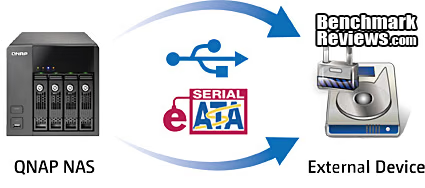
External USB/eSATA drive encryption - The Turbo NAS now supports encrypting USB/eSATA hard drives to prevent unauthorized access when they are lost or stolen. Hard drives with the file systems EXT4, EXT3, FAT 32, NTFS, or HFS+ are supported.
Military level security - A military level FIPS 140-2 validated encryption, which is considered to be the highest security certification for compliance, is adopted. The IT administrator can choose to encrypt a disk volume or a specific partition in the external drive at the encryption levels: AES-128, AES-192, AES-256.
Enhanced external drive backup capabilities

The enhanced external drive backup allows the IT administrator to replicate data to designated local disk volume or external storage devices by configuring multiple backup tasks and schedules. When setting up multiple external drives as backup destination, each backup task will be correctly mapped to the corresponding external drive even after the external drives are repeatedly removed and reconnected.
Benefits of QNAP external drive backup:
- Multiple backup tasks
- Multiple folder pairs per backup task
- Multiple backup schedules
- Detailed status and logs
- Configurable policy and file filtering
- E-mail notification upon backup completion or failure
Enhanced security options for MyCloudNAS 1.1

MyCloudNAS Access Code - After publishing the Turbo NAS to the Internet, a personal cloud is created. While exposing the Turbo NAS to the Internet could raise security concerns, the MyCloudNAS Access Code provides privacy control to make selected services only visible to authorized users. Highlights:
-
Private services to designated users (Max: 9 users)
-
MyCloudNAS Access Code for secure access control to view private NAS services on MyCloudNAS.com web portal
That's a good sample of the new software features that are aimed at the home or SOHO user. There are also a bunch of new features aimed at the business or data center user. Let's take a look at those, next.
QNAP v3.5 New Software Features-Business
LDAP protocol support

Works with LDAP-based services - QNAP's LDAP protocol support allows the Turbo NAS to be added to LDAP-based directory services, such as OpenLDAP. As a result, the IT administrator no longer needs to create and manage the same user account on each server within the network. Instead, users are authenticated centrally by the LDAP server, and can use the same LDAP account name and password to access any Turbo NAS that has been added the LDAP server, largely reducing IT deployment time and increasing business productivity.
Benefits of QNAP LDAP Directory Service:
-
Supports OpenLDAP
-
Supports large amount of users and groups. In QNAP's lab, 10,000 LDAP domain users have been tested
RADIUS Server

A RADIUS (Remote Authentication Dial In User Service) server provides centralized authentication and authorization management for computers to connect and use a network service. It is often used by ISPs and enterprises to manage access to the Internet or internal networks, wireless networks, and integrated e-mail services. The new RADIUS server support allows the Turbo NAS to provide the features that only a dedicated RADIUS server used to.
Benefits of QNAP RAIDUS server:
-
Centralized account management and authentication for network access
-
Supports 802.1x security authentication such as PAP, EAP-TLS/PAP, and EAP-TTLS/PAP
-
Web-based management interface
Syslog server
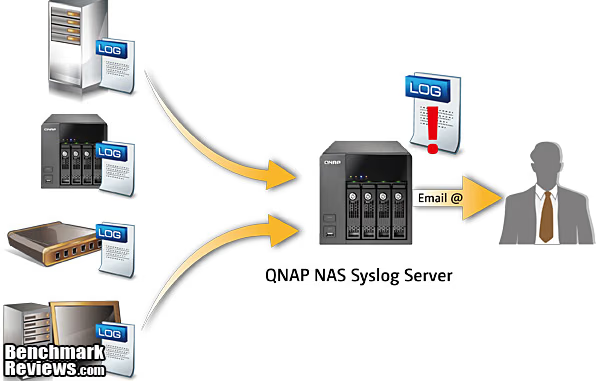
By collecting and storing logs of other network devices in the Turbo NAS with QNAP's Syslog server support, the IT administrator can easily monitor the status of these devices, and further troubleshoot when necessary. In addition, advanced filters and e-mail notifications are provided to help quickly identify failures or security threats.
Benefits of QNAP Syslog server:
- Supports TCP & UDP
- Immediate E-mail alerts
- Supports manually log filtering and advanced filtering via a wizard
- Web-based log display
Integrated anti-virus solution
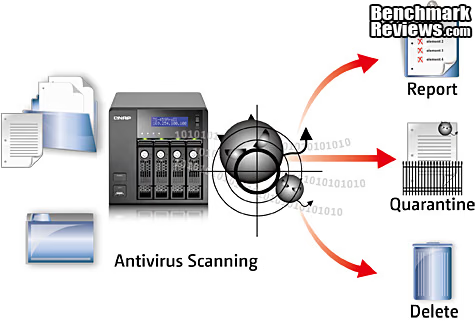
Protects data in mixed environments - Typically, all users within the businesses have installed proper real-time desktop antivirus software. However, when the virus evolutes beyond prediction and users' unintentional attempts to connect to dangerous Internet sites are difficult to avoid, having a back-stop antivirus solution on the NAS server that provides cross-platform file sharing is essential.
Smart detection - Based on the open source ClamAV antivirus toolkit, the integrated antivirus solution for the Turbo NAS ensures business continuity by offering detection against the latest viruses, malware, worms, and Trojan horses with continuous free virus database updates.
You can see that v3.5 was a major release in terms of new functionality. QNAP offers a huge selection of FAQs and how-to guides on their website that go into much more detail. It's one of the most informative sites I've seen, in any industry. They not only show what each feature does, they show you how to do it, with screen shots and real-world examples. As I said in the beginning of this section, QNAP clearly wants to stay on top, as the market leader in this segment. The high level of support that they offer for each user and each product is another example of how they intend to do that.
Closer Look: QNAP TS-879U-RP Turbo NAS Server
The QNAP TS-879U-RP has more capacity than most NAS units in the market; that's just the nature of its target market and design specs. You only have to look at the recently released expansion modules for the TS-x79 series, the 12-bay 2U format JB-1200U-RP, to see what kind of customer invests in this level of technology. You can daisy-chain these expansion chassis together to get a maximum addressable capacity of over 200 TB. It's a smart way to expand storage as business needs grow, simply by adding modules of additional capacity. Just looking at the base unit, the eight bays can theoretically hold 24TB of data, in JBOD or RAID 0 modes, with 3TB drives installed in each bay. The bottom line with any high performance storage solution is that the number of drive spindles in play is more important than almost any other factor, assuming that everything else is based on reasonably modern technology. When you combine the higher level of performance with the greater flexibility for online RAID capacity expansion & online RAID level migration, the additional cost of the extra drive bays looks like a bargain instead of conspicuous consumption. What initially looks like overkill in a NAS system might just be the very thing that saves the day some years down the road.
The QNAP TS-879U-RP shares the same basic technology platform as all the new TS-x79 models, and it's actually on the low end of this series, believe it or not. There are 8, 10, and 12 bay units available, in both tower and rack mount formats. The size and weight are substantial: 88mm(H) x 439mm(W) x 520mm(D), and 27.6 pounds without drives installed. Each HDD you install will add about 1-1/2 pounds, depending on your choice of drive. Most users will probably be looking at 2TB and 3TB drives for a unit like this, and they're heavier than most.

Very few people with anywhere near that much data are going to want to live without it for any length of time, so a RAID configuration that includes some redundancy is undoubtedly called for. Multiple SATA 6Gb/s drives can be installed as: a single disk, RAID 0 (Disk Striping), RAID 1 (Disk Mirroring), RAID 5 (Block-level striping with distributed parity), RAID 6 (Block-level striping with double distributed parity), RAID 10 (AKA RAID 1+0, a stripe of mirrors), and JBOD (Linear Disk Volume). The main choices are going to be RAID 5, 6, or 10, depending on what type of data is primarily stored on the device. Despite its popularity, RAID 5 suffers from severe write performance limitations in large multi-user databases. Most people running that type of application used to be limited to direct-attached storage; it really was a necessity for that type of work. RAID 10 eliminates this problem, at the expense of capacity, but for some uses it's a much better solution. RAID 6 offers some additional redundancy, allowing for continued operation even with two simultaneous drive failures, with no additional performance hit and only one additional drive. This option is very popular because if one individual drive fails in a RAID 5 implementation, the array instantly starts operating as a RAID 0 configuration, which has NO redundancy. It stays in that vulnerable state until the array is rebuilt, which is a slow process that generally taxes the system to the max, and can take hours to complete.
Each drive can be formatted with FAT, NTFS, EXT3, or EXT4 file systems. All Intel-based QNAP NAS units offer the additional option of AES 256-bit encryption and some of the units in the TS-x79 series support the recent AES-NI additions to the Intel64 instruction set. The Core i3 CPU in the TS-879U-RP does not, so we will have to see if sheer horsepower is enough to handle the extra encryption duties. The current models in this series either have Westmere or Sandy Bridge architectures for the CPU, so you should expect a much better experience using on-the-fly data encryption, compared to the performance of the Atom-based systems. Our tests on all QNAP systems have utilized EXT4-formatted disks without encryption.

QNAP uses a new design for the steel-framed tray that holds each drive on the TS-879U-RP, which is a common part across the new TS-x79 part of the product line. In the rack mount models, each tray slides in with the HDD in the horizontal position and locks firmly into place with the spring-loaded lever on the front. Key locks are not included to secure the trays in place, which may or may not be an issue for you (think of mechanically inclined, inquisitive children before you answer...). The drive trays easily accommodate 2.5" drives without any additional hardware; just use the correct mounting holes located on the bottom surface. 3.5" HDDs are retained by mounting holes on the sides of the tray. QNAP does not recommend mixing 3.5" and 2.5" drives in the same enclosure, and they do offer some small form factor units that are specifically designed for 2.5" drives. Those models are also less expensive than the full size units, so it's worth investigating them if handling 2.5" SATA drives is a requirement for you. There are some definite advantages to using that form factor in specific cases, as I outlined in my review of the Patriot Convoy 425XL SAS/SATA RAID Enclosure. The new trays are not labeled with the chassis slot number, like the older parts are. They are all physically identical and you can mix and match them all you want, until you build a drive array and then you had better remember which one goes where. I recommend making your own labels as soon as you start installing drives into the unit; if you mix them up the NAS won't recognize the array, and worst case you could end up destroying data as you try to figure out which drive is which.

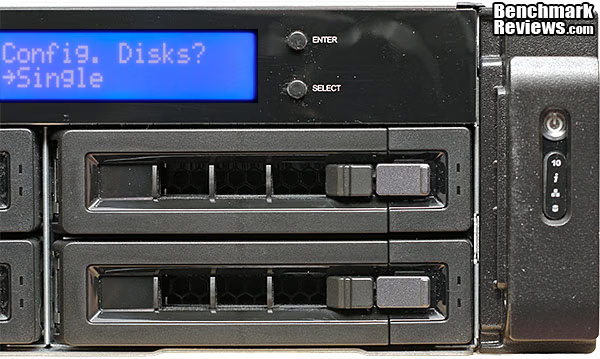
The 2U chassis height of the TS-879U-RP is tall enough to house three rows of 3.5" drives, which is exactly how the TS-1279U-RP is configured. With (only!) eight drive bays in this model, there is enough room at the top of the front panel for the standard three line LCD display that QNAP uses on many of their NAS products. The two buttons next to the display are for navigating the system setup and status menus. Almost all the basic setup variables can be configured from the front panel, although it's obviously more difficult than logging in with the browser interface. Hidden behind a metal lever on the right side of the rack mount handles are the ON/OFF power button and LED-illuminated icons for presence of a 10 GbE interface, System Status, LAN activity, and presence of an eSATA device. Each of the hard drive trays also has two LED indicators on it as well, showing HDD activity and error status. Green means the drive is present and OK, flashing green means the drive is being accessed. There are no USB ports located on the front of the Turbo NAS.
There are no ventilation holes on the sides, top, or bottom of the QNAP TS-879U-RP Turbo NAS chassis. The primary entry point for cool air is through the front of the drive trays; it passes over the HDDs and is then exhausted out the rear of the unit. The fan assembly is a modular unit, with three separate fans inside a grey plastic enclosure, and is controlled by the motherboard. In order to keep things cool when needed and quiet the rest of the time, the fan speed is heavily modulated. I haven't paid much attention to fan noise in the smaller NAS models, as it was never really noticeable during my daily use. The TS-879U-RP is a corporate beast though, and the fan noise was definitely annoying, even when running at idle speed. Just one more clue that this is not a unit designed for home use. The overall size of the unit is significant, as you can see below. The thin profile (2U height) is a bonus, and when mounted in a 19" rack is the only dimension that really matters.

The QNAP TS-879U-RP Turbo NAS server is equipped with an Intel Core i3-2120 processor, which is based on the current 32nm Sandy Bridge platform, and is clocked to 3.3 GHz. There is 2GB of DDR3-1333 system memory installed at the factory, and it's expandable to 4GB by adding another 2GB into an empty DIMM slot. This is arguably the top-of-the-line spec for CPU and memory in QNAP NAS servers, and it should provide excellent performance in an eight-bay unit. QNAP employs a dual-redundant 512MB Disk-on-Module (DOM) flash drive to store firmware and applications on the TS-879U-RP motherboard. This acts like the system drive, yet it takes up very little space and uses almost no power. Plus, there's a built-in, redundant backup drive in case of data corruption on the primary module. Just the sort of thing you need for a high-availability system. Notice, I didn't say high reliability; I'll tackle the differences in my Final Thoughts.

Looking at the back panel of the TS-879U-RP, you can see most of the hardwired I/O points. Starting on the left is a VGA port that is reserved for system maintenance. Just to the right of that are two half-height (Low Profile, if you prefer) expansion slot covers. They line up with two x8 PCI Express expansion slots on the main board. Next up are twin USB 3.0 connectors, in their customary blue plastic livery. To the right are two stacks of USB 2.0 and 1000BASE-T Ethernet jacks - four USBs and two RJ-45 for the GbE. The last of the signal connectors are two eSATA ports, just to the right of the small hole on the back panel that guards the reset button from accidental actuation. Two levels of reset capability are provided, Basic System Reset (hold for 3 sec), and Advanced System Reset (hold for 10 sec). On the far right are the IEC inputs for AC power, and the small cooling fans of the two redundant power supplies. That's not a feature you see very often on Benchmark Reviews! No Kensington lock hole, sorry.

The two, redundant power supplies are held in place by thumb screws, for a tool-less hot swap, if needed. U-shaped handles are on pivots, to help you pull them out and slide them back in. The electrical connections are made with a high-current card-edge connector on the back of the module, which engaged and disengaged easily when I tested it. The power supplies are each rated for 300 watts, which is enough to power the unit continuously, so there's no specific time limit on how long you can run the NAS on one PSU. There is still a need for UPS power, which most data centers will have already. The small green LEDs on the back of the PSUs light up when the system is active.
Now that we've had a thorough tour of the exterior, let's do a tear-down and see what the insides look like. The next section covers Insider Details.
Insider Details: QNAP TS-879U-RP Turbo NAS
The top cover is easily removed once two thumb screws on the back panel are taken care of. The modular layout is quite evident; the main board takes up a large part of the total footprint. The drive bays at the front of the unit use almost the same amount of space, just more rectangular, and the power supply area is a smaller, but still significant part of the overall arrangement. I pulled the fan package out for this image, to show the full scope of the main PCB. Some things to look for, that we'll see in more detail as we continue the tear down, are: the memory slots, the two x8 PCI Express slots, the DOM memory board, and the two heatsinks showing the locations of the Sandy Bridge CPU and PCH (Platform Controller Hub, nee Southbridge).

From this angle you can see the size of the CPU heatsink a little better, and the fan module is installed in this image, as well. Each of the three fans is a San Ace 60mm unit from premium maker Sanyo Denki, that's 38mm thick and PWM controlled. They are designed to handle higher backpressure than a typical PC case fan sees, both because of the layout of the device and the fact that it may run 24/7 for years without anyone cleaning it. Because cooling is such an important element of the overall reliability for devices like this, there's no good excuse for failing to clean things on a regular basis, especially since the modular fan assembly is designed to be quickly and easily removed and replaced. There's even a warning sticker on the fans that tells you exactly how long you can expect the NAS to run without it, just in case some technician thinks he can take it out for cleaning right before his lunch break. The electronics obviously need their fair share of cooling, but with up to eight HDDs crammed into a tight space, there is a great need to keep them cool, as well. Hard drive life is closely linked to operating temperature, and drive life is definitely something that most users of this unit will be concerned about.

Near the middle of the TS-879U-RP, the main board ends, and several PCI-e edge connectors transfer the signals to a vertical board that serves as the backplane for all the SATA HDD connectors. It's not just a passive board, there are drive controller ICs and a significant FPGA chip located on the backplane. This is consistent with how QNAP builds their larger tower models, putting the controllers closer to the drives they are responsible for. Each Marvell 88SE9125 SATA controller chip handles two drives, so the board isn't littered with these chips, but they're easy enough to spot. There's a fairly large open space above the drive bays that is home to a small board for driving the display and the front panel controls. On the 12 bay TS-1279U-RP, which shares a similar chassis, this space would be filled with drives. It's not only the chassis that's similar; the main PC board is silk-screened with a TS-1279 designation. There are a couple of empty solder pads where a third instance of a controller IC would probably be installed, were this board built up to the full TS-1279 specs.

Here's something you don't see every day on a NAS server: x8 PCI Express slots, two of them. This is where you have to go if you want to get the full performance that the TS-879U-RP is capable of. Plain old 1000BASE-T limits throughput to about 120 MB/s, and the potential is there for way over 1000 MB/s in this model. You really only need one of these PCIe slots, since most 10GbE NICs come in a dual-port configuration, but products of this caliber need to have some degree of future-proofing built into them. Right next to the expansion slots is the dual-redundant 512MB Disk-On-Module (DOM) PC board which contains two complete, independent operating systems. If one OS fails, the system reboots with the spare OS, and then immediately starts to repair and rebuild the OS on the corrupted module. All this takes place automatically, without user input.

The memory controller is integrated on the Intel Sandy Bridge CPU, and it is designed to handle DDR3-1066 and 1333 memory modules in its native configuration. The QNAP TS-879U-RP comes standard with 2GB of ADATA DDR3-1333 CL9 memory, which is installed in one of two DIMM sockets located on the main board. The specs for the TS-879U-RP call out a maximum memory capacity of 4 GB, but users have reported success with installing two 4GB DIMMS, and running with 8GB of system memory. Based on my testing, these folks must be running some of the more challenging apps on their boxes, because straight data transfers use very little of the NAS memory capacity.

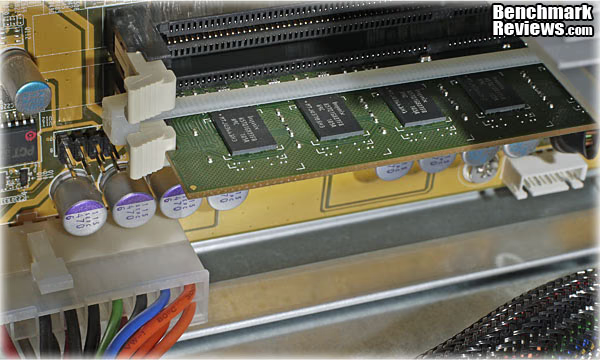
The latches on the socket where the factory memory was installed are firmly held closed by a nylon wire tie, installed during the system build. At first I thought it was some sort of anti-tamper measure, but I think it's really there to make sure the memory module doesn't get loose. There's actually a lot of vibration in data center racks, mostly due to hard drives and cooling fans, so it makes sense to tie everything down. Airplanes also have a lot of vibration, and I can tell you from experience shipping machinery to Japan, that things WILL loosen up over the course of a trans-oceanic plane ride.
So far we've had a good look at what there is to observe as far as hardware goes, but let's dig down one more layer, down to the chip level where the technology really starts to get interesting. I love my hardware just as much as the next person, but it's only half the story....
Technology Details: QNAP TS-879U-RP Turbo NAS
The biggest chip on the board is the Intel Core i3-2120 CPU, a dual-core member of the new Sandy Bridge family. It's certainly got the biggest heatsink, that's a finned aluminum block held in place by four heavy-duty springs. As much work as the CPU does, it's isolated from directly communicating with most of the subsystems by the Intel Platform Controller Hub, which we all used to call the Southbridge (back when there was also a Northbridge...). This is the second hardest working chip on the main board, and it's also got a heatsink on top, although it's less that 1/10 the size of the one on the CPU. Although the Core i3 CPU in the TS-879U-RP does not have it, some models in the QNAP TS-x79 product line have native CPU support for the Advanced Encryption Standard New Instructions (AES-NI) set. These new instructions speed up the encryption/decryption process by anywhere from 3x to 10x, depending on the implementation. As slow as the Atom-based and Marvell-based models are with encryption enabled, the QNAP TS-x79 models are the minimum level that can realistically support AES 256-bit Volume-based data Encryption. All of the NAS models I've tested to date have been bottle-necked by their CPU during RAID Write operations, and the extra load of data encryption was just too much to handle. I'm curious to see how this vastly superior CPU will perform, even without the new instruction set.

Marvell supplies several ICs on the main board, and the SATA backplane board. They are marked 88SE9125, and are the interface between the PCI-Express lanes and the SATA devices. Each controller supports two 6 Gb/s SATA interface ports and a one-lane 5.0 GT/s PCIe host interface back to the Intel PCH. There are several of these controllers, located both on the main board and the SATA backplane, which is the same way they were deployed on the TS-659 Pro II that Benchmark Reviews tested last year. There is a whole family of parts in this series, and this one is optimized for use with a central RAID controller on the system board. Benchmark Reviews has reported on a number of issues in the past year, where a variety of brand new SATA 6Gb/s controllers aren't fulfilling the promises made for this interface. With the latest SSDs pushing more than 4Gb/s on both read and write cycles, many controllers aren't keeping pace. I anticipate the primary usage of the TS-879U-RP as being paired with traditional 3.5" HDDS, none of which operate anywhere near the full capabilities of the SATA 6Gb/s interface. With the right SSDs installed, the theoretical throughput for all of the drives running together would be well over 30 Gb/s, and the rest of the hardware (not to mention the rest of the IT world) just isn't ready for that, yet.

The Xilinx XC3S50A IC on the SATA backplane board is a Field Programmable Gate Array chip, which is basically a programmable logic device that can do anything you want it to. Their main advantage in the marketplace is that they can be developed and deployed quicker and much more cheaply than Application Specific ICs (ASICs). The graphics processor in a video card is a common example of an ASIC, and most of you know how long they take to develop and how much they can cost! In this case, I'm betting that this FPGA is the core RAID controller for the whole system, since I don't see any other devices on the PC board that are designed for that task.

The rest of the major ICs in the system are for power management, and for supporting the various interconnects, like USB, eSATA, and GbE. Intersil supplies their ISL6364C and ISL 6314C to provide multi-phase PWM control over the Voltage Regulator Modules that feed the CPU, RAM, PCH, etc. Renesas Electronics (nee NEC) provides their ubiquitous D720200F1 chip for USB 3.0 duties.

QNAP relies heavily on Intel for their Ethernet controllers in the high-end models of their product line. It's a smart move, as Intel is a leader in this area, even though they're not very well known for it by the public. Two different ICs combine forces to provide the MAC and PHY functions; the WGG82574L and the WG82579LM. The latter chip was just launched in 1Q2011, so both Intel and QNAP are keeping things current in this area. We'll see later, in our RAID testing, just how critical Ethernet performance is to a product like this.

To measure isolated NAS power consumption, Benchmark Reviews uses the Kill-A-Watt EZ (model P4460) power meter made by P3 International. I had both of the redundant power supplies plugged in to the meter, because that's the way 99.99% of users will run a device like this. Obviously, power consumption is going to depend heavily on the number and type of drives that are installed. The power draw also depends heavily on the fan speed that's required to keep the unit cool. When the device first starts up and the fans are going 100%, 215 W is consumed at first, then it tapers down to 165W. Once the system completes its boot process, and gets into idle standby mode, the QNAP TS-879U-RP consumed 133 watts of electricity. This is right in line with the 130W specified by QNAP for a system with eight 1TB drives installed. With all eight drives installed and during heavy file transfer operations, it drew 155W. When the system goes into Sleep Mode and spins all the drives down, the power is reduced to 84 watts. When the unit is turned off, it still consumes 7W in Vampire mode; be aware that even when it's turned off, the two SMPS modules still pull a small amount of power.
We've seen the ins and outs of the hardware, the new software, and the technology under the hood; now let's take a detailed look through the extensive list of features that you get with most every QNAP Turbo NAS. I know the next couple of sections are overly long, but it's critical to understand just how much these units can do. You don't want to be fooled into thinking it's just a big box full of drives. It's capable of so much more than that.
QNAP Turbo NAS Features
As the data value and volume of business data continue to rise, corporations need high-performance storage solutions which are secure, reliable, and easy to manage. The QNAP® TS-879U-RP, which serves as both IP-SAN (iSCSI) and NAS, can be easily utilized in different business and enterprise applications such as backup center, disaster recovery, file sharing, virtualization, and video editing storage.

NAS + iSCSI/IP-SAN Solution for Server Virtualization
With increasing virtualization of IT resources, the need for high performance storage is more essential than ever. The TS-879U-RP offers class-leading system architecture matched with 10 GbE networking performance designed to meet the needs of demanding server virtualization, such as VMware®, Citrix®, and Windows® Hyper-V. 10 GbE network speeds greatly increase the agility of data transmission in a virtualized environment intensifying NFS and iSCSI connection performance.
The Feature-rich and Integrated Applications for Business
The NAS supports file sharing across Windows, Mac, Linux, and UNIX platforms. Versatile business applications such as file server, FTP server, printer server, web server, and Windows AD support are provided. The dominant features, such as WebDAV, Share Folder Aggregation (also known as DFS), IPv6 and IPv4 dual-stack, Wake on LAN, schedule power on/ off, HDD S.M.A.R.T, comprehensive log systems, and policy-based unauthorized IP blocking are all included features of a QNAP NAS server.
Secure - Data might seem insecure being open in a network, but the QNAP® TS-879U-RP offers a variety of security options such as encrypted access, IP filtering, policy-based automatic IP blocking, and more. In addition, full control of the NAS is offered down to the user and folder access rights to determine who can access the NAS and what can or cannot be accessed. The TS-879U-RP is packed with security features to stop all unauthorized data access such as AES-256 volume-based encryption. The AES-256 volume-based encryption prevents sensitive data from unauthorized access and data-breach even if the hard drives or the device is stolen.
Reliable - The TS-879U-RP is reliable with built-in safety precautions to safeguard all data from any unforeseen problems. With multiple built-in features to guarantee no interruptions to the work flow of a business, the TS-879U-RP is an efficient asset. The advanced RAID configurations and hot-swap capabilities are included to give RAID performance, protection and reduced rebuilding time. Moreover, the dual OS embedded on the DOM architecture ensures the system will boot up. If one of the two operating systems fails, the healthy operating system will boot up and operate normally while repairing the failed operating system. The dual Gigabit LAN ports can also be configured for failover which allows the NAS server to sustain the failure of one network port and still provide continuous services.
Simple - Setting up local or remote access with the TS-879U-RP is painless and does not require any IT skills. All setup processes have been simplified so that most of the process is either automatic or can be completed by an installation wizard. The user-friendly web GUI allows administrators to easily manage the NAS so there is no need for an extensive knowledge of complex commands. Simple management tools such as instant SMS/Email alert, the hard drive S.M.A.R.T. (Self-Monitoring, Analysis and Reporting Technology) feature, and system resource monitor are provided to keep administrators up-to-date on their NAS at all times.
High Performance - The TS-879U-RP features Intel® CoreTM i3 Processor, 2GB DDR3 memory, 10 Gigabit network capability, and 6Gb/s SATA. Even the most demanding requirements in data center or corporate networks can be satisfied by the TS-879U-RP. With outstanding data transfer rate of over 1,000 MB/s data throughput and 100,000 IOPS 1, intensive business applications and concurrent tasks can be easily fulfilled.
High Network Bandwidth - The TS-879U-RP offers network expansion options which includes dual-port 1 GbE and dual-port 10 GbE network expansion cards, to aggregate and boost network performance. The TS-879U-RP includes two Gigabit (GbE) LAN ports which can be expanded to four GbE LAN ports or two 10 GbE LAN ports plus two GbE ports.
Blazing Fast Data Backup via USB 3.0 - The TS-879U-RP features USB 3.0 ports for high speed backup to external hard drives. EXT3, EXT4, NTFS, and HFS+ file systems are supported to ensure compatibility with Windows, Mac® OS X, and Linux operating systems.
Cross-platform Sharing with Antivirus - The TS-879U-RP supports SMB/CIFS, NFS, and AFP protocols for file sharing across Windows, Mac, Linux/UNIX networks. User accounts and shared folders can be created via the user-friendly web-based interface without IT expertise. The integrated antivirus solution for the Turbo NAS ensures business continuity by offering detection against the latest viruses, malware, worms, and Trojan horses.
iSCSI for Virtualization Deployments
The Turbo NAS provides flexible and secure storage server deployment with the following enhanced iSCSI features:
NAS + iSCSI storage solution
The Turbo NAS can serve as a NAS for file sharing and iSCSI storage concurrently.Flexible multiple LUNs management
The NAS supports multiple LUNs (Logical Unit Numbers) and iSCSI targets. The LUNs can be flexibly mapped to, unmapped from, and switched among different iSCSI targets.Secure IP SAN environment deployment
Designed with CHAP authentication and LUN masking, the advanced ACL (Access Control List) offers you the capability to block unauthorized access from the initiators.Designed for virtualized and clustered environments
Comparing with the high cost of Fibre Channel SAN, the Turbo NAS is an affordable system that can be deployed as a storage center for virtualized and clustered server environments, such as VMware and Microsoft Windows Failover Cluster.
Advanced RAID Management with Hot-swap Design
The NAS offers advanced RAID 0, 1, Single, and JBOD disk configurations. It also supports hot-swap design that a failed drive can be replaced by hot swapping without turning off the server. Besides, the best-in-class RAID on the NAS brings users a higher level of data security by allowing one more hard drive failure than other NAS of the same level.
Online RAID Capacity Expansion
The storage capacity of a RAID configuration can be expanded by replacing the hard drives with larger ones. All the data will be kept and seamlessly moved to the newly installed hard drives. There is no need to turn off the server during the process.
Online RAID Level Migration
You can upgrade the disk configuration to higher RAID level with the data retained. There is no need to turn off the server during the process.
Virtual Disk Drive (VDD) adds flexibility to storage expansion along with ease of management
The unique "Virtual Disk Drive" adds flexibility to expand the capacity of NAS. By using the built-in iSCSI initiator, the NAS can connect to other iSCSI targets on the network and turn them into virtual disks, which become multiple single volumes on the NAS. Up to 8 virtual disks can be stacked. The NAS serves as the storage stack chaining master. The user only needs to connect to this single entry (QNAP NAS) and is able to reach and use all the iSCSI target storages on the network.
S.M.A.R.T & Advanced HDD Health Scanning (HHS) The NAS supports Hard Disk Drive S.M.A.R.T (Self-Monitoring Analysis and Reporting Technology) for monitoring the hard drive status. Moreover, the NAS is embedded with HHS Technology which supports disk checking and bad blocks scanning.
UPS Support
The NAS supports the majority of USB UPS devices (usbhid-ups supported) which enables the users to store the data in time and avoid critical data loss when power outage occurs during data transfer.
Video Editing
Digital film and video production produces volumes of data that require high performance RAID storage with sustainable throughput to balance with the demanding output of video editing. The TS-879U-RP fulfills storage and video editing needs with a high speed 10 GbE network interface. Digital videos can be quickly stored and edited on the TS-879U-RP directly over the network.
QNAP Backup Software - NetBak Replicator
The backup software, NetBak Replicator, is provided for the NAS users to perform real-time synchronization or schedule backup from multiple PCs to the NAS.
3rd Party Backup Software Ready
The NAS works well with other backup software, e.g. Acronis True Image, CA BrightStor ARCserve Backup, EMC Retrospect, Symantec Backup Exec, and LaCie Silverkeeper.
Encrypted Remote Replication
The data on the NAS can be backed up to or from another Turbo NAS over the network securely.
Sharing Files across Windows, Mac, Linux, and UNIX
The NAS is designed for users to share the files across Windows, Mac, Linux, and UNIX environment.
Windows Active Directory (AD) and LDAP Directory Service
The Windows AD and LDAP (Lightweight Directory Access Protocol) directory service features enable the system administrator to retrieve user accounts from Windows AD or Linux LDAP server to the TS-879U-RP reducing time and effort in account setup. Users can use the same login name and password to access the TS-879U-RP.
Web File Manager The NAS provides Web File Manager for you to easily download, upload, and manage the files on the server by web browser.
Ease of User and Share Folder Management
The NAS supports batch creation of users and share folders to save the time and effort of the server manager in account and folder creation. For the security of Windows network environment, server managers can hide or show network share folders.
Hard Disk Standby
You can configure the hard disks to enter standby mode if there is no disk access within the specified period.
Schedule Power on/ off
The flexible schedule power on/off feature is now provided on the NAS for IT administrators to manage the NAS server's up time according to the working hours. You can set the time for automatic system power on, power off, or restart on any days of the week.
Secure data storage, access, and sharing
- Comprehensive event logs: Detailed logs of file-level data access to the NAS via samba, FTP, AFP, HTTP, HTTPS, Telnet, and SSH, and networking services accessed by online users are all recorded.
- SSL security (HTTPS): The NAS can be accessed and configured by web browser securely.
- Remote login to the NAS by SSH (secure shell) or Telnet connection is supported.
- Secure FTP: The data can be transmitted with SSL/TLS (explicit) encryption. Passive FTP port range setup is also supported.
- Write-only access right on FTP server: The third party partners are allowed to upload data to the NAS but not able to read or edit the data on FTP server.
Policy-based Automatic IP Blocking
To prevent the NAS from malicious attacks, the server manager can create an IP filter policy to allow, deny, or auto-block the IP address or network domain which attempts to connect to the NAS via SSH/ Telnet/ HTTP(S)/ FTP/ samba/ AFP.
The most comprehensive support for numerous brands of IP cameras
The Surveillance Station of QNAP NAS supports all the leading network camera brands such as AXIS, D-Link, IPUX, LevelOne, Linksys, Panasonic and Vivotek etc. By using particular models, users can use two-way video and audio monitoring and recording, and smart PTZ control to control the monitoring direction via the web interface. Each of the supported cameras has been put through stringent tests with the NAS series in QNAP's laboratory to guarantee 100% compatibility and reliability with all these camera brands.
QNAP TS-879U-RP NAS Hardware Specifications
|
CPU |
Dual-core Intel® CoreTM i3-2120 Processor (3.3 GHz) |
|---|---|
|
DRAM |
2 GB DDR3 RAM (Expandable RAM, up to 4 GB) |
|
Flash Memory |
512MB DOM |
|
HDD Form Factor |
Accepts 2.5" or 3.5" SATA |
|
HDD Tray |
8 x Hot-swappable |
|
LAN Port |
2x Gigabit RJ-45 Ethernet port |
|
LED Indicators |
10 GbE, Status, LAN, eSATA, plus hard drive trays |
|
USB |
4 x USB 2.0 port (Back) |
|
eSATA |
2 x eSATA port (Back) |
|
Expansion Slot |
2 x PCI Express 2.0 x8 lane (for network and storage expansion) |
|
LCD Panel |
Mono-LCD display with backlight |
|
Dimensions |
88 (H) x 439 (W) x 520 (D) mm |
|
Weight |
Net weight: 12.52 kg/27.61 lb. |
|
Sound Level (dB) |
Standby: 54.6 dB |
|
Power Consumption (W) |
Sleep mode: 68W |
|
Temperature |
0~40°C |
|
Humidity |
0~95% R.H. |
|
Power Supply (2x Redundant) |
Dual Inputs: 100-240V AC, 47-63Hz, Output: 300W |
|
Secure Design |
K-lock security slot for theft prevention |
|
VGA |
Reserved for system maintenance |
|
Fan |
3 x smart cooling fan (60 mm x 38mm, 12V DC, PWM type) |
I mentioned earlier that QNAP has a very extensive set of features built into the operating software, but maybe I should have warned you. The S/W feature list is HUGE. Honestly, a lot of us spend the majority of our time analyzing hardware (yeah, I'm guilty...), but when you see all the capability that a modern NAS server can provide, it's pretty amazing. Let's take a long, detailed look, shall we?
QNAP TS-879U-RP Software Specifications
The TS-x79 series is designed for high-end SMB. Some home features such as Multimedia Station, Download Station, iTunes server, and UPnP media server will be provided by firmware update expected in January 2012. Please refer to the QNAP NAS Products Comparison Table for more details.
Software Specifications
Operating System
- QSM (QNAP Storage Manager) 3.5
Supported Operating System
- Microsoft Windows 2000, XP, Vista (32/ 64 bit), Windows 7 (32/ 64 bit), Server 2003/ 2008 R2
- Apple Mac OS X
- Linux & Unix
Supported Web Browsers
- Internet Explorer 7,8, or 9
- Mozilla Firefox 3, 4, 5
- Safari 3 & 4 or later
- Google Chrome
Multilingual Support
- Chinese (Traditional & Simplified), Czech, Danish, Dutch, English, Finnish, French, German, Italian, Japanese, Korean, Norwegian, Polish, Russian, Spanish, Swedish, Turkish.
File System
- Internal HDD: EXT3, EXT4
- External HDD: EXT3, EXT4, NTFS, FAT32, HFS+
Networking
- TCP/IP (IPv4 & IPv6: Dual Stack)
- Dual Gigabit LAN with Jumbo Frame
- Multi-IP Settings, Port Trunking/NIC Teaming (Modes: Balance-rr, Active Backup, Balance XOR, Broadcast, IEEE 802.3ad/Link Aggregation, Balance-tlb and Balance-alb)
- Service Binding based on Network Interfaces
- Virtual LAN (VLAN)
- DHCP Client, DHCP Server
- Protocols: CIFS/SMB,
AFP, NFS(v3), FTP, FTPES, TFTP, HTTP, HTTPS, Telnet, SSH, iSCSI, SNMP, SMTP, and SMSC - Network Service Discovery (UPnP, Bonjour)
- USB Wi-Fi 802.11n Adapter Support (Optional Purchase)
Network File Sharing
- CIFS/SMB (Plus DFS Support)
- AFP
- NFS
- FTP
- WebDAV
Backup Solution
- Real-time Remote Replication (RTRR)
- Real-time & Scheduled Backup
- Encryption, Compression, and File Filter
- Works as Both RTRR Server & Client
- USB One Touch Backup (Import/Export)
- Apple Time Machine Support with Backup Management
- Block-level Remote Replication
- Work as Both Rsync Server & Client
- Supports Encrypted Replication between QNAP NAS Servers
- Back up to Multiple External Storage Device
- Back up to Cloud Storage (Amazon S3 & ElephantDrive)
Security
- IP Filter & Policy-based Automatic IP Blocking
- Network Access Protection with Auto-blocking
- Encrypted Access: HTTPS, FTP with SSL/TLS (Explicit), SSH/SFTP (admin only), Encrypted Remote Replication (Rsync over SSH)
- CIFS Host Access Control for Shared Folders
- Anti-Virus Protection
- FIPS 140-2 Certified AES 256-bit Volume-based Data Encryption
- Importable SSL Certificate
- Instant Alert via Email, SMS, and LCD
- Military-level encryption for external drive (AES-128, AES-192, and AES-256)
Disk Management
- Single Disk, JBOD, RAID 0 / 1 / 5 / 5+Hot Spare / 6 / 6+ Hot Spare / 10, 10+Hot Spare
- Online RAID Capacity Expansion & Online RAID Level Migration
- Bad Block Scan & HDD S.M.A.R.T
- Global Hot Spare Drive
- RAID Recovery
- Bitmap Support
- Supports ISO Mounting (via Web File Manager)
iSCSI (IP SAN)
- iSCSI Target
- Multi-LUNs per Target
- Up to 256 LUNs
- Supports LUN Mapping & Masking
- Supports SPC-3 Persistent Reservation
- Supports MPIO & MC/S
- Virtual Disk Drive (via iSCSI Initiator)
- Stack Chaining Master
- Max. Virtual Disk Drives: 8
- iSCSI LUN Snapshot/Backup/Restore
Server Virtualization & Clustering
- Supports VMware vSphere (ESX/ESXi 4.x)
- Supports Citrix XenServer (5.x)
- Supports Windows Server 2008 R2 Hyper-V & Failover Clustering
Power Management
- Wake on LAN
- Internal HDD Standby Mode
- Network UPS with SNMP Management
- Scheduled Power on/off (Max 15 settings)
- Automatic Power on after Power Recovery
Access Right Management
- Max User Accounts: 4,096
- Max Groups: 512
- Max. Share Folder: 512
- Batch Creating Users
- Import/Export Users
- User Quota Management
- Subfolder Permissions Support
MyCloudNAS Service
- Private Cloud Storage
- Free Host Name Registration
- Auto Router Configuration, via UPnP
Domain Authentication Integratio
- Domain Users Login via CIFS/SMB, AFP, FTP and Web File Manager
- Supports NTLMv2 Authentication
- Microsoft Active Directory
- LDAP Directory Service
Web Administration
- AJAX-based User Interface
- HTTP/HTTPS Connections
- Alert Notification (Email & SMS)
- Smart Fan Control
- DDNS & MyCloudNAS Remote Access
- SNMP (v2 & v3)
- UPS Support with SNMP Management (USB)
- Supports Network UPS
- Resource Monitor
- Network Recycle Bin for CIFS/SMB and AFP
- Comprehensive Logs (Events & Connection)
- Real-time Online User List
- Syslog Client
- Firmware Update with Live Update Notification
- Backup and Restore System Settings
- Restore to Factory Default
Applications
- Web File Manager
- Surveillance Station
- Apache Web Server
- MySQL Server
- Syslog Server
- RADIUS Server
- Backup Server
- Anti-Virus
- TFTP Server
QPKG
- Web Applications
- Joomla!
- phpMyAdmin
- WordPress
- AjaXplorer
- vtigerCRM
- GLPI
- Magento
- GLPI
- P2P Applications
- MLDonkey (eMule)
- SABnzbd+
- NZBGet
- Server Applications
- Asterisk
- XDove (Mail Server)
- OpenLDAP
- Media Server
- Squeezebox Server
- IceStation
- Misc.
- Optware IPKG
- Python
- iStat
Powerful All-in-one server
File Server
- File Sharing across Windows, Mac, and Linux/UNIX
- Protocols: CIFS/SMB, AFP(3.2), NFS, FTP, HTTP, HTTPS
- QNAP Web File Manager
- Supports ISO Mounting
- Direct File Viewing via Google Doc
FTP Server
- FTP over SSL/TLS (Explicit)
- Max Concurrent Connections: 256
- FXP Supported
- Passive FTP Port Range Control
- FTP Bandwidth & Connection Control
- Unicode Support
Web Server
- HTTP/ HTTPS Connections
- Supports WebDAV Connection
- Support Virtual Host
- Importable SSL Certificate
Syslog Server
- Centralized Log Monitoring
- Centralized Log Archiving
- Immediate E-Mail Alerts
- Supports Log Filtering
RADIUS Server
- Centralized account management and authentication for network access
- Supports 802.1x security authentication
Database Server
- Built-in MySQL Server
- Web-based Management via phpMyAdmin (QPKG)
Backup Server
- Remote Replication Server (over Rsync)
- Real-time Remote Replication
- Apple Time Machine Support
- QNAP Client Backup Application-NetBak Replicator
- 3rd Party Backup Software Support: Acronis True Image, CA BrightStor, ARCserve Backup, EMC Retrospect, Symantec Backup Exec, LaCie SilverKeeper
Printer Server
- Network Printer Sharing (USB)
- Max Printers: 3
- Supports Internet Printing Protocol
- Supports Apple Bonjour Printing
- Advanced Printer Management
- Print Jobs Display and Management
- Access Right Control (IP & Domain Names)
Surveillance Station
- Supports 4 IP Cameras (Optional Purchase) for Network Surveillance
Besides the core features available in the QNAP v3.5 firmware, further capabilities are available in the QPKG Center Software Expansion. Let's take a quick look at some ways to extend the functionality of this server even further.
QPKG Center Software Expansion
Explore the Unlimited Possibilities of Your NAS with QPKG
The Network Attached Storage (NAS) used to refer to a basic network storage device for simple data sharing but now with the high performance SoC and the advantage in power-saving design, it is redefined as a powerful embedded system that allows the possibilities of offering numerous fascinating applications. Over the past years, QNAP has successfully developed a series of All-in-One NAS servers for power users and business users providing a wide variety of software applications. Besides those QNAP provides, many other software packages are also developed in Linux open source community that power users are able to install them on their NAS to further enrich the functions. However, this is only limited to those advanced users or software developers who are more familiar with Linux systems. In order to let majority of general QNAP NAS users to also utilize their NAS servers with those software packages already developed by the open source community, QPKG platform and development framework is then introduced by QNAP.
Inspired from the powerful software package management system in Linux (yum, dpkg, etc.), but unlike those running in the modern PCs today, QPKG is designed and fine-tuned for running on Linux embedded systems like NAS along with many popular software packages ready for install. Besides, in order to publish your software in our official repository all the software packages will be verified by QNAP to prevent from others to embed malicious codes for system intrusion or potential risks of data damage. Therefore QNAP NAS users may enjoy these software packages developed by the community in a safe way through an installation method as easy as firmware update just like you would install/uninstall software in the Windows environment without the need to go through the complicated process.
QNAP has introduced some popular QPKG software packages as the demonstration purpose. Below are the quick introductions on each of them:
MLDonkey (eMule)
MLDonkey (eMule) is a door to the 'donkey' network, a decentralized network used to exchange big files on the Internet and present most features of the basic Windows donkey client. (e.g., eMule)
Slim Server on Turbo Station (with SqueezeCenter 7)
Squeeze Center is the server software from Slim Device that manages common digital audio formats (.mp3, .flac, .ogg, etc.) and streams them to its players. Slim Server On Turbo Station (SSOTS) developed by flipflip is an add-on to the Turbo Station's firmware which provides the environment to run Squeeze Center 7 on it.
Optware Ipkg (Itsy Package Management System)
Ipkg, or the Itsy Package Management System, is a lightweight package management system designed for embedded devices. It is used in the Unslung operating system for the Linksys NSLU2, in OpenWRT, OpenMoko, Gumstix, iPAQ and now on QNAP NAS too.
SABnzbd+
SABnzbd+ is a multi-platform binary newsgroup downloader written in Python language. The program works in the background and simplifies the downloading, verifying and extracting of files from Usenet. SABnzbd+ does not search for files, instead NZB files (similar to .torrent files, but for Usenet) are fed to SABnzbd+ from sites like newzbin.com, binsearch.info and tvnzb.com (Requires prior installation of Python)
Python
Python is a general-purpose, high-level programming language. Its design philosophy emphasizes programmer productivity and code readability.
WordPress
WordPress is a free, open-source personal publishing system that allows you to easily create a complex blog, or web log, on your site. Written in PHP and supported by a MySQL database, WordPress offers intuitive administrative tools and sophisticated design features that make it easy to develop and integrate a personal or professional blog on your site.
Joomla CMS
Joomla! is a free, open source content management system for publishing content on the world wide web and intranets. The system includes features such as page caching to improve performance, RSS feeds, printable versions of pages, news flashes, blogs, polls, website searching, and language internationalization. Benchmark Reviews is built from the Joomla! CMS.
phpMyAdmin
phpMyAdmin is an open source tool written in PHP intended to handle the administration of MySQL over the Internet. Currently it can create and drop databases, create/drop/alter tables, delete/edit/add fields, execute any SQL statement, and manage keys on fields.
xDove Email Server
XDove named after XMail & Dovecot the 2 open source offerings that are combined to provide a complete set of Email server functionalities which is one-click installable on your QNAP NAS. XDove not only provides SMTP, POP3 and IMAP services, it also comes with a variety of features like multiple virtual domains and accounts, AJAX webmail with extended functionalities including personal folders, address book, calendar and real-time chat among users under the same mail domain. Besides the mail services XDove offers scheduled backup and restore of your mailboxes from multiple domains which gives you an extra protection on the top of your RAID data redundancy.
AjaXplorer
AjaXplorer is a file explorer for remotely managing files on a web server or operation as a simple file-sharing system. Its rich layout and actions make it easily accessible to virtually any end-user. The AJAX based interface, providing streamlined and intuitive functionalities, similar to that of a standard file-system explorer on any operating system.
Software Expansion via QPKG Platform
The QPKG software package platform enables the users to maximize the usage of Turbo NAS by installing additional software packages developed from the users and community worldwide. This can be done by simple "download & install" clicking without going through any complicated process.
We've seen the COMPLETE ins and outs of this complex system; now let's dive into the testing phase.
Network Terminology
Benchmark Reviews primarily uses metric data measurement for testing storage products, for anyone who is interested in learning the relevant history of this sore spot in the industry, I've included a small explanation below:
The basic unit data measurement is called a bit (one single binary digit). Computers use these bits, which are composed of ones and zeros, to communicate their contents. All files are stored as binary files, and translated into working files by the Operating System. This two number system is called a "binary number system". In comparison, the decimal number system has ten unique digits consisting of zero through nine. Essentially it boils down to differences between binary and metric measurements, because testing is deeply impacted without carefully separating the two. For example, the difference between the transfer time of a one-Gigabyte (1000 Megabytes) file is going to be significantly better than a true binary Gigabyte (referred to as a Gibibyte) that contains 1024 Megabytes. The larger the file used for data transfer, the bigger the difference will be.
Have you ever wondered why your 500 GB hard drive only has about 488 GB once it has been formatted? Most Operating Systems utilize the binary number system to express file data size, however the prefixes for the multiples are based on the metric system. So even though a metric "Kilo" equals 1,000, a binary "Kilo" equals 1,024. Are you confused yet? Don't be surprised, because even the most tech savvy people often mistake the two. Plainly put, the Kilobyte is expressed as 1000 bytes, but it is really comprised of 1,024 bytes.
Most network engineers are not fully aware that the IEC changed the way we calculate and name data chunks when they published the new International Standards back in December 1998. The International Electrotechnical Commission (IEC) removed the old metric prefixes for multiples in binary code with new prefixes for binary multiples made up of only the first two letters of the metric prefixes and adding the first two letters of the word "binary". For example, instead of Megabyte (MB) or Gigabyte (GB), the new terms would be Mebibyte (MiB) or Gibibyte (GiB). While this is the new official IEC International Standard, it has not been widely adopted yet because it is either still unknown by institutions or not commonly used.
NAS Testing Methodology
All the NAS devices we test cannot accommodate all the different disk configurations, so our current test protocol has been based on two of the most popular setups: a basic (single) disk and RAID-5 configurations. Most NAS products that can support RAID 5 go beyond the minimum number of drive bays, to a total of four, so that is the number of drives that I typically use to test with, even though I could get by with only three. I also took advantage of the massive capacity that the QNAP TS-879U-RP offers, and tested it with the full complement of eight drives. During initial setup, the NAS was upgraded to the latest v3.5.2.1126 firmware by flashing the DOM with binary files from QNAP's website. The firmware installed on the TS-879U-RP was v3.4.3.0331 when I received it, and the same version was included on a CD-ROM provided in the accessory kit.
Connected directly to two identical Intel Gigabit CT Desktop LAN controller in the test-bench system by ten-foot CAT6 patch cables, the NAS product receives one test transfer followed by at least three timed transfers. Each test file was sent to the Western Digital Caviar Black 750GB (WD7502AAEX) hard drives installed in the NAS for a timed write test, and that same file was sent back to the OCZ Agility3 120GB SSD (AGT3-25SAT3-120G) in the test system to perform a read test. Each test was repeated several times, the high and low values were discarded and the remaining results were recorded and charted.
The maximum data transfer rate that can be expected from the host computer is a function of several things, but one thing's for sure. The data has to be written to, or read from the drive on the host, 10GB at a time. For this test I'm using the third generation OCZ Agility SSD, which will be good for at least 500 MB/s, in or out. If I need higher throughput, I'll end up installing some RAMDisk software and borrow 10 GB from the sixteen that I have installed as system RAM. For now, here's a validation run of ATTO Disk Benchmark on the OCZ Agility 3 SSD in the host system, just to show what a 3rd generation SSD on the Sandy Bridge platform is capable of.
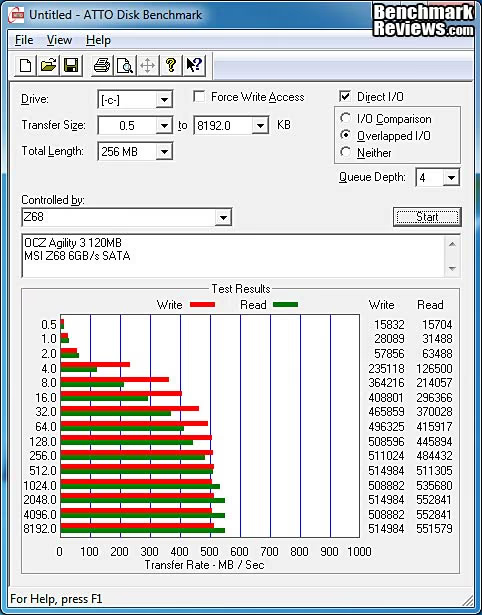
We are continuing our NAS testing with the exclusive use of Windows 7 as the testing platform for the host system. The performance differences between Win7 and XP are huge, as we documented in our QNAP TS-259 Pro review. The adoption rate for Win 7 has been very high, and Benchmark Reviews has been using Win 7 in all of our other testing for some time now. It was definitely time to make the jump for NAS products.
The two Read and Write transfer tests were conducted on each NAS appliance using the 1 GB file and then a 10 GB file. Additionally, a second set of tests were conducted with Jumbo Frame enabled, i.e. the MTU value for the Ethernet controllers was increased from 1500 to 9000. All the NAS products tested to date in the Windows 7 environment have supported the Jumbo Frame configuration. In the case of the TS-879U-RP, I tested the 1500 MTU setting with two NICs operating in IEEE 802.3ad mode. This is commonly called Link Aggregation Control Protocol (LACP), and I set the two cards to use dynamic link aggregation. Not all network interfaces will support this level of control, but the device drivers on the QNAP do, and I used Intel's Advanced Networking Services (ANS) driver on the host PC's NICs.
I also include a baseline of sorts on the single disk charts, which is the internal file transfer from a Corsair P64 SSD to a Western Digital 150GB VelociRaptor installed on an Intel P55 motherboard SATA connections, where the Intel P55 chipset provides the SATA 3Gb/s interface, and a Marvell 88SE9123 controller provides two ports of SATA 6Gb/s connections.
NAS Comparison Products
- QNAP TS-219P+ Gigabit 2-Bay SATA NAS server
- QNAP TS-259 Pro Gigabit 2-Bay SATA NAS server
- QNAP TS-659 Pro II Gigabit 6-Bay SATA NAS server
- QNAP TS-419P II Gigabit 4-bay SATA NAS Server
Support Equipment
- (8) Western Digital Caviar Black WD7502AAEX 750GB 7200 RPM 64MB Cache SATA 6.0Gb/s 3.5"
- 10-Foot Category-6 Solid Copper Shielded Twisted Pair Patch Cable
- 1 metric Gigabyte Test File (1 GB = 1,000,000,000 bytes)
- 10 metric Gigabyte Test File (10 GB = 10,000,000,000 bytes)
Test System
- Motherboard: MSI Z68-Express Z68A-GD80 (1.23.1108 BIOS)
- System Memory: 4x 4GB Corsair Vengeance LP DDR3 1600MHz (9-9-9-24)
- Processor: Intel Core i5-2500K Sandy Bridge 3.3GHz (BX80623I52500K)
- CPU Cooler: Thermalright Venomous-X (Delta AFB1212SHE PWM Fan)
- Video: Intel HD Graphics 3000
- Drive 1: OCZ Agility3 SSD 120GB (AGT3-25SAT3-120G)
- Optical Drive: Sony NEC Optiarc DVD (AD-7190A-OB 20X)
- Enclosure: Lian Li Armorsuit PC-P50R
- PSU: Corsair CMPSU-750TX ATX12V V2.2 750Watt
- Monitor: SOYO 24"; Widescreen LCD Monitor (DYLM24E6) 1920X1200
- Operating System: Windows 7 Ultimate Version 6.1 (Build 7600)
1GB Single-Disk Test Results
The bottom line for any storage device is the combination of capacity and transfer speed. For a network attached storage server, the differences are all about the infrastructure that is placed around the basic HDD array. Since capacity is something that's easy to define and measure, the real question for any NAS product is how fast will it Read and Write data. For this reason, Benchmark Reviews measures NAS performance as the bandwidth achieved during a file transfer test. The first tests we perform utilize a single 1GB (1000 megabytes / 1,000,000,000 bytes) file in a transfer to and from the NAS.
Since we started testing NAS units exclusively with Win 7, there aren't as many prior test results to compare with. We'll try and build up the NAS testing as best we can in the next year. In the meantime, we can compare several units from QNAP that we have on hand now. With all the NAS units operating in single disk mode, most of the units have broadly similar performance. The TS-879U-RP comes in ahead on the 1 GB Read tests, primarily due to the faster CPU. The Intel Core i3-based TS-x79 units have way more horsepower under the hood than the Atom-based units, and in turn, the Marvell-based models. Most people don't care too much about single disk performance, but it's useful to get an understanding of any possible issues with the basic architecture of the system. In this case, none of them have issues, and they all turn in good performance numbers.

Moving on to the 1 GB write bandwidth test, our results suggest that while it may sometimes be faster to read files from a hard drive than it is to write files onto it, the opposite is true more often than not in a NAS appliance. The good news is that the TS-879U-RP turns in very strong numbers here, compared to any of the Intel Atom-based models and the Marvell-based units with the weaker CPUs.
The thing that impresses me is how close the TS-879U-RP NAS results get compared to the maximum possible throughput of a GbE network connection. 120 MB/s is the same as 960 Megabits/second, which is just shy of the 1000 Megabits/second that is 1000BASE-T. We are going to see the downside of this in the next section, though. The very thing that makes these products what they are, Network Attached Storage, is the one thing that is holding them back.

Next up is 10 GB (1000 metric megabytes / 10,000,000,000 bytes) file transfer testing. Using the single-disk configuration in each NAS, and a Gigabit Ethernet connection, network throughput will be put to the test, and the effect of any system or hardware caches will be minimized.
10GB Single-Disk Test Results
Examining 10GB basic file transfer speeds, the QNAP TS-879U-RP delivers better read performance than any of the two-bay or four-bay units. The TS-659 Pro II comes the closest in read performance, due to the higher throughput of all the support systems inside the TS-x59 series. The TS-x79 series goes one better, and it shows. These small differences in single-disk performance aren't going to make a huge difference to anyone's day-to-day work, but they do show a clear, steady evolution of NAS infrastructure performance as you move up the product structure. The TS-879U-RP is built to handle the higher throughput of an eight-disk array in a corporate LAN environment, and it shows. The TS-8799U-RP has the best transfer speeds we've ever encountered during our testing and the single disk results are comparable to the RAID 5 performance. Of course, you get none of the advantages of redundancy with a single disk or JBOD, so most NAS users will go for one of the RAID configurations.

In our 10GB write performance tests, the performance of the TS-879U-RP really cleans up, offering at least 50% better performance than any NAS in the test group. The IEEE 802.3ad network connection runs a little slower than the single NIC configuration with 9000 MTU in write tasks. So far, it looks like the dynamic link aggregation (which is limited to 1500 MTU) provides a small advantage in read performance and a more significant decrease in write performance. We'll look at this more closely in the NAS System Overhead Measurements section. For now, we'll just note that this behavior is similar for both the 1GB and 10GB file transfers.

Next we're going to look at RAID 5 performance, where the TS-879U-RP should have an easier time, compared to its lesser siblings in the QNAP product line. Since the QNAP TS-259 Pro and TS-219P+ don't support the RAID5 configuration that we normally use to test large format NAS products, we won't be able to include their results in this comparison.
- QNAP TS-219P+ Gigabit 2-Bay SATA NAS server
- QNAP TS-259 Pro Gigabit 2-Bay SATA NAS server
- QNAP TS-659 Pro II Gigabit 6-Bay SATA NAS server
- QNAP TS-419P II Gigabit 4-bay SATA NAS Server
1GB RAID 5 Test Results
If you've got more than three HDD spindle to put in play, it makes sense to use one of the more advanced RAID configurations. RAID 5 is one of the most popular setups, primarily due to the balance it exhibits between capacity and redundancy. Not surprisingly, most NAS units that can support more than three HDDs also support RAID 5, so it makes sense to use it for test purposes. Most NAS products that can support RAID 5 go beyond the minimum number of drive bays, to a total of four, so that is the number of drives that I typically use to test with, even though I could get by with only three. I also took advantage of the massive capacity that the QNAP TS-879U-RP offers, and tested it with the full complement of eight drives. I am fortunate to have purchased eight W-D Caviar Black 750GB drives before the floods in Thailand wiped out half the world's HDD production capacity.
The results for RAID 5 read testing are very similar to single disk testing, which is not a bad thing. Given all the behind-the-scenes processing that goes on to calculate parity bits, these results show that most QNAP Turbo NAS units have the necessary power under the hood to keep the drives performing at their highest potential during read operations. When using RAID 5, the TS-879U-RP outperformed all of the other NAS systems and came close to its own performance level in single-disk operation. There was virtually no difference between 4-disk and 8-disk performance. CPU, memory, and network utilization were almost identical too, which tells me the support hardware has plenty of muscle to handle the task of pushing around all eight disks. Read performance is clearly very strong with this system, which is a real bonus if you use it as frontline storage. Using it primarily as a backup system, you want top-notch write performance, which we'll test next.

The 1 GB RAID 5 disk write test stays right up there with the single disk results. It's well known that RAID 5 write performance can be a weak point, with all the computation overhead involved and the extra parity bits that need to be calculated and written to each of the drives. The only way to overcome that is with raw computational horsepower, which is what the TS-879U-RP brings to the table better than any other NAS in this test. It's a shame that the simplest task any NAS can perform is basic backup duty, and in order to do that well, you need to buy the most powerful system to effectively reap the benefits of a multi-disk array. The reduced write performance with 1500 MTU is also a factor in RAID 5, so it's looking more and more like Jumbo Frames (9000 MTU) should be the preferred network setting for this unit. Unfortunately, you can't take advantage of Link Aggregation at that setting, as it is limited to 1500 MTU.

Next up is 10 GB (1000 metric megabytes / 10,000,000,000 bytes) file transfer testing. Using the 4-disk RAID 5 configuration in each NAS, and a single Gigabit connection, network throughput will be put to the test, and the effect of any system or hardware caches will be minimized. I'll also include some 8-disk results, just because I can.
10GB RAID 5 Test Results
Looking at read tests with a single 10GB file, the TS-879U-RP still beats out all of its little brothers, but not as much as in some of the other tests. The TS-659 Pro II improved its performance when transferring large files; it shows how this unit is built to carry the heavier data loads. The TS-879U-RP takes it a step further and comes in first place as a result. The proof of that is the nearly identical performance between 4-disk and 8-disk operation. There is still a small decrease in performance with Jumbo Frames disabled, which is now consistent between Read and Write tests, as we'll see in a moment. It's not significant enough to outweigh the reliability and availability advantages of Link Aggregation, though. Not in a corporate LAN room, or anywhere else.

Looking at write tests with a single 10GB file, the TS-879U-RP smokes the smaller units with gains of 50% and 100% over the Intel Atom and Marvell-based models. If you're writing large files to a NAS, you can't afford to scrimp on system hardware; you need the biggest, baddest CPU you can afford. The other units still suffers from the typical RAID 5 write penalties due to the computing overhead required to deal with the parity bits. The various caches built into the host and target system help out on the smaller file transfers, but they get filled up and lose their effectiveness when dealing with large files like this. Once again, the TS-879U-RP just laughs at the additional load of four additional hard drives; the CPU utilization never got above 25%. Once again, the 1500 MTU results lag a little bit behind the Jumbo Frames performance, but the redundancy of the dual GbE interfaces in a teaming arrangement trumps the small loss in throughput. The bigger issue is that the TS-879U-RP is being completely throttled by the 1000BASE-T interface, and really can't perform at its best without one or two 10GbE connections.

All in all, my impression of the test results is that the QNAP TS-879U-RP puts in a solid performance, eeking the most out of the GbE interface that comes standard. Judging by the System Overhead measurements that I'll show you in the next section, the TS-879U-RP doesn't even break a sweat when its throughput is limited by the network connection, at 1000 megabits/second. It's performance is suited for any task you might think of: front-line storage, backup, replication, or any combination. Its iSCSI capability means you're not limited to a single application, and the VMware capability means it's at home in virtualized environments, as well.
Now, let's take a closer look at the internal workings of the NAS, where we can see the individual activity of the CPU, memory, and network interface. It's these support subsystems that have a big influence on the overall system performance, as I've demonstrated in the past.
NAS Comparison Products
- QNAP TS-219P+ Gigabit 2-Bay SATA NAS server
- QNAP TS-259 Pro Gigabit 2-Bay SATA NAS server
- QNAP TS-659 Pro II Gigabit 6-Bay SATA NAS server
- QNAP TS-419P II Gigabit 4-bay SATA NAS Server
EDITOR'S NOTE: We've retested this product using 10Gb Ethernet, which gave phenomenal results. Read more here: QNAP TS-879U-RP 10GbE NAS Server
NAS System Overhead Measurements
I've discussed the potential impact the NAS hardware has on performance in general terms so far. The hard reality is that the CPU, drive controllers, memory, and network subsystems have a direct and profound impact on the throughput of a NAS device. In extreme cases where multiple drives (4+) are arranged in higher-order RAID configurations, the CPU has a ton of work to do, calculating parity bits and parsing them out to multiple data streams. In-line data encryption adds another potential load to the infrastructure. In this section, I'm going to look at some results from the System Monitor capability that is available on the QNAP Turbo NAS server.
Let's start off looking at CPU usage on the NAS server. During a straight data transfer from the PC to 4 disks configured as RAID 5 on the TS-879U-RP, the results show the Intel Core i3-2120 CPU coasting along at close to 25% on both cores, with the additional "hyper-threaded" cores doing close to nothing. They're involved, but only in a peripheral way. This is in marked contrast with every other NAS I've tested, where the CPU is maxed out at 100% when doing anything involving RAID. The Intel Atoms hold their own for the most part, but the Marvell processors have been a major bottleneck in my experience. Finally, with this corporate beast, we have a CPU that can handle the load. The memory subsystem on the QNAP TS-419P II is not being taxed by these file transfers at all. It's not even worth looking at the chart.

The host system is also tooling along at about 25% on the CPU (use the green trace in every graph below...), barely breathing hard. The Disk subsystem is having an even easier time of it, cruising at less than 15% of its throughput capacity. It's what you would expect for a 3d generation SSD capable of transferring over 500MB/s of data in sequential tests. The Network trace is where we see the real issue. That GbE NIC is working overtime and still can't keep up! I'm sad to say, we are completely limited in this test set by the network interface. It's maxed out and we aren't going to get any more, unless we spend an additional $1,000 on a new pair of 10GbE NICs from Intel.

Let's take a look at the network interface on the NAS side. This particular chart was produced during five disk-writing tests, with both Ethernet connections set up for teaming via IEEE 802.3ad/Link Aggregation. The first thing to inspect is the green trace, which shows Packets Received by the NAS. Since this was a "Write to NAS" test, you can see that the data throughput into the NAS is pretty well maxed out on the Ethernet 2 connection, at 116.1 MB/s (929 Mbps). Over on the Ethernet 1 connection, you see much less data being sent from the NAS back to the host computer, only 1.7 MB/s. This is likely just housekeeping data, checksums and such. So in theory, teaming the two GbE NICs together allows for double the network throughput; in reality it only does that if you have equal amounts of data being transferred IN and OUT of the device. In real-world usage that's a distinct possibility for some applications, but in my experience many data storage systems get hit asymmetrically all the time. In a typical tech office, everyone needs to check their work out of the "vault" when they get started in the morning, and they all need to check it back in before they leave for the night.
In an earlier review, I said, "One day, I'm going to load up one of the big NAS units with high end SSDs in RAID 0 and let it rip; then we'll see where the system bottlenecks are." Well, here it is: it's the industry standard network interface that's holding the big rigs back. Once a pair of 10GbE NICs are brought onto the team, I'm sure the load will balance out and the other team members will be pulling more weight.

Just to show the contrast between the TS-x79 series and the lesser models in the product line, take a look at the CPU utilization from an earlier test. The NAS CPU is being taxed to the max during these file transfers, with either small numbers of large files or a large number of small files. In the chart below, you can see some occasional dips where individual, smaller files were transferred. The system buffers are getting bounced around during this scenario and you see some sharp drops, with a corresponding sharp recovery. There's nowhere for the CPU to hide in a high performance NAS appliance, and the ARM processor in QNAP's lower-priced models gets hammered pretty bad in typical use cases.

Finally, I give you a glimpse at some further testing I plan to do on the TS-879U-RP. I reformatted all eight drives in RAID 5, but this time I selected the option to encrypt the data to AES 256-bit standards. Now, during the disk write tasks, the CPU gets a little more of a workload. Reading the encrypted data doesn't tax the system as heavily, as far as I could see. In the CPU chart at the beginning of this section, you can see that CPU 2 and CPU 4 were just along for the ride; there was nothing for them to do. With data encryption in the mix, the load on them is much higher, spiking up to 100% quite often. Remember that these are virtual CPUs, as the Intel Core i3 2120 CPU has only two physical cores, but it supports Hyper-Threading. Also, the Core i3 does not support the recent AES-NI enhancements, so it's using brute force to encrypt this data. With the GbE interface keeping the throughput artificially low, it looks like the CPU still has some headroom left.
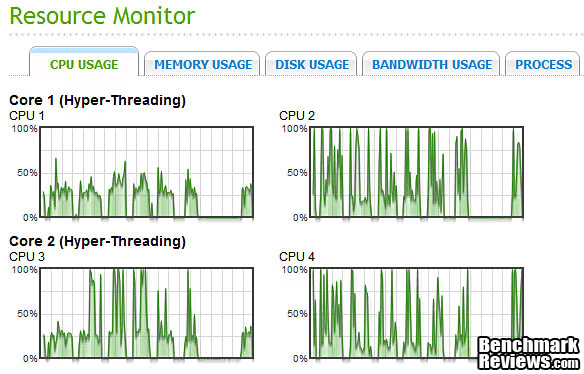
I hope this section showed you some objective reasons why the infrastructure that any NAS product brings to the table is important to its overall performance. As the number of drive bays goes up, the hardware requirements increase as well, and the price has to follow. I know it's disheartening to see that you don't get great economies of scale on the larger NAS units, but it would be even more of a shame if they didn't perform up to their true capabilities because the hardware was holding them back. In this case, the network interface is definitely holding the system back, and I hope to rectify that in the future.
Now, let's look at some Final Thoughts, and then move on to our Conclusion and Product Ratings.
NAS Server Final Thoughts
My first and solemn duty is to remind everyone that relying on a collection of drives in any RAID configuration for data backup purposes is a huge error. RAID systems provide protection against loss of services, not loss of data. Several examples will illustrate the problem, I hope:
-
the drive controller goes bad and corrupts the data on all the drives in the array
-
the entire storage device is physically or electrically damaged by external forces
-
the entire storage device is lost, stolen, or destroyed
-
a single drive in a RAID 5 cluster dies and during the rebuild process, which puts higher stress on the remaining drives, a second drive fails
-
floods, earthquakes, tornadoes, etc. (AKA El Niño)
All these points lead to the inescapable conclusion that multiple drives in a common system, in a single location do not provide effective and reliable data backup. Throughout this review I've talked about high-availability systems, and the QNAP TS-879U-RP fits that description to a tee, especially when employed in a RAID 6 configuration. Even with two concurrent drive failures, your data is still available and accessible. The NAS device stays online the entire time while the failed drives are replaced and the array is rebuilt. That's what RAID systems are designed to do. The inherent redundancy is not meant to serve as a backup file set. Remember, we're not talking about losing data here, we're only talking about the ability to keep working uninterrupted, if one or two drives should fail.
If you look closely at the ATTO Disk Benchmark for the 8-Disk configuration of the QNAP TS-879U-RP NAS Server, you see the benfit of such a system, even when straddled with obsolete NICs. The full performance of the system is reached at the 32KB chunk size. That means that the system isn't just good at transferring data in a linear, sequential manner, it's good at handling smaller chunks of data too. Take a look at any other system and see how well it handles smaller random chunks of data, compared to large, sequential chunks, and you'll see how rare this type of performance is.

The QNAP TS-879U-RP is not a product that most readers of Benchmark Reviews will ever contemplate purchasing. I know there are a few of you out there with day jobs that utilize this level of hardware, but 99.99% of the enthusiasts reading this don't have a real justification for spending the kind of money that it takes to put eight HDD spindles in play. I know that hasn't stopped some of us from buying overkill hardware in the past, though. Maybe, as hi-res video becomes the norm, it might make sense to invest in this level of capacity. Got a thousand Blu-ray movies you want to store for your home theater server, go for it? Got five thousand DVDs, you can do the same? If you don't want to invest in eight HDDs right now, and who does, just load it up with three or four in RAID 5 and expand the capacity later. If you listen carefully, you can almost hear me trying to convince myself to buy this thing....
Beyond the question of capacity, there is also the question of the overwhelming bandwidth that this kind of hardware is capable of pushing out the business end of its enclosure. The one thing that was made painfully clear to me in this review is: there is a small chorus of high performance devices singing the swan song for 1000BASE-T, as the network interface of choice. Maybe the new standard ought to be 10GbE, maybe it should be Thunderbolt, or maybe we're ready to move over to fiber for system-level interconnects, but we are right now at the tipping point where common devices are starting to overload the current networking standard. You would think, that with Ethernet performance going up by a factor of ten every few years, that it would be well ahead of Moore's law. Never mind being so far ahead of archaic spinning magnetic disks that it shouldn't even be a contest. But no - put four or eight of those ancient mechanical devices in a box, with some SOTA silicon to support it and voila, bandwidth limiting in the extreme.
I hope to get my hands on some 10GbE NICs in the future, so that I can really put the TS-879U-RP through its paces. Until then, I know that it has the power and capacity to overwhelm the storage requirements in any home setting, that it has all the necessary performance and functionality to thrive in a SMB environment, and that QNAP has produced a strong competitor for the enterprise data center.
So, what conclusions can we draw, particularly about this high performance, eight-bay TS-879U-RP Turbo NAS server? Click NEXT to find out, and discuss...
QNAP TS-879U-RP Conclusion
Although the rating and final score mentioned in this conclusion are made to be as objective as possible, please be advised that every author perceives these factors differently at various points in time. As Albert Einstein said, "Not everything that can be counted counts, and not everything that counts can be counted." While we each do our best to ensure that all aspects of the product are considered, there are often times unforeseen market conditions and manufacturer changes which occur after publication that could render our rating obsolete. Please do not base any purchase solely on our conclusions, as they represent our product rating for the sample received which may differ from retail versions.
The performance of the QNAP TS-879U-RP Turbo NAS server was higher than my test bed could support, but I plan to remedy that in the near future. The beefed up processer, a Dual Core Intel Core i3-2120 CPU, running at 3.3GHz and addressing the base 2GB of DDR3, made a measurable difference in performance compared to the Intel Atom and Marvell CPUs in the smaller units. QNAP has wisely chosen to implement SATA 6Gb/s and USB 3.0 here. Yes, the newer and faster SATA interface has little practical impact on performance with traditional hard drives, but this series of NAS models, the TS-x79 units, finally have the horsepower to handle SSDs. The USB 3.0 performance was a much needed shot in the arm for interfacing with portable devices, USB 2.0 was such a bottleneck and eSATA was more expensive and difficult to implement for portable use.
The best read performance I recorded for the TS-879U-RP was 117 MB/s, and the best write speed was 121 MB/s, which are both outstanding. Unfortunately, it's clear that these results are being compromised by the standard network interface, which is a pair of GbE connections. The additional load encountered with RAID 5 operation was handled easily, and much better than it was in the Intel Atom-based units I've tested; the write results in RAID 5 were very comparable to the single disk results, where data striping doesn't help out but the overhead is minimal.
The large, eight-bay form factor of the QNAP TS-879U-RP allows for the use of a display on the front of the unit, which was handy for quick adjustments and for out-of-the-box setup before connecting it to the network. The status LEDs for activity on each HDD are contained right on the front of the drive trays, the lights for 10GbE, Status, LAN, and eSATA are nestled under a protective cover on the right-hand rack handle, right below the on/off button. The exposed portion of the drive trays are nicely finished, a bit shinier than the comparable parts on the tower version, and blend well with the remainder of the front panel. Three different shades and textures of black can look busy if arranged poorly, but this NAS looks the business. The side and top panels are well finished, but have an industrial look that is completely appropriate, given the fact that they will be hidden inside a 19" rack for their entire service life. The glossier finish adds a bit of elegance to the visual design, but it shows every fingerprint that comes within an inch of the front panel. Maybe that's a security feature.... IMHO, it fits in perfectly with its intended environment, the data center. For the insanely rich, it would also look good in a very sophisticated home theater setup which, in the extreme, looks like a data center anyway.

The construction quality of the TS-879U-RP exceeds that of any computer-based appliance I've ever tested. The data center crews are all hardware junkies for the most part, and they like their gear to radiate superiority. I've seen some nice consumer hardware in the last twenty years, but nothing compares to the stuff that's designed to go in the data center. QNAP understands this, and this product is built to run 24/4 indefinitely, plus look good doing it.
The QNAP TS-879U-RP Turbo NAS network storage server is best suited to a very tech-capable IT organization that can take full advantage of all the capabilities and functions it offers. The applications are well designed and documented, to the point where most IT pros can easily handle setup and administration of even the most advanced capabilities. There's a lot of functionality that's important in a business environment, but the availability of more broad-based web applications is also impressive, with support for several consumer focused cloud-based services being a simple example. Some home features such as Multimedia Station, Download Station, iTunes server, and UPnP media server are not implemented yet for the TS-x79 series, but are planned for a future firmware update sometime in 2012. Most of these consumer oriented features are easier to configure than the hardcore IT apps, like VMware and iSCSI, plus the documentation provided by QNAP is excellent.
Before we discuss the pricing in detail, remember that these systems are not discretionary items for most businesses, they are a necessary expense. The inevitable costs for not having a robust data management system in place are 10-100 times higher than any of the prices you will see in this paragraph. As of January 2012 the diskless TS-879U-RP model was listed for $2899.99 at Newegg, or $3039.67 from Amazon. Newegg also sells the TS-EC879U-RP version with ECC memory for $3899.99. If you are handling VERY critical data, like credit card transactions, that's the one to get. If you need the wealth of features and the higher RAID performance the top TS-x79 Turbo NAS series provides, there really is no substitute. If you just need the storage capacity, and the throughput is of secondary importance, you might be able to get by with the QNAP TS-859U-RP+, which sells for about $1,000 less at Newegg. It runs the Intel Atom processor, and doesn't have the option for 10GbE networking.
Benchmark Reviews has enjoyed testing all of these QNAP network storage solutions, and with the wide range of products on offer from them, anyone in need of a NAS server can find one to fit their current and future needs. The biggest problem is choosing one; that's why we go into so much detail in our reviews, to help you figure out what level of performance and features is right for you. The TS-879U-RP Turbo NAS server seems like overkill for the enthusiast, or even the SOHO market, but there will be some obvious exceptions. Anyone doing a significant amount of video editing for instance will gladly pay the price, and will install (or already have in place) the 10GbE network that will let it sing.
EDITOR'S NOTE: We've retested this product using 10Gb Ethernet, which gave phenomenal results. Read more here: QNAP TS-879U-RP 10GbE NAS Server
Pros:
+ 117 / 121 MBps best read/write performance
+ System software is SOTA and continually updated
+ Support Apps available for multiple cloud services
+ Dual 10GbE NICs supported (Multiple Vendors)
+ VMware Ready iSCSI for virtualization deployments
+ Online RAID Capacity Expansion and Level Migration
+ Hot-swap RAID storage
+ Dual Gigabit Ethernet with teaming and failover
+ RAID 0/1/5/6/10/JBOD disk configurations
+ Two eSATA and two USB 3.0 ports on rear panel
+ High quality construction
Cons:
- Standard GbE interface can be a bottleneck
- 10GbE NICS are expensive (~ $700 each)
- A few advanced capabilities will be too daunting for most SOHO users
- Many consumer HDDs not suitable for RAID, and enterprise units are $$$
Ratings:
- Performance: 9.75
- Appearance: 9.00
- Construction: 9.50
- Functionality: 9.00
- Value: 9.00
Final Score: 9.25 out of 10.
Excellence Achievement: Benchmark Reviews Golden Tachometer Award.
Benchmark Reviews encourages you to leave comments (below), or ask questions and join the discussion in our Forum.
Reader comments from the original article
13 comments were posted before commenting closed. They are preserved as written. Original avatars no longer resolve and are shown as a placeholder.
I3 with AES-Ni ? Moogle Stiltzkin Permalink:
Since when did Intel I3's have AES-Ni instruction ? QNAP currently only has 2 rack models with the x79 name that has XEON cpus which do have AES-Ni. But the other X79 models only have Intel I3 cpus, and last i checked they didn't have AES-Ni instructions on them ..... yet your saying otherwise ? Got any references for that ? However despite that, Jason from QNAP is claiming their tests on the 879U-RP with AES encryption could achieve 100MB/s in both read & write in Gigabit environment. His a trustable guy so i'll believe that :X but what i doubt is your claim that i3 cpus have AES-Ni ....
Face Palm... Bruce Permalink:
Just looked it up on Intel site, and you're right. There are 141 products with AES-NI. No i3's though. ark.intel.com/search/advanced?AESTech=true Well, I've got some re-writing to do.... FWIW, my initial testing with AES-256 supports Jason's claims. The GbE bottleneck is the dominant factor. Thanks for pointing this out.
RE: QNAP TS-879U-RP NAS Network Storage Rack Server Moogle Stiltzkin Permalink:
yeah, all that matters is the result. doesn't matter if it has AES-Ni or not (although it's good to have since it's suppose to accelerate AES encryption so why not) since all comes down to whether it can perform well even with AES 256 encryption enabled. Jason says it does 100 mb/s and that in my opinion is very good. I was worried and confused why they opted for the i3's which are basically almost the same as i5's but without the aes-ni. But from the results, seems my worries were unfounded ? As i was expecting results like these which was an article by tomshardware showing how bad performance was on many NAS brands across the board that didn't use encryption acceleration such as AES-Ni. ##tomshardware.com/reviews/nas-encryption-aes-ni,2873.html Anyway i wonder if you would be kind enough to add to your review, a chart showing AES 256 encryption performance of the i3 QNAP to help back up Jason's claim. I trust Jason, but other people who don't know him will want proof from third party sites like yours to see if what QNAP claims is true or not. I'm also interested to know whether the other i3 QNAP models such as the 1079 can achieve the same good results for aes 256 encryption, as well as compare the results with Synology Diskstation DS3611xs which sports a Intel® Xeon® Processor E3-1225 cpu.
Follow-Up testing Bruce Bruce Permalink:
Yes, I plan to do a follow-up article which will focus on performance improvements with the optional 10GbE interface, and to document the AES-256 performance. Take a look at the last chart in the NAS System Overhead Measurements section of this article. That's one of the tests I ran with AES-256 enabled, and the CPU looks like it still has some headroom left, when running of the Gigabit interface. I'll have full results in the follow-up article.
RE: QNAP TS-879U-RP NAS Network Storage Rack Server Moogle Stiltzkin Permalink:
Quote: FWIW, my initial testing with AES-256 supports Jason's claims. The GbE bottleneck is the dominant factor. And lets not forget conventional hard drives may also be a bottle neck ? The fastest read and write maximum throughput for a hard drive is Seagate's New Barracuda 3TB (ST3000DM001) ##anandtech.com/show/5042/seagates-new-barracuda-3tb-st3000dm001-review Read Throughput Maximum: h2benchw 3.16 193.55 ##tomshardware.com/charts/hdd-charts-2012/Read-Throughput-Maximum-h2benchw-3.16,2900.html Write Throughput Maximum: h2benchw 3.16' 191.47 ##tomshardware.com/charts/hdd-charts-2012/Write-Throughput-Maximum-h2benchw-3.16,2903.html
8x Bruce Bruce Permalink:
I'll be running RAID 5 with eight drives, though. I don't expect to reach the same speeds that QNAP did with (8) Intel SSDs, but I'm betting it will still be way above what the unit does with the Gigabit interface.
RE: QNAP TS-879U-RP NAS Network Storage Rack Server Moogle Stiltzkin Permalink:
regarding your last con, well some desktop drives can be used fine for raid. For me, i've used 6 x SAMSUNG HD203WI for a long time and they work fine on my QNAP ts-659 pro II. QNAP and other branded NAS, tend to ignore tler, so it's not critical for these nases when using raid seeing as it's not being used. Quote: The responses I received from Synology, QNAP, NETGEAR and Buffalo all indicated that their NAS RAID controllers don't depend on or even listen to TLER, CCTL, ERC or any other similar error recovery signal from their drives. Instead, their software RAID controllers have their own criteria for drive timeouts, retries and when a drive is finally marked bad. ##smallnetbuilder.com/nas/nas-features/31202-should-you-use-tler-drives-in-your-raid-nas however samsung has sold off their hard drive business to Seagate who bought their hd unit out. So the only other manufacturer that offered some good desktop raid drives was Hitachi i believe which was the Hitachi Deskstar 7K3000 3TB which is a desktop drive that works fine in raid for say a QNAP. ##storagereview.com/hitachi_deskstar_7k3000_3tb_review_hds723030ala640 The desktop drives you should be wary about for using raid are western digital and seagate, which intentionally make it problematic in a raid setup, by dropping out very often to make you buy their x2 expensive raid edition drives.
Some work fine..... Bruce Bruce Permalink:
The Spinpoint F3 was a favorite for NAS use, no doubt. Other readers have also reported good luck with their Hitachi Deskstars. You'll see similar reports on the QNAP support forums. I'm somewhat concerned that most reports are from users with smaller NAS units, where the combined vibration of 8-12 drives is not present. It's bearing failure, as much as controller quirks that cause HDD failures. Samsung drives are still being built to the old designs/specs for now, right? Get them while you can, I think....
The 20 should be closser to 2. bits vs Bytes. tygrus Permalink:
"twenty times faster than what the latest generation of SSDs can muster" Sorry but 10GbE =
Comment system ate my comment tygrus Permalink:
There was some mathematical symbols in my previous comment. The comment has been truncated. ... 10GbE =lt 1250MBps. 500MBps = 4800Mbps. Reasonable sound level for a device to be in a server room. Too loud for home use. Would like to see aditional testing with multiple clients or larger queue depth. Need to beg someone for some 10GbE hardware.
10GbE is coming Bruce Permalink:
Next week I'll have two Intel 10GbE NICs. I'll just have the one PC, but would RoboCopy, with it's multithreaded operation get closer to the multiple client scenario?
Updated Results in New Article Bruce Permalink:
Just wanted to let all of you know that I completed the additional testing, with 10GbE NICs and a RAM Disk on the PC. Wow! What a difference. Check out the results in my follow-up article here: /index.php?option=com_content&task=view&id=882&Itemid=70
RE: QNAP TS-879U-RP NAS Network Storage Rack Server Moogle Stiltzkin Permalink:
Nice :} just read it.