

| QNAP TS-809 Pro 8-Bay SATA NAS |
| Reviews - Featured Reviews: Network | |||||||||||||||||||||||||||||||||||||||||||||||||||||||||||||||||||||||||||||||||||||||||||||||||||||||||||||||||||||||||||||||||||||||||||||||||||||||||||||||||
| Written by Olin Coles | |||||||||||||||||||||||||||||||||||||||||||||||||||||||||||||||||||||||||||||||||||||||||||||||||||||||||||||||||||||||||||||||||||||||||||||||||||||||||||||||||
| Friday, 03 July 2009 | |||||||||||||||||||||||||||||||||||||||||||||||||||||||||||||||||||||||||||||||||||||||||||||||||||||||||||||||||||||||||||||||||||||||||||||||||||||||||||||||||
QNAP TS-809 Pro Turbo NASNot every enterprise needs a file server to fit their needs; sometimes storage is the primary concern. Network Attached Storage (NAS) servers have helped corporate IT professionals delivery massive storage capacity at a price more in touch with a basic workstation. QNAP, a pioneer in NAS products, is the first to offer a an unmatched level of network storage. The QNAP TS-809 Pro allows up to eight SATA drives to be installed in RAID-0/1/5/6/5+Spare, and JBOD; all featuring iSCSI target services and AES 256-bit volume-based encryption. The 2.4GHz Intel Core 2 Duo processor and 2GB of DDR2 memory allow the dual Gigabit Ethernet network adapters to move data at speeds most network products only dream of. In this article, Benchmark Reviews tests bandwidth performance on the QNAP TS-809 Pro against some of the fastest NAS products available.
High performance and advanced RAID redundancy
|
|||||||||||||||||||||||||||||||||||||||||||||||||||||||||||||||||||||||||||||||||||||||||||||||||||||||||||||||||||||||||||||||||||||||||||||||||||||||||||||||||


| CPU | Intel Processor Core 2 Duo 2.4 GHz |
| DRAM | 2GB DDRII RAM |
| Flash Memory | 128MB DOM |
| HDD | 8 x 3.5" SATA I/II HDD (the standard package is shipped without HDD) |
| HDD Tray | 8 x Hot-swappable and lockable tray |
| LAN Port | 2 x Gigabit RJ-45 Ethernet port |
| LED Indicators | Status, LAN, USB, HDD 1, HDD 2, HDD 3, HDD 4, HDD 5, HDD 6, HDD 7, HDD8, USB, LAN |
| USB | 5 x USB 2.0 port (front: 1; back: 4) Supports USB printer, pen drive, USB hub, and USB UPS etc. |
| Buttons | System: Power button, USB One-Touch-Backup button, reset button |
| LCD Panel | Mono-LCD display with backlight and buttons for configuration |
| Alarm Buzzer | System warning |
| Form Factor | Tower |
| Dimensions | 270 (D) x 200 (W) x 298 (H) mm 10.63 (D) x 7.87 (W) x 11.73 (H) inch |
| Weight | Net weight: 8.1 kg Gross weight: 9.8 kg |
| Sound Level (dB) | Standby: 35.1dB In Operation: 37.7dB; 41dB in busy read & write In Operation without HDD installed: 34dB |
| Power Consumption (W) | sleep: 42W In Operation: 81W Power-off (in WOL mode): 2.25W with 8 x640GB HDD installed |
| Temperature | 0~40? |
| Humidity | 0~95% R.H. |
| Power Supply | Input: 100-240V AC, 47-63Hz, Output: 350W |
| Secure Design | K-lock security slot for theft prevention |
| VGA | Reserved for maintenance |
| Fan | 2 x 12 cm smart cooling fan |

TS-809 Pro Software
|
||||||||||||||||||||||||||||||||||||||||||||||||||||||||||||||||||||||
| Software Specifications | ||||||||||||||||||||||||||||||||||||||||||||||||||||||||||||||||||||||
|
QPKG Center Software Expansion
Explore the Unlimited Possibilities of Your NAS with QPKG
The Network Attached Storage (NAS) used to refer to a basic network storage device for simple data sharing but now with the high performance SoC and the advantage in power-saving design, it is redefined as a powerful embedded system that allows the possibilities of offering numerous fascinating applications. Over the past years, QNAP has successfully developed a series of All-in-One NAS servers for power users and business users providing a wide variety of software applications. Besides those QNAP provides, many other software packages are also developed in Linux open source community that power users are able to install them on their NAS to further enrich the functions. However, this is only limited to those advanced users or software developers who are more familiar with Linux systems. In order to let majority of general QNAP NAS users to also utilize their NAS servers with those software packages already developed by the open source community, QPKG platform and development framework is then introduced by QNAP.
Inspired from the powerful software package management system in Linux (yum, dpkg, etc.), but unlike those running in the modern PCs today, QPKG is designed and fine-tuned for running on Linux embedded systems like NAS along with many popular software packages ready for install. Besides, in order to publish your software in our official repository all the software packages will be verified by QNAP to prevent from others to embed malicious codes for system intrusion or potential risks of data damage. Therefore QNAP NAS users may enjoy these software packages developed by the community in a safe way through an installation method as easy as firmware update just like you would install/uninstall software in the Windows environment without the need to go through the complicated process.
QNAP has introduced some popular QPKG software packages as the demonstration purpose. Below are the quick introductions on each of them:
MLDonkey (eMule)
MLDonkey (eMule) is a door to the 'donkey' network, a decentralized network used to exchange big files on the Internet and present most features of the basic Windows donkey client. (e.g., eMule)
Slim Server on Turbo Station (with SqueezeCenter 7)
Squeeze Center is the server software from Slim Device that manages common digital audio formats (.mp3, .flac, .ogg, etc.) and streams them to its players. Slim Server On Turbo Station (SSOTS) developed by flipflip is an add-on to the Turbo Station's firmware which provides the environment to run Squeeze Center 7 on it.
Optware Ipkg (Itsy Package Management System)
Ipkg, or the Itsy Package Management System, is a lightweight package management system designed for embedded devices. It is used in the Unslung operating system for the Linksys NSLU2, in OpenWRT, OpenMoko, Gumstix, iPAQ and now on QNAP NAS too.
SABnzbd+
SABnzbd+ is a multi-platform binary newsgroup downloader written in Python language. The program works in the background and simplifies the downloading, verifying and extracting of files from Usenet. SABnzbd+ does not search for files, instead NZB files (similar to .torrent files, but for Usenet) are fed to SABnzbd+ from sites like newzbin.com, binsearch.info and tvnzb.com (Requires prior installation of Python)
Python
Python is a general-purpose, high-level programming language. Its design philosophy emphasizes programmer productivity and code readability.
WordPress
WordPress is a free, open-source personal publishing system that allows you to easily create a complex blog, or web log, on your site. Written in PHP and supported by a MySQL database, WordPress offers intuitive administrative tools and sophisticated design features that make it easy to develop and integrate a personal or professional blog on your site.
Joomla CMS
Joomla! is a free, open source content management system for publishing content on the world wide web and intranets. The system includes features such as page caching to improve performance, RSS feeds, printable versions of pages, news flashes, blogs, polls, website searching, and language internationalization. Benchmark Reviews is built from the Joomla! CMS.
phpMyAdmin
phpMyAdmin is an open source tool written in PHP intended to handle the administration of MySQL over the Internet. Currently it can create and drop databases, create/drop/alter tables, delete/edit/add fields, execute any SQL statement, and manage keys on fields.
xDove Email Server
XDove named after XMail & Dovecot the 2 open source offerings that are combined to provide a complete set of Email server functionalities which is one-click installable on your QNAP NAS. XDove not only provides SMTP, POP3 and IMAP services, it also comes with a variety of features like multiple virtual domains and accounts, AJAX webmail with extended functionalities including personal folders, address book, calendar and real-time chat among users under the same mail domain. Besides the mail services XDove offers scheduled backup and restore of your mailboxes from multiple domains which gives you an extra protection on the top of your RAID data redundancy.
AjaXplorer
AjaXplorer is a file explorer for remotely managing files on a web server or operation as a simple file-sharing system. Its rich layout and actions make it easily accessible to virtually any end-user. The AJAX based interface, providing streamlined and intuitive functionalities, similar to that of a standard file-system explorer on any operating system.
Software Expansion via QPKG Platform
The QPKG software package platform enables the users to maximize the usage of Turbo NAS by installing additional software packages developed from the users and community worldwide. This can be done by simple "download & install" clicking without going through any complicated process.
Closer Look: QNAP TS-809 Pro
The QNAP TS-809 Pro Turbo NAS is by far the largest network storage appliance Benchmark Reviews has ever tested. Measuring 10.63"(D)x7.87"(W)x11.73"(H), the TS-809 Pro is enclosed in a titanium-painted steel chassis. This mega-capacity NAS weighs 18 pounds empty, and bulks up to almost 20 pounds once it's filled with eight hard drives. Despite its size in relation to other NAS products, the TS-809 Pro actually appears small when compared to pedestal server enclosures.

QNAP has kept the front panel clutter to a minimum on the TS-809 Pro, with basic information displayed on the LCD screen and few buttons placed on the bezel. A single power button and USB (2.0) copy port are located along the lower left corner of the Turbo NAS, with eight removable drive trays illuminating a green LED when a SATA HDD/SSD is in position.

The LCD panel offers general information, and a two-button Enter/Select key allows for basic navigation. Beneath the LCD screen there are three colored LED lights, which indicate status on the TS-809 Pro, LAN Ethernet activity, and if a USB device is connected to the Turbo NAS.
An Intel Core 2 Duo 2.4GHz processor and 2GB of DDR2 memory make up the system hardware for this large NAS, and keep performance at it's peak.

QNAP uses a steel-framed tray with black plastic latches for each of the eight drive bays on the TS-809 Pro. Each tray stands vertically and slides smoothly into the NAS. If additional security is desired, the barrel lock can secure the drive in place.
The eight SATA drives can be installed in RAID-0/1/5/6/5+Spare, and JBOD configurations; all featuring iSCSI target services and AES 256-bit volume-based encryption.

There are no ventilation holes on any of the sides (or top and bottom) of the QNAP TS-809 Pro Turbo NAS. The only entry point for cool air is the drive bay trays, which then exhaust heated air out through two 120mm cooling fans positioned at the rear of the unit.
The integrated 350W mATX power supply unit lacks a power switch, but auto-senses 100-240V AC power on 47-63Hz cycles. A single 36mm fan keeps the power supply running cool.
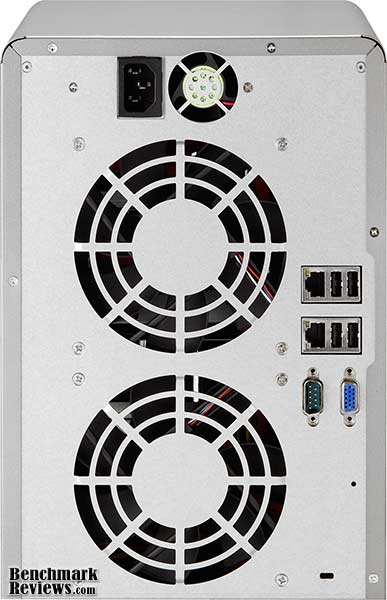
Dual Gigabit Ethernet NICs are available on the TS-809 Pro, with a total of four USB 2.0 ports beside them. A DB-9 (RS-232) serial and D-Sub analog VGA ports are also available at the rear of the Turbo NAS, however they came covered with plastic caps on our test unit. A Kensington lock hole is also available, allowing administrators to tether the nearly 20LB NAS to a nearby surface.
QNAP v3 User Interface
New to the QNAP TS-809 Pro (and other NAS) server series is the v3 Graphical User Interface. As a long-time NAS product tester, my experiences with the many GUIs used on the server products has been quite extensive. For the past three years, which is essentially the time period NAS products have gained in popularity to the point where network administrators consider them mainstream appliances, the one company that has always set the standard for software and menu navigation has been QNAP. So should it surprise me that a new version of their already-popular software interface was even better than the last?
QNAP is equally impressed, and has launched a demo site especially for the v3 GUI firmware. If you're considering a QNAP NAS product, I highly recommend that you browse over the demo site to get a better understanding of how nice the new GUI is.

The very first thing I noticed different once I updated the firmware on the QNAP TS-809 Pro was a new Administration logon screen. For a moment, I thought that I had logged into my media server, which has a similar iPhone-ish feel to it. The QNAP v3 User Interface borrows the nice rounded GUI design made popular by the Apple smart phone, and adds a myriad of sub-menus behind it.
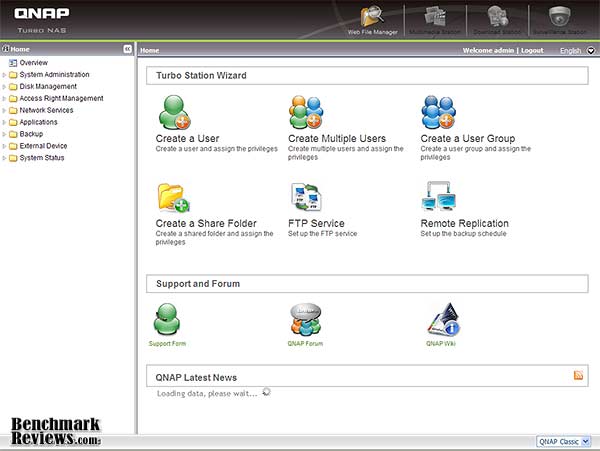
Finding what you need has never been so easy! Whenever I test NAS products, the very first thing I must do (after updating the firmware) is to configure network settings and build the drive array. Usually this takes a few minutes of searching through the menu, even the older QNAP v2 GUI took some time, but the latest navigation interface is unbelievably easy to work with.
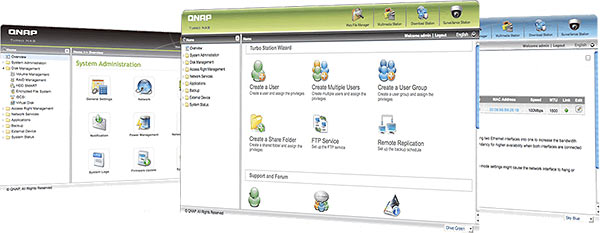
While many of the new aspects behind QNAP's v3 Graphical User Interface are cosmetic, it's nice to have the ability to customize the interface and build a color theme that best suites your mood. Normally I wouldn't pay this much mind, but when you work in the GUI so much that it becomes a regular stop on your Web Favorites list, it's nice to have a things tuned to your own needs. QNAP offers a live video demonstration of the v3 firmware GUI for those wanting more hands-on.
Network Terminology
Benchmark Reviews has decided to abandon our effort to educate readers on the difference between a Gigabyte, and a Gibibyte. This article will use the common metric terminology for data measurement, instead of the binary units we've used in past articles. Sadly, too many people are more interested in comfortable reading, even if it means being technically inaccurate. But for anyone who might still be interested in learning real technical terms relevant to the industry, I've added a small explanation below:
The basic unit data measurement is called a bit (one single binary digit). Computers use these bits, which are composed of ones and zeros, to communicate their contents. All files are stored as binary files, and translated into working files by the Operating System. This two number system is called a "binary number system". In comparison, the decimal number system has ten unique digits consisting of zero through nine. Essentially it boils down to differences between binary and metric measurements, because testing is deeply impacted without carefully separating the two. For example, the difference between the transfer time of a one-Gigabyte (1000 Megabytes) file is going to be significantly better than a true binary Gigabyte (referred to as a Gibibyte) that contains 1024 Megabytes. The larger the file used for data transfer, the bigger the difference will be.
Have you ever wondered why your 500 GB hard drive only has about 488 GB once it has been formatted? Most Operating Systems utilize the binary number system to express file data size, however the prefixes for the multiples are based on the metric system. So even though a metric "Kilo" equals 1,000, a binary "Kilo" equals 1,024. Are you confused yet? Don't be surprised, because even the most tech savvy people often mistake the two. Plainly put, the Kilobyte is expressed as 1000 bytes, but it is really comprised of 1,024 bytes.
Most network engineers (myself included) are not fully aware that the IEC changed the way we calculate and name data chunks when they published the new International Standards back in December 1998. The International Electrotechnical Commission (IEC) removed the old metric prefixes for multiples in binary code with new prefixes for binary multiples made up of only the first two letters of the metric prefixes and adding the first two letters of the word "binary". For example, instead of Megabyte (MB) or Gigabyte (GB), the new terms would be Mebibyte (MiB) or Gibibyte (GiB). While this is the new official IEC International Standard, it has not been widely adopted yet because it is either still unknown by institutions or not commonly used.
Personally, I think the IEC took a confusing situation and simply made it more of a mess. As I mentioned earlier, the Kilobyte was previously expressed as 1000 bytes, even though it was really comprised of 1,024 bytes. Now, the Kilobyte really is expressed correctly as 1000 bytes, and the Kibibyte is the item comprised of 1,024 bytes. In essence, the IEC just created a new name for the binary item and left the existing name for the metric item. Hopefully that clears things up, and you can thank Benchmark Reviews for training the next generation of Network Engineers.
NAS Testing Methodology
Although each of the devices we tested can accommodate several different disk configurations, it was decided that basic (single) disk and RAID-5 configurations were the best way to measure data throughput for our NAS servers.
Connected directly to the Realtek RTL8168 Gigabit Ethernet NIC by a three-foot CAT6 patch cable, the NAS products received one test transfer followed by three timed transfers. Each test file was sent to the Seagate 1.5 TB 7200.11 SATA-II HDD installed in the NAS for a timed write test, and that same file was sent back to an identical Seagate 1.5 TB 7200.11 HDD drive (ST31500341AS) in the test system to record the read test. Each test was repeated, and the first three identical results were recorded and charted.

The two transfer tests: read and write, were conducted on each NAS appliance using the 100 MB file and then the 1 GB file. Additionally, a second set of tests were conducted with Jumbo Frame enabled. While the Synology Disk Station DS209, DS408, Cube Station CS407, and QNAP TS-409 Pro/TS-209 Pro each offered 9000K MTU Jumbo Frame settings available, the D-Link DNS-323 and QNAP TS-509 Pro do not. In the Jumbo Frame tests the Realtek RTL8168 Gigabit NIC was set to use the 4K MTU value with Jumbo Frame enabled. For the sake of benchmark results, the TS-509 Pro was also tested in the RAID-5 configuration (four disks), and included 10 GiB file transfers.
NAS Comparison Products
-
D-Link DNS-323 Gigabit 2-Bay SATA NAS server
-
QNAP TS-209 Pro Gigabit 2-Bay SATA NAS server
-
QNAP TS-409 Pro Gigabit 4-Bay SATA NAS Server
-
QNAP TS-509 Pro Gigabit 5-Bay SATA NAS server
-
QNAP TS-809 Pro 8-Bay SATA Turbo NAS server
-
Synology Disk Station DS209 2-Bay DS209 NAS server
-
Synology Cube Station CS407 Gigabit 4-Bay SATA NAS server
-
Synology Disk Station DS408 Gigabit 4-Bay SATA NAS server
-
Thecus N7700 Gigabit 7-Bay SATA NAS server
Support Equipment
-
(3) Seagate 1.5 TB 7200.11 SATA-II 7200 RPM Hard Disk Drives
-
3-Foot Category-6 Solid Copper Shielded Twisted Pair Patch Cable
-
Realtek RTL8168 PCI-E Gigabit Ethernet Controller (Driver Version 5.674.807.2007)
-
1 metric Gigabyte Test File (1 GB / Gigabyte = 1,000,000,000 bytes)
-
10 metric Gigabyte Test File (10 GB / Gigabyte = 1,000,000,000 bytes)
Test System
-
Motherboard: Gigabyte GA-EX58-EXTREME (Intel X58/ICH10R Chipset) with F8b BIOS
-
Processor: Intel Core i7-920 Nehalem 2.66 GHz (BX80601920)
-
System Memory: OCZ 6GB 1600MHz CL7 DDR3 OCZ3P1600LV6GK
-
Disk Drive: OCZ Vertex 120GB SATA SSD OCZSSD2-1VTX120G
-
Monitor: SOYO 26-Inch Widescreen LCD Monitor DYLM26E6 (1920x1200)
-
Operating System: Windows XP Professional SP-3 (optimized to 16 processes at idle)
NAS Testing Results
With so many features available to offer a broad range of functionality, NAS server products can be daunting when you try to nail down performance. In this article, Benchmark Reviews will refer to performance as the bandwidth speed results of a file transfer test. The first tests we perform utilizes a single 1GB (1000 megabytes / 1,000,000,000 bytes) file in a transfer to and from the NAS. On products that support the feature, tests using the EXT3 and EXT4 file format will be included. Using an FTP tool so that exact transfer time could be captured, each NAS was tested for transfer bandwidth.
As you can see for yourself in the chart below, QNAP has certainly set itself apart as the dominate force in file transfer speed... even without the aid of Jumbo Frame support on their NAS products. The TS-809 Pro is built from similar hardware found in the TS-509 Pro, and even without the extra Jumbo packet size we see that QNAP products are designed for optimal transfer performance. Offering an all-time best of 62.5 MB/s read speed (using EXT4), the TS-809 Pro leads the pack. Next in line is the TS-809 Pro with 58.8 MB/s using EXT3, matching the 58.8 MB/s read bandwidth of the QNAP TS-509 Pro. The single-drive QNAP TS-119 and Synology DS408 coming in close behind with a best of 55.6 MB/s each with Jumbo Frame. The Thecus N7700 comes in right behind the top three leaders, with a best of 50.0 MB/s, matching performance with the Synology DS209.

Moving on to the 1 GB write bandwidth test, our results suggest that while it may sometimes it will be faster to read files from a NAS server then it is to write files onto it, the opposite is true more often than not. The Network Attached Storage servers each have their own strengths, with some being more robust in write-to performance when others conformed to the traditionally impressive read-from performance.
At the top of our charts the QNAP TS-809 Pro offers the highest performance with EXT4, as it did in 1GB read tests, and yields 76.9 MB/s. Formatted with EXT3, the TS-809 Pro offered 71.4 MB/s, followed by the QNAP TS-509 Pro which maintained 62.5 MB/s without the comfort of Jumbo Frame support. Next came the Thecus N7700 which produced a best of 62.5 MB/s. The Synology Disk Station DS209 narrowly beat the larger DS408, and scored a swift 43.5 MB/s write performance with Jumbo Frame enabled. A single-drive QNAP TS-119 held a steady 33.3 MB/s speed, scoring the same with and without Jumbo Frame enabled, and was tailed by the Thecus N3300 at 32.3 MB/s.

The lower-end spectrum consists of all the remaining NAS products, with the next closest competitor being the QNAP TS-409 Pro which reached only 20.3 MB/s write performance using Jumbo Frame, and 16.5 MB/s without it. The older Synology CD407 performed at roughly half the speed of its newer predecessor, and the remainder of the bunch trailed distantly behind. Let's move on to the larger file chunk testing, because next up is our 10 GB (1000 metric megabytes / 10,000,000,000 bytes) tests. Using only a single hard drive for testing in each NAS, network throughput would be put to the test.
Fresh out of the gates, QNAP's TS-809 Pro and TS-509 continued to impress us with the high-bandwidth read performance of 55.6 MB/s that lead the pack. QNAP's single-drive TS-119 offered the same performance once Jumbo Frame was enabled, but reduced to 47.6 MB/s at 1500 MTU. The Synology DS209 and DS408 maintained a close relationship with peak performance around 47 MB/s in normal mode, and improved to 49.3 and 48.3 MB/s read performance with Jumbo Frame enabled at both ends (respectively). The Thecus N7700 was able to sustain 44.5 MB/s using Jumbo Frame, and 41.5 MB/s without it, which was very similar to the N3200 Pro.

In our 10GB write performance tests, the charts were shuffled a bit. The Thecus N7700 makes up for above-average read performance by offering excellent large-file write performance and sustained 56.2/58.8 MB/s in normal and Jumbo Frame modes, and for once QNAP was not the performance leader. Next in line came the QNAP TS-809 Pro with 54.4 MB/s using EXT3 and 48.3 MB/s with EXT4. Then came the TS-509 Pro, which has held a top position for most tests until now, and scored 47.0 MB/s. The Synology DS209 and DS408 have performed in the middle of the pack for our 10GB file transfer tests, and performed at 42.9/40.0 and 36.8/36.3 MB/s in normal and Jumbo Frame modes.

The single-drive QNAP TS-119 and three-drive Thecus N3300PRO both score around 32 MB/s in our large file JBOD tests, and trail behind the leaders by almost 20 MB/s. Taking the entire test section as a whole, one thing becomes abundantly clear: QNAP keeps the bar high for NAS performance with their Turbo Station TS-509 Pro, even when compared against newer products.
NAS Comparison Products
- D-Link DNS-323 Gigabit 2-Bay SATA NAS server
- QNAP TS-209 Pro Gigabit 2-Bay SATA NAS server
- QNAP TS-409 Pro Gigabit 4-Bay SATA NAS Server
- QNAP TS-509 Pro Gigabit 5-Bay SATA NAS server
- QNAP TS-809 Pro 8-Bay SATA Turbo NAS server
- Synology Disk Station DS209 2-Bay DS209 NAS server
- Synology Cube Station CS407 Gigabit 4-Bay SATA NAS server
- Synology Disk Station DS408 Gigabit 4-Bay SATA NAS server
- Thecus N7700 Gigabit 7-Bay SATA NAS server
RAID-5 Test Results
Unless you're operating a data center or have so many files that they require the raw storage space of three (or more) individual drives, most NAS owners will likely take advantage of the available RAID-5 configuration instead. In a Basic Disk configuration, each drive is partitioned similar to the drives on most desktop computers. However, when three or more drives are combined into a RAID-5 array, the size of two disks is combined while the third (or forth) disk holds bit parity information. In RAID-5 each disk rotates responsibility, so one disk holds the parity bit for each cycle while data is written to the others. This improves performance in most circumstances, but there are drawbacks under the right conditions.
On products that support the feature, tests using the EXT3 and EXT4 file format will be included. Using an FTP tool so that exact transfer time could be captured, each NAS was tested for transfer bandwidth.
Beginning with a single 1GB file transfer to each NAS built into a three-drive RAID-5 array, our results look very similar to those we recorded with basic disk/JBOD configuration. Setting a trend, the QNAP TS-809 Pro found itself at the top of our charts. Performing at 66.7 MB/s using EXT4, the TS-809 Pro was a good notch ahead of the next best result. Matching EXT3 performance of the TS-809 Pro was the TS-509 Pro Gigabit 5-Bay SATA NAS server, offering 62.5 MB/s read performance. Synology's Disk Station DS408 4-drive SATA RAID NAS server performed at 58.8 MB/s with Jumbo Frame and 55.6 without it. Each the Thecus NAS servers performed similarly in our RAID-5 tests. The N7700 pushed files to our workstation at 50.0 MB/s max, while the Thecus N3200 offered 47.6 MB/s in both versions of the test. Reading a single 1 Gigabyte file from either NAS showed that the performance was close, but RAID-5 proved to be the better option.

In the chart below, write-to testing doesn't seem to change the order of top-performers. Writing a single 1-Gigabyte file from these NAS products isn't much work for a RAID-5 array, and the results show it. With an impressive lead, the QNAP TS-809 Pro offers 76.9 MB/s performance using EXT4, and 71.4 MB/s with EXT3. Next is the QNAP TS-509 Pro, which showed a personal best of 66.7 MB/s, the Thecus N7700 offered 50.0 MB/s with Jumbo Frame enabled. The Synology DS408 indicates reversal of benefits for RAID-5 over Basic Disk for this test. The RAID-5 disk array offered only 30.1 MB/s under normal transfers for the DS408, compared to the more impressive 38.5 MB/s for the Basic Disk configuration. At the tail end of our chart is the Thecus N3200PRO, which offered relatively poor results. With three drives behind a RAID-5 array, the N3200PRO could perform no better than 23.3 MB/s. Next stop, 10GB file transfers...

Testing with 10GB files is a lot to ask from any server, let alone a compact NAS product. There aren't too many occasions that call for file transfers of this size, but these occasions are on the rise as HD video sizes grow larger. For this test series, Benchmark Reviews has uploaded the large 10GB test file with and without Jumbo Frame to see how well the NAS performed with a three-disk RAID-5 array.
In our 10GB read-from benchmark test, the results were extremely close just like we discovered in the 1GB tests. Despite the lack of Jumbo Frame, QNAP's TS-509 Pro offered the fastest performance by pushing 58.8 MB/s through the Broadcom BCM5787 NetLink Gigabit Ethernet NIC. Trailing slightly behind was the TS-809 which offered 55.9 MB/s using EXT4. The RAID-5 array performed better for the TS-509 Pro than single disk, as was expected with the divided disk workload. Synology wasn't so far behind though, because with Jumbo Frame enabled the DS408 sill read at an impressive 52.6 MB/s, which was even with the Thecus N7700 when you compare the average. Even the Thecus N3200PRO did extremely well, performing at 46.5 MB/s at 1500 MTU, and 52.6 MB/s with Jumbo Frame.

Things change noticeably in the 10GB write-to tests, which keep the QNAP TS-809 Pro ahead of the others with 66.7 MB/s using EXT3. The QNAP TS-509 Pro on still near the top, with the Thecus N7700 right behind it, and then the Synology DS408 and Thecus N3200PRO attached to the bottom. Beginning with the TS-509 Pro, the top performance is recorded at 52.6 MB/s while operating in a RAID-5 array. The Thecus N7700 offers similar performance at 51.3/52.6 MB/s, essentially matching speed. At the other end of the spectrum is the Synology DS408 which takes a huge performance hit without Jumbo Frame to record only 27.8 MB/s, and then a more modest 43.5 with 9000 MTU enabled. Of all the products we tested in RAID-5 the N3200PRO was the worst performer of the bunch, and scored a Jumbo Frame best of 22.7 MB/s.

From our perspective, and after testing two of the newest NAS products available, it appears that technology is still catching up to its own potential. Please continue on to my final thoughts and conclusion.
NAS Comparison Products
- D-Link DNS-323 Gigabit 2-Bay SATA NAS server
- QNAP TS-209 Pro Gigabit 2-Bay SATA NAS server
- QNAP TS-409 Pro Gigabit 4-Bay SATA NAS Server
- QNAP TS-509 Pro Gigabit 5-Bay SATA NAS server
- QNAP TS-809 Pro 8-Bay SATA Turbo NAS server
- Synology Disk Station DS209 2-Bay DS209 NAS server
- Synology Cube Station CS407 Gigabit 4-Bay SATA NAS server
- Synology Disk Station DS408 Gigabit 4-Bay SATA NAS server
- Thecus N7700 Gigabit 7-Bay SATA NAS server
NAS Server Final Thoughts
It's not going to make a lot of sense for resellers and IT professionals to outfit a client with a Windows-based server if it's only going to be used for serving out files, sharing printers, and controlling Active Directory objects; one fairly inexpensive NAS does all this in its most basic form at less than half the cost. It's not until you consider that some manufacturers outfit their NAS series with full LAMP (Linux Apache MySQL and PHP) package for web servers, along with FTP and media tools, that the list of items a NAS product could potentially replace grows very large.
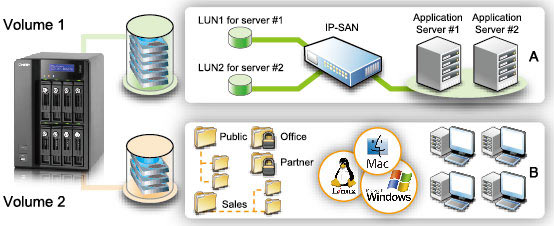
So what can you expect from most NAS products? More than you can with some pedestal or rack servers. This is supposed to be my final thoughts, and quite frankly I just barely touched the surface of features NAS products can offer. Most of my NAS reviews focus on performance, and sparingly supply feature lists. So let's recap some feature highlights that most modern NAS products offer:
-
Hot-swappable SATA-II drive storage bays, usually with 5.25-to-2.5" adapters available.
-
RAID-0, 1, 5, 6, 5 + Spare, 10, Single, and JBOD disk configurations.
-
Dual Gigabit Ethernet ports for failover redundancy or network teaming.
-
Windows Active Directory Services and NT4 support with login via Samba/AFP/FTP for domain users.
-
Linux based O/S with Apache-based web serving, usually partnered to PHP and MySQL allowing you to run dynamic web sites directly from the NAS.
-
eSATA and High-Speed USB 2.0 ports capable of connecting external hard disk drives, flash storage, and compatible printers.
Obviously the list could go on and on, especially if you noticed the multi-page layout of features and functionality. Taking into consideration that NAS products seem to all offer a feature-set that reads like a chefs shopping list, it's no wonder why these NAS products are quickly replacing Windows Server products. After all, for the price of one RAID-5 capable NAS and three 2.0 TB SATA-II HDDs you'll get four Terabytes of total storage space and still spend well below the cost of one single Windows Server Operating System and the required client access licenses.
While it's true that these NAS products will do almost everything a Windows Server platform can, they still fall very short of one important task: Windows software. Many of my clients have servers which require some form of server-side software to manage a database. Some of the most common applications that require almost no processing power but still require installation on a Windows O/S are QuickBooks and AutoCAD licensing server. Imagine the possibilities you could offer clients with a full server-in-the-box solution. I believe that this will be the next evolution in NAS products, as consumer demand more versatility out of their investment.
But there are still a few more things you can't do on a NAS, such as utilize the onboard O/S to install applications. Most NAS products utilize a Linux variant ('Nix) with little or no command interface, so even if you knew how to install from YUM or a similar repository the functionality doesn't exist. Even once that obstacle is navigated, I have a feeling that users will then demand a Windows emulator so they can install and utilize Windows-specific software on their NAS (such as license servers and anti-virus command points). It seems that these problems all revolve around side-stepping Microsoft products and licensing, which is not surprising.
QNAP TS-809 Pro Conclusion
Benchmark Reviews believes that manufacturers should be educating consumers with their product packaging, so they can make the most informed decision possible before they make the purchase. This is why we rate the retail package presentation. in terms of the TS-809 Pro Turbo NAS, this rating is above average because QNAP has done an excellent job of informing buyers with basic on-the-box specifications and feature information. The concept of truth in advertising is getting further and further away every year, but for once I can see that not every company is out to cover their product with catch phrases and slogans and instead educate the consumer. It also helps that the retail packaging is huge, and can allow for plenty of information.
If you're familiar with storage area network devices or large pedestal storage servers, then the TS-809 Pro will be a welcomed appliance to the network. There is a very small niche of enterprise-level consumers who might demand eight drive bays of storage, but that market is sure to exist. QNAP has somehow figured out a way to cram a system board, Core 2 Duo processor, DDR2 memory, two network interfaces, and eight SATA drive bays inside this relatively small chassis. The vented drive trays help focus airflow through the chassis, but I suspect a few vent holes in key locations would have also been helpful. The titanium finish is both attractive and fingerprint friendly, while the front bezel looks good and maintains straight-forward ergonomics.
QNAP took their time with the TS-809 Pro, and the end result is a very strong product destined to command any environment it's placed into. The Titanium-colored steel chassis is more than enough to protect against impact damage, while the textured flat-black bezel will avoid fine scratches unlike glossy plastic surfaces. The integrated power supply could be trouble if it ever required replacement, but thankfully QNAP offers a warranty for those willing to be patient with their service.
Ever since Gigabit Ethernet found its way into the mainstream, bandwidth throughput has gradually grown for all products involved. The QNAP TS-809 Pro enjoys the added benefits, and even without Jumbo Frame support it still performed beyond all competing NAS products we compared it against in our benchmark testing. Single-drive (Basic/JBOD) read bandwidth topped our charts at 62.5 MBps, while write-to performance was even more impressive and well ahead of the competition at 76.9 MBps. The 1GB file transfer speeds favored the EXT3 file system, while the larger 10GB file transfers preferred the EXT4 format. In our RAID-5 tests the EXT4 file system offered the fastest transfer speeds, offering 66.7 MBps read speed and 76.9 MBps write bandwidth. The list of functionality and features is nearly endless, as is the case with most NAS products available these days, and might be considered too much for one device since it's close to overwhelming for even the seasoned IT professional. All that's missing is the ability to install software to emulate a Windows environment.
Corporate Enterprise environments will appreciate the value QNAP's TS-809 Pro offers as a high-capacity NAS server. As of July 2009 the TS-809 Pro was listed at NewEgg for $1699.99 without drives. IT/IS managers can fill the TS-809 Pro with eight 2.0 TB drives giving them up to 16 Terabytes of storage, or they could use slightly smaller 1TB Seagate 7200.12 drives for less than $100 each. While storage is the principal focus for this NAS server, the many other capabilities combined with multiple drive configurations could allow separate servers to be configured on totally independent RAID arrays.
The QNAP TS-809 Pro dual-Gigabit 8-bay hot-swappable SATA-II NAS server is going to be an excellent alternative to data clusters or a file server stuffed with drives. The additional functionality should not go overlooked, because it could save your company money in other departments or cut the cost of experimenting on a sandbox server. The TS-809 Pro offers eight bays of SATA storage, allowing RAID configuration possibilities most other all-in-one products cannot offer, and satisfy the storage-space intensive Enterprise market at the same time. If you're an IT professional or data center manager looking to offer a network-attached mass-storage server with redundant data arrays and network failover features, the QNAP TS-809 Pro is perfect for storage-centric operational needs. Based on unmatched total storage capacity, best-ever transfer speed performance, and a full feature-set of functions, I give my recommendation to the QNAP TS-809 Pro NAS for storage-centric operational needs at a reasonable price. There are currently no other NAS solutions available that can offer eight-disk capacity on the market, and QNAP leads the pack in NAS software functionality.
Pros:
+ 62.5/76.9 MBps single-disk read/write performance
+ Built-in iSCSI Target Service
+ AES 256-bit Volume-based Encryption
+ Online RAID Capacity Expansion and Level Migration
+ 8-Bay hot-swap SATA storage up to 18TB+
+ Dual Gigabit Ethernet NICs offer teaming and failover safety
+ Pre-installed PHP+MySQL and Apache web server
+ RAID-0/1/5/6/5+Spare/JBOD disk configurations
+ No wiring needed; SATA and power on backplane
+ LCD Panel configures basic information without web interface
+ Rugged titanium-painted steel chassis provides durability
+ Four total High-Speed USB 2.0 ports + USB Copy port
+ Frequent firmware development and free software support
+ 231-page PDF user-manual offers incredibly detailed guidance
+ One-year product warranty with free tech support
+ Outstanding new v3 administration GUI
Cons:
- Lacks eSATA device connectivity
- Packaged with obsolete CAT-5e Ethernet patch cables
- Jumbo Frame functionality not available
- Integrated PSU could cause trouble if replacement is needed out of warranty
- High-stress applications cause higher operating temperatures
- Lacks ZFS file system support
Ratings:
-
Presentation: 9.25
-
Appearance: 9.50
-
Construction: 9.50
-
Functionality: 9.75
-
Value: 7.00
Final Score: 9.0 out of 10.
Excellence Achievement: Benchmark Reviews Golden Tachometer Award.
Questions? Comments? Benchmark Reviews really wants your feedback. We invite you to leave your remarks in our Discussion Forum.