
QNAP TS-259 Pro Turbo NAS Server
QNAP TS-259 Pro NAS Server Review
Network storage is a concept that many people use without a second thought in corporate environments, but what about at home? Count the number of PCs in your house and tell me it wouldn't be nice to have one central location for backups, video and music storage, and the inevitable centralized grocery store list(s). All that and much more is readily available in a Network Attached Storage server. The QNAP TS-259 Pro NAS server uses a powerful and energy-efficient 1.66GHz Intel Atom D510 processor with 1GB of DDR2-800 system memory to eliminate any potential bottlenecks in the device itself. Dual Gigabit Ethernet network interfaces allow failover safety and teaming, while two SATA drive bays offer single disk, JBOD, and RAID 0/1 configurations. Benchmark Reviews examines the QNAP TS-259 Pro in detail here and compares its performance against a wide variety of network attached storage servers.

Three features dominate the discussion of network storage hardware: data capacity, data security, and data transfer speed. On the software side, the current crop of NAS devices offer a dizzying array of applications to help manage and distribute the data, but they're of limited use if you need to be an MSCSE to figure them out. QNAP has always aimed for the high end of the NAS server market with performance and features such as dual Gigabit Ethernet with failover, a full range of RAID functionality, and a diverse, feature-rich user interface. They've recently upgraded the software suite that is supplied with the majority of their product line, and we'll look at both its capabilities and ease of use.
I mentioned the corporate IT environment earlier, and QNAP has plenty of solutions for that market. Today though, we're going to look at a NAS device that is scaled down for the small office/home office (SOHO) user. My home fits this description to a tee, as my wife and I have a small business, have 5 computers sharing our network, and have been using a NAS for the last five years as a file server and to manage our backups. My first impression is that QNAP trimmed down size and capacity, but the speed, security, and features of the TS-259 Pro NAS server are all top ranked. Benchmark Reviews has tested a number of QNAP products: the QNAP TS-119 NAS single-disk offering made for home users, and the Goliath QNAP TS-809 Pro 8-Bay NAS for the storage needs of large businesses. Most recently we tested a 4-bay QNAP TS-459 Pro Turbo-NAS, which may yet turn out to be the best compromise for some people. Let's see how a two-bay device compares to its big brothers and little sisters.
The Most Affordable and Flexible Virtualization Solution
The TS-259 Pro is certified as compatible with VMware vSphere4 (ESX 4.0 and above) virtualization platform. The NAS can be utilized as the networked shared storage of VMware virtualization environments and Windows cluster servers. Comparing with traditional SAN (Storage Area Network), the Turbo NAS is a competitive alternative with much lower setup and maintenance costs in an IP SAN.
The Feature-rich and Integrated Applications for Business
The NAS supports file sharing across Windows, Mac, Linux, and UNIX platforms. Versatile business applications such as file server, FTP server, printer server, web server, and Windows AD support are provided. The dominant features, such as WebDAV, Share Folder Aggregation (also known as DFS), IPv6 and IPv4 dual-stack, Wake on LAN, schedule power on/ off, HDD S.M.A.R.T, comprehensive log systems, and policy-based unauthorized IP blocking are all included features of a QNAP NAS server.
About QNAP Systems, Inc.
QNAP Systems, Inc. (QNAP) is a devoted and dominant provider of Internet Appliance products. With our solid and integrated expertise in the Linux embedded platform, QNAP has released more than 30 models for the network storage and digital network surveillance series over the past 6 years, providing our consumers with high performance and high reliability storage, backup, and surveillance solutions. Today, QNAP continues to lead the industry with our innovation in design and technology.
QNAP Turbo NAS Features
The TS-259 Pro is a powerful 2-bay network attached storage (NAS ) server, which is designed to provide an affordable and easy-to-management solution with iSCSI service for virtualized and clustered environment. The TS-259 Pro also offers versatile business applications to maximize the efficiency of the data center in a small-scale business environment.
iSCSI for Virtualization Deployments
The Turbo NAS provides flexible and secure storage server deployment with the following enhanced iSCSI features:
* NAS + iSCSI storage solution
The Turbo NAS can serve as a NAS for file sharing and iSCSI storage concurrently.
* Flexible multiple LUNs management
The NAS supports multiple LUNs (Logical Unit Numbers) and iSCSI targets. The LUNs can be flexibly mapped to, unmapped from, and switched among different iSCSI targets.
* Secure IP SAN environment deployment
Designed with CHAP authentication and LUN masking, the advanced ACL (Access Control List) offers you the capability to block unauthorized access from the initiators.
* Designed for virtualized and clustered environments
Comparing with the high cost of Fibre Channel SAN, the Turbo NAS is an affordable system that can be deployed as a storage center for virtualized and clustered server environments, such as VMware and Microsoft Windows Failover Cluster.
Advanced RAID Management with Hot-swap Design
The NAS offers advanced RAID 0, 1, Single, and JBOD disk configurations. It also supports hot-swap design that a failed drive can be replaced by hot swapping without turning off the server. Besides, the best-in-class RAID on the NAS brings users a higher level of data security by allowing one more hard drive failure than other NAS of the same level.
Online RAID Capacity Expansion
The storage capacity of a RAID configuration can be expanded by replacing the hard drives with larger ones. All the data will be kept and seamlessly moved to the newly installed hard drives. There is no need to turn off the server during the process.
Online RAID Level Migration
You can upgrade the disk configuration to higher RAID level with the data retained. There is no need to turn off the server during the process.
Virtual Disk Drive (VDD) adds flexibility to storage expansion along with ease of management
The unique "Virtual Disk Drive" adds flexibility to expand the capacity of NAS. By using the built-in iSCSI initiator, the NAS can connect to other iSCSI targets on the network and turn them into virtual disks, which become multiple single volumes on the NAS. Up to 8 virtual disks can be stacked. The NAS serves as the storage stack chaining master. The user only needs to connect to this single entry (QNAP NAS) and is able to reach and use all the iSCSI target storages on the network.
Built-in iSCSI Target Service
The TS-259 Pro can act as a NAS and iSCSI target server at the same time. It provides a cost-efficient iSCSI solution to set up an IP-SAN. You can make use of the built-in iSCSI target service to add up to 8 iSCSI devices. Different iSCSI Target LUNs (Logical Unit Number) can be defined as storage expansion or backup destination of the existing application servers, such as database servers and mail servers.
Furthermore, the "Virtual Space Allocation" (Thin Provisioning) feature is provided which allows you to flexibly allocate the capacity of iSCSI LUN (Logical Unit Number). When the physical storage capacity of the volume is going to be full, you can easily expand the storage capacity by "Online RAID Capacity Expansion", or adjust/ remove the current unused volume space according to the demands.
UPS Support
The NAS supports the majority of USB UPS devices (usbhid-ups supported) which enables the users to store the data in time and avoid critical data loss when power outage occurs during data transfer.
QNAP Backup Software - NetBak Replicator
The backup software, NetBak Replicator, is provided for the NAS users to perform real-time synchronization or schedule backup from multiple PCs to the NAS.
3rd Party Backup Software Ready
The NAS works well with other backup software, e.g. Acronis True Image, CA BrightStor ARCserve Backup, EMC Retrospect, Symantec Backup Exec, and LaCie Silverkeeper.
Encrypted Remote Replication
The data on the NAS can be backed up to or from another Turbo NAS over the network securely.
One Touch USB Auto Copy
The one touch button can be configured to trigger instant data backup from the external USB device to the NAS or the other way round (applies to the USB device connected to the front USB port of the NAS only).
Sharing Files across Windows, Mac, Linux, and UNIX
The NAS is designed for users to share the files across Windows, Mac, Linux, and UNIX environment.
Support Windows Active Directory
The Windows AD feature enables server manager to import user accounts from AD domain to NAS to reduce the time and effort for account setup, and users can use the same set of login name and password.
Web File Manager The NAS provides Web File Manager for you to easily download, upload, and manage the files on the server by web browser.
Ease of User and Share Folder Management
The NAS supports batch creation of users and share folders to save the time and effort of the server manager in account and folder creation. For the security of Windows network environment, server managers can hide or show network share folders.
Hard Disk Standby
You can configure the hard disks to enter standby mode if there is no disk access within the specified period.
Schedule Power on/ off
The flexible schedule power on/off feature is now provided on the NAS for IT administrators to manage the NAS server's up time according to the working hours. You can set the time for automatic system power on, power off, or restart on any days of the week.
Secure data storage, access, and sharing
- Comprehensive event logs: Detailed logs of file-level data access to the NAS via samba, FTP, AFP, HTTP, HTTPS, Telnet, and SSH, and networking services accessed by online users are all recorded.
- SSL security (HTTPS): The NAS can be accessed and configured by web browser securely.
- Remote login to the NAS by SSH (secure shell) or Telnet connection is supported.
- Secure FTP: The data can be transmitted with SSL/TLS (explicit) encryption. Passive FTP port range setup is also supported.
- Write-only access right on FTP server: The third party partners are allowed to upload data to the NAS but not able to read or edit the data on FTP server.
Policy-based Automatic IP Blocking
To prevent the NAS from malicious attacks, the server manager can create an IP filter policy to allow, deny, or auto-block the IP address or network domain which attempts to connect to the NAS via SSH/ Telnet/ HTTP(S)/ FTP/ samba/ AFP.
The most comprehensive support for numerous brands of IP cameras
The Surveillance Station of QNAP NAS supports all the leading network camera brands such as AXIS, D-Link, IPUX, LevelOne, Linksys, Panasonic and Vivotek etc. By using particular models, users can use two-way video and audio monitoring and recording, and smart PTZ control to control the monitoring direction via the web interface. Each of the supported cameras has been put through stringent tests with the NAS series in QNAP's laboratory to guarantee 100% compatibility and reliability with all these camera brands.
QNAP TS-259 Pro NAS Hardware
|
CPU |
Intel Atom Processor D510 1.66GHz (Dual-Core) |
|---|---|
|
DRAM |
1GB DDR2-800 DRAM (1x - SODIMM) |
|
Flash Memory |
512MB DOM |
|
HDD Form Factor |
Accepts 2.5" or 3.5" SATA |
|
HDD Tray |
2 x Hot-swappable and lockable tray |
|
LAN Port |
2 x Gigabit RJ-45 Ethernet port |
|
LED Indicators |
HDD 1, HDD 2, LAN, eSATA |
|
USB |
5 x USB 2.0 port (Front: 1; Back: 4) |
|
eSATA |
2 x eSATA port (Back) |
|
Buttons |
System Power, USB One-Touch-Backup, Reset |
|
Form Factor |
Tower |
|
Dimensions |
150 (H) x 102 (W) x 216 (D) mm |
|
Weight |
Net weight: 1.74 kg (3.84 lbs) |
|
Sound Level (dB) |
w/o HDD installed: 33.3 dB |
|
Power Consumption (W) |
Sleep mode: 16W |
|
Temperature |
0~40°C |
|
Humidity |
0~95% R.H. |
|
Power Supply |
Input: 100-240V AC, 50/60Hz, Output: 60W |
|
Secure Design |
K-lock security slot for theft prevention |
|
VGA |
Reserved VGA interface for maintenance |
|
Fan |
1 x smart fan (70 mm, 12V DC) |
QNAP TS-259 Pro Software
|
Operating System |
Embedded Linux |
|---|---|
|
Supported Operating System |
Microsoft Windows 2000, XP, Vista (32-/ 64-bit), Windows 7 (32-/ 64-bit), Server 2003/ 2008 |
|
Apple Mac OS X |
|
|
Linux & Unix |
|
|
File System |
Internal HDD: EXT3, EXT4 |
|
External HDD: EXT3, EXT4, NTFS, FAT32 |
|
|
Networking |
TCP/IP (IPv4 & IPv6: Dual Stack) |
|
Dual Gigabit NICs with Jumbo Frame |
|
|
Multi-IP Setting, Port Trunking / NIC Teaming |
|
|
DHCP Client, DHCP Server |
|
|
Protocols: CIFS/ SMB, AFP(3.1), NFS, FTP, HTTP, HTTPS, Telnet, SSH, iSCSI and SNMP |
|
|
Network Service Discovery (UPnP, Bonjour) |
|
|
Network File Sharing |
CIFS/ SMB (plus DFS support), AFP, NFS, FTP, WebDAV |
|
Backup Solution |
USB One Touch Backup (Import/ Export) |
|
Apple Time Machine Support |
|
|
Block-level Remote Replication |
|
|
QNAP NAS servers |
Data Backup to External Storage Device |
|
Data Backup to Cloud Storage (Amazon S3) |
|
|
Security IP Filter |
|
|
Network Access Protection with Auto-blocking |
|
|
HTTPS Connection |
|
|
FTP with SSL/ TLS (explicit) |
|
|
Encrypted Remote Replication (Rsync over SSH) |
|
|
Importable SSL Certificate |
|
|
Instant Alert E-mail and SMS |
|
|
Disk Management |
Single Disk, JBOD, RAID 0 / 1 |
|
Online RAID Capacity Expansion |
|
|
Online RAID Level Migration |
|
|
HDD S.M.A.R.T. |
|
|
Bad Block Scan |
|
|
RAID Recovery |
|
|
Bitmap Support |
|
|
iSCSI |
Max. iSCSI Target: 256 |
|
Disk Expansion |
Virtual Disk Drive (via iSCSI Initiator) |
|
Server Virtualization & Clustering |
Supports VMware vSphere (ESX/ ESXi 4.0 and above) |
|
Supports Windows Server 2008 Hyper-V & Failover Clustering |
|
|
Power Management |
Wake on LAN |
|
Scheduled Power on/ off (max. 15 settings) |
|
|
Automatic Power on after Power Recovery |
|
|
Access Right Management |
Max. User Accounts: 2,048 |
|
Max. Groups: 256 |
|
|
Max. Share Folders: 256 |
|
|
Batch Creating Users |
|
|
Import User List |
|
|
User Quota Management |
|
|
Web Administration |
AJAX-based User Interface |
|
HTTP/ HTTPS Connections |
|
|
Alert Notification (Email & SMS) |
|
|
Smart Fan Control |
|
|
DDNS |
|
|
SNMP (v2 & v3) |
|
|
UPS Support with SNMP Management (USB) |
|
|
Resource Monitor |
|
|
Network Recycle Bin for CIFS/ SMB and AFP |
|
|
Comprehensive Logs (Events & Connections) |
|
|
Real-time Online User List |
|
|
Syslog Client |
|
|
Backup and Restore System Settings |
|
|
Supported Web Browsers |
Internet Explorer 7 & 8 or Later |
|
Firefox 3 or Later |
|
|
Safari 3 & 4 or Later |
|
|
Google Chrome |
|
|
Multilingual Support |
Chinese (Traditional & Simplified), Czech, Danish, Dutch, English, Finnish, French, German, Italian, Japanese, Korean, Norwegian, Polish, Russian, Spanish, Swedish |
Powerful All-in-one server
|
File Server |
File Sharing across Windows, Mac OS and Linux/ Unix Platforms |
|---|---|
|
Protocols: CIFS/ SMB, AFP(3.1), NFS, FTP, HTTP, HTTPS |
|
|
QNAP Web File Manager |
|
|
FTP Server |
FTP over SSL/ TLS (explicit) |
|
Max. Concurrent Connections: 256 |
|
|
FXP Supported |
|
|
Passive FTP Port Range Control |
|
|
FTP Bandwidth & Connection Control |
|
|
Unicode Support |
|
|
Web Server |
HTTP/ HTTPS Connections |
|
Supports WebDAV Connection |
|
|
Importable SSL Certificate |
|
|
Database Server |
Built-in MySQL Server |
|
Web-based Management via phpMyAdmin (QPKG) |
|
|
Backup Server |
Remote Replication Server (over Rsync) |
|
Apple Time Machine Support |
|
|
QNAP Client Backup Application - NetBak |
|
|
3rd Party Backup Software Support: Acronis True Image, CA Brightstor, ARCserve Backup, EMC Retrospect, Symantec Backup Exec, LaCie Silverkeeper |
|
|
Printer Server |
Network Printer Sharing (max: 3, USB) |
|
iTunes Server |
Audio and Video Sharing |
|
Smart Playlist for iTunes Client (Windows & Mac OS) |
|
|
UPnP Media Server |
Built-in TwonkyMedia Server (DLNA 1.5 Certified) |
|
Real-time & Background Photo Transcoding |
|
|
Supports UPnP/ DLNA Media Players |
|
|
Supported Formats |
|
|
Download Station |
PC-less BitTorrent/ FTP/ HTTP Download (Up to 500 tasks) |
|
BitTorrent Download |
|
|
HTTP/ FTP Download |
|
|
QNAP Download Management Software: QGet |
|
|
Surveillance Station |
Supports 4 IP cameras (not included) for network surveillance |
QPKG Center Software Expansion
Explore the Unlimited Possibilities of Your NAS with QPKG
The Network Attached Storage (NAS) used to refer to a basic network storage device for simple data sharing but now with the high performance SoC and the advantage in power-saving design, it is redefined as a powerful embedded system that allows the possibilities of offering numerous fascinating applications. Over the past years, QNAP has successfully developed a series of All-in-One NAS servers for power users and business users providing a wide variety of software applications. Besides those QNAP provides, many other software packages are also developed in Linux open source community that power users are able to install them on their NAS to further enrich the functions. However, this is only limited to those advanced users or software developers who are more familiar with Linux systems. In order to let majority of general QNAP NAS users to also utilize their NAS servers with those software packages already developed by the open source community, QPKG platform and development framework is then introduced by QNAP.
Inspired from the powerful software package management system in Linux (yum, dpkg, etc.), but unlike those running in the modern PCs today, QPKG is designed and fine-tuned for running on Linux embedded systems like NAS along with many popular software packages ready for install. Besides, in order to publish your software in our official repository all the software packages will be verified by QNAP to prevent from others to embed malicious codes for system intrusion or potential risks of data damage. Therefore QNAP NAS users may enjoy these software packages developed by the community in a safe way through an installation method as easy as firmware update just like you would install/uninstall software in the Windows environment without the need to go through the complicated process.
QNAP has introduced some popular QPKG software packages as the demonstration purpose. Below are the quick introductions on each of them:
MLDonkey (eMule)
MLDonkey (eMule) is a door to the 'donkey' network, a decentralized network used to exchange big files on the Internet and present most features of the basic Windows donkey client. (e.g., eMule)
Slim Server on Turbo Station (with SqueezeCenter 7)
Squeeze Center is the server software from Slim Device that manages common digital audio formats (.mp3, .flac, .ogg, etc.) and streams them to its players. Slim Server On Turbo Station (SSOTS) developed by flipflip is an add-on to the Turbo Station's firmware which provides the environment to run Squeeze Center 7 on it.
Optware Ipkg (Itsy Package Management System)
Ipkg, or the Itsy Package Management System, is a lightweight package management system designed for embedded devices. It is used in the Unslung operating system for the Linksys NSLU2, in OpenWRT, OpenMoko, Gumstix, iPAQ and now on QNAP NAS too.
SABnzbd+
SABnzbd+ is a multi-platform binary newsgroup downloader written in Python language. The program works in the background and simplifies the downloading, verifying and extracting of files from Usenet. SABnzbd+ does not search for files, instead NZB files (similar to .torrent files, but for Usenet) are fed to SABnzbd+ from sites like newzbin.com, binsearch.info and tvnzb.com (Requires prior installation of Python)
Python
Python is a general-purpose, high-level programming language. Its design philosophy emphasizes programmer productivity and code readability.
WordPress
WordPress is a free, open-source personal publishing system that allows you to easily create a complex blog, or web log, on your site. Written in PHP and supported by a MySQL database, WordPress offers intuitive administrative tools and sophisticated design features that make it easy to develop and integrate a personal or professional blog on your site.
Joomla CMS
Joomla! is a free, open source content management system for publishing content on the world wide web and intranets. The system includes features such as page caching to improve performance, RSS feeds, printable versions of pages, news flashes, blogs, polls, website searching, and language internationalization. Benchmark Reviews is built from the Joomla! CMS.
phpMyAdmin
phpMyAdmin is an open source tool written in PHP intended to handle the administration of MySQL over the Internet. Currently it can create and drop databases, create/drop/alter tables, delete/edit/add fields, execute any SQL statement, and manage keys on fields.
xDove Email Server
XDove named after XMail & Dovecot the 2 open source offerings that are combined to provide a complete set of Email server functionalities which is one-click installable on your QNAP NAS. XDove not only provides SMTP, POP3 and IMAP services, it also comes with a variety of features like multiple virtual domains and accounts, AJAX webmail with extended functionalities including personal folders, address book, calendar and real-time chat among users under the same mail domain. Besides the mail services XDove offers scheduled backup and restore of your mailboxes from multiple domains which gives you an extra protection on the top of your RAID data redundancy.
AjaXplorer
AjaXplorer is a file explorer for remotely managing files on a web server or operation as a simple file-sharing system. Its rich layout and actions make it easily accessible to virtually any end-user. The AJAX based interface, providing streamlined and intuitive functionalities, similar to that of a standard file-system explorer on any operating system.
Software Expansion via QPKG Platform
The QPKG software package platform enables the users to maximize the usage of Turbo NAS by installing additional software packages developed from the users and community worldwide. This can be done by simple "download & install" clicking without going through any complicated process.
Closer Look: QNAP TS-259 Pro
Most SOHO network administrators don't need four or more drive bays to manage their Small Office/Home Office storage needs, unless they're doing video editing, post-production or other data intensive tasks. With 2 Terabyte drives readily available in both performance and Green versions, two bays will most likely house all the files that 2-3 people can create in the span of 3-5 years. That's the average planned life cycle for modern IT equipment, at least for primary use. It may get re-purposed, or upgraded or passed down because it still has life left in it, but in five years almost every piece of IT hardware you own now will have evolved to the point where the new capabilities and features are irresistible. Spoken like the true gear junkie that I am... When we get to "Final Thoughts", I'll let you see my five year old NAS and you can tell me whether it needs to be replaced with new-tech.
The QNAP TS-259 Pro shares the same technology inside and out as the larger TS-459 Pro, but the slim profile sets it apart and it doesn't cast such an imposing shadow. It also weighs a lot less, with only two drives bays to fill. The empty TS-259 Pro NAS unit weighs less than 4 LBS empty, and only gets up to about 7 LBS when filled with densely packed hard drives. If I had to describe it visually to someone who knew nothing about NAS devices, I'd tell them it looks like a slightly shrunken toaster with a smart, German design. Oh, and the toast slides in from the front. Clever, eh?

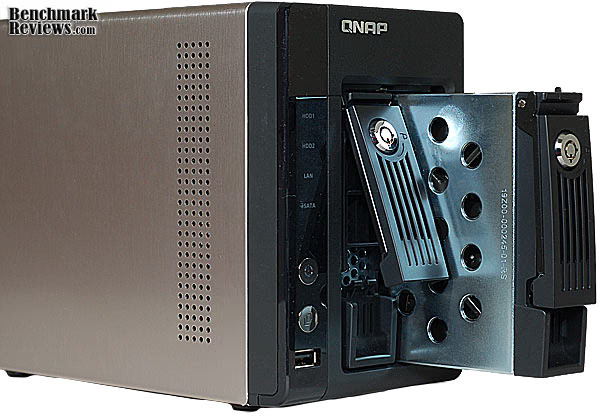
Two SATA drives can be installed as a single disk, RAID 0 (Disk Striping), RAID 1 (Disk Mirroring), and JBOD (Linear Disk Volume); all featuring iSCSI target services. Each drive can be formatted using FAT, NTFS, EXT3, or EXT4 file systems, and also offers AES 256-bit encryption. Our tests utilize EXT4-formatted disks without encryption. QNAP uses a steel-framed tray with black plastic latches for each drive bay on the TS-259 Pro. Each tray stands on edge, slides smoothly into the NAS and locks firmly into place. If additional security is desired, the barrel locks can secure the drives in place; they are keyed alike, and two duplicate keys are provided. The drive trays easily accommodate 2.5" drives without any additional hardware; QNAP does not recommend mixing 3.5" and 2.5" drives in the same enclosure. They do offer some small form factor units that are specifically designed for 2.5" drives, and those models are less expensive than the full size units. It's worth investigating them if handling 2.5" SATA drives is a requirement for you.
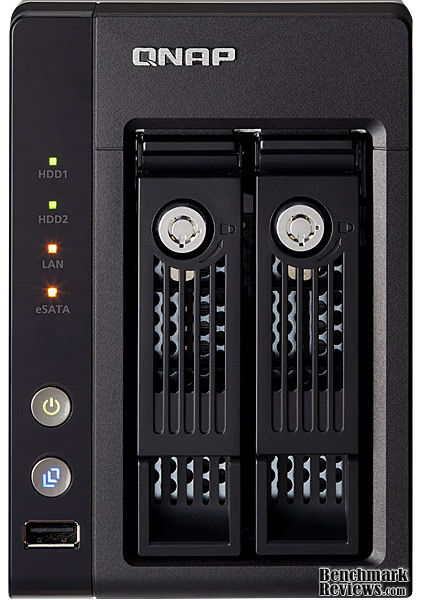
QNAP keeps the front panel clutter to a minimum on the TS-259 Pro, forgoing any LCD screens, and there are only a few buttons and indicator lights on the bezel. A single power button and USB (2.0) copy button and port are located on the lower left corner of the Turbo NAS. These buttons have status indicator lights built into them. Above these are four status lights which indicate activity for HDD1 and HDD2, LAN activity, and the presence of an eSATA device connected on the back panel.
There's a single strip of ventilation holes on the left side of the QNAP TS-259 Pro Turbo NAS. This is the primary entry point for cool air to the dual-core Intel Atom processor, as the system board is located on this side of the unit. Fresh air also enters through the drive trays, passes over the HDDs and is then exhausted out through a 70mm cooling fan on the rear of the unit.

The QNAP TS-259 Pro Turbo NAS 2-Bay server is equipped with an Intel Atom-D510 dual-core processor, which is clocked to 1.66GHz, and 1GB of DDR2 system memory. This is near the top-of-the-line spec for CPU and memory in QNAP NAS servers, and it should provide the maximum performance attainable in a two-bay unit. QNAP employs a dual-redundant 512MB Disk-on-Module (DOM) flash drive to store firmware and applications on the TS-259 Pro motherboard. We'll take a peek at this unusual chip module when we take a look inside, in the next section of the review.
Twin eSATA expansion ports are available on the QNAP TS-259 Pro, which permits the connection of additional high-speed storage appliances. Dual Gigabit Ethernet RJ-45 ports are provided, which can be configured in a variety of load balancing configurations, or as two separate adapters with independent MAC addresses. Each port is powered by an Intel 82574 Ethernet Controller, which offers a full set of features to take full advantage of whatever network environment the server is placed in. The IEEE 802.3ab standard (1000Base-T) interface enables Gigabit Ethernet to run over Category 5 copper cable and can be readily used in most 10/100 Ethernet networks without changing cables. The TS-259 Pro supports 4074, 7418, and 9000 bytes for MTU when Jumbo Frames are enabled. Note that Jumbo Frames are only available in a Gigabit network environment. Four Hi-Speed USB 2.0 ports are positioned beside the eSATA ports, and a Kensington lock hole along the bottom edge allows administrators to tether the enclosure.

QNAP uses a Delta Electronics Power AC adapter on the TS-259 Pro. The model DPS-60PBA is rated for 12V and 5A output. To measure isolated NAS power consumption, Benchmark Reviews uses the Kill-A-Watt EZ (model P4460) power meter made by P3 International. At idle standby mode the QNAP TS-259 Pro consumed 18 watts of electricity, which is on-par with the 19W specified. With two 750GB hard drives installed, formatting the TS-259 Pro NAS drives during initial system setup drew 39W according to the Kill-A-Watt power meter.
Now that we've had a thorough tour of the exterior, let's do a tear-down and see what the insides look like. The next section covers Insider Details.
Insider Details: QNAP TS-259 Pro
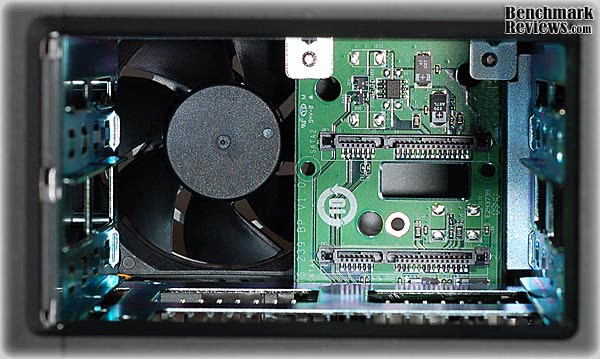
The first inner workings of a TS-259 Pro that you're likely to see is the opening of the drive bay, which is rather small, compared to some of the monster drive arrays that are available. The metal guide rails can be seen on the left and right here, and the PCIe extender card that carries the two SATA power and data connectors is right where it should be. It's firmly held in place by two screws on one end and the PCIe connector on the other. The fan has an unobstructed view of the drive bay, so any heat being generated by the drives can easily be pulled out the back of the enclosure.
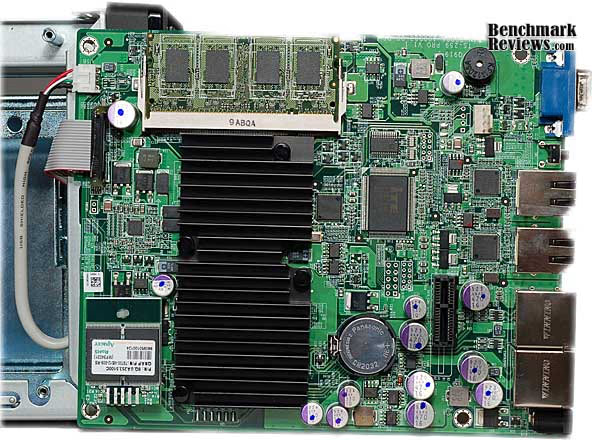
Once the brushed steel top and side cover is removed, you can see the main server board installed along the left side of the chassis, parallel to the drive bays. The back side of the board faces the exterior, and only a few components are mounted on the back of the PC Board. All of the rear panel connectors are mounted directly to the board, for a reliable and secure connection. There is a full size clear, flexible plastic shield attached to the board, to prevent the metallic side cover from shorting out any circuits in the event of some extreme rough handling. The fan mounts to the rear panel and is a high quality PWM type, as evidenced by the 4-wire connection.
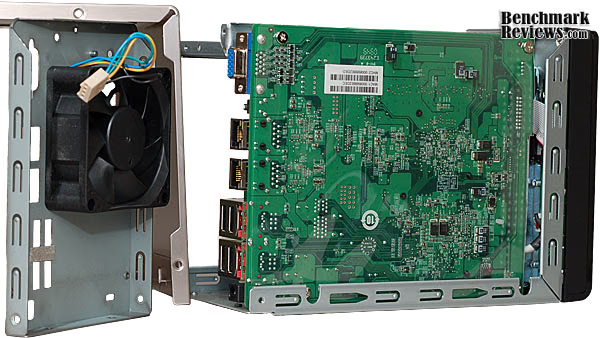
Swinging the board free from the chassis, you can get a better look at how it sits inside, on threaded standoffs at each corner. A large, but thin black heatsink covers the CPU. No other components require extra cooling help to stay within normal operating temperature. You can also get a better idea of how the daughter-board for the SATA drive connections interfaces with the main board. There are only a few wired connections to the main board: a ribbon cable for the front panel controls and indicators, a shielded four conductor cable for the USB 2.0 port, and the four pin fan connection.
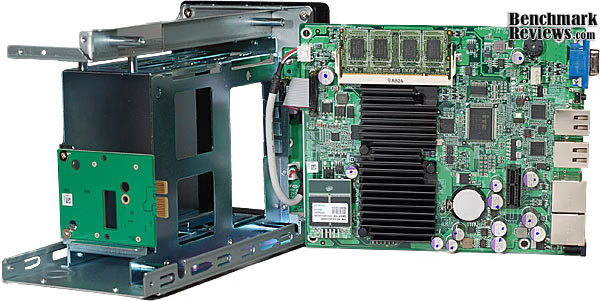
1GB of DDR2-800 memory is contained on one standard SODIMM DRAM module, inserted in a typical memory slot with locking tabs on each side. The chips in my sample were from Hynix and carried a CL6 latency spec.

QNAP employs a dual-redundant 512MB Disk-on-Module (DOM) flash drive to store firmware and applications on the TS-259 Pro. In case of a system crash, if the data on the operating DOM gets corrupted, the NAS will reboot with the spare DOM. Once it's recovered and stable, it will replace the data on the corrupted DOM.
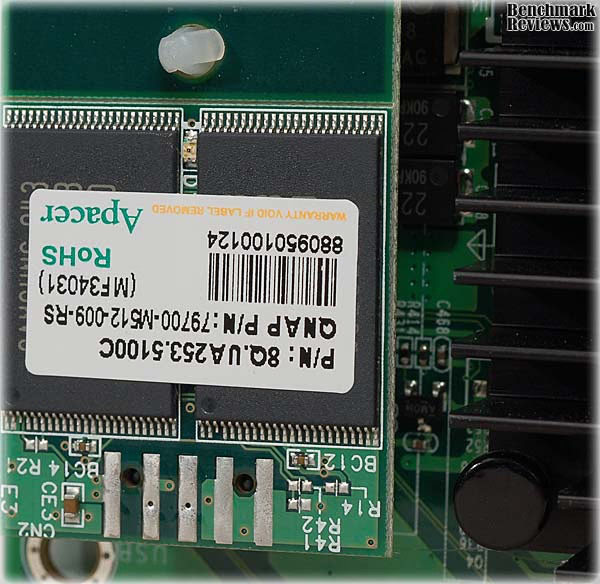
An ITE IT8718F Super I/O chip controls many of the functions of the QNAP TS-259. The chip supports a wide range of functions, including:
-
Serial Flash I/F for BIOS
-
Multi sensor, multi curve fan control
-
Enhanced Hardware Monitor
-
SmartGuardian Controller
-
Two 16C550 UARTs
-
Keyboard Controller
-
48 General Purpose I/O Pins
-
Watchdog Timer
Intel supplies the two individual Ethernet controllers for the dual Gigabit connections. The 82574 Ethernet Controller offers a large feature set, and is able to take full advantage of whatever network environment the server is placed in. Intel has long been a dominant force in the NIC market for corporate IT, and QNAP wisely chose a highly compatible and high performing component for this critical subsystem. The Intel 82574 provides a fully-integrated Gigabit Ethernet Media Access Control (MAC) and Physical Layer (PHY) port, all interfacing with the standard PCIe architecture on the system board.
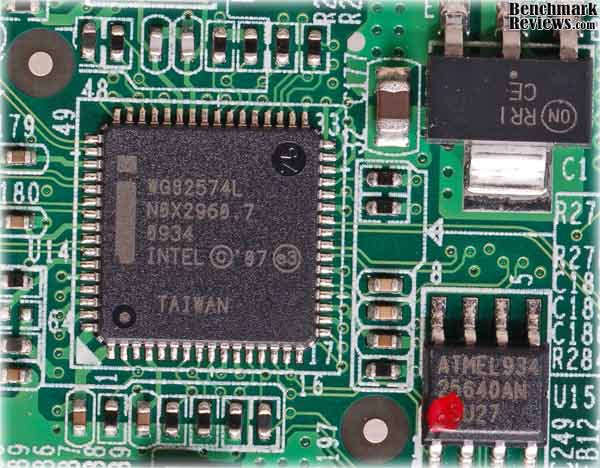
Each IEEE 802.3ab standard (1000Base-T) interface enables Gigabit Ethernet to run over Category 5 copper cable and can be readily used in most 10/100 Ethernet networks without changing cables.
We've seen the ins and outs of the hardware, now let's dive into the v3 User Interface that's supplied by QNAP. I'll give you a hint: there's a lot there, but it's all very modular and you can easily find and configure the functions you need.
QNAP v3 User Interface
QNAP has recently launched the v3 Graphical User Interface on their Turbo NAS servers. For the past three years, which is essentially the time period NAS products have gained in popularity to the point where network administrators consider them mainstream appliances, the one company that has always set the standard for software and menu navigation has been QNAP. So it shouldn't be a surprise that a new version of their already-popular software interface is even better than the last.
QNAP is equally happy with the results, and has launched a demo site especially for the v3 GUI firmware, and as of this writing a new v3.2 beta firmware is available with expanded functionality. If you're considering a QNAP NAS product, I highly recommend that you browse over the demo site to get a better understanding of how nice the new GUI is.
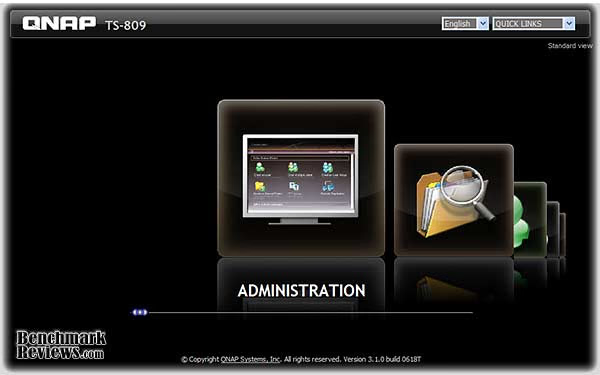
The very first thing I noticed different once I updated the firmware was a new Administration logon screen. For a moment, I thought that I had logged into my media server, which has a similar iPhone-ish feel to it. The QNAP v3 User Interface borrows the nice rounded GUI design made popular by the Apple smart phone, and adds a myriad of sub-menus behind it.
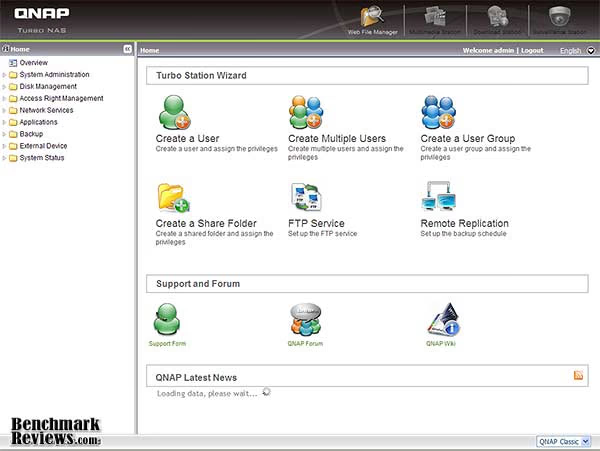
Finding what you need has never been so easy! Whenever I test NAS products, the very first thing I must do (after updating the firmware) is to configure network settings and build the drive array. Usually this takes a few minutes of searching through the menu, even the older QNAP v2 GUI took some time, but the latest navigation interface is unbelievably easy to work with.

While many of the new aspects behind QNAP's v3 Graphical User Interface are cosmetic, it's nice to have the ability to customize the interface and build a color theme that best suites your mood. Normally I wouldn't pay this much mind, but when you work in the GUI so much that it becomes a regular stop on your Web Favorites list, it's nice to have a things tuned to your own needs. QNAP offers a live video demonstration of the v3 firmware GUI for those wanting more hands-on.
Network Terminology
Benchmark Reviews has decided to abandon our effort to educate readers on the difference between a Gigabyte, and a Gibibyte. This article will use the common metric terminology for data measurement, instead of the binary units we've used in past articles. Sadly, too many people are more interested in comfortable reading, even if it means being technically inaccurate. But for anyone who might still be interested in learning real technical terms relevant to the industry, I've added a small explanation below:
The basic unit data measurement is called a bit (one single binary digit). Computers use these bits, which are composed of ones and zeros, to communicate their contents. All files are stored as binary files, and translated into working files by the Operating System. This two number system is called a "binary number system". In comparison, the decimal number system has ten unique digits consisting of zero through nine. Essentially it boils down to differences between binary and metric measurements, because testing is deeply impacted without carefully separating the two. For example, the difference between the transfer time of a one-Gigabyte (1000 Megabytes) file is going to be significantly better than a true binary Gigabyte (referred to as a Gibibyte) that contains 1024 Megabytes. The larger the file used for data transfer, the bigger the difference will be.
Have you ever wondered why your 500 GB hard drive only has about 488 GB once it has been formatted? Most Operating Systems utilize the binary number system to express file data size, however the prefixes for the multiples are based on the metric system. So even though a metric "Kilo" equals 1,000, a binary "Kilo" equals 1,024. Are you confused yet? Don't be surprised, because even the most tech savvy people often mistake the two. Plainly put, the Kilobyte is expressed as 1000 bytes, but it is really comprised of 1,024 bytes.
Most network engineers (myself included) are not fully aware that the IEC changed the way we calculate and name data chunks when they published the new International Standards back in December 1998. The International Electrotechnical Commission (IEC) removed the old metric prefixes for multiples in binary code with new prefixes for binary multiples made up of only the first two letters of the metric prefixes and adding the first two letters of the word "binary". For example, instead of Megabyte (MB) or Gigabyte (GB), the new terms would be Mebibyte (MiB) or Gibibyte (GiB). While this is the new official IEC International Standard, it has not been widely adopted yet because it is either still unknown by institutions or not commonly used.
Personally, I think the IEC took a confusing situation and simply made it more of a mess. As I mentioned earlier, the Kilobyte was previously expressedas 1000 bytes, even though it was really comprised of 1,024 bytes. Now, the Kilobyte really is expressed correctly as 1000 bytes, and the Kibibyte is the item comprised of 1,024 bytes. In essence, the IEC just created a new name for the binary item and left the existing name for the metric item. Hopefully that clears things up, and you can thank Benchmark Reviews for training the next generation of Network Engineers.
NAS Testing Methodology
Although the device we tested can accommodate several different disk configurations, all of our current test data has been with basic (single) disk and RAID-5 configurations. Since this two-bay device cannot support RAID-5, I tested only the single disk mode.
Connected directly to the Realtek RTL8112B PCIe Gigabit Ethernet NIC in the test-bench system by a ten-foot CAT6 patch cable, the NAS product receives one test transfer followed by three timed transfers. Each test file was sent to the Western Digital Caviar Black 750GB (WD7501AALS) hard drives installed in the NAS for a timed write test, and that same file was sent back to a Western Digital VelociRaptor 150GB 10,000 RPM (WD1500HLFS) hard drive in the test system to perform a read test. Each test was repeated, and the first three identical results were recorded and charted.
The two transfer tests: read and write, were conducted on each NAS appliance using the 1 GB file and then the 10 GB file. Additionally, a second set of tests were conducted with Jumbo Frame enabled. While the Synology Disk Station DS209, DS408, Cube Station CS407, and QNAP TS-409 Pro/TS-209 Pro each offered 9000K MTU Jumbo Frame settings available, the D-Link DNS-323 and QNAP TS-509 Pro do not. In some Jumbo Frame tests the Realtek RTL8112B Gigabit NIC was limited to a maximum of 4074 for the MTU value, with Jumbo Frame enabled.
NAS Comparison Products
- D-Link DNS-323 Gigabit 2-Bay SATA NAS server
- QNAP TS-209 Pro Gigabit 2-Bay SATA NAS server
- QNAP TS-409 Pro Gigabit 4-Bay SATA NAS server
- QNAP TS-419P Gigabit 4-Bay SATA NAS server
- QNAP TS-459 Pro Gigabit 4-Bay SATA NAS server
- QNAP TS-509 Pro Gigabit 5-Bay SATA NAS server
- QNAP TS-809 Pro 8-Bay SATA Turbo NAS server
- Synology Disk Station DS209 2-Bay DS209 NAS server
- Synology Cube Station CS407 Gigabit 4-Bay SATA NAS server
- Synology Disk Station DS408 Gigabit 4-Bay SATA NAS server
- Thecus N7700 Gigabit 7-Bay SATA NAS server
- Patriot Corza PCZ35SNAS2 Gigabit 2-Bay SATA NAS server
Support Equipment
- (2) Western Digital Caviar Black 750GB SATA-II 7200 RPM HDD
- 10-Foot Category-6 Solid Copper Shielded Twisted Pair Patch Cable
- 1 metric Gigabyte Test File (1 GB = 1,000,000,000 bytes)
- 10 metric Gigabyte Test File (10 GB = 10,000,000,000 bytes)
Test System
- Motherboard: ASUS M4A79T Deluxe (AMD 790FX Chipset)
- Realtek RTL8112B PCI-E Gigabit LOM Ethernet Controller (Driver Version 5.702.0806.2008)
- Processor: AMD Phenom II 720 Black Edition (Overclocked to 3.6 GHz)
- System Memory: 2X 2GB OCZ Reaper HPC DDR3 1600MHz (7-7-7-24)
- Disk Drive 1: OCZ Summit SSD, 60GB (OCZSSD2-1SUM60G)
- Disk Drive 2: Western Digital VelociRaptor 150GB, 10,000 RPM (WD1500HLFS)
- Operating System 1: Windows XP Home, SP3
- Operating System 2: Windows 7 Ultimate Version 6.1 (Build 7600)
1GB Single-Disk Test Results
The bottom line for any storage device is the combination of capacity and transfer speed. For a network attached storage server, the differences are all about the infrastructure that is placed around the basic HDD array. Since capacity is something that's easy to define and measure, the real question for any NAS product is how fast will it Read and Write data. For this reason, Benchmark Reviews measures NAS performance as the bandwidth achieved during a file transfer test. The first tests we perform utilize a single 1GB (1000 megabytes / 1,000,000,000 bytes) file in a transfer to and from the NAS.
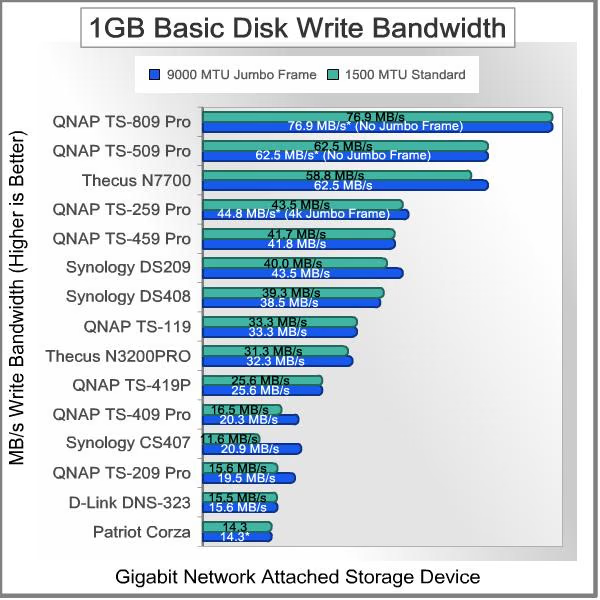
QNAP pulls down the top five spots for 1GB Read testing, with their TS-xxx series of products. The TS-809 Pro and TS-509 Pro are built from similar hardware, and the TS-459 and TS-259 are also kin under the skin. Even without the extra Jumbo packet size, the QNAP x09 products are built for very high transfer rates. At 62.5 MB/s read speed (using EXT4) the TS-809 Pro beats everything except the QNAP TS-459 Pro with 9k Jumbo Frame enabled.
Our two-bay TS-259 Pro comes in slightly below the TS-509 when using a standard MTU of 1500, and then matches it with a transfer rate of 59.0 MB/s using 4k Jumbo Frames.
The single-drive QNAP TS-119 and Synology DS408 come in close with Jumbo Frames enabled, reaching 55.6 MB/s each. The Thecus N7700, Synology DS209, and QNAP TS-419P come in right behind the leaders, with a matching best effort of 50.0 MB/s. Although the QNAP TS-419P shares the same hardware as the TS-119, for some reason it didn't post the same performance numbers with Jumbo Frame support.
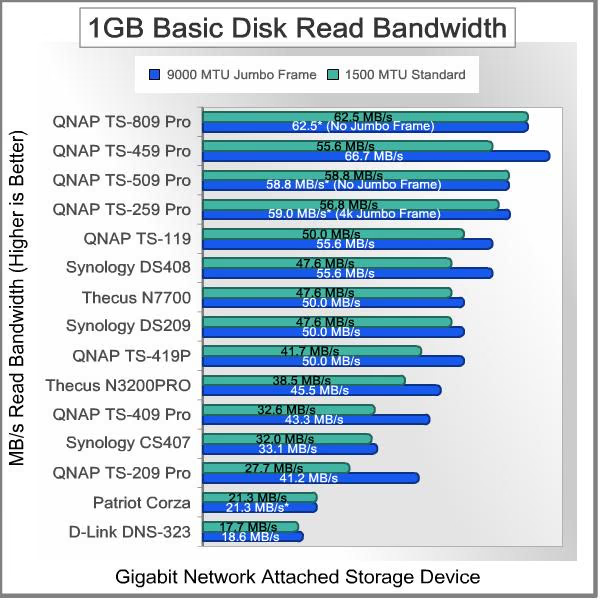
Moving on to the 1 GB write bandwidth test, our results suggest that while it may sometimes it will be faster to read files from a NAS server then it is to write files onto it, the opposite is true more often than not. The Network Attached Storage servers each have their own strengths, with some being more robust in write performance while others have more impressive read performance.
At the top of our charts the QNAP TS-809 Pro offers outstanding performance again (with EXT4), leading the crowd even more than it did in the 1GB read tests, with 76.9 MB/s of write speed. Formatted with EXT3, the TS-809 Pro offered 71.4 MB/s, followed by the QNAP TS-509 Pro which maintained 62.5 MB/s without the aid of Jumbo Frame support. Next in line, the Thecus N7700 does well in write tests and produced a best result of 62.5 MB/s, finishing out the list of top-performers.
The QNAP TS-259 leads the next grouping, with write speeds of 43.5 MB/s using a standard MTU of 1500, and 44.8 MB/s with a Jumbo Frame size of 4074. It narrowly beat the QNAP TS-459 Pro NAS, which produced 41.7 MB/s at 1500 MTU, and remained relatively unchanged with 41.8 MB/s once 9000 MTU Jumbo Frame was enabled at each end of the network connection. The Synology Disk Station DS209 narrowly beat the larger DS408, and scored a swift 43.5 MB/s write performance with Jumbo Frame enabled. A single-drive QNAP TS-119 held a steady 33.3 MB/s speed, scoring the same with and without Jumbo Frame enabled, and was tailed by the Thecus N3300 at 32.3 MB/s.
The lower-end group consists of all the remaining NAS products, with the next closest competitor being the QNAP TS-419P which scored 25.6 MB/s. The remainder of the bunch trailed far behind. Next up is 10 GB (1000 metric megabytes / 10,000,000,000 bytes) testing. Using the single-disk configuration in each NAS, and a single Gigabit connection, network throughput will be put to the test.
10GB Single-Disk Test Results
Examining 10GB basic file transfer speeds, the QNAP TS-459 Pro delivers remarkable read performance, at 65.4 MB/s with Jumbo Frame enabled. QNAP's newer models, the TS-459 Pro and TS-259 Pro lead the field on Read results, based on their Jumbo Frame capability. Both of them, plus the TS-809 Pro, and TS-509 Pro are in a dead heat utilizing the standard MTU value; all four of them are within spitting distance of 56 MB/s. QNAP's single-drive TS-119 offered the same performance once Jumbo Frame was enabled, but is reduced to 47.6 MB/s at 1500 MTU. Once again, in Read performance, QNAP takes the top five spots on the chart.
The Synology DS209 and DS408 maintain a close relationship with peak performance around 47 MB/s in normal mode, and improve to 49.3 and 48.3 MB/s read performance with Jumbo Frame enabled at both ends. At 50.3 MB/s with Jumbo Frame support, the QNAP TS-419P offers very good large file transfer speeds, but without JF support the speed slows to 39.8 MB/s. The Thecus N7700 was able to sustain 44.5 MB/s using Jumbo Frame, and 41.5 MB/s without it, which was very similar to the N3200 Pro.

In our 10GB write performance tests, the charts get shuffled a bit and the results also take on a more linear profile, instead of a series of groupings. The Thecus N7700 makes up for above-average read performance by achieving the top result for large-file writes, with 56.2/58.8 MB/s in normal and Jumbo Frame modes; for once QNAP was not the performance leader. Next in line comes the QNAP TS-809 Pro, with 54.4 MB/s using EXT3. Then the TS-509 Pro, which scores 47.0 MB/s. The QNAP TS-259 Pro slots in next with 42.9 MB/s and 44.6 MB/s with 4k Jumbo Frame enabled, rising above the Synology DS209 and the QNAP TS-459 Pro just like it did in the 1GB test. The TS-459 drops to 39.2 MB/s at 1500 MTU and 40 MB/s with Jumbo Frame enabled, just losing one position to the Synology DS209 in this test. The remainder of the products trail off in a very linear fashion, until you get to the Patriot Corza, which really struggled with both of the 10GB tests; then again this network appliance costs less than $100.

This is the end of our test results for this review, since the QNAP TS-259 does not support the RAID5 configuration we normally use to test the large format NAS products. A couple of things struck me about the results. The performance you can expect is based largely on the infrastructure that surrounds the hard drives in all these products. The processing power, amount of system DRAM, network interfaces, and configuration options all make a significant difference. This is all the more surprising since the single-disk configuration is the least demanding in terms of the resources driving it. Any disk configuration of RAID-5 or higher introduces a much greater load on the supporting subsystems of a NAS device. If you plan to deploy one of these devices in a multi-user setting, you also have to account for the simple fact that 2-3 people are probably going to hit the server at the same time, usually just before they have to leave to catch their train home at the end of the day. So, it pays to think of these systems as servers first, and disk storage arrays second.
In our next section, Benchmark Reviews looks at the surprising differences between the Windows XP and Windowa 7 environments. Be sure to take a look, especially if you would like to find out which platform performs 50% better...
NAS Comparison Products
- D-Link DNS-323 Gigabit 2-Bay SATA NAS server
- QNAP TS-209 Pro Gigabit 2-Bay SATA NAS server
- QNAP TS-409 Pro Gigabit 4-Bay SATA NAS server
- QNAP TS-419P Gigabit 4-Bay SATA NAS server
- QNAP TS-459 Pro Gigabit 4-Bay SATA NAS server
- QNAP TS-509 Pro Gigabit 5-Bay SATA NAS server
- QNAP TS-809 Pro 8-Bay SATA Turbo NAS server
- Synology Disk Station DS209 2-Bay DS209 NAS server
- Synology Cube Station CS407 Gigabit 4-Bay SATA NAS server
- Synology Disk Station DS408 Gigabit 4-Bay SATA NAS server
- Thecus N7700 Gigabit 7-Bay SATA NAS server
- Patriot Corza PCZ35SNAS2 Gigabit 2-Bay SATA NAS server
Windows 7 Disk Test Results
I started this article with my standard test system, which has been running Windows 7 since it launched last October. It's the 64-bit version because there's no reason for most users to continue the 32-bit legacy. It's the Ultimate version because that's what Microsoft was giving away at their media events. I don't really need the additional features of the Ultimate package, and all my other PCs in the house run Windows 7 Home Premium. I wasn't expecting any issues or problems; it's been a very stable platform for over six months now, and all I would be doing is transferring a few files back and forth to another device on the network. Boy was I wrong!
Everything worked all right; in fact it worked too well. When I compared the results I was getting with the results for other NAS devices reviewed here on Benchmark Reviews, I was stunned. I was getting read and write results 50-60% better than comparable units, that were tested quite recently with similar hardware. I retested, and then I tried to equalize things a bit by turning off some new features, like Remote Differential Compression. No matter how I tried to cripple Win7, it always produced significantly faster file transfers than previous tests with Windows XP.
At this point, I popped a new hard drive into the test bench system, did a fresh install of XP and then Service pack 3. Then I downloaded fresh drivers for the onboard NIC and started retesting. Well, that fixed it, so to speak...now the results were very much in line with prior tests. These are the numbers I reported above, where I compared the TS-259 with the other NAS servers. In those charts we are comparing apples-to-apples; in this section of the review let's look at the performance differences between Windows XP and Windows 7 on a single NAS server, as they are significant.

Looking at read tests, where we read a file from the NAS and copy it to a HDD on the test system, Win7 consistently trounces Windows XP. On average, the results are 53% quicker with Win7, and are pretty much the same whether copying a 1GB file or a 10GB file. Looking at these results, you can see why I was nonplussed at first when I started running the tests. The numbers are not even close, and the individual tests were very steady from run to run. I can't say I'm unhappy with the change in performance; who wouldn't like a 50% speed increase, especially on a task that generally takes several minutes to complete. Let's take a look at write performance.

The write tests, where I copied a file from the test system to the NAS, offer a very similar picture. Indeed, the average performance increase for Win7 is 53% again. In this case, the Jumbo Frame benefits with Win7 were more apparent, and helped pull the numbers up. Without Jumbo Frames, with an MTU of 1500, Win7 was only 45% faster than XP. With Jumbo Frames enabled, the performance increase jumps up to 60%. Anyone doing backups to a NAS device is going to be very pleased with this kind of improvement. Think about how long a nightly backup takes now, and knock off a third of that time. Same thing if you do full backups every week or every month; you can get it done in two thirds the time it takes now.
Most likely, you will be copying thousands of smaller files rather than one or two large ones, which will slow things down. So you won't achieve the same transfer rates as we did, but the improvements should be similar when you upgrade to Windows 7. For most users this is not enough justification for upgrading their operating system, but its one heck of a perk if you were going to do it anyway.
NAS Server Final Thoughts
I guess I was an early adopter, or at least I was in the early majority. I bought my first NAS in 2005, after my wife's Dell desktop shredded the first of several hard drives. The easy, automated backup process, available for all computers on the network was just what I needed to restore domestic harmony. Sometime later, after rebuilding her desktop environment a couple times, I did two things: I learned how to clone hard drives, and I dismantled the Dell from Hell. Problem solved!
While my NAS from the past has been sitting in one spot for most of those five years, the world of NAS products has not. New products available today offer so much more functionality and additional features that it boggles the mind. Most of the advances have been in the area of software, but the hardware has also kept pace. PATA became SATA; 10Mbps became dual Gigabit NICs with failover; "locked-in-a-box" (AKA: The Brick) became hot-swap RAID clusters; one button & one light became 4-line LCD displays. However you look at it, the range of capabilities available today towers over what we had to choose from in the not too distant past.
I'm writing this article from a much different perspective than our Executive Editor. He runs an IT company and I support a small network for a home office. That being said, we both recognize the intrinsic value of network attached storage products. I bought my first one five years ago and it does automatic backups every night at midnight and 1:00 AM for the two primary workstations in the house. When I hear it light off at midnight, I know it's time to either finish my article or go to bed. Then the snooze alarm kicks off an hour later, if I'm still up. It performs well and looks stylish even today, if a bit outsized. It looks like this:
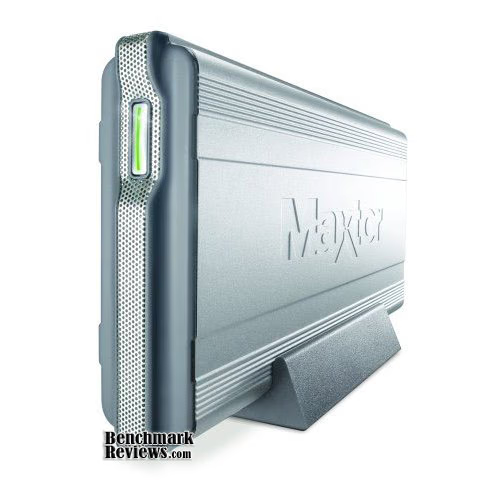
All of the QNAP TS series product in this article offer so much more capability than my old, simple NAS. Just as our small business has evolved, so too have the tools available. We're looking at creating a website and a blog to go along with it, and maybe a forum. All these can be hosted from one of these new versatile NAS devices, acting as a server. This kind of capability goes far beyond the simple remote access tools provided by Windows Home Server. Quite frankly, unless you are getting Windows Home Server for free from your MSDN account and you can repurpose an old computer that's sitting in the corner unused, all these NAS systems reviewed here on Benchmark Reviews are a much better value. If your Windows based server is only going to be used for serving out files, sharing printers and managing backups, one inexpensive NAS does all this at less than half the cost.
At the other end of the spectrum, there's no way any of these devices compete with the kind of equipment you find in a modern data center. With a multitude of virtual servers running under VMware and connecting to redundant Storage Area Networks (SAN) across a Fiber Channel backbone, the cost and complexity of full bore Enterprise IT solutions dwarfs the appliances under test here. Still, with the availability of iSCSI and virtual drives on selected systems reviewed here, the lines of demarcation are blurring.
So, what conclusions can we draw, particularly about this high performance, two-bay TS-259 Pro server. Click NEXT to find out, and discuss...
QNAP TS-259 Pro Conclusion
Although the rating and final score mentioned in this conclusion are made to be as objective as possible, please be advised that every author perceives these factors differently at various points in time. While we each do our best to ensure that all aspects of the product are considered, there are often times unforeseen market conditions and manufacturer changes which occur after publication that could render our rating obsolete. Please do not base any purchase solely on our conclusion, as it represents our product rating for the sample received which may differ from retail versions.
The performance of the QNAP TS-259 Pro NAS server compares very favorably against similar network storage products. Based on the test results with the single disk configuration, the QNAP TS-259 Pro offers excellent performance when fetching small to large files. It always scored in the top five, against some heady competition. The beefed up Intel Atom D510 1.66GHz Dual-Core processor and 1GB DDR2 DRAM made all the difference in performance, compared to the Marvell-based T-419P. The best read performance was 59 MB/s, and the best write speed was 44.8 MB/s. Both of these speeds were recorded with 1GB files, but the 10GB results were within tenths of a MB/s.
The smaller, two-bay form factor of the QNAP TS-259 pretty much precludes the use of a display on the front of the unit. Status LEDs are provided for activity on: HDD1, HDD2, LAN, and eSATA. The exposed portion of the drive trays are nicely finished and blend well with the remainder of the front panel. Three different shades and textures of black can look busy if arranged poorly, but this NAS looks the business. The side panels are titanium colored with a fine grained brush finish. The brighter finish adds a bit of elegance to the visual design, plus it doesn't show fingerprints, win-win. IMHO, it fits in perfectly with its intended environment, the small office or home office.

The construction quality of the TS-259 exceeds that of many computer-based appliances. The data center crews are all hardware junkies for the most part, and they like their gear to radiate superiority. QNAP takes the level of excellence that is required to win over that finicky community and applies it across the product line. Enjoy the trickle-down effect where you can, even if it's from the data centers on Wall St. and not the banks on Wall St.
The QNAP TS-259 Pro Turbo NAS network storage server is going to have tremendous appeal to a very tech-capable SOHO organization that can take full advantage of all the capabilities and functions it offers. For some businesses, that need all the benefits but aren't tech-savvy enough to exploit the full functionality without some hitches, utilizing a Value-Added-Reseller (VAR) to integrate, configure and test it in your environment is always an option. Especially if your company already has a relationship with one, it could reduce the potential for start-up headaches. I've focused almost entirely on functionality that's important in a business environment, but the support for home entertainment applications is also impressive, with support for UPnP/ DLNA Media Players as a simple example. Fortunately, these features are all a little easier to configure.
The QNAP TS-259 Pro Turbo NAS server may be less suited for the corporate Enterprise environment, but its size, performance and features certainly hit the SOHO market head-on. Two drive bays only allow for RAID-0 or RAID-1, and that may be all you need for the home office. Before we discuss the pricing in detail, remember that these systems are not discretionary items for most businesses, they are a necessary expense. The inevitable costs for not having a robust data management system in place are usually 10-100 times higher than any of the prices you will see in this paragraph. As of late April 2010 the TS-259 Pro model was listed at NewEgg for $599. Compared to the Marvell-based QNAP TS-419P which also sells for $599, the performance gains from the upgraded processor and memory get traded for a doubling of storage capacity and the ability to run RAID-5 configurations. If you need the wealth of features the entire Turbo NAS series provides and more storage space, the TS-459 Pro is the logical choice at $899. For storage-centric environments that need the absolute best, QNAP offers the TS-809 Pro which is available for $1700 without drives. Home users could feel more comfortable with the single-bay QNAP TS-119 for $300 for basic tasks.
Benchmark Reviews has tested all of these QNAP network storage solutions, and with the wide range of products they offer, anyone in need of a NAS server can find one to fit their current and future needs. The TS-259 Pro Turbo NAS server seems ideal for certain segments of the SOHO market. A few may need something simpler, and others may need more storage space, but the two-bay TS-259 hits the mark for a large portion of users.
Pros:
+ 59.0/44.8 MBps best read/write performance
+ New v3.xx administration GUI
+ VMware Ready iSCSI for virtualization deployments
+ Online RAID Capacity Expansion and Level Migration
+ 2-Bay SATA hot-swap RAID storage
+ Dual Intel Gigabit Ethernet Controllers with teaming and failover
+ Pre-installed PHP+MySQL and Apache web server
+ RAID-0/1/JBOD disk configurations
+ Four High-Speed USB-2.0 ports + USB Copy port
+ Two eSATA ports for additional storage expansion
+ Frequent firmware development and free software support
+ One-year product warranty with free tech support
+ Low power consumption
Cons:
- SAS version for enterprise-class, 15,000 RPM drives not available
- Some capabilities will be too daunting for a novice SOHO user
Ratings:
- Performance: 9.50
- Appearance: 9.25
- Construction: 9.50
- Functionality: 9.25
- Value: 7.50
Final Score: 9.0 out of 10.
Excellence Achievement: Benchmark Reviews Golden Tachometer Award.
Benchmark Reviews encourages you to leave comments (below), or ask questions and join the discussion in our Forum.
Reader comments from the original article
3 comments were posted before commenting closed. They are preserved as written. Original avatars no longer resolve and are shown as a placeholder.
Test with bonding gbit lan ? ^-Super_Treje-^ Permalink:
No test with the network in "bonding" ?
I did, but.... BruceBruce Permalink:
I repeated the tests with IEEE 802.3ad Link Aggregation Control Protocol, using two Intel Gigabit CT Desktop Adapters in the test bench system. The problem with that test scenario and Teaming or Bonding or whatever you want to call it, is that the network speed stays exactly the same. The bandwidth is increased by widening the data path, not increasing the speed. I.e. it?s analogous to two fully loaded trucks driving the speed limit instead of one truck delivering your data. Yes, you get twice the data, but you get it in the same time frame, which is what our testing measures. I think the way to test this feature is to have two or more transfers occurring at the same time. With one transfer already under way, another could be started and timed, and the speed of the second transfer should be relatively unaffected by the continued activity of the first one. Your thoughts, suggestions?
802.3ad is NOT your solution scavenger Permalink:
YES this is it. Load balancing is made only on multiple file transfers. If you can read french, I posted a lot about it on #lafibre.info/iperf/gs108t-nc360t-n5550-load-balancing-33mbs/new/#new but the result is this one : Conclusion is 802.3ad is ONLY failover. ABSOLUTELY NOT load balancing. If you want to do what I dreamed of, choose on each side the Balance-SLB (or Balance-ALB) + round robin transmit load balancing method. Then you will have a smooth repartition of the packets on each port, but you will notice a strong down bandwidth due to the fact that "Packet order is NOT guaranteed" Load balancing for a one file transfer on many cables is just a dream... right now...