
QNAP TS-509 Pro Gigabit 5-Bay SATA NAS Server
QNAP TS-509 Pro NAS
When corporate funds are tight, companies find new ways to reduce operating costs wherever they can. As a network administrator for several small and medium businesses, I'm used to seeing pedestal servers with expensive Windows Server edition Operating Systems running for the sole purpose of serving files out to the workgroup or domain. These environments have made it necessary to look for money-saving opportunities elsewhere in the office environment. A few years back Network Attached Storage server hit the scene with a price tag comparable to the alternative, but the NAS products offered in today's market are far superior and cost much less than before. QNAP offers many affordable NAS server solutions for every department size, and their Turbo Station TS-509 Pro delivers feature-rich functionality to the enterprise environment. In this article, Benchmark Reviews tests the performance of the 5-drive hot-swappable SATA Gigabit NAS server.
As a product analyst, I know that my job is to test and research products for consumers before they consider them on store shelves. Even though I also own and operate a small business which manages corporate networks, the list of products I get to work with still pales in comparison to the items our sponsors send. So when someone in my position is blown away at the myriad of features and functions embedded into this extremely affordable product, it's worth taking to heart. The unfortunate downside to offering such a myriad of features and functionality is that there's only so much that can be said about it before I lose your interest. In this review of the TS-509 Pro, only the most important features will be discussed.
Powered by Intel Celeron 1.6 GHz CPU, 1GB DDRII memory, the 5-bay, hot-swappable TS-509 Pro delivers superior performance for multiple business applications and intensive concurrent data access. The Linux OS and applications of the TS-509 Pro are embedded in the flash DOM that higher stability is guaranteed. Moreover, the dual Gigabit LAN ports can be configured as Failover, Load balancing, or serving two different subnets which enables more deployment options in a business network environment.
Advanced RAID redundancy with expandability and upgradeability
Advanced RAID configurations, RAID 0/ 1/ 5/ 6/ 5+Spare and JBOD are all supported. With Online RAID Capacity Expansion, users can select to purchase the most cost-effective hard drives for initial server setup and upgrade to larger ones in the future. With Online RAID Level Migration, users can start from one drive firstly and add more to upgrade the RAID level in the future with the data retained.
Easy setup, low-cost maintenance
The handy LCD display on the TS-509 Pro provides a speedy and easy approach for IT administrators to initialize the NAS and set up the RAID configuration without using any computer. The system information and settings are also displayed for easy management. The schedule power on/off feature is available on the TS-509 Pro for IT administrators to flexibly manage the NAS server's up time according to the working hours. Also, the smart Wake on LAN is supported for convenient remote wakeup of the NAS in the local network.
Modern business requires a centralized data center to protect information asset, back up critical data, share the information among workgroups or departments. A solid, efficient, and flexible data backup system is the key to greater business agility and also an increasingly important task for IT administrator. QNAP TS-509 Pro Turbo NAS is the new generation all-in-one NAS server for SMB and enterprises. It offers the most reliable and powerful storage solution. With superior performance, versatile server features, best-in-class RAID data protection, and rock-solid hot swappable hard drive design, the TS-509 Pro brings business nowadays a truly new experience of instant data access and sharing, a protected mass storage, value-plus server features at the lowest maintenance cost.
About the company: QNAP Systems, Inc.
QNAP Systems, Inc. (QNAP) is a devoted and dominant provider of Internet Appliance products. With our solid and integrated expertise in the Linux embedded platform, QNAP has released more than 30 models for the network storage and digital network surveillance series over the past 6 years, providing our consumers with high performance and high reliability storage, backup, and surveillance solutions. Today, QNAP continues to lead the industry with our innovation in design and technology.
Closer Look: Turbo Station
Benchmark Reviews has done well to provide readers with an in-depth performance test for each product size that QNAP offers. Our Featured Reviews: Network section is filled with many different NAS products, and this article will add the largest network attached storage server yet: the QNAP TS-590 Pro. QNAP has offered high-performance server alternatives for many years now, and they have refined their craft with each new generation.
The Turbo Station series has become a large family of multi-bay SATA NAS servers with straight-forward approach to delivering functionality comparable to most Windows Server platforms right out of the box. Usually this is merit enough to consider a NAS for your work environment, the real determining factor in this economic climate is price. Thankfully for consumers, every single NAS server Benchmark Reviews has tested all cost remarkably less than the alternative.
Times are changing, and the way IT professionals have solved problems in the past will not make economic sense into the future. The corporate server landscape has become much more simplistic over the past few years. After visiting the recent SuperComputing Conference SC07 event I was surprised by how dull some of the server designs were. Server tasks are about the same, but the large cluster arrangement and daunting maintenance routines have created a demand for something much easier on the administrator - and budget.

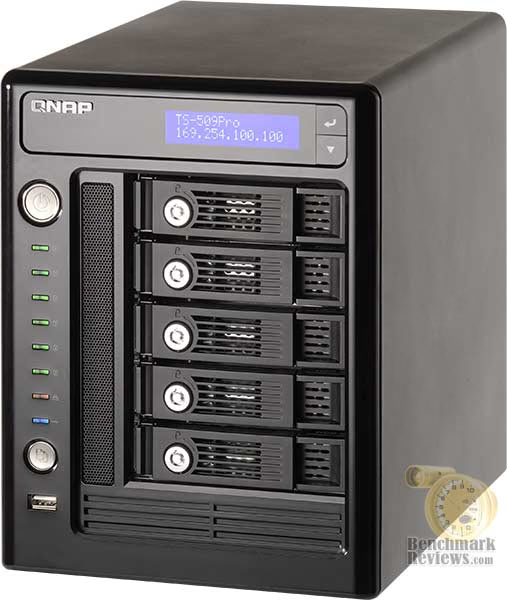
The image above shows the front view of QNAP's Turbo Station TS-509 Pro, which comes available in one color: titanium grey with black face bezel. The TS-509 Pro is a 5-Bay hot-swappable SATA network attached storage server (NAS) which offers everything from single basic-disk arrangement, to mission-critical data security RAID configurations. The disk array capability alone may be enough to sell this product, but you would be cheating yourself if you didn't learn about the many other features it offers.
To begin our first look, you will notice that the QNAP TS-509 Pro features an LCD display at the top of this tall unit. The indigo-blue backlit screen makes it very easy to see any displayed white text, even in brightly lit environments. I found the two-button menu system adequate for retrieving configuration information from the TS-590 Pro, but with a little more engineering it appeared that this could one day become an alternate instruction interface for the NAS. The gloss-black bezel face of the TS-509 Pro NAS is simple and straightforward, but offers enough information to keep the most anxious Network Administrator content with status detail.

Beneath the main power button is a series of eight colored LED lights, followed by a one-touch backup button, and a USB 2.0 port. The first LED lights green with a specific information pattern, showing a general status for the unit. The next five green LEDs indicate respective drive access. An orange LED indicates network access, followed by a blue LED for USB activity.

Each of the five drive bays is removable. A lockable tray comes away from the TS-509 Pro by pulling the swing-arm lever out and towards the power button side of the unit. You can get away with not securing drives into the tray, but when the tray is pulled from the NAS it will probably leave the SATA drive firmly attached to the NAS backplane connection. To the left of the drive bays is a mesh grill for mainboard and CPU cooling air intake, which works in conjunction with the vented drive trays to help circulate cool air over the components.
The QNAP TS-509 Pro measures 10.28" long x 7.42" wide x 10.28" tall, and weighs just over 14 LBS. Since the standard rack unit ('U') measures 1.75" tall by 19.0" wide per unit, the TS-509 Pro is just slightly shorter than a 6U height rack case, and could accommodate two units inside the 6U workspace. With roughly four inches of spare space between two units, other network appliances could be fit inside of the footprint.
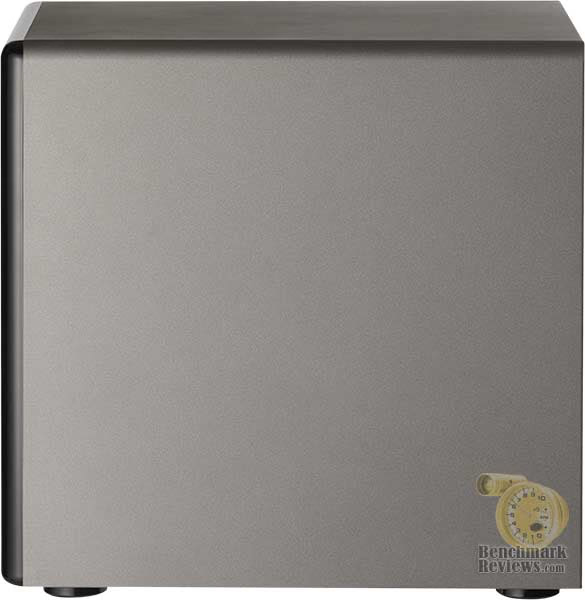
At the back of the TS-509 Pro is a busy arsenal of connections and two cooling exhaust vents. QNAP is one of the few manufacturers to incorporate the eSATA interface into their product, which will offer 1.5 GBps bandwidth to connected storage devices (such as an external drive enclosure). Four additional USB 2.0 connectors are available at the back of the TS-509 Pro, which can be used for external storage (including flash drives), print servers (the TS-509 Pro can manage three USB-based printers), or for connection to a compatible UPS (APC USB auto detect, APC with SMNP management, or MGE Ellipse premium UPS support). A Kensington Security Slot and reset pinhole are also present.
Two separate Broadcom BCM5787 NetLink Gigabit (10/100/1000 Base-T) Ethernet NICs lend themselves to unique IP addresses, and can be teamed as for a redundant fail-safe connection or a load-balancing connection. I tested the teaming functionality, and whenever a patch cable was pulled from one of the ports during a large file transfer there was no sign of interruption. QNAP decided to utilize the BCM5787 controller because of its high-performance throughput; even though it doesn't offer Jumbo Frame support.

The 120mm thermistor cooling fan is temperature controlled and runs at low speed whenever the NAS is operating below 40°C by default, but picks up speed (and some noise)above 48°C. Of course, the Turbo Station software interface allows you to manually configure both the low- and high-speed temperature thresholds and work in either Celsius or Fahrenheit.
Unlike most of the NAS products we've tested here at Benchmark Reviews, the QNAP TS-509 Pro Gigabit 5-Bay SATA NAS Server is the first to have an integrated power supply unit. QNAP specifications indicate an 250W ATX PSU integrated into the TS-509 Pro's frame. QNAP claims the power consumption in sleep mode is 47.3W, which operational consumption is 84.7W. Clearly, QNAP takes pride in the low power consumption of the Turbo Station TS-509 Pro NAS.
By using the Kill A Watt EZ model P4460 power meter by P3 International, I was able to determine exactly how much electrical power the TS-509 Pro consumed in empty, idle, and active modes. With no drives installed, the TS-509 Pro consumed a mere 52W, and once loaded with four 1.5 Terabyte Seagate Barracuda 7200.11 SATA Desktop Hard Drives (ST31500341AS) the idle (not standby) power draw was steady at 73W. Once the drives were configured into a RAID-5 array and file transfers began, the power demand increased to only 77W. It's evident that going green isn't difficult with these NAS products; something administrators should keep in mind.
In our detailed features section on the next page, the TS-509 Pro will be disassembled and inspected for design flaws before we test for performance. Please continue on to learn more about this powerful little product.
TS-509 Detailed Features
One area that certainly looks familiar is the motherboard, which appears to utilize all-solid capacitors and passive cooling heatsinks. You don't have to be an IT professional to appreciate the effort placed on maintaining years of stable use our of the TS-509 Pro. For corporate buyers, this translates into fewer maintenance and repair cycles and a lower total cost of ownership.
QNAP has engineered their Turbo Station TS-509 Pro with a single-core 65 nm Intel Celeron M 420 1.6 GHz processor, which is mobile-optimized CPU featuring 1 MB of L2 cache and operates on the 533 MHz FSB. QNAP decided to go big and add 1 GB of DDR2-667 SoDIMM DRAM for system memory, along with a hefty 128 MB of static flash memory for the Linux v2.6.24/Ubuntu v4.1.2 Operating System.
A standard Intel thermal cooling device is attached via four push-pin style clips, but has had the fan section removed for clearance reasons. For those of you out there thinking about it, the answer is no; nothing from our Cooling Section will fit it and it cannot be overclocked. The motherboard is proprietary design offering no PCI- or PCI-Express expansion slots, however there are eight SATA connectors supported by two Marvell 88SE6145 SATA storage controllers. Of course, the TS-509 Pro only see five of these for it's attached backplane bays, but QNAP might find a model with more scalability. The motherboard also uses several of the usual suspects: the ITE8712F constrols basic I/O functionality, SST's 8Mbit Firmware Hub 49LF008A occupies some real estate, and the Analog Devices ADM213 chip controls the RS-232 interface.

Believe it or not, the entire unit is very much like those of a desktop system. If you connect a USB mouse and keyboard along with a D-Sub monitor, you'll be able to watch the power-on self test (POST) as the BIOS is tested at startup. The 128 MB flash memory holds the Ubuntu O/S, which can be accessed with proper shell login information. Most LAMP administrators will see this a challenge to their skills, and have no problem squeezing a little more out of the TS-509 Pro NAS.
QNAP has included everything you will need to get the five SATA hard disk drives loaded and ready for duty-use inside the Turbo Station NAS. Although there might be future plans, at this time QNAP does not include Hard Disk Drives with their NAS products. I expect that pre-loaded and pre-configured NAS servers with HDDs included will soon be a part of their product lineup. In this TS-509 Pro kit there is enough hardware to mount all of the drives into their respective trays, along with a power cord and CAT-5e cable. My only gripe is with the enclosed network patch cable, which wasn't very impressive when you consider that most environments now use CAT-6 as a standard.

Gigabit Ethernet will still perform well over CAT-5e, especially at short patch-cord lengths, but most IT professionals agree that this is yesteryear's standard and has since been replaced by CAT-6. The manufacturers cost is a difference of about two to three pennies per cord at 100-unit prices, so I really can't find a valid reason as to why every network product Benchmark Reviews has seen still comes with the old cables. For more than two years I have seen all new network construction and retrofits utilize CAT-6 infrastructure and patch cords, so let's hope the manufactures catch on soon.
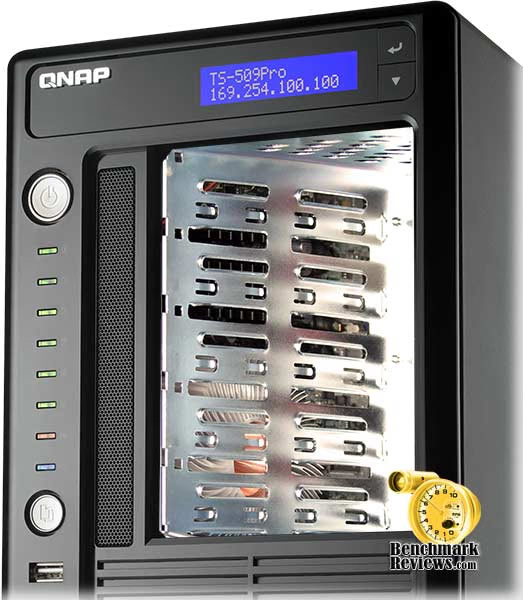
From the angled view above you can see where the front bezel vent circulates air across the CPU cooler and chipset heatsinks. The TS-509 Pro's Celeron M 420 processor does manage to get fairly warm under normal loads, so if you're really interested in over-cooling the processor you could fit it with one of the low-profile coolers that come with any of the most recent Intel Core 2 Duo processors. There's a Molex power receptacle for the CPU fan nearby, so some degree of modification can be made to accommodate high-temperature environments. Be forewarned though, opening-up the chassis will void your QNAP warranty.
The 120mm cooling fan draws cool air over the five drive bays, and paired with SMART monitoring the TS-509 Pro actively reports temperature and other statistics from the web interface. For the duration of testing, the temperatures were very low (identical to those of the spare 7200.11 HDD inside the test workstation), so I don't see any reason to over-cool these components.
On a somewhat unrelated note, the pull-out trays make it possible for an administrator to hand-feed smaller drives into the backplane connection interface. This is what will be necessary to utilize 2.5" drives, which is a standard size for Solid State Drives. It might not be considered standard yet, but SSD's have proven themselves an extremely important asset for servers because of their instantaneous response time and high bandwidth performance. We've test plenty of SSD products so far, and they're every bit worth the expense when speed and performance are necessary.

At the underside of the TS-509 Pro are four round foam-embedded feet with a single screw fastening it to the chassis. If needed, these feet can be removed to reduce the overall height to an even ten inches.
When it's all said and done, QNAP has done a great job of producing another quality product with long-lasting internal components. In our next section, the detailed features and specifications are revealed. Normally this is something most readers would scan over on their way to the next page, but I sincerely think you will see that there is a lot more to the Turbo Station TS-509 Pro than just 5-bays worth of hot-swappable SATA hard drive storage.
Turbo Station Features
DOM Architecture with Embedded Fail-safe Dual OS
All the OS and applications are embedded on the DOM. The TS-509 Pro allows system booting without accessing the physical disk sectors and that prevents unsuccessful system startup caused by bad block sectors or file errors on the hard drives. Two operating systems are built on the DOM for system booting alternatively upon every system startup. When one fails, the other one will be used to boot up instead, and the failed OS is recoverable from the other healthy OS.
Advanced RAID Management with Hot-swap Design
The NAS offers advanced RAID 0, 1, 5, 6, 5 + Spare, Single, and JBOD disk configurations. It also supports hot-swap design that a failed drive can be replaced by hot swapping without turning off the server. Besides, the best-in-class RAID on the NAS brings users a higher level of data security by allowing one more hard drive failure than other NAS of the same level.
Online RAID Capacity Expansion
The storage capacity of a RAID configuration can be expanded by replacing the hard drives with larger ones. All the data will be kept and seamlessly moved to the newly installed hard drives. There is no need to turn off the server during the process.
Online RAID Level Migration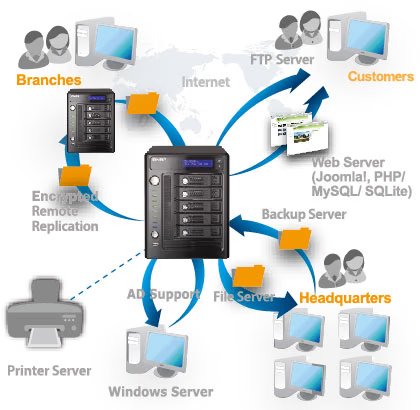
Users can upgrade the disk configuration to higher RAID level with the data retained. There is no need to turn off the server during the process.
Touch-N-Go PC-less Installation
You can use the handy LCD to finish the first time installation in 3 simple steps. The NAS will automatically complete the hard disk formatting and RAID building.
Schedule Power on/ off
The flexible schedule power on/off feature is provided on the NAS for users to manage the NAS server's up time according to the working hours. You can set the time for automatic system power on, power off, or restart on any days of the week.
Wake on LAN
Enable this option to power on the NAS remotely by Wake on LAN. Wake on LAN helps you manage your NAS conveniently.
Network Failover
Dual Gigabit LAN Ports for More Deployment Options. Failover allows the NAS to sustain the failure of one network port to provide continuous services.
Load-Balancing
Bandwidth aggregation is supported to boost the file transfer speed (works with managed Ethernet switch with 802.3ad configured).
QNAP Backup Software - NetBak Replicator
The backup software, NetBak Replicator, is provided for the NAS users to perform real-time synchronization or schedule backup from multiple PCs to the NAS.
3rd Party Backup Software Ready
The NAS works well with other backup software, e.g. Arconis True Image, CA BrightStor ARCserve Backup, EMC Retrospect, Symantec Backup Exec, and LaCie Silverkeeper.
Encrypted Remote Replication by Rsync
Data on the NAS can be backed up to or from another Turbo NAS or Rysnc server over the network securely.
One Touch USB Auto Copy
The one touch button can be configured to trigger instant data backup from the external USB device to the NAS or the other way round (applies to the USB device connected to the front USB port of the NAS only).
S.M.A.R.T. & Advanced HDD Health Scanning (HHS)
The NAS supports Hard Disk Drive S.M.A.R.T (Self-Monitoring Analysis and Reporting Technology) for monitoring the hard drive status. Moreover, the NAS is embedded with HHS Technology which supports disk checking and bad blocks scanning.
Comprehensive Event Logs
Logs of connections to the NAS via samba, FTP, AFP, HTTP, HTTPS, Telnet, and SSH, and networking services accessed by online users are all recorded.
Sharing files across Windows, Mac, Linux, and UNIX
The NAS is specially designed for different users to share the files across Windows, Mac, Linux, and UNIX environment.
Support Windows AD
The Windows AD feature enables server manager to import user accounts from AD domain to NAS to reduce the time and effort for account setup, and users can use the same set of login name and password.
-
IP filter control: Users can allow or deny specified IP connections to the NAS.
-
SSL Security (HTTPS): The NAS can be accessed and configured by web browser securely.
-
Remote login your The NAS by SSH (secure shell) or Telnet connection.
-
Secure FTP: Share and transmit your data over SSL/TLS (Explicit) encryption. Passive FTP port range setup is also supported.
-
Smart FTP policy control: The maximum number of all FTP connections and a single account can be configured.
-
Encrypted remote replication: Data on the NAS can be backed up to another QNAP NAS product over the Internet securely.
The NAS supports batch creation of users and share folders to save the time and effort of the server manager in account and folder creation. For the security of Windows network environment, server managers can hide or show network share folders.
-
File Server: The NAS allows server manager to create user ID and password, and define the authority and quota for each user.
-
FTP Server: You can establish your own FTP server, manage the access authority of the FTP server, and share your files with others easily in a few steps.
-
Encrypted Remote Replication: Encrypted remote replication provides high level of data protection. Files can be backed up from the NAS to other QNAP NAS products in remote locations.
-
Web Server with Built-in phpMyAdmin: With the built-in phpMyAdmin, Joomla!, editable php.ini, MySQL and SQLite, you can easily set up your web server and other online applications such as online shops, forums, and blogs.
-
MySQL Server: The NAS is can be configured as a standalone database server for system integrators. It can be applied in various deployments such as a database server of another web server in remote site or an additional backup database server.
-
Printer Server: The NAS supports network printer sharing function (max 3 sets).
QPKG Center Software Expansion
Explore the Unlimited Possibilities of Your NAS with QPKG
The Network Attached Storage (NAS) used to refer to a basic network storage device for simple data sharing but now with the high performance SoC and the advantage in power-saving design, it is redefined as a powerful embedded system that allows the possibilities of offering numerous fascinating applications. Over the past years, QNAP has successfully developed a series of All-in-One NAS servers for power users and business users providing a wide variety of software applications. Besides those QNAP provides, many other software packages are also developed in Linux open source community that power users are able to install them on their NAS to further enrich the functions. However, this is only limited to those advanced users or software developers who are more familiar with Linux systems. In order to let majority of general QNAP NAS users to also utilize their NAS servers with those software packages already developed by the open source community, QPKG platform and development framework is then introduced by QNAP.
Inspired from the powerful software package management system in Linux (yum, dpkg, etc.), but unlike those running in the modern PCs today, QPKG is designed and fine-tuned for running on Linux embedded systems like NAS along with many popular software packages ready for install. Besides, in order to publish your software in our official repository all the software packages will be verified by QNAP to prevent from others to embed malicious codes for system intrusion or potential risks of data damage. Therefore QNAP NAS users may enjoy these software packages developed by the community in a safe way through an installation method as easy as firmware update just like you would install/uninstall software in the Windows environment without the need to go through the complicated process.
QNAP has introduced some popular QPKG software packages as the demonstration purpose. Below are the quick introductions on each of them:
The NAS supports both APC and MGE UPS devices which help users store the data in time and avoid critical data loss when power outage occurs during data transfer.
The files deleted from the network shares of the NAS will be moved to a particular recycle bin folder. You can restore your data anytime in case of unintended file deletion.
The QPKG software package platform enables the users to maximize the usage of Turbo NAS by installing additional software packages developed from the users and community worldwide. This can be done by simple "download & install" clicking without going through any complicated process.
TS-509 Pro Specifications
| Processor | Intel Celeron Processor 1.6GHz | ||||
|---|---|---|---|---|---|
| Memory | 1GB DDRII RAM, 128MB flash (DOM) | ||||
| HDD Capacity | 5 x 3.5" SATA I/II HDD, up to 5TB (the standard system is shipped without HDD) | ||||
| HDD Tray | 5 x hot-swappable and lockable tray | ||||
| LAN Port | 2 x Gigabit RJ-45 Ethernet port | ||||
| LED Indicators | Status, HDD 1, HDD 2, HDD 3, HDD 4, HDD 5, LAN, USB | ||||
| USB | 5 x USB 2.0 (Front: 1; Back: 4) Support USB printer, disk, pen drive, USB hub, and USB UPS etc. |
||||
| eSATA | 1 x eSATA port (Back) | ||||
| Buttons | System: Power button, USB one-touch backup button, reset button | ||||
| LCD Panel | Mono-LCD display with backlight Enter button, Select button for configuration | ||||
| Alarm Buzzer | System warning | ||||
| Form Factor | Tower | ||||
| Dimensions | 261.1(D) x 188.5(W) x 261.1(H) mm 10.28(D) x 7.42(W) x 10.28(H) inch |
||||
| Weight |
|
||||
| Operation Environment | Temperature 0~40˚C Humidity 0~95% R.H. |
||||
| Power Supply | ATX 250W, Input: 100-264 Vac~, 46-63Hz, 5A | ||||
| Power Consumption | Sleep mode 47.3W In operation 84.7W |
||||
| Secure Design | K-Lock security slot for theft prevention | ||||
| VGA | Reserved VGA interface for maintenance | ||||
| RS-232 | RS-232 x1 | ||||
| Fan | 12cm quiet cooling fan (12V DC) | ||||
| Sound Level: | Standby: 34.2 dB In operation: 41.2dB |
I know that most times the testing methodology is skipped over by readers like a legal disclaimer. But hopefully, I can persuade you to read it through. You see, I will do something more people should do in their work: I will educate you. It's almost guaranteed.
Please continue on to the next page to learn the difference between a Megabyte, and a Mebibyte. You probably had no idea there was such a thing, but it's time to correct our slow-learning industry with the facts.
Network Terminology
You're about to be confused, or educated; or both. I'm warning you now, because it has become apparent that most consumers don't know the difference between a Gigabyte, and a Gibibyte. Essentially it boils down to binary versus metric measurement, but testing is deeply impacted without carefully separating the two. For example, the difference between the transfer time of a one-Gigabyte (1000 Megabytes) file is going to be significantly different than a true binary Gigabyte (referred to as a Gibibyte) that contains 1024 Megabytes.
In case you're not up to speed with modern network terminology, our you're just new to the technology, here is a little refresher for you. The basic unit data measurement is called a bit (one single binary digit). Computers use these bits, which are composed of ones and zeros, to communicate their contents. All files are stored as binary files, and translated into working files by the Operating System. This two number system is called a "binary number system". In comparison, the decimal number system has ten unique digits consisting of zero through nine.
Have you ever wondered why your 500 GB hard drive only has about 488 GB once it has been formatted? Most Operating Systems utilize the binary number system to express file data size, however the prefixes for the multiples are based on the metric system. So even though a metric "Kilo" equals 1,000, a binary "Kilo" equals 1,024. Are you confused yet? Don't be surprised, because even the most tech savvy people often mistake the two. Plainly put, the Kilobyte is expressed as 1000 bytes, but it is really comprised of 1,024 bytes.
Most network engineers (myself included) are not fully aware that the IEC changed the way we calculate and name data chunks when they published the new International Standards back in December 1998. The International Electrotechnical Commission (IEC) removed the old metric prefixes for multiples in binary code with new prefixes for binary multiples made up of only the first two letters of the metric prefixes and adding the first two letters of the word "binary". For example, instead of Megabyte (MB) or Gigabyte (GB), the new terms would be Mebibyte (MiB) or Gibibyte (GiB). While this is the new official IEC International Standard, it has not been widely adopted yet because it is either still unknown by institutions or not commonly used.
Personally, I think the IEC took a confusing situation and simply made it more of a mess. As I mentioned earlier, the Kilobyte was previously expressed as 1000 bytes, even though it was really comprised of 1,024 bytes. Now, the Kilobyte really is expressed correctly as 1000 bytes, and the Kibibyte is the item comprised of 1,024 bytes. In essence, the IEC just created a new name for the binary item and left the existing name for the metric item. Hopefully that clears things up, and you can thank Benchmark Reviews for training the next generation of Network Engineers.
In this review, the QNAP TS-509 Pro Gigabit 5-Bay SATA NAS server was compared against the Synology DS408, QNAP TS-409, D-Link DNS-323, and the older Synology CS407 NAS. All five of these NAS products are Gigabit-speed Ethernet network devices, and offer Basic Disk and RAID configurations.
NAS Testing Methodology
Although each of the devices we tested can accommodate several different disk configurations, it was decided that basic (single) disk and RAID-5 configurations were the best way to measure data throughput on the Synology DS408.
Connected directly to the Realtek RTL8168 Gigabit Ethernet NIC by a three-foot CAT6 patch cable, the NAS products received one test transfer followed by three timed transfers. Each test file was sent to the Seagate 1.5 TB 7200.11 SATA-II HDD installed in the NAS for a timed write test, and that same file was sent back to an identical Seagate 1.5 TB 7200.11 HDD drive (ST31500341AS) in the test system to record the read test. Each test was repeated, and the first three identical results were recorded and charted.
The two transfer tests: read and write, were conducted on each NAS appliance using the 100 MiB file and then the 1 GiB file. Additionally, a second set of tests were conducted with Jumbo Frame enabled. While the Synology Disk Station DS408, Cube Station CS407, and QNAP TS-409 Pro/TS209 Pro each offered 9000K MTU Jumbo Frame settings available, the D-Link DNS-323 and QNAP TS-509 Pro do not. In the Jumbo Frame tests the Realtek RTL8168 Gigabit NIC was set to use the 4K MTU value with Jumbo Frame enabled. For the sake of benchmark results, the TS-509 Pro was also tested in the RAID-5 configuration (four disks), and included 10 GiB file transfers.
NAS Comparison Products
-
QNAP TS-509 Pro Gigabit 5-Bay SATA NAS Server
-
Synology Disk Station DS408 Gigabit 4-Bay SATA NAS server
-
Synology Cube Station CS407 Gigabit 4-Bay SATA NAS server
-
QNAP TS-409 Pro Gigabit 4-Bay SATA NAS Server
-
D-Link DNS-323 Gigabit 2-Bay SATA NAS server
-
QNAP TS-209 Pro Gigabit 2-Bay SATA NAS server
Support Equipment
-
(4) Seagate 1.5 TB 7200.11 SATA-II 7200 RPM Hard Disk Drives
-
3-Foot Category-6 Solid Copper Shielded Twisted Pair Patch Cable
-
Realtek RTL8168 PCI-E Gigabit Ethernet Controller (Driver Version 5.682.1122.2007)
-
100 Binary Megabytes Test File (100 MiB / Mebibyte = 104,857,600 bytes)
-
1 Binary Gigabyte Test File (1 GiB / Gibibyte = 1,073,741,824 bytes)
-
10 Binary Gigabytes Test File (10 GiB / Gibibyte = 1,073,741,824 bytes)
Test System Hardware
- Motherboard: Gigabyte GA-X48T-DQ6 (Intel X48 Chipset) with version F6a BIOS
- Processor: Intel E8400 Core 2 Duo 3.0 GHz (Overclocked to 3.6 GHz)
- System Memory: Corsair PC3-14400 DDR3 1800MHz
- Primary Drive: Patriot Warp 128GB SATA-II SSD PE128GS25SSDR
- Secondary Drive: Seagate 1.5 TB 7200.11 SATA-II Hard Disk Drive ST31500341AS
- Optical Drive: ASUS BC-1205PT SATA Blu-ray Disc Optical Drive
- Enclosure: Lian Li PC-B25B Black Aluminum Mid-Tower ATX Case
- PSU: ePower Technology EP-1200P10 xScale 1200W PSU
- Monitor: SOYO 26-Inch Widescreen LCD Monitor DYLM26E6
- Operating System: Windows XP Professional SP-3 (optimized to 16 processes at idle)
NAS Testing Results
With so many features available to offer a broad range of functionality, NAS server products can be daunting when you try to nail down performance. In this article, Benchmark Reviews will refer to performance as the bandwidth speed results of a file transfer test. For those of you who just skipped over the last page and are not so keen to the Mebibyte per second terminology, you can substitute it with Megabyte per second as they are roughly identical.
The first test we performed is a simple 100 MiB (100 binary megabytes / 104,857,600 bytes) file transfer to and from the NAS. This test used to take our NAS test products a few seconds, leaving the margin for error very small. But in the past year there have been major gains in NAS transfer performance, and now our tests end in as little as one second. Using an FTP tool so that exact transfer time could be captured, each NAS was tested for transfer bandwidth.
As you can see for yourself in the chart below, QNAP has certainly set itself apart in small file transfers. The TS-509 Pro doesn't offer Jumbo Frame, and so all of our tests use the same result twice, but even without the extra packet size we see that QNAP has designed a winner. At 66.7 MiB/s read bandwidth the QNAP TS-509 Pro is our highest 100 MiB performer, with the Synology DS408 coming in close behind with a best of 50.0 MiB/s, and QNAPs own TS-409 Pro with a best of 45.0 MiB/s with Jumbo Frame enabled.

Moving on to the 100 MiB write bandwidth test, the collective results confirmed that it is still faster to pull a file from the NAS servers then it is to push a file onto it. The Network Attached Storage servers we tested did not degrade bandwidth performance by much, when compared to their respective read test results. QNAP maintained the 66.7 MiB/s it recorded in the read tests, just as the Synology Disk Station DS408 kept it's 50 MiB/s performance with Jumbo Frame enabled (but reduced to 33.3 MiB/s at standard 1500 MTU). The lower-end spectrum consists of all the remaining NAS products, with the next closest competitor being the QNAP TS-409 Pro which reached only 27.5 MiB/s write performance using Jumbo Frame, and 16.5 MiB/s without it. The older Synology CD407 performed at roughly half the speed of its newer predecessor, and the remainder of the bunch trailed distantly behind. Again, the Disk Station DS408 prevailed, giving a substantial performance boost over the nearest competition. Let's move on to the larger file chunk testing...

Next up was the 1 GiB (1024 binary megabytes / 1,073,741,824 bytes) read test, which was offered results very similar to the 100 MiB read tests. Using only a single hard drive for testing in each NAS, network throughput would be put to the test.
Fresh out of the gates, QNAP's TS-509 continued to impress us with the high-bandwidth read performance of 60.2 MiB/s. The Synology DS408 pulled ahead of the lower-end pack with 48.8 MiB/s in normal mode, and improved to 56.9 MiB/s read performance with Jumbo Frame enabled at both ends. The QNAP TS-409 Pro was slightly behind it with a best of 43.3 MiB/s, followed in step by the Synology CS407 and QNAP TS-209 Pro. The D-Link DNS-323 was the slowest performer, offering its best at 18.6 MiB/s.

Finishing off our Basic Disk bandwidth readings was the 1 GiB write performance test. Unlike the previous three benchmark tests which proved that all six products would perform at about the same ratio regardless of file size, the 1 GiB file chunk write-to test indicates a different story. Only two products really have write-to performance worth mentioning, as the others are so far behind the curve that they make up a low-end portion of the chart. QNAP kept ahold of its continued lead, performing at 64.0 MiB/s without Jumbo Frame available. Next was the Synology DS408 with a respectable yet distant best of 39.4 write performance utilizing Jumbo Frame
The QNAP's TS-409 Pro scored 20.3 MiB/s, while Synology's CS407 managed a best of 20.9 MiB/s with Jumbo Frame but only 11.6 MiB/s without it. QNAPs little TS-209 Pro NAS settled in at a best of 19.5 MiB/s, which isn't far ahead of the D-Link DNS-323 NAS with 15.6 MiB/s using Jumbo Frame.

Taking the entire test section as a whole, one thing becomes abundantly clear: QNAP has raised the bar for NAS performance with their Turbo Station TS-509 Pro. So with the competition out of the way, our next section will focus on the benefits of RAID-5 over Basic Disk configurations in terms of bandwidth throughput performance.
NAS Comparison Products
-
QNAP TS-509 Pro Gigabit 5-Bay SATA NAS Server
-
Synology Disk Station DS408 Gigabit 4-Bay SATA NAS server
-
Synology Cube Station CS407 Gigabit 4-Bay SATA NAS server
-
QNAP TS-409 Pro Gigabit 4-Bay SATA NAS Server
-
D-Link DNS-323 Gigabit 2-Bay SATA NAS server
-
QNAP TS-209 Pro Gigabit 2-Bay SATA NAS server
RAID-5 Test Results
Unless you are someone with so many files that they require the raw storage space of four individual drives, most NAS owners will likely take advantage of the available RAID configurations. In a Basic Disk configuration, each drive is partitioned similar to the drives on most desktop computers. However, when three or more drives are combined into a RAID-5 array, the size of two disks is combined while the third (or forth) disk holds bit parity information. In RAID-5 each disk rotates responsibility, so one disk holds the parity bit for each cycle while data is written to the others. This improves performance in most circumstances, but there are drawbacks under the right conditions.
Testing the QNAP TS-509 Pro Gigabit 5-Bay SATA NAS server directly against last months featured Synology Disk Station DS408 4-drive SATA RAID NAS server, we compare performance in both single-disk Basic mode and four drive RAID-5 mode. The read and write performance was measured for a series of 1 Gibibyte and 10 Gibibyte file transfers. Here's how it breaks down:
At its best, the QNAP TS-509 Pro produced 64.0 MiB/s in RAID-5 but without the aid of Jumbo Frame packets. For Synology, the RAID-5 disk array offered 56.9 MiB/s under normal transfers for the DS408 NAS. With a single hard drive comprising our Basic Disk configuration, the QNAP TS-509 Pro performed at 60.2 MiB/s in 1 Gibibyte read tests, while the Synology DS408 produced a respectable 56.9 MiB/s using Jumbo Frame. Reading a single 1 Gibibyte file from either NAS showed that the performance was close, but RAID-5 proved to be the better option.

In the chart below, we see that things have changed for the write-to testing. Writing a single 1 Gibibyte file from these NAS products is a lot more work, and the results sometimes show it. While the QNAP TS-509 Pro showed a personal best of 68.3 MiB/s, the DS408 indicates reversal of benefits for RAID-5 over Basic Disk for this test. The RAID-5 disk array offered only 30.1 MiB/s under normal transfers for the DS408, compared to the more impressive 39.3 MiB/S for the Basic Disk configuration. The real single-disk winner was the QNAP TS-509 Pro with a solid 64.0 MiB/s write-to performance without using Jumbo Frame. Next stop, 10 GiB file transfers...

Testing a 10 GiB file is a lot to ask from any server, let alone a NAS product. There aren't too many occasions that call for file transfers of this size, but these occasions are on the rise. For this test series, Benchmark Reviews has uploaded the large 10 MiB test file with and without Jumbo Frame to see how well the NAS performed with a single disk versus a four-disk RAID-5 array.
In our read benchmarks, the results were extremely close just like we discovered in the 1 GiB tests. Despite the lack of Jumbo Frame, QNAP's TS-509 Pro offers tremendous performance from the Broadcom BCM5787 NetLink Gigabit Ethernet NICs. The RAID-5 array performed best for the TS-509 Pro, resulting in 60.2 MiB/s read bandwidth. The TS-509 Pro also beat-out the competition with a single disk configuration, yielding a 56.9 MiB/s read bandwidth performance. Synology wasn't so far behind though, because with Jumbo Frame enabled the DS408 sill read at an impressive 53.6 MiB/s. The Basic Disk setup was close behind with 48.8 MiB/s with Jumbo Frame, but actually scored better at 49.5 MiB/s with Jumbo Frame disabled.

Things change noticeably in the 10 GiB write-to tests, which we chart below. Beginning with the TS-509 Pro, the top performance is recorded at 54.2 MiB/s while operating in a RAID-5 array. The QNAP TS-509 Pro again demonstrated its superiority by producing a 48.1 MiB/s basic disk performance, which was a slight way off from Synologies best of 44.1 on the DS408 with Jumbo Frame enabled.

Without Jumbo Frame, however, the DS408 had A strange thing happen in which the upload speed to the DS40 fell flat. My results were so unexplainable that I repeated my tests five times to be sure, and so after testing for the initial three benchmarks I tore down the disk configurations and rebuilt the RAID-5 array. This was all for not, as the results remained the same and I am still a little confused by them. When Jumbo Frame was disable the DS408 scored a mere 28.7 MiB/s.
From our perspective, and after testing two of the newest NAS products available, it appears that technology is still catching up to its own potential. Please continue on to my final thoughts on the Turbo Station series, as I address the history of QNAPs product line and how it has evolved.
NAS Comparison Products
-
QNAP TS-509 Pro Gigabit 5-Bay SATA NAS Server
-
Synology Disk Station DS408 Gigabit 4-Bay SATA NAS server
-
Synology Cube Station CS407 Gigabit 4-Bay SATA NAS server
-
QNAP TS-409 Pro Gigabit 4-Bay SATA NAS Server
-
D-Link DNS-323 Gigabit 2-Bay SATA NAS server
-
QNAP TS-209 Pro Gigabit 2-Bay SATA NAS server
Turbo Station Final Thoughts
It's not going to make a lot of sense for resellers and IT professionals to outfit a client with a Windows-based server if it's only going to be used for serving out files, sharing printers, and controlling Active Directory objects; one fairly inexpensive NAS does all this in its most basic form. It's not until you consider that QNAPs Turbo Station series offers a full LAMP package for web servers, along with FTP and media tools, the list of items this NAS product could potentially replace is very large.
So where do I begin? This is supposed to be my final thoughts, and quite frankly I just barely touched the surface of features the TS-509 Pro offers. So let's recap the highlights that will most likely capture interest:
-
Five hot-swappable SATA-II hard disk drive storage bays, with RAID-0, 1, 5, 6, 5 + Spare, Single, and JBOD disk configurations.
-
Dual Gigabit Ethernet ports for failover redundancy or teaming.
-
Windows Active Directory Services and NT4 support with login via Samba/AFP/FTP for domain users.
-
Web Station runs Apache web server, and the pre-installed PHP+MySQL allows you to run your own dynamic web site from the TS-509 Pro.
-
Five High-Speed USB 2.0 ports capable of connecting external hard disk drives, flash storage, or up to three compatible printers.

Obviously the list could go on and on, especially if you noticed two pages worth of features and functionality. Taking into consideration that the Turbo Station feature-set reads like a chefs shopping list, it's no wonder why these NAS products are quickly replacing Windows Server products. After all, for the price of the TS-509 Pro and five 1.5 TB SATA-II hard disk drives you get 7.5 Terabytes of total storage space and still come well below the cost of one single Windows Server Operating System and the required client access licenses.
I've been testing QNAP products since the original Turbo Station TS-201 dual-drive NAS, and judging the TS-509 Pro I can see that their products have evolved beyond my expectations. The Turbo Station series has been a branded name from QNAP for almost three years now, but since there has been almost twenty product releases under this series I think it might soon be time for a new name. The Turbo Station we've seen in the TS-509 Pro is light years ahead of what I tested back in the days of the TS-201, but there's still more room for improvement.
While it's true that these NAS products will do almost everything a Windows Server platform can, they still fall very short of one important task: Windows software. Many of my clients have servers which require some form of server-side software to manage a database. Some of the most common applications I see that require almost no processing power but still require installation are applications such as QuickBooks or AutoCAD licensing server. Imagine the possibilities you could offer clients with a full server-in-the-box solution. I believe that this could be the next generation of NAS products worth waiting for.
QNAP TS-509 Pro Conclusion
Benchmark Reviews believes that manufacturers should be educating consumers with their product packaging, so they can make the most informed decision possible. This is why we ratie the retail package presentation. in terms of the TS-509 Pro NAS this rating is somewhat high because QNAP has done an excellent job of informing buyers with plenty of on-the-box specifications and feature information. It doesn't hurt that they've got plenty of room, as the retail package is very large in comparison to most products. The concept of truth in advertising is getting further and further away every year, but for once I can see that not every company is out to cover their product with catch phrases and slogans.
There is a very small niche of products that offer five bays of storage, and even fewer with an attractive finish. The ventilation grill along the left side of the front bezel goes completely unnoticed and provide discreet funtion with emphasis on fashion. The silver power and backup bottons pair themselves to the round lock faces on each drive tray, and help add accent to the overall look. Colorful LED lights keep things in motion without to much going on so to keep the corporate image intact without too much pizzazz.
QNAP took their time with the TS-509 Pro, and the end result is a very strong product destined to command any environment it's placed into. The Titanium-colored steel chassis is more than enough to protect against impact damage, but the piano-black bezel is high gloss and could lose its mirror finish as fine scratches develope. The integrated power supply could be trouble if it ever required replacement, but thankfully QNAP offers a warranty for those willing to be patient with their service.
Since Gigabit Ethernet has found its way into the mainstream, bandwidth throughput has gradually grown for all products involved. The Turbo Station TS-509 Pro is no different, and it handily outperformed the closest competition we compared it against in our benchmark tests. With tremendous read-from bandwidth peaking around 64.0 MiB/s for a 1 Gibibyte file, and actually improving to 68.3 MiB/s in write-to performance, the Turbo Station proved itself to be a real top-performer. The list of functionality and features is nearly endless, and could almost be considered too much for one device since it might overwhelm the average home network enthusiast or even a trained IT professional. But as the saying goes: "It's better to have and not need then to need and not have". All that's missing is the ability to install software to emulate a Windows environment.
Corporate Enterprise environments have never seen so much value in a high-performance NAS. As of July 2009 the TS-509 Pro is listed at NewEgg for $899.99 without drives, which is certain to please everyone from the accountant to the IT/IS manager since almost everything built for the business market has a high price-tag. In all regards, the Turbo Station is far more valuable than the going street price; but I admit there aren't too many consumers who will actually use it for everything it offers.
The QNAP Turbo Station Dual-Gigabit 5-bay hot-swappable SATA-II NAS server is going to be an excellent alternative to the basic workgroup and domain level file servers that most resellers use for small- to medium-sized business networks. The additional functionality should not go overlooked, because it could save your company money in other departments of cut the cost of experimenting on a sandbox server. Five bays of storage allow possibilities most other all-in-one products cannot offer, and satisfy the storage-space intensive Enterprise market. I give a strong recommendation to the QNAP TS-509 Pro for storage-centric operational needs, as there isn't very much else available to offer Enterprise level redundancy for the same price range.
Pros:
+ Extremely powerful NAS product
+ 64.0/68.3 MiB/s Gigabit Ethernet read/write performance
+ RAID-0, 1, 5, 6, 5+Spare, Single, and JBOD disk configurations
+ Dual Gigabit Ethernet NICs with teaming and failover safety
+ High-quality durable metal enclosure
+ Elegant appearance without functional compromise
+ No wiring need; SATA and power on backplane
+ Five total High-Speed USB 2.0 ports
+ Simple HTML administration interface
+ Frequent firmware development and free software support
+ Pre-installed PHP+MySQL and Apache web server
+ Multi-Terabyte storage capacity
+ Excellent cooling and ventilation
+ LED Panel can control basic functions without web interface
+ Offers eSATA connectivity for 1.5 GBps external storage
Cons:
- Does not offer Jumbo Frame functionality
- Basic web interface compared to competing options
- QNAP does not offer a local US support telephone line
- Integrated PSU could cause trouble if replacement is needed out of warranty
- Package includes obsolete CAT-5e Ethernet patch cable
Ratings:
-
Presentation: 9.25
-
Appearance: 9.50
-
Construction: 9.50
-
Functionality: 9.75
-
Value: 7.50
Final Score: 9.1 out of 10.
Excellence Achievement: Benchmark Reviews Golden Tachometer Award.
Questions? Comments? Benchmark Reviews really wants your feedback. We invite you to leave your remarks in our Discussion Forum.
Reader comments from the original article
2 comments were posted before commenting closed. They are preserved as written. Original avatars no longer resolve and are shown as a placeholder.
HDD compatability Marcel Permalink:
Hi, I was wondering if anyone knows if this is compatable with the Barracuda® XT Desktop Hard Drives Model ST32000641AS SATA 6Gb/s 2 TB Thanks Marcel
Fully compatible Olin Coles Permalink:
The QNAP TS-509 Pro is fully compatible with the Barracuda XT hard drive.