
Synology Disk Station DS-207+ SATA Gigabit NAS
Synology DS207+ NAS
Benchmark Reviews recently had the opportunity to test the Synology Disk Station DS-207+ SATA Gigabit NAS (Network Attached Storage) device. The basic premise behind the NAS box started out as a fairly simple one, allow networked client computers easy access to shared files across the network without the need for a full blown server. While this may sound simple, the NAS boxes of the past have been plagued with horrid performance in the speed department. I should place a heavy emphasis on “past”, because recently that has all changed, and the idea of tolerating slow transfer speeds from a NAS box is just not going to fly anymore, especially with the arrival of products like the DS207+. I guess I just spoiled any suspense as to how the DS207+ performs. This is one incredible little box.

Like all NAS boxes, the Synology DS207+ enables you to share documents, files, including digital media such as music, photos and videos with everyone on the home or office network. If it stopped there, I guess it would still be a decent NAS box, but would sure be nothing special. While just sharing files might be okay for personal family use at home, today’s NAS boxes must go above and beyond the call of duty of simply file sharing. Fortunately, the DS207+ does go above and beyond, way above and beyond. Not content to just provide simple file sharing, the Synology DS207+ is actually a full office server and much, much more in a very small package. Not only can you access your files locally on the network from a Windows, MAC, or Linux, you can also access them over the web through encrypted FTP. Need to host a web site, no problem, the DS207+ has you covered. Want to push your media files to a UPnP device on your network, now you can. Want to let others on the network share your iTunes collection, easy as pie. Don’t to want to mess with complicated and expensive backup software for all your user’s outlook folders and personal files, no need to now, the DS207+ can handle it, and much, much more.

About the company: Synology
While the average home user may not have heard of Synology, rest assured they are no stranger to the business of network storage. Synology Inc., founded in April of 2000, creates next generation Network Attached Storage servers for the international market. Providing a secure way of storing and sharing digital content, Synology products are stylish in appearance, compact in size, and energy efficient. Customer’s investment is enhanced with free software upgrades and 24/7 online support. This makes the Synology product an ideal choice for the Home, Small Business, and Corporate setting.
Disk Station Features and Specifications
As we’ve stated earlier about the design of NAS devices, although one would think that with everything they can accomplish they would be a very complex product for the end user. In reality, it is just the opposite, all that is needed to complete the Synology DS-207+ SATA NAS is a screwdriver and two SATA hard drives. No other tools are required, because it is truly a plug and play device.
Synology DS207+ Features:
-
Storing and Sharing Files
-
DS207+ is designed for Windows users and Mac users to share files seamlessly. Windows users can access DS207+ via Samba and FTP, and Mac users via Samba, FTP, and AFP. Unicode support allows sharing files smoothly in different languages. Even more, File Station is a great way for you to remotely access and manage files stored on DS207+. Simply use a web browser to connect to DS207+, and you’ll have total control over the files. With File Station, moving files among shared folders will now be only seconds away!
-
-
Work with Windows ADS
-
DS207+ is compatible with Windows ADS and NT4 domain. Windows domain users are able to access data shared from DS207+ when they pass the Active Directory authentication. This will greatly save your time on creating large amount of accounts for the domain users.
-
-
Flexible Storage Management
-
You can create a large-capacity RAID 0 or reliable RAID 1 volume on DS207+. For budget-sensitive users, DS207+ allows using one hard drive to create a Non-RAID volume, and upgrading it to RAID 1 at a later time when the second hard drive is added.
-
When the hard drive on DS207+ is full, you can expand more storage simply by attaching an external USB or eSATA hard drive to the DS207+.

-
-
Security Enhancements
-
Encrypted FTP allows you to transmit data using "FTP over SSL" or "FTP over TLS" option. HTTPS support encrypts all HTTP connections with SSL transport mechanism. Encrypted Network Backup ensures Network Backup is done with encrypted data transmission. You won’t be worried about critical data being exposed in danger.
-
-
Build Up Dynamic Website
-
Web Station runs Apache web server that allows you to publish website with only few steps. With pre-installed PHP+MySQL, you are free to install popular blog or bulletin board programs on DS207+. No advanced IT knowledge is required to build up your community.
-
-
Total Backup Solutions
-
Data backup is so important but people tend to ignore it, DS207+ makes data backup so complete and automatic that backup always be done without your attention. You can always find the backup alternatives that fit your needs.
-
Network Backup is designed for you to back up data from DS207+ to another Synology product that also supports Network Backup function or rsync-compatible server.
-
Local Backup allows you to back up data from DS207+ to external hard drive attached to DS207+ via the USB port.
-
Desktop Backup simplifies desktop backup with Data Replicator II. PC users will enjoy the easy-to-use backup tool to back up important data automatically.
-
-
-
Managing Files through Web Browsers
-
File Station makes it possible for users to manage their files on the Synology Server easily through a web interface. Simply point the web browser to SynologyFile Station, and you have one more access to your files.
-
-
Sharing Photos and Videos with Photo Station 2 + video
-
“Photo Station 2 + video” provides intuitive user interface to share your photos and videos online in a snap.
-
-
Enjoying Entertainment Data Stored on Server
-
BitTorrent: “Download Station” allows you to download files from Internet through BitTorrent, FTP, and HTTP to Synology Server.
-
Moreover, if you have UPnP DMA connected in the LAN, you can enable “Multimedia Service” and share the multimedia files on Synology server.
-
If you just want to share and play mp3 files stored on Synology Server, you can enable “iTunes Service”, and enjoy the music through any iTunes clients on LAN.
-
-
Upload Photos
-
The build-in “Copy” button on the device allows instant copy of photos from the camera to Synology Server.
-
-
Enjoying Music instantly with USB Speakers
-
“Audio Station” allows users to collate music stored in Synology Server into playlist, play music stored on the Synology Server or from the connected iPod,or even stream Internet Radio Stations.
-
With USB speakers connected to the Synology Server, you’re able to bathe in music at anytime you want.
-
-
USB Printer Server
-
You can share one USB 2.0 Printer through Local Area Network.
-
-
Easy user security
-
Managing users is no longer a pain. Create up to 64 groups and 128 users remotely from your web browser. Create unique groups for different classes of employees, (Boss, accounting, general worker) easily create shared folders allowing different permissions to individual groups or individual users. Setting up a 25 employee small business with varying degrees of permissions and giving some of those employees access to private directories and remote FTP access from home took me all of 30 minutes.
-
Synology DS207+ Specifications:
-
CPU Clock Rate: 500 MHz
-
RAM Size: 128MB
-
External HDD Interface: USB 2.0 port X3, eSATA port X1
-
Max Capacity (Internal HDD): 2 TB (See Supported HDD)
-
Power Consumption
-
52.2W(Spin)
-
32.76W(Access)
-
28.32W(Idle)
-
11.04W(Hibernation)
-
-
Certification: FCC Class B, CE Class B
-
Networking Protocols: CIFS, AFP (3.1), FTP
-
Windows ADS Domain Integration
-
ADS/ NT4 Support
-
Domain users login via Samba/AFP/FTP
-
Synology Data Replicator II for Domain Users
-
-
Security
-
"FTP over SSL (explicit)" or "FTP over TLS (explicit)"
-
Encrypted Network Backup
-
HTTPS Connection
-
FTP Auto-Block
-
-
File System
-
EXT3
-
FAT (External Disk Only)
-
NTFS (External Disk Read Only)
-
-
File Sharing
-
Max User Accounts: 128
-
Max Groups: 64
-
Max Shared Folder: 100
-
Max Concurrent Connections: 32
-
-
UPnP Multimedia Support
-
Audio Format: aac, ac3, FLAC, LPCM, m4a, mp1, mp2, mp3, mpa, ogg, raw, wav, wma
-
Video Format: asf, DivX, avi, dat, mov, MPEG1, MPEG2, MPEG4, vob, wmv
-
Image Format: bmp, gif, icon, jpg(jpeg, jpe), png, psd, tif(tiff), ufo
-
Playlist Format: WPL, M3U
-
-
Backup Solutions
-
Network Backup
-
Local Backup
-
Desktop Backup (using Synology Data Replicator II)
-
USB Copy
-
-
RAID Management
-
Volume Type: Non-RAID, RAID 0, RAID 1
-
Upgrade Non-RAID to RAID 1
-
Expand RAID 1 with Larger Hard Drives
-
Volume Auto-rebuild after abnormal power failure
-
-
Warranty: One Year
Closer Look: DS207+ Interior and Exterior
The Synology Disk Station DS-207+ SATA Gigabit NAS arrives in a small white box with a convenient carrying handle. The information on the box is informative.

Although there is not much needed to assemble the DS207+, everything you will need is conveniently supplied, including a CAT5e network cable.

The exterior of the DS207+ is a very clean looking white and black. This shouldn't matter to the larger office buyer, but is probably a welcomed perk for the home or small office that plans on placing this device where others might actually see it. At first glance it doesn’t look that much different than some of the two drive external USB/Firewire enclosures.
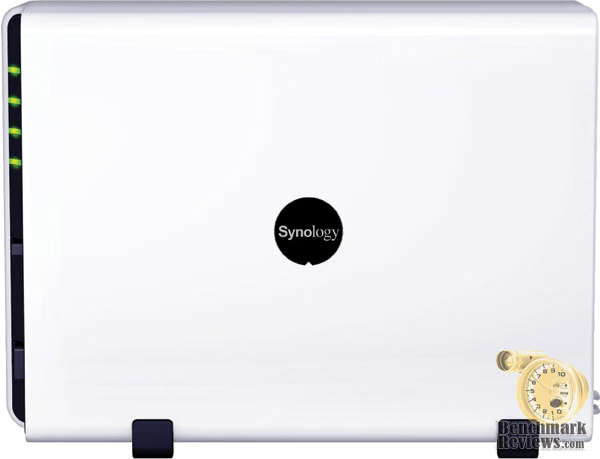
The Synology DS207+ measures approximately 9"x6.5"x3.5" which is quite compact, especially considering everything this little box can do. The good thing about a NAS box is that it doesn’t need to be placed near the computers that are going to be accessing it. If you plan on using this in a corporate workspace, most likely it will be locked away somewhere, however, if you are a home office user, and plan on sitting it on your desk it should have no problems passing the “wife” test. This would be the test that every husband is familiar with. It usually involves something we’ve either bought or made (read “rigged”) or may involve how we have arranged something. If the wife doesn’t look at it and state “You have got to be kidding”, it passes. It really is a nice looking little box.

Not much to the inside. Two SATA hard drives mount stacked on top of one another. Power is supplied via two 4pin power outlets. Don’t worry, the 4pin to SATA cables are provided, as well as perfectly fitted SATA cables. An efficient 60mm fan keeps both drives cool.

Honestly, the only real requirements of NAS enclosures are that it hold the drives securely, keep them cool, feel solid, and not be so ugly that the wife forces you to hide it in the closet (last one may not apply). The DS207+ meets all these requirements. What we really care about is how it performs.
DS207+ NAS Detailed Exterior
The front of the Synology Disk Station DS-207+ SATA Gigabit NAS provides an easy to reach power button that lights up when powered on, a USB copy button that allows you to automatically copy all the contents of a USB flash drive to the server’s internal hard drives, and four status lights. Also included on the front is an USB port allowing for the easy connection of additional external hard drives, USB printers, or other USB devices, and an eSATA port for connecting an external SATA hard drive.

The back of the DS207+ houses the 60mm fan outlet, a DC 12V port, a reset button, a gigabit LAN port, and two more USB ports for connecting even more USB hard drives, printers, flash drives, or other USB devices.

The Synology Disk Station DS-207+ may be housed in a small package but it packs more features than most full blown servers.
Synology NAS Software and Configuration
I am accustomed to setting up both Windows servers and Linux servers for my business clients, so I have a good understanding of the time involved in creating a secure working environment for a small business. The typical needs obviously include the ability to share data across the network, but also include the ability to restrict private data to specific users, for example it would not be good at all for everyone in the company to have access to the company’s accounting data. Another common feature is the ability to access the company data from home or from the road in a secure manner. And of course, a method of backing up both individual user data along with server data.

Accomplishing all those needs on Windows Advanced Server or Linux server can take considerable time and become quite a chore. Setting up the Synology Disk Station DS-207+ SATA Gigabit NAS is so easy it really makes you wonder why setting up Windows Advanced Server has to be such a pain, but I guess that really is asking too much from such a small company as Microsoft.

The first step involved in setting up the DS207+ is installing the Synology Assistant software. This software will format the hard drives and install the operating system. I downloaded a 34MB file from Synology’s website to insure that I had the latest version. Once you have run the “one step” update you are ready to log on to your new NAS box. From this point on everything is controlled from your web browser. The next step involves creating a volume for your data. I chose to set my two 750gb drives up in a RAID 1 array, which after formatting gave me 686.21GB of usable space.

Once you have your volume created, you need to create your shared folders. I created three folders for my unit: accounting, data, and private.

The next step is to create groups for your soon to be created users. For my review I created three groups: boss, accounting, and workers.
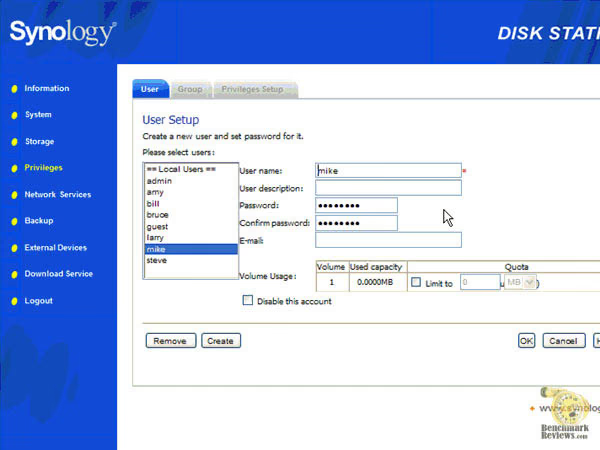
Now that we have groups created, we need some users. You can create up to 128 users to suit your needs. Create your users and assign them to the groups you would like them in.

Next, we go the Privileges Setup tab. Here you will have a drop down list of all the shared folders you created earlier. Simply select the groups or individual users you would like to have access to each shared folder. You can give your users and groups read only access, writable access , or block access to any of the folders you have created.

After this, if you would like to enable FTP access to your shared folders, simply click the FTP check box. And that is it. It took all of 15 minutes to format the hard drives, install the operating system, create shared folders, create multiple user accounts and assign them to customized groups, give individual users access to folder you select and restrict folders that contain private data to only the users you want to see it, and with a simple one click of the mouse, allow access from home.
Synology DS-207+ NAS Testing & Results
A piece of network equipment like a NAS box or any server for that matter have multiple factors that one must consider when weighing their value to the end user. Some of these factors are; the actual purchase price or the item, the time (cost) involved in getting it up and running, and how well it performs once it is up and running. Once it’s setup and possibly stored out of sight, all that really matters is how it performs.
NAS Testing Methodology
I wanted to try something a little different this time around for testing. Given the significant improvements in transfer speeds of the current top of the line NAS boxes, I thought it was time to compare them to their big brothers. So in my testing I compared the DS207+ to a Windows Advanced Server 2008 system and a Linux server running ClarkConnect.
Using three sets of test files each measuring exactly 1 GB (1,240,000 KB), one consisting of one large 1 GB file, one consisting of ten 100 MB files, and a third consisting of one thousand 1 MB files. I would make four write transfers to each system using simple Windows shares and time each transfer. The first transfer was ignored, but the following three were averaged. In all tests, the NAS device hard drives were operating in RAID 1 mode. I realize that RAID 1 most likely slows down the performance of the NAS box but it is the most likely setup that an office would be using.
For my testing, the included CAT-5e patch cord was used to connect the NAS device and the Linux server directly to the Gigabit Ethernet NIC built into the ASUS P5K motherboard. Due to the location of the Windows Server, I was unable to use a patch cable and therefore the test was routed through a Dell Gigabit switch.
Synology DS207+ System
-
Stock System
-
Processor: 500MHz
-
System Memory: 128MB
-
Hard Disk 1: Western Digital WD7500AAKS 750GB
-
Hard Disk 2: Western Digital WD7500AAKS 750GB (Raid 1)
Linux System
-
Motherboard: Dell Vostro 200
-
System Memory: 2 x 512mb DDR2 667MHz
-
Processor: Intel E2140 at 1.6GHz
-
Cooling: Stock
-
Network: PCI Realtek 10/100/1000
-
Hard Disk 1: 80GB SATA
-
Optical Drive: SATA DVD
-
Enclosure: Dell Minitower
-
PSU: Stock Dell Power Supply
-
Operating System: ClarkConnect 4.2
Windows Server 2008 System
-
Motherboard: Abit AB9 Pro
-
System Memory: Supertalent T800UX2GC4 PC2-6400 4GB DDR2 RAM
-
Processor: Intel Celeron D at 2.8GHz
-
Cooling: Stock
-
Network: Integrated 10/100/1000
-
Hard Disk 2 x Samsung HD501LJ 500GB SATA (Raid 1)
-
Optical Drive: NONE
-
Enclosure: NONE
-
PSU: Antec TruePower 550
-
Operating System: Windows Server 2008
Client System
-
Motherboard: Asus P5K (Intel P35 chipset)
-
System Memory: Supertalent T800UX2GC4 PC2-6400 2GB DDR2 RAM
-
Processor: Intel Q6600 Core 2 Quad at 3.2GHZ (8x400)
-
Cooling: Tuniq Tower 120
-
Video: EVGA 8800GTX
-
Hard Disk 1: Western Digital WD1500ADFD 10,000 RPM SATA
-
Optical Drive: SATA 20x DVD R/W
-
Enclosure: ANTEC Nine Hundred
-
PSU: PC Power and Cooling Silencer 750 Quad
-
Operating System: Windows XP Professional SP-2
Results
While some may say that it is unfair to compare a NAS box that costs less than $400 to a full blown Windows Advanced Server which will run a typical company in excess of $2,000 in software alone, I really felt this little box was ready to run with the big boys. While I was unable to obtain the 33.58MB per second (60.28MB per second under FTP) that Synology claims the DS207+ performed for them, granted they were using RAID 0, rather than the RAID 1 that I tested under, I was never the less very impressed with the numbers this little unit churned out in real world conditions.

-
1 GB File Transfer Test (read)
-
DS207+ NAS: 19.76 Mbps
-
Linux Server: 24.76 Mbps
-
Windows Server: 43.04 Mbps
-
-
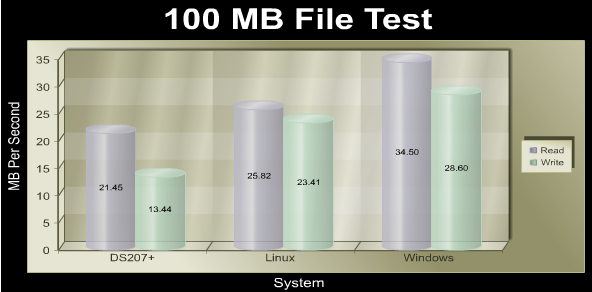
100 MB File Transfer Test (read)
-
DS207+ NAS: 21.45 Mbps
-
Linux Server: 25.83 Mbps
-
Windows Server: 34.50 Mbps
-
-
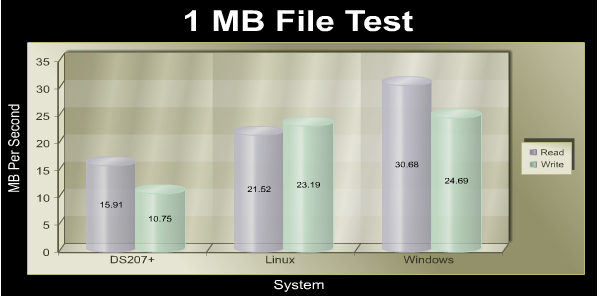
1 MB File Transfer Test (read)
-
DS207+ NAS: 15.91 Mbps
-
Linux Server: 21.52 Mbps
-
Windows Server: 30.68 Mbps
-
Now before you look at the chart and think the DS207+ got whipped, you should consider a few things. First, in every read test the DS207+ averaged faster than the maximum theoretical transfer rate of 10/100 which would be approximately 12.5 MBps. So if you are still operating on a standard 10/100 network which I would have to say is the case for the mass majority of small businesses today, these would all pretty much be a tie. All three would exceed the bottleneck of the typical 10/100 network. Second, the DS207+ was tested in RAID 1 which impacts the write times significantly. And third, the Windows Server would be well over 5x the cost of the DS207+.
Now for those of you that have made the transition to full Gigabit, the real world performance differences between the DS207+ and the full blown Windows Advanced Server 2008 system are going to be hard to notice unless you are working with huge files. By huge I don’t mean a large document, I’m talking about ripped DVD images. Make no mistake about it, this little box is a speed daemon.
Final Thoughts
I believe the days of tolerating a slow NAS box are over. With the ease of setup and the acceptable levels of performance, the Synology Disk Station DS-207+ SATA Gigabit NAS is a diamond. My review focused more on how this box would work for a typical small business, which is what I am accustomed to working with. I really didn’t touch much on all the extra features packed in to the DS207+ such as the downloading station, the multimedia station, or even the ability to hook your iPod up to it and share it with everyone on the network. Honestly, this box is a keeper even without all those bonus features. Don’t get me wrong, I’m glad they are there for the home office user, but my rating was not influenced by them.
I really didn’t know how to work this in, but it might help convey just how impressive this little box is. I asked a fellow colleague, who happens to be the manager of another computer shop in town, to assist me in the benchmarking process of this review. His first observation of the DS207+ was that it was a nice looking little box but would you really take this into a business and go “here is your new server”. His experience with NAS boxes of the past were pretty much the same experience most of us have had, they were cheap and slow. He actually expressed a concern that if he did in fact install this device in a client’s office, anyone that came in later to work on the system would most likely laugh at what he had installed. After three hours of testing, his attitude had completely changed. To be honest, we were both blown away by both the ease of setup and the performance of the little box. While I have a feeling the RS407 is more in line with what he will most likely be installing in his client’s offices, he none the less is sold on Synology NAS products. This little box is just that impressive.
Synology DS-207+ Conclusion
Synology has done a fine job with product presentation. There is plenty of pertinent information on the retail box, which improves the chances that the Synology Disk Station DS-207+ SATA Gigabit NAS will satisfy the consumer needs.
Appearance is attractive for the home user. The white and black enclosure of the DS207+ gives it a very clean appearance. While it might look more at place in the home office than on the corporate rack, only the tech guys see the rack anyways.
With very little wasted space, the construction is solid. Two drives are nicely secured. Cooling seems more than adequate. The DS207+ exterior is made almost entirely of plastic so I would not suggest dropping it, but then that probably goes for any of your computer equipment.
Functionality of this little unit really blew me away. Not only does it provide more features then most users will ever need, the transfer speed was comparable to servers costing thousands of dollars more than this little unit. NAS boxes have arrived. The ease of setup of the DS207+ makes the option of the average user setting up a secure server, having the ability to access that server from home, the office, or anywhere with Internet access, and even hosting a website, are now a real possibility.
The value of the Synology DS207+ is really hard to express. It is by no means the cheapest NAS box available. On the contrary, at close to $340 without hard drives it may be towards the upper end of pricing. However, given that most of those cheap NAS boxes can’t touch the DS207+ in the performance category you really do get what you pay for, only here, you actually get quite a bit more. When compared to a typical Windows Server that most small businesses have, the DS207+ becomes a steal. Biggest problem might be with a product this simple, it may be hard for professional network installers to justify the large install bill. Maybe I need to rethink my excitement on this product.
In summary, if you hadn’t already guessed, I loved this little box. I just wish I could truly relay just how easy this box is to set up. While not the cheapest of the bunch, I still feel it is a good value. Only changes I might request would be a cheaper price and support for more hard drives.
Pros:
+ Extremely easy setup
+ Good performance
+ Compact size
+ Attractive finish
+ Nice cooling
+ Support for 2 TB of storage possible more.
+ eSATA support
+ Ability to add USB Hard drives
+ USB print server
+ Rubber feet for side mounting
+ Inexpensive compared to PC Servers
Cons:
- Expensive compared to other NAS devices
- Still not as fast as a full blown server
- May be out of place in a company rack server
- Going to be hard to justify the high install bill for clients.
Ratings:
-
Presentation: 8.50
-
Appearance: 9.50
-
Construction: 9.00
-
Functionality: 9.50
-
Value: 8.50
Final Score: 9.00 out of 10.
Excellence Achievement: Benchmark Reviews Golden Tachometer Award.
Questions? Comments? Benchmark Reviews really wants your feedback. We invite you to leave your remarks in our Discussion Forum.