
GeForce GTS 450 SLI Scaling Performance
GeForce GTS 450 SLI Performance Scaling
Only a few years ago NVIDIA's SLI technology was a feature only the most elite gamers took advantage of, helping them to push the fastest graphics cards on the planet even faster. Often times a second GeForce video card could be combined into a SLI set and produce 33-50% more performance. Those days are gone, and Benchmark Reviews has learned that a set of GF106 GPUs can do a lot more than scale; they can multiply. Since a single $129 GeForce GTS 450 can outperform an AMD Radeon HD 5750 and match the 5770, what kind of performance do you get from two GTS 450's for $258? It seems like a pair of mainstream GTS 450's in SLI should compete nicely against AMD's $200 Radeon HD 5830, or maybe even their $270 Radeon HD 5850. As it turns out, two GTS 460's in SLI are good enough to threaten NVIDIA's top-end segment. In this article, Benchmark Reviews tests NVIDIA GeForce GTS 450 SLI performance scaling.
NVIDIA recently earned its reputation back with the GF104 Fermi-based GeForce GTX 460; a video card that dominated the price point even before it dropped to $179 USD and completely ruled the middle market. Priced to launch at $129, the NVIDIA GeForce GTS 450 packs 192 CUDA cores into its 40nm GF106 Fermi GPU and adds 1GB of GDDR5 memory. Benchmark Reviews overclocked our GTS 450 to nearly 1GHz, and even paired them together in SLI to test against several high-end video cards using many of the most demanding DirectX-11 PC video games available.
The majority of PC gamers either use 1280x1024 or 1680x1050 monitor resolutions, which is appropriate for a single GeForce GTS 450. Once a second video card is added and configured into SLI, monitor resolutions such as 1920x1200 become possible along with quality settings only upper echelon graphics solutions can reproduce. Alternatively, gamers who purchase NVIDIA's 3D Vision kit and a 120Hz monitor (I suggest the ASUS VG236H model that comes with a NVIDIA 3D-Vision kit enclosed) can add a second GTS 450 to ensure they maintain their current quality and effects settings.
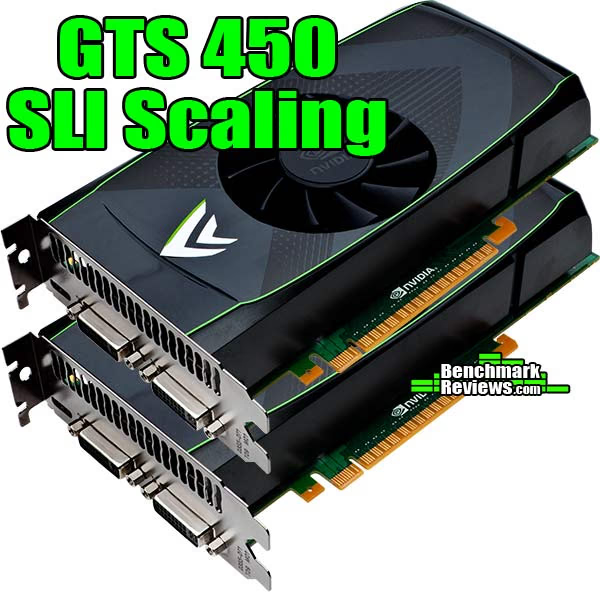
NVIDIA GeForce GTS 450 Video Card SLI Set
NVIDIA's GeForce GTX 460 uses a pared-down version of the GF104 GPU, which is actually capable of packing eight Streaming Multiprocessors for a total of 384 possible CUDA Cores and 64 Texture Units. GF106 is best conceived as one half of the GF104, allowing it to deliver four SMUs for 192 CUDA cores and 32 Texture Units. The NVIDIA GeForce GTS 450 comes clocked at 783MHz, with shaders operating at 1566. 1GB of 128-bit GDDR5 video frame buffer clocks-in at 902MHz, and works especially well with large environment games like Starcraft II or BattleForge. Although it might seem like two GTS 450's in SLI could equal one GTX 460, this report will prove that thory wrong.
PC-based video games are still the best way to experience realistic effects and immerse yourself in the battle. Consoles do their part, but only high-precision video cards offer the sharp clarity and definition needed to enjoy detailed graphics. Thanks to the new GF106 GPU, the GeForce GTS 450 video card offers enough headroom for budget-minded overclockers to drive out additional FPS performance while keeping temperatures cool. In this article, Benchmark Reviews tests the GeForce GTS 450 SLI set against some of the best video cards within the price segment by using several of the most demanding PC video game titles and benchmark software available: Aliens vs Predator, Battlefield: Bad Company 2, BattleForge, Crysis Warhead, Far Cry 2, Resident Evil 5, and Metro 2033.
It used to be that PC video games such as Crysis and Far Cry 2 were as demanding as you could get, but that was all back before DirectX-11 brought tessellation and to the forefront of graphics. DX11 now adds heavy particle and turbulence effects to video games, and titles such as Metro 2033 demand the most powerful graphics processing available. NVIDIA's GF100 GPU was their first graphics processor to support DirectX-11 features such as tessellation and DirectCompute, and the GeForce GTX 400-series offers an excellent combination of performance and value for games like Battlefield: Bad Company 2 or BattleForge.
At the center of every new technology is purpose, and NVIDIA has designed their Fermi GF106 GPU with an end-goal of redefining the video game experience through significant graphics processor innovations. Disruptive technology often changes the way users interact with computers, and the GeForce GTS 450 family of video cards are complex tools built to arrive at one simple destination: immersive entertainment at an entry-level price; especially when paired with NVIDIA GeForce 3D Vision. The experience is further improved with NVIDIA System Tools software, which includes NVIDIA Performance Group for GPU overclocking and NVIDIA System Monitor which displays real-time temperatures. These tools help gamers and overclockers get the most out of their investment.
EDITOR'S NOTE: This article supplements our stand-alone NVIDIA GeForce GTS 450 GF106 Video Card launch-day review. At the time of launch AMD's Radeon HD 5770 cost $150 compared to the $129 GTS 450 price point, making a CrossFire 5770 comparison inappropriate. If AMD moves the Radeon HD 5770 price point, this article will be updated with new test comparisons and results shortly thereafter.
Manufacturer: NVIDIA Corporation
Product Name: GeForce GTS 450 1GB
Price As Tested: $129.99 MSRP
Full Disclosure: The product sample used in this article has been provided by NVIDIA.
NVIDIA GF106 Architecture
GF106 implements 192 CUDA cores, organized as 8 SMs of 48 cores each. Each SM is a highly parallel multiprocessor supporting up to 32 warps at any given time (four Dispatch Units per SM deliver two dispatched instructions per warp for four total instructions per clock per SM). Each CUDA core is a unified processor core that executes vertex, pixel, geometry, and compute kernels. A unified L2 cache architecture (512KB on 1GB cards) services load, store, and texture operations. GF106 is designed to offer a total of 16 ROP units pixel blending, antialiasing, and atomic memory operations. The ROP units are organized in four groups of eight. Each group is serviced by a 64-bit memory controller. The memory controller, L2 cache, and ROP group are closely coupled-scaling one unit automatically scales the others.
Based on Fermi's third-generation Streaming Multiprocessor (SM) architecture, GF106 could be considered a divided GF104. NVIDIA GeForce GF100-series Fermi GPUs are based on a scalable array of Graphics Processing Clusters (GPCs), Streaming Multiprocessors (SMs), and memory controllers. NVIDIA's GF100 GPU implemented four GPCs, sixteen SMs, and six memory controllers. GF104 implements two GPCs, eight SMs, and four memory controllers. Conversely, GF106 houses one GPC, four SMs, and two memory controllers. Where each SM contained 32 CUDA cores in the GF100, NVIDIA configured GF104 with 48 cores per SM... which has been repeated for GF106. As expected, NVIDIA Fermi-series products are launching with different configurations of GPCs, SMs, and memory controllers to address different price points.
CPU commands are read by the GPU via the Host Interface. The GigaThread Engine fetches the specified data from system memory and copies them to the frame buffer. GF106 implements two 64-bit GDDR5 memory controllers (128-bit total) to facilitate high bandwidth access to the frame buffer. The GigaThread Engine then creates and dispatches thread blocks to various SMs. Individual SMs in turn schedules warps (groups of 48 threads) to CUDA cores and other execution units. The GigaThread Engine also redistributes work to the SMs when work expansion occurs in the graphics pipeline, such as after the tessellation and rasterization stages.

NVIDIA Fermi GF106 Block Diagram
GF106 Specifications
- Up to 192 CUDA Cores
- 4 Geometry Units
- 1 Raster Units
- 32 Texture Units
- 16 ROP Units
- 128-bit GDDR5
- DirectX-11 API Support
GeForce GTX 400 Specifications
|
Graphics Card |
GeForce GTS 450 |
GeForce GTX 460 |
GeForce GTX 465 |
GeForce GTX 470 |
GeForce GTX 480 |
|---|---|---|---|---|---|
| GPU Transistors | 1.17 Billion | 1.95 Billion | 3.2 Billion | 3.2 Billion | 3.2 Billion |
|
Graphics Processing Clusters |
1 | 2 |
4 |
4 |
4 |
|
Streaming Multiprocessors |
4 | 7 | 11 |
14 |
15 |
|
CUDA Cores |
192 | 336 | 352 |
448 |
480 |
|
Texture Units |
32 | 56 | 44 |
56 |
60 |
|
ROP Units |
16 | 768MB=24 / 1GB=32 | 32 |
40 |
48 |
|
Graphics Clock |
783 MHz |
675 MHz |
607 MHz |
607 MHz |
700 MHz |
|
Processor Clock |
1566 MHz |
1350 MHz |
1215 MHz |
1215 MHz |
1401 MHz |
|
Memory Clock |
902/3608 MHz |
900/3600 MHz |
837/3348 MHz |
837/3348 MHz |
924/3696 MHz |
|
Total Video Memory |
1024MB GDDR5 |
768MB / 1024MB GDDR5 |
1024MB GDDR5 |
1280MB GDDR5 |
1536MB GDDR5 |
|
Memory Interface |
128-Bit | 768MB=192 / 1GB=256-Bit |
256-Bit |
320-Bit |
384-Bit |
|
Total Memory Bandwidth |
57.7 GB/s |
86.4 / 115.2 GB/s |
102.6 GB/s |
133.9 GB/s |
177.4 GB/s |
|
Texture Filtering Rate |
25.1 GigaTexels/s |
37.8 GigaTexels/s |
26.7 GigaTexels/s |
34.0 GigaTexels/s |
42.0 GigaTexels/s |
|
GPU Fabrication Process |
40 nm |
40 nm |
40 nm |
40 nm |
40 nm |
|
Output Connections |
2x Dual-Link DVI-I |
2x Dual-Link DVI-I |
2x Dual-Link DVI-I |
2x Dual-Link DVI-I |
2x Dual-Link DVI-I |
|
Form Factor |
Dual-Slot |
Dual-Slot |
Dual-Slot |
Dual-Slot |
Dual-Slot |
|
Power Input |
6-Pin |
2x 6-Pin |
2x 6-Pin |
2x 6-Pin |
6-Pin + 8-Pin |
|
Thermal Design Power (TDP) |
106 Watts | 768MB=150W / 1GB=160W |
200 Watts |
215 Watts |
250 Watts |
|
Recommended PSU |
400 Watts |
450 Watts |
550 Watts |
550 Watts |
600 Watts |
|
GPU Thermal Threshold |
95°C |
104°C |
105°C |
105°C |
105°C |
|
GeForce Fermi Chart Courtesy of Benchmark Reviews |
Closer Look: GeForce GTS 450
Game developers have had an exciting year thanks to Microsoft DirectX-11 introduced with Windows 7 and updated on Windows Vista. This has allowed video games (released for the PC platform) to look better than ever. DirectX-11 is the leap in video game software development we've been waiting for. Screen Space Ambient Occlusion (SSAO) is given emphasis in DX11, allowing some of the most detailed computer textures gamers have ever seen. Realistic cracks in mud with definable depth and splintered tree bark make the game more realistic, but they also make new demands on the graphics hardware. This new level of graphical detail requires a new level of computer hardware: DX11-compliant hardware. Tessellation adds a tremendous level of strain on the GPU, making previous graphics hardware virtually obsolete with new DX11 game titles.
The NVIDIA GeForce GTS 450 video card series offers budget gamers a decent dose of graphics processing power for their money. But the GeForce GTS 450 is more than just a tool for video games; it's also a tool for professional environments that make use of GPGPU-accelerated compute-friendly software, such as Adobe Premier Pro and Photoshop.

The reference NVIDIA GeForce GTS 450 design measure 2.67" tall (double-bay), by 4.376-inches (111.15mm) wide, with a 8.25-inch (209.55mm) long graphics card profile. These dimensions are identical to the recently released GeForce GTX 460 video card, but the GTS 450 will be offered with 1GB of GDDR5 memory as its only frame buffer option. NVIDIA's reference cooler design uses a center-mounted 75mm finsink, which is more than adequate for this middle-market Fermi GF106 GPU. This externally-exhausting cooling solution is most ideal for overclocked computers, or those employing SLI sets. Our temperature results are discussed in detail later in this article.
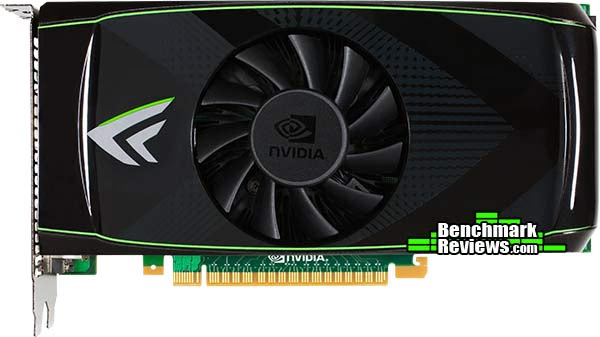
As with most past GeForce products, the Fermi GPU offers two video output 'lanes', so all three output devices cannot operate at once. NVIDIA has retained two DVI outputs on the GeForce GTS 450, so dual-monitor configurations can be utilized. By adding a second video card users can enjoy GeForce 3D-Vision Surround functionality.
Other changes occur in more subtle ways, such as replacing the S-Video connection with a more relevant (mini) HDMI 1.3a A/V output. In past GeForce products, the HDMI port was limited to video-only output and required a separate audio output. Native HDMI 1.3 support is available to the GeForce GTS 450, which allows uncompressed audio/video output to connected HDTVs or compatible monitors.

The 40nm fabrication process opens the die for more transistors; by comparison there are 1.4-billion in GT200 GPU (GeForce GTX 285) while the lower-end GF106 packs 1.17-billion onto the GTS 450. Even with its mid-range intentions, the PCB is a busy place for the GeForce GTS 450. Four (of six possible) DRAM ICs are positioned on the exposed backside of the printed circuit board, and combine for 1GB of GDDR5 video frame buffer memory. These 'Green'-branded GDDR5 components are similar to those used on the other Fermi products, as well as several Radeon products. The Samsung K4G10325FE-HC05 is rated for 1000MHz and 0.5ns response time at 1.5V ± 0.045V VDD/VDDQ.

Despite being approximately half of a mid-range GF104 graphics processor, the GTS 450's GF106 GPU still receives a heavy-duty thermal management system for optimal temperature control. NVIDIA employs a dual-slot cooling system on the reference GTX 460 video card, and by removing four retaining screws the entire heatsink and plastic shroud come away from the circuit board. Two copper heat-pipe rods span away from the copper base into two opposite sets of aluminum fins. The entire unit is cooled with a 75mm fan, which kept our test samples extremely cool at idle and maintained very good cooling once the card received unnaturally high stress loads with FurMark (covered later in this article).

Launching at the affordable $130 retail price point, NVIDIA was wise to support dual-card SLI sets on the GTS 450. Triple-SLI capability is not supported, since the $390 cost of three video cards would be better used to purchase either two GTX 470's or one GTX 480. Benchmark Reviews has tested two GeForce GTS 450's combined into SLI and shared some of the results in this article, but our NVIDIA GeForce GTS 450 SLI Performance Scaling report goes into more detail with additional test comparison. In the next several sections Benchmark Reviews will explain our video card test methodology, followed by a performance comparison of the NVIDIA GeForce GTS 450 against the Radeon 5770 and several of the most popular entry-level graphics accelerators available.
VGA Testing Methodology
The Microsoft DirectX-11 graphics API is native to the Microsoft Windows 7 Operating System, and will be the primary O/S for our test platform. DX11 is also available as a Microsoft Update for the Windows Vista O/S, so our test results apply to both versions of the Operating System. The majority of benchmark tests used in this article are comparative to DX11 performance, however some high-demand DX10 tests have also been included.
According to the Steam Hardware Survey published for the month ending May 2010, the most popular gaming resolution is 1280x1024 (17-19" standard LCD monitors). However, because this 1.31MP resolution is considered 'low' by most standards, our benchmark performance tests concentrate on higher-demand resolutions: 1.76MP 1680x1050 (22-24" widescreen LCD) and 2.30MP 1920x1200 (24-28" widescreen LCD monitors). These resolutions are more likely to be used by high-end graphics solutions, such as those tested in this article.
 In each benchmark test there is one 'cache run' that is conducted, followed by five recorded test runs. Results are collected at each setting with the highest and lowest results discarded. The remaining three results are averaged, and displayed in the performance charts on the following pages.
A combination of synthetic and video game benchmark tests have been used in this article to illustrate relative performance among graphics solutions. Our benchmark frame rate results are not intended to represent real-world graphics performance, as this experience would change based on supporting hardware and the perception of individuals playing the video game.
DX11 Cost to Performance Ratio
For this article Benchmark Reviews has included cost per FPS for graphics performance results. An average of the five least expensive product prices are calculated, which do not consider tax, freight, promotional offers, or rebates into the cost. All prices reflect product series components, and do not represent any specific manufacturer, model, or brand. The retail prices for each product were obtained from NewEgg.com on 11-September-2010:
- $150 Radeon HD 5770 1GB
- $130 GeForce GTS 450 1GB
- $200 Radeon HD 5830 1GB
- $180 GeForce GTX 460 768MB
- $270 Radeon HD 5850 1GB
- $300 GeForce GTX 470 1280MB
Intel X58-Express Test System
- Motherboard: ASUS P6X58D-E (Intel X58/ICH10R/Marvell SE9128)
- Processor: Intel Core i7-920 Nehalem 2.66 GHz (BX80601920)
- CPU Cooler: Prolimatech Megahalems
- System Memory: Kingston HyperX DDR3 KHX2000C8D3T1K3 (3x2GB @ 1333 CL6-6-6-18)
- Primary Drive: OCZ Agility-EX SLC SSD OCZSSD2-1AGTEX60G firmware 1.60
- Power Supply Unit: OCZ Z-Series Gold 850W OCZZ850
- Monitor: 26-Inch Widescreen LCD (up to 1920x1200@60Hz)
DirectX-10 Benchmark Applications
- 3DMark Vantage v1.02
- Extreme Settings: (Extreme Quality, 8x Multisample Anti-Aliasing, 16x Anisotropic Filtering, 1:2 Scale)
- Crysis Warhead v1.1 with HOC Benchmark
- Extreme Settings: (Very High Quality, 4x AA, 16x AF, Airfield Demo)
- Far Cry 2 v1.02
- Extreme Settings: (Very High Performance, Ultra-High Quality, 8x AA, HDR + Bloom)
- Resident Evil 5 Benchmark
- Extreme Settings: (Super-High Quality, 8x MSAA)
DirectX-11 Benchmark Applications
- Aliens vs Predator
- Extreme Settings: (Very High Quality, 4x AA, 16x AF, SSAO, Tessellation, Advanced Shadows)
- BattleField: Bad Company 2
- Extreme Settings: (Highest Quality, HBAO, 8x AA, 16x AF, 180s Fraps Single-Player Intro Scene)
- BattleForge v1.2
- Extreme Settings: (Very High Quality, 8x Anti-Aliasing, Auto Multi-Thread)
- Metro 2033
- Extreme Settings: (Very-High Quality, AAA, 16x AF, Advanced DoF, Tessellation, 180s Fraps Chase Scene)
- Unigine Heaven Benchmark 2.1
- Extreme Settings: (High Quality, Normal Tessellation, 16x AF, 4x AA)
Video Card Test Products
| Graphics Card | Radeon HD5770 | GeForce GTS450 | Radeon HD5830 | GeForce GTX460 | Radeon HD5850 | GeForce GTX470 |
|---|---|---|---|---|---|---|
| GPU Cores | 800 | 192 | 1120 | 336 | 1440 | 448 |
| Core Clock (MHz) | 850 | 783 | 800 | 675 | 725 | 608 |
| Shader Clock (MHz) | N/A | 1566 | N/A | 1350 | N/A | 1215 |
| Memory Clock (MHz) | 1200 | 902 | 1000 | 900 | 1000 | 837 |
| Memory Amount | 1024MB GDDR5 | 1024 MB GDDR5 | 1024MB GDDR5 | 768MB GDDR5 | 1024MB GDDR5 | 1280MB GDDR5 |
| Memory Interface | 128-bit | 128-bit | 256-bit | 192-bit | 256-bit | 320-bit |
- ATI Radeon HD 5770 Reference Design (850 MHz GPU/1200 MHz vRAM - ATI Catalyst Driver 10.8)
- NVIDIA GeForce GTS 450 1GB (783 MHz GPU/1566 MHz Shader/902 MHz vRAM - Forceware 260.52)
- ATI Radeon HD 5830 Reference Design (800 MHz GPU/1000 MHz vRAM - ATI Catalyst Driver 10.8)
- NVIDIA GeForce GTX 460 768MB (675 MHz GPU/1350 MHz Shader/900 MHz vRAM - Forceware 260.52)
- ATI Radeon HD 5850 Reference Design (725 MHz GPU/1000MHz vRAM - ATI Catalyst Driver 10.8)
- ZOTAC GeForce GTX 470 ZT-40201-10P (608 MHz GPU/1215 MHz Shader/837 MHz vRAM - Forceware 260.52)
DX10: 3DMark Vantage
3DMark Vantage is a PC benchmark suite designed to test the DirectX10 graphics card performance. FutureMark 3DMark Vantage is the latest addition the 3DMark benchmark series built by FutureMark corporation. Although 3DMark Vantage requires NVIDIA PhysX to be installed for program operation, only the CPU/Physics test relies on this technology.
3DMark Vantage offers benchmark tests focusing on GPU, CPU, and Physics performance. Benchmark Reviews uses the two GPU-specific tests for grading video card performance: Jane Nash and New Calico. These tests isolate graphical performance, and remove processor dependence from the benchmark results.
- 3DMark Vantage v1.02
- Extreme Settings: (Extreme Quality, 8x Multisample Anti-Aliasing, 16x Anisotropic Filtering, 1:2 Scale)
3DMark Vantage GPU Test: Jane Nash
Of the two GPU tests 3DMark Vantage offers, the Jane Nash performance benchmark is slightly less demanding. In a short video scene the special agent escapes a secret lair by water, nearly losing her shirt in the process. Benchmark Reviews tests this DirectX-10 scene at 1680x1050 and 1920x1200 resolutions, and uses Extreme quality settings with 8x anti-aliasing and 16x anisotropic filtering. The 1:2 scale is utilized, and is the highest this test allows. By maximizing the processing levels of this test, the scene creates the highest level of graphical demand possible and sorts the strong from the weak.

Jane Nash Extreme Quality Settings
Cost Analysis: Jane Nash (1680x1050)
- $200 Radeon HD 5830 1GB costs $8.48 per FPS
- $180 GeForce GTX 460 768MB costs $7.44 per FPS
- $270 Radeon HD 5850 1GB costs $9.47 per FPS
- $300 GeForce GTX 470 1280MB costs $10.45 per FPS
- $260 GeForce GTS 450 SLI costs $8.58 per FPS
- $365 Radeon HD 5870 1GB costs $10.20 per FPS
- $360 GeForce GTX 460 SLI costs $8.47 per FPS
3DMark Vantage GPU Test: New Calico
New Calico is the second GPU test in the 3DMark Vantage test suite. Of the two GPU tests, New Calico is the most demanding. In a short video scene featuring a galactic battleground, there is a massive display of busy objects across the screen. Benchmark Reviews tests this DirectX-10 scene at 1680x1050 and 1920x1200 resolutions, and uses Extreme quality settings with 8x anti-aliasing and 16x anisotropic filtering. The 1:2 scale is utilized, and is the highest this test allows. Using the highest graphics processing level available allows our test products to separate themselves and stand out (if possible).

New Calico Extreme Quality Settings
Cost Analysis: New Calico (1680x1050)
- $200 Radeon HD 5830 1GB costs $11.43 per FPS
- $180 GeForce GTX 460 768MB costs $8.70 per FPS
- $270 Radeon HD 5850 1GB costs $12.33 per FPS
- $300 GeForce GTX 470 1280MB costs $12.35 per FPS
- $260 GeForce GTS 450 SLI costs $9.46 per FPS
- $365 Radeon HD 5870 1GB costs $13.91 per FPS
- $360 GeForce GTX 460 SLI costs $9.97 per FPS
Test Summary: If you examine the price to performance ratio between both tests, the GeForce GTX 460 offers the best value of any single graphics card followed by the GTS 450 SLI set. The closest competition to the SLI sets' $260 price point is a $270 Radeon HD 5850, which performs poorly compared to the less expensive pair. The same can be said for NVIDIA's own GTX 470 video card, which trails the GTS 450 SLI set in every test resolution. In fact, the New Calico tests forces a $365 Radeon HD 5870 to trail behind the GTS 450 SLI set as well. Obviously a $180 GeForce GTX 460 is the way to go for best single-card value, but the $260 GTS 450 SLI set is an excellent value for the performance it delivers.
In regard to SLI scaling, a single GTS 450 produced 16.0 FPS in the 1680x1050 Jane Nash test, compared to 30.3 FPS in SLI. The New Calico test rendered 14.2 FPS on a single GTS 450 while a pair of them produced 27.5 FPS. This is proof evident that NVIDIA's SLI technology has become extremely efficient, and can effectively double the performance of a single card without degradation.
| Graphics Card | Radeon HD5770 | GeForce GTS450 | Radeon HD5830 | GeForce GTX460 | Radeon HD5850 | GeForce GTX470 |
|---|---|---|---|---|---|---|
| GPU Cores | 800 | 192 | 1120 | 336 | 1440 | 448 |
| Core Clock (MHz) | 850 | 783 | 800 | 675 | 725 | 608 |
| Shader Clock (MHz) | N/A | 1566 | N/A | 1350 | N/A | 1215 |
| Memory Clock (MHz) | 1200 | 902 | 1000 | 900 | 1000 | 837 |
| Memory Amount | 1024MB GDDR5 | 1024 MB GDDR5 | 1024MB GDDR5 | 768MB GDDR5 | 1024MB GDDR5 | 1280MB GDDR5 |
| Memory Interface | 128-bit | 128-bit | 256-bit | 192-bit | 256-bit | 320-bit |
DX10: Crysis Warhead
Crysis Warhead is an expansion pack based on the original Crysis video game. Crysis Warhead is based in the future, where an ancient alien spacecraft has been discovered beneath the Earth on an island east of the Philippines. Crysis Warhead uses a refined version of the CryENGINE2 graphics engine. Like Crysis, Warhead uses the Microsoft Direct3D 10 (DirectX-10) API for graphics rendering.
Benchmark Reviews uses the HOC Crysis Warhead benchmark tool to test and measure graphic performance using the Airfield 1 demo scene. This short test places a high amount of stress on a graphics card because of detailed terrain and textures, but also for the test settings used. Using the DirectX-10 test with Very High Quality settings, the Airfield 1 demo scene receives 4x anti-aliasing and 16x anisotropic filtering to create maximum graphic load and separate the products according to their performance.
Using the highest quality DirectX-10 settings with 4x AA and 16x AF, only the most powerful graphics cards are expected to perform well in our Crysis Warhead benchmark tests. DirectX-11 extensions are not supported in Crysis: Warhead, and SSAO is not an available option.
- Crysis Warhead v1.1 with HOC Benchmark
- Extreme Settings: (Very High Quality, 4x AA, 16x AF, Airfield Demo)

Crysis Warhead Extreme Quality Settings
Cost Analysis: Crysis Warhead (1680x1050)
- $200 Radeon HD 5830 1GB costs $9.09 per FPS
- $180 GeForce GTX 460 768MB costs $7.20 per FPS
- $270 Radeon HD 5850 1GB costs $10.00 per FPS
- $300 GeForce GTX 470 1280MB costs $9.09 per FPS
- $260 GeForce GTS 450 SLI costs $8.13 per FPS
- $365 Radeon HD 5870 1GB costs $11.77 per FPS
- $360 GeForce GTX 460 SLI costs $8.78 per FPS
Test Summary: The CryENGINE2 graphics engine used in Crysis Warhead allows the 1GB NVIDIA GeForce GTS 450 SLI set to match performance with ATI's Radeon HD 5870, and beat its closest contended at the price point (Radeon HD 5850) by 5 FPS at 1680x1050. This allows a favorable price to performance ratio for the GeForce GTS 450 SLI set, although a single GTX 460 still delivers maximum value. For die-hard fans of Crysis, two GeForce GTS 450's in SLI offer an excellent performance advantage over the more-expensive Radeon HD 5850 and 5870, but it also competes with the GTX 470. For the first time in our testing, Crysis Warhead demonstrates 100% efficiency by converting the 16 FPS of a single GTS 450 in 32 FPS when two video cards are combined into SLI.
| Graphics Card | Radeon HD5770 | GeForce GTS450 | Radeon HD5830 | GeForce GTX460 | Radeon HD5850 | GeForce GTX470 |
|---|---|---|---|---|---|---|
| GPU Cores | 800 | 192 | 1120 | 336 | 1440 | 448 |
| Core Clock (MHz) | 850 | 783 | 800 | 675 | 725 | 608 |
| Shader Clock (MHz) | N/A | 1566 | N/A | 1350 | N/A | 1215 |
| Memory Clock (MHz) | 1200 | 902 | 1000 | 900 | 1000 | 837 |
| Memory Amount | 1024MB GDDR5 | 1024 MB GDDR5 | 1024MB GDDR5 | 768MB GDDR5 | 1024MB GDDR5 | 1280MB GDDR5 |
| Memory Interface | 128-bit | 128-bit | 256-bit | 192-bit | 256-bit | 320-bit |
DX10: Far Cry 2
Ubisoft has developed Far Cry 2 as a sequel to the original, but with a very different approach to game play and story line. Far Cry 2 features a vast world built on Ubisoft's new game engine called Dunia, meaning "world", "earth" or "living" in Farci. The setting in Far Cry 2 takes place on a fictional Central African landscape, set to a modern day timeline.
The Dunia engine was built specifically for Far Cry 2, by Ubisoft Montreal development team. It delivers realistic semi-destructible environments, special effects such as dynamic fire propagation and storms, real-time night-and-day sun light and moon light cycles, dynamic music system, and non-scripted enemy A.I actions.
The Dunia game engine takes advantage of multi-core processors as well as multiple processors and supports DirectX 9 as well as DirectX-10. Only 2 or 3 percent of the original CryEngine code is re-used, according to Michiel Verheijdt, Senior Product Manager for Ubisoft Netherlands. Additionally, the engine is less hardware-demanding than CryEngine 2, the engine used in Crysis.
However, it should be noted that Crysis delivers greater character and object texture detail, as well as more destructible elements within the environment. For example; trees breaking into many smaller pieces and buildings breaking down to their component panels. Far Cry 2 also supports the amBX technology from Philips. With the proper hardware, this adds effects like vibrations, ambient colored lights, and fans that generate wind effects.
There is a benchmark tool in the PC version of Far Cry 2, which offers an excellent array of settings for performance testing. Benchmark Reviews used the maximum settings allowed for DirectX-10 tests, with the resolution set to 1920x1200. Performance settings were all set to 'Very High', Render Quality was set to 'Ultra High' overall quality, 8x anti-aliasing was applied, and HDR and Bloom were enabled.
- Far Cry 2 v1.02
- Extreme Settings: (Very High Performance, Ultra-High Quality, 8x AA, HDR + Bloom)

Far Cry 2 Extreme Quality Settings
Although the Dunia engine in Far Cry 2 is slightly less demanding than CryEngine 2 engine in Crysis, the strain appears to be extremely close. In Crysis we didn't dare to test AA above 4x, whereas we used 8x AA and 'Ultra High' settings in Far Cry 2. The end effect was a separation between what is capable of maximum settings, and what is not. Using the short 'Ranch Small' time demo (which yields the lowest FPS of the three tests available), we noticed that there are very few products capable of producing playable frame rates with the settings all turned up.
Cost Analysis: Far Cry 2 (1680x1050)
- $200 Radeon HD 5830 1GB costs $5.76 per FPS
- $180 GeForce GTX 460 768MB costs $2.67 per FPS
- $270 Radeon HD 5850 1GB costs $5.23 per FPS
- $300 GeForce GTX 470 1280MB costs $3.90 per FPS
- $260 GeForce GTS 450 SLI costs $3.17 per FPS
- $365 Radeon HD 5870 1GB costs $6.02 per FPS
- $360 GeForce GTX 460 SLI costs $3.35 per FPS
Test Summary: Far Cry 2 benchmark tests use maximum settings, which means that users who dial down the anti-aliasing or use a lower resolution will have much better frame rate performance. The FC2 Dunia game engine demonstrates a preference towards NVIDIA products over ATI, which allows the pair of GeForce GTS 450's in SLI to produce a dominating 21.4 FPS performance lead over the Radeon HD 5870 while still maintaining a lead over the more expensive GTX 470. Because of the major differences in performance with Far Cry 2, the GeForce GTS 450 SLI set (and all other GeForce cards) offered the best performance and cost per FPS of any DX11 video card. Far Cry 2 rendered 43.3 FPS with a single GeForce GTS 450, which scales to 82.0 FPS with 95% SLI efficiency.
| Graphics Card | Radeon HD5770 | GeForce GTS450 | Radeon HD5830 | GeForce GTX460 | Radeon HD5850 | GeForce GTX470 |
|---|---|---|---|---|---|---|
| GPU Cores | 800 | 192 | 1120 | 336 | 1440 | 448 |
| Core Clock (MHz) | 850 | 783 | 800 | 675 | 725 | 608 |
| Shader Clock (MHz) | N/A | 1566 | N/A | 1350 | N/A | 1215 |
| Memory Clock (MHz) | 1200 | 902 | 1000 | 900 | 1000 | 837 |
| Memory Amount | 1024MB GDDR5 | 1024 MB GDDR5 | 1024MB GDDR5 | 768MB GDDR5 | 1024MB GDDR5 | 1280MB GDDR5 |
| Memory Interface | 128-bit | 128-bit | 256-bit | 192-bit | 256-bit | 320-bit |
DX10: Resident Evil 5
Built upon an advanced version of Capcom's proprietary MT Framework game engine to deliver DirectX-10 graphic detail, Resident Evil 5 offers gamers non-stop action similar to Devil May Cry 4, Lost Planet, and Dead Rising. The MT Framework is an exclusive seventh generation game engine built to be used with games developed for the PlayStation 3 and Xbox 360, and PC ports. MT stands for "Multi-Thread", "Meta Tools" and "Multi-Target". Games using the MT Framework are originally developed on the PC and then ported to the other two console platforms.
On the PC version of Resident Evil 5, both DirectX 9 and DirectX-10 modes are available for Microsoft Windows XP and Vista Operating Systems. Microsoft Windows 7 will play Resident Evil with backwards compatible Direct3D APIs. Resident Evil 5 is branded with the NVIDIA The Way It's Meant to be Played (TWIMTBP) logo, and receives NVIDIA GeForce 3D Vision functionality enhancements.
NVIDIA and Capcom offer the Resident Evil 5 benchmark demo for free download from their website, and Benchmark Reviews encourages visitors to compare their own results to ours. Because the Capcom MT Framework game engine is very well optimized and produces high frame rates, Benchmark Reviews uses the DirectX-10 version of the test at 1920x1200 resolution. Super-High quality settings are configured, with 8x MSAA post processing effects for maximum demand on the GPU. Test scenes from Area #3 and Area #4 require the most graphics processing power, and the results are collected for the chart illustrated below.
- Resident Evil 5 Benchmark
- Extreme Settings: (Super-High Quality, 8x MSAA)

Resident Evil 5 Extreme Quality Settings
Resident Evil 5 has really proved how well the proprietary Capcom MT Framework game engine can look with DirectX-10 effects. The Area 3 and 4 tests are the most graphically demanding from this free downloadable demo benchmark, but the results make it appear that the Area #3 test scene performs better with NVIDIA GeForce products compared to the Area #4 scene that levels the field and gives ATI Radeon GPUs a fair representation.
Cost Analysis: Resident Evil 5 (Area 4)
- $200 Radeon HD 5830 1GB costs $3.41 per FPS
- $180 GeForce GTX 460 768MB costs $2.24 per FPS
- $270 Radeon HD 5850 1GB costs $3.28 per FPS
- $300 GeForce GTX 470 1280MB costs $3.08 per FPS
- $260 GeForce GTS 450 SLI costs $2.95 per FPS
- $365 Radeon HD 5870 1GB costs $3.76 per FPS
- $360 GeForce GTX 460 SLI costs $2.73 per FPS
Test Summary: It's unclear if Resident Evil 5 graphics performance fancies ATI or NVIDIA, especially since two different test scenes alternate favoritism. There doesn't appear to be any decisive tilt towards GeForce products over ATI Radeon counterparts from within the game itself. Test scene #3 certainly favors Fermi GPU's, and they leads ahead of every other product tested. In test scene #4 the Radeon video card series appears more competitive, although the pair of 1GB GeForce GTS 450's in SLI still outperforms a Radeon HD 5850 by several frames per second. Additionally, the GTS 450 offers a competitive edge for the next best cost per frame right behind the GTX 460. Using a single GeForce GTS 450 at 1680x1050 resolution, Resident Evil 5 rendered 49.0 FPS. Combining two cards into an SLI set generated 88.3 FPS for 90% SLI efficiency.
| Graphics Card | Radeon HD5770 | GeForce GTS450 | Radeon HD5830 | GeForce GTX460 | Radeon HD5850 | GeForce GTX470 |
|---|---|---|---|---|---|---|
| GPU Cores | 800 | 192 | 1120 | 336 | 1440 | 448 |
| Core Clock (MHz) | 850 | 783 | 800 | 675 | 725 | 608 |
| Shader Clock (MHz) | N/A | 1566 | N/A | 1350 | N/A | 1215 |
| Memory Clock (MHz) | 1200 | 902 | 1000 | 900 | 1000 | 837 |
| Memory Amount | 1024MB GDDR5 | 1024 MB GDDR5 | 1024MB GDDR5 | 768MB GDDR5 | 1024MB GDDR5 | 1280MB GDDR5 |
| Memory Interface | 128-bit | 128-bit | 256-bit | 192-bit | 256-bit | 320-bit |
DX11: Aliens vs Predator
Aliens vs. Predator is a science fiction first-person shooter video game, developed by Rebellion, and published by Sega for Microsoft Windows, Sony PlayStation 3, and Microsoft Xbox 360. Aliens vs. Predator utilizes Rebellion's proprietary Asura game engine, which had previously found its way into Call of Duty: World at War and Rogue Warrior. The self-contained benchmark tool is used for our DirectX-11 tests, which push the Asura game engine to its limit.
In our benchmark tests, Aliens vs. Predator was configured to use the highest quality settings with 4x AA and 16x AF. DirectX-11 features such as Screen Space Ambient Occlusion (SSAO) and tessellation have also been included, along with advanced shadows.
- Aliens vs Predator
- Extreme Settings: (Very High Quality, 4x AA, 16x AF, SSAO, Tessellation, Advanced Shadows)

Aliens vs Predator Extreme Quality Settings
Cost Analysis: Aliens vs Predator (1680x1050)
- $200 Radeon HD 5830 1GB costs $8.66 per FPS
- $180 GeForce GTX 460 768MB costs $6.55 per FPS
- $270 Radeon HD 5850 1GB costs $9.12 per FPS
- $300 GeForce GTX 470 1280MB costs $8.85 per FPS
- $260 GeForce GTS 450 SLI costs $7.65 per FPS
- $365 Radeon HD 5870 1GB costs $9.89 per FPS
- $360 GeForce GTX 460 SLI costs $7.66 per FPS
Test Summary: Aliens vs Predator may use the well-known Asura game engine, but DirectX-11 extensions push the graphical demand on this game to levels eclipsed only by Mafia-II or Metro 2033 (and possibly equivalent to DX10 Crysis). With an unbiased appetite for raw DirectX-11 graphics performance, Aliens vs Predator accepts ATI and NVIDIA products as equal contenders. When high-strain SSAO is called into action, the pair of 1GB GeForce GTS 450's in SLI demonstrate how well Fermi is suited for DX11, coming within a few frames of the more expensive ATI Radeon HD 5870 while pulling ahead of the Radeon HD 5850 it shares at the price point. NVIDIA's GTX 460 enjoys a significant cost per FPS advantage, followed by the GTS 450 SLI set (which matched performance with the GTX 470 in Aliens vs Predator). A single GTS 450 produced 17.7 FPS with the Aliens vs Predator benchmark at 1680x1050, while a pair combined into SLI delivered 34.0 FPS. This amounts to 96% SLI efficiency.
| Graphics Card | Radeon HD5770 | GeForce GTS450 | Radeon HD5830 | GeForce GTX460 | Radeon HD5850 | GeForce GTX470 |
|---|---|---|---|---|---|---|
| GPU Cores | 800 | 192 | 1120 | 336 | 1440 | 448 |
| Core Clock (MHz) | 850 | 783 | 800 | 675 | 725 | 608 |
| Shader Clock (MHz) | N/A | 1566 | N/A | 1350 | N/A | 1215 |
| Memory Clock (MHz) | 1200 | 902 | 1000 | 900 | 1000 | 837 |
| Memory Amount | 1024MB GDDR5 | 1024 MB GDDR5 | 1024MB GDDR5 | 768MB GDDR5 | 1024MB GDDR5 | 1280MB GDDR5 |
| Memory Interface | 128-bit | 128-bit | 256-bit | 192-bit | 256-bit | 320-bit |
DX11: Battlefield Bad Company 2
The Battlefield franchise has been known to demand a lot from PC graphics hardware. DICE (Digital Illusions CE) has incorporated their Frostbite-1.5 game engine with Destruction-2.0 feature set with Battlefield: Bad Company 2. Battlefield: Bad Company 2 features destructible environments using Frostbit Destruction-2.0, and adds gravitational bullet drop effects for projectiles shot from weapons at a long distance. The Frostbite-1.5 game engine used on Battlefield: Bad Company 2 consists of DirectX-10 primary graphics, with improved performance and softened dynamic shadows added for DirectX-11 users.
At the time Battlefield: Bad Company 2 was published, DICE was also working on the Frostbite-2.0 game engine. This upcoming engine will include native support for DirectX-10.1 and DirectX-11, as well as parallelized processing support for 2-8 parallel threads. This will improve performance for users with an Intel Core-i7 processor. Unfortunately, the Extreme Edition Intel Core i7-980X six-core CPU with twelve threads will not see full utilization.
In our benchmark tests of Battlefield: Bad Company 2, the first three minutes of action in the single-player raft night scene are captured with FRAPS. Relative to the online multiplayer action, these frame rate results are nearly identical to daytime maps with the same video settings. The Frostbite-1.5 game engine in Battlefield: Bad Company 2 appears to equalize our test set of video cards, and despite AMD's sponsorship of the game it still plays well using any brand of graphics card.
- BattleField: Bad Company 2
- Extreme Settings: (Highest Quality, HBAO, 8x AA, 16x AF, 180s Fraps Single-Player Intro Scene)

Battlefield Bad Company 2 Extreme Quality Settings
Cost Analysis: Battlefield: Bad Company 2 (1680x1050)
- $200 Radeon HD 5830 1GB costs $4.34 per FPS
- $180 GeForce GTX 460 768MB costs $3.31 per FPS
- $270 Radeon HD 5850 1GB costs $4.44 per FPS
- $300 GeForce GTX 470 1280MB costs $4.66 per FPS
- $260 GeForce GTS 450 SLI costs $4.11 per FPS
- $365 Radeon HD 5870 1GB costs $5.13 per FPS
- $360 GeForce GTX 460 SLI costs $3.88 per FPS
Test Summary: Our extreme-quality tests use maximum settings for Battlefield: Bad Company 2, and so users who dial down the anti-aliasing or use a lower resolution will have much better frame rate performance. The best value to performance ratio belongs to the single and SLI GeForce GTX 460 configurations, followed again by the GTS 450 SLI set. While the GTS 450 SLI set leads AMD's Radeon HD 5850 and matches the GeForce GTX 470 at 1680x1050, it trails behind them slightly at 1920x1200. Overall the GTS 450 SLI set performs exactly as it should for its price point, although BF:BC2 taxes the pair of GF106 GPUs at 1920x1200. Tested with a single GeForce GTS 450 at 1680x1050, Battlefield: Bad Company 2 rendered 33.7 FPS. Combine two GTS 450's together into SLI and the frame rate jumps to 63.2 FPS for 94% SLI efficiency.
| Graphics Card | Radeon HD5770 | GeForce GTS450 | Radeon HD5830 | GeForce GTX460 | Radeon HD5850 | GeForce GTX470 |
|---|---|---|---|---|---|---|
| GPU Cores | 800 | 192 | 1120 | 336 | 1440 | 448 |
| Core Clock (MHz) | 850 | 783 | 800 | 675 | 725 | 608 |
| Shader Clock (MHz) | N/A | 1566 | N/A | 1350 | N/A | 1215 |
| Memory Clock (MHz) | 1200 | 902 | 1000 | 900 | 1000 | 837 |
| Memory Amount | 1024MB GDDR5 | 1024 MB GDDR5 | 1024MB GDDR5 | 768MB GDDR5 | 1024MB GDDR5 | 1280MB GDDR5 |
| Memory Interface | 128-bit | 128-bit | 256-bit | 192-bit | 256-bit | 320-bit |
DX11: BattleForge
BattleForge is free Massive Multiplayer Online Role Playing Game (MMORPG) developed by EA Phenomic with DirectX-11 graphics capability. Combining strategic cooperative battles, the community of MMO games, and trading card gameplay, BattleForge players are free to put their creatures, spells and buildings into combination's they see fit. These units are represented in the form of digital cards from which you build your own unique army. With minimal resources and a custom tech tree to manage, the gameplay is unbelievably accessible and action-packed.
Benchmark Reviews uses the built-in graphics benchmark to measure performance in BattleForge, using Very High quality settings (detail) and 8x anti-aliasing with auto multi-threading enabled. BattleForge is one of the first titles to take advantage of DirectX-11 in Windows 7, and offers a very robust color range throughout the busy battleground landscape. The charted results illustrate how performance measures-up between video cards when Screen Space Ambient Occlusion (SSAO) is enabled.
- BattleForge v1.2
- Extreme Settings: (Very High Quality, 8x Anti-Aliasing, Auto Multi-Thread)

BattleForge Extreme Quality Settings
Cost Analysis: BattleForge (1680x1050)
- $200 Radeon HD 5830 1GB costs $7.41 per FPS
- $180 GeForce GTX 460 768MB costs $4.68 per FPS
- $270 Radeon HD 5850 1GB costs $7.00 per FPS
- $300 GeForce GTX 470 1280MB costs $5.69 per FPS
- $260 GeForce GTS 450 SLI costs $5.38 per FPS
- $365 Radeon HD 5870 1GB costs $8.08 per FPS
- $360 GeForce GTX 460 SLI costs $5.29 per FPS
Test Summary: With settings turned to their highest quality, the NVIDIA GeForce GTS 450 SLI set out performs both the Radeon HD 5850 and 5870 at 1680x1050. Turning the resolution up to 1920x1200 forces the GTS 450 SLI set to match performance with the more expensive Radeon HD 5870, but the 450's have a $5.38 price to performance ratio compared to the 5870's $8.08. A single GeForce GTS 450 produced 24.7 FPS at 1680x1050, while an SLI set delivered 48.3 FPS for a 98% total efficiency.
| Graphics Card | Radeon HD5770 | GeForce GTS450 | Radeon HD5830 | GeForce GTX460 | Radeon HD5850 | GeForce GTX470 |
|---|---|---|---|---|---|---|
| GPU Cores | 800 | 192 | 1120 | 336 | 1440 | 448 |
| Core Clock (MHz) | 850 | 783 | 800 | 675 | 725 | 608 |
| Shader Clock (MHz) | N/A | 1566 | N/A | 1350 | N/A | 1215 |
| Memory Clock (MHz) | 1200 | 902 | 1000 | 900 | 1000 | 837 |
| Memory Amount | 1024MB GDDR5 | 1024 MB GDDR5 | 1024MB GDDR5 | 768MB GDDR5 | 1024MB GDDR5 | 1280MB GDDR5 |
| Memory Interface | 128-bit | 128-bit | 256-bit | 192-bit | 256-bit | 320-bit |
DX11: Metro 2033
Metro 2033 is an action-oriented video game with a combination of survival horror, and first-person shooter elements. The game is based on the novel Metro 2033 by Russian author Dmitry Glukhovsky. It was developed by 4A Games in Ukraine and released in March 2010 for Microsoft Windows. Metro 2033 uses the 4A game engine, developed by 4A Games. The 4A Engine supports DirectX-9, 10, and 11, along with NVIDIA PhysX and GeForce 3D Vision.
The 4A engine is multi-threaded in such that only PhysX had a dedicated thread, and uses a task-model without any pre-conditioning or pre/post-synchronizing, allowing tasks to be done in parallel. The 4A game engine can utilize a deferred shading pipeline, and uses tessellation for greater performance, and also has HDR (complete with blue shift), real-time reflections, color correction, film grain and noise, and the engine also supports multi-core rendering.
Metro 2033 featured superior volumetric fog, double PhysX precision, object blur, sub-surface scattering for skin shaders, parallax mapping on all surfaces and greater geometric detail with a less aggressive LODs. Using PhysX, the engine uses many features such as destructible environments, and cloth and water simulations, and particles that can be fully affected by environmental factors.
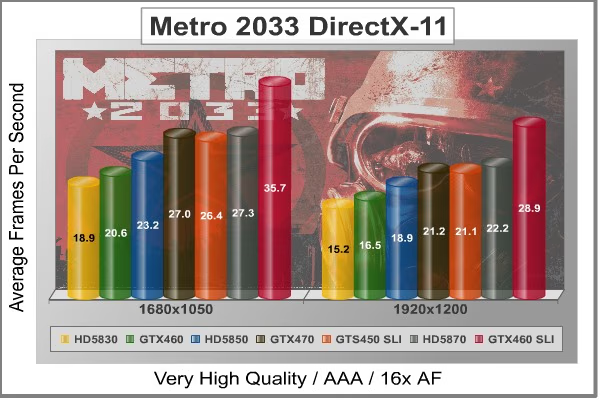
NVIDIA has been diligently working to promote Metro 2033, and for good reason: it is the most demanding PC video game we've ever tested. When their flagship GeForce GTX 480 struggles to produce 27 FPS with DirectX-11 anti-aliasing turned two to its lowest setting, you know that only the strongest graphics processors will generate playable frame rates. All of our tests enable Advanced Depth of Field and Tessellation effects, but disable advanced PhysX options.
- Metro 2033
- Extreme Settings: (Very-High Quality, AAA, 16x AF, Advanced DoF, Tessellation, 180s Fraps Chase Scene)
Metro 2033 Extreme Quality Settings
Cost Analysis: Metro 2033 (1680x1050)
- $200 Radeon HD 5830 1GB costs $10.58 per FPS
- $180 GeForce GTX 460 768MB costs $8.74 per FPS
- $270 Radeon HD 5850 1GB costs $11.64 per FPS
- $300 GeForce GTX 470 1280MB costs $11.11 per FPS
- $260 GeForce GTS 450 SLI costs $9.85 per FPS
- $365 Radeon HD 5870 1GB costs $13.37 per FPS
- $360 GeForce GTX 460 SLI costs $10.08 per FPS
Test Summary: There's no way to ignore the graphical demands of Metro 2033, and only the most powerful GPUs will deliver a decent visual experience unless you're willing to seriously tone-down the settings. Even when these settings are turned down, Metro 2033 is a power-hungry video game that crushes frame rates. The pair of GeForce GTS 450's in SLI survived our stress test despite using Advanced Depth of Field and Tessellation effects, and matched nicely with the GTX 470. While these two GTS 450's trailed behind the Radeon HD 5870 by only 1 FPS or less, cost per frame value allowed the GTS 450 SLI set to cost a full $3.52 less per frame. As we've seen in other tests, placing two GTS 450s together in SLI for $260 delivers performance equal to or greater than a single $365 Radeon HD 5870. Additionally, Metro 2033 only offers advanced PhysX options to NVIDIA GeForce video cards.
Metro 2033 is another example of how efficient today's SLI technology has become, allowing nearly perfect 2:1 scaling. While a single GeForce GTS 450 produces 13.7 FPS, adding a second in SLI helps improve performance and produce 26.4 FPS with 96% efficiency.
| Graphics Card | Radeon HD5770 | GeForce GTS450 | Radeon HD5830 | GeForce GTX460 | Radeon HD5850 | GeForce GTX470 |
|---|---|---|---|---|---|---|
| GPU Cores | 800 | 192 | 1120 | 336 | 1440 | 448 |
| Core Clock (MHz) | 850 | 783 | 800 | 675 | 725 | 608 |
| Shader Clock (MHz) | N/A | 1566 | N/A | 1350 | N/A | 1215 |
| Memory Clock (MHz) | 1200 | 902 | 1000 | 900 | 1000 | 837 |
| Memory Amount | 1024MB GDDR5 | 1024 MB GDDR5 | 1024MB GDDR5 | 768MB GDDR5 | 1024MB GDDR5 | 1280MB GDDR5 |
| Memory Interface | 128-bit | 128-bit | 256-bit | 192-bit | 256-bit | 320-bit |
DX11: Unigine Heaven 2.1
The Unigine "Heaven 2.1" benchmark is a free publicly available tool that grants the power to unleash the graphics capabilities in DirectX-11 for Windows 7 or updated Vista Operating Systems. It reveals the enchanting magic of floating islands with a tiny village hidden in the cloudy skies. With the interactive mode, emerging experience of exploring the intricate world is within reach. Through its advanced renderer, Unigine is one of the first to set precedence in showcasing the art assets with tessellation, bringing compelling visual finesse, utilizing the technology to the full extend and exhibiting the possibilities of enriching 3D gaming.
The distinguishing feature in the Unigine Heaven benchmark is a hardware tessellation that is a scalable technology aimed for automatic subdivision of polygons into smaller and finer pieces, so that developers can gain a more detailed look of their games almost free of charge in terms of performance. Thanks to this procedure, the elaboration of the rendered image finally approaches the boundary of veridical visual perception: the virtual reality transcends conjured by your hand.
Although Heaven-2.1 was recently released and used for our DirectX-11 tests, the benchmark results were extremely close to those obtained with Heaven-1.0 testing. Since only DX11-compliant video cards will properly test on the Heaven benchmark, only those products that meet the requirements have been included.
-
Unigine Heaven Benchmark 2.1
- Extreme Settings: (High Quality, Normal Tessellation, 16x AF, 4x AA
Heaven 2.1 Extreme Quality Settings
Cost Analysis: Unigine Heaven (1680x1050)
- $200 Radeon HD 5830 1GB costs $9.48 per FPS
- $180 GeForce GTX 460 768MB costs $6.27 per FPS
- $270 Radeon HD 5850 1GB costs $10.98 per FPS
- $300 GeForce GTX 470 1280MB costs $9.87 per FPS
- $260 GeForce GTS 450 SLI costs $7.32 per FPS
- $365 Radeon HD 5870 1GB costs $12.46 per FPS
- $360 GeForce GTX 460 SLI costs $7.29 per FPS
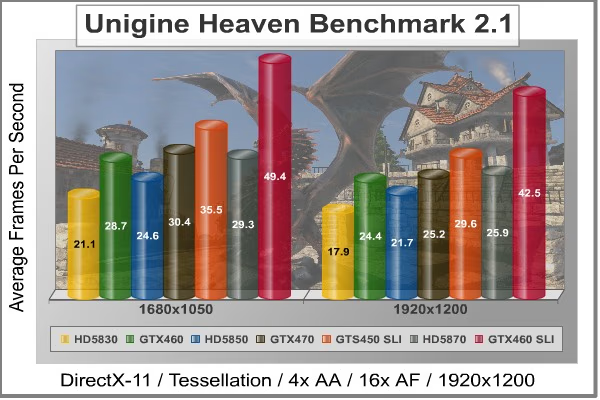
Test Summary: Reviewers like to say "Nobody plays a benchmark", but it seems evident that we can expect to see great things come from a graphics tool this detailed. For now though, those details only come by way of DirectX-11 video cards. Our 'extreme' test results with the Unigine Heaven benchmark tool appear to deliver fair comparisons of DirectX-11 graphics cards when set to higher quality levels. Since Heaven is a very demanding benchmark tool, it's surprising to see a pair of GF106 GPU's outperforming the stronger graphics processors with more collective cores. NVIDIA's GeForce GTS 450 SLI set outperforms the Radeon HD 5870 by more than 6 FPS, but that same less-expensive GTS 450 pair delivers a crushing advantage over the 5850 that shares the price point. In terms of price to performance ratio, the GeForce GTX 460 still continues to own the best value followed by the GTS 450 SLI pair.
A single GeForce GTS 450 was able to produce 18.3 FPS at the 1680x1050 resolution, while the SLI set rendered 35.5 FPS on the Unigine Heaven benchmark. This amounts to an impressive 97% SLI scaling efficiency.
| Graphics Card | Radeon HD5770 | GeForce GTS450 | Radeon HD5830 | GeForce GTX460 | Radeon HD5850 | GeForce GTX470 |
|---|---|---|---|---|---|---|
| GPU Cores | 800 | 192 | 1120 | 336 | 1440 | 448 |
| Core Clock (MHz) | 850 | 783 | 800 | 675 | 725 | 608 |
| Shader Clock (MHz) | N/A | 1566 | N/A | 1350 | N/A | 1215 |
| Memory Clock (MHz) | 1200 | 902 | 1000 | 900 | 1000 | 837 |
| Memory Amount | 1024MB GDDR5 | 1024 MB GDDR5 | 1024MB GDDR5 | 768MB GDDR5 | 1024MB GDDR5 | 1280MB GDDR5 |
| Memory Interface | 128-bit | 128-bit | 256-bit | 192-bit | 256-bit | 320-bit |
NVIDIA APEX PhysX Enhancements
Many of the latest video games are being developed with new graphical enhancement technologies, such as APEX PhysX and 3D-Vision Surround. Each of these NVIDIA technologies are designed to work their best on GeForce desktop graphics solutions, but only the most powerful GPUs can make the special effects stand out in full glory. While a single GeForce GTS 450 may not have enough power to enable all of the quality settings to their highest levels, two of these video cards combined into SLI open the possibilities.
Mafia II is the first PC video game title to include the new NVIDIA APEX PhysX framework, a powerful feature set that only GeForce video cards are built do deliver. While console versions will make use of PhysX, only the PC version supports NVIDIA's APEX PhysX physics modeling engine, which adds the following features: APEX Destruction, APEX Clothing, APEX Vegetation, and APEX Turbulence. PhysX helps make object movement more fluid and lifelike, such as cloth and debris. In this section, Benchmark Reviews details the differences made with- and without APEX PhysX enabled.
We begin with a scene from the Mafia II benchmark test, which has the player pinned down behind a brick column as the enemy shoots at him. Examine the image below, which was taken with a Radeon HD 5850 configured with all settings turned to their highest and APEX PhysX support disabled:

No PhysX = Cloth Blending and Missing Debris
Notice from the image above that when PhysX is disabled there is no broken stone debris on the ground. Cloth from foreground character's trench coat blends into his leg and remains in a static position relative to his body, as does the clothing on other (AI) characters. Now inspect the image below, which uses the GeForce GTX 460 with APEX PhysX enabled:
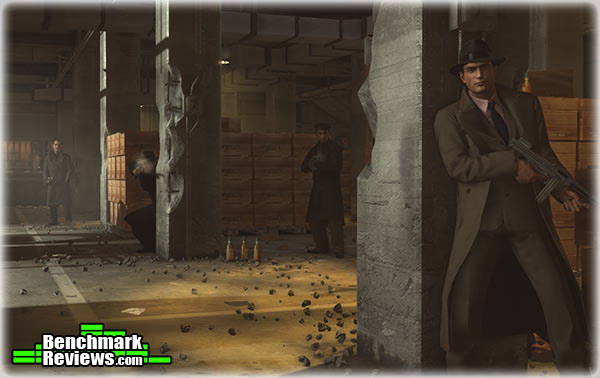
Realistic Cloth and Debris - High Quality Settings With PhysX
With APEX PhysX enabled, the cloth neatly sways with the contour of a characters body, and doesn't bleed into solid objects such as body parts. Additionally, APEX Clothing features improve realism by adding gravity and wind effects onto clothing, allowing for characters to look like they would in similar real-world environments.
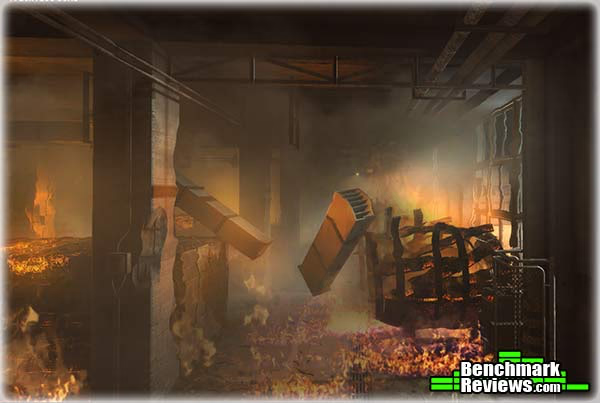
Burning Destruction Smoke and Vapor Realism
Flames aren't exactly new to video games, but smoke plumes and heat vapor that mimic realistic movement have never looked as real as they do with APEX Turbulence. Fire and explosions added into a destructible environment is a potent combination for virtual-world mayhem, showcasing the new PhysX APEX Destruction feature.
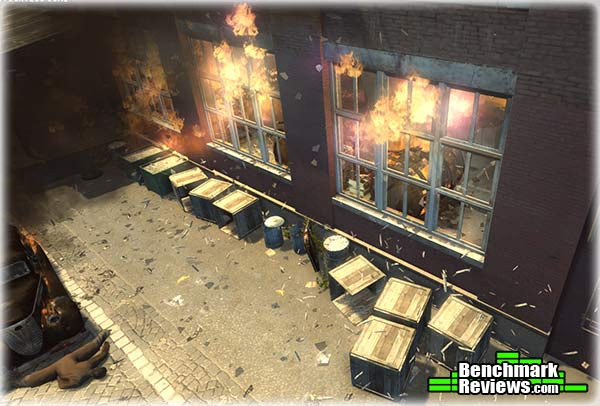
Exploding Glass Shards and Bursting Flames
NVIDIA PhysX has changed video game explosions into something worthy of cinema-level special effects. Bursting windows explode into several unique shards of glass, and destroyed crates bust into splintered kindling. Smoke swirls and moves as if there's an actual air current, and flames move out towards open space all on their own. Surprisingly, there is very little impact on FPS performance with APEX PhysX enabled on GeForce video cards, and very little penalty for changing from medium (normal) to high settings.
NVIDIA 3D-Vision Effects
Readers familiar with Benchmark Reviews have undoubtedly heard of NVIDIA GeForce 3D Vision technology; if not from our review of the product, then for the Editor's Choice Award it's earned or the many times I've personally mentioned it in out articles. Put simply: it changes the game. 2010 has been a break-out year for 3D technology, and PC video games are leading the way. Mafia II is expands on the three-dimensional effects, and improves the 3D-Vision experience with out-of-screen effects. For readers unfamiliar with the technology, 3D-Vision is a feature only available to NVIDIA GeForce video cards.
Mafia 2 is absolutely phenomenal with 3D-Vision... and with its built-in multi-monitor profiles and bezel correction already factored this game is well suited for 3D-Vision Surround. Combining two GeForce GTS 450's into SLI allowed this game to play at 5760 x 1080 resolution across three monitors using upper-level settings to deliver a thoroughly impressive experience. If you already own a 3D Vision kit and 120Hz monitor, Mafia II was built with 3D Vision in mind.

The first thing gamers should be aware of is the performance penalty for using 3D-Vision with a high-demand game like Mafia II. Using a GeForce GTX 480 video card for reference, currently the most powerful single-GPU graphics solution available, we experienced frame rate speeds up to 33 FPS with all settings configured to their highest and APEX PhysX set to high. However, when 3D Vision is enabled the video frame rate usually decrease by about 50%. This is no longer the hardfast rule, thanks to '3D Vision Ready' game titles that offer performance optimizations. Mafia II proved that the 3D Vision performance penalty can be as little as 30% with a single GeForce GTX 480 video card, or a mere 11% in SLI configuration. NVIDIA Forceware drivers will guide players to make custom-recommended adjustments specifically for each game they play, but PhysX and anti-aliasing will still reduce frame rate performance.
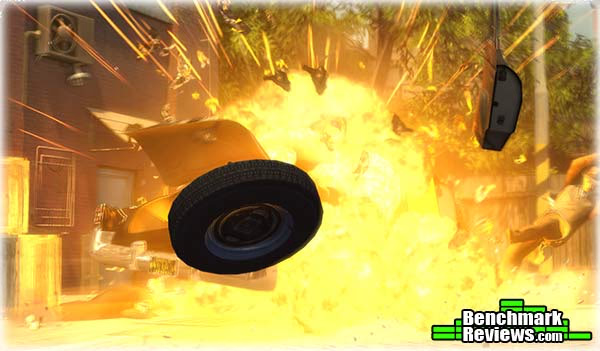
Of course, the out-of-screen effects are worth every dollar you spend on graphics hardware. In the image above, an explosion sends the car's wheel and door flying into the players face, followed by metal debris and sparks. When you're playing, this certainly helps to catch your attention... and when the objects become bullets passing by you, the added depth of field helps assist in player awareness.

Combined with APEX PhysX technology, NVIDIA's 3D-Vision brings destructible walls to life. As enemies shoot at the brick column, dirt and dust fly past the player forcing stones to tumble out towards you. Again, the added depth of field can help players pinpoint the origin of enemy threat, and improve response time without sustaining 'confusion damage'.
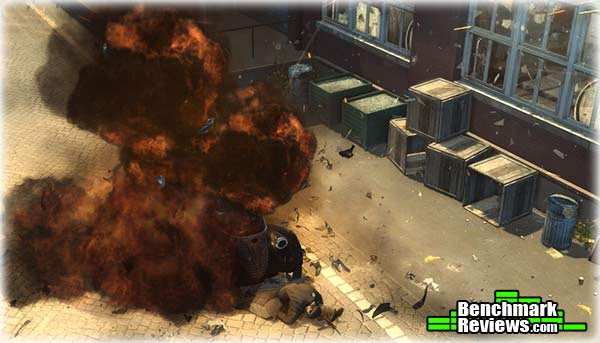
NVIDIA APEX Turbulence, a new PhysX feature, already adds an impressive level of realism to games (such as with Mafia II pictured in this section). Watching plumes of smoke and flames spill out towards your camera angle helps put you right into the thick of action.

NVIDIA 3D-Vision/3D-Vision Surround is the perfect addition to APEX PhysX technology, and capable video games will prove that these features reproduce lifelike scenery and destruction when they're used together. Glowing embers and fiery shards shooting past you seem very real when 3D-Vision pairs itself APEX PhysX technology, and there's finally a good reason to overpower the PCs graphics system.
GeForce GTS 450 Temperatures
Benchmark tests are always nice, so long as you care about comparing one product to another. But when you're an overclocker, gamer, or merely a PC hardware enthusiast who likes to tweak things on occasion, there's no substitute for good information. Benchmark Reviews has a very popular guide written on Overclocking Video Cards, which gives detailed instruction on how to tweak a graphics cards for better performance. Of course, not every video card has overclocking head room. Some products run so hot that they can't suffer any higher temperatures than they already do. This is why we measure the operating temperature of the video card products we test.
To begin my testing, I use GPU-Z to measure the temperature at idle as reported by the GPU. Next I use FurMark's "Torture Test" to generate maximum thermal load and record GPU temperatures at high-power 3D mode. The ambient room temperature remained at a stable 20°C throughout testing. FurMark does two things extremely well: drive the thermal output of any graphics processor higher than applications of video games realistically could, and it does so with consistency every time. Furmark works great for testing the stability of a GPU as the temperature rises to the highest possible output. The temperatures discussed below using FurMark are absolute maximum values, and not representative of real-world performance.

NVIDIA GeForce GTS 450 1GB Video Card Temperatures
Maximum GPU thermal thresholds have varied between Fermi GPUs. The GF100 graphics processor (GTX 480/470/465) could withstand 105°C, while the GF104 was a little more sensitive at 104°C. The GF106 apparently suffers from heat intolerance, and begins to downclock the GeForce GTS 450 graphics processor at 95°C. Thankfully, our tests on two different GeForce GTS 450 products indicate that these video cards operate at stone cold temperatures in comparison. Sitting idle at the Windows 7 desktop with a 20°C ambient room temperature, the GeForce GTS 450 rested silently at 29°C. After roughly ten minutes of torture using FurMark's stress test, fan noise was minimal and temperatures plateau around 65°C.
Most new graphics cards from NVIDIA and ATI will expel heated air out externally through exhaust vents, which does not increase the internal case temperature. Our test system is an open-air chassis that allows the video card to depend on its own cooling solution for proper thermal management. Most gamers and PC hardware enthusiasts who use an aftermarket computer case with intake and exhaust fans will usually create a directional airflow current and lower internal temperatures a few degrees below the measurements we've recorded. To demonstrate this, we've built a system to illustrate the...
Best-Case Scenario
Traditional tower-style computer cases position internal hardware so that heat is expelled out through the back of the unit while modern video cards reduce operating temperature with active cooling solutions. This is better than nothing, but there's a fundamental problem: heat rises. Using the transverse mount design on the SilverStone Raven-2 chassis, Benchmark Reviews re-tested the NVIDIA GeForce GTS 450 video card to determine the 'best-case' scenario.
Positioned vertically, the GeForce GTS 450 rested at 29°C, which is identical to temperatures measured in a regular computer case. Pushed to abnormally high levels using the FurMark torture test, NVIDIA's GeForce GTS 450 operated at 66°C, one degree higher than a standard tower case. After some investigation, it seems that the reference thermal cooling solution is better suited to a horizontal orientation. Although the well-designed Raven-2 computer case offers additional cooling features and has helped to make a difference in other video cards, namely the GeForce GTX 480 and SLI sets, this wasn't the case for GTS 450... not that it matters with temperatures this low.
In the traditional (horizontal) position, the slightly angled heat-pipe rods use gravity and sintering to draw cooled liquid back down to the base. When positioned in a transverse mount case such as the SilverStone Raven-2, the NVIDIA GeForce GTS 450 heatsink loses optimal effective properties in the lowest heat-pipe rod, because gravity takes keeps the cool liquid in the lowest portion of the rod within the finsink.
VGA Power Consumption
Life is not as affordable as it used to be, and items such as gasoline, natural gas, and electricity all top the list of resources which have exploded in price over the past few years. Add to this the limit of non-renewable resources compared to current demands, and you can see that the prices are only going to get worse. Planet Earth is needs our help, and needs it badly. With forests becoming barren of vegetation and snow capped poles quickly turning brown, the technology industry has a new attitude towards turning "green". I'll spare you the powerful marketing hype that gets sent from various manufacturers every day, and get right to the point: your computer hasn't been doing much to help save energy... at least up until now.
For power consumption tests, Benchmark Reviews utilizes the 80-PLUS GOLD certified OCZ Z-Series Gold 850W PSU, model OCZZ850. This power supply unit has been tested to provide over 90% typical efficiency by Chroma System Solutions, however our results are not adjusted for consistency. To measure isolated video card power consumption, Benchmark Reviews uses the Kill-A-Watt EZ (model P4460) power meter made by P3 International.
A baseline test is taken without a video card installed inside our test computer system, which is allowed to boot into Windows-7 and rest idle at the login screen before power consumption is recorded. Once the baseline reading has been taken, the graphics card is installed and the system is again booted into Windows and left idle at the login screen. Our final loaded power consumption reading is taken with the video card running a stress test using FurMark. Below is a chart with the isolated video card power consumption (not system total) displayed in Watts for each specified test product:
VGA Product Description(sorted by combined total power) |
Idle Power |
Loaded Power |
|---|---|---|
NVIDIA GeForce GTX 480 SLI Set |
82 W |
655 W |
NVIDIA GeForce GTX 590 Reference Design |
53 W |
396 W |
ATI Radeon HD 4870 X2 Reference Design |
100 W |
320 W |
AMD Radeon HD 6990 Reference Design |
46 W |
350 W |
NVIDIA GeForce GTX 295 Reference Design |
74 W |
302 W |
ASUS GeForce GTX 480 Reference Design |
39 W |
315 W |
ATI Radeon HD 5970 Reference Design |
48 W |
299 W |
NVIDIA GeForce GTX 690 Reference Design |
25 W |
321 W |
ATI Radeon HD 4850 CrossFireX Set |
123 W |
210 W |
ATI Radeon HD 4890 Reference Design |
65 W |
268 W |
AMD Radeon HD 7970 Reference Design |
21 W |
311 W |
NVIDIA GeForce GTX 470 Reference Design |
42 W |
278 W |
NVIDIA GeForce GTX 580 Reference Design |
31 W |
246 W |
NVIDIA GeForce GTX 570 Reference Design |
31 W |
241 W |
ATI Radeon HD 5870 Reference Design |
25 W |
240 W |
ATI Radeon HD 6970 Reference Design |
24 W |
233 W |
NVIDIA GeForce GTX 465 Reference Design |
36 W |
219 W |
NVIDIA GeForce GTX 680 Reference Design |
14 W |
243 W |
Sapphire Radeon HD 4850 X2 11139-00-40R |
73 W |
180 W |
NVIDIA GeForce 9800 GX2 Reference Design |
85 W |
186 W |
NVIDIA GeForce GTX 780 Reference Design |
10 W |
275 W |
NVIDIA GeForce GTX 770 Reference Design |
9 W |
256 W |
NVIDIA GeForce GTX 280 Reference Design |
35 W |
225 W |
NVIDIA GeForce GTX 260 (216) Reference Design |
42 W |
203 W |
ATI Radeon HD 4870 Reference Design |
58 W |
166 W |
NVIDIA GeForce GTX 560 Ti Reference Design |
17 W |
199 W |
NVIDIA GeForce GTX 460 Reference Design |
18 W |
167 W |
AMD Radeon HD 6870 Reference Design |
20 W |
162 W |
NVIDIA GeForce GTX 670 Reference Design |
14 W |
167 W |
ATI Radeon HD 5850 Reference Design |
24 W |
157 W |
NVIDIA GeForce GTX 650 Ti BOOST Reference Design |
8 W |
164 W |
AMD Radeon HD 6850 Reference Design |
20 W |
139 W |
NVIDIA GeForce 8800 GT Reference Design |
31 W |
133 W |
ATI Radeon HD 4770 RV740 GDDR5 Reference Design |
37 W |
120 W |
ATI Radeon HD 5770 Reference Design |
16 W |
122 W |
NVIDIA GeForce GTS 450 Reference Design |
22 W |
115 W |
NVIDIA GeForce GTX 650 Ti Reference Design |
12 W |
112 W |
ATI Radeon HD 4670 Reference Design |
9 W |
70 W |
The NVIDIA GeForce GTS 450 requires a single six-pin PCI-E power connection for proper operation. Resting at idle, the power draw consumed only 16 watts of electricity... 6W less than the ATI Radeon HD 5770, and half the amount required for the NVIDIA GeForce 8800 GT, GTX 280, GTX 465 at idle. Once 3D-applications begin to demand power from the GPU, electrical power consumption climbed to full-throttle. Measured with 3D 'torture' load using FurMark, the GeForce GTS 450 consumed 122 watts, which nearly matches the Radeon 5770 yet still below the 8800 GT. Although GF106 Fermi GPUs features the same 40nm fabrication process as the GF100 part, it's clear that NVIDIA's GTS 450 is better suited for 'Green' enthusiasts.
GeForce GTS 450 Overclocking
NVIDIA's recent GF104 graphics processors proved itself capable of serious overclocking, and the new GF106 is no different. In fact, the GeForce GTS 450 is an overclockers dream. Already sold with an impressive stock clock speed of 783/1566 MHz, NVIDIA's GF106-equipped GTS 450 is 108/216 MHz faster than the GeForce GTX 460. With 1GB of GDDR5 running at 902 MHz (3608 effective) on the GTS 450, the Samsung K4G10325FE-HC05 memory speeds are nearly identical. Putting this into perspective, GTS 450 processor speeds fall between the GeForce GTX 470 and GTX 480 (closer to the former), and it has a much faster memory clock.
Now comes the fun part: overclocking the GeForce GTS 450 is as easy as its ever been. My mission was simple: locate the highest possible GPU and GDDR5 overclock without adding any additional voltage. Hardcore overclockers can get even more performance out of the hardware when additional voltage is applied, but the extra power increases operating temperatures and can cause permanent damage to sensitive electronic components.
Software Overclocking Tools
Back in the day, software overclocking tools were few and far between. Benchmark Reviews was literally put on the map with my first article: Overclocking the NVIDIA GeForce Video Card. Although slightly dated, that article is still relevant for enthusiasts wanting to permanently flash their overclocked speeds onto the video cards BIOS. Unfortunately, most users are not so willing to commit their investment to such risky changes, and feel safer with temporary changes that can be easily undone with a reboot. That's the impetus behind the sudden popularity for software-based GPU overclocking tools.
NVIDIA offers one such tool with their System Tools suite, formerly named NVIDIA nTune. While the NVIDIA Control Panel interface is very easy to understand an navigate, it's downfall lies in the limited simplicity of the tool. It's also limited, and doesn't offer the overclocking potential that AIC partners offer in their own branded software tools. RivaTuner is another great option, developed by Alexey Nicolaychuk, which he then modified and branded for various graphics card manufacturers to produce EVGA Precision and MSI Afterburner. Although they're based on the same software foundation, they're don't offer the same functionality.

EVGA Precision Overclocking Utility (v2.0.0)
Upon startup, the EVGA Precision tuning tool offered a small graph with GPU temperature and usage as well as fan speed percentage and tachometer. The GPU core and shader clocks are linked by default, and were adjustable to 1255/2510 MHz for the GTS 450. Memory clock speed could be adjusted up to 2164 MHz (double data rate), while fan speed stopped at 70% power. Next came MSI Afterburner...

MSI Afterburner Overclocking Utility (v2.0.0)
When I started MSI's Afterburner "Graphics Card Performance Booster", the first apparent difference was the added GPU core voltage option. MSI Afterburner allowed the GTS 450 adjustments up to 1162 mV, while EVGA Precision lacked this option. The GPU core and shader clocks are linked by default, and adjustable up to the same 1255/2510 MHz for the GTS 450. Another difference was available with memory clock speeds, which could be adjusted up to 2345 DDR (compared to only 2164 MHz with EVGA Precision). Fan speed adjustments stopped at 70% power, and the charts (not shown) can be detached and repositioned. It appears that Alexey Nicolaychuk gives overclockers more options with MSI's Afterburner.
Overclocking Results
Using MSI Afterburner to overclock the GeForce GTS 450, I began overclocking this video cards 783/1566 MHz graphics processor first. As a best practice, it's good to find the maximum stable GPU clock speed and then drop back 10 MHz or more. While the GeForce GTS 450 was stable in several short low-impact tests up to 990/1980 MHz, there were occasional graphical defects. Once put into action with high-demand video games, I decided that 950/1900 MHz with full-time stability is a far better proposition than crashing out midway through battle. Still, a solid 167/334 MHz GPU overclock without any added voltage was very impressive.
Since my agenda was finding maximum performance from the GF106 graphics processor as well as 1GB GDDR5, I had more work ahead of me. NVIDIA clocks the GTS 450 video memory at 902 MHz (1804 MHz DDR - 3608 effective), however these Samsung K4G10325FE-HC05 modules are built for 1000 MHz. After some light benchmarking to see if my memory overclock was bumping up against the module's ECC, I decided that a 98 MHz overclock up to 1000 MHz (2000 MHz DDR - 4000 effective) was most ideal for this project. When the dust settled, the GF106 GPU operated at 950/1900 MHz while memory was clocked to 1000 MHz GDDR5 - allowing me to play Battlefield Bad Company 2 with an overclocked GeForce GTS 450 without stability issues. Now come the results:
| Video Game | Standard | Overclocked | Improvement | |||
|---|---|---|---|---|---|---|
| Crysis Warhead | 16 | 19 | 19% | |||
| Far Cry 2 | 43.3 | 49.8 | 15% | |||
| Battlefield BC2 | 33.7 | 39.0 | 16% | |||
| Aliens vs Predator | 17.7 | 20.5 | 16% | |||
| Battleforge | 24.7 | 29.0 | 17% | |||
| Matro 2033 | 13.7 | 16.0 | 17% |
On average, my stock-voltage overclock produced a 17% improvement in video game FPS performance (using extreme settings designed for high-end video cards). In games where the GeForce GTS 450 was in close proximity to the Radeon 5770, this overclock helped surpass performance. In other games, the added boost extended a lead over the 5770 and made it possible to enjoy higher quality settings. At this price point, budget gamers need everything they can get.
GeForce GTS 450 SLI Conclusion
NVIDIA's GeForce GTS 450 is an interesting specimen. All on its own it does extremely well to compete with AMD's Radeon HD 5750 and even the more expensive 5770. Despite this, the GTX 460 still comes down to steal the thunder every time you compare the price to performance ratios. It's not until you combine two GTS 450's into an SLI set that things really get interesting. There's a gap between NVIDIA's $180/200 GTX 460 and their $300 GTX 470 that completely welcomes a $260 pair of GTS 460's. What really makes things unusual is how well these two video cards combine to take out some very expensive competition... something you'll pay another $100/140 for with the GTX 460 (depending on 768MB or 1GB version used).
Most mainstream gamers play at 1280x1024 or 1680x1050 widescreen, which is very well suited for a single GTS 450. On the other hand, it does extremely well at 1920x1200 when combined into an SLI set. Even despite it's mid-level GTS naming, two 450's combine to deliver very impressive SLI performance with nearly perfect 2:1 scaling. Crysis Warhead demonstrated true 100% efficiency, while games like BattleForge maintained 98% efficient SLI scaling while Aliens vs Predator and Metro 2033 delivered 96% efficient dual-card scaling.
Many of NVIDIA's AIC partners have used custom cooling solutions in many of their own models, with at least one that's passively cooled. Most add-in card partners have added a custom cooling option, which is unnecessary for the GTS 450, and they exhaust heated air back into the computer case. The reference design expels heated air out through an externally exhausting vent, and in my opinion is the best choice for overclockers and SLI gamers.
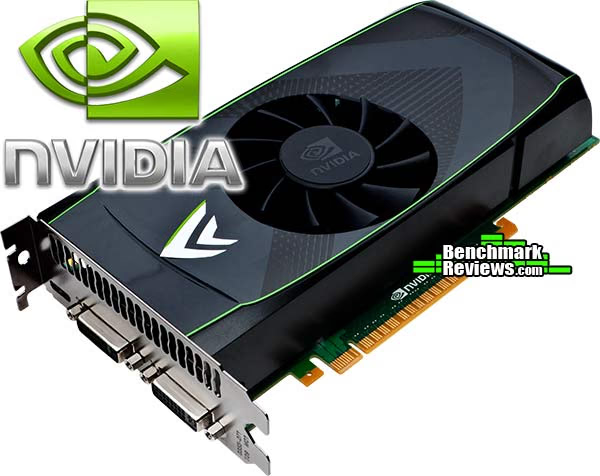
NVIDIA GeForce GTS 450 Video Card SLI Set
In terms of video card pecking order, NVIDIA has three divisions: GTX for high-end, GTS for middle market, and GT for lower-end. The GeForce GTS 450 is the first Fermi video card designed for mainstream gamers, and it's also the first to utilize their new GF106 graphics processor. NVIDIA has their GTS 480/470/465/460 series, allowing the GeForce GTS 450 to become the fifth member of the Fermi family. Regardless of price, the GTS 450 fits between AMD's Radeon HD 5750 and 5770; although performance matches it up more closely to the 5770. GeForce GTS 450 has been designed with the same solid construction as its predecessors, and while the electronic components located along the back of the PCB expose the memory modules there's really no need for metal back-plate for protection or heat dissipation. The top-side of the graphics card features a protective plastic fan shroud, which receives a recessed concave opening for the 75mm fan and allows for airflow in SLI configurations.
While most PC gamers and hardware enthusiasts buy a discrete graphics card for the sole purpose of playing video games, there's a very small niche who depend on the extra features beyond video fast frame rates. NVIDIA is the market leader in GPGPU functionality, and it's no surprise to see CPU-level technology available in their GPU products. NVIDIA's Fermi architecture is the first GPU to ever support Error Correcting Code (ECC), a feature that benefits both personal and professional users. Proprietary technologies such as NVIDIA Parallel DataCache and NVIDIA GigaThread Engine further add value to GPGPU functionality. Additionally, applications such as Adobe Photoshop or Premier can take advantage of GPGPU processing power. In case the point hasn't already been driven home, don't forget that 3D Vision and PhysX are technologies only available through NVIDIA.
Idle and loaded operating temperatures remained very cool on GTS 450; clearly an end result of the refined GF106 GPU. Idle power draw was a mere 16 watts by our measure, allowing gamers to save money on energy bills when this video card isn't being used. Conserving energy is great news, but NVIDIA's Fermi GF106 GPU offers incredible headroom for overclockers which translates into even better FPS performance in video games. Both of our GTS 450 samples overclocked from 783 to beyond 950 MHz, which could make a manufacturer's lifetime warranty well worth the money. It would also make a significant difference if permanently flashed to each video card and combined into an overclocked SLI set.
Defining product value means something different to everyone. Some readers take heat and power consumption into consideration, while others are only concerned with FPS performance and price. A single GeForce GTS 450 video card already outperforms its closest rivals: the $120 AMD Radeon HD 5750 and $150 Radeon HD 5770. But when you compare a $260 SLI set against the nearest price point, the results look devastating for the competition. The $270 was completely overwhelmed in our tests, and often times the GeForce GTX 470 was made to trail behind. Two GeForce GTS 450's in SLI usually made for a good fight with the $365 AMD Radeon HD 5870, at least in terms of FPS performance. A video card (5870) that costs $105 more should not be producing the same frame rates, in my opinion.
Several add-in card partners plan to offer a variety of stock and overclocked GeForce GTS 450 models, but my suggestion is to find a reference (external exhaust) model with no overclock so you can save the money and have fun finding the OC limit yourself. Watch for vendors offering bundled video games with the GTS 450, namely Starcraft II, which factors in to the value of the product.
In summary, a single GTS 450 offers considerable power for the money when driven at the most common monitor resolutions (1280x1024 and 1680x1050), but two GTS 460's combine extremely well to fill the $260 price point and beat several more expensive options. We tested the GTS 450 SLI set to work especially well with NVIDIA's 3D-Vision Surround technology, even when performance was modest at 1920x1080. Priced at time of launch for $129.99 the mid-level 1GB GeForce GTS 450 video card is a far better choice than AMD's $120 Radeon HD 5750, and in many cases it makes the $150 Radeon HD 5770 look unfit for its price point. Add a second video card for a grand total of $260, and there's almost nothing that competes in the segment. NVIDIA's GeForce GTS 450 is a real winner for SLI enthusiasts.
Pros:
+ Tremendous overclocking potential!
+ Cool operating temperatures at idle and load
+ SLI consumes only 32 watts of power at idle
+ Great value at $260 - easily beats Radeon 5850
+ Excellent price-to-performance cost ratio
+ Enables triple-monitor 3D Vision Surround capability
+ Fan externally exhausts heat outside of case
+ Quiet cooling fan under loaded operation
+ Outperforms Radeon 5870 in many games
+ Adds 32x CSAA post-processing detail
Cons:
- Triple-SLI not supported
Benchmark Reviews encourages you to leave comments (below), or ask questions and join the discussion in our Forum.
Reader comments from the original article
23 comments were posted before commenting closed. They are preserved as written. Original avatars no longer resolve and are shown as a placeholder.
RE: GeForce GTS 450 SLI Scaling Performance Adam Permalink:
Similar results to a 5870 at £180 less? Bargain! It would seem that now the two mid range 400 series cards are finally out Nvidia are beating AMD on nearly every front, even if it took them a rediculous amount of time to do it. Going to be interesting to see how the 6000 series will respond to these.
RE: GeForce GTS 450 SLI Scaling Performance RealNeil Permalink:
I agree that NVIDIA seems to be thrashing ATI right now. In terms of performance AND capability too. I can't see the 6000 series denting this kind of output with speed performance alone, they'll have to somehow add the extra capabilities that the 400 series cards have them trumped on. It's a good time to be a consumer.
YEAH! Doug Permalink:
Ohhhhh YEaaaaah! LMAO I was hoping you would do this. Can't wait to read on!
Interesting. Omar Permalink:
Quite an interesting article. Glad to get some good numbers and comparisons with SLI. Also, on NewEgg at least, the price of the GTX 460 is down to $170, increasing its Price/Performance margin even more. Interestingly, there's also GTX 460 1GB (as opposed to 768mB), quite curious how its price to performance stacks up. Radeon HD 5830 is currently down to $160 w/Rebate, putting in the same price point range and price to performance range [when the GTX 460 was at $180] as the GTX 460. Though Id go with the 460 simply for PhysX & CUDA. And those were the only two that had lower prices (or at least, lower by enough to make an decent impact).
RE: GeForce GTS 450 SLI Scaling Performance Doug Permalink:
Looks like 460 SLI is the TICKET!
Hmm not a single screeching red rooster ? SiliconDoc Permalink:
Wow. I don't see the raging (unbiased of course!) red roosters. Well, that always tells me what cards are so good that even they can't make up a dozen unbelievable lies about them. Thanks for the review, and the indicative post space.
tested card complaint dr dreaeder Permalink:
the gts 450 you tested is a lower end model
Not Low End... BruceBruce Permalink:
It's the NVIDIA Reference model, and at the time the review was published, it was the only thing available.
2X Cards 3X screens crysis? quickquestion Permalink:
I have 1 gts 450, and 2 screens (20", 1608X1050). If i add another GTS 450 and a 3rd 1680X1050 screen, will i still be able to play crysis on medium, or higher with over say, 32 FPS? BTW i will NOT be running 3D of any sort whatsoever, so i will only be rendered from 1 angle at a time, not 2. It looks like they can run triple 1080P displays in 3D and still play Mafia II, so i am guessing that I will be able to run 1608X1050 X3 and play Crysis.
RE: 2X Cards 3X screens crysis? Olin Coles Permalink:
Adding a second GTS 450 would be a very good idea, and would certainly improve performance if you extend to a third monitor. If you can play with those settings now on two monitors with one GTS 450, adding a second video card to a three-monitor system will actually yield better performance than you have now.
RE: 2X Cards 3X Screens Crysis quickquestion Permalink:
thanks for the reply as soon as i get the money I'll try to do that. have a good day and keep gaming :)
RE: RE: 2X Cards 3X screens crysis? Quickquestion Permalink:
I guess I failed to mention, I can play at those settings on 1 monitor, as with 2 my crosshairs would be in the bezel. Would I still see a performance increase adding another card and a 3rd monitor, then gaming on all 3? Or would I have to do some insane overclocking and go down to low settings? Thanks for the help man.
RE: RE: RE: 2X Cards 3X screens crysis? Olin Coles Permalink:
That changes everything. If one card on one monitor = 100% performance, than two cards on three monitors would mean 66% performance.
RE: RE: RE: RE: 2X Cards 3X screens crysis? Quickquestion Permalink:
So, then I would probably need to do some insane iverclocking on each card to keep the frame rate that I'm getting, right.
RE: RE: RE: RE: RE: 2X Cards 3X screens crysis? Olin Coles Permalink:
More than insane: impossible. The best you could hope for is getting within 80% of the level you previously played at.
RE: RE: RE: RE: RE: RE: 2X Cards 3X screens crysis? Quickquestion Permalink:
I'll try playing on 2 just to see how it goes but my pc's off right now but I'll try tomorrow and reply again. My worry is that it's barely playable now, and will become unplayable on 2 cards, 3 screens.
RE: GeForce GTS 450 SLI Scaling Performance quickquestion Permalink:
this may not work well as difference in FPS, but if i get a GTX 460 SE and add it to my GTS 450, No SLI because i can't, but ran 2 displays off the 460SE and 1 off the 450, would that work well?
RE: RE: GeForce GTS 450 SLI Scaling Performance Olin Coles Permalink:
You would be better off with SLI GTS 450's.
RE: GeForce GTS 450 SLI Scaling Performance Quickquestion Permalink:
But still probably crysis will not be playable I'm guessing, right?
RE: RE: GeForce GTS 450 SLI Scaling Performance Olin Coles Permalink:
No, it won't. Running two different models of video card to drive two different monitors isn't possible, as far as I've tested.
SOLD Quickquestion Permalink:
Well, i know its a long time after, but ive actually given up on 3 screens and bought a single 560ti. I actually now only run one 1680X1050 screen. I never would have had room for 2 screens, and speakers. So i sold one screen, bought a 560ti and some SP2500 Speakers, and am very happy with this decision. The 560ti SHREDS everything i throw at it, Crysis 2 Extreme DX11 High Res textures, Multiplayer, 50+ FPS constant. Recording 35 Constant. Plus the 2500s have great audio positioning so they have helped me a lot. since i got them my K/D went up .6.
RE: GeForce GTS 450 SLI Scaling Performance quickquestion Permalink:
I heard it was, but you probably have more testing than I do. Just wondering, would 2 GTX 460SE cards be able to handle 3 monitors and play crysis? On medium with No AA, but AA if possible. I mean like a pretty steady 35 FPS or something would be perfectly fine for me. I would also like to thank you for all your help throughout this discussion, as i am kind of new to graphics cards in SLI and multiple monitors.
RE: GeForce GTS 450 SLI Scaling Performance Doc Permalink:
$80 at Newegg with $20 rebate...whadda bargain!