
Patriot Convoy 425XL SAS/SATA RAID Enclosure
Patriot Convoy 425XL RAID Enclosure Review
Most PC cases sold today don't have any provision for directly mounting a 3.5" device in the front panel. Floppy drives are a thing of the distant past, and most accessory units designed for mounting in this location have adopted the 5.25" format. The Patriot Convoy 425XL takes advantage of this larger environment to provide space for four 2.5" format drives. Commonly called "laptop" drives, the smaller format is also the most common platform for SSDs. There are a few 1.8" drives around and even fewer 3.5" SSDs available, but there has been an explosion in the last two years of 2.5" SSSDs on the market. Silent and fast, with low power requirements, they would seem to be an ideal companion for this new class of drive enclosure. Let's take a look at the ins and outs of the Convoy 425XL and then put it through its paces with a full suite of benchmarking tests.

The Convoy 425XL supports RAID 0, 1, 3, 5, 10, Clone, Large, and JBOD modes with its built-in controller, and features a single connection each for both power and SATA II signal cables. The front loading hot- swappable drive trays support SATA I or SATA II drives up to 12.5mm in height, and are individually lockable and removable. The Convoy 425XL is ideally suited for an application where a RAID solution is needed in a small space, particularly the higher RAID levels that require 3-4 drives for a combination of speed and redundancy.
Manufacturer: Patriot Memory (PDP Systems, Inc.)
Product Name: Patriot Convoy 425XL 4-Bay 2.5" SATA RAID Storage Enclosure
Model Number: PCC425XL
Price As Tested:$118.59 at Amazon
Full Disclosure: The product sample used in this article has been provided by Patriot Memory.
Patriot Convoy 425XL Features
Patriot Convoy 4x4 enclosures have an industrial design featuring a rugged aluminum housing and two 40mm fans for superior cooling and heat dissipation, four individually hot-swappable drive trays and support HDD or SSD drives up to 12.5mm in height. Hardware RAID functionality on the 425XL model offers RAID 0,1,3,5,10 and JBOD which can be easily configured using the dip switches found on the EZ RAID back-plane. The Patriot Convoy 425S and 425XL are ideal for creating a performance oriented storage solution with scalability.
-
4-in-1 design - Holds up to 4x 2.5¨ HDD or SSD in a single 5.25" Bay
-
Heavy duty all-aluminum construction
-
Built in 2 x 40mm cooling fan
-
EZ RAID dip switch settings for RAID 0, 1, 3, 5, 10 , Clone, Large, JBOD
-
Individual hot swappable drive tray with built in drive status LED
-
LED: Drive status, Failure, activity
-
High performance, overall transfer rate up to 3Gbps
-
Supports SAS, SATA I & SATA II
-
Supports 2.5" drives up to 1TB capacity.
-
Maximum drive height = 12.5mm
-
Power: 1 x 4 pin Molex
-
SATA: 1 x SATA II connector
-
Form Factor: 1x 5.25" Bay
-
Cables Included: 1 x SATA Cable
Source: Patriot Memory
JMicron JMB393 Port Replicator Specifications
JMicron JMB393 is a single chip, 1 to 5-ports Serial ATA II Port Multiplier with RAID function support. It is designed to provide SATA port expansion, data protection and performance aggregation. JMB393 uses JMicron's Multi-port Serial ATA PHY technology and JMicron-proprietary storage processor to provide very efficient SATA RAID operation, which completely frees up the main CPU from disk operations. With an easy configuration scheme, the device can be a pure port multiplier which provides SATA port expansion just like a SATA Hub, or a hard-drive performance booster which provides a high performance device seen by host controller, or a hard-drive data protector which automatically backs up data to prevent data loss from hard-drive damage. JMB393 also has an advanced mode to provide both benefit of performance boost and data protection.
-
Fully hardware-accelerated RAID Engine
-
No driver, BIOS or software required for RAID operation
-
No external DRAM or processor required for RAID operation
-
Independent of device SATA port connection sequence
-
Supports RAID levels: 0 / 1 / 3 / 5 / 10 /JBOD / CLONE
-
RAID 3 / 5 write-back cache to enhance performance
-
SATA In-band application interface
-
Supports more than 2Tera Bytes RAID drive
-
Supports on-line command based bad sector recovery
-
Supports on-line Auto-Rebuild
-
Rebuild speed: 200GB/hour
-
Rebuild proceed continuously between power cycling
-
Supports Hot Spare on RAID
Source: JMicron Inc.
Closer Look: Patriot Convoy 425XL
SSDs are seemingly everywhere. I have about ten of them in the house now, and it's not because I reviewed any of them either. I let our Executive Editor do all the hard work....... The Patriot Convoy 425XL manages to easily fit four of the standard 2.5" drives into the 5.25" form factor faceplate. There isn't any extra room left over, but no special tricks were required to accommodate them either. There is a full length, physical divider between the left and right set of drive bays, and smaller guide rails to separate the upper and lower drives.

On the front of each drive tray is a small yellow lever for firmly latching the tray into position. In the middle of the tray fascia, at the bottom, is a rectangular lens which pipes light from the status LEDs inside the unit out to the front where it can be seen easily. The indicator was plenty bright during use, giving no indication of the somewhat tortured path the light has to take.

The drive trays slide in and out easily and there is no binding or scraping as they move. The larger outer housing is partitioned into four bays, and I never had any problems putting a drive tray in the wrong bay or between bays. One of my test rigs has awkward access to the front of the chassis, since I mostly need to work on the back panel of that unit, and I was able to manage the swapping of drive trays backhanded if you will, without issue. The mechanics of the device seem well designed and manufactured, as if they were designed by someone who was actually going to use it. Once slid home and locked into place, there was no motion or play between the trays and the enclosure.

Standard 2.5" drive bay mounting holes are provided on the bottom of the drive tray, and they fit perfectly with all of the 2.5" drives I had in the house, including one HDD. The mounting screws are provided by Patriot, so you don't have to worry about whether the drive manufacturer provided any. The tray is fabricated from a combination of steel and rigid plastic and is quite sturdy, even before the drive is screwed into place. The maximum drive height that can be accommodated is 12.5mm, which means you can fit the monster-sized 1 TB drives in here without a problem. There is no provision for 1.8" drives, but I wouldn't consider that a negative. The light pipe for the individual status indicator is visible here, running from the front to the back, where the actual LED is located on a PCB holding the drive electronics.

The most interesting parts of the Patriot Convoy 425XL are at the rear of the unit. The layout is very clean and uncluttered, mainly because there is only one power and one signal connection required for the four drives. The old tried-and-true Molex connection is used for power, since it has the current carrying capacity to feed all four of the 2.5" drives from one connection point. The single SATA II signal connection is facilitated by the use of a Port Replicator chip which also provides all the RAID management functions. The DIP switches are for setting the RAID modes from a hardware perspective: the included software from JMicron is still required to set up the RAID volumes.

The last thing to point out is the small push button for performing a hardware reset and for changing the drive mode, after the DIP switch settings are changed. Since more than one of the DIP switches may need to be changed to go from one mode to another, you want to be able to wait until all the switched have been set to the new configuration before you "accept" the changes with the pushbutton. The silkscreened text spells it out, but to do a basic hardware reset, push the switch and hold for less than 2 seconds. To change the drive mode, after all the DIP switches are set correctly, press the button and hold it down for more than two seconds.
Now that you've seen the basic exterior features of this unique device, it's time to peek inside the metal enclosure and inspect the internal components. Access is obtained after removing four small counter-sunk Phillips-head screws located at the rear of the unit. One of these screws is covered with the Serial Number label, and by removing it your consumer protection may be at risk. Benchmark Reviews will reveal all of the internal components in our next section anyway, so let us take the bum rap and save your product warranty.
Patriot Convoy 425XL Detailed Features
Once all the drive trays are pulled out, there's a big rectangular hole in the front of the Patriot Convoy 425XL, and you can look inside to see how and where the individual drives mate up with the drive electronics. Also visible are the two 40mm fans which provide a substantial amount of ventilation for the drives. There's no need to worry about those big dual-platter terabyte drives getting hot inside this enclosure. They're going to be much cooler than they would ever be in almost any laptop I can think of. The symmetric arrangement of the fans also means that both sets of drives, on either the left or right side, will be cooled equally.

The drive electronics, SATA backplane connectors and back-panel switches are all contained on two printed circuit boards, with a long set of header pins tying them together, electrically. There's not much there, really; all the functions are controlled from one small IC, sourced from JMicron. The two fans also get their power from the upper board, a simple two-wire DC circuit, with no speed monitoring or control. One thing you might not notice is that the SATA connectors for signal and power are designed to accept either SAS or SATA drives. The interface is very similar, and the Patriot Convoy 425XL will accept either of the two types.

Once the board and fan are out you can see that these are serious fans; they're almost as thick as they are wide, which is an indication of high pressure potential. They are 40mm square, by 20mm thick, so I exaggerated somewhat, but when's the last time you saw a computer fan that was half as thick as it was wide? Once the four drive bays are filled up, there aren't a lot of places for the air to go, so these fans build up enough pressure to make sure the air gets through and keeps those drives cool. For SSDs, it's not so much of an issue, but traditional HDDs like it cool. I learned that the hard way, with an old Dell box that used to bake the hard drives and then eat them for lunch, every 10-12 months or so. If you're going to the trouble of assembling a RAID array, you're obviously interested in reliability!
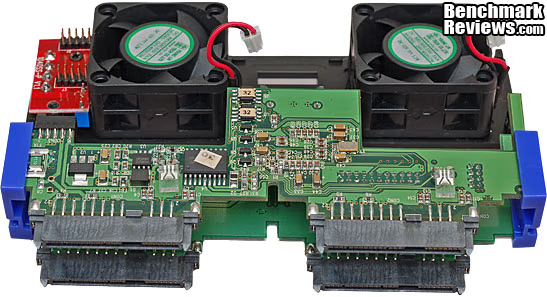
Speaking of reliability, it helps to have components that are well made, with good manufacturing practices. One thing that often gets overlooked is the quality of the PCB boards that are at the heart of most electronic devices. Most of the assembly is automated these days, and only rework is done by hand, if the robots make a mistake. I was pleasantly surprised by the assembly and wave soldering quality exhibited by the two boards in the Convoy 425XL. Component placement was good, the solder joints were excellent, and the board was well cleaned with very little residue left on the board.

The single most significant component on the PCB we've been looking at is the JMicron Port Replicator chip, the JMB393. It's the brains behind the operation, along with the JMicron HW RAID Manager software.

Let's take a closer look...
JMicron JMB393 Controller and RAID Manager Software
The JMicron JMB393 controller is a Serial ATA II Port Multiplier with six ports, and it resembles a network switch in that one of the six ports is the "uplink" connection, and the remaining five ports are used to fan out the interface to multiple devices. In the Patriot Convoy 425XL application, only four SATA drives are connected, as that is the maximum number of drives that can fit into the available space of one 5.25" drive bay.

In addition to providing the basic port multiplication capability, the JMB393 also supports a variety of RAID configurations, and some advanced features such as on-line Auto-Rebuild, Hot Spare on RAID, and continuous rebuild process between power cycles. It's hard to believe that this little chip does all this: a fully hardware-accelerated RAID engine, no external DRAM or processor required, with no additional driver, BIOS settings or software required for RAID operation. It's a lot to ask for such a small IC, and we'll be putting it to the test later to see if it can keep up with a quartet of fairly modern SSDs.
Once all the drives are loaded into the drive bays, and the DIP switches are set, the RAID Manager software is used to create the RAID volume. In this instance, I've selected RAID 0 with all four drives active in one volume. Theoretically, this should yield the highest performance of all the possible configurations. Note that there is no data redundancy in this configuration, and if any one of the drives goes south, the entire array is toast. I would never recommend this arrangement with mechanical drives, but with SSDs the risk is a bit lower. Even then I hesitate to suggest it, because no matter how many times I explain the increased risk to someone, I still get all the blame if it goes down the tubes.

Drive information for each installed unit is available in this screen, right down to the firmware version and serial number for each drive. This is critical info in the cases of SSDs, as firmware revisions can have a major effect on the performance of the individual drive. In my case, I had four drives that were purchased over the course of one year, and two of the drives had older firmware loaded. I had to flash the firmware on both of them to bring them up to the same version as the two newer drives. Fortunately, OCZ is a market leader in product support for their SSD product line, and I was able to download everything I needed from their support forums.

S.M.A.R.T. drive information is also available for each installed unit by clicking the "Advanced" icon. This is very handy since the motherboard controller won't be able to query the individual drives through the single SATA connection. Hopefully none of this information will be relevant and all the drives are behaving properly, but if you start having performance issues, it's helpful to be able to look at these attributes. Even if you just need to rule out the performance of the drives themselves, the only way to "see" each of the separate drives is through this custom JMicron software.

The firmware of the entire drive controller is also accessible, and can be managed in the JMicron application. There were no firmware updates available at the time of testing, but the instructions were clear on how to perform the update if one was required. We can also see the OEM manufacturer of the unit in this screen, as Patriot doesn't build these devices themselves. Nothing unusual there, very few of the household names in computer components actually own and manage the factories that do the final assembly of their products.

In case you are an IT professional and you want to use the Patriot Convoy 425XL for storage in your data center, the software has provisions for automated notifications in case of trouble. Over a dozen possible events can be selected as potential alarm conditions, and the device will be only too happy to give you the bad news via email. It doesn't have all the capabilities of a NAS, so you won't be able to log into this particular device remotely via IP to fix the issue. On the other hand, it's about one quarter of the price of a full featured four-bay NAS, so you can't rightly complain. This device was never intended to replace the SAN and NAS devices of the world; it fulfills a much simpler role, in niche applications where there is no comparable alternative.

With all the possible configurations of this device, I had to choose a subset to test, or else it could have taken a month to test every one. Fortunately, there are a few that stand out as the most likely choices. Please continue on as we discuss the testing methodology and then dive straight into testing.
Testing Methodology
Early on in our SSD coverage, Benchmark Reviews published an article which detailed Solid State Drive Benchmark Performance Testing. The research and discussion that went into producing that article changed the way we now test SSD products. Our previous perceptions of this technology were lost on one particular difference: the wear leveling algorithm that makes data a moving target. Without conclusive linear bandwidth testing or some other method of total-capacity testing, our previous performance results were rough estimates at best.
Our test results in this article were obtained after each SSD had been prepared using the DISKPART program. As a word of caution, applications such as Sanitary Erase (SE) and Wiper offer immediate but temporary restoration of original 'pristine' performance levels. They will also reduce the effective life of the NAND modules, which is finite and based on the number of write commands performed on the module. In our tests, the maximum performance results (charted) decayed as subsequent tests were performed, so we almost always report the results from the first run. Subsequent runs only serve to validate the first set of results. In the case of single SSDs attached to a TRIM-enabled Operating Systems, they will benefit from continuously refreshed performance, whereas older O/S's will require a garbage collection (GC) tool to avoid 'dirty NAND' performance degradation. With the JMicron (JMB393) port replicator controller between the motherboard's Southbridge and the actual SSDs, the TRIM capability built into my operating system was unable to access the drives.
It's critically important to understand that no software for the Microsoft Windows platform can accurately measure SSD performance in a comparable fashion. Synthetic benchmark tools such as HD Tach and PCMark are helpful indicators, but should not be considered the ultimate determining factor. That factor should be measured in actual user experience of real-world applications. Benchmark Reviews includes both bandwidth benchmarks and application speed tests to present a conclusive measurement of product performance.
Intel P55 Express Test System
- Motherboard: ASUS P7P55D-E Pro (1002 BIOS)
- System Memory: 2x 2GB GSKILL Ripjaws DDR3 1600MHz (7-8-7-24)
- Processor: Intel Core i5-750 (OC @ 4.0 GHz)
- CPU Cooler: Prolimatech Megahalems (Delta AFB1212SHE PWM Fan)
- Video: MSI R6870-2PM2D1GD5 (Forceware v260.89)
- Drive 1: OCZ Vertex SSD, 32GB
- Drive 2: Western Digital VelociRaptor, 150GB
- Optical Drive: Sony NEC Optiarc AD-7190A-OB 20X IDE DVD Burner
- Enclosure: CM STORM Sniper Gaming Case
- PSU: Corsair CMPSU-750TX ATX12V V2.2 750Watt
- Monitor: SOYO 24"; Widescreen LCD Monitor (DYLM24E6) 1920X1200
- Operating System: Windows 7 Ultimate Version 6.1 (Build 7600)
Drive Hardware Tested:
- Corsair P64 CMFSSD-64GBG2D SATA MLC SSD (Firmware VBM19C1Q)
- Corsair Force F100 CSSD-F100GB2 SATA MLC SSD (Firmware v1.1)
- OCZ Vertex OCZSSD2-1VTX30G 30GB SATA SSD (Firmware v1.5)
- Patriot Convoy 425XL 4-Bay 5.25" Enclosure (Firmware v0.955[5/14] )
Test Tools:
- AS SSD Benchmark 1.5.3784.37609: Multi-purpose speed and operational performance test
- ATTO Disk Benchmark 2.46: Spot-tests static file size chunks for basic I/O bandwidth
- Iometer 2008.06.28 by Intel Corporation: Tests IOPS performance and I/O response time
- Lavalys EVEREST Ultimate Edition 5.50: Disk Benchmark component tests linear read and write bandwidth speeds
- CrystalDiskMark 3.0.0 by Crystal Dew World: Sequential speed benchmark spot-tests various file size chunks
Test Results: Bandwidth Speed vs. Operational Performance
This article utilizes benchmark software tools to produce operational IOPS performance and bandwidth speed results. Each test was conducted in a specific fashion, and repeated for all products. These test results are not comparable to any other benchmark application, neither on this website or another, regardless of similar IOPS or MB/s terminology in the scores. The test results in this project are only intended to be compared to the other test results conducted in identical fashion for this article.
As we've explained in our SSD Benchmark Tests: SATA IDE vs AHCI Mode guide, Solid State Drive performance revolves around two dynamics: bandwidth speed (MB/s) and operational performance (IOPS). These two metrics work together, but one is more important than the other. Consider this analogy: operational IOPS performance determines how much cargo a ship can transport in one voyage, and the bandwidth speed is to fast the ship moves. By understanding this and applying it to SSD storage, there is a clear importance set on each variable depending on the task at hand.
For casual users, especially those with laptop or desktop computers that have been upgraded to use an SSD, the naturally quick response time is enough to automatically improve the user experience. Bandwidth speed is important, but only to the extent that operational performance meets the minimum needs of the system. If an SSD has a very high bandwidth speed but a low operational performance, it will take longer to load applications and boot the computer into Windows than if the SSD offered a higher IOPS performance.
List your results in this section. Make certain that you have given the reader as much information pertaining to the test procedure and results as possible.
AS-SSD Benchmark Results
Alex Schepeljanski of Alex Intelligent Software develops the free AS SSD Benchmark utility for testing storage devices. The AS SSD Benchmark tests sequential read and write speeds, input/output operational performance, and response times. Because this software receives frequent updates, Benchmark Reviews recommends that you compare results only within the same version family.
Beginning with sequential read and write performance, the 2-disk RAID 0 arrangement provided the best performance and produced 248.51 MB/s read speed, and 129.06 MB/s of write performance. The sequential file transfer speeds have traditionally been low with this benchmark tool, especially for SandForce controllers, which is why we will concentrate on the operational IOPS performance for this section.
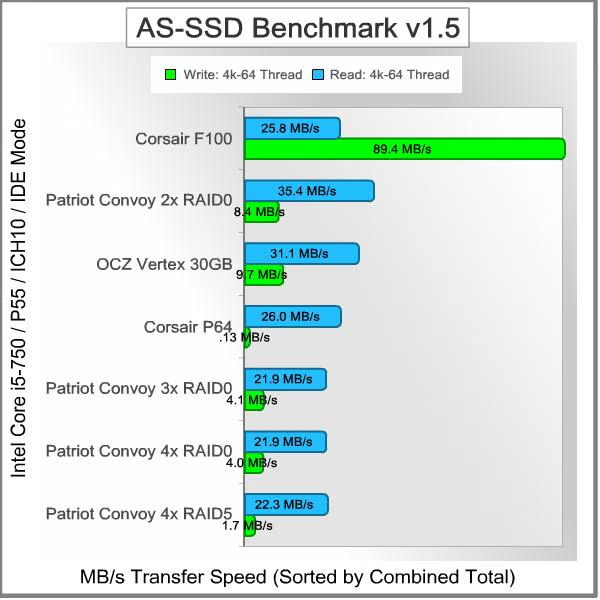
Single-threaded 4K IOPS performance delivers 32.29 MB/s read and 8.21 MB/s write, which shows the difficulty these drives have with small read/write operations. Similarly, the 64-thread 4K reads recorded 35.43 MB/s while write performance was 8.44 MB/s.

Displayed in the chart below, the 64-thread 4KB IOPS performance results for several SSD storage products illustrates which products offer the best operational input/output with small (4k) file transfers. The 4k write performance is well below par for every RAID configuration of the Vertex drives, compared to the newer SandForce-controlled SSD we tested it against. This is no fault of the Patriot Convoy 425XL device, as you can see from the results when the OCZ Vertex drive was connected directly to the motherboard's drive controller. There is some degradation of performance as additional drives are added to the RAID 0 array, and the RAID 5 performance is the lowest of all configurations. This looks like an issue with the JMicron drive controller getting overwhelmed by the overhead involved with managing multiple drives, but further testing is needed to confirm that. In RAID 5, the controller has additional overhead, and the write results are half that of the RAID 0 configuration with four drives installed. Read results stayed close to 22 MB/s for all configurations with 3 drives or greater. Once again, this looks like a controller issue.
Drive Hardware
- Corsair P64 CMFSSD-64GBG2D SATA MLC SSD (Firmware VBM19C1Q)
- Corsair Force F100 CSSD-F100GB2 SATA MLC SSD (Firmware v1.1)
- OCZ Vertex OCZSSD2-1VTX30G 30GB SATA SSD (Firmware v1.5)
- Patriot Convoy 425XL 4-Bay 5.25" Enclosure (Firmware v0.955[5/14] )
In the next section, Benchmark Reviews tests transfer rates using the ATTO Disk Benchmark.
ATTO Disk Benchmark Results
The ATTO Disk Benchmark program is free, and offers a comprehensive set of test variables to work with. In terms of disk performance, it measures interface transfer rates at various intervals for a user-specified length and then reports read and write speeds for these spot-tests. There are some minor improvements made to the 2.46 version of the program that allow for test lengths up to 2GB, but all of our benchmarks are conducted with 256MB total length. ATTO Disk Benchmark requires that an active partition be set on the drive being tested. Please consider the results displayed by this benchmark to be basic bandwidth speed performance indicators.
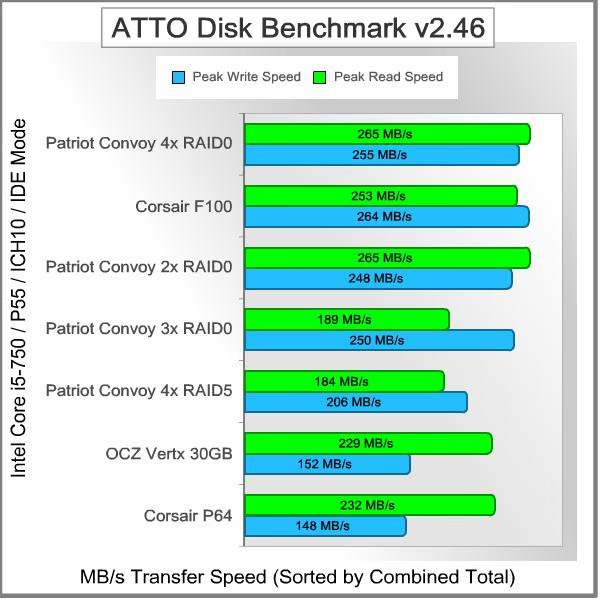
In this test, the RAID 0 configuration with four OCZ Vertex drives installed came out on top, and those results are shown below. The drive array reached near to maximum performance at the 128kB level and the 64kB levels are not far behind. This solution performs well as the chunk size gets larger. You can also see how poorly it does at the 4kB level, which we already saw in the previous test.

The 4-drive array comes out on top here, but the 2-drive array is not very far behind. With three drives active the read speed fell down to approximately 70% of the maximum level. This was also true for the 4-disk RAID 5 array, since it uses the fourth drive for storing parity bits. I don't have an explanation for why three drives performed worse than two, but the results were very consistent. The write speed hung in there on the 3-drive array at 250MB/s, but dropped to 206MB/s when configured as RAID 5. In general, the Patriot Convoy 425XL performed well on this test, but the performance scaling still tops out at a level well below 2X of what a single OCZ Vertex drive produces. The write speed gets the most improvement, as it starts out initially at a lower level than read speed on the bare drive, but it never got higher than 255MB/s.
Drive Hardware
- Corsair P64 CMFSSD-64GBG2D SATA MLC SSD (Firmware VBM19C1Q)
- Corsair Force F100 CSSD-F100GB2 SATA MLC SSD (Firmware v1.1)
- OCZ Vertex OCZSSD2-1VTX30G 30GB SATA SSD (Firmware v1.5)
- Patriot Convoy 425XL 4-Bay 5.25" Enclosure (Firmware v0.955[5/14] )
In the next section, Benchmark Reviews tests sequential performance using the CrystalDiskMark 3.0 software tool...
CrystalDiskMark 3.0 Benchmark Results
CrystalDiskMark 3.0 is a file transfer and operational bandwidth benchmark tool from Crystal Dew World that offers performance transfer speed results using sequential, 512KB random, and 4KB random samples. For our test results chart below, the 4KB 32-Queue Depth read and write performance was measured using a 1000MB space. CrystalDiskMark requires that an active partition be set on the drive being tested. Benchmark Reviews uses CrystalDiskMark to illustrate operational IOPS performance with multiple threads. In addition to our other tests, this benchmark allows us to determine operational bandwidth under heavy load.
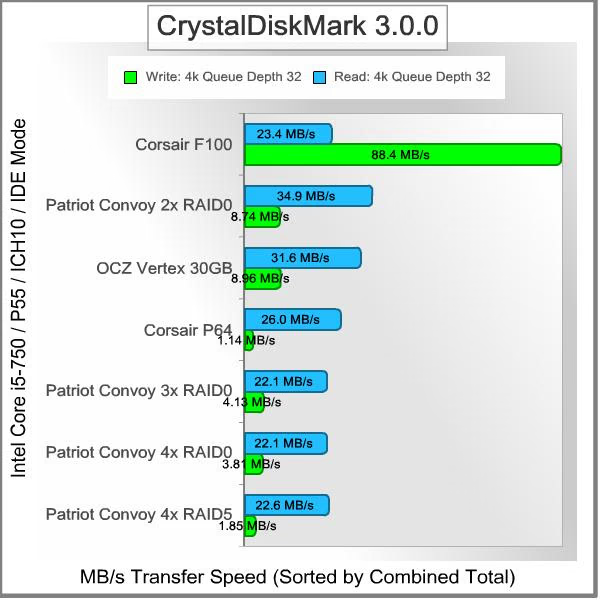
Our tests of the various storage configurations were each consistent, although results tended to decay over the course of multiple runs, and only the maximum speeds are charted below. Sequential tests on the Patriot Convoy 425XL were best with the 2-drive RAID 0 arrangement, and produced a maximum read speed of 262.0 MB/s, and a write speed of 180.9 MB/s. The sequential file transfer speeds have traditionally been somewhat low with this benchmark tool, especially for SandForce controllers, which is why we will concentrate on the operational IOPS performance for this section.
CrystalDiskMark 3.0 reported 512K results of 187.4 MB/s read and 135.9 MB/s write performance. 4K tests produced 34.88 MB/s read and 8.735 MB/s write performance. 4KB queue depth 32 IOPS performance for the 2-Drive RAID 0 configuration produced 37.32 MB/s read and 8.365 MB/s write performance.

In the chart below, the maximum 4KB queue depth 32 IOPS performance results for several enthusiast-level storage products show which storage solutions offer the best operation under load typically produced by database operations. These results are similar to what we saw with the AS-SSD benchmark, with the SandForce controlled SSD producing significantly better results than any other solution. In particular, the write performance is an order of magnitude better than any of the others. The 2-drive RAID 0 configuration performs slightly better than the raw drive, but the other RAID choices taper off, especially in the write portion of the test. The RAID 5 write performance is about half of the 3-drive or 4-drive RAID 0 performance, just like we saw in the AS-SSD test results. Clearly, the collective abilities of the JMicron 393 port controller and the Indilynx Barefoot drive controller are not doing much to improve the performance of the OCZ Vertex SSD in this type of test. Sequential access of large blocks of data is improved for sure, but these small block I/O tests are very typical for a web server or database server. A desktop environment is more of a mixed load with some large blocks and a fair amount of small blocks mixed in.
Drive Hardware
- Corsair P64 CMFSSD-64GBG2D SATA MLC SSD (Firmware VBM19C1Q)
- Corsair Force F100 CSSD-F100GB2 SATA MLC SSD (Firmware v1.1)
- OCZ Vertex OCZSSD2-1VTX30G 30GB SATA SSD (Firmware v1.5)
- Patriot Convoy 425XL 4-Bay 5.25" Enclosure (Firmware v0.955[5/14] )
In our next section, we test linear read and write bandwidth performance and compare the Patriot Convoy 425XL against several other top storage products using EVEREST Disk Benchmark. Benchmark Reviews feels that linear tests are excellent for rating SSDs, however HDDs are put at a disadvantage with these tests whenever capacity is high.
EVEREST Disk Benchmark Results
Many enthusiasts are familiar with the Lavalys EVEREST benchmark suite, but very few are aware of the Disk Benchmark tool available inside the program. The EVEREST Disk Benchmark performs linear read and write bandwidth tests on each drive, and can be configured to use file chunk sizes up to 1MB (which speeds up testing and minimizes jitter in the waveform). Because of the full sector-by-sector nature of linear testing, Benchmark Reviews endorses this method for testing SSD products, as detailed in our Solid State Drive Benchmark Performance Testing article. However, Hard Disk Drive products suffer a lower average bandwidth as the capacity draws linear read/write speed down in the inner-portion of the disk platter. EVEREST Disk Benchmark does not require a partition to be present for testing, so all of our EVEREST benchmarks are completed prior to drive formatting.
Linear disk benchmarks are superior bandwidth speed tools in my opinion, because they scan from the first physical sector to the last. A side effect of many linear write-performance test tools is that the data is erased as it writes to every sector on the drive. Normally this isn't an issue, but it has been shown that partition table alignment will occasionally play a role in overall SSD performance (HDDs don't suffer this problem).
The Patriot Convoy 425XL tested with EVEREST Disk Benchmark was connected to the Intel ICH10 controller on the motherboard and 1MB block size option was used for all tests. Read performance on the 2-drive RAID 0 setup measured a very consistent 251.0 MB/s with a nearly identical maximum peak of 251.4 MB/s. The occasional transient dip reached down to a minimum rate of 241.7 MB/s, and had very little influence n the average speed. This is about as close to perfect a (flat) curve as you will ever see. Linear write-to tests were next...

The waveform chart below illustrates how well the integrated buffer manages file transfers, and makes linear write performance appears relatively even. The results seen here are for the 2-drive RAID 0 arrangement, and while not quite as even as the read tests shown above, are still relatively consistent. This is performance that's comparable to other SSD products we've tested in the past. The Patriot Convoy 425XL recorded an average linear write-to speed of 239.4 MB/s, with a maximum performance of 242.1 MB/s.

The final chart I want to share shows what happens when the various elements of a system are not working in perfect harmony. With a 4-drive RAID 0 arrangement the controller gets off to a rocky start and then recovers by the time it finishes approximately 4% of the total disk capacity. Things go reasonably well until the system hits about 28% of the full volume size, and then it goes haywire. The write performance becomes very unstable at that point, never recovers, and takes a nosedive at the very end of the test. Looking at the two charts, it's pretty clear why the 4-drive configuration is not able to match the 2-drive setup in any of the other tests. This is a perfect example of how and why this particular benchmark is so revealing.

The chart below shows the averages linear read and write bandwidth speeds for a cross-section of SATA storage devices tested with EVEREST Disk Benchmark:

Drive Hardware
- Corsair P64 CMFSSD-64GBG2D SATA MLC SSD (Firmware VBM19C1Q)
- Corsair Force F100 CSSD-F100GB2 SATA MLC SSD (Firmware v1.1)
- OCZ Vertex OCZSSD2-1VTX30G 30GB SATA SSD (Firmware v1.5)
- Patriot Convoy 425XL 4-Bay 5.25" Enclosure (Firmware v0.955[5/14] )
This test concludes our benchmarking section, and while I've hinted at some conclusions that can be drawn, I urge you to look at my Final Thoughts to put these results into perspective.
Patriot Convoy 425XL Final Thoughts
Sometimes we let our hopes and dreams get out of control. Over the course of a year, as various deals and bargains came and went, I found that I had purchased four OCZ Vertex 30GB SSDs. It just "happened", if you know what I mean. I think I'm like a lot of consumers who use this avoidance technique to keep themselves safe from sticker shock, yet in the end we still get to purchase most of the goodies we want. This is the same attraction that applies to CrossFireX and SLI capability in video cards; I have trouble splashing out the big $$$ for a GTX480, but I'll buy a GTX460 today, and another one 4 months from now and hook ‘em together in SLI. Technology buyers are not very good with delayed gratification...
Ever since I read The Little Engine That Could as a child, I've always felt that anything is possible, given the right circumstances. What I had hoped for in this case was a way to easily harness the power of four very fast 2.5" SSDs that I had lying on the shelf. We all know that speed is addictive, and here I was thinking, "If one OCZ Vertex is fast, imagine how much faster four of them will be". I've been reminded since then how to make that happen, but without an appropriate (read very expensive) drive controller, it's still a dream deferred.
What was I thinking?!? Last time I looked at RAID controller cards, I found what I wanted: something like a 4-port version with an 800 MHz processor and 512 MB of 800 MHz DDR2 RAM. It costs over $300, but users report that it is the hot ticket for SSD arrays. Connecting up four OCZ Vertex drives like the ones I used in this article generally results in read speeds just over 1 GB/s. They all look pretty much like this, with a PCI Express x4 connection to handle the bandwidth, and a big heat sink on their processor.
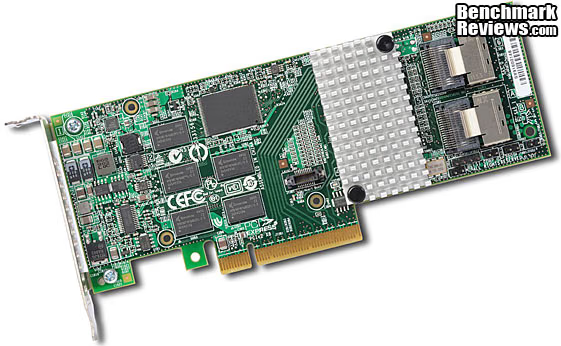
I must have been dreaming up a storm to think that all this functionality and performance could be jammed into the rear 20% of a 5.25" drive housing, pass everything through a single SATA 3Gb/s connection, and cost less than $100.
If the Patriot Convoy 425XL can't turn four Indilinx-based SSDs into a 1 GB/s data hose, what is it good for? In order to properly answer that question you need to think about the things that only a small, tightly integrated package like this can do. How about a RAID-5 setup in a SFF system or a HTPC with full front panel hot swap capability? This product opens up a unique possibility to install a very large and robust data storage solution in the same space as a standard optical drive. Four 1 TB drives in the space of a single 5.25" drive bay is a force to be reckoned with. The reduced footprint of the 425XL only consumes one power connection and one SATA connection, as well. Most small systems are not going to support the additional power and signal connections required to implement this any other way. All of a sudden the small size of a 2.5" HDD is an asset in this scenario instead of a liability. Note: Everyone who implements a RAID setup needs to be aware that RAID anything is NOT a backup solution. All the RAID configurations that include some form of data redundancy are meant to provide continuity of operation. Don't be fooled into using it as a backup of your data; sooner or later you'll regret it.
One more possibility is someone who needs to make multiple data backups, fast. Using the "Clone" configuration on the Convoy 425XL, you can make four identical backups at the same time and then move them to multiple offsite locations. In this arrangement, the overall write speed is limited to the speed of the slowest drive, so a quad of SSDs can run at their full performance potential. I know some Sys/Admins who would love to shave an extra 20 minutes off of every day's "do it before I go home" routine. The small size and light weight of the individual SSDs would also bring a smile to their face as they drop it into their "can't be too rich or too thin" briefcase. With 1 TB drives available in the 2.5" form factor, those who need capacity more than they need speed are also able to enjoy the benefits.
Another option that's available is to purchase the Patriot Convoy 425S model, which does not have the integrated port replicator circuitry, and instead has four independent SATA connections on the rear panel. Although you have to deal with running the separate SATA signal cables, there is still only one power cable to connect. Whether you use the drive controller built into the motherboard's Southbridge or a dedicated RAID controller like I mentioned above, you should see much better performance scaling using SSDs in RAID applications.
There's always been a gray area surrounding SSD performance benchmarks. SSDs can be very temperamental towards the condition of their flash NAND. In my experience testing Solid State Drives, I almost always see that the performance results reported to consumers in product reviews (including this one) convey the very best performance scores. Unfortunately, the process used to obtain these results is not always applicable to real-world usage. The only saving hope is that garbage collection techniques such as TRIM can keep the flash NAND in 'clean' condition, so that end-users will experience the same performance levels as we do in our tests.
Windows 7 offers native TRIM support in its default configuration, and some newer SSDs also include a special Garbage Collection function, or offer a firmware update that can bring the drive up-to-date. For anyone using an Operating System or SSD that does not offer Garbage Collection functionality, you'll be using 'dirty' flash NAND modules and suffering sub-optimal performance for each write-to request. So far, this is the case with every RAID implementation of SSDs, including this one.
Some people have been also confused about Intel's support for TRIM and RAID with their Intel Rapid Storage Technology product. They had to issue an erratum, clarifying that "Intel Rapid Storage Technology 9.6 supports TRIM in AHCI mode and in RAID mode for drives that are not part of a RAID volume." In plain language, that means that if you have an SSD in your system that is not part of a RAID volume, it will still have TRIM support even if there are RAID volumes installed on the same system. In earlier versions, the very presence of a RAID volume on a machine would disable TRIM for any and all installed drives. For the new version, they had to make it clear that any drives that ARE part of a RAID volume will not have TRIM support.
The best solution seems to be the integration of garbage collection directly into the drive controller. The SandForce controllers do this, and it's this feature that allows OCZ to build PCI-Express based storage solutions that are "self-cleaning" and don't depend on TRIM support from the operating system.
Patriot Convoy 425XL Conclusion
IMPORTANT: Although the rating and final score mentioned in this conclusion are made to be as objective as possible, please be advised that every author perceives these factors differently at various points in time. While we each do our best to ensure that all aspects of the product are considered, there are often times unforeseen market conditions and manufacturer changes which occur after publication that could render our rating obsolete. Please do not base any purchase solely on our conclusion, as it represents our product rating specifically for the product tested which may differ from future versions. Benchmark Reviews begins our conclusion with a short summary for each of the areas that we rate.
The performance of the Patriot Convoy 425XL didn't meet my initial expectations, but that's because my expectations were dead wrong. If I had bothered to think for just a second, I would have realized that one Serial ATA 2 (AKA SATA II, SATA-300, SATA 3Gbps) is limited to 300 metric MB/s. Toss in the processing overhead of the JMicron port replicator chip inside the unit, and there's no way that even two reasonably fast SSDs in RAID 0 are going to give you much better read performance than a single device. One OCZ Vertex SSD is already pumping out close to 250 MB of data per second, so there's very little room for improvement. Write performance got a slightly bigger boost from two striped drives, but still ended being throttled by the SATA II interface, especially as the drive count got to three or four. I had also hoped that the 4kB read and write performance would be better, as there are many applications and environments that are impacted by the ability of the drive system to handle a large number of small files quickly.

The appearance is a little more important for the Convoy 425XL than for some of the other products I review. After all, the fascia of the unit is going to be sitting front and center in one of your 5.25" drive bays. Fortunately all is good, unless you have an unusual aversion to pale yellow, which is used sparingly for the individual drive bay latches. If they were red or blue, the unit wouldn't match half of all the gaming cases in the world; this way they aren't matchy-matchy with anything. I still think the best looking bits are going to be hidden inside the case, but at least you'll get to appreciate how good it looks during the setup and install process.
Construction is a real high point for the Patriot Convoy 425XL. The metalworking on the aluminum enclosure gets top marks for precision and finish. There were no sharp edges or burrs present, something I almost invariably discover the hard way during assembly or disassembly, leaving me with bloodied fingers. The overall layout and design is well thought out, and the components are appropriate for this class of device. You don't need a 6-phase power supply and organic polymer capacitors to drive two small, low-power interface chips. The drive trays were well executed and fit into the enclosure with precision and smoothness. I gave all the drive trays a good workout during the month that I was testing the unit, and they all fit just as well at the end as they did in the beginning.
Functionality is where I start to get a little conflicted. On the face of it, the Patriot Convoy 425XL offers all of the requisite features and functions one could ask for in a multi-bay drive enclosure. All possible RAID levels with a drive count of four, check. Hot-swap, auto-rebuild, SAS and SATA drive interfaces, all check. So, what's the problem? I keep thinking that performance is a function; in fact it's the MAIN function. Maybe if I'd installed a couple of 5400 RPM laptop drives, instead of some pretty fast SSDs, I would be singing a different tune. But the fact remains that I got no real performance increase from any of the RAID configurations I tested. It's great to have the functionality of RAID 0, but if there's no speed increase as you go from one to two to four drives, what's the point in having the function?
As of late November 2010, the Patriot Convoy 425XL is selling for $118.59 at Amazon, and is available from some other e-tailers as well. This represents about a $50 premium over the passive version of the enclosure that has none of the drive controller features of this unit. I mentioned in my Final Thoughts that this unit fills a niche no other device can, and for that you have to be willing to pay the price, both in dollars and performance. Its closest competitor is the AMS VENUS T5 mini DS-2250J 5-Bay SATA RAID Storage Enclosure, which is an external unit and it's no less expensive. On balance, the Convoy 425XL is not going to appeal to bargain shoppers, but the folks who need to leverage its unique capabilities to solve a specific problem aren't going to complain about the price: it's fair.
In Real Estate, it's always about "Location, Location, Location". That's the same exact situation here, as the defining capability of the Patriot Convoy 425XL for me is the ability to fit a hot-swappable RAID 5 subsystem into a single 5.25" drive bay. You can easily install one into a SFF HTPC case, and you could put four into many mid-tower cases. That's not a likely scenario, and you'll probably get better performance from a quartet of 3TB-3.5" drives in RAID 5, but it is interesting to ponder the possibilities. Ultimately, even though it was unfair of me to expect miracles from the single SATA port on the rear of the unit, the RAID performance let me down. Now that I've been spoiled by the fast response time and linear read/write speeds of the newest SSDs, I was looking for that next bump in performance. My expectations and yours will be much better off if the jumping off point is a typical laptop-class HDD.
Pros:
+ Simple, easy way to get RAID-5 in a SFF chassis
+ Very well constructed and reliable
+ Supports SMART functions for the individual drives
+ Excellent cooling for all installed drives
+ Supports 12.5mm high drives (1TB drives available)
+ Easy way to break the 2.2 TB OS limitation in a single drive bay
+ Simplified cable connections are invaluable in SFF cases
+ Supports all possible RAID levels: 0 / 1 / 3 / 5 / 10 + JBOD / CLONE
+ Supports on-line auto-rebuild at 200GB/hour
+ RAID 3 / 5 write-back cache
Cons:
- Single SATA-II uplink connection is overwhelmed by 2-4 SSDs
- Does not support TRIM pass-thru (No RAID system does this yet)
- Lack of built-in encryption may hinder use for burning off-site backups
Ratings:
-
Performance: 7.50
-
Appearance: 8.75
-
Construction: 9.00
-
Functionality: 8.50
-
Value: 8.00
Final Score: 8.35 out of 10.
Questions? Comments? Benchmark Reviews really wants your feedback. We invite you to leave your remarks in our Discussion Forum.
Reader comments from the original article
15 comments were posted before commenting closed. They are preserved as written. Original avatars no longer resolve and are shown as a placeholder.
RE: Patriot Convoy 425XL SAS/SATA RAID Enclosure Stupido Permalink:
I'm not very familiar with RAID stuff, but is this device usable with mechanical HDDs? I mean can one get better performance (& reliability) with such a device populated with mechanical 2.5 HDDs?
yupy XLfun Permalink:
yes, it's usable with mechanical HDDs. since 4 months, I'm using it with tree WD5000BEKT in raid5. one HDD alone on intel chipset: random write is 70Mo/s with avgseek 6.7ms tree in raid5 on intel chipset: random write is 85Mo/s with avgseek 9.0ms four in raid5 is slower than with tree HDDs and raid10 (four HDD) is similar in speed thant raid5 w/3HDD there is too many numbers in this review. In daily usage 85% of the time windows is doing random access.
Yes BruceBruce Permalink:
Yes, it is. It is actually a better choice to use HDDs, since you WILL get speed increases when comparing multiple mechanical drives in the Patriot Convoy 425XL to the same drive used on its own. If you want better performance AND reliability at the same time, you need to set it up with RAID 5, and use at least three HDDs (all the same model, preferably).
4 SATA ports are far superior Paul A. Mitchell Permalink:
Imho, this Icy Dock unit is a better solution, chiefly because it has 4 x independent SATA ports: #newegg.com/Product/Product.aspx?Item=N82E16817994095&Tpk=N82E16817994095 This X14 unit from Enhance Technology is even better, because each drive tray can be locked: ##enhance-tech.com/press/press-082509-quadrapack-x14.html There are inferior units like the Icy Dock e.g. Athena, but the SATA ports were known to "rip out" completely when the SATA cable was removed: this happened to me, so I speak from direct experience: #newegg.com/Product/Product.aspx?Item=N82E16816119025&Tpk=N82E16816119025 MRFS
For Speed, I agree... BruceBruce Permalink:
In a SFF or HTPC chassis, there may not be enough SATA ports on the mobo to handle the four drives in that unit, a boot drive and an optical drive. That's six, and a typical mini-ITX won't support that. Also, if you're running the drives in CLONE mode, then one SAT connection will handle the whole bandwidth. Like I said in the review, this unit fills one or two niches that no other unit can. FYI also, Patriot does offer the Convoy 425S, which has the four separate SATA connections on th back of the units; simple pass-throughs to the drives inside.
RE: For Speed, I agree... Stupido Permalink:
Bruce, Thanks for the reply! Indeed I was interested because I'm interested in build based on mini-ITX factor. Also interesting point is to check what is more beneficial price-wise (performance/capacity for certain price range): 1 SSD or this box populated with 2.5 HHDs...
Why 1GB/s speeds aren't possible Nick Permalink:
There is a reason why you can't get 1GB/s with this unit, it's because of the single sata port which can only do 3Gb/s which is only around 280MB/s with no over head, so really you probably hit a bottle next on the SATA2 spec, if it supported SATA3 it may have done better, not saying it would have but it may have done better in the RAID0 tests.
Quite True.... BruceBruce Permalink:
I admitted exactly that in the Final Thoughts and Conclusion. "I must have been dreaming up a storm to think that all this functionality and performance could be jammed into the rear 20% of a 5.25" drive housing, pass everything through a single SATA 3Gb/s connection, and cost less than $100."
Untapped Potential BruceBruce Permalink:
Imagine this item with a beefier controller chip and SATA 3. Now, it can compete with the base model Revo from OCZ.....
RE: Patriot Convoy 425XL SAS/SATA RAID Enclosure Doug Permalink:
It looks like we're finally getting to a place where we should have been 20 years ago--mainstream drive installation from the front of the case. I know it's more than a front load drive bay, but I'm glad we're finally seeing this stuff become more mainstream. A couple of years ago I replaced my internal drive bays with front load hot swap bays and it's just the way to go.
good anyway,.... RealNeil Permalink:
So this didn't perform as expected, but I still like the idea of keeping four little drives put away like it does. I think that they'll figure out the bandwidth situation too, in time. Technology is like Army Ants,.... nothing stops it for long and it's always moving along. It's all good.
What about fan noise? DionV Permalink:
What was the fan noise like? If, as you suggested, one uses this in a SFF case for desktop or media centre purposes, the fan noise would be critical. Thanks for the review. This is the first one I've read on this site, and I'm impressed with the level of detail.
FAN Noise OK, but not silent... BruceBruce Permalink:
In my normal PC, I ca,'t hear it over the noise of the case fans and the CPU Cooler fan and the GPU Cooler Fan.... you get the picture. But I understand your concern for the HTPC situation. I plugged it in, out in the open air and what I hear is a low frequency type of noise, which surprises me. I guess since the fan has so few blades, the frequency is lower. Anyways, the noise is lower than a typical 1500-2000 RPM 120mm case fan, and it is MUCH lower than a typical 120mm CPU cooler fan. They are designed to produce higher pressures, and "bite" the air a little harder. I know there is a range of noise performance among brands and models.... I'm listening it to it now, 2 meters away in the open, and it is noticeable. Once it is inside a proper case, I suspect it will be down 10-15dB and hardly worth worrying about.
Thanks! DionV Permalink:
Bruce, thanks for the swift reply!
Any chance of HDD test? Brandy Permalink:
Nice test and interesting writeup. It was interesting to see what the max thru put is. But I never dreamed of putting SSD into this carrier as it seemed a waste. What I am really interested in is a more real world test. For example there are number of 12.5mm 2.5" 1TB disk drives available. The Samsung Spinpoint 5400rpm 1TB seems to have good write ups. So what would be the performance of 4 1TB drives in JBOD, raid 5 and raid 10, I would expect those to be the most used modes. I personally have a well stuffed desktop with an unused CDROM slot and the sata port that goes with it. Mobo sata is 3Gbs sata II, cpu is i7-X980, 18gbytes mem, 160GB SSD OS disk, 4TB data storage and a DVD/BD writer. BUT I am having a problem finding compact nearline protected storage. To me this system with 4-1TB drives in raid 10 with my DVD/BD writer might actually work. I would love to see a representative test run on a configuration I would actually use. Thank you.