
Intel Core i5-750 Processor BX80605I5750
Intel Core i5-750 Processor
When it launched last year, the Core i7 platform redefined Intel's high-end processor segment. Unfortunately, the platform was also accompanied by high-end prices. As such, it has seen only a minimal share of the desktop market. Today, however, Intel is releasing a new platform that it claims will bring the performance of Nehalem to mainstream price points. Referred to as Lynnfield, the new platform shares its core microarchitecture with the i7-900 series, but introduces a completely new chipset and socket design. This means that not only will we see new processors, but new motherboards as well. Benchmark Reviews has been testing several of these new items and will be covering the launch in detail over the next few days. In this article, we examine the Intel Core i5-750 Quad Core Processor model BX80605I5750.
The Intel Core i5-750 is one of three processors launching today under the Lynnfield platform, the others being the Core i7-860 and Core i7-870. All three chips are based on the same die, feature 8 MB of share cache, and are packaged using the new LGA 1156 socket. They also feature a new version of Intel's Turbo Boost Technology that dynamically overclocks the individual processor cores depending on workload. As the naming scheme suggests, however, the Core i5-750 is the low end part out of the three. This is in part due to clock speed, as the i5-750 runs at only 2.66 GHz compared to 2.80 GHz for the i7-860 and 2.93 GHz for the i7-870. The key difference, though, is the lack of Hyper-Threading. According to Intel, all of the Core i5-700 series processors will be limited to one thread per core, while the Core i7-800 series, will be capable of two threads per core. We'll see how much of an impact this has on performance when we get to the benchmarks a little later on.

The Core i5-750 may be the underdog of the Lynnfield launch, but with a launch-MSRP of $199 for the BX80605I5750 kit, it's certainly not a budget processor. The good news is that the new P55 chipset from Intel should offer a considerable price break compared to the X58. Intel moved the bulk of the Northbridge functions to the processor and combined the rest with the Southbridge to deliver a single chip solution called Ibex Peak. The memory configuration has also been reduced, from triple-channel to only dual-channel support. We'll cover this in more detail in the P55 motherboard reviews. However, let it suffice to say that the new chipset should bring system prices down quite a bit. Whether or not they'll be the mainstream prices Intel claims remains to be seen.
About Intel Corporation

Intel Corporation is the world's largest semiconductor company founded by semiconductor pioneers Robert Noyce and Gordon Moore, and widely associated with the executive leadership and vision of Andrew Grove, Intel combines advanced chip design capability with a leading-edge manufacturing capability. Originally known primarily to engineers and technologists, Intel's successful "Intel Inside" advertising campaign of the 1990s made it and its Pentium processor household names.
Intel pushes the boundaries of innovation so our work can make people's lives more exciting, fulfilling, and manageable. And our work never stops. We never stop looking for the next leap ahead-in technology, education, culture, manufacturing, and social responsibility. And we never stop striving to deliver solutions with greater benefits for everyone. Intel is making PCs more accessible and affordable through innovative PC purchase programs. Through public and private collaboration, Intel has worked closely with government and industry leaders to develop more than 200 programs in 60 countries. With the onslaught of wireless broadband communication technologies like WiMAX, Wi-Fi, and 3G and wireline ADSL and cable, Intel in collaboration with local governments is connecting more people in more places than ever before-no matter how remote.
Intel is committed to improving education on a global scale. With an ongoing focus on students and teachers, we're making an impact with technology solutions that support the development of 21st Century skills, including digital literacy, problem solving, and critical thinking. As citizens use the Internet, the need to create localized content is the key. Intel-sponsored programs provide localized content and services to connect technologies to villages, suburbs, and cities around the world to deliver access to community information, education, and healthcare.
Intel Core i5 Features
Product Overview
Get a major boost in PC throughput with the intelligent performance of the Intel Core i5 processor, which automatically allocates processing power where it's needed most. You'll move faster when creating HD video, composing digital music, editing photos, and playing the coolest PC games. With the new Intel Core i5 processor, you can multitask with ease and be more productive than ever.
Quad-Core Processing
Provides four complete execution cores in a single processor package. Four dedicated physical threads help operating systems and applications deliver additional performance, so users can experience better multitasking and multithreaded performance across many types of applications and workloads.
Intel Turbo Boost Technology
Dynamically increases the processor's frequency as needed by taking advantage of thermal and power headroom when operating below specified limits. Get more performance automatically, when you need it the most.
8 MB Intel Smart Cache
This large last-level cache enables dynamic and efficient allocation of shared cache to all four cores to match the needs of various applications for ultra-efficient data storage and manipulation.
Integrated Memory Controller
An integrated memory controller offers stunning memory read/write performance through efficient prefetching algorithms, lower latency, and higher memory bandwidth making the Intel Core i5 processor ideal for data intensive applications.
Intel HD Boost
Includes the full SSE4 instruction set, significantly improving a broad range of multimedia and compute-intensive applications. The 128-bit SSE instructions are issued at a throughput rate of one per clock cycle, allowing a new level of processing efficiency with SSE4-optimized applications.
Core i5-750 Specifications
|
Core i5-750 |
Core i7-860 |
Core i7-870 | |
|---|---|---|---|
| Base Clock Speed |
2.66 GHz |
2.80 GHz |
2.93 GHz |
| Max Turbo Frequency |
3.2 GHz |
3.46 GHz |
3.6 GHz |
| Cores/Threads |
4/4 |
4/8 |
4/8 |
| Shared Cache | 8MB | 8MB | 8MB |
| Memory Support |
DDR3 1333 MHz |
DDR3 1333 MHz |
DDR3 1333 MHz |
| Chipset Support |
P55 |
P55 |
P55 |
| Socket | LGA 1156 | LGA 1156 | LGA 1156 |
| TDP |
95W |
95W |
95W |
| Transistor Count | 774M | 774M | 774M |
| Die Size |
296mm2 |
296mm2 |
296mm2 |
| MSRP | $199 | $285 |
$555 |
Closer Look: Intel Core i5-750
All of the Lynnfield processors launched today are based on the same Nehalem microarchitecture as the Bloomfield Core i7-900 series. However, as I mentioned in the intro, significant changes have been made to reduce costs. First up is the smaller socket design, 1156 vs 1366. The lower pin-count is primarily the result of a revised memory controller. Tripple channel memory support has been dropped in favor of a more economical dual channel configuration. However, the new Lynnfield processors officially support DDR3 1333, a step up from 1066. Unchanged, it seems, are the cache sizes and associativity. Each core gets 64 KB of L1 cache, 256 KB L2 cache, and shares a larger 8 MB L3 cache.

The bus speed is also unchanged and, as you can see in the screenshot above, sits at 133 MHz. With turbo disabled, the maximum multiplier for the i5-750 is 20, for a maximum clock speed of 2.66 GHz. Speed Step, C1E, and C-States are used to independently manage the clockspeed and power state of each core. As such, you'll find that under light workloads all four cores often do not have to run at that maximum frequency.

For heavy workloads, specifically those that do not take advantage of multi-threading, enabling Intel's Turbo Boost Technology can have the opposite effect. It effectively overclocks the cores in use by raising the multiplier and voltage of each core independently until the maximum multiplier or TDP is reached. For the Core i5-750, the maximum turbo multiplier is 24, resulting in a maximum turbo speed of 3.2 GHz. However, this is with only one core in use. For each additional core in use, the maximum multiplier is reduced by one. For example, if all four of the i5-750's cores were in use, all four cores would have a maximum turbo multiplier of 21, or 2.79 GHz. We'll examine the performance benefits of Turbo later on in the review.
Testing and Results
Before I begin any benchmarking or overclocking, I thoroughly stress the CPU and memory by running Prime95 on all available cores for 12 hours. If no errors are found, I move on to a gaming stress test. To do this, I use Prime95 again to stress the processor, while running an instance of FurMark's stability test on top of this. If the computer survives this test for 1 hour without lockup or corruption, I consider it to be stable and ready for benchmarking.
Each benchmark test program begins after a system restart, and the very first result for every test will be ignored since it often only caches the test. This process proved extremely important in the World in Conflict and Supreme Commander benchmarks, as the first run served to cache maps allowing subsequent tests to perform much better than the first. Each test is completed five times, with the average results displayed in our article.
The test systems below have all been carefully configured to reduce any extraneous variables. For this review, we will be examining platform performance. As such, the motherboards and processors will vary. However, with the exception of our LGA1366 test system, all of our test platforms use the same memory, video card, and hard drive. We were unable to test the LGA1366 under these conditions, but felt it worthwhile to include the i7-920 in this review and will only include results from benchmarks that are unaffected by these components.
Intel LGA775 Test System
-
Processors: Intel Core 2 Quad Q9450
-
Motherboard:Asus P5Q3
-
System Memory: 2x2GB DDR3 1066 7-7-7-20 1.5v
-
Video: ASUS EAH4850
-
Disk Drive: Western Digital 6400AAKS 640GB
-
Operating System: Windows XP Professional SP3
Intel LGA 1156 Test System
-
Processors: Intel Core i5-750, Core i7-870
-
Motherboard: Intel DP55KG Extreme
-
System Memory: 2x2GB DDR3 1066 7-7-7-20 1.5v
-
Video: ASUS EAH4850
-
Disk Drive: Western Digital 6400AAKS 640GB
-
Operating System: Windows XP Professional SP3
AMD Socket AM3 Test System
-
Processors:AMD Phenom II 965 BE
-
Motherboard:Asus M4A79T Deluxe
-
System Memory: 2x2GB DDR3 1066 7-7-7-20 1.5v
-
Video: ASUS EAH4850
-
Disk Drive: Western Digital 6400AAKS 640GB
-
Operating System: Windows XP Professional SP3
Intel LGA1366 Test System
-
Processors:Intel Core i7-920
-
Motherboard:Gigabyte GA-EX58-UD4P
-
System Memory: 3x2GB DDR3 1066 7-7-7-20 1.5v
-
Video:ASUS ENGTX285 TOP
-
Disk Drive:OCZ Vertex EX 120GB SLC SSD
-
Operating System: Windows XP Professional SP3
Benchmark Applications
-
EVEREST Ultimate Edition v5.01 by Lavalys
-
Passmark PerformanceTest
-
PCMark05 v1.2.0 by Futurmark Corporation
-
Crysis Benchmark Tool
-
Devil May Cry 4 Benchmark
-
SPECviewperf v10.0 by Standard Performance Evaluation Corporation
-
MAXON CINEBENCH R10
EVEREST Benchmark Tests
EVEREST Ultimate Edition is an industry leading system diagnostics and benchmarking solution for enthusiasts PC users, based on the award-winning EVEREST Technology. During system optimizations and tweaking it provides essential system and overclock information, advanced hardware monitoring and diagnostics capabilities to check the effects of the applied settings. CPU, FPU and memory benchmarks are available to measure the actual system performance and compare it to previous states or other systems. Furthermore, complete software, operating system and security information makes EVEREST Ultimate Edition a comprehensive system diagnostics tool that offers a total of 100 pages of information about your PC.

The results of EVEREST's memory tests are a bit unexpected. Despite being reduced to dual channel memory, it appears that the new Lynnfield processors can still keep up with the i7-920. In fact, the i5-750 even pulls ahead in memory read and write bandwidth. It's only in the copy test that the 920 appears to have an advantage. Compared to the AMD Phenom II X4 965 and the Intel Core 2 Quad Q9450, the Core i7-750 has a commanding lead. Keep in mind, though, that the tests were run at DDR3-1066. Higher bandwidth memory may results in different performance dynamics.
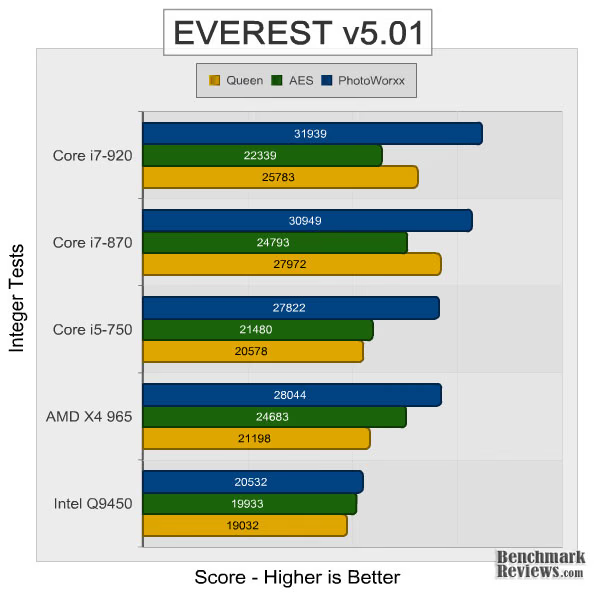
Moving on to integer tests, the rankings are much closer together, with the Core i5-750 coming in just behind the X4 965. The Core i7-870, on the other hand, actually manages to take the lead over the i7-920 in the Queen and AES benchmarks.

In the floating point benchmarks, the situation changes a bit. The Core i7-870 takes the lead, the i5-750 comes in second, and the AMD X4 965 and Intel Q9450 battle it out for last place.
Passmark PerformanceTest
PassMark PerformanceTest is a PC hardware benchmark utility that allows a user to quickly assess the performance of their computer and compare it to a number of standard 'baseline' computer systems. The Passmark PerformanceTest CPU tests all benchmark the mathematical operations, compression, encryption, SSE, and 3DNow! instructions of modern processors.
In our tests there were several areas of concentration for each benchmark, which are combined into one compound score. This score is referred to as the CPU Mark, and is a composite of the following tests: Integer Math, Floating Point Math, Find Prime Numbers, SSE/3DNow!, Compression, Encryption, Image Rotation, and String Sorting. For this review, we've also decided to run the memory benchmark, which results in a composite score based on the following tests: small block allocation, cached read, uncached read, write performance, and large block allocation.

Passmark's composite scores confirm what we saw in the raw EVEREST benchmarks. The Core i7-870 actually outpaces the i7-920 in both memory and CPU scores. Without hyper-threading, though, the Core i5-750 can't quite keep up in the CPU tests. It does, however, post a decent memory score.
PCMark05 Benchmark Suite
Using synthetic benchmarks to compare one product to another has some distinct advantages when testing similar hardware, yet I have never found myself completely satisfied by the process. I have come to understand that they're important for comparing "apples to apples", and that the results are usually very consistent. But as with any synthetic benchmark, the numbers can often mean very little more than just numbers. We don't take a high score on a synthetic benchmark to mean that a product will/should perform well, and neither should you. The difference between projected performance and actual performance is the difference between fire and the fire-fly.
PCMark is a series of computer benchmark tools developed by Futuremark. The tools are designed to test the performance of the user's CPU, read/write speeds of RAM and hard drives. We have used these tests to simulate a battery of applications and tasks, which will produce results we can compare to other systems using similar hardware.

In PCMark05, the Core i5-750 comes in a close second to the Core i7-870 in the CPU and memory composite scores, as well as the single-threaded audio compression test. However, this performance difference is likely due to the difference in clock speed, as the majority of PCMark05's benchmarks do not take advantage of the i7-870's 8 processing threads.
Crysis Gaming Tests
Crysis uses a new graphics engine: the CryENGINE2, which is the successor to Far Cry's CryENGINE. CryENGINE2 is among the first engines to use the Direct3D 10 (DirectX10) framework of Windows Vista, but can also run using DirectX9, both on Vista and Windows XP.
Roy Taylor, Vice President of Content Relations at NVIDIA, has spoken on the subject of the engine's complexity, stating that Crysis has over a million lines of code, 1GB of texture data, and 85,000 shaders. To get the most out of modern multicore processor architectures, CPU intensive subsystems of CryENGINE 2 such as physics, networking and sound, have been re-written to support multi-threading.
Crysis offers an in-game benchmark tool, which is similar to World in Conflict. This short test does place some high amounts of stress on a graphics card, since there are so many landscape features rendered. For benchmarking purposes, Crysis can mean trouble as it places a high demand on both GPU and CPU resources. Benchmark Reviews uses the Crysis Benchmark Tool by Mad Boris to test frame rates in batches, which allows the results of many tests to be averaged.
When testing a CPU, the settings we choose are a bit different than a typical video card review. As you'll see in the charts below, modern games can easily max out the processing abilities of the video card and mask any differences between the CPUs. For this reason, we generally start at low resolutions and quality settings and slowly ramp them up until we hit the limit of the video card. This allows us to quickly distinguish differences between CPUs and identify any other limiting hardware.

Crysis is a heavily CPU-bound game, but only if the video card can keep up. The benchmark settings were specifically chosen to illustrate this. At 1024x768, we see a clear difference in framerates, with the Core i5-750 and Core i7-870 coming out on top. However, as we tax the video card more with increased resolutions and settings, our HD 4850 becomes the limiting factor. That said, you'll want to pair these processors with a high end video card to get the most out of them in gaming.
Devil May Cry 4 Gaming Tests
Devil May Cry 4 is one of the newest additions to Benchmark Reviews' testing suite. Fortunately for us, Capcom recognized the community's interest in hardware testing and included a built in benchmarking tool with this game. In fact, it is even included it in the demo. The benchmarking tool runs through four different scene, all of which I highly recommend watching. However, for the purposes of our review, we only report the scores of the most challenging tests: scenes 2 and 4.
Similar to the Crysis gaming benchmarks, we will start testing DMC 4 at lower settings to reduce the impact of GPU limitations. From there, we'll slowly increase resolution and quality settings until we reach the limit of our HD 4850.

In contrast to Crysis, scene two of Devil May Cry 4 actually places Core i5-750 behind the Phenom II X4 965 and the Intel Q9450. It's worth noting, however, that we did run into a few software issues during benchmarking. At times, our Radeon HD 4850 would revert to PCIe 1.0 speeds when used with the Intel DP55KG motherboard. We're working with ATI and Intel to find the source of problem.

In scene 4 of Devil May Cry 4, the Core i5-750 finds itself back in the number two spot in the 1024x768 test. Once again, though, it falls behind in more demanding tests. As I mentioned above, though, this may be a side-effect of working with pre-release hardware and driver.
SPECperfview 10
SPECviewperf is a portable OpenGL performance benchmark program written in C. It was developed by IBM. Later updates and significant contributions were made by SGI, Digital (Compaq, HP), 3Dlabs (Creative Labs) and other SPECopc project group members. SPECviewperf provides a vast amount of flexibility in benchmarking OpenGL performance. Currently, the program runs on most implementations of UNIX, Windows XP, Windows 2000, and Linux.
SPECviewperf parses command lines and data files, sets the rendering state, and converts data sets to a format that can be traversed using OpenGL rendering calls. It renders the data set for a pre-specified amount of time or number of frames with animation between frames. Finally, it outputs the results. SPECviewperf reports performance in frames per second. Other information about the system under test - all the rendering states, the time to build display lists (if applicable), and the data set used - are also output in a standardized report.
A "benchmark" using SPECviewperf is really a single invocation of SPECviewperf with command-line options telling the SPECviewperf program which data set to read in, which texture file to use, what OpenGL primitive to use to render the data set, which attributes to apply and how frequently, whether or not to use display lists, and so on. One quickly realizes that there are an infinite number of SPECviewperf "benchmarks" (an infinite number of data sets multiplied by an almost infinite number of command-line states).

The SPECviewperf CATIA results are somewhat perplexing. As a single-threaded benchmark, the only notable difference between the i5-750 and the i7-870 is clock speed. Even factoring in Turbo, that's only an 11% difference, while the results here suggest a 25% difference in performance. In all likelihood, it's the same software issue we discovered in Devil May Cry 4.
MAXON CINEBENCH R10
CINEBENCH comes to us from MAXON, the developers of CINEMA 4D animation software. This benchmark runs several tests to measure performance of the processor and the graphics card under real-world circumstances. It can make use of up to 16 CPUs or CPU cores, but also includes a single-threaded test to provide an accurate comparison of efficiency and performance across a wide range of CPU types.
The resulting values among different operating systems are 100% comparable and therefore very useful with regard to purchasing decision making. It can also be used as a marketing tool for hardware vendors or simply to compare hardware among colleagues or friends.

One of the reasons we include CINEBENCH is to analyze the effects of multiple threads. The Core i7-870 and i7-920 easily top the charts thanks to Intel's hyper-threading. What's interesting is that the i7-870 actually takes the lead. Further, in the single-threaded benchmark, the Core i5-750 also tops the i7-920.
Performance Features and Overclocking
In this section, we examine the performance features and overclocking potential of the Core i5-750. As i mentioned earlier, none of the Core i5-700 seres parts will support hyper-threading. However, they do have the advantage of Intel's revised Turbo Boost Technology. Turbo Boost is enabled by default and was used in all of our benchmarking so far. However, I ran a few of benchmarks without it to illustrate the its effect on performance. You'll find those results below.

I also decided to test how for I could push the Core i5-750 manually. If you go this route, one of the first decisions you'll have to make is whether to enable or disabled Turbo Boost. With it enabled, every change to the base clock will increase the turbo frequency. As you can see above, I was able to increase the bus speed to 180 MHz for a base clock speed of 3.6 GHz and a maximum turbo clock speed of 4.32 GHz. Needless to say, that's a great result. However, turbo boost actually limited the overclock of the base clock speed. If you disable it, you lose the higher turbo clock speed, but should be able to increase the base clock speed of all four cores a bit more. For the purposes of this review, though, I kept Turbo Boost enabled.
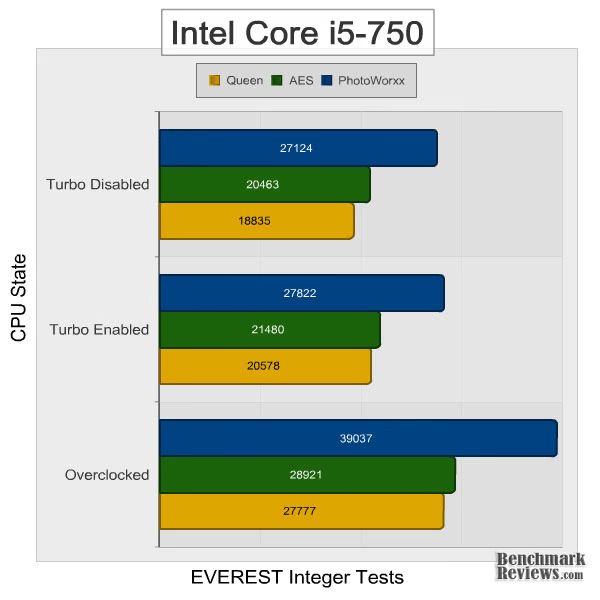
In the EVEREST integer benchmarks, turbo boost has a slight, but significant impact, particularly in the Queen test. Of course, the overclocked Core i5-750 has a massive lead over both.

Moving on to Crysis, we find that turbo boost again has a significant effect, at least at the lower resolution and settings. And once again, the overclocked result is simply phenomenal. However, no increase to clock speed can remove the limitation of our Radeon HD 4850, as demonstrated in the last two tests.

Finally, in CINEBENCH we see how turbo boost varies with threading. In the single threaded benchmark, enabling turbo boost amounts to a 14.8% increase in performance. However, in the multi-threaded benchmark the maximum turbo boost multiplier is decreased and turbo boost results in only a 5.7% increase. The only thing left to do is overclock the i5-750 manually by increasing the bus speed, which clearly results in the highest scores--but at the expensive of power, heat, and hardware longevity.
Power Consumption
Life is not as affordable as it used to be, and items such as fuel and electrical energy top the list of resources that have exploded in price over the past few years. Add to this the limit of non-renewable resources compared to demand and you can see that the prices are only going to get worse. Planet Earth is needs our help, and needs it badly. With forests becoming barren of vegetation and snow capped poles quickly turning brown, the technology industry has a new attitude towards suddenly becoming "green". Motherboard manufacturers, in particular, have been touting their new energy saving features. How effective these power management system are, is exactly what we intend to measure in our power consumption tests.
Before we get to the results, let me quickly explain the procedures. We begin with a completely idle system (Windows XP desktop with 0-2% processor utilization), and measure the power draw from the wall with a Kill-a-Watt power meter. Then we restart and disable CnQ, Speed Step, C1E, C-States, and Turbo Boost in the BIOS. This allows us to analyze efficiency of the different power saving technologies. We then max out the available CPU cores/threads using Prime95 to establish a maximum 2D power draw. Finally, as an additional test for the Core i5 and Core i7 processors, we run the 2D load test once again, but with Turbo Boost enabled to determine the impact it has on power consumption.

With a TDP of 140W, it comes as no surprise that the Phenom II X4 965 tops the charts. What is surprising, however, is the idle power consumption of the Core i5-750 and Core i7-870. Intel has clearly improved their power saving technology compared to the Core 2 Quad generation. With turbo boost disabled, the Core i5-750 even takes first in the load test. Even with it enabled, power consumption only increased by 8 watts.
Intel Lynnfield Final Thoughts
Lynnfield has been rumored and speculated over for months. Now that it's finally here, I have to say I'm extremely impressed with the performance I've seen today. Not only does it surpass the previous Core 2 Quad generation, but it also challenges the Core i7-900 series. Thanks to Intel's Turbo Boost technology, the Lynnfield processors should also compare well to higher-clocked dual core processors in single-threaded applications, and in multi-threaded applications the hyper-threading of the i7-800 series should help out significantly.
That said, the platform does have a few drawbacks. First, and most obvious, is the new socket. This will require purchasing a new motherboard, and in most cases, a new heatsink and fan. If your still running DDR2, you'll also need to purchase DDR3 modules as DDR2 is not supported. The other issue at hand is the platform upgrade path. Intel's LGA1366 socket isn't simply disappearing. In fact, they intend to use both sockets for quite some time. In all likelihood, Intel's high-end processors will be released under LGA1366, while LGA 1156 will be platform of choice for Intel's mainstream and performance segment. That said, it's definitely worth considering your future needs before investing in either platform.

One other item worthy of note is the compatibility issue we had with our reference Radeon HD 4850. While we're still working with Intel and AMD to isolate the problem, we have determined that it only occurs when the HD 4850 is paired with a P55 motherboard under Windows XP. Shortly after completing the benchmarking for this article, I installed Vista SP2 and the issues were eliminated. At this point, though, it still isn't clear whether this is an isolated incident or a more widespread problem. If it does turn out to be a widespread problem, a software or driver update will likely be issued to address it.
Core i5-750 Conclusion
Intel promised Nehalem-level performance with their new Lynnfield platform and they definitely delivered. In nearly all of our benchmarks today, the Core i5-750 had a clear lead over the AMD Phenom II X4 965 and the Intel Core 2 Quad Q9450. In fact, in many tests, it even matched the Core i7-920. Needless to say, the BX80605I5750 kit earns top marks in performance.
The Core i5-750 also scores well in construction quality. It ran through our torture tests without a hint of instability and was for the most part error-free. However, as I noted previously, there were a few compatibility issues with our HD 4850. Until we can determine the source of the problem, though, I'll reserve my judgment.
Moving on to features, the Intel Core i5-750 has them in abundance. It seems its true strength lies in the Turbo Boost Technology. With it, the processor can automatically overclock all four of its cores independently to match the workload at hand. Down-clocking worked equally as well. Thanks to new power saving features, the Core i5-750 actually consumed the least amount of power out of all of the processors tested. The only thing it is lacking compared to the other Lynnfield processors is hyper-threading.

Of course, with a little extra voltage and an increase to the bus speed, that deficit can be somewhat minimized by overclocking. We were able to push our Core i5-750 sample to an impressive bus speed of 180 MHz. That translates to a base clock speed of 3.6 GHz and a maxiumum turbo clock speed of 4.32 GHz. Disabling Turbo Boost allowed us to push all four cores further, but not quite high as the single core was able to reach with it enabled. Whichever method you chose, rest assured that this chip has plenty of headroom.
As of launch, NewEgg offers the Core i5-750 BX80605I5750 retail kit for $209.99. At that price, Core i5-750 outperforms every direct competitor is has, and even the higher-priced Phenom II X4 965. For that, it's simply a great value. Of course, you'll need a new LGA1156 motherboard to go with it, but thanks to the single chip Ibex Peak P55 chipset, motherboard pricing should be significantly lower than we saw with the X58 launch. The bottom line: if you're looking to upgrade your current system, or build a new one, the Core i5-750 is a great place to start.
Pros:
+ Excellent Performance
+ Turbo Boost Technology
+ Low Power Consumption
+ DDR3-1333 Support
+ 8 MB Shared Cache
Cons:
- No Hyper-Threading
- Requires New LGA 1156 Motherboard
Ratings:
-
Performance: 9.5
-
Construction: 9.0
-
Functionality: 9.5
-
Overclock: 9.75
-
Value: 9.5
Final Score: 9.45 out of 10.
Excellence Achievement: Benchmark Reviews Golden Tachometer Award.
Questions? Comments? Benchmark Reviews really wants your feedback. We invite you to leave your remarks in our Discussion Forum.
Reader comments from the original article
4 comments were posted before commenting closed. They are preserved as written. Original avatars no longer resolve and are shown as a placeholder.
Why is the i7-920 suddenly out of the mix on page? Fred Ubercake Permalink:
Why not continue to include the i7-920 in the benchmark graphs? I don't get it.
How can you say... Fred Ubercake Permalink:
..."in many tests, it even matched the Core i7-920" when the charts suddenly don't include it from the PCMark page on???
Why Windows XP and not Win 7 Julian Permalink:
Why are you using Windows XP and not the Win 7 64. I believe Windows 7 can achieve better results aspecialy 64 bit
Windows 7 hadn't been released yet Olin Coles Permalink:
If I had to guess, it's because Microsoft Windows 7 didn't arrive until about two months after this article was published.