
Gigabyte GA-EX58-UD4P X58 Motherboard
Gigabyte GA-EX58-UD4P
Innovations in the computer hardware industry don't have the same effect on me that they have on most consumers. As a reviewer, I've accepted that there will be a new product line almost every month. It doesn't phase me that Intel launches chipsets almost as fast as the weather changes; but it does annoy me. In fact, despite my direct connection into the industry, there are many times that I become frustrated with the manufacturers. On November 2nd, Gigabyte launched the GA-EX58-UD5 motherboard for the freshly-announced Intel Core i7 and X58-Express platform. Two months later, that same EX58-UD5 motherboard is now end of life and replaced by the EX58-UD4P.
The GA-EX58-UD4P is the latest high performance X58-Express Series motherboard from GIGABYTE, designed to unleash the awesome power of Intel's new Core i7 processors and replaces the GA-EX58-UD5. Equipped with a host of new features including the new QPI interface, 3-channel DDR3 support, 3-Way SLI and CrossFireX support, Ultra Durable 3 technology and the industry's most extensive range of overclocking features, the EX58-UD4P is bringing excitement back into the high performance motherboard industry. In this article, Benchmark Reviews compares the Gigabyte GA-EX58-UD4P motherboard to their EX58-EXTREME, Intel's DX58SO Smackover, and last-generations GA-X48T-DQ6.
The GA-EX58-UD4P was designed specifically to take advantage of the raw power of the next generation Intel Core i7 processors and the Intel X58 Express chipset, whose new evolution in computing architecture is able to deliver an amazing performance break through from past processor generations. Replacing the Front Side Bus is the new Quick Path Interconnect, or QPI, whose 25.6 GB/sec transfer rate (double the bandwidth of the 1600MHz FSB) eliminates the communication bottleneck between the processor and chipset.

Intel's Core i7 processors also feature an integrated memory controller inside the processor die and support 192-bit 3-channel DDR3 memory that delivers a 50% memory bandwidth enhancement and lower memory latency for incredibly fast memory access. Additionally, The EX58-UD4P X58 motherboard features Intel Turbo Boost Technology, which is able to power down idle processor cores and dynamically reroute the power to the active cores for significant performance boosts, and at the same time, maintain greater energy efficiency.
The Intel X58 Express Chipset continues to push innovation with capabilities designed to deliver quality, performance and headroom The Intel X58 Express Chipset achieves this performance by supporting the latest Intel Core i7 family of processors at 6.4 GT/s and 4.8 GT/s speeds via the Quick Path Interconnect (QPI), and enabling increased system bandwidth by supporting industry leading technologies, such as PCI Express 2.0 graphics, Intel Turbo Memory and support for Intel High-Performance Solid State drives.
About the company: Gigabyte United Inc. (G.B.T. Inc. USA)
Gigabyte United Inc., established in December 2006, is assuming the GIGABYTE TECHNOLOGY Co., Ltd. Brand, which for the past 20 years has been a world-renowned leader in the motherboard industry. Continuing to focus on its core businesses of GIGABYTE branded motherboards and graphics cards, Gigabyte United Inc. is committed to providing our valued customers with the highest quality products and services featuring the industry's most innovative design.
In order to meet the challenges of today's intensely competitive channel market, Gigabyte United Inc. fully utilizes its key assets including its cutting-edge research and development team as well as its professional sales and marketing resources to continue to develop technologies to fit a complete range of digital life solutions. Now and for the future, Gigabyte United Inc. will continue to embody the unique spirit and culture, which has made Gigabyte one of the foremost brands in the industry.
More information about Gigabyte is available by visiting their website.
Intel Core i7: Platform
What is Nehalem Technology?
The Intel Core i7 microprocessor is built using a new micro architecture, codenamed "Nehalem," that allows chips to handle more data, quicker and more energy efficiently. Go inside Intel's labs and meet some of the thousands of Intel engineers who helped design and test the new processor. "Building this microprocessor brings a lot of people together, like architects, micro architects and the design teams," says Rani Borkar, vice president of Intel's Digital Enterprise Group. "As you get into the development phases, working with the process technology, it's a mind-boggling effort that requires a lot of teamwork across the board."
Before going into the specifications and features of the entire Intel Core i7 processor series we thought some background information about the new Nehalem technology might be in order. While doing research for this review I came a cross a very useful document on Intel's website entitled: "First the Tick, Now the Tock: Next Generation Intel Micro-architecture (Nehalem)". This white paper article helped me to gain a much better understanding of not only the features we'll see today in the Core i7 series of processors, but in future product releases we're likely to see that will implement other aspects of the Nehalem architecture. The article itself is 8 pages long so I'll leave it to you to read it in its entirety, but I will share a few excerpts that may help you to gain a better understanding of the products we'll visit today.

The first chapter is all about scalability. Next generation Intel micro architecture (Nehalem) is a dynamically scalable and design-scalable micro architecture. At runtime, it dynamically manages cores, threads, cache, interfaces, and power to deliver outstanding energy efficiency and performance on demand. At design time, it scales, enabling Intel to easily provide versions that are optimized for each server, desktop, and notebook market. Intel will deliver versions differing in the number of cores, caches, interconnect capability, and memory controller capability, as well as in the segmented use of an integrated graphics controller. This allows Intel to deliver a wide range of price, performance, and energy efficiency targets for servers, workstations, desktops, and laptops.
To extract greater performance from this new micro architecture, in targeted market segments, Intel is also introducing a new platform architecture: Intel QuickPath Architecture. Through integrated memory controllers and a high-speed interconnect for connecting processors and other components, Intel QuickPath Architecture delivers best-in-class performance, bandwidth, and reliability. In turn, it truly enables systems to fully unleash the new levels of performance that new and more powerful next generation micro architecture-based processor cores will deliver.
Next generation Intel micro architecture (Nehalem) marks the next step (a "tock") in Intel's rapid "tick-tock" cadence for delivering a new process technology (tick) or an entirely new micro architecture (tock) every year. The first Nehalem-based processors are expected to release in the latter part of 2008. The family will grow to include server, workstation, desktop, and mobile processors.
The next generation micro architecture's performance and power management innovations include:
-
Dynamically managed cores, threads, cache, interfaces, and power.
-
Simultaneous multi-threading (SMT) for enabling a more energy efficient means of increasing performance for multi-threaded workloads. The next generation micro architecture's SMT capability enables running two simultaneous threads per core-an amazing eight simultaneous threads per quad-core processor and 16 simultaneous threads for dual-processor quad-core designs.
-
Innovative extensions to the Intel Streaming SIMD Extensions 4 (SSE4) that center on enhancing XML, string, and text processing performance.
-
Superior multi-level cache, including an inclusive shared L3 cache.
-
New high-end system architecture that delivers from two to three times more peak bandwidth and up to four times more realized bandwidth (depending on configuration) as compared to today's Intel Xeon processors.
-
Performance-enhanced dynamic power management.
For more information on Intel's Core i7 series, please visit our Featured Reviews: Processors section which includes comprehensive articles on the Core i7-920 (BX80601920) and Core i7-965 Extreme Edition processors.
Intel X58-Express Platform
The Gigabyte GA-EX58-UD4P motherboard platform consists of the Intel Core i7 processor (CPU), Intel X58 Express Chipset (IOH) and the ICH. The CPU now incorporates the system memory controller and accesses DDR3 memory through three independent memory channels. The IOH provides support for the two PCIe graphics slots and connects to the CPU via the Quick Path Interconnect (QPI) bus. The ICH provides the support for the SATA, USB and other system interfaces and is connected to the IOH via the DMI bus.
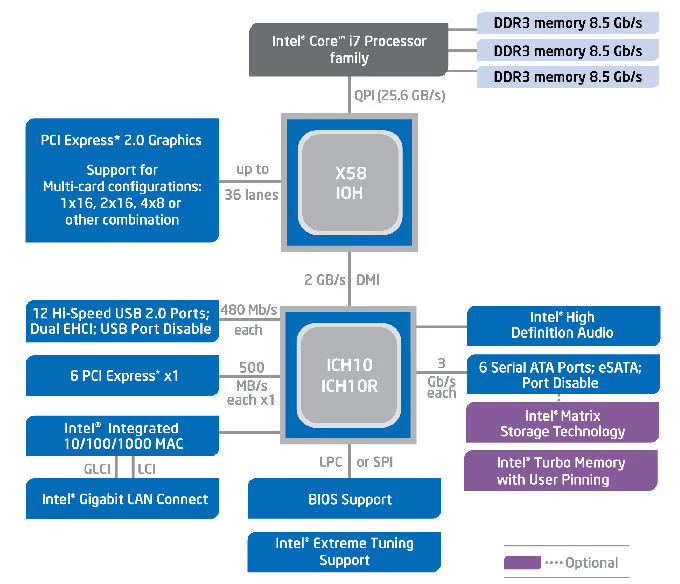
All motherboard busses and components are driven from a single 133.33 MHz base clock. The resulting component speed values are generated by applying a multiplier value to this base clock. There are four multipliers on the motherboard which are used to set the system speed:
-
CPU Speed: When multiplied by the system base clock speed (default 133.33 MHz) gives the CPU frequency. Four multipliers are used to define different speeds based on the number of active CPU cores.
-
Memory Speed: When multiplied by the system base clock speed gives the memory frequency. For example a memory multiplier of 10 times the base clock of 133.33 MHz results in a memory frequency of 1333 MHz.
-
Quick Path Interconnect (QPI) Speed: Selectable transfer rate of data transferred between the CPU and the IOH.
-
Uncore Speed: This multiplier applies to the non-CPU related items in the processor. The limit on this multiplier is set by the memory multiplier.
The Intel X58 Express Chipset
The Intel X58 Express Chipset continues to push innovation with capabilities designed to deliver quality, performance and headroom The Intel X58 Express Chipset achieves this performance by supporting the latest Intel Core i7 family of processors at 6.4 GT/s and 4.8 GT/s speeds via the Quick Path Interconnect (QPI), and enabling increased system bandwidth by supporting industry leading technologies, such as PCI Express 2.0 graphics, Intel Turbo Memory and support for Intel High-Performance Solid State drives.
PCI Express 2.0
Intel's high-end desktop chipset continues support for PCI Express 2.0 and adds flexibility with support of dual x16 and up to quad x8 graphics card configurations and combinations in between. The greatly improved 32GB/s of graphics bandwidth capability enables much higher levels of performance on graphics intensive applications such as high end gaming and video rendering for digital content creation.
Faster System Performance
With the growing imbalance between processor and memory performance, it is critical to optimize the memory controller design to obtain the maximum possible performance from the memory subsystem. The transition of the integrated memory controller (iMC) into the processor significantly increases overall system performance through the optimization of available bandwidth along with reduction of memory access latency. The Intel Core i7 family of processors brings triple channel DDR3 memory technology support. The DDR3 SDRAM devices operating at 1066 MHz, offer peak data transfer rates of up to 25.6 GB/s (when operated in triplel-channel interleaved mode), enabling the platform to take advantage of the higher bandwidth, faster system performance, and higher performance per watt at 1066MHz2.
Intel I/O Controller Hub 10 (Intel ICH10 and Intel ICH10R)
The Intel ICH10 I/O controller hub of the Intel X58 Express Chipset integrates several capabilities to provide flexibility for connecting I/O devices.
-
Intel Matrix Storage Technology1: Native support of external SATA ports (eSATA), combined with Intel Matrix Storage Technology (Intel MST), provides the flexibility to add an external drive for increased data storage with up to 6 times faster performance than USB* 2.0 or IEEE 1394 4002. Support for eSATA enables the full SATA interface speed of up to 3 Gb/s outside the chassis. The Advanced Host Controller Interface (AHCI) provides easier expandability with support for eSATA devices and native hot plug, while boosting boot and multi-tasking performance with Native Command Queuing (NCQ). In addition, support for Command Based Port Multipliers, and RAID levels 0, 1, 5 and 10 enable greater reliability for personal data, or maximum storage performance for intensive applications.
-
Intel Rapid Recover Technology (when configured with ICH10R I/O controller): With the ability to instantly boot off of a clone hard drive, Intel Rapid Recover Technology provides a fast, easy to use method for the end user to recover their data and return their system to an operational status.
-
Intel Turbo Memory: The Intel X58 Express Chipset with the Intel ICH10R also supports Intel Turbo Memory, an innovative flash memory-based overall system performance and boot time accelerator. This feature is easily implemented using a PCI
Express x1 module and can be used with any SATA Hard Drive to improve system responsiveness. Intel Turbo memory enables faster application loading and concurrent performance enhancements when used in conjunction with Intel Matrix Storage
Technology. Intel Turbo Memory, paired with the Intel X58 Express Chipset, also allows the user to easily control the applications or data in the cache using the new Intel Turbo Memory Dashboard interface, boosting performance further. -
Intel Solid State Drives support: The Intel X58 Express Chipset, when paired with Intel X25-E Extreme and X25-M Mainstream SATA Solid State Drives (SSDs), provides a high performance solution that can enable faster overall system response, boot and resume times. With no moving parts, SSDs run cooler and quieter and are a more reliable option than hard drives. In addition, SSDs remove input/output (I/O) performance bottlenecks associated with hard disk drives that help maximize the efficiency of Intel processors, such as the new Intel Core i7 processor family.
Gigabyte X58 Features
Delivering excellent overclock performance at a value-based price is what the Gigabyte GA-EX58-UD4P X58 motherboard is all about. With friendly overclocking features such as Precision OV (Hardware Overvoltage Control IC), Debug LED and onboard clear CMOS switches. Additionally, the EX58-UD4P motherboard features comprehensive BIOS options for reaching higher limits with more detailed settings, including CPU frequency stepping, Over Voltage increments, memory multipliers and advanced memory timing controls, making it easier than ever to tweak the highest levels of extreme overclocking performance from your system.
TPM Security
Built-in TPM security chip with 2048-bit encryption for the highest level digital data protection.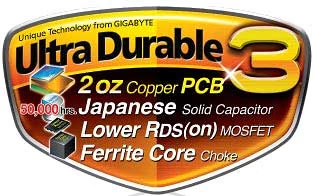
Ultra Durable 3
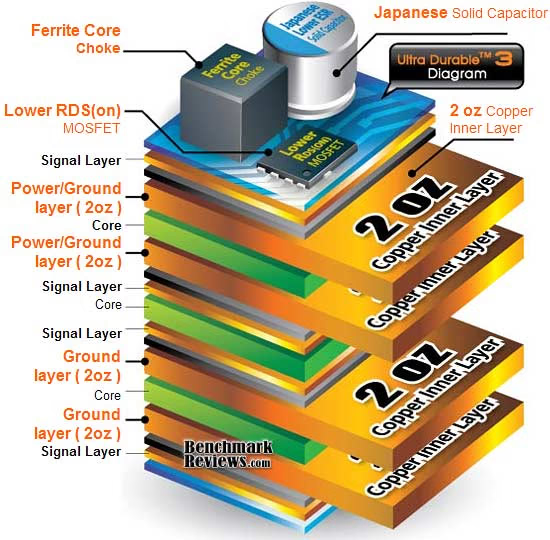
Revolutionary Ultra Durable 3 technology from GIGABYTE features the industry's first consumer desktop motherboard design with 2 oz copper Power and Ground layers for dramatically lower system temperature, improved energy efficiency and enhanced stability for overclocking.
DualBIOS - Patented Dual Hardware BIOS Protection
Automatically recovers Main BIOS data when Main BIOS has crashed or failed.
Integrated Memory Controller - Intel Core i7 Processors feature triple channel DDR3 support
Intel Core i7 processors feature the memory controller integrated directly into the processor die rather than as part of the Northbridge as in previous generations, allowing for faster memory performance. Core i7 processors also provide additional memory support including:
• 3 channels, 6 DIMMs
• Up to 2 DIMMs per channel
• Supports single, dual and quad-bank DIMMs
QPI (QuickPath Interconnect) - Replacing the role of FSB
Intel uses the QPI to connect internal components of Core i7 processors , and to connect the CPU itself to the Northbridge and banks of memory. QPI delivers up to 25.6GB/sec of bandwidth between Core i7 processors and the rest of the system, providing exactly double the bandwidth of 1600 MHz FSB.
Intel Turbo Boost Technology - Dynamically reroutes power to improve performance
For situations when all cores are not needed for a particular workload, Intel Turbo Boost Technology powers down the idle cores and dynamically reroutes the power to the active cores, boosting their performance without wasting power. This allows the active cores to achieve significant overclocks.
Precision OV - Hardware Over Voltage Control ICs
provide more voltage control options than before (CPU, NB & Memory). HW linear real time voltage control provides finer voltage control steppings as little as 20 mV min (.002 V) with no delay compared to previous GPIO.
Ultra TPM Security Encryption
Gigabyte's unique Ultra TPM (Trusted Platform Module) supports the industry's most advanced TPM hardware-based encryption. With the easy-to-use Ultra TPM user interface, users can store/back up their digital signature keys on a USB flash drive or in the system BIOS. The key(s) will be erased from the computer after being stored on a USB flash drive (or in the system BIOS), preventing unauthorized access to the computer. By simply plugging or unplugging the USB flash drive, users are able to access their PSD files without the hassles of complicated configurations. In addition, Ultra TPM's key backup function allows users to still have a way to access their data in case the keys are lost.
Secure e-mail
User-specific e-mail encryption and/or signing to prevent unauthorized persons from reading or changing your e-mails. Using this feature guarantees that only the e-mail creator and the specified recipients will be able to decrypt and read the message or validate the identity of the sender. If you chose to configure this feature, you can request a certificate for secure e-mail (if a certificate request web address is set in your policy settings). The wizard will provide information how to configure secure e-mail. The configuration of your mail client is not part of this wizard. Thus the status cannot be displayed here.
File and folder encryption with Encrypting File System (EFS)
The operating system incorporates the functionality to perform user-specific encryption of the content of folders and files on the local computer using the Microsoft Encrypting File System (EFS). Only the user who created a file in these folders can access the content of this file. Other users have to be granted access rights to an EFS folder in an explicit administrative operation to enable them to use files in it. If you chose to configure this feature, you can select a certificate for EFS. You can also request or create a new certificate.
File and folder encryption with Personal Secure Drive (PSD)
Personal Secure Drive features file and folder encryption similar to EFS. Unlike EFS, PSD is supported in Windows Vista Home Basic, Vista Home Premium and XP Home Editions. A logical drive is provided to permitted users. This drive offers access protection and encryption for all content in it. The encryption is performed automatically. A PSD cannot be accessed via its UNC identifier to get readable data and can be installed only on the local computer. Network access is not possible. If you chose to configure this feature, you can set up, modify or delete your PSD. Like EFS configuration, you can select a certificate for PSD. You can also request or create a new certificate.
Infineon Security Platform Settings Tool
With the Security Platform Settings Tool you can get various information about the Trusted Platform Module of your system. Also, you are able to carry out several administrative tasks, such as to change Basic User Password, perform backups, export/import Security Platform User keys and certificates, etc.
To enable the TPM, follow the steps below in sequence:
-
Configure the system BIOS to enable Security Chip
-
Install the Infineon TPM driver and the GIGABYTE Ultra TPM utility
-
Initialize the TPM chip
-
Configure the GIGABYTE Ultra TPM utility
Gigabyte offers a fully detailed guide for step-by-step installation and configuration on the product website, where a TPM Installation Manual can be downloaded.
Dynamic Energy Saver
Gigabyte first launched their full range of Dynamic Energy Saver motherboards beginning with the P35-based series, and later included the X38 and X48 motherboards. Dynamic Energy Saver, or DES, allows you to receive unparalleled power savings of up to 70% and up to 20% improved power efficiency with the simple click of a button. Back as a new "Advanced" edition, the GA-EP45T-EXTREME allows even greater control and power savings.
"With more than one year of intensive design and testing, Gigabyte's Dynamic Energy Saver represents a truly amazing revolution in motherboard development," said Johnson Lin, CEO of Gigabyte United. "With one little click, users are able to take advantage of up to 70% CPU power savings without sacrificing computing performance. Imagine the potential for power savings on a global scale if every motherboard in the world was able to provide similar power savings."
Featuring an advanced proprietary software and hardware design, including high quality components from Intersil, Gigabyte Dynamic Energy Saver is a unique technology that provides exceptional power savings and improved power efficiency. The unique multi-gear power phase design of Gigabyte's Dynamic Energy Saver allows for the most efficient switching of power phases depending on CPU workload. When the CPU workload is light or at idle, the Dynamic Energy Saver downshifts gears and only allows the minimum required power phases needed to accomplish the task to operate. By turning off the power phases that are not needed, Gigabyte's Dynamic Energy Saver is able to dramatically save power, up to 70% compared to traditional motherboards, that would normally have been wasted. As soon as the workload increases, Dynamic Energy Saver recognizes that more power is needed and is able to shift into higher gear, turning on power phases as they are needed.

Unlike traditional power designs that keep all power phases active at all times no matter what the loading, Gigabyte's Dynamic Energy Saver features multiple gears, allowing the CPU to maintain optimum power efficiency from light all the way to heavy loading. In a traditional power phase design, each gear needs to operate at less than optimum efficiency, causing gaps in power efficiency. With the ability to switch on and off gears before they start to loose efficiency, Gigabyte's Dynamic Energy Saver is able to provide up to 20% improved power efficiency.
Dynamic Energy Saver User Interface Gigabyte's user-friendly Dynamic Energy Saver interface allows users to turn on and off the power saving features with a simple click of the Dynamic Energy Saver button. Not only can users see real-time CPU power consumption in Watts, but once Dynamic Energy Saver is enabled, users can also see how much power they are actually saving. In Meter Mode, Gigabyte Dynamic Energy Saver shows how much power users have saved in a set period of time. Like a trip odometer in a car, users are able to reset the power savings meter to zero. In Total Mode, users are able to see how much total power savings they have accumulated since activating Dynamic Energy Saver for the first time. Even if the Dynamic Energy Saver functionality is turned off, the total amount of power saved will be recorded until re-activated, when total power savings will resume recording power savings.
Gigabyte's Dynamic Energy Saver technology also delivers additional power savings with its Dynamic CPU Voltage Control. Adjust the CPU voltage according to power saving needs; Level 1 for Normal Power Savings, Level 2 for Advanced Power Savings, and Level 3 for Extreme Power Savings. Gigabyte's Dynamic Frequency Control (CPU Throttling) allows for additional system power savings with a simple 1-click on/off button.
Unique Dynamic Energy Saver Hardware Design
Gigabyte Dynamic Energy Saver enabled motherboards feature an LED display located directly on the motherboard, allowing users to see the dynamic gear shifting in real-time. As each gear is activated, a color-coded LED representing the gear lights up.
Gigabyte Dynamic Energy Saver + Intel 45nm CPU = Unmatched Energy Efficiency
Gigabyte Dynamic Energy Saver motherboards paired with Intel 45nm CPUs deliver the very best platform for multitasking, multimedia and high performance gaming, all while consuming very little power. By combining the improved performance-per-watt and optimized power savings of the Intel 45nm CPUs with the Ultra Durable, Ultra Cool and Ultra Energy Efficient performance of Gigabyte's Dynamic Energy Saver motherboards, users will be able to experience a new world of energy efficient computing.
Benefits of Gigabyte Dynamic Energy Saver
Not only does Gigabyte Dynamic Energy Saver help users save money on electricity costs, but Dynamic Energy Saver enabled motherboards also help to reduce the impact everyday computing has on the environment. Less power consumption means less energy is needed to be produced from coal burning power plants. This cuts down on carbon dioxide output, a byproduct of burning fossil fuels for electricity and a known component of greenhouse gasses.
Today it is more important than ever to help conserve and protect our environment. That is why Gigabyte has taken the lead to develop responsible computing technologies that have as little impact on the environment as possible. In addition to Dynamic Energy Saver, Gigabyte has removed lead and other hazardous materials from their products, helping to create a greener computing future.
Gigabyte offers a video demonstration of their Dynamic Energy Saver feature in action. You can download or view the demonstration here.
GA-EX58-UD4P Specifications
Just when you thought 2 PCI-E x16 was good enough, GIGABTYE delivers 3. The GIGABYTE GA-EX58-EXTREME motherboard features 3 PCIe x16 Gen 2.0 slots with support for both 3 way ATI CrossFireX and 3 way NVIDIA SLI, enabling powerful graphics configurations for extreme multi-GPU gaming.
| CPU |
|
|---|---|
| QPI |
|
| Chipset |
|
| Memory |
|
| Audio |
|
| LAN |
|
| Expansion Slots |
|
| Storage Interface | South Bridge:
|
| IEEE 1394 |
|
| USB |
|
| Internal I/O Connectors |
|
| Back Panel Connectors |
|
| I/O Controller |
|
| H/W Monitoring |
|
| BIOS |
|
| Unique Features |
|
| Bundle Software |
|
| Operating System |
|
| Form Factor |
|
First Look: GA-EX58-UD4P
In this article, I am going to write for two different types of readers: those who don't have knowledge of the latest motherboards, and those who do. So beginning with the experts, I can reveal that the Gigabyte GA-EX58-UD4P motherboard is identical to the GA-EX58-EXTREME and GA-EX58-UD5 in PCB component layout and BIOS. All of these motherboards offer Gigabyte's Ultra-Durable 3 construction, which features two ounces of copper in the printed circuit board. All three use the same Realtek ALC889A high-definition audio, and offer the exact same PCI expansion slots. The only difference is in the chipset cooling, and the number of Realtek 8111D Gigabit Ethernet ports that are integrated.
Since the GA-EP45T-EXTREME and GA-EX58-UD5 are virtually identical twins already, it's easiest to consider the Gigabyte GA-EX58-UD4P the younger sibling. It doesn't have multi-rod copper heat-pipe channels spanning between the chips, instead it gets a lonely single aluminum heat-pipe rod. It also sheds the second NIC, and second JMicron SATA chip that the other two have. It does however pick-up a special TPM chip with 2048-bit encryption, which is unique to only this model. The exception, as I see it, is that the GA-EX58-UD4P is the most realistic version of Gigabyte's X58-Express LGA1366 line-up.
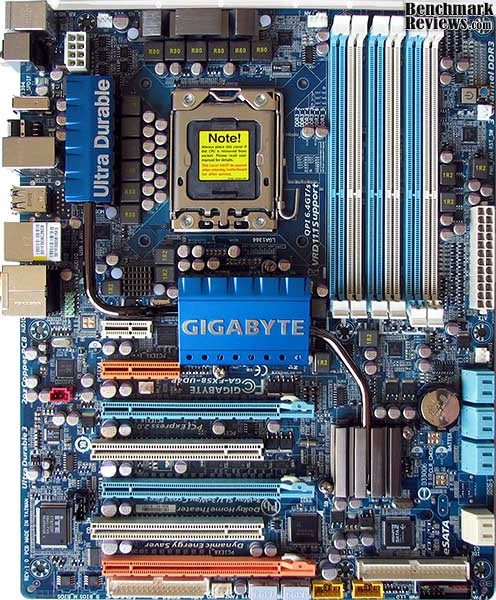
Design traditions not withstanding, the EX58-UD4P offers all of the features you would expect from an X58-Express enthusiast motherboard. Intel Core-i7 support and tri-channel DDR3 are both present, but also CrossFireX and SLI graphics-teaming support. From the top view, the Gigabyte EX58-UD4P reveals a blue-themed layout. Unlike past Gigabyte motherboards (such as the GA-X48T-DQ6), there are far less colors in this X58 iteration. The biggest difference is how the colors used on the X58-generation of motherboards actually represent something, instead of creating a loosely associated collage.

Gigabyte is working to promote their Ultra Durable 3 feature, which introduces the industry's first consumer desktop motherboard design with 2 ounces of copper used on the Power and Ground layers of the printed circuit board (PCB) which lowers the PCB impedance by 50% as a result. Impedance is a measure of how much the circuit impedes the flow of current. The less the flow of current is impeded, the less amount of energy is wasted. For Gigabyte Ultra Durable 3 enhanced motherboards, this means total PCB electrical waste is reduced by 50%, which also means less heat is generated. Two ounces of copper also provides improved signal quality, better system stability, and allows greater margins for overclocking. For those with older-generation motherboard, the Ultra Durable feature is designed to extend the overall product life, and help overclockers achieve more stable results.

Similar to when Intel moved from socket PGA478 to LGA775, the previous generation cooling products are not a suitable carry-over. The new LGA1366 socket increases the distance between CPU cooler mounting holes to 80mm, which is significantly more footprint area than the 72mm used by the LGA775 socket. Some CPU cooler manufacturers have designed adapters for their LGA775 coolers to fit on the new LGA1366 socket, which isn't a very safe practice. For systems not receiving an overclock, this may not be such a problem, but if you're going to re-use your Core 2 cooler on a Core i7 processor, it had better be listed near the top of our Best CPU Cooler Performance list. I'll explain why in my final thoughts section, which should be helpful information for enthusiasts.

The backside of the PCB lacks the "Crazy Cool" heatspreader cooling plates we've seen in past generations of Gigabyte motherboards, which some enthusiasts may not miss so much. The socket LGA1366 interface receives a backplate for reinforcing the structural rigidity of the GA-EX58-UD4P even further, and improves contact pressure for the CPU cooler. So far, every X58 motherboard I have seen has this backplate attached.

After a short 'first glance' at the basic layout for the GA-EX58-UD4P motherboard, it appears that Gigabyte has designed this to be a no-nonsense mainboard solution for mainstream overclockers and enthusiasts. We will dig deeper in the following sections to find out if this Core-i7 X58-Express DDR3 motherboard offers the features overclockers and hardware tweakers will want out of their top-shelf product.
Closer Look: Gigabyte X58
Motherboards haven't seen a lot of change in the past two years, and the GA-EX58-UD4P looks extremely similar to past Gigabyte products. The biggest difference with this X58-Express product is that it updates the socket from LGA775 to LGA1366 in order to support the Intel Core-i7 series of processors. Additionally, the Dual-Channel DDR support that reigned supreme since the Pentium 4 days has also been updated to include Triple-Channel DDR3.
Intel may have introduced DDR3 support on their mainboards almost two years ago, but high costs paired with low adoption by manufacturers led to a reprieve for DDR2. That all ends now, as X58 is built for DDR3 only and Intel has no plans to allow DDR2 back into the game. This might seem like a move which slams the door in the face of mainstream enthusiasts wanting more value from their hardware, but the truth is that P45 and X48 chipsets will continue in production for many more months to come.
Moving to triple-channel DDR3 also adds momentum for 64-bit computing, but also optimizes current 32-bit systems. Windows XP for example, offers a 4GB maximum memory mapping space on the 32-bit variety of the O/S. Since most all PCI-E video cards available today offer at least 512MB of GDDR, it's theoretically impossible for someone to completely realize 4GB of system memory. In fact, only 2GB was available from our 4GB memory kit when we recently tested the Palit Revolution 700 Radeon HD 4870 X2 video card which has 2GB of video frame buffer of its own.

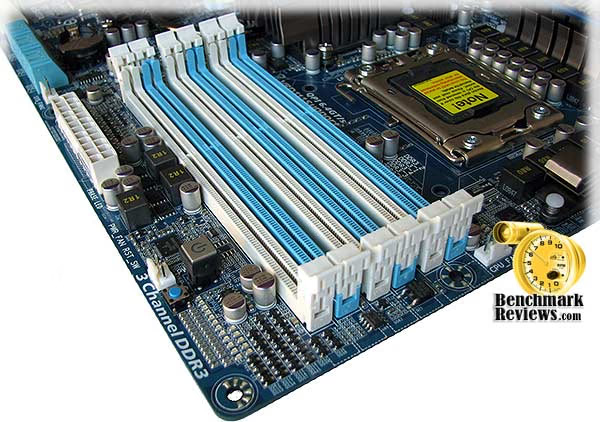
So when you start to replace 2GB (dual-channel) kits with 3GB (triple-channel) kits, there's more available memory and less waste than if the builder used a 4GB memory kit on their 32-bit O/S, and 3GB is going to be more affordable. Alternatively, the X58 chipset does not retire dual-channel memory mode, so enthusiasts who are already using their favorite DDR3 in one system can upgrade to the GA-EX58-UD4P without purchasing additional memory; the drawback is that dual-channel mode only doubles memory bandwidth while triple-channel mode will (you guessed it) triple the original bandwidth. With support for single, dual and quad-bank DIMMs the GA-EX58-UD4P can utilize up to 24GB of DDR3 and keep any 64-bit O/S moving along nicely.
Some of the other features don't appear as outwardly obvious on the GA-EX58-UD4P, such as Green LAN and Dynamic Energy Saver (DES) Advanced. I originally configured the BIOS to enable Gigabyte's Green LAN feature, which is disabled by default, but I came to learn the hard way that if nothing is plugged in (or turned on) to the RJ-45 port it will go into a deep sleep that cannot be recovered from without a reboot.
Gigabyte includes the high-definition Realtek ALC889A audio controller with DTS Connect capability on the EX58-UD4P. This audio chipset may be integrated, but with a featured 106 dB Signal to Noise ratio over eight channels it is anything but low-end. Digital audio outputs arrive in two varieties: optical and coaxial S/PDIF connectors. Realtek's ALC889A with DTS Connect is meant to enable high quality full-rate lossless audio, and offer support for both Blu-ray and HD DVD.
One feature that seems to have been borrowed from the ASUS Striker II NSE nForce 790i SLI Motherboard we reviewed not long ago is the "Clr CMOS" button, which allows the user to clear the custom settings of their BIOS and start over from scratch. I found this function to be very useful, but not at all in a convenient area. I recommend that Gigabyte move this button away from the USB ports which are directly beside it, so that when you're reaching around the backside of the computer case to plug in a cable you don't accidentally reset you hard-earned overclock.
A total of eight High-Speed USB 2.0 ports populate the rear I/O panel, with another four available at the mainboard header connection. One IEEE-1394a Firewire port is also available on the I/O panel, but the Texas Instruments TSB43AB23 processor allows up to two more to be added using brackets connected to the motherboards header panel. Gigabyte includes one dual-port Firewire bracket, which leaves one more port available to your computer case's I/O panel if supported. The remainder of the input/output panel is quite busy, with a wide assortment of ports and connections for everything that is connectable by today's standard. A single Realtek 8111D Gigabit Ethernet LAN port is supplied, with activity and link speed indicators at the corner of the RJ-45 port.

External SATA connectors are not part of the motherboards I/O panel, however Gigabyte has included one SATA expansion bracket with the GA-EX58-UD4P motherboard kit. There are two eSATA ports available with a 4-pin Molex power connector between them for a total of two eSATA ports. In regards to standard integrated SATA ports, the UD4P offers six Intel ICH10R (colored blue) Southbridge ports capable of RAID-0, 1, 5, and 10. Along side the ICH10R ports is another set of SATA-II connections from a JMicron JMB322 'Smart Backup' controller (colored white) which supports RAID-0, 1, and JBOD.
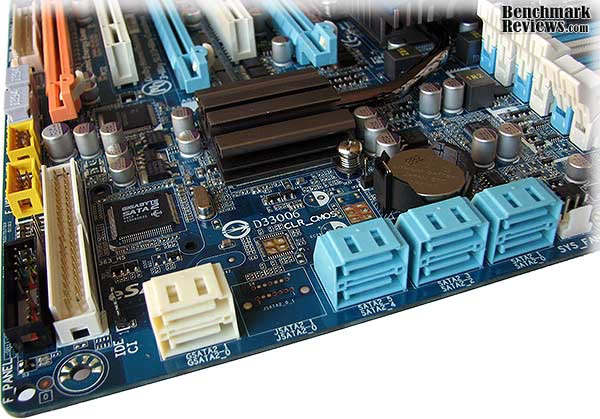
One particular note of interest is the orientation of all eight SATA ports, which utilize transverse-mount connections to stem cables off to the side of the motherboard. This layout works extremely well for all modern video cards, especially the larger GeForce GTX 285 and Radeon HD 4870 X2 video cards which occupy multiple expansion slots. This design has been corrected from a flaw we pointed out on the GA-EP45T-EXTREME, which rendered four of the six SATA ports unusable when a large graphics card was installed.
Gigabyte makes it convenient for hardware enthusiasts to tweak the motherboard without having to reach for a power button, or even have the unit installed inside a computer case. By adding a reset and power button switch directly on the motherboard, overclockers can make quick changes and simply press the closest button. Because of the trials and tribulations I had with finding a stable overclock, these two buttons (along with the Reset CMOS button) came in very handy.
One particular feature the X58 chipset introduces in the marriage of CrossFireX and SLI support on the same motherboard. Gigabyte builds three PCI-Express 2.0 ports into the GA-EX58-UD4P: two 16x expansion slots (colored blue) and one 8x slot (colored orange). While most gamers would stop at two-way SLI or CrossFire, the third 8x slot allows you to combine three video cards for unmatched graphics power. For the first time ever (in my experience) Gigabyte has also included the necessary 2-way and 3-way SLI bridge connectors, although the CrossFireX bridge connector remains absent from this kit.
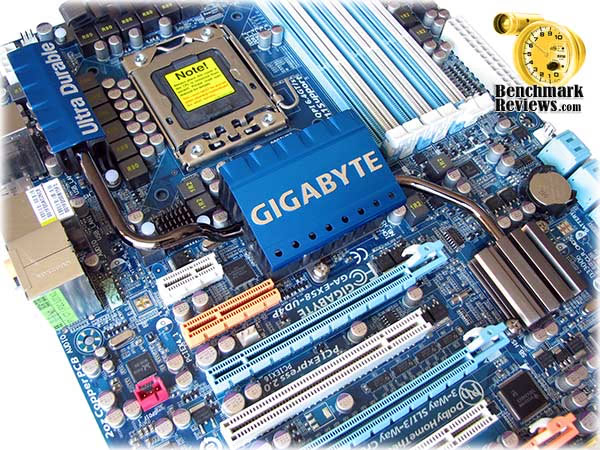
Surrounding the processor socket are several high-quality CPU power modules that utilize ferrite core chokes to minimize electromagnetic (and radio) interference signal noise and create a cleaner electrical circuit and comprise the finer points of Ultra Durable 3. A lower Resistance from Drain to Source rDS (ON) MOSFET array allows for transitional power steps, which is the heart of Gigabytes DES Advanced feature. Japanese manufactured SMD solid state capacitors, which contain a solid organic polymer and lower equivalent series resistance (ESR), are implemented throughout this board and will likely outlast the useful life of the Gigabyte GA-EX58-UD4P X58 motherboard.
Taken on its own merit, the heat-pipe cooling system does an excellent job for the GA-EX58-UD4P. Sure we've seen bigger an better, especially since this review follows the GA-EX58-EXTREME, but the UD4P sheds a lot of unnecessary weight to deliver mainstream performance without the extra bells and whistles. One other item that didn't make it to this mainstream motherboard is the embedded post code Debug LED, which displays the system status for users wanting to troubleshoot or diagnose their system. Gigabyte probably discovered how few users take advantage of this tool, and cut consumer costs where they could.
Please continue on towards the next section, which reveals a little about our motherboard testing methodology as it pertains to the Gigabyte GA-EX58-UD4P Intel Core-i7 X58-Express DDR3 motherboard.
Testing Methodology
Testing motherboards is one of the most difficult tasks I've had as a product analyst. There are several different methods to compare one product to another, but even when you try to measure one against another the features don't always stack up. Benchmark Reviews hasn't been around long enough to have a wide variety of same or past-generation chipset motherboards on hand to test against, which shifts the role of our testing away from who makes the best whatever-chipset motherboard to more of a comparison between this product and another previously-released chipset versions for the same processor and memory. But this is where our problems begin; the X58 chipset is brand new, and there aren't many products we can compare apples-to-apples against a fresh new platform.
The Gigabyte GA-EX58-UD4P motherboard features two of Intel's latest chipset technologies: the ICH10(R) Southbridge and X58 Express Northbridge. While testing could have easily be left to a simple "this vs. that" routine, we here at Benchmark Reviews think that this is less than educating. For our tests, each motherboard was overclocked as far as safe limits would allow utilizing the exact same supplemental components. Benchmarks are recorded after each test, and a system shut down and restart followed thereafter. Because the QPI opens PCI-Express 2.0 bandwidth to 32GBps, we also spent considerable time testing the "real-world" difference between the motherboards with the exact same video card and drivers.
At the start of all tests, the previous display adapter driver is uninstalled and trace components are removed using Driver Cleaner Pro. We then restart the computer system to establish our display settings and define the monitor. Once the hardware is prepared, we begin our testing. The synthetic benchmark tests in 3DMark06 will utilize shader models 2.0 and 3.0. In our higher-end VGA products we conduct tests at the following resolutions: 1280x1024 (19" Standard LCD), 1680x1050 (22-24" Widescreen LCD), and 1920x1200 (24-28" Widescreen LCD). In some tests we utilized widescreen monitor resolutions, since more users are beginning to feature these products for their own computing.
Each benchmark test program begins after a system restart, and the very first result for every test will be ignored since it often only caches the test. This process proved extremely important in the World in Conflict and Supreme Commander benchmarks, as the first run served to cache maps allowing subsequent tests to perform much better than the first. Each test is completed five times, with the average results displayed in our article.
Our site polls and statistics indicate that the over 90% of our visitors use their PC for playing video games, and practically every one of you are using a screen resolutions mentioned above. Since all of the benchmarks we use for testing represent different game engine technology and graphic rendering processes, I feel that this battery of tests will provide a diverse range of results for you to gauge performance on your own computer system. Since most gamers and enthusiasts are still using Windows XP, it was decided that DirectX 9 would be used for all tests.
Test System #1
-
Motherboard: Gigabyte GA-EX58-UD4P (Intel X58/ICH10R Chipset) with F6b BIOS
-
Processor: Intel Core i7-920 Nehalem 2.66 GHz (BX80601920)
-
System Memory: 6GB Corsair Dominator PC3-12800 Triple-Channel DDR3 (TR3X6G1600C8D)
-
Disk Drive: Patriot Warp v2 SATA 128GB SSD PE128GS25SSDR
-
Graphics: ASUS ENGTX285 TOP GeForce GTX 285 (Forceware v181.20)
-
Monitor: SOYO 26-Inch Widescreen LCD Monitor DYLM26E6 (1920x1200)
Test System #2
-
Motherboard: Gigabyte GA-EX58-EXTREME (Intel X58/ICH10R Chipset) with F5d BIOS
-
Processor: Intel Core i7-920 Nehalem 2.66 GHz (BX80601920)
-
System Memory: 6GB Corsair Dominator PC3-12800 Triple-Channel DDR3 (TR3X6G1600C8D)
-
Disk Drive: Patriot Warp v2 SATA 128GB SSD PE128GS25SSDR
-
Graphics: ASUS ENGTX285 TOP GeForce GTX 285 (Forceware v181.20)
-
Monitor: SOYO 26-Inch Widescreen LCD Monitor DYLM26E6 (1920x1200)
Test System #3
-
Motherboard: Intel DX58SO 'Smackover' Motherboard (Intel X58/ICH10R Chipset)
-
Processor: Intel Core i7-920 Nehalem 2.66 GHz (BX80601920)
-
System Memory: 6GB Corsair Dominator PC3-12800 Triple-Channel DDR3 (TR3X6G1600C8D)
-
Disk Drive: Patriot Warp v2 SATA 128GB SSD PE128GS25SSDR
-
Graphics: ASUS ENGTX285 TOP GeForce GTX 285 (Forceware v181.20)
-
Monitor: SOYO 26-Inch Widescreen LCD Monitor DYLM26E6 (1920x1200)
Test System #4
-
Motherboard #1: Gigabyte GA-X48T-DQ6 (Intel X48/ICH9R Chipset) with F6a BIOS
-
Processor: Intel Q9400 Core 2 Quad 2.66 GHz (BX80580Q9400)
-
System Memory: 4GB Corsair PC3-12800 Dual-Channel DDR3 (TWIN3X40961600C7DHXIN)
-
Disk Drive: Patriot Warp v2 SATA 128GB SSD PE128GS25SSDR
-
Graphics: ASUS ENGTX285 TOP GeForce GTX 285 (Forceware v181.20)
-
Monitor: SOYO 26-Inch Widescreen LCD Monitor DYLM26E6 (1920x1200)
Test System #5
-
Motherboard #1: Gigabyte GA-EP45T-EXTREME (Intel P45/ICH10R Chipset) with F5d BIOS
-
Processor: Intel Q9400 Core 2 Quad 2.66 GHz (BX80580Q9400)
-
System Memory: 4GB Corsair PC3-12800 Dual-Channel DDR3 (TWIN3X40961600C7DHXIN)
-
Disk Drive: Patriot Warp v2 SATA 128GB SSD PE128GS25SSDR
-
Graphics: ASUS ENGTX285 TOP GeForce GTX 285 (Forceware v181.20)
-
Monitor: SOYO 26-Inch Widescreen LCD Monitor DYLM26E6 (1920x1200)
Benchmark Applications
- Futuremark PCMark05 v1.2.0 System Test Suite for Windows XP
-
Futuremark PCMark Vantage v1.01 System Test Suite for Windows Vista
-
Futuremark 3DMark06 v1.1.0 (8x Anti Aliasing & 16x Anisotropic Filtering)
-
Call of Duty 4: Modern Warfare v1.7.568 (4x AA/16x Trilinear AF)
-
Crysis v1.21 Benchmark (High Settings, 0x and 4x Anti-Aliasing)
-
Far Cry 2 v1.02 (Very High Performance, Ultra-High Quality, 8x AA)
-
Operating System: Windows XP Professional SP-3 (optimized to 16 processes at idle)
GA-EX58-UD4P X58 F6b BIOS
If you're a true hardcore overclocking enthusiast, chances are good that you'll be mighty concerned about the motherboards BIOS. For years now, I have found the BIOS to be the one factor that manufacturers overlook on their products. All of the heatsinks, heat-pipes, and fans will not offer nearly the control over any decent overclock to the same degree as a well designed BIOS. For just as many years, I have also been keeping track of who incorporates the good designs, and who doesn't. This experience has made me become very picky about how I like to have the BIOS presented. I recall a previous review where another now-defunct manufacturer (abit) colored the entire BIOS background pink, and then another manufacturer made theirs completely yellow. Blue works for me, despite its closeness to the BSOD.
Like any good system builder, the first thing I do is set the date and time. After that, it's straight into the Motherboard Intelligent Tweaker (MIT) section of this Award BIOS. In the image below, which was created with composite sections of the entire MIT page, you can see how far Gigabyte has come with their BIOS programming... and this is just the main MIT page.

Most of the familiar variables are present and accounted for. The CPU Clock Ratio feature allows you to alter the clock ratio for the installed CPU. This item is present only if a CPU with unlocked clock ratio is installed. Intel Turbo Boost Technology can be enable or disabled, to avoid cores from switching 'off' to optimize the cores in use. QPI Link Speed allows you to set the options to: Auto (default), x36, x44, x48, Slow Mode. Even Load-Line Calibration is present, which enables or disables this feature to adjust Vdroop, keeping the CPU voltage more constant under light and heavy CPU load while the Disabled setting keeps CPU voltage at the Intel specifications.
In past motherboard reviews, I've taken pages to document and explain a myriad of BIOS features and functionality. Most people feel that this is an information overload, so for this review I've decided to offer a comprehensive X58 BIOS overclocking guide on PDF. Gigabyte offers this eleven-page guide as a reference for tweaking the Core i7 processor with their X58 motherboards.
3DMark06 Benchmarks
3DMark is a computer benchmark by Futuremark (formerly named Mad Onion) to determine the DirectX 9 performance of 3D game performance with graphics cards. 3DMark06 uses advanced real-time 3D game workloads to measure PC performance using a suite of DirectX 9 3D graphics tests, CPU tests, and 3D feature tests.
3DMark06 tests include all new HDR/SM3.0 graphics tests, SM2.0 graphics tests, AI and physics driven single and multiple cores or processor CPU tests and a collection of comprehensive feature tests to reliably measure next generation gaming performance today. Some enthusiasts may note that Benchmark Reviews does not include CPU-bound tests in our benchmark battery, and that only graphic-bound tests are included.
Here at Benchmark Reviews, we believe that synthetic benchmark tools are just as valuable as video games, but only so long as you're comparing apples to apples. Since the same test is applied in the same controlled method with each test run, I believe 3DMark is a very reliable tool for comparing graphic cards against one-another.
Using the 1920x1200 resolution as a baseline, the maximum settings were applied to 3dMark06 which for these tests include 8x Anti-Aliasing and 16x Anisotropic Filtering. For years now people have revolved around the 3dMark score, which is a composite number that includes CPU and other factors. For this test series, I decided to instead display each test individually, showing the frame rate for each benchmark.
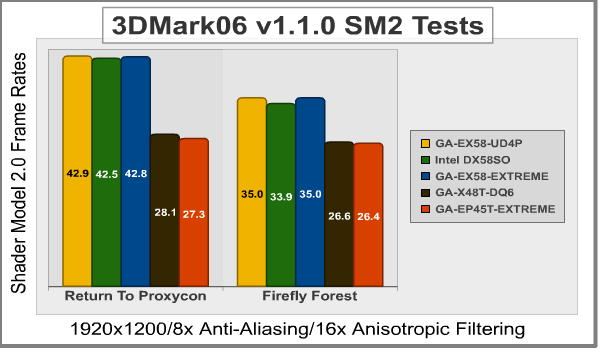
Beginning with Shader Model 2.0 tests, Return to Proxycon is a fast-paced fast-moving scene that puts strain on the GPU by calling for low-graphical demand with high-speed output. In this series the Gigabyte GA-EX58-UD4P, GA-EX58-EXTREME and Intel DX58SO all rendered virtually identical 43 FPS frame rates using the Core i7-920 and GeForce GTX 285. However, the GA-X48T-DQ6 and GA-EP45T-EXTREME did not fare so well and could barely muster 27 FPS.
The second SM 2.0 test was Firefly Forest, which demands more graphics processing and produced similar results (again) between the three X58-Express motherboards with 34-35 FPS each. The older X48 and P45 motherboards were limited to 27 FPS. Using the same video card and driver between these different platforms (X58, X48, and P45) indicates the less-intensive Shader Model 2.0 tests actually create a separation between the series. Let's see if SM 3.0 reacts the same way...
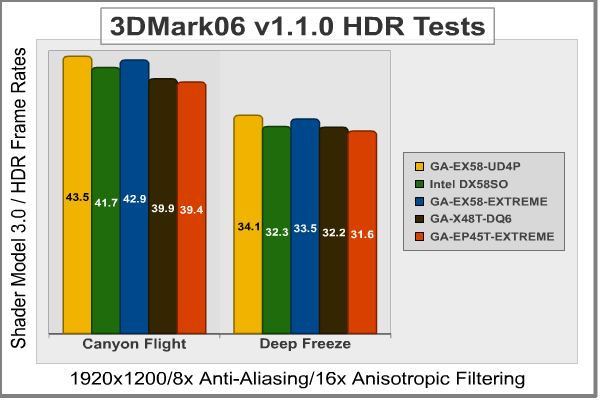
The first test in the Shader Model 3.0 and HDR (High Dynamic Range) series is Canyon Flight. Based on our results, the X58 platforms hover around 43 FPS while the X48 and P45 chipsets were close behind with 40 FPS. It's strange that there was a much larger disparity between these platforms in the SM 2.0 tests, but heading into the second test scene, Deep Freeze, it becomes much less evident.
Possible as a result of less onboard-overhead, the Gigabyte EX58-UD4P enjoyed a fractional lead of the EX58-EXTREME and Intel SmackOver desktop motherboards. The older X48- and P45-based platform held tight only two frames behind the leaders.
The conclusion I've drawn here is that 3dMark06 has very little reliance on the processor or memory sub-system, which may translate into real-world gaming. If the GPU is isolated, it won't matter which motherboard you're using. But we all know that games come in a variety of CPU- or GPU-bound flavors, so we'll do the best we can to demonstrate this point.
In our next section, PCMark Vantage is tested on 64-bit Windows Vista SP-1.
PCMark Vantage Tests
PCMark Vantage is the first objective hardware performance benchmark for PCs running 32 and 64 bit versions of Microsoft Windows Vista. PCMark Vantage is perfectly suited for benchmarking any type of Microsoft Windows Vista PC from multimedia home entertainment systems and laptops to dedicated workstations and hi-end gaming rigs.
Regardless of whether the person benchmarking is an graphic artist or an IT Professional, PCMark Vantage shows the user where their system soars or falls flat, and how to get the most performance possible out of their hardware. PCMark Vantage is easy enough for even the most casual computer user to use, yet supports in-depth, professional industry-grade testing.
Since our hardware configurations used 4GB or more of system memory, we decided that 64-bit Windows Vista would offer a glimpse of real perspective for the 6GB tri-channel DDR3 kit used testing. PCMark Vantage offers several scores for different areas of interest, but because the platform differences between X48, P45, and X58 were so big it was best to keep the bias to a minimum.

Beginning with graphics, the Gigabyte GA-EX58-UD4P pulled ever so slightly ahead of the GA-EX58-EXTREME and Intel DX58SO motherboards; even though both utilized the 2.67GHz Core i7-920 CPU on their X58-Express platform and shared the same GeForce GTX 285 video card. The Gigabyte X48T-DQ6 and EP45T-EXTREME both did well, but still came in roughly 16% below the QPI-equipped motherboards. It may not be much, but this could be the proof we're looking for to show that gaming can benefit by the Core i7/X58 platform.

The PCMark Vantage 'HDD' score is a little misleading; primarily because we didn't use a hard drive for testing. Instead the Patriot Warp v2 SSD was used, which tests the SATA chipset for bottlenecks with solid state drive products. For all intents the playing field was quite even. Using the onboard Intel SATA controller on each motherboard, we the PCMark Vantage score was averaged. Even though the Southbridge chips range from the ICH9R to ICH10R, every single motherboard produced an average score between 11387 and 11433. In testing terms, they're almost identical.

The last area of interest for PCMark Vantage was the 'memories' score, which I must admit is an unfair comparison between the two very dissimilar platforms. Needless to say, the QPI technology gives triple-channel DDR3 a much greater bandwidth (and 8.5 GBps advantage) over dual-channel DDR3. The Gigabyte GA-EX58-UD4P led the three X58-Express motherboards, but only a few points separate this mainboard from the GA-EX58-EXTREME and Intel SmackOver motherboard. The X48 and P45 motherboards were both extremely close, but still trail behind by almost 27%. Triple-channel system memory sounds enticing, more so than dual channel, but does it really amount to better performance and experience?
In the next section, we test gaming performance between the platforms with Crysis.
Crysis Benchmark Results
Crysis uses a new graphics engine: the CryENGINE2, which is the successor to Far Cry's CryENGINE. CryENGINE2 is among the first engines to use the Direct3D 10 (DirectX10) framework of Windows Vista, but can also run using DirectX9, both on Vista and Windows XP.
Roy Taylor, Vice President of Content Relations at NVIDIA, has spoken on the subject of the engine's complexity, stating that Crysis has over a million lines of code, 1GB of texture data, and 85,000 shaders. To get the most out of modern multicore processor architectures, CPU intensive subsystems of CryENGINE 2 such as physics, networking and sound, have been re-written to support multi-threading.
Crysis offers an in-game benchmark tool, which is similar to World in Conflict. This short test does place some high amounts of stress on a graphics card, since there are so many landscape features rendered. For benchmarking purposes, Crysis can mean trouble as it places a high demand on both GPU and CPU resources. Benchmark Reviews uses the Crysis Benchmark Tool by Mad Boris to test frame rates in batches, which allows the results of many tests to be averaged.
Low-resolution testing allows the graphics processor to plateau its maximum output performance, which thereby shifts demand onto the other system components. At the lower resolutions Crysis will reflect the GPU's top-end speed in the composite score, indicating full-throttle performance with little load. This makes for a less GPU-dependant test environment, and is helpful in creating a baseline for measuring maximum output performance in the next few test results. At the 1280x1024 resolution used by some newer 17" and most 19" monitors, all of the video cards tested performed at very respectable levels.

At 1920x1200 resolution Crysis is rendered by the GTX 285 at 47-48 FPS by the Gigabyte GA-EX58-UD4P,Intel DX58SO, and GA-EX58-EXTREME . Almost without difference, the GA-X48T-DQ6 and GA-EP45T-EXTREME come in just behind with 47 FPS. I realize that when I ran these same tests for the Gigabyte GA-EX58-EXTREME there was a more pronounced difference in performance results, but with new installations of the O/S and a new version of graphics drivers, I am finding the results to be extremely close in relation. I will admit that the 5 FPS difference isn't very much incentive to ditch the X48 platform and replace it with X58, but the difference exists nevertheless.
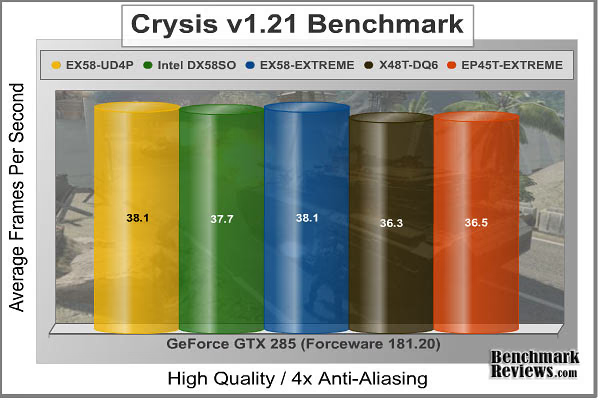
Adding 4x anti-aliasing to the strain doesn't help show the differences in performance I would have expected, since 2 FPS between the X58 and X48/P45 is almost enough to be considered a margin of error. Perhaps the real error was using the GeForce GTX 285 in our tests. Although I think that the enthusiast who buys an X58 platform with likely pair it to a similarly top-end graphics solution, it makes sense. But from a benchmarking point of view, the GeForce GTX 285 has forced Crysis to become GPU dependant. If we had used a low-end video card, the CryENGINE 2 gaming engine would have demanded more from the CPU. In the end, I tried to make our tests as relevant to real-world systems as possible.
So up to this point, X58 has prevailed against X48 and P45. This isn't a real technical surprise, as the triple-channel system memory and much-improved memory path no longer have to travel out from the processor to the Northbridge and back, which make a noticeable difference in performance. But in games, there is only a small gain to be had if you're using a high-performance graphics solution.
In our next section, Benchmark Reviews will test the X58 platforms against last generation X48 and P45 motherboards in the fast-paced Far Cry 2 video game.
Far Cry 2 Benchmark
Ubisoft has developed Far Cry 2 as a sequel to the original, but with a very different approach to game play and story line. Far Cry 2 features a vast world built on Ubisoft's new game engine called Dunia, meaning "world", "earth" or "living" in Farci. The setting in Far Cry 2 takes place on a fictional Central African landscape, set to a modern day timeline.
The Dunia engine was built specifically for Far Cry 2, by Ubisoft Montreal development team. It delivers realistic semi-destructible environments, special effects such as dynamic fire propagation and storms, real-time night-and-day sun light and moon light cycles, dynamic music system, and non-scripted enemy A.I actions.
The Dunia game engine takes advantage of multi-core processors as well as multiple processors and supports DirectX 9 as well as DirectX 10. Only 2 or 3 percent of the original CryEngine code is re-used, according to Michiel Verheijdt, Senior Product Manager for Ubisoft Netherlands. Additionally, the engine is less hardware-demanding than CryEngine 2, the engine used in Crysis.
However, it should be noted that Crysis delivers greater character and object texture detail, as well as more destructible elements within the environment. For example; trees breaking into many smaller pieces and buildings breaking down to their component panels. Far Cry 2 also supports the amBX technology from Philips. With the proper hardware, this adds effects like vibrations, ambient colored lights, and fans that generate wind effects.
There is a benchmark tool in the PC version of Far Cry 2, which offers an excellent array of settings for performance testing. Benchmark Reviews used the maximum settings allowed for our tests, with the resolution set to 1920x1200. The performance settings were all set to 'Very High', DirectX 9 Render Quality was set to 'Ultra High' overall quality, 8x anti-aliasing was applied, and HDR and Bloom were enabled.

Although the Dunia engine in Far Cry 2 is slightly less demanding than CryEngine 2 engine in Crysis, the strain appears to be extremely close. In Crysis we didn't dare to test AA above 4x, whereas we used 8x AA and 'Ultra High' settings in Far Cry 2. The end effect was a separation between what is capable of maximum settings, and what is not. Using the short 'Ranch Small' time demo (which yields the lowest FPS of the three tests available), the GeForce GTX 285 was left to perform its best on each motherboard.
Once again, the X58 motherboards prevail over the X48 and P45 platforms, with the GA-EX58-UD4P leading the pack. I don't have an explanation why the EX58-UD4P consistently leads (by a mere 1%) the EX58-EXTREME, when they are nearly identical motherboards. My opinion is that the newer EX58-UD4P has reaped the benefit of a refined construction process, along with housing fewer integrated components. Regardless, the X58-Express motherboards perform at 27 FPS while the X48 and P45 platforms yield 24 FPS on average.
Memory intensive applications have proven to prefer the Core i7 platform, but gaming stand to gain very little over a similarly equipped Intel Q9400 Core 2 Quad system. In the next section, I give my final thoughts on Intel's X58 platform and the new Core i7 processor series.
Intel X58 Final Thoughts
While I didn't write the Intel Core i7 CPU & DX58SO X58 Platform article featured here at Benchmark Reviews, I've come to agree with Miles Cheatham on all points covered in his comprehensive review. The X58 'Tylersburg' platform is Intel's first offering for the Core i7 'Nehalem' processor, with several more already in the works. No sooner can I cheer the Core i7/X58 marriage before Intel already has a quad-core 'Lynnfield' and dual-core 'Havendale' processor poised for release on the LGA1160 socket ready for sometime in H1 2009. Later into 2009 Intel will offer the P55 'Ibexpeak' platform, which changes the game once again and ditches the term 'chipset' in place of Platform Controller Hub (PCH).
With DRAM being sold at the lowest prices we've seen in many years, the introduction of a motherboard willing to harness 24GB of DDR3 may be a blessing in disguise. Even though enthusiasts have yet to fall in love with Windows Vista, the 64-bit version of Windows Vista (and to a lesser extent Windows XP 64) have seen renewed interest since the launch of Intel's X58 platform. The market has already begun to sell 6GB tri-channel kits, and it will be a short matter of time before we have 12GB kits pieced together from 4GB modules. Despite my protest, we'll even begin using Vista 64 Ultimate for testing tri-channel system memory kits. Thankfully, the Windows 7 launch isn't too far away.
There is still one minor drawback for the X58 platform which effects enthusiasts: the difference in CPU cooler mounting dimensions. Many overclockers and enthusiasts have grown to cherish their favorite cooler, and trust them to cool the hottest setup. The problem now is that many manufacturers are offering free adapter kits, or include an adapter with their current model coolers, which leads to bigger problems.
CPU coolers made for the LGA775 platform were designed for use with a Core 2 (Duo or Quad) or Pentium 4 and D processor with an integrated heat-spreader measuring 28.5 x 28.5mm (812.25mm total), but the LGA1366 socket requires a much larger 32 x 35mm (1120mm total) footprint to accommodate the extra 591 'pins'. If you use an LGA775 cooler on a LGA1366 socket, your missing out on 38% (307.75mm) of the contact surface.

Regardless of whether the X58 is the last 'chipset' motherboard we see from Intel, or a stepping stone for future PCH-based designs, the future of computing has paved the way for Moore's law to continue as predicted. Herein lies the problem though, because software hasn't been keeping up with its end of the deal, and most of us still use the 32-bit technology introduced back in Windows 95; it's sad but true. Games like Crysis helped give reason for advancing graphics technology, just like virtualization technology and Terminal Services helped push processor power.
But heading into 2009 we now have Crysis: Warhead, a game which require less graphics power than the former version, and newer server and virtualization technology that uses fewer CPU cycles. Essentially the wheels are slowly turning in opposite directions; although more accurately put, the software 'wheel' is barely turning at all while hardware is laying rubber). Which raises the question: to what end?
I used to overclock my Pentium 4 (and later Pentium D and Core 2) processor to get a few extra frames out of Battlefield 2 and earn more work units per day with Folding @ Home. But now I have a graphics card that performs 600x better at folding proteins than my CPU ever did, and a processor that can encode my authored DVD's in a fraction of the time. We haven't hit the wall, but the light at the end of the tunnel is a long ways off. If software doesn't come around soon, we'll soon share automobile dilemma: faster engines with more horsepower, so we can all still drive at 65 MPH. I personally feel that this has been the case since Core 2 was launched, which is why we're already sharing another auto-industry dilemma: efficiency.
GA-EX58-UD4P Conclusion
Whenever a new hardware platform launches, I feel that manufacturers owe it to consumers to educate them on the changes. To this extent, Gigabyte does only offer a few tiny bullet points of information pertaining to QPI, and 3-channel memory. What you get is a whole lot of information on Ultra Durable 3 and the benefits of using 2 ounces of copper, some marketing points pertaining to Hybrid Silent-Pipe 2, and a little about Dynamic Energy-Saver. This is all fine if you're a lifelong Gigabyte motherboard user, but buyers compare apples to oranges, and Gigabyte needs to remember this. I think it would also be helpful if the package states the compatible hardware; not everyone knows that a Core 2 processor will not work on the X58 platform.
Just like the Gigabyte GA-EX58-EXTREME we recently reviewed, the overall appearance of the GA-EX58-UD4P is exciting. My first impression was that the EX58-UD4P left behind all of the pastel colors as if to say that it came here to do business. Gigabyte has a winning combination of shiny silver and anodized blue components. The colors used for expansion card slots are matched to bus speed and type, and the power phase and onboard LEDs give just as much for user feedback as they do for captivating looks. At the end of my testing I was pleased to say I don't miss copper heatpipe tubing winding around the motherboard, because the EX58-UD4P gets the job done with a single aluminum rod.
For the first time in several product releases, Gigabyte has achieved near-perfect component layout on their X58-Express motherboards. The construction is what you would expect from a top-class premium product: second to none. I know that there has been a long history of being second-best in the motherboard industry, but the EX58-UD4P has convinced me otherwise. All eight SATA ports are turned sideways, which allows full access to them even with large video cards installed. Even the six memory module banks are located away from the action for better access and cooling.
Performance deserves some extra attention, and careful consideration for what tasks will be fed to the Core i7/X58 platform. Considering that video game frame rates on the entire collection of X58 motherboards were only slightly better than those of the X48 and P45 platforms, the EX58-UD4P shouldn't be expected to deliver anything you couldn't get from the more affordable last generation of hardware. I won't rehash two pages of Gigabyte-specific features, you can always revisit those sections, but the TPM Security Chip is certainly worthy of mention here.
As of January 2009, NewEgg offers the Gigabyte GA-EX58-UD4P for $259.99 ($239.99 after rebate). This is considerably better than the $329 EX58-EXTREME that offers nearly identical features, and makes the EX58-UD4P one of the most affordable X58-Express motherboards available. As the fresh after-glow of launch fades away, compare prices to get the best deals online.
In conclusion, the Gigabyte GA-EX58-UD4P receives my highest recommendation. This X58 motherboard offers all of the features available to premium high-end motherboards, but spares us the added cost. For previous generation users of the X48 and P45 platforms (and even X38), I don't see the X58 platform offering a substantial return on investment when gaming is the core focus. However the P35-Express and older platforms would benefit from a combination of updated PCI-Express 2.0 graphics bandwidth and updated memory architecture. Everyone and everything can benefit from triple-channel memory over the dual-channel bandwidth of past platforms, but the application workload must be large enough to see an actual difference. Casual overclockers are guaranteed to enjoy the myriad array of settings and BIOS configuration options, while the performance enthusiast will admire the scalability of 3-way SLI and CrossFireX. 24GB of total DDR3 capacity will please 64-bit users, and eight total SATA ports will ensure that no drive is left behind (a popular initiative for my SSD collection). The full depth of Gigabyte's proprietary product features is well worth the asking price, and the TPM encryption security is at the front of this list. Considering the matched performance against other X58-Express solutions, the final choice will depend on your needs.
Pros:
+ Outstanding BIOS - designed for enthusiasts
+ TPM security offers 2048-bit encryption
+ Advanced Dynamic Energy Saver Advanced offers VRD 11.1 ultra-low power state
+ Triple PCI-Express 2.0 compliant graphics slots
+ BIOS updates are made safe with dual-BIOS
+ Japanese-manufactured surface mount all-solid capacitors
+ Blu-Ray/HD DVD Full rate audio with DTS connect
+ Supports three-way ATI CrossFireX and NVIDIA SLI video card sets
+ Industry-leading thermal cooling architecture
+ 2oz Copper Ultra Durable 3 construction improves cooling and stability
+ Best in class graphics and application performance
+ 6 Intel ICH10R and 4 JMB322 SATA ports
+ Supports 24GB of Dual- or Triple-channel DDR3
+ Among the most affordable X58 motherboards available
+ Kit includes CrossFireX bridge component
Cons:
- Premium motherboard solution
- BIOS options can be complicated for some users
- Lacks Serial Attached SCSI (SAS) onboard support
- Independent core multipliers are not available
- Turbo Boost not available when overclocking
Ratings:
-
Presentation: 8.75
-
Appearance: 9.25
-
Construction: 9.75
-
Functionality: 9.25
-
Value: 8.25
Final Score: 9.05 out of 10.
Excellence Achievement: Benchmark Reviews Golden Tachometer Award.
Questions? Comments? Benchmark Reviews really wants your feedback. We invite you to leave your remarks in our Discussion Forum.
Reader comments from the original article
2 comments were posted before commenting closed. They are preserved as written. Original avatars no longer resolve and are shown as a placeholder.
technician shawn Permalink:
I would like to know where you got your info since the ud5 mobo while using the same x58 chipset is still an update to the ud4p. As I owned both mobos the ud4p is not a bad board but the ud5 offers more features, least of which is the usb 3.0 and SATA 6Gb/s.
RE: technician Olin Coles Permalink:
I don't understand your question. We test these products first hand and report our results. Additionally, the GA-EX58-UD4P is different than GA-EX58-UD5 and also the GA-X58A-UD4P. They are all X58-Express motherboard, but they are not all 'the same'... each BIOS is different to cope with memory and I/O chip additions and the X58A series adds additional load to the PCI-Express bus. Also - this motherboard received our Golden Tachometer Award, so nobody ever said it wasn't good.