
ASUS P5Q3 LGA775 Intel P45 ATX Motherboard
ASUS P5Q3 Motherboard
Launched last summer by Intel, the P45 chipset has quickly grown in popularity, replacing the aging P35 chipset. Intended for a mid to upper mainstream consumer base, the P45 chipset boasts some impressive features, such as: full DDR2/DDR3 support, 20 PCI Express 2.0 lanes, ATI Crossfire support, and a 65nm manufacturing process. By now manufacturers have had ample time to design and refine their P45 based motherboards and today Benchmark Reviews takes a look at ASUS' mainstream P45 DDR3 motherboard: the P5Q3. As a twist on our usual motherboard reviews, this article will also shed some light on the growing DDR2 vs DDR3 debate with some hard numbers in the benchmark sections.
DDR3 has been around for a while now, but its increased cost over DDR2 has limited it to mostly the enthusiast segment. With the launch of the new Core i7 platform, however, DDR3 prices have been steadily falling. While the high cost of the Core i7 platform is still out of reach for most consumers, the effect it's had on DDR3 prices can be felt throughout most market segments. Combined with the P45 chipset, which offers support for DDR2 and DDR3, these price drops have brought about an interesting question: is DDR3 worth the extra cost?
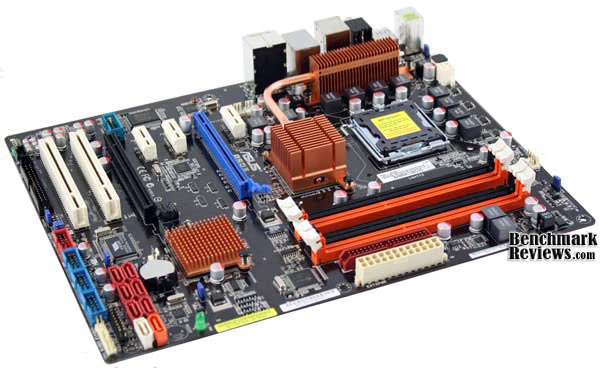
To help answer that question, Benchmark Reviews will be comparing our P5Q3 to one of its many siblings within the ASUS P5Q family, the P5Q-E. This board is similar to the P5Q3 in most respects, but with one important distinction: it uses DDR2 instead DDR3. This will allow us to isolate the memory technology used as the only variable affecting system performance. As usual, we'll also take a look at the various features and technologies offered by the P5Q3 and how they relate to real world settings.
About the company: ASUSTek Computer, Inc.
ASUS, a technology-oriented company blessed with one of the world's top R&D teams, is well known for high-quality and innovative technology. As a leading provider of 3C (computers, communications and consumer electronics) total solutions, ASUS offers a complete product portfolio to compete in the new millennium.
ASUS products' top quality stems from product development. It's like learning Chinese Kung-Fu; one must begin with cultivating the "Chi" and inner strength. Besides innovating cutting-edge features, ASUS engineers also pay special attention to EMI (electromagnetic interference), thermal, acoustics and details that usually go unnoticed to achieve complete customer satisfaction. ASUS notebooks are the first TCO'99-certified notebooks worldwide. The requirements for this honor include radiation emission control, energy (battery consumption), ecology (environment friendly) and ergonomics.
To succeed in this ultra-competitive industry, great products need to be complimented by speed-to-market, cost and service. That's why all 100,000 over employees of ASUS strive for the "ASUS Way of Total Quality Management" to offer the best quality without compromising cost and time-to-market while providing maximum value to all customers through world-class services.
ASUS P5Q3 Features
LGA775 Intel Core 2 Processor Ready
This motherboard supports the latest Intel Core 2 processors in LGA775 package. It also can support Intel 45nm Multi-Core CPU. With new Intel Core microarchitecture technology and 1600/1333/1066/800MHz FSB, Intel Core 2 processor is one of the most powerful and energy efficient CPU in the world.
ATI CrossFireX Technology
ATI´s CrossFireX boosts image quality along with rendering speed, eliminating the need to scale down screen resolutions to get the high image quality you want. CrossFire ignites with the higher antialiasing, anisotropic filtering, shading, and texture settings you desire. Adjust your display configurations, experiment with your advanced 3D settings, and check the effect with a real-time 3D-rendered preview within ATI´s CatalystTM Control Center to rule your CrossFireX system.
Dual-Channel DDR3 1800(O.C.)
The motherboard supports DDR3 memory that features data transfer rates of 1800(O.C.)/1600/1333/1066 MHz to meet the higher bandwidth requirements of the latest operation system, 3D graphics, multimedia, and Internet applications. The dual-channel DDR3 architecture doubles the bandwidth of your system memory to boost system performance. Furthermore, the supply voltage for the memory is reduced from 1.8 V for DDR2 to just 1.5 V for DDR3. This voltage reduction limits the power consumption and heat generation of DDR3 which makes it an ideal memory solution.
ASUS EPU-6 Engine
The new ASUS EPU - the world´s first power saving engine, has been upgraded to a new 6 engine version, which provides total system power savings by detecting current PC loadings and intelligently moderating power in real-time. With auto phase switching for components (which includes the CPU, VGA card, memory, chipset, hard drives and CPU cooler/system fans), the EPU automatically provides the most appropriate power usage via intelligent acceleration and overclocking - helping save power and money.
AI Nap
With AI Nap, users can instantly snooze your PC without terminating the tasks. System will continue operating at minimum power and noise when user is temporarily away. It keeps downloading files or running applications in quietest state while you´re sleeping. Simply click keyboard or mouse, you can swiftly wake up the system in few seconds.
ASUS Express Gate
With a fast bootup speed of only 5 seconds, the ASUS Express Gate offers an optional Linux OS bootup that allows you to enjoy instant access to commonly used functions like accessing the Internet, VoIP, and Web emailing without entering the OS.
ASUS 8-Phase Power Design
With power efficiency so important to operating temperatures, ASUS 8-phase VRM design leads the industry with its 95% power efficiency. High quality power components such as low MOSFETs for minimum switching loss & lower temperatures, Ferrite core chokes with lower hysteresis loss, and high quality Japanese-made conductive polymer capacitors all add up to ensure longer component life and lower power loss - creating more energy efficiency.
100% High-quality Japan-made Conductive Polymer Capacitors!
This motherboard uses all high-quality Japan-made conductive polymer capacitors onboard for durability, improved lifespan, and enhanced thermal capacity.
Drive Xpert
Without drivers or BIOS setups, the ASUS exclusive Drive Xpert is ideal for anyone who needs to secure data on their hard drives or enhance hard drive performances without the hassles of complicated configurations. With Drive Xpert´s user-friendly graphical user interface, users can easily arrange hard drive backups or enhance their hard drive transfer rates - making sure that data is looked after every moment, every day.
Fan Xpert
ASUS Fan Xpert intelligently allows users to adjust both the CPU and chassis fan speed according to different ambient temperature , which is caused by different climate conditions in different geographic regions and system loading. Built-in variety of useful profiles offer flexible controls of fan speed to achieve a quiet and cool environment.
Q-Shield
The specially designed ASUS Q-Shield does without the usual "fingers" - making it convenient and easy to install. With better electric conductivity, it ideally protects your motherboard against static electricity and shields it against Electronic Magnetic Interference (EMI).
AI Direct Link
AI Direct Link can easily and efficiently transfer large amounts of data via the network cable - saving up to 70% of the total time taken. With AI Direct Link, it becomes easy to backup or share large data files like movies or other media content.
Q-Connector
The ASUS Q-Connector allows you to connect or disconnect chassis front panel cables in one easy step with one complete module. This unique adapter eliminates the trouble of plugging in one cable at a time, making connection quick and accurate.
CrashFree BIOS 3
The ASUS CrashFree BIOS 3 allows users to restore corrupted BIOS data from a USB flash disk containing the BIOS file. This utility saves users the cost and hassle of buying a replacement BIOS chip.
EZ-Flash 2
EZ Flash 2 is a user-friendly BIOS update utility. Simply launch this tool and update BIOS from a USB flash disk before entering the OS. You can update your BIOS only in a few clicks without preparing an additional floppy diskette or using an OS-based flash utility.
O.C. Profile
Freely share and distribute favorite overclocking settings The motherboard features the ASUS O.C. Profile that allows users to conveniently store or load multiple BIOS settings. The BIOS settings can be stored in the CMOS or a separate file, giving users freedom to share and distribute their favorite overclocking settings.
Precision Tweaker 2
Allows the user to adjust the NB Voltage, FSB termination Voltage, CPU PLL Voltage and the DRAM Voltage in 0.02v steps to finetune voltages to achieve the most precise setting for the ultimate customized overclocking configuration.
Noise Filtering
This feature detects repetitive and stationary noises like computer fans, air conditioners, and other background noises then eliminates it in the incoming audio stream while recording.
ASUS P5Q3 Specifications
|
CPU
|
Intel Socket 775 Core2 Quad/Core2 Extreme/Core2 Duo/Pentium D/Celeron dual-core /Celeron Processors
Compatible with Intel 05B/05A/06 processors Supports Intel 45nm multi-Core CPU *Refer to www.asus.com for Intel CPU support list *This motherboard is designed with VRD11.1 power phase, and cannot be compatible with VRD10 designed CPU. Please refer to www.asus.com for "CPU support list". |
|---|---|
|
Chipset
|
Intel P45 / ICH10R with Intel Fast Memory Access support
|
|
Front Side Bus
|
1600/1333/1066/800 MHz
|
|
Memory
|
4 x DIMM, Max. 16 GB, DDR3 1800(O.C.)/1600/1333/1066 Non-ECC,Un-buffered Memory
Dual Channel memory architecture *DDR3 1600MHz or above DIMMs work only on the Orange slots for one DIMM per channel. *When installing total memory of 4GB capacity or more, Windows 32-bit operation system may only recognize less than 3GB. Hence, a total installed memory of less than 3GB is recommended. *Refer to www.asus.com or this user manual for the Memory QVL(Qualified Vendors Lists). |
|
Expansion Slots
|
2 x PCIe 2.0 x16 , support ATI CrossFireX technology at x8 link (PCIe x16_1 blue, PCIe x16_2 black*)
3 x PCIe x1 2 x PCI *PCI Express x16_2 slot (black) at max. x8 link |
|
Storage
|
Southbridge
6 xSATA 3Gb/s ports Intel Matrix Storage Technology Support RAID 0,1,5,10 JMicron JMB363 PATA and SATA controller 1 xUltraDMA 133/100/66 for up to 2 PATA devices 1 xExternal SATA 3Gb/s port (SATA On-the-Go) JMicron JMB322 (Drive Xpert technology) 2 x SATA 3Gb/s Supports EZ Backup and Super Speed functions |
|
LAN
|
Realtek 8111C PCIe Gb LAN controller featuring AI NET2
|
|
Audio
|
Realtek ALC1200 8 -Channel High Definition Audio CODEC
- Support Jack-Detection, Multi-streaming, Front Panel Jack-Retasking - Coaxial/Optical S/PDIF_OUT ports at back I/O - ASUS Noise-Filtering |
|
IEEE 1394
|
VIA6308 controller supports 2 x 1394a ports (one at mid-board; one at back panel)
|
|
USB
|
12 USB 2.0 ports (6 ports at mid-board, 6 ports at back panel)
|
|
ASUS AI Lifestyle Features
|
ASUS Power Saving Solution:
- ASUS EPU 6-Engine - ASUS 8-phase Power Design - AI Nap ASUS Unique Features: - ASUS Express Gate - AI Direct Link ASUS Quiet Thermal Solutions: - ASUS Fanless Design: heat-pipe solution - ASUS Fan Xpert ASUS EZ DIY: - ASUS Drive Xpert - ASUS Q-Shield - ASUS Q-Connector - ASUS O.C. Profile - ASUS CrashFree BIOS 3 - ASUS EZ Flash 2 |
|
Overclocking Features
|
ASUS AI Booster
Precision Tweaker 2: - vCore: Adjustable CPU voltage at 6.25mV increment - vDIMM: 64-step DRAM voltage control - vChipset: 55-step Chipset voltage control - vCPU PLL: 64-step CPU PLL voltage control SFS (Stepless Frequency Selection) - FSB tuning from 200MHz up to 800MHz at 1MHz increment - PCI Express frequency tuning from 100MHz up to180MHz at 1MHz increment Overclocking Protection: - ASUS C.P.R.(CPU Parameter Recall) |
|
Special Features
|
ASUS MyLogo
|
|
Back Panel I/O Ports
|
1 x PS/2 Keyboard (Purple)
1 x PS/2 mouse port (Green) 1 x Coaxial S/PDIF Output 1 x Optical S/PDIF Output 1 x IEEE1394a 1 x RJ45 port 1 x eSATA connector 6 x USB 2.0/1.1 8-channel Audio I/O |
|
Internal I/O Connectors
|
3 x USB connectors support additional 6 USB ports
1 x Floppy disk drive connector 1 x IDE connector 1 x TPM connector 1 x COM connector 6 x SATA connectors (red) 2 x Drive Xpert SATA connectors (orange and white) 1 x CPU Fan connector 2 x Chassis Fan connector 1 x Power Fan connector 1 x IEEE1394a connector Front panel audio connector 1 x S/PDIF Out Header Chassis Intrusion connector CD audio in 24-pin ATX Power connector 8 pin ATX 12V Power connector System Panel(Q-Connector) |
|
BIOS
|
8 Mb Flash ROM
PnP, DMI 2.0, WfM 2.0, SM BIOS 2.5, ACPI 2.0a |
|
Manageability
|
WOL by PME, WOR by PME, WOR by Ring, Chassis Intrusion, PXE
|
|
Accessories
|
1 x UltraDMA 133/100/66 cable
4 x Serial ATA cables 1 x 2-port Serial ATA power cable Q-connector ASUS Q-Shield User's manua |
|
Support Disc
|
Drivers
Express Gate ASUS PC Probe II ASUS Update ASUS AI Suite Anti-Virus software (OEM version) Image-Editing Suite |
|
Form Factor
|
ATX Form Factor
12 inch x 9.6 inch ( 30.5 cm x 24.4 cm ) |
Closer Look: ASUS P5Q3
In typical ASUS fashion, the P5Q3 motherboard came packaged in a well-designed and well-decorated box. On a personal note, I've always been a fan of motherboard boxes. Beyond the obvious function of protecting and advertising the product, they also work well as storage containers. Whenever I finish a particular build, I like to throw all of the manuals and spare parts inside to keep them all in one place. Of course, we're not here to simply review the box, so let's get one with it.
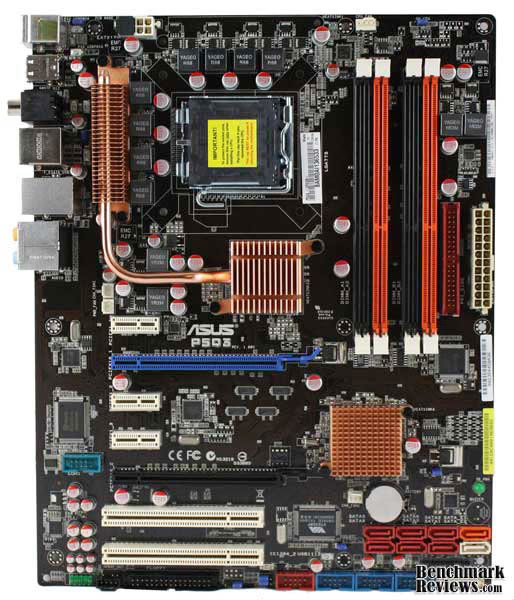
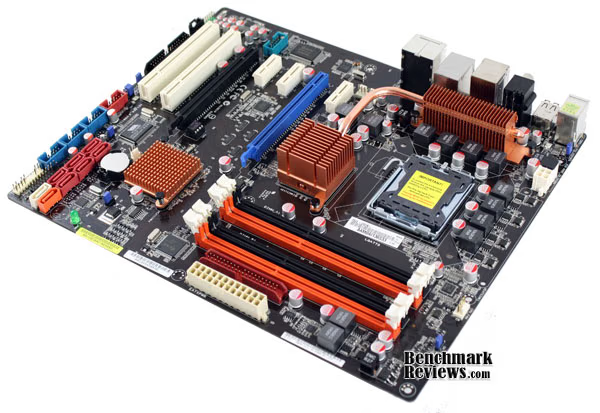
With the motherboard out of the box, we can get a good look at the layout. The P5Q3 conforms to the ATX motherboard form factor, which specifies the size and position of most of the components. Still, manufacturers have control over some of the little things, such as the location of the SATA ports, front panel headers, and power connections. These can play a critical role during the installation process. For example, if the SATA ports are too close the PCI-E slot, they can interfere with large video cards. It's also a good idea to keep most of the connections on the perimeter of the motherboard to prevent them from interfering with other expansion cards and airflow. In the case of the P5Q3, just about everything looks great. My only complaint is that the front panel audio header is a bit too far toward the back and may be an issue if your case does not provide enough cable length.
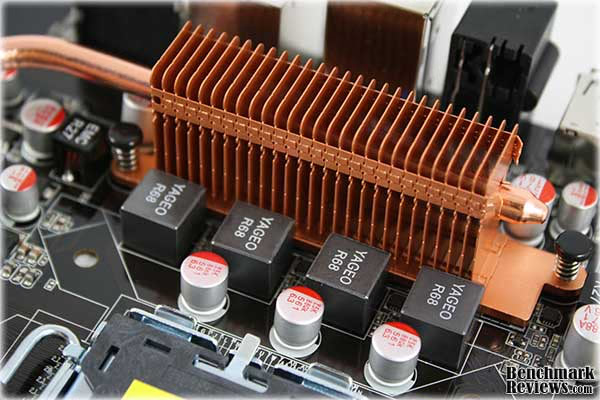
Turning our attention to the CPU socket, we can see the power delivery design. On a motherboard, the CPU power circuitry serves two purposes. First, it has to reduce the voltage supplied by the power supply to a level useable by the processor and, second, it stabilizes the supply of electricity to reduce noise and loss. Using multiple phases and high quality components reduces the strain on individual components, increases efficiency, and helps provide a more stable current to the CPU. When overclocking this becomes even more important. On the P5Q3, we see an 8-phase design, but more importantly, high quality components are used throughout each phase. Combined, it should provide a stable environment for the CPU and great overclocking potential.
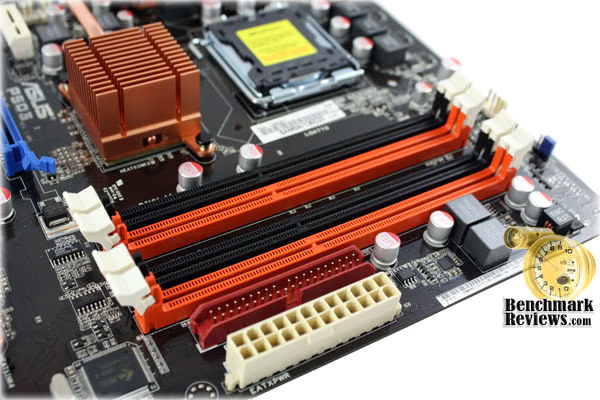
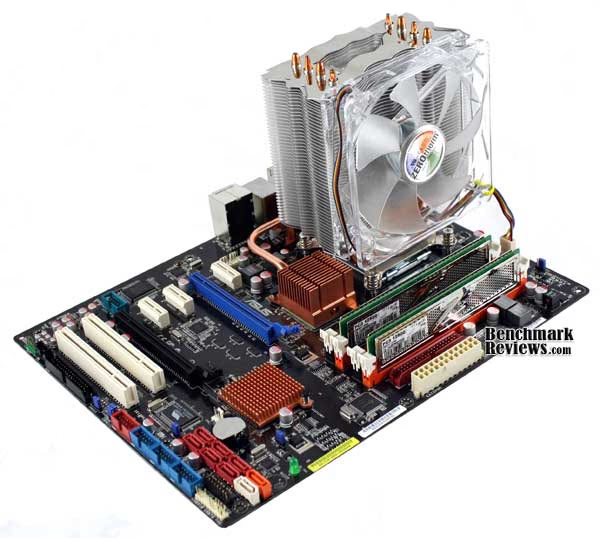
Power delivery is also important when it comes to RAM, particularly when running it at higher voltages. The ASUS P5Q3 has that covered as well. As mentioned in the intro, this board is one of the few P5Q series motherboards to support DDR3 memory. Here you can see room for 4 DDR3 DIMMS, although ASUS recommends using only two DIMMS if you plan overclock or run high performance memory. Running 4 DIMMS at a high frequency increases the strain on the memory controller and will often limit your overclocking results. Not to mention, low-latency RAM may have to be brought up to JEDEC specs to run correctly in all four slots. For our testing purposes, we will use two DIMMS.
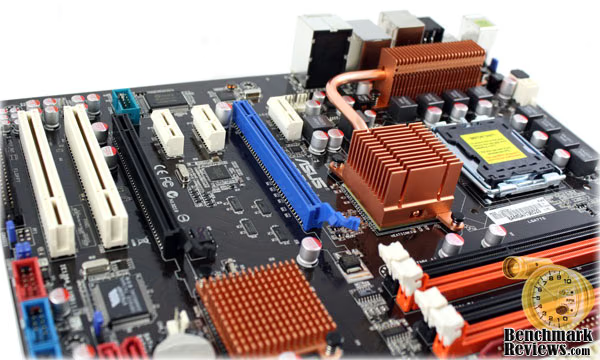
One of the other major components of a good workstation or gaming computer is, of course, the video card. The P45 chipset supports 20 PCI-E 2.0 lanes, which we can see here on the ASUS P5Q3. In addition, the 16 lanes for the graphics cards can be split into two 8x divisions to accommodate Crossfire setups. On this board, in particular, the blue PCI-E slot will function at the full 16x spec provided the black PCI-E slot is empty. When both slots are occupied, the slots are automatically reduced to 8x. What I like about the P5Q3 is the large distance between the two PCI-E x16 slots. This should provide ample room, even for two video cards with double slot HSF units. An important note concerning crossfire, however, is that even though two high performance video cards may fit and function properly, the reduced 8x+8x bandwidth may yield decreased performance in certain situations. This is inherent to all P45 based motherboards, though, and to get beyond it, you'll have to move up to the X48 or X58 chipsets, which cost considerably more.

Rounding out our tour of the ASUS P5Q3 is the rear port assembly. The usual PS/2, USB, network, and analog audio ports are clearly visible as well as a few higher-end features, such as digital audio outputs (analog and coaxial), firewire, and eSATA. For the average user, these ports are more than adequate. For those with more demanding needs, however, the P5Q3 does come in a deluxe version that offers a second NIC with teaming functionality and integrated Wi-Fi, as well as a more robust heatsink and upgraded audio and network chipsets.
ASUS P5Q3 Detailed Features
Aside from the expected motherboard specifications, ASUS also offers several features unique to their motherboards and the P5Q family. A full list of features can be found at the beginning of this article, but I would like to highlight a few of the major ones. The ASUS P5Q3 motherboard features an active power savings system, a dedicated RAID controller, and even its own operating system. The BIOS is another strength of the P5Q3, offering numerous settings and overclocking options.

The ASUS Energy Processing Unit is actually a hardware based controller that monitors system load and adjusts various power settings to maximize efficiency. The entire system is controlled through a software interface, allowing the user to customize each setting and power profile. For brevity's sake, I won't spend a whole lot of time discussing the history and advanced specifications of the EPU, but for those interested, ASUS has a great flash presentation on their website. What I will mention, is that the system on the ASUS P5Q3 actually works. Although, as you'll see in our power consumption benchmark, certain setting just aren't worth the trouble for the average home user.

Another useful feature found on the P5Q3 is ASUS' Drive Xpert hardware. It is essentially an easy to use RAID controller based on a JMicron JMB322 chipset with two RAID option: striping (RAID 0) and mirroring (RAID 1). What sets this apart from other RAID controllers is ASUS' simplified management software. Beginning with installation, you simply plug two hard-drives into the white and orange SATA ports of the motherboard. At that point, you can set up the array through the BIOS or the user friendly GUI provided by ASUS. The GUI offers users the choice between redundancy or enhanced speed and then takes care of the rest. For the average user, this system makes it incredibly easy to benefit from RAID, without the complicated setup. Enthusiasts, however, may want to stick with the RAID controller built in the ICH10R southbridge of the P5Q3 or, for better performance, a dedicated add-in card.

While several other motherboard manufacturers have their own power regulation and RAID options, ASUS is one of the few to offer a complete Linux-based operating system. Of course, there are countless free Linux distributions out there, but what makes this one particularly unique is that on the ASUS P5Q3 it boots in only 5 seconds. The installer also makes it easy to run it along side Windows or even on a USB drive. Once booted, the user has access to a web browser, media applications, and chat software. The idea is that you can use the Express Gate OS for basic office/internet related tasks without having to boot into a full OS. My needs tend to require a full operating system, so for the most part I left it disabled. Still, I can definitely appreciate its usefulness and appeal for less demanding consumers.
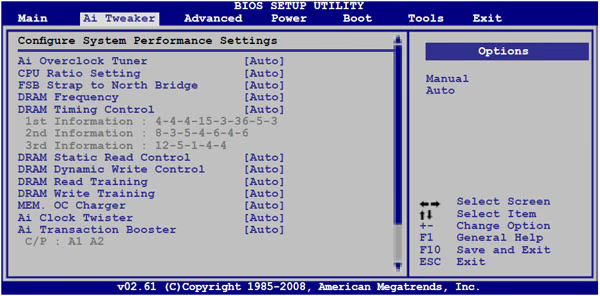
Rounding out our look at the features of the ASUS P5Q3 motherboard is the BIOS. In a strict sense, the BIOS is not so much a feature as it is a requirement of any motherboard. However, manufacturers can enhance the BIOS by providing users with more control over the motherboard settings. This is particularly important when it comes to overclocking. On the P5Q3, these overclocking settings can be found in the AI Tweaker tab. In the screenshots above and below, it's clear that the user has full control over the FSB, memory speed and timings, and an array of voltage adjustments.
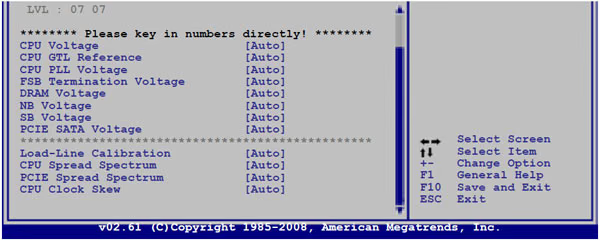
Equally important, are the automatic settings. For those unfamiliar with building a computer, a motherboard should also provide good defaults and automatic settings. In my testing of the P5Q3, it properly recognized all of my hardware using the Auto selection. Although, as is typical of most motherboards, the Auto settings did not offer the same level of performance as the custom changes I made.
Motherboard Testing Methodology
Motherboards are like the transmission and chassis of a car. They link all of the major components together and, while they can't provide dramatic increases in flat-out performance, they do affect the overall efficiency and stability of the complete system. With that in mind, before I begin any benchmarking or overclocking, I thoroughly stress the CPU and memory by running Prime95 on all available cores for 12 hours. If no errors are found, I move on to a gaming stress test. To do this, I use Prime95 again to stress the processor, while running an instance of FurMark's stability test on top of this. If the computer survives this test for 2 hours without lockup or corruption, I consider it to be stable and ready for overclocking. After achieving what I feel is stable overclock, I run to these tests again for certainty. The goal of this stress testing is to ensure the clock speeds and settings are stable before performing any benchmarks. After all, what good are performance measures if the system cannot reliably produce them.
Each benchmark test program begins after a system restart, and the very first result for every test will be ignored since it often only caches the test. This process proved extremely important in the World in Conflict and Crisis benchmarks, as the first run served to cache maps allowing subsequent tests to perform much better than the first. Each test is completed five times, with the average results displayed in our article.
Our site polls and statistics indicate that the over 90% of our visitors use their PC for playing video games. Since all of the benchmarks we use for testing represent different game engine technology and graphic rendering processes, I feel that this battery of tests will provide a diverse range of results for you to gauge performance on your own computer system. Since most gamers and enthusiasts are still using Windows XP, it was decided that DirectX 9 would be used for all tests until demand and software support improve for Windows Vista.
Test System
-
Processor: Intel Q9450 Core 2 Quad 2.66 GHz (Overclocked to 3.2 GHz)
-
System Memory (DDR2): Corsair XMS2 DHX DDR2 800 (4-4-4-12)
-
System Memory (DDR3): OCZ Platinum DDR3 1600 (7-6-6-24)
-
Video:ASUS EAH4870 DK TOP
-
Disk Drive: Western Digital VelociRaptor WD3000GLFS 300GB
-
Disk Drive: Western Digital Caviar SE16 WD6400AAKS 640GB
-
Optical Drive: Pioneer DVR-215DBK DVD/CD-RW
-
PSU: Antec NeoHE 550W
-
Operating System: Windows XP Professional SP3
Benchmark Applications
-
3DMark06
-
PCMark05
-
SiSoftware Sandra Lite
-
Lavalys EVEREST
-
Crysis Benchmark Tool
Motherboard Test Products
-
Motherboard: Asus P5Q-E (Intel P45 Chipset) with version 1703 BIOS
-
Motherboard: Asus P5Q3 (Intel P45 Chipset) with version 0609 BIOS
3DMark06 Benchmark Results
3DMark is a computer benchmark by Futuremark (formerly named Mad Onion) to determine the DirectX 9 performance of 3D game performance with graphics cards. 3DMark06 uses advanced real-time 3D game workloads to measure PC performance using a suite of DirectX 9 3D graphics tests, CPU tests, and 3D feature tests.
3DMark06 tests include all new HDR/SM3.0 graphics tests, SM2.0 graphics tests, AI and physics driven single and multiple cores or processor CPU tests and a collection of comprehensive feature tests to reliably measure next generation gaming performance today. Some enthusiasts may note that Benchmark Reviews does not include CPU-bound tests in our benchmark battery, and that only graphic-bound tests are included.
Here at Benchmark Reviews, we believe that synthetic benchmark tools are just as valuable as video games, but only so long as you're comparing apples to apples. Since the same test is applied in the same controlled method with each test run, I believe 3DMark is a very reliable tool for comparing graphic cards against one-another.
More visitors to Benchmark Reviews operate at 1280x1024 resolution than any other, as it represents the native resolution of 19" LCD monitors. Using this resolution as a starting point, the maximum settings were applied to 3dMark06 which for these tests include 8x Anti-Aliasing and 16x Anisotropic Filtering. Low-resolution testing allows the graphics processor to plateau maximum output performance, which thereby shifts demand onto the system components to keep up. At the lower resolutions 3DMark will reflect the GPU's top-end speed in the composite score, indicating full-throttle performance with little load. This makes for a less GPU-dependant test environment, and is helpful in measuring the maximum output performance in the test results.
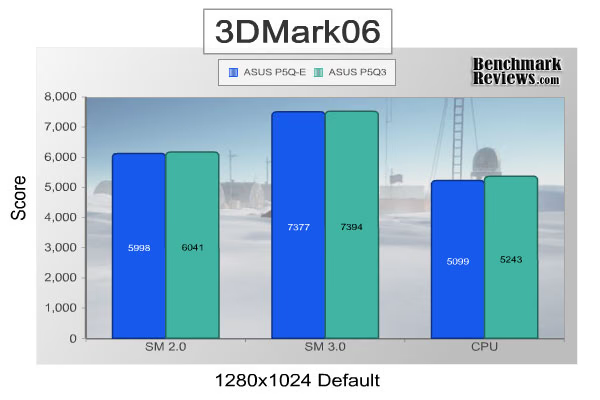
In this first test, 3DMark06 is set to its default settings. Within a certain margin of error, this allows our results to be compared to countless other systems out there. Here we can see no significant different in the SM 2.0 and SM 3.0 graphics tests and a 2-3% difference in the CPU test. In these tests, it's clear that the extra bandwidth of the DDR3 memory on the ASUS P5Q3 has had little effect.
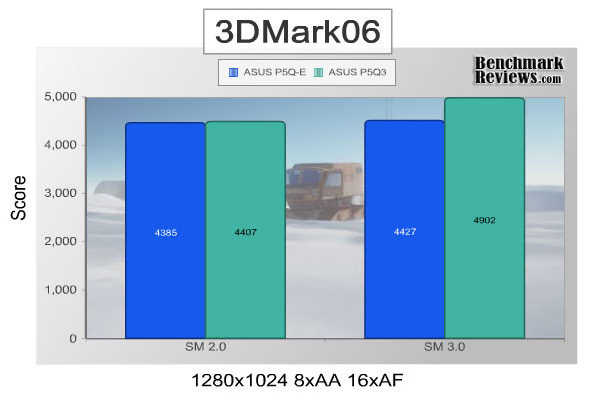
When we add anti-aliasing and anisotropic filtering to the mix, however, the DDR3 based P5Q3 does come out on top. The SM 2.0 test is still too close to call, but the SM 3.0 tests suggests nearly a 10% performance advantage. We'll find out how these numbers relate to real world gaming performance a bit later in this review. Before we get there, though, let's have a look at a few more to synthetic tests to help determine the source of these improvements.
PCMark05 Benchmark Results
Using synthetic benchmarks to compare one product to another has some distinct advantages when testing similar hardware, yet I have never found myself completely satisfied by the process. I have come to understand that they're important for comparing "apples to apples", and that the results are usually very consistent. But as with any synthetic benchmark, the numbers can often mean very little more than just numbers. We don't take a high score on a synthetic benchmark to mean that a product will/should perform well, and neither should you. The difference between projected performance and actual performance is the difference between fire and the fire-fly.
PCMark is a series of computer benchmark tools developed by Futuremark. The tools are designed to test the performance of the user's CPU, read/write speeds of RAM and hard drives. We have used these tests to simulate a battery of applications and tasks, which will produce results we can compare to other systems using similar hardware.
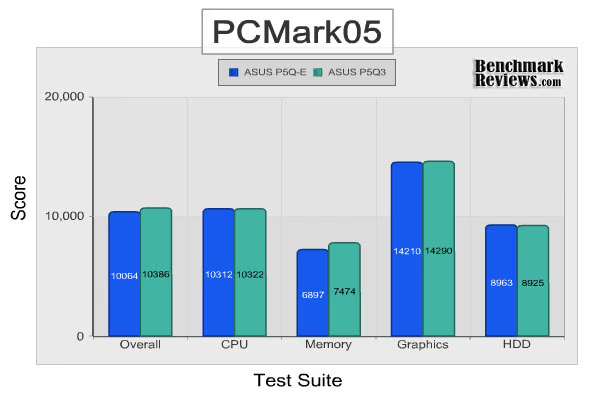
Similar to the 3DMark06 benchmark suite, in most tests PCMark05 shows no significant performance difference between the ASUS P5Q3 and its DDR2-based counterpart, the ASUS P5Q-E. A closer look at the memory test suite, however, reveals a 7-8% performance increase when using the DDR3-based P5Q3. The scores returned by PCMark05's memory benchmark represent a composite score formulated from several benchmarks. PCMark05 makes these test results available, but to gain a better understanding of what's going on, we'll be testing the system with Sandra Lite and EVEREST.
SiSoft Sandra Lite
SiSoftware Sandra was launched in 1997 and has become one of the most popular benchmarking tools among IT professionals and enthusiasts. Similar to 3DMark06 and PCMark05, Sandra runs a series of standardized benchmarks to test individual and system-wide performance. In contrast to the other two benchmarks, however, Sandra does not report composite scores. Instead, it simply reports the appropriate measurements of each benchmark. While this may be confusing for less technically inclined users, for those who can interpret the benchmarks, Sandra's results can be a powerful tool.
SiSoftware Sandra offers a variety of benchmarks designed to test nearly every component of a modern motherboard. However, given that these two motherboards are both built on the same P45 and ICH10R chipset design, I'm going to limit the scope to only tests involving CPU and memory performance.
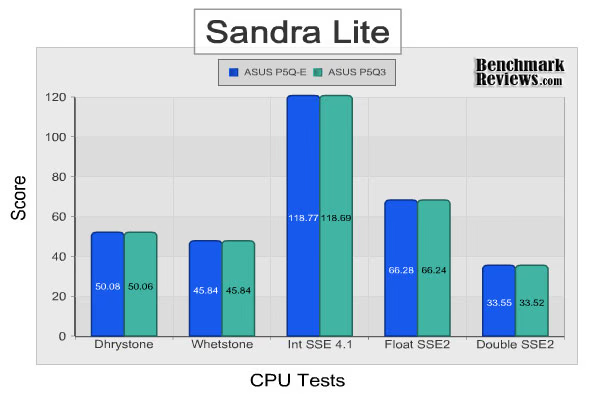
The CPU test results are exactly as I expected: no significant performance difference between the ASUS P5Q3 and P5Q-E. This makes sense given that the exact same CPU was used with both motherboards with the exact same bus speed and multiplier. I was hesitant to even include these results, but I felt it important to demonstrate the accuracy of SiSoftware's benchmarks. The CPU tests are designed to test only the CPU and that is what they did.
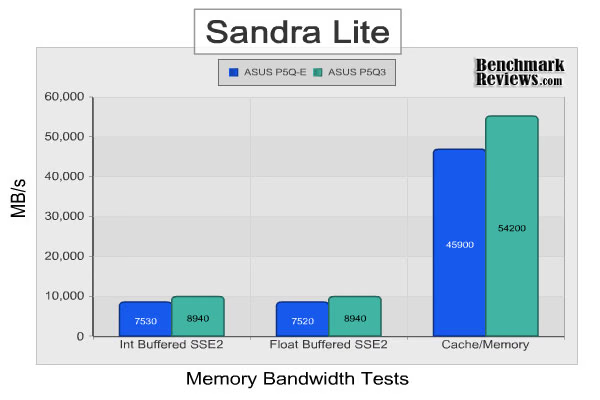
Turning our attention to the memory tests, however, tells a completely difference story. In both the integer and floating point SSE2 tests, the P5Q3 with the OCZ DDR3-1600 memory kit offered significantly higher bandwidth. If you recall, both memory kits used in our tests system offer some of the lowest timings available. Even with the high-performing CL4 DDR2-800 RAM, the ASUS P5Q-E still loses to the P5Q3 in this test. With 12MB of cache the Intel Q9450 CPU used in our test rig put up some good number in the Cache/Memory benchmark as well. Still, as the memory blocks got bigger, the higher memory bandwidth of the P5Q3 allowed it pull ahead.
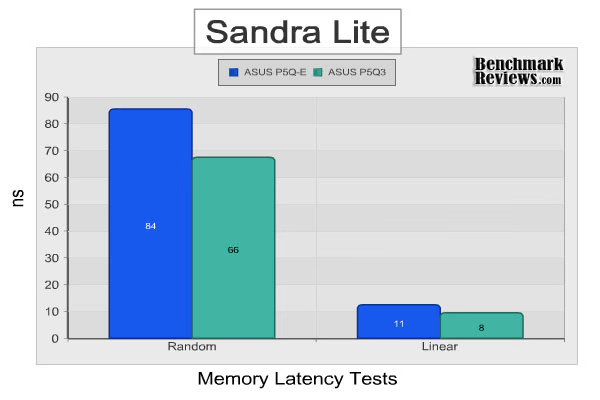
To take a closer look at the timings of the DDR2 and DDR3 memory modules tested, I also ran Sandra's latency benchmarks. As expected, the combination of the ASUS P5Q3 and OCZ's DDR3 memory modules resulted in much lower memory latency. The lower latencies help explain the higher bandwidth scores.
Lavalys EVEREST
Lavalys EVEREST is our last synthetic benchmark application for this review. It's similar to SiSoft Sandra in that it uses a series of standardized benchmarks and reports raw scores. Although, it's not quite as robust as Sandra, it still offers and excellent array of tests. For our purposes, it is used to as a second opinion, to validate the findings suggested by Sandra's benchmarks.
For this particular review, we will stick to only the EVEREST memory benchmarks. We've already established that the P45 and ICH10R chipsets used in both motherboards, as well as the identical CPU, have the ASUS P5Q3 and P5Q-E matched in most respects. So far, memory has been the only significant performance factor. Let's see what EVEREST can tell us.
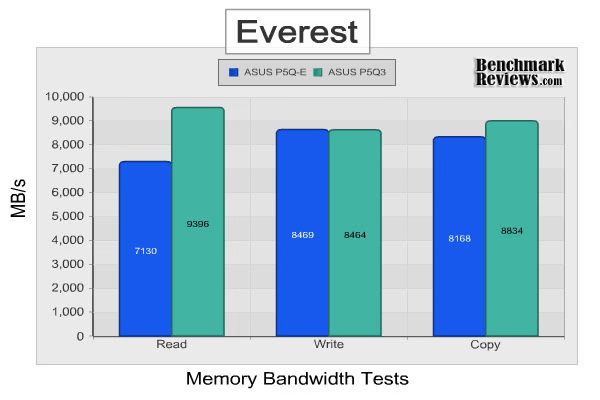
Given the trend of previous results, you would have probably guessed that memory bandwidth is higher on the P5Q3. For the most part, this would be a correct assumption, except for the write benchmark. On this test, the performance of the motherboards and selected memory modules are essentially matched. This indicates a limiting factor somewhere else in the system, likely the P45 chipset itself, meaning the write speed could probably be increased by further increasing the system bus.
Crysis Benchmark Results
Crysis uses a new graphics engine: the CryENGINE2, which is the successor to Far Cry's CryENGINE. CryENGINE2 is among the first engines to use the Direct3D 10 (DirectX10) framework of Windows Vista, but can also run using DirectX9, both on Vista and Windows XP.
Roy Taylor, Vice President of Content Relations at NVIDIA, has spoken on the subject of the engine's complexity, stating that Crysis has over a million lines of code, 1GB of texture data, and 85,000 shaders. To get the most out of modern multicore processor architectures, CPU intensive subsystems of CryENGINE 2 such as physics, networking and sound, have been re-written to support multi-threading.
Crysis offers an in-game benchmark tool, which is similar to World in Conflict. This short test does place some high amounts of stress on a graphics card, since there are so many landscape features rendered. For benchmarking purposes, Crysis can mean trouble as it places a high demand on both GPU and CPU resources. Benchmark Reviews uses the Crysis Benchmark Tool by Mad Boris to test frame rates in batches, which allows the results of many tests to be averaged.
Low-resolution testing allows the graphics processor to plateau its maximum output performance, which thereby shifts demand onto the other system components. At the lower resolutions Crysis will reflect the GPU's top-end speed in the composite score, indicating full-throttle performance with little load. This makes for a less GPU-dependant test environment, and is helpful in creating a baseline for measuring maximum output performance in the next few test results. At the 1280x1024 resolution used by some newer 17" and most 19" monitors, all of the video cards tested performed at very respectable levels.
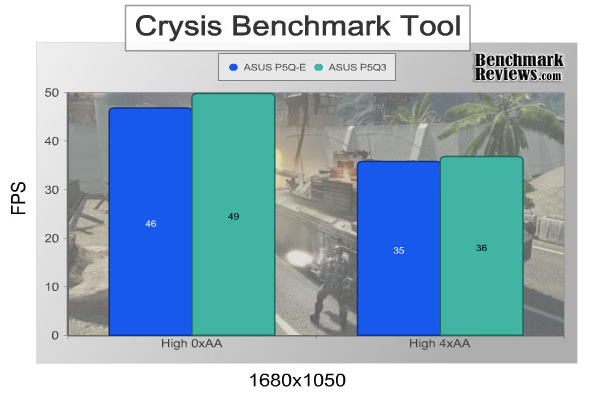
Moving on to our game testing, we begin to see some real world results. Without anti-aliasing enabled, the ASUS P5Q3 motherboard offers an extra 3 fps in crisis, or about a 6% improvement. Adding anti-aliasing into the equation, though, removes the advantage. At these settings, we're likely hitting the limit of the GPU itself.
World in Conflict Benchmark Results
The latest version of Massive's proprietary Masstech engine utilizes DX10 technology and features advanced lighting and physics effects, and allows for a full 360 degree range of camera control. Massive's MassTech engine scales down to accommodate a wide range of PC specifications, if you've played a modern PC game within the last two years, you'll be able to play World in Conflict.
World in Conflict's FPS-like control scheme and 360-degree camera make its action-strategy game play accessible to strategy fans and fans of other genres... if you love strategy, you'll love World in Conflict. If you've never played strategy, World in Conflict is the strategy game to try.
Based on the test results charted below it's clear that WiC doesn't place a limit on the maximum frame rate (to prevent a waste of power) which is good for full-spectrum benchmarks like ours, but bad for electricity bills. The average frame rate is shown for each resolution in the chart below. World in Conflict just begins to place demands on the graphics processor at the 1920x1200 resolution, so we'll jump ahead for our consensus.
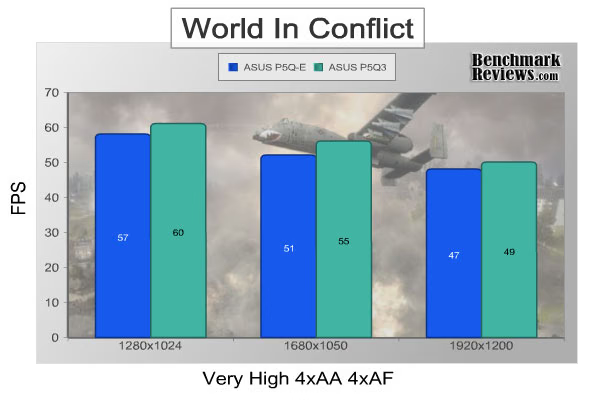
World in Conflict tells a similar story as Crisis. Average frame rates improve up to 7% when using the ASUS P5Q3 and low latency DDR3. It may not be a huge jump in performance, but it is significant. At these frame rates, though, I doubt most people would be able to distinguish the difference.
ASUS P5Q3 Power Consumption
Life is not as affordable as it used to be, and items such as fuel and electrical energy top the list of resources that have exploded in price over the past few years. Add to this the limit of non-renewable resources compared to demand and you can see that the prices are only going to get worse. Planet Earth is needs our help, and needs it badly. With forests becoming barren of vegetation and snow capped poles quickly turning brown, the technology industry has a new attitude towards suddenly becoming "green". Motherboard manufacturers, in particular, have been touting their new energy saving features. How effective these power management system are, is exactly what we intend to measure in our power consumption tests.
Before we get to the results, let me quickly explain the procedures. We begin with a completely idle system (Windows XP desktop with 0-2% processor utilization), and measure the power draw from the wall with a Kill-a-Watt power meter. We then max out the available CPU cores/threads using Prime95 to establish a maximum 2D power draw. After this measurement has been taken, we fire up the FurMark stability test, while still running Prime95, to determine the maximum VGA power consumption. I also monitor the power draw during the benchmarks to ensure we did, indeed, establish the maximum power consumption.
In addition to the standard power tests, I also measured the power consumption of the P5Q3 using the EPU software provided by ASUS. This software provides four power presets: turbo, higher performance, medium savings, and maximum savings. Each preset can be customized to enhance power savings, but for the purposes of this review, I kept everything at the default settings. I also reduced the CPU down to stock speeds and set all of the BIOS settings to auto; the EPU software automatically adjusts FSB speed, CPU ratio, and voltages. Here's a quick table of the speeds I observed on my Intel Q9450 during the various presets:
| Power Preset |
FSB |
Multiplier |
CPU Frequency |
|---|---|---|---|
| Turbo | 342 MHz |
8 | 2736 MHz |
| High Performance |
334 MHz |
8 | 2672 MHz |
| Med Savings |
328.5 MHz |
8 | 2628 MHz |
| Max Savings |
328.5 MHz |
6 | 1971 MHz |
It's typical for Intel CPU's switch between multipliers depending on system load, so I took the frequency readings during the CPU load test. They seem fairly normal, but what's interesting is that the maximum savings preset forces the CPU into a lower multiplier regardless of load. This has a big impact on power savings, as can be seen below:
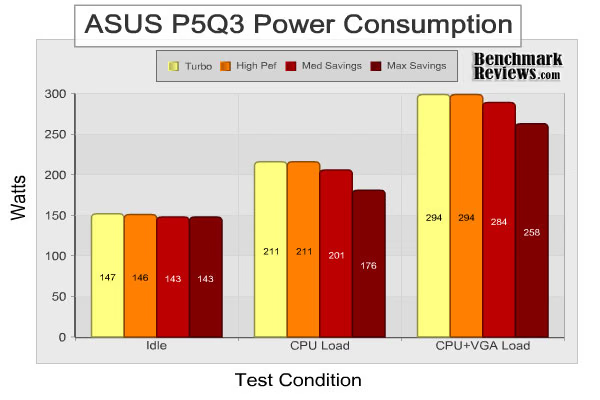
As expected, the idle power consumption is essentially the same. Intel already does a great job of managing the processor and the minor difference in FSB between the presets did not account for much. At 100% CPU load, though, we begin to see the P5Q3's EPU system in action. Interestingly, the small overclock provided by the turbo mode did not alter power consumption, however, the underclocking of the power saving presets did. This probably has to do with the way the EPU handles voltages. At 100% CPU and VGA load we similar results. By comparing the differences between presets, though, it is clear that almost all of the power savings is still coming from the reduced FSB and CPU multiplier. Whether or not intentional underclocking your CPU is worth the energy savings is really up to you. Unless you own a large data center, though, I recommend investing in energy saving lightbulbs and other cost-saving measures before worrying about your motherboard.
ASUS P5Q3 Final Thoughts
Throughout all of our benchmarking today, one thing is clear: the combination of the ASUS P5Q3 and a set of low latency DDR3 modules does offer a slight performance advantage over a P45/DDR2 based system. Once you account for variability and sources of error, though, it really is a slim lead. In fact, a set of high-bandwidth DDR2 modules could probably out perform some of the lower-end DDR3 kits out there. It's important to keep in mind, though, the results of our benchmarks should only be generalized to P45 based motherboards. Other chipsets may offer completely different performance dynamics, particularly with Intel Core 2 based CPU's as the memory controller is part of the chipset itself.
That said, another important consideration is performance per dollar. The recent Core i7 and Phenom II launched have driven DDR3 prices down, but DDR2 is still considered mainstream and tends to be sold for less. DDR3 based motherboards are generally more expensive as well. Our P45 based test systems, though, are fairly well match in price. The ASUS P5Q-E and Corsair DDR2 used in this review can be had for roughly $246, while the ASUS P5Q3 and OCZ DDR3 can be found for $276. Of course, these are all high-end components. If you're going with a budget system, DDR2 based platforms will almost be cheaper.
So, is it time to run out and upgrade your motherboard and RAM? If you're already have a decent Core 2 build with good DDR2 modules, my suggestion would be no. The performance increase just isn't enough. You'd be better off getting a new video card or upgrading your whole system to the new Core i7 platform. If, on the other hand, you're looking to build a new Core 2 system, a DDR3 based motherboard will offer slightly better performance. I'm tempted to say that it's also more future-proof, but with the market conditions in their current state, it's hard to say. If you do spring for DDR3, though, the ASUS P5Q3 is definitely a great motherboard.
ASUS P5Q3 Conclusion
ASUS has been in the motherboard business for quite a while, and it shows. In addition to great advertising and support on their website, ASUS also ships the P5Q3 out in an attractive, information-laden box. My only complaint would be the lack of product photos on their website.
Out of the box, the P5Q3 is sure to please. The black PCB will go with any case and the copper heatsink solution adds a great touch. However, I would much rather have the larger heatsink offered on the P5Q-E. In addition to a more aggressive appearance, the larger heat sink also provides better cooling performance. Heatsink aside, the P5Q3 earns top marks for appearance.
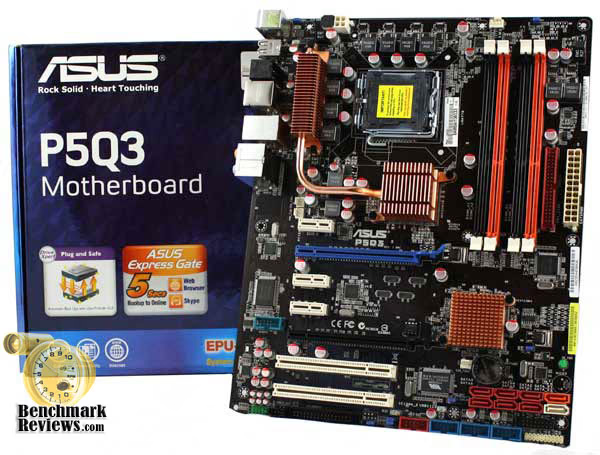
ASUS is well known for their quality standards and P5Q3 certainly lives up to their reputation. High quality components are used throughout the motherboard and the board itself felt very secure. Best of all, it stood up to our torture test and effortlessly overclocked our Q9450. Granted a 500 MHz overclock isn't hard to come by with this chip, but the P5Q3 can definitely be pushed beyond this. If you do get the P5Q3, though, I would recommend buying RAM from ASUS' qualified vendor list; early revisions of the P5Q3 were reported to have memory compatibility issues. Our COZ DDR3 memory kit, however, performed flawlessly.
In addition to quality, the P5Q3 is also abundant with features. The Drive Xpert utility helps novice users set up a raid array, the EPU engine actually saves power, and Express Gate offers users a quick and convenience operating system. The BIOS is well laid out and offers advanced users numerous overclocking settings. As mentioned early, though, better chipset cooling would be a welcome addition.
At $149.99 from newegg.com, the ASUS P5Q3 is not the cheapest P45 motherboard out there, but certainly not the most expensive. Given the quality construction, CrossfireX, and DDR3 support, though, it's a great value. If you're looking to move up to DDR3, the ASUS P5Q3 is an excellent place to start.
Pros:
+ Build quality & stability
+ DDR3 support
+ Overclocker friendly
+ Express Gate OS
+ Excellent feature set
+ Solid performance
Cons:
- Smaller chipset heatsink than equally priced P5Q-E
- Some memory compatibility issues reported
Ratings:
-
Presentation: 9.5
-
Appearance: 9.25
-
Construction: 9.0
-
Functionality: 9.25
-
Value: 9.0
Final Score: 9.2 out of 10.
Excellence Achievement: Benchmark Reviews Golden Tachometer Award.
Questions? Comments? Benchmark Reviews really wants your feedback. We invite you to leave your remarks in our Discussion Forum.
Reader comments from the original article
4 comments were posted before commenting closed. They are preserved as written. Original avatars no longer resolve and are shown as a placeholder.
p5q3 asus can support apacer ddr3 ram ? roden Permalink:
im using p5q3 motherboard i have bought 2x2gb ddr3 apacer ram , it couldent run but only pc fan in turning. i was previouse using mushkin 2x 2g ddr3 ram it run properly so i try to add more ram with ddr3 apacer ram, but it coulden't run. even i unplug the mushkin and add only apacer ram the result is same fail to run. the problem is the apacer ram packaging told us it run and it is design for brand-name asus,acer,dell,ibm ,etc... why! please help
marngar thramdar Permalink:
Infact i like this motherbord but the only onething is that it doesn't have the normal VGA port, so how can i use it with the normal monitors
Video Card BruceBruce Permalink:
This motherboard does not have the graphics adapter built in. You need to purchase a separate graphics card.
Computer Repair Las Vegas- Question about a Laptop Repair company in Las Vegas? Can you guys on benchmarkreviews.com help me? A_Maid_For_You Permalink:
I Seem to remember a few of you guys live in the Las Vegas area. My Laptop Lcd screen is busted, and I am trying to find a cheap Laptop repair Las Vegas store. A member here on benchmarkreviews.com said to call Compudoc Computer Repair. I don't remember who it was. I see a place called Computer doc at 708 South Jones Boulevard Las Vegas, Nv, 89107. I called 702-871-1881 and the number is no good. Is this the place?