
ASUS Crosshair IV Formula AMD-890FX Motherboard
ASUS Crosshair IV Formula AM3 Motherboard
In April of 2010, AMD introduced the final parts of their "Leo" platform: new iterations of their 45nm processor family and the supporting 8-series chipset. Unlike Intel, which seems to delight in spawning new CPU socket architecturfes, AMD continues to support the AM3 socket, so upgrades are easier and cheaper. The 8-series chipsets along with the SB850 south bridge brings some new capabilities over the previous "Dragon" 7-series chipsets, and as you might expect, ASUS is ready with a new enthusiast-level offering, the ASUS Crosshair IV Formula motherboard. This AMD 890FX-based motherboard offers some interesting new enhancements over the previous generation 790FX-based Crosshair III Formula motherboard, and Benchmark Reviews compares the two as well as taking the Crosshair IV Formula as far as it can go with the fastest components.
There are a number of companies making enthusiast-level AMD motherboards, but when AMD shipped out review samples of their AMD Phenom II X6 1090T 6-core processor, the Crosshair IV was the motherboard they included.
AMD's previous generation enthusiast chipset, the 790FX, was very popular: it was relatively inexpensive (compared to Intel chipsets) and a good overclocker as well. It supported both DDR2 and DDR3 memory, allowing manufacturers to build a range of motherboards at different price points. Overall it was a great success for AMD, and the 890FX has some big shoes to fill. We'll see what AMD's added in this new chipset in the coming pages.
About ASUSTeK Computer Inc.
ASUS, a technology-oriented company with a global staff of more than ten thousand and blessed with one of the world's top R&D teams, is renowned for high-quality products and cutting-edge innovation. As a leading company in the new digital era, ASUS offers a complete product portfolio to compete in the new millennium.
ASUS has an unyielding commitment to innovation and quality, a fact borne out by its corporate slogan-"Inspiring Innovation - Persistent Perfection"-and the numerous media, industry and governmental accolades it receives every year. In 2008, ASUS won 3,056 awards-receiving over 8 awards on average every day. The company's revenue for the same year was 8.1 billion U.S. dollars, and it topped the IT Hardware Category of the annual league table of Taiwan's Top 10 Global Brands with a brand value of 1.324 billion U.S. dollars. ASUS also ranks among the top 10 IT companies in Business Week's "InfoTech 100", and has been on the listing for 11 consecutive years.
Inspired by the diverse needs of consumers in all areas and phases of life, ASUS' foremost mission is to deliver truly innovative solutions that in turn inspire consumers to reach for greater heights of productivity and fun. By leveraging its intimate understanding of the requirements of today's digital home, digital office and digital person, ASUS has the honor of claiming many world's firsts-such as the introduction of the groundbreaking Eee PCTM, the ingenious use of renewable materials like leather and bamboo in notebooks and the incorporation of its proprietary power-saving Super Hybrid Engine technology into its notebooks and motherboards. By pioneering many new innovations, trends and technologies that have had a genuine impact on its customers' lives and the Earth at large, ASUS hopes to garner mindshare as well as market share.
To succeed in the ultra-competitive IT industry, ASUS focuses on speed-to-market, cost and service. That is why every ASUS employee strives to master the "ASUS Way of Total Quality Management" in order to fulfill the "Persistent Perfection" promise of the brand. Guided by these precepts, ASUS has developed a strong advantage in product design, technology, quality and value/cost. These advantages in turn constitute ASUS' formula for success-allowing marketing to communicate these strengths to win our consumers' hearts.
The AMD 890FX Chipset
The AMD 8-series desktop chipset was introduced in April, 2010, and is the successor to the popular 7-series chipset. There are four versions of the 8-series: the 890FX, the 890GX, the 880G, and the 870. These chipsets differ in the features offered such as the presence or absence of integrated video, the number of available PCI-E lanes, and so forth. This chart summarizes the major differences:
| 890FX | 890GX | 870 | 880G | |
|---|---|---|---|---|
|
# of PCI-E lanes/Engines |
42 lanes/11 engines | 22 lanes/8 engines | 22 lanes/7 engines | 22 lanes/7 engines |
| ATI CrossFireX support | Yes | Yes | - | - |
| Virtualization | IOMMU 1.2 | - | - | - |
| NB-SB Interface | x4 A-Link III | |||
| Integrated graphics | - | ATI Radeon HD4290 | - | ATI Radeon H4250 |
| DirectX | - | 10.1 | - | 10.1 |
| HD Acceleration | - | UVD2 | - | UVD2 |
| HD Post Processing | - | Yes | - | Yes |
| ATI Stream Technology | - | Yes | - | Yes |
| Max TDP | 19.6W | 25W | 12.5W | 18W |
| Process Technology | TSMC 65nm | TSMC 55nm | TSMC 65nm | TSMC 55nm |
The 890FX is obviously the part enthusiasts will want, since its extra PCI-E lanes makes things like three-way CrossFireX possible. AMD also has two new southbridge chips to pair with the 8-series chips, the SB850 and SB710:
| SB850 | SB710 | |
|---|---|---|
| USB ports | 14 USB 2.0 + 2 USB 1.1 | 12 USB 2.0 + 2 USB 1.1 |
| Serial ATA | 6xSATA 6Gb/s, backwards compatible with SATA 3Gb/s AHCI 1.2 |
6xSATA 3Gb/s AHCI 1.1 |
| Integrated Gigabit Ethernet | Yes | - |
| Process Technology | TSMC 65nm | TSMC 130nm |
The ASUS Crosshair IV Formula pairs the 890FX with the SB850 southbridge. The SATA 6Gb/s capabilities of the SB850 are new, too: while other motherboards typicaly use a Marvell 88SE9123 or SE9128 chip to provide two SATA 6Gb/s ports, the SB850 natively provides six.
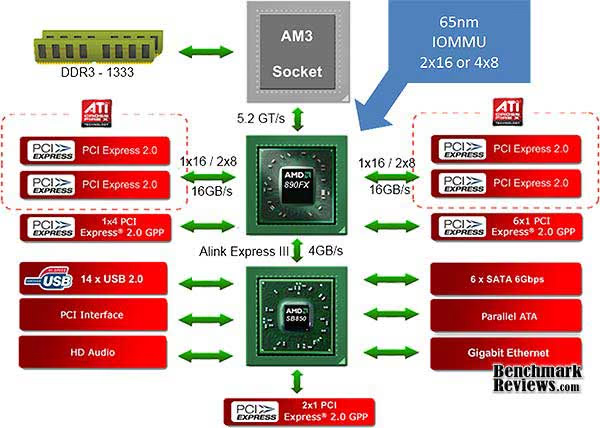
The 890FX is an incremental improvement over the 790FX. It has the same number of PCI-E lanes (42) allocated the same way (32 for add-in cards, 10 for other I/O). The official memory bus speed jumps from 1066mHz to 1333mHz, but support for the older DDR2 standard is now gone: only DDR3 is supported. The link speed between the 890FX and the southbridge is now twice as fast as it was with the previous-generation 790FX, but that's it for the new FX features. The SB850 southbridge's native SATA 6Gb/s is the big news, so if you've a SATA 6Gb/s SSD laying around, you're in good shape. It would have been nice (and arguably more useful) to see SuperSpeed USB (USB 3.0) native support, but ASUS does provide two such ports, courtesy of the ubiquitous NEC D720200F1 chip.
Crosshair IV Formula Features
The Republic of Gamers consists only the best of the best. We offer the best hardware engineering, the fastest performance, the most innovating ideas, and we welcome the best gamers to join in.
In the Republic of Gamers, mercy rules are only for the weak, and bragging rights means everything. We believe in making statements and we excel in competitions. If your character matches our trait, then join the elite club, make your presence felt, in the Republic of Gamers.
Phenom II/Athlon II/ Sempron 100 Series Processors (AM3 CPU)
This motherboard supports AMD Socket AM3 multi-core processors with unique L3 cache and delivers better overclocking capabilities with less power consumption. It features dual-channel DDR3 1333 memory support and accelerates data transfer rate up to 5200MT/s via HyperTransport 3.0 based system bus. This motherboard also supports AMD CPUs in the new 45nm manufacturing process.
AMD 890FX Chipset
AMD 890FX Chipset is designed to support up to 5.2GT/s HyperTransport 3.0 (HT 3.0) interface speed and dual PCI Express 2.0 x16 graphics. It is optimized with AMD latest AM3 and multi-core CPUs to provide excellent system performance and overclocking capabilities.
DDR3 2000(O.C.) Support
This motherboard supports DDR3 2000(O.C.) that provides faster data transfer rate and more bandwith to increase memory computing efficiency, enhancing system performance in 3D graphics and other memory demanding applications.
ATI CrossFireX Technology
ATI's CrossFireX boosts image quality along with rendering speed, eliminating the need to scale down screen resolution to get high quality images. CrossFireX allows higher anti-aliasing, anisotropic filtering, shading, and texture settings. Adjust your display configurations, experiment with the advanced 3D settings, and check the effects with a real-time 3D-rendered previews within ATI Catalyst Control Center.
PCIe 2.0 support
This motherboard supports the latest PCIe 2.0 devices for double speed and bandwidth which enhances system performance.
ROG Connect
Monitor the status of your desktop PC and tweak its parameters in real-time via a notebook-just like a race car engineer-with ROG Connect. ROG Connect links your main system to a notebook through a USB cable, allowing you to view real-time POST code and hardware status readouts on your notebook, as well as make on-the-fly parameter adjustments at a purely hardware level.
GameFirst
Low Internet latency allows you to frag more, and get fragged less. That's why ROG has introduced GameFirst, a feature that manages the flow of traffic according to your needs so that you can still listen to online music, download and upload files, and engage in Internet chats without sacrificing the low ping times you need to pwn your opponents.
iROG
The iROG is a special IC which enables several ROG highlitghted functions that gives users full disposal of the motherboard at any stage! This design allows advanced user control and management to be processed purely at a hardware level. iROG greatly increases fun during overclocking for PC enthusiasts and it offers system maintainence and management with more control and efficiency.
ProbeIt
ProbeIt takes the guesswork out of locating the motherboard's measurement points, identifying them clearly in the form of 7 sets of detection points so you'll know exactly where to get quick yet accurate readings using a multitester.
MemOK!
Memory compatibility is among the top concerns when it comes to computer upgrades. Worry no more, MemOK! is the fastest memory booting solution today. This remarkable memory rescue tool requires nothing but a push of a button to patch memory issues and get your system up and running in no time. The technology is able to determine failsafe settings that can dramatically improve system booting success.
CPU Level Up
Ever wish that you could have a more expansive CPU? Upgrade your CPU at no additional cost with ROG's CPU Level Up! Simply pick the processor you wanted to OC to, and the motherboard will do the rest! See the new CPU speed and enjoy that performance instantly. Overclocking is never as easy as this.
Voltiminder LED
In the pursuit of extreme performance, overvoltage adjustment is critical but risky. Acting as the "red zone" of a tachometer, the Voltiminder LED displays the voltage status for CPU, NB, SB, and Memory in a intuitive color-coded fashion. The voltiminder LED allows quick voltage monitoring for overclockers.
Extreme Tweaker
Extreme Tweakers is the one stop shop to fine-tune your system to optimal performance. No matter if you're looking for frequency adjustment, over-voltage options, or memory timing settings, they're all here!
COP EX
The COP EX allows overclockers to increase chipset voltages without the worries of overheating. It can also be used to monitor and save an overheating GPU. The COP EX allows more freedom and less constraint for maximum performance achievement.
Loadline Calibration
Maintaining ample voltage support for the CPU is critical during overclocking. The Loadline Calibration ensures stable and optimal CPU voltage under heavy loading. It helps overclockers enjoy the motherboard's ultimate OC capabilities and benchmark scores.
Onboard Switch
With an easy press during overclock, this exclusive onboard switch allows gamer to effortlessly fine-tune the performance without having to short the pins or moving jumpers!
Q-Connector
The Q-Connector allows you to connect or disconnect chassis front panel cables in one easy step with one complete module. This unique adapter eliminates the trouble of plugging in one cable at a time, making connection quick and accurate
Crosshair IV Formula Features Continued
SupremeFX X-Fi Built-in
SupremeFX X-Fi delivers an excellent high definition audio experience to the gamers of ROG. The SupremeFX X-Fi features unique audio innovations for gamers to spot enemes in 3D environment during game play. SupremeFX X-Fi also provides gamers a special tool to emphasize human voices in games to help make dialogues clearer and more audible.
Kaspersky Anti-Virus
Kaspersky Anti-Virus Personal offers premium antivirus protection for individual users and home offices. It is based on advanced antivirus technologies. The product incorporates the Kaspersky Anti-Virus engine, which is renowned for malicious program detection rates that are among the industry's highest.
Core Unlocker
ASUS Core Unlocker simplifies the activation of a latent AMD CPU-with just a press of a button. Enjoy an instant performance boost by simply unlocking the extra cores, without performing complicated BIOS changes.
Turbo Key II
Enjoy superb performance by auto-tuning your processor to an extreme yet stable state. Simply activate a dedicated switch on the motherboard to unleash extra processing capabilities.
TurboV EVO
The ultimate O.C. processor satisfies every level of overclockers-from die-hard enthusiasts to beginners. Auto tuning intelligently pushes the system to the fastest clock speeds while maintaining stability. Turbo Key boosts performance with just one touch; while TurboV offers more options to advanced overclockers to achieve world O.C. record. Moreover, upgrade your CPU at no additional cost with CPU Level UP!
Turbo Unlocker
Turbo Unlocker is the next evolution of an exclusive ASUS performance boost feature. All it takes is one click in the TurboV EVO interface and Turbo Unlocker automatically and dynamically adjusts each core frequency to speed up performance based on actual system load. Turbo Unlocker gets you in touch with more performance exactly when you need it.
USB 3.0 Support
Experience ultra-fast data transfers at 4.8Gbps with USB 3.0-the latest connectivity standard. Built to connect easily with next generation components and peripherals, USB 3.0 transfers data 10X faster and is also backward compatible with USB 2.0 components.
SATA 6Gb/s Support
Supporting next-generation Serial ATA (SATA) storage interface, this motherboard delivers up to 6.0Gb/s data transfer rates. Additionally, get enhanced scalability, faster data retrieval, double the bandwidth of current bus systems.
O.C. Profile
Freely share and distribute favorite overclocking settings The motherboard features the ASUS O.C. Profile that allows users to conveniently store or load multiple BIOS settings. The BIOS settings can be stored in the CMOS or a separate file, giving users freedom to share and distribute their favorite overclocking settings.
Q-Shield
The specially designed ASUS Q-Shield does without the usual "fingers" - making it convenient and easy to install. With better electric conductivity, it ideally protects your motherboard against static electricity and shields it against Electronic Magnetic Interference (EMI).
EZ Flash2
EZ Flash 2 is a user-friendly BIOS update utility. Simply launch this tool and update BIOS from a USB flash disk before entering the OS. You can update your BIOS only in a few clicks without preparing an additional floppy diskette or using an OS-based flash utility.
MyLogo3
The ASUS MyLogo 3 is the new feature present in the motherboard that allows you to personalize and add style to your system with customizable and animated boot logos.
Stack Cool2
Stack Cool 2 is a fan-less and zero-noise cooling solution offered exclusively by ASUS. It effectively transfers heat generated by the critical components to the other side of the specially designed PCB (printed circuit board) for effective heat dissipation.
SATA on the Go
The motherboard supports the next-generation hard drives based on the Serial ATA (SATA) 3Gb/s storage specification, delivering enhanced scalability and doubling the bus bandwidth for high-speed data retrieval and saves. The external SATA port located at the back I/O provides smart setup and hot-plug functions. Easily backup photos, videos and other entertainment contents on external devices.
IEEE 1394a interface
IEEE 1394a interface provides high speed digital interface for audio/video appliances such as digital television, digital video camcorders, storage peripherals & other PC portable devices.
ASUS AM3 Motherboard Specifications
| CPU | AMD Socket AM3; Phenom II /Athlon II /Sempron 100 Series Processors AMD 140W CPU Support AMD Cool 'n' Quiet Technology Supports 45nm CPU |
|---|---|
| Chipset | AMD 890FX/SB850 |
| System Bus | Up to 5200 MT/s ; HyperTransport 3.0 |
| Memory | 4 x DIMM, Max. 16 GB, DDR3 2000(O.C.)/1800(O.C.)/1600(O.C.)/1333/1066 ECC,Non-ECC,Un-buffered Memory Dual Channel memory architecture *Refer to www.asus.com or user manual for the Memory QVL (Qualified Vendors Lists) **Due to OS limitation, when installing total memory of 4GB capacity or more, Windows 32-bit operation system may only recognize less than 3GB. Hence, a total installed memory of less than 3GB is recommended. |
| Expansion Slots | 3 x PCIe 2.0 x16 (dual @ x16, triple @x16 x8 x8) 1 x PCIe 2.0 x4 2 x PCI 2.2 |
| Multi-GPU Support | Support ATI CrossFireX Technology graphics cards |
| Storage | SB850 Chipset 6 xSATA 6Gb/s ports Support RAID 0,1,5,10 JMicron JMB363 PATA and SATA controller 1 xSATA 3Gb/s port (Black) 1 xExternal power SATA 3Gb/s port on rear (SATA On-the-Go) * Due to the Windows XP/ Vista limitation, the RAID array with the total capacity over 2TB cannot be set as a boot disk. A RAID array over 2TB can only be set as a data disk only. |
| LAN | Marvell 8059 Gigabit LAN controller |
| Audio | SupremeFX X-Fi built-in 8-Channel High Definition Audio CODEC - EAX Advanced HD 4.0 - X-Fi CMSS-3D - X-Fi Crystalizer - Creative ALchemy - Supports Blu-ray audio layer content protection - Supports 1 Optical S/PDIF out port at back I/O - Supports 1 x S/PDIF out header - Supports Jack-detection, Multi-streaming, Front Panel Jack-retasking |
| IEEE 1394 | 2 x 1394a port(s) (1 port at back I/O, 1 port onboard) |
| USB | NEC USB 3.0 controller - 2 x USB 3.0/2.0 ports (at back I/O) AMD SB850 chipset - 12 x USB 2.0 ports (5 ports at mid-board, 7 ports at back I/O, 1 port at back I/O is also for ROG connect) |
| Overclocking Features | ROG Connect GameFirst Extreme Tweaker Power Design: - 8+2 phase CPU power design CPU Level Up MemOK! iROG Loadline Calibration Intelligent overclocking tools: - ASUS TurboV Evo - O.C Profile Overclocking Protection: - COP EX (Component Overheat Protection - EX) - Voltiminder LED - ASUS C.P.R.(CPU Parameter Recall) |
| Special Features | Turbo Key II Core Unlocker ASUS Q-Connector ASUS Q-Shield ASUS Q-Fan 2 ASUS EZ Flash 2 ASUS CrashFree BIOS 3 ASUS MyLogo 3 |
| Back Panel I/O Ports | 1 x External SATA 1 x S/PDIF Out (Optical) 1 x IEEE 1394a 1 x LAN(RJ45) port 8 -Channel Audio I/O 1 x PS/2 Keyboard port(purple) 2 x USB 3.0/2.0 ports 7 x USB 2.0/1.1 ports (1 port is also for ROG Connect) 1 x ROG Connect On/Off switch 1 x Clr CMOS switch |
| Internal I/O Connectors | 3 x USB 2.0 connectors supports additional 5 USB 2.0 ports 6 x SATA 6Gb/s connectors (Red) 1 x SATA 3Gb/s connectors (Black) 8 x Fan connectors: 1 x CPU / 1 x PWR / 3 x Chassis / 3 x Optional 7 x ProbeIt measurement points 3 x Thermal sensor connectors 1 x IEEE1394a connector 1 x SPDIF_out connector 1 x 24-pin ATX power connector 1 x 8-pin ATX 12V power connector 1 x En/Dis-able Clr CMOS switch 1 x Core unlocker switch 1 x Turbo key II switch 1 x Power on switch 1 x Reset switch 1 x OC Station Header 1 x Go Button System panel connector |
| BIOS | 16 Mb Flash ROM AMI BIOS, PnP, DMI2.0, WfM2.0, SM BIOS 2.4, ACPI2.0a Multi-Language BIOS |
| Manageability | WOL by PME,WOR by PME,PXE |
| Accessories | User's manual 1 x I/O Shield 1 x ROG Connect Cable 1 x 2-in-1 ASUS Q-Connector Kit 1 x 2-in-1 SATA 6Gb/s Cables 2 x 2-in-1 SATA 3Gb/s Signal Cables 1 x 2-port USB2.0 + ESATA Module 1 x Crossfire Cable 1 x Cable Ties Pack 1 x ROG Theme Label 1 x 12-in-1 ROG Cable Label |
| Support Disc | Support DVD: - Drivers and applications * ASUS PC Probe II * ASUS Update * ASUS AI Suite * Sound Blaster X-Fi Utility * Kaspersky Anti-Virus 1-year license |
| Form Factor | ATX Form Factor 12 inch x 9.6 inch ( 30.5 cm x24.5 cm ) |
Closer Look: Crosshair IV Formula Motherboard
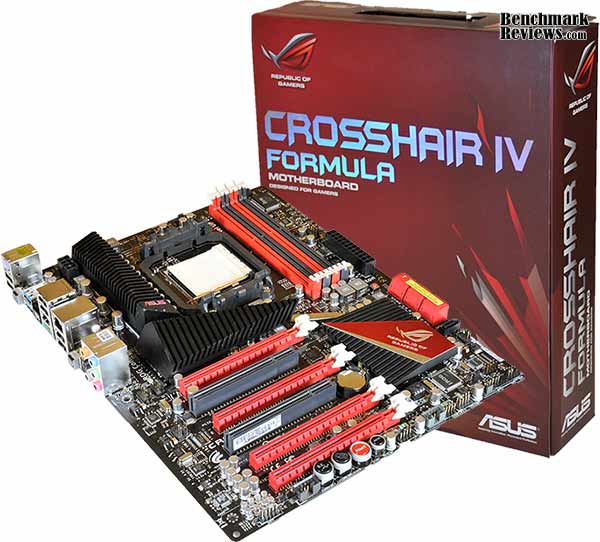
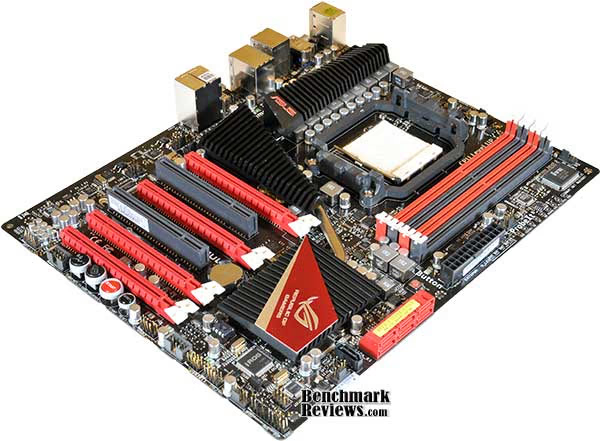
ASUS' Crosshair IV Formula AM3 motherboard is stuffed with features (as the previous three pages attest), but the first thing you'll notice when you see the board is the bling: clad in red and black, with artfully designed heatsinks and a silver-and-red "Republic of Gamers" logo, this board begs for a windowed case.
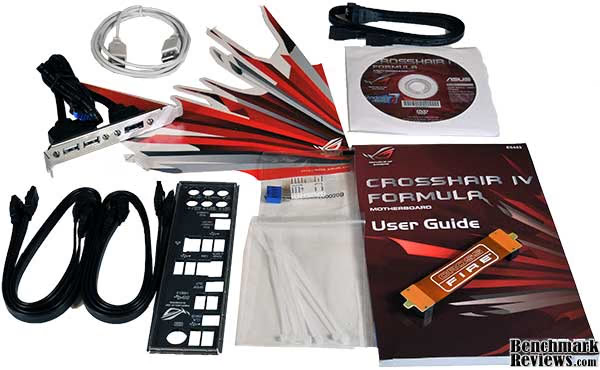
ASUS includes a typical accessory package: a manual, driver disk, I/O shield, 3 SATA cables, a USB/E-SATA breakout panel, some zip ties, the Q-Connectors, and a special USB cable for the "ROG Connect" feature. ASUS also includes some handy SATA cable labeling stickers and a rather large "Republic of Gamers" vinyl sticker, presumably intended for the side of your case. Previous high-end ASUS motherboards sometimes included external "poster" displays or more elaborate things like the display included with the P6T Deluxe OC Palm Edition motherboard, but these days it's all handled by ROG Connect (which we'll cover in the section on overclocking).
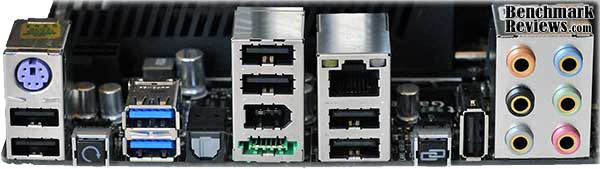
The rear I/O panel has 8 USB ports (the two blue ports are USB 3.0), a legacy PS/2 connector, a switch to clear the CMOS (an essential feature of an enthusiast-level motherboard, in my opinion), an optical S/PDIF port, a IEEE 1394 "Firewire" port, an E-SATA port, a gigabit Ethernet port, and a standard complement of analog audio ports. The button and vertical USB port to the left of the analog audio ports are the ROG Connect switch and port used to monitor and control the motherboard from another connected computer. One nice thing about the 890FX/SB850 platform is that its large number of PCI-E lanes (42 total, as compared to 36 on a standard X58-based system, or a measly 24 on P55-based systems, 8 of which are low-speed PCI-E 1.0 lanes) means that using USB 3.0 doesn't require "stealing" lanes from other parts of the board, like the graphics card slots, which is a common "feature" on even high-end Intel X58-based systems with USB 3.0.
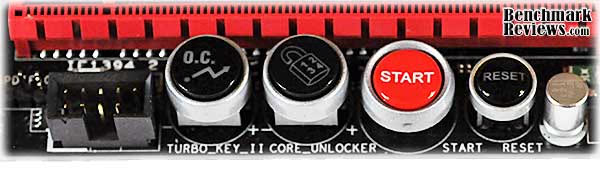
At the lower edge of the board, along with the standard USB, FireWire (IEEE 1394), and front panel connectors are four backlit buttons: the Turbo Key II, Core Unlocker, Start, and Reset switches. The first two switches latch down and should only be toggled when the computer is off. The Turbo Key II initiates a (mild) automatic overclock at the next boot, while the Core Unlocker will attempt to activate any disabled cores in AMD X2 and X3 processors.
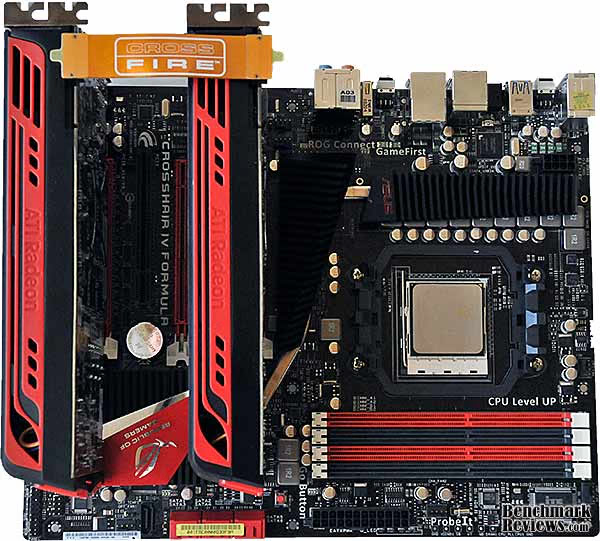
The card slot layout is much improved from the previous generation Crosshair III Formula, which could only support dual-card CrossFireX. The Crosshair III's dedicated PCI-E x1 slot for the included Creative Supreme FX sound card is gone, since sound's now integrated on the motherboard, courtesy of a Via VT2020 audio chip. This allowed ASUS to provide four PCI-E x16 slots, and you can stuff three of them with double-width graphics cards.The number of lanes allocated to each slots changes with the number of video cards you have; with a two-card CrossFireX setup in the first and third PCI-E x16 slots, you get a full 16 lanes on both slots; adding a third card drops the second and third slots to x8, and with four cards (a single-slot card would be required for slot #3) all four slots are x8. ASUS includes an extra-long CrossFireX bridge cable so you can give large graphics cards a little breathing room in two-card CrossFireX by using the first and third PCI-E x16 slots. Peeking out from the edge of the upper black heatsink in this image are the 10 solid chokes comprising part of ASUS' "8+2" phase power system for the CPU. Prospective buyers should remember that since this is an AMD motherboard, NVIDIA SLI multi-GPU configurations will not work.
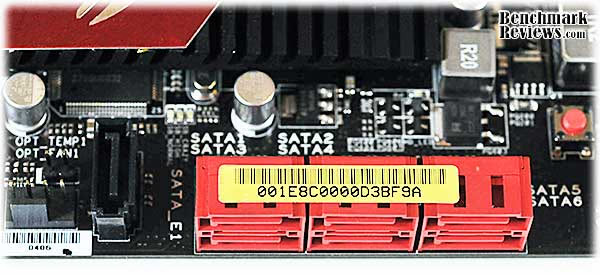
Ah, a full six SATA 6Gb/s ports! Talk about future-proof! The lone black SATA port off to the side is a plain old 3Gbps port for your optical drive. You won't, however, see any IDE or floppy ports on this board. And really, who needs them?
Let's take an even closer look at this motherboard...
ASUS Crosshair IV Detailed Features
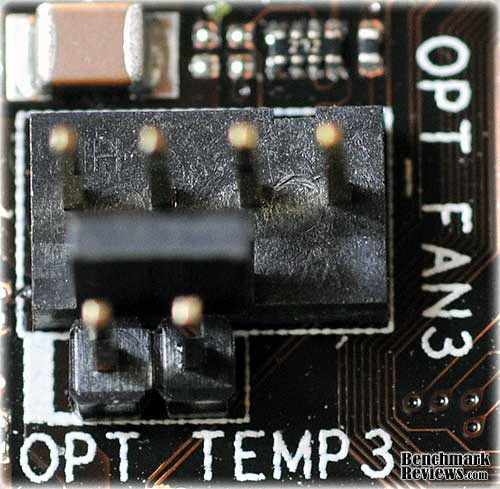
Many of the extra features of the Crosshair IV Formula are little things, but they're the kind of little things enthusiasts appreciate. For example, every fan header on the board (I counted seven) is a four-pin header, which means you can control the speed of each fan in the system using ASUS' "Fan XPert" software; several of the fan headers feature associated temperature probe connectors. Surprisingly, ASUS does not include any temperature sensors with this motherboard; they're "optional". This is disappointing since without the sensors, you can't use "Fan XPert" to automatically adjust accessory fan speed based on temperature. You can, however, use Fan XPert to adjust the response of the CPU and chassis fans, since they use the motherboard's built-in temperature sensors.
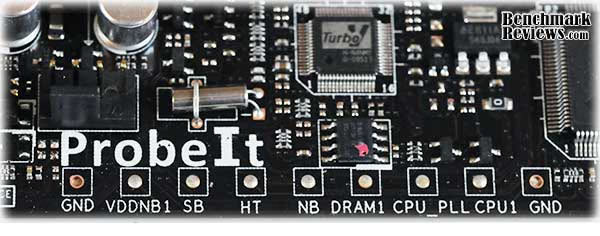
For those of who simply don't trust the BIOS when checking board voltages, ASUS "ProbeIt" feature provides a set of labeled pads for your multimeter. Unlike some of ASUS' other enthusiast motherboards, there are no connectors to hang your multimeter probes on; you have to hold the tip of the probe precisely on the (tiny) pad to get a reading, which makes adjusting voltages while watching the results a two-person (or three-hand) process.
Remember the "Turbo Key II" button in the previous section? That's not the only on-board overclocking button: there's also the "Go button":
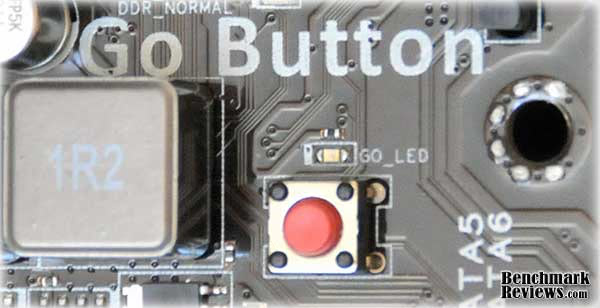
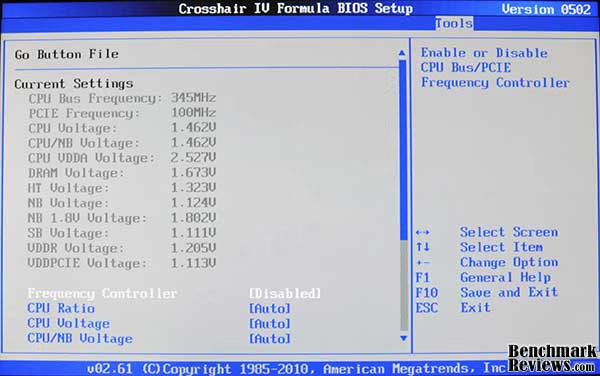
The "Go Button" actually performs two separate functions. The first is the feature ASUS calls "MemOK!" on other motherboards: if memory timing problems prevent your system from booting, press and hold this button until the LED above it starts to blink, and the system will automatically make the settings necessary. Once the system has passed POST, pressing the button loads a special set of BIOS configuration parameters defined in a separate "Go Button File" in the BIOS (as well as illuminating the "GO LED" to let you know your special profile is active).
ASUS extends the functions of the Crosshair IV Formula motherboard with a number of third-party and custom chips. The EPU, iROG, and TurboV chips handle power management, iROG Connect, and automatic overclocking; the VIA VT2020 is a 10-channel high definition audio codec (replacing the separate card used in the Crosshair III Formula), the VIA VT6315 is the FireWire (IEEE 1394) controller, and the ubiquitous NEC D720200F1 provides the two USB 3.0 ports. ASUS' EPU power-management system continues to evolve, and the current iteration adds an interesting feature: the ability to undeclock and undervolt the processor for extra power savings if desired. The "vCore Voltage Downgrade" setting in ASUS' EPU utility can be set to "None", "High", or "Extreme"; the latter setting requires an automated tuning pass to determine the characterstics of your particular processor, and will limit the processor's top speed, so the "High" setting is probably more germane to the enthusiast market. In my testing it dropped the vCore from the stock 1.376 (indicated) volts to 1.277, but would ramp the voltage back up when the processor came under load.

Join me in the next section as we proceed with the testing.
Motherboard Testing Methodology
Since this is the newest iteration of ASUS' enthusiast AM3 platform, we decided to test it against the previous-generation ASUS Crosshair III Formula. Benchmark Reviews used the same AMD Phenom II X6 1090T Black Edition processor, Corsair Dominator GT memory, and ATI Radeon 5870 video card in each board, testing at both standard clock speeds, and as high as we could reliably overclock each board.
Test Systems
- Motherboard: ASUS Crosshair IV Formula with 0502 BIOS, ASUS Crosshair III Formula with 1602 BIOS
- Processor: AMD Phenom II X6 1090T Black Edition
- System Memory: 4G (2x2G) Corsair Dominator GT 2000 DDR3 memory @ 7-7-7-20
- Video Card: ATI Radeon 5870 (Catalyst 10.3)
- Operating System: Windows 7 Ultimate Edition 64-Bit
Benchmark Applications
- Lavalys EVEREST Ultimate Edition v5.5
- Maxon CINEBENCH 11.5 64-Bit
- Futuremark PCMark Vantage 1.0.2 64-Bit
- Battelfield: Bad Company 2
- Unigine Heaven Benchmark 2.0 (DX11, Normal Tessellation, 16x AF, 4x AA)
I took each motherboard to the highest stable overclock I could by first underclocking the processor by reducing the multiplier, then increasing the base clock speed as high as possible. Once I'd achieved the highest stable base clock speed, I increased the processor multiplier until the processor clock was as fast as was stable, and finally adjusted the memory speed. Since the memory speeds available depended on the base clock speed, I wasn't able to set the memory clock precisely at its rated 2000MHz speed, but for most performance testing, a higher processor clock speed is better than a higher memory clock speed. Memory timings were 7-7-7-20 for all tests.
BIOS and Overclocking
There are so many ways to overclock the ASUS Crosshair IV Formula AM3 motherboard that you'd need an entire separate article to cover them all. There are "simple" overclocks like the ones provided by the Turbo Key II button on the motherboard, or the "CPU Level Up" feature in the BIOS. These produce overclocks that are relatively small, but very safe. The next step up are automated "optimum-finding" overclocks where the system tweaks settings and runs stability tests until the system crashes, then reverts to the last good setting. You can perform this type of overclock either directly from the BIOS (using the "OC Tuner" feature, made possible by ASUS' custom iROG chip), or from within Windows using the supplied "TurboV Evo" utility (which also provides full manual control). And as a Republic of Gamers board, the Crosshair IV Formula also includes the special connector for ASUS' OC Station hardware overclocking device.
Yet another auto-overclocking feature is the "Turbo Unlocker" built into TurboV Evo. If you have an AMD Black Edition processor, activating Turbo Unlocker (which appears as a small floating window on the screen when TurboV Evo is running) will automatically increase the processor's multiplier when it's under load. This is similar to the "Turbo Core" feature of the AMD six-core "Thuban" processors, but goes further: while Turbo Core is limited to increasing the multiplier on three cores, Turbo Unlocker can increase the multiplier on all of the cores if the load warrants it. On the 1090T processor used in this review, Turbo Unlocker would bump the multiplier from 16 to 19 under load (raising the processor clock from the stock 3.2GHz to 3.8GHz). The Turbo Unlocker feature is best used by itself rather than in conjunction with other overclocking features, according to ASUS. This makes sense: if you're pushing an overclock to the maximum, you don't want the system bumping the processor multiplier and possibly causing a crash. 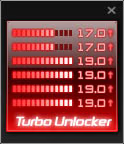
In the BIOS, you can store 8 different overclocking profiles and recall any one of them at boot time; and there's also a separate "Go Button" profile as discussed in the previous section. My one complaint here is that ASUS includes only a single BIOS chip, rather than the dual BIOS chips that are becoming more common on high-end motherboards. Having two BIOS chips can be a life-saver if a BIOS flash goes awry, spelling the difference between a mild annoyance and having to send your motherboard back to ASUS.
You can also download and use AMD's own "AMD Overdrive" utility, which offers both full manual control as well as auto-overclocking functions. But the really interesting new feature is what ASUS calls "ROG Connect." ROG Connect comprises a special, dedicated USB port on the motherboard I/O panel to enable a connected computer (a netbook works well) running the supplied "RC Tweakit" software to monitor and control voltages and clocks externally. No software need be installed on the controlled computer; simply pressing the "ROG Connect" button next to the special USB port initiates the connection. You can even start, shut down, and reset the controlled computer from this remote application. One non-obvious advantage of this feature is that if you crash your Crosshair IV with too-aggressive settings, your settings are retained on the remote computer, so you don't have to enter them all again for the next round. Note: You should only use the special USB cable ASUS supplies for ROG Connect.
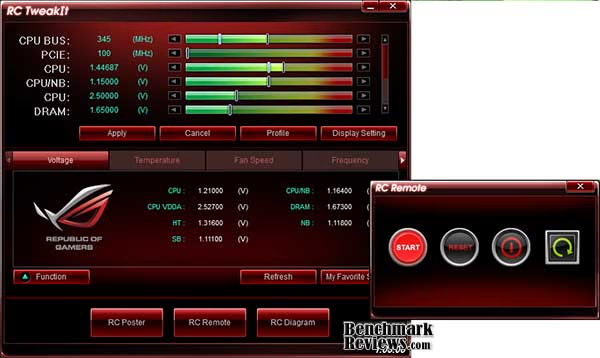
Although the type and number of overclocking options could be confusing, it's nice to have methods that cater to all experience levels: neophytes can start with the "Turbo Key II", "CPU Level Up", or "Turbo Unlocker" options, then advanace throug the automated overclocking options and graduate to full manual control...or not, depending on their ambition and experience.
Just for fun, I tried the BIOS-level "OC Tuner" and well as the TurboV Evo program's "Extreme Tuning" features. OC Tuner settled at a base (HTT) clock speed of 232MHz and a 16x multiplier for a 3.7GHz processor clock and a disappointing memory speed of 1234MHz. TurboV Evo's "Extreme Tuning" run did better with a 250MHz base clock and a 16x multiplier giving an even 4GHz processor clock, but a still-disappointing 1333MHz memory speed. The Corsair Dominator GT memory used didn't include AMD Black Edition memory profiles on the SPD; so the low memory speeds are perhaps understandable, but it would have been nice to see some more aggressive memory speeds. As always (at least for now), the best overclocks are achieved with patience (lots of it) and manual tweaking. Still, the real-world differences between the performance with the overclocks I achieved manually and the automated overclock provided by TurboV Evo's "Extreme Tuning" feature would be all but unnoticeable.
Remember that overclocks are never guaranteed and that the overclocks I achieved and tested with are for these specific components. Your results, even with the same motherboard, processor, and memory, will likely vary from mine. Juggling the various timings and voltages is still more an art than a science. On the 890FX platform, I was able to achieve a maximum stable 4.1GHz on the AMD Phenom II X6 1090T processor with a base (HyperTransport) clock speed of 345MHz, with the Corsair Dominator GT memory at 1840MHz.
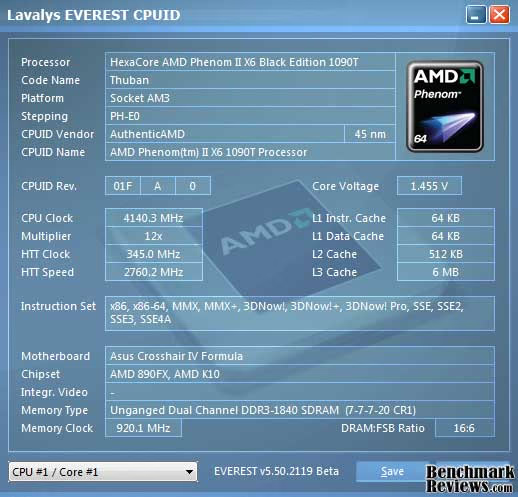
This is an amazingly high overclock for the base clock, much higher than I was able to achieve with the Crosshair III formula. No voltage tweaks were required to reach this speed, either. The maximum stable overclock on the 790FX-based Crosshair III Formula was a 285MHz base clock with a 14x multiplier for a processor clock of 3.99GHz and a memory speed of 1900MHz. On both motherboards, I disabled the "Turbo Core" feature - when you're trying for the highest overclock possible, you don't want your system crashing because the processor cranked things up another few hundred MHz on its own.
EVEREST Benchmark Results
Lavalys EVEREST Ultimate Edition is an industry leading system diagnostics and benchmarking solution for enthusiasts PC users, based on the award-winning EVEREST Technology. During system optimizations and tweaking it provides essential system and overclock information, advanced hardware monitoring and diagnostics capabilities to check the effects of the applied settings. CPU, FPU and memory benchmarks are available to measure the actual system performance and compare it to previous states or other systems. Furthermore, complete software, operating system and security information makes EVEREST Ultimate Edition a comprehensive system diagnostics tool that offers a total of 100 pages of information about your PC.
All of the benchmarks used in our test bed (Queen, Photoworxx, ZLib, and AES) rely on basic x86 instructions, and consume very little system memory while also being aware of HyperThreading, multi-processors, and multi-core processors. While the EVEREST CPU tests really only compare the processor performance more than it measures platforms, it still offers a glimpse into what kind of power each platform possesses.
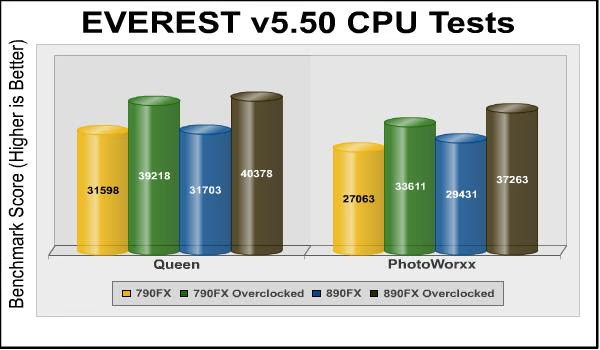
Queen and Photoworxx tests are synthetic benchmarks that operate the function many times over and over-exaggerate by several magnitudes what the real-world performance would be like. The Queen benchmark focuses on the branch prediction capabilities and misprediction penalties of the CPU. It does this by finding possible solutions to the classic queen problem on a chessboard. At the same clock speed theoretically the processor with the shorter pipeline and smaller misprediction penalties will attain higher benchmark scores. At stock clock speeds the Crosshair IV motherboard has a barely-discernible performance edge (a fraction of a percent in Queen, and 8-9% in PhotoWorxx) over its older sibling, possibly due to the doubled link speed between the 890FX and SB850 south bridge. The overclocked results are similarly close at 3% and 11%.
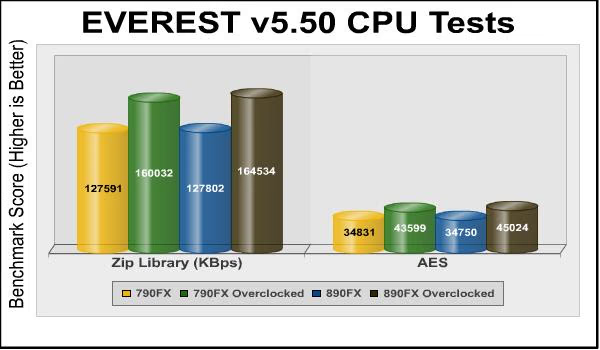
The Zip library and AES test results are similar to the previous tests. The performance of the ASUS Crosshair IV Formula motherboard is identical to the 790FX-based board at stock clock speeds (less than 1% difference), and about 3% faster when overclocked. Now, let's look at some PCMark Vantage tests...
PCMark Vantage Test Results
PCMark Vantage is an objective hardware performance benchmark tool for PCs running 32- and 64-bit versions of Microsoft Windows Vista or Windows 7. PCMark Vantage is well suited for benchmarking any type of Microsoft Windows Vista/7 PC: from multimedia home entertainment systems and laptops, to dedicated workstations and high-end gaming rigs. Benchmark Reviews has decided to use a few select tests from the suite to demonstrate simulate real-world processor usage in this article. Our tests were conducted on 64-bit Windows 7, with results displayed in the chart below.
TV and Movies Suite
- TV and Movies 1 (CPU=50%, RAM=2%, GPU=45%, SSD=3%)
- Two simultaneous threads
- Video transcoding: HD DVD to media server archive
- Video playback: HD DVD w/ additional lower bitrate HD content from HDD, as downloaded from net
- TV and Movies 2 (CPU=50%, RAM=2%, GPU=45%, SSD=3%)
- Two simultaneous threads
- Video transcoding: HD DVD to media server archive
- Video playback, HD MPEG-2: 19.39 Mbps terrestrial HDTV playback
- TV and Movies 3 (SSD=100%)
- HDD Media Center
- TV and Movies 4 (CPU=50%, RAM=2%, GPU=45%, SSD=3%)
- Video transcoding: media server archive to portable device
- Video playback, HD MPEG-2: 48 Mbps Blu-ray playback
Gaming Suite*
- Gaming 1 (CPU=30%, GPU=70%)
- GPU game test
- Gaming 2 (SSD=100%)
- HDD: game HDD
- Gaming 3 (CPU=75%, RAM=5%, SSD=20%)
- Two simultaneous threads
- CPU game test
- Data decompression: level loading
- Gaming 4 (CPU=42%, RAM=1%, GPU=24%, SSD=33%)
- Three simultaneous threads
- GPU game test
- CPU game test
- HDD: game HDD
Music Suite
- Music 1 (CPU=50%, RAM=3%, GPU=13%, SSD=34%)
- Three simultaneous threads
- Web page rendering - w/ music shop content
- Audio transcoding: WAV -> WMA lossless
- HDD: Adding music to Windows Media Player
- Music 2 (CPU=100%)
- Audio transcoding: WAV -> WMA lossless
- Music 3 (CPU=100%)
- Audio transcoding: MP3 -> WMA
- Music 4 (CPU=50%, SSD=50%)
- Two simultaneous threads
- Audio transcoding: WMA -> WMA
- HDD: Adding music to Windows Media Player
* EDITOR'S NOTE: Hopefully our readers will carefully consider how relative PCMark Vantage is as "real-world" benchmark, since many of the tests rely on unrelated hardware components. For example, per the FutureMark PCMark Vantage White Paper document, Gaming test #2 weighs the storage device for 100% of the test score. In fact, according to PCMark Vantage the video card only impacts 23% of the total gaming score, but the CPU represents 37% of the final score. As our tests in this article (and many others) has already proven, gaming performance has a lot more to do with the GPU than the CPU, and especially more than the hard drive or SSD (which is worth 38% of the final gaming performance score).

The stock-clocked Crosshair IV Formula and Crosshair III Formula motherboards are again neck-and-neck, with the 790FX-based Crosshair III actually pulling very slightly ahead in the TV and Movies and Gaming benchmarks. The 890FX-based board has a significant 12% advantage in the Music benchmark. Overclocked, the difference between the boards is within the margin of error for TV and Movies (less than 1% difference), but more significantly in favor of the 890FX board with 11% and 14% better performance in the Gaming and Music benchmarks.
One can always argue how relevant benchmark results are to real-world experiences, or how well they can serve as a predictor thereof. Of the tests in this suite, the TV and Movies is arguably the most "realistic" of the tests, and it's the one that shows the least difference between the platforms.
CINEBENCH 11.5 Benchmark
Maxon CINEBENCH is a real-world test suite that assesses the computer's performance capabilities. CINEBENCH is based on Maxon's award-winning animation software, Cinema 4D, which is used extensively by studios and production houses worldwide for 3D content creation. Maxon software has been used in blockbuster movies such as Spider-Man, Star Wars, The Chronicles of Narnia and many more. CINEBENCH Release 11.5 includes the ability to more accurately test the industry's latest hardware, including systems with up to 64 processor threads, and the testing environment better reflects the expectations of today's production demands. A more streamlined interface makes testing systems and reading results incredibly straightforward.
The CINEBENCH R11.5 test scenario uses all of a system's processing power to render a photorealistic 3D scene, "No Keyframes" the viral animation by AixSponza. This scene makes use of various algorithms to stress all available processor cores. The OpenGL graphics card testing procedure uses a complex 3D scene depicting a car chase with which the performance of your graphics card in OpenGL mode is measured. During the benchmark tests the graphics card is evaluated by way of displaying an intricate scene that includes complex geometry, high-resolution textures, and a variety of effects to evaluate the performance across a variety of real-world scenarios.
The OpenGL tests in CINEBENCH force processor-first graphics computation before offloading work to the available video card. CINEBENCH R11.5 reveals performance results illustrated in the chart below:
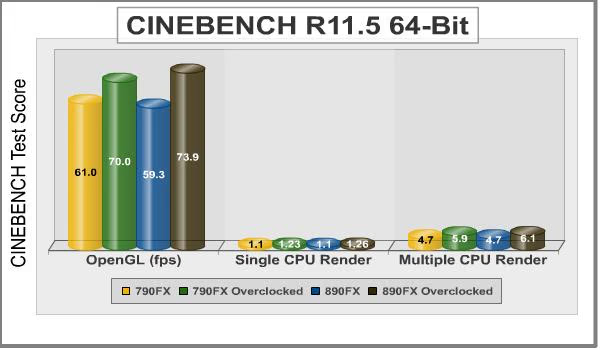
Although the OpenGL test is much more dependent on the video card than the motherboard, it's in this test that we see the largest performance difference: the overclocked ASUS Crosshair IV Formula motherboard is about 6% faster than the overclocked Crosshair III motherboard. The CPU rendering tests show virtually identical performance between the two platforms. Given the specifications (and overclocks) of the two boards Benchmark Reviews is testing, the only real difference would be the extra bandwidth of the 890FX's faster HyperTransport bus (345MHz vs. 285Mhz) and its faster link to the southbridge, neither of which apparently count for much here.
Unigine Heaven Test Results
The Unigine "Heaven 2.0" benchmark is a free publicly available tool that grants the power to unleash the graphics capabilities in DirectX-11 for Windows 7 or updated Vista Operating Systems. It reveals the enchanting magic of floating islands with a tiny village hidden in the cloudy skies. With the interactive mode, the experience of exploring the intricate world is within reach. Through its advanced renderer, Unigine is one of the first to set precedence in showcasing the art assets of tessellation, bringing compelling visual finesse, utilizing the technology to the full extent and exhibiting the possibilities of enriching 3D gaming.
The distinguishing feature in the Unigine Heaven benchmark is its ability to use the hardware tessellation of DX11 video cards. This is a scalable technology aimed for automatic subdivision of polygons into smaller and finer pieces, so that developers can gain a more detailed look of their games almost free of charge in terms of performance. Thanks to this procedure, the elaboration of the rendered image finally approaches the boundary of veridical visual perception: the virtual reality transcends conjured by your hand. The "Heaven" benchmark excels at providing the following key features:
- Native support of OpenGL, DirectX 9, DirectX-10 and DirectX-11
- Comprehensive use of tessellation technology
- Advanced SSAO (screen-space ambient occlusion)
- Volumetric cumulonimbus clouds generated by a physically accurate algorithm
- Dynamic simulation of changing environment with high physical fidelity
- Interactive experience with fly/walk-through modes
- ATI Eyefinity support
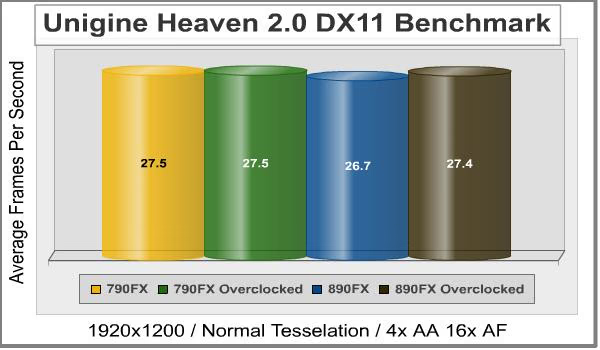
Perhaps unsurprisingly (since Heaven 2 is designed to stress the video card), there's essentially no difference between the motherboards demonstrated with this test. The ASUS Crosshair IV Formula at stock clock speeds turns in the lowest score of 26.7 frames per second, but that's only 0.8 frames per second less than the fastest score of 27.5 frames per second, and that difference is about the difference I saw between individual runs of the test.
Battlefield: Bad Company 2
The Battlefield franchise has been known to demand a lot from PC graphics hardware. DICE (Digital Illusions CE) has incorporated their Frostbite-1.5 game engine with Destruction-2.0 feature set with Battlefield: Bad Company 2. Battlefield: Bad Company 2 features destructible environments using Frostbit Destruction-2.0, and adds gravitational bullet drop effects for projectiles shot from weapons at a long distance. The Frostbite-1.5 game engine used on Battlefield: Bad Company 2 consists of DirectX-10 primary graphics, with improved performance and softened dynamic shadows added for DirectX-11 users.
At the time Battlefield: Bad Company 2 was published, DICE was also working on the Frostbite-2.0 game engine. This upcoming engine will include native support for DirectX-10.1 and DirectX-11, as well as parallelized processing support for 2-8 parallel threads. This should improve performance for users with an multi-core CPUs like the Intel Core-i7 processor and the AMD 1090T used in this test. Unfortunately, the Extreme Edition Intel Core i7-980X six-core CPU with twelve threads will not see full utilization.
In our benchmark tests of Battlefield: Bad Company 2, the first three minutes of action in the single-player raft night scene are captured with FRAPS. Relative to the online multiplayer action, these frame rate results are nearly identical to daytime maps with the same video settings.
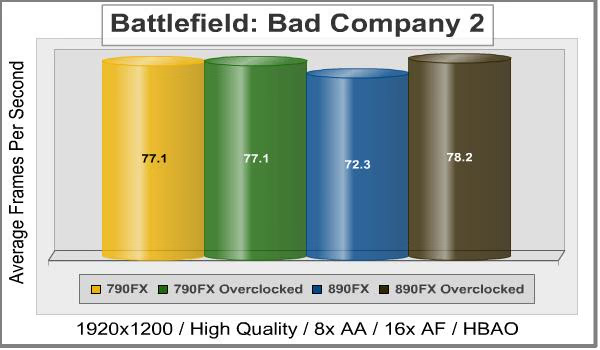
These test results are more interesting. Note that overclocking the ASUS Crosshair III Formula motherboard resulted in no performance improvement at all, but overclocking the 890FX-based Crosshair IV Formula motherboard resulted in an 8% improvement. Also, as we saw in the Unigine Heaven 2.0 benchmark, the 790FX-based Crosshair III motherboard turned in better performance at its stock clock speeds than the newer motherboard...almost 7% better, in fact. The real question is why the results for the stock-clocked Crosshair IV are as low as they are, and I can't come up with a theory why they should be. Sometimes, all you can do is run the benchmark and report the results.
ASUS AM3 Motherboard Final Thoughts
If you've read this whole review (instead of simply jumping to the conclusion pages), you'll have noticed that even the massive 890FX overclocks we achieved with this board often resulted in little or no performance improvements over the previous-generation motherboard. But it would be a mistake to conclude from this that your money isn't well-spent on an enthusiast-level motherboard. As the basis of your entire system, the motherboard is the limiting factor on what you can achieve in overclocking the components that do make a signficant difference, like the processor and memory. Building a system with a high-end CPU, memory, and video card on a lower-end motherboard is like putting a blueprinted, supercharged engine in a Model T chassis...you're not going to be able to realize the performance of which the components are capable.
Throwing a benchmark, game, or other computationally-intensive task at an idling processor can result in the processor's power demand doubling in a microsecond; power circuitry that can handle this sudden demand without a crash-inducing voltage drop is one thing that distinguishes motherboards at this level.
Since the Crosshair IV Formula's 890FX/SB850 design represents the high-end AMD chipset, it's tempting to compare it to Intel's high-end fX58 platforms. But the AMD platform remains attractive for enthusiasts whose budgets won't stretch to cover an X58 system, so its real competitors are similarly-priced Intel P55 systems. And here's where an 890FX-based motherboard has a crushing advantage, especially for the enthusiasts and gamers the 890FX is aimed at: 42 full speed PCI-E 2.0 lanes. P55 computers have a mere 24 lanes: 16 full-speed lanes on the LGA 1156 processor, and 8 half-speed lanes on the P55 chipset. Insert two graphics cards and they'll both run at x8 speeds, and your USB 3.0 performance will be constrained by the half-speed PCI-E lanes from the P55 chipset (I compared the performance of USB 3.0 on full and half-speed PCI-E lanes in my review of the ASUS P7H55D-M Evo motherboard).
Intel systems can make use of NVIDIA's NF200 bridge chips to add extra PCI-E lanes at the cost of extra latency and power (and price: for example, ASUS' own Maximus III Extreme P55 motherboard, which includes an NF200 chip, costs almost $175.00 more than the Crosshair IV Formula.) But if you'd rather put your gaming system dollars where they're make the most difference (and don't mind being limited to ATI video cards), you can build a faster gaming setup around AMD's 890FX platform than Intel's P55 platform...simply because your system will have more PCI-E lanes to devote to multiple high performance graphics cards, and you won't have to compromise the performance of other parts of your system by "stealing" PCI-E lanes.
Few enthusiasts have unlimited budgets. The AMD platform remains attractive because you can buy top-end components for the price of mid-range Intel. Intel fans will argue that the mid-range Intel components can in many cases be tweaked to outperform the high-end AMD components, but the fact remains that the high-end AMD stuff will have features the mid-range Intel stuff in many cases won't: support for three video cards; SATA 6Gb/s, and enough tweaking and overclocking features to keep hard-core overclockers entertained. After all, the whole point behind overclocking (originally, at least) was to enable those who couldn't afford the high-end CPUs and video cards to wring the last bit of performance out of their less-expensive components. AMD's long-term commitment to Socket AM3 (in contrast to Intel, which seems to revel in introducing new CPU sockets, each with a unique CPU cooler mounting system) makes it easier for owners to upgrade their systems a piece at a time.
Any 890FX-based motherboard is going to be an enthusiast-level product, and barring BIOS bugs or component problems, the overall performance of any given 890FX-based motherboard is going to be pretty similar to the performance of any other 890FX-based motherboard, or even to the performance of previous-generation 7-series motherboards. But let us re-emphasize: it not all about the performance; it's about how the motherboard serves the rest of your system. The Crosshair IV Formula has enough new features - triple-card CrossFireX support, 6 native SATA 6Gb/s ports, SuperSpeed USB, and so forth - to ensure that a system built around this motherboard would, given appropriate components, be considerably faster than a system you could build with a Crosshair III. Even if you don't have a SATA 6Gb/s SSD or three Radeon video cards laying around, this "future proofing" means you'll be able to easily upgrade your system in the future without having to invest in a new motherboard.
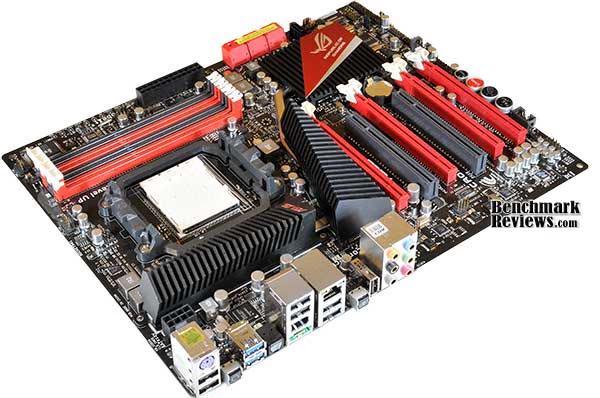
Of course, any other 890FX motherboard will have SATA 6Gb/s, and I don't remember the last new motherboard introduced without the NEC D720200F1 USB 3.0 controller. So how does ASUS distinguish their product from the competition? Custom chips for power management and overclocking, and innovative features like ROG Connect, that's how. And, of course, there's the physical appearance of the board: a co-ordinated red and black color scheme and Art Deco heatsinks confer no functional benefit, but they sure look good in a lit, windowed case (and seem to be the de facto "styling" for all of ASUS' new Formula and Extreme motherboards). The down side to all this is that this is one of the most expensive AM3 motherboards available, which could make it a hard sell.
Bling and features aside, there were a few disappointing things with this motherboard. The lack of included thermal sensors, only a single BIOS chip, and no physical connectors for voltage probes are cost-cutting measures that seem inappropriate given that competing 890FX-based motherboards with SATA 6Gb/s, USB 3.0, and triple-card CrossFireX support can be had for $25-$75 less.
ASUS Crosshair IV Formula Conclusion
Although we strive to be as objective as possible, any review will reflect to some extent the perceptions and biases of the reviewer. Also, keep in mind that the computer market is very volatile, and that today's killer super product can easily become yesterday's also-ran as the market competition changes. Don't base a purchase decision solely on this review, but use it as part of your research.
As with most of ASUS' motherboards, the Crosshair IV Formula comes in an elabofrate box with a hinged flap that opens to reveal the motherboard visible under a thick clear plastic window. It looks great on the store shelf and the Velcro-secured flap lets you look at the motherboard without opening the box, but one wonders how much the retail price could be reduced if the board shipped in a plain brown cardboard box. The accessories bundle is standard for this level of board, but should have included at least a couple of temperature sensors.
The performance of this motherboard was excellent, with an amazingly high HyperTransport overclock of 345MHz. However, as Benchmark Review's tests showed, even this overclock did not significantly improve benchmark performance as compared to the previous-generation Crosshair III motherboard. But for performance potential, the newer-generation has it all over its older sibling, with triple-card CrossFireX, SATA 6Gb/s, and SuperSpeed USB 3.0 support. So while benchmarks might not be appreciably faster on this motherboard, a system built with high-end components that can use its new features would be substantially faster.
The appearance of this motherboard is simply spectacular. ASUS obviously put almost as much thought into the appearance of the board as they did its features. Some might think it's a little too much, but I think the board really hits the sweet spot between "just another motherboard" and "over the top". It would look especially nice in a matching red-and-black Cooler Master HAF 932 AMD Edition windowed case. As with their other enthusiast-level motherboards, ASUS has peppered the Crosshair IV Formula with a number of indicator LEDs that provide feedback on things like voltages and BIOS profiles...which will also look good in a windowed case.
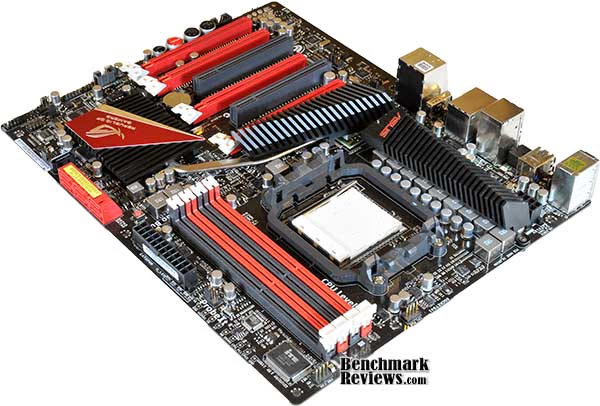
Construction quality was excellent. At this level of motherboard, you should expect perfect solder-masking, with no drips or smudged silk-screen printing; perfectly aligned components (slightly wonky chokes are surprisingly common these days), and, perhaps most importantly, good component layout. You want plenty of room around the CPU socket for your giant cooler, connectors placed near the edges of the board, and so forth. Cables or components should never block connectors (how many motherboards place SATA connectors in a perfect position to be blocked by a long graphics card in the second slot?), nor should connectors be placed so close to other components that you need a tool to release the connector latch. ASUS' decision to eliminate the legacy IDE and floppy ports opened up room on the motherboard they've used to good advantage.
Functionally, it's mostly good. ASUS uses AMD's latest chipset to good advantage, and offers its own custom silicon to add advanced power management and overclocking features, and third party chips for features like USB 3.0 and high-end sound. It's great to see a processor chipset that finally supports SATA 6Gb/s natively, even if devices that can use it are thin on the ground just now...but they won't be in another 6-12 months. Onboard buttons for power, reset, and BIOS clearing are expected on high-end motherboards these days; ASUS adds buttons for simple overclocking, core unlocking, and overclocking profile retrieval as well. Minor disappointments like a single BIOS chip, no included temperature sensors, and no connectors for multimeter probes are my only complaints.
While relatively inexpensive compared to enthusiast-level Intel X58 motherboards, at $229 at NewEgg, the ASUS Crosshair IV Formula AM3 motherboard is much more expensive than most other 890FX-based motherboards, many of which have comparable feature sets. Whether ASUS' proprietary features such as ROG Connect are worth the extra money is something each buyer will have to decide. You'll rarely get a bargain buying the best, and although this board is many things, a "bargain" is not one of them. Still, price is relative, and you could buy this board and the AMD Phenom II X4 965 Black Edition processor for less than a technically less-interesting Intel Core i7 930 processor and mid-level X58 motherboard. This board is for the knowledgeable AMD enthusiast who can recognize and appreciate its performance and features as the basis of an "ultimate" AMD-based system.
Pros:
+ Pretty!
+ Excellent board layout
+ Supports triple-card CrossFireX
+ More overclocking features and methods than you will ever use
+ Achieves very high overclocks
+ 6 native SATA 6Gb/s ports, two USB 3.0 ports
+ ASUS custom chips add useful power saving, automatic overclocking features
Cons:
- Expensive enthusiast-level product
- Only a single BIOS chip
- No thermal probes included
- No multimeter probe connectors
- Can't use DDR2 memory from your existing AMD system
Ratings:
-
Performance: 9.0
-
Appearance: 9.5
-
Construction: 9.0
-
Functionality: 9.0
-
Value: 7.25
Final Score: 8.75 out of 10.
Quality Recognition: Benchmark Reviews Silver Tachometer Award.
Questions? Comments? Benchmark Reviews really wants your feedback. We invite you to leave your remarks in our Discussion Forum.
Reader comments from the original article
13 comments were posted before commenting closed. They are preserved as written. Original avatars no longer resolve and are shown as a placeholder.
Asus Crosshair IV Steve Permalink:
I would like to know if a dvd drive can connect to this motherboard. I look on the board and i don't see where the ribbon from the dvd drive is to connect to the motherboard. Can you please inform me as to how to work around this in installing the softwares.
RE: Asus Crosshair IV Olin Coles Permalink:
This motherboard only has SATA connections. There is no support for legacy hardware such as IDE drives of floppy drives.
RE: ASUS Crosshair IV Formula AMD-890FX Motherboard Kryztian Permalink:
I'm going to build a system in about 3 months and this is the specs I would like to include: AMD Phenom II X6 1090T Black Edition Thuban 3.2GHz ASUS Crosshair IV Formula AM3 AMD 890FX ASUS EAH5970/2DIS/2GD5 Radeon HD 5970 2GB 8GB Memory (2x 4GB) I'm doing a research about what memory would be the most compatible and with most performance for this system. I personally like Kingston, but some friends recommended me Corsair or OCz. What company and what model would you recommend me for this system? Thanks... By the way... your reviews are awesome. Thanks a lot for your time.
Purpose? Olin Coles Permalink:
The question shouldn't be which brand... it should be what are you going to do with this computer?
Recommend Justin Permalink:
Crucial Ballistix Extream Performance 240-pin DIMM, DDR3 PC3-12800 memory module Affordable And Very Fast!
Also: Justin Permalink:
Gives Me 7.3 For 4Gb (2x2Gb) For Memory Operations Per Second,Its Not 7.9 But I'm Sure With 8-16Gb Of It You Will Be Doing Whatever You Want,I Am Running The M4A79XTD EVO At The Moment With This Ram And Its Amazing,I'm Looking In To Buying This Crosshair Board To Replace The EVO And I'm Loading It Up With 8Gb Of Crucial,But Whatever You Decide To Do Is Your Choice Its Your Pc. Good Day!
CPU Cooler For the crosshair IV Damien OBrien Permalink:
I am building a new system in the near future. I settled on the crosshair IV for my motherboard. I was wondering anyone if could tell me if the cooler master V6 cooler would fit without blocking the first ddr slot? Or if anyone has the dimmensions for the cpu area.
RE: CPU Cooler For the crosshair IV Patrick Permalink:
I have crosshair IV and cooler master V6GT and fits and works great, however be prepared to have to remove the motherboard to fit the cooler and it well only fit inside very large cases.
.RE: CPU Cooler? Bigolddog Permalink:
I have a CoolerMaster V10 CPU Cooler my Crosshair Formula IV motherboard and I run Ripsaw 1800MGz 4X2 memory ram
NB!! zelove Permalink:
What do you think about the hot north bridge issues!?
Case Chris Permalink:
What size case will work with this motherboard?
Full Size ATX BruceBruce Permalink:
This is a full size ATX form factor motherboard. 90% of all computer cases on sale throughout the world are designed for standard ATX motherboards.
cosminholuis@hotmail .com cosme luis s da s Permalink:
crosshair iv formula memoriy [2x2] amd phenom 2x6 1090t black edition 3.2ghz