
ASUS Rampage IV Formula Gene Motherboard
ASUS Rampage IV Gene Motherboard Review
Model Number: Rampage IV Gene
Price:$289.99 (Newegg)
Full Disclosure: The product sample used in this article has been provided by ASUS.
The ASUS Republic of Gamers Rampage series of motherboards usually comes in three varieties, the Extreme, Formula, and Gene. Benchmark Reviews recently brought you an in-depth review of the ASUS Rampage IV Formula motherboard. Now it's time for a look at the Formula's little brother, the ASUS Rampage IV Gene. Built on the Intel X79 Express chipset, the Rampage IV Gene represents the low-end of the ASUS Republic of Gamers X79 motherboards.

The Republic of Gamers line was introduced back in 2006, when ASUS used it to begin emphasizing the most cutting-edge hardware for enthusiasts. ROG motherboards are available in both AMD and Intel varieties. The Maximus and Rampage series tout Intel chipsets and the Crosshair series is made for AMD processors. More specifically, the Rampage IV series of ROG motherboards houses the Intel X79 Chipset with the LGA 2011 socket for Intel Sandy Bridge Extreme processors. Within the Rampage IV series there are three flavors. The Rampage IV Gene represents the low of the high-end, followed up by the Rampage IV Formula and finally the Rampage IV Extreme.
The Rampage IV Gene motherboard is somewhat of a mystery to me. I'm excited to sink my teeth in and find out all about this micro-ATX X79 motherboard. What confuses me is the appeal of a motherboard such as the Rampage IV Gene. As a micro-ATX motherboard, it can't support the 4-way SLI or CFX that the X79 Express chipset and Sandy Bridge Extreme CPUs are known for. The Extreme Engine DIGI+ II and isolated Supreme FX III audio CODEC are nice features, but do the extras on the Rampage IV Gene justify the expense?
You are probably already very familiar with the X79 chipset by now. If not, please check out our reviews of the ASUS Sabertooth X79 TUF Motherboard or the ASUS P9X79 Deluxe Motherboard for more information about the Intel Sandy Bridge Extreme Chipset.
Closer Look: ASUS Rampage IV Gene Motherboard
Nearly all ASUS Republic of Gamers motherboard boxes look the same. The only exception is specially bundled motherboards like the Battlefield 3 Edition boards in the Rampage IV series. For the most part, though, the boxes are plain red with the Republic of Gamers logo at top and the flames/splash at the bottom. It's not flashy, but it's branded. If you're a ROG fan, you know what to look for.

The ASUS Rampave IV Gene comes with almost the same accessories as the Formula. It has only 2 SATA 3Gb/s cables instead of 4, but it still has 4 SATA 6Gb/s cables. There is an SLI bridge, but no 3-Way bridge and no CrossFire cable. The Q-Connectors are present, as well as the ROG Connect cable and the ROG cable labels. Also absent is the X-Socket pad that allows you to use your old X58 cooler. The driver CD, ROG Connect manual, and the motherboard manual are there as well.
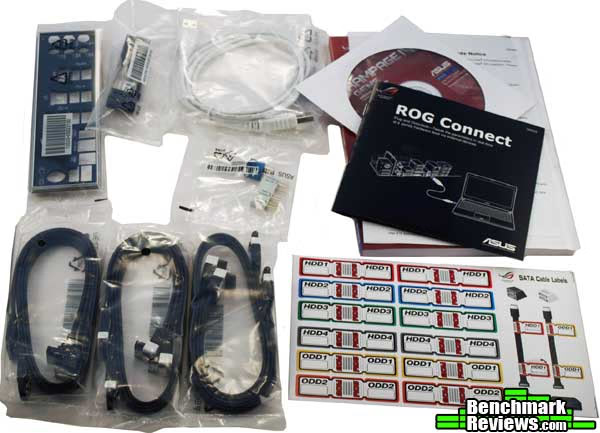
Since the Rampage IV Gene doesn't come with a Battlefield 3 Edition motherboard, so the extras we saw bundled with the Rampage IV Formula BF3 Edition are missing here. There are a couple of extras, however. The Republic of Gamers flame splash sticker and the "I'm Gaming, Do Not Disturb" door hanger come with the Rampage IV Gene motherboard.

The ASUS Rampage IV Gene motherboard is a micro-ATX motherboard. That makes it quite a bit smaller than the full ATX X79 offerings like it's big brother, the Rampage IV Formula. What that also means is that it is missing some of the features the bigger boards can offer. The Rampage IV Gene looks very similar to the other ROG motherboards. It sports the red and black theme and the heatsinks are stylized to match the professional look of the ROG series. The MOSFETS and the rest of the VRM are all covered by heatsinks to help deal with the extra stress the Rampage IV Gene is likely to experience as you boost up the voltage levels for an extreme overclock.
The Rampage IV Gene is a little skimpy on the I/O end, in my opinion. It has all of the necessary items, but none of the extras. There is a legacy PS/2 port for your mechanical keyboard. I usually don't like this, but it makes some sense on a gaming motherboard. PS/2 keyboards can log an unlimited number of simultaneous key presses, where even the best USB keyboards can only keep track of up to 6. This doesn't matter for most people, but some extreme gamers may find themselves in a situation where they want to mash a lot of buttons at once.
The reason I call it skimpy is because it fully loads 8 USB 2.0 ports and only 2 USB 3.0 ports where the Rampage IV Formula has four. It has only one eSATA port rather than two and it's not powered. The reason I find this disappointing is that the Rampage IV Gene has the exact same ASMedia controllers as the Rampage IV Formula. There isn't an issue of space. There could have been two more USB 3.0 ports replacing two USB 2.0 ports on the I/O and there could have been two powered eSATA ports. There just isn't.

Finishing off the I/O panel we have the Gigabit Ethernet port powered by the Intel 82579V chip, providing the best Ethernet connectivity available. Also, you have a clear CMOS button, which comes in extremely handy during overclocking. Besides the 6 standard HD Audio ports, you have an S/PDIF Optical 8-Channel output. The final button is the ROG Connect switch. Turn it on and that bottom USB port turns into a ROG Connect port. Alternatively, that port, when activated, becomes the BIOS flashback port. You can flash the BIOS with the motherboard only connected to a power supply. You don't need to have a CPU, RAM or any other components present. That's a pretty handy feature.

The Rampage IV Gene supports quad-channel memory, with each DIMM slot representing a different channel; A1 is closest to the rear I/O panel and D1 is closest to the 24-Pin power connector. This still allows for up to 32GB of RAM and the speeds supported are the same as the other ASUS X79 motherboards at up to 2400MHz overclocked. The recommended configuration is for a single DIMM in D1, two DIMMs in D1 and B1, three in D1, C1, and B1, and the A1 slot only being used with all four DIMMs in place. The lack of more DIMM slots disappointed me on the Rampage IV Formula, and it disappoints me again on the Rampage IV Gene.

While the Rampage IV Formula makes up for some of its deficiencies with its four fully functional PCIe x16 ports, the Gene can't keep up with that. The micro-ATX form factor won't fit four PCIe x16 ports. As it is, the Rampage IV Gene has three PCIe x16 ports. Two of those ports run at x16 and the third runs at x8. You'd be hard-pressed to use all three, however, since the last two ports are right next to each other. You'll need cards that only take up a single slot to use all three.

Let's talk about those PCIe lanes for a minute. The lanes here are PCIe 3.0 lanes. While the technology for PCIe 3.0 lanes has been available for over a year, it hasn't been used until now. The main reason for this is that even PCIe 2.0 bandwidth, at 5GT/s is underutilized by current GPUs. PCIe 3.0 takes that bandwidth up to 8GT/s, but really adds much more because it uses a new technique that does away with the traditional 8b/10b encoding. That 8b/10b encoding can cost up to 20% in bandwidth, meaning the PCIe 2.0 lanes really give about 4GT/s. The new technique, called scrambling, only loses about 1 to 1.5% in bandwidth, so PCIe 3.0 very nearly doubles the previous standard. With that in mind, even running at x8, the bandwidth could, hypothetically, allow the GPU to run at the same bandwidth as traditional x16 slots. This hasn't panned out in testing, but it might prove useful when more GPUs start taking advantage of the higher capabilities.
 To finish off our closer look at the ASUS Rampage IV Gene motherboard, we have the SATA ports. There are seven on Rampage IV Gene, besides the eSATA port on the rear I/O. As you are likely aware, the X79 chipset, like the other Sandy Bridge chipsets, only supports 2 SATA 6 Gb/s ports natively. Here there are four, two powered by an ASMedia controller. The red ports are SATA 6 Gb/s and the black are SATA 3GB/s ports. With the tighter space requirements of the Rampage IV Gene, there isn't room for the extra two SATA 3GB/s ports you find on the Formula motherboard. The seventh and final SATA port is actually located under the Chipset on the bottom of the board.
Rampage IV Gene Detailed Features
Now that we've had an overview of what the Rampage IV Gene has to offer compared to other X79 alternatives, let's look deeper into the more detailed features of this ROG motherboard.
To start off, the ASUS Rampage IV series moves one step ahead of even the other ASUS X79 motherboards by implementing their Extreme Engine DIGI+ II. DIGI+ II digitalizes the control of the voltages on the motherboard. DIGI+ II adds even more features than its predecessor, allowing for even better voltage regulation for extreme overclocking. The DIGI+ II on the Rampage IV Gene includes an 8-phase CPU power design, a little lower than the 16-phase on the P9X79 Deluxe, and the same 2 +2-phase design for DRAM power. It also provides a 3-phase VCCSA power design. The ability to tweak the VCCSA through the Extreme Engine DIGI+ II is very nice, considering a major part of overclocking the X79 chipset is through boosting the bclk. The Rampage IV Gene lacks the TPU we have become accustomed to on newer ASUS motherboards, but the purpose of the Rampage IV Gene , overclocking and extreme gaming, really precludes the necessity anyway. It does keep the EPU, however, for enhanced energy efficiency. In addition to DIGI+ II, the ASUS Rampage IV Gene protects overclockers from frying their machine through the use of COP EX component overheat protection, an LED called a Voltiminder that lets you know when things are a little off, and ASUS C.P.R., or CPU Parameter Recall.

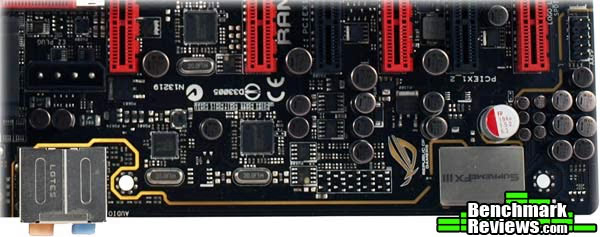
In the image above you can see the two DIGI+ chips found on the Rampage IV Gene, as well as one of the two ASMedia controllers (one for USB 3.0 ports and the other for the extra four SATA 6Gb/s ports). The Nuvoton chip is an I/O chip made for monitoring voltages, fan speeds, and temperatures. This chip allows you to use software such as the AI Suite II to monitor your components in Windows. The ICS chip is the internal clock generator and the SupremeFX III is actually just a cover for the audio CODEC, which we will explore more in just a bit.

Speaking of hardware monitoring, the ASUS Rampage IV Gene has the fancy LEDs up by the CPU fan connector that correspond with a whole list of diagnostics you can find the user's manual. Not too far from those LEDs are a bunch of tiny probe points. You can connect a probe to these points to see the exact voltage levels as they are coursing through your motherboard. Lacking on the Rampage IV Gene is the LN2 switch. I suppose if you want to cool with liquid nitrogen, you should get a different board.

Now back to the SupremeFX III Audio CODEC. ASUS has forgone the usual Realtek 7.1 channel audio CODEC for a full 8-Channel Audio CODEC with a 1500 uF Audio Power Capacitor. The SupremeFX III carries support for X-Fi Xtreme Fidelity, EAX Advanced HD 5.0, THX TruStudio Pro, Creative Alchemy, and Blu-ray audio layer content protect. Probably my favorite feature of the SupremeFX III, however, is the new shielding technology. One of the biggest problems with audio CODECs is the interference from other components. As you can see in the image, ASUS has completely isolated the audio CODEC on the Rampage IV Gene. This should help to diminish, if not eliminate entirely, the interference with other components.
To finish off, let's take a look at the ROG specific features of the Rampage IV Gene because these are what really set this motherboard apart from other X79 motherboards. To start, the Rampage IV Formula has ROG Connect. When you start it up by pushing the button on the I/O panel, the white USB port turns into the ROG Connect USB port. By connecting a laptop, you can monitor POST code and status readouts and make adjustments to your overclock in real-time. Another ROG feature is GameFirst. This program allows you to manage your internet bandwidth usage and prioritize it to meet your gaming needs. If you are gaming online, downloading files, streaming musing, chatting, and doing anything else at the same time and your internet speeds begin to slow, GameFirst will divert the flow from these less important functions to make sure your ping stays low. Pwn on!
Finally, the Rampage IV Gene comes with some nice, bundled software. First up is an Anti-Virus, Kapersky specifically. With Microsoft Security Essentials out now, this isn't too much of a necessity anymore, but it's a nice feature. ROG CPU-Z is included too. CPU-Z is free, but this one looks like ROG. Way cooler. DAEMON Tools Pro Standard is also included, for "backing-up" CDs, DVDs, and Blu-rays. It will also let you write your discs to your hard drive and run them off the optical drive emulator. Mem TweakIt and GPU TweakIt are also included, allowing you real-time manageability for your Memory and GPU similar to what you have for your CPU.

The last thing I want to mention is overclocking on the Rampage IV Gene. It won't take long because it is exactly the same as the Rampage IV Formula. I'm not going to spend extra time explaining the overclocking process here, because I went into great detail about overclocking in my review of the Rampage IV Formula. I got exactly the same results with the Rampage IV Gene. If you're interested, check out that section here.
Motherboard Features and Specifications
ASUS Rampage IV GENE Specifications
Specifications supplied by ASUS.
|
CPU |
Intel Socket 2011 for 2nd Generation Cor i7 Processors |
|---|---|
|
Chipset |
Intel X79 |
|
Memory |
4 x DIMM, Max. 32GB, DDR3 2400(O.C.)/2133(O.C.)/1866/1600/1333/1066 MHz Non-ECC, Un-buffered Memory |
|
Multi-GPU Support |
Supports NVIDIA SLI Technology |
|
Expansion Slots |
2 x PCIe 3.0/2.0 x16 (dual x16, red) |
|
Storage |
Intel X79 chipset : |
|
LAN |
Intel, 1 x Gigabit LAN Controller(s) |
|
Audio |
SupremeFX III built-in 8-Channel High Definition Audio CODEC |
|
USB Ports |
ASMedia USB 3.0 controller : |
|
Overclocking Features |
ROG Connect |
|
Special Features |
ASUS TurboV EVO : |
|
Back I/O Ports |
1 x PS/2 keyboard/mouse combo port(s) |
|
Internal I/O Ports |
1 x USB 3.0 connector(s) support(s) additional 2 USB 3.0 port(s) |
|
Accessories |
User's manual |
|
BIOS |
64Mb Flash ROM, UEFI AMI BIOS, PnP, DMI2.0, WfM2.0, SM BIOS 2.5, ACPI2.0a Multi-Language BIOS |
|
Manageability |
WfM2.0, DMI2.0, WOL by PME, WOR by PME, PXE |
|
Support Disc |
Support DVD: |
|
Form Factor |
uATX Form Factor |
|
Note |
*1: These SATA ports are for data hard drivers only. ATAPI device is not supported. |
Motherboard Testing Methodology
Motherboards based on the same chipset, even from different vendors, will tend to perform similarly when equipped with the same hardware (processor, memory, video card, et cetera), so vendors strive to distinguish themselves on features. And as you might expect from ASUS, this motherboard is jammed with proprietary goodies: Extreme Engine DIGI+ II, EPU, auto-overclocking, fully digital power circuitry, various diagnostic LEDs, and a complete suite of software and utilities to let you make the most of it. You can even overclock the CPU and tweak the power settings from within Windows, without rebooting, with the included Turbo V Evo utility.
Unfortunately, I didn't have four identical graphics cards to really give the system a workout; so you'll have to be satisfied with our standard test suite. I'll compare the ASUS Rampage IV Gene motherboard against a motherboard from each of the other recent chipsets, as well as another board from the Rampage IV line, the Gene.
Intel X58 Express Test Platform
- Motherboard: ASUS Rampage III Extreme with BIOS 0901
- Processor: 3.33GHz Intel Core i7-980X
- System Memory: 12GB (6 2GB DIMMs) Corsair Dominator CMD12GX3M6A1600C8 DDR3-1600 (9-9-9-24)
- Primary Drive: Western Digital VelociRaptor 300G
- Graphics Adapter: AMD Radeon 6850
- CPU cooler: Cooler Master Hyper 612 PWM
Intel P67 Express Test Platform
- Motherboard: ASUS P8P67 with BIOS 1305
- Processor: 3.4GHz Intel Core i7-2600K
- System Memory: 8GB (2 4GB DIMMs) Corsair Vengeance DDR3-1600 (9-9-9-24)
- Primary Drive: Western Digital VelociRaptor 300G
- Graphics Adapter: AMD Radeon 6850
- CPU cooler: Cooler Master Hyper 612 PWM
AMD 990FX Test Platform
- Motherboard: ASUS Crosshair V Gene with BIOS 0083
- Processor: 3.6GHz AMD FX-8150 "Bulldozer"
- System Memory: G. Skill F3-17066CL7D-4GBPIS DDR3-1866 (9-9-9-24)
- Primary Drive: Western Digital VelociRaptor 300G
- Graphics Adapter: AMD Radeon 6850
- CPU cooler: Thermalright Silver Arrow
Intel X79 Express Test Platforms
- Motherboard: ASUS Rampage IV Gene
- Motherboard: ASUS Rampage IV Gene
- Processor: 3.6GHz Intel Core i7-3820
- System Memory: 16GB (4 4GB DIMMs) G.Skill RipJaws X Series DDR3-1866 (9-9-9-24)
- Primary Drive: Zalman 256GB SSD
- Graphics Adapter: AMD Radeon 6850
- CPU cooler: Corsair CWCH60 H60 CPU Cooler
Benchmark Applications
- Operating System: Windows 7 Home Premium 64-Bit
- SiSoft Sandra Lite 2011.SPS (1780)
- AIDA64 Extreme Edition v1.85.1600
- Futuremark PCMark Vantage v1.0.2.0 64-Bit
- TV and Movies
- Gaming
- Music
- Maxon CINEBENCH R11.5 64-Bit
- Street Fighter IV benchmark
- PassMark PerformanceTest 7.0b1021
- x264Bench HD 3.0, including AMD-supplied variants using new FX instructions
- SPECviewperf-11:
- Lightwave 9.6
- Autodesk Maya 2009
- Siemens Teamcenter Visualization Mockup
- SPECapc LightWave 3D v9.6
- Handbrake 0.95 video transcoding
- Blender 3D rendering
- POV-Ray 3D rendering
AIDA64 Extreme Edition Tests
AIDA64 Extreme Edition is the evolution of Lavalys' "Everest Ultimate Edition". Hungarian developer FinalWire acquired the rights to Everest in late November 2010, and renamed the product "AIDA64". The Everest product was discontinued and FinalWire is offering 1-year license keys to those with active Everest keys.
AIDA64 is a full 64-bit benchmark and test suite utilizing MMX, 3DNow! and SSE instruction set extensions, and will scale up to 32 processor cores. An enhanced 64-bit System Stability Test module is also available to stress the whole system to its limits. For legacy processors all benchmarks and the System Stability Test are available in 32-bit versions as well. Additionally, AIDA64 adds new hardware to its database, including 300 solid-state drives. On top of the usual ATA auto-detect information the new SSD database enables AIDA64 to display flash memory type, controller model, physical dimensions, and data transfer performance data. AIDA64 v1.00 also implements SSD-specific SMART disk health information for Indilinx, Intel, JMicron, Samsung, and SandForce controllers.
All of the benchmarks used in this test- Queen, Photoworxx, ZLib, hash, and AES- rely on basic x86 instructions, and consume very little system memory while also being aware of Hyper-Threading, multi-processors, and multi-core processors. Of all the tests in this review, AIDA64 is the one that best isolates the processor's performance from the rest of the system. While this is useful in that it more directly compares processor performance, readers should remember that virtually no "real world" programs will mirror these results.

The Queen and Photoworxx tests are synthetic benchmarks that iterate the function many times and over-exaggerate what the real-world performance would be like. The Queen benchmark focuses on the branch prediction capabilities and misprediction penalties of the CPU. It does this by finding possible solutions to the classic queen problem on a chessboard. At the same clock speed theoretically the processor with the shorter pipeline and smaller misprediction penalties will attain higher benchmark scores.
Like the Queen benchmark, the Photoworxx tests for penalties against pipeline architecture. The synthetic Photoworxx benchmark stresses the integer arithmetic and multiplication execution units of the CPU and also the memory subsystem. Due to the fact that this test performs high memory read/write traffic, it cannot effectively scale in situations where more than two processing threads are used, so quad-core processors with Hyper-Threading have no real advantage. The AIDIA64 Photoworxx benchmark performs the following tasks on a very large RGB image:
- Fill
- Flip
- Rotate90R (rotate 90 degrees CW)
- Rotate90L (rotate 90 degrees CCW)
- Random (fill the image with random colored pixels)
- RGB2BW (color to black & white conversion)
- Difference
- Crop

Intel's Clarksdale and subsequent CPUs have dominated the AES test due to their Advanced Encryption Standard New Instructions (AES-NI), which dramatically accelerate AES code. Again, we see similar results turned in by all the ASUS boards.

Let's move on to the PCMark Vantage benchmark.
PCMark Vantage Tests
PCMark Vantage is an objective hardware performance benchmark tool for PCs running 32- and 64-bit versions of Microsoft Windows Vista or Windows 7. It's well suited for benchmarking any type of Microsoft Windows Vista/7 PC: from multimedia home entertainment systems and laptops, to dedicated workstations and high-end gaming rigs. Benchmark Reviews has decided to use a few select tests from the suite to simulate real-world processor usage in this article. Our tests were conducted on 64-bit Windows 7, with results displayed in the chart below.
TV and Movies Suite
- TV and Movies 1 (CPU=50%, RAM=2%, GPU=45%, HDD=3%)
- Two simultaneous threads
- Video transcoding: HD DVD to media server archive
- Video playback: HD DVD w/ additional lower bitrate HD content from HDD, as downloaded from net
- TV and Movies 2 (CPU=50%, RAM=2%, GPU=45%, HDD=3%)
- Two simultaneous threads
- Video transcoding: HD DVD to media server archive
- Video playback, HD MPEG-2: 19.39 Mbps terrestrial HDTV playback
- TV and Movies 3 (HDD=100%)
- HDD Media Center
- TV and Movies 4 (CPU=50%, RAM=2%, GPU=45%, HDD=3%)
- Video transcoding: media server archive to portable device
- Video playback, HD MPEG-2: 48 Mbps Blu-ray playback
Gaming Suite*
- Gaming 1 (CPU=30%, GPU=70%)
- GPU game test
- Gaming 2 (HDD=100%)
- HDD: game HDD
- Gaming 3 (CPU=75%, RAM=5%, HDD=20%)
- Two simultaneous threads
- CPU game test
- Data decompression: level loading
- Gaming 4 (CPU=42%, RAM=1%, GPU=24%, HDD=33%)
- Three simultaneous threads
- GPU game test
- CPU game test
- HDD: game HDD
Music Suite
- Music 1 (CPU=50%, RAM=3%, GPU=13%, HDD=34%)
- Three simultaneous threads
- Web page rendering - w/music shop content
- Audio transcoding: WAV -> WMA lossless
- HDD: Adding music to Windows Media Player
- Music 2 (CPU=100%)
- Audio transcoding: WAV -> WMA lossless
- Music 3 (CPU=100%)
- Audio transcoding: MP3 -> WMA
- Music 4 (CPU=50%, HDD=50%)
- Two simultaneous threads
- Audio transcoding: WMA -> WMA
- HDD: Adding music to Windows Media Player
* EDITOR'S NOTE: Hopefully our readers will carefully consider how relevant PCMark Vantage is as a "real-world" benchmark, since many of the tests rely on unrelated hardware components. For example, per the FutureMark PCMark Vantage White Paper document, Gaming test #2 weighs the storage device for 100% of the test score. In fact, according to PCMark Vantage the video card only impacts 23% of the total gaming score, but the CPU represents 37% of the final score. As our tests in this article (and many others) have already proven, gaming performance has a lot more to do with the GPU than the CPU, and especially more than the hard drive or SSD (which is worth 38% of the final gaming performance score).

The TV and Movies suite concentrates on video playback and transcoding, but only uses two threads at a maximum, so most of the cores in these high-end processors are sitting idle.
The Gaming benchmark relies on the hard disk and video card for over 50% of its score (see the Editor's Note above), and we're using the same video card for all platforms, so the results for all these motherboards are directly comparable.
CINEBENCH R11.5 Benchmarks
Maxon CINEBENCH is a real-world test suite that assesses the computer's performance capabilities. CINEBENCH is based on Maxon's award-winning animation software, Cinema 4D, which is used extensively by studios and production houses worldwide for 3D content creation. Maxon software has been used in blockbuster movies such as Spider-Man, Star Wars, The Chronicles of Narnia, and many more. CINEBENCH Release 11.5 includes the ability to more accurately test the industry's latest hardware, including systems with up to 64 processor threads, and the testing environment better reflects the expectations of today's production demands. A more streamlined interface makes testing systems and reading results incredibly straightforward.
The CINEBENCH R11.5 test scenario comprises three tests: an OpenGL-based test that models a simple car chase, and single-core and multi-core versions of a CPU-bound computation using all of a system's processing power to render a photo-realistic 3D scene, "No Keyframes", the viral animation by AixSponza. This scene makes use of various algorithms to stress all available processor cores, and all rendering is performed by the CPU: the graphics card is not involved except as a display device. The multi-core version of the rendering benchmark uses as many cores as the processor has, including the "virtual cores" in processors that support Hyper-Threading. The resulting "CineMark" is a dimensionless number only useful for comparisons with results generated from the same version of CINEBENCH.

Let's take a look at some CPU-limited gaming results in the next section.
CPU-Dependent 3D Gaming
Street Fighter IV uses a new, built-from-scratch graphics engine that enables CAPCOM to tune the visuals and performance to fit the needs of the game, as well as run well on lower-end hardware. Although the engine is based on DX9 capabilities, it does add soft shadows, High Dynamic Range lighting, depth of field effects, and motion blur to enhance the game experience.
The game is multi-threaded, with rendering, audio, and file I/O all running in different threads. The development team has also worked to maintain a relatively constant CPU load in all parts of the game so that on-screen performance does not change dramatically in different game scenarios.

I ran the Street Fighter IV benchmark at its lowest resolution (640x480) will all graphical features turned down to the minimum possible settings. This makes the video card much less of a factor in the results, biasing towards processor performance.
PassMark PerformanceTest 7.0
The PassMark PerformanceTest allows you to objectively benchmark a PC using a variety of different speed tests and compare the results to other computers. PassMark comprises a complete suite of tests for your computer, including CPU tests, 2D and 3D graphics tests, disk tests, memory tests, and even tests to determine the speed of your system's optical drive. PassMark tests support Hyper-Threading and systems with multiple CPUs, and allow you to save benchmark results to disk (or to export them to HTML, text, GIF, and BMP formats).
Knowledgeable users can use the Advanced Testing section to alter the parameters for the disk, network, graphics, multitasking, and memory tests, and created individual, customized testing suites. But for this review I used only the built-in CPU tests, which aren't configurable. The CPU tests comprise a number of different metrics. The first three I'll look at are integer performance, floating point performance, and a benchmark that finds prime numbers.

Now we'll take a look at SSE and Encrypt performance.

SSE stands for "Streaming SIMD Extensions", and describes instructions that handle multiple chunks of data per instruction (SIMD = Single Instruction Multiple Data). SSE instructions work on single-precision floating point data and are typically used in graphical computations. SSE was Intel's response to AMD's "3D Now", which itself was a response to Intel's MMX instructions.

Let's move onto some more real-world applications.
Handbrake Media Encoding
It's a truism that consumer-level computer performance reached the "fast enough" point years ago, where increases in system performance don't make thing any faster for most people. Web browsing, e-mail, word processing, and even most games won't benefit dramatically from a super-fast CPU. There are some exceptions, though, and media encoding is one of them: transcoding video, especially high-definition video, can bring the strongest system to its knees. Fortunately, media transcoding is one of those things that (depending on the design of the code, of course) that scales really well with both clock speed and the number of cores, so the more you have of both, the better your results will be.
The free and open-source Handbrake 0.95 video transcoder is an example of a program that makes full use of the computational resources available. For this test I used Handbrake 0.95 to transcode a standard-definition episode of Family Guy to the "iPhone & iPod Touch" presets, and recorded the total time (in seconds) it took to transcode the video.

x264 HD Benchmark 3.19
Tech ARP's x264 HD Benchmark comprises the Avisynth video scripting engine, an x264 encoder, a sample 720P video file, and a script file that actually runs the benchmark. The script invokes four two-pass encoding runs and reports the average frames per second encoded as a result. The script file is a simple batch file, so you could edit the encoding parameters if you were interested, although your results wouldn't then be comparable to others.

And now for the last 2 runs.

SPECviewperf 11 tests
The Standard Performance Evaluation Corporation is "...a non-profit corporation formed to establish, maintain and endorse a standardized set of relevant benchmarks that can be applied to the newest generation of high-performance computers." Their free SPECviewperf benchmark incorporates code and tests contributed by several other companies and is designed to stress computers in a reproducible way. SPECviewperf 11 was released in June 2010 and incorporates an expanded range of capabilities and tests. Note that results from previous versions of SPECviewperf cannot be compared with results from the latest version, as even benchmarks with the same name have been updated with new code and models.
SPECviewperf comprises test code from several vendors of professional graphics modeling, rendering, and visualization software. Most of the tests emphasize the CPU over the graphics card, and have between 5 and 13 sub-sections. For this review I ran the Lightwave, Maya, and Seimens Teamcenter Visualization tests. Results are reported as abstract scores, with higher being better.
Lightwave
The lightwave-01 viewset was created from traces of the graphics workloads generated by the SPECapc for Lightwave 9.6 benchmark.
The models for this viewset range in size from 2.5 to 6 million vertices, with heavy use of vertex buffer objects (VBOs) mixed with immediate mode. GLSL shaders are used throughout the tests. Applications represented by the viewset include 3D character animation, architectural review, and industrial design.
Maya
The maya-03 viewset was created from traces of the graphics workload generated by the SPECapc for Maya 2009 benchmark. The models used in the tests range in size from 6 to 66 million vertices, and are tested with and without vertex and fragment shaders.
State changes such as those executed by the application- including matrix, material, light and line-stipple changes- are included throughout the rendering of the models. All state changes are derived from a trace of the running application.
Siemens Teamcenter Visualization Mockup
The tcvis-02 viewset is based on traces of the Siemens Teamcenter Visualization Mockup application (also known as VisMockup) used for visual simulation. Models range from 10 to 22 million vertices and incorporate vertex arrays and fixed-function lighting.
State changes such as those executed by the application- including matrix, material, light and line-stipple changes- are included throughout the rendering of the model. All state changes are derived from a trace of the running application.

SPECapc Lightwave
SPECapc (Application Performance Characterization) tests are fundamentally different from the SPECviewperf tests. While SPECviewperf tests incorporate code from the various test programs directly into the benchmark, the SPECapc tests are separate scripts and datasets that are run against a stand-alone installation of the program being benchmarked. SPECapc group members sponsor applications and work with end-users, user groups, publications and ISVs to select and refine workloads, which consist of data sets and benchmark script files. Workloads are determined by end-users and ISVs, not SPECapc group members. These workloads will evolve over time in conjunction with end-users' needs and the increasing functionality of PCs and workstations.
For this test, I ran the SPECapc "Lightwave" benchmark against a trial installation of Newtek's Lightwave 3D product. The benchmark, developed in cooperation with NewTek, provides realistic workloads that simulate a typical LightWave 3D workflow. It contains 11 datasets ranging from 64,000 to 1.75 million polygons and representing such applications as 3D character animation, architectural review, and industrial design. Scores for individual workloads are composited under three categories: interactive, render and multitask.
The benchmark puts special emphasis on processes that benefit from multi-threaded computing, such as animation, OpenGL playback, deformations, and high-end rendering that includes ray tracing, radiosity, complex textures and volumetric lighting. The test reports three scores: Animation (multitasking), Animation (interactive), and Rendering. The numeric scores represent the time it took to complete each section of the benchmark, in seconds, so lower scores are better.
I've found the SPECapc Lightwave 3D test to be an excellent indicator of overclock stability. In many cases, overclocked systems that will make it through every other benchmark here will crash in this test. It's also one of the most "fun" benchmarks to watch, as multiple windows with various complex rendering tasks appear and disappear on your screen.

This is one of the most "real" benchmarks, since it's just a set of scripts that control a standard Lightwave installation (SPECviewperf uses embedded Lightwave code).
Blender
Blender is an open-source, free content creation suite of 3D modeling, rendering, and animation capabilities. Originally released in 2002, it's available in versions for Mac OS X, Windows, Linux, and several Unix distributions. It supports rigid and soft-body objects and can handle the draping and animation of cloth, as well as the rendering and animation of smoke, water, and general particle handling.
Our Blender test renders multiple frames of an animation of a rotating chunk of ice, with translucency and reflections. Rendering of this model uses ray-tracing algorithms and the program reports the rendering time for each of the animation's 25 frames. The results are a summation of the rendering times for all frames and the lower the score, the better. Bear in mind, though, that Blender can dispatch a maximum of eight threads, so the full power of the 980X and 3960X isn't being used here.

POV-Ray
The Persistence of Vision ray tracer is a free, open source 3D modeling program that uses ray-tracing algorithms to generate realistic three-dimensional images. Ray tracing is very computationally intensive, and the POV-Ray program has a handy built-in benchmark to let you check the performance of your system. Although AMD again brings up the rear, the FX-8150 really does pretty well, coming very close to the performance of the 2600K. But unlike Blender, POV-Ray can use as many threads as a CPU will give it, so the six core CPUs win again.

ROG X79 Express Motherboard Final Thoughts
Let's talk about the ASUS Rampage IV Gene for a bit. I was absolutely impressed by the Rampage IV Formula motherboard because of the options it offered to enthusiasts. The Rampage IV Gene doesn't offer many of those options. One of the things that has been readily stated about the X79 Express Chipset over and over again is that it really isn't worth it unless you are going to take real advantage of the extras it offers.
One of those extras is the 48 PCIe 3.0 lanes that allow for four-way SLI or CFX configurations. With the near double bandwidth capability of PCIe 3.0 lanes, even the slots running at x8 should theoretically carry enough bandwidth to run PCIe 2.0 cards at full speed. The problem with the Rampage IV Gene is that the micro-ATX form factor can't support more than two cards realistically. Since the regular Sandy Bridge systems are more than enough to run any game with the right configuration, the only reason you would upgrade to Sandy Bridge Extreme anyway would be the extras, like running four GPUs.
One of the other reasons you might consider upgrading to a Sandy Bridge Extreme motherboard is the quad-channel memory. The issue with the Rampage IV Gene is that it only has a single DIMM slot for each channel. This is an issue I have with the Rampage IV Formula as well. There are plenty of motherboards less expensive than both the Gene and the Formula that have 8 DIMM slots.
The Rampage IV Gene doesn't even have the X-Socket fitter. I would say some of the people most likely to upgrade to the X79 Chipset are X58 Extreme users. That is especially true if you are upgrading to the Rampage IV Gene, since I would recommend this as an upgrade for any using a P67 or Z68 motherboard already. So if you are using an X58 Extreme CPU, you'll have to buy a new CPU cooler.
There are good things about the Rampage IV Gene too, of course. For one, I don't think you'll find overclocking capability like this in any motherboard for the same price. The Extreme Engine DIGI+ II pretty much ensures that. The ROG Connect functionality, GameFirst, Mem TweakIT, and GPU TweakIT help on that front as well.
The ASUS Rampage IV Gene also address a couple of issues that overclockers have had for a while. For one, they fixed the variable voltage stepping on startup that causes cold boot issues. You can get the full voltage you need for your overclock right from the start. Also, the AI Suite II gives you excellent monitoring ability from within Windows. But those readings could vary a little too much, so the Rampage IV Gene offers probe points so you can use your own tools.ASUS Rampage IV Gene Conclusion
IMPORTANT: Although the rating and final score mentioned in this conclusion are made to be as objective as possible, please be advised that every author perceives these factors differently at various points in time. While we each do our best to ensure that all aspects of the product are considered, there are often times unforeseen market conditions and manufacturer changes which occur after publication that could render our rating obsolete. Please do not base any purchase solely on our conclusion, as it represents our product rating specifically for the product tested which may differ from future versions. Benchmark Reviews begins our conclusion with a short summary for each of the areas that we rate.
The ASUS Rampage IV Gene performs just as well as the Rampage IV Formula in our tests. It definitely sits right there at the top of the charts for almost every test. There is no question that an upgrade to the Rampage IV Gene will get you higher performance under extreme circumstances. The question lies in whether or not you need that performance boost for what you are doing. Without the possibility of more than four DIMMs or more than two GPUs, is it really worth upgrading? I'm not so sure. The gaming performance on the ASUS Rampage IV Gene is top notch, though, with GameFirst keeping ping low and the Intel Ethernet controller keeping your connection strong.
The appearance of the ASUS Rampage IV Gene motherboard fits the bill for your standard Republic of Gamers motherboard. The heatsinks on the Chipset and VRM are stylized in a no-nonsense, professional manner. There's a ROG logo on one of the heatsinks and the ASUS logo on the Chipset heatsink. The motherboard doesn't look bad, but it's not the looks that sell the Republic of Gamers motherboards anyway.
The ASUS Rampage IV Gene motherboard, like all the other ROG motherboards, is very solidly constructed. The Extreme Engine DIGI+ II is built on Japanese 10K Black metallic capacitors. According to ASUS, these have a lifespan five times that of solid capacitors, the industry standard component, and they also have better efficiency and higher stability at high temperatures. All of the components on the ASUS Rampage IV Gene are designed to last.
In reality, the functionality of the ASUS Rampage IV Gene is what keeps me from writing this motherboard off as a viable option. If you want Sandy Bridge Extreme capabilities for your gaming rig, or especially if you are into overclocking but are on a little bit of a budget, you won't find more options for the same price. From absolutely the highest level of control in monitoring and adjusting voltage and overclock levels to the prioritization of your internet connection for gaming to the isolation of the audio CODEC so you get the best sound available, the Rampage IV Gene offers tons of functionality.
The Rampage IV Gene motherboard costs around $289.99. That's right up the middle of the road for X79 motherboards. Some less expensive motherboards offer more DIMM slots and full-ATX form factors with 4 usable PCIe slots. They may not have the ROG features, isolated audio CODEC, probe point, or DIGI+ II functionality, however. Of course, many of them might have more USB 3.0 ports and powered eSATA ports as well. In the end, for me, if the ASUS Rampage IV Gene had cost $30 less, I would say it was a good deal.
Pros:
+ Enhanced Digital Voltage Tuning Precision, even for VCCSA
+ ROG Connect for on-the-fly tuning
+ GameFirst Prioritizes Bandwidth for Gaming
+ Isolated SupremeFX III Sound reduces interference
+ Detailed POST code display, status LEDs, and Probe Points
Cons:
Ratings:
- Performance: 8.00
- Appearance: 8.00
- Construction: 9.50
- Functionality: 9.00
- Value: 7.50
Final Score: 8.40 out of 10.
Benchmark Reviews invites you to leave constructive feedback below, or ask questions in our Discussion Forum.