
Cooler Master Hyper 612 PWM Heatsink
Cooler Master Hyper 612 PWM CPU Cooler
Manufacturer: Cooler Master
Product Name: Hyper 612 PWM
Part Number: RR-H612-20PK-R1
Price As Tested: $49.99 (Newegg)
Full Disclosure: The product sample used in this article has been provided by Cooler Master.
Cooler Master is a name well known to enthusiasts for their extensive line of enthusiast computer equipment, including cases, CPU coolers, power supplies, and more. They're probably best known for their coolers, though, and today Benchmark Reviews has the Cooler Master Hyper 612 PWM to test against a collection of other coolers. This appears to be an update of Cooler Master's existing Hyper 212 cooler, but how will it perform? Putting it up against an overclocked and overvolted Core i7 950 processor will reveal all.
As CPU design migrates to a 32nm process (such as Intel's new Sandy Bridge processors and AMD's forthcoming Bulldozer CPUs), power consumption and heat production go down, and the need for monster cooling systems decreases. But there are still a lot of very hot CPUs out there, such as the overclocked and overvolted Core i7-950 I use in my heat sink test machine.

Any CPU cooler's primary task is to cool the CPU. Since retail CPUs come with perfectly adequate coolers, the main reason to buy an aftermarket cooler is for conditions that the stock cooler can't handle...namely, overclocking. The Hyper 612 PWM is Cooler Master's latest entry in the field.
Cooler Master Hyper 612 PWM Specifications
- Cooler Dimensions: 140mm x 128mm x 163mm (5.5 x 5 x 6.4 inches)
- Cooler weight: 806 g (excluding fan)
- Heatsink material: Copper base with aluminum fins, 6 heat pipes
- Fan: 120x120x25mm, 24.9 - 82.9 CFM, 600 - 2000 RPM (PWM)
- Fan life: 40,000 hours
- Fan noise level: 9 - 36dBA
- Fan weight: 104 g
Closer Look: Cooler Master Hyper 612
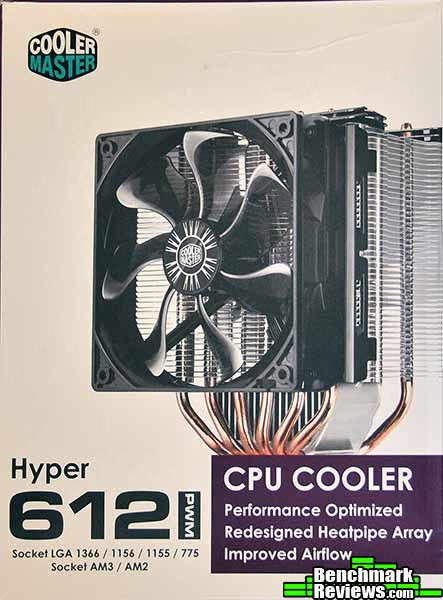
Cooler Master's box strikes a nice balance, showing you a photo of the cooler and the sockets it can accommodate. The "PWM" lets you know that the fan's speed can be controlled directly by your motherboard, a nice touch I wish more coolers would use.
Inside the box are the cooler and its single fan, along with the mounting brackets for Intel and AMD processors, a small tube of thermal interface material, and a socket to help install the nuts that will hold the cooler on. The two black plastic items at the lower left of this image are mounts included for another fan you can optionally install on the back of the cooler.

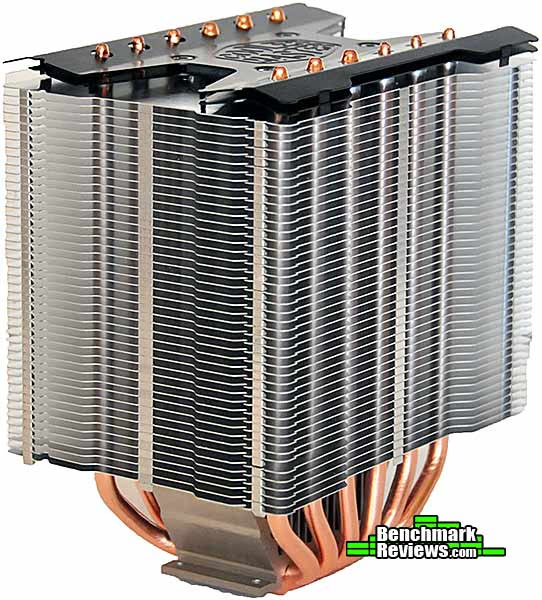
There are 45 closely spaced aluminum fins which are perforated by six 6mm copper heat pipes. A single Cooler Master 120mm fan is clipped onto the front of the heat sink. This design is similar to the existing Hyper 212 cooler; the major difference is that the heat pipes run front-to-back, instead of side-to-side as they do in the 212.

Looking at the back of the cooler, we can see the 45 fins and the six copper heat pipes; there's also a small secondary set of fins fixed directly to the heat sink base, under the main cooling fin array.

With its fan removed, the symmetrical design of the heat sink is evident. The angled black top plates seem purely decorative.
Let's see how this heat sink is to mount...
Hyper 612 PWM Detailed Features
As with most coolers, the base of the Hyper 612 comes covered with a protective plastic film. When I removed it, a lot of adhesive residue remained on the base (left image below), which is not something I've seen before. Alcohol wouldn't dissolve the adhesive; I had to use an organic solvent (WD-40) and then clean that off with alcohol. The cleaned base is shown at the right. The residue could affect the cooling ability of the heat sink, but even if it doesn't, it shouldn't be there. Once the residue is cleaned off, we see a nicely finished, very flat base. It's not a mirror finish but the surface texture is too fine to be discerned with a fingernail.

The mounting hardware for the Cooler Master Hyper 612 PWM is a little unusual: two brackets screw onto the heat sink, and spring-loaded screws (which on this Intel bracket slide in slots to adjust for Socket 775, Socket 1155/1156, and Socket 1366 spacings) protrude through the motherboard. The little springs don't seem as if they will provide a great amount of clamping pressure.

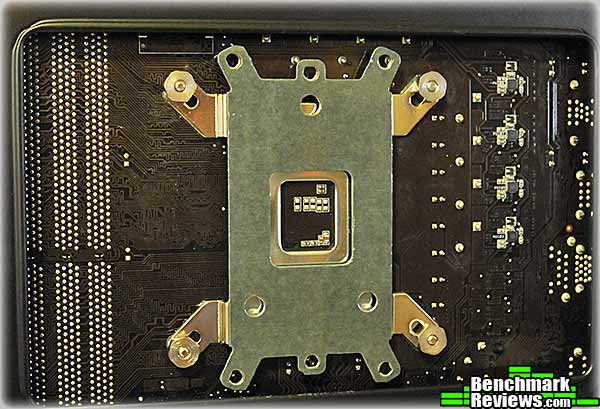
The Hyper 612 comes with the now-common flippy universal backplate that has one side for Intel motherboards and another side for AMD motherboards. The heat sink's screws are secured by the nuts shown: you screw the nuts down (Cooler Master provides a small socket you can use with a screwdriver) until they reach the end of the threaded parts of the screws and stop. The little springs on each screw provide the clamping pressure that holds the heat sink to the processor.
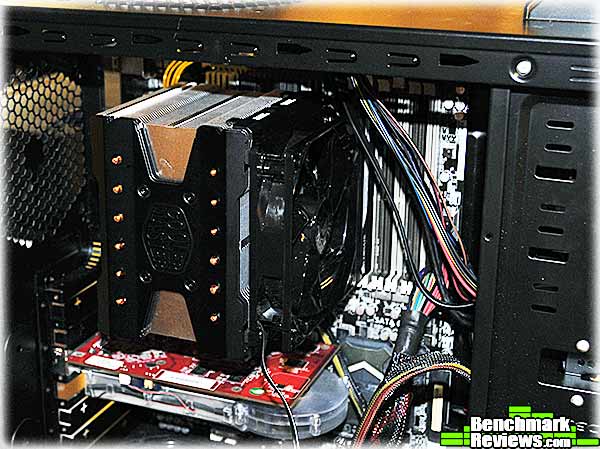
Inside the test system, the Cooler Master Hyper 612 PWM looks like a standard enthusiast heat sink. Normally, for testing, I'd mount heat sinks like this with the fan blowing upwards, since that's the orientation that would keep the heat pipes horizontal. But the Hyper 612's design has the heat pipes horizontal (i.e. running front to back, rather than up and down) in the "normal" orientation. This is a nice touch I wish more manufacturers would adopt, since heat pipes often work slightly better this way. Note that the fan hangs over the first two RAM slots in this X58 motherboard, so low-profile memory is a requirement.
Now that the CPU cooler is mounted, let' see how it performs.
Heat Sink Test Methodology
Benchmark Reviews is obsessed with testing CPU coolers, as our Cooling Section has demonstrated over the past few years. We've solicited suggestions from the enthusiast community, and received guidance from some of the most technical overclockers on the planet. As a result, our testing methodology has changed with every new edition of our Best CPU Cooler Performance series. Because of this, each article is really its own stand-alone product, and cannot be fairly compared to the others. Benchmark Reviews continues to test CPU coolers using the stock included fan (whenever applicable), and then replace it with a high-output fan for re-testing.
Manufacturers are not expected to enjoy this sort of comparison, since we level the playing field for all heat sinks by replacing their included fan with a common unit which is then used for every CPU cooler tested. Many manufacturers include fans with their heat sink products, but many 'stock' fans are high-RPM units that offer great airflow at the expense of obnoxiously loud noise levels, or, conversely, quiet fans that sacrifice performance for low noise. By using the same model of cooling fan throughout our heat sink tests, we can assure our results are comparable across the board. This is one of the more significant changes we have made to our test methodology, since many of the benchmark tests we have conducted in the past have compared the total package. Ultimately we're more interested in the discovering the best possible heat sink, and we believe that you'll feel the same way.
For each test, ambient room temperature levels were maintained within one degree of fluctuation, and measured at static points beside the test equipment with a digital thermometer. The Cooler Master Hyper 612 PWM and the comparison coolers used a common Thermal Interface Material of our choosing (listed in the support equipment section below) for consistency. The processor received the same amount of thermal paste in every test, which covered the heat spreader with a thin nearly-transparent layer. The heat sink being tested was then laid down flat onto the CPU, and compressed to the motherboard using the supplied retaining mechanism. If the mounting mechanism used only two points of force, they were tightened in alternation; standard clip-style mounting with four securing points were compressed using the cross-over method. Once installed, the system was tested for a baseline reading prior to testing.
At the start of each test, the ambient room temperature was measured to track any fluctuation throughout the testing period. AIDA64 Extreme Edition is utilized to create 100% CPU-core loads and measure each individual processor core temperature. It's important to note that software-based temperature reading reflects the thermal output as reported from the CPU to the BIOS. For this reason, it is critically important (for us) to use the exact same software and BIOS versions throughout the entire test cycle, or the results will be incomparable. All of the units compared in our results were tested on the same motherboard using the same BIOS and software, with only the CPU-cooler product changing in each test. These readings are neither absolute nor calibrated, since every BIOS is programmed differently. Nevertheless, all results are still comparable and relative to each product in our test bed (see The Accuracy Myth section below).
Since our test processor reports core temperatures as a whole number and not in fractions, all test results utilize ADIA64 to report averages (within the statistics panel), which gives us more precise readings. The ambient room temperature levels were all recorded and accurate to one-tenth of a degree Celsius at the time of data collection.
When each cooler is tested, Benchmark Reviews makes certain to keep the hardware settings identical across the test platform. This enables us to clearly compare the performance of each product under identical conditions. Benchmark Reviews reports the thermal difference; for the purposes of this article, thermal difference (not the same as thermal delta) is calculated by subtracting the ambient room temperature from the recorded CPU temperature.
Please keep in mind that that these test results are only valid within the context of this particular test: and, as the saying goes, your mileage may vary.
Intel Test System
- Processor: Intel Core i7-950 Bloomfield 3.06GHz LGA1366 130W Quad-Core Processor Model BX80601950, core voltage set to 1.35V
- Motherboard: ASUS Sabertooth X58 Intel X58-Express chipset) with BIOS 0603, BCLK set to 175MHz for a processor speed of 4025MHz
Support Equipment
- AIDA64 Extreme Edition version 1.50.1200
- MG Chemicals Heat Transfer Compound 8610-60G
- Stock fan (for heat sinks without fans): Thermalright TR-FDB-12-1600 (63.7CFM advertised)
- High-speed fan: Delta AFC1212D (113CFM advertised)
All of the tests in this article have been conducted using vertical motherboard orientation, positioned upright in a traditional tower computer case. Air-cooled heat sinks are positioned so that heat pipe rods span horizontally, which in most cases means the fan is blowing air out the top of the chassis. The radiators of water coolers are mounted as per manufacturer instructions. In both cases, fans are connected directly to the power supply (rather than motherboard headers) and run at full speed during the test. At the start of our test period, the test system is powered on and AIDA64 system stability tests are started with Stress CPU and Stress FPU options selected. AIDA64 loads each CPU core to 100% usage, which drives the temperature to its highest point. Finally, once temperatures have sustained a plateau (no observed change in average temperatures for 5 minutes), the ending ambient room temperature and individual CPU core levels are recorded thus completing the first benchmark segment. The time to reach stable temperatures varied between 10 and 20 minutes for the heat sinks in this test; larger heat sinks typically take longer to stabilize.
The second test segment involves removing the stock cooling fan and replacing it with a high-output 120 mm Delta AFC1212D cooling fan, then running the same tests again.
Note: Both the Antec Kühler H2O 620 and the Coolit Vantage A.L.C. are designed to drive their own RPM-controlled fans directly; in the case of the Vantage, an alarm will sound continuously if there is no fan connected. For these coolers, the fans were left connected as designed during stock fan testing. For high-speed fan testing, the Delta fan was connected directly to the power supply (and the alarm on the Vantage ignored).
The Accuracy Myth
All modern processors incorporate an internal thermal diode that can be read by the motherboards' BIOS. While this diode and the motherboard are not calibrated and therefore may not display the actual true temperature, the degree of accuracy is constant. This means that if the diode reports 40°C when it's actually 43°C, then it will also report 60°C when it's truly 63°C. Since the design goal of any thermal solution is to keep the CPU core within allowable temperatures, a processor's internal diode is the most valid means of comparison between different heat sinks, or thermal compounds. The diode and motherboard may be incorrect by a small margin in relation to an actual calibrated temperature sensor, but they will be consistent in their margin of error every time.
Testing and Results
For this test, I used the following heat sinks in addition to the Cooler Master Hyper 612 PWM:
- Thermalright Venomous X
- Thermalright Silver Arrow
- Thermalright Macho HR-02
- Thermaltake Frio OCK
- Cooler Master V6 GT
- Prolimatech Super Mega
- Corsair Hydro Series H50
- Corsair Hydro Series H70
- Coolit ECO A.L.C.
- Coolit Vantage A.L.C.
- Antec Kühler H2O 620
For heat sinks without a stock fan, I used a Thermalright TR-FDB-12-1600 fan, which puts out 63.7CFM at 28dBa according to Thermalright. This mid-range fan provides good airflow and reasonable noise levels. For "apples to apples" testing, where each heat sink is tested with the same fan, I used a Delta AFC1212D. This high-performance PWM fan is rated at 113CFM at a claimed 46.5dBa at full speed...which means that while it moves quite a bit of air, it's very loud.
The Intel Core i7-950 I used in this test runs much hotter than the Core i7-920 I've used previously. At 1.35 volts, with a BCLK of 175Mhz, the 4,025Mhz CPU pumps out enough heat to stress the very best heat sinks. AIDA64 would report throttling once any single core reached 100 degrees Celsius; any throttling resulted in canceling the test and recording a "FAIL". This overclocked and overvolted Core i7-950 represents an extreme that many heat sinks cannot handle.
The chart below summarizes the results with the stock fans (hotter temperatures towards the top of the chart, and cooler temperatures towards the bottom). The twin-fan coolers have a real advantage here, since their dual fans generally move more air than the stock single fan of any of the other units. Remember that the lower the thermal difference is, the better the heat sink is performing.
Stock Fan Tests
|
Heat Sink (*=two fans) |
Thermal Difference (degrees Celsius) |
Difference from Hyper 612 |
|---|---|---|
| Coolit ECO A.L.C. | 75.2 | +12.9 |
| Corsair H50 | 73.1 | +10.8 |
| Coolit Vantage A.L.C. (extreme) | 73.0 | +10.7 |
| Thermalright Macho HR-02 | 71.0 | +8.7 |
| Prolimatech Super Mega | 67.2 | +4.9 |
| Antec Kühler H2O 620 | 65.9 | +3.6 |
| Corsair H70 (high)* | 65.3 | +3.0 |
| Thermaltake Frio OCK* | 65.2 | +2.9 |
| Thermalright Venomous X | 63.0 | +0.7 |
| Cooler Master Hyper 612 PWM | 62.3 | +0.0 |
| Thermalright Silver Arrow* | 61.8 | -0.5 |
| Cooler Master V6 GT* | 61.2 | -1.1 |
As you might expect, the heat sinks that come with two fans tend to do better than those with only one fan...which makes the Hyper 612's performance all the more surprising. Connected directly the computer's power supply, the Hyper 612 PWM's fan is audible, but not particularly noisy. I'd say it doesn't sound like a fan that can push over 80CFM, but the results speak for themselves: the Cooler Master Hyper 612 PWM powers past most of the other coolers in this comparison. Nothing beats the Cooler Master's own V6 GT, but its dual fans cranked up to full speed for this test do extract a significant audio penalty, one that's arguably not worth the mere 1.1 degree advantage it has over its sibling.
Delta High Speed Fan Tests
|
Heat Sink |
Thermal Difference (degrees Celsius) |
Difference from Hyper 612 |
|---|---|---|
| Corsair H50 | 68.1 | +9.1 |
| Coolit Vantage A.L.C. | 67.8 | +8.8 |
| Corsair H70 | 64.7 | +5.7 |
| Thermalright Macho HR-02 | 64.5 | +5.5 |
| Thermaltake Frio OCK | 64.3 | +5.3 |
| Coolit ECO A.L.C. | 64.3 | +5.3 |
| Cooler Master V6 GT | 59.5 | +0.5 |
| Prolimatech Super Mega | 59.4 | +0.4 |
| Cooler Master Hyper 612 PWM | 59.0 | +0.0 |
| Antec Kühler H2O 620 | 58.7 | -0.3 |
| Thermalright Venomous X | 58.0 | -1.0 |
| Thermalright Silver Arrow | 55.8 | -3.2 |
The Delta high-speed fan attaches to the extra fan bracket Cooler Master includes with the Hyper 612 using four standard self-tapping fan screws, the short, stubby kind you'd normally use to mount case fans. The Delta fan is rated to move over 30 CFM more than the Hyper 612's stock fan, but that performance comes at the cost of very high noise levels. Still, beating the Prolimatech Super Mega and getting within a degree or two of all but the much larger and more expensive Thermalright Silver Arrow is an accomplishment Cooler Master can be proud of. The 3.3 degree drop is smaller than I normally see when using the Delta fan, indicating that the stock fan does a pretty good job. I think for most applications it would be better to use the extra fan mounting hardware to add a second, quieter fan to the rear of the cooler.
I'll summarize my opinions on this cooler in the next section.
CPU Cooler Final Thoughts
The choice of fan is critical in getting the best performance from a CPU cooler (even a water cooling system). Size, noise, airflow, and even static pressure are all things that must be taken into account. The fan Cooler Master uses strikes an excellent balance between noise and airflow, and as you can see from the test results provides excellent performance with this cooler. I have no doubt that adding a second similar fan would provide even better performance than the single Delta high-speed fan.

I've been saying in my last few CPU cooler reviews that the need for expensive, high performance coolers will fade as newer, lower-power processors such as Intel's Sandy Bridge become more common. A processor with a maximum TDP of 95 watts simply doesn't need the amount of cooling that a 140W CPU does. Sure, power consumption will go up significantly with overclocking, but newer processor will still put out less heat than older ones.
That said, I've started noticing another trend: lower-priced coolers that perform at the level of higher-priced coolers. The Cooler Master Hyper 612 PWM performs at the level of the Thermalright Silver Arrow or Cooler Master's own V6 GT with stock fans, but costs almost 33% less than either. Given the exceptional cooling provided by its single fan, adding another quiet PWM fan would probably make this equal to the very best air coolers out there. How it can achieve these results without features like Prolimatech's massive mounting system is a mystery. Perhaps there's some magic sauce in the heat pipes.
Cooler Master Hyper 612 PWM Conclusion
Please remember that these test results reflect our experience with each cooler on a specific motherboard, with a specific processor, BIOS revision, BCLK and voltage settings, and test programs. The results of this test cannot be directly compared to other tests since many factors will have changed.
There's nothing special about the appearance of the Cooler Master Hyper 612 PWM: it's a standard multi-heat pipe design with a copper base. The small extra fin array on top of the base is unusual, but it won't be visible even in a windowed case. The orientation of the heat pipes-- running from the front to the back of the cooler, rather than from side to side-- is a little unusual although not unprecedented: the Thermalright Silver Arrow uses the same design. Given its performance, the shock-and-awe appearance of the Thermalright Silver Arrow or the LED bling of the V6 GT would be the only real reasons to prefer these more expensive products.
Overall, the construction quality is very good. It doesn't have the "hewn from a block of steel" feel of a Prolimatech heat sink, but everything's there and fits well.
I was surprised to see the residue the protective sticker left on the heat sink base. I've never run across this in any of my other cooler testing, and it's definitely something Cooler Master should look into.
The accessories package was standard, and it was nice of Cooler Master to use re-sealable plastic bags to make it easier to keep track of the screws and bits you don't use. The extra fan mounts make adding a second fan at a later time easy. The mounting mechanism, especially the spring-loaded screws, seemed a little "lightweight", but you can't argue with the results.
The performance of this cooler was excellent, almost unprecedented at this price level ($49.99 at Newegg). Which brings us to the value aspect: not everyone needs a cooler that can handle the very hottest processors, and those who don't overclock, or have Sandy Bridge CPUs, can save some money on a less expensive cooler. But if you are one of the few whose rig dims the house lights when it's turned on, you can save a bit of coin with the Hyper 612 PWM over its more expensive competition.
Pros:
+ Amazing performance for the price...for any price, really
+ Almost silent operation
+ Quiet, PWM-controlled fan
+ Extra fan mount included
Cons:
- Protective sticker leaves residue on heat sink base
- Rather pedestrian appearance
Ratings:
-
Performance: 9.75
-
Appearance: 8.0
-
Construction: 9.0
-
Functionality: 8.5
-
Value: 9.75
Final Score: 9.0 out of 10.
Excellence Achievement: Benchmark Reviews Golden Tachometer Award.
Questions? Comments? Benchmark Reviews really wants your feedback. We invite you to leave your remarks in our Discussion Forum.
Reader comments from the original article
23 comments were posted before commenting closed. They are preserved as written. Original avatars no longer resolve and are shown as a placeholder.
RE: Cooler Master Hyper 612 PWM Heatsink Patrick Permalink:
Thanks for the nice and definitely quick review on the new CM Hyper 612 PWM. One point of suggestion, though, about the adhesive removal, I'd use Acetone instead of WD-40 as it leaves residue behind, especially, the non-mirror finish base (e.g. w/ grooves). And, that Isopropyl alcohol won't completely remove all the residue left behind by the WD-40. However, it wouldn't affect the result of the test that much. Cheers.
RE: RE: Cooler Master Hyper 612 PWM Heatsink David Ramsey Permalink:
Yeah, but I didn't have any acetone! I'll get some since this situation may come up again...
Good to see Cooler Master Bruce Permalink:
Nice to see Cooler Master is getting it's Mojo back. I picked up their little 92mm model (Hyper N520) for a slim case I have, and it's great where there are clearance issues. I'm pretty amazed that they get such good performance out of this unit, with the low mounting pressure they designed in. A hint on the acetone - look for nail polish remover, which is frequently stocked by the female residents of the house.
How does it compare to the 212? ET3D Permalink:
Thanks for the review. Since this is billed as an upgrade to the 212, it would have been interesting to see a more detailed comparison.
RE: How does it compare to the 212? David Ramsey Permalink:
Welll, to be fair, Cooler Master didn't bill it as an "upgrade to the 212"; that was just my impression. Still, the 212 results would have been in the table had Cooler Master sent us one, which they didn't, and I can only test what I have.
direct heatpipe fresc0 Permalink:
Good to see a move away from the direct contact heatpipes
RE: direct heatpipe David Ramsey Permalink:
Yeah, that fad seems to have died down. It never brought the performance improvements hoped for.
Typo razaron Permalink:
At the end of page 5 it should say "3.3 degree drop" not "4.3 degree drop".
RE: Typo David Ramsey Permalink:
You're right, and it's been fixed. Thanks!
Accuracy Myth banthracis Permalink:
"While this diode and the motherboard are not calibrated and therefore may not display the actual true temperature, the degree of accuracy is constant. " I'm pretty sure that's wrong. Per Intel, accuracy of thermal measurements is greatest as you approach the Tcontrol point. #download.intel.com/design/intarch/papers/322683.pdf "PECI is most accurate near the maximum temperature (PROCHOT#) and it is accurate enough for fan speed control in the TCONTROL range but it can be very inaccurate at low temperatures." pg 19 Same also applies for DTS. See page calibration and variance graphs on pg 8 and 9 of the document. Given this, the thermal measurements are MORE accurate as you approach Tcontrol and less accurate and temps get lower. Therefore, the degree of accuracy is not constant, but rather temperature dependent.
RE: Accuracy Myth banthracis Permalink:
This variance in accuracy is also mentioned in Intel thermal specifications data sheet for sandy bridge CPU's on page 45 section 6.1 "Although each processors DTS is factory calibrated, the accuracy of the DTS will vary from part to part and may also vary slightly with temperature and voltage." #download.intel.com/design/processor/designex/324644.pdf
Hmm... Justair Permalink:
Your observation about Sandy Bridge proccessors (and newer ones down the pipeline) probably not needing aditional cooling seems a little optimistic. With their stock fan on the 2500K You can easily push past 75C with higher overclocks and during the summer months Idle it can go to 45C+ Even with the Hyper 212 I can hit 65C if I am overclocking. I was a little put off by all that. So many people said oh it runs cool it runs cool .. you can hit 4.4G with the stock fan. Sure.. you can but it certainly won't run cool. Anyway.. overall a great review.
RE: Hmm... David Ramsey Permalink:
I think you misinterpreted what I said, Justair. I didn't mean that you don't need any third party cooling at all; I meant that _expensive_, high end coolers (like the Megahalems or Silver Arrow) won't be needed.
RE: Cooler Master Hyper 612 PWM Heatsink Justair Permalink:
Ah ok, Gotcha(ty for the clarification). With the Hyper212 sitting at what .. 29 bucks? I'd say most high end cooler are moot (unless your going for some sort of theme with one of the cool looking ones)The one thing this one may have over the 212 is it may be a little quieter. Temperatures seem fairly close.
RE: RE: Cooler Master Hyper 612 PWM Heatsink David Ramsey Permalink:
I can't comment on the performance of the Hyper 212, since I've never tested it...be cautious when comparing temperatures between different reviews, especially across web sites, as testing protocols will differ.
RE: Cooler Master Hyper 612 PWM Heatsink Luis Permalink:
Where/When can I buy????
RE: RE: Cooler Master Hyper 612 PWM Heatsink David Ramsey Permalink:
Good question. I can't find them available at any online merchant yet.
RE: RE: Cooler Master Hyper 612 PWM Heatsink Olin Coles Permalink:
This review was published ahead of product stock into stores, so expect to see the Cooler Master Hyper 612 PWM make it into Newegg and Amazon very soon.
RE: RE: RE: Cooler Master Hyper 612 PWM Heatsink Luis Permalink:
Thanks for the info! This thing looks like a beast!
RE: Cooler Master Hyper 612 PWM Heatsink ChrisH Permalink:
Hi, on the strength of this review and with some supplementary checking I've purchased the cooler. Will get the usual Arctic Fox paste and a second fan to maximize its potential. What worries me is the weight. Haven't the unit yet but I'm tossing up whether I'll add a small brace soldered from the centre seam (perpendicular to the fans) to above the side panel opening. Reason being the case does get moved around and the last thing one wants is to use the chipset as a moment. I'll find out if its feasible or not. Secondly, because RAM height is such an important precursor perhaps a measurement from the slot to the base of the cooler might help people out. Hence I'm buying CPU, mobo and cooler first then determining if my desired RAM will fit.Anyhow thanks for the review.
RE: RE: Cooler Master Hyper 612 PWM Heatsink David Ramsey Permalink:
Any cooler that overhangs RAM slots will block RAM with tall heatsinks. Given that modern DDR3 simply doesn't get hot enough to actually require those silly heatsinks, I'd recommend simply always getting "low profile" RAM.
direct-heatpipe-works Roj0 Permalink:
Direct contact heat pipes actually work, it is the reason the 612 won't out perform the 212 evo...What can possibly be faulty with direct heat pipe? It makes contact with the hot surface directly rather than having some sort of base make contact & then that base make contact with the heat pipes, halfwits
RE: direct-heatpipe-works David Ramsey Permalink:
Direct contact heat pipes are nice, but they're not the only design feature that affects cooler performance, and some coolers without direct contact heat pipes can outperform those with direct contact heat pipes. The flatness of the cooler base, the amount of clamping pressure, the physical amount of metal available to absorb the heat, and the airflow through the cooler are all important factors.