
Cooler Master Elite 330 Case RC-330-KKN1-GP
Cooler Master Elite 330
Benchmark Reviews has been on the web for over a year now. In that time I've had the pleasure of reviewing some very nice higher end computer items, including mid and full tower cases. While I love the high end market I realize for every high end part sold, there are probably 100's of mid to lower end parts sold. So who's buying these parts? Everyone is that's who. So where do they get their pre purchase information from? Hopefully here at Benchmark Reviews. Cooler Master recognizes there is an audience at this price point and so should we. Today Benchmark Reviews will look at the Cooler Master Elite 330 RC-330-KKN1-GP Chassis. A mid tower computer case that appears to be big on features but small on price.
Cooler Master is a well known computer chassis manufacturer. Many of their gaming cases are world renowned but they do cater to more than the gaming scene. They offer a complete line of mid towers that would definitely fit the part of corporate computing with classy conservative style on the outside with performance features on the inside. A wolf in sheep's clothing if you will.

In this review we'll look at both the outward appearance and the inside features a little closer. Maybe this really is a wolf in sheep's clothing. Lets continue and see if a case at this price point really is worthy of consideration for your next computer or maybe your first computer build.
Cooler Master Elite Series Features
Stylish CM LED lights
Front I/O panel for easy access
Rear fan supports 8, 9.2 and 12 cm fans
120mm rear fan (front fan optional)
5.25" tool-free for easy installation
3.5" and HDD screw-less for easy access
Add-on card tool-free installation
Side panel chassis air duct v1.1
RC-330-KKN1-GP Specifications
Model RC-330
Available Color Black
Dimension (W)7.4 x (H)16.7 x (L)19 inches
Weight 13.22 Lbs
Material SECC
Motherboards ATX, Micro-ATX
5.25" Drive Bay 4(exposed)
3.5" Drive Bay 1(Exposed); 6 (Hidden)
I/O Panel USB 2.0 x 2, MIC x 1, SPK x 1
Cooling System One 120mm front fan(optional),
One 120mm rear fan
Expansion Slots 7
Power Supply Standard ATX PS2 (Optional)
UPC Code RC-330-KKN1-GP - 870423003113
RC-330-KKR1 (w/ 350W PSU) - 870423003434
Warranty 2 years
About the company: Cooler Master
Cooler Master was founded with the mission of providing the industry's best thermal solutions. Since its establishment a decade ago, the company has remained faithful to this mission, emerging as a world leader in products and services for companies dealing with devices where heat issues must be resolved.
In pursuing this mission, Cooler Master is absolutely committed to delivering solutions that precisely meet customer requirements for features, performance, and quality. Moreover, we strive to be a reliable long-term partner for our customers that they can truly depend on. It aims to be the first and foremost name that comes to mind for companies around the world seeking thermal solutions, and seeks to build such a reputation through outstanding technology, sophisticated design, and superior service.
Cooler Master's current business encompasses a comprehensive lineup of thermal solutions for a full range of applications. Its products range from heat sinks and fans to component housing, chassis, and ducting for computers, industrial machinery, telecommunications equipment, and many other devices.
A critical component of Cooler Master's ability to successfully pursue its mission is an unstinting commitment to quality, as demonstrated by the ISO 9001 certification granted to its main manufacturing plant in Taiwan. It has also enforced ISO guidelines and is in the process of applying for ISO 9002 certification at its second and third plants, located in China. Cooler Master has also implemented a number of analytical and testing protocols to ensure top quality, including at subcontractors, to further ensure thorough quality control. Moreover, Cooler Master's dedication to quality extends beyond manufacturing to every aspect of its operation, including service.
Closer Look: Exterior
The Cooler Master Elite 330 appears to be a typical mid tower case, a little shorter and slightly narrower than some, it measures 485mm length x 189mm width x 425mm height. Lets take a closer look. we'll start on the left side. Here you find a side VGA vent which is very popular among case designers lately. This should allow two possible solutions. Depending on your case layout with fans etc. this vent may let hot air out or allow cool air in. It is strategically placed over top of the expansion slots of any motherboard. Directly above that is the Intel TAC vent. Now this case may not be specifically named by intel for TAC but this is in the very least a close facsimile of the TAC 1.1 certified vent. I have since built a new core i7 920 machine around this box for daily office use and I can confirm this lines up fairly well with the stock Intel cpu cooler. A little more on this later on.

Moving left to right is the front panel. There are four external 5.25" bays and two external 3.5" bays with only one 3.5" bay being available. One is taken up by the front input panel. Moving down you'll see the main power button which is circled in blue acrylic and lights up blue when powered on. Not too bright or obnoxious but noticeable from a distance. To the power buttons right is the HDD activity indicator light, then the reset button. Both buttons feel fairly sturdy and should hold up to daily use for a long time. Like the buttons the entire front fascia is made of molded plastic. The 5.25" bay covers and the area around and below the external 3.5" bays as well as below the power/reset buttons is a fine black metal mesh overlay.

On to the right side you'll see a completely smooth cover with the exception being an indentation at the middle rear to allow for easier removal of the panel. You can also notice the nice beveled edge and slight contours of the front panel. Conservative and clean without being boring. I like it. The black paint is flawless. This appears to be a very nice case for this price range.

Keep moving along, now to the rear. At the bottom going up are the standard seven expansion slots. Now this is an entry level case and I understand the need to cut some corners to keep price down, but I have to say I absolutely hate the knock out expansion slot covers. I don't know what additional costs would be to include bolt in covers but I for one would be willing to pay a few extra dollars for them. I've already knocked the wrong one out for the VGA and that leaves me rooting through my stuff looking for a bolt in cover... Moving up is the rear fan mount. This mount will accept an 80mm, 92mm or 120mm fan. They've made the minds up for most people by including a 120mm fan. Above that the standard ATX PSU mounting holes which allow any standard size ATX power supply unit to be mounted from the inside of the case. Pop rivet construction throughout. Worth noting is the inclusion of thumb screws for the left side panel.

Now down to the bottom. Just stamped steel here with several different shapes added to increase rigidity. To the front of the bottom you can see an air intake. This induces the natural flow most systems need. In at the bottom front and up and out the top rear. The feet are hard plastic feet that snap into the bottom of the chassis.
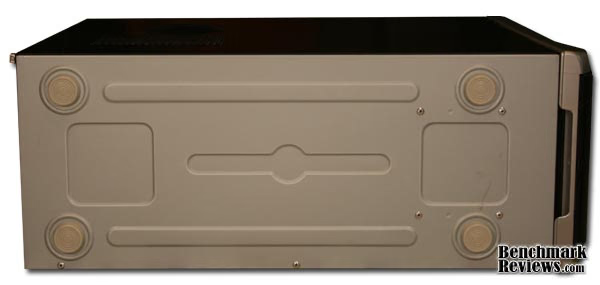
I certainly don't like hard case feet but at this price point I certainly understand them. In a quiet system this should not be a problem but with each additional fan, DVD ROM and spinning hard drive the potential for vibration stemming from these feet increases. Keeping the case on a carpeted floor should alleviate your worries though.
Detailed Exterior Features
Here we'll take a closer look at some of the exterior features of the Cooler Master Elite 330 (RC-330). The CPU vent stamped into the side of the left door provides an avenue for cold (cooler) outside air to enter into the case specifically at the CPU. This design meets the Intel spec TAC (Thermally Advantaged tested Chassis) v1.1. This will be helpful to those using the stock radial heat sinks provided by intel from the Celeron D up to the new core i7 models. Mileage will vary for those that choose to use an aftermarket cooler. In fact you will actually need to remove the inside duct to use an aftermarket cooler if it's design is radically different that intels stock cooler. The good news is the bolt pattern equals that of an 80mm fan so if needed you can add an additional fan in place of the duct. I should mention that this duct does not line up completely for AMD systems. It will allow cool air into the stock AMD heat sink but off center.
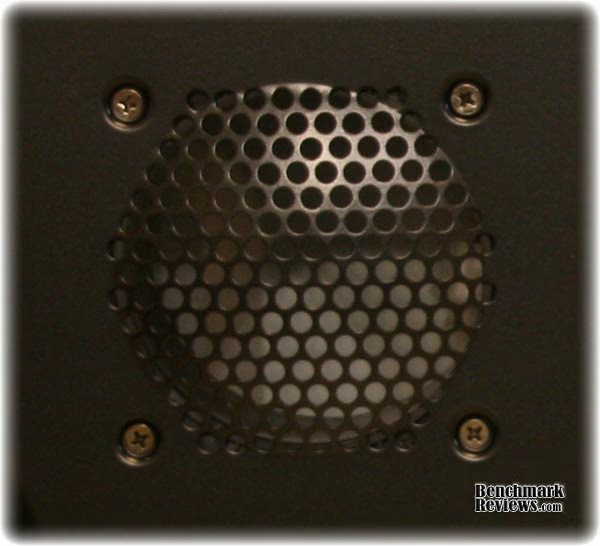
Here's a closeup of the stamped VGA vent. There are no holes per se for mounting an additional fan, but this could be easily done to exhaust hot air out or to push cool air in. Again, this is located directly over top of the motherboard PCI-e and PCI slots.
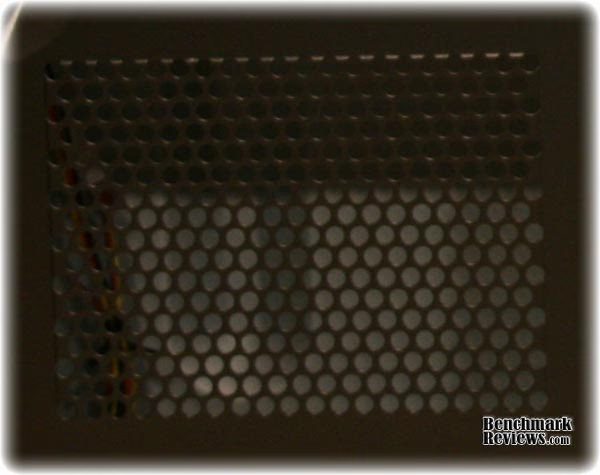
Around to the front is the front input panel. This panel is located mid chassis. I know a lot of people have their personal favorite spots for this but mid chassis is surely the most universally acceptable place for these. Many cases have the external inputs at the extremes, all the way to the top of the case, actually on the lid, or at the very bottom practically on the floor. Neither of those are as universally usable as mid chassis. I think Cooler Master chose to play it safe here with this case and I think they made the right decision, at least in this case. Included are two USB 2.0 ports, and the typical 3.5mm mic and headset plugs. They all plug directly to the motherboard. Both the USB and front audio each have their own combined headers, no individual pins to figure out. Visible is the fine metal mesh that makes up about 80% of the face on this chassis. I like the looks of it and it should allow for some additional air flow. All of this mesh is backed by a thin layer of foam for a filter effect. Dust buildup should be minimal inside the case.

Moving down the case front is the power and reset buttons as well as the hard drive activity indicator light. The power button is encased in blue acrylic and has an LED behind to light up when powered on. The buttons are plastic which is expected in a case from this price range, but considering the price the buttons feel very sturdy. I've seen many cases that cost much more than this, even from Cooler Master with buttons that don't stack up to these.

Maybe it seems like I'm a bit of a button freak, but I've been victim of cheap cases in my early computer years where buttons have popped out, broken early on, leaving me to rig up my own solutions - leading me to the old conclusion of you get what you pay for. Not the case here.
Closer Look: Interior
The interior is spacious for a slightly smaller mid tower case. With room for five 3.5" internal hard disks, two 3.5" external bays and four 5.25" external bays it should have more than enough expansion capabilities for the average users. You can also see the CPU duct (intel TAC) I spoke of earlier. Taken from www.intel.com (Intel's thermal specifications recommend the use of a Thermally Advantaged Chassis (TAC) version 1.1 for Intel CoreTM2 Quad processor, Intel CoreTM2 Duo processor, the Intel Pentium D processor, and the Intel Pentium 4 processor-based systems. Intel also recommends the use of a Thermally Advantaged Chassis (TAC) version 1.0 for Celeron D processor-based systems.) As I said earlier this chassis might not be specifically named but it does work well with stock intel coolers.

Visible from the inside rear of the chassis is the included 120mm fan, the seven expansion slots and the non removable motherboard tray. The included fan is a three wire fan, capable of speed monitoring. It also includes a three wire to molex plug adapter. Both the fan and the adapter are a nice addition to this already very economical case.
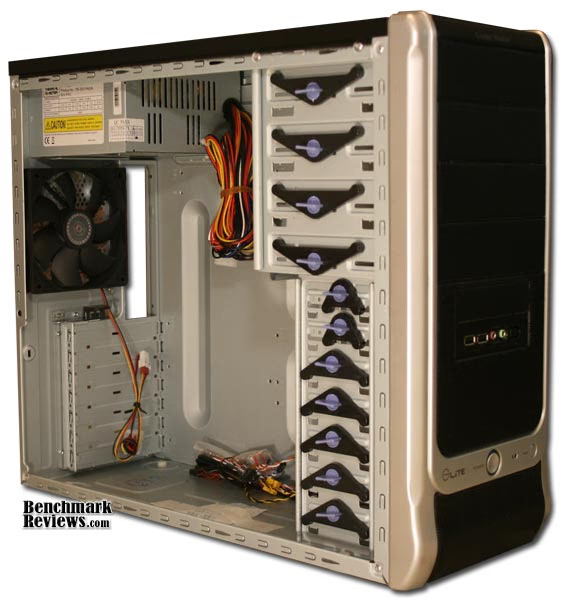
I like the design of the hard drive mounts. They are completely open near the front of the case allowing the user to mount an optional front fan, again in sizes 80mm, 92mm or 120mm. This space would also allow you to run wires and cables from the right side of the case to the left if needed. I like to mount my hard drives with the plugs facing the front of the case giving me a cleaner install without all wires being visible. It is more work to plug in/un plug cables to your hard drives but worth it for a cleaner case. This design would definitely ease the pain for this a bit although the tool-free design may only line up with one mounting hole.

With the right side cover removed you can see the back side of the motherboard tray and the right side of the internal and external bay mounts. There are no holes for cable pass through and as a matter of fact a full size ATX motherboard covers almost every inch of the motherboard tray. Now I don't know if this was by design or if the parts were just missing but you can clearly see the tool-free hardware missing from six of the external bays on this side.

I've mounted hardware in the 5.25" bays and the omission of these clips had a minimal effect on the install but I still wonder... It is possible the 5.25" clips are not included by design, when I removed one from the left side and installed it on the right the center blue locking mechanism rubs the right side cover when it is put back on so... I'll give them this one.
Detailed Interior Features
In this section I'll try to give a good run through some interior features in greater detail. First is the 5.25" external bays. As you can see here I have mounted one DVD Rom already leaving three bays open. In front of those bays are your typical metal shields left over from the manufacturing process. You must first remove these before inserting any ROM devices. It's been said that even if you don't need the bays for ROMs that you may remove these metal shields to increase airflow. I wonder about that and think this may be counter productive in an average everyday computer build. Actually taking away from the normal process of cold air in lower front and out upper rear. I apologize for the dark picture but the metal mesh 5.25" bay covers are removed from the inside of the case, they do not pop out, but in.

Moving down to the hard drive bays, it's easy to see there is plenty of space for an optional fan and plenty of open area for cool air to enter. Obviously the more hard drives you install the more restricted the air flow. Even with two hard drives you can keep the air moving right along almost unobstructed if you install one HDD at the top and one at the bottom.

Here is a close look at the tool-free design. I've seen many tool-free designs from Cooler Master over the years and so far I honestly like this one the best. I recently built a computer for a friend and he wanted the Cooler Master Centurion chassis. Nice chassis but I have to say this tool-free design is a more elegant and reliable method than that of the Centurion. This requires a little more work due to the clips actually coming off the chassis but in my experience works much better than their mid end sliders. You can see the clip pushes into the key, then you turn the blue locking barrel to lock into place. Metal studs go into the screw holes to hold your device in place.

A close up of the clips shows the "lock" and "unlock" position. It's that simple, turn the knob to "unlock" position, pull straight out. To lock the device again, push straight in, turn the knob to "lock" and you are done. The picture above also illustrates how the blue barrel keys into the chassis and when turned locks into place.

Another tool-free feature is at the rear of the chassis. Specifically the PCI expansion card lock. Just grab the little handle and pull straight out and the expansion slots are open for insertion or removal of your add-in cards. I've honestly never been a big fan of tool-free designs, mostly because they have been unreliable at best but both the drive bays and the expansion slots work very good here.

Around to the right side. This in my mind would be easy to overlook but very important to a lot of people. There is practically zero space behind the motherboard tray. What does this mean? If you are asking that question then it means nothing to you and you can be happy.

If you know what it means you know there will be no way to run or hide any cables or wires behind the motherboard between it and the right side door. That should not be too much of a problem unless you intend to mod the case and add a clear window or something similar. If you are not a modder, then you have nothing to worry about. If you are a modder you may want to look elsewhere.
Elite 330 Final Thoughts
The Cooler Master Elite 330 is the case I wish I started with many years ago. It would have made my first builds a lot more enjoyable. It offers many advanced options usually found on much more expensive chassis such as the tool-free options and the room for 120mm fans. I would have liked to see the inclusion of the screw on rear expansion covers. This to me is a fairly big deal. For me, with piles of computer junk strewn across my basement the se should be easy to find... Maybe! To the first time builder or the office IT manager looking for a decent solid case, this may send them back out to the store or waiting for their online order to arrive as I'm sure they don't have these just laying around.
The omission of the tool-free locking mechanisms on the right side either by mistake or by design did not sit well with me either. If by design they should mention this somewhere in their literature. The first time builder could get confused and assume these parts are missing, causing a return trip to the store for the missing pieces or to return the product completely. There are a few sharp edges and I do have a cut or two but most edges are rolled. Short of the very few complaints overall it was a good experience and I would buy this case again especially considering the price.
RC-330-KKN1-GP Conclusion
The chassis arrived to me in a single plain brown box with the cooler master logo, the chassis name and a brief specification list , meaning the actual product box was used to ship the item. The chassis was packed in the standard Styrofoam book ends. Again, given the price I was not surprised. It's hard to justify full color boxes on a $35 chassis. On top of that, the chassis came out of the box without a single ding, dent or scratch.
Given that $35 price tag, the case looks like it costs much more. It has a classy style, very conservative but not boring at all. The silver bezel and black mesh help to pull off the more expensive look.
The inner chassis itself is not much different than any other case at reasonable prices. The chassis itself is typical of 90% of the cases out there. The metal covering is noticeably thinner than many cases at the higher end of the spectrum, but noticeably thicker and stronger than most at this lower end of the spectrum.
I had absolutely no troubles assembling a system from this case, everything fit perfectly, fit and finish is definitely above par at this price range.
It seems they made cuts in all the right places to save money and pass that savings onto the consumer. I'd rather have a good case than a flashy box any day. At the time of writing, this Elite 330 computer case is available from NewEgg for $34.99 or $49.99 (with 350w power supply). The value of this chassis is phenomenal. It's no CM stacker but you don't get much for $35 these days, with the Elite 330 you get more than you pay for.
This is no modders box, but this chassis is more than capable to house anything from a word processing, emailing, web surfing boring life computer to even a fairly hefty gaming rig. It's design and layout is inclined to cool fairly well and tool-free design make it very easy to work with. I would not hesitate to build family and friends machines around this chassis. This is one of the very best if not the best case you'll find at this price point.
Pros:
+ Very very economical
+ Plenty of expansion capability
+ User friendly tooless design
+ Good cooling with 120mm fans
+ Good looks
+ Nice feature set
Cons:
- Boring box?
- Possibly missing parts
- Hard plastic feet
- No room behind motherboard for cables
- No screw in expansion slot covers
- Some sharp edges
Ratings:
-
Presentation: 7.00
-
Appearance: 9.25
-
Construction: 8.00
-
Functionality: 8.00
-
Value: 9.50
Final Score: 8.35 out of 10.
Questions? Comments? Benchmark Reviews really wants your feedback. We invite you to leave your remarks in our Discussion Forum.
Reader comments from the original article
14 comments were posted before commenting closed. They are preserved as written. Original avatars no longer resolve and are shown as a placeholder.
Coolermaster Elite 330 Power Button Darrin De May Permalink:
Unfortunately, the power button on the Coolermaster Elite 330 is its weak point. They really need to sit down and redesign the button and make it far sturdier. I bought two of these cases on NewEgg to build for clients, and they've both broken their power switch buttons. I just ordered yet another replacement. Hopefully Coolermaster won't run out of replacements anytime soon, I'm going to keep requesting more every time one breaks...
Button Replacement Ryan Permalink:
did you had to replace the case or just the button?
Yes, it is the blue & silver, cheap, power button! Rev. John A. Rish Permalink:
Ryan, you don't have to replace the case, just that cheap piece of plastic (blue & silver) with screws at each end. The actual electrical switch in the metal case is fine and sturdy. The cheap blue & silver thing reminds me of the old, "Made in Japan" stuff that gave rise to that insult. Now, the Japanese have changed their image for the better, while the Chinese have a long way to go, in my opinion. This item needs a quick re-working by Cooler Master to beef it up. Almost everyone who has this case has the same complaint: this switch. Another problem is the metal thing that rotates to keep the add-on cards (sound, video, etc) in place (instead of screws). There is a quality-control problem when something like this comes off in your hand.
Good case Ron Permalink:
I disagree regarding the comment about the TAC vent not matching up to AMD processors. I have a full ATX Asus A7V8X-X with a athlon xp2000+ and the vent matches up perfectly. I have had no issues with my power button and overall I'm happy with the case. I'll probably order another one for my next build.
RE: Cooler Master Elite 330 Case RC-330-KKN1-GP Tim White Permalink:
After nearly two years of daily use my power button is still intact. I will say that it does sometimes stick a bit. I've only noticed that recently though. As far as the TAC vent goes, I guess I should have specified I was using a modern AMD board as reference. I did not check this with an obsolete socket A motherboard but an AM2+ board. The socket A cpu socket is not placed on the MB the same as AM2/AM2+. The TAC vent is as I stated in the review on AM2/AM2+ boards; off center.
RE: RE: Cooler Master Elite 330 Case RC-330-KKN1-GP Colly Permalink:
The reason your power button sticks a bit sometimes, is probably because it is HALF broken.... On my case (soon after I got it almost a couple of years ago) one side of the power button 'hinge' broke, meaning it sometimes stuck. Now unfortunately, the other side has broken meaning I couldn't unstick it. Anyone know where I can get the power button only? I don't want to get a whole front cover as that's just a waste.
Yes, from Cooler Master support! Rev. John A. Rish Permalink:
Colly, you can fortunately get any replacement parts from Cooler Master support on the home website. But you need your case model number first. Just look up the case description, as it is still produced. The model number is vertically inscribed on the case itself, not the removable cover, near the old-style mouse and keyboard slots on the back of the case.
RE: Cooler Master Elite 330 Case RC-330-KKN1-GP captain Ron Permalink:
Its a simple 2 way micro-switch, I don't see why you couldn't find a replacement over at CompUSA or Radio shack for a few bucks.
Wrong switch! Rev. John A. Rish Permalink:
Captain Ron, we are not talking about the electricl switch, but the switch actuator. It's just that cheap piece of plastic (blue & silver) with screws at each end. The actual electrical switch in the metal case is fine and sturdy. The cheap blue & silver thing reminds me of the old, "Made in Japan" stuff that gave rise to that insult. Now, the Japanese have changed their image for the better, while the Chinese have a long way to go, in my opinion. This item needs a quick re-working by Cooler Master to beef it up. Almost everyone who has this case has the same complaint: this switch. Another problem is the metal thing that rotates to keep the add-on cards (sound, video, etc) in place (instead of screws). There is a quality-control problem when something like this comes off in your hand.
RE: Wrong switch! Captain Ron Permalink:
oh ok, i misunderstood. well in my case the PWR button still works fine after one year of daily use. After reading this review and comments regarding this case i did look at the button assembly and yeah, it does look kinda flimsy. But Im guessing that yours was probably just defective from the start, it happens. good luck!
Power key fix Koen Permalink:
My parents had a broken power key on this case too (not the electrical switch, but the actuator). It basically broke the first week, but i never took the time to fix it. I finally did and it seems to be a common problem too! This is what I did: I removed the remains of the weak plastic parts holding the key in place. Then I removed the screws and the plastic parts they were holding in place. Then I looped some tight rubber bands over the power key and around the screw-holes and refitted the screws with the plastic parts (which in turn keep the rubber bands in place). The key now works even better than before! Hope this helps anyone.
No problems with mine! Elite 330 Ben Permalink:
I've had my case for 2yrs and nothing has gone wrong. The only problem I had was the tight fit for the new video card. Wouldn't hurt if the case had at least another half inch of room.
POOR QUALITY alex Permalink:
1 of 10!!! Cooler Master produce poor quality parts. Well known issue with 330 Power Button, hundreds of thousands people had to pay them for part replacement,cose it is brakes after few month of use. $10,sometime i think that they make more money from this small plastic part then from cases itself. Buttons made to be used often.How come Cooler Master don't know about it???
CoolerMaster Elite 330 Power Button Darrin De May Permalink:
So far I haven't had to pay for the replacement buttons, I've called them up twice to complain, and both times they've sent out a package with two replacements for free. Too bad that's not the story with the hard drive rails in my CoolerMaster Mystique case that break every time you try to pull a hard drive out. I've had to pay for those...