
Silverstone Kublai KL03B-W Mid-Tower ATX Case
SilverStone Kublai KL03B-W
For the longest time, computer cases were neglected. So it's about time that some thought went into the design of these historically overlooked PC components. Now it seems computer case designs are changing faster than ever. Of course now you have literally hundreds of products to choose from. The problem comes when trying to select the best one for you. There are of course some big names and not so big names in the industry. I've always thought of Silverstone as a manufacturer of very expensive high end computer cases. Well, that all changed when I first learned of the Kublai series cases from Silverstone, I was excited because I knew that finally I could afford to own a true Silverstone computer case. I had always admired them but knew I could never afford their steep price tags. Now that has all changed with the Kublai series. This is actually the third installment of the Kublai series cases, also known as the KL03 series of which also comes in several different flavors too.

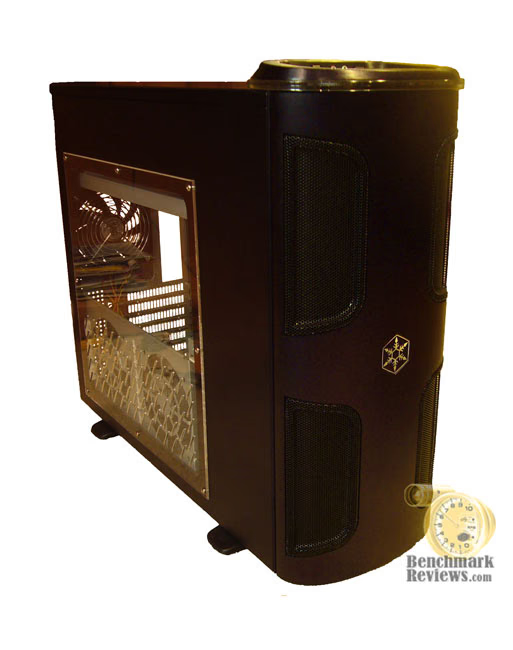
Silverstone's third Kublai mid tower chassis is made for aficionados and serious computer enthusiasts that require a high level component with no trade-offs for cooling and quietness. Following the designing concept of previous chassis from Kublai series, the KL03 also possess many features borrowed from the Temjin series. Constructed using steel and aluminum, this chassis strikes a great balance between external aesthetics and excellent structural rigidity. Benchmark Reviews tests the Silverstone Kublai KL03B-W mid-tower ATX computer case in this article.
Kublai Series Features
-
Longer mid-size tower chassis design for all around integration
-
Temjin quality aluminum front door finish and construction
-
Dual 120mm fans included for excellent cooling
-
Perforated expansion slot cover for improved graphics card cooling
-
Optional 120mm side fans for graphics card cooling
-
Front door and panel with vents for better cooling performance
-
Hot-swappable hard drive cage
-
Tool-less design
KL03B-W Specifications
|
Model No. |
SST-KL03B (black) | |||
|---|---|---|---|---|
| SST-KL03S (silver) | ||||
| SST-KL03B-W (black, with window) | ||||
| SST-KL03S-W (silver, with window) | ||||
|
Material |
2.5mm aluminum front door, 0.8mm SECC body | |||
|
Motherboard |
SSI, Extended ATX, ATX, Micro ATX | |||
|
Multimedia |
|
|||
|
Resolution |
|
|||
|
Driver Bay |
External |
|
||
|
||||
| Internal |
|
|||
|
Cooling System |
Front |
|
||
| Rear |
|
|||
| Side |
|
|||
| Top |
|
|||
| Bottom |
|
|||
| Internal |
|
|||
|
Expansion Slot |
7 |
|||
|
Front I/O Port |
|
|||
|
Power Supply |
1 x Optional standard PS2 (ATX) | |||
|
Expansion Card |
Full size long cards capable | |||
|
Net Weight |
14.0kg |
|||
|
Dimension |
220 mm (W) x 524 (H) x 594 mm (D) | |||
|
Extra |
One CP05 included for single hot-swappable SATA hard drive | |||
About the company: Silverstone
Founded in 2003, SilverStone is an established leader in its field, with an elite team of engineers; we started our quest of providing products that create inspirations. We have since expanded the lines of products as well as types of products we produce, giving our customers a wide selection of choices.
With distribution centers in different areas of the globe, SilverStone products can be seen all over the world, not just for computer users but also for home entertainment use. Providing leisure with integration of advanced technologies that is functional and making them enjoyable to use.
Here at SilverStone Technology, we continue to pride ourselves in providing the highest level of standards in designing and manufacturing computer enclosures, power supplies, and accessories. Our pursuit for the first class aesthetic appeal is relentless; our teams of devoted engineers are constantly searching for the best technologies that suit end-users with different needs and will make our products as technologically sound as they are beautiful.
Philosophy
SilverStone Technology's philosophy is based on our recognition that merely having innovative expertise within the industry is not enough. Our objective is to ensure that our expertise is delivered to all products with consistency, in response to user's needs, and with maximum user satisfaction. SilverStone Technology thrives on challenges of rapid technological advancements and creating aesthetic standard for the industry.
Company Quality Policy
* Outstanding Design
* Perfect Quality
* Customer Satisfaction
Closer Look: Exterior
The packaging itself is pretty impressive. Now I must say that this has got to be the largest box I've ever received a computer case in. It is simply huge! It is also very heavy weighing in at over 30 lbs. It arrived in perfect condition and you can tell care was taken to ensure damage is minimized during shipping and handling.
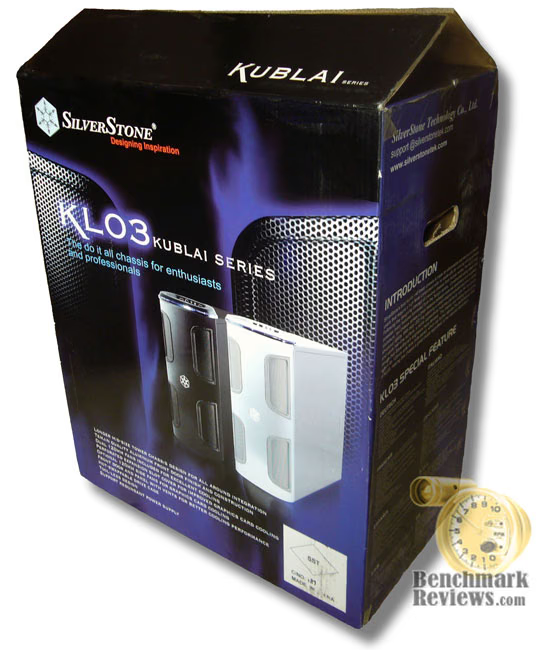
The cardboard box itself is extra thick and sturdy with attractive glossy images and detailed specifications of what's inside. Inside the box you'll find styrofoam blocks and thick plastic bags protecting the case. Plastic sheeting also protects the side window as well. There is also a separate white box which holds all the hardware such as screws, motherboard standoffs, drive mounting rails and a manual. I've seen other manufacturers not secure this hardware and just simply place it inside the case without any protection to the insides of the case, especially the side window.

The need for such a big box became apparent as soon as I removed the case from it's packaging. If you didn't pay attention to the dimensions of this case before buying it then you will probably be in for a surprise because this thing is huge. It measures almost 24 inches long which is longer than most computer desks. This doesn't even include the couple of inches of breathing room you will need for your rear exhaust fans and cabling. So I would suffice to say that this case is best suited to be placed on the floor unless you have an executive style desk but even then it might be just too big. It's not just long either, it's tall too. I stood it up against my old Aprevia Navigator case and it was only an inch shorter than it and that's considered a full tower. For this to be called a mid tower might be a little bit of a stretch because it's nearly a full tower. The other thing that caught my eye is the side window, it does not look like just a thin piece of flimsy plastic, the edges are beveled and it's thicker than most side panel windows I've ever seen.

Looking at the top of the case, it adorns an elegant blue LED acrylic glass ring that I really like because it adds a touch of class without being garish or obnoxious. The blue light ring encompasses the power and reset buttons along with the I/O Panel which includes 2 USB, 1 firewire, 1 microphone, and 1 headphone jack. There is no eSATA port however. Hopefully future models of this will as eSATA becomes more prevalent. Grouping everything together on top was a wise decision since this case will probably be placed on the floor and having everything on top in one central location would be ideal in that scenario.
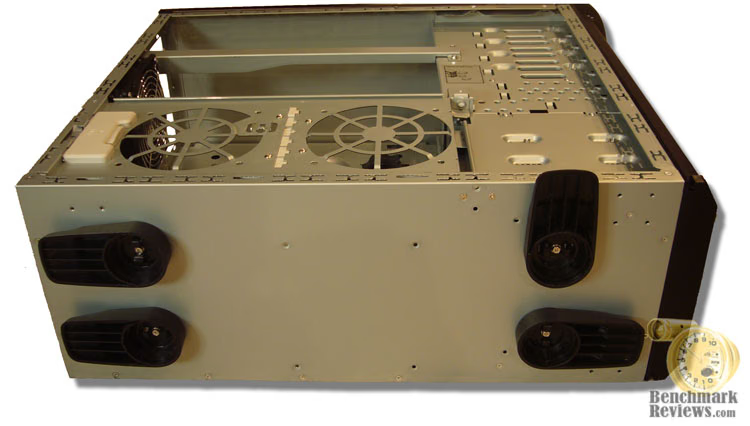
Moving to the bottom of the case you'll find the feet on here are a standard swivel type that have been commonly found on various other case designs in recent years. They rotate 90 degrees to be pointed forward or outward for the front feet and backward or outward for the rear feet. Not my favorite type since they can stratch up wood or whatever they're sitting on but they work. They can be easily removed too if you don't want them. What strikes me as odd is how the KL01 and KL02 cases each have much nicer rubber and brushed aluminum audio equipment style feet but yet these get the elcheapo standard plastic ones. Another feature that might be of use to some includes the ability to mount four swivel castors in lieu of the standard feet. This would certainly help in moving a case this heavy around.

Now around to the backside you will notice something relatively new to case designs and that would be the expansion card slot covers. They have slotted ventilation holes for improved air flow around those hot running video cards. There are also ventilation holes above the expansion card area for even more airflow. Now, there are no holes for water tubes but my guess is this case for one thing is big enough and drafty enough to not need liquid cooling and is not intended to be sold to the extreme gamer who overclocks their system to the point of nearly catching fire. The power supply has a detachable mounting plate for which you can install a redundant power supply. At first I thought it was to assist in installing a power supply but when I tried inserting my power supply through the cutout it wouldn't fit. So I just installed it through the side.
Detailed Exterior Features
Looking at the front of this case you'll see lots of mesh material on not just the front of the case but also the door. This is a nice touch since I never liked having the door open just to improve airflow during intensive computing sessions. I also noticed the mesh screening on the door has larger hole openings than the mesh material on the inside. So dust won't collect on the door mesh screen but will on the screening that covers the expansion and fan bays.

Now here is a feature that really impresses me. I like how you can easily release the locking hinge and reposition it so that it swings open to the left or right. The door itself is very solid and feels as if it can take some serious abuse. The hinge however, is made of cheap plastic. That was a disappoint for me. I nearly broke mine when trying to remove it the first time. Why have such a high quality door yet have it held on by a cheap plastic hinge that is easily broken?

Here is what it looks like opening to the left. Mine was shipped with it opening to the right. The other issue I had with the door was that it does not offer an easy way to grip it when you want to open it. At times I've pushed my whole case over a couple of inches just trying to open the door unless I use two hands then it's not so hard. Thankfully I won't need to open the door that often since my power, reset and I/O ports are all centrally located at the top.
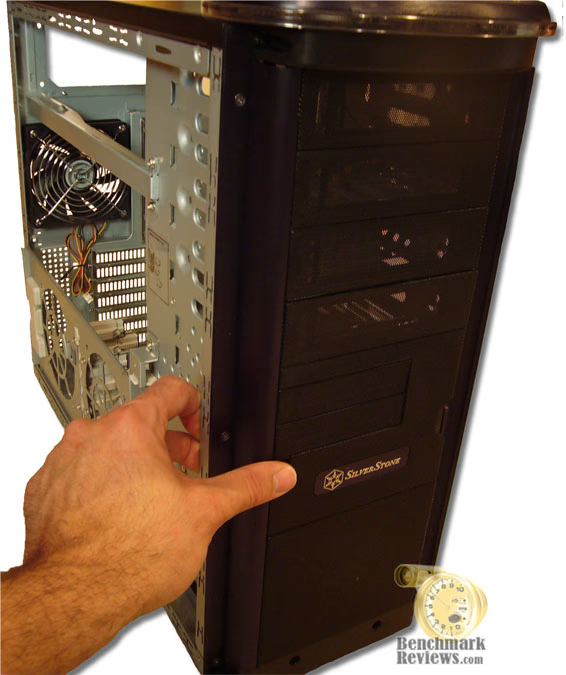
Of course you could go without a door altogether if you wanted to. The case is quite beautiful even without the door installed. Thanks in part to the thoughtfully designed concealing side hinge flaps. These flaps hide the toolless design features of the external bays and really adds a touch of class to this case. I've never thought a case looked good with it's door open or even off but this one looks very sleek with or without the door.

And here is what it looks like with the flaps open. In order to remove the bay covers you need to open these flaps because removal requires a standard screwdriver to press in on the side tabs of the bay covers. The perforated bay covers also assist in keeping this case cool, that is if you don't fill up all the external bays with optical drives or whatever.
Closer Look: Interior
The first thing you notice when you open up the case is this large metal arm which swivels outward and allows you to mount two 120mm fans (not included) for cooling video cards. I like not having to mount the fans on the window itself. This way I can remove the side panel without having to disconnect the fan cables everytime. Plus it eliminates any vibration noise that may occur. You can also remove the arm if you don't plan on mounting any fans on it.

Here you also see the hot swappable hard drive connector. The case only comes with one but you can order more directly from Silverstone if you plan on using this feature in like a RAID setup. Directly above the removable hard drive cage and below the 3.5 inch external drive bays is a place for a fifth hard drive using the supplied black mounting rails. The power supply bracket bar can also be removed to ease installation of large power supplies. I didn't have to remove it for my installation and I'm using a 1000watt Thermaltake PSU that's 8 inches long and without modular cabling.

When I went to remove the side panels, I noticed there were no thumbscrews, now most PC enthusiasts balk at this since they're always removing the side panels to tweak something inside, myself included. I suppose though Silverstone had to trim costs somewhere to achieve the price point they were targeting but I personally felt thumbscrews should've been included. However, the good news is that I found no sharp edges to be found anywhere. All metal cutouts are folded over or have filed down edges to protect your hands and fingers from those nasty little cuts. They're also good for cabling management as well. The only problem I had with cable management involved the front audio cable. It's simply not long enough to reach the most common spot on motherboards for it to plug into, the lower left corner. It will reach but you can't try and hide it or tuck it away anywhere.

Now just to illustrate how much room is inside this case, here is what it looks like with all my goodies installed. First of all, the power supply is an 8 inch long unit with extremely long cables and not to mention excess cabling that includes 6 PCI express power connectors. Obviously my setup doesn't need that many cables but as you can see here, I've managed to somewhat hide all that extra cabling but it wasn't easy. When you have such a large case, you would think it would be conducive to storing excess power supply cabling but I found out that all that extra room just makes it harder to store it out of sight. My video card is 10.5 inches long. As you can see here, I still have a couple (almost three) inches to spare before it hits the hard drives. Aftermarket CPU coolers shouldn't be a problem either given the amount of room between the motherboard and power supply. The spec sheets indicate this case supports extended ATX motherboards and it's obvious here that it does. The motherboard tray is not removeable but with a case this big, it's simply not necessary. I could get my big paws around inside of it without any problems whatsoever.
Detailed Interior Features
Another cool little feature on this case is the side fan mount bracket which features adjustable little bracket arms that help in securing large video cards from sagging. Pretty intuitive if you ask me.

Now here is the most intriguing part of this case. The fan is a hot swappable detachable type. It uses a contact plate as pictured above to get it's power from the case. You can swap this fan out like I did with an LED model or any type you like as long as it's 120mm. I had a little trouble getting the contact plates to press firmly against each other when using an LED fan. Sometimes I had to push on the outside of the mesh screen to get it make full contact so I finally just wired it directly to my fan controller which still allows me to remove the fan because I left just enough slack in order to do this.
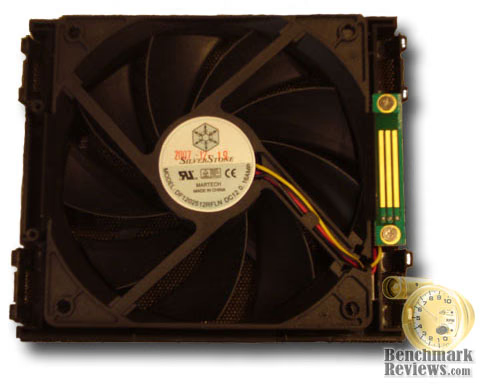
The fan itself is ultra quiet but doesn't move a lot of air either. I'm not sure you'll need it too since the case has so much room to breathe already. It's rated to move 53.24 CFM's at a quiet 26 dB. The fan is also a 9 bladed type which contributes to it's quietness.
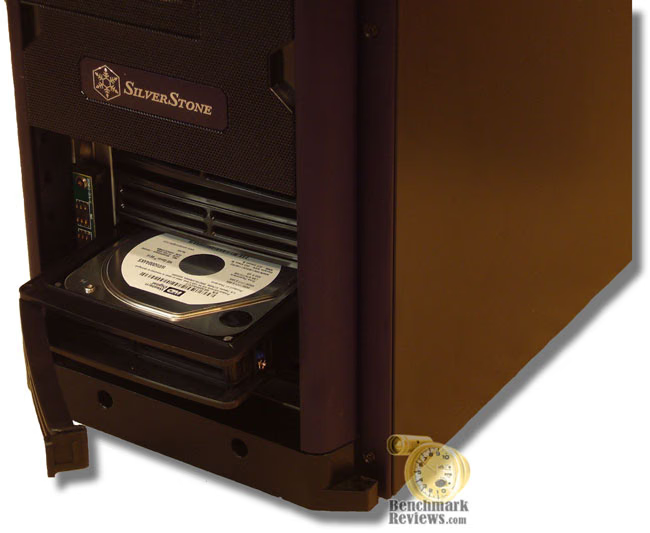
And here is the reason for the hot swappable removeable fan. The hard drives are hot swappable as well. Well, at least one of them is anyways. Silverstone includes only one adaptor to do this with but they offer more for sale on their website. This feature is only for SATA drives and requires a motherboard that supports this feature as well. The adaptor actually uses a traditional molex connector to get it's power from. There is room for upto 4 hard drives here although you could add more inside the case, but you can only use the removeable trays on four of them. You can also remove the whole hard drive cage and use the space for up to three additional external bay devices if you wanted to. Another configuration option you have is to swap three of the 5.25 inch external bays with the hard drive cage location or just order another hard drive cage and use it in place of three of the 5.25 inch external bays for a total capacity of nine hard drives. The floppy drive cage is not removable but had Silverstone made it removable then I could see yet another hard drive cage being placed there for potential of up to 12 total hard drives. The hard drive trays use four standard mounting screws with little blue rubber bushings that act to absorb any vibrations.
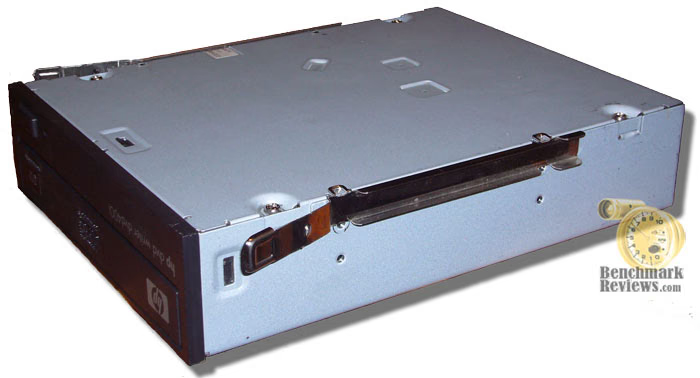
Included are several toolless clips for external drives which do not need any screws to attach them with. They simply push into the standard screw holes of your external drives as illustrated above. They slide and lock right in without any resistance or problems.
SilverStone Kublai Final Thoughts
There are no major design flaws with this case, there are a couple of minor flaws and the only one that I felt Silverstone could've and should improve upon is the exclusion of thumbscrews on the side panels. Maybe they didn't think users of this case would be removing the side panels very often but it's pretty much standard equipment on most cases nowadays. The other things like the plastic door hinges and short front audio cable could be remedied as well. I'm not a product design engineer but I can't imagine it would cost too much to correct these deficiences. The lack of an e-Sata port is probably not a big deal for most people at the moment. Of course it's quite possible Silverstone intentionally designed this case this way so that it will give you an incentive to want their more expensive Temjin series cases much like in the automotive world where for example Toyota includes certain high tech features on their Lexus cars but not their Toyota lineup. Other than that, it seems like this case offers all the quality you would expect out of the Silverstone Temjin lineup but at the affordable Kublai price points.
I also want to emphasize that the front and rear fans that come with the case are extremely quiet which surprised me since the case is so open with it's mesh front panel and slotted side window and PCI slot covers.
Kublai KL03B-W Conclusion
Seeing this case in pictures on the internet didn't really grab my attention at first but seeing it in person when it first arrived I was very impressed. So much so I couldn't help but stare at it and admire everything from it's beautiful high quality finish to how well everything fits together and of course it's size. The packaging that it arrived in was top notch and the overall presentation of the product was about as good as it gets. It's also a very heavy case weighing over 30 pounds so it's not a case you would want to lug around to LAN parties if that's your thing. It's heft is what contributes to it's quality construction. The size of this case I believe adds to it's appeal for not only people wanting to install large video cards and power supplies but also those who may need or want to install an extended ATX style motherboard or just want very good air flow. It's not the lowest priced case in it's class but it does an outstanding job balancing cost with high quality construction and functionality. Newegg currently sells it for $174.99 before a $30 mail-in rebate. For this reason I would highly recommend this case to anyone who apprciates high quality and at a decent price.
Pros:
+ Beautiful high quality black alunimum brushed finish
+ Removeable front intake fan
+ Toolless optical drive installation
+ Good airflow for keeping everything cool
+ Removeable and swappable front door
+ Ultra quiet
+ Large video card support brackets
Cons:
- No thumbscrews
- Plastic door hinges
- Front audio cable too short
- No e-SATA port
Ratings:
-
Presentation: 9.25
-
Appearance: 9.25
-
Construction: 9.00
-
Functionality: 9.00
-
Value: 8.25
Final Score: 8.95 out of 10.
Quality Recognition: Benchmark Reviews Silver Tachometer Award.
Questions? Comments? Benchmark Reviews really wants your feedback. We invite you to comment on this article or leave your remarks in our Discussion Forum.