
BitFenix Shinobi Mid-Tower Computer Case
BitFenix Shinobi Window Mid-Tower Case
Manufacturer: BitFenix Co. Ltd.
Product Name: BitFenix Shinobi Window Black
Model Number: BFC-SNB-150-KKW1-RP
Price As Tested: $69.00 at BitFenix Store
Full Disclosure: The product sample used in this article has been provided by BitFenix Co. Ltd.
Here at Benchmark Reviews we like to bring you the most up to date hardware reviews, our latest sample is the BitFenix Shinobi Window Mid-Tower PC case model number BFC-SNB-150-KKW1-RP. This case has been out now for a few months but is still quite recent, it was the elegant design that first attracted me to this case, the second point that made this case rather appealing was its raw mod-ability.
There seems to be a trend lately with many people cursing overly plastic PC cases but I think the Shinobi is somewhat different, it isn't perfect but for its price you can't really want for more. For under $70 you get a very good looking 'windowed' case with a painted interior, motherboard cut-out's and room to manage and hide cables effectively, a bottom mounted PSU, two 120mm fans pre-installed with capability for seven and mesh venting on all intakes bar the window. Let's not leave it there though, there is more to see so let's get to it.

BitFenix Shinobi Window Features
Killer Looks
From the uniquely crafted side panel window and fan vents, to the brushed aluminum accents, Shinobi Window carries through the signature BitFenix design philosophy of clean lines, understated elegance, and modern styling. If looks could kill, a glance at Shinobi Window could be your last.
Choose Your Destiny
The stealthy digital warrior must adapt to their environment. Available in with or without a windowed side panel, you can choose the Shinobi that blends perfectly with your surroundings. Whether you choose to walk the path of light or darkness, Shinobi has you covered.
Maximum Expansion
Serious rigs require serious hardware. That's why Shinobi Window is engineered to handle up to three 5.25" drives or eight 3.5" hard disks. You can also install a 2.5" SSD with the included adapter. Best of all, Shinobi Window can easily accommodate long graphics cards, which means that you can outfit it with the hardware necessary to eliminate the opposition.
Efficient Cooling
The effective gaming rig, like the warrior who wields it, must be cool under fire. Shinobi Window is adorned with unique mesh areas that can quickly dissipate excess heat. Shinobi Window can accommodate a bevy of fans - up to seven 120mm or two 140mm fans can be installed to ensure that all hardware stays as cool as the blood running through an assassin's veins.
Plenty of Connectivity
The efficient warrior must have easy access to all the tools they need to get the job done. Equipped with no less than four USB 2.0 ports, Shinobi Window offers plenty of connectivity for all your USB devices so that you can keep you gear connected and ready for battle.
DIY Friendliness
Fighting should be done in game -- not with your hardware. Shinobi Window comes with a wealth of DIY-friendly features, ensuring that getting your system setup is quick and efficient. A CPU cooler cutout makes it easy to change out your CPU cooler should the need arise. Shinobi Window comes with filtered fan intakes, keeping the interior clean and your system looking great. Shinobi Window even comes with convenient tool-free drive locking mechanisms for ultimate convenience.
BitFenix Quality
Shinobi Window comes with all the amenities and design touches characteristic of BitFenix chassis. BitFenix SofTouchTM Surface Treatment for resistance to fingerprints and stains surrounds the brushed gunmetal BitFenix logo emblazoned on the front. A luxuriously black coated chassis exudes both quality and refinement. With Shinobi Window, users can experience BitFenix quality both inside and out.
BitFenix Shinobi Window Specifications
| Materials | Steel, Plastic | |
|---|---|---|
| Color (Int/Ext) | Black/Black | |
| Side Panel | Tinted Window | |
| Dimensions (WxHxD) | 205 x 460 x 490 mm (ATX Mid Tower) | |
| Motherboard Sizes | Mini-ITX, mATX, ATX | |
| 5.25" Drive Bays | x 3 | |
| 3.5" Drive Bays | x 8 (1 x external, using 5.25" adapter) | |
| 2.5" Drive Bays | x 1 (using 5.25" adapter) | |
| Cooling Front | 2 x 120mm (1 x 120mm included) | |
| Cooling Rear | 1 x 120mm (included) or 1 x 92mm (optional) | |
| Cooling Side Panel | 1 x 120mm (optional) | |
| Cooling Top | 2 x 140mm or 2 x 120mm (optional) | |
| Cooling Bottom | 1 x 120mm (optional) | |
| PCI Slots | x 7 | |
| I/O | 4 x USB2.0, Audio | |
| Power Supply | PS2 ATX (bottom, multi direction) | |
| Extras | Tool-free drive locking mechanisms |
Source: BitFenix.com
Closer Look: Exterior
In this section we will have a good look at the exterior styling of the BitFenix Shinobi Window case to get a good idea of what it has to offer.

The Shinobi Window case ships in a rather plain cardboard box, nothing too fancy which helps to keep costs down. The main features of the case are depicted in picture form with very brief explanations of these features.

The looks of the front of the Shinobi will surely leave us divided, I quite like the straightforward no frills approach and I think this will be the new trend. There are too many 'in your face' jagged line/abstract looking cases on the market and not enough profesional looking cases in this price range. My only concern here is air intake and how restricted it might be, the mesh running up either side is where most of the air will be drawn in.

The front mesh design carries on over to the top of the case and there is also some nice mesh venting here for exhaust fans. The front I/O panel looks rather nice too.
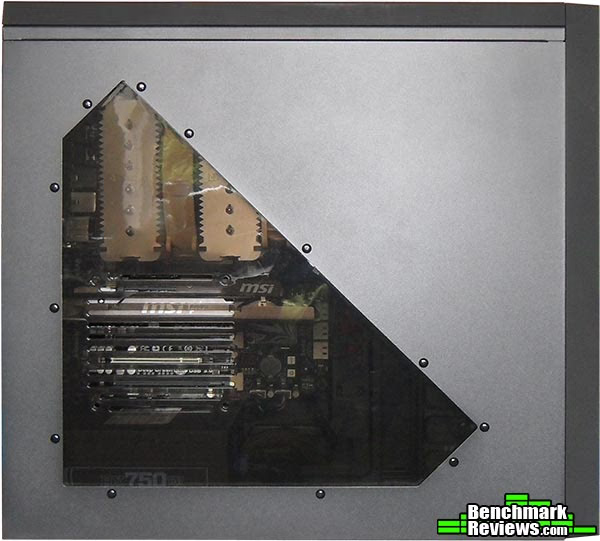
Rather than just cutting a square hole in the side panel and slapping in some perspex BitFenix have opted for an abstract window design for the window edition Shinobi case. The window is a very dark smoked color and actually restricts view quite a lot, unless you have interior lighting inside your case you won't really see much through the window.

The rear of the Shinobi looks normal by today's standards of PC cases, with all of the normal features that are popular amongst us enthusiasts. A good indicator of how much room you have to play with inside the case is to look above the rear I/O space and below the bottom PCI expansion slot, in this case it looks rather tight. While this might hinder installation a little, it will be good from a cable management perspective as you will be able to get all of your cables tight and close to the motherboard top and bottom. The rear fan mount allows for a 120mm fan (installed) or a 92mm fan, and there are two grommeted watercooling pass through ports. It is a little shame that the PCI expansion covers are not vented but this is another cost saving method that doesn't affect the overall case too much.
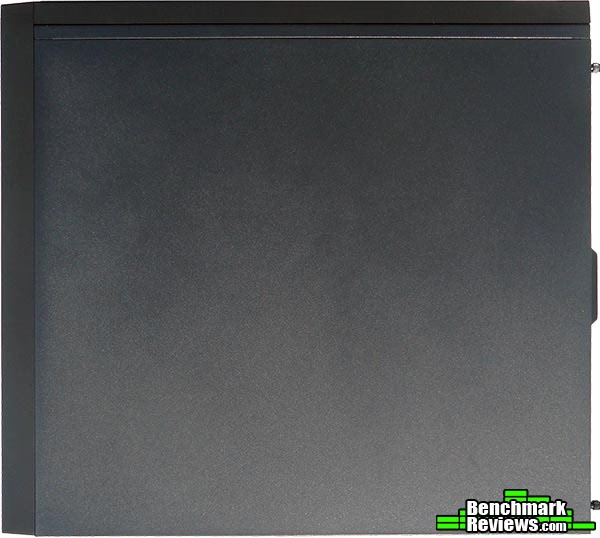
The right side of the case is rather plain and doesn't matter too much as it is normally hidden out of sight anyway. I see this side panel as a blank template should you want to inflict your own design on a side panel, both side panels are generally interchangeable so do with this one as you wish.

Looking at the bottom of the case now we can see extra venting for intake airflow (left side) this alleviates my earlier concerns about restricted air intake a little, but still doesn't quite compare to straight forward intake airflow from a fully vented case front. In the center and towards the rear are two vented cut-outs, the middle one is for air intake and allows for a 120mm fan to mounted inside the case and the rear one is for PSU air intake. Both of the air intakes have a plastic honeycomb mesh dust filter which is better than nothing but will only stop large dust particles.
Detailed Exterior Features
In this section we will have a closer look at the exterior features of the BitFenix Shinobi Window case.

The front I/O consists of four USB 2.0 ports, microphone and headphone ports, HDD and power LED's and a big power and small reset button. We also have a close-up shot of the mesh strips that follow the front to the top.

To remove the front panel you have to pull really hard from the bottom, this requires a lot of effort and when it comes free you really know to it. Once it is removed you are greeted with a 5.25" to 3.5" drive bay adapter and a mesh covered air intake. The drive bay adapter allows you to install a card reader/USB 3.0 front panel/floppy drive (your choice), the intake fan is installed on the inside and you can access the fitting screws from this side, the front intakes only allow for 120mm fans.

Looking inside the front panel you can see that the BitFenix badge and the mesh strips are removable as are the drive bay covers. You remove the drive bay covers and the BitFenix badge by pulling the plastic tabs to the side and you can remove the mesh by bending out the several metal tabs along the length of the panel. BitFenix will soon be selling the badges and mesh strips in various colors as an aftermarket option to allow you to make your case more personal, or you can paint them yourself.

Removing the top panel is much the same as the front panel and there is a cut out at the rear of the case that allows you to do this easier, you will need to ensure the front panel cables are free or you will not be able to remove the panel. Once removed you have access to the two top exhaust fan mounts, there are no fans installed by default but you can install a pair of 120mm or a pair of 140mm here.

Looking at the inside of the top panel you can see once again that the mesh is easily removed. Also, the front I/O panel cables are modular so if you do not use certain parts of it then you can simply disconnect the wires and have a much tidier install.

The BitFenix Shinobi Window doesn't come with rubber feet pre-installed, you must do this yourself. They are found inside the small accessory package and have adhesive already applied so it's a case of simply sticking them on, this is likely another cost saving technique by BitFenix. Here is also a close up of the mesh, like I mentioned before I doubt you will be catching any fine dust with this filter, but some level of protection is better than none.
Closer Look: Interior
Now let's take a look at the interior of the BitFenix Shinobi case. No matter how nice the exterior looks, it could all be for nothing if the interior is not well thought out.

The interior of the Shinobi case is nicely laid out, there are plenty of cut-outs for cable management and the intake airflow is not restricted by the HDD bays. There are three tool free 5.25" drive bays, one of which is occupied by a 5.25" to 3.5" / 2.5" adapter and there are eight tool free 3.5" hard drive bays. The motherboard standoff holes are all nicely lablled and there is a key inside the 'H' that tells you which holes you need to use for each particular size of motherboard. Important dimensions to note are as follows; From the rear PCI expansion slots to the HDD bays (width for video cards) is 32.5cm and from the motherboard tray to the side panel (depth for CPU coolers) is 17.5cm by my own measurement.

The rear of the motherboard tray is merely a reflection of the front, with the main difference being that there are no tool free retention clips for the 5.25" bays on the reverse. There are plenty of cable tie down points on the reverse of the motherboard tray that allow for some very tidy cable management, but I'm not too keen on the space between the edge of the motherboard tray and the HDD rack because this makes hiding cables that bit more difficult.

A quick look at the front interior section of the case here with the main focus on the 3.5" HDD rack and the tool free retention clips. There are upsides and downside here, the main upside is that the HDD rack isn't restricting airflow with no HDD's installed and of course you won't need to mess about with screws to install or remove a hard drive. The downsides to this setup are that there are no anti vibration materials used, and from a cable management perspective the power and SATA cables will be more visible with HDD's mounted in this orientation.
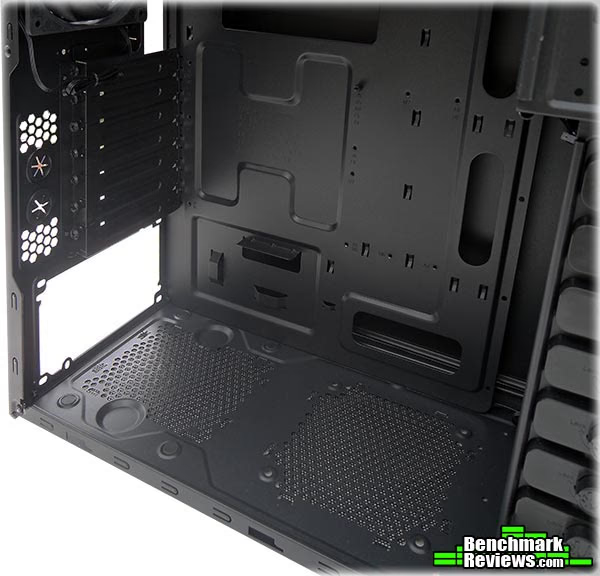
Looking at the PSU area inside the case here we can see four pads that raise your PSU slightly and avoid any scratches where the PSU would make contact with the case. The mount for the 120mm intake fan towards the front of the case is quite close to the PSU area, this may cause an issue if you have a big PSU (in my case my PSU comes within millimeters of the fan mount) and getting a fan in here without the wires getting in the way could prove difficult. Also note that the PSU is slightly offset from the motherboard tray and that there is a nice cut out here too, this allows you to route your front panel USB and audio leads here for a nice clean install.
Detailed Interior Features
Lets have a detailed look at the interior features of the BitFenix Shinobi.
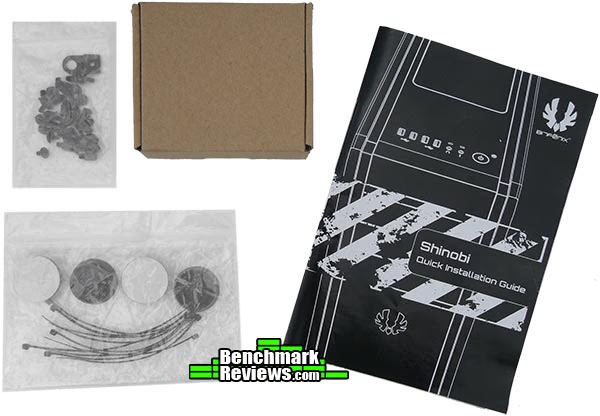
When you open the case for the first time you are greeted with an installation guide and a basic accessory package (tucked neatly in a little brown box). You get a little bag of assorted screws and the motherboard standoffs, the rubber feet for the case and a dozen or so cable ties.

The 5.25" tool free retention clips are simple yet effective, to open simply push underneath on a plastic tab to release the clip, install your optical drive (or other 5.25" device), line up the screw holes and push the clip back into place. Each one has the BitFenix logo on it, which I think is a nice little touch.

Similar story with the 3.5" tool free retention clips, no real explanation is needed as the picture above says it all really. One thing to note here is that these retention clips come free of the case when you unlock them and can be a little fiddly to get back into place but it's nothing major.

Here is the 5.25" bay adapter removed from the case, this allows you to install an external 3.5" device or an internal 2.5" drive. The front face has the same finish as the 5.25" drive bay covers that are clipped into the front panel meaning you won't sacrifice looks when you install an external 3.5" device.
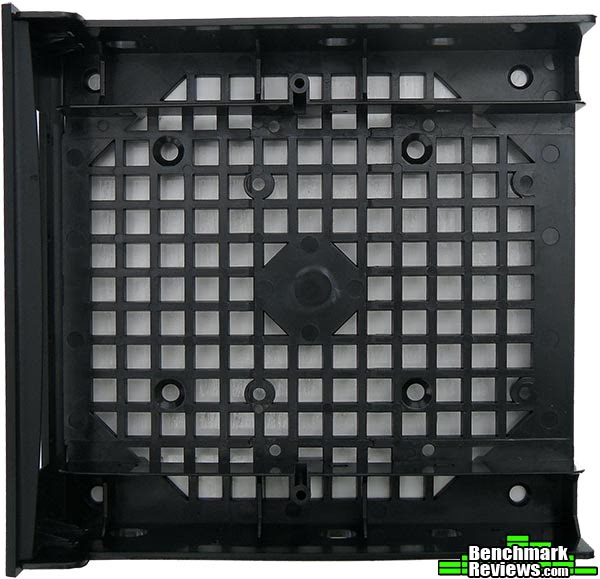
Installing a 2.5" device in the bay adapter is accomplished by screwing it in from the underside, it's a shame that the provision for two 2.5" drives were not catered for as it could have easily been achieved with a bit of creative thinking, but those of us that think like this won't have a problem finding a way to install more than one 2.5" drive anyway.
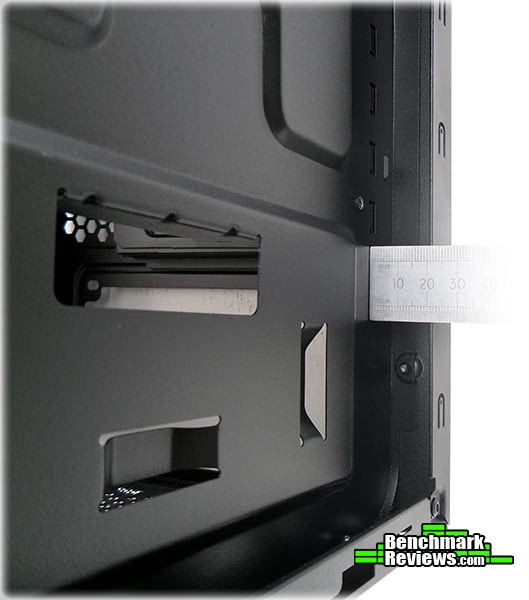
the rear of the motherboard tray is 2cm deep which is more than enough room for hiding you cables away, you may have noticed that there are certain recessed areas of the motherboard tray but they are only around 5mm deep so it is not a problem.
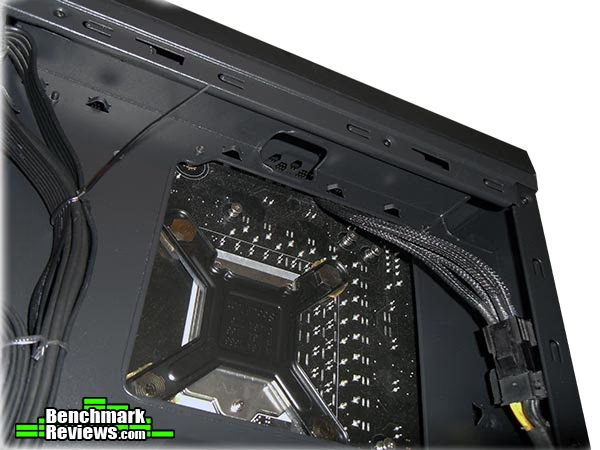
for more cable routing goodness you only need look up at the top of the case to find yet another two cut-outs that allow for routing of the CPU power cable and/or any fan cables you may have.
System Build and Testing
My favorite part of building a system is the satisfaction of doing a good job, the more effort you put into it the more satisfaction you will get from it. Knowing that you built it yourself with your own two hands and knowing that you did a good job makes it all worthwhile in the end.
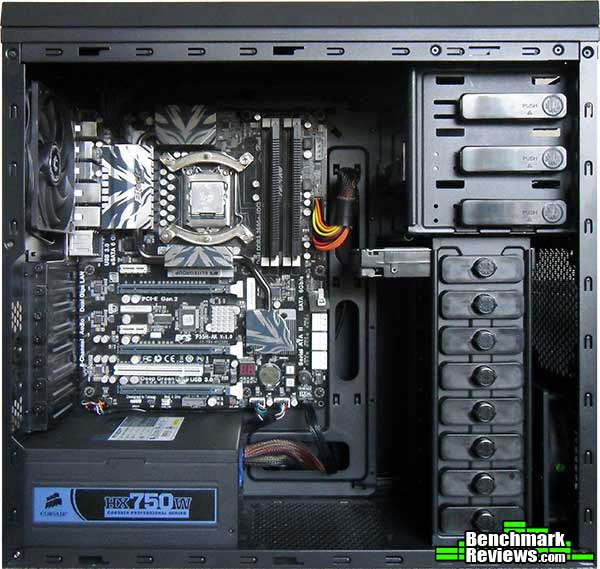
When going for a neat and tidy install its always a little difficult to decide on what to install first, I generally start with the motherboard and then the PSU, removing them where necessary to route cables in the most efficient way possible. Now that I have a 3.5" HDD installed I am not overly keen on the HDD rack, I like things to be hidden as best as possible but that's just me.

Even though it will never be seen I like to keep my cables tidy, there is nothing worse than sifting through a tangled mess of wires just to upgrade one piece of hardware, so tidy is the way forward people. The Shinobi comes with a nice big cut-out for access to the CPU backplate but on my Intel 1156 motherboard it seems just that bit too small. Cable management is made very easy thanks to the numerous cable tie down points and cable routing cut-outs, there is still room for improvements but I am not complaining.

This is where it all pays off, careful planning and placement and a few hours of your time can lead to much gratification. After all it is your system and you must make it personal to yourself, sure you could have someone else do it for you but that defeats the object, it's called a personal computer for a reason.
Testing and Results
 Testing Methodology
In the following tests I will be putting the BitFenix Shinobi Window case through its paces to see if it performs as good as it looks. I will be measuring three of the most important components inside the case and these are CPU, VGA and HDD. To test the CPU I will create a load using prime 95 and to test the GPU I will create a load using FurMark v1.9.1. To test the hard drive I submitted it to a barrage of various benchmarks and I monitored all of the temperatures using CPUID HWMonitor. All tests were run simultaneously for 30 minutes to stress the system to its fullest and get some real world numbers.
Test System
- Motherboard: ECS P55H-AK (Intel P55)
- System Memory: OCZ Blade ST 2000MHz 4GB Kit
- Processor: Intel Core i5 760 OC @ 4.0GHz
- CPU Cooler: Noctua NH-D14
- Video: MSI N560GTX-Ti Hawk
- HDD 1: OCZ Vertex 2 60GB
- HDD 2: 1TB Seagate SATA 7200rpm
- HDD 3: Seagate Constellation 160GB 7200rpm 32MB cache
- ODD: TSSTcorp SATA DVD-RW Combi
- PSU: Corsair HX750W Modular
- Monitor: HKC 2219A 22" Widescreen
- Operating System: Windows 7 ultimate x64
The screen shot of CPUID HWMonitor (below) shows minimum temperatures (system idle) and maximum temperatures (system load). The value column is representative of the temperatures at the time of taking the screenshot and shows the variance (if any) in the temperatures during my tests. The ambient room temperature during testing was 25°C.
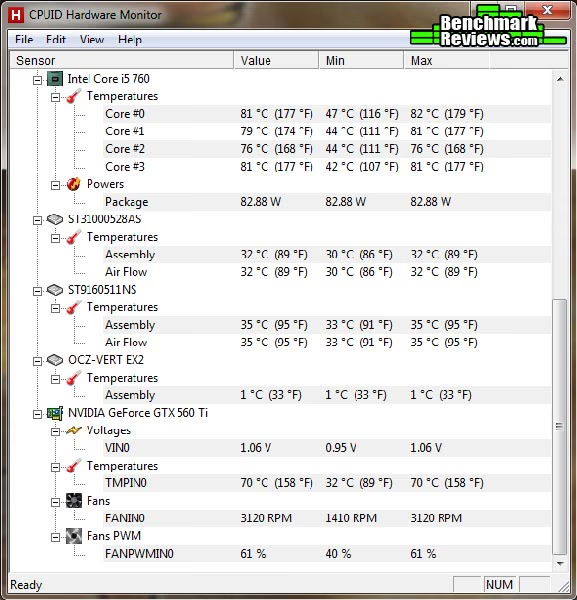
The temperatures inside the case are a little high but nothing major. The main worry I had with the case to start with was the restricted intake air flow but it seems that it might not be such an issue after all. My CPU is running at 4.0GHz with just under 1.4V vCore and the Noctua is doing a great job keeping it tamed. Looking back at the N560GTX-Ti Hawk article that I wrote not too long ago, I had this video card installed inside the Lancool PC-K63 case (which has better airflow) and the difference is only around 3~4°C between the two cases, so that's a good point in favor of the Shinobi Window. HDD temperatures didn't fluctuate much and 2°C increase is nothing to worry about especially considering tha none of my two mechanical hard drives were in any direct airflow anyway.
BitFenix Shinobi Window Final Thoughts
On first inspection I wasn't too sure about the overall feel of the BitFenix Shinobi window case, it was quite light and I had a few doubts but these were laid to rest after building a system inside it and I am left really impressed. There are a few things missing that you would find in a more expensive case such as rubber grommets on the cable routing holes and vented PCI expansion slot covers, but these are ways of reducing production costs (like not pre-installing the rubber feet) and have allowed BitFenix to bring us a case that delivers great value for money while still looking good and being functional.

BitFenix Shinobi Window Conclusion
In this section I am going to write a brief five point summary on the following categories; Performance, Appearance, Construction, Functionality and Value. These views are my own and help me to give the BitFenix Shinobi Window PC case a rating out of 10. A high or low score does not necessarily mean that it is better or worse than a similar PC case that has been reviewed by another writer here at Benchmark Reviews, which may have got a higher or lower score. It is however a good indicator of whether the PC case is good or not. I would strongly urge you to read the entire review, if you have not already, so that you can make an educated decision for yourself.
Performance is really good, the design of the front panel leads you to believe intake air would be restricted but the Shinobi kept the temperatures in check and sound levels down. Installation was a breeze, the Shinobi Window is an absolute pleasure to work with.
Appearance is a strong point for the Shinobi Window, at least as far as I am concerned it is. I think it looks quite professional whereas I have had it referred to as too plain. Thanks to the graphical nature of this review you can make up your own opinion.
Although the BitFenix is made from plastic and steel and felt kind of lightweight I was pleasantly surprised by the overall build quality after installing a system inside it. The front and top panels are a pain to remove but you won't be doing this too often anyway, it would have just been nice to be able to remove the panels without thinking about reaching for a crowbar, if you know what I mean.
Lack of USB 3.0 and no real watercooling options really let down the BitFenix Shinobi window as an enthusiast case, but at the same time you have excellent cable management and filtered air intakes that cancel those negatives out. I guess it just depends on what you are looking for in a case.
For $69.00 at the BitFenix Store the Shinobi Window PC case could be yours, I think this is great value for money and you get a sexy looking case with money left over that allows you to personalise it to suit your own taste.
Pros:
+ Excellent cable routing
+ Tool free retention clips are effective
+ Great overall build quatlity
+ Very quiet operation
+ Lovely smoked side window
+ Filtered air intakes
+ 2.5" drive adapter / External 3.5" adapter in one
+ Painted interior
+ Bottom mounted PSU
+ Good value
Cons:
- Rubber feet not installed
- Front and top panels are pain to remove
- No USB 3.0 ports
- Not much room above and below motherboard
Ratings:
- Performance: 8.50
- Appearance: 9.00
- Construction: 8.50
- Functionality: 9.00
- Value: 9.00
Final Score: 8.80 out of 10.
Quality Recognition: Benchmark Reviews Silver Tachometer Award.
Benchmark Reviews invites you to leave constructive feedback below, or ask questions in our Discussion Forum.
Reader comments from the original article
5 comments were posted before commenting closed. They are preserved as written. Original avatars no longer resolve and are shown as a placeholder.
RE: BitFenix Shinobi Mid-Tower Computer Case Robert17 Permalink:
Nice review Steven. And nice build as well. Case manufacturers seem to be competing well with features vs. dollars these days. I'm glad to see it. Hopefully better cases will be one of the factors to encourage more folks to jump into building their own PCs.
RE: RE: BitFenix Shinobi Mid-Tower Computer Case Steven Iglesias-Hearst Permalink:
Yeah could'nt agree more, on a similar note hopefully the whole 'Windows 8 will support XBOX 360 games' is just a malicious roumor because that might just be the end for PC gaming as we know it.
RE: RE: RE: BitFenix Shinobi Mid-Tower Computer Case WhyNotV2 Permalink:
Nice case and good review. I just want to say that as long as Sony continues making a Playstation console, PC gaming will continue as it is. Not everyone is an Xbox/Micro$oft fanboy :D
It's all there RealNeil Permalink:
I like this case. It's not gaudy and just looks good to me. (personal preference) I like that there are plenty of options for adding more fans into the box if it's needed. I like that it's not expensive. I usually buy CoolerMaster cases, but will consider a build using this case.
RE: It's all there Stupido Permalink:
+1 to your statement :)