
OCZ Vertex 3 Max IOPS Edition SSD
OCZ Vertex 3 Max IOPS SSD Review
Manufacturer: OCZ Technology Group, Inc.
Product Name: OCZ Vertex 3 Max IOPS Edition SATA III 2.5" SSD
Model Numbers: 120GB: VTX3MI-25SAT3-120G and 240GB: VTX3MI-25SAT3-240G
Price As Tested: 120GB Model $310 (Newegg) or $360 (Amazon), 240GB Model $557 (Amazon)
Full Disclosure: The product sample used in this article has been provided by OCZ.
Not so long ago, Benchmark Reviews tested the OCZ Vertex 3 SSD, which delivered the best transfer speeds and operational performance we had seen from any SATA-connected drive. Not to be outdone, the OCZ Vertex 3 Max IOPS Edition solid state drive debuts with the same SandForce SF-2281 controller but switches to Toshiba TH58TAG7D2FBAS9 3nnm toggle NAND flash components. OCZ suggests up to 120,000 combined IOPS are possible, with speeds reading 550 MB/s. In this article, Benchmark Reviews compares the OCZ Vertex 3 Max IOPS Edition SSD to other high-speed SATA 6Gb/s storage devices.
OCZ Technology first launched their Vertex SSD series shortly after the 2009 Consumer Electronics Show, and delivered impressive performance to performance hardware enthusiasts using the latest Indilinx Barefoot storage controller. Indilinx would go on to have a phenomenal year, and capture the consumer market with their Barefoot controller. But market dominance is a short-lived success, and at the 2010 CES there was a new player in the market: SandForce Inc. This new company promoted the SandForce SF-1200 SSD Processor, which operated faster and more efficiently than the competition, and would be the foundation for OCZ's Vertex 2 SSD. Like clockwork, OCZ debuted their next-generation enthusiast storage platform at the recent 2011 CES, and introduced the Vertex 3 SSD to the market a short while later.
For many within the industry, SandForce was seen to control the 2010 market in much the same way that Indilinx did in 2009. The difference now is that SandForce's platform offers several technical benefits that the Indilinx platform was not capable of. Already into the Q2-2011, the landscape is approximately the same, but with some interesting new twists. OCZ Technology has recently acquired Indilinx, and while there's no word on any new project developments they've moved forward with the Vertex 3 SSD based on the second-generation SandForce's SF-2281 SATA 6Gb/s controller. OCZ promises 60,000 IOPS at up to 550 MB/s transfer speeds with the Vertex 3 SSD, and Benchmark Reviews confirms that they're keeping this promise with tests of the new storage device on a B3-stepping Sandy Bridge platform.
The second-generation SF-2281 SSD processor maintains all of the original core technology SandForce originally introduced in the SF-1200 series, but now improves SSD performance with 20% faster IOPS and 40% faster sequential read/write throughput. They've enhanced BCH ECC capability, and the new processor now supports ATA-7 Security Erase. Finally, the new SF-2200 series implements cost-effective 20nm-class NAND flash from all leading flash vendors with Asynch/ONFi1/ONFi2/Toggle interfaces.
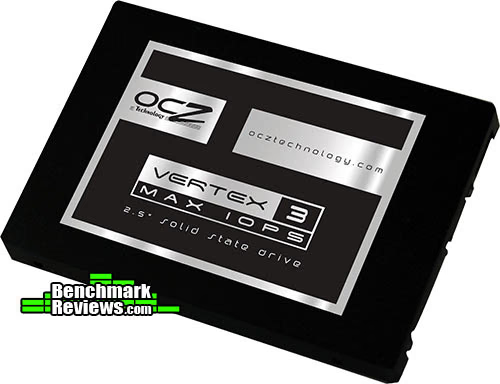
Even after decades of design improvements, the hard disk drive (HDD) is still the slowest component in any personal computer system. Consider that modern desktop processors have a 1 ns response time (nanosecond = one billionth of one second), while system memory responds between 30-90 ns. Traditional hard drive technology utilizes magnetic spinning media, and even the fastest spinning mechanical storage products still exhibit a 9,000,000 ns / 9 ms initial response time (millisecond = one thousandth of one second). In more relevant terms, the processor receives the command and must then wait for system memory to fetch related data from the storage drive. This is why any computer system is only as fast as the slowest component in the data chain; usually the hard drive.
In a perfect world all of the components operate at the same speed. Until that day comes, the real-world goal for achieving optimal performance is for system memory to operate as quickly as the central processor and then for the storage drive to operate as fast as memory. With present-day technology this is an impossible task, so enthusiasts try to close the speed gaps between components as much as possible. Although system memory is up to 90x (9000%) slower than most processors, consider then that the hard drive is an added 1000x (100,000%) slower than that same memory. Essentially, these three components are as different in speed as walking is to driving and flying.
Solid State Drive technology bridges the largest gap in these response times. The difference a SSD makes to operational response times and program speeds is dramatic, and takes the storage drive from a slow 'walking' speed to a much faster 'driving' speed. Solid State Drive technology improves initial response times by more than 450x (45,000%) for applications and Operating System software, when compared to their mechanical HDD counterparts. The biggest mistake PC hardware enthusiasts make with regard to SSD technology is grading them based on bandwidth speed. File transfer speeds are important, but only so long as the operational IOPS performance can sustain that bandwidth under load.
Bandwidth Speed vs Operational Performance
As we've explained in our SSD Benchmark Tests: SATA IDE vs AHCI Mode guide, Solid State Drive performance revolves around two dynamics: bandwidth speed (MB/s) and operational performance (IOPS). These two metrics work together, but one is more important than the other. Consider this analogy: bandwidth determines how much cargo a ship can transport in one voyage, and operational IOPS performance is how fast the ship moves. By understanding this and applying it to SSD storage, there is a clear importance set on each variable depending on the task at hand.
For casual users, especially those with laptop or desktop computers that have been upgraded to use an SSD, the naturally quick response time is enough to automatically improve the user experience. Bandwidth speed is important, but only to the extent that operational performance meets the minimum needs of the system. If an SSD has a very high bandwidth speed but a low operational performance, it will take longer to load applications and boot the computer into Windows than if the SSD offered a higher IOPS performance.
Closer Look: OCZ Vertex 3 Max IOPS
SSDs are quickly gaining popularity because they work equally well in PC, Linux, or Apple Mac computers. Likewise, they install into both desktop and notebook platforms without modification. For this article Benchmark Reviews is testing the 240GB OCZ Vertex 3 Max IOPS Edition SSD (Vertex 3 MI), which is expected to reach speeds of 550 MB/s for sequential reads and 500 MB/s sequential writes. The VTX3MI-25SAT3-240G model we've received for testing is built using the SandForce SF-2281 SSD controller and Toshiba toggle-NAND flash components.
OCZ offers two difference capacities for their Vertex 3 Max IOPS series solid state drives, and while they both use identical enclosures the performance specifications differ between models. All OCZ Vertex 3 MI models share the same part numbers, with a capacity designator trailing the end: VTX3MI-25SAT3-120G for 120GB and VTX3-25SAT3-240G for 240GB. With respect to OCZ's Vertex 3 Max IOPS series, the 240GB version is expected to be the most popular of the two capacities because it offers the best performance specifications.

The OCZ Vertex 3 Max IOPS SSD is best suited for performance-orientated personal computers, but also works extremely well for SOHO computer systems. SandForce SF-2200 series SSDs have been designed with a focus on high-performance operational and data transfer speeds, and includes 256-bit encrypted data protection and improved NAND wear-leveling through their proprietary DuraWrite technology. Although OCZ Vertex 3 MI SSDs do not offer an integrated USB Mini-B port, which appeared on some early-generation SSDs, the retail market offers several different 2.5" SATA enclosures that utilize the SuperSpeed USB-3.0 standard for high-performance portable file transfers.

OCZ understands that once installed, the SSD will be hidden away from view inside a notebook computer or desktop workstation, so they've remained conservative towards the design of their solid state drive appearance. Both halves of the enclosure are given a black textured finish, which does not show fingerprints or smudges like a gloss surface would. A glossy label is attached to the top of the enclosure, denoting model and capacity.
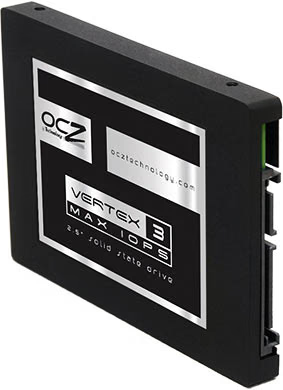
Standard 2.5" drive bay mounting points are pre-drilled and threaded into the OCZ Vertex 3 Max IOPS SSD chassis, which allows for quick upgrade or addition into any existing notebook and other compact computer system. Fortunately, OCZ also includes a 3.5" to 2.5" tray adapter with this kit, so the Vertex 3 MI will easily install into desktop computers. The mounting positions matched up to the drive bracket on my notebook computer, and after only a few minutes I was booting from a restored Windows 7 System Image without a hitch.
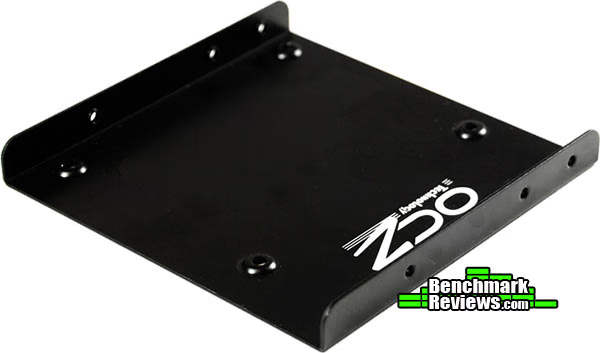
Unlike most Hard Disk Drive (HDD) storage products, SSDs are nearly impervious to impact damage and do not require (or benefit from) any kind of special vibration dampening or shock-proof enclosures OCZ utilizes a standard two-piece metal enclosure for their Vertex 3 Max IOPS series SSDs, which reveals the internal components after removing four small counter-sunk screws located along the sides of this solid state drive. The seam along the side is covered with a 'Warranty Void' label, which OCZ attaches to warn consumers against taking apart their product. By removing the SSD cover it will also remove your consumer protection with it, but Benchmark Reviews takes the risk for you and reveals the internal components in our next section.

If you're familiar with previous-generation OCZ storage products, you'll notice that the Vertex 3 MI series hasn't changed beyond the product decal. While its outward appearance is similar to many other solid state drives, the functionality and value packaged inside are considerably unique. Now that you're acquainted with the basic exterior features of this SSD, it's time to peek inside the metal enclosure and inspect the SandForce SF-2281 internal components...
SandForce SF-2281 SSD Controller
SandForce introduces their new second generation solid state drives to both consumer and enterprise segments, with seven different models to choose from. On the consumer (retail) side you've got models using the older SATA 3Gb/s interface as well as the latest SATA 6Gb/s interface, while all enterprise drives utilize the 3rd-generation SATA 6Gb/s interface. More than any other factor, it's the Flash Channels/Byte Lanes configuration that these separate models. SandForce's SF-2000 series of SSDs continue to feature up to 8 data channels organized into 16 Byte lanes; similar to the previous generation of SF-1222/SF-1565 series SSD controllers, but now some models are scaled down for usage scenarios not requiring massive IO activity.
SandForce second-generation SF-2200 and SF-2100 SSD processors aren't just SATA 6Gb/s on paper - they actually require the bandwidth afforded to the host interface to deliver sustained sequential read/write performance up to 500 MB/s. SandForce DuraClass Technology is still a staple part of their feature set, but now include Trusted Computing Group (TCG) Opal-compliant Self Encrypting Drives (SEDs) support with AES-256/128 and double encryption. SF-2200 and SF-2100 SSDs also utilize high-speed ONFi2 and Toggle flash interfaces in single-level (SLC) and multi-level cell (MLC) NAND flash families from all major suppliers. The last major difference is the reduced minimum over-provisioning requirement, which continues to use an integrated buffer but returns more capacity for storage assignment.
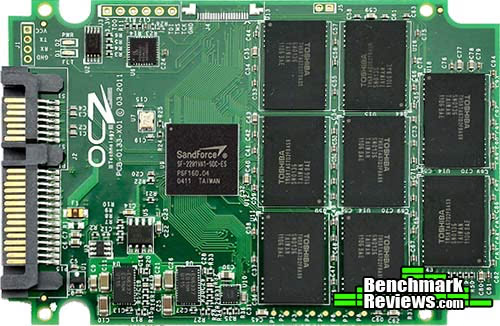
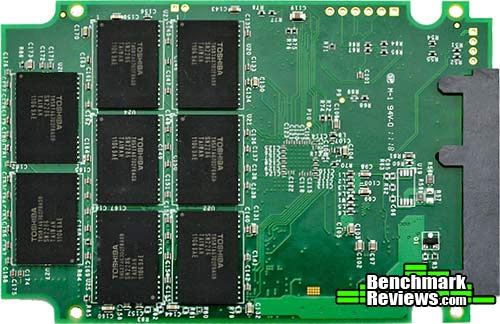
Illustrated above is the OCZ Vertex 3 Max IOPS Edition printed circuit board, which looks nearly identical to previous SandForce PCBs. Eight topside NAND flash modules sit in ranks behind the second-generation SandForce SF-2281 SSD processor, and plenty of electronics fill the remaining space in-between. Another benefit of SandForce's SF-2200 architecture is that all data recorded to the SSD remains on the NAND grid and removes the need for a separate cache buffer DRAM module. Once the SandForce SSD board is turned to expose the underside (image below), SandForce's efficient "DRAM-less" design features DuraClass technology to negate a separate memory buffer chip and enables a more flexible compact design. The result is a faster transaction, albeit at the expense of total storage capacity.
Previous SandForce SSDs utilized an over-provisioning technology, which allocated a portion of NAND for data storage and the remainder reserved for transaction and cache buffer space. Their latest controllers still use this technology, however SandForce claims that the 2200 series has a 0% minimum over-provisioning improvement, which could open up additional storage space if the remaining capacity made it necessary to complete a write cycle. Greater levels of over-provisioning are used by their SSDs built to sustain Enterprise duty cycles.
The new SATA 6Gb/s SandForce SF-2281VA1-SDC-ES processor is part of their SF-2200 family of retail SSD controller chips, although and identical SF-2181 processor exists for older SATA 3Gb/s connections. Offering 8 flash channels with 8 Byte lanes configured (one lane per channel), the SF-2281 maintains a BGA-256 package whereas the top-end SF-2282 delivers two lanes per channel on a BGA-400 package. More detail is available in our SandForce SF-2000 Series SSD Processor Overview article.
All SandForce SSD controllers offer native TRIM garbage collection in supporting Operating System (such as Microsoft Windows-7), Native Command Queuing (NCQ) with 32 command slots, and basic Self-Monitoring, Analysis, and Reporting Technology (SMART) command set. SandForce built the SF-2200 series to produce 500 MB/s Sequential Read and Write bandwidth with 60K (burst)/20K (sustained) IOPS Random Write (4K transfers). Some manufacturers use unique component combinations to exceed these specifications, such is the case with OCZ's Vertex 3 MI.
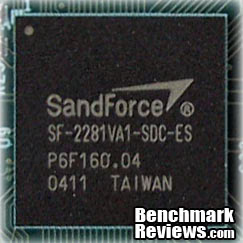
SandForce SF-2281VA1-SDC-ES Controller
The SF-2200 SSD processor provides enhanced ECC with BCH data protection, and also includes SandForce's unique RAISE (Redundant Array of Independent Silicon Elements) technology. RAISE provides the protection and reliability of RAID on a single SSD drive, thanks to flash architecture, without the significant write overhead of parity. The SandForce DuraClass technology automatically stores data using Trusted Computing Group (TCG) OPAL security with 256-bit AES encryption and automatic, line-rate double encryption with a drive-level password, preventing data extraction directly from the physical flash memory modules.

Toshiba TH58TAG7D2FBAS9 Toggle-NAND Flash
SandForce enables support for advanced 30nm- and 20nm-class NAND flash from all leading flash vendors with Asynch/ONFi1/ONFi2/Toggle interfaces with data transfer rates up to 166 Mega Transfers per second. Their latest generation of controllers also offers advanced ECC engine correcting up to 55 bits per 512-byte sector to assure high data integrity and support for future generations of flash memory. On the OCZ Vertex 3 Max IOPS SSD, sixteen multi-layer cell Toshiba TH58TAG7D2FBAS9 Toggle-NAND Flash modules are joined to the SandForce SF-2281 controller. Consumer-level SandForce SSDs generally allocate 7% capacity over-provisioning and 128GB devices will yield 120GB of usable storage space.
Because the SandForce SF-2200 SSD processor is a non-exclusive component available market-wide, Benchmark Reviews expects to see several new solid state storage products using this same controller in the very near future. Please continue on to the next section for details on this particular model, and performance SSD test results...
SandForce SF-2200 Features
OCZ Vertex 3 Max IOPS Solid State Drives unleash the performance potential of the SATA 6Gbps interface, leading the speed revolution in this next-generation solution. Featuring the latest Sandforce controller design, OCZ designed the Vertex 3 Max IOPS to push the limits in read/write rates to blaze past the competition with up to 75,000 random write performance. These latest drives take productivity, gaming, and multimedia applications to the next level to work in perfect symmetry with the latest enthusiast platforms.
Built with the quality, reliability, and durability that lives up to the OCZ name, the Vertex 3 Max IOPS Series easily integrates into today's mobile and desktop platforms and features TRIM support to optimize performance over the drive's lifespan as the ultimate Windows 7 companion. Vertex 3 SSDs are available in 120GB and 240GB capacities and come backed by a 3-Year Warranty.
Endurance and Longevity
As each generation of flash memory evolves and the silicon geometries shrink - performance, reliability, endurance, and data retention are negatively impacted. DuraWrite technology extends the life of the SSD over conventional controllers, by optimizing writes to the flash memory and delivering a write amplification below 1, without complex DRAM caching requirements.
Performance and Power Optimization
SSDs are capable of significantly outperforming traditional HDDs, but typical controllers haven't delivered the compelling value necessary for mainstream adoption. SandForce DuraClass technology enables the SSD to maximize both the endurance and performance for the life of the drive fulfilling the promise of high speed flash memory in client computing applications and improving system performance by up to 50% as measured by the SYSmark Benchmark.
Mobile Computing Security
The SF-2200 series has built in AES-256 bit double encryption controllable by a configurable user password. This feature prevents would-be thieves from extracting data directly from the flash memory should they ever have access to the drive.
Data Protection and Reliability
SF-2200 SSD Processors provide up to 100x greater data protection than today's SSDs, and leading enterprise HDDs. This is a result of superior ECC protection and unique RAISE (Redundant Array of Independent Silicon Elements) technology. RAISE provides the protection and reliability of RAID on a single drive without the significant write overhead.
Vertex 3 Specifications
|
DuraClass Technology: |
|
|---|---|
|
Host Interface: |
|
|
Capacity Supported: |
|
|
Performance (sustained): |
|
|
Flash Memory Support: |
|
|
Power Consumption: |
|
|
Security: |
|
|
Protection: |
|
|
Reliability: |
|
|
Operating Temperature: |
0°C to 55°C ambient |
|
Package: |
256-pin BGA in 14x14mm @ 0.80mm pitch |
|
Compliance: |
RoHS, Halogen-Free, Green |
Source: OCZ and SandForce
SSD Testing Methodology
Solid State Drives have traveled a long winding course to finally get where they are today. Up to this point in technology, there have been several key differences separating Solid State Drives from magnetic rotational Hard Disk Drives. While the DRAM-based buffer size on desktop HDDs has recently reached 64 MB and is ever-increasing, there is still a hefty delay in the initial response time. This is one key area in which flash-based Solid State Drives continually dominates because they lack moving parts to "get up to speed".
However the benefits inherent to SSDs have traditionally fallen off once the throughput begins, even though data reads or writes are executed at a high constant rate whereas the HDD tapers off in performance. This makes the average transaction speed of a SSD comparable to the data burst rate mentioned in HDD tests, albeit usually lower than the HDD's speed.
Comparing a Solid State Disk to a standard Hard Disk Drives is always relative; even if you're comparing the fastest rotational spindle speeds. One is going to be many times faster in response (SSDs), while the other is usually going to have higher throughput bandwidth (HDDs). Additionally, there are certain factors which can affect the results of a test which we do our best to avoid.
SSD Testing Disclaimer
Early on in our SSD coverage, Benchmark Reviews published an article which detailed Solid State Drive Benchmark Performance Testing. The research and discussion that went into producing that article changed the way we now test SSD products. Our previous perceptions of this technology were lost on one particular difference: the wear leveling algorithm that makes data a moving target. Without conclusive linear bandwidth testing or some other method of total-capacity testing, our previous performance results were rough estimates at best.
Our test results were obtained after each SSD had been prepared using DISKPART or Sanitary Erase tools. As a word of caution, applications such as these offer immediate but temporary restoration of original 'pristine' performance levels. In our tests, we discovered that the maximum performance results (charted) would decay as subsequent tests were performed. SSDs attached to TRIM enabled Operating Systems will benefit from continuously refreshed performance, whereas older O/S's will require a garbage collection (GC) tool to avoid 'dirty NAND' performance degradation.
It's critically important to understand that no software for the Microsoft Windows platform can accurately measure SSD performance in a comparable fashion. Synthetic benchmark tools such as HD Tach and PCMark are helpful indicators, but should not be considered the ultimate determining factor. That factor should be measured in actual user experience of real-world applications. Benchmark Reviews includes both bandwidth benchmarks and application speed tests to present a conclusive measurement of product performance.
Test System
- Motherboard: ASUS P8P67 EVO (Intel P67 Sandy Bridge Platform, B3 Stepping)
- Processor: Intel Core i7-2600K 3.4 GHz Quad-Core CPU
- System Memory: 4GB Dual-Channel DDR3 1600MHz CL6-6-6-18
- SATA 6Gb/s Storage HBA: Integrated Intel P67 Controller
- AHCI mode - Intel Rapid Storage Technology Driver 10.1.0.1008
- SATA 3Gb/s Storage HBA: Integrated Intel P67 Controller
- AHCI mode - Intel Rapid Storage Technology Driver 10.1.0.1008
- Operating System: Microsoft Windows 7 Ultimate Edition 64-Bit with Service Pack 1
Storage Hardware Tested
The following storage hardware has been used in our benchmark performance testing, and may be included in portions of this article:
- ACARD ANS-9010 DDR2 SATA RAM-Drive
- Corsair X256 CMFSSD-256D1 256GB SATA MLC SSD (Firmware version 1.1)
- Corsair Nova V128 CMSSSD-V128GB2 SATA MLC SSD
- Crucial RealSSD-C300 CTFDDAC256MAG-1G1 256GB SATA 6Gb/s MLC SSD
- Intel X25-E Extreme SSDSA2SH032G1GN SATA SLC SSD
- Intel 311 Series Larson Creek SLC SSD SSDSA2VP020G2E
- Kingston SSDNowV+ SNVP325-S2 128GB SATA MLC SSD
- LiteOn LA-32M1S Strong-Page 32GB MLC SSD
- OCZ Agility OCZSSD2-1AGT120G 120GB SATA MLC SSD (Firmware version 1.5)
- OCZ Agility-EX OCZSSD2-1AGTEX60G 64GB SATA SLC (Firmware version 1.5)
- OCZ Agility 2 'Extended' OCZSSD2-2AGTE120G 120GB MLC SSD
- OCZ RevoDrive OCZSSDPX-1RVD0120 120GB MLC PCI-Express SSD
- OCZ RevoDrive X2 OCZSSDPX-1RVDX0240 240GB MLC PCI-E SSD
- OCZ Vertex OCZSSD2-1VTX120G 120GB SATA SSD (Firmware 1.5)
- OCZ Vertex-EX OCZSSD2-1VTX120G 120GB SATA SLC SSD (Firmware version 1.5)
- OCZ Vertex Turbo OCZSSD2-1VTXT120G 120GB SATA SSD (Firmware version 1.5)
- OCZ Vertex 2 'Extended' OCZSSD2-2VTXE120G 120GB MLC SSD (Firmware version 1.2)
- OCZ Vertex 3 VTX3-25SAT3-240G 240GB MLC SSD (Firmware 1.1)
- OCZ Vertex 3 Max IOPS VTX3MI-25SAT3-240G MLC SSD (Firmware 2.06)
- Patriot Inferno PI100GS25SSDR 100GB MLC SSD
- Patriot Torqx 2 PT2128GS25SSDR 128GB MLC SSD
- Seagate Momentus-XT Solid State Hybrid Drive ST95005620AS
- Seagate Barracuda-XT ST32000641AS 2TB 7200RPM SATA 6Gb/s Hard Drive
- Western Digital VelociRaptor WD3000HLFS 300GB 10,000 RPM SATA Hard Disk Drive
- WD SiliconEdge-Blue SSC-D0256SC-2100 256GB SATA SSD
Test Tools
- AS SSD Benchmark 1.6.4067.34354: Multi-purpose speed and operational performance test
-
ATTO Disk Benchmark 2.46: Spot-tests static file size chunks for basic I/O bandwidth
- CrystalDiskMark 3.0.1a by Crystal Dew World: Sequential speed benchmark spot-tests various file size chunks
- Iometer 1.1.0 (built 08-Nov-2010) by Intel Corporation: Tests IOPS performance and I/O response time
-
Lavalys EVEREST Ultimate Edition 5.50: Disk Benchmark component tests linear read and write bandwidth speeds
- Futuremark PCMark Vantage 1.02: HDD Benchmark Suite tests real-world drive performance
Test Results Disclaimer
This article utilizes benchmark software tools to produce operational IOPS performance and bandwidth speed results. Each test was conducted in a specific fashion, and repeated for all products. These test results are not comparable to any other benchmark application, neither on this website or another, regardless of similar IOPS or MB/s terminology in the scores. The test results in this project are only intended to be compared to the other test results conducted in identical fashion for this article.
AS-SSD Benchmark
Alex Schepeljanski of Alex Intelligent Software develops the free AS SSD Benchmark utility for testing storage devices. The AS SSD Benchmark tests sequential read and write speeds, input/output operational performance, and response times. Because this software receives frequent updates, Benchmark Reviews recommends that you compare results only within the same version family.
Beginning with sequential read and write performance, the 240GB OCZ Vertex 3 MI produced 491.37 MB/s read speed, and 261.02 MB/s write performance. The sequential file transfer speeds have traditionally been low with this benchmark tool for SandForce controllers because of data compression, so we will concentrate on the operational IOPS performance for this section.
Single-threaded 4K IOPS performance delivers 18.90 MB/s read and 61.62 MB/s write, while the 64-thread 4K reads recorded 234.56 MB/s and write performance was 206.62 MB/s... both earning the OCZ Vertex 3 MI a position ahead of other Sandforce-driven SSDs in our performance results chart below.

Displayed in the chart below, the 64-thread 4KB IOPS performance results for several enthusiast-level storage products helps to illustrate which products offer the best operational input/output under load:

In the next section, Benchmark Reviews tests transfer rates using ATTO Disk Benchmark.
ATTO Disk Benchmark
The ATTO Disk Benchmark program is free, and offers a comprehensive set of test variables to work with. In terms of disk performance, it measures interface transfer rates at various intervals for a user-specified length and then reports read and write speeds for these spot-tests. There are some minor improvements made to the 2.46 version of the program that allow for test lengths up to 2GB, but all of our benchmarks are conducted with 256MB total length. ATTO Disk Benchmark requires that an active partition be set on the drive being tested. Please consider the results displayed by this benchmark to be basic bandwidth speed performance indicators.

ATTO Disk Benchmark: Queue Depth 4 (Default)

ATTO Disk Benchmark: Queue Depth 10 (Maximum)
Our basic bandwidth speed tests begin with the OCZ Vertex 3 MI SSD attached to the Intel SATA 6Gb/s controller operating in AHCI mode. Using the ATTO Disk Benchmark tool, the test drive performs file transfers ranging from 0.5 KB to 8192 KB. The VTX3MI-25SAT3-240G model we received reveals 599 MBps maximum read speed that plateaus from 128-8192 KB file chunks, and 519 MBps peak write bandwidth plateaus from 64-8192 KB. These both exceed SandForce specifications, and meet the manufacturer's own specification.

In the next section, Benchmark Reviews tests sequential performance using the CrystalDiskMark 3.0 software tool...
CrystalDiskMark 3.0 Tests
CrystalDiskMark 3.0 is a file transfer and operational bandwidth benchmark tool from Crystal Dew World that offers performance transfer speed results using sequential, 512KB random, and 4KB random samples. For our test results chart below, the 4KB 32-Queue Depth read and write performance was measured using a 1000MB space. CrystalDiskMark requires that an active partition be set on the drive being tested, and all drives are formatted with NTFS on the Intel P67 chipset configured to use AHCI-mode. Benchmark Reviews uses CrystalDiskMark to illustrate operational IOPS performance with multiple threads. In addition to our other tests, this benchmark allows us to determine operational bandwidth under heavy load.
Each of our tests with the OCZ Vertex 3 Max IOPS SSD were consistent, and the best results obtained were used in the chart below. Sequential tests on this Sandforce SF-2200 SSD produced a maximum read speed of 484.9 MB/s, while the write speed was 270.1 MB/s. The sequential file transfer speeds have traditionally been low with this benchmark tool for SandForce controllers because of data compression, so we will concentrate on the operational IOPS performance for this section.
CrystalDiskMark 3.0 reported 512K results of 417.5 MB/s read and 267.8 MB/s write performance. 4K tests produced 25.75 read and 78.30 write performance. 4KB queue depth 32 IOPS is one area where SandForce-based SSDs truly excel, and the 240GB OCZ Vertex 3 Max IOPS offers the most impressive performance we've ever seen from any SATA-connected solid state drive.

Displayed in the chart below, the maximum 4KB queue depth 32 IOPS performance results for several enthusiast-level storage products illustrate which products offer the best operation under load:

In the next section, we continue our testing using Iometer to measure input/output performance...
Iometer IOPS Performance
Iometer is an I/O subsystem measurement and characterization tool for single and clustered systems. Iometer does for a computer's I/O subsystem what a dynamometer does for an engine: it measures performance under a controlled load. Iometer was originally developed by the Intel Corporation and formerly known as "Galileo". Intel has discontinued work on Iometer, and has gifted it to the Open Source Development Lab (OSDL). There is currently a new version of Iometer in beta form, which adds several new test dimensions for SSDs.
Iometer is both a workload generator (that is, it performs I/O operations in order to stress the system) and a measurement tool (that is, it examines and records the performance of its I/O operations and their impact on the system). It can be configured to emulate the disk or network I/O load of any program or benchmark, or can be used to generate entirely synthetic I/O loads. It can generate and measure loads on single or multiple (networked) systems.
To measure random I/O response time as well as total I/O's per second, Iometer is set to use 4KB file size chunks over a 100% random sequential distribution at a queue depth of 32 outstanding I/O's per target. The tests are given a 50% read and 50% write distribution. While this pattern may not match traditional 'server' or 'workstation' profiles, it illustrates a single point of reference relative to our product field.
All of our SSD tests used Iometer 1.1.0 (built 08-Nov-2010) by Intel Corporation to measure IOPS performance, using a SandForce-created QD30 configuration: 4KB 100 Random 50-50 Read and Write.icf. The chart below illustrates combined random read and write IOPS over a 120-second Iometer test phase, where highest I/O total is preferred:

In our Iometer tests, which use 32 outstanding I/O's per target and a random 50/50 read/write distribution, SandForce SSDs clearly outperform the competition when tested which a larger queue depth. The PCI-Express based SandForce-driven RevoDrive SSDs lead the pack, followed by their latest SATA 6Gb/s storage solutions. The OCZ Vertex 3 Max IOPS peaks at 83117, and delivers the fastest IOPS performance we've measured on any SATA-based SSD.
In our next section, we test linear read and write bandwidth performance and compare its speed against several other top storage products using EVEREST Disk Benchmark. Benchmark Reviews feels that linear tests are excellent for rating SSDs, however HDDs are put at a disadvantage with these tests whenever capacity is high.
EVEREST Disk Benchmark
Many enthusiasts are familiar with the Lavalys EVEREST benchmark suite, but very few are aware of the Disk Benchmark tool available inside the program. The EVEREST Disk Benchmark performs linear read and write bandwidth tests on each drive, and can be configured to use file chunk sizes up to 1MB (which speeds up testing and minimizes jitter in the waveform). Because of the full sector-by-sector nature of linear testing, Benchmark Reviews endorses this method for testing SSD products, as detailed in our Solid State Drive Benchmark Performance Testing article. However, Hard Disk Drive products suffer a lower average bandwidth as the capacity draws linear read/write speed down into the inner-portion of the disk platter. EVEREST Disk Benchmark does not require a partition to be present for testing, so all of our benchmarks are completed prior to drive formatting.
Linear disk benchmarks are superior bandwidth speed tools in my opinion, because they scan from the first physical sector to the last. A side affect of many linear write-performance test tools is that the data is erased as it writes to every sector on the drive. Normally this isn't an issue, but it has been shown that partition table alignment will occasionally play a role in overall SSD performance (HDDs don't suffer this problem).
The high-performance storage products tested with EVEREST Disk Benchmark are connected to the Intel SATA 6Gb/s controller and use a 1MB block size option. Read performance on the 240GB OCZ Vertex 3 MI SSD measured an average 489.9 MBps bandwidth with a relatively close maximum peak speed of 494.5 MBps. Everest linear write-to tests were next...

The waveform chart below illustrates how the integrated buffer manages file transfers, and makes linear write performance appears relatively even. The results seen here are still relatively consistent compared to most other SSD products we've tested in the past. The OCZ Vertex 3 MI solid state drive recorded an average linear write-to speed of 462.0 MBps, with a maximum performance of 477.6 MBps.

The chart below shows the average linear read and write bandwidth speeds for a cross-section of storage devices tested with EVEREST:
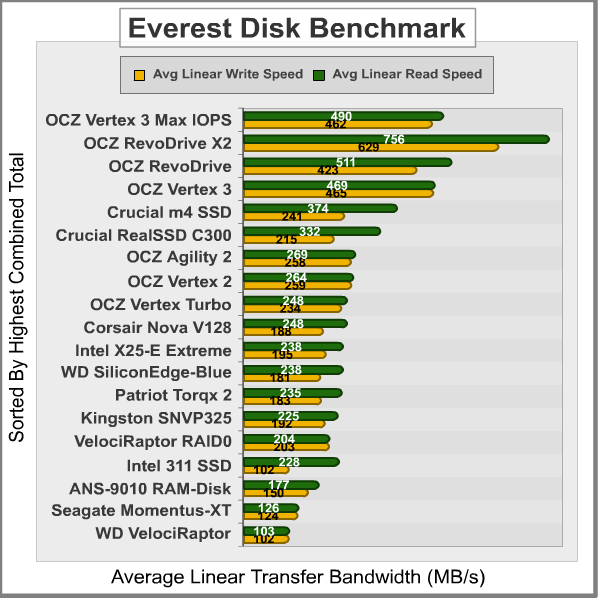
Linear tests are an important tool for comparing bandwidth speed between storage products - although HDD products suffer performance degradation over the span of their areal storage capacity. Linear bandwidth certainly benefits the Solid State Drive, since there's very little fluctuation in transfer speed. This is because Hard Disk Drive products decline in performance as the spindle reaches the inner-most sectors on the magnetic platter, away from the fast outer edge.
In the next section we use PCMark Vantage to test real-world performance...
PCMark Vantage HDD Tests
PCMark Vantage is an objective hardware performance benchmark tool for PCs running 32- and 64-bit versions of Microsoft Windows Vista or Windows 7. PCMark Vantage is well suited for benchmarking any type of Microsoft Windows Vista/7 PC: from multimedia home entertainment systems and laptops, to dedicated workstations and high-end gaming rigs. Benchmark Reviews has decided to use the HDD Test Suite to demonstrate simulated real-world storage drive performance in this article.
PCMark Vantage runs eight drive tests, each with a specific purpose. Once complete, the test results are given a PCMark score while the detailed result show actual transaction speeds.

Our tests were conducted on an Intel P67 Sandy Bridge motherboard using the onboard SATA 6Gb/s controller with 64-bit Windows 7. Results are displayed in the chart below:

In the next section I share my final thoughts on the struggle between SSD and HDD technology, as well as their new hybrid counterpart, before delivering my conclusion and final product rating.
HDD vs Hybrid Drive vs SSD
It's been the same argument for over two years now: SSDs offer the best performance, but HDDs still offer the best capacity and price. Now that Solid State Hybrid drives are available, that argument changes. While the optimal blend of bandwidth speed, operational performance, storage capacity, and price value has yet to be delivered, products like the Seagate Momentus-XT offer an ultra-affordable start in the right direction Installed as a primary drive for notebook and value-conscious enthusiasts, the Solid State Hybrid Drive delivers up high-capacity storage space while starting Windows and opening programs like a SSD.
The last days of old technology are always better than the first days of new technology. Never has this saying been more true than with the topic of storage technology, specifically in regard to the introduction of Solid State Drive technology a few years ago. The only things standing in the way of widespread Solid State Drive (SSD) adoption are high storage capacity and affordable price of Hard Disk Drive (HDD) devices. Because NAND flash-based SSD technology costs more per gigabyte of capacity than traditional magnetic hard drives, the benefits of immediate response time, transfer speeds, and operational input/output performance often get overlooked. Like most consumer products, it wasn't a question of how much improvement was evident in the new technology, it was price. I'll discuss product costs more in just a moment, but for now consider how each new series of SSD product employs greater performance than the one before it, convincing would-be consumers into waiting for the right time to buy.
There's also a gray area surrounding SSD performance benchmarks that has me concerned. You might not know this, but SSDs can be very temperamental towards the condition of their flash NAND. My experience testing dozens of Solid State Drives is that a freshly cleaned device (using an alignment tool) will always outperform the same device once it's been formatted and used. A perfect example are Indilinx Barefoot-based SSDs, which suffers severely degraded performance when writing to 'dirty' flash NAND. The reason that all of this will matter is simple: the performance results reported to consumers in product reviews (such as this one) often report the very best performance scores, and the process used to obtain these results is not applicable to real-world usage. This is where garbage collection techniques such as TRIM become important, so that end-users will experience the same performance levels as we do in our tests.
Garbage Collection (GC) is the current solution for keeping flash NAND in 'clean' condition, while maintaining optimal performance. Windows 7 offers native TRIM support, and most retail SSDs also include this special GC function or at least offer a firmware update that brings the drive up-to-date. For anyone using an Operating System or SSD that does not offer Garbage Collection functionality, you'll be using 'dirty' flash NAND modules and suffering sub-optimal performance for each write-to request. A few SSD manufacturers offers free tools to help restore peak-level performance by scheduling GC to 'clean' used NAND sectors, but these tools add excessive wear to the NAND the same way disk defragmenting tools would. SLC flash modules may resist wear much better than MLC counterparts, but come at the expense of increased production cost. The best solution is a more durable NAND module that offers long-lasting SLC benefits at the cost of MLC construction. Adoption is further stalled because keen consumers aware of this dilemma further continue their delay into the SSD market.
Getting back to price, the changes in cost per gigabyte have come as often as changes to the technology itself. At their inception, high-performance models such the 32GB MemoRight GT cost $33 per gigabyte while the entry-level 32GB Mtron MOBI 3000 sold for $14 per gigabyte. While an enjoyable decline in NAND component costs forced consumer SSD prices down low in 2009, the price of SSD products was on the rise during 2010 and continued into 2011. Nevertheless, solid state drives continue to fill store shelves despite price or capacity, and there are a few SSD products now priced dangerously close to the high-performance storage solutions. Despite being less expensive, the cost of SSDs may still price some budget buyers out of the market. Sales prices notwithstanding, the future is in SSD technology - or possibly a high-capacity SSD hybrid - and the day when HDDs are obsolete is nearing close.
OCZ Vertex 3 MI SSD Conclusion
IMPORTANT: Although the rating and final score mentioned in this conclusion are made to be as objective as possible, please be advised that every author perceives these factors differently at various points in time. While we each do our best to ensure that all aspects of the product are considered, there are often times unforeseen market conditions and manufacturer changes which occur after publication that could render our rating obsolete. Please do not base any purchase solely on our conclusion, as it represents our product rating specifically for the product tested which may differ from future versions. Benchmark Reviews begins our conclusion with a short summary for each of the areas that we rate.
NOTE: Solid state drive owners experiencing stability issues with their product are encouraged to use the latest OCZ SSD firmware available.
SandForce SSDs have taken the market by storm, which has helped companies like OCZ to expand their reach deep into the high-performance storage hardware segment. Not only are these SandForce-driven solid state drives extremely fast, but more importantly they're capable of SLC-level operational performance I/O and NAND durability. The OCZ Vertex 3 Max IOPS (MI) SSD builds from the powerful SandForce SF-2281 solid state processor, which brings innovation to the SSD industry by prolonging MLC NAND flash module lifetime and delivering RAID-like data redundancy. When one SandForce product is physically identical to another, the overall value depends on price, warranty, and customer support. If you're price shopping, a quick stroll through our Storage Section reviews will reveal how other SSD options compare.
Our performance rating considers how effective the OCZ Vertex 3 MI solid state drive performs in operations against direct competitor storage solutions. For reference, SandForce specifies the SF-2281 with 500 MB/s read and write, which OCZ increases to 550 MB/s read and 500 write maximum speeds for the Max IOPS model. In our SSD benchmark tests, the 240GB OCZ Vertex 3 MI performed at or above this speed, and surpassed every other SATA-based SSD we tested. Our test results proved the OCZ Vertex 3 MI was good for delivering 559/519 MBps peak read and writes speeds using ATTO Disk Benchmark SSD speed tests. Everest Disk Benchmark produced 490/462 MB/s, confirming the Vertex 3 MI as the fastest MLC SSD Benchmark Reviews has tested to date.
The 240GB retail kit VTX3MI-25SAT3-240G that OCZ sent us for testing is advertised to deliver 120,000 maximum combined IOPS. Using a SandForce-provided configuration for our own Iometer operational performance tests, we used a queue depth of 32 outstanding I/O's per target that measured 83,117 combined IOPS performance. In this test, the formatted OCZ Vertex 3 MI SSD leads all other SATA-based storage devices benchmarked with this configuration, and positions itself between the SandForce-driven PCI-Express options. In the 4K 32QD tests with AS-SSD and CrystalDiskMark, the OCZ Vertex 3 SSD topped our charts and became the new leader for high-performance consumer storage devices. With the results we've received in our tests, hardware enthusiasts can expect extremely high operational performance and storage functionality for demanding applications and extreme I/O environments.
Solid State Drives are low-visibility products: you see them just long enough to install and then they're forgotten. Like their Hard Disk Drive counterparts, Solid State Drives are meant to place function before fashion. Anything above and beyond a simple metal shell is already more than what's expected in terms of the appearance. OCZ has created a back-to-basics look with the black textured finish and white branding on their Vertex-series SSDs. As solid state storage controllers become faster and more advanced, heat dissipation through the enclosure walls may demand that chassis designs become more beneficial than they previously needed to be. This isn't the case yet, and a metal chassis suits SandForce SSDs nicely.
SSDs are not prone to mechanical failure, but if any Vertex 3-series solid state storage product does happen to fail during the 3-year warranty period end-users may contact OCZ Technology via their company website or extensive support forums. Fortunately, there's also a toll-free telephone number (800-459-1816) for free technical support and customer service questions. OCZ has been proven to be one of the best companies in the business when it comes to customer service, and replacement parts are often sent with priority delivery.
In terms of overall value, OCZ has priced their premium Vertex 3 Max IOPS Edition SSDs to be relatively comparable to their standard Vertex 3 SandForce-driven products of the same capacity. OCZ offers the Vertex 3 SSD series in only two different capacities: 120GB: VTX3MI-25SAT3-120G and 240GB: VTX3MI-25SAT3-240G. As of late May 2011, the 120GB model sells for $310 (Newegg) or $360 (Amazon),while the 240GB model costs $557 (Amazon).
In summary, there's a lot worth considering in the OCZ Vertex 3 Max IOPS Edition SSD. To begin with, this solid state drive nearly saturated all available bandwidth on the SATA 6Gb/s interface by reaching 559 MB/s with ATTO Disk Benchmark. In addition to impressive tranfer speeds, the Vertex 3 MI also produced the highest 4K IOPS we've seen from any SATA-based storage device - and at the same time outperformed the PCI-Express OCZ RevoDrive SSD. Our test results provide solid proof that OCZ's Vertex 3 MI SSD has redefined storage expectations by delivering unmatched performance never before seen by consumers. Computer hardware enthusiasts will clearly benefit by ultra-fast transaction response times, which allows applications to open in near-instant reaction. Based on the SandForce SF-2281VA1-SDC-ES processor, the OCZ Vertex 3 Max IOPS Edition delivers native TRIM garbage collection and basic SMART support with impressive 559 MB/s transfer speeds. More importantly, SandForce DuraClass technology adds their proprietary RAISE and DuraWrite features not available to other SSDs, and the end result is a product that could last up to five times longer with less wear on NAND flash modules. Considering the level of performance we've experienced with the Vertex 3 Max IOPS SSD, it's easy recommend this solid state drive to high-performance computer hardware enthusiasts and hardcore power-users. The blazing fast transfer speeds and outstanding operational performance at a fair price earn the OCZ Vertex 3 Max IOPS Edition SSD our Golden Tachometer Award.
Pros:
+ Delivers nearly 90K IOMeter IOPS performance
+ Outstanding 559/519 MBps read/write speed with ATTO
+ TCG OPAL security with 256-bit AES encryption
+ SandForce SF-2281 processor supports TRIM, SMART, and RAISE
+ DuraWrite technology extends NAND lifetime
+ Top-level enthusiast operational I/O performance
+ 3-Year OCZ product warranty support
+ 120/240GB high-speed SSD storage capacities
+ Lightweight compact storage solution
+ Resistant to extreme shock impact
+ Low power consumption may extend battery life
Cons:
- Some manufacturers offer five-year warranty
- Expensive enthusiast-level product
Ratings:
- Performance: 9.75
- Appearance: 8.75
- Construction: 9.50
- Functionality: 9.75
- Value: 7.75
Final Score: 9.1 out of 10.
Excellence Achievement: Benchmark Reviews Golden Tachometer Award.
Benchmark Reviews invites you to leave constructive feedback below, or ask questions in our Discussion Forum.
Reader comments from the original article
26 comments were posted before commenting closed. They are preserved as written. Original avatars no longer resolve and are shown as a placeholder.
RE: OCZ Vertex 3 Max IOPS Edition SSD Steven Iglesias-Hearst Permalink:
Damn another good show from the OCZ labs. OCZ and SSD's are like Intel and CPU's....
RE: RE: OCZ Vertex 3 Max IOPS Edition SSD Olin Coles Permalink:
I would agree. OCZ has transformed themselves into an enthusiast storage brand, and I would consider them an industry leader in performance storage products above all others.
RE: RE: RE: OCZ Vertex 3 Max IOPS Edition SSD Hsew Permalink:
Personally I'm just waiting for the Corsair Force 3 SSDs to become available (85k write IOPS advertised) and tested before a decision can be made.
RE: OCZ Vertex 3 Max IOPS Edition SSD Robert17 Permalink:
Another tip of the hat to OCZ is in order. Good review Olin. The only "con" to your review, one of few I've ever had, is the slight hit you issued in your conclusion regarding "expensive enthusiast" product. OK, it is contrary to the masses and their hard earned dollars, no question. The 240 Gb version at $2.58/Gb is a goodly sum. But looking at it from a performance standpoint, and thinking of the terminology "enthusiast" makes me think of it not as a "con" but pretty mainstream, if not reasonable as far as bang-for-buck goes. There's my two cents worth, raising the price to $2.60/Gb. But no one will pay, right?
Leading brand does not always equal best Andrew Rose Permalink:
I just bought a new Sandforce 2281 based Sata III SSD from one of the lesser known brands Comay, cost me £135 ($211) for a 120GB venus 3e model. I put it on ATTO and it lives up to manufacturers claims, mind blowing performance: 80,103 IOPS Random Write (4k) 36,120 IOPS Random Read (4k) 556MB Sequential Write 515MB Sequential Read Really solid build aswell, which perhaps isn't surprising since these guys apparently are better known in the military/rugged world. Shaping up to be one of best purchases I ever made!
RE: Leading brand does not always equal best Steve watts Permalink:
Andrew can you tell us where? I only see them for sale on ebay, and they are more expensive on there. Are you running linux? I'm looking for an SSD with specs something like that with max 4k iops to give a performance hike to an Oracle database.
Performance varies greatly with capacity. Homer Permalink:
Theres not enough explanation in this review(and others) about performance with different capacities. The 240GB drive is much faster than the 120Gb drive. It gets even worse with 60/64 Gb(like vertex 2 series) drives which can be 70% slower than the 240Gb drive with incompressible write speed. This review gives people the impression that a 120GB drive will perform like a 240GB drive but they do not. I know its part of the marketing to send only the big fastest drives to reviewers but the performance difference between capacities should be more clearly explained
RE: Performance varies greatly with capacity. Olin Coles Permalink:
You must not have read the review. I mention (in three places) that the 240GB version performs better than the 120GB version. This is also evident to anyone who can read the specifications.
RE: OCZ Vertex 3 Max IOPS Edition SSD Steve White *The Stav* Permalink:
Re : OCZ Vertex 3 comment just sent - unclear as to why the above 2 fields have bounced back yet contents of message was sent?
RE: RE: OCZ Vertex 3 Max IOPS Edition SSD Olin Coles Permalink:
Please explain. I'm not really sure what you're saying.
RE: OCZ Vertex 3 Max IOPS Edition SSD The Stav Permalink:
# OCZ Vertex 3 - The Stav Olin, my response was not directed at your valid comment. I simply sent a lengthy comment to Benchmark Reviews about the relevance of the performance of the slowest component in a system - the hard drive. It was not published. I run 2 older Sata2 SSD's (A-RAM 32Gb) in Raid 0 to kick start the system and run a few apps. When I was using a single SSD and Ubuntu 9.04 the read/write speed was 270/253 Mb. In terms of the 'IOPS' I had no idea and didn't appreciate the importance as an equal indicator of overall system performance. All of my other mid range bits that make up the system are more than adequate for what I do....6 core AMD,a GTX460, a Raptor storage drive, a SATA3 & USB3 motherboard, blue-ray burner,2 LED 22" screens etc. My point and I'm sure many of you have read that the money spent on the hard drive replacement 'SSD' should be the priority. When I get the bucks OCZ will be my next upgrade. Question : when in Raid 0, is the read/write & IOPS doubled also?
RE: RE: OCZ Vertex 3 Max IOPS Edition SSD Olin Coles Permalink:
It's impossible to say if RAID-0 doubles IOPS without testing. Some components will come close, while others will not. The host controller also comes into play, and can determine how much headroom is available for bandwidth.
Does RAID 0 double read/write & IOPs Paul A. Mitchell Permalink:
As a general rule, RAID 0 arrays do NOT scale in a linear fashion. And, as Olin wisely adds, a LOT depends on the controller. The closest we've come to near-linear scaling was the combination of a Highpoint RocketRAID 2720 and 4 x Hitachi 15,000 rpm 2.5" SAS HDDs each with 64MB of cache: 3 x HDDs in RAID 0 topped out at 441 MB/second 4 x HDDs in RAID 0 topped out at 618 MB/second We would not have ever tried 3 x HDDs, except that one was defective from the factory, so we configured a RAID 0 with 3 of these Hitachis, while we waited for the replacement to arrive. But, this near linear scaling has been the exception, NOT the rule, in our experience with RAID 0 arrays (which we use often, primarily for speed). Sincerely yours, /s/ Paul A. Mitchell, Instructor, Inventor and Systems Development Consultant All Rights Reserved without Prejudice
2 x SSDs in OS "software RAID"? Paul A. Mitchell Permalink:
Hi Olin, Thanks again for another good review. A question keeps coming up, as I read these various reviews: if TRIM does not work with multiple SSDs configured in a RAID array, do you happen to know if TRIM will work if each SSD is configured in AHCI mode, and then joined to an OS "software RAID"? Do you have enough instrumentation at your lab to answer this question? I'm aware that an OS "software RAID" cannot host the OS, but I have an XP software RAID running well with 2 x 6G WD HDDs, hosting a dedicated data partition, and it appears to work just fine. RSVP if/when you have the time. Thanks again! Keep up the good work. Sincerely yours, /s/ Paul A. Mitchell, Instructor, Inventor and Systems Development Consultant All Rights Reserved without Prejudice
RE: 2 x SSDs in OS "software RAID"? Olin Coles Permalink:
Hello Paul: So long as the drives are in AHCI/IDE mode with an OS that supports TRIM (Microsoft Windows 7), then the commands will receive the SSD. Hardware RAID does not use AHCI/IDE mode, and will not pass along TRIM commands. So if you're using Windows 7 (not XP) and configure mirrored sets in the Disk Management console using AHCI/IDE SSDs, then it's not truly RAID and you'll have the benefit of TRIM support... with the penalty of a CPU/RAM hit for software mirroring.
RE: RE: 2 x SSDs in OS "software RAID"? Paul A. Mitchell Permalink:
> configure mirrored sets in the Disk Management console using AHCI/IDE SSDs Thanks again, Olin! By "mirrored sets" do you mean RAID 1, for example, and not RAID 0? Also, just to clarify, do you predict the same for RAID 0 / striped arrays using OS software RAID? This could be the topic for another Review, perhaps. p.s. With so many quad-core CPUs proliferating, now with hyper-threading too, the CPU-RAM hit does not seem to be a huge penalty to pay, particularly for desktop and workstation users. Also, users who have shrunk their C: system partitions have probably also created dedicated data partitions e.g. D:+ Those dedicated data partitions would be good candidates for a software RAID, particularly if TRIM will work reliably, as described above. Sincerely yours, /s/ Paul A. Mitchell, Instructor, Inventor and Systems Development Consultant All Rights Reserved without Prejudice
RE: RE: RE: 2 x SSDs in OS "software RAID"? Olin Coles Permalink:
I don't mean RAID of any kind. Window Disk Management doesn't offer RAID, it offers Mirrored Disks. This is the most ideal software-based redundancy you can get.
RE: RE: RE: RE: 2 x SSDs in OS "software RAID"? Paul A. Mitchell Permalink:
> Window Disk Management doesn't offer RAID, it offers Mirrored Disks. XP/Pro supports software RAID 0 also: we have it running on a P45 chipset with 2 x 6G Western Digital 1TB HDDs. I'm not currently a Windows 7 user, but I would expect that the same is true for Windows 7. The partitions need to be changed to "Dynamic" first; but after that, it's a piece o' cake to configure software RAID 0 as long as the drive letter is NOT C: . One needs to use the OS to effect this configuration, so structural changes to C: are not possible at this point. Do you have some spare hardware laying around, with which to try it? Maybe 2 x 6G SSDs (my preference)? OCZ might be particularly interested in this experiment, with your usual battery of benchmark tests. You be the "Benchmark Man" -- to be sure!! Sincerely yours, /s/ Paul A. Mitchell, Instructor, Inventor and Systems Development Consultant All Rights Reserved without Prejudice
RE: RE: RE: RE: RE: 2 x SSDs in OS "software RAID"? Paul A. Mitchell Permalink:
See e.g.: ##softwaresecretweap ons.com/jspwiki/windows-7-software-raid-disk-partition-and-volume-context-menus "New Striped Volume" is an option. Sincerely yours, /s/ Paul A. Mitchell, Instructor, Inventor and Systems Development Consultant All Rights Reserved without Prejudice
RE: RE: RE: RE: RE: RE: 2 x SSDs in OS "software RAID"? Paul A. Mitchell Permalink:
Note: somehow "softwaresecretweapon s.com" became "softwaresecretweap ons.com" above: just eliminate that extra space after "weap" Sincerely yours, /s/ Paul A. Mitchell, Instructor, Inventor and Systems Development Consultant All Rights Reserved without Prejudice
RE: RE: RE: RE: RE: 2 x SSDs in OS "software RAID"? Olin Coles Permalink:
Windows XP does not support TRIM.
RE: RE: RE: RE: RE: RE: 2 x SSDs in OS "software RAID"? Paul A. Mitchell Permalink:
Yes, I realize that: The experiment I'm suggesting would need Windows 7 to configure a software RAID 0 with 2 x 6G SSDs initialized in AHCI mode. The question at hand: will Windows 7 pass TRIM commands to 2 x SSDs configured in an OS software RAID 0? Sincerely yours, /s/ Paul A. Mitchell, Instructor, Inventor and Systems Development Consultant All Rights Reserved without Prejudice
RE: RE: RE: RE: RE: RE: RE: 2 x SSDs in OS "software RAID"? Olin Coles Permalink:
AFIK, Windows 7 doesn't support software RAID-0 with Disk Manager.
reportedly: 3 editions of Windows 7 support RAID 0 Paul A. Mitchell Permalink:
#superuser.com/questions/7683/which-software-raid-modes-does-each-version-of-windows-7-support [begin quote] The Professional/Enterprise/Ultimate editions of Windows 7 officially support the following dynamic disk modes: * Simple * Spanned * Striped (RAID-0) * Mirrored (RAID-1) These are the officially supported modes. It has been possible in previous Windows releases to enable unsupported modes through DLL modifications and/or registry changes, and this will probably be the case in Windows 7 as well. At your own risk, of course. RAID-5 dynamic disks are only available in Windows Server editions. Note that dynamic disks are not available in the Standard/Home editions of Windows 7. [end quote] Sincerely yours, /s/ Paul A. Mitchell, Instructor, Inventor and Systems Development Consultant All Rights Reserved without Prejudice
crucial vs ocz Aleksander1337 Permalink:
OCz used max performance but 4k its still to low. ... so its not top vs crucial c300 and we can say c300 is top still u know why ? When OCZ made max performance vs seq they loss vs crucial in 4k mode and why we need ocz just wait when comes new disk cruciall. .. u will see u will neeed more money to spend :D
RE: crucial vs ocz Olin Coles Permalink:
Your message doesn't make any sense. The OCZ Vertex 3 Max IOPS edition SSD outperforms all of the Crucial SSDs in every IOPS test... especially 4K read/write tests. Did you even read this review, or do you just simply like Crucial product more?