
Mtron Pro 7000 2.5-Inch 16GB SSD SATA7025
Mtron Pro 7000 SATA7025
EDITORS NOTE: Please read Solid State Drive (SSD) Benchmark Performance Testing to understand how the benchmarks used in this article should be interpreted.
Companies are faced with increasingly complex business environments that require processing higher capacity transactions more quickly. Investments are being made in the IT infrastructure to quickly adapt to the rapidly changing environment and take proactive roles in the marketplace. Even there have been remarkable developments in systems such as servers and storage networks, developers have reached limitations due to the fundamental problems associated with the hard disk. A new flash memory technology referred to as SSD (Solid State Drive) is now at the center of attention as the mans to provide the solution.
Mtron offers the Pro 7000 SSD as a high performance storage device designed to solve the bottleneck of computing system by traditional hard disk drives. The Pro 7000 SSD can be a drop-in replacement to hard disk drives without any additional software installation. Customers may benefit instantly from the SSD's high random access performance and solve the legacy problem of access time bottlenecks traditional to hard disk drives.
As a professional system builder of higher-end computer systems, I have learned some very important lessons in regards to system performance over the past eight years. While gamers constantly leap for higher frame rates out of their video card, there is something more important than a faster processor, memory, or front side bus. The real backbone to overall speed and performance is the system drive. In today's world, that means the hard disk drive for nearly all computers. After hundreds of performance computers built and sold, I have seen 10,000 RPM drives make a 2GHz CPU seemingly perform twice as fast, whereas a 5,400 RPM drive makes that same CPU run like it was only half as fast.

Solid State Drives are not for everyone. Similar to the evolution towards DDR3 system memory, a gradual replacement of the Hard Disk Drive (HDD) by the Solid State Drive (SDD) is going to move very slow. The cost of purchase for SSD's is the primary cause, since most drives cost more than an entire computer system. Other factors include the restricted bandwidth available to flash-based SSD's. But what if the price was within reach? What if the data throughput was comparable? This is where Benchmark Reviews comes in to answer the tough questions, as we test the Mtron Pro 7000 2.5-Inch 16GB SSD MSD-SATA7025.
Mtron utilizes the Serial ATA (SATA) interface for easy replacement of hard disk drives in both desktop and laptop computers with their Pro 7000 SSD. The Pro 7000 MSD-SATA7025 has an especially great advantage for notebook computers and ultra-Pro 7000le portable computers (UMPC) because it uses flash memory for less heat and noise, and has strong protection against outside environment.
According to the research by expert market analyst, Web-Feet, the current SSD market has grown 74% every year, and it is expected to total $10 billion by 2012. The consumer SSD market is also expected grow significantly from 42 million in 2006 to $7.5 billion in 2012, replacing current hard disk with SSD

What is an SSD (Solid State Drive)?
Solid State Drives are data storage devices consisting of flash memory. This eliminates motors and mechanical drives included in conventional Hard Disk Drives to remove the heat and noise generation and provide resistance against external impact. Compared to a HDD with an identical capacity, the Mtron Pro 7000 SSD offers half the weight, and fractions of the response time. Moreover, Mtron Pro 7000 SSD's allows the user to easily install the SSD to replace an existing HDD without system modification. Solid State Disks are expected to expand applications from high-performance Pro 7000le PCs to replace conventional HDDs.
What is the Mtron Pro 7000 SSD?
-
A storage device that can immediately replace your HDD without any software installation
-
Unlike an external disk, the Pro 7000 SSD is easily installed right into your PC or notebook computer for immediate access
-
Using a high performance controller, Pro 7000 offers higher performance, stability and product lifetime compared to a USB drive or CF/SD card

About the company: Mtron Co.,Ltd.
Established in 2005, Mtron is the pioneer in Flash memory solution world by using their technology on storage, server systems, and security systems. Mtron merged with Digital First in 2008 and changed their official name to Mtron storage Technology. As worldwide leader in Flash memory SSD, Mtron focuses on R&D and market research in order to develop new SSD products for consumers and improve SSD industry around the world.
For more information, please visit the Mtron company website.
Mtron Pro 7000 SDD Features
Remarkable Reduction of Booting Time
The booting speed is determined by the time required for the hard disk to read the data required for OS operation, regardless of CPU or memory performance. Accordingly, it is difficult to expect fundamental improvement in booting speed without addressing the structural problem associated with the hard disk. Mtron SSD Pro 7000 uses the flash memory to resolve the problem. With a maximum read speed of 100MB/s, data is read three times faster than a hard disk, remarkably expediting your booting process.
Improved Work Efficiency for Heavy Load Tasks including Photoshop, Premiere and CAD
Applications that involve large-scale images or videos such as Photoshop, Premiere and CAD require substantial amounts of time for rendering and storing data. Mtron SSD Pro 7000 reduces the work time so that professional photographers, graphic designers, video professionals and architects conduct tasks efficiently and maximize cost reduction.
Seamless Game Experience
Online and PC games such as Lineage and Battle Field involve large scale data exceeding 1GB, extending the time required to load the game and read new data when accessing a new map. Mtron SSD Pro 7000 expedites the loading process and allows users to experience uninterrupted, optimal game environments.

Outstanding Durability Optimized for the Pro 7000 System
Thanks to the ubiquitous environment that allows networking regardless of time and place, various types of mobile devices have become essential part of our lives. However, it is not easy to maintain data security in the mobile and portable devices that are always on the move. Mtron's Pro 7000 is a semiconductor storage device built with flash memories. It is light and sturdy, minimizing the risk of damaging the data against drops, impact or vibration.
Reduced Battery Power Consumption for Longer Notebook Computer Use
Being able to use a notebook PC or a Pro 7000le device even for 10 minutes longer is very important. Since the devices are often reboot or taken to the standby mode in the Pro 7000le environment, power consumption by the hard disk is inevitably high. Mtron SSD Pro 7000 only consumes 0.5W in the idle state, allowing significant power saving for the notebook computer.
Notebook Computer without Noise and Heat
Noise from a computer can be more annoying than subways or vehicles. Since Mtron SSD Pro 7000 consumes power only when accessing the semiconductor chip, there is very little heat, which reduces fan mechanism, the main source of computer noise, and creates a quite computing environment.
Performance
-
-
Maximum sustained read: 120MB/s
-
Maximum sustained write: 90MB/s
-
Maximum IOPS: 81,000
-
-
Form factor: 2.5-inch (100.2mm x 69.8mm x 9.5mm)
-
Interface standard: SATA revision 1.0a
-
Transfer mode: PIO mode (0~4), DMA mode (0~2), UDMA mode (0~6)
-
Density: 16GB, 32GB
-
Input voltage: 5VCC (±5%)
-
Flash management algorithm: static and dynamic wear-leveling, bad block management algorithm
-
ECC (Error Correction Code): BCH 7 bits ECC
-
Write endurance: >140 years @ 50GB write/day
-
Read endurance: unlimited
-
Data retention: 10 years
MSD-SATA7025 Specifications
| Mtron Pro 7000 Specifications | Compiled by Benchmark | Reviews | ||||
|---|---|---|---|---|---|---|
|
Capacity: |
16/32/64/128 GB |
Interface: |
SATA revision 1.0a | |||
|
Warranty: |
5 years |
MTBF: |
1,000,000 hours | |||
| Vibration Tolerance: | 20 G | Impact Tolerance: | 1,500 G | |||
|
Transmission Modes: |
PIO mode (0-4) DMA mode (0-2) UDMA mode (0-6) | Operation Temp: | 0-70° C | |||
|
Avg. Data Access: |
0.1 msec | Power Consumption: | 0.5 W Idle, 2 W Active | |||
| Max. Read Speed: | 120 MB/s |
Max. Write Speed: |
90 MB/s | |||
| Height: | 9.5 mm ±0.25 | Length: | 100.2 mm ±0.25 | |||
| Width: | 69.8 mm ±0.20 |
Maximum Weight: |
86 grams |
Interface
The interface of MSD-SATA7025 complies with the standard serial ATA revision 1.0a
Transfer modes:
-
PIO mode 0, 1, 2, 3, 4
-
DMA mode 0, 1, 2
-
UDMA mode 0, 1, 2, 3, 4, 5, 6
Capacity
|
Capacity |
16GB |
|---|---|
|
Total Byte |
16,001,269,760 |
|
Cylinders |
16383* |
|
Heads |
16 |
|
Sectors |
63 |
|
Max LBA |
31,252,480 |
Mtron Pro 7000 SSD Closer Look
Modern day computers have been heading in two different directions for several years now. Desktop computer systems have been pushing the performance envelope, and everything from designer cases to extremely powerful graphics cards have kept everything large scale. On the other hand, notebook computers are in a constant struggle to get more out of less. Very recently Apple announced the new MacBook Air notebook, which offers the solid state drive as an optional upgrade. Not coincidentally, the Mtron Pro 7000 MSD-SATA7025 SSD offers the best to both worlds, and manufacturers are beginning to take notice.

Unlike the USB flash drive which is visible to users during normal use, the drive is a component which is often installed and forgotten. To this extent, Mtron has given some effort to dressing up the exterior appearance for a product that will only be seen during installation. The Pro series is encased into a metal chassis nearly identical to OCZ's 64GB OCZSSD64GB Solid State Drive, which will make sharp impacts a bit more powerful. Additionally, the metal chassis is also exposed to electrical shock which may come into play if the device is ever submerged.

I know for a fact that consumers are often times persuaded by looks over performance, which is just a natural tragedy that has repeated itself for centuries. Take for example the average desktop Hard Disk Drive, which is relatively unchanged in appearance for over a decade now. Then along comes a product like the Raptor X with a see-through window. Ultimately function before fashion is a saying you want to hold very near and dear to the products trusted with your most important data.

A directionally scored alloy metal cover encases the Mtron Pro 7000, and offers a lightweight and durable shell to the inner components. While most SSD applications thus far have historically been for military application, the retail consumer market is beginning to open up many doors for performance-orientated resellers. Because of the military specifications inherent to the design, many manufacturers have utilized a metal case for protection.
It seems to me that they are forgetting a few key variables such as impact on weight and shock value (both electrical and gravitational) which would make the use of a plastic shell not only more economical but also more rugged. Dropping an ultra-lightweight plastic shell on a hard surface creates far less of an impact than a heavier metal-encased SSD.
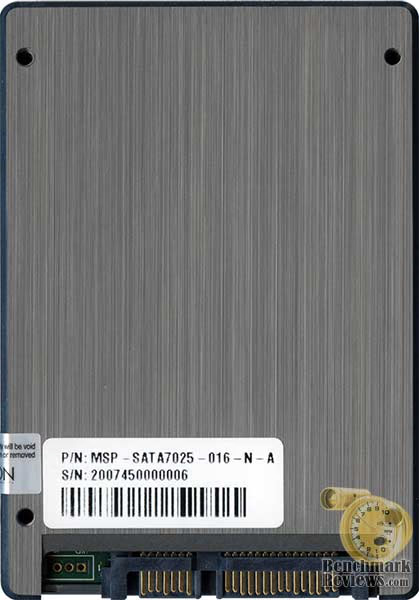
Mtron's Pro 7000 series consists of only semiconductors and NAND flash memory, which helps to give the MR25.2-064S a level of rugged durability against shock and vibration not available to hard disk drives. Furthermore, the GT series is equipped with a very elaborate flash memory management algorithm to guarantee high data integrity and even wear patterns.
In our next section, Benchmark Reviews takes a look at what makes the Mtron Pro 7000 SSD tick. We let Mtron disassemble their own SSD to illustrate this, but we explain the concept.
Mtron MSD-SATA7025 Detailed Features
The Mtron Pro 7000 SSD uses SLC (Single Level Cell) memory to provide the maximum claimed read speed of 100 MB per second, maximum claimed write speed of 90 MB per second, and random access time of 0.1 ms. Because if a nearly-instant response time, the boot-up speed is nearly twice as fast as current hard disk drives. The Pro 7000 allows you to work at significantly faster speeds for large rendering tasks such as AutoCAD, Photoshop, and Premier.

As a consumer, you might think that Solid State Drives are little more than a 2.5" or 3.5" case with flash memory loaded inside. Take a nice long look at the diagram above, and your misunderstanding of the technology will be quickly corrected. A lot more than memory modules go into the construction of your average Solid State Drive, although they are at the core.
Solid State Disks are not created by simply assembling flash memory into a unit; there's a lot more to it. The difference in SSD technology depends on the controller that manages the flash memories used for storage. The Mtron Pro 7000 SSD uses the proprietary Multi-Channel Parallel Array controller technology to achieve maximum read and write speeds of 100MB/s and 80MB/s, respectively, which is three times faster than most conventional hard disks.

But to begin the explanation of SSD technology you have to start at the Host Interface Connector, which in the case of the Mtron Pro 7000 is Serial-ATA. From the Host Interface Logic controller, which interprets the interface commands and transfer codes, data is moved onto the first-in-first-out controller before reaching a SDRAM buffer. This buffer works in a fashion similar to the cache buffer found on a Hard Disk Drive, however the SDRAM buffer is merely a hold and store location for additional algorithm processors and task-balancing controllers. In the final step, data is split and stored in multiple flash memory modules and kept secure using a memory management algorithm.
Mtron SSD's support both static and dynamic wear-leveling. Together, these two algorithms guarantee all flash memory will be at same level of erase cycles to improve lifetime limitation of NAND based storage.

Please continue on to our testing and results section, where Benchmark Reviews will determine if Mtron's Pro 7000 2.5-Inch 16GB SSD MSD-SATA7025 offers the superior performance, reliability and durability, Mtron claims. We will also see if this SSD increases overall performance and value for Pro 7000le systems and enterprise computer environments.
Testing Methodology
EDITORS NOTE: Please read Solid State Drive (SSD) Benchmark Performance Testing to understand how the benchmarks used in this article should be interpreted.
Solid State Drives have traveled a winding course to get where they are today. Up to this point in technology there have been several key differences between Solid State Disks and magnetic rotational Hard Disk Drives. While the DRAM-based buffer size on desktop HDD's has recently reached 32 MB and is ever-increasing, there is still a delay in the initial response time. This is one key area in which flash-based Solid State Drives continually dominates because they lack moving parts.
However the benefits inherent to SSD's have traditionally fallen off once the throughput begins, even though data reads or writes are executed at a high constant rate whereas the HDD tapers off in performance. This makes the average transaction speed of a SSD comparable to the data burst rate mentioned in HDD tests, albeit usually lower than the HDD's speed.

Test System
-
Motherboard: Gigabyte GA-X48T-DQ6 (Intel X48 Chipset) with E BIOS
-
System Memory: Corsair PC3-14400 DDR3 1800MHz
-
Processor: Intel Q6600 Core 2 Quad 2.40GHz
-
Optical Drive: Samsung SH-S203 SATA 20x DVD R/W
-
Operating System: Windows XP Professional SP-2 (optimized to 16 processes at idle)
Disk Hardware
- Mtron MOBI 3000 16GB MSD-SATA3025 2.5" Solid State Drive
- OCZ 64GB OCZSSD64GB SATA 2.5" Solid State Drive
- MemoRight GT MR25.2-064S 2.5-Inch 64GB SATA SSD
- Western Digital Raptor 74GB WD740ADFD 10,000 RPM SATA Hard Disk Drive (16MB Cache Buffer)
- Seagate 7200.11 500GB ST3500320AS 7,200 RPM SATA-II Hard Disk Drive (32MB Cache Buffer)
Benchmark Reviews is aware that all Intel ICH9 and ICH9R chipsets which come on the 3 and 4 series motherboards exhibit a bandwidth limit defect on SSD's of approximately 80MBps when not operating in ACHI mode (BIOS configuration). Since the Gigabyte GA-X48T-DQ6 motherboard we used for testing also comes equipped with a JMicron JMB363 SATA controller for two additional SATA-II ports, all tests were conducted on this drive controller.
Test Tools
-
HD Tach RW v3.0.4.0 by Simpli Software
-
ATTO Disk benchmark v2.02

Comparing a Solid State Disk to a standard Hard Disk Drives is always relative; even if you're comparing the fastest rotational spindle speeds. One is going to be many times faster in response (SSD's), while the other is usually going to have higher throughput bandwidth (HDD's). Additionally, there are certain factors which can effect the results of a test which we do our best to avoid. Nevertheless there will be some tests which will not be completely representative of the individual product tested, but a combination of the product and supporting system hardware. An excellent example of such a test is the write-to bandwidth benchmarks, which rely on other system components to force data onto the drive along with the bus bandwidth to support it. This dependency on system hardware is why you will see Benchmark Reviews place an emphasis on read bandwidth over write tests.
HD Tach Benchmarks
EDITORS NOTE: Please read Solid State Drive (SSD) Benchmark Performance Testing to understand how the benchmarks used in this article should be interpreted.
We've seen the product and heard all of the marketing hype, and now it's show time! All claims to performance are either made real or proven false in our testing, and although SSD's clearly offer some advantages it sometimes takes seeing a product compared to the performance of others to prove the point. In the tests below, Benchmark Reviews utilizes the HD Tach RW tool to compare the Mtron Pro 7000 2.5-Inch 16GB SATA7025 Solid State Drive against the fastest collection of desktop drives we can get our hands on.
HD Tach is a software program for Microsoft Windows that tests the sequential read, random access and interface burst speeds of the attached storage device. For the record. every single product tested was brand new and never used. HD Tach allows write-bandwidth tests only if no partition is present. Additionally, each and every product was tested five times with the average result displayed here. Additionally, a trend that becomes evident is how capacity has no effect on at all on the sequential read and write speeds, which really should be the case for all flash-based drives.

Before we begin comparing the Mtron Pro 7000 2.5-Inch 16GB SSD to the top contenders, let's examine the test results. Since this Pro series utilizes a SATA controller interface, we weren't very sure how it would perform in regards to the marketing claim of 120 MBps. Evidently it had no impact at all. To our complete surprise the 150 MBps barrier for SATA-I is not much of a hurdle, since the Pro successfully performed with a 112.2 MBps burst speed. Now that we know the marketing claims are near-enough to legitimate results, we can compare the SATA7025 to our top-performers in the desktop drive sector. Let's begin by comparing the Mtron Pro against it's younger more economical sibling, the Mtron MOBI 3000 2.5-Inch 16GB SSD MSD-SATA3025.

Because the Intel ICH9 SATA controller is defective in regards to SSD's, we utilize the JMicron JMB363 SATA controller for all of our tests. The upside to this is the removed bandwidth limit seems to have overlooked in their ICH9 design; but the downside is that the physical device descriptions are a little less detailed. In the chart above, the red "SATA MTRON MS" refers to the Mtron Pro 7000 SATA7025, while the item below in blue refers to the Mtron MOBI 3000 SATA3025.
Comparing the HD Tach results directly between the Mtron Pro 7000 and Mtron MOBI 3000 only enforced our opinion that the MOBI offers a good value comparatively. While the Pro 7000 SSD posted nearly 10 MBps faster burst speed, the other sequential tests were not so different. The Mtron Pro records the same 10 MBps advantage in sequential reads over the MOBI, but then drops its gains to barely 3 MBps in write performance. The Pro 7000 series might be Mtron's fastest SSD, but it is far more expensive than the nearly-identical MOBI (which is also far more expensive than the recently reviewed OCZ 64GB OCZSSD64GB SSD).
With our "economy" SSD's compared to the Pro, we proceed to the top-end of the spectrum where the fastest desktop solutions compete for the crown.

Our next match-up puts the Mtron 7000 Pro head-to-head with its competitors fastest model: the MemoRight GT SSD. At first I was a little concerned about my test results, since the 7000 Pro seemed to be producing results questionably similar to the MOBI 3000. But after nine total tests I was convinced that the Mtron 7000 Pro really wasn't much different. While the results were close, the MemoRight GT recorded a 123.7 MBps burst speed to outperform the Mtron 7000 Pro's respectable 113.0 MBps. Even the sustained read speeds were very similar, with the GT scoring 117.9 MBps compared to the 7000 Pro's 112.2. It was in the sustained write speed tests that the difference was abundantly clear: a rather pathetic 54.7 MBps write speed of the Mtron Pro is beaten by the astounding 122.8 MBps recorded by the MemoRight GT. At this point, it seems that Mtron had better improve its technology very soon, or their "Pro" designation will soon have no special meaning.
Our most anticipated matchup was everyone's favorite: the Western Digital Raptor HDD. While we have tested all four variations of the Raptor, the 74GB version was the most popular among gamers and so that's what we displayed. All four Raptor hard drives performed nearly identical, with only very negligible differences in burst and average speeds.

Comparing the Mtron SATA7025 to the Raptor may amount to the largest factor for most enthusiasts considering the new SSD technology for their performance desktop computers. In the Burst Speed tests the Raptor averaged 127.9 MBps compared to the Pro's lesser 113.0. This is not a huge surprise, since the combination of fast spindle speed and large 16MB cache buffer amount to a substantial burst capability. Over the span of capacity however, the advantage lends itself to the faster SSD. The Mtron Pro averaged a 112.2 MBps sustained read speed while the Raptor was clearly beaten with a 78.2 MBps, making a case for SSD's as the desktop drive replacement. The reverse might be true for the sustained write speed, which the Raptor is best known for. At the end of our testing, the Pro's 54.7 MBps sustained write speed proves itself no match for the Raptor's 68.2 MBps. Although not shown, the other Raptor models also performed within 3% of these results.
Just for good measure I have included a chart to compare the test results of MemoRight's GT against the other drives we tested, including Seagate's newest 7200.11 Hard Disk Drive. The 7200.11 features a cache buffer twice the size of previous hard disks, totaling 32MB. This comes into play early on in the tests, as the Seagate 7200.11 actually beats out the Western Digital Raptor in sequential read speed performance by a long shot.

Pressing along with its 120.0 MBps burst, the Mtron Pro 7000 was very evenly matched by Seagate's 7200.11 burst of 120.0 MBps; which are both considerably close to the Raptor's 127.9 MBps. Unlike the previous comparison however, the Seagate 7200.11 puts all 32MB worth of cache buffer to use as sequential read speed reaches 88.8 MBps on average, compared to the more powerful 112.2 MBps offered by Pro. Just one good look at this chart, and you can see that SSD's are beginning to directly compete against the desktop hard drive segment.
Although Benchmark Reviews completely endorses the test results of HD Tach for our benchmarking, it's always good to have a second opinion. We decided to then test the Mtron Pro 7000 Solid State Drive using the ATTO Disk Benchmark tool in our next section. Please continue to see if our results were a fluke or not.
ATTO Disk Benchmark Results
EDITORS NOTE: Please read Solid State Drive (SSD) Benchmark Performance Testing to understand how the benchmarks used in this article should be interpreted.
Normally ATTO Disk Benchmark is not my first choice for drive testing tools. To be honest, I think it makes for a poor scientific comparison of products because the results have such a large range of variance. But since the Intel ICH9 and ICH9R southbridge has a bug that prohibits SSD bandwidth beyond 80 MBps I cannot use my all-time favorite System Speed Test software. The ICH chipset has an available DOS driver, but the JMicron JMB363 controller used for testing does not which left us without our favorite testing tool.
The ATTO Disk Benchmark program is free, and offers a comprehensive set of test variables to work with. In terms of disk performance, it measures interface transfer rates at several different user-specified intervals and reports read and write speeds. The drives seek and access times are not statistics made available in this application, which makes this a considerably basic tool.

Bandwidth results are indicated as the transfer rate in the image above. Since there are results for each transfer file size, we decided to use the 1 MB statistic in our chart. Based on the results indicated above, the Mtron SATA7025 SSD comes very near to the 120 MBps advertised maximum rate throughout the read-bandwidth test results. The write bandwidth results are a very different story, as they come nowhere near the 90 MBps advertised. Nice try Mtron, but no cigar for bluffing.
From 64.0 Kb to 1 MB the read and write transfer bandwidth is virtually identical, with the 64 Kb file size appearing to be the delta. Since most enthusiasts will directly compare the Mtron Pro against the Raptor, we have included the test results of the Western Digital Raptor WD740ADFD below.

Western Digital's Raptor is a very good product for the money, and unless random access time is a huge concern to you it appears nothing is going to change. With a performance delta around 16 Kb, the Mtron Pro 7000 has a tough time competing against the Raptor's early performance plateau. Western Digitals desktop champ has no problem surpassing the Mtron SSD's bandwidth results.
In the chart below, I have organized the products using the sum of their read and write bandwidth speeds. The Mtron SATA7025 appears to place itself directly in the middle of the pack, beaten-out by the MemoRight GT SSD and Seagate 7200.11 hard drive in terms of total combined performance. Training behind is the Mtron MOBI and WD Raptor in last place. Access time is the key benefit for Raptor owners, but with 32MB of cache buffer in the 7200.11 it won't be long before other hard drives are within reach. For now it looks like there is some real promise in the linear read and write speeds of Hard Disk Drives utilizing larger cache buffers.

Originally I hadn't planned on including the ATTO Disk Benchmark results in this article. While the software is decent enough to mention, it was merely included because Mtron tested their Pro 7000 with it. After several tests had been completed, I began to see why they decided on this particular software for benchmarks. What I like least about this software is how you can manipulate the settings to produce very different results. As an example, if you reduce the total test length size from 32 MB (used in our testing configuration) to one of the smaller sizes the benchmark results are more than 30% different.
At the end of our performance testing series, I could tell that Mtron was using selective test settings to product advantageous results. Compared apples-to-apples, the Mtron Pro just doesn't compete. Making the situation worse for their product is the growing size of cache buffers, which develops a reasonable middle ground that will provide the best of both worlds. I suspect that hybrid drives could play an important role in this argument very soon.
In our next section, we address the collection of test results and give our conclusion.
SSD Final Thoughts
EDITORS NOTE: Please read Solid State Drive (SSD) Benchmark Performance Testing to understand how the benchmarks used in this article should be interpreted.
At the very beginning of this article I preached that the system disk is the primary factor in computer performance and program response. Processor and system memory all make an impact, but they both have to wait on the slowest component in the race to quickly retrieve data; and that's presently the Hard Disk Drive on almost all computers. Not even an increased bus speeds can make a difference, because when you open a file or application you're not waiting on the CPU or RAM to process that response, you're waiting on the disk to collect data and respond.
Obvious to any consumer who has priced the technology, SSD's are still a very new technology for retail shelves. The US Government has been making use of Solid State Disks in their military equipment for over two years now, which might indicate why the budget deficit is so high. While nearly all product offerings presently available to the market have not caught up with SATA-II host controller support, they are right on the verge. At the same time, hybrid hard drives are making their own climb onto the store shelves and may offer much more performance per dollar.
Very recently OCZ was able to offer the Samsung-based 64GB OCZSSD64GB Solid State Drive to consumers for around $17/Gigabyte, making it the most affordable SSD play yet. Even thought the performance results on that OCZ SSD are so far from the products we tested in this review, there's no reason not to speed another couple of hundred for something that performs multiples better. This is also true for the Mtron MOBI 3000 SSD which targets "budget-conscious" users and very closely parallels the Pro 7000 series.
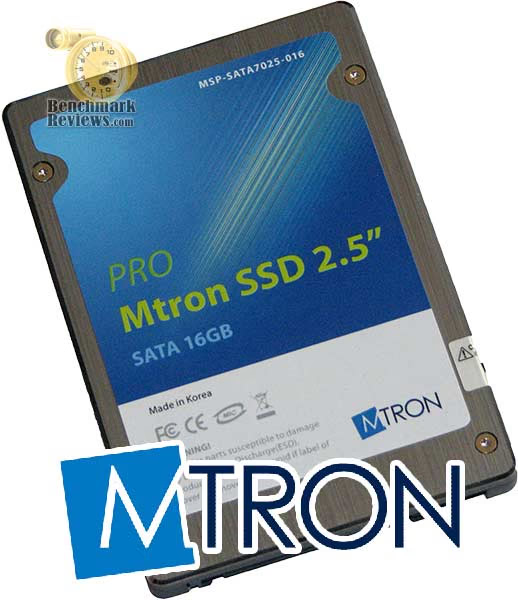
Solid State Drives are expensive and on the same niche level as DDR3. There are clear advantages to be sure, but if you can't afford the performance then what good is it going to do you? After all, manufactures know it always about the money. Making matters a little worse is the recently discovered defect in all Intel ICH9 and ICH9R chipsets which exhibit a bandwidth limit of approximately 80 MBps for SSD's. So if cost doesn't keep you away, perhaps Intel's newest 3 and 4 series motherboards will.
Until the climate of Solid State technology changes to accommodate either affordable mainstream pricing, or hybrid hard drives to offer the best of both worlds, SSD's will remain the answer for those affluent few who can afford the luxury. But even for those blessed few, the performance of particular SSD's will determine if it's all really worth the trouble.
MSD-SATA7025 Conclusion
EDITORS NOTE: Please read Solid State Drive (SSD) Benchmark Performance Testing to understand how the benchmarks used in this article should be interpreted.
Hard Disk Drive manufacturers have historically separated themselves from the rest of the hardware market when it comes to product presentation. Mtron follows along these lines with a very conservative retail package devoid of exciting colors or thorough statistics. If they believe in their product enough to produce it, perhaps it wouldn't hurt to place a chart somewhere on the back pointing out how much better the Pro 7000 does in Random Access Time when compared to the Western Digital Raptor. My point here is that Mtron should probably add something to their retail packaging to help the consumer along with their buying decision.
Appearance is always a relative subject. I suppose if you're the type to put colored LED's inside your computer, then the alloy shell on the Mtron Pro series will help your laser light show at the next LAN party. The Pro's appearance is designed with looks in mind, which means that notebook users will have to take a picture if they want to constantly admire their investment. I think Mtron did things right with their MOBI SSD, which was housed in a very lightweight plastic shell colored bright white. It worked for Apple.
Hard Disk Drives have convinced us that everything which holds our data must be heavy and covered is steel. Mtron clings to the status quo in their decision to house the Pro 7000 series SATA7025 SSD in a metal case. It doesn't take an engineer to realize that dropping a steel writing pen on the ground causes a harder impact than dropping a lightweight plastic pen. The same concept holds true here, and the construction could be improved because of it. At just under the same weight of a standard notebook Hard Disk Drive, the Pro series forfeits any weight benefit gained by taking an inherently indestructible product and making it heavy. Even still, the durability is intact, and military funding is sure to favor the rugged heavy-weight look.
Whenever I rate product functionality, I tend to lean more toward the right-here-and-now aspect of the product. At the 2008 CES I visited with vendors who showed me their 832GB SATA SSD, but nearly three months later and their product is still in the press-release phase of physical existence. This has caused me to become more of a "prove it to me" product analyst, and so now I rate products based on what I have here against what presently exists in the real world. With that said, the Pro 7000 is a good performer on some fronts and less than admirable on some others. The Pro is Mtron's fastest and most expensive SSD offering, and it barely has an advantage over the economical MOBI series.
Marketed as Mtron's Professional series and offered in 16 and 32 GB capacities, they make perfect candidates for notebook computers, UMPC's, servers, and high-performance workstations. The Pro 7000 SSD extended my notebook battery run time by a very noticeable margin, in addition to respectable performance gains. Presently the 16 GB Mtron Pro 7000 series SSD model SATA7025 is available for $718, and the 32 GB version sells for $1119. Bleeding edge technology comes with a heavy price tag, and the value seems to lean away from the Pro series and back to the MOBI.
If you're a hardware enthusiast or gamer, the price of SSD's is going to seem out of reach - as it should be. Solid State Drives are not a new toy so you can get an extra frag or two out of your video games. If this is your goal, the money is better spent on a high-performance graphics card instead. SSD's deliver their best value in other areas. For the lightweight traveler who depends on compact computing with a noteworthy battery life, the SSD is the obvious solution. In regards to performance, the Mtron Pro series did not impress us. Since the Mtron MOBI 3000 MSD-SATA3025 costs half as much and delivers nearly the same performance, I am left with no reason to recommend the Pro series. Even more critical is how this top-of-line product couldn't compete with the MemoRight GT SSD which is roughly the same cost/gigabyte.
Pros:
+ Extremely low power consumption
+ Lightweight data storage solution
+ Resistant to extreme shock impact
+ 5-Year Mtron warranty
+ Excellent 0.10 ms Random Access Time
+ Rugged metal casing reinforces product durability
+ Less expensive SSD solution
+ Available in 16 GB and 32 GB capacities
+ 112 MBps sequential read bandwidth
Cons:
- Very expensive product
- Not available in capacities over 32GB
- 55 MBps sequential write bandwidth
- Poor product documentation
- Manufacturer hand-selects preferential benchmark results for product specs
Ratings:
-
Presentation: 8.50
-
Appearance: 9.00
-
Construction: 9.75
-
Functionality: 9.25
-
Value: 5.25
Final Score: 8.35 out of 10.
Questions? Comments? Benchmark Reviews really wants your feedback. We invite you to leave your remarks in our Discussion Forum.
Reader comments from the original article
1 comment were posted before commenting closed. They are preserved as written. Original avatars no longer resolve and are shown as a placeholder.
RE: Mtron Pro 7000 2.5-Inch 16GB SSD SATA7025 james braselton Permalink:
hi there you are right i have 2 hp netbooks with ssd's came standard 1 has a 16 gb ssd and 1 has a 32 gb ssd and my ipad has 32 gb ssd and my ipod touch has 64 gb ssd wii has 512 mb flash memory dsi has 256 mb flash memory psp go has 16 gb ssd flash drive with a 16 gb m2 memory card i am going pick up 2 sandisk xbox 360 16 gb usb flash drives gives me 32 gb and 3ds 2 gb