
Seagate Momentus-XT Solid State Hybrid Drive
Seagate Momentus-XT Solid State Hybrid Drive Review
The Hard Disk Drive (HDD) has enjoyed a long service life in the computer industry, and only recently has the Solid State Drive (SSD) threatened to replace it. While the HDD offers higher capacity at a better price, SSDs offer tremendous speeds and operational performance. Finally, Seagate has achieved the optimal blend of each, and presents the Solid State-Hybrid Hard Drive. Seagate's Momentus-XT hybrid uses a 7200-RPM hard drive fused with 4GB SLC NAND flash to deliver SSD speeds and HDD storage capacity. Seagate's Adaptive Memory technology uses an algorithm to monitor user data access transactions, which caches qualified data onto the SSD. In this article, Benchmark Reviews tests the 500GB Seagate Momentus-XT ST95005620AS Solid State Hybrid Drive against several of the fastest notebook storage devices available.
When SSD storage devices first arrived to market, hardware review websites (such as Benchmark Reviews) worked past a period of understanding the new technology. Testing SSDs required more understanding than HDD tests, and operational performance was vastly more relevant than transfer speeds. Seagate is about to usher in another transitional period, because their SSD-Hybrid relies on an Adaptive Memory algorithm that works by identifying patterns in how often certain digital data is used. So while the name is Solid State Hybrid Drive, the product is really a 'smart' HDD with a large memory buffer.
For this purpose, our usually collection of benchmark test metrics won't paint an accurate picture. ATTO and Iometer will offer traditional measurements, but these performance readings will ignore Seagate's Adaptive Memory algorithm that improves the operation of accessing these programs and not the benchmark results. Repetitive processes will benefit from SSD-like performance, but one-time file transfers and initial application access will be handled by the enhanced hard drive. In addition to traditional HDD/SSD benchmark tests, the Seagate Momentus-XT Solid State Hybrid will be used for real-world tasks and compared against the competition.

For decades, the slowest component in any computer system was the hard drive. Most modern processors operate within approximately 1-ns (nanosecond = one billionth of one second) response time, while system memory responds between 30-90 ns. Traditional Hard Disk Drive (HDD) technology utilizes magnetic spinning media, and even the fastest spinning desktop storage products exhibit a 9,000,000 ns - or 9 ms (millisecond = one thousandth of one second) initial response time. In more relevant terms, The processor receives the command and waits for system memory to fetch related data from the storage drive. This is why any computer system is only as fast as the slowest component in the data chain; which is usually the hard drive.
The theoretical goal for achieving optimal performance is for system memory to operate as quickly as the central processor, and the storage drive to operate as fast as memory. With present technology this is an impossible task, so enthusiasts try to close the speed gaps between components as much as possible. Although system memory is up to 90x (9000%) slower than most processors, just consider that the hard drive is an added 1000x (100,000%) slower than that same memory. Essentially, these three components are as different in speed as walking is to driving and flying.
Solid State Drive technology bridges the largest gap. The difference a SSD makes to operational reaction times and program speeds is dramatic, and takes the storage drive from a slow 'walking' speed to a much faster 'driving' speed. Solid State Drive technology improves initial response times by more than 450x (45,000%) for applications and Operating System software, when compared to their HDD counterparts.
About Seagate Technology LLC.
Seagate is the worldwide leader in the design, manufacture and marketing of hard disk drives and storage solutions, providing products for a wide-range of applications, including Enterprise, Desktop, Mobile Computing, Consumer Electronics and Branded Solutions. Seagate's business model leverages technology leadership and world-class manufacturing to deliver industry-leading innovation and quality to its global customers, with the goal of being the time-to-market leader in all markets in which it participates. The company is committed to providing award-winning products, customer support and reliability to meet the world's growing demand for information storage. Seagate can be found around the globe and at https://www.seagate.com/.
SSD Hybrid Features
Today's high-performance SSDs for mobile computing cost several hundred dollars more than standard laptop hard disk drives of the same capacity, with the price of a 250GB SSD outstripping even the cost of some mainstream laptop PCs. Many organizations and consumers are unwilling or unable to pay the high price for the greater speed and quiet operations of SSDs. Raising the barrier even higher, SSDs offer fewer capacity options than hard disk drives and no advantage in extending the battery life of a laptop.
The new Seagate Momentus XT hard drive combines a 7200RPM spin speed, 4 Gigabytes of solid state flash and Seagate's Adaptive Memory - a groundbreaking Seagate technology that moves frequently used information into flash memory for faster access. Momentus XT - a 2.5-inch, 9mm drive with a top capacity of 500GB - boots up to 40 percent faster than traditional 7200RPM notebook drives and sets new performance benchmarks for gaming, multi-media enhanced and high-end laptops and workstations as well as high performance external backup enclosures.
The Seagate Adaptive Memory algorithm works by identifying patterns in how often certain digital data is used. It then moves the most frequently retrieved information to flash memory for faster access than from the spinning disks - effectively tailoring hard drive performance to the user and applications. Momentus XT installs as easily as a traditional 9.5mm-high notebook drive for new systems or laptop upgrades and, unlike early hybrid drives, operates independently of the operating system and the motherboard chipset.
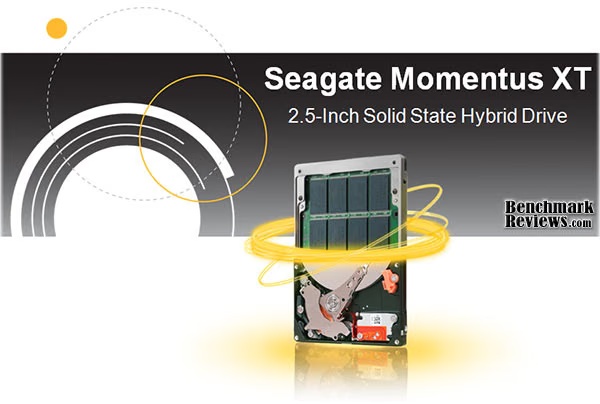
Key Features and Benefits
- Boots 40 percent faster than traditional 7200-RPM drives (for overall system performance, that's within 1% of an SSD*)
- Cuts costs by 75 percent compared to SSDs by combining solid state and hard drive technologies
- Delivers the perfect balance of speed and capacity
- Uses Adaptive Memory technology to optimize performance in real time by storing frequently used files and data on the solid state drive component
- Ensures compatibility with any operating system or application with a standard 9.5mm notebook drive form factor and the characteristics of a traditional 7200RPM drive
- Offers all the benefits of SSD performance with the high capacity, storage, battery life, power consumption and heat generation of a traditional hard drive
Seagate Adaptive Memory Technology
Customizes system performance to the user. Usage patterns are constantly monitored and updated for dynamically improved response times.
Momentus XT MSRP
-
500GB Momentus XT - ST95005620AS $156
-
320GB Momentus XT - ST93205620AS $132
-
250GB Momentus XT - ST92505610AS $113
Momentus-XT Specifications

First Look: Seagate Momentus-XT
From the outside, the Seagate Momentus-XT Solid State Hybrid hard drive looks exactly like any other Seagate 2.5" notebook drive. On the inside, 4GB of Single-Layer Cell (SLC) NAND flash memory resides above a single 500GB platter. The Seagate Momentus-XT has an operating rotational speed of 7200-RPM, which is paired to 32MB of DRAM buffer memory. There are three different sizes available:
- 500GB Momentus XT - ST95005620AS $156
- 320GB Momentus XT - ST93205620AS $132
- 250GB Momentus XT - ST92505610AS $113

Best suited for performance notebook computer installations, the Seagate Momentus-XT SSD hybrid could also be utilized for enthusiast desktop systems. Seagate Momentus-XT hybrid drives have been designed with a focus on enhancing real-world user experience while maintaining a large storage capacity. Using their new Seagate Adaptive Memory Technology, the Momentus-XT learns what programs needs to be cached to the SSD based on usage patterns.
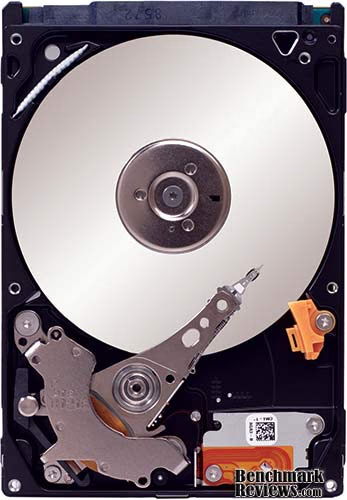
Standard 2.5" drive bay mounting points are pre-drilled and threaded into the Momentus-XT chassis, which allows for quick upgrade or addition into any existing notebook or desktop system. The mounting positions matched up to the drive bracket on my notebook computer, and after only a few minutes of drive cloning I was quickly loading the Microsoft Windows-7 O/S without a hitch.

Unlike most Hard Disk Drive (HDD) storage products, SSDs are nearly impervious to impact damage and do not require (or benefit from) any kind of special vibration dampening or shock-proof enclosures. While not completely an SSD, the Seagate Momentus-XT is also very different than your average hard drive. For example, the WD VelociRaptor features and operating shock (read) value of 65G measured at 2-ms, or non-operating shock of 300G. Conversely, the Momentus-XT is safe up to 350-G's operating shock and 1000-G's non-operating.

Seagate resists publishing performance specifications for the Momentus-XT, but we'll soon see how well this 500GB SSD-Hybrid drive performs in the next few sections...
SSD Testing Methodology
Solid State Drives have traveled a long winding course to finally get where they are today. Up to this point in technology, there have been several key differences separating Solid State Drives from magnetic rotational Hard Disk Drives. While the DRAM-based buffer size on desktop HDDs has recently reached 32 MB and is ever-increasing, there is still a hefty delay in the initial response time. This is one key area in which flash-based Solid State Drives continually dominates because they lack moving parts to "get up to speed".
However the benefits inherent to SSDs have traditionally fallen off once the throughput begins, even though data reads or writes are executed at a high constant rate whereas the HDD tapers off in performance. This makes the average transaction speed of a SSD comparable to the data burst rate mentioned in HDD tests, albeit usually lower than the HDD's speed.
Comparing a Solid State Disk to a standard Hard Disk Drives is always relative; even if you're comparing the fastest rotational spindle speeds. One is going to be many times faster in response (SSDs), while the other is usually going to have higher throughput bandwidth (HDDs). Additionally, there are certain factors which can affect the results of a test which we do our best to avoid.
SSD Testing Disclaimer
Early on in our SSD coverage, Benchmark Reviews published an article which detailed Solid State Drive Benchmark Performance Testing. The research and discussion that went into producing that article changed the way we now test SSD products. Our previous perceptions of this technology were lost on one particular difference: the wear leveling algorithm that makes data a moving target. Without conclusive linear bandwidth testing or some other method of total-capacity testing, our previous performance results were rough estimates at best.
Our test results were obtained after each SSD had been prepared using DISKPART or Sanitary Erase tools. As a word of caution, applications such as these offer immediate but temporary restoration of original 'pristine' performance levels. In our tests, we discovered that the maximum performance results (charted) would decay as subsequent tests were performed. SSDs attached to TRIM enabled Operating Systems will benefit from continuously refreshed performance, whereas older O/S's will require a garbage collection (GC) tool to avoid 'dirty NAND' performance degradation.
It's critically important to understand that no software for the Microsoft Windows platform can accurately measure SSD performance in a comparable fashion. Synthetic benchmark tools such as HD Tach and PCMark are helpful indicators, but should not be considered the ultimate determining factor. That factor should be measured in actual user experience of real-world applications. Benchmark Reviews includes both bandwidth benchmarks and application speed tests to present a conclusive measurement of product performance.
Bandwidth Speed vs Operational Performance
As we've explained in our SSD Benchmark Tests: SATA IDE vs AHCI Mode guide, Solid State Drive performance revolves around two dynamics: bandwidth speed (MB/s) and operational performance (IOPS). These two metrics work together, but one is more important than the other. Consider this analogy: operational IOPS performance determines how much cargo a ship can transport in one voyage, and the bandwidth speed is to fast the ship moves. By understanding this and applying it to SSD storage, there is a clear importance set on each variable depending on the task at hand.
For casual users, especially those with laptop or desktop computers that have been upgraded to use an SSD, the naturally quick response time is enough to automatically improve the user experience. Bandwidth speed is important, but only to the extent that operational performance meets the minimum needs of the system. If an SSD has a very high bandwidth speed but a low operational performance, it will take longer to load applications and boot the computer into Windows than if the SSD offered a higher IOPS performance.
Test System
- Motherboard: Gigabyte GA-X58A-UD7 (Intel X58-Express)
- Processor: Intel Core i7-920 BX80601920 @ 2.667 GHz
- System Memory: 6GB Triple-Channel DDR3 1600MHz CL6-6-6-18
- SATA 3Gb/s Storage HBA: Integrated Intel ICH10R Controller
- AHCI mode - Intel Rapid Storage Technology Driver 9.6.0.1014
- SATA 6Gb/s Storage HBA: Integrated Marvell SE9128 Controller
- AHCI mode - Marvell Magni Driver Marvell Magni Driver 1.0.0.1036
- Operating System: Microsoft Windows 7 Ultimate Edition 64-Bit
Drive Hardware Tested
The following storage hardware has been used in our benchmark performance testing, and may be included in portions of this article:
-
Corsair X256 CMFSSD-256D1 256GB SATA MLC SSD (Firmware version 1.1)
-
Intel X25-E Extreme SSDSA2SH032G1GN SATA SLC SSD
- OCZ Agility OCZSSD2-1AGT120G 120GB SATA MLC SSD (Firmware version 1.5)
-
OCZ Agility-EX OCZSSD2-1AGTEX60G 64GB SATA SLC (Firmware version 1.5)
-
OCZ Vertex OCZSSD2-1VTX120G 120GB SATA SSD (Firmware v1.5)
-
OCZ Vertex-EX OCZSSD2-1VTX120G 120GB SATA SLC SSD (Firmware version 1.5)
-
OCZ Vertex Turbo OCZSSD2-1VTXT120G 120GB SATA SSD (Firmware version 1.5)
Test Tools
- AS SSD Benchmark 1.4.3704.27281: Multi-purpose speed and operational performance test
-
ATTO Disk Benchmark 2.34: Spot-tests static file size chunks for basic I/O bandwidth
- Iometer 2008.06.28 by Intel Corporation: Tests IOPS performance and I/O response time
-
Lavalys EVEREST Ultimate Edition 5.50: Disk Benchmark component tests linear read and write bandwidth speeds
-
CrystalDiskMark 3.0.0b by Crystal Dew World: Sequential speed benchmark spot-tests various file size chunks
Test Results Disclaimer
This article utilizes benchmark software tools to produce operational IOPS performance and bandwidth speed results. Each test was conducted in a specific fashion, and repeated for all products. These test results are not comparable to any other benchmark application, neither on this website or another, regardless of similar IOPS or MB/s terminology in the scores. The test results in this project are only intended to be compared to the other test results conducted in identical fashion for this article.
AS-SSD Benchmark
Alex Schepeljanski of Alex Intelligent Software develops the free AS SSD Benchmark utility for testing storage devices. The AS SSD Benchmark tests sequential read and write speeds, input/output operational performance, and response times. Because this software receives frequent updates, Benchmark Reviews recommends that you compare results only within the same version family.
Beginning with sequential read and write performance, the Seagate Momentus-XT Solid State Hybrid Drive produced 104.38 MB/s read speed, and 101.88 MB/s write performance. The sequential file transfer speeds have traditionally been low with this benchmark tool, which is why we will concentrate on the operational IOPS performance for this section.
Single-threaded 4K IOPS performance delivers 0.59 MB/s read and 0.98 MB/s write, which is average for notebook hard disk drives. Similarly, the 64-thread 4K reads recorded 1.29 MB/s while write performance was 0.73... indicating that AS-SSD was not optimized within the SSD cache of this Hybrid hard drive.
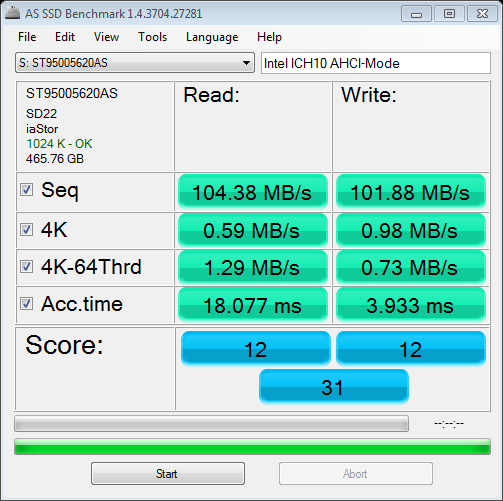
Displayed in the chart below, the 64-thread 4KB IOPS performance results for several enthusiast-level storage products illustrates which products offer the best operation under load:

Adaptive Memory Technology Notice
The Seagate Momentus-XT Solid State Hybrid Drive employs a proprietary Adaptive Memory technology that improves application performance matching the highest usage patterns. In most cases, benchmark performance tools do not activate the hybrid SSD features of this storage device.
Drive Hardware
In the next section, Benchmark Reviews tests transfer rates using ATTO Disk Benchmark.
ATTO Disk Benchmark
The ATTO Disk Benchmark program is free, and offers a comprehensive set of test variables to work with. In terms of disk performance, it measures interface transfer rates at various intervals for a user-specified length and then reports read and write speeds for these spot-tests. There are some minor improvements made to the 2.34 version of the program, but the benchmark is still limited to non-linear samples up to 256MB. ATTO Disk Benchmark requires that an active partition be set on the drive being tested. Please consider the results displayed by this benchmark to be basic bandwidth speed performance indicators.
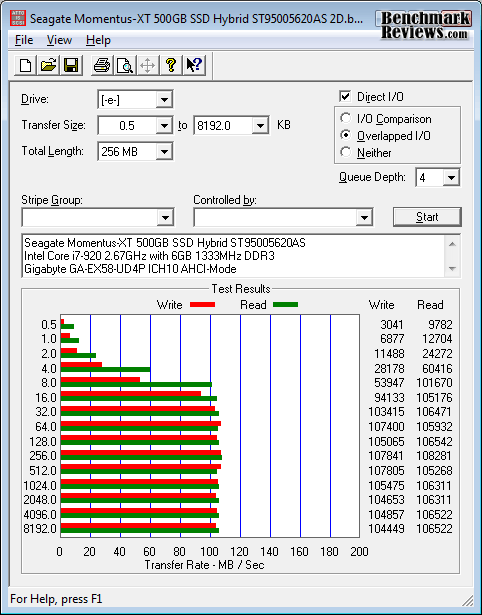
Our basic bandwidth speed tests begin with the Seagate Momentus-XT connected to the Intel ICH10 controller in AHCI mode, as the ATTO Disk Benchmark tools performs file transfers ranging from 0.5 KB to 8192 KB. The 200GB model we received reveals 108 MBps maximum read speed that plateaus from 8-8192 KB file chunks, and also 108 MBps peak write bandwidth plateaus from 32-8192 KB.

Adaptive Memory Technology Notice
The Seagate Momentus-XT Solid State Hybrid Drive employs a proprietary Adaptive Memory technology that improves application performance matching the highest usage patterns. In most cases, benchmark performance tools do not activate the hybrid SSD features of this storage device.
Drive Hardware
-
Intel X25-E Extreme SSDSA2SH032G1GN SATA SLC SSD
In the next section, Benchmark Reviews tests sequential performance using the CrystalDiskMark 3.0 software tool...
CrystalDiskMark 3.0 Tests
CrystalDiskMark 3.0 is a file transfer and operational bandwidth benchmark tool from Crystal Dew World that offers performance transfer speed results using sequential, 512KB random, and 4KB random samples. For our test results chart below, the 4KB 32-Queue Depth read and write performance was measured using a 1000MB space. CrystalDiskMark requires that an active partition be set on the drive being tested, and all drives are formatted with NTFS on the Intel ICH10 controller set to AHCI-mode. Benchmark Reviews uses CrystalDiskMark to illustrate operational IOPS performance with multiple threads. In addition to our other tests, this benchmark allows us to determine operational bandwidth under heavy load.
Our tests of the Seagate Momentus-XT Solid State Hybrid Drive were each consistent, but only the maximum speeds were charted below. Sequential tests on the Seagate Momentus-XT produced a maximum read speed of 110 MB/s, while the write speed measured 107 MB/s. The sequential file transfer speeds have traditionally been low with this benchmark tool, which is why we will concentrate on the operational IOPS performance for this section.
CrystalDiskMark 3.0 reported 512K results of 47 MB/s read and 57 MB/s write performance. 4K tests produced 0.62 read and 1.06 write performance. 4KB queue depth 32 IOPS for the Seagate Momentus-XT measured only 1.35 read and 0.94 write IOPS. These results are much better than the desktop Seagate Barracuda XT, but not quite as good as the Western Digital VelociRaptor.

Displayed in the chart below, the maximum 4KB queue depth 32 IOPS performance results for several enthusiast-level storage products illustrate which products offer the best operation under load:

Adaptive Memory Technology Notice
The Seagate Momentus-XT Solid State Hybrid Drive employs a proprietary Adaptive Memory technology that improves application performance matching the highest usage patterns. In most cases, benchmark performance tools do not activate the hybrid SSD features of this storage device.
Drive Hardware
Iometer IOPS Performance
Iometer is an I/O subsystem measurement and characterization tool for single and clustered systems. Iometer does for a computer's I/O subsystem what a dynamometer does for an engine: it measures performance under a controlled load. Iometer was originally developed by the Intel Corporation and formerly known as "Galileo". Intel has discontinued work on Iometer, and has gifted it to the Open Source Development Lab (OSDL).
Iometer is both a workload generator (that is, it performs I/O operations in order to stress the system) and a measurement tool (that is, it examines and records the performance of its I/O operations and their impact on the system). It can be configured to emulate the disk or network I/O load of any program or benchmark, or can be used to generate entirely synthetic I/O loads. It can generate and measure loads on single or multiple (networked) systems.
To measure random I/O response time as well as total I/O's per second, Iometer is set to use 4KB file size chunks over a 100% random sequential distribution. The tests are given a 50% read and 50% write distribution. While this pattern may not match traditional 'server' or 'workstation' profiles, it illustrates a single point of reference relative to our product field.
Our charts show the Read and Write IOPS performance as well as I/O response time (measured in ms). Iometer was configured to test for 120 seconds, and after five tests the average is displayed in our benchmark results. The first tests included random read and write IOPS performance, where a higher I/O is preferred.

In the Random IOPS performance tests the single layer cell (SLC) OCZ Agility EX (3982/3988), Intel X25-E Extreme (3543/3548), and OCZ Vertex EX (3106/3091) outperformed all other products by a wide margin.
SandForce SF-1200 SSDs lead the MLC results, with the ADATA S599 producing 2087/2081 I/O's, Corsair F100 delivers 2077/2076, and the RunCore Pro-V with 2021/2015. Indilinx-based MLC SSDs start with the Corsair Nova delivering 1982/1995, then the OCZ Vertex Turbo SSD rendered 1774/1770, while the Corsair recorded 1769/1773; both of which are just slightly ahead of a single Vertex SSD that produced 1702 for read and write IOPS. Finishing out the second-tier IOPS performance is the WD SiliconEdge-Blue with 1625/1632 and OCZ Agility SSD with 1625/1618 IOPS.
The SATA 6Gb/s Crucial RealSSD-C300 produced 1070 read-IOPS with 1069 write, and creates a third-level tier of operational performance suitable for personal computer systems. Kingston's SSDNow V+ SNVP325 offered 826/829 IOPS. Every other product thereafter responded with low IOPS operational performance, and are not suggested for high input/output applications or performance-orientated computer systems.

The Iometer random IOPS average response time test results were nearly an inverse order of the IOPS performance results. It's no surprise that SLC drives perform I/O processes far better than their MLC versions, but that gap is slowly closing as controller technology improves the differences and enhances cache buffer space. The Read/Write IOPS performance for the 64GB OCZ Agility-EX SLC SSD was 0.19/0.06 ms, with the Intel X25-E Extreme SSD measuring 0.22/0.06 ms, while the OCZ Vertex-EX achieved 0.26/0.06 ms. Bridging the gap between SLC and MLC construction was the ADATA S599, Corsair F100, RunCore Pro-V (all SandForce SF-1200 SSDs), which produced 0.25/0.25 ms.
The Corsair X256 and OCZ Vertex Turbo SSD both scored 0.50/0.06ms, while the Vertex SSD offered 0.52/0.06ms. The mainstream Agility SSD produced 0.55/0.06ms while Western Digital's SiliconEdge-Blue offered 0.51/0.11ms, the Corsair Nova delivered 0.57/0.09ms, Crucial's 256GB RealSSD C300 responded in 0.87/0.06ms, and the second-generation Kingston SSDNow V+ SNVP325 responded to read requests in 0.27ms while write requests were a bit slower at 0.93ms. The Western Digital VelociRaptor did very well compared against SSD products, producing 6.59/0.82ms. These times were collectively the best available, as each product measured hereafter performed much slower.
Adaptive Memory Technology Notice
The Seagate Momentus-XT Solid State Hybrid Drive employs a proprietary Adaptive Memory technology that improves application performance matching the highest usage patterns. In most cases, benchmark performance tools do not activate the hybrid SSD features of this storage device.
Drive Hardware
-
Corsair X256 CMFSSD-256D1 256GB SATA MLC SSD (Firmware version 1.1)
-
Intel X25-E Extreme SSDSA2SH032G1GN SATA SLC SSD
In our next section, we test linear read and write bandwidth performance and compare its speed against several other top storage products using EVEREST Disk Benchmark. Benchmark Reviews feels that linear tests are excellent for rating SSDs, however HDDs are put at a disadvantage with these tests whenever capacity is high.
EVEREST Disk Benchmark
Many enthusiasts are familiar with the Lavalys EVEREST benchmark suite, but very few are aware of the Disk Benchmark tool available inside the program. The EVEREST Disk Benchmark performs linear read and write bandwidth tests on each drive, and can be configured to use file chunk sizes up to 1MB (which speeds up testing and minimizes jitter in the waveform). Because of the full sector-by-sector nature of linear testing, Benchmark Reviews endorses this method for testing SSD products, as detailed in our Solid State Drive Benchmark Performance Testing article. However, Hard Disk Drive products suffer a lower average bandwidth as the capacity draws linear read/write speed down into the inner-portion of the disk platter. EVEREST Disk Benchmark does not require a partition to be present for testing, so all of our benchmarks are completed prior to drive formatting.
The high-performance storage products tested with EVEREST Disk Benchmark are connected to the Intel ICH10 controller on the Gigabyte GA-X58A-UD7 motherboard. Using the 1MB block size, read performance of the 500GB Seagate Momentus-XT Solid State Hybrid Drive measured an average 126 MBps with a similar maximum peak of 133 MBps. Linear write-to tests were next...

Linear disk benchmarks are superior tools in my opinion, because they scan from the first physical sector to the last. A side affect of many linear write-performance test tools is that the data is erased as it writes to every sector on the drive. Normally this isn't an issue, but it has been shown that partition table alignment will occasionally play a role in overall SSD performance (HDDs don't suffer this problem).
The waveform chart below illustrates how the integrated buffer manages file transfers, and makes linear write performance appear even yet unsteady. The results seen here are still relatively consistent compared to most other SSD products we've tested in the past. The Seagate Momentus-XT Solid State Hybrid Drive recorded an average linear write-to speed of 124 MBps, with a maximum performance of 133 MBps.
Based on these results, it appears that Seagate's Adaptive Memory Technology feature was working in the background because performance doesn't drop off until 405.3 GB into each test. Any other hard drive would decrease performance from beginning to end, as demonstrated in this Linear Bandwidth test.

The chart below shows the average linear read and write bandwidth speeds for a cross-section of SATA storage devices tested with EVEREST:

I personally consider linear tests to be the single most important comparison of storage drive products, although HDD products suffer performance degradation over the span of their storage capacity. Linear bandwidth certainly benefits the Solid State Drive, since there's very little fluctuation in transfer speed. This is because Hard Disk Drive products decline in performance as the spindle reaches the inner-most sectors on the magnetic platter, away from the fast outer edge.
Adaptive Memory Technology Notice
The Seagate Momentus-XT Solid State Hybrid Drive employs a proprietary Adaptive Memory technology that improves application performance matching the highest usage patterns. In most cases, benchmark performance tools do not activate the hybrid SSD features of this storage device.
Drive Hardware
-
Corsair X256 CMFSSD-256D1 256GB SATA MLC SSD (Firmware version 1.1)
-
Intel X25-E Extreme SSDSA2SH032G1GN SATA SLC SSD
In the next section, the 500GB Seagate Momentus-XT Solid State Hybrid Drive is tested in real-world usage...
Real-World Performance
Benchmark tests are a good way to measure performance for task-X between product-Y and product-Z. Unfortunately, synthetic benchmarks are not always applicable to the product being tested. In the past few years Solid State Drive (SSD) technology has made traditional HDD benchmark tools nearly meaningless, because operational performance (IOPS) must now be taken into consideration in addition to bandwidth speed. With the introduction of Seagate's SSD-hybrid technology, our tests must shift to yet another perspective to account for the Adaptive Memory Technology learning curve. To illustrate my point, I'll use an example of another emerging technology that fits this situation: electric vehicles.
Take the electric motorcycle; more specifically the KillaCycle electric motorcycle (which holds a faster world-record than the electric dragster). Much like the SSDs we've come to admire, the electric motorcycle takes off from 0-60 is less than one second. The difference between an SSD and HDD is easily demonstrated by the drag racing event shown below:
My point is this: you can't measure the KillaCycle's performance using a long-distance benchmark. Much like the SSD or SSD-Hybrid, they are extremely fast off the start but reach their peak performance very early. You couldn't fairly test the electric motorcycle in the Baja-500, which is why large-file transfer tests are not always appropriate for SSDs, nor are the synthetic benchmark tests we often use.
Windows-7 System Restart Benchmark
Quantitative results help compare products, and a measurable real-world test is probably the best tool to contrast the various storage solutions. Using our guide on Windows 7 System Image Disc Recovery, Benchmark Reviews cloned our 64-bit Windows-7 Ultimate Edition test platform to three different storage devices: performance desktop HDD, SSD-Hybrid, and SSD. Each test was measured using the Windows Event Log to indicate the precise time the computer restart was initiated, followed by the initial startup of Windows (Microsoft Windows 6.01. 7600 Multiprocessor Free), and finally the total time elapsed to load all system services. Each cloned drive was restarted three times prior to testing (Seagate Momentus-XT received five restarts to ensure Adaptive Memory would utilize SSD functionality), and three test runs were conducted. The times for all three tests were identical for each drive, so no averaging was necessary.

Based on the results of our Windows-7 reboot tests, the Seagate Momentus-XT truly demonstrates how it offers the best of both worlds. The 500GB Momentus XT Solid State Hybrid Drive took 12% longer (5-seconds) to boot into Windows than our 128GB OCZ Vertex SSD, but loaded the O/S 15% faster (7-seconds) than the 300GB Western Digital VelociRaptor high-performance HDD. Inspecting the total system start-up time (which includes all system services) reveals that the Seagate Momentus XT loaded the entire system 22% faster (33-seconds) than the WD VelociRaptor, and trailed behind the Vertex SSD by only 7% (8-seconds).
Clearly demonstrated, the Seagate Momentus-XT behaves much more like an SSD than it does a hard drive. Plus, you're not going to find a 500GB SSD that costs only $150.
Drive Hardware
- OCZ Vertex OCZSSD2-1VTX120G 120GB SATA SSD (Firmware v1.5)
- Seagate Momentus-XT Solid State Hybrid Drive ST95005620AS
- Western Digital VelociRaptor WD3000HLFS 300GB 10,000 RPM SATA Hard Disk Drive
In the next section, I share my final thoughts on the struggle between SSD and HDD technology before delivering my conclusion and final product rating.
HDD vs Hybrid Drive vs SSD
It's been the same argument for over two years now: SSDs offer the best performance, but HDDs still offer the best capacity and price. Now that Solid State Hybrid drives are available, that argument changes. While the optimal blend of bandwidth speed, operational performance, storage capacity, and value has yet to be delivered, Seagate's Momentus-XT is an ultra-affordable start in the right direction. Admittedly, our benchmarks are a poor substitution for real-world user experience, and the Momentus-XT isn't designed to move large files at SSD speeds. Installed as a primary drive for notebook and value-conscious enthusiasts, the Seagate Momentus-XT Solid State Hybrid Drive delivers up to 500GB storage capacity while starting Windows and opening programs like an SSD.
The last days of old technology are always better than the first days of new technology. Never has this saying been more true than with the topic of storage technology, specifically in regard to the introduction of Solid State Drive technology a few years ago. The only things standing in the way of widespread Solid State Drive (SSD) adoption are high storage capacity and affordable price of Hard Disk Drive (HDD) devices. Because NAND flash-based SSD technology costs more per gigabyte of capacity than traditional magnetic hard drives, the benefits of immediate response time, transfer speeds, and operational input/output performance often get overlooked. Like most consumer products, it wasn't a question of how much improvement was evident in the new technology, it was price. I'll discuss product costs more in just a moment, but for now consider how each new series of SSD product employs greater performance than the one before it, convincing would-be consumers into waiting for the right time to buy.
There's also a gray area surrounding SSD performance benchmarks that has me concerned. You might not know this, but SSDs can be very temperamental towards the condition of their flash NAND. My experience testing dozens of Solid State Drives is that a freshly cleaned device (using an alignment tool) will always outperform the same device once it's been formatted and used. A perfect example are Indilinx Barefoot-based SSDs, which suffers severely degraded performance when writing to 'dirty' flash NAND. The reason that all of this will matter is simple: the performance results reported to consumers in product reviews (such as this one) often report the very best performance scores, and the process used to obtain these results is not applicable to real-world usage. This is where garbage collection techniques such as TRIM become important, so that end-users will experience the same performance levels as we do in our tests.
| Manufacturer | Indilinx | Intel | JMicron | Samsung | Toshiba | SandForce | Marvell |
|---|---|---|---|---|---|---|---|
| Controller | IDX110M00-FC | PC29AS21AA0 | JMF612 | S3C29RBB01-YK40 | T6UG1XBG | SandForce SF-1200 | 88SS9174-BJP2 |
| Max Cache | 64MB | 16MB | 128KB+256MB | 128MB | 128MB | Integrated | 128MB |
| Max Capacity | 256GB | 160GB | 256GB | 256GB | 512GB | 512GB | 256GB |
| Read/Write Speed | 230/170 MBps | 250/70 MBps | 250/200 MBps | 220/200 MBps | 230/180 MBps | 260/260 MBps | 355/215 MBps |
| Interface | SATA-II 3-Gbps | SATA-II 3-Gbps | SATA-II 3-Gbps | SATA-II 3-Gbps | SATA-II 3-Gbps | SATA-II 3-Gbps | SATA-III 6-Gbps |
| Garbage Collection | GC/TRIM | None | TRIM | GC/TRIM | GC/TRIM | GC/TRIM | GC/TRIM |
|
Chart By: |
BmR |
Garbage Collection (GC) is the current solution for keeping flash NAND in 'clean' condition, while maintaining optimal performance. Windows 7 offers native TRIM support, and most retail SSDs also include this special GC function or at least offer a firmware update that brings the drive up-to-date. For anyone using an Operating System or SSD that does not offer Garbage Collection functionality, you'll be using 'dirty' flash NAND modules and suffering sub-optimal performance for each write-to request. A few SSD manufacturers offers free tools to help restore peak-level performance by scheduling GC to 'clean' used NAND sectors, but these tools add excessive wear to the NAND the same way disk defragmenting tools would. SLC flash modules may resist wear much better than MLC counterparts, but come at the expense of increased production cost. The best solution is a more durable NAND module that offers long-lasting SLC benefits at the cost of MLC construction. Adoption is further stalled because keen consumers aware of this dilemma further continue their delay into the SSD market.
Getting back to price, the changes in cost per gigabyte have come as often as changes to the technology itself. At their inception, high-performance models such the 32GB MemoRight GT cost $33 per gigabyte while the entry-level 32GB Mtron MOBI 3000 sold for $14 per gigabyte. While an enjoyable decline in NAND component costs forced consumer SSD prices down low in 2009, the price of SSD products has been on the rise during 2010. Nevertheless, Solid State Drives continue to fill store shelves despite price or capacity, and there are a few SSD products now costing only $2.03 per gigabyte. Although the performance may justify the price, which is getting dangerously close to the $0.79 per gigabyte for the WD VelociRaptor hard drive, costs may still close some buyers out of the market. Price notwithstanding, the future is in SSD technology - or possibly a SSD hybrid - and the day when HDDs are obsolete is nearing.
Seagate Momentus-XT Conclusion
Although the rating and final score mentioned in this conclusion are made to be as objective as possible, please be advised that every author perceives these factors differently at various points in time. While we each do our best to ensure that all aspects of the product are considered, there are often times unforeseen market conditions and manufacturer changes which occur after publication that could render our rating obsolete. Please do not base any purchase solely on our conclusion, as it represents our product rating for the sample received which may differ from retail versions. Benchmark Reviews begins our conclusion with a short summary for each of the areas that we rate.
Our performance rating considers how effective the 500GB Seagate Momentus-XT Solid State Hybrid Drive performs in operations against direct competitor SATA storage solutions. For reference, Seagate did not offer manufacturer-specified performance expectations for this product, likely because of Adaptive Memory technology. In our benchmark tests, the Seagate Momentus-XT delivered 126/124 MBps read and write performance in Everest, followed by 108 MB/s peak read/write speeds using ATTO Disk Benchmark (repeated in AS-SSD and CrystalDiskMark as well). Operational performance with Iometer was on-par with the Seagate Barracuda-XT, but nowhere near SSDs, and not enough for I/O-intensive applications.

2.5" Notebook drives are low-visibility products: you see them just long enough to install and then they're forgotten. Like their Hard Disk Drive counterparts, Solid State Hybrid drives are meant to place function before fashion. Anything above and beyond a simple metal shell is already more than what's expected in terms of the appearance, but unfortunately the Seagate Momentus-XT looks the part of 'strictly business'. Unlike many of the colorful brushed-aluminum enclosures we've seen for SSDs, the Momentus-XT looks like most other notebook HDDs.
Construction is generally a strong point for solid state drive products, and the Seagate Momentus-XT SSD hybrid is no exception. While not quite up to the 1500-G shock resistance that most SSDs enjoy, the Seagate Momentus XT does boast a 539% higher operating shock tolerance than the WD VelociRaptor. Touting a five-year warranty helps to position the Seagate Momentus XT ahead of most other storage products, especially SSDs that often offer a basic 1-year warranty. Seagate delivers industry-leading quality and construction in all of their products, and the hybrid-performance/high-capacity Momentus XT series is the end-result of years of proven industry experience.
As of 24-May-2010, launch day, retail pricing for the Momentus-XT Solid State Hybrid drive is recommended by Seagate at these price points:
500GB Momentus XT ST95005620AS: $156
320GB Momentus XT ST93205620AS: $132
250GB Momentus XT ST92505610AS: $113
EDITOR'S NOTE: Awaiting inventory, NewEgg already lists the 500GB Momentus-XT Solid State Hybrid drive we've reviewed here in this article for $129.99 (which is $26 less than the MSRP).
If we compare HDD vs Hybrid vs SSD on a value-to-performance scale, the Momentus XT winshands-down. Based on our real-world test results, the Momentus XT trails behind the Vertex SSD by only 7% but outperforms the VelociRaptor by 22%. At only $0.31/GB of storage capacity, the Momentus XT delivers 156% better cost value than the VelociRaptor ($0.79/GB) and nearly 700% better value than the Vertex ($2.49/GB). The difference of 7% performance in most Windows applications is hardly worth the added expense of a standard SSD.
In conclusion, the Seagate Momentus-XT has delivered on it's promise to deliver quick SSD-like performance to the Operating System and installed applications. After months of working with a SSD, my brief switch to the Momentus-XT solid state hybrid for testing purposes brought only a few occasional moments that contrasted the difference. In comparison, my switch from SSD to high-performance hard drive (VelociRaptor) was painfully frustrating and kept me waiting on applications to open. If you're an impatient person who needs the computer to open programs as fast as you can click on the icon, the Seagate Momentus-XT offers an excellent blend of SSD speed with HDD capacity. Performance computer enthusiasts who can't afford a SSD, or require greater capacity than SSDs offer, owe it to themselves to invest in a Seagate Momentus-XT Solid State Hybrid Drive.
Pros:
+ 22% Faster than 10,000-RPM WD VelociRaptor
+ Outstanding price to performance value
+ Extremely-high HDD operational shock durability
+ Adaptive Memory tech offers SSD-like responsiveness
+ 5-Year full Seagate product warranty
+ Up to 500GB of storage capacity
+ Supports Native Command Queuing and SMART
+ Extremely high HDD operational shock
Cons:
- Lacks SSD-like IOPS operational performance
- Not 3rd-Generation SATA-6.0 compliant
- Unimpressive bandwidth for the World's first SSD Hybrid
Ratings:
- Performance: 9.25
- Appearance: 7.50
- Construction: 9.25
- Functionality: 8.75
- Value: 9.50
Final Score: 8.85 out of 10.
Quality Recognition: Benchmark Reviews Silver Tachometer Award.
Comments? Questions? Benchmark Reviews appreciates constructive feedback, so leave your comment below are ask questions in our Discussion Forum.
Reader comments from the original article
25 comments were posted before commenting closed. They are preserved as written. Original avatars no longer resolve and are shown as a placeholder.
Thanks again for the exceptional review K Gregory Permalink:
Very complete, and the forward 'honesty' is welcomed. I still have some skepticism about the product. I think Seagate 'skimped' on technology that could have been included in order to 'milk' cash that this product line/type can bring in as far as possible. However, I'll look to see a true 'desktop' release hybrid configuration to confirm or unseat my skepticism. 6Gb/s interface, 64MB cache, 10k speed, Nand that offers both read and write benefits and perhaps even dual porting -now that the 6Gb/s interface offers the signal strength to meet such a feature without too many issues. Time will tell. Again great review.
A Mistake! Rahul Permalink:
According to marketing I think that Seagate Adaptive Technology focused ONLY on Real World Uses and not BENCHMARKS. So, I think the 1st and 2nd Con should not have been put here.
RE: A Mistake! Olin Coles Permalink:
As I mentioned several times throughout the article, the Adaptive Memory technology does not apply to all benchmarks (it does apply to some). I suggest that you re-read the article, since you've missed several points I've made.
Microking Ryan Permalink:
Would like to know more about these hybrids? 1.) Can you defrag them? Do you need a special tool? Can you damage the SSD portion by defragmenting the drive? 2.) What about Raiding these drives? Is possible and what should be concerned with? Can you defrag them Raided? 3.)Special drivers? Does the OS matter with regard to performance? I wonder how these would perform in a server environment raided?
RE: Microking Olin Coles Permalink:
Consumers should consider these drives as standard hard disks, with the ability to cache the most-used applications into the SSD portion. You can/should defragment this drive, because all of the data is written to the hard disk and not the SSD. There are no special drivers needed or used. As for RAID, we only received the single unit. I don't wish to speculate on how the Momentus XT would perform in RAID without more experience witht he product.
Raid Adam Postma Permalink:
@ Ryan I read a different review and RAID is definitely possible and brings the performance even closer to SSD levels. Because they are just normal Hard Drives to the operating system, you can do anything with them that you can with a ordinary Hard Drive. Defragging won't damage the SSD portion, but in case something does damage the SSD portion seagate said your drive should still operate as an ordinary hard drive.
RE: Seagate Momentus-XT Solid State Hybrid Drive Dual Permalink:
"Each cloned drive was restarted three times prior to testing (Seagate Momentus-XT received five restarts to ensure Adaptive Memory would utilize SSD functionality)": doesn't this point to a potential problem in that real-world use of a drive involves a constantly-changing array of tasks? I only reboot my CPU (Mac) about every two weeks or so. The hybrid can't be expected to 'memorize' launch data for the scores of apps I use, or the other tasks a hybrid can potentially accelerate. If 'learning' is so important for these drives, that fact must have a significant impact on dynamic, real-world performance.
RE: RE: Seagate Momentus-XT Solid State Hybrid Drive Olin Coles Permalink:
If you want immediate gratification without a learning curve, there's a solution called the SSD. It's more expensive and has much less capacity, but it's faster every time. For everyone else who needs storage capacity and is willing to wait for the second or third time a program is accessed for it to be 'learned and cached', the hybrid SSD is ideal.
RE: RE: RE: Seagate Momentus-XT Solid State Hybrid Drive Dual Permalink:
Thanks Assuming you're not being snarky, yes I know about SSD's. The reason for my comment was twofold: AFAIK (I do have a problem with skimming at times) the performance hit caused by the learning curve is not discussed in the review, and neither is the cache depth a hybrid drive has to support multiple applications and tasks (in other words: having launched app X 5 times to teach the drive, how long before that information is wiped by other activity?) Extrapolating from the article, and perhaps in error, it seems to me that a hybrid drive best might support a user who engages in repetitive work, and that someone with a more varied approach to his computer and work life would not see much benefit from a hybrid. Even having to consider factors like this when considering a storage device is NEW, and I feel deserves some discussion.
RE: RE: RE: RE: Seagate Momentus-XT Solid State Hybrid Drive Olin Coles Permalink:
I'm also curious as to how much 'learned' information is stored on the drive. It's got a 4GB SSD buffer, so I imagine that up to 4GB of program files (whatever files are used to operate the application) can be stored before a lesser-used program is removed.
500g Momentus xt Dallas Michaels Permalink:
I picked one up for my qosmio x305 q705 laptop. I read a few articals on the tech behind this drive but yours has been the most informative. My guess was that the 4g of ssd would be used for cache, my hope was that the user could define how to use that part of the drive. I would think that using two thirds of it as a ssd paging file and the rest as shared video memory for the TurboCache tech that is used by the 9700m video solution would give a nice boost to performance. But I have not found a way to partition that part of the drive or if it is possible or plausible. Like I stated earlier I didn't really understand the drives tech untile I read your srtical.
Why IOMeter only test 120 seconds Andy Permalink:
Does anyone konw why IOMeter test only test 120 seconds?
RE: Why IOMeter only test 120 seconds Olin Coles Permalink:
You can set it for as long as you want, but SSD results will usually be the same.
We need more reviews like this. Sil Permalink:
Great Article, well done.
A classic Seagate move..... sucker in the people who know just enough to be Dangerous BigSteve Permalink:
I don't think Seagate REALLY gets it (or at least their marking dept). The whole idea of SSDs is not JUST about the speed, but also reliability (like NO MOVING PARTS, Seagate's problem area), AS WELL AS less power & heat. This abomination (IMHO) of an SSD, is like calling a jet powered car a "space shuttle hybrid". It's a souped-up HDD, but still ONLY a HDD! Ever wonder why Seagate offers such long warranties (5 yrs on new drives) and still so cheap??? It's ALL marketing due to their LONG history of making CRAP. And then they went out and bought up other companies (like Maxtor) that actually had quality products and messed up their stuff. Over the years (almost 20 now), I have had more Seagate failures than ALL OTHERS COMBINED (even the newer drives, that I couldn't talk people out of). In short, I wouldn't buy (and recommend against) Seagate's REAL SSDs as they will LIKELY be the 1st SSDs to FAIL (IMHO)
RE: A classic Seagate move..... sucker in the people who know just enough to be Dangerous Olin Coles Permalink:
I think you've got some misplaced anger there. For nearly the same price as a 2.5" notebook hard drive, people can improve their performance and retain large storage capacities. I'm a huge proponent of SSDs, but I'm not so in love with the technology that I can't see it's shortcomings.
All About Expectations Chuck from Columbus Permalink:
I have had one of these drives in a Sony Vaio laptop for over a month and I am as pleased as I can be. I think part of the reason is because I think of it as an HDD rather than an SSD. Don't compare it to SSDs because that isn't what it is
RE: Seagate Momentus-XT Solid State Hybrid Drive Snappy Permalink:
Solid State Drive = Massive SD Card If you plan to not use it as a primary HDD for any OS the SSD has tons of uses, mainly being a cheap expanded SD card for storage of your grandmas photos. Nothing beats solid hilarity :)
NAND ET Permalink:
Just wondering if you added DMA into the equation here ? I am sure you did, but in windows 7 and vista, the os has been known to disable SETMAX for DMA, and set it back to PIO - mode. This occurs supposedly because of a certain amount of read/write errors. When I have restarted my system though, it is enabled again. Wouldn't this have some effect on your testing ? There is a big difference between UDMA mode 6(ata -133) and DMA mode 0(ata -33). Also, correcting this I have peaked at 120 MB/s transferring a 1,47 GB .mkv file from my laptop to a seagate 5400 rpm 8 MB cache 2.5" internal harddisk in an external enclosure, which seems to defy all your benchmark testing..... I do not know too much about harddisks, but I seem to be coming up with better results than prof. tests show - all the time.
BIOS Settings Wayne Bish Permalink:
SHould the Momentus XT be set to AHCI or IDE?
RE: BIOS Settings Olin Coles Permalink:
If you're installing the Operating System for the first time, I would suggest AHCI mode. If you've already got an OS installed, sometimes switching from IDE to AHCI will cause crashes because the driver was not initially installed. It doesn't hurt to switch it over to AHCI, and just switch it back to IDE if that causes crashes.
RE: RE: BIOS Settings Wayne Bish Permalink:
Thanks for your response. Was just trying to find out which has better overall performance.
RE: RE: RE: BIOS Settings Olin Coles Permalink:
See here: /index.php?option=com_content&task=view&id=505
RE: RE: RE: RE: BIOS Settings Wayne Bish Permalink:
Thanks for the link (and further clarification/information). I just added a Crucial C300. Have had one plaguing problem; system won't power down. After clicking the "shut-down" button, windows goes through the normal process and shuts down, but the fans are still spinning and power is still on. Any thoughts on how to fix? Thanks for your help.
RE:SSD is as reliable as Hdd JOhnDekker Permalink:
##zdnet.com/blog/storage/ssds-no-more-reliable-than-hard-drives/1483 you can do a search, SSD can be as reliable as HDD