
QNAP TS-879U-RP 10GbE NAS Server
QNAP TS-879U-RP 10GbE NAS Server Review
Manufacturer: QNAP Systems, Inc.
Product Name: QNAP TS-879U-RP NAS Server
Model Number: TS-879U-RP
Price As Tested: $2899.99 (Newegg)
There is a glass ceiling in the world of NAS devices, and like all glass ceilings it's not that obvious until you bang your head against it a few times. The standard-issue network interface in the consumer market for the last several years has been a one-gigabit Ethernet connection, through an RJ-45 plug and socket at each end. Convert bits to bytes and you end up with a less impressive sounding 125 MB/s interface. Right away the ceiling comes into play, because even a single Seagate Barracuda 3TB Hard Drive ST3000DM001 can push 160MB/s through its SATA 6 Gb/s interface when it's running hard. That's about 25% more data throughput than a standard 1000BASE-T network is capable of handling. If that's just a single mechanical hard drive; think about what eight SSDs in RAID 5 can do! The answer from QNAP is, read and write speeds well over 1500MB/s with the QNAP TS-879U-RP Turbo NAS.

Last month we did an extensive review of the QNAP TS-879U-RP Turbo NAS server. We tested it with the network configuration that comes standard from the factory, which is: two GbE NICs integrated into the main system board, courtesy of Intel's WGG82574L and WG82579LM chips. The best Read/Write performance we could get on the underside of the glass ceiling was 117/121 MB/s. The good news is that the entire TS-x79 series can accept a variety of 10GbE NICs in an internal PCIe x8 slot, and that should make a huge difference in real-world performance. The bad news is that it didn't come with one (or two), and I had to go out and get two of them for my test bench. All's well that ends well though, and I ended up with two very nice cards from Intel that support CAT 6 (copper) cabling, so at least I didn't have to delve into the world of fiber optic interconnects. One new technology at a time, thank you.
Let's have a brief look back at the QNAP TS-879U-RP, before we dive into the details of the updated NAS. With eight 3.5" drive bays available, it's the next logical step up from a typical four or six-bay device; there's the potential for 24TB of storage and transfer rates of more than 10 Gb/s. The TS-879U-RP is targeted a little higher than the typical small and medium business (SMB) IT needs, both by virtue of its size and its form factor. Its rack mounted design fits in with the rest of the networking, storage, and server hardware in use by high-end SMBs, and at the enterprise level. It's got storage space, plus it's also got enough CPU horsepower to do the job, with a Dual Core Intel Core i3-2120 CPU running at 3.3GHz, and 2GB of DDR3 system memory.
I was a little frustrated when I first tested the TS-879U-RP, because I didn't have a network environment that could unleash its full performance. Now that I do, let's take a look at what it takes to get this corporate animal up to full speed.
Closer Look: QNAP TS-879U-RP NAS with 10GbE
The QNAP TS-879U-RP shares the same basic technology platform as all the new TS-x79 models, and it's actually on the low end of this series, believe it or not. There are 8, 10, and 12 bay units available, and both tower and rack mount formats. The size and weight are substantial: 88mm(H) x 439mm(W) x 520mm(D), and 27.6 pounds without drives installed. Each HDD you install will add about 1-1/2 pounds, depending on your choice of drive. Multiple SATA 6Gb/s drives can be installed as: a single disk, RAID 0 (Disk Striping), RAID 1 (Disk Mirroring), RAID 5 (Block-level striping with distributed parity), RAID 6 (Block-level striping with double distributed parity), RAID 10 (AKA RAID 1+0, a stripe of mirrors), and JBOD (Linear Disk Volume). RAID 5 is a very popular arrangement, and all testing for this phase was done with all eight drive bays loaded and configured as a single RAID 5 volume.
Here's what makes this extended test session possible, and it's something you don't see every day on a NAS server: two x8 PCI Express slots. This is where you have to go if you want to get the full performance that the TS-879U-RP is capable of. Plain old 1000BASE-T limits the real-world throughput to about 120 MB/s, and the potential is there for way over 1000 MB/s with this model. You really only need one of these PCIe slots, since most 10GbE NICs come in a dual-port configuration, but products of this caliber need to have some degree of future-proofing built into them. The future is definitely where 10GbE is, it's just not that widely implemented at this time. In 2007, one million 10GbE ports were shipped, in 2009 two million, and in 2010 three million ports were shipped. That's a pretty slow and linear adoption rate, and it's a measure of how entrenched one-Gigabit Ethernet is in the networking world.

The thin 2U profile of the TS-879U-RP limits the form factor for expansion cards to "low profile", or "½ height", as I like to call them. Fortunately, most of the high end network cards are intended to be used in just this type of rack-mount hardware, so they come with low profile I/O plates. Either they ship that way as standard, or they are included as an accessory. The Intel E10G42BT, X520-T2, 10Gbps Ethernet NIC, looks right at home here in its PCIe 2.0 x 8 expansion slot. There's no interference with any of the other components, and the airflow from the centrally mounted fan module blows straight down the length of the card. Network cards with this level of performance need a fair amount of cooling. They don't need as much as a video card, but note that there are two heat sinks on the card and one of them has an integral cooling fan.

Looking at the back panel of the TS-879U-RP, you can see the business end of the Intel X520-T2, and the twin RJ-45 connectors. Both of them are identical in every way, and there are a number of different ways of configuring them from within the QNAP system software, either individually or as a bonded pair. While the configuration options are not as broad as those offered by the Intel Advanced Networking Services driver, the NAS system software does provide the most common and useful alternatives. Both PCI Express expansion slots have access to the outside world, through the two removable covers on the back panel. This provides a degree of flexibility in setting up the networking connection on the TS-879U-RP. In a corporate LAN environment, there are some potential advantages to having up to four network ports on a storage server, both for redundancy, and the opportunity to establish a few critical connections directly, instead of running everything through a switch.

Once the additional NIC is installed, they are configured from the Network tab in the System Administration section of QSM (QNAP Storage Manager) 3.5. If a network port has a physical connection to another device, then it automatically enters the "active" state and the status is shown on this screen. There were no additional steps needed to install or initialize the new 10GbE interface. All the drivers are already loaded on the NAS, and the new device is automatically detected and configured without any user involvement. The downside to proprietary driver support is usually the limited number of devices that are supported. The upside is the way they are integrated in the overall package, which is seamlessly in this case.

During NAS operations, the QNAP Resource Monitor, in the System Status section of QSM 3.5 shows the actual bandwidth usage of each available connection. In this set of testing, I used a single 10GbE connection between the NAS and the host PC. The pink and green traces for Ethernet 4 show the bandwidth used during both Read and Write testing of the NAS. The green trace shows Packets Received, and the pink traces show Packets Sent from the NAS. These charts offer a useful window into the inner operation of the NAS. Even though they don't provide the precision necessary to generate accurate benchmark performance results, they certainly offer a solid means of keeping an eye on the system during the tests. It's one way of making sure that there aren't some hidden anomalies occurring that might affect the results.

That's it for the upgrade, there's not a lot to it besides picking the 10GbE NIC that best meets your needs. Most of the decision-making process will involve selecting the most appropriate interconnect specification. CAT 6 was the easiest and cheapest for me to implement, but most people will have to focus more on interoperability with existing hardware on their network. All the most popular connection types are provided for on the QNAP compatibility listing, so no one should be left out.
Let's take a brief look again at the hardware specs, since this follow-up review is almost exclusively focused on performance.
QNAP TS-879U-RP NAS Hardware Specifications
|
CPU |
Dual-core Intel® CoreTM i3-2120 Processor (3.3 GHz) |
|---|---|
|
DRAM |
2 GB DDR3 RAM (Expandable RAM, up to 4 GB) |
|
Flash Memory |
512MB DOM |
|
HDD Form Factor |
Accepts 2.5" or 3.5" SATA |
|
HDD Tray |
8 x Hot-swappable |
|
LAN Port |
2x Gigabit RJ-45 Ethernet port |
|
LED Indicators |
10 GbE, Status, LAN, eSATA, plus hard drive trays |
|
USB |
4 x USB 2.0 port (Back) |
|
eSATA |
2 x eSATA port (Back) |
|
Expansion Slot |
2 x PCI Express 2.0 x8 lane (for network and storage expansion) |
|
LCD Panel |
Mono-LCD display with backlight |
|
Dimensions |
88 (H) x 439 (W) x 520 (D) mm |
|
Weight |
Net weight: 12.52 kg/27.61 lb. |
|
Sound Level (dB) |
Standby: 54.6 dB |
|
Power Consumption (W) |
Sleep mode: 68W |
|
Temperature |
0~40°C |
|
Humidity |
0~95% R.H. |
|
Power Supply (2x Redundant) |
Dual Inputs: 100-240V AC, 47-63Hz, Output: 300W |
|
Secure Design |
K-lock security slot for theft prevention |
|
VGA |
Reserved for system maintenance |
|
Fan |
3 x smart cooling fan (60 mm x 38mm, 12V DC, PWM type) |
This follow-up review is all about performance, so let's move right into the testing phase.
Network Terminology
Benchmark Reviews primarily uses metric data measurement for testing storage products, for anyone who is interested in learning the relevant history of this sore spot in the industry, I've included a small explanation below:
The basic unit data measurement is called a bit (one single binary digit). Computers use these bits, which are composed of ones and zeros, to communicate their contents. All files are stored as binary files, and translated into working files by the Operating System. This two number system is called a "binary number system". In comparison, the decimal number system has ten unique digits consisting of zero through nine. Essentially it boils down to differences between binary and metric measurements, because testing is deeply impacted without carefully separating the two. For example, the difference between the transfer time of a one-Gigabyte (1000 Megabytes) file is going to be significantly better than a true binary Gigabyte (referred to as a Gibibyte) that contains 1024 Megabytes. The larger the file used for data transfer, the bigger the difference will be.
Have you ever wondered why your 500 GB hard drive only has about 488 GB once it has been formatted? Most Operating Systems utilize the binary number system to express file data size, however the prefixes for the multiples are based on the metric system. So even though a metric "Kilo" equals 1,000, a binary "Kilo" equals 1,024. Are you confused yet? Don't be surprised, because even the most tech savvy people often mistake the two. Plainly put, the Kilobyte is expressed as 1000 bytes, but it is really comprised of 1,024 bytes.
Most network engineers are not fully aware that the IEC changed the way we calculate and name data chunks when they published the new International Standards back in December 1998. The International Electrotechnical Commission (IEC) removed the old metric prefixes for multiples in binary code with new prefixes for binary multiples made up of only the first two letters of the metric prefixes and adding the first two letters of the word "binary". For example, instead of Megabyte (MB) or Gigabyte (GB), the new terms would be Mebibyte (MiB) or Gibibyte (GiB). While this is the new official IEC International Standard, it has not been widely adopted yet because it is either still unknown by institutions or not commonly used.
NAS Testing Methodology
All the NAS devices we test cannot accommodate all the different disk configurations, so our current test protocol is based on two of the most popular setups: a basic (single) disk and RAID-5. Most NAS products that can support RAID 5 go beyond the minimum number of drive bays, to a total of four, so that is the number of drives that I typically use to test with, even though I could get by with only three. I took advantage of the massive capacity that the QNAP TS-879U-RP offers, and tested it with the full complement of eight identical drives. During initial setup, the NAS was upgraded to the latest v3.5.2.1126 firmware by flashing the DOM with binary files from QNAP's website. The firmware installed on the TS-879U-RP was v3.4.3.0331 when I received it, and the same version was included on a CD-ROM provided in the accessory kit.
The emphasis for this round of testing was to see how much faster the QNAP TS-879U-RP could run, once the GbE bottleneck was removed. To accomplish that, we installed Intel 10GbE NICs in both the NAS and the host PC. QNAP has several 10GbE options on their list of compatible NICs, and I chose the Intel X520-T2 model (E10G42BT) to install in the NAS, as it is one of the few models that directly supports regular CAT6 cables. For the host PC, I had pretty much free reign to choose, as long as I stuck to copper wiring. I decided on the Intel E10G41AT2 because I wanted to ensure network compatibility, and because of my positive experience with Intel NICs in the GbE world. Their drivers and utilities have been top notch, with a very comprehensive feature set, and easy to use. I have no need for long cable runs in my test area, but those that do will want to look at models that support fiber optic cables. CAT6a cables are good for 100 meter wire runs with these two NICs, which is about 97 meters longer than I needed.
With the 10GbE network physically in place, all tests were conducted with Jumbo Frame enabled, i.e. the MTU value for the Ethernet controllers was set to 9000. All the NAS products tested to date in the Windows 7 environment have supported the Jumbo Frame configuration. With only one port available on the Intel E1041AT2, the two NICs were not able to operate in IEEE 802.3ad mode, commonly called Link Aggregation Control Protocol (LACP). In a Windows environment, with one host PC and one NAS, LACP does not provide twice the bandwidth, unless there is an equal amount of data being sent and received at the same time. In a multi-user situation, with the appropriate network switches in place, you are more likely to see the benefits of Dynamic Link Aggregation. I used Intel's Advanced Networking Services (ANS) driver on the host PC, which is standard issue with their high-end NICs.

With the network up to speed, the next potential bottleneck that needed attention is the disk system on the host PC. In previous tests, we relied on the third generation OCZ Agility SSD, which is good for at least 500 MB/s, input or output, on the appropriate Intel Platform Controller Hub. QNAP has achieved over 1500 MB/s with the TS-879U-RP in their tests, so it was time to bypass the SSD on our test rig and install a RAM Disk. There are at least a dozen products on the market that will create and manage a RAM Disk on Windows systems; I chose RAMDisk v3.5.1.130R22 from Dataram based on performance tests in several reviews (we read 'em, too....) and its reasonable cost structure. I needed to assign at least 10GB of space to the RAM Disk, in order to replicate the test protocol I've been using for all my NAS testing, so none of the freeware products looked suitable. One other trick was necessary, to get the RAM Disk to access files larger than 2GB, I had to use the Convert utility in Windows 7 to make the RAM Disk an NTFS volume. Then I was able to perform the file transfers with 10GB files, no problem. If you want to avoid this extra step, be sure to look for a RAM Disk product that directly supports the NTFS file system.

The actual throughput testing followed our standard methodology, with the NAS directly connected to the LAN controller in the test-bench system by ten-foot CAT6 patch cables. The NAS product receives one test transfer followed by at least three timed transfers. Each test file was sent to the Western Digital Caviar Black 750GB (WD7502AAEX) hard drives installed in the NAS for a timed write test, and that same file was sent back to the RAMDisk in the test system to perform a read test. Each test was repeated several times, the high and low values were discarded and the remaining results were recorded and charted.
In addition to straight throughput testing, I also ran the ATTO Disk Benchmark on the NAS, which is easy to do once a drive mapping is created on the host PC. Our standard test settings use a queue depth of 4, and I also ran additional tests with the maximum queue depth available in this benchmark, which is 10.

For the first time, I also ran the Intel NAS Performance Toolkit (NASPT) version 1.7.1, which was originally designed to run on a Windows XP client. People smarter than me have figured out how to run it under Windows 7, including the 64-bit version that is used more often than the 32-bit version these days. Like most computer gurus, they openly shared their new-found knowledge with the rest of us, and now we can duplicate and expand their results. NASPT brings an important perspective to our test protocol, as it is designed to measure the performance of a NAS system as viewed from the end user's perspective. Benchmarks like ATTO use Direct I/O Access to accurately measure disk performance with minimal influence from the OS and the host platform. This provides important, objective data that can be used to measure raw, physical performance. While it's critical to measure the base performance, it's also important to quantify what you can expect using real-world applications, and that's exactly what NASPT does. One of the disadvantages of NASPT is that it is influenced by the amount of memory installed on the client, and it was designed for systems that had 2-4 GB of RAM. Consequently, two of the tests give unrealistic results, because they are measuring the speed of the buffer on the client, instead of the actual NAS performance. For that reason, we will ignore the results for "HD Video Record" and "File Copy to NAS".

We are continuing our NAS testing with the exclusive use of Windows 7 as the testing platform for the host system. The performance differences between Win7 and XP are huge, as we documented in our QNAP TS-259 Pro review. The adoption rate for Win 7 has been very high, and Benchmark Reviews has been using Win 7 in all of our other testing for some time now. It was definitely time to make the jump for NAS products.
NAS Comparison Products
- QNAP TS-879U-RP 10 Gigabit 8-Bay SATA NAS server
- QNAP TS-659 Pro II Gigabit 6-Bay SATA NAS server
- QNAP TS-419P II Gigabit 4-bay SATA NAS Server
Support Equipment
- (8) Western Digital Caviar Black WD7502AAEX 750GB 7200 RPM 64MB Cache SATA 6.0Gb/s 3.5"
- (2) 10-Foot Category 6 Enhanced 550 MHZ Shielded Twisted Pair Patch Cable
- Intel E10G42BT, X520-T2, 10Gbps Ethernet NIC, PCIe 2.0 x8, 2x CAT6a
- Intel E10G41AT2, 10Gbps Ethernet NIC, PCIe 2.0 x8, 1x CAT6a
- Dataram RAMDisk v3.5.1.130R22
- Intel NAS Performance Toolkit (NASPT) version 1.7.1
- ATTO Disk Benchmark v2.47
- 1 metric Gigabyte Test File (1 GB = 1,000,000,000 bytes)
- 10 metric Gigabyte Test File (10 GB = 10,000,000,000 bytes)
Test System
- Motherboard: MSI Z68-Express Z68A-GD80 (1.23.1108 BIOS)
- System Memory: 4x 4GB Corsair Vengeance LP DDR3 1600MHz (9-9-9-24)
- Processor: Intel Core i5-2500K Sandy Bridge 3.3GHz (BX80623I52500K)
- CPU Cooler: Thermalright Venomous-X (Delta AFB1212SHE PWM Fan)
- Video: Intel HD Graphics 3000
- Drive 1: OCZ Agility3 SSD 120GB (AGT3-25SAT3-120G)
- Optical Drive: Sony NEC Optiarc DVD (AD-7190A-OB 20X)
- Enclosure: Lian Li Armorsuit PC-P50R
- PSU: Corsair CMPSU-750TX ATX12V V2.2 750Watt
- Monitor: SOYO 24"; Widescreen LCD Monitor (DYLM24E6) 1920X1200
- Operating System: Windows 7 Ultimate Version 6.1 (Build 7600)
1GB RAID 5 Test Results
If you've got more than two or three HDD spindle to put in play, it makes sense to use one of the more advanced RAID configurations. RAID 5 is one of the most popular setups, primarily due to the balance it exhibits between capacity and redundancy. For this round of tests, we are interested in getting the maximum level of performance that the QNAP TS-879U-RP offers with HDDs installed, so I tested it with the full complement of eight drives. I am fortunate to have purchased eight W-D Caviar Black 750GB drives before the floods in Thailand wiped out half the world's HDD production capacity.
The results for RAID 5 read testing with 1GB files show right away the massive performance gain that results from removing the one Gigabit network bottleneck. Although we aren't reaching the stratospheric performance levels that QNAP achieved with a full complement of Intel C510 120GB SSDs installed in the drive bays, we did get a 4X bump in performance by moving to the 10GbE interface. The Intel Core i3 CPU in the TS-879U-RP was running at less than 50% utilization during these transfers. Even though read tests use less CPU resources than write testing, it looks like the CPU still has plenty of headroom left. Memory utilization remained low, even at the higher transfer speeds, and the network bandwidth reported by the QNAP Resource Monitor was consistent with the calculated transfer rates.
In addition to straight throughput testing, I also formatted the drives with AES-256 bit volume encryption and ran the same read and write tests. Read testing with the standard GbE interface appeared to still be limited by network throughput, rather than the NAS CPU hardware. With the 10GbE NIC in place, throughput improved by 22% to a slightly more impressive 122 MB/s. That's nowhere close to the amazing 432 MB/s that's available when the CPU is not burdened with encryption duties, but it's a very solid result compared to other products in the marketplace.
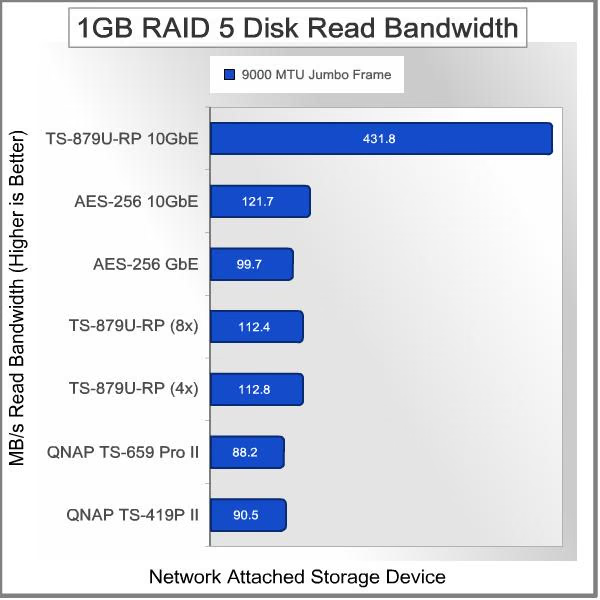
The 1 GB RAID 5 disk write test produced results very similar to the read tests. It's well known that RAID 5 write performance can be a weak point, with all the computation overhead involved and the extra parity bits that need to be calculated and written to each of the drives. The only way to overcome that is with raw computational horsepower, which is what the TS-879U-RP brings to the table better than any other NAS in this test. Once the 10GbE pipeline was opened, the throughput for writing data to the NAS jumped up to over 450 MB/s. These two charts make it painfully obvious how far back in the dust all the other options are.

Next up is 10 GB (1000 metric megabytes / 10,000,000,000 bytes) file transfer testing. Using the same 8-disk RAID 5 configuration, and a single 10 Gigabit Ethernet connection, network throughput will be put to the test, and the effect of any system or hardware caches will be minimized.
10GB RAID 5 Test Results
Looking at read tests with 10GB files, the TS-879U-RP still smokes all of the other units, just like in the 1GB tests. The results with AES-256 bit encryption come in a distant second place, but slightly improved from the results with 1GB file transfers. Once again, the liberating effect of the 10GbE NIC provided an over 20% improvement in the encrypted throughput. Everything else is either throttled by the meager 1Gigabit/second Ethernet pipe, or hampered by a weaker CPU, or both. The combination of a Core i3 CPU and a 10GbE network connection pushes this NAS into another league altogether, way beyond 400 MB/s. While there are certain aspects of a high-end home PC that can trounce the typical corporate desktop, don't try to take any candy away from the latest and greatest storage systems in a corporate LAN room. You'll lose.

Looking at write tests with 10GB files, the TS-879U-RP hits the highest throughput numbers of the test session, 463 MB/s. That's in Write mode, with a RAID 5 disk volume, no less. That's more than 5.5x faster than a TS-659 Pro II, which is not what I would consider a slow machine, at least for its intended market. If you're setting up a NAS for a demanding environment, like an Engineering company or a large video production office, you can't afford to scrimp on system hardware; you need the biggest, baddest device you can afford. The smaller and less expensive units will invariably suffer from any subsystem that gets shortchanged or underspecified. You can't overlook any facet of the infrastructure; look at the effect that a simple NIC had on the performance of the TS-879U-RP. Even with consumer-class HDDs, the performance penalty was 4x; with enterprise-class drives, either 15,000 RPM HDDs or the right SSDs, the hit would have been more like 10x.

Let's talk about the AES-256 encryption performance for a moment. In every test, the higher bandwidth NIC provided somewhere between 9% and 23% improvement in throughput on simple file transfers. The CPU utilization traces I'm showing here are typical of what I saw after I formatted the entire array as an encrypted volume. On one hand, it looks like the CPU is getting off on light duty, but those spikes are telling. Only one virtual core, CPU 1 is living easy, CPU 2, 3 and 4 are getting hit much harder. The only time I ever saw the CPU getting used this hard was when the drives were encrypted. Under normal operating conditions, none of the virtual cores had much higher than 50% utilization.

It's a simple math problem to figure out if the additional cost of outfitting several components on your network to the 10GbE standard is worth it, for the additional performance. With non-encrypted volumes, it's a much easier choice. With encrypted drives, I think it's a tough case to make. It's not going to be inexpensive; the dual-port Intel NIC that I installed in the NAS goes for about $700. On some level it's a bargain, because the single-port Intel NIC I bought for the host PC costs around $500. Switches are another story. Expect to pay close to $3,000 for a switch that has a couple "extra" 10GbE ports included, and maybe that's enough, for now. I don't see enterprises rolling out 10GbE to the desktop anytime soon; it's all going to be contained within the data center for the next couple of years.
Now, let's take a closer look at a test protocol that has been around for several years, but fell out of favor until recently. Intel's NAS Performance Toolkit (NASPT) version 1.7.1 was originally designed to run on a Windows XP client. People smarter than me have finally figured out how to run it under Windows 7, so let's run some benchmarks with it.
NAS Comparison Products
- QNAP TS-879U-RP 10 Gigabit 8-Bay SATA NAS server
- QNAP TS-659 Pro II Gigabit 6-Bay SATA NAS server
- QNAP TS-419P II Gigabit 4-bay SATA NAS Server
Intel NASPT Test Results
NASPT brings an important perspective to our test protocol, as it is designed to measure the performance of a NAS system, as viewed from the end user's perspective. Benchmarks like ATTO use Direct I/O Access to accurately measure disk performance with minimal influence from the OS and the host platform. This provides important, objective data that can be used to measure raw, physical performance. While it's critical to measure the base performance, it's also important to quantify what you can expect using real-world applications, and that's exactly what NASPT does. One of the disadvantages of NASPT is that it is influenced by the amount of memory installed on the client, and it was designed for systems that had 2-4 GB of RAM. Consequently, two of the tests give unrealistic results, because they are measuring the speed of the buffer on the client, instead of the actual NAS performance. For that reason, we will ignore the results for "HD Video Record" and "File Copy to NAS".
First, let's look at the results with the standard GbE interface, and un-encrypted drives. This is sort of the baseline, as we want to see how much AES-256 encryption reduces the performance, and we want to see how much the enhanced Ethernet connection improves the performance. With the basic GbE interface in place, a familiar pattern is seen. No individual test pushes past the ~120 MB/s barrier, but several hover just below it. Several of the tests have very low transfer rates, and that's due to the nature of the test. The Content Creation test for example, simulates a user creating a web page, accessing multiple sources for the content. This kind of NAS device is built for handling in the neighborhood of 30 users doing content creation, so I'm a little suspicious about this test, but we'll see how it works with multiple scenarios before we rule it out. The Directory Copy tests use several hundred directories and several thousand files to test a typical backup and restore scenario.

Moving up the performance ladder, with the 10GbE connection in place, the results show significant gains across the board. The HD Video Playback tests all take full advantage of the larger Ethernet pipeline and posted improvements on the order of 4x, which is the same effect we saw in the earlier file transfer tests. Content Creation got a 2.5x boost, while the Directory Copy tests got a 2x improvement on copies from the NAS and performed 3.5x better on copies to the NAS. Clearly there are some significant factors in the test protocols that are emphasizing different aspects of NAS performance, otherwise all the results would be in the 400-500 MB/s range. As we generate more data with this benchmarking tool, we should start to see some performance patterns emerging.

Adding in AES-256 bit volume encryption to the equation, the peak test results fall back to levels more like those we saw with the GbE network connection. The more context-sensitive tests, like Content Creation and Directory Copy to the NAS all posted decent gains, though. On average, the numbers are about 50% better than the baseline performance with the GbE connection. Unfortunately, the average with encrypted drives is also only about half of what is possible without it. That's quite a performance hit, so be very sure to make an informed and rational decision before deciding to encrypt all your data. Most applications for this kind of NAS system are going to have a number of physical security safeguards in place that would negate the need for encryption. Most data centers are card-key access only, and have cameras pointed down every aisle, but all it takes is one very smart, rogue employee to make everyone wish that someone had taken the extra step to secure their data.

To wrap things up, here's a consolidated chart of the "Fast" NASPT tests, and another for the "Slow" ones. First, the tests with relatively fast transfer rates. Once again, the performance of eight un-encrypted disks pumping data through a 10 Gigabit pipe is miles ahead of the alternatives. The larger bandwidth of 10GbE also gives the AES-256 encryption tests a small advantage over the baseline performance of the TS-879U-RP with its integral GbE connections. It's also interesting to see how the AES-256 performance goes up slightly as the video playback speed increases from 1x to 4x.
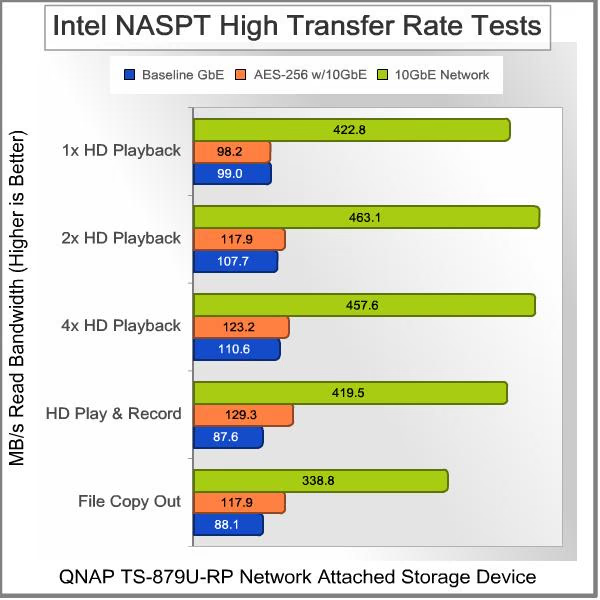
The "Slow" tests show a much narrower range of performance variation between the three different configurations. It also shows that most of these benchmarks got a more significant boost on the AES-256 scores than we saw in the "Fast" test results. The Directory Copy In results are a bit of an anomaly, but aren't completely out of the realm of possibilities. It does make me wonder if the metadata for the directories is encrypted. That might be a problem.....

Before we leave this benchmark, take a look at the network bandwidth chart from the QNAP Resource Monitor, as it records the data flows in and out of the NAS during the NASPT benchmark. The green trace is for data coming into the NAS, and the pink trace is for data leaving the NAS. Note the fifth peak, which represents the data for "HD Playback & Record" and you can see data simultaneously going into and out of the NAS. The big gap before any more data transfer is all the machinations going on in the Content Creation test - all that human simulation stuff that keeps the overall transfer rate low for this benchmark.

This was my first real set of official tests with the Intel NASPT benchmarking tool, and I'm reasonably happy with the results. I'm not too pleased that two of the tests are so dependent on the amount of memory in the host PC, to the point of making their test results completely unusable. I'm also not willing to hobble the Windows 7 test bench to 2GB of RAM just to run this test suite. The fact that 10 of the 12 tests are not affected by this issue means I will choose to ignore the HD Video Record and File Copy to NAS results unless a patch is issued to fix this problem. All of the other tests give predictable and meaningful results that represent real-world scenarios, so I think I'll continue to use this benchmark in the future.
NAS Comparison Products
- QNAP TS-879U-RP 10 Gigabit 8-Bay SATA NAS server
- QNAP TS-659 Pro II Gigabit 6-Bay SATA NAS server
- QNAP TS-419P II Gigabit 4-bay SATA NAS Server
ATTO Disk Benchmark Results
In addition to straight file transfer testing, I also ran the ATTO Disk Benchmark on the QNAP TS-879U-RP Turbo NAS Server, which is easy once a drive mapping is created on the host PC. Benchmarks like ATTO use Direct I/O Access to accurately measure disk performance with minimal influence from the OS and the host platform. This provides important, objective data that can be used to measure raw, physical performance. Our standard test settings for this benchmark use a queue depth of 4, and I also ran additional tests with the maximum queue depth available in this benchmark, which is 10. Heavy database usage can drive queue depth up to 32 or more, and this level is available on some other drive benchmarking suites. ATTO stops at 10, however, so we'll take a look at how much impact that has on the results.
First, let's look at the results with the standard GbE interface, and un-encrypted drives. This is sort of the baseline, as we want to see how much AES-256 encryption reduces the performance and we want to see how much the enhanced Ethernet connection improves the performance. With the basic GbE interface in place, a familiar performance pattern is seen. Neither the Read nor Write portions of the test can break past the 120 MB/s barrier put in place by the 1000BASE-T network connection. The good news is that the NAS reaches its peak performance with just 32kB data chunks.

As expected, the results with a 10GbE connection show huge gains. The Write speed reaches a peak of 457 MB/s and hits over 90% of that peak value at the 64kB step. It dips a little after the 1MB data size, but never drops below 92% of the peak. The Read speed hits an incredible peak of 679 MB/s at the two largest data sizes, and although it rises steadily during the test, it hits 95% of the peak value by the 512kB data chunk. This is an impressive performance improvement, and it pushes the TS-879U-RP NAS so far out in front of previously tested systems, that it almost creates a new category.
Adding in AES-256 bit volume encryption to the equation, the peak Write test results fall back to levels more like those we saw with the GbE network connection. The maximum write speed was 144 MB/s at the 128kB level. The write speed plateaued after the 16kB chunk size, where it first gets above 132MB/s. Using the Direct I/O setting, Read performance in this benchmark was not affected by the data encryption. Peak read speed came at the largest data level of 8192kB, and it actually surpassed the reading for the un-encrypted drives with a top tally of 698MB/s. Once again, top notch performance numbers that blow all previous units out of the water.

Increasing the Queue Depth from 4 to 10 didn't affect the peak performance numbers as much as it caused a bunch of variations at the different data chunk levels. The read speeds were particularly unstable, and you can see the green bars wandering all over the place in the chart below. They did hit a new high, though, with a top reading of 736 MB/s at the 256kB level. Write speeds were more uniform, with scores in the 430-456 MB/s range, starting at the rather low 32kB chunk size. I would call this good performance at the higher queue depth, and it's more than likely a testament to the 8 separate disks that make up the RAID 5 volume. It's no surprise that large disk arrays are the solution of choice for heavy database applications. The more drives you have in service, the more drive failures you're going to experience. Apparently, this is one case where the 24/7 performance advantage outweighs the occasional failure.

Before we leave the ATTO Disk Benchmark results, let's take a quick look at the QNAP Resource Monitor. During one of the benchmark runs with AES 256-bit encryption enabled, the read and write speeds are shown in stark contrast, laid on top of one another in real time. As the data chunk size increases, the read speed keeps going up, while the write speed is stuck in the 120-140 MB/s range. That's a result of the Direct I/O setting on the ATTO disk benchmark. A few minutes later you can see the traces for some timed 10GB file transfers, and the proof that without the Direct I/O path into the NAS, the read speeds fall back to normal levels.

ATTO has been used for a long time at Benchmark Reviews, since the early days of HDD testing, through the journey of trials and tribulations that accompanied the first several generations of SSDs, with all their benchmarking peculiarities. In the NAS arena, I appreciate the fact that it's one of the few drive testing programs that will work on a NAS that's been mapped to a drive letter by the host OS. It also has some nuances that need to be considered, but I believe there's strength in diversity. The more test applications I can use, the better understanding we can achieve about a product, IMHO.
NAS Comparison Products
- QNAP TS-879U-RP 10 Gigabit 8-Bay SATA NAS server
- QNAP TS-659 Pro II Gigabit 6-Bay SATA NAS server
- QNAP TS-419P II Gigabit 4-bay SATA NAS Server
NAS System Overhead Measurements
I've discussed the potential impact the NAS hardware has on performance in general terms so far. The hard reality is that the CPU, drive controllers, memory, and network subsystems have a direct and profound impact on the throughput of a NAS device. In extreme cases where multiple drives (4+) are arranged in higher-order RAID configurations, the CPU has a ton of work to do, calculating parity bits and parsing them out to multiple data streams. In-line data encryption adds another potential load to the infrastructure. In this section, I'm going to look at some results from the System Monitor capability that is available on the QNAP Turbo NAS server.
Let's start off looking at Network Bandwidth usage on the NAS server. During straight data transfers to and from the PC, with 8 disks configured as RAID 5 on the TS-879U-RP, the results show the single 10GbE connection consistently pushing and pulling over 500 MB/s of data through the wire. No real surprises here, just secondary confirmation that the data is actually being moved around from one place to another. You never know when an unsuspecting buffer will decide to make its presence known. The peak transfer rate during these tests is shown by a marker on the chart, and it's sitting at 586 MB/s. That's about 20% higher than the average throughput, which makes sense when you consider the effect of various system buffers and wait states. These charts had a lot more detail in them when each transfer took about 100 seconds to complete, now that they're over in about 20-25 seconds, the refresh rate of the chart is a little low.

Now let's look at CPU usage on the NAS server for the same set of transfers. During straight data transfers the results show the Intel Core i3-2120 CPU still not being pushed to the max. Data writes to the NAS still consume more cores than reads, but the load really never gets higher than 50% on all cores. During Read tests, some of the additional "hyper-threaded" cores are doing close to nothing. They're involved, but only in a peripheral way. This is in marked contrast with every other NAS I've tested, where the CPU is maxed out at 100% when doing anything involving RAID. The Intel Atoms hold their own for the most part, but the Marvell processors have been a major bottleneck in my experience. Finally, with this corporate beast, we have a CPU that can handle the load. The memory subsystem on the QNAP TS-879U-RP is not being taxed by these file transfers at all. It's not even worth looking at the chart.

Write tests with AES-256 volume encryption slow the transfer rate down quite a bit, and you can see from the marker on the chart that the peak was only 145 MB/s. The overall traces are pretty consistent, but the multiple small peaks in each transfer show some short-term variation in bandwidth. No surprises there, the refresh rate is pretty slow on these charts, and the various buffers and wait states always throw a couple wrinkles in any computer performance chart. In the next chart we'll see that the CPU gets hit hard, and in spikes - that's a factor that impacts the network throughput traces, as well.

Finally, let's look again at the CPU workload during disk write tasks with 256-bit encryption enabled. Reading the encrypted data doesn't tax the system as heavily, as far as I could see. With data encryption in the mix, the load on each of the CPU cores is much higher, spiking up to 100% quite often. Remember that these are virtual CPUs, as the Intel Core i3 2120 CPU has only two physical cores, but it supports Hyper-Threading. Also, the Core i3 does not support the recent AES-NI enhancements, so it's using brute force to encrypt this data. With the 10GbE interface keeping the bandwidth pipeline open, it looks like the CPU may have some bit of headroom left, but not much.
I hope this section showed you some objective reasons why the infrastructure that any NAS product brings to the table is important to its overall performance. As the number of drive bays goes up, the hardware requirements increase as well, and the price has to follow. I know it's disheartening to see that you don't get great economies of scale on the larger NAS units, but it would be even more of a shame if they didn't perform up to their true capabilities because the hardware was holding them back. In this case, the network interface that definitely was holding the system back is no longer an issue, and the system is showing the balanced performance that is more typical with a well-designed NAS system.
Now that we've shown you all the performance information, I'll share some Final Thoughts and then move on to our Conclusion page.
NAS Server Final Thoughts
My first and solemn duty is to remind everyone that relying on a collection of drives in any RAID configuration for data backup purposes is a huge error. RAID systems provide protection against loss of services, not loss of data. Multiple drives in a common system, in a single location do not provide effective and reliable data backup. I've harped on this for about a year now, so I hope the message got through, at some point.
Beyond the questions of availability, reliability, data recovery and capacity, there is also the question of the overwhelming bandwidth that this kind of hardware is capable of pushing out the business end of its enclosure. The one thing that was made painfully clear to me in this extended review is this: there is a growing chorus of high performance devices singing the swan song for 1000BASE-T as the network interface of choice. Maybe the new standard ought to be 10GbE, maybe it should be Thunderbolt, or maybe we're ready to move over to fiber for system-level interconnects, but we are right now at the tipping point where common devices are starting to overload the current networking standard. You would think, that with Ethernet performance going up by a factor of ten every few years, that it would be well ahead of Moore's law. Never mind being so far ahead of archaic spinning magnetic disks that it shouldn't even be a contest. But no - put four or eight of those ancient mechanical devices in a box, with some SOTA silicon to support it and voila, bandwidth limiting in the extreme.
The results we got when the networking bottleneck was removed are nothing short of amazing. After several years of testing leading-edge video cards, I'm used to 50% and 100% improvements in processing speed, with every new product cycle and technology node (45nm, 32nm, 28nm...) steadily pushing the bar higher and higher. A 400% speed increase is a shocking experience, even though I was pretty much expecting it. The only problem is that speed is addictive. Once you've experienced it, everything else is so frustratingly slow. Plus, it's never free, is it? In this case, it's not just the one NAS device that needs to be updated; at least one other device on the network needs to have a compatible interface. If your network architecture dictates that a 10GbE switch is required, expect to pay at least $3,000. If you're tying the NAS to a server as dedicated storage, you can get by for under $1,000.
Even though the QNAP TS-879U-RP is not a product that many readers of Benchmark Reviews will ever contemplate purchasing for home or personal use, it makes a lot of sense for larger organizations. There are certainly some of you out there with day jobs that need this level of performance, and now it's available at a distinctly lower cost than previous hard-core storage solutions. No, I'm not bi-polar; I know the last paragraph listed some eye-opening costs for implementing 10GbE; it's just that the sticker shock factor is an order of magnitude higher in the business world. Plus, this is worker productivity you're buying here, not an "enhanced user experience". Mention check-in and check-out times to most CADD designers or video editors, and they'll get this sad expression on their face. Mention it to their managers and they'll talk about their department's growing backlog, along with the fact that they really can't push their people any harder because there are technology limits holding them back. It's time for IT to be the hero again, instead of the millstone around their neck.
So, what conclusions can we draw from our massive performance upgrade of this high performance, eight-bay TS-879U-RP Turbo NAS server? Click NEXT to find out, and discuss...
QNAP TS-879U-RP 10GbE Upgrade Conclusion
This is not a full review of the QNAP TS-879U-RP Turbo NAS Server. For that, please refer to the previous article from last month. This article is a follow-up, which reviews the additional performance obtained with the optional 10GbE Network Interface Card, and the performance of the unit with AES 256-bit Volume-based Data Encryption. In addition, I included a new test protocol, which has recently been enabled on the Windows 7 platform. Because of the limited scope of this article, I won't be re-evaluating the product ratings for the TS-879U-RP; the original ratings in the full review are still applicable. Even though I was able to wring out significantly better performance from the unit with the enhancements I implemented, I believe my initial impressions are still accurate.
The raw file transfer rate of the QNAP TS-879U-RP Turbo NAS server was about four times faster with the 10GbE network card installed. Looking at simple file transfers, both Read and Write speeds were in the range of 450 MB/s, which is outstanding performance. I knew that the platform was capable of much better than I was able to achieve with the base Gigabit Ethernet connectivity. I wasn't sure how far I could push this NAS with 7200 RPM HDDs, though. Many of the Enterprise-class HDD products have migrated to the Serial-Attached-SCSI (SAS) interface, which is not supported on this unit, so 10,000 or 15,000 RPM drives were not going to be a readily available option. Enterprise-class SSDs are coming into their own though, and QNAP has posted some very impressive results from their test labs, using eight Intel C510 120GB units.
Performance with FIPS 140-2 Certified, AES 256-bit Volume-based Data Encryption enabled was much lower, even with the 10GbE interface. The read and write speeds were slightly better than what the base model TS-879U-RP delivered with GbE connectivity, but nowhere near the level that the un-encrypted configuration provided. The Intel Core i3-2120 CPU, which is a dual-core member of the Sandy Bridge family, doesn't support the Advanced Encryption Standard New Instructions (AES-NI) set. These new instructions speed up the encryption/decryption process by anywhere from 3x to 10x, depending on the implementation. You have to move up to the Quad-core E3-1225 Intel Xeon Processor in the TS-EC879U-RP version, with ECC memory, in order to get that capability. It makes sense - if you care enough about your data to protect it with AES 256-bit encryption, you probably want to ensure its integrity with ECC memory.

The Appearance and Construction Quality of the unit aren't changed by the addition of a dedicated 10GbE NIC, so there's nothing to mention there. The Functionality doesn't change directly, but the performance of that functionality does, in the case of AES 256-bit encryption. The capability was usable with the base configuration, and remains so with the enhanced network bandwidth. Unfortunately, the performance with encrypted drives did not scale up as well as it did without encryption, and gains of only about 20% were realized. In my mind, that difference doesn't really change the functionality, so the product rating is unaffected.
The value proposition for the QNAP TS-879U-RP Turbo NAS Server is definitely impacted by the ability to add a $700 NIC and consequently increase the raw performance by a factor of four. The difference is akin to adding a dedicated video card to your PC, to take over rendering duties from an integrated graphics processor. Yes, it's a significant price adder, but the boost in performance is even more significant. Given the increasing number of roles that a modern NAS is capable of assuming, that substantially higher level of throughput might be a game changer. Value is one of the only ratings that might be impacted by the enhanced networking performance that's available with the optional NIC.
As of March 2012 the diskless TS-879U-RP model was listed for $2899.99 at Newegg, or for the same price $2899.99 from Amazon. Newegg also sells the high-end Network Interface Cards you need to implement 10GbE networking. If you've only got short distances to cover, it's probably easier to stick with Cat 6 wiring, and I was very happy with the performance of the two Intel NICs I purchased for this project. The Intel E10G42BT, X520-T2, 10Gbps Ethernet NIC is on QNAP's compatibility list and sells for $689.99 at Newegg. The Intel E10G41AT2, 10Gbps Ethernet NIC is also available at Newegg for $512.00, in case you just need a single 10GbE connection on one of your other devices. They're both compatible with a wide variety of operating systems, including Windows 7. That's not always a given, for enterprise-class hardware. Windows Server - yes, Linux - yes, VMware - yes. Consumer OS's are usually a maybe for this type of product; make doubly sure it's compatible before you buy, and check the relevant support forums for confirmation from the user base.
My first testing experience with the QNAP TS-879U-RP was like doing a test drive of a modern-day Ferrari with the Valet Key. Yeah, I could tell I was driving a vehicle that had incredible performance potential, but I couldn't access it. Fortunately, all it took was $700 and a screwdriver to remedy that situation. I now feel like I've given this NAS a proper test and one that you probably won't find elsewhere. 10GbE test platforms are few and far between at the moment, and Benchmark Reviews is committed to staying at the leading edge of technology reviews.
Pros:
+ 432 / 463 MB/s best read/write performance
+ Driver support for 10GbE NIC was seamless
+ AES 256-Bit encryption throughput improved slightly
+ Even more performance can be had with faster drives
Cons:
- 10GbE NICS are expensive (~ $700 each)
Benchmark Reviews encourages you to leave comments (below), or ask questions and join the discussion in our Forum.
Reader comments from the original article
23 comments were posted before commenting closed. They are preserved as written. Original avatars no longer resolve and are shown as a placeholder.
Ok test 10GbE but .. Federico La Morgia Permalink:
Test with 8xocz agility3 raid-0 for the maximum performance on the transfer rate 10GbE???
RE: Ok test 10GbE but .. Olin Coles Permalink:
Sure! Would you like our address so you can send them to us?
RE: RE: Ok test 10GbE but .. Federico La Morgia Permalink:
Unfortunately I have not, however, try to ask them directly to OCZ
Might be fun, but... Bruce Permalink:
The results would be totally unrealistic. The great majority of users of this hardware are going to be stuffing it with mechanical HDDs, just because they need the capacity. I haven't seen any 2TB or 3TB SSDs around, have you? Also, anyone using an SSD in this type of application is going to have to use a very limited subset of SSDs - models that are specificallly designed for hard 24/7 RAID usage, without any TRIM support to keep the NAND cells fresh. The AGILITY uses "budget" flash memory, and any data center systems engineer who specified one for this kind of usage would be fired for incompetence. So, I would be happy to use the QNAP TS-879U-RP to test some SSD makers' new enterprise-class drives, and run them hard, in a realistic test case. But, just stuffing some consumer grade devices in the NAS to push it closer to 10Gbps throughput doesn't really do much for me.... I "get" why QNAP tested it that way, but I also think it would have been useful for them to publish additional test results with enterprise-class HDDs.
RE: Might be fun, but... Federico La Morgia Permalink:
the case of 8xSSD SATA3 in Raid-0 (as well as also the same in Raid-6 both normal and degraded discs 1-2) is used to understand the goodness of the disk controller present and / or the ultizzo cpu in operations in which need for high performance! Use the SSD so you need to understand the physical limitations inherent in the product, it is obvious that no one ever use this product with SSDs, but the fact remains that with the HDD will never get to know the limits of the Qnap as well as any 'NAS or other product that has or needs to introduce SATA mass storage.
SSD vertex 3 Guy-Michel Permalink:
Hi we are planning use qnap either 879 or ts-ec879U-RP as a san unit for vmware it realistic? To boost performance we would could reuse ocz vertex 3 and 4 480.Second choice would be to put 480 ssd deneva from ocz for are database terminal server and accounting. would you recommand that? Or should we check to put the fastest sata available in raid 10 if supported.
RE: SSD vertex 3 Olin Coles Permalink:
Please provide a little more detail. Will you use only one SSD, or several in RAID? Will the NAS receive backups, or merely run with redundancy?
detail in my mind :-) Guy-Michel Permalink:
would say that the main goal would be to have an array 4x480 vertex 4 let's say. the second array would be raid 10 fastest sata 6 we can find like Hitachi Deskstar 7K3000 or barracuda for file server and less critical vm machine.
further more detail Guy-Michel Permalink:
Just to complete obove my plan is to use the qnap like SAN for datastore in vmware esxi5.If test is speed wise acceptable we gone build arround that.While re-using are actual vmhost with individual ssd drive. we gone put these ssd in a QNAP with ISCSI SAN probably upgrade the ethernet to 10gige adapter and finally bring a cluster for HA.that the overall plan. Be able to achieve HA whitout breaking the bank.
HA...?? Bruce Permalink:
What is HA ?? I have never heard that acronym.
RE: HA...?? Guy-Michel Permalink:
it is a accronym (H)igh (A)vailability.
RE: detail in my mind :-) Bruce Permalink:
Even though it says on the QNAP website: "...QNAP NAS supports advanced RAID configurations and multiple RAID volumes on a single NAS." I don't believe you can actually set up two separate RAID arrays on one NAS. Is that what you are proposing, two arrays of four drives each one TS-879 machine? I don't think that's possible. Try posting that question on the QNAP forums, one of the QNAP representatives will give you confirmation. You CAN set up multiple iSCSI targets and/or multiple LUNs one device, but they would all reside on one physical RAID volume.
Lucky You... Bruce Permalink:
I would use the Enterprise Class SSDs if you can afford it. They have superior wear-leveling routines built into them. Remember, the operating system on the QNAP is not doing anything to keep the NAND refreshed on the SSDs, unlike consumer systems. I know OCZ and other vendors have been improving the "wear resistance" of all their SSD offerings, but the OCZ Denaeva will still have the most capable systems for keeping the performance up in this sort of usage. RAID 10 (0r RAID 20)is usually best for database applications. RAID 5 can be slower in Write operations. Do you have the ability to set the system up in a test environment? I would strongly encourage that, so you can try the different configurations.
QNAP 10GbE Promotion Bruce Permalink:
BTW, QNAP is bundling a 10GbE NIC with some models. Details here: #qnap.com/static/landing/10gbe_en.html Did I inspire them...? LOL
RE: QNAP 10GbE Promotion Sébastien Permalink:
Any idea what transfer rate could be achieved if USB 3.0 was used instead of 10 Gbe (RAID5, same disks)?
At the max, maybe Bruce Permalink:
From Wikipedia: The "SuperSpeed" bus provides a transfer mode at 5.0 Gbit/s additionally to the three existing transfer modes. The raw throughput is 4 Gbit/s, and the specification considers it reasonable to achieve 3.2 Gbit/s (0.4 GB/s or 400 MB/s) or more. I got more than 450MB/s in ACTUAL real-world throughput, which is slightly more than the USB-IF expects the USB 3.0 connection to handle, so I would say that using USB instead of Ethernet would throttle the bandwidth somewhat. Of course, you lose all the advantages of having the device sitting directly on the network, which is a major feature of this and any other NAS.
USB 3.0 Sébastien Permalink:
You are right but my plan is to share the NAS between 5 computers with slow streaming capability (connected to a 1 Gbe switch) and one or two close workstations with fast streaming capability (connected to the USB 3.0 ports). Do you know if this hybrid mode is supported? Do you confirm 450 MB/s with the NAS configuration you described and USB 3.0? In case of simultaneous streaming what total throughput can I expect... could the NAS handle 2x450 + 100 MB/s = 1000 MB/s? That should be supported by 8 high end disks but I do not know if the processor can handle a RAID5 encoding/decoding at this rate... Last question: is it possible to wire the NAS with two 1 Gbe cables to the switch and handle two 100 MB/s streams from two different computers? Is it seamless - I mean would the computers all see a single disk or is it more complex to aggregate?
Not recommended Bruce Permalink:
You are not going to be able to manage all these data streams with a quasi-network of USB connections connected to the TS-879U-RP. Your best bet would be to get a 10GbE switch, like the one I mentioned from Cisco, in the review. That way, all your workstations can get the bandwidth they need, and you have the bandwidth for future expansion.
USB 3.0 Sébastien Permalink:
Five of the computers connected to the NAS are old and run LOW profile hard drives (max 50 MB/s), it is very unlikely that more than 2 of them access the NAS simultaneously and none is equipped with 10Gbe adapters. Only a single (possibly 2 in the future) workstation is able to transfer data at a rate over 500 MB/s and it is the computer I expect to transfer the largest amount of data. Given this situation I think that the 10Gbe switch + many 10Gbe adapters is overkilling... I thought USB 3.0 would be very well suited to this kind of unsymmetric and non simulataneous access scenario. Where do you exactly see a problem? Do you think that the hybrid mode cannot work in practice or were you only saying the NAS cannot handle two USB 3.0 streams at 450 MB/s?
Not too many 10GbE.... Bruce Permalink:
The 10GbE switch I mentioned has only two 10GbE ports, the rest are all just GbE. That way, the individual workstation loads get aggreagated by the switch. The 10GbE ports are usually just fot rhe NAS, but you could put your workstation into one of them. My main issue is that all the software for this, and most NAS devices, is designed and optimized to work in an Ethernet environment, not an ad-hoc USB network. The capabilities while connected via USB will be severly restricted. Upload and download, via a couple of built-in scripts, that's all. FWIW, I'm never been impressed by the performance of USB with external drives. I guess I should test this one before I pull it apart...
RE: Not too many 10GbE.... Sébastien Permalink:
I get your point and I have no doubt 10Gbe is well more efficient than USB 3.0 but I guess the price of the 10Gbe switch you mention would be well over the price of the NAS itself so I am afraid I cannot afford this extra cost. Still I would be really happy with the 450 MB/s you reported over USB 3.0 and I guess it will not interfere with the traffic over the 1Gbe port since the transfer will (a priori) not be simultaneous. My worry is more about the configuration of the system in ethernet / USB hybrid mode: is it prepared for this or is it thought to work exclusively in USB or ethernet mode? Note: If you ever get the chance to test dual USB 3.0 transfer from two different computers ... :) Thanks a lot for your help!
IT Consultants Henri Permalink:
Hi, have such a box installed as ESXI 5.1 storage. Monday this week, the ESXI 5.1 freezed about 15 times after installing a additional RAID0 with 2 Samsung 830 512GB SSDs. Box is attached by 2* 10Gbit Intel X520 DA2. Stopped to access this DataStore seams to fix the problem. Support of QNAP always recommands to reset the box to the factory setup. Not very helpful.
Multiple RAID Volumes Bruce Normann Permalink:
Does the firmware you are using support multiple RAID volumes? Last time I checked you couldn't do that. Multiple LUNs, yes....but that's not the same thing as a new RAID volume. There are some devices out there thad support multiple volumes, just not sure if QNAP added that capability since I last inquired.