
Seagate Barracuda 3TB Hard Drive ST3000DM001
Seagate Barracuda ST3000DM001 Hard Drive Review
Manufacturer: Seagate Technology LLC
Product Name: Barracuda Hard Disk Drive
Model Number: ST3000DM001
Price As Tested: $170 at Amazon
Full Disclosure: The product sample used in this article has been provided by Seagate.
Back on March 2011, Seagate debuted their original Barracuda XT 3TB hard drive, model ST33000651AS, which used five platters to supply 3000 gigabytes of capacity over a SATA 6Gb/s interface. Seven short months later, they've returned to introduce a replacement: the Seagate Barracuda 3TB hard drive ST3000DM001, which features the same 6 GB/s interface and 64MB cache buffer but now utilizes only three 1GB density platters. Seagate has also introduced a number of refined technologies to help improve overall hard drive performance, including: dual core 40nm processor technology, DDR2 DRAM buffer, and refined caching algorithms. By reducing disc platters from five to three, it prolongs servo motor life and reduces heat output. Benchmark Reviews compared these two hard drives, to see exactly what's been gained.
Back on 21 September 2009, Seagate Technology was the first manufacturer to offer a SATA 6Gb/s (aka SATA-III) hard drive product with the industry's largest 64MB cache buffer. At its time, the 2TB Seagate Barracuda XT ST32000641AS was an impressive leap for high-density mechanical storage devices; primarily because it offered tremendous capacity along side commendable performance levels. Launching just over a year later, the 3TB version offers all of the same benefits of that made the series popular, but improves transfer speed performance while including free software to take Seagate drives beyond the 2TB limitation. Early adopters of the SATA 6Gb/s interface will appreciate the high-bandwidth transfer speeds that all high-capacity Seagate Barracuda-series storage solutions provide. Seagate has pleased enthusiasts and gamers with a 64MB cache buffer; the largest DRAM buffer on any commercial hard drive on the consumer market. Now Seagate takes one step further, and while both versions of the 3TB drive share similarities, there have also been a few industry changes since the 3TB Barracuda XT was originally unveiled.
The Seagate Barracuda series is designed for performance computer enthusiasts, as well as large-capacity storage systems. Manufacturer-supplied free enthusiast tools such as Seagate SeaTools software allows users to custom-define firmware parameters to enable performance features such as 'Short Stroke' and noise reduction. Featuring the industry's largest 3TB capacity and third-generation SATA 6Gb/s controller interface, the Seagate Barracuda is the first hard drive to also utilize 1TB storage disc platters. In this article, Benchmark Reviews tests the 3TB Seagate Barracuda ST3000DM001 hard drive against the drive it replaces: Seagate Barracuda XT model ST33000651AS.

What's new with Barracuda?
Barracuda is the industry's first hard drive to deliver 1TB per disk of capacity. The drive packs 340,000 tracks into every linear inch measured across the radius of the disc. This means that average track sizes have decreased to a mere 75 nanometers - smaller even than a flu virus. Seagate has enabled these very small densities and improved tracking over previous generations of Barracuda by deploying new nano actuation technology on each read/write arm assembly.
Seagate has also introduced a number of refined technologies to help improve overall performance, including dual core, 40nm processor technology, DDR2 DRAM and refined caching algorithms.
With the introduction of the new Barracuda, Seagate will be phasing out the 5900RPM Barracuda Green product line. This decision reflects the fact that low-power, or reduced-RPM, hard drives in the desktop market do not save enough electricity to justify the performance penalty. Seagate's analysis demonstrates that a reduced RPM hard drive saves only 20 to 40 cents per year in electricity cost at a cost of 20% to 40% in reduced performance. The 7200RPM Barracuda hard drives enable higher user productivity, delivering more value.
Source: Seagate Technology
Barracuda Features
New, Seagate 1TB-per-disk technology marks another major milestone for the hard drive industry. To make this happen, Seagate engineers had to pack 340,000 hard drive tracks into the width of a single inch. This means that, when reading and writing data, the read/write head needs to accurately follow a track that is a mere 75 nanometers wide. That's about 500 times smaller than the period at the end of this sentence.
Seagate AcuTrac technology helps enable this incredible feat-reliably and accurately following these nano-tracks even in challenging operating environments, like an all-in-one PC with the music turned up.
Seagate OptiCache Technology Continues to Push Performance. Barracuda 1TB-per-disk hard drives now include a host of refined technologies to further boost performance. Combined, these improvements squeeze even more performance out of storage already known for pushing the envelope!
Key Advantages
- Third-generation dual-core processor with integrated ARM handles more data faster.
- 40nm chip manufacturing technology delivers more computing power without increasing electrical power requirements.
- 64MB of DDR2 SDRAM enables the fastest cache yet on Barracuda drives.
- Double your capacity and drive down costs with the industry's first 1TB-per-disk hard drive technology.
- Up to 3TB capacity with 7200-RPM performance. Why compromise?
- SATA 6Gb/s interface optimizes burst performance
- Seagate AcuTrac servo technology delivers dependable performance, even with hard drive track widths of only 75 nanometers.
- Seagate OptiCache technology boosts overall performance by as much as 45% over the previous generation.
- Seagate SmartAlign technology provides a simple, transparent migration to Advanced Format 4K sectors.
- Free Seagate DiscWizard software allows you to install a 3TB hard drive in Windows, including XP, without UEFI BIOS.
Best-Fit Applications
- Desktop or all-in-one PCs
- Home servers
- PC-based gaming systems
- Desktop RAID
- Direct-attached external storage devices (DAS)
- Network-attached storage devices (NAS)
ST3000DM001 Specifications
-
Model Number: ST3000DM001
-
Interface Options: SATA 6Gb/s NCQ
-
Transfer Rate: 6.0/3.0/1.5 Gb/s
-
Sustained Data Rate: 156 MB/s
-
Max Sustained Data Rate: 210 MB/s (OD)
-
Cache: 64 MB
-
Seek Average, Read: <8.5 ms
-
Seek Average, Write: <9.5 ms
-
Spindle Speed: 7200 RPM
-
Heads/Disks: 6/3
-
Bytes per Sector: 4096
-
Load/Unload Cycles: 300,000
-
Non-recoverable Read Errors per Bits Read: Max 1 per 10E14
-
Annualized Failure Rate: <1%
-
Limited Warranty (years): 5
-
Startup Current +12 Peak (Amp, ±10%): 2.0
- Idle Average Power Consumption: 5.40W
- Operating Average Power Consumption: 8.0W
-
Operating Temperature: 0 to 60°C
-
Non-operating Temperature: -40 to 70°C
- Physical Height: 26.11 mm / 1.028"
-
Physical Width: 101.6 mm / 4.0"
-
Physical Depth: 146.99 mm / 5.787"
-
Physical Weight: 626 grams / 1.38 Lbs
Source: Seagate Technology LLC
Drive Testing Methodology
Solid State Drives have traveled a long winding course to finally get where they are today. Up to this point in technology, there have been several key differences separating Solid State Drives from magnetic rotational Hard Disk Drives. While the DRAM-based buffer size on desktop HDDs has recently reached 64 MB and is ever-increasing, there is still a hefty delay in the initial response time. This is one key area in which flash-based Solid State Drives continually dominates because they lack moving parts to "get up to speed".
However the benefits inherent to SSDs have traditionally fallen off once the throughput begins, even though data reads or writes are executed at a high constant rate whereas the HDD tapers off in performance. This makes the average transaction speed of a SSD comparable to the data burst rate mentioned in HDD tests, albeit usually lower than the HDD's speed.
Comparing a Solid State Disk to a standard Hard Disk Drive is always relative; even if you're comparing the fastest rotational spindle speeds. One is going to be many times faster in response (SSDs), while the other is usually going to have higher throughput bandwidth (HDDs). Additionally, there are certain factors which can affect the results of a test which we do our best to avoid.
Test System
- Motherboard: ASUS P8P67 EVO (Intel P67 Sandy Bridge Platform, B3 Stepping)
- Processor: Intel Core i7-2600K 3.4 GHz Quad-Core CPU
- System Memory: 4GB Dual-Channel DDR3 1600MHz CL6-6-6-18
- SATA 6Gb/s Storage HBA: Integrated Intel P67 Controller
- AHCI mode - Intel Rapid Storage Technology Driver 10.1.0.1008
- SATA 3Gb/s Storage HBA: Integrated Intel P67 Controller
- AHCI mode - Intel Rapid Storage Technology Driver 10.1.0.1008
- Operating System: Microsoft Windows 7 Ultimate Edition 64-Bit with Service Pack 1
Storage Hardware Tested
The following storage hardware has been used in our benchmark performance testing, and may be included in portions of this article:
- Seagate Barracuda XT 3TB Hard Drive ST33000651AS
- Seagate Barracuda 3TB Hard Drive ST3000DM001
Test Tools
- AS SSD Benchmark 1.6.4067.34354: Multi-purpose speed and operational performance test
- ATTO Disk Benchmark 2.46: Spot-tests static file size chunks for basic I/O bandwidth
- CrystalDiskMark 3.0.1a by Crystal Dew World: Sequential speed benchmark spot-tests various file size chunks
- Iometer 1.1.0 (built 08-Nov-2010) by Intel Corporation: Tests IOPS performance and I/O response time
- Lavalys EVEREST Ultimate Edition 5.50: Disk Benchmark component tests linear read and write bandwidth speeds
- Futuremark PCMark Vantage 1.02: HDD Benchmark Suite tests real-world drive performance
Test Results Disclaimer
This article utilizes benchmark software tools to produce operational IOPS performance and bandwidth speed results. Each test was conducted in a specific fashion, and repeated for all products. These test results are not comparable to any other benchmark application, neither on this website or another, regardless of similar IOPS or MB/s terminology in the scores. The test results in this project are only intended to be compared to the other test results conducted in identical fashion for this article.
AS-SSD Benchmark
Alex Schepeljanski of Alex Intelligent Software develops the free AS SSD Benchmark utility for testing storage devices. The AS SSD Benchmark tests sequential read and write speeds, input/output operational performance, and response times. Because this software receives frequent updates, Benchmark Reviews recommends that you compare results only within the same version family.
Compared below are the Seagate Barracuda XT ST33000651AS (five-platter) and new Seagate Barracuda ST3000DM001 (three-platter). Both drives received AS SSD's sequential benchmark tests, using the same Intel P67 SATA 6Gb/s interface. The older Seagate Barracuda XT ST33000651AS posted 157 MB/s reads followed by 157 MB/s sequential writes, while the new Seagate Barracuda ST3000DM001 improved read speeds to 167 MB/s with slower writes at 147 MB/s. Comparing the results, the old five-platter drive maintained a steady 157 MB/s read/write speed, while the new three-platter drive boosted reads by 10 MB/s but dropped write speed by the same amount.
My assessment: It's a draw, with an advantage point to the new Barracuda ST3000DM001 for boosting speed where it matters most.

Seagate Barracuda XT 3TB Hard Drive ST33000651AS (Five-Platter)

Seagate Barracuda 3TB Hard Drive ST3000DM001 (Three-Platter)
In the next section, Benchmark Reviews tests transfer rates using ATTO Disk Benchmark.
ATTO Disk Benchmark
The ATTO Disk Benchmark program is free, and offers a comprehensive set of test variables to work with. In terms of disk performance, it measures interface transfer rates at various intervals for a user-specified length and then reports read and write speeds for these spot-tests. There are some minor improvements made to the 2.46 version of the program that allow for test lengths up to 2GB, but all of our benchmarks are conducted with 256MB total length. ATTO Disk Benchmark requires that an active partition be set on the drive being tested. Please consider the results displayed by this benchmark to be basic bandwidth speed performance indicators.
ATTO Disk Benchmark offered very consistent results for both the Seagate Barracuda XT ST33000651AS (five-platter) and new Seagate Barracuda ST3000DM001 (three-platter). Both hard drives shared a nearly identical read and write ramp-up to their maximum output, and both produced similar test scores. After comparing the results, it appears that the new Seagate Barracuda ST3000DM001 (three-platter) hard drive shows an advantage with this test. The read and write speeds were just a few MB/s faster with the new Seagate Barracuda ST3000DM001, but they reach that maximum output just a bit quicker.

Seagate Barracuda XT 3TB Hard Drive ST33000651AS (Five-Platter)

Seagate Barracuda 3TB Hard Drive ST3000DM001 (Three-Platter)
In the next section, Benchmark Reviews tests sequential performance using the CrystalDiskMark 3.0 software tool...
CrystalDiskMark 3.0 Tests
CrystalDiskMark 3.0 is a file transfer and operational bandwidth benchmark tool from Crystal Dew World that offers performance transfer speed results using sequential, 512KB random, and 4KB random samples. For our test results chart below, the 4KB 32-Queue Depth read and write performance was measured using a 1000MB space. CrystalDiskMark requires that an active partition be set on the drive being tested, and all drives are formatted with NTFS on the Intel P67 chipset configured to use AHCI-mode. Benchmark Reviews uses CrystalDiskMark to illustrate operational IOPS performance with multiple threads. In addition to our other tests, this benchmark allows us to determine operational bandwidth under heavy load.
Using CrystalDiskMark, both the Seagate Barracuda XT ST33000651AS (five-platter) and new Seagate Barracuda ST3000DM001 (three-platter) offered very consistent test results. Again, both hard drives produced very similar test scores. After comparing the results, it appears that the new Seagate Barracuda ST3000DM001 (three-platter) hard drive once again shows a small speed advantage. The read and write speeds were just a few MB/s faster with the new Seagate Barracuda ST3000DM001, delivering 3 MB/s faster reads and writes.

Seagate Barracuda XT 3TB Hard Drive ST33000651AS (Five-Platter)

Seagate Barracuda 3TB Hard Drive ST3000DM001 (Three-Platter)
In the next section, we continue our testing using Iometer to measure input/output performance...
Iometer IOPS Performance
Iometer is an I/O subsystem measurement and characterization tool for single and clustered systems. Iometer does for a computer's I/O subsystem what a dynamometer does for an engine: it measures performance under a controlled load. Iometer was originally developed by the Intel Corporation and formerly known as "Galileo". Intel has discontinued work on Iometer, and has gifted it to the Open Source Development Lab (OSDL). There is currently a new version of Iometer in beta form, which adds several new test dimensions for SSDs.
Iometer is both a workload generator (that is, it performs I/O operations in order to stress the system) and a measurement tool (that is, it examines and records the performance of its I/O operations and their impact on the system). It can be configured to emulate the disk or network I/O load of any program or benchmark, or can be used to generate entirely synthetic I/O loads. It can generate and measure loads on single or multiple (networked) systems.
To measure random I/O response time as well as total I/O's per second, Iometer is set to use 4KB file size chunks over a 100% random sequential distribution at a queue depth of 32 outstanding I/O's per target. The tests are given a 50% read and 50% write distribution. While this pattern may not match traditional 'server' or 'workstation' profiles, it illustrates a single point of reference relative to our product field.
All of our SSD tests used Iometer 1.1.0 (build 08-Nov-2010) by Intel Corporation to measure IOPS performance, using a SandForce-created QD30 configuration: 4KB 100 Random 50-50 Read and Write.icf. The chart below illustrates combined random read and write IOPS over a 120-second Iometer test phase, where highest I/O total is preferred:

In our Iometer tests, which use 32 outstanding I/O's per target and a random 50/50 read/write distribution, which is generally a heavy load for SSDs but also relevant to modern hard disk drives. From these test results, we can see that five platters outperform three in input/output operational performance. This makes logical sense, because there's less travel to fetch and ferry data. If you're using a hard drive on any high-I/O system then I strongly urge you to consider an SSD, but if you're choosing between the older Seagate Barracuda XT ST33000651AS or new Seagate Barracuda ST3000DM001, the older five-platter design fares better.
In our next section, we test linear read and write bandwidth performance and compare its speed against several other top storage products using EVEREST Disk Benchmark.
EVEREST Disk Benchmark
Many enthusiasts are familiar with the Lavalys EVEREST benchmark suite (now named AIDA), but very few are aware of the Disk Benchmark tool available inside the program. The EVEREST Disk Benchmark performs linear read and write bandwidth tests on each drive, and can be configured to use file chunk sizes up to 1MB (which speeds up testing and minimizes jitter in the waveform). EVEREST Disk Benchmark does not require a partition to be present for testing, so all of our benchmarks are completed prior to drive formatting. Linear disk benchmarks are superior bandwidth speed tools in my opinion, because they scan from the first physical sector to the last. A side affect of many linear write-performance test tools is that the data is erased as it writes to every sector on the drive.
These high-capacity storage products were tested with EVEREST Disk Benchmark and connected to the Intel SATA 6Gb/s controller to use a 1MB block size option. Because these hard drives offer 3000 gigabytes of data storage capacity, the test run took a very long time to complete. Nevertheless, the waveform performance chart illustrates data speed stability across every platter. Ironically, both tests resulted in identical average and maximum speeds. This test finishes in a draw, with no advantage given to either drive.
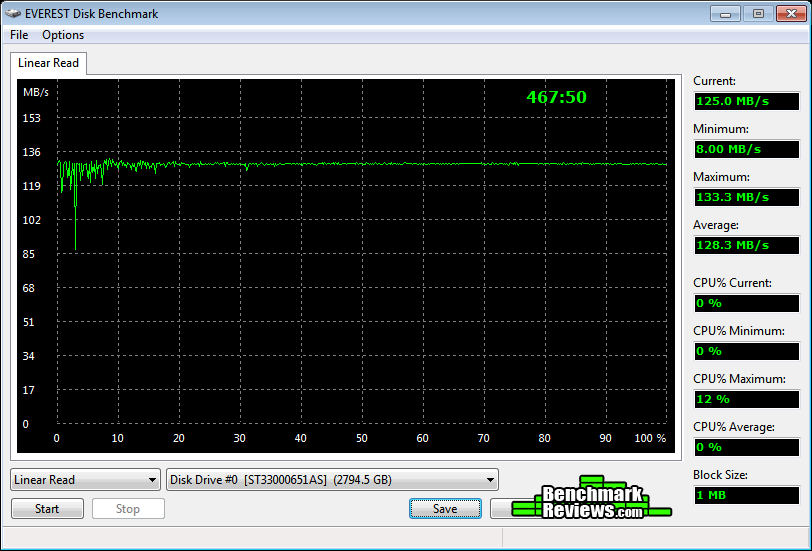
Seagate Barracuda XT 3TB Hard Drive ST33000651AS (Five-Platter)

Seagate Barracuda 3TB Hard Drive ST3000DM001 (Three-Platter)
In the next section we use PCMark Vantage to test real-world performance...
PCMark Vantage HDD Tests
PCMark Vantage is an objective hardware performance benchmark tool for PCs running 32- and 64-bit versions of Microsoft Windows Vista or Windows 7. PCMark Vantage is well suited for benchmarking any type of Microsoft Windows Vista/7 PC: from multimedia home entertainment systems and laptops, to dedicated workstations and high-end gaming rigs. Benchmark Reviews has decided to use the HDD Test Suite to demonstrate simulated real-world storage drive performance in this article.
PCMark Vantage runs eight drive tests, each with a specific purpose. Once the benchmarking test were complete, the results are given a PCMark score while the detailed result show actual transaction speeds. Our tests were conducted on an Intel P67 Sandy Bridge motherboard using the onboard SATA 6Gb/s controller with 64-bit Windows 7. Results are displayed in the chart below:
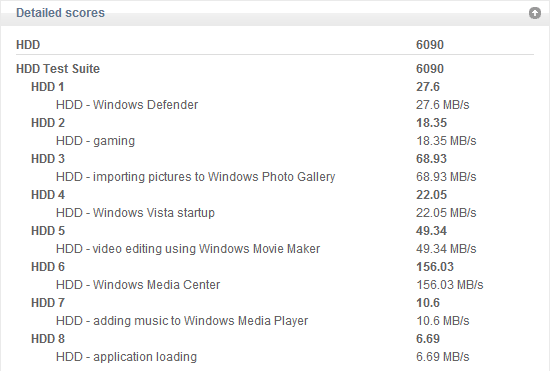
Seagate Barracuda XT 3TB Hard Drive ST33000651AS (Five-Platter)

Seagate Barracuda 3TB Hard Drive ST3000DM001 (Three-Platter)
Each drive has a small advantage depending on the task: the older five-platter Seagate Barracuda XT ST33000651AS did well with importing pictures into Windows Photo Gallery, but the new three-platter Seagate Barracuda ST3000DM001 excelled at video editing with Windows Movie Maker and Windows Media Center. Overall the new hard drive performed better in most tests, and scored a notably higher PCMark Vantage rating. Based on these results, the new Seagate Barracuda ST3000DM001 does improve real-world performance by using three 1TB platters instead of five.
In the next section I share my conclusion and final product rating.
Seagate Barracuda Conclusion
IMPORTANT: Although the rating and final score mentioned in this conclusion are made to be as objective as possible, please be advised that every author perceives these factors differently at various points in time. While we each do our best to ensure that all aspects of the product are considered, there are often times unforeseen market conditions and manufacturer changes which occur after publication that could render our rating obsolete. Please do not base any purchase solely on our conclusion, as it represents our product rating specifically for the product tested which may differ from future versions. Benchmark Reviews begins our conclusion with a short summary for each of the areas that we rate.
Beginning with performance, the new Seagate Barracuda ST3000DM001 3-platter hard drive has proven itself worthwhile. In all file transfer tests, three disc platters usually outperformed five. However, when it comes to operational I/O performance, the opposite was true and the older Seagate Barracuda XT outperformed by a small margin. Using PCMark Vantage as a real-world performance benchmark, the new Seagate Barracuda ST3000DM001 excelled at video editing with Windows Movie Maker and Windows Media Center. Overall, the new Seagate Barracuda ST3000DM001 proved itself to be a solid replacement for the older Seagate Barracuda XT ST33000651AS series.
Previously the Barracuda XT touted a five-year warranty, which helped position the series ahead of most other storage products. The new Barracuda ST3000DM001 arrives with a much shorter two-year warranty, although the low operating temperature and power saving rotational shut-down features may make a long-term warranty moot. Since spinning mechanical storage technology is so mature, especially from a company like Seagate, there are no issues with the Barracuda in terms of compatibility or firmware functionality... UEFI-based systems can utilize all 3TB right out of the box. Seagate delivers industry-leading quality and construction in all of their products, and the high-performance/high-capacity Barracuda series is the end-result of years of proven industry experience.
Available as of 1 November 2011, the three-platter Seagate Barracuda ST3000DM001 hard drive presently sells for $170 at Amazon. This works out to less than $0.06 per gigabyte of storage capacity, which is pennies on the dollar in comparison to SSD technology. To put things into perspective with SSDs, a hypothetical 120GB Barracuda HDD would cost less than $7 - or roughly 5% the price for any solid state drive of the same capacity. For storage-hungry gamers and performance enthusiasts wanting performance and high-capacity storage, the Seagate Barracuda is an exceptional drive with plenty of value.
Based on the current condition of today's desktop storage market, it's still very much a hard drive friendly world. While SSD technology will eventually replace hard disk storage some day soon, there's no evidence as to when solid state storage can match capacity at the same price point. The 3TB Seagate Barracuda Hard Drive ST3000DM001 resists that forthcoming change for at least a while longer, and its massive three-Terabyte capacity paired to the future-proof SATA 6Gb/s interface will certainly help punctuate this. The affordable cost to capacity ratio puts the Barracuda ahead of SSDs by a long-shot, while still offering respectable bandwidth performance speeds for enthusiast computer systems. Now capable of 1TB platters, it won't be long before we see 5TB hard drives.
Pros:
+ Very good 162 MB/s read bandwidth with ATTO Benchmark
+ 3rd-generation SATA 6Gb/s compliant controller
+ Massive 3-Terabyte storage capacity on three platters
+ Outstanding total-package value
+ 64MB Cache buffer improves burst transactions
+ Low-power standby conserves energy
+ 2-Year Seagate product warranty
+ Additional performance available via short-stroking
+ UEFI Systems can utilize 3TB+ out of the box
Cons:
- 2.1TB Barrier not removed via native hardware instruction on older O/S's
- Previous Barracuda XT series offered 5-year warranty
Ratings:
-
Performance: 8.75
-
Appearance: 8.50
-
Construction: 9.25
-
Functionality: 9.00
-
Value: 8.00
Final Score: 8.7 out of 10.
Recommended: Benchmark Reviews Seal of Approval.
Benchmark Reviews invites you to leave constructive feedback below, or ask questions in our Discussion Forum.
Reader comments from the original article
8 comments were posted before commenting closed. They are preserved as written. Original avatars no longer resolve and are shown as a placeholder.
RE: Seagate Barracuda 3TB Hard Drive ST3000DM001 Doug Dallam Permalink:
I just finished retesting my two Western Digital Caviar 640 Blacks and used a lot of the same tools you did. (My reasons weren't to compare this drive but other tests I was doing unrelated.) One of the things I wanted to do was test using real files. I chose to use a folder with 6GB of jpg/RAW/and video files. I then compressed that entire folder into a solid RAR archive and tested with that as well. Synthetic benches are fun, but real world file transfers can tell a different story. All in all a tight review, but I'm wondering why you didn't test the drive using real files, say reading from an SSD and writing to it?
RE: RE: Seagate Barracuda 3TB Hard Drive ST3000DM001 Olin Coles Permalink:
I could have used real files, but felt I already had enough tests completed to illustrate performance. When you use real files, they must be the exact same files every time. Compressed files (mov/avi/mpg/etc) also skew results depending on the SSDs used.
RE: Seagate Barracuda 3TB Hard Drive ST3000DM001 Doug Dallam Permalink:
When you say "skew" results, you mean because SSDs take into consideration compressible files as opposed to uncompromisable files? If so, that's why I created a compressed RAR file and the folder with loose files in it. It would have just been nice to see two real world file transfer scenarios, as per above. Maybe I'm off base here. If so, disregard.
Uncontrolled Variability Bruce Permalink:
I've done some comparisons like this during my NAS tests: "Instead of one 10 GB file, the green portion of the chart shows what happens when transferring 4,793 items totaling 6.5GB from the PC to the NAS. If you're going to use any NAS for basic backup duties, this is the kind of action it's going to see." My informal tests showed that the real-world examples introduced too much variation in the results, making comparisons difficult and/or misleading. Still, I get your point, and I also wish there was a way to use a standardized set of test files, that everyone could agree on.
RE: Uncontrolled Variability Doug Dallam Permalink:
Since here only two drives were being compared to each other, the same files could have been used for both drives. One, as explained above, multiple file, and the other one large file. Because as you point out, drives act differently depending on what is being transferred. I suppose you could save those same files and use them to test other drives also, albeit, with the same drive and rig set up. Or, one could test a number of drives using the same files on any rig, as long as the host drive, to prevent bottlenecking, is faster than the drive being tested. That SSD Olin tested recently would have been a good contender for the host drive, since it is the fastest SSD currently commercially available to the public.
RE: Seagate Barracuda 3TB Hard Drive ST3000DM001 ersan Permalink:
does this drive work with sata 2 raid controllers?
RE: RE: Seagate Barracuda 3TB Hard Drive ST3000DM001 Olin Coles Permalink:
Yes, SATA 6Gb/s is backwards compatible with SATA 3Gb/s and 1.5Gb/s.
Sales Rep David carr Permalink:
I have both the Workstation and the Sabertooth motherboards with the P55 chipset and if they are the same as the X79 the Sabertooth compared to the Workstation are the same my p55's. The Sabertooth was able to OC 300 mhz more then the workstation 4.3Ghz for the Workstation comaper to the Sabertooth able to clock to 4.6Ghz.