
OCZ Core Series SATA-II SSD OCZSSD2-1C64G
OCZ Core Series SATA-II SSD
EDITORS NOTE: Please read Solid State Drive (SSD) Benchmark Performance Testing to understand how the benchmarks used in this article should be interpreted.
EDITORS NOTE: Many visitors have purchased the OCZ Core series SSD based on this positive review of the product, however it should be noted that Benchmark Reviews received our sample unit directly from OCZ and was asked to return it after only a few days. This arrangement did not allow us to complete long-term testing for stability and product reliability.
Sometime shortly after the whole Y2K scare I decided to build an elite-level high-performance computer system for myself. At the time DDR2 was a new format that had just made its way into stores, so availability was somewhat limited (similar to DDR3 system memory is now). Even though I had been reselling Crucial memory for years through my business, I decided on a low-latency low-voltage kit from OCZ so that I could do some modest overclocking and keep the system stable. Thus, my relationship with OCZ began.
Since then, Benchmark Reviews has tested a bit of everything from this manufacturer. Our review of the OCZ Reaper HPC 1150MHz DDR2 kit could only be outdone by the OCZ 1600MHz DDR3 memory kit. Later on OCZ developed their first Solid State Drive (SSD) product, and despite lackluster performance in their original SATA SSD, OCZ later returned with a very potent SATA-II SSD that featured extremely good performance at a relatively reasonable price. Now things are different, because OCZ has found a way to deliver top-level performance at the lowest price for an SSD the market has seen.
The OCZ Core Series delivers the performance and reliability of the latest SSDs at a 50% less price per gigabyte than other high speed offerings currently on the market. OCZ Core Series Solid State Drives enable enhanced productivity in everyday computing and intensive multi-tasking applications. Perfect for notebooks, the Core Series is ideal for energy-efficient mobile computing to extend battery life, increase access time, and provide a durable alternative to conventional hard disc drives with superior shock resistance. High capacities and low power consuming NAND flash technology provide the necessary performance and battery life boosts generated by the proliferation of mobile gaming and new ultra-thin laptops. With fast access and seek times combined with excellent reliability, the OCZ Core Series SSDs are the answer for consumers demanding this latest storage technology.
Since first making an initial commercial debut to the public at the 2007 Consumer Electronics Show, Solid State Drives have been a topic of hot discussion among performance enthusiasts. With virtually no access time delay, these nonvolatile flash memory-based drives were quick to promise a more reliable storage device with greater performance while operating at a fraction of the power level. Moving further into 2008 they have become a reality for many performance-minded power users. I suppose it's been a slow ramp-up for consumers to accept Solid State Drive technology, similar to the struggle DDR3 SDRAM has seen.

Solid State Drives are a perceived as the new animal in the computer hardware kingdom. They've been around for several years already, yet a very slow consumer acceptance has made the Solid State Drive (SSD) an elusive product to spot in the wild. There really hasn't been a heavy appetite for these premium-priced products; especially since they haven't exactly pushed the Hard Disk Drive (HDD) into extinction. However, the big-game hunters are beginning to see SSDs really crowd the habitat, and their performance has often times eclipsed that of the HDD.
According to a Q1 2008 report by the semiconductor market research firm iSuppli, the SSD market will grow at an annualized average of 124 percent during the four-year period from 2008 until 2012. iSuppli now projects SSD sales to increase by an additional 35 percent in 2009 over what it projected last year, 51 percent more in 2010, and 89 percent more in 2011, and continue to show dramatic increases in subsequent years.
About the company: OCZ Technology
Entering the memory market in August 2000, OCZ Technology was built around the determination to manufacture the best high speed DDR and RDRAM. OCZ was founded by enthusiasts, for enthusiasts, and their commitment to the end-user has not digressed. OCZ Technology has been an innovator in many areas.
We were the first manufacturer to make Dual Channel optimized memory available to the public, which originally took advantage of nVidia's Twinbank or Dual DDR architecture, found in their nForce chipset. We have now taken that technology and tailored it for the Canterwood, and Granite Bay chipset's. OCZ developed and was the first to implement ULN technology, which has been a critical element in the manufacturing process for some time.
We at OCZ diligently work to improve communication with CPU and motherboard chipset manufacturers prior to the release of their products. Only in this manner can we fine-tune the memory's SPD settings, ensuring a synergistic relationship between the memory module, memory controller, and microprocessor. In today's rapidly evolving semiconductor industry, such communication is not simply research, but a necessary component of the manufacturing process.
OCZ Core Series Features
The drives feature a durable yet lightweight alloy housing, and because OCZ SSDs have no moving parts, the drives are not prone to damage from common mishandling. Designed for ultimate reliability, these SSDs have an excellent 1.5 million hour mean time before failure (MTBF) ensuring peace of mind over the long term. All Core Series SSD drives come backed a two year warranty and OCZ's legendary service and support.
-
Compatible with SATA-I and SATA-II interface
-
Fully compatible with notebooks, personal computers, and servers
-
High reliability assured based on the internal ECC
-
ROHS Compliant - no lead used
-
Low power consumption to extend battery life
-
High performance and reliability
-
Shock resistance increases data protection
-
No noise, No latency delay and No seek error
Overview, Benefits, and Use Cases
Recent advances in Flash memory design and production processes have made Flash the hottest new storage technology. Now, new Flash-based solid-state disk drives, or SSDs, are poised to bring enhanced driver experiences to notebook, server, and enthusiast computers. This paper reviews the SSD architecture and its Flash memory chip, examines the benefits of flash-based SSDs, and lists the potential users of this technology.
Architecture
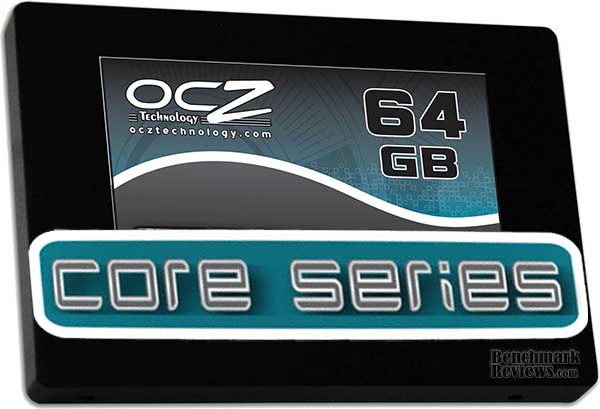
Solid State Disk (SSD) Drives are completely interchangeable with industry standard hard disk drives. SSDs conform to the same physical dimensions as hard drives, so they can fit in the standard drive bays and enclosures used by millions of computers. And SSDs use the same Serial ATA (SATA) or IDE interface as hard drives, making them functionally identical. This 100% physical and electrical compatibility and interchangeability with hard drives makes it very easy to design SSDs into systems and storage appliances.
Low Power Consumption
A major disadvantage of hard drives is the amount of power they consume. Most of the power in a hard drive is used by the motor that has to spin the disk. Faster performance in a hard drive requires faster rotational speeds of the disk, up to 10,000 rpm's for high performance hard drives. The SSD offers an enormous advantage over hard drives in power efficiency. Thanks to the lack of motors and to the efficiency of flash IC's, SSDs consume a fraction of the power a conventional hard drive demands. When idle, SSDs use about 95% less power than hard drives; and when active, 50 to 85% less power.
Lower power consumption means less heat produced inside the chassis that needs to be expelled, which results in cooler components and a lighter need for chassis ventilation. And more important, in mobile computing less power means longer battery life. Furthermore, each SSD can save up to 21.9 Kilowatt-Hours of power per year compared to a hard drive, making SSDs the ultimate choice for eco-friendly computing.
Fast Performance
Hard drives and flash technology have very different performance characteristics. With Access times in the 10-20ms range, hard drives are very slow to locate data, Flash has the advantage of lightning fast access time, well below 1ms. Therefore, SSDs are far superior to hard drives for small random reads and writes.
Hard drives are relatively fast for burst transfers of large sequential blocks of data. But the fastest SSD drives support even faster sustained read and write speeds than the fastest hard drives. High speed SSDs are the best choice for maximum throughput. Another considerable advantage flash has over hard drives is that they do not suffer from delay waking from sleep mode because with no moving parts, they have no need to spin down like a conventional hard drive.
OCZSSD2-1C64G Specifications
Core series SSD drives are available in capacities of 32GB, 64GB, and 128GB and deliver incredible 120-143 MB/s 80-93 MB/s read/write speeds and seek times of less than 0.35ms, making the Core series up to 10x as fast on a seek-time basis and up to 40% faster on a R/W basis that the best performing 2.5" HDDs on the market, all while consuming 50% less power.
OCZ 64 GB Core Series SATA II 2.5-Inch SSD OCZSSD2-1C64G
-
Read 120-143 MB/sec
-
Write 80-93 MB/sec
-
Slim 2.5" form factor design
-
100.2 x 70 x 9.3mm
-
Lightweight 77g
-
Operating Temp: -10C ~ +70C
-
Storage Temp: -55C ~ +140C
-
Shock Resistant 1500G
-
RAID Support
-
MTBF 1.5 million hours
-
2 year warranty
Part Numbers
-
Core 32GB - OCZSSD2-1C32G
-
Core 64GB - OCZSSD2-1C64G
-
Core 128GB - OCZSSD2-1C128G
OCZ SSD Support Addendum
EDITORS NOTE: Please read Solid State Drive (SSD) Benchmark Performance Testing to understand how the benchmarks used in this article should be interpreted.
Solid State Drives are not always a direct replacement to Hard Disk technology, because there are a few differences between products that make it important to properly configure your hardware for the best possible performance and stability. OCZ SSD's are not identical to other Solid State industry offerings, which is why they include a detailed guide for proper set-up on the OCZ support forum. Following their expert advice can help you avoid data write failures and delayed write data corruption errors on the OCZ SSD. Here are some important excerpts from their guide:
Known Issues
The original release of Microsoft Vista has problems with properly using SSDs that are resolved with Service Pack1. Installation of SP1 results in a substantial performance boost in synthetic benchmarks and smoother operation of the system in standard usage. Before using, please ensure that Service Pack1 (Vista32 and 64) is installed. Also, despite the fact that Vista contains generic chipset drivers, those drivers do not correctly enable any of the SATA controllers used on current motherboards, regardless of chipset manufacturer. Please make sure to install the latest chipset drivers, otherwise, especially the burst transfers will show a dramatic degradation and this will also affect sequential read and write performance.
HDTune uses fixed strides across the array to measure small block sizes. If these blocks fall on page or chip boundaries, the time delays result in atypically low "calculated" performance spot data that are not representative of the drive's real performance but an artifact stemming from inadequate testing methodology.
HDTach's fixed strides between sample points causes similar issues as those outlined in HDTune, in this case, the periodicities of the stride pattern and the flash memory address space cause some wave-like interference patterns of the benchmark results that are also measuring artifacts rather than being indicative of performance.
AHCI
the Advanced Host Controller Interface allows Hot-Plugging and Native Commands Queuing as well as multithreaded access of the drive by applications. Enabling AHCI results in conflicts between the controller and the drive that are apparent as sluggish overall system performance.
Benchmarks that actually work are those that are not geared towards quick and dirty assessment of a HDDs performance based on optimization of the test algorithms to meet the typical HDD architecture. Examples are PCMark Vantage, Winbench 99 2.0 "Drive Inspection Test" or ATTO.
This is just a very small example of the information OCZ provides consumers in their Setup and Testing Guide: Configuring and setting up SSDs. Visit the OCZ support forum for more information and the complete guide.
OCZ Core SSD Closer Look
Solid State Drives are an interesting topic. Some sites have yet to see one up close and in person, while Benchmark Reviews rides the edge of technology just a little too close and tests more DDR3 and SSDs than most the web. The bleeding edge is where most enthusiasts like to live, but seldom enjoy the price tag. But because I am in a position where cutting edge technology are within my reach (if only for a few weeks of testing), I enjoy sharing my valuable experience with the small niche of consumers that might actually want these premier products. OCZ promises that the Core series SSD will be different; excellent performance matched with the lowest price in the industry. Kind of difficult to balk at a combination like that, so let's take a look at what we got from our OCZSSD2-1C64G sample...

For almost two years now Benchmark Reviews has anxiously awaited that fabled Solid State Drive which would replace our current list of preferred Hard Disk Drives. Hard Disk Drive (HDD) manufacturers are constantly improving their product and adding new enhancements to the technology, all while the product cost decline. First there was perpendicular storage technology, then came fluid bearings, and finally there was the increase in cache buffer DRAM to speed-up the burst data transfer. Performance was the long-time hurdle for most SSDs, with read and write bandwidth creating the largest obstacles. Response time and reduced power consumption have long become the key arguments for owning an SSD, but without the bandwidth throughput to measure up against HDDs they became an expensive niche item. Fortunately, OCZ has helped solved this problem with their CORE series.
A few months ago we tested the lightning-fast MemoRight GT SSD, which finally put the Western Digital Raptor in its place... to the tune of almost $2000. In that round, the Solid State Drive won a decisive speed and bandwidth victory, but it had a long way to go before surpassing the low-cost value of a Hard Disk Drive. This is where the next chapter in SSD history is written, because OCZ claims that their OCZSSD2-1C64G can not only beat HDD performance; but it can be nearly as inexpensive.
As a professional system builder of higher-end computer systems, I have learned some very important lessons in regards to system performance over the past eight years. While gamers constantly leap for higher frame rates out of their video card, there is something more important than a faster processor, memory, or even front side bus. The real backbone to overall system speed and performance is the primary boot drive. In today's world, that usually means the hard disk drive (C:\) for nearly all computers. After hundreds of performance computers built and sold, I have seen a 10,000 RPM drive make a 2GHz CPU seemingly perform twice as fast, whereas a 5,400 RPM drive makes that same CPU run like it was only half as fast.
Power consumption is still astonishing low, even when compared to the newest series of efficient HDDs available. Access time has only got better with new product revisions, as nearly all SSDs register 0.1~0.3 ms delay. Bandwidth has dramatically improved as controller components have been refined and redesigned. Even the previous setback of SATA-I controller limitation has been recently overcome with commercially available SATA-II solutions. All that remains now on the list of items holding back widespread SSD usage is... cost.

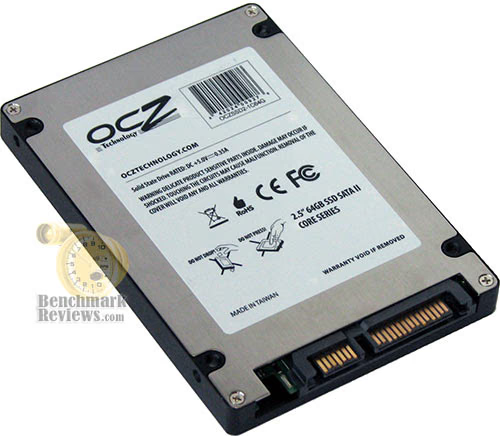
Dressing up an internal drive is almost as difficult as dressing up a cardboard box. There's only so much that can be done to a product that will be hidden away inside a notebook or PC. OCZ manages to keep things looking good, without the frills of chrome or brushed aluminum like I've seen in more expensive SSD products. Each SSD is finished with a flat black metal upper and unpainted lower enclosure package, which creates a contrasting color.
Standard 2.5" drive bay mounting points are pre-drilled and threaded in the Core series, which allows for quick upgrade or addition to any existing notebook or desktop system. The mounting positions matched up to the drive bracket on my Dell Inspiron laptop, and without any trouble at all I was quickly loading the operating system on this 64 GB SATA-II SSD. The entire unit fastens together from the underside with counter-sunk screws, and as much as I would have liked to disassemble the OCZSSD2-1C64G sample unit I received for testing, I knew that OCZ wanted it back. If you're really interested in how it looks inside these SSDs, feel free to visit our Silicon Power 64GB SATA Solid State Drive review.
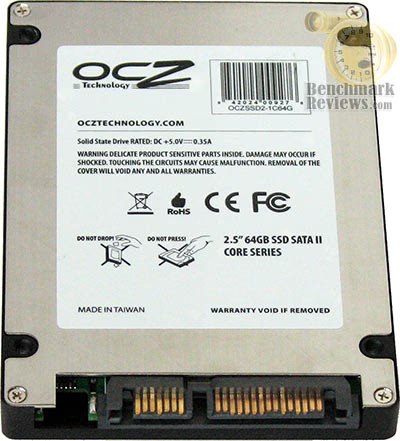
The underside of the OCZ OCZSSD2-1C64G reveals standard SATA power and data interface connections. Unlike desktop computers which utilize a SATA cable system to connect drive to motherboard, nearly all notebooks allow the 2.5" drive to simply slide directly into a connection bay within the system. In addition to notebooks and desktop computer usage, this OCZ 64 GB Core Series SATA-II Solid State Drive can be utilized for mission-critical backups or high-abuse data systems.
Even with the promise of great performance and reduced prices, Solid State Drives are not going to be for everyone. Similar to the evolution towards DDR3 system memory, a gradual replacement of HDDs by Solid State Drives is going to move very slowly. But what if the price was within reach? What if the data throughput was comparable? This is where Benchmark Reviews comes in to answer the tough questions, as we test the OCZ 64 GB Core Series SATA II 2.5-Inch SSD OCZSSD2-1C64G.
SSD Testing Methodology
EDITORS NOTE: Please read Solid State Drive (SSD) Benchmark Performance Testing to understand how the benchmarks used in this article should be interpreted.
Solid State Drives have traveled a winding course to get where they are today. Up to this point in technology, there have been several key differences separating Solid State Drives from magnetic rotational Hard Disk Drives. While the DRAM-based buffer size on desktop HDD's has recently reached 32 MB and is ever-increasing, there is still a delay in the initial response time. This is one key area in which flash-based Solid State Drives continually dominates because they lack moving parts.
However the benefits inherent to SSD's have traditionally fallen off once the throughput begins, even though data reads or writes are executed at a high constant rate whereas the HDD tapers off in performance. This makes the average transaction speed of a SSD comparable to the data burst rate mentioned in HDD tests, albeit usually lower than the HDDs speed.
Test System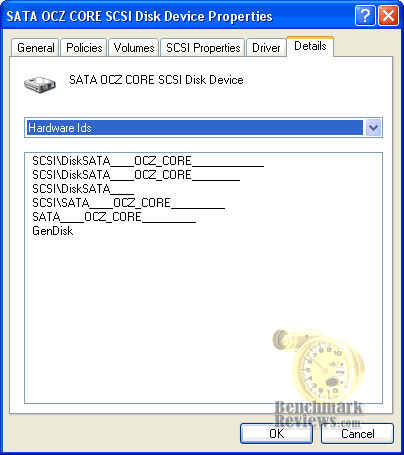
-
Motherboard: Gigabyte GA-X48T-DQ6 (Intel X48 Chipset) with version F4 BIOS
-
Processor: Intel E8400 Core 2 Duo 3.0 GHz (Overclocked to 3.6 GHz)
-
System Memory: Corsair PC3-14400 DDR3 1800MHz
-
Optical Drive: ASUS BC-1205PT SATA Blu-ray Disc Optical Drive
-
Graphics: Sapphire Radeon HD 4850 Video Card
-
Operating System: Windows XP Professional SP-3 (optimized to 16 processes at idle)
Disk Hardware
-
Crucial / Lexar 32GB 2.5" SATA-2 SSD CT32GBFAB0
-
Samsung 64GB 2.5" SATA-2 SSD MCCOE64G5MPP-0VA
-
Western Digital Raptor 74GB 3.5" WD740ADFD 10,000 RPM SATA Hard Disk Drive (16MB Cache Buffer)
-
Seagate 7200.11 500GB 3.5" ST3500320AS 7,200 RPM SATA-II Hard Disk Drive (32MB Cache Buffer)
Benchmark Reviews is aware that all Intel ICH9 and ICH9R chipsets which come on the 3- and 4- series motherboards exhibit a bandwidth limit defect on SSD's of approximately 80MBps when not operating in ACHI mode (BIOS configuration). Since the Gigabyte GA-X48T-DQ6 motherboard we used for testing also comes equipped with a JMicron JMB363 SATA controller for two additional SATA-II ports, all tests were conducted using this drive controller.
Test Tools
-
HD Tach RW v3.0.4.0 by Simpli Software
-
ATTO Disk benchmark v2.02
-
System Speed Test v4.78 by Vladimir Afanasiev
Comparing a Solid State Disk to a standard Hard Disk Drives is always relative; even if you're comparing the fastest rotational spindle speeds. One is going to be many times faster in response (SSD's), while the other is usually going to have higher throughput bandwidth (HDD's). Additionally, there are certain factors which can effect the results of a test which we do our best to avoid.
Nevertheless there will be some tests which will not be completely representative of the individual product tested, but a combination of the product and supporting system hardware. An excellent example of such a test is the write-to bandwidth benchmarks, which rely on other system components to force data onto the drive along with the bus bandwidth to support it. This dependency on system hardware is why you will see Benchmark Reviews place an emphasis on read bandwidth over write tests.
System Speed Test Benchmarks
EDITORS NOTE: Please read Solid State Drive (SSD) Benchmark Performance Testing to understand how the benchmarks used in this article should be interpreted.
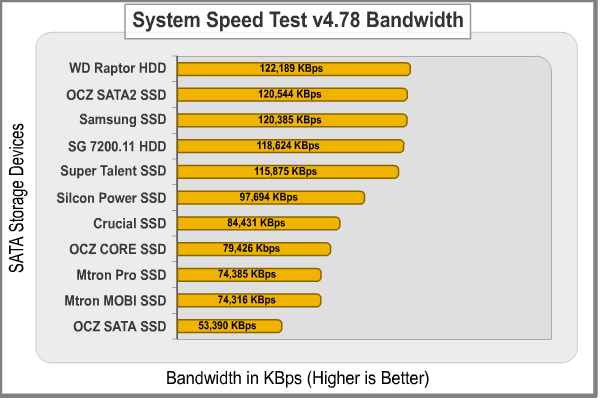
It's show time! All claims to performance are either made real or proven false in our testing, and although SSD's clearly offer some advantages it sometimes takes seeing a product compared to the performance of others to prove the point. During our re-testing process, I decided to take action and get System Speed Test v4.78 back in our test rotation. This software is solid, and the results are more accurate than any others available.
I doubt that when DOS died, Vladimir Afanasiev ever thought he would see his System Speed Test software used again in professional reviews. This program offers comprehensive system information, but it also has a powerful benchmarking tool for memory, processor, and disks. In terms of disk performance, it measures interface and physical transfer rates, seek and access times at the hardware level, and it does so without delay or interference from Operating System software or running processes. This is why Benchmark Reviews will continue to use this test: it polls its results directly from the hardware!
To detect the Random Access Time of each device, we ran full test routines on all products a total of five times. The highest and lowest scores were ignored, and the remainder was averaged. However, in nearly every single access time benchmark the test results were identical. In the bandwidth tests the results were extremely close to the others, but required averaging.

The System Speed Test access time benchmark places the OCZ 64 GB Core Series SSD near the lower-end of our results. At 0.38 ms access time, the only SSD's that have done worse than OCZ's CORE SSD are the Crucial CT32GBFAB0 SSD and Super Talent MasterDrive MX SSD. Even OCZ's first SSD, the OCZSSD64GB, managed to provide a faster response time. In reality, you couldn't begin to perceive the differences, but technology should get better with time and not the other way around.
Bandwidth is a whole other consideration once you record the results. In our tests, both the Western Digital Raptor and Seagate 7200.11 Hard Disk Drives showed strength as only a few SSD's could match or beat the buffered read performance. Close on the Raptors' tail was the OCZ OCZSSD2-1S32Gwhich is based off of the Samsung MCCOE64G5MPP-0VA SSD. The Seagate 7200.11 HDD was nearly matched in buffered read bandwidth by the Super Talent FTM60GK25H and Silicon Power SP064GBSSD25SV10. OCZ's CORE SSD performed at the same level as the Crucial/Lexar SATA-II SSD, and the remainder of SSD's end with the original OCZ SSD.
Looked at a different way, and ignoring the dominant buffered read speed results trend set by the Hard Disk Drives, the top SSD's actually did well to hold ground against the Raptor and 7200.11, which are at the very top-end of HDD performance. The 32MB buffer in the 7200.11 makes a 7200 RPM HDD difficult to keep pace with, and the 10,000 RPM spindle speed offer enough of an advantage to keep the Raptor on top.
Disk Hardware Tested:
- OCZ SATA-II 32GB 2.5" SSD OCZSSD2-1S32G
- OCZ SATA-II 64GB Core Series 2.5" SSD OCZSSD2-1C64G
- OCZ SATA-II 64GB 2.5" SSD OCZSSD2-1S64G
- Mtron MOBI 3000 16GB 2.5" SATA SSD MSD-SATA3025
- OCZ 64GB 2.5" SATA SSD OCZSSD64GB
- Mtron Pro 7000 16GB 2.5-Inch 16GB SSD SATA7025
- MemoRight GT 64GB 2.5" SATA SSD MR25.2-064S
- Crucial / Lexar 32GB 2.5" SATA-2 SSD CT32GBFAB0
- Samsung 64GB 2.5" SATA-2 SSD MCCOE64G5MPP-0VA
- Super Talent MasterDrive MX 60GB 2.5" SATA-II SSD FTM60GK25H
- Silicon Power 64GB 2.5" SATA SSD SP064GBSSD25SV10
- Western Digital Raptor 74GB 3.5" WD740ADFD 10,000 RPM SATA Hard Disk Drive (16MB Cache Buffer)
- Seagate 7200.11 500GB 3.5" ST3500320AS 7,200 RPM SATA-II Hard Disk Drive (32MB Cache Buffer)
Although Benchmark Reviews completely endorses the test results of System Speed Test for our benchmarking, it's always good to have other sources. We decided to then test the OCZ 64 GB Core Series SSD OCZSSD2-1C64G using the HD Tach RW and ATTO Disk Benchmark tool in the following sections. Please continue to see if our results were a fluke or not.
HD Tach RW Benchmark Results
EDITORS NOTE: Please read Solid State Drive (SSD) Benchmark Performance Testing to understand how the benchmarks used in this article should be interpreted.
In the tests below, Benchmark Reviews utilizes the HD TachRW tool to compare the Silicon Power 64GB SATA Solid State Drive against the fastest collection of desktop drives and competing SSD's we can get our hands on.
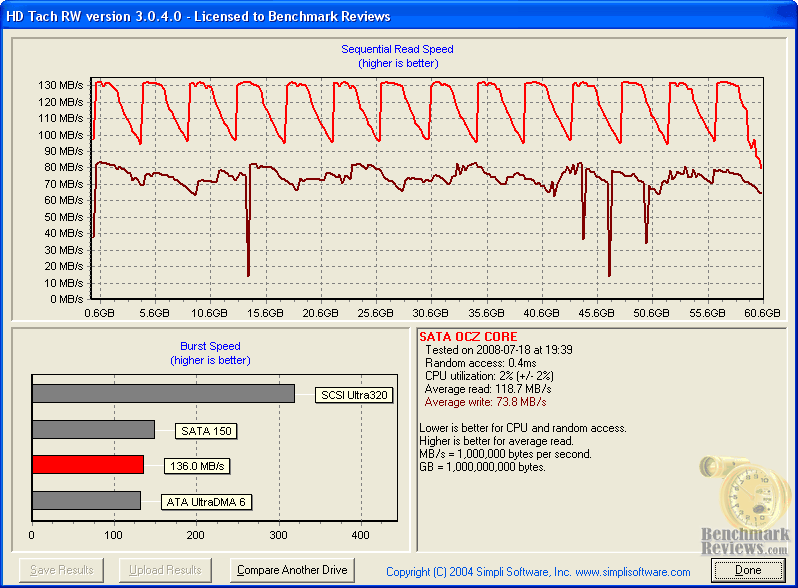
HD Tach is a software program for Microsoft Windows that tests the sequential read, random access and interface burst speeds of the attached storage device. For the record. every single product tested was brand new and never used. HD Tach allows write-bandwidth tests only if no partition is present. Additionally, each and every product was tested five times with the highest and lowest results removed before having the average result displayed here. The graphical user interface (GUI) of the Windows-based benchmark tool HD Tach is very convenient. and allows the test product to be compared against others collected on your system or those registered into the Simpli Software database.
HD Tach recorded a 136.0 MBps burst speed for the OCZSSD2-1C64G, which for Solid State Drives should be ignored due to the memory controller architecture. There are times where this number will be extremely high, such as the 260+ MBps we recorded while testing the OCZ SATA-II 32GB 2.5" SSD OCZSSD2-1S32G. The important numbers are the average read and write bandwidth speeds, which indicate the true performance level of the product. Our featured test item, the OCZ Core Series SATA II SSD, performed at 118.7 MBps sustained read bandwidth and 73.8 MBps sustained write bandwidth.
The chart below illustrates the collected benchmark results for HD Tach RW, with the read and write bandwidth results added together to determine placement. Without question, the MemoRight GT MR25.2-064S SSD enjoys a substantial lead over the entire field of storage products with an impressive 117.9 MBps read and 122.8 MBps write bandwidth speed. Unlike the System Speed Test benchmarks that placed the OCZ CORE SSD near the lower portion of our charts, HD Tach positions the OCZSSD2-1C64G second only to a $2000 SSD.
The OCZ SATA-II 64GB 2.5" SSD OCZSSD2-1S64G trails a decent distance behind with 94.3 MBps read and 85.9 MBps write, followed by the Seagate 7200.11 HDD with 88.8 and 78.8 MBps respectively. Mtron's Pro 7000 and Samsung's SATA-II SSD are trailed by the Crucial SATA-II SSD and Mtron MOBI 3000, which both feature great read speed paired with pathetic write bandwidth.
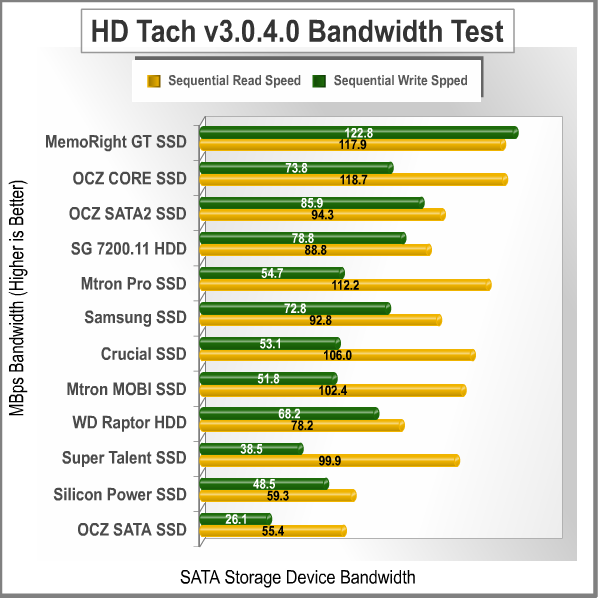
At the bottom half of our chart is the Western Digital Raptor 74GB 3.5" WD740ADFD 10,000 RPM SATA Hard Disk Drive. Sustained speeds seem to taper out after the initial burst for this drive, which by no means is a slouch - but just not as high-bandwidth as the others in our test group. The Super Talent MasterDrive MX SATA-II SSD seems to also suffer from a very poor write bandwidth matched against very good read performance. Finally, the Silicon Power 64GB SATA SSD SP064GBSSD25SV10 offers the second worst performance out of an SSD we've ever seen, only to be under-performed by OCZ's original SSD product which arrived to market almost a year ago.
Disk Hardware Tested:
- OCZ SATA-II 32GB 2.5" SSD OCZSSD2-1S32G
- OCZ SATA-II 64GB Core Series 2.5" SSD OCZSSD2-1C64G
- OCZ SATA-II 64GB 2.5" SSD OCZSSD2-1S64G
- Mtron MOBI 3000 16GB 2.5" SATA SSD MSD-SATA3025
- OCZ 64GB 2.5" SATA SSD OCZSSD64GB
- Mtron Pro 7000 16GB 2.5-Inch 16GB SSD SATA7025
- MemoRight GT 64GB 2.5" SATA SSD MR25.2-064S
- Crucial / Lexar 32GB 2.5" SATA-2 SSD CT32GBFAB0
- Samsung 64GB 2.5" SATA-2 SSD MCCOE64G5MPP-0VA
- Super Talent MasterDrive MX 60GB 2.5" SATA-II SSD FTM60GK25H
- Silicon Power 64GB 2.5" SATA SSD SP064GBSSD25SV10
- Western Digital Raptor 74GB 3.5" WD740ADFD 10,000 RPM SATA Hard Disk Drive (16MB Cache Buffer)
- Seagate 7200.11 500GB 3.5" ST3500320AS 7,200 RPM SATA-II Hard Disk Drive (32MB Cache Buffer)
In the next section, ATTO Disk Benchmark compares our range of drives and offers a different perspective from a unique test tool.
ATTO Disk Benchmark Results
EDITORS NOTE: Please read Solid State Drive (SSD) Benchmark Performance Testing to understand how the benchmarks used in this article should be interpreted.
The ATTO Disk Benchmark program is free, and offers a comprehensive set of test variables to work with. In terms of disk performance, it measures interface transfer rates at several different user-specified intervals and reports read and write speeds. The drives seek and access times are not statistics made available in this application, which makes this a considerably basic tool, although the adjustable test settings allow for a large range of differing results. Manufacturers seems to like this tool because it offers them the ability to reduce the test length load size to produce high benchmark results. Conversely, Benchmark Reviews uses this tool with the largest (32 MB) test chuck used to produce our test results.
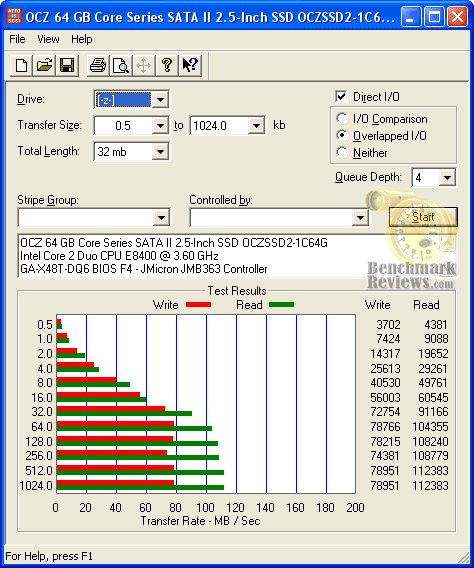
Bandwidth results are indicated as the transfer rate in the image below, showing the performance curve for the Core Series SATA II 2.5-Inch SSD from 512 Bytes up to 1 MB test chunks. OCZ specifies bandwidth expectations as 120-143 MBps read and 80-93 MBps write for their OCZSSD2-1C64G SSD, and so far our own bandwidth test results indicate that these are optimistic yet possible figures.
Read performance begins to plateau from 64.0 KB to 1024 KB and generates a 112,383 KBps (109.75 MBps) bandwidth around 512 KB, indicating a preference for larger file chunks. The same is true for the write bandwidth, which sustains a 77.10 MBps bandwidth peaking at the 512 KB test chunk range.
Since ATTO Disk Benchmark offers test settings for each transfer file size from .5 KB to 1 MB, we used the largest (1 MB) statistic to build the chart located below. In this chart, I have organized the products using the sum of their read and write bandwidth speeds to determine position rank.
Once again, the MemoRight GT SSD demonstrates that an optimized SATA-I controller can outperform even the latest SATA-II controllers. The Seagate 7200.11 hard drive gets the closest in terms of performance, followed by the OCZ Core Series SSD. Not far behind was the OCZ 64GB SATA-II SSD, Mtron Pro 7000 16GB SSD, and Samsung SSD.
The mid-range of performance is filled by the Mtron MOBI 3000 SSD and Western Digital Raptor, which aren't really all that far off from the products positioned above them. On the other hand, the low-end of performance is a noticeable distance away. The Crucial / Lexar CT32GBFAB0 SATA-II SSD takes a major dip in write-bandwidth performance, which is mirrored by the Super Talent MasterDrive MX SSD and Silicon Power 64GB SATA SSD. I'm not entirely clear on the technology each of these lower-end SSD's contain, but considering that two of them are SATA-II and match the performance of our slowest SATA-I SSD's I would contend that a design improvement is in order.
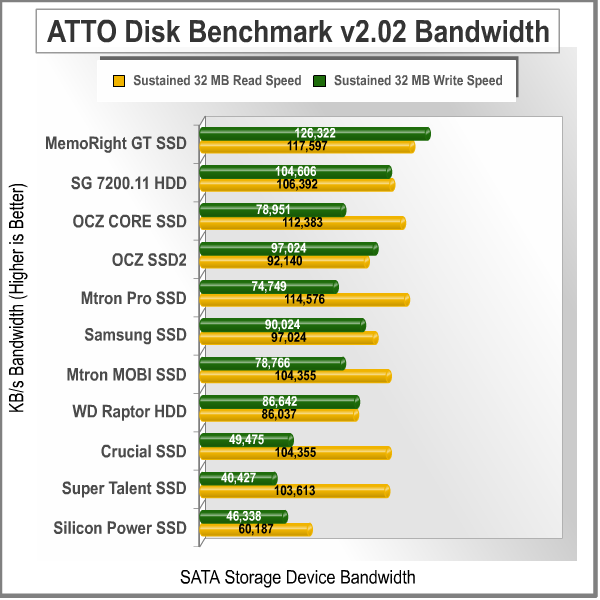
Originally I hadn't planned on including the ATTO Disk Benchmark results in this article. While the software is decent enough to mention, it was merely included because almost all SSD manufacturers test with it... and for very good reason I have learned. After several tests had been completed, I began to see why they decided on this particular software for benchmarks. What I like least about ATTO Disk Benchmark is how you can manipulate the settings to produce extremely wide range results from the same product.
As an example, if you reduce the total test length size from 32 MB (used in our testing configuration) to one of the smaller sizes the benchmark results are more than 30% different (as in higher bandwidth). This reason alone is enough for manufacturers to tweak their own test configurations for self-benefit. Nevertheless, in regard to our ATTO tests the entire range of SSD products is very well represented with our configuration. It should be noted that with cache buffers growing larger and larger, perhaps there's a reasonable middle ground that will provide the best of both worlds. I suspect that hybrid drives could play an important role in this argument very soon.
Disk Hardware Tested:
- OCZ SATA-II 32GB 2.5" SSD OCZSSD2-1S32G
- OCZ SATA-II 64GB Core Series 2.5" SSD OCZSSD2-1C64G
- OCZ SATA-II 64GB 2.5" SSD OCZSSD2-1S64G
- Mtron MOBI 3000 16GB 2.5" SATA SSD MSD-SATA3025
- OCZ 64GB 2.5" SATA SSD OCZSSD64GB
- Mtron Pro 7000 16GB 2.5-Inch 16GB SSD SATA7025
- MemoRight GT 64GB 2.5" SATA SSD MR25.2-064S
- Crucial / Lexar 32GB 2.5" SATA-2 SSD CT32GBFAB0
- Samsung 64GB 2.5" SATA-2 SSD MCCOE64G5MPP-0VA
- Super Talent MasterDrive MX 60GB 2.5" SATA-II SSD FTM60GK25H
- Silicon Power 64GB 2.5" SATA SSD SP064GBSSD25SV10
- Western Digital Raptor 74GB 3.5" WD740ADFD 10,000 RPM SATA Hard Disk Drive (16MB Cache Buffer)
- Seagate 7200.11 500GB 3.5" ST3500320AS 7,200 RPM SATA-II Hard Disk Drive (32MB Cache Buffer)
In our next section, we address the collection of test results and give our conclusion on the OCZ 64 GB Core Series SATA II 2.5-Inch SSD OCZSSD2-1C64G.
Core Series Final Thoughts
EDITORS NOTE: Please read Solid State Drive (SSD) Benchmark Performance Testing to understand how the benchmarks used in this article should be interpreted.
EDITORS NOTE 07/25/08: There have been an above-average number of reports indicating data corruption on the OCZ Core SSD. The problem is primarily attributed to the ACHI feature being enabled in the BIOS, even though the manual suggests that this feature is disabled to preserve stability. Benchmark Reviews received our sample unit directly from OCZ and was asked to return it after only a few days, and because of this arrangement were unable to complete long-term stability testing for product reliability.
For the past year, or at least since Reno Hosted the SuperComputing Conference SC07, I have been on the prowl to test every SSD I could get my hands onto. Unlike some manufacturers that send out a press release with claims of monumental performance from their up-and-coming product, OCZ delivers what they promise... and can do so on the same day they release a statement. So when OCZ mentioned that the 64GB Core Series SSD would sell for $259, I really wasn't sure what to think. It turns out the claims are true, which might mean that the dawn widespread consumer acceptance of SSDs is right around the corner.
As a product analyst, I often get to have my hands on product that I would otherwise never spend my own money to purchase. Certainly without argument, Solid State Drives fit perfectly into this category. There are many products which I feel are so new that it's better to let them ripen on the vine, and with a little time they will mature into something everyone wants. However early adopters never follow the pack, and scoff at the notion of waiting out the next technologies maturity. So when Benchmark Reviews began testing SSD's last year en mass, it seemed like we were doing very little more than toying with the untouchable. But that was before you could replace your existing high-performance Hard Disk Drive for a SSD product for almost the same cost (sacrificing a small degree of capacity, of course).
Back when I reviewed the OCZ SATA-II 32GB SSD it seemed like $17 per gigabyte was a good price for SSDs at the time. Consider for a moment that before now, SSD's such the 32 GB MemoRight GT cost on the level of $33 per gigabyte. Even the entry-level 32 GB Mtron MOBI 3000will run nearly $22 per gigabyte. So of course these prices all seem very high compared to the Western Digital Raptor which is available for about $2 per gigabyte of storage. Even with Super Talent MasterDrive MX hitting a reasonable $6 per gigabyte ratio, buyers are still very wary of all things SSD. But now that OCZ can offer a value-priced $4 per gigabyte, I am truly hoping that this line in the sand will begin to disappear.
OCZ's CORE series allows the modest consumer to experience top-tier performance and feature benefits of solid state technology without the serious set-back of premium cost. Since the CORE SSD product line extends to 120 GB, there's really no hold-back from taking on their new technology as a primary partition for your Operating System. With the sluggishness of Windows Vista on standard HDDs, perhaps an SSD is exactly what Microsoft's "O/S" needs to make it in today's world.
OCZ CORE SSD Conclusion
EDITORS NOTE: Please read Solid State Drive (SSD) Benchmark Performance Testing to understand how the benchmarks used in this article should be interpreted.
EDITORS NOTE 07/25/08: There have been an above-average number of reports indicating data corruption on the OCZ Core SSD. The problem is primarily attributed to the ACHI feature being enabled in the BIOS, even though the manual suggests that this feature is disabled to preserve stability. Benchmark Reviews received our sample unit directly from OCZ and was asked to return it after only a few days, and because of this arrangement were unable to complete long-term stability testing for product reliability.
With the American economy in the midst of a not-recession recession, manufacturers are having to pull out some very creative ideas to help market their products. Add onto this the fact that SSD technology carries a premium, even when OCZ offers it at the lowest prices ever, there needs to be extremely eye-catching product packaging to help along sales. Generally speaking, nearly every single SSD product we've sampled has had a very boring package that is nowhere near as exciting as most other computer hardware packaging we handle. OCZ appears to have taken my criticism of their past product presentation to heart, because for once it looks like there's a lot more than performance and value to lure you to the retail shelves.
Product appearance for SSD's is no easy task to handle successfully, just as I mentioned in the introduction. We're talking about a product that either hides inside a notebook computer and is usually only seen just once at installation, or it gets lost in depths of an oversized tower computer case. For what the CORE series is supposed offer, this OCZ SSD looks perfectly fine. I wouldn't expect unnecessary shine or glimmer from the finish of a value-segment product, and it's not there. Nevertheless, the OCZ Core series SSD has the appearance equal to the most expensive SSD products we've tested.
Construction is probably the strongest feature asset credited to any SSD product. Solid State Drives are by nature immune to most abuses, but add to this a hard shell and you have to wonder what it would take to make this drive fail. Keep wondering, because I'm not in a position to wreck one of these just yet. The steel enclosure used to protect the OCZ Core series SSD may not keep this drive safe from electrical shock like a plastic enclosure would, but it can certainly take a beating.
HD Tach reported 119 MBps read and 74 MBps write bandwidth performance, while ATTO suggests 110 MBps read and 77 MBps write. These test results confirm that OCZs claim of 120 MBps read and 80 MBps write bandwidth are certainly plausible maximum specifications you can expect to achieve. The read speed is excellent on the OCZ OCZSSD2-1C64G, while at the same time write performance very impressive. The OCZ Core SSD matches stated performance from their second-generation SATA-II controller.
Value is a relative term, especially when you discuss bleeding edge technology. People ridicule the thought of making the high-dollar purchase of an SSD over a standard hard drive, but then they get into their Hummer and go to Starbucks for a $7 coffee. At the ends of every emerging technology are two sides: one which will buy the technology and one that will not. Thankfully, Solid State Disk technology is made more affordable by the dropping price of DRAM (for the moment) and OCZ's ability to deliver a product within a very affordable price range. At the time of this writing, the 64 GB version (OCZSSD21C64G) of OCZ's SATA-II CORE series SSD is offered at several online retailers for around $260. NewEgg currently sells the 64 GB version for $269.00. Not a completely inexpensive storage solution, but still much less costly than all others by far.
In conclusion, OCZ has finally given consumers an undeniable reason for upgrading with a SSD product. The OCZ Core series offers excellent SATA-II performance on par with solid state products that cost thousands more, which means that the best experience doesn't have to cost the most money. Solid State Drives are excellent products for extending notebook battery life and increasing overall system performance, and the OCZ OCZSSD21C64G is an exemplary product that proves this point. The read speeds are near to 120 MBps and write-to speeds recorded close to 80 MBps, putting the fastest HDDs behind is performance. With Core series pricing the most affordable we've ever seen, gamers and hardware enthusiasts should soon experience the benefits this new technology can give their high-performance computer system. I completely endorse the OCZ Core Series SATA-II Solid State Drive because it offers top-level read and write speed performance at a cost comparable to enthusiast hard drives.
Pros:
+ 119 MBps read / 74 MBps write bandwidth in HD Tach
+ Very low power consumption extends battery life
+ Lightweight storage solution
+ Resistant to extreme shock impact
+ Up to 128 GB of SSD capacity
+ 2-Year OCZ warranty
+ $4 per gigabyte price ratio
+ Very accurate product specifications
Cons:
- Steel case does not protect from electrical shock damage
- Comparatively high response time based on SSDs tested
Ratings:
-
Presentation: 8.75
-
Appearance: 8.75
-
Construction: 9.75
-
Functionality: 9.50
-
Value: 8.50
Final Score: 9.05 out of 10.
Excellence Achievement: Benchmark Reviews Golden Tachometer Award.
Questions? Comments? Benchmark Reviews really wants your feedback. We invite you to leave your remarks in our Discussion Forum.
Reader comments from the original article
2 comments were posted before commenting closed. They are preserved as written. Original avatars no longer resolve and are shown as a placeholder.
RE: OCZ Core Series SATA-II SSD OCZSSD2-1C64G Raj Naraine Permalink:
Hello I, bought a Core 64GB - OCZSSD2-1C64G sometime ago. It worked fin with Vista and XP. Win 7 has a problem it never loads on this SSD .. Is there any firmware etc.. I can use to have win 7 workng on this SSB. Best Regards Raj Naraine
RE: RE: OCZ Core Series SATA-II SSD OCZSSD2-1C64G Olin Coles Permalink:
There have been several firmware updates for this product. Visit here: ocztechnologyforum.com/forum/forumdisplay.php?236-End-of-Life-OCZ-SSD-s-(Core-V1-V2-Apex-Summit)