
OCZ PC3-12800 DDR3 1600MHz RAM Kit OCZ3P16002GK
OCZ OCZ3P16002GK DDR3
Benchmark Reviews continues on with our High-Speed DDR3 Overclocking and Review Series, which features over one dozen different DDR3 kits. Many of the kits we have tested so far have helped achieve extremely uncommon overclock speeds, and even some of the kits not setting speed records managed to impress us with their combination of performance and value. So far we have reviewed the Patriot PC3-15000, Super Talent PC3-14400, and Mushkin PC3-10666 kits, but today we are especially pleased to test the OCZ PC3-12800 DDR3 1600MHz 2GB RAM Kit OCZ3P16002GK.
While the Patriot PDC32G1866LLK kit may presently hold the title for the fastest DDR3 module produced, there are several others that overclock to nearly the same speed or close enough to it. Because of the very limited quantities and slowly growing demand, the prices are almost as high as the speeds; which makes it difficult to recommend the kit that is best for any particular need. Even when I approach a term like "best", not even an experienced analyst like I can tell you which DDR3 product is "the best kit" because at this early stage the concept of "best" takes on a relative meaning. But in terms of fastest... well, it looks like Benchmark Reviews should have no problem helping you with that dilemma.
Many of the readers will probably not consider DDR3 an important part of the hardware market just yet, and in a very few ways I can agree with them. It's expensive, and it's not going to change their system from a 2 to a 10. But I think that this argument only exists if you have missed the point: DDR3 is a more efficient replacement over DDR2 in many different ways, but high-speed DDR3 is intended for overclockers and enthusiasts almost exclusively. In a year from now, expect to have DDR3 pressed into your new motherboard. However for today, the demand behind DDR3 and its high-speed variants is best met by the growing number of hardware enthusiasts which push their equipment well past the stock settings.
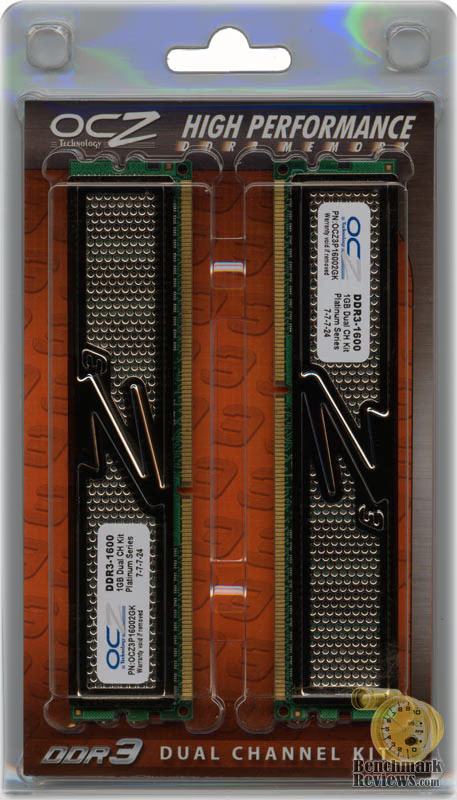
All of this is great news for the overclocker, the hardcore gamer, and the hardware enthusiast; which has been the case every time high-end system memory parts arrive to the market. It wasn't all that long ago we all had SDRAM with 1 and 1.5CL timings, and then DDR arrived with CL3. Nobody complained then, so I'm not sure why they are starting now. It was the exact same story when DDR2 arrived to replace DDR; which nearly doubled the timings. So from a technical standpoint we should appreciate that the timings have only gradually increased with the clock speed, because history has proven this to be difficult.
EDITORS NOTE: Benchmark Reviews has also published the article DDR3 RAM: System Memory Technology Explained
About the company: OCZ Technology
Entering the memory market in August 2000, OCZ Technology was built around the determination to manufacture the best high speed DDR and RDRAM. OCZ was founded by enthusiasts, for enthusiasts, and their commitment to the end-user has not digressed. OCZ Technology has been an innovator in many areas.
We were the first manufacturer to make Dual Channel optimized memory available to the public, which originally took advantage of nVidia's Twinbank or Dual DDR architecture, found in their nForce chipset. We have now taken that technology and tailored it for the Canterwood, and Granite Bay chipset's. OCZ developed and was the first to implement ULN technology, which has been a critical element in the manufacturing process for some time.
We at OCZ diligently work to improve communication with CPU and motherboard chipset manufacturers prior to the release of their products. Only in this manner can we fine-tune the memory's SPD settings, ensuring a synergistic relationship between the memory module, memory controller, and microprocessor. In today's rapidly evolving semiconductor industry, such communication is not simply research, but a necessary component of the manufacturing process.
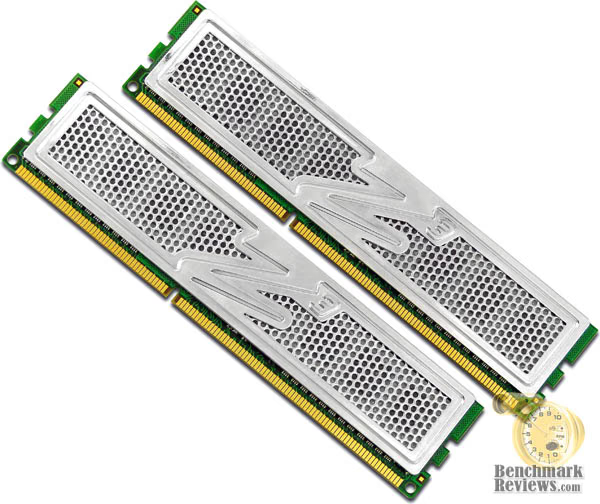
OCZ PC3-12800 Features
-
Non-ECC, Unbuffered
-
2GB kit (2x 128Mx64)
-
Platinum Z3 XTC Heatspreader
-
100% Tested and Verified
-
OCZ Lifetime Warranty
-
RoHS Compliant
-
Tested and compatible with Intel P35 and X38 chipsets
-
Made in USA
Each module is 100% hand-tested for quality assurance and compatibility and features a proprietary platinum-mirrored XTC (Xtreme Thermal Convection) heatspreader for the most effective heat dissipation. As part of OCZ's line-up of premium memory, the DDR3 series is backed by a Lifetime Warranty and industry-leading technical support for unparalleled peace of mind.
OCZ3P16002GK Specifications
-
1600MHz DDR3
-
Chip Architecture: 2x8 IC chips, 128MBx8
-
2x 240-pin DDR3 DIMMs
-
Part Number: OCZ3P16002GK
-
Extreme Performance PC3-12800
-
Low Latency CL7-7-7-24
-
1.9V Voltage Setting
-
1.95V EVP*
*(Extended Voltage Protection) is a feature that allows performance enthusiasts to use a VDIMM of 1.95V without invalidating their OCZ Lifetime Warranty.
Closer Look: OCZ PC3-12800
The new PC3-12800 Platinum Edition was developed to offer enthusiasts a memory solution that takes full advantage of the capabilities of the Intel P35, X38, and the upcoming P45/X48 Express chipsets. At 1600MHz, the OCZ PC3-12800 Platinum is presently considered High-Speed. However, once JEDEC finalizes the 1600MHz standard this DDR3 kit will be considered a standard DDR3 part. Since the OCZ3P16002GK kit is rated to run CL7-7-7-24 timings it is poised to provide enthusiasts with high-performance potential regardless.
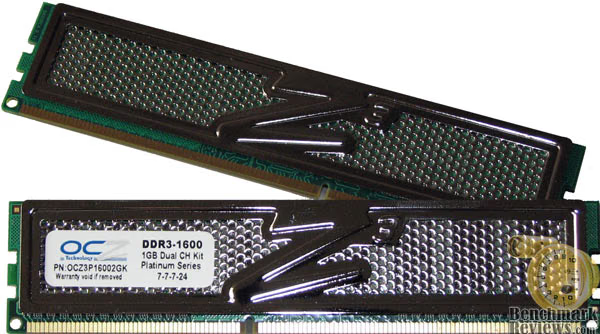
OCZ may have set the bar with their Reaper HPC design, and then lifted that bar even higher with their recently announced PC3-10666 ReaperX HPC Enhanced Bandwidth DDR3. But since this is the Platinum XTC set, and the combination of honeycomb heatspreader which adds surface area and low voltage really allows the OCZ OCZ3P16002GK kit to operate at cool and stable temperatures.
In our recent reviews, the larger heatspreaders found on the Winchip PC2-9600 64A0TMTHE8G17C and Super Talent PC3-14400 W1800UX2GP kits have found themselves too tall to fit in a full range spectrum of system applications. This translates into higher compatibility in compact computer builds, such as shallow HTPC systems, for the OCZ PC3-12800 DDR3 1600MHz 2GB RAM OCZ3P16002GK kit.
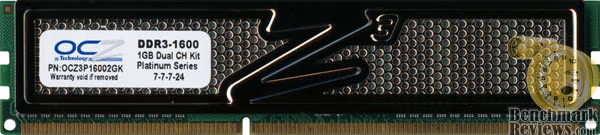
XTC (Xtreme Thermal Convection) heatspreaders optimize the thermal management of memory modules by promoting greater airflow by means of micro-convection throughout what is usually the dead air space inside conventional heatspreader designs. In this manner, build-up of heat is avoided and thermal dissipation of the memory components is offloaded more efficiently through the honeycomb design. At the same time, mechanical stability is maintained.
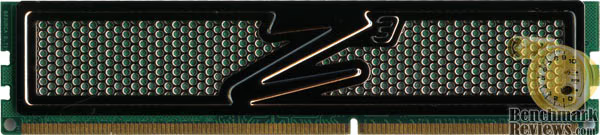
During normal operation, I discovered that the OCZ PC3-12800 DDR3 1600MHz RAM kit generated a temperature which was just barely lukewarm to the touch. Even in the very best DDR2 kits running at a lowly 800MHz, it is nearly impossible to touch the module during operation. This drastic reduction in operating temperature is likely the result of the efficient DDR3 process or possibly the 1.9V used with this OCZ3P16002GK kit.

OCZ has introduced several different RAM module designs over the past few years, and it seems that the OCZ3P16002GK kit is not really all that different when compared to the appearance of past generations. Personally, I think that the introduction of the new DDR3 standard would be cause for a new design to be released. But until the ReaperX HPC Enhanced Bandwidth DDR3 is available it looks like we'll have to wait and see how enthusiasts react to the design.
In the next section, Benchmark Reviews covers the finer points of DDR3 and the changes it brings. The overall progress of this DDR3 series is also updated, along with overclocking results.
DDR3 Comparison Review Progress
Ultimately DDR3 offers a faster design which allows all hardware enthusiasts to take advantage of it. Current high-speed DDR3 memory doesn't offer any benefit when installed into computers running at the stock JEDEC standard speeds of 400 (800), 533 (1066), 666 (1333), and 800 (1600).
Instead, the new generation of DDR3 is meant to avoid a bottleneck between the CPU and the system memory; especially in highly overclocked scenarios. With the high-speed variety of DDR3, which presently includes everything beyond the highest 1333MHz JEDEC standard, you increase the Front Side Bus (FSB) and CPU clock speed without being forced to slow the system memory to remain stable. It should be noted that as of late October 2007 the JEDEC 1600MHz speed is still in draft in standard JESD79-3A, but once finalized high-speed DDR3 will include parts beyond this new speed.
System Memory is labeled with a new generation for each interval of Front Side Bus development. In terms of DDR, or double data rate memory, the first generation was designed for 100 MHz to 200 MHz speeds (DDR-200 to DDR-400). Later, DDR2 arrived and started production at 266 MHz (DDR2-533) and officially ended (by JEDEC standards) at 400 MHz (DDR2-800). This is where DDR3 begins, starting with 533 MHz (DDR-1066), and scale up to 800 MHz (DDR3-1600).

Each generation of DDR is more than just an update to the memory speed, it is also a more technologically advanced production process and a lower operating voltage and better heat dissipation. The previous generation of DDR2 is manufactured on a 110nm node, whereas the new DDR3 has receives a fab process shrink down to a 90nm node (although some use 80nm) with either 55/45nm prepared for later into 2008. Together, this all helps the hardware enthusiast reach higher clock speeds at the expense of higher latencies. This is why the new DDR3 generation of memory needs a significantly higher clock speed deliver better performance than the preceding generation of DDR2 technology.
In additional to the logically progressive changes, there are also improvements made to the architectural design of the memory. One particularly important change introduced with DDR3 is in the prefetch buffer: up from DDR2's four bits to an astounding eight bits per cycle. This translates to a full 100% increase in the prefetch payload; not just a small incremental improvement as there have been in the other area's.
DDR2-400 Memory is equal in performance to DDR-400, which is why it must operate at DDR2-667 speed to carry incentive. The same scenario is true with DDR3 when compared to DDR2. While in theory DDR2-1066 offers the same performance as DDR3-1066, this generally means that DDR3 requires a DDR3-1333 speed to show any benefit over DDR2-800. Memories within the same generation (DDR/DDR2/DDR3) are downwards compatible, meaning that if you have DDR3-1600 RAM, you can configure it to operate at 1066 and 1333 MHz speeds.
Unfortunately, without the proper chipset to support high-speed DDR3 memory, anything beyond DDR3-1333 (the fastest selectable memory multiplier setting with most motherboards) will be relegated to overclocking. Intel has designed the entire 3 Series of motherboards to be DDR3 compatible; but even though the G33, P35, X38, and the upcoming X48 chipsets all support the newer standard they are still encouraging DDR2 support. This is going to be a power struggle between standards until Intel launches yet another new Front Side Bus.
But aren't we forgetting someone? Oh, that's right, Advanced Micro Devices. These days it's almost as if AMD has been late to dinner so often they don't even get a table setting anymore. While little brother (AMD) may have made claims back in 2006 to support DDR3 in their products this year, they appear to eating their words as the move has been stalled until the last half of 2008 when they will likely introduce the 45nm AM3. Which is what brings about the purpose of this article... is it all worth it?
DDR3 Test Products:
One of the nice benefits of owning a computer sales and service company is that I get to have my hands on a whole lot of inventory that I would never purchase for myself. The other benefit is that I get to make contact with many of the top names in the industry, and can often persuade them to lend us product for testing. Over the next several weeks, you can expect to see top-tier names like: Aenenon, Corsair, Crucial, GeIL, Kingston, SimpleTech, Mushkin, OCZ, Patriot, Winchip, and Super Talent in our featured DDR3 reviews for this mega-comparison round-up. The list below is just the beginning...
- A-Data PC3-12800 CL7-7-7-20 AD31600X002GU DDR3 1600MHz 1.75-1.85V 2x1GB RAM Kit
- Aeneon PC3-10666 CL8-8-8-15 AXH760UD00-13GA98X DDR3 1333MHz 1.5V 2x1GB RAM Kit
- Aeneon PC3-12800 CL9-9-9-28 AXH860UD20-16H DDR3 1600MHz 1.5V 2x2GB RAM Kit
- Corsair PC3-14400 CL7-7-7-20 TWIN3X2048-1800C7DF G DDR3 1800MHz 2.0V 2x1GB RAM Kit
- Crucial PC3-12800 CL8-8-8-24 BL2KIT12864BA1608 Ballistix DDR3 1600MHz 1.8V 2x1GB RAM Kit
- GeIL PC3-8500 CL6-6-6-15 G31GB1066C6PDCA DDR3 1066MHz 1.5V 2x512MB RAM Kit
- Kingston PC3-13000 CL7-7-7-20 KHX13000D3LLK2/2G DDR3 1625MHz 1.9V 2x1GB RAM Kit
- Mushkin PC3-10666 CL6-7-6-18 HP3-10666 DDR3 1333MHz 1.8V 1GBx2 RAM Kit
- OCZ PC3-12800 CL7-7-7-24 OCZ3P16002GK Platinum Series DDR3 1600MHz 1.9V 2x1GB RAM Kit
- Patriot PC3-15000 CL8-8-8-24 PDC32G1866LLK DDR3 1866MHz 1.9V 2x1GB RAM Kit
- Qimonda PC3-8500 CL7-7-7-20 Aeneon AEH760UD00-10FA98X DDR3 1066MHz 1.5V 2x1GB RAM Kit
- SimpleTech PC3-10600 S1024R5NP2QA DDR3 1333MHz 2x1GB RAM Kit
- Super Talent PC3-14400 CL7-7-7-20 W1800UX2GP DDR3 1800MHz 2.0V 2x1GB RAM Kit
- Winchip PC3-10666 CL8-8-8-15 64A0TRHN8G17E DDR3 1333MHz 1.65V 2x1GB RAM Kit
This review focuses on the OCZ PC3-12800 DDR3 1600MHz 2GB RAM Kit OCZ3P16002GK, but as soon as the individual series of reviews have been completed I will address the collective conclusions in a single finale article. The comparison results displayed below are updated in real time as they are completed.
Test System
-
Motherboard: ASUS P5K3 Deluxe (Intel P35 chipset) with BIOS 810 (11/02/2007)
-
Processor: Intel E6550 Core 2 Duo 2.33GHz with 1333MHz Front Side Bus
-
Video: FOXCONN GeForce 8800 GTS 640MB overclocked to 600MHz Core / 900MHz RAM
-
Hard Disk 1: Western Digital WD360GD 10,000 RPM SATA
-
Optical Drive: Toshiba Samsung SH-S203B SATA 20x DVD R/W
-
Enclosure: Antec P182 Performance One ATX Case with 2x120mm cooling fans
-
Operating System: Windows XP Professional SP-2 (optimized to 16 processes at idle)
Testing Methodology: DDR3 RAM
Before the testing really begins, there are several settings to be adjusted in the BIOS. Many combinations of the CPU's front side bus are matched to a specific memory multiplier, giving us the desired RAM (and CPU) operating speed. When high-speed DDR3 is tested, a 1:1 memory multiplier is combined with the highest CPU front side bus speed available to obtain baseline readings; the fastest FSB is presently 1333MHz found in select Intel Conroe and Kentsfield series desktop processors. When I first begin this process and start benchmarking for a baseline, the memory voltage and timing are always left at the manufacturer's default values.

After each and every change to the BIOS, the system is restarted and all RAM modules are automatically tested with MemTest86+ for one full pass. Since the modules are not yet overclocked, one pass is usually sufficient to determine if a bad part exists. Later, once I begin to overclock the memory, these tests are a good way of quickly pre-screening stable configurations. Once the test pass is complete, I move onto the synthetic benchmark tests. Here at Benchmark Reviews we use the following test suites and applications:
-
SiSoft Sandra Lite v2008.1.12.34
-
Lavalys EVEREST v4.00.976
-
Passmark Performance Test v6.01.1001
-
RightMark Memory Analyzer v3.72
-
World in Conflict v1.0.0.3 (Build 83)
After all of the tests have been performed at the default memory clock speed (or highest JEDEC standard), which establishes the baseline reading for our comparisons, I then increase the front side bus to overclock the RAM without adding any additional voltage. My theory is this: a module that overclocks without additional voltage is going to perform better than a module which requires you to potentially damage it or void the warranty. Another way of looking at this is that if a module overclocks well without added voltage, it is likely that there will be more headroom if addition voltage is applied.
I am fully aware that many sites turn up the voltage and apply dangerous amounts of power to the modules so that they can unlock that last megahertz; but if I begin down that road where will it end? Do I then start writing reviews where I apply liquid nitrogen cooling to the RAM? Do I volt-mod the motherboard and apply so much power I ruin expensive parts and equipment? In the end, I decided that overclocking will be done at the stock voltage for benchmarks, because I believe most enthusiasts are going to aim for the same goal. If on some rare occasion I determine that adding voltage would potentially return large performance gains, then I will add up to 0.2V to the default volt rating.
In each synthetic benchmark test Windows XP was booted fresh and the application was opened. Task manager was then utilized to end the explorer.exe (Windows) process so that only the most essential services were running and a trim 16 processes total were consuming system memory. This procedure allowed the RAM to be as isolated as possible for our testing. Once the system was ready, I perform a single test-run of the benchmark, followed by three recorded tests. At the end of the series, I average the three results for the final score.
Sometimes it is very difficult to get broad results between the memory modules tested, so we use several different speeds of memory from participating manufacturers. Benchmark Reviews is very serious about performance, which is why we test the products against as many benchmarks as reasonably possible. Not every test suite is effective in these reviews, and some often calculate processor and other system components into the score. This is what makes a RAM review difficult: unless all of the modules compared have the exact same rating and the CPU operates at the exact same speed for each and every test, the comparison is always going to be subjective.
Test Results: OCZ3P16002GK
Testing RAM is a subject which requires a bit of technical knowledge. I have recently found a few other sites using nothing except video games to benchmark the RAM product they are reviewing, and this whole practice made no sense at all to me. Video games are GPU and CPU dependant, and RAM has a very small impact on framerate performance - as I will prove to you in my own tests. So keeping all of this in mind, I use the tools that belong in a system memory review; I use system memory tests for my benchmarks. Additionally, I don't spend three (usually tiny) pages discussing how I overclocked or how I made it to tighter timings. Every memory module comes with its very own limit, so one size doesn't fit all and this kit may not be the same as the next.
As it turned out, the OCZ PC3-12800 DDR3 1600MHz OCZ3P16002GK RAM kit could overclock to from 1600MHz to an astonishing 1740MHz without adding any additional voltage and keeping the default clock latency values of 7-7-7-24. Keep in mind that OCZ fully warranties this kit at the default memory voltage, and up to 1.95V. Since this kit is already +0.4V over spec at 1.9V there is only a small amount of room for safe voltage increases.
Our first results were recorded from Lavalys EVEREST using the Cache and Memory Benchmark tool. The results shown below represent the average measurement obtained from the OCZ PC3-12800 High-Speed DDR3 kit at the 1:1 RAM-to-CPU multiplier of 1333MHz and the front side bus overclocked to 400MHz to produce 1600MHz. After testing the default speed, I then test at the 1333 SPD-set baseline and then the overclocked speed of 1740MHz. The results for the average read, write, and copy bandwidth from EVEREST are displayed below.

Everest is among my most trusted benchmark programs, and the Cache and Benchmark tool is one of the more reliable in terms of consistent results. The chart above shows that the extra 140MHz over the stock 1600MHz speed amounted to a sizable increase in added bandwidth; but the real improvement is over the 1333MHz baseline where the read bandwidth improved by nearly 21%.
With both CPU-Z and EVEREST reporting memory clocks at 7-7-7-24, I will believe that the ASUS P5K3 BIOS settings were configured correctly.
Next up was the PassMark Performance Test benchmark which runs several different system memory tests in a row. Although some of the tests are specific to the performance of the RAM, others take the CPU clock speed and front side bus into account when developing a score. Most important are the memory read and write tests, and the score based tests are bias towards CPU speed and other hardware factors.

Passmark's Performance Test offers the most consistent memory test results of the entire group, with each of the test runs resulting in a score nearly identical to the previous test run. Ideally, all of these programs should be this consistent, but until they are I would consider Performance Test to be the best tool available for testing system memory bandwidth.

SiSoftware Sandra Lite XIIc offered identical results nearly the same in regards to increased performance; according to the chart above. Although the bandwidth tests are of a different nature, the improvement of 1740MHz over 1333MHz still resulted in nearly 22% in both the integer bandwidth and float buffered tests.
The last of our memory testing applications to run is RightMark Memory Analyzer. This program may not offer the same level of consistent test results that Performance Test does, but instead it offers a more technical approach to testing the system memory. Plus, this is a Benchmark Reviews favorite - because it's free.

RightMark Memory Analyzer offer nearly the same tests that EVEREST and Performance Test have, and could be considered a bit redundant, but then again this is a technology article and us geeks like our redundancy. While it's true that Memory Analyzer hasn't been updated in over a year and seems out of development, it's still not a bad tool since it gives the second most consistent results every single run (unlike Sandra). It also offers an average "real" RAM read and write bandwidth result which most enthusiasts don't appreciate because it combines the results of dozens of tests. This is the layman's alternative to the Sciencemark v2.0 test suite, which is also gone but not forgotten.

Finally, I tested with the memory multiplier set at 1:1 for 1333MHz against the overclocked 1740MHz setting in the game World in Conflict. Realizing that games can be either CPU or GPU bound, this made it difficult for me to compare all of the memory sets since the clock speed of the processor would change as I adjust the front side bus for the desired RAM speed. In the end a 407MHz system memory improvement over the 1333MHz SPD setting gave the framerate in World in Conflict only 4 FPS more in the average framerate. This mediocre improvement is evidence of how insignificant the system memory speed is in relation to video game performance.
But don't misunderstand me, because system memory could have a much larger impact on game performance if you use it to overclock the processor. Obviously, if you are using OCZ PC3-12800 DDR3 1600MHz RAM, you aren't going to keep the CPU at the stock speed anyway; and you probably use a video card that more than makes up for the very small gains of overclocked system memory. This means that faster RAM allows for a faster CPU, and in turn produces a faster framerate. But in the world of system memory benchmarks, comparing the different sets of RAM in a game is pointless.
Final Thoughts
OCZ has made a reputation for itself by releasing system memory kits which have ultra-low latency and tremendous overclocking headroom, and nothing seen in this review changes that tradition. Since early adopters of DDR3 will either settle for entry level or go all-out for the fastest product available, OCZ hits the target sweet-spot by offering excellent clock speed matched to conservative timings and value pricing.
Some of the faster kits we reviewed are not going to be something system builders and casual users should purchase for vanilla systems. But this OCZ3P16002GK PC3-12800 DDR3 kit offers something for everyone, and delivers more than you bargain for. Make just one visit to the OCZ website and you discover that they have a system memory solution for every market segment imaginable. But let's not fool ourselves here, they are still after the cutting-edge group of hardcore gamers and serious hardware enthusiasts. The OCZ3P16002GK kit may be multi-purpose, but with plenty of headroom for hardware enthusiasts and overclockers can take advantage of the improved bandwidth.
So do you overclock? There's just no way around it: if you want High-Speed DDR3 operating at the advertised 1600MHz, then overclocking your system is exactly what the OCZ3P16002GK 2GB RAM kit demands. For what you get, which is 1740MHz worth of CL7-7-7-24 stable bandwidth, this is the perfect part for those looking to take their CPU way beyond the normal range of operation. So long as your motherboard and processor can support the overclock, OCZ's PC3-12800 High-Speed DDR3 1600MHz 2GB RAM kit is going to open up some impressive front side bus speeds.
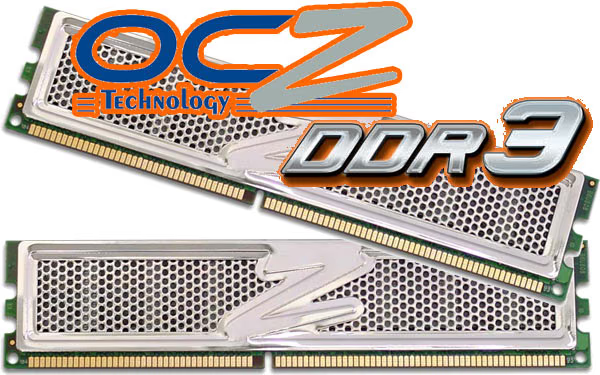
I think that most enthusiasts will probably presume that High-Speed DDR3 isn't really an important part of the hardware market. After all, it's still expensive; and OCZ's DDR3 1600MHz 2GB RAM kit isn't going to be a plug and play improvement to system performance. High-Speed DDR3 may not be market-critical, but remember that this high-speed DDR3 is intended for overclockers and enthusiasts almost exclusively. Presently the demand for High-Speed DDR3 is relegated to those enthusiasts who push their equipment well past the stock settings and are willing to pay extra for the privilege.
OCZ3P16002GK Conclusion
Since beginning this DDR3 series, the presentation rating has been replaced with a performance score. In our system memory reviews, we offer this score to represent the overclocking potential and memory timing capability of the product reviewed. OCZ managed to overclock to 1740MHz with the OCZ3P16002GK kit while still maintaining a stable CL7-7-7-24 timing; a very impressive achievement for 1600MHz DDR3. While the overclocking headroom is more than enough for most enthusiasts, just wait until you see how much less this kit costs compared to other sets.
For the appearance rating, I regret that OCZ had not issued a new look for the DDR3 module. In all honesty the honeycomb look has been well-received; but that doesn't mean it can't be a tired look, too. Certainly the polished mirror-finish helps to make it look better, but this detracts from the cooling performance that a flat black finish offers. Adding a chrome finish would only help the module retain head, so perhaps the polished look could use a makeover.
In regards to construction, OCZ has done a fine job of producing well-protected RAM with the ability to survive minor abuse. The solid bond made to the RAM modules will give this OCZ3P16002GK kit rugged durability because the heatspreaders are a permanent fixture. This kit could survive harsh abuse, but I still recommend you handle with care.
So far in our series, the OCZ PC3-12800 DDR3 1600MHz 2GB RAM has overclocked better than all others. High-Speed DDR3 is going to grow more popular with time, but for early adopters who don't want to wait another year this means that the 1600MHz guaranteed to perform at CL7-7-7-24 in the OCZ3P16002GK kit will give them the chance to dramatically overclock their system... and do so right now.
Many readers aren't aware that DDR2 is being sold at or beneath the production cost; something manufacturers must to do to help pay off their soon to be obsolete fabrication units. Standard rate DDR3 pricing is nearly in-line with same-speed DDR2, but this OCZ High-Speed DDR3 kit offers a lot more bandwidth than DDR2 ever could. Unlike some of the other kits we have reviewed, pricing on the OCZ3P16002GK kit is relatively low and the availability is high. At the time of this writing the OCZ PC3-12800 DDR3 1600MHz 2GB RAM was found for $500.99 at NewEgg, but ClubIT offer the OCZ3P16002GK kit for as low as $455.99!
In conclusion, the OCZ PC3-12800 CL7-7-7-24 OCZ3P16002GK High-Speed DDR3 1600MHz 2x1GB RAM kit offers great performance and opens plenty of front side bus opportunities never before seen. Thanks to impressive overclocking performance and value-strong pricing these modules might just be the key to inspiring the masses to adopt the new standard. The OCZ3P16002GK is excellent for pushing your system well beyond the manufacturer's intended specifications, and the current market price makes these modules more affordable for hardware enthusiasts.
Pros:
+ Offers extremely high CPU overclocking potential
+ 1600MHz of guaranteed available bandwidth
+ Memory overclocks to 1740MHz on default voltage
+ Conservative CL7-7-7-24 memory timings
+ Supports 1.95V Extended Voltage Protection
+ Lifetime OCZ Product Warranty
+ Affordable early adoption pricing
+ Standard module profile offers multi-platform compatibility
Cons:
- Heatspreader is ready for a make-over
- Not a XMP ready memory module
Ratings:
-
Performance: 9.75
-
Appearance: 8.50
-
Construction: 9.75
-
Functionality: 9.50
-
Value: 7.25
Final Score: 8.95 out of 10.
Quality Recognition: Benchmark Reviews Silver Tachometer Award.
Questions? Comments? Benchmark Reviews really wants your feedback. We invite you to leave your remarks in our Discussion Forum.
EDITORS NOTE: Benchmark Reviews has also published the article DDR3 RAM: System Memory Technology Explained