
Best CPU Cooler Performance - Q2 2008
Best CPU Cooler Performance - Q2 2008
Benchmark Reviews launched a quarterly roundup of CPU coolers beginning with the article Best CPU Cooler Performance - Q1 2008. That first article has been very successful and showed how well our collection of coolers performed, but I will be the very first person to admit that the methodology wasn't perfect. While the idea of testing each product with a common fan is good, it was decided that future articles would utilize the included stock fan in addition to a high-volume fan.
After publishing the first quarterly comparison article of the series, our methodology was adjusted to include test results with both reference and performance cooling fans. A follow-up article comparing the Vendetta 2 vs TRUE vs HDT-S1283 was later published using the new methods, and the results more accurately illustrated the performance an overclocking enthusiast might receive compared to someone who buys the product and uses it in the stock form.
Benchmark Reviews strives to offer the overclocker and hardware enthusiast community solid evidence reflecting the true performance of computer products through rigorous testing and evaluation. I personally understand that many readers who visit Benchmark Reviews have been involved with other community websites for years, and therefore take our test results personally. So now that our test process has been reworked, we have collected the most complete source of benchmark results possible and gathered in a controlled environment. The purpose of this second article of our series is to document performance and declare the best CPU coolers available as of Q2 2008.
Q2 2008 Featured Products |
Comparison Products |
|
|
(Listed in alphabetical order)
|
(Listed in order of previous test performance) |
Computer hardware is an ever-evolving industry, and since Moores law only applies to an exponentially growing transistor count, then there should probably be another law for cooling. In the very recent past there have been two major trends which have accelerated the performance potential of CPU coolers. That first development was the use of heat-pipes to directly contact with the CPU surface; which resulted in the Heat-pipe Direct Touch technology. The second development is by no means a new concept, just new to our industry in specific. For many years now heatsinks have been full of right angles, but very recently companies have begun to recognize the need to disrupt smooth airflow and reduce the laminar skin effect which allows air to travel just above the solid surface. Some manufacturers have used at least one of these new concepts in their product design, and only a few are beginning to incorporate both. Benchmark Reviews will see how much this effects the overall performance as we test a large segment of products.
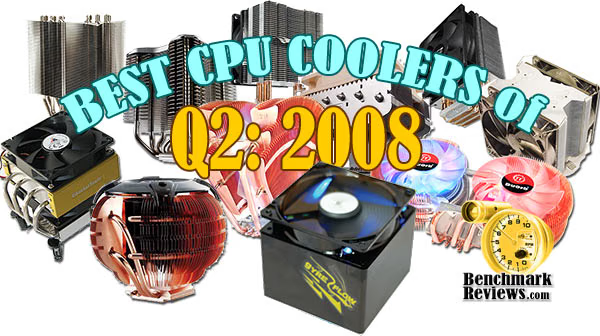
Our scope is limited to stand-alone products only, meaning those products which can be installed and operated without additional critical components needed or kit construction. This generally excludes nearly all liquid cooling systems, which may offer better performance than the products we test. Suffice it to say however, the vast majority of gamers and enthusiasts are using air-cooled solutions and therefore we target this article towards them.
Manufacturers are not expected to enjoy this sort of comparison, since we level the playing field by replacing their included fan (whenever applicable) with a common unit which we then use for every CPU cooler we test. Manufacturers regularly include fans with their CPU cooler products, and more often than not these fans are very high RPM units which offer great airflow at the expense of an obnoxiously loud noise level. By using the same model of cooling fan throughout our testing, we can assure our results are comparable across the board. This is one of the more significant changes we have made to our test methodology, since many of the benchmark tests we have conducted in the past have compared the total package. Ultimately we're more interested in discovering the best CPU cooler performance and we believe that you'll feel the same way.
Before we introduce our newest collection of CPU coolers, let's establish that our tests consist of methods we have determined to be the best for our one singular purpose. Our methodology isn't written in stone, and could very likely be changed or modified as we receive justification (and feedback from the community).
We encourage hardware enthusiasts to utilize the equipment available to them, and select the cooling fan that best suits their needs. Just keep in mind that exceptional cooling performance must begin with the CPU cooler, and end with the cooling fan. It's the foundation of the unit that makes a difference, which is exactly what we're after in this article.
Conductive Elements
Manufacturers have made a small fortune off of confusion tactics and misinformation. Marketing departments often times neglect to refer back to solid science when making their bold claims, which is why we have assembled a complete list of thermally conductive elements in the reference chart below.
It's very well known that Silver, Copper, Gold, and Aluminum together comprise top four most thermally conductive elements. However, without knowing the thermal conductance of these elements you might think the performance was close. As it turns out, Silver and Copper both offer nearly twice the performance of Aluminum when transferring thermal energy such as heat. Aluminum is the least expensive top-tier metal, which explains the popularity. Most Thermal Interface Material and CPU coolers use several different elemental ingredients to work together, but after a careful inspection of the performance levels it comes as a surprise to me that some of the most popular products make use of such poor conductors.
|
|
Recipes usually call for only the finest ingredients, and the very same principle is true for overclocker and hardware enthusiast products. Thermal pastes are often times mixed from at least a dozen different components, while heatsink coolers may use only one or two different metals. Armed with the knowledge above, you might expect any silver-based product to be a clear-cut winner... but building a superior product by design is different than what you receive in execution.
Keep these materials in mind as we take a look at the new products Benchmark Reviews has collected for this round-up article, beginning with our first contender...
Cooler Master Hyper Z600
Cooler Master used to be a real driving force in the aftermarket cooling industry. Unfortunately, nobody gives credit for what a company used to be. While CM is by no means out of the running, it's been quite some time since they last offered a real contender for cooling the overclocked multi-core computer systems that overclockers and enthusiasts tend to use the most.
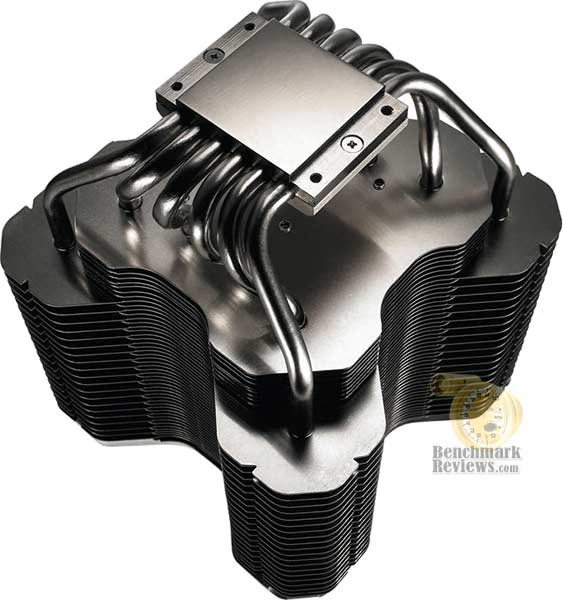
The Hyper Z600 is Cooler Masters latest entry into the enthusiast segment for aftermarket cooling. I won't try to hide the obvious: the Hyper Z60 is enormous! Suitable for passive cooling configurations, the Hyper Z60 is capable of cooling an overclocked processor without fans, making it a suitable option for silent computer systems.

Mounting the Cooler Master Hyper Z600 requires a backbrace, which ultimately means removing the motherboard for installation. Cooler Master favors a unique nut and bolt system for securing their heavyweight coolers, but since a socket adapter is included the only tool you'll need will be a Phillips screwdriver.
Taking 158 cubic inches of volume inside the case, the Hyper Z600 fills the maximum space provided for cooling on a standard ATX motherboard. You'll want to make sure that nothing smaller than a mid-tower case is used, because the Z60 stands an additional 6.3" from the motherboard. The RR-600-NNU1-GP kit comes with everything you need for mounting this goliath cooler on any current AMD or Intel motherboard. Additionally, Cooler Master includes a small syringe of thermal paste based on an aluminum-oxide recipe.

Hyper Z600 Specifications
-
Product Name: Cooler Master Hyper Z600
-
Product SKU: RR-600-NNU1-GP
-
Dimensions: 127.28 x 127.28 x 160 mm (5.01" x 5.01" x 6.30")
-
Material: Copper base, Aluminum fin
-
Weight: 1045 g (2.30 LBS)
-
Heat-pipe Gauge: φ6mm
At the time of this writing, the Cooler Master Hyper Z600 SKU RR-600-NNU1-GP was virtually impossible to locate for sale online. There was a small collection of obscure and unknown retailers preparing the item for sale, but none had inventory as of July 2008.
About the company: Cooler Master
Cooler Master was founded with the mission of providing the industry's best thermal solutions. Since its establishment a decade ago, the company has remained faithful to this mission, emerging as a world leader in products and services for companies dealing with devices where heat issues must be resolved.
In pursuing this mission, Cooler Master is absolutely committed to delivering solutions that precisely meet customer requirements for features, performance, and quality. Moreover, we strive to be a reliable long-term partner for our customers that they can truly depend on. It aims to be the first and foremost name that comes to mind for companies around the world seeking thermal solutions, and seeks to build such a reputation through outstanding technology, sophisticated design, and superior service.
Cooler Master's current business encompasses a comprehensive lineup of thermal solutions for a full range of applications. Its products range from heat sinks and fans to component housing, chassis, and ducting for computers, industrial machinery, telecommunications equipment, and many other devices.
Cooler Master CM Sphere
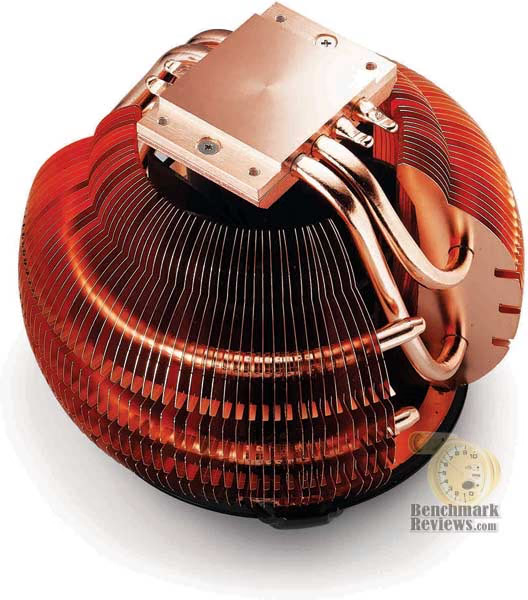
The Cooler Master CM Sphere is not a brand new product on the retail market, especially since it launched in Q3 2007; but we haven't had the opportunity to test it until now. Like many of Cooler Masters products, function is usually only as important as fashion. The CM Sphere comes in a full-copper and black version, and both feature an 66mm blower fan on the inside. Cooler Master rates the fan at 84.7, CFM, but after testing this product I have no idea how they arrived at this number.
The CM Sphere operates at a very low sound level, thanks to the unique blower fan that constantly paddles air away from the fins from the inside core. It would only be fair to let the performance results speak for themselves, but the CM Sphere is not a product I expect hardcore overclocker to have an interest in because it lacks interchangeable fan functionality.
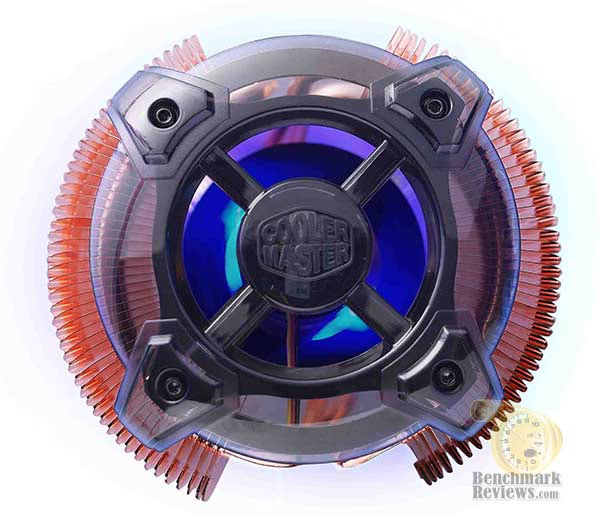
Nevertheless, the CM Sphere was a near-silent cooling solution with a good overall performance. The full copper construction means that this isn't going to be a value-priced item, but it certainly makes up for high-end performance with great looks. For your average enthusiast, or even the casual user who is building their own system, Cooler Master's CM Sphere would add some color to the inside of any computer.
Like most of the Cooler Master product line, the CM Sphere uses a proprietary securing system. The mounting system uses four screws that fasten from the backside of the motherboard, a task that ultimately means the main board must be removed for installation.

CM Sphere Specifications
-
Product Name: Cooler Master Sphere
-
Product SKU: RR-CCZ-LL12-GP
-
Dimensions: Φ113 x 132 mm
-
Weight 684.54 g
-
Heat Sink Material 100% copper heatsink with 4 heatpipes
-
Heat Pipes Dimensions Φ6 mm
-
Fan Type Blue LED Fan
-
Fan Dimension (W / H / D) Φ66 x 68 mm
-
Fan Speed 2200 R.P.M.
-
Fan Airflow 84.7 CFM
-
Bearing Type Long life sleeve
-
Fan Life Expectancy 40,000 hours
-
Fan Noise Level (dB-A) 22 dBA
-
Connector 3-pin
-
Rated Voltage 12 V
-
Start Voltage 6 V
-
Operating Voltage 6~13.8 V
-
Rated Current 0.4 A
-
Input Power 4.8 W
As of this writing, NewEgg sells the Cooler Master Sphere for $44.99. While I can vouch for the quality of service and good return policy at NewEgg, there are several other retailers offering the RR-CCZ-LL12-GP as well.
As a company, Cooler Master is an organization that is finely tuned to the demands of providing innovative solutions that meet customer needs as rapidly as possible. Rather than adopt a traditional corporate structure and then try to retrofit operations to suit such a preexisting structure, Cooler Master's is a company built around the nature of its operations, providing maximum efficiency and strict workflow control. Focused on meeting customer requirements flexibly and efficiently, Cooler Master's workflows commence with careful surveys to understand these requirements, and then proceed to R&D, manufacturing, marketing, and sales, as part of a comprehensive and tightly integrated workflow.
Throughout the design process, Cooler Master maintains robust communications channels with customers, taking advantage of online systems as well, to keep customers informed about the status of projects and allowing Cooler Master engineers to understand customer concerns as they evolve. Moreover, Cooler Master engineers make extensive use of Computational Fluid Dynamics (CFD) analysis software tools to model heat absorption and dissipation characteristics of in-progress designs to ensure that final products completely satisfy customer specifications.
Gigabyte G-Power II Pro
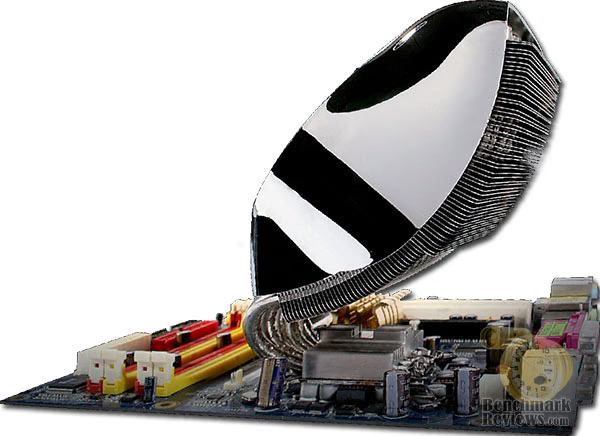
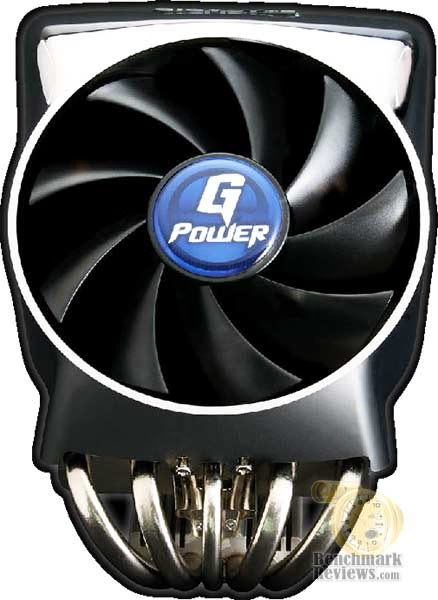
For as long as I can remember, Gigabyte products have always stood out as being different. For the record, CPU coolers have a wide range of "different", as our collection for this article has proven. But the Gigabyte G-Power II Pro is a whole new animal, which doesn't happen all that often in this industry. So when I say they're different, I mean different as in the Segway or Good Year Blimp. The Gigabyte G-Power II Pro is unique in that it offers a viable cooling solution for enthusiasts and overclockers, but it goes about the delivery different than the rest by using a curved arc-shaped heatsink to help cool the system components at the same time as the processor.
While I can appreciate that Gigabyte is trying to cool two components instead of one, the G-Power II Pro doesn't have the most powerful fan integrated into it and should be paired with an exhausting case fan for best performance. Furthermore, the integrated fan will mean that hardcore overclockers will not be substituting the stock fan with another of their choice. Unfortunately, this also means that the G-Power II Pro is only going to receive stock fan testing for this article.

Gigabyte has designed the G-Power II Pro with five heat-pipe rods, which span into an aluminum heatsink base. The heat-pipes and base are both nickel-plated copper, which will add some uniformity to the overall appearance but also act as a barrier for escaping heat. The contact base of the GH-PSU23-PB is extremely smooth and flat, but it too is finished in nickel and thus reduces the thermal conductance between surfaces.
The Gigabyte G-Power II Pro uses a proprietary clip system for fastening the cooler onto the motherboard. Installation requires that the motherboard be removed from the case so that the screws can be fitted from the back. Once secured, the G-Power II Pro creates very good pressure between the contact surfaces.
G-Power II Pro Specifications
-
Product name: Gigabyte G-Power II Pro
-
Product SKU: GH-PSU23-PB
-
Heat sink dimensions 121x119x162 mm (D x W x H)
-
Fan dimensions 120x120x25 mm (D x W x H)
-
Number of heat pipes 5
-
Base composition Copper
-
Fin material Aluminum
-
Rated Voltage 12V
-
Rated Current 0.2A
-
Fan Speed 1500 RPM
-
Acoustic 23 dBA
-
Bearing type EBR
-
MTBF 30,000 Hours
-
Total Weight 590g
-
Fan connector 4-pin
As of July 2008, NewEgg lists the GH-PSU23-PB for $54.99. There may be other online retailers listing the Gigabyte G-Power II Pro for sale, so it would be worth comparing prices in our price comparison site.
About the company: Gigabyte United Inc. (G.B.T. Inc. USA)
Gigabyte United Inc., established in December 2006, is assuming the GIGABYTE TECHNOLOGY Co., Ltd. Brand, which for the past 20 years has been a world-renowned leader in the motherboard industry. Continuing to focus on its core businesses of GIGABYTE branded motherboards and graphics cards, Gigabyte United Inc. is committed to providing our valued customers with the highest quality products and services featuring the industry's most innovative design.
In order to meet the challenges of today's intensely competitive channel market, Gigabyte United Inc. fully utilizes its key assets including its cutting-edge research and development team as well as its professional sales and marketing resources to continue to develop technologies to fit a complete range of digital life solutions. Now and for the future, Gigabyte United Inc. will continue to embody the unique spirit and culture, which has made Gigabyte one of the foremost brands in the industry.
More information about Gigabyte is available by visiting their website.
GlacialTech Igloo 5750
GlacialTech isn't a household name for most enthusiasts, because unlike most companies that seek to make the most glamorous products GT is busy making the most affordable. So it's no surprise that the GlacialTech Igloo 5750 is meant for enthusiasts who want more for their money. Comprised of two 92mm fans in a horizontal push/pull configuration, the Igloo 5750 offers very good performance with very low fan noise levels.
While it is possible to exchange the two 92mm fans for another brand, it would be difficult to retain the integrated wiring loom that GlacialTech provides with the Igloo. Additionally, the standard push-pin clip system is going to only satisfy the basic compression needs betwen the mating surfaces. Essentially, the Igloo 5750 is an entry-level product for enthusiasts not needing extremely-customizable options on their cooler.

GlacialTech has integrated four heatpipe rods in the Igloo 5750, which span from the base into the heatsink. Unlike some coolers, GlacialTech has fashioned the base of the Igloo into a standalone heatsink as well, giving a small level of added performance to the product.
Although it may not seem desirable, the pre-applied thermal paste actually performed extremely well - nearly matching the OCZ Freeze we used for testing.

Igloo 5750 Specifications
-
Cooler Dimension (mm): 96 x 120 x 121
-
Cooler Weight (gram): 507
-
Fan Bearing Type: 1B1S
-
Rated Voltage DC: 12 V DC 12 V
-
Dimension (mm): 92 x 92 x 20
-
Speed (RPM): 1400(±10%) per fan
-
Airflow (CFM): 21.18 per fan
-
Noise (dBA): 15.2 per fan
-
Interface Material: High Efficiency Thermal Compound

About the company: GlacialTech Inc
GlacialTech Inc. was established in June 2001 by a team of 8 world-class researchers (PHDs) and three factory owners. Its technological areas of expertise include specialized thermal theory, soldering and mounting technologies, mechanism design, test and verification environment build-up and advanced conduct material development.
As a total thermal solution provider, GlacialTech is committed to using lighter weight materials, lower noise and lower manufacturing cost to deliver superior cooling solutions. All this has brought about the increased value for our customers with lighter system board loading, quiet working environment and optimal price performance. Price performance, noise performance and weight performance are our three cooling design philosophy. Having acquired ISO 9001 and 14001, GlacialTech commits itself to using green materials for its products designs and to perfecting green manufacturing processes in manufacturing its products.
GlacialTech offers two kinds of standard and customized cooling solutions. The standard cooling solutions deal with the CPU coolers for desktop and server PC system, PC case fan, VGA coolers and other accessory cooling products. The customized cooling solutions are furnished with applications for specialized PC barebones system, notebook, consumer products and telecommunication products.
Noctua NH-C12P
When I hear the name Noctua mentioned, I somehow think of the other companies that offers extremely refined high-end products and a premium price. Lian-Li computer cases are a good example; very nice, but very expensive as well.
Following up on their recent launch of the "U" designed NH-U12P cooler, Noctua returns with a "C" design... hence the NH-C12P name. Very clever Noctua, very clever indeed. Back when we tested the NH-U12P (the "U" is the shape of the heat-pipe rods in relation to the processor, just in case you missed it), we used the Noctua NF-P12 fan on all of our coolers which didn't exactly let anyone stand out as a real performer. Well, I've learned my lesson about the NF-P12; great fan for reducing noise and keeping decent performance, but certainly not a high-output solution. Even though the NH-C12P comes with a NF-P12 of its own, we test it (and re-test the NH-C12P) with the included fan and our high-output Yate Loon fan.
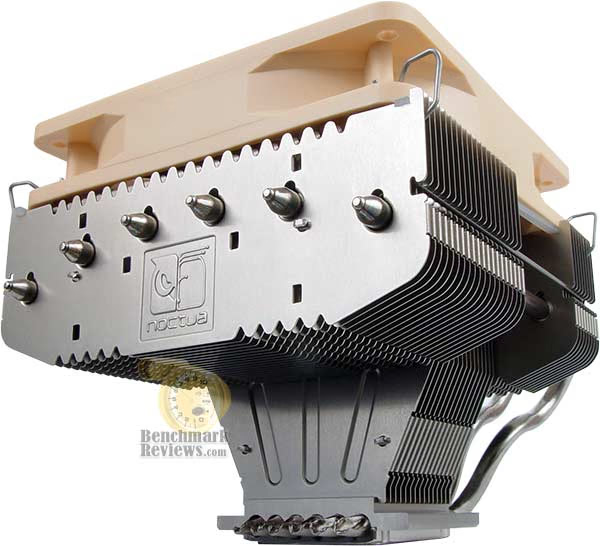
Sporting 6 heat pipes and the award-winning, psycho-acoustically optimized NF-P12 120mm fan, the NH-C12P achieves excellent performance and outstanding quietness. The down-facing c-type design doesn't only allow for optimal motherboard and case compatibility, but also provides additional cooling for motherboard components through two Airflow-Gaps. Outfitted with the professional SecuFirm mounting system and Noctua's much acclaimed NT-H1 thermal compound, the NH-C12P is a premium-class silent cooler through and through.
Did I just read the word "psycho" in the Noctua marketing pitch? I suppose they do things a little differently over in Austria, because psycho doesn't really sell very well here in the states.
Noctua includes everything you'll need to mount the NH-C12P on any modern motherboard available. The heatsink is rather heavy, requiring the use of a bolt-through kit (included). Additionally, Noctua includes their NH-H1 thermal paste with the kit, which performed very well in our 33-Way Thermal Interface Material Comparison.

NH-C12P Specifications
-
Noctua NH-C12P
-
Height: (without fan) 91 mm (with fan) 114 mm
-
Width: (without fan) 126 mm (with fan) 126 mm
-
Depth: (without fan) 152 mm (with fan) 152 mm
-
Weight (without fan) 550 g (with fan) 730 g
-
Material Copper (base and heat-pipes), aluminum (cooling fins), soldered joints, nickel plated
-
Fan compatibility 120x120x25mm / 120x120x38mm
At the time of this writing, the Noctua NH-C12P was just reaching market. Prices for the NH-C12P were found near the $70 range - a bit steep in my opinion. Just because it's a product from Austria, shouldn't mean that the consumer has to pay 2-3x the amount of other coolers that perform as well (or better). Perhaps this is why you don't see many retailers stocking Noctua products?

About the company: Noctua
Noctua arises from a cooperation between the Austrian Rascom Computer distribution Ges.m.b.H and the Taiwanese Kolink International Corporation and entertains a development partnership with the Austrian Institute of Heat Transmission and Fan Technology (Österreichisches Institut für Wärmeübertragung und Ventilatorentechnik, ÖIWV). These connections form the key to the achievement of our goal: The partnership with the ÖIWV permits the application of scientific measurement instrumentation, methods of calculation and simulation technology in the R&D process. Rascom's long, customer-oriented experience in developing and distributing sound-optimised high-end products ensures a clear focus on the users' needs. The use of Kolink's advanced manufacturing technology and ultra-modern production plants allows us to efficiently implement our technical edge and provide solutions of the highest standard in quality and performance.
What does "Noctua" mean?
The little owl, Athene noctua, is the symbol of the Greek goddess Athene, who represents wisdom, science and strategy. She has a marked preference for the most clever among the Greek heroes, like Odysseus, who endure their adventures by the use of savvy consideration instead of mere force. Until today, the owl symbolises intelligence and prudence, its manlike face "emblematises" attentiveness and communication. We from Noctua follow the suit of its calm and accurate observation in the dark, its soundless flight as well as the effective, economical use of its powers and precise attack.
SilenX IXC-120HA2
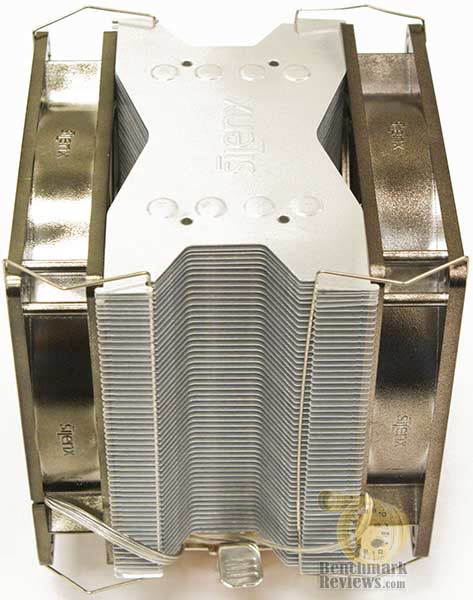
There are only a few names in the computer hardware industry that are unfamiliar to me, and SilenX is one of them. Strikingly similar to the Core Contact Freezer (but unclear as to which product arrived first), the IXC-120HA2 offers the best of both worlds: HDT (Heat-pipe Direct Touch) technology matched with a heatsink capable of fitting a pair of 120mm cooling fans. Since the SilenX retail kit contains only one fan with the IXC-120HA2, we keep uniformity and test with only one fan for our benchmark results.
Looking up close at the IXC-120HA2, there's a lot to take notice of. First, there are no exposed heat-pipe ends at the top of the heatsink. This allows the IXC-120HA2 to fit inside some of the more slim mid-tower cases without rubbing the edges and possibly allowing the gas/liquid to escape from an opened rod. The next notable difference is the use of four separate 8-gauge copper heat-pipe rods in a "U" configuration, exposed at the base for HDT contact. Finally, the SilenX IXC-120HA2 cooler uses a high-pressure clip mounting system to secure the cooler onto the CPU without removing the motherboard.

Our customers asked us to make the highest performance heatsink possible. We not only did that, but we managed to do it at the lowest noise levels as well! Introducing the IXC-120HA2, which, as one reviewer puts it, "the best cooler in the world". With a thermal resistance of 0.09°C/W, we're talking 500 watts of heat dissipation at room temperature! The heatpipes are enormous 8mm ones that have twice the heat capacity of the smaller 6mm units on our competitors. We won't kid around by multiplying the number of heatpipes by two as our competitors seem to do, no need to do that when we embarrass their products on the benchmarks! And to achieve that with lower mass, you won't need to fiddle around with the mess of exotic watercooling. Installation couldn't be simpler, no need to remove the motherboard, just snap in and latch the levers, someone with no computer background can mount it in a minute or two tops. Includes a fan controller for precise manual control over the fan noise.
I assure you that if the SilenX IXC-120HA2 proves itself to be "the best cooler in the world" as they boast, you'll never hear the end of it from me. However, experience has taught me that in this industry the best products only remain at that status until the competition suceeds them a short while later. So if the IXC-120HA2 doesn't perform as well as SilenX claims, Benchmark Reviews is going to make sure the world knows about it.
IXC-120HA2 Specifications
-
Product SKU IXC-120HA2
-
Fan Size: 120mm
-
Compatibility: Socket 754 / 939 / 940 / AM2 / LGA775
-
Bearing Type: FDB, fluid dynamic bearings
-
RPM: 900 - 1700 RPM
-
Air Flow: 36 - 84 CFM
-
Noise Level: 9 - 24 dBA
-
Heatsink Material: Aluminum & Copper
-
Weight: 685g
As of July 2008, NewEgg lists the SilenX IXC-120HA2 for $49.99.

About the company: SilenX
SilenX has been a privately-owned and operated company based in southern California since 1995. There are several research and design facilities in addition to our primary warehouse facility and our renowned technical support and customer service center. Originally a high-end systems integrator for silent computers, SilenX shifted its focus to manufacturing silent PC components in 2002 and established factories in the United States, China, and Taiwan.
Our retail products are distributed in numerous countries around the world. We also have an OEM division that manufactures fans, thermal heatsink solutions and power supplies for various applications in computing, consumer electronics and other industrial uses. Our specialty is in low noise components as we have among the lowest noise cooling equipment in the industry.
Numerous awards have been won by our products in the consumer computing world for delivering a combination of the lowest noise levels without sacrificing high performance. Reviewers from around the world have praised our products for being on the forefront of the silent PC industry. Our commitment to the finest quality makes SilenX products both reliable and competitive.
Sunbeam Core Contact Freezer CR-CCTF
Sunbeam, also known by its subsidiary Tuniq, have been making computer hardware components and coolers for many years. While the Core Contact Freezer is not a brand new name for overclockers and enthusiasts, Benchmark Reviews has not been able to test this product until now. Similar to the SilenX design, SunbeamTech's Core Contact Freezer CR-CCTF uses the same general layout - both of which are licensed from the patent holder.
The primary differences between the two products (not that I intend to compare them all) is the heatsink fin design. The CR-CCTF allows only one 120mm cooling fan to be positioned onto the cooler, thus limiting the ability of the Freezer to achieve maximum cooling potential. Otherwise, most other design features are the same.

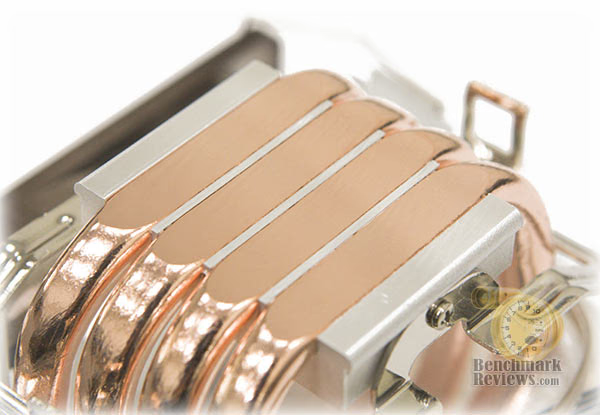
The Core Contact Freezer features a set of four large-gauge copper heat-pipe rods positioned into a "U" pattern and exposed at the base for HDT contact. Sunbeams's CR-CCTF cooler uses a high-pressure clip mounting system to secure the cooler onto the CPU without removing the motherboard, since a plastic retaining ring snaps into position from the top side.
Initially I felt like the heatsink design should not have included the notched-out section at either side, but then it occurred to me during installation how difficult it would be without them. My experience installing the cooler with this lever-style clip system was not as forthright as I had expected, and a bit of finesse was necessary to get the job done.

CR-CCTF Specifications
-
Sunbeam Core Contact Freezer CR-CCTF
-
Fan Size 120mm
-
Compatibility Socket 754 / 939 / 940 / AM2 / LGA775
-
Bearing Type Magnetic Fluid Dynamic Bearing
-
RPM 1000 - 2000 ±10% RPM
-
Air Flow 90.65 CFM (Max)
-
Noise Level 16 - 20 ±10% dBA
-
Weight 590g
At the time of this writing, very few online retailers could be found for the Sunbeam Core Contact Freezer. Our price comparison site lists the CR-CCTF around $34.99.
About the company: Sunbeam Company
Sunbeam Company, a true art innovator in the field of PC modification and accessories at all aspect, targets on providing the top quality and state of art computer products to high tech PC users. We dedicate outstanding high quality control as our number one priority and deliver the products with the highest level of excellent Performance, as well as the coolest Innovation and an Appearance that draws your attention.
Launched as a promising new company in the field in 2000, Sunbeam Company specialized in developing cold cathode fluorescent lamps (CCFL), and furthermore extended to manufacture various modding equipments. Throughout the years, we now expand our product coverage to provide pioneering and fancy computer application at all aspects, while focusing on, but not limiting to, cooling systems and computer cases. Our mission is to satisfy PC players all over the world who are tired of boring traditional computer impressions and longing to experience the excitement of revolutionary hardware designs.
Sunbeam Company has manufacturing factories located in Dongguan City, China. In order to provide exceptional product quality combined with superior customer support, we keep updating and advancing ourselves to meet the diverse changes and increasing market demands. We strive to continue designing and developing ground-breaking, exciting, and appealing products as well as being the one stop resource and solution for all computer enthusiasts seeking to turn their ingenious visions into the coolest and fanciest reality.
Thermaltake V1 CL-0401
Thermaltake launched the V1 cooler, model CL-0401, over one year ago. So why are we testing a Q2-2007 cooler in a Q2 2008 article? Simply because we haven't yet had the opportunity to produce test results, and I don't know how well this product will perform. There have been other coolers from Tt that we've liked in the past, namely the Thermaltake MaxOrb CL-P0369, and they've all performed fairly well.
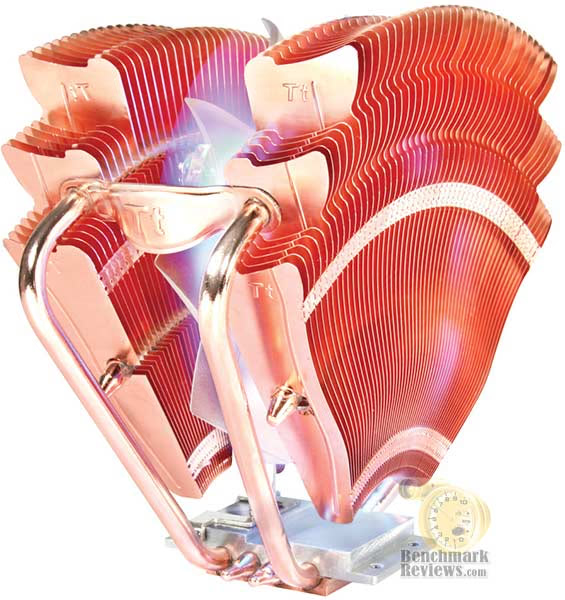
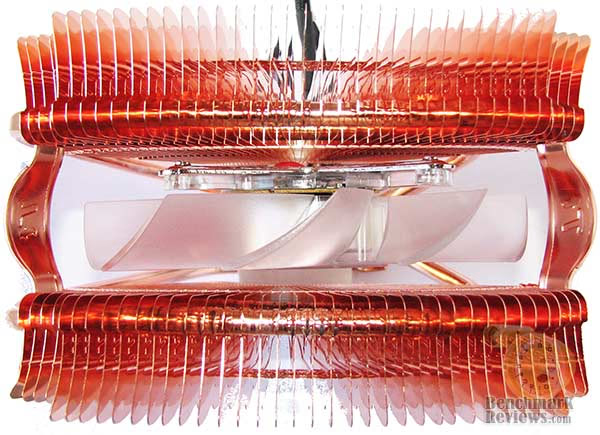
The V1 cooler offers a unique approach to cooling, with a proprietary speed-controlled fan sandwiched between two heatpipes with copper fins on either end. Unfortunately this proprietary fan will limit the amount of overclockers that might consider this product as a viable cooling solution for this system. Additionally, the V1 uses the standard Intel LGA775 push-pin clip system, so compression between surfaces will be adequate at best.
There are four uneven-length copper heat-pipe rods used on the Thermaltake V1 CL-0401. The two longer heat-pipe rods span up to the top and then bend across, while the other two shorter rods get up to the midway point and drive across the heatsink fins. Despite the roundabout path, this design is very similar to the "U" design of current heat-pipe coolers.
As CPU processing power increases, so does the need to remove the damaging heat that increased power generates. Nowhere is this more truer than with overclocked processors which operate beyond their original specifications. But, the last thing a computer enthusiast wants when designing their machine is to cap it off with an ugly cooler. Thermaltake has long been an innovator in the realm of CPU cooling with many of its thermal strategies being adopted by OEM and other companies.
They also lead the way in innovative designs that remain supremely functional. The patented fan-shaped design of the CL-P0401 V1 provides an extra element of style while cooling the current crop of Intel and AMD processors. Its all-copper construction provides maximum efficiency in conducting damaging heat away from the CPU. A group of four heatpipes draw heat upward from the mirror-finished base which lies in perfect contact with the chip.
The array of dissipation fins enables the 110mm fan to easily move 86.5CFM at 2000RPM by creating multiple air intake points. The speed can be adjusted to balance the cooling performance and the already low 24dBA noise level. The blue LED lights within the fan add a stylish glow against the copper surfaces enhancing the appearance of your system whether you're using an Intel Socket LGA775 or AMD Socket AM2/939/754) family of processors.
CL-0401 Specifications
-
Thermaltake V1 CL-0401
-
Heatsink Dimension 5.8 x 3.7 x 5.3 inch (L)x(W)x(H)
-
Heatsink Material Copper Base & Copper Fin
-
Heatpipe Copper Tube 6 mm x 4 pcs.
-
Fan Dimension 110 x 25 mm
-
Fan Speed 1300 ~ 2000 RPM
-
Noise Level 16 dBA ~ 24 dBA
-
Max. Air Flow 86.5 CFM
-
Max. Air Pressure 2.22mm H2O
-
LED Fan Blue Color
-
Power Connector 3-pin
-
Started Voltage 7V
-
Rated Current 12V
-
Power Input 3W
-
MTBF 50,000 Hours
-
Weight 637g
As of July 2008 the CL-0401 is available at NewEgg for $59.99.

We live in a world where most things seem to move at the speed of light. At Thermaltake, we feel the same way and that is exactly how Thermaltake conducts itself to deliver innovative, reliable and customer-centric solutions to the worldwide market. Since the beginning of Thermaltake in 1999, it has been at the forefront of creating new and exciting products at a time where most computer users were provided little to no choices for components that may seem irrelevant, but in reality crucial to the performance of a PC.
Thermaltake Server Series solutions, with years of thermal experience and industry leadership, sets its goal on reforming total thermal management in server segment by formulating the perfect mixture of versatility, efficiency and thermal management with each respective server product category: Rackmount Chassis, Server Fixed & Redundant Power Supply and Server CPU Cooling Management Solutions.
With its comprehensive line of products available, it enables Thermaltake's core customers to enjoy a one-stop-shop experience, reduce product design-in evaluation period and most important of all, flawless integration process. Each of Thermaltake's strengths enables its customer to focus on their core business while taking advantage of the skills and efficiency of a single thermal management solution partner.
Thermaltake DuOrb CL-P0464
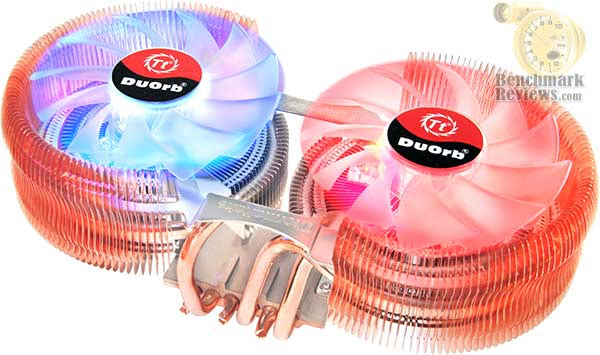
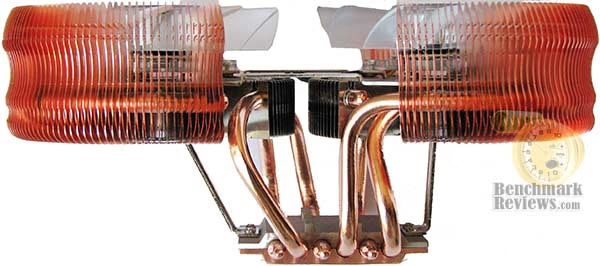
Thermaltake has long been an innovator in the realm of CPU cooling with many of its thermal strategies being adopted by OEM and other companies. They are also as well known for their equally innovative stylish designs that look as good as they perform. The Thermaltake CL-P0464 DuOrb breaks the mold with its twin clear 80mm fans surrounded by twin arcs of copper dissipation fins.
Six heatpipes draw heat up from the mirror-finished copper baseplate and distribute it efficiently among the fans. Each 2000 rpm fin is able to move 37.67CFM of cooling air through the array of fins with a combined noise level of 21dBA. The DuOrb does more than cool the CPU, it cools the area around the RAM, VRM and the back of the VGA card enabling higher memory clock speeds.
The base is offset to allow for VGA cards and one fan has blue LED's while the other sports red for a truly striking visual effect while under power. The DuOrb supports Intel Core2, Pentium and Celeron series processors as well as the Athlon 64, -FX, X2 and Sempron CPUs.
Similar to Cooler Master designs, Thermaltake walks a different path in regards to their approach to creating unique products. Just like the Thermaltake V1, the DuOrb CL-P0464 is like no other you've ever seen. It's always a good thing to have manufacturers think outside the box for cooling solutions, because that's how we get ideas like heat-pipes and the subsequent heat-pipe direct touch technology.
Each side-cooler on the Thermaltake DuOrb CL-P0464 has three copper heat-pipe rods spanning to it. These three rods make a circle pattern beneath the fan, giving each an opportunity to cool equally. The mounting system used by the DuOrb is comprised of the standard push-pin style clips system, which means that you won't have to remove the motherboard to install the CL-P0464 cooler.
Although the included fan speed controller dial will help to keep noise levels down for most enthusiasts not needing full power, the proprietary fan design will most likely keep serious overclockers from giving this product a fair chance. No worries though, since Benchmark Reviews plans on testing this product for you!
At the time of this writing NewEgg sells the CL-P0464 for $64.99, which places this product among the most expensive cooling solutions offered.
CL-P0464 Specifications
-
Thermaltake DuOrb CL-P0464
-
Heatsink Dimension 202(L) x 106(W) x 86(H) mm
-
Heatsink Material Copper/Aluminum Fins/Copper Base
-
Heatpipe Copper Pipe Ø 6 mm x 6
-
Fan Dimension 80 x 20 mm
-
Fan Speed 2000 RPM
-
Noise Level 21 dBA
-
Max. Air Flow 37.67 CFM
-
Max. Air Pressure 1.27 mmH2O
-
LED Fan Blue and Red
-
Power Connector 3-pin
-
Rated Voltage 12V
-
Started Voltage 5V Rated Current
-
Power Input 5.04W (2 Fans)
-
MTBF 50000 Hours
-
Weight 598 g

About the company: Thermaltake
Founded in 1999, Thermaltake Technology is the world leader in the supply of thermal management cooling solutions, high-end power supply and chassis for desktop PC and industrial application systems. Building on the strength of its people, products and extensive expertise in Thermal Management, Thermaltake raised the level of excellence on its Award Winning Purepower branded power supply as well as Xaser line of chassis. While mission-critical applications for Enterprises and ultimate video gaming experiences available for gaming enthusiasts all rely on today's cutting-edge PCs to deliver, high-end PC makers rely on Thermaltake to provide the most reliable power supply, the most thermally efficient chassis and cooling solutions.
Thermaltake Technology Co., Ltd. started its core business based on our extensive knowledge of PC thermal management during the era where the area of performance CPU cooling was only exclusive for "overclockers" or PC enthusiasts. With the company's initial launch of Orb coolers, it created waves of shocks and appraisals throughout the gaming and overclocking communities. Thermaltake quickly became the name gamers turn to when they need high-end and reliable thermal solutions.
With company's core business of CPU cooling still growing at a vast rate, Thermaltake made another grand entry to the PC chassis industry. To date, Thermaltake has always been considered as the pioneering company that revolutionized the PC chassis industry with Xaser series enclosures. The typical and traditional beige and plastic front panel design was outdone by Xaser series chassis's atypical gaming red and aluminum front panel. It was also the first enclosure available to the public with Hardcano unit which provided users full control over computer's thermal management system.
As a leader in Thermal Management, Thermaltake is the trusted supplier to many computer manufacturers providing Intel Validated and AMD Approved CPU coolers for today's high frequency and mainstream CPUs. At the pace of current technological advancement in multimedia application and multi-core processor, Thermal Management will become an evermore challenging task requiring innovative product design and reliable manufacturing process; a task that has made what Thermaltake is now and will be in the future.
In the year 2002, Thermaltake announced Purepower line of power supply unit for the ever-growing power-hungry PCs. Purepower series PSU quickly gained recognition with its extensive warranty and high-reliability guaranty. Today, Thermaltake has grown into a world-class company with state-of-the-art testing and R&D facility based in Taiwan along with 60+ engineers and ID team covering each application segment such as Liquid Cooling, Air Cooling, PC Enclosure and Power Supply for main-stream users, high-end solutions, system integrators and industrial applications; thus achieve Thermaltake 's company motto, " COOLall YOUR LIFE "!
Thermal Interface Material Application
Over the past several months, I have read an unreasonable number of discussion forum posts which offer inaccurate and often times incorrect information. It's not really all that surprising to read poorly conceived information on the Internet, which seems to be a anonymous means of passing off opinion for fact. As a general rule we don't let too many things go untested, and the advice of wanna-be experts is not doing the hardware enthusiast and overclocker community any good. In this article, Benchmark Reviews dispels myth and establishes fact on the topic of proper application in our Best Thermal Paste Application Methods article.
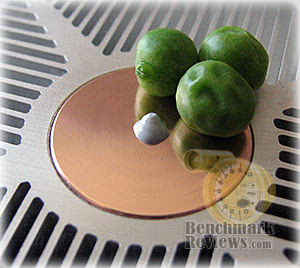
After we wrote our 33-Way Thermal Interface Material Comparison article, many enthusiasts argued that by spreading out the TIM with a latex glove (or finger cover) was not the best way to distribute the interface material. Most answers from both the professional reviewer industry as well as enthusiast community claim that you should use a single drop "about the size of a pea". Well, we tried that advice, and it turns out that maybe the community isn't as keen as they thought. The example image below is of a few frozen peas beside a small BB size drop of OCZ Freeze TIM. The image beside it is of the same cooler two hours later after we completed testing. If there was ever any real advice that applies to every situation, it would be that thermal paste isn't meant to separate the two surfaces but rather fill the microscopic pits where metal to metal contact isn't possible.

After discussing this topic with real industry experts who are much more informed of the process, they offered some specific advice that didn't appear to be a "one size fits all" answer:
-
CPU Cooling products which operate below the ambient room temperature (some Peltier and Thermo-electric coolers for example) should not use silicon-based materials because condensation may occur and accelerate compound separation.
-
All "white" style TIM's exhibit compound breakdown over time due to their thin viscosity and ceramic base (usually beryllium oxide, aluminum nitride and oxide, zinc oxide, and silicon dioxide). These interface materials should not be used from older "stale" stock without first mixing the material very well.
-
Thicker carbon and metal-based (usually aluminum-oxide) TIM's may benefit from several thermal cycles to establish a "cure" period which allows expanding and contracting surfaces to smooth out any inconsistencies and further level the material.
The more we researched this subject, the more we discovered that because there are so many different cooling solutions on the market it becomes impossible to give generalized advice to specific situations. Despite this, there is one single principle that holds true in every condition: Under perfect conditions the contact surfaces between the processor and cooler would be perfectly flat and not contain any microscopic pits, which would allow direct contact of metal on metal without any need for Thermal Interface Material. But since we don't have perfectly flat surfaces, Thermal Material must fill the tiny imperfections. Still, there's one rule to recognize: less is more.
Surface Finish Impact
Here's the part I've been waiting to reveal... the importance of surface finish in relation to the impact on thermal conductivity. CPU coolers primarily depend on two heat transfer methods: conduction and radiation (heat-pipes also add convection). This being the case, let's start with conduction as it related to the mating surface between a heat source and a cooler.
Because of their density, metals are the best conductors of thermal energy. As density decreases so does conduction (of heat), which relegates fluids to be naturally less conductive, and gases as virtually non-conductive. So ideally the less fluid between metals, the better heat will transfer between them. Ultimately though, this means that the perfectly flat and well-polished surface (Noctua NH-U12P) is going to be preferred over the rougher and less even surface which required more TIM to fill the gaps (Thermalright Ultra-120 eXtreme).
Heat radiation is different however, and requires exactly the opposite. Because gases (air) are naturally poor heat conductors, surface area of the heatsink is key to the cooling performance through convection. This type of cooling is what you commonly see in automobile radiators, which utilize large arrays of metal fins to radiate heat to be drawn away by a fan. The same is true for the CPU cooler, which needs as much surface area as possible to optimize it's radiative effects. OCZ and others have recognized that the surface of a heatsink does not have to be the sum of its overall size. By adding dimples and bends, the surface area is increased without growing the overall dimensions.
To sum it all up, science teaches us that a smooth flat mating surface is ideal for CPU coolers so that less Thermal Interface Material is used. Because these coolers are using fans to force air over the heatsinks fins, the overall surface area of those fins should be as large and uneven as possible. In the next section we'll find out just how well all of these principles worked for our collection of test products.
Testing Methodology
Testing was conducted in a loosely scientific manner. Ambient room temperature levels were held to within one degree of fluctuation measured at static point beside the test equipment with a calibrated digital thermometer. All coolers had their original manufacturer-supplied fan removed and replaced with our common test fan listed in the support equipment section below. Each product then received the same amount of Thermal Interface Material (specified below), which amounted to roughly a BB-sized drop placed onto the center of the CPU. The CPU cooler product being tested was then laid down flat onto the CPU, and compressed to the motherboard using the supplied retaining mechanism. If the mounting mechanism used only two points of force, they were tightened in alternation; standard clip-style mounting with four securing points were compressed using the cross-over method. Once installed, the system was tested for a baseline reading prior to testing.
At the start of each test, the ambient room temperature was measured to track any fluctuation throughout the testing period. EVEREST Ultimate Engineer Version 4.20.1170 was then utilized to create core loads and measure each individual CPU core temperature. It's important to note that software-based temperature readings reflect the thermistor output as recorded by the BIOS. For this reason, it is critically important to use the exact same software and BIOS versions throughout the entire test cycle, or the results will be incomparable. All of the units compared in our results were tested on the same motherboard using the same BIOS and software, with only the product itself changing in each test. These readings are neither absolute nor calibrated, since every BIOS is programmed differently. Nevertheless, all results are still comparable and relative to each product in our test bed.

One unfortunate problem is that CPU's report temperatures as a whole number and not in fractions. This in turn causes the motherboard BIOS and subsequent software applications such as EVEREST to also report to the nearest whole number. To compensate for this, our tests were conducted several times after complete power down thermal cycles. Conversely, the ambient room temperature levels were all recorded and accurate to one-tenth of a degree Celsius.
When I tested each cooler, I made certain to keep the hardware settings identical across the test platform. This would enable me to clearly compare the performance of each product under identical conditions. While the ambient room temperature did fluctuate between 20~22°C, this would not be enough to cause a noticeable impact on our test results since only the thermal difference is reflected in the charts. For the purpose of this article, thermal difference (not the same as thermal delta) is calculated by subtracting the ambient room temperature from the recorded CPU temperature.
Test System
-
Motherboard: Gigabyte GA-X48T-DQ6 (Intel X48 Chipset) with version F4 BIOS
-
Processor: Intel E8400 Core 2 Duo 3.0 GHz overclocked to 3.6 GHz
-
System Memory: Corsair PC3-14400 DDR3 1800MHz
-
Disk Drive 1: OCZ SATA-II 32GB 2.5-Inch SSD OCZSSD2-1S32G
-
Optical Drive: ASUS BC-1205PT SATA Blu-ray Disc Optical Drive
-
Grpahics: ZOTAC GeForce 9800 GTX 512MB Video Card
-
Operating System: Windows XP Professional SP-3 (optimized to 16 processes at idle)
Q2 2008 Featured Products |
Comparison Products |
|
|
(Listed in alphabetical order)
|
(Listed in order of previous test performance) |
Support Equipment
-
OCZ Freeze Thermal Interface Material (No curing time necessary or given)
-
Yate Loon 120mm cooling fan, model D12SH-12 (88 CFM @ 40 dbA)
All of our tests are conducted using two different product orientations: horizontal and vertical. So far as we can tell, Benchmark Reviews is probably the first website to test with this method. We do this because there are different requirements for each person's system, and it's a good idea to know what effect gravity has on the product.
At the start of our test period, the test system is orientated sideways in a flat "HTPC" position which places the motherboard and processor horizontally to face up towards the ceiling. Next, the computer system is powered on and EVEREST system stability tests are started with Stress CPU and Stress FPU options selected. Then for a minimum of ten minutes EVEREST loads each CPU core to 100% usage, which drives the temperature to its highest point. Finally, once temperatures have sustained a plateau, the ending ambient room temperature and CPU core levels are recorded and the first benchmark segment is complete. EVEREST remains running at full load into the next test segment.
The second benchmark segment begins by simply turning the test system vertically upright into a standing tower position, so that the motherboard and CPU are facing to the side. Many of the products we have tested utilize a "U" pattern in the heat-pipe rods, and the upright system orientation favors this particular product design because it removes the effect of gravity on the heat-pipes' thermal cycle. For a minimum of five additional minutes EVEREST continues to load each CPU core, and once temperatures have plateaued the ending ambient room temperature and CPU core levels are recorded. This process was identical for all cooling solutions used in our benchmark tests segments.
Test Results: Stock Cooling Fan
When it comes to personal computers, you could probably divide users into two groups for almost any topic. For this article, I will consider those two groups to include enthusiasts, and overclockers. In regards to fan noise, there are those of us who want it quiet while others will tolerate an eardrum-ringing whine. Since noise is a problem and not a solution, I believe that most enthusiasts want as much performance as they can get while sacrificing as little serenity as possible. That's what this test section is all about.
Benchmark Reviews tests our collection of CPU coolers for this Q2-2008 article using the following criteria:
-
We will test coolers using the manufacturer-included stock fan, so that cooler performance can be relevant to a consumer using a product right out of the box.
-
We will test coolers in both a horizontal and vertical position, since heat-pipes are effected by product orientation and gravity and consumers use different styles of computer cases.
Our testing begins with a horizontally positioned system, similar to a HTPC or rack mount server unit. Some may think that a difference doesn't exist between the horizontal and vertical orientations and that the cooler will perform the same no matter what, but we were a little surprised by the new benchmark results. With the supplied stock fan attached to each cooler, there were five test samples taken within our ambient temperature range. In the charts below each cooler displays a thermal difference, which is the difference between the ambient room temperature and the recorded temperature of the processor cores.
Right out of the box OCZ's Vendetta 2 (OCZVEND2) performs extremely well while operating from the horizontal position, but was trailed closely by the infamous Xigmatek HDT-S1283. Despite a silent-running medium-output NF-P12 fan the Noctua NH-U12P managed its way to the top, and although we discovered a small design flaw in the Xigmatek Achilles S1284 it also performed near the top. Now obviously these results are extremely close, which means that ultimately they will all perform roughly the same in most environments. That being said, it comes down to price, and perhaps application compatibility. The Kingwin RVT-12025 is a poor-mans HDT-S1283 since it costs as little as $19.99 compared to $36.99, and they are identical in unit construction (but Kingwin includes a lower-volume silent fan).
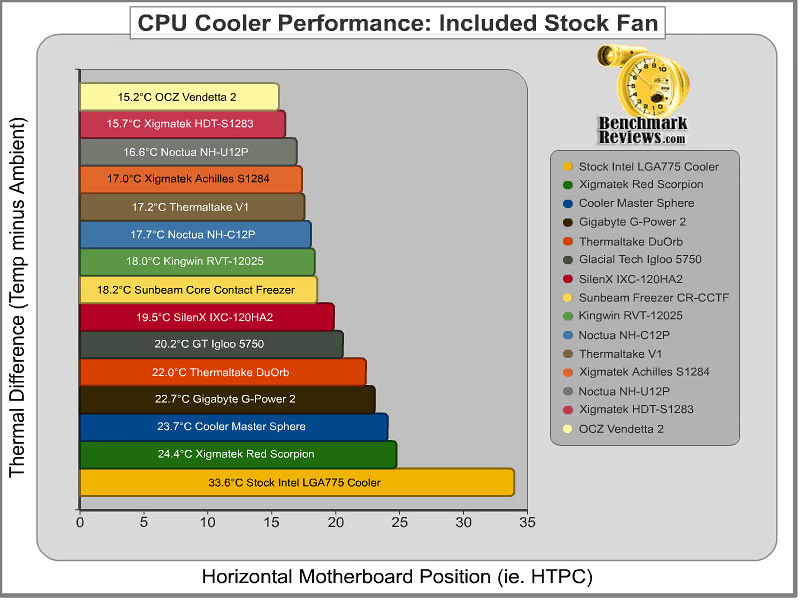
Sometimes a unique design will translate into good performance, and sometimes it doesn't. Thermaltakes V2 cooler earned a solid 5th place in our stock results in the horizontal (HTPC) position, while their DuOrb occupied a less-impressive 11th place position. All within a one-degree range the Kingwin RVT-12025, Noctual NH-C12P, and Sunbeam Core Contact Freezer make up the mid-level performance segment. The less spectacular performers of the group include the SilenX IXC-120HA2, GlacialTech Igloo 5750, Gigabyte G-Power 2, and Cooler Master CM Sphere. Proving that they can make good products as well as bad (or at least very poor), Xigmatek's Red Scorpion S1283 looked pretty with its colored fan blades pushing it deep into the lower-performance segment.
For almost every heatpipe cooler, having the unit positioned with the rods running horizontally proved to offer a noticeable cooling benefit, however none changed as dramatically as the Xigmatek Red Scorpion S1283 that recorded a 24.4° C thermal difference in the horizontal position and later dropped nearly 4° C in the vertical motherboard position representative of tower computer cases. The opposite was true for Noctua's NH-U12P which decreased performance by over one full degree. This goes to show you that heat-pipes are in fact prone to suffer the effects of gravity in their design. Once the vapor cools and becomes liquid, it seems to have an easier time completing the thermal circuit from side to side than it does from top to bottom. So let's see how these coolers performed with the stress of gravity removed from them:
The vertical test results are going to be the most relevant to enthusiasts and overclockers, since upright tower computer cases are almost always used to build their systems. In the second half of our stock-fan benchmark testing, the OCZ Vendetta 2 proved itself worthy of the Golden Tachometer Award it received a few months back. If you're not interested in wearing some form of hearing protection around your computer, then the OCZ Vendetta 2 is a sure winner for the sub-$50. Not far behind was the trusty Xigmatek HDT-S1283, which could also find itself a nice home for anyone tight on cash but long on overclocking ambition. In third place for our vertical test results, the Xigmatek Achilles S1284 performed better than expected despite nickel plating and an offset array of heat-pipes that didn't make full contact with the processor. Next was the Noctua NH-C12P, which performed better in the vertical position primarily because of the transverse heat-pipe orientation. The Kingwin Revolution RVT-12025 is a clone of Xigmatek's HDT-S1283 cooler, and although it comes with a slower and less-powerful stock fan you shouldn't ignore how much less it costs - NewEgg presently offers the RVT-12025 for $31.99. Also clinging to the upper-half of our performance results is the SunbeamTech Core Contact Freezer and Noctua NH-U12P.
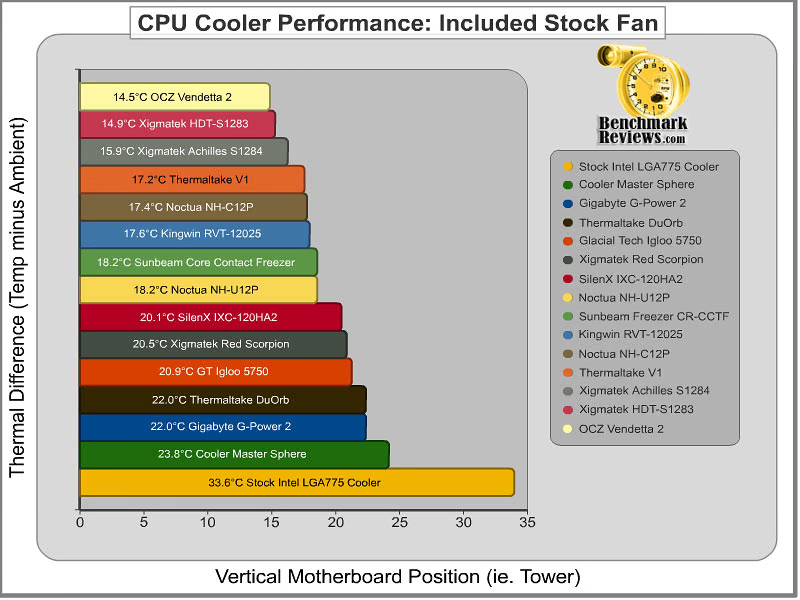
The mid-level performance group occupies the lower half of the charts and begins with the SilenX IXC-120HA2, which for all purposes was exceptionally silent but sacrificed performance. Xigamtek's Red Scorpion crawled up from last place in our horizontal tests to the midway point in vertical testing. GlacialTech should probably consider upgrading the fans in their Igloo 5750 to offer higher output because they seemed to be moving extremely slow during our tests, resulting in lukewarm performance. The Thermaltake DuOrb and Gigabyte G-Power 2 performed among the lowest of our testing, with nearly equal distance between the best coolers and Intel's stock Core 2 Duo cooler. Finishing out as the lowest performers in our test group was the Cooler Master Sphere.
Please keep in mind that the entire basis of this article is Best Performing CPU Coolers, so while some of the coolers did not perform well in comparison to others it doesn't particularly mean that they are poor products. They're just not the best. In summary, if you're building a system that places an emphasis on low sound levels, you'll want to pick your cooler carefully. OCZ's Vendetta 2 is an excellent choice for either HTPC or tower builds, with the Xigmatek HDT-S1283 coming in right behind it. For under $50 USD, you can either keep with the stock fans and see performance results similar to ours, or you can dig a little deeper and force-feed the cool air with a nice Yate Loon fan (like we used for our next section). Because the Thermalright Ultra-120 eXtreme and Cooler Master Hyper Z600 coolers do not come with an included cooling fan, they were not part of this test group. In our next section, every cooler that could be fitted with our high-output fan (including the aforementioned) is represented in full glory. Overclockers should be pleased by the outcome... or shocked, because I sure was.
Test Results: High-Output Fan
This section uses the high-output Yate Loon D12SH-12 cooling fan on each product we test, so while this section is labeled high-output it shouldn't be mistaken for highest-output. I am aware that there are much more impressive fans available, such as the 120 CFM screamers that require a bolt-on kit to retain them. But in my experience, the Yate Loon D12SH-12 is one of the best 120mm cooling fans available in regards to the noise to performance ratio. The D12SH-12 cooling fan forces an impressive 88 CFM of air at a moderately noisy 40 dbA. Personally, I can't suffer anything that produces higher sound levels than this, since gaming would then require headphones and casual computing is almost impossible.
In our last section, the OCZ Vendetta 2 proved itself worthy of high-temperature systems, even while using the stock included cooling fan. But we're moving on, because almost anyone who buys an aftermarket cooler is doing so because of the free performance waiting to be unlocked through hardware tweaking. Overclockers are already willing to take their hardware to the breaking point, so it stands to reason that reduced fan noise is not a top priority. Not very long ago Benchmark Reviews compared the top-performing coolers in our Vendetta 2 vs TRUE vs HDT-S1283 article. In that article, we tested with the high-output D12SH-12 fan and liked the results so much that each cooler tested here has received the same treatment.
The high-output testing begins at the horizontal position, similar to an HTPC or rack mount server unit. I can't realistically see anyone in their right mind using the high-output fan inside an HTPC, but desktop workstations and rack mount server units could certainly benefit here. With the high-output Yate Loon D12SH-12 fan attached to each cooler, there were seven test samples taken within our ambient temperature range. In the charts below each cooler displays a thermal difference, which is the difference between the ambient room temperature subtracted from the recorded temperature results for the processor.
At first, I had to double-check my results for a typo or a superimposed name or something, because when the Noctua NH-U12P performed at the top of our horizontal test results I was absolutely shocked. Almost like an aftershock, I then noticed that the Cooler Master Hyper Z600 nudged out the OCZ Vendetta 2. So I'm going to go into this at length, because I can already imagin the flaming that TRUE fan-boys will be doing in the enthusiast keyboard-warrior forums. To begin with the results of the top four coolers are all within the range of a single degree, and although I personally tested each product as carefully as possible there's always a small margin of error. This being said, let's compare the differences between these products.
Noctua's NH-U12P uses a bolt-through system for mounting the cooler, similar to the Xigmatek Crossbow kit we use for other coolers (like the Vendetta 2). The Thermalright Ultra-120 eXtreme also uses a bolt-through kit, as does the Cooler Master Hyper Z600... so contact pressure is extremely high for all of them. Next, the NH-U12P and Hyper Z600 both have very flat mirror finishes for the contact surface, whereas the OCZTVEND2 and TRUE have a textured and equally imperfect surfaces (although the TRUE features an uneven convex surface). All four of the top coolers have either large-gauge heat-pipes, or several pairs of rods integrated into the base. Keeping in perspective that these are the horizontal test results, and it's doubtful that many of you use an HTPC or rack-mount server chassis for your overclocked system, I will finish out the remainder of the product results before I return to our top-tier bunch.

The mid-range performance for our collection revolved around a 15°C thermal difference. Noctua's NH-C12P performs just a half-degree from the Vendetta 2, and at 15.3°C the Xigmatek HDT-S1283 performed nearly the same as its less expensive clone, the Kingwin RVT-12025. After that comes the Xigmatek Achilles S1284, followed by the SilenX IXC-120HA2 and nearly identical SunbeamTech Core Contact Freezer. Finishing up our high-output fan tests was the Xigmatek under-achiever Red Scorpion S1283, which really didn't care much at all for the horizontal orientation (remember that it dropped 4°C when turned in our stock results).
The Thermaltake V2 and DuOrb, Gigabyte G-Power 2, and GlacialTech Igloo 5750 were not included in our high-output fan tests because they used proprietary designs which prohibit reasonable fan substitutions.
Now for the test that matters most to overclockers: the high-output vertical position benchmarks. Nearly every single overclocker uses a tower computer chassis, which stands upright and orients the motherboard vertically. Additionally, it's probably a safe bet that most overclockers don't particularly mind the noise level that these high-output fans create. So for this test segment, I tested each cooler for a total of seven test samples and averaged the thermal difference results in the chart below.

When the testing was complete and the results were calculated, it surprised me to find these coolers performing so close to one another. In most cases, I would normally dismiss some portion of my results as margin of error, but each of the tests were very much identical to the entire collection for each product. For a short while I had suspected that the Thermalright Ultra-120 eXtreme would beat the entire bunch, but then I remembered how the TRUE actually did better in the horizontal position than it does in vertical environments. So it didn't really surprise me when the Ultra-120 eXtreme produced the same (exact) thermal difference for both positions, because it actually got worse results in the vertical position testing under low-output fan testing back in the Best CPU Cooler Performance - Q1 2008 article.
Armed with a high-output Yate Loon D12SH-12 cooling fan, the Noctua NH-U12P once again performed at the very top of our results. If you're surprised, just imagine how I feel! We've already reviewed the Noctua NH-U12P with low-output fans and it never impressed us, so it appears that it is very much like the Thermalright Ultra-120 eXtreme in that it works best with high-output fans. Next was the OCZ Vendetta 2, which seems to produce a very-narrow lead ahead of the Thermalright Ultra-120 eXtreme, which is why the OCZVEND2 is our most recommended cooler since it costs half as much as the others near it. Of course, both the NH-U12P and Ultra-120 eXtreme can fit an additional fan on them for a push/pull combination, further extending performance for hardcore overclockers.
There are five coolers that performed nearly the same when the Yate Loon D12SH-12 was attached, beginning with the goliath Cooler Master Hyper Z600. The Z600 can accommodate four 120mm coolers, which is obscene by today's standards, but still performed very well with only one. Noctua's NH-C12P improved it's position in the standings for a shared 4th place, giving reason to suggest that Noctua look into designing some less-noisy high-output fans. The Xigmatek HDT-S1283 performed the same as Kingwin's Revolution RVT-12025 because they are the same exact product, while the Xigmatek Achilles S1284 tags along directly behind them. At the lower-performing segment of products is the SilenX IXC-120HA2, which posts a reasonable performance result only 3°C away from the best product tested. Next was the SunbeamTech Core Contact Freezer, followed by the Red Scorpion at 4°C behind the leader.
Please continue on to the final thoughts and conclusion section to read my remarks on the test outcome.
CPU Cooler Final Thoughts
There's only one purpose for the entire Benchmark Reviews CPU cooler series, and that's to discover the very best product for each period. There are a lot of different products out there, and believe it or not we exclude a few from each article because they don't stack up well at all. So this is why you may not see some of the coolers other sites have tested in our results. Because of space and time limitations it's not feasible to review them all, but it's certainly worth mentioning which products should be avoided. So I began to think about, and nearly constructed a real-time chart which places products into different levels of performance. That's when I realized that performance is relative, too, and what performs well today might be at the bottom of the pile a year from now. As it turns out, the best way I can think of is already being done by our affiliate FrostyTech: use a synthetic system to generate the same load for every test. This would stand the test of time much better than any computer system would, and temperature is a static measurement.

No doubt there will be a few readers who will scoff at my results (because I read their pity parlay after each time my affiliates publish their own cooler reviews), so I'm certain the fan boys will claim that anyone with ten minutes of experience will "lap" the processor's integrated heat spreader smooth as well as polish the CPU coolers mating surface. Sure, I concede, you're correct. Any bonafide overclocker with more time on his/her hands than the average hardware enthusiast will spend a few hours wet-sanding their equipment so that they can get an extra degree of cooling performance. But for the other 99% of the consumer population, this is what you can expect from these cooling products if you want the CPU cooler to perform right out of the box or with a simple add-on fan upgrade.
I can't please everyone, and my biggest critics have taught me that there's a small portion of enthusiasts that would happily spend ten days turning a decent cooler (the Thermalright Ultra-120 eXtreme is usually the subject of said improvements) into an excellent cooler. But I'm not that guy. I'll spend ten minutes removing the old stock fan and replace it with something of higher output along with a good thin thermal paste application and call it done. So to you hardcore overclockers, feel free to see my results as flawed, because nobody I know is willing to spend that much time on a large collection of review samples (to include Spawne of OverclockersPulse). I had to draw the line somewhere, and this is it.
There are numerous ways to improve upon the performance that any one of these products has offered. Take for example the Thermalright Ultra-120 eXtreme: most enthusiasts like to modify this product by lapping the surface and adding additional mounting pressure by using a washer. I for one believe this to be more of a necessity than anything else, since Thermalright designed the surface with an intentionally uneven convex finish. To a lesser extent, you could also file and polish the mating surface of any one of the Heat-pipe Direct Touch coolers and then use bolt-on backplate mounting kit (such as the Xigmatek Cross-bow system). Nevertheless, most of this point was made in our Vendetta 2 vs TRUE vs HDT-S1283 article.
Best CPU Cooler Q2 2008 Conclusion
When you test this many coolers, the work becomes repetitive and boring. I wouldn't challenge my worst enemy to this kind of misery, because for nearly one full month I would wake up very early in the morning and begin testing as soon as the ambient room temperature was within range. The entire process is not at all enjoyable, since I had to maintain a strict regimen of re-installing the cooler before each test with a new application of thermal paste and make sure each test was uniform to the last. Testing CPU coolers is a very long, very tedious job, but once the data has been transferred into a spreadsheet and formulas are applied the results make it all worth it. I can promise you this: my money wasn't on a Noctua product.
It's not that I don't think Noctua makes a great product, because I have always been impressed with the quality and finish of their hardware. But lets face it: Noctua as a brand just doesn't scream performance. Perhaps what they need is a powerful dose of high-output cooling to make them see how much better their products can be if they sacrifice silence for a little fan noise. Personally, I use their NF-P12 fan on my HDT-S1283 to cool my primary system, but many of you would think my E8400 overclocked to 3.6 GHz is child's play. Fan noise, or just noise in general, is a relative subject with opinions on acceptability ranging from silence to deafening.

At the end of our testing for the Best CPU Cooler - Q1 2008 article the OCZ Vendetta 2 claimed a top position in our results. Then again in our follow-up article Vendetta 2 vs TRUE vs HDT-S1283 it has cemented its previous performance legitimacy. But all good things must come to an end, and for this Q2 2008 roundup the OCZTVEND2 will have to be happy with second best for this round. At the end of the year (2008) we will take the top coolers aside for a three-level performance test, and you can expect to see the OCZ Vendetta 2 ready to defend it's title (or earn the Editors Choice Award).
With the results of this round-up now complete, Noctua has proven that their "psycho-acoustically optimized NF-P12 120mm fan" is good for low noise levels but not low temperatures. The Noctua NH-U12P didn't stand a chance as a final top-competitor in it's stock retail form, but once we added the Yate Loon D12SH-12 high-output fan the story changed. Our mixed results don't make it an easy to issue a general recommendation, since the NH-U12P was nearly 4°C off from the top performers in the vertical orientation stock product testing (but only about 1°C from the top in horizontal orientation).
So here's my suggestion: if you're looking for a high-performance cooler that operates at a whisper level for your HTPC, the Noctua NH-U12P is an excellent fit. If you're after a good performer right out of the box for your tower system, then the OCZ Vendetta 2 is still my top choice with the Xigmatek HDT-S1283 right behind it. However when it comes to the best (or rather the best with a Yate Loon D12SH-12 high-output fan), the Noctua NH-U12P certainly fits the build. It's going to be difficult to locate in North America, which is why OCZ's Vendetta 2 makes for an excellent second-choice. Likewise pricing may be an issue, as the NH-U12P is usually found only at a few online retailers with an average cost of $64.99 whereas NewEgg lists the OCZTVEND2 for $49.99. Noctua includes its own backbrace bolt-through system, but the Xigmatek CrossBow kit ACK-I7751 we used to replace the LGA775 push-pin clip retaining system on the Vendetta 2 will cost an extra $6.99 plus shipping.
Questions? Comments? Benchmark Reviews really wants your feedback. We invite you to leave your remarks in our Discussion Forum.
The Aftermath: Editors Notes
The nice thing about competition between hardware manufacturers is that it forces product improvements; or at least it should. I don't have to please anyone with my test results, since they are what they are (I test, and I report). There's no doubt that the manufacturer would like a positive review, but if I make one manufacturer angry because I don't give their product a glowing review and they decide to ignore future product requests I can just simply move on to their competition. But if they're serious about producing excellent products worthy of praise, they'll be back with a bigger and better design the next time around.
There's a flaw in this design though. Operating a review site requires a balance of several key skills: organization, perseverance, ambition, and aptitude for the topics. Unfortunately, it takes a lot more than operating the site to make it productive; you need products to test. This is where sites like Benchmark Reviews depend on the cooperation from the product manufacturer to receive test samples of their products when it is not available elsewhere.
The largest hardware sites have been around for over ten years, and have a very large staff. Most operate like a large corporation, and when their popularity with a large audience isn't enough to persuade manufacturer cooperation they utilize advertising leverage to pay for the products they review. This is convenient, but at some point they have to pay the bills and retaining advertisers can sometimes mean bending your opinion. I won't allow this for my website.
Benchmark Reviews operates very differently. If the manufacturer doesn't send us samples, I will usually use product from the shelves of my computer company to complete testing. But on many occasions this is not possible for a timely product launch, or when a product becomes "used" after its first installation. So like most sites, we rely on manufacturer donations and samples. One such case of this is with Thermalright, whom has been requested to send us their Thermalright TRUE Black cooler. We've seen it reviewed elsewhere so it exists, but it can't be purchased at the moment. So I make my requests, but sometimes the response is worse than receiving a bad product. Here are some excerpts from the correspondence with Hank Peng and Loren Hrabak of Thermalright:
Olin Coles 06/10/08: Hello Loren, I am writing you to request the Thermalright TRUE Black Edition cooler. I have already made this request with you over the phone last month, but now it has come to my attention that our affiliates have already received this product. Please let me know if you will be sending Benchmark Reviews a sample for testing.
Loren Hrabak 06/11/08: As of right now I don't have any of these heatsinks available. Hopefully I should have some in a month or so for review sites.
After this Q2 2008 article published, I resumed correspondence with Thermalright. Olin Coles 07/16/08: Does Thermalright have any interest in sending us the TRUE Black 120 for review? I've been trying to receive one for testing for over four months.
Loren doesn't answer my request, but his supervisor Hank Peng does: As you know, all reviews are not created equal. Knowing that Ultra-120 eXtreme didn't do too well particularly in your tests time after time (not claiming the top spot) and knowing that TRUE Black 120 puts out similar performance, if you were working for Thermalright's marketing team would you go ahead and send the test unit?
This didn't sit well with me, so I issued a response: My experience with your Ultra-120 eXtreme has given the product more than its share of limelight. It was included in the Q1 2008 round-up article. We then tested it with a high and low volume fan for our Vendetta 2 vs TRUE vs HDT-S1283 article, where it performed right at the very top. Again in our Q2 article, it was tested and performed in the top positions. So what I am to understand is that because your product has not yet received the #1 position (or an award), Thermalright is not going to support my requests? It seems to me that the purpose of sites like Benchmark Reviews is to dispel marketing myth and prove which products really work. The TRUE really works very well, but it is far from a perfect product and most who use it must modify and alter the product to make it worth their trouble.
Perhaps I've missed something in my two years of product testing, but I believe this would be the very first time a product has not been sent to us because another product the manufacturer had sent did not receive an award for the top position. Antec has done the same thing to Benchmark Reviews, but more so because we didn't rate their product highly and not because it wasn't the "best". Maybe I'm reading into things but it seems to me that if you sell a product, than the performance should speak for itself.
There's no need to intimidate review sites with (the lack of) cooperation simply because your product doesn't get an award. Shame on you Thermalright. First you hassle consumers with poor mounting clips systems, then you change the product with multiple revisions. Now you punish those of us willing to give the product a fair representation of performance?
Perhaps it's a good thing that there's some strong competition, because these HDT coolers are putting the overpriced Ultra-120 eXtreme in its place. It appears that Thermalright knows this, which is why they can only respond to an evolving industry by coloring a two-year old design black.