
OCZ Vendetta 2 HDT CPU Cooler OCZTVEND2
OCZ Vendetta 2 (OCZTVEND2)
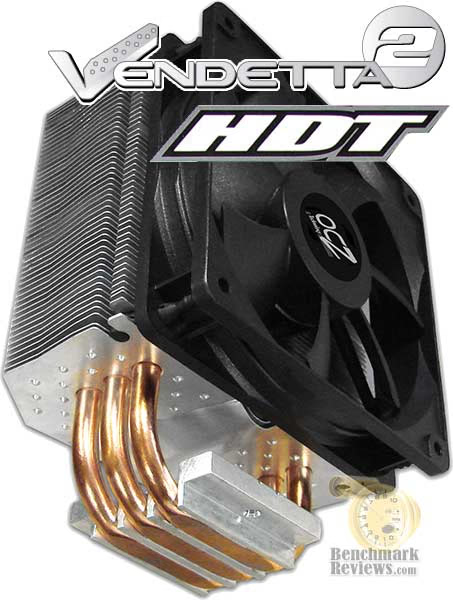
Computer hardware is an ever-evolving industry, and since Moores law only applies to an exponentially growing transistor count then there should probably be another law for cooling. In the very recent past there have been two major trends which have accelerated the performance potential of CPU cooler. That first development was the use of heat-pipes to directly contact with the CPU surface; which resulted in the Heat-pipe Direct Touch technology. The second development is by no mean a new concept, just new to our industry in specific. For many years now heatsinks have been full of right angles, but very recently companies have begun to recognize the need to disrupt smooth airflow and reduce the laminar skin effect which allows air to travel just above the solid surface. Manufacturers like OCZ have used both of these trends in their new Vendetta 2 CPU cooler. Benchmark Reviews will see how much this effects the overall performance as we test OCZTVEND2 against a large segment of competitor products.
Manufacturers are not expected to enjoy this sort of comparison, since we level the playing field by replacing their included fan (whenever applicable) with a common unit which we then use for every CPU cooler we test. Manufacturers regularly include fans with their CPU cooler products, and more often than not these fans are very high RPM units which offer great airflow at the expense of an obnoxiously loud noise level. By using the same model of cooling fan throughout our testing, we can assure our results are comparable across the board. This is one of the more significant changes we have made to our test methodology, since many of the benchmark tests we have conducted in the past have compared the total package. Ultimately we're more interested in the discovering the best CPU cooler performance, and we believe that you'll feel the same way.
Before we introduce our newest collection of CPU coolers, let's establish that our tests consist of methods we have determined to be the best for our one singular purpose. Our methodology isn't written in stone, and could very likely be changed or modified as we receive justification (and feedback from the community). The results of our testing were compiled into our Best CPU Cooler Performance - Q1 2008 article which was recently published.
We encourage hardware enthusiasts to utilize the equipment available to them, and select the cooling fan that best suits their needs. Just keep in mind that exceptional cooling performance must begin with the CPU cooler, and end with the cooling fan. It's the foundation of the unit that makes a difference, which is exactly what we're after in this article.
About the company: OCZ Technology
Entering the memory market in August 2000, OCZ Technology was built around the determination to manufacture the best high speed DDR and RDRAM. OCZ was founded by enthusiasts, for enthusiasts, and their commitment to the end-user has not digressed. OCZ Technology has been an innovator in many areas.
We were the first manufacturer to make Dual Channel optimized memory available to the public, which originally took advantage of nVidia's Twinbank or Dual DDR architecture, found in their nForce chipset. We have now taken that technology and tailored it for the Canterwood, and Granite Bay chipset's. OCZ developed and was the first to implement ULN technology, which has been a critical element in the manufacturing process for some time.
We at OCZ diligently work to improve communication with CPU and motherboard chipset manufacturers prior to the release of their products. Only in this manner can we fine-tune the memory's SPD settings, ensuring a synergistic relationship between the memory module, memory controller, and microprocessor. In today's rapidly evolving semiconductor industry, such communication is not simply research, but a necessary component of the manufacturing process.
OCZTVEND2 Specifications
-
For Sockets AMD 754/755/939/AM2 and Intel LGA775
-
3 Pure Copper heat pipes for superior heat dissipation
-
Pure Aluminum fins for ultimate durability
-
Heatsink Dimensions:(W)120 x (H)50 x (D)159mm
-
Fan Dimensions: (L)120 x (W) 120 x (H)25mm
-
Rated Voltage: 12V DC
-
Fan Speed: 800-1500 RPM
-
Fan Air Flow: 65-81 CFM
-
Noise Level: 20-32 dBA
-
Bearing type: Rifle
-
Connector: 4 pin with PWM
-
Includes: 120mm Fan with rubber connectors
-
Mounting Hardware for all above CPUs
OCZ Vendetta 2 Closer Look
OCZ Completely surprised us when the original Vendetta HDT CPU cooler was tested and secured a top position among our collection of coolers. It was later discovered that the loud high-volume 92mm fan was included for a reason: the fins were much longer than the Xigmatek HDT-S963 it was loosely based off of and needed the extra push to force air past them. But OCZ didn't leave well enough alone, and recognized where there could be the potential for even more performance out of the HDT design. So back to the design table they went, and created the Vendetta 2 (OCZTVEND2) CPU cooler.
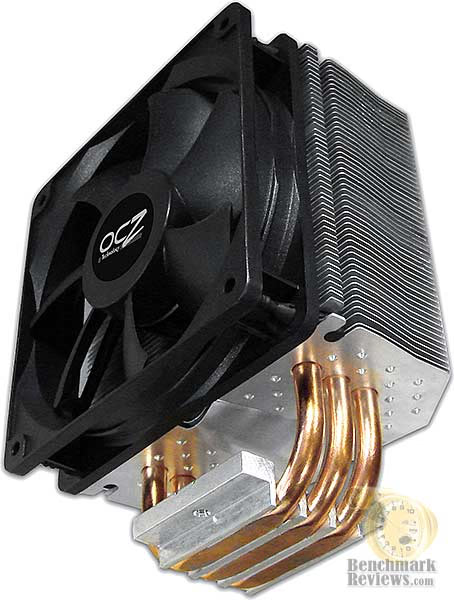
The OCZ Vendetta 2 is an efficient new CPU cooler that utilizes a distinctive stacked fin design and heat-pipe Direct Touch (HDT) technology. In this version of their popular cooler, OCZ designed the OCZTVEND2 to use large 8-gauge copper heat-pipe rods combined with a large low-noise fan. Together these items match to offer a perfect balance, allowing the Vendetta 2 to quitely cool even the most robust quad-core system.

Utilizing the proven performance of their original Vendetta HTD design, the Vendetta 2 has direct contact with the processor using three copper heat pipes to ensure the most rapid heat transfer and a lighter weight. OCZ's unique dimple micro-configuration of the stacked aluminum fins adds turbulence, reducing the skin effect of laminar air flow for more efficient circulation within your case.

The Vendetta 2 also offers an extra performance boost over the more compact original version. The ultra-quiet 120mm fan (AD1212DX-A7BGL) operates with only 0.13A and comes equipped with anti-vibration rubber mounting latches to reduce excess noise. Even with the high-volume airflow it doesn't make high-volume noise like the 92mm version fan did.

As with all HDT coolers, there are small "gutters" to each side of the heat-pipe rod. These gutters are very small, but they are still large enough to collect excess Thermal Interface Material. It's recommended that a carbon and aluminum-oxide based TIM be used with all copper surfaces. There are many excellent options tested in our 33-Way Thermal Interface Material Comparison article.
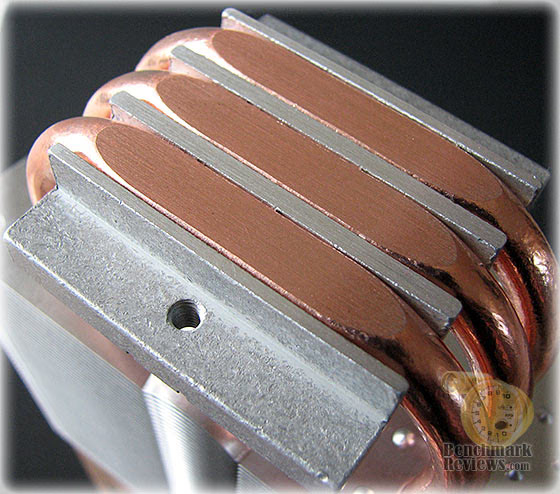
The large 8-gauge exposed copper heatpipes come ground down level with the mounting base. The finish is noticiably rough with a slight grain texture to it, but nothing worse than most coolers. The hardcore enthusiast can wet-sand the surface to a polished shine with very little effort, but I warn you to be careful because copper is considerably softer than aluminum or alloys.
Thermally Conductive Element Reference
Manufacturers have made a small fortune off of misinformation and confusion tactics. Marketing departments often times neglect to refer back to solid science when making claims, which is why we have assembled a complete list of thermally conductive elements in the reference chart below.
It's very well known that Silver, Copper, Gold, and Aluminum together comprise the top four most thermally-conductive elements. However, without knowing the thermal conductance value of these elements you might think the performance was close. As it turns out, Silver and Copper both offer nearly twice the performance of Aluminum when transferring thermal energy such as heat. Aluminum is the least expensive top-tier metal, which explains the popularity. Most Thermal Interface Material and CPU coolers use several different elemental ingredients to work together, but after a careful inspection of the performance levels it comes as a surprise to me that some of the most popular products make use of such poor conductors.
| Thermal Conductance | Element Name | Symbol |
|---|---|---|
| 4.29 W/cmK | Silver | Ag |
| 4.01 W/cmK | Copper | Cu |
| 3.17 W/cmK | Gold | Au |
| 2.37 W/cmK | Aluminum | Al |
| 2.01 W/cmK | Calcium | Ca |
| 2.01 W/cmK | Beryllium | Be |
| 1.74 W/cmK | Tungsten | W |
| 1.56 W/cmK | Magnesium | Mg |
| 1.5 W/cmK | Rhodium | Rh |
| 1.48 W/cmK | Silicon | Si |
| 1.47 W/cmK | Iridium | Ir |
| 1.41 W/cmK | Sodium | Na |
| 1.38 W/cmK | Molybdenum | Mo |
| 1.29 W/cmK | Carbon | C |
| 1.17 W/cmK | Ruthenium | Ru |
| 1.16 W/cmK | Zinc | Zn |
| 1.024 W/cmK | Potassium | K |
| 1 W/cmK | Cobalt | Co |
| 0.968 W/cmK | Cadmium | Cd |
| 0.937 W/cmK | Chromium | Cr |
| 0.907 W/cmK | Nickel | Ni |
| 0.876 W/cmK | Osmium | Os |
| 0.847 W/cmK | Lithium | Li |
| 0.816 W/cmK | Indium | In |
| 0.802 W/cmK | Iron | Fe |
| 0.718 W/cmK | Palladium | Pd |
| 0.716 W/cmK | Platinum | Pt |
| 0.666 W/cmK | Tin | Sn |
| 0.599 W/cmK | Germanium | Ge |
| 0.582 W/cmK | Rubidium | Rb |
| 0.58 W/cmK | Dubnium | Db |
| 0.575 W/cmK | Tantalum | Ta |
| 0.54 W/cmK | Thorium | Th |
| 0.537 W/cmK | Niobium | Nb |
| 0.506 W/cmK | Technetium | Tc |
| 0.502 W/cmK | Arsenic | As |
| 0.479 W/cmK | Rhenium | Re |
| 0.47 W/cmK | Protactinium | Pa |
| 0.461 W/cmK | Thallium | Tl |
| 0.406 W/cmK | Gallium | Ga |
| 0.359 W/cmK | Cesium | Cs |
| 0.353 W/cmK | Lead | Pb |
| 0.353 W/cmK | Strontium | Sr |
| 0.349 W/cmK | Ytterbium | Yb |
| 0.307 W/cmK | Vanadium | V |
| 0.276 W/cmK | Uranium | U |
| 0.274 W/cmK | Boron | B |
| 0.243 W/cmK | Antimony | Sb |
| 0.23 W/cmK | Hafnium | Hf |
| 0.23 W/cmK | Rutherfordium | Rf |
| 0.227 W/cmK | Zirconium | Zr |
| 0.219 W/cmK | Titanium | Ti |
| 0.2 W/cmK | Polonium | Po |
| 0.186 W/cmK | Radium | Ra |
| 0.184 W/cmK | Barium | Ba |
| 0.179 W/cmK | Promethium | Pm |
| 0.172 W/cmK | Yttrium | Y |
| 0.168 W/cmK | Thulium | Tm |
| 0.165 W/cmK | Neodymium | Nd |
| 0.164 W/cmK | Lutetium | Lu |
| 0.162 W/cmK | Holmium | Ho |
| 0.158 W/cmK | Scandium | Sc |
| 0.15 W/cmK | Francium | Fr |
| 0.143 W/cmK | Erbium | Er |
| 0.139 W/cmK | Europium | Eu |
| 0.135 W/cmK | Lanthanum | La |
| 0.133 W/cmK | Samarium | Sm |
| 0.125 W/cmK | Praseodymium | Pr |
| 0.12 W/cmK | Actinium | Ac |
| 0.114 W/cmK | Cerium | Ce |
| 0.111 W/cmK | Terbium | Tb |
| 0.107 W/cmK | Dysprosium | Dy |
| 0.106 W/cmK | Gadolinium | Gd |
| 0.1 W/cmK | Lawrencium | Lr |
| 0.1 W/cmK | Einsteinium | Es |
| 0.1 W/cmK | Berkelium | Bk |
| 0.1 W/cmK | Californium | Cf |
| 0.1 W/cmK | Fermium | Fm |
| 0.1 W/cmK | Curium | Cm |
| 0.1 W/cmK | Nobelium | No |
| 0.1 W/cmK | Americium | Am |
| 0.1 W/cmK | Mendelevium | Md |
| 0.0834 W/cmK | Mercury | Hg |
| 0.0787 W/cmK | Bismuth | Bi |
| 0.0782 W/cmK | Manganese | Mn |
| 0.0674 W/cmK | Plutonium | Pu |
| 0.063 W/cmK | Neptunium | Np |
| 0.0235 W/cmK | Tellurium | Te |
| 0.0204 W/cmK | Selenium | Se |
| 0.017 W/cmK | Astatine | At |
| 0.00449 W/cmK | Iodine | I |
| 0.00269 W/cmK | Sulfur | S |
| 0.00235 W/cmK | Phosphorus | P |
| 0.001815 W/cmK | Hydrogen | H |
| 0.00152 W/cmK | Helium | He |
| 0.00122 W/cmK | Bromine | Br |
| 0.000493 W/cmK | Neon | Ne |
| 0.000279 W/cmK | Fluorine | F |
| 0.0002674 W/cmK | Oxygen | O |
| 0.0002598 W/cmK | Nitrogen | N |
| 0.0001772 W/cmK | Argon | Ar |
| 0.0000949 W/cmK | Krypton | Kr |
| 0.000089 W/cmK | Chlorine | Cl |
| 0.0000569 W/cmK | Xenon | Xe |
| 0.0000364 W/cmK | Radon | Rn |
Recipes usually call for only the finest ingredients, and the very same pricipal is true for overclocker and hardware enthusiast products. Thermal pastes are often times mixed from at least a dozen different components, while heatsink coolers may use only one or two different metals. Armed with the knowledge above, you might expect any silver-based product to be a clear-cut winner... but building a superior product by design is different than what the manufacturer delivers in execution.
Preparation Notes
Over the past several months, I have read an unreasonable number of discussion forum posts which offer inaccurate and often times incorrect information. It's not really all that surprising to read poorly conceived information on the Internet, which seems to be a anonymous means of passing off opinion for fact. As a general rule we don't let too many things go untested, and the advice of wanna-be experts is not doing the hardware enthusiast and overclocker community any good. In this article, Benchmark Reviews dispels myth and establishes fact on the topic of proper application in our Best Thermal Paste Application Methods article.
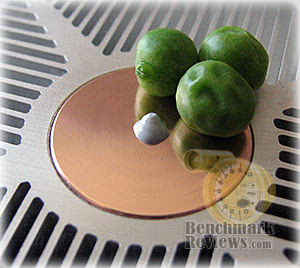
After we wrote our 33-Way Thermal Interface Material Comparison article, many enthusiasts argued that by spreading out the TIM with a latex glove (or finger cover) was not the best way to distribute the interface material. Most answers from both the professional reviewer industry as well as enthusiast community claim that you should use a single drop "about the size of a pea". Well, we tried that advice, and it turns out that maybe the community isn't as keen as they thought. The example image below is of a few frozen peas beside a small BB size drop of OCZ Freeze TIM. The image beside it is of the same cooler two hours later after we completed testing.

After discussing this topic with real industry experts who are much more informed of the process, they offered some specific advice that didn't appear to be a "one size fits all" answer:
-
CPU Cooling products which operate below the ambient room temperature (some Peltier and Thermo-electric coolers for example) should not use silicon-based materials because condensation may occur and accelerate compound separation.
-
All "white" style TIM's exhibit compound breakdown over time due to their thin viscosity and ceramic base (usually beryllium oxide, aluminium nitride and oxide, zinc oxide, and silicon dioxide). These interface materials should not be used from older "stale" stock without first mixing the material very well.
-
Thicker carbon and metal-based TIM's may benefit from several thermal cycles to establish a "cure" period which allows expanding and contracting surfaces to smooth out any inconsistencies and further level the material.
The more we researched this subject, the more we discovered that because there are so many different cooling solutions on the market it becomes impossible to give generalized advice to specific situations. This is where our testing comes into play. For the tests in this article, the processor received a thin layer of thermal paste which was kept consistent throughout every test. Ultimately it is the contact pressure of the coolers retaining system that is created when the elements are mounted with enough force which ensure excellent thermal conductivity between metals. With this principal kept in mind, those coolers with the stronger retaining system will often times benefit from the improved thermal conductance.
Surface Finish Impact
Here's the part I've been waiting to reveal... the importance of surface finish in relation to the impact on thermal conductivity. CPU coolers primarily depend on two heat transfer methods: conduction and radiation (heat-pipes also add convection). This being the case, let's start with conduction as it related to the mating surface between a heat source and a cooler.
Because of their density, metals are the best conductors of thermal energy. As density decreases so does conduction, which relegates fluids to be naturally less conductive. So ideally the less fluid between metals, the better heat will transfer between them. Ultimately, this means that the perfectly flat and well-polished surface (Noctua NH-U12P) is going to be preferred over the rougher and less even surface which required more TIM to fill the gaps (Thermalright Ultra-120 eXtreme).
Heat radiation is different however, and requires exactly the opposite. Because gases (air) are naturally poor heat conductors, surface area is key to the performance of cooling through radiation. This type of cooling is what you commonly see automobile radiators, which utilize large arrays of metal fins to radiate heat to be drawn away by a fan. The same is true for the CPU cooler, which needs as much surface area as possible to optimize it's radiative effects. OCZ and others have recognized that the surface of a heatsink does not have to be the sum of its overall size. By adding dimples and bends, the surface area is increased without growing the overall size.
To sum it all up, science teaches us that a smooth flat mating surface is ideal for CPU coolers so that less Thermal Interface Material is used. Because these coolers are using fans to force air over the heatsinks fins, the overall surface area of those fins should be as large and uneven as possible. In the next section we'll find out just how well all of these principals worked for our collection of test products.
CPU Cooler Test Methodology
Our scope is limited to stand-alone products only, meaning those products which can be installed and operated without additional critical components needed or kit construction. This generally excludes nearly all liquid cooling systems, which may offer better performance than the products we test. Suffice it to say however, the vast majority of gamers and enthusiasts are using air-cooled solutions and therefore we target this article towards them.
Testing was conducted in a loosely scientific manner. Ambient room temperatures levels were held to within one degree of fluctuation measured at static point beside the test equipment with a calibrated digital thermometer. All coolers had their original manufacturer-supplied fan removed and replaced with our specified common test fan. Each product then received the same amount of Thermal Interface Material (specified below), which amounted to roughly a BB-sized drop placed onto the center of the CPU. The CPU cooler product being tested was then laid down flat onto the CPU, and compressed to the motherboard using the supplied mechanism. If the mounting mechanism used only two point of force, they were tightened in alternation; standard clip-style mounting with four securing points were compressed using the cross-over method. Once installed, the system was tested for a baseline reading prior to testing.

At the start of each test, the ambient room temperature was measured to track any fluctuation throughout the testing period. Lavalys EVEREST Ultimate Engineer Version 4.20.1170 was then utilized to create core loads and measure each individual CPU core temperature. It's important to note that software-based temperature readings reflect the thermistor output as recorded by the BIOS. For this reason, it is critically important to use the exact same software and BIOS versions throughout the entire test cycle, or the results will be incomparable. All of the units compared in our results were tested on the same motherboard using the same BIOS and software, with only the product itself changing in each test. These readings are neither absolute nor calibrated, since every BIOS is programmed differently. Nevertheless, all results are still comparable and relative to each products in our test bed.
One unfortunate problem is that CPU's report temperatures as a whole number and not in fractions. This in turn causes the motherboard BIOS and subsequent software applications such as EVEREST to also report to the nearest whole number. To compensate for this, our tests were conducted several times after complete power down thermal cycles. Conversely, the ambient room temperature levels were all recorded and accurate to one-tenth of a degree Celsius.
It was interesting to see the order of performance get shuffled by the horizontal positioning of our test system. Even more interesting was the immediate effect it had on our test results. Here is an example of the effect on performance that turning a heat-pipe CPU cooler from a vertically-standing position to the normal horizontal position will have:

Test System
-
Motherboard: Gigabyte GA-X48T-DQ6 (Intel X48 Chipset) with version F4 BIOS
-
System Memory: Corsair PC3-14400 DDR3 1800MHz
-
Processor: Intel Q6600 G0 Stepping Core 2 Quad 2.4GHz (Overclocked to 3.3 GHz)
-
Disk Drive 1: Western Digital 74GB WD740ADFD 10,000 RPM SATA
-
Disk Drive 2: (Paging File) MemoRight GT MR25.2-064S 2.5-Inch 64GB SATA SSD
-
Optical Drive: Samsung SH-S203 SATA 20x DVD R/W
-
Operating System: Windows XP Professional SP-2 (optimized to 16 processes at idle)
Support Equipment
-
OCZ Freeze Thermal Interface Material (No curing time necessary or given)
-
Noctua 120mm cooling fan, model NF-P12
-
Noctua 92mm cooling fan, model NF-B9
All of our tests are conducted using two different product orientations: horizontal and vertical. So far as we can tell Benchmark Reviews is probably the first website to test with this method; but it's very likely that others will soon follow our lead. At the start of our test period, the test system is orientated sideways in a flat "desktop" position which places the motherboard and processor horizontally to face up towards the ceiling. Next, the computer system is powered on and EVEREST system stability tests are started with Stress CPU and Stress FPU options selected. Then for a minimum of ten minutes EVEREST loads each CPU core to 100% usage, which drives the temperature to its highest point. Finally, once temperatures have sustained a plateau, the ending ambient room temperature and CPU core levels are recorded and the first benchmark segment is complete. Lavalys EVEREST remains running at full load into the next test segment.
The second benchmark segment begins by simply turning the test system vertically upright, so that the motherboard and CPU are facing to the side. Many of the products we have tested utilize a "U" pattern in the heat-pipe rods, and the upright system orientation favors this particular product design because it removes the effect of gravity on the heat-pipes' thermal cycle. For a minimum of five additional minutes EVEREST continues to load each CPU core, and once temperatures have plateaued the ending ambient room temperature and CPU core levels are recorded. This process was identical for all cooling solutions used in our benchmark tests segments.
CPU Cooler Test Results
Benchmark Reviews strives to offer the overclocker and hardware enthusiast community solid evidence reflecting the true performance of computer products through rigorous testing and evaluation. We understand that many of our readers have been involved with other community websites for years, and take our test results personally; this was made clear to us when we released our 33-Way Thermal Interface Material Comparison article. So then after months of planning and preparation, we have worked to achieve the most complete source of test results possible, offering irrefutable test results gathered in a controlled environment.
We are still a rather new website, even though we have just recently completed our first year on the web. So in the spirit of improving on the old ways of testing, we have decided it was time for the industry to see things from a new perspective. Beginning with this review series, Benchmark Reviews is doing two things to change the way CPU coolers are tested:
-
We will test coolers using a common fan so that air speed and volume between products do not have an impact on our results.
-
We will test coolers in both a horizontal and vertical position, since heat-pipes are effected by product orientation.
Like we mentioned at the beginning of this article, the CPU cooler must perform for itself before a fan can improve upon it. So with the test system positioned horizontally based on our new test methodology, we were a little surprised by the new benchmark results. To begin with, the Xigmatek HDT-S1283 didn't finish on top as it has consistently done in the past. The Kingwin RVT-12025 just barely edged it out based on average performance, but it was the OCZ Vendetta 2 that took the top position by a noticeable margin. The Ultra ChillTEC cooler did a good job, albeit noisy that's the to factory fan that was used (not easily interchanged for our common fan). To our disappointment the Noctua NH-U12P, Xigmatek Red Scorpion S1283, and Thermalright Ultra-120 eXtreme all averaged behind the 92mm Kingwin RVT-9225.
The fact that any of our 92mm coolers could finish near the top is a great testament to their ability, but I personally felt like the Noctua NF-B9 fan we used was a little too tame for the task. This proved to be a major factor in the poor performance of our former runner-up champion, the OCZ Vendetta. Because of the extended fins in their design, the lower-power NF-B9 fan doesn't push with the same force as the moderately loud OCZ 92mm 0.30A fan.
In every case where the CPU cooler used a "U" shaped heat pipe rod in their design, having the unit positioned with the rods running horizontally proved to offer a cooling benefit. This was especially true for the Xigmatek Red Scorpion S1283, which had the most significant drop in temperature out of the bunch. This goes to show you that heat-pipes are in fact prone to suffer the effects of gravity in their design. Once the vapor cools and becomes liquid, it seems to have an easier time completing the thermal circuit from side to side than it does from top to bottom. So let's see how these coolers performed with the stress of gravity removed from them:
When I tested each cooler, I made certain to keep the hardware settings identical across the test platform. This would enable me to clearly compare the performance of each product under identical conditions. While the ambient room temperature did fluctuate between 20.1~20.3°C, this would not be enough to cause a noticeable impact on our test results. For the most part, the product performance in this vertical position was very close to the same order as it was horizontally. Almost all of the products dropped a few degrees, which is something you'll want to consider if you're building an HTPC that sits horizontally.
When the dust settled, our second half of the benchmark testing indicated that we have a new champion among CPU coolers: the OCZ Vendetta 2. The trusty Xigmatek HDT-S1283 from which it borrowed its design from tied for second place with the Kingwin RVT-12025 clone. Xigmatek's newly skinned Red Scorpion S1283 finished in third place for this test, with Kingwin's RVT-9225 right on it's tail (pun) with the help of three mighty large 8-gauge copper heat-pipe rods. Noctua's NH-U12P CPU cooler finished in fifth place, with the for the vertical position benchmarks, and the Thermalright Ultra-120 eXtreme was right behind it. Just like we discovered in the last test, the Kingwin RVT-12025D, OCZ Vendetta, and Zaward VIVO PCJ004 cannot keep in-step and fall well behind the other HDT cooling solutions.

Some of the bigger disappointments in our test group belonged to the gigantic Scythe Mugen SCINF-1000, which really didn't care for the modest 120mm Noctua NF-P12 cooling fan. This would explain why Scythe built this giant to accommodate four 120mm fans total, and also why it does so poorly with only one. The Thermaltake MaxOrb also shared the last place rights, but I can't pick on it too much since it's neither behemoth in size or using Heat-pipe Direct Touch technology.
EDITORS NOTE: Because of the fairly dense finsink system on the Vendetta 2, the stock fan (not used in this article) is best suited for noise reduction and not cooling performance. After dozens of re-tests, it's been concluded that a 72-78 CFM fan provides the optimum airflow for this cooler.
CPU Cooler Final Thoughts
I really enjoyed producing the Best CPU Cooler Performance - Q1 2008 article, but probably for the wrong reasons. To begin with, I want to know which product performs the best just as much as you do; maybe even more. But thanks to having so many products available to me for testing at the same time, I have the advantage of finding a winner where nobody is looking and down-grading the product everyone is so hyped about. Several times in the past year I have found myself exchanging dialog with readers who question my results because they have experienced a different result with one particular product. Plainly put: all of my testing and the subsequent benchmark results are gathered in the exact same manner on the same test system during the same benchmark period. So if you personally feel that I didn't manage to somehow test these products to your standards, you will still have to commit to the fact that they were all tested identical fashion - apples to apples.
No doubt there will be a few readers who will scoff at my results, and claim that anyone with ten minutes of experience will "lap" the processor's integrated heat spreader smooth as well as polish the CPU coolers mating surface. Sure, I concede that the bonafide overclocker with more time on his/her hands than the average hardware enthusiast will wet-sand their equipment so that they can get a few extra degrees of cooling performance. But for the other 99.99% of the consumer population, this is what you can expect from these cooling products if you want the CPU cooler to perform right out of the box.
There are numerous ways to improve upon the performance that any one of these products has offered, so claiming that "if you do this or that" to one product will not exactly put it ahead of another. Take for example the Thermalright Ultra-120 eXtreme: most enthusiast like to modify this product by lapping the surface and adding additional mounting pressure by using a washer. But to that same (unnecessary) extent, you could file and polish the mating surface of any one of the Heat-pipe Direct Touch coolers and use bolt-on back-plate mounting to exert the same benefit. Either way you look at it, you'll have to compare stock-for-stock or modified against modified; just like anything else.
OCZTVEND2 Conclusion
OCZ has always known how to deliver flash and flair while remaining focused at presenting the consumer with plenty of useful information in their product packaging. The Vendetta 2 is no different, and the extremely over-protective application of closed-cell foam is almost to the point of being too careful with a product. You'll certainly appreciate receiving a perfect product without blemishes, and the retail package is certainly enough to catch eyes.
Some hardware enthusiasts may not like the "V" design that OCZ has given their Vendetta series. The extended fin plates may not allow a second fan, but then again that would be unnecessary based on the performance we received. The exposed heatpipes formed from polished copper, along with polished aluminum fins lined with effective pebbles, create a look you can't really help but to appreciate the functional fashion OCZ has designed into the Vendetta 2.
Already built from the rugged design which Xigmatek perfected, OCZ has taken a good thing and make it just a little better; something they do quite often it seems. The construction found in the Vendetta 2 is what I expect all CPU coolers to have: visually flawless and structurally sound.
Available for as low as $39.99 online (search OCZTVEND2), the OCZ Vendetta 2 presently offers the best value Benchmark Reviews has seen in any CPU cooler! If you're looking for a top-class cooler at a mid-range price, then look no more, Vendetta 2 is your answer.

In conclusion, I highly recommend the OCZ Vendetta 2 HDT cooler. It was very easy to install, and since it uses the standard pin-style compression clips the motherboard didn't have to be removed. I have noticed that both the original Vendetta and the new Vendetta 2 both have a clip system that requires more force to secure than an OEM Intel cooler, which is beneficial. This gives the Vendetta 2 a much stronger mount to the CPU in return. Although the Vendetta 2 is designed from the Xigmatek HDT-S1283 concept, there are several key differences separating the two products. Presently the OCZ Vendetta 2 CPU cooler is just reaching retail shelves, and NewEgg is listing the OCZTVEND2 for $49.99 with an additional mail-in rebate.
Pros:
+ Top-ranked Best CPU Cooler Performance - Q1 2008
+ Three large 8-gauge copper heat-pipe rods
+ Finsink dimples reduce skin effect of laminar air flow
+ Powerful yet quiet 0.13A 120mm fan
+ Very easy to install - no motherboard removal necessary
+ Lightweight cooling solution
+ Pricing is better than many of the competitors
+ Finsink "V" design increases surface area
+ Abnormally strong push-pin style mounting clips
Cons:
- Does not include OCZ Freeze Thermal Interface material
- Silicon TIM material supplied oxidizes copper
- No spare soft rubber T-clip supplied
- Unpolished mounting base
Ratings:
-
Presentation: 9.00
-
Appearance: 9.50
-
Construction: 9.50
-
Functionality: 10.0
-
Value: 9.00
Final Score: 9.4 out of 10.
Excellence Achievement: Benchmark Reviews Golden Tachometer Award.
Nomination: 2008 Benchmark Reviews Editor's Choice Award
Questions? Comments? Benchmark Reviews really wants your feedback. We invite you to leave your remarks in our Discussion Forum.