
Best CPU Cooler Performance AMD Socket AM3 Preview
It shames me to write this, but sometimes the reader's needs must come before those of the website. For the past several months, Benchmark Reviews has been busy at work on the our Best CPU Cooler Performance AMD AM2/AM3 Q4-2009 article. Dispite my best efforts to hurdle every roadblock, there were too many problems to allow sucessful completion of the entire article before departing for the 2010 International Consumer Electronics Show (CES). That might sound like bad news, but there's some good to it: although several manufacturers told me that samples had been shipped (only to come back weeks later and tell me no samples were available), several new CPU cooler products actually were tested. Our tests results are presented in unfinished article stictly for informational purposes, so that our readers can make the best decisions possible when they shop for aftermarket cooling products.
The AMD Phenom II has been a popular choice for enthusiasts lately, and Benchmark Reviews understands the interest that budget-conscious overclockers have with the affordable Black Edition CPU's. A quick review of our Featured Reviews: Processors section will reaveal that we feature several products from each chip-maker, with the Intel Core i7-920, Intel Core i5-750, and AMD Phenom II X4 965 BE having all received Editor's Choice Awards over the past two years. However, due to popular response from our community, Benchmark Reviews decided it was time to focus on AMD in one of our Best CPU Cooler Performance series.
In this 'preview' article, Benchmark Reviews tests several CPU coolers on the AM3 socket for the AMD Phenom-II platform. An overclocked AMD Phenom II X4 965 "Black Edition" processor was used (original 140W version), and given a heart-warming 1.55 volts to the vCore so it could reach 4000MHz (4GHz) stable. We did test with 1.6V at first, but felt it was unsafe for all but the absolute best coolers. The heat produced at 1.55V caused at least one product to earn high marks in our tests, while another fell so far below respectible performance that it pains us to expose it.
Computer hardware is an ever-evolving industry, and since Moores law only applies to an exponentially growing transistor count then there should probably be another law for cooling. In the very recent past there have been two major trends which have accelerated the performance potential of CPU cooler. That first development was the use of heat-pipes to directly contact with the CPU surface; which resulted in the Heat-pipe Direct Touch technology. The second development is by no mean a new concept, just new to our industry in specific. For many years now heatsinks have been full of right angles, but very recently companies have begun to recognize the need to disrupt smooth airflow and reduce the laminar skin effect which allows air to travel just above the solid surface. Some manufacturers have used at least one of these new concepts in their product design, and only a few are beginning to incorporate both. Benchmark Reviews will see how much this affects the overall performance as we test a large segment of enthusiast cooling products.
Before we inspect each member of our new CPU cooler collection, let's establish that our tests consist of methods we have determined to be the best for our one singular purpose. Our methodology isn't written in stone, and could very likely be changed or modified as we receive justification (and feedback from the community). Our scope is limited to stand-alone products only, meaning those products which can be installed and operated without additional critical components needed or kit construction. This generally excludes most commercial liquid cooling systems, which may potentially offer better performance than the products we test for this article but require components to be assembled from various options and equipment. Suffice it to say, the vast majority of gamers and enthusiasts are using air-cooled solutions and therefore we target this review series towards them. We encourage hardware enthusiasts to utilize the equipment available to them, and select the cooling fan that best suits their needs. Just keep in mind that exceptional cooling performance must begin with the CPU cooler, and end with the cooling fan. It's the foundation of the unit that makes a difference, which is exactly what we're after in this article.
EDITOR'S NOTE 13 FEB 2010: Benchmark Reviews will publish our Q1-2010 Best CPU Cooler Performance LGA1366 article on 11 March 2010. Several new heatsinks along with some enthusiast favorites will all be tested on an overclocked six-core processor. Additionally, our performance test results for the AMD AM3 socket will also be included.
Conductive Elements
Manufacturers have made a small fortune off of confusion tactics and misinformation. Marketing departments often times neglect to refer back to solid science when making their bold claims, which is why we have assembled a complete list of thermally conductive elements in the reference chart below.
It's very well known that Silver, Copper, Gold, and Aluminum together comprise the top four most thermally conductive elements. However, without knowing the thermal conductance of these elements you might be fooled into thinking the performance was close. As it turns out, Silver and Copper both offer nearly twice the performance of Aluminum when transferring thermal energy such as heat. The reason Aluminum is used in so many applications is because it's the least expensive top-tier metal available. Most Thermal Interface Material and CPU coolers use several different elemental ingredients to work together, but after a careful inspection of the performance levels it comes as a surprise to me that some of the most popular products make use of such poor conductive elements.
|
|
Recipes usually call for only the finest ingredients, and the very same principle is true for overclocker and hardware enthusiast products. Thermal pastes are often times mixed from at least a dozen different components, while heatsink coolers may use only one or two different metals. Armed with the knowledge above, you might expect any silver-based product to be a clear-cut winner... but building a superior product by design is different than what you receive in execution. Production and material costs usually dictate how the product is designed and fabricated.
Keep these materials in mind as we take a look at the new products Benchmark Reviews has collected for this round-up article, beginning with our first contender...
Scythe Kabuto SCKBT-1000
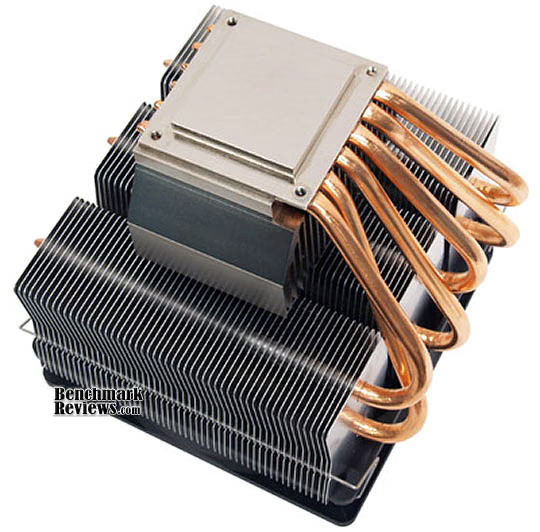
So many of today's aftermarket cooling solutions have adopted the 'U' tower design for their products that it's become a rare occasion to see a CPU cooler break the mold. The Scythe Kabuto cooler uses an included 120mm Slip-Stream 1300RPM fan, which is great for moderate airflow with minimal noise. Because of the large footprint, the Scythe Kabuto is relegated to using the stock Intel push-pin style clip mounting system. While this doesn't provide the best contact pressure, it does allow installation without removing the motherboard.
The Scythe Kabuto SCKBT-1000 is really one heatsink atop another, with a solid aluminum heatsink venting up from the base and connected to the large aluminum finsink by six large-gauge heatpipe rods. As of October 2009, the Scythe Kabuto SCKBT-1000 kit is available at NewEgg for $44.99.
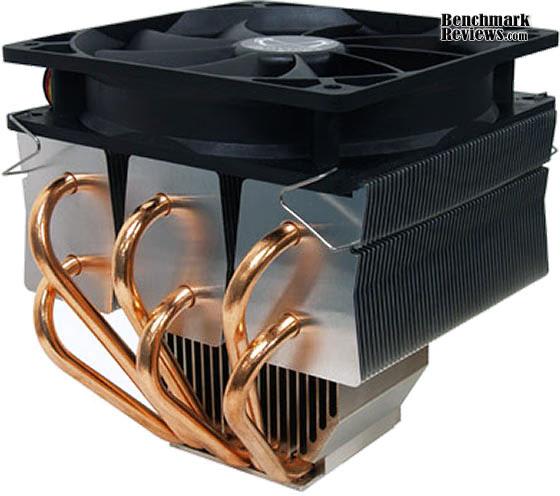
Scythe Kabuto Features
-
Top Mount Fan
The Slip Stream 120 mm PWM fan mounted on top of the cooler is suited both to transport the heat of the CPU cooler away and to cool down sensitive components of the mainboard. -
M.A.P.S. (Multiple Pass-Through Airflow Structure)
The newly developed M.A.P.S. (Multiple Airflow pass-through structure) is a completely new fin structure, where the airflow generated by the Scythe Slip Stream 120 mm PWM fan can be used perfectly. -
4-Way Mounting
By orientating the fixing holes of the mounting clips in a square, users can mount the heatsink in four different ways.
SCKBT-1000 Specifications
| Name: | KABUTO | |
|---|---|---|
| Model: | SCKBT-1000 | |
| Manufacturer: | Scythe Co., Ltd. Japan | |
| Heatsink | Dimension: | 124 x 133 x 132 mm |
| 4.88 x 5.24 x 5.20 inch | ||
| Weight: | 730 g (without accessory) | |
| 25.74 oz (without accessory) | ||
| Fan | Dimension: | 120 x 120 x 25 mm |
| Weight: | 115 g | |
| Scythe Slip Stream PWM 1.300 rpm | ||
| Speed: | 300 ~ 2,500 rpm (regulated via PWM) | |
| Noise Level: | 0 - 26,5 dBA | |
| Air Flow | 0 - 126 m³/h = 0 - 74.25 CFM | |
| Bearing: | Sleeve Bearing | |
About Scythe USA
So who is Scythe? What do they do? Many of you are asking this question while surfing our website. Scythe Co., Ltd. (Registered & incorporated in Tokyo Japan) originally started in Akihabara Electric Town located in Tokyo Japan, where visitors can find the latest electric products from computer parts and accessories to the world's most advanced cellular phones with video camera capabilities, small displays and the ability to play movies!
Scythe Co., Ltd., began its operation and business in November, 2002 as a distributor and manufacture of PC parts & gaming devices for "DIY PC Experts!". For more information about Scythe Japan HQ, please visit the website at: www.scythe.co.jp (If you read Japanese!). Scythe's first venture was to manufacture a super powerful YET super quiet CPU cooler (Scythe Kamakaze CPU cooler), and with the great success of this Kamakaze CPU cooler, Scythe became recognized as the leading CPU cooler supplier in Japan's Akihabara Electric Town. Shortly there after, due to popular demand, Scythe began exporting products all over the world.
In April of 2004 Scythe USA began local operations by establishing an office in Northern California. In October of 2004 Scythe USA moved operations to LA in order to work more closely with manufactures and streamline logistics to better service our US based partners. Have you seen/heard anything interesting, from Japan's Akihabara electric town that you'd like us to import to the US? Let us know! We'd love to hear from you!
Scythe Mugen-2 SCMG-2000
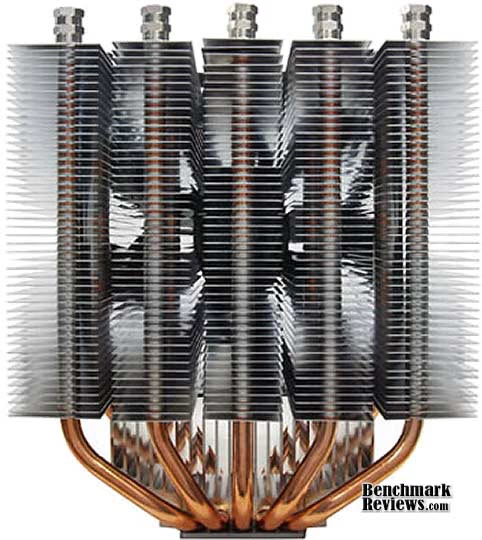
Scythe has been a premium brand name in the aftermarket cooling industry for many years now, and has earned a reputation among enthusiast and overclockers for their giant-sized cooling solutions. The Scythe Mugen 2 is one of the largest air-cooled heatsinks Benchmark Reviews has tested... at least since the original Scythe Mugen Infinity project. Aside from splitting the heatsink into five smaller groups of fins, these two coolers share almost identical design.
The Scythe Mugen 2 includes a single Scythe Slip-Stream cooling fan, but the large SCMG-2000 unit can accommodate two 120mm cooling fans total (presuming the enclosure will support the area needed). Although the Mugen 2 utilizes a high-pressure bolt-through mounting system, the entire LGA1366 socket assembly needed to be removed in order to facilitate heatsink installation.
Similar to other Scythe coolers, the Mugen-II SCMG-2000 is really one heatsink atop another. A solid aluminum heatsink venting up from the base is connected by five large-gauge heatpipe rods to a group of five aluminum finsinks. Each finsink segment helps to separate the heat-pipe rods, and isolate heat distribution. How effective this concept is over the previous design will soon be revealed. The Scythe Mugen 2 SCMG-2000 kit is available at NewEgg for $34.99.
EDITOR'S NOTE: The Scythe Mugen-2 Revision B model SCMG-2100 heatsink is identical to the first version, model SCMG-2000. The only difference is that Mugen-2 Rev. B uses a newly developed F.M.S.B. (Flip Mount Super Back-Plate) for more convenient mounting onto the motherboard. There should not be any cooling performance between these two models, despite marketing hype.
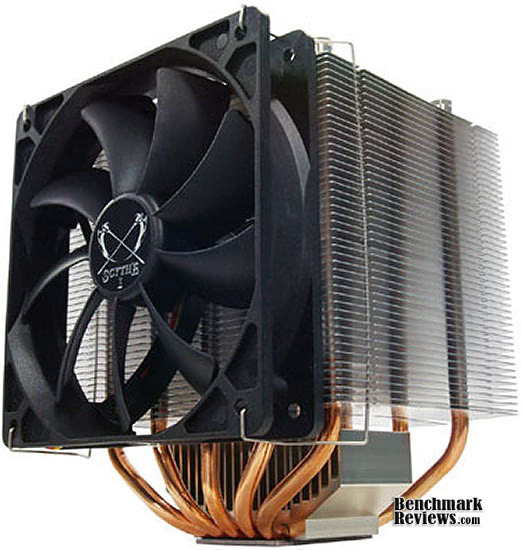
Long expected and now finally here: Scythe Mugen 2 CPU cooler is the consistent further development of the award-winning Mugen CPU cooler. Several features make this cooler the perfect solution for silent users and overclockers! In a nearly 1-year development period, the concept of Mugen was completely revised and further developed. Mugen 2 is on the latest state of technology and was produced using highest Japanese quality standards.
Scythe Mugen 2 Features
-
F.M.S.B. (Flip Mount Super Back-Plate)
The newly developed F.M.S.B. (Flip Mount Super Back-Plate) both improves the compatibility and mounting of the cooler with the motherboard. With this system, a solution was developed which is not using push pins but is instead based on a Back Plate/screws mounting set. Of course, Mugen 2 is compatible with all the current sockets, including the new Intel Socket LGA1366. -
Multi Fan Mount Structure
As with the former Mugen it is possible to mount the supplied fan in four different directions. By this, the user can arrange the air flow to the circumstances of his deployment area. Furthermore, a maximum of 4 fans be installed, the needed fan clips have to be bought separately. -
M.A.P.S. (Multiple Airflow Pass-Through Structure)
The newly developed M.A.P.S. (Multiple Airflow pass-through structure) is a completely new lamellar structure, where the airflow generated by the Scythe Slip Stream 120 mm PWM fan can be used perfectly
SCMG-2000 Specifications
| Name: | MUGEN-2 | |
|---|---|---|
| Model: | SCMG-2000 | |
| Manufacturer: | Scythe Co., Ltd. Japan | |
| Heatsink | Dimension: | 130 x 100 x 158 mm |
| 51.2 x 39.4 x 62.2 inch | ||
| Weight: | 870 g | |
| 30.7 lb | ||
| Baseplate-Material: | Nickel-plated copper | |
| Fan | Dimension: | 120 x 120 x 25 mm |
| 4 3/4 x 4 3/4 x 1 inch | ||
| Weight: | 115 g | |
| 0.25 lb | ||
| Speed: | 324 ~ 1,200 rpm (±10%) PWM Function |
|
| Noise Level: | 0 - 26.50 dBA | |
| Air Flow | 0 - 74.25 CFM 0 - 126 m³/h |
|
| Bearing: | Sleeve Bearing | |
About Scythe USA
So who is Scythe? What do they do? Many of you are asking this question while surfing our website. Scythe Co., Ltd. (Registered & incorporated in Tokyo Japan) originally started in Akihabara Electric Town located in Tokyo Japan, where visitors can find the latest electric products from computer parts and accessories to the world's most advanced cellular phones with video camera capabilities, small displays and the ability to play movies!
Scythe Co., Ltd., began its operation and business in November, 2002 as a distributor and manufacture of PC parts & gaming devices for "DIY PC Experts!". For more information about Scythe Japan HQ, please visit the website at: www.scythe.co.jp (If you read Japanese!). Scythe's first venture was to manufacture a super powerful YET super quiet CPU cooler (Scythe Kamakaze CPU cooler), and with the great success of this Kamakaze CPU cooler, Scythe became recognized as the leading CPU cooler supplier in Japan's Akihabara Electric Town. Shortly there after, due to popular demand, Scythe began exporting products all over the world.
In April of 2004 Scythe USA began local operations by establishing an office in Northern California. In October of 2004 Scythe USA moved operations to LA in order to work more closely with manufactures and streamline logistics to better service our US based partners. Have you seen/heard anything interesting, from Japan's Akihabara electric town that you'd like us to import to the US? Let us know! We'd love to hear from you!
Spire TherMax II
Spire doesn't have a big brand-name presence in North America, at least not to the extent that SunbeamTech or SilenX enjoy. Regardless, the design of their TherMax II will be stikingly familiar to enthusiasts and overclockers who follow the products closely. Identical in core design to the Sunbeam Core Contact Freezer CR-CCTF and SilenX IXC-120HA2, the TherMax II (SP679S1-PCI) is practically the same product with a different fan. Like the Core Contact Freezer it closely imitates, the TherMax II is restricted to allow only one cooling fan to be attached onto the finsink assembly (the IXC-120HA2 nicely fits two).

Aside from its shared lineage, the TherMax II offers the effective Heat-pipe Direct Touch design, with four exposed copper 8mm heat-pipes rods in a "U" configuration ready to wick away the heat into 55 Aluminum fins. Looking up close at the TherMax II, there are no exposed heat-pipe ends at the top of the heatsink. This allows the SP679S1-PCI to fit inside some of the more slim mid-tower cases without rubbing the edges and possibly allowing the gas/liquid to escape from an opened rod. A well-designed high-pressure clip mounting system is used to secure the TherMax II onto the CPU without removing the motherboard.
Benchmark Reviews has tested the Spire TherMax II SP679S1-PCI with both the included cooling fan and a single Yate Loon D12SH-12 (88 CFM @ 40 dbA) for comparison.

The universally compatible TherMax II is the big brother of the original TherMax cooler innovation by Spire. Designed with four 8mm copper U shaped heat-pipes enclosed by fifty-five aluminum stacked Micro-fins. The heat-sink base is equipped with the latest Direct-Touch heat-pipe technology providing the optimal cooling configuration. The TherMax II fits nearly every processor available on the market today. Its cooling capacity ranges all the way from low end Micro-processors, up to today's hottest 150W dual-core processors. This cooler has it all! Equipped with Spire's signature UV-reactant BlueStar fan, this towering cooler is built to last!
TherMax II Features:
-
Four 8mm all copper u shaped heat-pipes
-
All new Direct-Touch heat-pipe technology
-
UV-reactant 120mm BlueStar fan design
-
Amazingly silent at just 29.0 dBA
-
55 stamped Aluminum Micro-Fin's
-
Supports the latest Intel & AMD micro-processors
SP679S1-PCI Specifications
-
Heat sink Dimensions: 125×77×155 mm (l × w × h)
-
12VDC Fan Dimensions: 120×120×25 mm
-
Bearing: Sleeve bearing
-
Rated speed: 2200 RPM +/-10%
-
Rated power: 4.2 W
-
Noise level: 34 dBA
-
Air flow: 93.3CFM at 2,200 RPM
-
Current: 0.35 A
-
Connector: 2510/3p
-
Application:
-
Intel : Core 2 Duo ~ 3 GHz (775 Dual-core)
-
Intel : Core 2 Extreme ~ 3.2 GHz (775 Dual-core)
-
Core 2 Quad ~ 2.66 GHz (775 Quad-core)
-
Core i7 ~ 3.2 GHz 1366
-
LGA775 ~ 3.73 GHz (Prescott)
-
Pentium D ~ 3.4 GHz (775 Dual-Core)
-
Pentium EE ~ 3.73 GHz (775 Dual-Core)
-
AMD : Athlon 64 X2 ~ 9500 GHz (AM2)
-
Athlon X2 ~ 9500 GHz (AM2)
-
Phenom X4 ~ 9600 GHz (AM2/AM3)
-
-
Thermal resistance: 0.14 °C/W
-
Thermal paste type: Stars-420 white grease (Injection Tube,0.5g)

About Spire Corporation
Spire - Powered by Innovation: Founded in 1991, Spire is a leading premier brand for computer thermal solutions, power supplies and enclosures. In order to meet the requirements and demands of the global market, we have established our production facilities and corporate office in ShenZhen, China. Our overseas branches are located in USA, The Netherlands, U.K, Germany, France, Taiwan, Japan and Brazil. All locations are strategically located to better work with the customers we serve.
At Spire we continually strive for success and quality products. To improve and develop a wide range of computer products, we have invested heavily in our quality manufacturing process and Research & Development. Our objective is to provide top quality products for national distributors as well as for ODM and OEM clients. Our focus is to build on the current success of the Spire brand so that our brand is recognized world wide as a provider of top quality computing solutions. We will continue to work to maintain the satisfaction of our customers and share the knowledge of our experts - Spire 'Powered by Innovation'.
Titan FENRIR TTC-NK85TZ
If you've been keeping tabs on CPU coolers, you've probably lost count on the number of products that 'borrow' their design from another manufacturer. The truth is that nobody is borrowing anything, and that everyone is licensing the patent from the creator (usually out of Taiwan). Similar to the TherMax II we explored in a previous section, the Titan FENRIR TTC-NK85TZ also shares design similarities with the Sunbeam Core Contact Freezer CR-CCTF and SilenX IXC-120HA2. Titan makes the same mistake as Sunbeam and Spire, and restricts the FENRIR to accept only one cooling fan.

Heat-pipe Direct Touch design technology is the standard for most modern coolers, and with four exposed copper 8mm heat-pipes rods in a "U" configuration the Titan FENRIR takes full advantage. A well-designed high-pressure clip mounting system is used to secure the TTC-NK85TZ onto the CPU without removing the motherboard.
Benchmark Reviews has tested the Titan FENRIR with both the included 120mm cooling fan and a high-output Yate Loon D12SH-12 (88 CFM @ 40 dbA) for comparison.
TTC-NK85TZ Specifications
-
Outline Dimension: 156 x 124 x 107mm
-
Fan Dimension: 120 x 120 x 25 mm
-
Rated Voltage 12V DC
-
Rated Cunent: 0.32A
-
Power Consumption: 3.84W
-
Rated Speed: 800~2200 RPM ±10%
-
Airflow: 33.2~78.41CFM
-
Static Pressure: 0.02~ 0.11 InchH2O
-
Noise Level: <17.2 ~ <39dBA
-
Bearing Type: Z-axis Bearing
-
Lifetime: 60,000 HOURS

About TITAN Technology Limited
TITAN Technology Limited was established in Taiwan by a group of progressive and experienced engineers in their respective fields. Since our establishment with over 16 years of manufacturing experience with high quality cooling devices for various kinds of PCs, we have successfully gained worldwide recognition for our innovative designs.
TITAN is headquartered in Taiwan and has its own two factories, total approximate 20,000 square meters. Both are located in Guang Dong- China, China. There are around 1200 employees, which provide combined efforts a production capacity of output 1.2 million units per month. TITAN is also leading manufacturer of various thermal products such as: CPU Coolers, VGA Coolers, H.D.D coolers, System Blowers, D.C fans, Heatsinks in comprehensive solution of cooling systems in different applications of PC systems. We have just launched the newest design; the superior water cooling kit(case), annual sales US$57,000,000 combined water and air-cooling in the world; the performance is excellent to reduce heat problems and operates at minimal noise levels. To keep advance with the fast changing market; new models are launched every 1-2 months to meet your requirements.
We have invested our resources on research & development and improved our innovative Total PC thermal solutions. We would like to extend our warmest invitation to any customers who wish to visit us and inspect our operations at our operation; we will ensure that we do our best to meet the needs of our customers. Come and share our experience! We are now showing our most warmly welcome to invite you to visit us for more details and information. Please assure that whichever of our services you decide to use, you will receive our immediate and careful attention.
Tuniq Tower 120 Extreme
Most overclockers still consider the original Tuniq Tower 120 CPU cooler to be a fan favorite, which is exactly why Sunbeamtech has introduced its successor: the Tuniq Tower 120 Extreme. While the CR-T120-EX-BK kit offers several improvements over the previous design, there's no getting around motherboard removal to install the Tuniq Tower 120 Extreme because of the tight fitting thumb-screws that must be secured under the heatsink.
As of October 2009, the Tuniq Tower 120 Extreme is available from FrozenCPU for $64.99.
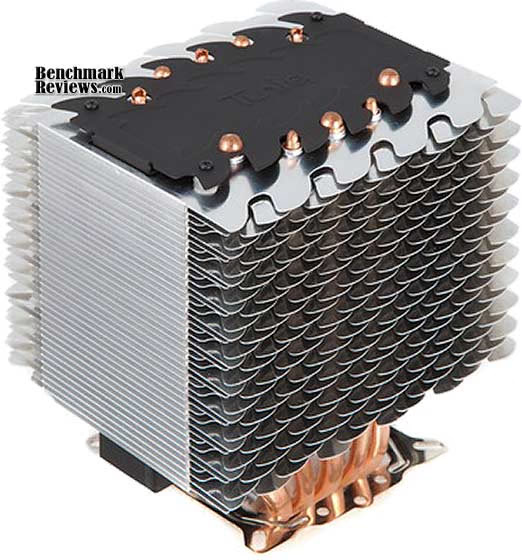
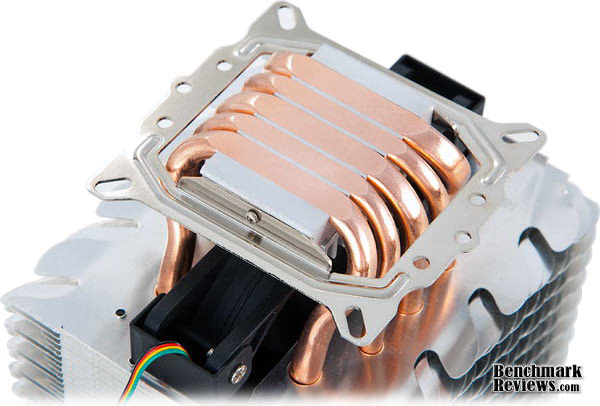
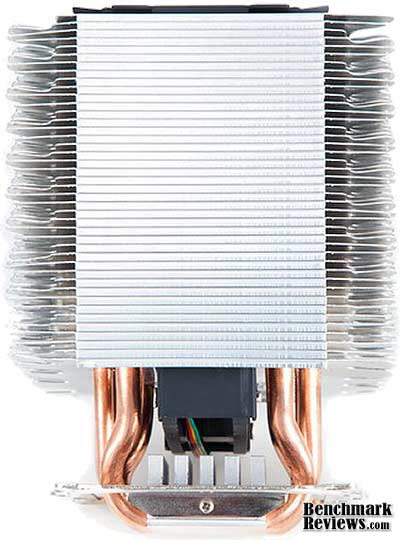
The performance king has returned! The much praised Tuniq Tower 120 has gone through a radical redesign and not only looks cooler but its performance has been boosted. The unique wave-like fins display a tremendous visual impact and increase the air-contact area for an unprecedented thermal performance. The nickel-plated surface combined with the LED fan creates a breath taking visual effect!
To ensure that the maximum cooling performance is obtained, we have also included our highest performing thermal compound, the TX-3. Furthermore, our unique adjustable fan controller places the control in your hands!
Tower 120 Extreme Features
-
Three High Performance 8mm and two High Performance 6mm U-shaped Heat-pipes
-
Silent 120mm MFDB Fan (Magnetic Fluid Dynamic Bearing)
-
Includes TX-3 Thermal Grease (0.33ml/1g)
-
Heat-pipe Direct Touch 'Core Contact' Design
| Dimensions (mm) | 131(L) × 112.31(W) × 150.7(H) |
| Weight: | 775g (without fan) |
| Heatpipe | Ø 8mm x 3 + Ø 6mm x 2 |
MFDB fan Specifications: |
|
| Bearing Type: | Magnetic Fluid Dynamic Bearing |
| Rated Voltage: | 12V DC |
| Rated Current: | 0.16A (Max) |
| Air Flow: | 90.65 CFM (Max) |
| Noise: | 16~20 +/- 10%dBA |
| Speed: | 1000~2000 RPM |
| Life: | 50,000 hours |
| Thermal Resistance | 0.092 (°C / W) |
About Tuniq Co., Ltd.
Tuniq was formed as a division of Sunbeamtech and took on a whole new direction in product designs. We at Tuniq aim to provide authentic performance through a minimalist approach by stripping down the unnecessary components in product designs. Our research and development team consists of members who have over a decade of experience as well as young designers who are able to think outside of the box. It is this unique merge of experience and fresh ideas that enables us to bring to our customers such exquisite, elegant, top-quality products.
We feel that product design should be Zen-like: simple, functional, harmonious and without frails. Each product from Tuniq aims to combine the virtues of high performance, elegant design, and extraordinary value. When handling a Tuniq product, you will appreciate its impeccable finish and will be pleasantly amazed by its quality and performance.
With the multitude of awards and acclaims that each of our products has received, we have proven that our vision and approach is the right one and we will continue to provide our valued customers with new and better products.
Xigmatek Thor's Hammer
Our first look at the Xigmatek Thor's Hammer S126384 reveals a complex array of densely double-stacked fins atop a double-layer of heat-pipe rods. The finish is comprised of a black nickel coating, which makes the S126384 surprisingly heavy at 800 grams (before mounting clip brackets). Xigmatek doesn't include a fan, because they feel that this is their flagship cooler and it should be matched with a premium after-market fan of the overclockers choice. While the CAC-SXHH7-U01 kit comes with enough rubber retaining plugs for two fans, we will compare our group with on one forward mounted fan blowing to the rear of the case.
The concept behind the S126384 is that it relies on ultra-heavy thermal loading to take advantage of its double-layer heatpipe architecture. Because of the very dense fins array, and the four-pipe contact base, Thor's Hammer is really best suited for larger AMD Phenom II and Intel Core i7 processors which feature a larger IHS (Integrated Heat Spreader) surface area. We tested the group on the Core i7/X58 platform, but in retrospect the AMD Phenom II X4 940 Black Edition probably would have been more fun and offer a better contact surface with the enlarged base of these coolers.
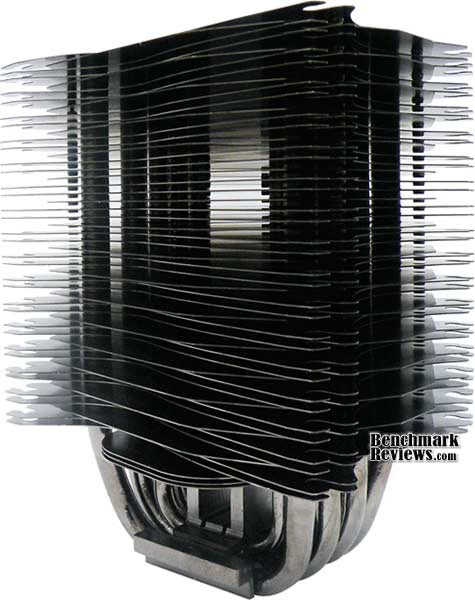
All forty-nine of the blackened aluminum-alloy fins are met by the seven heat-pipe rods, which turn into fourteen different heat-pipe cooling ends. Because of the staggered fins array, high overclocks could potentially see better cooling from the static pressure a 120x120x35mm fan can provide. The 120x120x25mm profile is standard for most Xigmatek coolers, but don't feel limited to using this profile if your case can afford the space. The total width with two (120x120x)25mm fans is 140mm, which is slightly longer than the width, but adding 35's would make this a very long cooler.
The Thor's Hammer S126384 is meant to compete with the most elite CPU coolers known to the industry, but that's what every product we test pretends to claim. In our next few sections, we'll peek at how well the S126384 does against the very best LGA1366 CPU coolers. At the time of this article, the Xigmatek Thor's Hammer S126384 kit was available at NewEgg for $64.99.
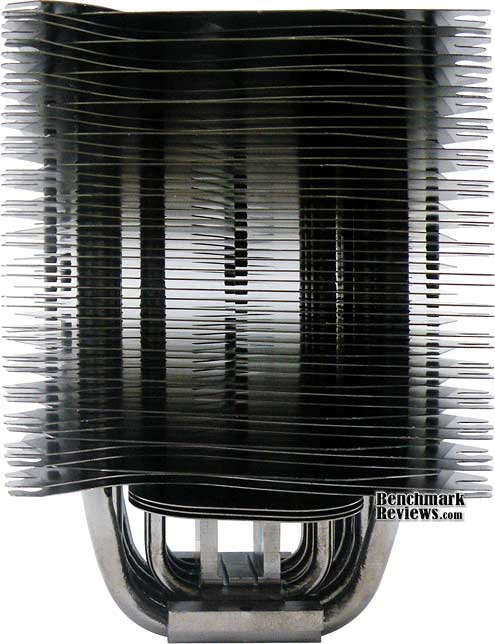
Thor's Hammer S126384 Features
-
H.D.T. (Heat-pipe Direct Touch) technology
-
Double-layer HDT and double-heatpipe performance
-
Black-Nickel plating throughout the entire cooler
-
Anti-vibration rubber fan mounting design
-
Includes Crossbow ACK-I7363 bolt-through mounting kit
-
Passive cooler design with optional fan installation for extra cooling
CAC-SXHH7-U01 Specifications
-
Product Name: Thor's Hammer S126384
-
Product Number: CAC-SXHH7-U01
-
Outside Dimension (W) x (H) x (D) mm 120 x 90 x 160
-
Heat Sink Material: Aluminum Alloy
-
4pcs Φ8mm Primary heat-pipe group
-
3pcs Φ6mm Secondary heat-pipe group

About Xigmatek Co., Ltd.
XIGMATEK, a European company, was established in 2005 with the aim of becoming one of the world leaders in the Thermal field. In XIGMATEK, the major members of management have many years experience in Thermal industry, PC, manufacturing and other applications. With our fruitful experience, we have full confidence that we can provide not only the best, reliable, environmental and performing Thermal/Cooling systems but excellent service also to fulfill global user demand.
Purpose and targets of becoming one of the worlds leaders in thermal PC Industry were set for Xigmatek Co. Ltd in 2005, the founding year! To ensure reaching this project aim, Xigmatek's management followed up with hard work, experience and customer friendly business style. 
Honing one of the world's most efficient manufacturing operations, Integration Presence in major economic regions, being tied up with most important strategic alliances between suppliers and academia and further majority investments in R&D are some of Xigmatek's aggressive enhancement strategies.
Combining the cream of product designers, R&D engineers and technical people (main team in Germany) Xigmatek is proud and full of confidence to offer excellent quality products and service to cover the customers requirements and demands. Within the standard channels as the consumer market and the distributing electrical appliances, Xigmatek will keep on focusing on development and set up even new sales channels to comply with ever-changing demands and requirements. Several years of experiences company background in Thermal IT industry provides our customer the best, reliable, environmental and performing Thermal/Cooling Systems including excellent Service to fulfill global users and customers demands.
ZEROtherm Nirvana NV120 Premium
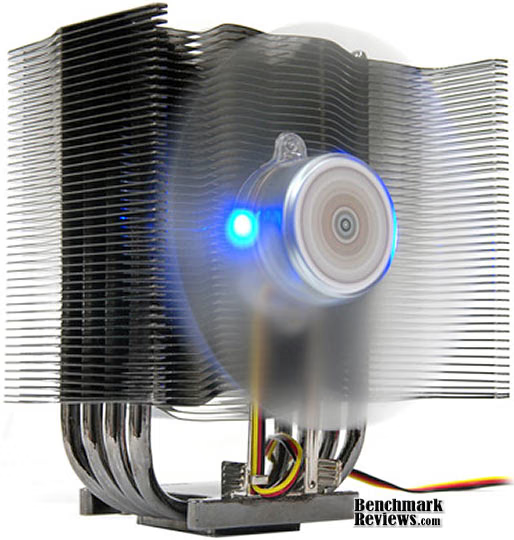
The ZEROtherm Nirvana NV120 Premium is the embodiment of everything effective from cooler designs, taking only what works and combining it into a package product that tames the most unique hardcore system. The Apack ZEROtherm Nirvana NV120 Premium is identical to the Nirvana NV120 PWM, sharing identical construction and design. Aluminum fins surround the sides of an embedded 120mm fan, and the uneven pattern of each aluminum fin plate creates a Honeycomb structure for optimized air flow. Four heat-pipe rods span from up in a traditional 'U' tower design, with each of the four heat-pipe ends running directly behind the airflow path of the next. The fan uses the Pulse-Width Modulation (PWM) to control rotational speed, and operates between 900-1800RPM.
The ZEROTherm NV120 features a bolt-through mounting clip system, which fits all Intel LGA775/LGA1366 sockets, as well as AMD 939/940/AM2?AM2+/AM3 sockets. The ZEROTherm website claims that the Nirvana NV120 is not compatible with Intel 1156/478/771/603/604 and AMD Socket 754/F/A motherboards, which is unfortunate for legacy hardware users. As of October 2009 the ZEROtherm Nirvana NV120 was available at NewEgg for $49.99.
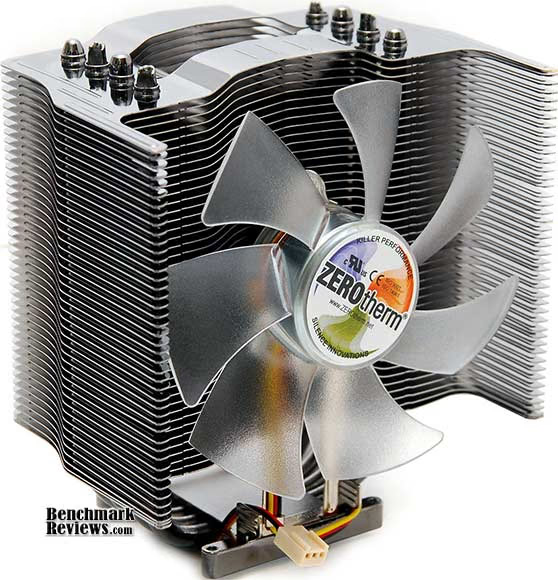
ZEROtherm Nirvana Features
-
Effective 8-line Heat-pipe design
-
Honeycomb structure for optimized air flow. More than 6,748 §² heat dissipation area
-
120mm fan for max. air-flow (up to 84.7 CFM)
-
Manual fan speed Controller Adapted
-
Polished NI-Plated Copper Base
-
Supports Latest Intel & AMD CPUs
NV120 PWM Specifications
| Dimensions | 128 X 95 X 150 mm (5.04 X 3.74 X 5.83 inch) | |
|---|---|---|
| Weight | 638g (Without Components) | |
| Matreials | Base | Pure Copper |
| Heat pipe | Pure Copper | |
| Fin | Cr/Ni Plated Alunium | |
| Heat Dissipation Area | 6,748 cm÷ (1,046 inch÷) | |
| Cooling Capacity | Over 150W | |
| Fan Size | 120 X 25 mm (4.72 X 0.98 inch) With 2 Blue LEDs | |
| Fans Speed | 1,000 ~ 2,300 rpm (¡¾ 10%) | |
| Acoustic Noise |
19 ~ 39 dBA (¡¾ 10%) |
|
| Bearing Type |
UFO Bearing |
|
| Operating Voltage |
5.0 ~ 13.8 VDC |
|
| Airflow Rate | Max. 84.7 CFM | |
| Fan Controller | Range | 5.0 ~ 11.5V |
| Installation | Place it anywhere using the 4pcs of mounting tape | |
| Extension Cable | 1,000mm (39.37 inch) | |
About Apack, Inc.
ZEROTherm is the cooling product brand name owned by APack, Inc.
The name ZEROTherm was christened by Dr. Song, our CEO and lifelong engineer. For our first product he said, "With our first retail product we need exceed expectations, so make it happen." While ZEROTherm represented our engineering goal to build a competitive cooler, our design point was that we were to use our first product as a "first flight" into the retail market. Of course, we've done one-of-a-kind thermal cooling solutions that had exact specs to meet and restrictions to consider, so we wanted to include a design that expressed our own craftsmanship as well.
So the butterfly design was to be incorporated into our first product because it represents our first flight into the retail market, but also like a butterfly, our company APACK was changing from a very comfortable OEM market to the very open world-wide market.
Of course every product can be better and it's something that we are working hard on, but maybe people will not understand the butterfly design or be critical of it. But for us, it was part of an effort to show our ability in design as well as in engineering. We hope that all ZEROtherm products can show our commitment to engineering value in price, design and performance. ZEROtherm is committed to try everyday not to just meet your expectations, but to put all our efforts into exceeding them.
Surface Preparation
Processor and CPU cooler surfaces are not perfectly smooth and flat surfaces, and although some surfaces appear polished to the naked eye, under a microscope the imperfections become clearly visible. As a result, when two objects are pressed together, contact is only made between a finite number of points separated by relatively large gaps. Since the actual contact area is reduced by these gaps, they create additional resistance for the transfer of thermal energy (heat). The gasses/fluids filling these gaps may largely influence the total heat flow across the surface, and then have an adverse affect on cooling performance as a result.
Surface Finish Impact
CPU coolers primarily depend on two heat transfer methods: conduction and convection. This being the case, we'll concentrate our attention towards the topic of conduction as it relates to the mating surfaces between a heat source (the processor) and cooler. Because of their density, metals are the best conductors of thermal energy. As density decreases so does conduction, which relegates fluids to be naturally less conductive. So ideally the less fluid between metals, the better heat will transfer between them. Even less conductive than fluid is air, which then also means that you want even less of this between surfaces than fluid. Ultimately, the perfectly flat and well-polished surface is going to be preferred over the rougher and less even surface which required more TIM (fluid) to fill the gaps.
This is important to keep in mind, as the mounting surface of your average processor is relatively flat and smooth but not perfect. Even more important is the surface of your particular CPU cooler, which might range from a polished mirror finish to the absurdly rough or the more complex (such as Heat-Pipe Direct Touch). Surfaces with a mirror finish can always be shined up a little brighter, and rough surfaces can be wet-sanded (lapped) down smooth and later polished, but Heat-pipe Direct Touch coolers require some extra attention.
To sum up this topic of surface finish and its impact on cooling, science teaches us that a smooth flat mating surface is the most ideal for CPU coolers. It is critically important to remove the presence of air from between the surfaces, and that using only enough Thermal Interface Material to fill-in the rough surface pits is going to provide the best results. In a perfect environment, your processor would mate together with the cooler and compress metal on metal with no thermal paste at all; but we don't live in perfect world and current manufacturing technology cannot provide for this ideal environment.
Mounting Pressure
Probably one of the most overlooked and disregarded factors involved with properly mounting the cooler onto any processor is the amount of contact pressure applied between the mating surfaces. Compression will often times reduce the amount of thermal compound needed between the cooler and processor, and allow a much larger metal to metal contact area which is more efficient than having fluid weaken the thermal conductance. The greater the contact pressure between elements, the better it will conduct thermal (heat) energy.
Unfortunately, it is often times not possible to get optimal pressure onto the CPU simply because of poor mounting designs used by the cooler manufacturers. Most enthusiasts shriek at the thought of using the push-pin style clips found on Intel's stock LGA775 thermal cooling solution. Although this mounting system is acceptable, there is still plenty of room for improvement.
Generally speaking, you do not want an excessive amount of pressure onto the processor as damage may result. In some cases, such as Heat-pipe Direct Touch technology, the exposed copper rod has been pressed into the metal mounting base and then leveled flat by a grinder. Because of the copper rod walls are made considerably thinner by this process, using a bolt-through mounting system could actually cause heat-pipe rod warping. Improper installation not withstanding, it is more ideal to have a very strong mounting system such as those which use a back plate behind the motherboard and a spring-loaded fastening system for tightening. The Noctua NH-U12P is an excellent example of such a design.
In all of the tests which follow, it is important to note that our experiments focus on the spread pattern of thermal paste under acceptable pressure thresholds using either a push-pin style mounting system or spring-loaded clip system. In most situations your results will be different than our own, since higher compression would result in a larger spread pattern and less thermal paste used. The lesson learned here is that high compression between the two contact surfaces is better, so long as the elements can handle the added pressure without damaging the components.
Thermal Paste Application
The entire reason for using Thermal Interface Material is to compensate for flaws in the surface and a lack of high-pressure contact between heat source and cooler, so the sections above are more critical to good performance than the application of TIM itself. This section offers a condensed version of our Best Thermal Paste Application Methods article.
After publishing our Thermal Interface Material articles, many enthusiasts argued that by spreading out the TIM with a latex glove (or finger cover) was not the best way to distribute the interface material. Most answers from both the professional reviewer industry as well as enthusiast community claim that you should use a single drop "about the size of a pea". Well, we tried that advice, and it turns out that maybe the community isn't as keen as they thought. The example image below is of a few frozen peas beside a small BB size drop of OCZ Freeze TIM. The image beside it is of the same cooler two hours later after we completed testing. If there was ever any real advice that applies to every situation, it would be that thermal paste isn't meant to separate the two surfaces but rather fill the microscopic pits where metal to metal contact isn't possible.
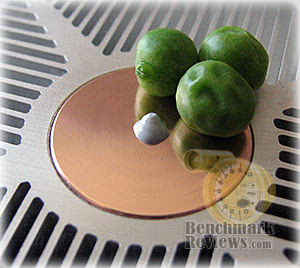

After discussing this topic with real industry experts who are much more informed of the process, they offered some specific advice that didn't appear to be a "one size fits all" answer:
-
CPU Cooling products which operate below the ambient room temperature (some Peltier and Thermo-electric coolers for example) should not use silicon-based materials because condensation may occur and accelerate compound separation.
-
All "white" style TIM's exhibit compound breakdown over time due to their thin viscosity and ceramic base (usually beryllium oxide, aluminum nitride and oxide, zinc oxide, and silicon dioxide). These interface materials should not be used from older "stale" stock without first mixing the material very well.
-
Thicker carbon and metal-based (usually aluminum-oxide) TIM's may benefit from several thermal cycles to establish a "cure" period which allows expanding and contracting surfaces to smooth out any inconsistencies and further level the material.
The more we researched this subject, the more we discovered that because there are so many different cooling solutions on the market it becomes impossible to give generalized advice to specific situations. Despite this, there is one single principle that holds true in every condition: Under perfect conditions the contact surfaces between the processor and cooler would be perfectly flat and not contain any microscopic pits, which would allow direct contact of metal on metal without any need for Thermal Interface Material. But since we don't have perfectly flat surfaces, Thermal Material must fill the tiny imperfections. Still, there's one rule to recognize: less is more.
Cooler Test Methodology
Benchmark Reviews has been obsessed with testing CPU coolers over the few years. We've solicited suggestions from the enthusiast community, and received guidance from some of the most technical overclockers on the planet. As a result, our testing methodology has changed with every edition of our Best CPU Cooler Performance series. Because of this, each article is really its own stand-alone product, and cannot be fairly compared to the others. This article is going to be a perfect example of that principle, although certain tenants still hold true. Benchmark Reviews continues to test CPU coolers using the stock included fan (whenever applicable), and then replaces it with a high-out fan for re-testing.
Manufacturers are not expected to enjoy this sort of comparison, since we level the playing field by replacing their included fan with a common unit which we then use for every CPU cooler we test. Manufacturers regularly include fans with their CPU cooler products, and more often than not these fans are very high RPM units which offer great airflow at the expense of an obnoxiously loud noise level. By using the same model of cooling fan throughout our testing, we can assure our results are comparable across the board. This is one of the more significant changes we have made to our test methodology, since many of the benchmark tests we have conducted in the past have compared the total package. Ultimately we're more interested in the discovering the best CPU cooler performance and we believe that you'll feel the same way.
Testing was conducted in a loosely scientific manner. Ambient room temperatures levels were held to within one degree of fluctuation measured at static point beside the test equipment with a calibrated digital thermometer. All coolers had their original manufacturer-supplied thermal material removed and replaced with a product of our choosing listed in the support equipment section below. Each product then received the same amount of Thermal Interface Material (specified below), which amounted to roughly a BB-sized drop placed onto the center of the CPU. The CPU cooler product being tested was then laid down flat onto the CPU, and compressed to the motherboard using the supplied retaining mechanism. If the mounting mechanism used only two point of force, they were tightened in alternation; standard clip-style mounting with four securing points were compressed using the cross-over method. Once installed, the system was tested for a baseline reading prior to testing.
At the start of each test, the ambient room temperature was measured to track any fluctuation throughout the testing period. EVEREST Ultimate Edition v5.02.1750 by Lavalys was then utilized to create core loads and measure each individual CPU core temperature. It's important to note that software-based temperature reading reflects the thermal output as reported from the CPU to the BIOS. For this reason, it is critically important (for us) to use the exact same software and BIOS versions throughout the entire test cycle, or the results will be incomparable. All of the units compared in our results were tested on the same motherboard using the same BIOS and software, with only the product itself changing in each test. These readings are neither absolute nor calibrated, since every BIOS is programmed differently. Nevertheless, all results are still comparable and relative to each products in our test bed.
One unfortunate problem is that CPU's report temperatures as a whole number and not in fractions. This in turn causes the motherboard BIOS and subsequent software applications such as EVEREST to also receive whole-number reports. Thankfully, EVEREST also does offer averages in the statistics panel, which gives us more precise readings. To further compensate for this, our tests were conducted several times after complete power down thermal cycles. Conversely, the ambient room temperature levels were all recorded and accurate to one-tenth of a degree Celsius at the time of data collection.
When each cooler is tested, Benchmark Reviews makes certain to keep the hardware settings identical across the test platform. This enables us to clearly compare the performance of each product under identical conditions. While the ambient room temperature did fluctuate between 20~21°C during testing, this would not be enough to impact our test results since only the thermal difference is reflected in the charts. For the purpose of this article, thermal difference (not the same as thermal delta) is calculated by subtracting the ambient room temperature from the recorded CPU temperature.
Support Equipment
-
EVEREST Ultimate Edition v5.02.1750 by Lavalys
-
Tuniq TX-3 (No curing time necessary or given)
All of our tests are now conducted using only the vertical motherboard orientations traditional to tower computer systems. At the start of our test period, the test system is powered on and EVEREST system stability tests are started with Stress CPU and Stress FPU options selected. For a minimum of sixty minutes (one hour) EVEREST loads each CPU core to 100% usage, which drives the temperature to its highest point. Finally, once temperatures have sustained a plateau, the ending ambient room temperature and individual CPU core levels are recorded thus completing the first benchmark segment.
The second test segment involves removing the stock cooling fan (while the system is still under load) and replacing it with a high-output 120 mm Yate Loon D12SH-12 cooling fan. The system is given thirty additional minutes with EVEREST loading the CPU cores before final temperature readings are taken and recorded.
The Accuracy Myth
All modern processors incorporate an internal thermal diode that can be read by the motherboards' BIOS. While this diode and the motherboard are not calibrated and therefore may not display the actual true temperature, the error is constant. This means that if the diode reports 40°C when it is actually 43°C, then it will also report 60°C when it is truly 63°C. Since the design goal of a thermal solution is to keep the CPU core within allowable temperatures, a processor's internal diode is the most valid means of comparison between different heatsinks, or thermal compounds. The diode and motherboard may be incorrect by a small margin in relation to an actual calibrated temperature sensor, but they will be consistent in their margin of error every time.
Test Results: Stock Cooling Fan
When it comes to personal computers, you could probably divide users into two separate groups for almost any one topic. This article is no different, and those two groups include both enthusiasts and overclockers. Hardcore overclockers and serious hardware enthusiasts may not consider the stock cooling results very interesting, but they're welcome to skip ahead into the next section where we add a high-performance fan and then add overclocked values. Believe it or not though, some people are on a budget and don't have the extra money to spend on aftermarket cooling fans or an additional bolt-through mounting kit; sometimes they just want good cooling right out of the box. This section is for them.
In regards to fan noise, there are those of us who want it quiet while other will tolerate an eardrum-ringing whine. Since noise is a problem and not a solution, I believe that most enthusiasts want as much performance as they can get without additional tweaking and time-intensive modifications. That's what this test section is all about: how the cooler performs out of the box. For the "Stock Cooling Fan" results, Benchmark Reviews tests our collection of LGA1366 CPU coolers for this article using the following criteria: Each cooler is tested with the manufacturer-included fan, so that performance will be relevant to consumers using the product in stock form.
In these stock-fan cooling tests, Benchmark Reviews tests each CPU cooler with the AMD Phenom II X4 965 overclocked to 4.0GHz at 1.55V. Benchmark Reviews has tested several new products (along with a few top-performers from the previous series) in stock form for the AMD AM2/AM3 socket results charted above. The performance results position the coolers in the following order, with the temperature difference noted (CPU core temp minus 20-20.7°C ambient room temp) beside them:
|
CPU Cooler |
Thermal Difference | |
|---|---|---|
| Zalman CNPS10X-Performa | 31.9°C over ambient | |
| Noctua NH-D14 (2x 140mm fans) | 32.9°C over ambient | |
| Scythe Mugen 2 SCMG-2000 | 33.1°C over ambient | |
| Titan FENRIR TTC-NK85TZ | 35.1°C over ambient | |
| Tuniq Tower 120 Extreme | 35.4°C over ambient | |
| CyberPowerPC XtremeGear HP-1216B | 37.2°C over ambient | |
| Zalman CPNS10X-Quiet | 38.1°C over ambient | |
| 3R System IceAge Prima Boss-II | 38.3°C over ambient | |
| Scythe Kabuto SCKBT-1000 | 38.4°C over ambient | |
| Spire TherMax II SP679S1-PCI | 38.6°C over ambient | |
| Thermaltake Contac-29 | 38.8°C over ambient | |
| Coolink Corator-DS | 38.8°C over ambient | |
| Xigmatek Balder SD1283 | 39.5°C over ambient | |
| Dynatron Genius G950 | 46.7°C over ambient | |
| ZEROtherm Nirvana NV120 Premium | 51.3°C over ambient | |
| Thermaltake SpinQ-VT | 68.0°C over ambient |
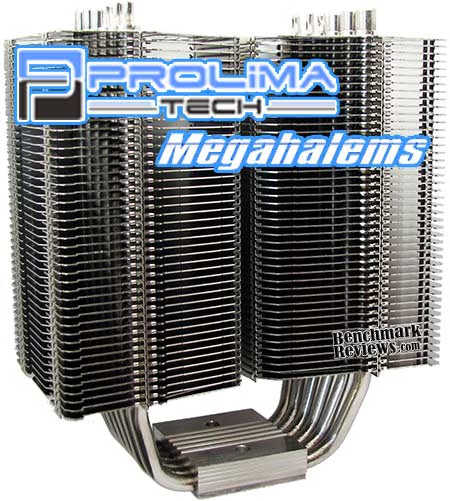
In stock form with a high-temperature overclock, there are more than a few aftermarket coolers that fail to perform when put to task. Consider this when you're paying for a new CPU cooler, because some are designed for looks while others are meant for performance, and seldom do both come in the same package. Please note that certain coolers have been excluded from this test because they do not come with a cooling fan (such as the Xigmatek Thor's Hammer). Other coolers, such as the Prolimatech Megahalems, Thermalright Ultra-120 eXtreme, and Cogage TRUE Spirit do not come with AMD mounting brackets and must be purchased separately.
Test Results: High-Output Fan
Overclockers are known for being particular to their equipment, which is why Benchmark Reviews changes our format with each new project. Although it's impossible to nail-down which fan is the overwhelming choice for overclocker project, most enthusiasts would agree that the higher the airflow the more appropriate the fan. Because of size and design constraints in most of these products, a 120x120x25mm fan is as large as we can go with our collection of CPU coolers. This section uses the high-output Yate Loon D12SH-12 cooling fan on each product tested. The D12SH-12 cooling fan forces an impressive 88 CFM of air at a moderately noisy 40 dBA, and performs better than several 120x120x38mm fans we've tested (more on that later). In my experience, the Yate Loon D12SH-12 is one of the best 120mm cooling fans available in regards to the noise to performance ratio.
While our stock-fan performance tests utilize aftermarket CPU coolers in stock form, this section makes use of Yate Loon D12SH-12 cooling fan to tame the 4.0 GHz overclock at 1.55V on the AMD Phenom II X4 965. While some enthusiasts have dared to trespass beyond this voltage, Benchmark Reviews needed our test system to remain functional long enough to complete testing on nearly twenty various products under several different conditions. Our readers must remember that every product must pass testing on the same motherboard and processor, or the testing must be redone completely. This is why we backed down from 1.6V after a few tests, since three of the top coolers we tested could barely keep the temperatures under control.
All of the top performing CPU coolers have a few things in common: bolt-through mounting clip systems that create impressive contact pressure. Adding a high-volume fan ensure that the cooler performs at it's very best. Listed in their order of overclocked cooling performance, these are the Best CPU Coolers for an overclocked AMD AM2/AM3 socket, with the temperature difference noted beside each cooler (CPU core temp minus 20-20.7°C ambient room temp):
|
CPU Cooler |
Thermal Difference | |
|---|---|---|
| Scythe Mugen 2 SCMG-2000 | 26.2°C over ambient | |
| Xigmatek Thor's Hammer S126384 | 27.6°C over ambient | |
| Zalman CNPS10X-Performa | 29.8°C over ambient | |
| Tuniq Tower 120-Extreme | 32.3°C over ambient | |
| Zalman CNPS10X-Quiet | 32.6°C over ambient | |
| Noctua NH-D14 (stock 140mm fans) | 32.7°C over ambient | |
| CyberPowerPC XtremeGear HP-1216B | 33.2°C over ambient | |
| Xigmatek Balder SD1283 | 34.0°C over ambient | |
| 3R System IceAge Prima Boss-II | 35.8°C over ambient | |
| Thermaltake Contac-29 | 36.1°C over ambient | |
| Titan FENRIR TTC-NK85TZ | 36.5°C over ambient | |
| Coolink Corator-DS | 37.2°C over ambient | |
| Spire TherMax II SP679S1-PCI | 38.6°C over ambient | |
| Scythe Kabuto SCKBT-1000 | 44.8°C over ambient |
Without a doubt, the Scythe Mugen 2 SCMG-2000 is making a solid name for itself by leading the results with 26.2°C over ambient. This reinforces my Honorable Mention in the Benchmark Reviews Editors Choice Awards 2009. Xigmatek's S126384 does well enough to tame our overclocked processor down to 27.6°C over ambient. The new Zalman CNPS10X-Performa impressed us with an overclocked temperature of 29.8°C over ambient.
Of course, we can't forget that several high-end coolers didn't get tested on the AMD platform for lack of mounting hardware. Popular top-performers like the Prolimatech Megahalems, Thermalright Ultra-120 eXtreme, and Cogage TRUE Spirit will have to live in an Intel-dominated world... at least until the mounting kits arrive.
This concludes our preview AMD AM2/AM3 roundup article... once the 2010 CES trade show is finished and I return, a new article will be published with both AMD and Intel results with other new products also included.
If you have constructive suggestions, Benchmark Reviews encourages you to leave comments and questions in our Discussion Forum.
EDITOR'S NOTE: Benchmark Reviews has published our Q1-2010 Best CPU Cooler Performance article for Intel heatsinks. Several new coolers along with some enthusiast favorites have been tested on the overclocked Intel 980X six-core processor. Additionally, our performance test results for the AMD AM3 socket have been included.
Reader comments from the original article
2 comments were posted before commenting closed. They are preserved as written. Original avatars no longer resolve and are shown as a placeholder.
RE: Best CPU Cooler Performance AMD Socket AM3 Preview TFT Permalink:
Elements Thermal Conductance Research has not completed yet. It lack the elements release rate into the air when heat stop provided to the element. Nor has the chill factor when contacted with a reference element/cooper.
Pauly Paul Letteri Permalink:
Hello It would be most helpfull of listing what motherboards would work with these based on experience and feedback. also the dimentions espially from the mount to under the 1st fin for many of us with denominator type memory have problems with clearance . I would also like to mention I have a 770usb3 Gigabyte board and it is very disturbing that their engineers did not give a least 65mm from center of the cpu for the % is very high for coolers with 120mm fans especially for over clockers such as myself. thank you and good work on your testing reports , Paul.