
Best CPU Cooler Performance LGA775 - Q4 2008
Best CPU Cooler Performance
From my experience, 2008 has been a very good year for CPU coolers. We've tested the OCZ Vendetta 2 to perform as well or better than coolers twice its price, and we've discovered that the Thermaltake V14 Pro can deliver top cooling performance while looking good. But heading into 2009 we must bid farewell to the LGA775 platform, which has been the home to many of our most popular products, and welcome in the new LGA1366 socket for the Intel Core i7 CPU & X58 platform. This Best CPU Cooler Performance - Q4 2008 article will be the last foreseeable socket T series round-up from Benchmark Reviews, unless something really big changes the landscape.
When it comes down to it, consumers that shop for aftermarket cooling products only want one thing: the very best their money can buy. It makes perfect sense, too. Since so many products flood the market every day, it all comes down to price and performance. Based on this principal, Benchmark Reviews searches out the latest CPU coolers and tests them under real-world overclocked conditions. Want to know which cooling products stand-out? This quarterly update to our Best CPU Cooler Performance series will separate the good from the bad.
Benchmark Reviews strives to offer the overclocker and hardware enthusiast community solid evidence reflecting the true performance of computer products through rigorous testing and evaluation. I personally understand that many of the readers who visit Benchmark Reviews have been involved with other community websites for several years, and therefore take our test results personally. So now that our test process has been reworked, we have collected the most complete source of benchmark results possible and gathered in a controlled environment. The purpose of this fourth article of our series is to document performance and declare the best CPU coolers available as of Q4 2008.
New Test Products |
Previous Performers |
|
|---|---|---|
|
||
Honorable Mention |
Under-Achievers |
|
Computer hardware is an ever-evolving industry, and since Moore's law only applies to an exponentially growing transistor count then there should probably be another law for cooling. In the very recent past there have been two major trends which have accelerated the performance potential of CPU cooler. That first development was the use of heat-pipes to directly contact with the CPU surface; which resulted in the Heat-pipe Direct Touch technology. The second development is by no mean a new concept, just new to our industry in specific. For many years now heatsinks have been full of right angles, but very recently companies have begun to recognize the need to disrupt smooth airflow and reduce the laminar skin effect which allows air to travel just above the solid surface. Some manufacturers have used at least one of these new concepts in their product design, and only a few are beginning to incorporate both. Benchmark Reviews will see how much this effects the overall performance as we test a large segment of products.
Before we introduce our newest collection of CPU coolers, let's establish that our tests consist of methods we have determined to be the best for our one singular purpose. Our methodology isn't written in stone, and could very likely be changed or modified as we receive justification (and feedback from the community). Our scope is limited to stand-alone products only, meaning those products which can be installed and operated without additional critical components needed or kit construction. This generally excludes nearly all liquid cooling systems, which may potentially offer better performance than the products we test for this article. Suffice it to say however, the vast majority of gamers and enthusiasts are using air-cooled solutions and therefore we target this review series towards them. We encourage hardware enthusiasts to utilize the equipment available to them, and select the cooling fan that best suits their needs. Just keep in mind that exceptional cooling performance must begin with the CPU cooler, and end with the cooling fan. It's the foundation of the unit that makes a difference, which is exactly what we're after in this article.
Conductive Elements
Manufacturers have made a small fortune off of confusion tactics and misinformation. Marketing departments often times neglect to refer back to solid science when making their bold claims, which is why we have assembled a complete list of thermally conductive elements in the reference chart below.
It's very well known that Silver, Copper, Gold, and Aluminum together comprise top four most thermally conductive elements. However, without knowing the thermal conductance of these elements you might think the performance was close. As it turns out, Silver and Copper both offer nearly twice the performance of Aluminum when transferring thermal energy such as heat. Aluminum is the least expensive top-tier metal, which explains the popularity. Most Thermal Interface Material and CPU coolers use several different elemental ingredients to work together, but after a careful inspection of the performance levels it comes as a surprise to me that some of the most popular products make use of such poor conductors.
|
|
Recipes usually call for only the finest ingredients, and the very same principle is true for overclocker and hardware enthusiast products. Thermal pastes are often times mixed from at least a dozen different components, while heatsink coolers may use only one or two different metals. Armed with the knowledge above, you might expect any silver-based product to be a clear-cut winner... but building a superior product by design is different than what you receive in execution.
Keep these materials in mind as we take a look at the new products Benchmark Reviews has collected for this round-up article, beginning with our first contender...
CoolIT Domino ALC
CoolIT Systems announced the Domino Advanced Liquid Cooling (ALC) on December 8th, 2008. They believe the Domino ALC offers technological advantages employed by high-end liquid cooling solutions offering superior performance, quiet protection and years of maintenance-free operation that cannot be achieved by similarly priced heat sink/fan combinations. The integrated LCD status display and controls provide users with the ability to easily switch between multiple operation modes satisfying the need for quiet or the desire for overclocking performance.
Domino Advanced Liquid Cooling transforms the CPU cooling industry by being the first really affordable robust liquid cooling system that delivers superior performance and quiet operation with multiple configurable settings. Domino A.L.C. comes ready for extreme cooling of Intel's latest generation Socket 1366 and includes all hardware required for use with Intel 775 and AMD AM2+ sockets.

Domino A.L.C. offers the technological advantages of liquid cooling by efficiently transporting damaging heat away from the CPU as well as reducing overall chassis temperature levels. The system provides incredible thermal headroom, keeping pace with advances in processor technology and thus supporting the ability to maximize the performance of high performance PCs.
Users have the option to switch between three operation modes with the simple push of a button satisfying the need for quiet or the desire for over clocking performance. Domino A.L.C. is the only cooling solution with an integrated display providing system status as well as audible alerts if attention is required. The advanced micro-controller auto-regulates performance to ensure continuous protection for maintaining CPU reliability.
The compact Domino A.L.C. is factory sealed ready to be quickly and easily installed into the most crowded chassis. Mounting hardware for Intel 775/1366 and AMD AM2+ processors is included along with a specially engineered retention mechanism which ensures an optimum interface with the CPU and limits the weight on the motherboard to well below the maximum specified by CPU manufacturers.
This system of carefully designed and selected components will provide over 50,000 hours or worry free operation backed by an unprecedented 2 year manufacturer warranty. Contact CoolIt system directly to inquire on the Domino ALC.
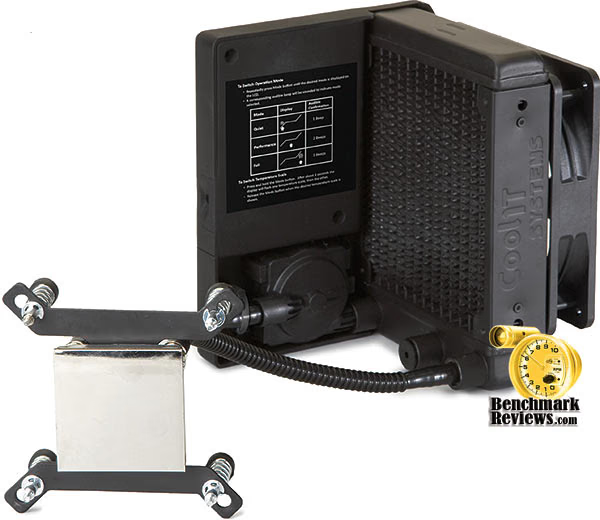
CoolIT Domino ALC Specifications
-
User Interface:
-
High contrast backlit LCD
-
Single push button control for configuring operation mode and temperature scale
-
Audible status alerts
-
-
Operation Modes (Fan Speeds)
-
Quiet: 1100-2500 RPM
-
Performance*: 1100-2500 RPM
-
Full: 2900 RPM
*System automatically increases cooling
performance at an increased rate compared to Quiet Mode.
-
-
Physical Specifications
-
Dimensions: 14.0 x 12.5 x 15.5 mm
-
Weight: 1.03 kg
-
Operating Voltage: 11.6-12.4V
-
Power Consumption: 8W (Max)
-
Life Cycle: 50,000 Hours (MTBF)
-
-
Fan
-
Long life, low noise
-
Dimension: 120 x 120 x 25 mm
-
Noise: 19.2 dBA (Min)
-
-
Pump
-
CFF1 long life ceramic bearing
-
Noise: <21 dBA
-
-
Radiator
-
Custom engineered for low noise heat dissipation
-
Dimension: 157 x 133 x 25 mm
-
CPU FHE (Fluid Heat Exchanger)
-
Copper Micro-Channel
-
Dimension: 50 x 50 mm
-
-
Coolant: Proprietary with anticorrosion/antifungal additives
-
CPU Thermal Grease: Proprietary Pro Advanced Thermal Compound
-
Warranty: 2 Year Manufacturer
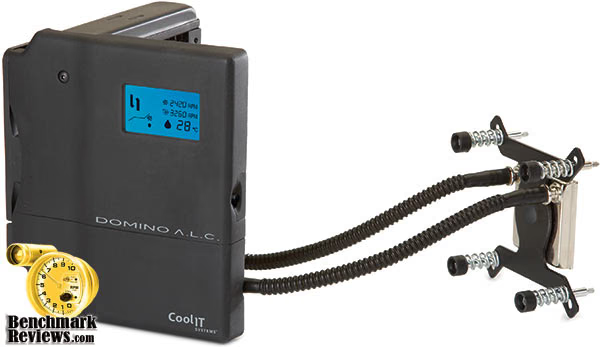
About CoolIT Systems
CoolIT Systems has been working with industry leaders in the computer industry to research, design, and deliver next generation cooling products that provide a comprehensive solution while exceeding high OEM standards for reliability and maintenance-free operation. This carefully designed and patented technology unleashes the full potential of a PC, providing superior cooling performance while reducing system level noise and improving reliability of vital components. The CoolIT MTEC Technology can be found in the top names in performance computing like Dell, Alienware, Velocity Micro, MAINGEAR, Hypersonic, Biohazard, Ultra, Ultraforce, Systemax, War Machine and Shuttle. CoolIT also works with the AMD engineering group to provide the Reference cooling solution for the latest high performance video cards.
GlacialTech UFO V51
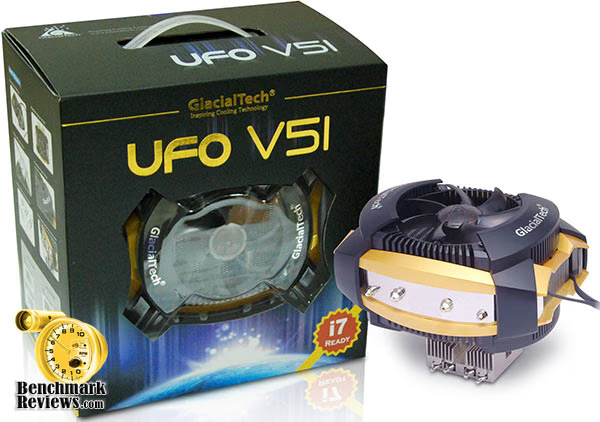
Sporting a UFO like design, the UFO V51 coolers are made up of two 92mm ultra silent fans, four heat-pipes with 6mm and 8mm diameter, aluminum fins, long-life sleeve bearings and a stylish plastic encase. Available in 2 versions, UFO 51 Silent and UFO 51 PWM, the latest Glacialtech CPU coolers come with an Intel LGA775 or AMD (754/939/940/AM2/F) socket and is compatible with Intel Core i7, Intel Core 2 Extreme, Core 2 Quad, Core 2 Duo, Pentium Extreme, Pentium Dual-Core, Pentium D, Pentium 4, Celeron Dual-Core, Celeron D and Celeron; as well as AMD Phenom, Athlon 64 FX, Athlon 64 X2 Dual -Core, Opteron and Sempron.
GlacialTech rolled out the UFO V51 Silent and UFO 51 PWM processor coolers, these new models support all the latest processors from Intel and AMD, including the new Core i7. The UFO V51 is pretty big, it has four heat-pipes with 6mm and 8mm diameter, a highly polished copper bottom and two 92mm fans. The cooler measures 130 x 157 x 138mm (L x W x H) and weighs 780g.

Dual silent fans offering speeds of 800rpm to 2500rpm, four heat pipes and a state-of-art aluminum heat sink maintain excellent air-flow management, keeping the CPU and surrounding components like Memory, VRM and chipsets cool. The light weight design, high performance thermal compound, high quality polish bottom, UFO battleship design and pure copper base are some of the latest innovations incorporated by GlacialTech in this latest CPU cooler product line.
The Silent version has two 92mm fans that spin at 1600RPM, with an airflow of 29.56CFM and noise level of 19dBA. The PWM version has two 92mm fans with 800-2500RPM, airflow of max. 46.18CFM and noise level of up to 32dBA.

GlacialTech UFO V51 Specifications
|
UFO V51 Silent |
UFO V51 PWM |
||
|---|---|---|---|
|
Dimension (mm) |
130 (L) × 157 (W) × 138 (H) |
||
|
Weight (grams) |
780 |
||
|
Fan |
Type |
12 Volts / Entering bearing |
|
|
Dimension (mm) |
92 x 92 x 25 |
||
|
Speed (RPM) |
1600 (±10%) |
800(± 300 rpm) ~ 2500(±10%) |
|
|
Airflow (CFM) |
29.56 (±10%) per fan |
46.18 (±10%) per fan |
|
|
Noise (dBA) |
19 per fan |
32 per fan (Max.) |
|
|
Interface Material |
High Efficiency Thermal Compound |
||
About GlacialTech Inc
GlacialTech Inc. was established in June 2001 by a team of 8 world-class researchers (PHDs) and three factory owners. Its technological areas of expertise include specialized thermal theory, soldering and mounting technologies, mechanism design, test and verification environment build-up and advanced conduct material development.
As a total thermal solution provider, GlacialTech is committed to using lighter weight materials, lower noise and lower manufacturing cost to deliver superior cooling solutions. All this has brought about the increased value for our customers with lighter system board loading, quiet working environment and optimal price performance. Price performance, noise performance and weight performance are our three cooling design philosophy. Having acquired ISO 9001 and 14001, GlacialTech commits itself to using green materials for its products designs and to perfecting green manufacturing processes in manufacturing its products.
GlacialTech offers two kinds of standard and customized cooling solutions. The standard cooling solutions deal with the CPU coolers for desktop and server PC system, PC case fan, VGA coolers and other accessory cooling products. The customized cooling solutions are furnished with applications for specialized PC barebones system, notebook, consumer products and telecommunication products.
Thermaltake SpinQ CL-P0466
Thermaltake, a company that has repeatedly designed outside the box, recently introduced the SpinQ CL-P0466 CPU cooler. Looking like nothing you've ever seen before, the SpinQ appears extremely intriguing.
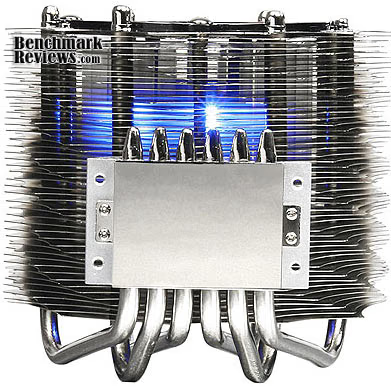
The SpinQ is a complex arrangement of fifty wave-shaped aluminum disc fins, each being turned slightly in progression, joined to six nickel-plated copper heat-pipes. Each rod is spaced equidistant from the next, and all six meet side-by-side in the nickel-plated copper base.
An 80mm blower fan draws air into the center chamber of the CL-P0466, and then expels it out pasts holes between fins and heat-pipe rods. The Thermaltake SpinQ comes with a push-pin mounting kit, and adapts to the AMD AM2/AM2+/939/754 and Intel LGA775/LGA1366 sockets.
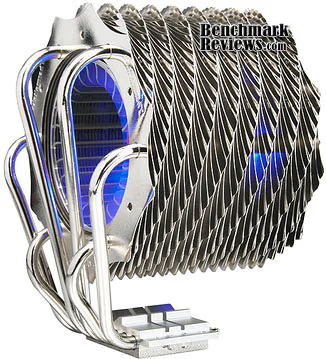
The best price we found for the Thermaltake CL-P0466 among listed retailers was $54.99, which is decidedly better than the $79.99 list price, but nowhere near as appealing as the prices we've seen for our top-rated cooling product. NewEgg also offers the SpinQ for $59.99.
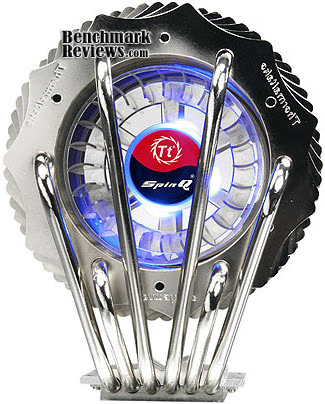
SpinQ CL-P0466 Specifications
-
Heatsink Dimension: 121.63(L) x 90(W) x 151.85(H) mm
-
Heatsink Material: 50 Aluminum Fins w/ Copper Heatpipes & Base
-
Heatpipe Ø: 6 mm x 6
-
Fan Dimension Ø: 80 x 85 mm
-
Fan Speed: 1000 ~ 1600 RPM
-
Bearing Type: Sleeve
-
Noise Level: 19 ~ 28 dBA
-
Max. Air Flow: 86.5 CFM
-
Max. Air Pressure: 2.22 mmH2O
-
LED Fan: Blue LED
-
Power Connector: 3 Pin
-
Rated Voltage: 12 V
-
Started Voltage: 7 V
-
Rated Current: 0.45 A
-
Power Input: 5.4 W
-
MTBF: 50,000 Hours
-
Weight: 667 g
About Thermaltake
Founded in 1999, Thermaltake Technology is the world leader in the supply of thermal management cooling solutions, high-end power supply and chassis for desktop PC and industrial application systems. Building on the strength of its people, products and extensive expertise in Thermal Management, Thermaltake raised the level of excellence on its Award Winning Purepower branded power supply as well as Xaser line of chassis. While mission-critical applications for Enterprises and ultimate video gaming experiences available for gaming enthusiasts all rely on today's cutting-edge PCs to deliver, high-end PC makers relies on Thermaltake to provide the most reliable power supply, the most thermally efficient chassis and cooling solutions.
Thermaltake Technology Co., Ltd. started its core business based on our extensive knowledge of PC thermal management during the era where the area of performance CPU cooling was only exclusive for "overclockers" or PC enthusiasts. With the company's initial launch of Orb coolers, it created waves of shocks and appraisals throughout the gaming and overclocking communities. Thermaltake quickly became the name gamers turn to when they need high-end and reliable thermal solutions.
With company's core business of CPU cooling still growing at a vast rate, Thermaltake made another grand entry to the PC chassis industry. To date, Thermaltake has always been considered as the pioneering company that revolutionized the PC chassis industry with Xaser series enclosures. The typical and traditional beige and plastic front panel design was outdone by Xaser series chassis's atypical gaming red and aluminum front panel. It was also the first enclosure available to public with Hardcano unit which provided users full control over computer's thermal management system.
As a leader in Thermal Management, Thermaltake is the trusted supplier to many computer manufacturers providing Intel Validated and AMD Approved CPU coolers for today's high frequency and mainstream CPUs. At the pace of current technological advancement in multimedia application and multi-core processor, Thermal Management will become an evermore challenging task requiring innovative product design and reliable manufacturing process; a task that has made what Thermaltake is now and future.
In the year 2002, Thermaltake announced Purepower line of power supply unit for the ever-growing power-hungry PCs. Purepower series PSU quickly gained recognition with its extensive warranty and high-reliability guaranty. Today, Thermaltake has grown into a world-class company with state-of-the-art testing and R&D facility based in Taiwan along with 60+ engineers and ID team covering each application segment such as Liquid Cooling, Air Cooling, PC Enclosure and Power Supply for main-stream users, high-end solutions, system integrators and industrial applications; thus achieve Thermaltake 's company motto, " COOLall YOUR LIFE "!
Thermaltake V1 AX CL-P0508
Many months back we tested the copper Thermaltake V1 CL-0401 CPU cooler. While the V1 did well enough for itself, it was far away from matching the price to performance ratio that many other products have attained. Because of this, the V1 didn't fare well in our review and we called Thermaltake on their product design. Then Thermaltake went and amazed me with their Thermaltake V14Pro, which held the top position among stock CPU coolers in the Best CPU Cooler Performance - Q3 2008 article. So now they're back in the running, but this time Thermaltake saves a few dollars on production material and offers the aluminum V1 AX CL-P0508.
There are four uneven-length nickel-plated copper heat-pipe rods used on the Thermaltake V1 AX CL-P0508. The two longer heat-pipe rods span up to the top and then bend across, while the other two shorter rods get up to the midway point and drive across the heatsink fins. Despite the roundabout path, this design is very similar in principal to the "U" design of current heat-pipe coolers.

We received the Thermaltake V1 AX CL-P0508 CPU cooler with a push-pin mounting kit, which includes hardware for the AMD AM2/AM2+/939/754 and Intel LGA775/LGA1366 sockets. NewEgg sells the V1 AX for $59.99, which appears to be the standard price for nearly every cooler Thermaltake offers considering the full-copper CL-0401 version is also available $59.99.
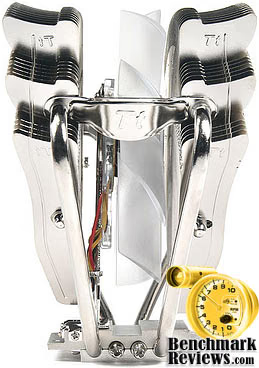
Thermaltake V1 AX Features
-
H.D.T. (Heat-pipe Direct Touch) technology
-
Anti-vibration rubber design
-
High-volume cooling fan
-
4pcs Φ8mm high performance U type heat-pipes
-
High performance & easy installation
-
120mm highly efficient PWM fan
-
3 in 1 application: LGA775 push-pin/K8 & AM2 tool-less clip.

CL-P0508 Specifications
-
Product Name: HDT-S1284
-
Product Number: CAC-SXHH4-U01
-
Outside Dimension (W) x (H) x (D) mm 120 x 60 x 159
-
Heat Sink Material: Aluminum Alloy
-
Fan Dimension (W) x (H) x (D) mm 120 x 120 x 25
-
Pulse Width Modulation (PWM) Fan
-
Voltage Rating (V) 12V
-
Speed (R.P.M.) 800~1500 R.P.M.
-
Bearing Type: Long Life Bearing
-
Air Flow (CFM) 56.3 CFM
-
Air Pressure (mm H2O) 1.57 mm H2O
-
Life Expectancy (hrs) 40,000 hrs
-
Noise Level (dB) 27.2 dBA
-
Connector 4 Pin with PWM
-
Weight (g) 660g (w/fan)
Titan FENRIR TTC-NK85TZ
Titan is seldom referred to as the industry leader in CPU cooler products, at least not in regards to the very best top-performers. But then again, that was before the Titan FENRIR TTC-NK85TZ had arrived.
A very dense array of aluminum fins are stacked around four "U" orientated heat-pipe rods, which have been proven to deliver exceptional performance on overclocked computer systems.
Built from the same design that gives us the Sunbeam Core Contact Freezer CR-CCTF and SilenX IXC-120HA2, Titan offers their 'Fenrir' as a single 120mm-capable CPU cooler with four exposed heat-pipes. The TTC-NK85TZ comes with a proprietary bolt-through kit, which also includes mounting for the LGA775 and LGA1366 sockets.

TTC-NK85TZ Specifications
-
Outline Dimension: 156 x 124 x 107mm
-
Fan Dimension: 120 x 120 x 25 mm
-
Rated Voltage 12V DC
-
Rated Cunent: 0.32A
-
Power Consumption: 3.84W
-
Rated Speed: 800~2200 RPM ±10%
-
Airflow: 33.2~78.41CFM
-
Static Pressure: 0.02~ 0.11 InchH2O
-
Noise Level: <17.2 ~ <39dBA
-
Bearing Type: Z-axis Bearing
-
Lifetime: 60,000 HOURS

About TITAN Technology Limited
TITAN Technology Limited was established in Taiwan by a group of progressive and experienced engineers in their respective fields. Since our establishment with over 16 years of manufacturing experience with high quality cooling devices for various kinds of PCs, we have successfully gained worldwide recognition for our innovative designs.
TITAN is headquartered in Taiwan and has its own two factories, total approximate 20,000 square meters. Both are located in Guang Dong- China, China. There are around 1200 employees, which provide combined efforts a production capacity of output 1.2 million units per month. TITAN is also leading manufacturer of various thermal products such as: CPU Coolers, VGA Coolers, H.D.D coolers, System Blowers, D.C fans, Heatsinks in comprehensive solution of cooling systems in different applications of PC systems. We have just launched the newest design; the superior water cooling kit(case), annual sales US$57,000,000 combined water and air-cooling in the world; the performance is excellent to reduce heat problems and operates at minimal noise levels. To keep advance with the fast changing market; new models are launched every 1-2 months to meet your requirements.
We have invested our resources on research & development and improved our innovative Total PC thermal solutions. We would like to extend our warmest invitation to any customers who wish to visit us and inspect our operations at our operation; we will ensure that we do our best to meet the needs of our customers. Come and share our experience! We are now showing our most warmly welcome to invite you to visit us for more details and information. Please assure that whichever of our services you decide to use, you will receive our immediate and careful attention.
Zalman CNPS9900 LED
Zalman is a very well-known name around the cooling industry, I believe primarily because they began using copper materials in their product while everyone else was cutting corners with aluminum. The other factor which has helped add to their success is their promise to deliver good performance without all of the noise. Most all of the Zalman CPU coolers I've tested have been very quite, some completely silent, and performed among the best products.
In this article, the Zalman CNPS9900 LED is back to defend the company name. Packaged with a bottle of ZM-STG1 paint-on thermal grease, this is an all-in-one kit that should be enough to get most overclockers and enthusiasts on their way. Additionally, Zalman includes a socket LGA1366 mounting kit with the Zalman CNPS9900 LED, which ensures it will see our Best CPU Performance - Q1 2009 series.

There are three copper heat-pipe rods spanning from the copper-inset mounting base; one rod curls around the front of the CNPS9900, while the other two rods loop around the back copper fin-sink array. The heat-pipe rods and finsink are cooled by Zalman's proprietary SuperFlo-bearing 92mm fan, which seems very effective despite its size and center hub diameter.
A mirror-polished copper contact surface mates to a metal upper-base segment, with heat-pipes pressed between the two parts. Because of the very smooth contact surface, only an extremely small amount of thermal paste is needed for best heat transfer.
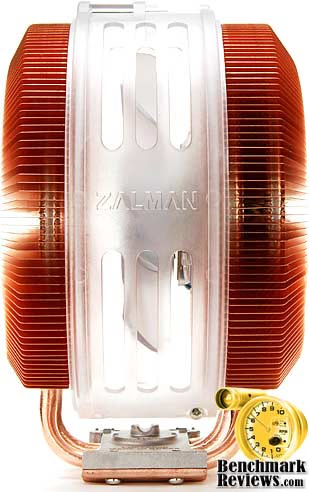
CNPS9900 LED Specifications
-
Dimensions: 94(L) x 140(W) x 158.5(H) mm
-
Weight: 782g
-
Base Material: Pure Copper
-
Dissipation Area: 5,402§²
-
Bearing Type: 2 Ball-Bearing
-
Speed: 1,000rpm ~ 2,000rpm ¡¾ 10 %
-
Noise Level; 19.5dBA ~ 38.0dBA ¡¾ 10%
-
Control Method: PWM Control, Auto Restart

About the company: Zalman Tech Co., Ltd.
Zalman Tech was founded in 1999 and focused their early efforts on "silent" cooling solutions; their motto was "Noiselss Computing". They grew rapidly and their cooling product line has expanded to match the thermal challenges posed by the rapidly increasing heat load inside high performance PCs. They have also diversified with new products like 2D/3D convertible LCD Monitors, Heatpipe Cooled Power Supplies, Notebook coolers, Surround Sound Headphones, and their newest product, a FPS gaming interface.
They are headquartered in Seoul, Korea and have a staff of ~169. The company went public in 2007 and is listed on the KOSDAQ stock exchange in Korea. The CEO, Young-Pil Lee, in his greetings on the corporate website, captures the essence of their success: "Zalman will not content itself with present results and will continue its innovation driven efforts to guarantee client satisfaction."
Thermal Interface Material Application
Over the past several months, I have read an unreasonable number of discussion forum posts which offer inaccurate and often times incorrect information. It's not really all that surprising to read poorly conceived information on the Internet, which seems to be a anonymous means of passing off opinion for fact. As a general rule we don't let too many things go untested, and the advice of wanna-be experts is not doing the hardware enthusiast and overclocker community any good. In this article, Benchmark Reviews dispels myth and establishes fact on the topic of proper application in our Best Thermal Paste Application Methods article.
After we wrote our 33-Way Thermal Interface Material Comparison article, many enthusiasts argued that by spreading out the TIM with a latex glove (or finger cover) was not the best way to distribute the interface material. Most answers from both the professional reviewer industry as well as enthusiast community claim that you should use a single drop "about the size of a pea". Well, we tried that advice, and it turns out that maybe the community isn't as keen as they thought. The example image below is of a few frozen peas beside a small BB size drop of OCZ Freeze TIM. The image beside it is of the same cooler two hours later after we completed testing. If there was ever any real advice that applies to every situation, it would be that thermal paste isn't meant to separate the two surfaces but rather fill the microscopic pits where metal to metal contact isn't possible.
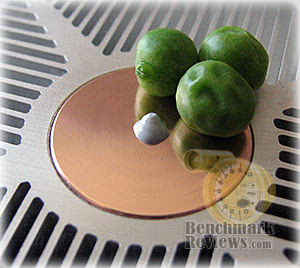

After discussing this topic with real industry experts who are much more informed of the process, they offered some specific advice that didn't appear to be a "one size fits all" answer:
-
CPU Cooling products which operate below the ambient room temperature (some Peltier and Thermo-electric coolers for example) should not use silicon-based materials because condensation may occur and accelerate compound separation.
-
All "white" style TIM's exhibit compound breakdown over time due to their thin viscosity and ceramic base (usually beryllium oxide, aluminum nitride and oxide, zinc oxide, and silicon dioxide). These interface materials should not be used from older "stale" stock without first mixing the material very well.
-
Thicker carbon and metal-based (usually aluminum-oxide) TIM's may benefit from several thermal cycles to establish a "cure" period which allows expanding and contracting surfaces to smooth out any inconsistencies and further level the material.
The more we researched this subject, the more we discovered that because there are so many different cooling solutions on the market it becomes impossible to give generalized advice to specific situations. Despite this, there is one single principle that holds true in every condition: Under perfect conditions the contact surfaces between the processor and cooler would be perfectly flat and not contain any microscopic pits, which would allow direct contact of metal on metal without any need for Thermal Interface Material. But since we don't have perfectly flat surfaces, Thermal Material must fill the tiny imperfections. Still, there's one rule to recognize: less is more.
Surface Finish Impact
Here's the part I've been waiting to reveal... the importance of surface finish in relation to the impact on thermal conductivity. CPU coolers primarily depend on two heat transfer methods: conduction and radiation (heat-pipes also add convection). This being the case, let's start with conduction as it related to the mating surface between a heat source and a cooler.
Because of their density, metals are the best conductors of thermal energy. As density decreases so does conduction (of heat), which relegates fluids to be naturally less conductive, and gases as virtually non-conductive. So ideally the less fluid between metals, the better heat will transfer between them. Ultimately though, this means that the perfectly flat and well-polished surface (Noctua NH-U12P) is going to be preferred over the rougher and less even surface which required more TIM to fill the gaps (Thermalright Ultra-120 eXtreme).
Heat radiation is different however, and requires exactly the opposite. Because gases (air) are naturally poor heat conductors, surface area of the heatsink is key to the cooling performance through convection. This type of cooling is what you commonly see in automobile radiators, which utilize large arrays of metal fins to radiate heat to be drawn away by a fan. The same is true for the CPU cooler, which needs as much surface area as possible to optimize it's radiative effects. OCZ and others have recognized that the surface of a heatsink does not have to be the sum of its overall size. By adding dimples and bends, the surface area is increased without growing the overall dimensions.
To sum it all up, science teaches us that a smooth flat mating surface is ideal for CPU coolers so that less Thermal Interface Material is used. Because these coolers are using fans to force air over the heatsinks fins, the overall surface area of those fins should be as large and uneven as possible. In the next section we'll find out just how well all of these principles worked for our collection of test products.
Testing Methodology
Manufacturers are not expected to enjoy this sort of comparison, since we level the playing field by replacing their included fan (whenever applicable) with a common unit which we then use for every CPU cooler we test. Manufacturers regularly include fans with their CPU cooler products, and more often than not these fans are very high RPM units which offer great airflow at the expense of an obnoxiously loud noise level. By using the same model of cooling fan throughout our testing, we can assure our results are comparable across the board. This is one of the more significant changes we have made to our test methodology, since many of the benchmark tests we have conducted in the past have compared the total package. Ultimately we're more interested in the discovering the best CPU cooler performance and we believe that you'll feel the same way.
Testing was conducted in a loosely scientific manner. Ambient room temperatures levels were held to within one degree of fluctuation measured at static point beside the test equipment with a calibrated digital thermometer. All coolers had their original manufacturer-supplied fan removed and replaced with our common test fan listed in the support equipment section below. Each product then received the same amount of Thermal Interface Material (specified below), which amounted to roughly a BB-sized drop placed onto the center of the CPU. The CPU cooler product being tested was then laid down flat onto the CPU, and compressed to the motherboard using the supplied retaining mechanism. If the mounting mechanism used only two point of force, they were tightened in alternation; standard clip-style mounting with four securing points were compressed using the cross-over method. Once installed, the system was tested for a baseline reading prior to testing.
At the start of each test, the ambient room temperature was measured to track any fluctuation throughout the testing period. EVEREST Ultimate Engineer Version 4.60 was then utilized to create core loads and measure each individual CPU core temperature. It's important to note that software-based temperature readings reflect the thermistor output as recorded by the BIOS. For this reason, it is critically important to use the exact same software and BIOS versions throughout the entire test cycle, or the results will be incomparable. All of the units compared in our results were tested on the same motherboard using the same BIOS and software, with only the product itself changing in each test. These readings are neither absolute nor calibrated, since every BIOS is programmed differently. Nevertheless, all results are still comparable and relative to each products in our test bed.

One unfortunate problem is that CPU's report temperatures as a whole number and not in fractions. This in turn causes the motherboard BIOS and subsequent software applications such as EVEREST to also receive whole-number reports. Thankfully, EVEREST also does averages in the statistics panel, which gives us more precise readings. To further compensate for this, our tests were conducted several times after complete power down thermal cycles. Conversely, the ambient room temperature levels were all recorded and accurate to one-tenth of a degree Celsius.
When I tested each cooler, I made certain to keep the hardware settings identical across the test platform. This would enable me to clearly compare the performance of each product under identical conditions. While the ambient room temperature did fluctuate between 16~17°C, this would not be enough to cause a noticeable impact on our test results since only the thermal difference is reflected in the charts. For the purpose of this article, thermal difference (not the same as thermal delta) is calculated by subtracting the ambient room temperature from the recorded CPU temperature.
Test System
-
Motherboard: Gigabyte GA-EP45T-EXTREME (Intel P45 Chipset) with version F4 BIOS
-
Processor: Intel Q9450 Core 2 Quad 2.66 GHz (overclocked to 3.2 GHz)
-
System Memory: Super Talent PC3-14400 DDR3 1800MHz W1800UX2GP
-
Disk Drive 1: OCZ SATA-II 32GB 2.5-Inch SSD OCZSSD2-1S32G
-
Optical Drive: ASUS BC-1205PT SATA Blu-ray Disc Optical Drive
-
Grpahics: ZOTAC GeForce 9800 GTX+ Zone Edition (liquid cooling looped into P45 Northbridge)
-
Operating System: Windows XP Professional SP-3 (optimized to 16 processes at idle)
Support Equipment
-
OCZ Freeze Thermal Interface Material (No curing time necessary or given)
-
Yate Loon 120mm cooling fan, model D12SH-12 (88 CFM @ 40 dbA)
All of our tests are now conducted using only the vertical motherboard orientations traditional to tower computer systems. At the start of our test period, the test system is powered on and EVEREST system stability tests are started with Stress CPU and Stress FPU options selected. Then for a minimum of thirty minutes EVEREST loads each CPU core to 100% usage, which drives the temperature to its highest point. Finally, once temperatures have sustained a plateau, the ending ambient room temperature and CPU core levels are recorded and the first benchmark segment is complete.
The second test segment involves removing the stock cooling fan and replacing it with a high-output 120 mm Yate Loon D12SH-12 cooling fan. The system is given thirty additional minutes with EVEREST loading the CPU cores before final temperature readings are taken and recorded.
Test Results: Stock Cooling Fan
When it comes to personal computers, you could probably divide users into two separate groups for almost any one topic. This article is no different, and those two groups include both enthusiasts and overclockers. In regards to fan noise, there are those of us who want it quiet while other will tolerate an eardrum-ringing whine. Since noise is a problem and not a solution, I believe that most enthusiasts want as much performance as they can get without additional tweaking and time-intensive modifications. That's what this test section is all about: how the cooler performs out of the box. For the "Stock Cooling Fan" results, Benchmark Reviews tests our Q3-2008 collection of CPU coolers for this article using the following criteria: Each cooler is tested with the manufacturer-included fan, so that performance will be relevant to consumers using the product in stock form.
Peeking at the results illustrated in the chart below, there's a certain amount of explanation necessary to fully understand how they were achieved. For example our best "stock" performer for Q4-2008 was (again) the Thermaltake V14Pro CPU Cooler CL-P0471 at 27.7°C, but it's important to know that this cooler has an integrated high-output 140mm x 30mm fan (which was tested at full speed) that cannot be replaced. All on its own the V14 Pro stands out as an over-achiever, and in some respects it truly is. While the retaining system may use the standard Intel push-pin clips, the contact surface is a perfectly flat and very-well polished copper block. You must also keep in mind that the CL-P0471 measures 171mm (6.73 in) tall by 161mm (6.34 in) wide, placing it among the very largest coolers we've seen (such as the Scythe Mugen Infinity SCINF-1000). So that should explain why the V14 Pro is at the top of the stock cooler list.
Directly behind it, and looking like a smaller (aluminum) version of the V1Pro, is Thermaltake's V1 AX. I was completely surprised by the performance this little cooler put out, and with fan dialed down low it kept temperatures at 32.8°C over ambient. Dialing the fan speed to its maximum output improves the V1 AX to 28.9°, only one degree away from it's big brother at the top and well-known coolers like the Xigmatek HDT-S1283, but also raises the noise level dramatically.
Many of the more familiar products kept their positions at the top, with the OCZ Vendetta 2 (OCZTVEND2) performing extremely well at 29.4°C while operating with a medium-noise/medium-volume fan, trailed closely by the (now legendary) Xigmatek HDT-S1283 with similar PWM fan at 29.9°C. Xigmatek's new HDT-S1284 performed nearly as well with a stock temperature of 30.3°C over ambient, nearly matched by the Vantec AeroFlow FX (VAF-1225). The Zalman CNPS9900 LED finished in the top ten with a 30.5°C temperature over ambient. Now obviously these results are all extremely close, which means that ultimately they will all perform roughly the same in most environments. That being said, it comes down to price, and perhaps application compatibility. The Kingwin RVT-12025 is a poor-mans HDT-S1283 since it costs as little as $19.99 compared to $36.99, and they are identical in construction (but Kingwin includes a lower-volume silent fan).

Sometimes a unique design will translate into good performance, and sometimes it doesn't. The Cooler Master V8 (RR-UV8-XBU1-GP) performed at 31.0°C using the stock fan, which was trailed by the OCZ Gladiator Max (OCZTGLADM). The Titan Finrir TTC-NK85TZ recording an average 31.7°C, matching performance to the Sunbeam Core Contact Freezer CR-CCTF and SilenX IXC-120HA2 (which all share the same design). Thermaltake's uniquely shaped SpinQ seems to sacrifice function for fashion, as the lowest speed setting for the integrated fan produces 39.8°C. Even with the fan turned to maximum output the SpinQ still keeps temperatures around 32.3°C, which isn't very impressive for a product that touts an award-winning design.
GlacialTech always seems to produce quality products with a unique look, but sadly they don't seem to perform as well as the top products we collect for these round-ups. The GlacialTech UFO V51 posts a 33.1°C performance, despite the large frame. But when you manufacture a cooler to be silent there's usually some sacrifices to be made, as we also see with our stock fan results for the Noctua NH-U12P. Our former high-volume top performer does well-enough and produces 32.7°C over ambient with a silent-running medium-output NF-P12 fan attached to it.
Added in for good measure, the CoolIT Domino Advanced Liquid Cooling system offers three fan settings and for this test we measured results using the lowest speed. With nearly no audible noise, the Domino ALC kept the Q9450 at a respectable 33.6°C, which was still low enough to be neighborly with the other top performing stock CPU coolers. For reference, a copper-and-aluminum stock Intel thermal solution scored 46.2°C under full load.
Please keep in mind that the entire basis of this article revolves around the title: Best Performing CPU Coolers. So while some of the coolers did not perform well in comparison to others it doesn't particularly mean that they are poor products. They're just not the absolute best. In summary, if you're building a system that places an emphasis on quiet sound levels and affordable cost, you'll want to pick your cooler carefully. Of the top choices, my suggestion goes to the OCZTVEND2, as it's a more affordable version of the HDT-S1283. However, the Vantec AeroFlow FX and new Zalman CNPS9900 are also both excellent choices for either HTPC or tower builds. If you're able to fit the part into your non-overclocked system, Thermaltake offers tremendous performance from their V14 Pro.
For under $50 USD, you can either keep with the stock fans and see performance results similar to ours, or you can dig a little deeper and force-feed the cool air with a nice Yate Loon fan (like we used for our next section). Because the Thermalright Ultra-120 eXtreme and Cooler Master Hyper Z600 coolers do not come with an included cooling fan, they were not included as part of this test group. In our next section, every cooler that could be fitted with our high-output fan (including the aforementioned) is represented in full glory.
Test Results: High-Output Fan
This section uses the high-output Yate Loon D12SH-12 cooling fan on each product tested. I am aware that there are much more impressive fans available, such as the 120 CFM screamers that require a bolt-on kit to retain them. But in my experience, the Yate Loon D12SH-12 is one of the best 120mm cooling fans available in regards to the noise to performance ratio. The D12SH-12 cooling fan forces an impressive 88 CFM of air at a moderately noisy 40 dbA. I can't personally suffer anything that produces higher sound levels than this, since gaming would then require headphones and casual computing is almost impossible. Overclockers are already willing to take their hardware to the breaking point, so it stands to reason that reduced fan noise is not a top priority. Not very long ago Benchmark Reviews compared the top-performing coolers in our Vendetta 2 vs TRUE vs HDT-S1283 article. In that article, we tested with the high-output D12SH-12 fan and liked the results so much that each cooler tested here has received the same treatment.
In our stock results section, the Thermaltake V14 Pro really had run of the field with it's integrated 140mm x 30mm fan. Compared to other stock fan results the V14 Pro had it easy, but the truth is that a 27.7°C temperature above ambient still places it in among the best coolers in our high-output results. In the big picture a stock unit placing in the top ten overall is very good, but either way I have a gut feeling that overclockers might reject it for lack of tweakability. Conversely, the Noctua NH-U12P that near the low-end in our stock results has now performed at the very top of our high-output results with 24.9°C. This proves to me that pairing the right fan to a cooler can make a dynamic difference in performance.
Even though the CoolIT Domino ALC is a water-cooled solution, I thought it would be interesting to measure the performance against our collection. As it turns out, it does compare to- but doesn't beat, the very best air-cooled products. In a very tight battle for second place, three coolers worked hard to earn our respect. The OCZ Vendetta 2 proved itself worthy of high-temperature overclocked systems recording 25.0°C over ambient room temperatures and matching the Domino ALC. Almost identical in cooling performance but much higher in cost is the Thermalright Ultra-120 eXtreme, which when paired to the Yate Loon D12SH-12 (Thermalright doesn't include a fan) the TRUE performed at an impressive 25.1°C. This supports our decision to award the OCZTVEND2 with the Benchmark Reviews 2008 Editors Choice Award for cooling, in which we also gave the TRUE an honorable mention.
Completing what I consider to be the highest-performing segment of coolers was a tightly-packed group of five coolers. Cooler Master's Hyper Z600 reported 25.3°C to finish in fifth place, which could be further-improved by attaching up to three additional 120mm fans. The Xigmatek HDT-S1284 (and Kingwin RVT-12025 clone) posted 25.4°C and offered a very subtle improvement over the Xigmatek Achilles S1284 which it replaces. Next in line was Cooler Master's V8, which is as big as the Hyper Z600 but accommodates just one 120mm fan, followed by the Xigmatek HDT-S1283 and it's clones (Vantec AeroFlow FX 120 and Kingwin RVT-12025) with 25.7°C.

All of the top performing CPU coolers have a few things in common: Noctua's NH-U12P uses a bolt-through system for mounting the cooler, similar to the Xigmatek Crossbow kit we use for other coolers. The Thermalright Ultra-120 eXtreme also uses a bolt-through kit, as does the Cooler Master Hyper Z600 and V8... so contact pressure is extremely high for all of them. The NH-U12P, Hyper Z600, and V8 all have very flat mirror finishes for the contact surface, whereas the OCZTVEND2, HDT-S1284, VAF-1225, RVT-12025, and TRUE have a textured and equally imperfect surfaces (although the TRUE features a convex surface). All of the top coolers have either large-gauge heat-pipes, or several pairs of heat-pipe rods integrated into the base. The Domino matches a flat polished surface to water cooling.
Considering that the ten best CPU coolers collected for these high-output tests performed in a range between 24.9°-25.7°C, it's a fair bet that any one of these well-designed products will cool an overclocked system extremely well. Much like the Thermal Interface Material testing we have done for our upcoming follow-up article, high-performance products are all beginning to perform at nearly the same levels. Eventually, I foresee this to be very much like NASCAR: everyone will have the same technology and the difference will remain in the application. This is where experience comes in handy, and we've shared some of this with you in our Best Thermal Paste Application Methods article. Remember, less is more when it comes to thermal paste, and soon CPU coolers may offer the same paradigm.
The collection of CPU coolers receiving an honorable mention (or not) begins with the Titan Fenrir TTC-NK85TZ, which uses a large finsink array to produce 26.6°C over ambient. The Coollink Silentator may have borrowed some of Noctua's design aspects, but the 26.8°C is almost two full degrees away. OCZ's Gladiator Max performed at 27.0°C over ambient, but is also operates two degrees hotter than the Vendetta 2 and yet still costs more. The SilenX IXC-120HA2 is a HDT cooler with three exposed heat-pipes and large fins modeled after the Sunbeam Core Contact Freezer CR-CCTF from which it borrows the design. Both perform well, and deserve some recognition for their 27.3°C finish at the edge of our high-end readings.
Please continue on to the final thoughts and conclusion section to read my remarks on the test outcome.
CPU Cooler Final Thoughts
These could be the last and final days for Intel's "socket T" CPU interface. The popular LGA775 CPU interface has served well since June of 2004, and with such a large consumer base it will likely survive until at least 2010. However, as this article is published, Benchmark Reviews is already testing CPU coolers for the Intel socket LGA1366 Core i7 platform. This marks the beginning of the end for the existing line of Core 2 Duo/Quad/Extreme 65/45nm processors, and our Best CPU Cooler Performance - Q1 2009 articles is already prepared to use the Intel Core i7-920 processor BX80601920. With four physical cores ready to double their load to eight through Hyper-Threading, we should soon see how much cooling is needed on the new X58 platform.
There are a lot of different products out there, and believe it or not we exclude a few from each article because they don't stack up well at all. So this is why you may not see some of the coolers other sites have tested in our results. Because of space and time limitations it's just simply not feasible to review them all, but it's certainly worth mentioning which products should be avoided. So I began to carefully think about it and nearly constructed a real-time chart which places products into different levels of performance. That's when I realized that performance is relative, too, and what performs well today might be considered low-end only a year from now. As it turns out, the best way I can think of is already being done by our affiliate FrostyTech: use a synthetic system to generate the same exact load for each and every test conducted. This would stand the test of time much better than any computer system or processor platform would, because temperature is a static measurement. Unfortunately, the sythetic test system was quoted to me for $35,000 by the manufacturer, and times are way too tight for that kind of expense.

No doubt there will be a few readers who will scoff at my results (because I read their pity parlay after each time my affiliates publish their own cooler reviews), so I'm certain the fanboys will claim that anyone with ten minutes of experience should "lap" the processor's integrated heat spreader smooth as well as polish the CPU coolers mating surface. Sure, I concede, this is correct: any bonafide overclocker with more time on his/her hands than the average hardware enthusiast will spend a few hours wet-sanding their equipment so that they can get an extra degree of cooling performance. But for the other 99% of the consumer population, this is what you can expect from these products if you want the CPU cooler to perform right out of the box or with a simple add-on fan upgrade.
I can't please everyone, and my biggest critics have taught me that there's a small portion of enthusiasts that would happily spend ten days turning a decently-designed cooler (the Thermalright Ultra-120 eXtreme is usually the subject of said improvements) into an excellent-performing cooler. But I'm not that guy. I'll spend ten minutes removing the old stock fan and replace it with something of higher output along with a very thin application of thermal paste and call it done. So to you hardcore overclockers, feel free to see my results as flawed, because nobody I personally know is willing to spend that much time on a large collection of review samples. I had to draw the line somewhere, and this is it.
There are numerous ways to improve upon the performance that any one of these products has offered. Take for example the Thermalright Ultra-120 eXtreme: most enthusiast like to modify this product by lapping the surface and adding additional mounting pressure by using a washer. I for one believe this to be more of a necessity than anything else, since Thermalright designed the surface with an intentionally uneven convex finish. To a lesser extent, you could also wet sand and polish the mating surface of any Heat-pipe Direct Touch cooler and then use a bolt-through backplate mounting kit (such as the Xigmatek Crossbow system). Nevertheless, most of this point was made in our Vendetta 2 vs TRUE vs HDT-S1283 article which compared the top three coolers to-date.
Best of Q4 2008 Conclusion
Intel has made its mark with their LGA775 'Socket T' interface. For enthusiasts and overclockers, there's still plenty of life left in the old platform. Prices on the Intel Core 2 Quad Q6600 and Q8200 have both dropped to $189.99 as we begin 2009, while the Core 2 Duo E8400 sells for $164.99. All of these products provide excellent value, and give hardware enthusiasts a reason to patronize P45 and X48 chipsets. Furthermore, there are so many excellent CPU coolers to choose from that you can't go wrong with any one of our top choices. My sources tell me that high-temperature processors are going to be put into extinction before long, and overclocking the CPU will become more challenging.
Testing these CPU coolers has a very long and stressful job for me over the past year; but once the data gets transferred and results are calculated it begins to make it all worth the trouble. Three degrees is all that separates over fifteen different top-end CPU coolers. Because the technical architecture and design concepts have been converging for so long now, it's not really all that surprising to see similar results. Nevertheless, this article is the last round-up for the Core Duo platform, and we now concentrate our effort towards the new Intel LGA1366 socket found on the X58 platform. I expect to use the Gigabyte GA-EX58-EXTREME motherboard, primarily because radiant heat can be removed from the X58 Northbridge by looping it into the video cards water-cooling system.

But before Benchmark Reviews moves on, allow me to offer my final suggestions for CPU coolers. I determined this standing by taking five variables into account: performance, cost, installation, construction, and availability. Obviously performance has the most impact on my decision, but if two or more coolers perform the same and one costs half as much it begs to reason that I favor the more affordable product. Furthermore, well-built and easy-to-install products get my vote over something less convenient. Finally, rare and hard-to-find CPU coolers are less desirable than readily-stocked products. So without further delay, here are my top ten choices for the socket LGA775 platform in order of preference:
-
OCZ Vendetta 2 (OCZTVEND2): Consistent top-performer with the OCZTFORCV mounting kit available for maximum contact pressure. As of January 2009, the OCZTVEND2 kit sell for $49.99 ($39.99 after rebate) at NewEgg.
-
Kingwin RVT-12025: A clone of the HDT-S1283, but with slightly lower-volume fan included. With a $13.98 price tag, this is the most affordable top-performance product available; leaving money to upgrade the fan and mounting kit.
-
Xigmatek HDT-S1283: The grandfather of HDT still performs at the top of our charts, and the Xigmatek CrossBow kit ACK-I7751 only costs an extra $6.99. Presently the HDT-S1283 sells for $36.61.
-
Vantec AeroFlow 120 VAF-1225: Clones the HDT-S1283 design and cleans-up the appearance with a well-polished look. Currently the VAF-1225 sells for $39.99 from NewEgg, and accepts the same bolt-through kits.
-
Cooler Master Hyper Z600: This large multi-fan ready cooler has enormous potential for extreme overclocking. The RR-600-NNU1-GP package is available for $59.99 and comes with it's own LGA775 and LGA1366 bolt-through kits.
-
Sunbeam Core Contact Freezer CR-CCTF: Four exposed heat-pipes offer very good cooling, even with the stock fans. A proprietary clamp-down system keep the CR-CCTF in place. Available at NewEgg for $39.99.
-
Noctua NH-U12P: Although this is our best-performing CPU cooler, it is also the hardest to find. NewEgg offers the updated 'Second Edition' NH-U12P SE1366 for $74.99 which includes two fans and bolt-through kits for LGA775 and LGA1366.
-
SilenX IXC-120HA2: Similar to the CR-CCTF, but supports two 120mm fans. SilenX includes one of their iXtrema Pro Quiet fans, which I enthusiastically endorse. NewEgg lists the SilenX IXC-120HA2 for $49.99.
-
Thermalright Ultra-120 eXtreme: Known as the 'TRUE' this cooler needs some extra attention and requires that you purchase fan(s) separately, but otherwise performs very well. At $79.99, very few retailers still offer the TRUE online.
-
Cooler Master V8: Performs well with the included 120mm fan, but performs even better with the Yate Loon D12SH-12. The RR-UV8-XBU1-GP kit includes LGA775 and LGA1366 bolt-through components, and sells for $69.99 online.
This concludes the Q4 2008 review of the Best Performing CPU Coolers. Overall, I believe Benchmark Reviews has done a very good job of searching out the best-of-the-best cooling products over the past year, and proved what works on a real-world system. These are my suggestions for the Best CPU Cooler products heading into 2009 for the Core Duo/LGA775 platform. In our next roundup article, we begin trials on the Core i7-920 for the LGA1366 socket. Please make your suggestions, or leave comments and questions in our Discussion Forum.
Reader comments from the original article
3 comments were posted before commenting closed. They are preserved as written. Original avatars no longer resolve and are shown as a placeholder.
RE: Best CPU Cooler Performance LGA775 - Q4 2008 SGT Permalink:
Used this for about 8 months and it started to leak around the pump area work well but in not up to the job in a long hall i replace it with a CORSAIR CWCH50 Hydro Water Cooler...and never look back
RE: Best CPU Cooler Performance LGA775 - Q4 2008 Michael Permalink:
I used it for 6 month, not so good especially at low speed fan. Once you increase the fan speed it becomes very noisy!
Good CPU Cooler BUT MOBO Cooks Graham Permalink:
As with most replacement ccolers you have a trade off.With Sttandard cooler you have reduced cooling available for overclocking yet you still have the mobo components cooled by the same fan.With this cooler solution you get amazing cooling if maybee a little noisy when ramped up,I use it on a intel Quad 6600 running at almost 4gig (per core) overclock on a top end Lanpsrty Mobo.The Cpu runs idle at 28-30deg and Sressed when benchmarking at 48-50 so really good.The biggest problem is, even when used in a huge custom case with 2 x 250 mm case fans and three 120 rear fans (One of which adds pull action to the Radiator of the coolit) i have a major problem with the motherboard cooling sometimes hitting in excess of 60 deg which causes all sorts of issues. So to conclued it is a great product If your not doing extreme Overclocking. BUT i Intend to replace it with a Noctua NH-C12P SE14, AM2/AM3/775/1156/1366 which has a 140mm downward facing fan to keep the mobo temps under control.