
Best CPU Cooler Performance LGA1366 Q2-2009
Best CPU Cooler Performance
Overclockers and performance enthusiasts share the same desire to cool their processor with the best possible hardware solution. Benchmark Reviews first tested the cooling performance on the Intel Core i7 platform in the Best CPU Cooler Performance LGA1366 - Q1 2009 article, which discovered the now-famous Prolimatech Megahalems CPU Cooler. With such a dominant hold on cooling performance, the CPU cooler industry has been slow to respond with even better products. In this article, Benchmark Reviews tests a new collection of products in the Best CPU Cooler Performance LGA1366 Q2 - 2009.
Throughout all of 2008, I made it my mission to test every high-performance CPU cooler that Benchmark Reviews received. The Core 2 Duo and Core 2 Quad processors did their part to separate the cream of the crop from our large collection of LGA775 coolers. In our previous Best CPU Cooler Performance article, Benchmark Reviews retired the LGA775 platform from its testing duties and made room for the up-and-coming LGA1366 socket. It didn't take long to collect several CPU coolers designed for the Intel Core i7 CPU & X58 platform. This Best CPU Cooler Performance LGA1366 - Q2 2009 article focuses on a wide selection of performance-cooling products for overclockers. It's a mistake to think that any LGA775 cooler can do just as well with the new LGA1366/Core i7 platform; primarily because the size and location of processor cores has changed.
When it comes down to it, those consumers shopping for aftermarket cooling products only want one thing out of them: the very best cooling performance their money can buy. It makes perfect sense, too. Since so many products flood the market, it all comes down to price and performance. Based on this principle, Benchmark Reviews searches out the latest CPU coolers and tests them under real-world overclocked conditions. Want to know which cooling products stand-out? This quarterly update to our Best CPU Cooler Performance series will separate the good from the bad... but we also find those products that are truly exceptional and deserving of your hardware projects.
Benchmark Reviews strives to offer the overclocker and hardware enthusiast community solid evidence reflecting the true performance of computer products through rigorous testing and evaluation. I personally understand that many of the readers who visit Benchmark Reviews have been involved with other community websites for several years, and therefore take our test results personally. So now that our test process has been reworked, we have collected the most complete source of benchmark results possible and gathered in a controlled environment. The purpose of this sixth article from our quarterly series is to document performance and declare the best CPU coolers available for the LGA1366 socket as of Q2 2009.
New LGA1366 Test Products |
Previous Top Performers |
|
|---|---|---|
|
|
|
Honorable Mention |
Cooling Underachievers |
|
Computer hardware is an ever-evolving industry, and since Moores law only applies to an exponentially growing transistor count then there should probably be another law for cooling. In the very recent past there have been two major trends which have accelerated the performance potential of CPU cooler. That first development was the use of heat-pipes to directly contact with the CPU surface; which resulted in the Heat-pipe Direct Touch technology. The second development is by no mean a new concept, just new to our industry in specific. For many years now heatsinks have been full of right angles, but very recently companies have begun to recognize the need to disrupt smooth airflow and reduce the laminar skin effect which allows air to travel just above the solid surface. Some manufacturers have used at least one of these new concepts in their product design, and only a few are beginning to incorporate both. Benchmark Reviews will see how much this affects the overall performance as we test a large segment of enthusiast cooling products.
Before we inspect each member of our new CPU cooler collection, let's establish that our tests consist of methods we have determined to be the best for our one singular purpose. Our methodology isn't written in stone, and could very likely be changed or modified as we receive justification (and feedback from the community). Our scope is limited to stand-alone products only, meaning those products which can be installed and operated without additional critical components needed or kit construction. This generally excludes most commercial liquid cooling systems, which may potentially offer better performance than the products we test for this article but require components to be assembled from various options and equipment. Suffice it to say, the vast majority of gamers and enthusiasts are using air-cooled solutions and therefore we target this review series towards them. We encourage hardware enthusiasts to utilize the equipment available to them, and select the cooling fan that best suits their needs. Just keep in mind that exceptional cooling performance must begin with the CPU cooler, and end with the cooling fan. It's the foundation of the unit that makes a difference, which is exactly what we're after in this article.
EDITOR'S NOTE 13 FEB 2010: Benchmark Reviews will publish our Q1-2010 Best CPU Cooler Performance LGA1366 article on 11 March 2010. Several new heatsinks along with some enthusiast favorites will all be tested on an overclocked six-core processor. Additionally, our performance test results for the AMD AM3 socket will also be included.
Conductive Elements
Manufacturers have made a small fortune off of confusion tactics and misinformation. Marketing departments often times neglect to refer back to solid science when making their bold claims, which is why we have assembled a complete list of thermally conductive elements in the reference chart below.
It's very well known that Silver, Copper, Gold, and Aluminum together comprise the top four most thermally conductive elements. However, without knowing the thermal conductance of these elements you might be fooled into thinking the performance was close. As it turns out, Silver and Copper both offer nearly twice the performance of Aluminum when transferring thermal energy such as heat. The reason Aluminum is used in so many applications is because it's the least expensive top-tier metal available. Most Thermal Interface Material and CPU coolers use several different elemental ingredients to work together, but after a careful inspection of the performance levels it comes as a surprise to me that some of the most popular products make use of such poor conductive elements.
|
|
Recipes usually call for only the finest ingredients, and the very same principle is true for overclocker and hardware enthusiast products. Thermal pastes are often times mixed from at least a dozen different components, while heatsink coolers may use only one or two different metals. Armed with the knowledge above, you might expect any silver-based product to be a clear-cut winner... but building a superior product by design is different than what you receive in execution. Production and material costs usually dictate how the product is designed and fabricated.
Keep these materials in mind as we take a look at the new products Benchmark Reviews has collected for this round-up article, beginning with our first contender...
CM Hyper 212 Plus
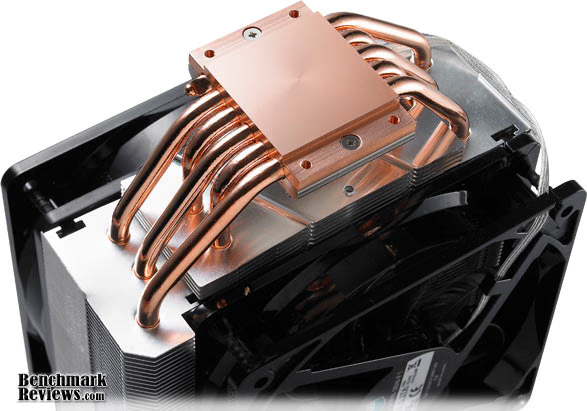
Cooler Master has been well known to most enthusiasts for over a decade or longer, and they usually offer cutting-edge technology in their products before most other incorporate them. So it was surprising that Cooler Master took so long to adopt the HDT (Heat-Pipe Direct Touch) technology for their CPU cooler products. Most of the industry has used variations of the HDT design for almost two years now, making it difficult to impress overclockers with less-effective traditional designs. This is where Cooler Master took a turn and produced the Hyper 212 Plus (RR-B10-212P-GP) CPU cooler.
Hyper 212 Plus Features
-
Well-balanced cooling performance
-
Computer aided heatsink design provides fin optimization with perfect balance between high and low speed operation.
-
4 x Direct Contact heat-pipes for seamless contact between CPU surface and cooler.
-
Wide-range PWM fan with unique blade design for excellent airflow.
-
Upgradable to dual fans and swapping of fans with extra fan-clips included.
-
Fan mounting using clips for easy installation and swapping.
-
Versatile all-in-one mounting solution for Intel Socket LGA775/1156/1366 and AMD Socket 939/AM2/AM3.
-
Silent operation with minimal noise level at 13 dBA.
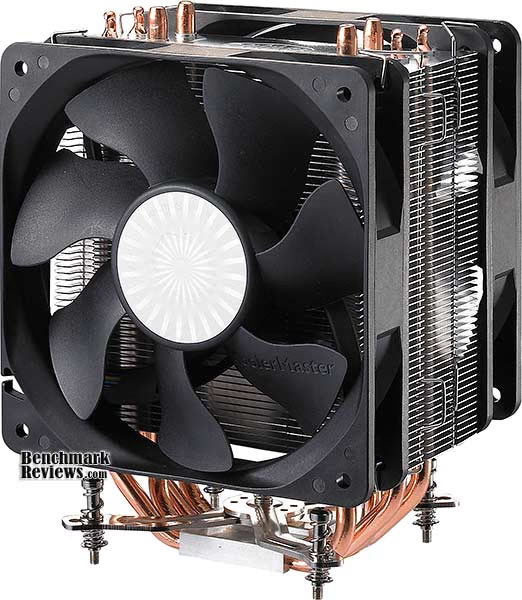
There's a lot to like about the Hyper 212 Plus: Heat-pipe Direct Touch technology, twin 120mm fan support, and a high-pressure bolt-through mounting clip system. For once it appears that Cooler Master is completely serious about enthusiast air cooling; especially overclockers on a budget. As of August 2009 the Cooler Master Hyper 212 Plus model RR-B10-212P-GP was available at NewEgg for $29.99. Aside from the Intel LGA1366 platform we're testing on for this article, the Hyper 212 Plus supports the new Intel LGA1156 and older LGA775 sockets as well as AMD AM3/AM2/940/939 sockets.
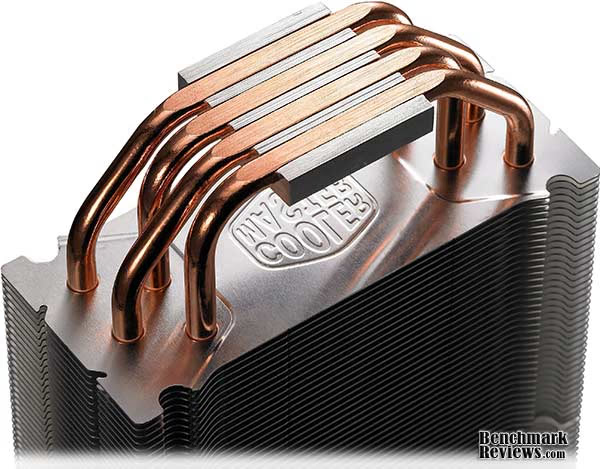
RR-B10-212P-GP Specifications
| CPU Socket | Intel: Socket LGA1366 / 1156 / 775 AMD: Socket AM3 / AM2 / 940 / 939 |
|---|---|
| CPU Support | Intel: Core i7 Extreme / Core i7 / Core 2 Extreme / Core 2 Quad / Core 2 Duo / Pentium / Celeron AMD: Phenom II X4 / Phenom II X3 / Phenom X4 / Phenom X3 / Athlon X2 / Athlon / Sempron |
| Dimensions | 120 x 79.7 x 158.5 mm (L x W x H) |
| Weight | 626g |
| Heat Sink Material | Aluminum fin |
| Heatpipes | 4 pcs |
| Fan Dimension (W / H / D) | 120 x 120 x 25 mm |
| Fan Speed | 600 - 2000 R.P.M. (PWM) |
| Fan Airflow | 21.2 - 76.8 CFM |
| Air pressure (mmH2O) | 0.40 - 3.90 mmH2O |
| Bearing Type | Long life sleeve bearing |
| Fan Life Expectancy | 40,000 hours |
| Fan Noise Level (dB-A) | 13 - 32 dBA |
| Connector | 4-pin |
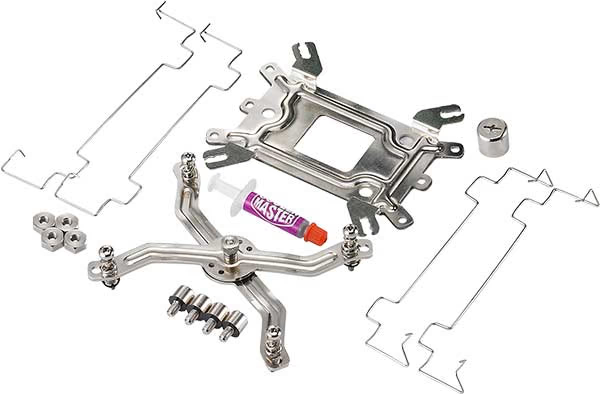
Although it is inconvenient to remove the motherboard to simply upgrade the CPU cooler, Cooler Master includes everything you'll need to make the project possible. A small syringe of thermal paste is included, along with a second set of bracket for adding an additional fan. The mounting system is spring loaded, and offers a safe amount of pressure atop the processor.
Cooler Master Hyper N620
Most cooling products that come from the Cooler Master labs are both functional and fashionable, and the new Hyper N620 CPU cooler attaches itself to both qualities from the beginning. Equipped with a dual-fan design and high-flow heatsink fins, the Hyper N620 is built for overclockers and enthusiasts alike. The Cooler Master RR-B20-N620-GP kit offers a large six-pipe cooler with two 120mm cooling fans, and a unique offset fan alignment for optimal airflow.
Hyper N620 Features
-
Intel (LGA1366 / LGA775)
-
AMD (AM2+ / AM2 / 940 / 939 / 754)
-
Optimum Air Flow
-
Distinct appearance with dual fan bracket
-
Unique dual fan cooling design ensures cool air accelerates straight through the heatsink
-
Superior Cooling Performance
-
Mirror finished copper base guarantees perfect contact between CPU and cooler
-
6 heat pipes optimize heat transfer

Unlike Cooler Master's Hyper 212 Plus which uses HDT technology, the Hyper N620 uses older cooling architecture that emphasizes more heat-pipes and a polished copper base. The Cooler Master Hyper N620 fits Intel LGA1366/LGA775/LGA771 Skulltrail sockets, and also AMD AM3/AM2+/AM2/940/939/754 sockets. Included with the RR-B20-N620-GP kit are two 120mm cooling fans, a small syringe of thermal paste, and Cooler Master's classic bolt-through mounting system. At the time of ths writing, NewEgg offered the Cooler Master Hyper N620 (RR-B20-N620-GP) for $59.99, which is considerably higher than most competing products.
RR-B20-N620-GP Specifications
| CPU Socket | Intel Socket (LGA1366 / LGA775 / LGA 771 Skulltrail) AMD Socket (AM3 / AM2+ / AM2 / 940 / 939 / 754) |
|---|---|
| CPU Support | Intel: Corei7 / Core 2 Extreme / Core 2 Quad / Core 2 Duo / Pentium 4 / Pentium D / Celeron / Celeron D AMD: Phenom X4 Quad Core / Phenom X3 Triple Core / Athlon 64 x2 Dual Core / Athlon 64 FX / Athlon 64 / Sempron |
| Dimensions | 140.8 x 96.4 x 160.7 mm ( L x W x H ) |
| Weight | 847g |
| Heat Sink Dimensions | 140.8 x 50.8 x 158 mm |
| Heat Sink Material | Cu base, AI fin, 6 heatpipes |
| Heat Pipes Dimensions | Ø6 mm |
| Fan Dimension (W / H / D) | 120x120x25 mm |
| Fan Speed | 800~2000 R.P.M |
| Fan Airflow | 83.6 CFM (Max) |
| Air pressure (mmH2O) | 4.43 mmH2O (Total) |
| Bearing Type | Rifle Bearing |
| Fan Life Expectancy | 40,000 hours |
| Fan Noise Level (dB-A) | 16~28 dBA |
| Connector | 4-Pin |
| Fan Control | PWM |
About Cooler Master
Cooler Master was founded with the mission of providing the industry's best thermal solutions. Since its establishment a decade ago, the company has remained faithful to this mission, emerging as a world leader in products and services for companies dealing with devices where heat issues must be resolved.
In pursuing this mission, Cooler Master is absolutely committed to delivering solutions that precisely meet customer requirements for features, performance, and quality. Moreover, we strive to be a reliable long-term partner for our customers that they can truly depend on. It aims to be the first and foremost name that comes to mind for companies around the world seeking thermal solutions, and seeks to build such a reputation through outstanding technology, sophisticated design, and superior service.
Cooler Master's current business encompasses a comprehensive lineup of thermal solutions for a full range of applications. Its products range from heat sinks and fans to component housing, chassis, and ducting for computers, industrial machinery, telecommunications equipment, and many other devices.
Kingwin XT-1264
The CPU cooling industry is filled similar-looking products. After all, it's difficult to reinvent the wheel without it looking like, well, a wheel. So some manufacturers take a combination of design aspects and package them into their own product, which is what Kingwin has done with the XT-1264 cooler. The original patent holder for Heat-Pipe Direct Touch (HDT) technology continues to mix and match options, and the Kingwin XT-1264 is the hybrid result of design aspects implemented in the Sunbeam Core Contact Freezer CR-CCTF along with aspects of the SilenX IXC-120HA2. At the time of this writing, the XT-1264 cost $34.99 at NewEgg.
Kingwin XT-1264 Features
-
Model: XT-1264
-
Intel: Socket 1366/775/Core i7/Core 2 Extreme/Quad/Duo/Pentium Extreme Edition/Celeron D
-
AMD: Socket AM3/AM2/754/939/940/Athlon 64/FX/X2/Opteron/Sempron
-
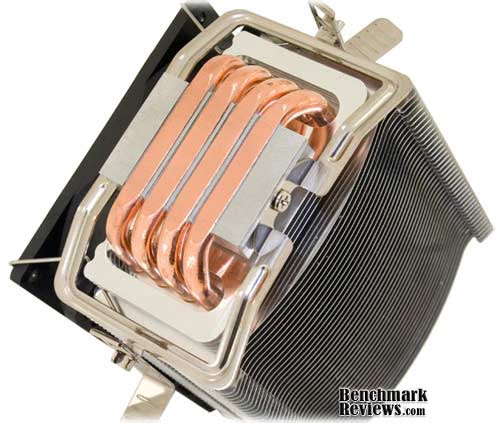
4 pcs High Performance U Type Heat-pipe Touch w/ CPU Chip
-
Easy installation
-
Direct H.T.C. (Heat-pipe Touch Chip) Technology
-
4 Copper Heatpipes
-
120 mm NDB Fan
-
Aluminum fin
-
Light weight
-
Tool-Free clip
-
Universal Application: 1366/LGA775 push-pin & AM2/K8 Tool-Less Clip
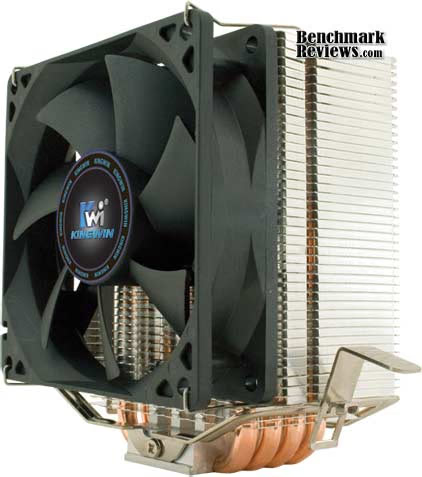
Overclockers have had positive things to say about other similarly-designed coolers, and Kingwin hopes that the XT-1264 will follow in the footsteps of its predecessors. Four large heat-pipes span up the sides in a 'U' shaped configuration, and the tension-based clip system applies above average pressure to the contact surface. Designed to fit Intel LGA1366 and LGA775 sockets, as well as AMD AM3/AM2/754/939/940 sockets, the Kingwin XT-1264 could be the universal fit for overclocking projects. As of August 2009 the Kingwin XT-1264 was available at NewEgg for $36.99, which is approximately average for cooler prices.
XT-1264 Specifications
| Fan speed: | XT-1264 | ||||||||||||||||||||||||
|---|---|---|---|---|---|---|---|---|---|---|---|---|---|---|---|---|---|---|---|---|---|---|---|---|---|
| Dimension: | 120mm (L) x 74mm (W) x 150mm (H) | ||||||||||||||||||||||||
| Heat Sink: |
|
||||||||||||||||||||||||
| Weight(g): | 467g (w/fan) |
About KWI Technology Inc.
Kingwin was founded in 1992 as a manufacturer specialized in designing and manufacturing CPU Coolers and Mobile Racks, also with goals to provide our customers with the best Computer Chassis, Thermal Cooling, Liquid Cooling, and Storage Solutions. With the company's core business of Storage Solution units is still growing at a vast rate, Kingwin started looking into the PC chassis industry. To date, Kingwin has always been considered the pioneering company that revolutionized the Storage Solution Industry by bringing out different types and great storage units. The typical and traditional beige and plastic front panel design was replaced buy the excellent and more light and cooler material of the aluminum Storage Solution units. By doing this, Kingwin started growing in the industry and still is growing up to this date.
Prolimatech Megahalems
What happens when the best engineers from Thermalright decide that it's time to leave a stagnant company who refuses their ideas? They gather their intellect and begin Prolimatech. Unlike other companies that have formed from the intellect of another, Prolimatech didn't decide to leave their former home and release a mainstream product. The Prolimatech Megahalems offers everything former projects (like the Thermalright Ultra-120 eXtreme) featured, but then adds new engineering where there were improvements needed.
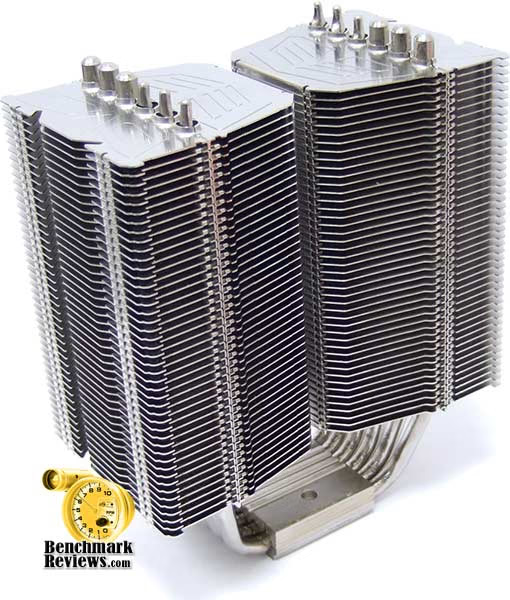
The Prolimatech Megahalems uses a very dense array of aluminum fins which are split down the middle to form two separate heatsink halves. The Megahalems is comprised of six heat-pipe rods, which span to each side and offer twelve total cooling ends. The nickel-plated copper base secures firmly to the CPU with a proprietary mounting clip system. This mounting system, which I am pleased to report is the most effective clip mechanism I've ever used, offers tremendous contact pressure while completely removing the chance of processor movement or sliding.
Aside from a very impressive alloy mounting system, the Megahalems includes a standard-fit 120mm cooling fan offering exceptional performance with nearly no audible noise, but the hardcore overclocker and performance enthusiast will certainly want to exchange these parts for something more powerful. Benchmark Reviews has tested the Prolimatech Megahalems with both the included fans and a single Yate Loon D12SH-12 (88 CFM @ 40 dbA) for comparison. As of August 2009 the ProlimaTech Megahalems was available at FrozenCPU for $65.

Megahalems Specifications
-
Heatsink Dimension: (L)130mm X (W)74mmX (H)158.7mm
-
Heatsink Weight: 790g
-
Heatpipe Ø: 6mm X 6pcs
-
Fan: 120mm x 120mm x 25mm
-
Fan Speed: 800~1200 RPM
-
Noise Level: (dBA) Below 26 dBA
-
Air Flow: 57 CFM

About ProlimaTech
Prolimatech, founded in 2008 is headquartered in Taiwan, led by a team of dedicated experts with 22 years of accumulated experience in the field of computer thermal solutions. Prolimatech stands for Professionalism exceeding beyond all Limits. We are here to challenge any limits that stand in our way to achieve what was thought to be impossible. Prolimatech incorporates integration of the aerospace resource-saving technology and advanced heat conduction technology to create the best heat absorption and dissipation solutions while pertaining to the science of aesthetics. Our never-ending quest is to satisfy every computer overclocker's and every enthusiast's needs for high quality and performance oriented thermal solutions for their high-end computer components.
Scythe Zipang 2
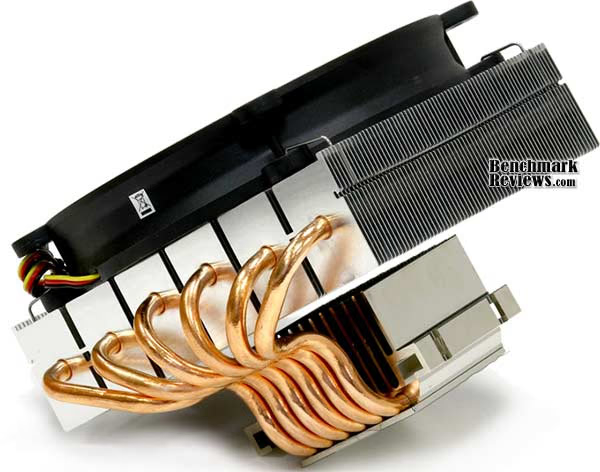
Scythe is a name associated with several popular enthusiast-level cooling fans, primarily because of their ability to delivery impressive airflow with minimal noise. The Scythe Zipang 2, which is an updated version of their Zipang cooler, comes with a polished copper base, six heatpipes, aluminum fin-sink, and a silent 140mm fan with an airflow of up to 51.43 CFM at a noise level of 22.74dBA. At the time of this article the Zipang 2 was not available online, although Scythe has suggested a retail price of $58.
Scythe Zipang 2 Features
Scythe Kaze Maru 140 mm Fan
By applying an original Scythe Kaze Maru fan, wider area of the components on the motherboard can be cooled compared to 120 mm fans while keeping low noise and high cooling ability for the CPU.
V.T.M.S. (Versatile Tool-Free Multiplatform System)
Newly developed & patented mounting mechanism "VTMS" allows user to install Zipang 2 CPU Cooler without any tools and hassle.
M.A.P.S. (Multiple Airflow Pass-Through Structure)
By introducing the newly developed M.A.P.S. (Multiple Airflow Pass-Through Structure), the heatsink has been optimized to fully utilize the ability of the included Scythe original Kaze Maru 140 mm case fan.
Total 6 Heatpipe
With total 6 x 6 mm diameter copper heatpipe to provide the top cooling performance!
Wide Range Cooling
Optimized to get its performance from low-rpm to high-rpm to meet the demand from silent users to heavy-core overclockers. All in one solution for your PC system.
Optional 120 mm Fan
An optional 120 mm fan can be attached to Zipang 2 CPU Cooler using the supplied fan clips.
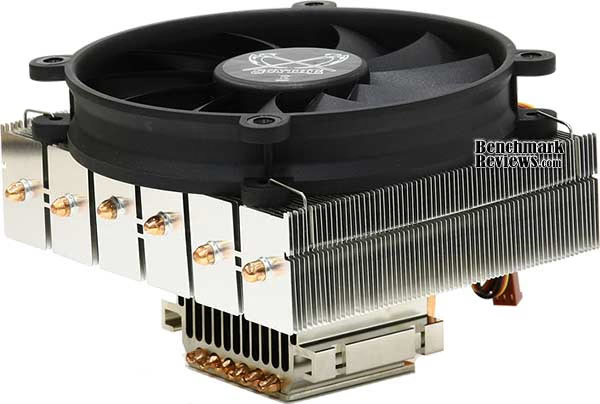
The former Zipang CPU Cooler was further developed and is now available as the second version with various improvements. The M.A.P.S. (Multiple Airflow Pass-Through Structure)which is known from Mugen 2 was adjusted and applied to increase the overall performance of Zipang 2 CPU Cooler. Kaze Maru 140 mm fan was used to further optimize performance and airflow.
Improvements in performance were achieved by adopting and further tuning the M.A.P.S.(Multiple Airflow Pass-Through Structure) which is known from the chart leading Mugen 2 CPU Cooler. Each of the total 6 copper-heatpipes is connected to a separated block of aluminum fins, from which the heat dissipation is resolved. Further optimization was done by utilizing M.A.P.S.(Multiple Airflow Pass-Through Structure) to use the airflow more efficiently. Constant airflow of 51.43 CFM (87 m³/h) is generated by the Scythe original Kaze Maru 140 mm fan which was used in the former Zipang CPU Cooler. To keep the noise level as low as 22.74 dba, the Kaze Maru fan rotates at a fan speed of 1,000 rpm.
Zipang 2 CPU Cooler can be customized according to the individual wishes of every user by exchanging the supplied fan to any aftermarket 120 mm case fans to reach more airflow and performance or lower fan speed and noise level. 120 mm case fan can be mounted using the supplied mounting clips which are used for the pre-mounted Kaze Maru 140 mm fan. Further improvements were achieved by adopting the V.T.M.S. (Versatile Tool-Free Multiplatform System) to the new Zipang 2 CPU Cooler to allow tool-free mounting to all common CPU sockets including AM3 and LGA1366.
Zipang 2 Specifications
-
Model Name: Zipang 2 CPU Cooler
-
Model Number: SCZP-2000
-
Compatibility (Intel) Sockel LGA478 / LGA775 / LGA1366
-
Compatibility (AMD) Sockel 754 / 939 / AM2 / AM2+ / AM3 / 940
-
Dimension (Overall): 145 x 149 x 106 mm / 5.71 x 5.87 x 4.17 inch
-
Dimension (Fan): 140 x 140 x 25 mm / 55.12 x 55.12 x 9.84 inch
-
Fan Speed: 1,000 rpm (±10%)
-
Fan Noise: 22.74 dBA
-
Air Flow: 51.43 CFM = 87 m³/h
-
Weight: 715 g (23.08 oz)
-
Baseplate-Material: Nickel-plated copper
About Scythe USA
So who is Scythe? What do they do? Many of you are asking this question while surfing our website. Scythe Co., Ltd. (Registered & incorporated in Tokyo Japan) originally started in Akihabara Electric Town located in Tokyo Japan, where visitors can find the latest electric products from computer parts and accessories to the world's most advanced cellular phones with video camera capabilities, small displays and the ability to play movies!
Scythe Co., Ltd., began its operation and business in November, 2002 as a distributor and manufacture of PC parts & gaming devices for "DIY PC Experts!". For more information about Scythe Japan HQ, please visit the website at: www.scythe.co.jp (If you read Japanese!). Scythe's first venture was to manufacture a super powerful YET super quiet CPU cooler (Scythe Kamakaze CPU cooler), and with the great success of this Kamakaze CPU cooler, Scythe became recognized as the leading CPU cooler supplier in Japan's Akihabara Electric Town. Shortly there after, due to popular demand, Scythe began exporting products all over the world.
In April of 2004 Scythe USA began local operations by establishing an office in Northern California. In October of 2004 Scythe USA moved operations to LA in order to work more closely with manufactures and streamline logistics to better service our US based partners. Have you seen/heard anything interesting, from Japan's Akihabara electric town that you'd like us to import to the US? Let us know! We'd love to hear from you!
Thermaltake ISGC-300
Thermaltake has a reputation for producing unique cooling products using unorthodox design methods. The Thermaltake V14 Pro CL-P0471 was the last cooler Benchmark Reviews tested for our 'Best CPU Cooler Performance' series, and we were taken back by the excellent performance. Once again, Tt has returned with the extraordinary, but instead of shaping a new cooler, it is the fan that's different.
The ISGC series takes advantage of a completely-silent cooling fan that utilizes saw-blade indentions to improve airflow by 15% while reducing noise 3%. In our tests, the ISGC was so quiet that we were forced to visually check that the fan was spinning. Conversely, the ISGC fan still performed quite well for a silent fan. Benchmark Reviews tests the Thermaltake ISGC-300 CLP0539 with both the included ISGC cooling fan and a single Yate Loon D12SH-12 (88 CFM @ 40 dbA) for comparison.
Four heat-pipe rods span through a solid-copper polished base, with eight tips cooled by the aluminum fin-sink unit. As of August 2009, the Thermaltake ISGC-300 CLP0539 was sold by several online retailers starting around $49.99. Similar 'silent' coolers sell for nearly the same price, or more.

ISGC-300 Features:
- ISGC Fan Technology
The pure white 120mm VRFanTM which is designed by the Thermaltake to pursuit noiseless environment. Therefore Thermaltake design to reduce the turbulence and the friction between air and fan
- Hydro Dynamic Bearing (HDB) Technology
Improved fan operation stability and noise production for extended overall product durability
- The Ultimate Copper+ Base Architecture x 4 Heatpipes
Mirror Copper Base deliver 100% touch between CPU and Cooler. Meanwhile, 4 Cooper Heatpipes create the best heat transferring.
- Individual 33 Sawtooth Tower Fins
Thermaltake designs Tower Sawtooth onto the fins. With these sawtooth indentations, the cold air intake becomes smoother. The maximum cooling performance and noise is controlled thus can be optimized through 33 Sawtooth Tower Fins
CLP0539 Specifications
-
Compatibility:
-
Intel Socket LGA1366/LGA775
-
AMD Socket AM2+/AM2
-
-
Heatsink Dimensions:
-
126(L) x 71(W) x 161(H) mm
-
4.96(L) x 2.8"(W) x 6.34(H) in
-
-
Heatsink Material:
-
Aluminum Fins
-
Aluminum Extrusion Cover + Copper Base
-
Heatpipe Ø 6 mm x 4
-
-
Fan Dimension: 120 x 25 mm
-
Fan Speed: 800 ~ 1300 RPM
-
Bearing Type: Hydro Dynamic
-
Noise Level: 16 dBA
-
Max. Air Flow 58.3 CFM
-
Max. Air Pressure 1.4 mmH2O
-
Weight 697 g

About Thermaltake
Founded in 1999, Thermaltake Technology is the world leader in the supply of thermal management cooling solutions, high-end power supply and chassis for desktop PC and industrial application systems. Building on the strength of its people, products and extensive expertise in Thermal Management, Thermaltake raised the level of excellence on its Award Winning Purepower branded power supply as well as Xaser line of chassis. While mission-critical applications for Enterprises and ultimate video gaming experiences available for gaming enthusiasts all rely on today's cutting-edge PCs to deliver, high-end PC makers relies on Thermaltake to provide the most reliable power supply, the most thermally efficient chassis and cooling solutions.
Thermaltake Technology Co., Ltd. started its core business based on our extensive knowledge of PC thermal management during the era where the area of performance CPU cooling was only exclusive for "overclockers" or PC enthusiasts. With the company's initial launch of Orb coolers, it created waves of shocks and appraisals throughout the gaming and overclocking communities. Thermaltake quickly became the name gamers turn to when they need high-end and reliable thermal solutions.
With company's core business of CPU cooling still growing at a vast rate, Thermaltake made another grand entry to the PC chassis industry. To date, Thermaltake has always been considered as the pioneering company that revolutionized the PC chassis industry with Xaser series enclosures. The typical and traditional beige and plastic front panel design was outdone by Xaser series chassis's atypical gaming red and aluminum front panel. It was also the first enclosure available to public with Hardcano unit which provided users full control over computer's thermal management system.
As a leader in Thermal Management, Thermaltake is the trusted supplier to many computer manufacturers providing Intel Validated and AMD Approved CPU coolers for today's high frequency and mainstream CPUs. At the pace of current technological advancement in multimedia application and multi-core processor, Thermal Management will become an evermore challenging task requiring innovative product design and reliable manufacturing process; a task that has made what Thermaltake is now and future.
In the year 2002, Thermaltake announced Purepower line of power supply unit for the ever-growing power-hungry PCs. Purepower series PSU quickly gained recognition with its extensive warranty and high-reliability guaranty. Today, Thermaltake has grown into a world-class company with state-of-the-art testing and R&D facility based in Taiwan along with 60+ engineers and ID team covering each application segment such as Liquid Cooling, Air Cooling, PC Enclosure and Power Supply for main-stream users, high-end solutions, system integrators and industrial applications; thus achieve Thermaltake 's company motto, " COOLall YOUR LIFE "!
Thermaltake ISGC-400
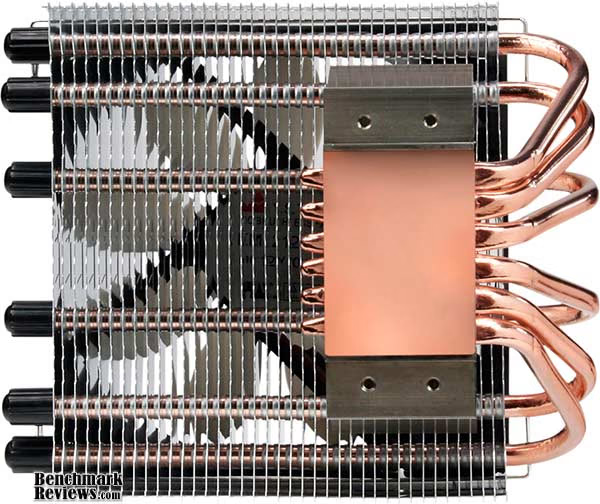
Nearly identical to the ISGC-300, the Thermaltake ISGC-400 is a horizontally orientated finsink cooler with six heat-pipe rods instead of only four. The same ISGC-series fan operates in complete silence, and utilizes saw-blade indentions to improve airflow by 15% while reducing noise 3%. Benchmark Reviews tests the Thermaltake ISGC-400 CLP0540 with both the included ISGC cooling fan and a single Yate Loon D12SH-12 (88 CFM @ 40 dbA) for comparison.
Six heat-pipe rods span out from a solid-copper polished contact base, and travel through the aluminum fin-sink unit. As of August 2009, the Thermaltake ISGC-400 CLP0540 was sold by several online retailers starting around $53.82. This pricing is slightly higher than the ISGC-300 which shares the exact same features but fewer heat-pipe rods.

ISGC-400 Features:
- ISGC Fan Technology
The pure white 120mm VRFanTM which is designed by the Thermaltake to pursuit noiseless environment. Therefore Thermaltake design to reduce the turbulence and the friction between air and fan
- Hydro Dynamic Bearing (HDB) Technology
Improved fan operation stability and noise production for extended overall product durability
- The Ultimate Copper+ Base Architecture x 4 Heatpipes
Mirror Copper Base deliver 100% touch between CPU and Cooler. Meanwhile, 4 Cooper Heatpipes create the best heat transferring.
- Individual 33 Sawtooth Tower Fins
Thermaltake designs Tower Sawtooth onto the fins. With these sawtooth indentations, the cold air intake becomes smoother. The maximum cooling performance and noise is controlled thus can be optimized through 33 Sawtooth Tower Fins
CLP0540 Specifications
-
Compatibility:
-
Intel Socket LGA1366/LGA775
-
AMD Socket AM2+/AM2
-
-
Heatsink Dimensions:
-
126(L) x 71(W) x 70(H) mm
-
4.96(L) x 2.8"(W) x 2.76(H) in
-
-
Heatsink Material:
-
Aluminum Fins
-
Aluminum Extrusion Cover + Copper Base
-
Heatpipe Ø 6 mm x 6
-
-
Fan Dimension: 120 x 25 mm
-
Fan Speed: 800 ~ 1300 RPM
-
Bearing Type: Hydro Dynamic
-
Noise Level: 16 dBA
-
Max. Air Flow 58.3 CFM
-
Max. Air Pressure 1.4 mmH2O
-
Weight 697 g
About Thermaltake
Founded in 1999, Thermaltake Technology is the world leader in the supply of thermal management cooling solutions, high-end power supply and chassis for desktop PC and industrial application systems. Building on the strength of its people, products and extensive expertise in Thermal Management, Thermaltake raised the level of excellence on its Award Winning Purepower branded power supply as well as Xaser line of chassis. While mission-critical applications for Enterprises and ultimate video gaming experiences available for gaming enthusiasts all rely on today's cutting-edge PCs to deliver, high-end PC makers relies on Thermaltake to provide the most reliable power supply, the most thermally efficient chassis and cooling solutions.
Thermaltake Technology Co., Ltd. started its core business based on our extensive knowledge of PC thermal management during the era where the area of performance CPU cooling was only exclusive for "overclockers" or PC enthusiasts. With the company's initial launch of Orb coolers, it created waves of shocks and appraisals throughout the gaming and overclocking communities. Thermaltake quickly became the name gamers turn to when they need high-end and reliable thermal solutions.
With company's core business of CPU cooling still growing at a vast rate, Thermaltake made another grand entry to the PC chassis industry. To date, Thermaltake has always been considered as the pioneering company that revolutionized the PC chassis industry with Xaser series enclosures. The typical and traditional beige and plastic front panel design was outdone by Xaser series chassis's atypical gaming red and aluminum front panel. It was also the first enclosure available to public with Hardcano unit which provided users full control over computer's thermal management system.
As a leader in Thermal Management, Thermaltake is the trusted supplier to many computer manufacturers providing Intel Validated and AMD Approved CPU coolers for today's high frequency and mainstream CPUs. At the pace of current technological advancement in multimedia application and multi-core processor, Thermal Management will become an evermore challenging task requiring innovative product design and reliable manufacturing process; a task that has made what Thermaltake is now and future.
In the year 2002, Thermaltake announced Purepower line of power supply unit for the ever-growing power-hungry PCs. Purepower series PSU quickly gained recognition with its extensive warranty and high-reliability guaranty. Today, Thermaltake has grown into a world-class company with state-of-the-art testing and R&D facility based in Taiwan along with 60+ engineers and ID team covering each application segment such as Liquid Cooling, Air Cooling, PC Enclosure and Power Supply for main-stream users, high-end solutions, system integrators and industrial applications; thus achieve Thermaltake 's company motto, " COOLall YOUR LIFE "!
Xigmatek Thor's Hammer
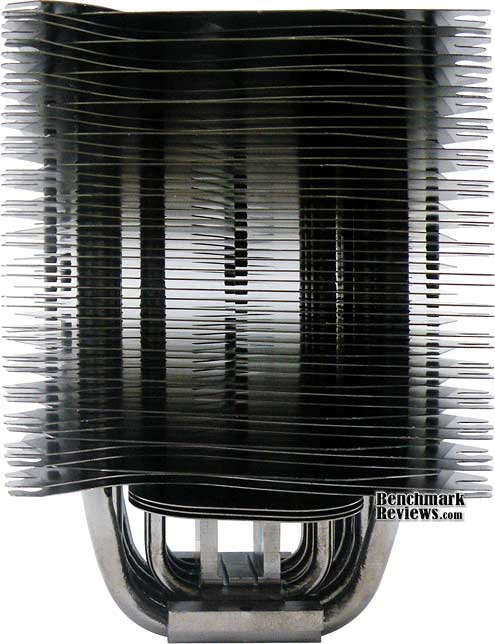
Our first look at the Xigmatek Thor's Hammer S126384 reveals a complex array of densely double-stacked fins atop a double-layer of heat-pipe rods. The finish is comprised of a black nickel coating, which makes the S126384 surprisingly heavy at 800 grams (before mounting clip brackets). Xigmatek doesn't include a fan, because they feel that this is their flagship cooler and it should be matched with a premium after-market fan of the overclockers choice. While the CAC-SXHH7-U01 kit comes with enough rubber retaining plugs for two fans, we will compare our group with on one forward mounted fan blowing to the rear of the case.
The concept behind the S126384 is that it relies on ultra-heavy thermal loading to take advantage of its double-layer heatpipe architecture. Because of the very dense fins array, and the four-pipe contact base, Thor's Hammer is really best suited for larger AMD Phenom II and Intel Core i7 processors which feature a larger IHS (Integrated Heat Spreader) surface area. We tested the group on the Core i7/X58 platform, but in retrospect the AMD Phenom II X4 940 Black Edition probably would have been more fun and offer a better contact surface with the enlarged base of these coolers.
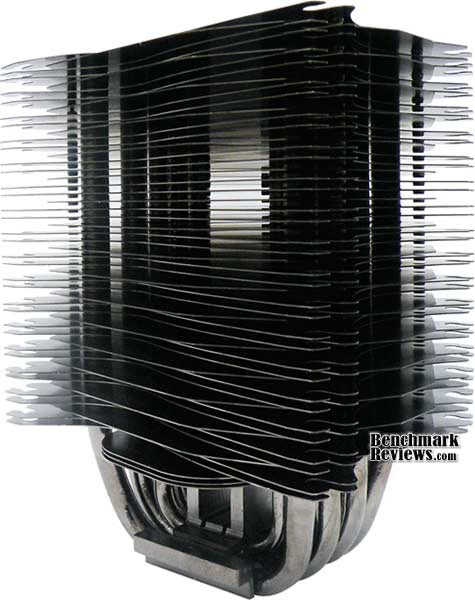
All forty-nine of the blackened aluminum-alloy fins are met by the seven heat-pipe rods, which turn into fourteen different heat-pipe cooling ends. Because of the staggered fins array, high overclocks could potentially see better cooling from the static pressure a 120x120x35mm fan can provide. The 120x120x25mm profile is standard for most Xigmatek coolers, but don't feel limited to using this profile if your case can afford the space. The total width with two (120x120x)25mm fans is 140mm, which is slightly longer than the width, but adding 35's would make this a very long cooler.
The Thor's Hammer S126384 is meant to compete with the most elite CPU coolers known to the industry, but that's what every product we test pretends to claim. In our next few sections, we'll peek at how well the S126384 does against the very best LGA1366 CPU coolers. At the time of this article, the Xigmatek Thor's Hammer S126384 kit was available at NewEgg for $64.99.
Thor's Hammer S126384 Features
-
H.D.T. (Heat-pipe Direct Touch) technology
-
Double-layer HDT and double-heatpipe performance
-
Black-Nickel plating throughout the entire cooler
-
Anti-vibration rubber fan mounting design
-
Includes Crossbow ACK-I7363 bolt-through mounting kit
-
Passive cooler design with optional fan installation for extra cooling
CAC-SXHH7-U01 Specifications
-
Product Name: Thor's Hammer S126384
-
Product Number: CAC-SXHH7-U01
-
Outside Dimension (W) x (H) x (D) mm 120 x 90 x 160
-
Heat Sink Material: Aluminum Alloy
-
4pcs Φ8mm Primary heat-pipe group
-
3pcs Φ6mm Secondary heat-pipe group

About Xigmatek Co., Ltd.
XIGMATEK, a European company, was established in 2005 with the aim of becoming one of the world leaders in the Thermal field. In XIGMATEK, the major members of management have many years experience in Thermal industry, PC, manufacturing and other applications. With our fruitful experience, we have full confidence that we can provide not only the best, reliable, environmental and performing Thermal/Cooling systems but excellent service also to fulfill global user demand.
Purpose and targets of becoming one of the worlds leaders in thermal PC Industry were set for Xigmatek Co. Ltd in 2005, the founding year! To ensure reaching this project aim, Xigmatek's management followed up with hard work, experience and customer friendly business style. 
Honing one of the world's most efficient manufacturing operations, Integration Presence in major economic regions, being tied up with most important strategic alliances between suppliers and academia and further majority investments in R&D are some of Xigmatek's aggressive enhancement strategies.
Combining the cream of product designers, R&D engineers and technical people (main team in Germany) Xigmatek is proud and full of confidence to offer excellent quality products and service to cover the customers requirements and demands. Within the standard channels as the consumer market and the distributing electrical appliances, Xigmatek will keep on focusing on development and set up even new sales channels to comply with ever-changing demands and requirements. Several years of experiences company background in Thermal IT industry provides our customer the best, reliable, environmental and performing Thermal/Cooling Systems including excellent Service to fulfill global users and customers demands.
Zalman CNPS10X Extreme
Zalman is a very well-known name around the cooling industry because they were the first to begin using copper materials in their product while everyone else was still cutting corners with aluminum. The other factor which has helped add to their success is their promise to deliver good performance without all of the noise. Most all of the Zalman CPU coolers I've tested have been very quite, some completely silent, and performed as well as the very best (noisy) products.
In this article the Zalman CNPS10X Extreme introduces the PWM Mate fan speed controller, so you can fine tune the fan speeds for the optimum balance between cooling performance and noise level. The Zalman CNPS10X Extreme includes compatibility with AMD socket 754, 939, 940, AM2, AM2+ and AM3 platforms, as well as the Intel LGA775, 1156 and 1366 platform. At the time of this writing, the Zalman CNPS10X Extreme was available at NewEgg for $79.99, while others had stock for $67.99. This price is among the highest we've seen for CPU coolers, and it's worth comparing the alternatives.

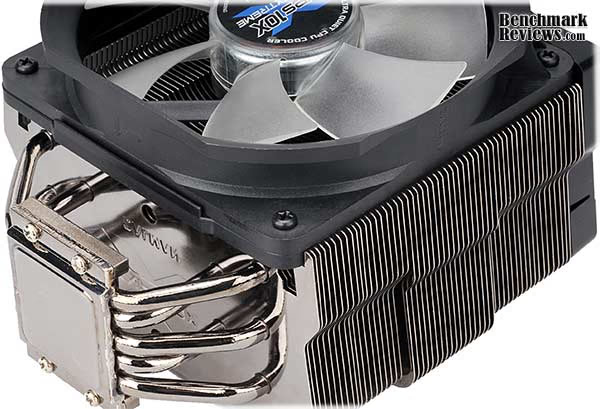
Five nickel-plated copper heat-pipe rods are staggered and span from the polished nickel-plated mounting base up into the aluminum finsink. The heat-pipe rods and finsink are cooled by a Zalman PWM 120mm Blue LED Fan. The Zalman CNPS10X Extreme includes PWM Mate, the world's first RPM-controllable PWM fan speed controller, with the option of 3-Speed Auto or Manual Control modes.
A polished nickel-plated copper contact surface mates to a metal upper-base segment, with heat-pipes pressed between the two parts. Because of the very smooth contact surface, only an extremely small amount of thermal paste is needed for best heat transfer. The Zalman CNPS10X Extreme includes a large syringe of the new high-performance thermal grease ZM-STG2, which maximizes heat transfer from the CPU to the base of CNPS10X Extreme for improved cooling performance. Benchmark Reviews recently tested the ZM-STG2 thermal compound in our 80-way Thermal Interface Material Performance Test.
CNPS10X Extreme Specifications
-
Dimensions: 135(L) X 100(W) X 160(H)mm
-
Weight: 920g
-
Materials:
-
Fins: Aluminum
-
Base: Copper
-
-
Dissipation Area: 8,544§²
-
Heatpipes: 5 x U-shaped heatpipes
-
Fan: PWM 120mm Blue LED Fan
-
Fan RPM: 1,000 - 2,150rpm ¡¾ 10 %
-
Fan Noise: 20.0 - 39.0dBA
-
Fan Bearing: 2 Ball-Bearing
-
Nominal Fan Voltage 12V
About the company: Zalman Tech Co., Ltd.
Zalman Tech was founded in 1999 and focused their early efforts on "silent" cooling solutions; their motto was "Noiseless Computing". They grew rapidly and their cooling product line has expanded to match the thermal challenges posed by the rapidly increasing heat load inside high performance PCs. They have also diversified with new products like 2D/3D convertible LCD Monitors, Heatpipe Cooled Power Supplies, Notebook coolers, Surround Sound Headphones, and their newest product, a FPS gaming interface.
They are headquartered in Seoul, Korea and have a staff of ~169. The company went public in 2007 and is listed on the KOSDAQ stock exchange in Korea. The CEO, Young-Pil Lee, in his greetings on the corporate website, captures the essence of their success: "Zalman will not content itself with present results and will continue its innovation driven efforts to guarantee client satisfaction."
Surface Preparation
Processor and CPU cooler surfaces are not perfectly smooth and flat surfaces, and although some surfaces appear polished to the naked eye, under a microscope the imperfections become clearly visible. As a result, when two objects are pressed together, contact is only made between a finite number of points separated by relatively large gaps. Since the actual contact area is reduced by these gaps, they create additional resistance for the transfer of thermal energy (heat). The gasses/fluids filling these gaps may largely influence the total heat flow across the surface, and then have an adverse affect on cooling performance as a result.
Surface Finish Impact
CPU coolers primarily depend on two heat transfer methods: conduction and convection. This being the case, we'll concentrate our attention towards the topic of conduction as it relates to the mating surfaces between a heat source (the processor) and cooler. Because of their density, metals are the best conductors of thermal energy. As density decreases so does conduction, which relegates fluids to be naturally less conductive. So ideally the less fluid between metals, the better heat will transfer between them. Even less conductive than fluid is air, which then also means that you want even less of this between surfaces than fluid. Ultimately, the perfectly flat and well-polished surface is going to be preferred over the rougher and less even surface which required more TIM (fluid) to fill the gaps.
This is important to keep in mind, as the mounting surface of your average processor is relatively flat and smooth but not perfect. Even more important is the surface of your particular CPU cooler, which might range from a polished mirror finish to the absurdly rough or the more complex (such as Heat-Pipe Direct Touch). Surfaces with a mirror finish can always be shined up a little brighter, and rough surfaces can be wet-sanded (lapped) down smooth and later polished, but Heat-pipe Direct Touch coolers require some extra attention.
To sum up this topic of surface finish and its impact on cooling, science teaches us that a smooth flat mating surface is the most ideal for CPU coolers. It is critically important to remove the presence of air from between the surfaces, and that using only enough Thermal Interface Material to fill-in the rough surface pits is going to provide the best results. In a perfect environment, your processor would mate together with the cooler and compress metal on metal with no thermal paste at all; but we don't live in perfect world and current manufacturing technology cannot provide for this ideal environment.
Mounting Pressure
Probably one of the most overlooked and disregarded factors involved with properly mounting the cooler onto any processor is the amount of contact pressure applied between the mating surfaces. Compression will often times reduce the amount of thermal compound needed between the cooler and processor, and allow a much larger metal to metal contact area which is more efficient than having fluid weaken the thermal conductance. The greater the contact pressure between elements, the better it will conduct thermal (heat) energy.
Unfortunately, it is often times not possible to get optimal pressure onto the CPU simply because of poor mounting designs used by the cooler manufacturers. Most enthusiasts shriek at the thought of using the push-pin style clips found on Intel's stock LGA775 thermal cooling solution. Although this mounting system is acceptable, there is still plenty of room for improvement.
Generally speaking, you do not want an excessive amount of pressure onto the processor as damage may result. In some cases, such as Heat-pipe Direct Touch technology, the exposed copper rod has been pressed into the metal mounting base and then leveled flat by a grinder. Because of the copper rod walls are made considerably thinner by this process, using a bolt-through mounting system could actually cause heat-pipe rod warping. Improper installation not withstanding, it is more ideal to have a very strong mounting system such as those which use a back plate behind the motherboard and a spring-loaded fastening system for tightening. The Noctua NH-U12P is an excellent example of such a design.
In all of the tests which follow, it is important to note that our experiments focus on the spread pattern of thermal paste under acceptable pressure thresholds using either a push-pin style mounting system or spring-loaded clip system. In most situations your results will be different than our own, since higher compression would result in a larger spread pattern and less thermal paste used. The lesson learned here is that high compression between the two contact surfaces is better, so long as the elements can handle the added pressure without damaging the components.
Thermal Paste Application
The entire reason for using Thermal Interface Material is to compensate for flaws in the surface and a lack of high-pressure contact between heat source and cooler, so the sections above are more critical to good performance than the application of TIM itself. This section offers a condensed version of our Best Thermal Paste Application Methods article.
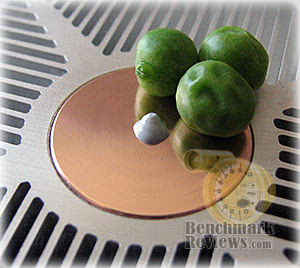
After publishing our Thermal Interface Material articles, many enthusiasts argued that by spreading out the TIM with a latex glove (or finger cover) was not the best way to distribute the interface material. Most answers from both the professional reviewer industry as well as enthusiast community claim that you should use a single drop "about the size of a pea". Well, we tried that advice, and it turns out that maybe the community isn't as keen as they thought. The example image below is of a few frozen peas beside a small BB size drop of OCZ Freeze TIM. The image beside it is of the same cooler two hours later after we completed testing. If there was ever any real advice that applies to every situation, it would be that thermal paste isn't meant to separate the two surfaces but rather fill the microscopic pits where metal to metal contact isn't possible.

After discussing this topic with real industry experts who are much more informed of the process, they offered some specific advice that didn't appear to be a "one size fits all" answer:
-
CPU Cooling products which operate below the ambient room temperature (some Peltier and Thermo-electric coolers for example) should not use silicon-based materials because condensation may occur and accelerate compound separation.
-
All "white" style TIM's exhibit compound breakdown over time due to their thin viscosity and ceramic base (usually beryllium oxide, aluminum nitride and oxide, zinc oxide, and silicon dioxide). These interface materials should not be used from older "stale" stock without first mixing the material very well.
-
Thicker carbon and metal-based (usually aluminum-oxide) TIM's may benefit from several thermal cycles to establish a "cure" period which allows expanding and contracting surfaces to smooth out any inconsistencies and further level the material.
The more we researched this subject, the more we discovered that because there are so many different cooling solutions on the market it becomes impossible to give generalized advice to specific situations. Despite this, there is one single principle that holds true in every condition: Under perfect conditions the contact surfaces between the processor and cooler would be perfectly flat and not contain any microscopic pits, which would allow direct contact of metal on metal without any need for Thermal Interface Material. But since we don't have perfectly flat surfaces, Thermal Material must fill the tiny imperfections. Still, there's one rule to recognize: less is more.
Cooler Test Methodology
Benchmark Reviews has been obsessed with testing CPU coolers over the few years. We've solicited suggestions from the enthusiast community, and received guidance from some of the most technical overclockers on the planet. As a result, our testing methodology has changed with every edition of our Best CPU Cooler Performance series. Because of this, each article is really its own stand-alone product, and cannot be fairly compared to the others. This article is going to be a perfect example of that principle, although certain tenants still hold true. Benchmark Reviews continues to test CPU coolers using the stock included fan (whenever applicable), and then replaces it with a high-out fan for re-testing.
Manufacturers are not expected to enjoy this sort of comparison, since we level the playing field by replacing their included fan with a common unit which we then use for every CPU cooler we test. Manufacturers regularly include fans with their CPU cooler products, and more often than not these fans are very high RPM units which offer great airflow at the expense of an obnoxiously loud noise level. By using the same model of cooling fan throughout our testing, we can assure our results are comparable across the board. This is one of the more significant changes we have made to our test methodology, since many of the benchmark tests we have conducted in the past have compared the total package. Ultimately we're more interested in the discovering the best CPU cooler performance and we believe that you'll feel the same way.

Testing was conducted in a loosely scientific manner. Ambient room temperatures levels were held to within one degree of fluctuation measured at static point beside the test equipment with a calibrated digital thermometer. All coolers had their original manufacturer-supplied thermal material removed and replaced with a product of our choosing listed in the support equipment section below. Each product then received the same amount of Thermal Interface Material (specified below), which amounted to roughly a BB-sized drop placed onto the center of the CPU. The CPU cooler product being tested was then laid down flat onto the CPU, and compressed to the motherboard using the supplied retaining mechanism. If the mounting mechanism used only two point of force, they were tightened in alternation; standard clip-style mounting with four securing points were compressed using the cross-over method. Once installed, the system was tested for a baseline reading prior to testing.
At the start of each test, the ambient room temperature was measured to track any fluctuation throughout the testing period. EVEREST Ultimate Edition v5.02.1750 by Lavalys was then utilized to create core loads and measure each individual CPU core temperature. It's important to note that software-based temperature readings reflect the thermistor output as recorded by the BIOS. For this reason, it is critically important (for us) to use the exact same software and BIOS versions throughout the entire test cycle, or the results will be incomparable. All of the units compared in our results were tested on the same motherboard using the same BIOS and software, with only the product itself changing in each test. These readings are neither absolute nor calibrated, since every BIOS is programmed differently. Nevertheless, all results are still comparable and relative to each products in our test bed.
One unfortunate problem is that CPU's report temperatures as a whole number and not in fractions. This in turn causes the motherboard BIOS and subsequent software applications such as EVEREST to also receive whole-number reports. Thankfully, EVEREST also does offer averages in the statistics panel, which gives us more precise readings. To further compensate for this, our tests were conducted several times after complete power down thermal cycles. Conversely, the ambient room temperature levels were all recorded and accurate to one-tenth of a degree Celsius at the time of data collection.
When each cooler is tested, Benchmark Reviews makes certain to keep the hardware settings identical across the test platform. This enables us to clearly compare the performance of each product under identical conditions. While the ambient room temperature did fluctuate between 18~19°C, this would not be enough to cause a noticeable impact on our test results since only the thermal difference is reflected in the charts. For the purpose of this article, thermal difference (not the same as thermal delta) is calculated by subtracting the ambient room temperature from the recorded CPU temperature.
Test System
- Motherboard: Gigabyte GA-EX58-EXTREME (Intel X58/ICH10R Chipset)
- Processor: Intel Core i7-920 BX80601920 2.667 GHz (overclocked test operates at 3.60 GHz 1.35V)
- System Memory: OCZ 6GB 1600MHz CL7 DDR3 OCZ3P1600LV6GK
- System Drive: OCZ Vertex 120GB SATA SSD OCZSSD2-1VTX120G
-
Optical Drive: ASUS BC-06B1ST Blu-Ray Disc Optical Combo Drive
-
Enclosure: Cooler Master ATCS 840 Computer Case RC-840
-
Grpahics: ZOTAC GeForce 9800 GTX+ Zone Edition (liquid cooling looped into X58 Northbridge)
-
Operating System: Windows XP Professional SP-3 (optimized to 16 processes at idle)
Support Equipment
-
OCZ Freeze Thermal Interface Material (No curing time necessary or given)
-
Yate Loon 120mm cooling fan, model D12SH-12 (88 CFM @ 40 dbA)
-
Xigmatek CrossBow ACK-I7361 (supports xxxx1 / xxxx2 / xxxx3 cooler models)
-
Xigmatek CrossBow ACK-I7363 (supports xxxx4 / xxxx5 / xxxx6 cooler models)
-
EVEREST Ultimate Edition v5.02.1750 by Lavalys
All of our tests are now conducted using only the vertical motherboard orientations traditional to tower computer systems. At the start of our test period, the test system is powered on and EVEREST system stability tests are started with Stress CPU and Stress FPU options selected. For a minimum of sixty minutes (one hour) EVEREST loads each CPU core to 100% usage, which drives the temperature to its highest point. Finally, once temperatures have sustained a plateau, the ending ambient room temperature and individual CPU core levels are recorded thus completing the first benchmark segment.
The second test segment involves removing the stock cooling fan (while the system is still under load) and replacing it with a high-output 120 mm Yate Loon D12SH-12 cooling fan. The system is given thirty additional minutes with EVEREST loading the CPU cores before final temperature readings are taken and recorded. Once the testing has been completed at the stock processor speed, Benchmark Reviews turns up the voltage on our Core i7-920 processor and overclocks to 3.6GHz using a 1.35V vCore. When the system restarts, we start our testing over from the beginning and allow a minimum of sixty minutes of loading before taking our readings.
The Accuracy Myth
All modern processors incorporate an internal thermal diode that can be read by the motherboards' BIOS. While this diode and the motherboard are not calibrated and therefore may not display the actual true temperature, the error is constant. This means that if the diode reports 40°C when it is actually 43°C, then it will also report 60°C when it is truly 63°C. Since the design goal of a thermal solution is to keep the CPU core within allowable temperatures, a processor's internal diode is the most valid means of comparison between different heatsinks, or thermal compounds. The diode and motherboard may be incorrect by a small margin in relation to an actual calibrated temperature sensor, but they will be consistent in their margin of error every time.
Stock Cooling Fan Results
Benchmark Reviews tries to cover every angle, but sometimes it's just not possible given our time constraints. Past articles from our 'Best CPU Cooler Performance' series have largely focused on the Intel Core 2 Duo/Quad LGA775 socket, and while the results are relevant to users owning that series of processor, the new Core i7 platform is completely different. To the inexperienced enthusiast, a top-performing LGA775 cooler might be (mistakenly) considered worthy for cooling a new LGA1366 Core i7 project. This would be a grave error, because not only are the two processors different in overall size, they also place the processor cores in different locations. Simply stated: what worked well on a Core 2 platform may not work very good at all with Core i7.
When it comes to personal computers, you could probably divide users into two separate groups for almost any one topic. This article is no different, and those two groups include both enthusiasts and overclockers. Hardcore overclockers and serious hardware enthusiasts may not consider the stock cooling results very interesting, but they're welcome to skip ahead into the next section where we add a high-performance fan and then add overclocked values. Believe it or not though, some people are on a budget and don't want or have the extra money to spend on aftermarket cooling fans or an additional bolt-through kit; sometimes they just want good cooling right out of the box. This section is for them.
In regards to fan noise, there are those of us who want it quiet while other will tolerate an eardrum-ringing whine. Since noise is a problem and not a solution, I believe that most enthusiasts want as much performance as they can get without additional tweaking and time-intensive modifications. That's what this test section is all about: how the cooler performs out of the box. For the "Stock Cooling Fan" results, Benchmark Reviews tests our Q2-2009 collection of LGA1366 CPU coolers for this article using the following criteria: Each cooler is tested with the manufacturer-included fan, so that performance will be relevant to consumers using the product in stock form.
Please keep in mind that a product that finishes at the top of the stock fan list isn't going to be relative if you plan on overclocking your processor or invest in a different cooling fan. Manufacturer-supplied stock cooling fans usually offer either extremely high airflow or incredibly low noise, so there's a lot riding on what's packaged with the kit. Sure, there's added importance on the cooler's design and construction, but at the stock level these factors really don't carry tremendous weight.

Benchmark Reviews has tested several new products (and a few top-choices from the previous series) in stock form for the LGA1366 socket results charted above. The performance results position the coolers in the following order, with the temperature difference (CPU core temp minus ambient room temp) beside them:
|
CPU Cooler |
Thermal Difference | |
|---|---|---|
| Prolimatech Megahalems | 29.6°C over ambient | |
| Cooler Master Hyper Z600 | 30.4°C over ambient | |
| Xigmatek HDT-S1284 | 32.5°C over ambient | |
| Noctua NH-U12P SE 1366 (2x 120mm fans) | 33.3°C over ambient | |
| OCZ Gladiator Max | 33.6°C over ambient | |
| Zalman XNPS10X Extreme | 33.8°C over ambient | |
| OCZ Vendetta 2 OCZTVEND2 | 33.9°C over ambient | |
| Kingwin XT-1264 | 34.0°C over ambient | |
| Cooler Master Hyper N620 | 34.9°C over ambient | |
| Cooler Master Hyper 212 Plus | 36.9°C over ambient | |
| CoolIt Domino ALC (low fan setting) | 40.3°C over ambient | |
| Scythe Zipang 2 | 42.0°C over ambient | |
| Thermaltake ISGC-300 | 42.3°C over ambient | |
| Thermaltake ISGC-400 | 42.9°C over ambient | |
| Intel LGA1366 Stock Cooling Solution | 55.0°C over ambient |
Just as it had done in our Best CPU Cooler Performance LGA1366 - Q1 2009 article, the Prolimatech Megahalems once again proves itself dominant over the collection of LGA1366 coolers. Equally impressive and twice as large is the Cooler Master Hyper Z600, followed closely by the Xigmatek HDT-S1284 which offer very good performance right out of the box. The Noctua NH-U12P SE sacrifices some cooling performance for a pair of completely-silent 120mm fans, but still manages to occupy a top stock-performance spot in our charts. The low-volume low-noise fans included with the OCZ Gladiator Max and OCZ Vendetta 2 hold them to the middle of our results, with the new Zalman XNPS10X Extreme and Kingwin XT-1264 performing just as well. The Cooler Master Hyper N620 pushes it's dual fans to a noteworthy position in our results, but from this point on the performance gets a little warmer.
The CM Hyper 212 Plus, Cooler Master's first HDT cooler, offers great cooling performance under stock conditions, but nothing Benchmark Reviews would consider outstanding. Because the CoolIt Domino ALC offers three fan settings, we felt it was appropriate to use the low fan setting for the stock comparison. Although the Domino ALC was completely silent, almost scary silent, it barely kept up with the other high-end coolers when applied to a stock Intel Core i7-920 processor operating at 2.66 GHz. There were only three products which performed worse... not counting the stock Intel cooling solution. The Scythe Zipang 2, what might be considered a low-profile 'server' cooler, led the under-performers. Thermaltake's ISGC-300 performed as promised: silently, which unfortunately doesn't translate into excellent cooling performance. The Thermaltake ISGC-400 performed similarly, primarily because the cooling fan is meant for low-noise and not high-output airflow.
The stock Intel LGA1366 thermal cooling solution tests actually began to worry me, as the core temperatures reached past 70°C without any overclock. There were a few products excluded from our stock fan results, simply because they don't include a fan with the kit. The Xigmatek Thor's Hammer S126384 is one example, and another is the Thermalright Ultra-120 eXtreme. If you want to see how these coolers do when they have a high-volume cooling fan attached, please continue into the next section.
High-Output Fan Results
This section uses the high-output Yate Loon D12SH-12 cooling fan on each product tested. Because of the size and design constraints of most products, a 120x120x25mm fan is as large as we can go with our collection of coolers. We are aware that much more impressive fans are available to consumers, such as the 120x120x35mm screamers that require a bolt-on kit to retain them. But in my experience, the Yate Loon D12SH-12 is one of the best 120mm cooling fans available in regards to the noise to performance ratio. The D12SH-12 cooling fan forces an impressive 88 CFM of air at a moderately noisy 40 dbA.
In our recent review of the Xigmatek Thor's Hammer S126384 cooler, Benchmark Reviews used the Scythe Kaze-Jyuni Slip Stream 120mm cooling fan (model SY1225SL12H) along side the Yate Loon D12SH-12. Although Scythe claims the Kaze offers 88.11 CFM, I had a difficult time believing the stated specification when the results were always in favor of the Yate Loon product. Regardless, the Kaze series is quite popular with enthusiasts and the SlipStream does do well to provide sufficient airflow without all the irritation of noise... but Benchmark Reviews isn't going to use it for testing in this article.
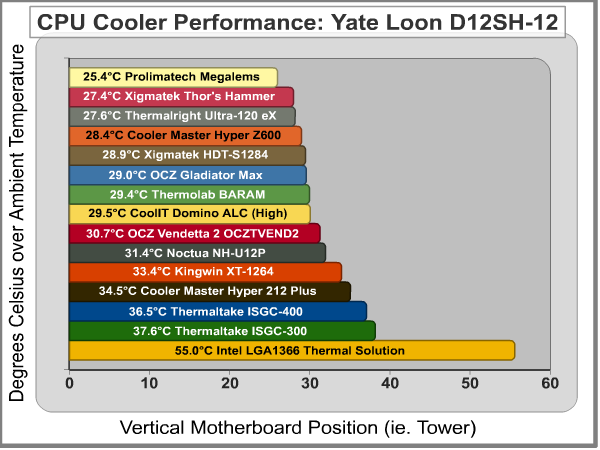
Our high-output fan tests held only a few exceptions, such as the CoolIT Domino ALC water-cooled solution, which I thought would be interesting to measure the performance of against our collection (although this time the fan was switched onto the 'high' setting). The Scythe Zipang 2 and Zalman XNPS10X Extreme were did not get included in these results because of proprietary non-replacable fans, while all of the other CPU coolers received a single Yate Loon D12SH-12 cooling fan. The cooling performance test results are charted above and in detail below with the temperature difference (CPU core temp minus ambient room temp) beside them:
|
CPU Cooler |
Thermal Difference | |
|---|---|---|
| Prolimatech Megahalems | 25.4°C over ambient | |
| Xigmatek Thor's Hammer S126384 | 27.4°C over ambient | |
| Thermalright Ultra-120 eXtreme | 27.6°C over ambient | |
| Cooler Master Hyper Z600 | 28.4°C over ambient | |
| Xigmatek HDT-S1284 | 28.9°C over ambient | |
| OCZ Gladiator Max | 29.0°C over ambient | |
| Thermolab BARAM | 29.4°C over ambient | |
| CoolIt Domino ALC (high fan setting) | 29.5°C over ambient | |
| OCZ Vendetta 2 OCZTVEND2 | 30.7°C over ambient | |
| Noctua NH-U12P SE1366 | 31.4°C over ambient | |
| Kingwin XT-1264 | 33.4°C over ambient | |
| Cooler Master Hyper 212 Plus | 34.5°C over ambient | |
| Thermaltake ISGC-400 | 36.5°C over ambient | |
| Thermaltake ISGC-300 | 37.6°C over ambient | |
| Intel LGA1366 Stock Cooling Solution | 55.0°C over ambient |
It becomes evident that there's a point of diminishing returns for every CPU cooler, and when 'over-fanned' the results collide closely together. Although the 2.66GHz Intel Core i7-920 processor does a decent job of separating the crowd when these coolers wear their stock fan, once a high-output fan is attached there's only about 12°C between the coolers we tested. It's a good bet that most of these top-performing products could cool an overclocked system extremely well, but these days only the very best will do. Much like the Thermal Interface Material testing we've conducted, all of the high-performance products are beginning to perform at nearly the same levels. Eventually, I expect to see the same technology used in all cooling products with the difference being the application. This is where experience comes in handy, and we've shared some of this with you in our Best Thermal Paste Application Methods article. Remember, less is more when it comes to thermal paste, and soon CPU coolers may offer the same paradigm.
Once again, the Prolimatech Megahalems dominated high-output fan tests, just as it did in our stock results. The Xigmatek Thor's Hammer S126384 and Thermalright Ultra-120 eXtreme and are neck and neck with each other, but still a few degrees behind the Megahalems cooler. The jumbo-sized Cooler Master Hyper Z600 kept up with the leaders with the high-output Yate Loon fan attached, followed by the Xigmatek HDT-S1284 and OCZ Gladiator Max coming in right behind it. On the outer edge of the top-performers is the Thermolab BARAM, CoolIt Domino ALC (using the high fan setting), and an old LGA775 favorite: the OCZ Vendetta 2 OCZTVEND2. After the Noctua NH-U12P SE1366 cooler, performance for the remaining products was fairly lukewarm.
Even though the temperatures were comparable to some of the leaders, the Kingwin XT-1264 and Cooler Master Hyper 212 Plus fell on the cusp of high-performance. Less likely to fall into that category are the Thermaltake ISGC-400 and ISGC-300 coolers, which may not be up to the task when we add some voltage and overclock the processor... which is exactly what happens in our next section.
Overclocked Test Results
Here it is, the section that matters most in the world of high-performance overclocking and aftermarket CPU coolers. Using a new Intel Core i7-920 2.66GHz processor for all previous tests, an identical Core i7-920 lapped flat with super-fine 1200 grid wet-sanding paper on a thick piece of glass. Once the Integrated Heat Spreader (IHS) exposed the copper finish, we switched to ultra-fine 2000 grit wet-sanding paper. To add a final buffing finish, the surface was wet-sanded with ultra-fine 2500 grit and then polished with liquid finishers. When the lapped Core i7-920 was reinstalled into the X58 test platform, the voltage was raised to 1.35V and pushed to a moderate 3.60 GHz overclock. Much higher overclocks were possible, but because a single failure could ruin the entire project, Benchmark Reviews tested at the most stable speed possible to avoid crashes and instability. Our readers must remember that every product must pass testing on the same motherboard and processor, or the testing must be redone completely.
The added voltage and overclock immediately increased the core temperatures by almost 25°C across the entire collection, even with the Yate Loon D12SH-12 huffing and puffing. All kits used either an included or aftermarket bolt-through kit for mounting the cooler and creating good contact pressure. After each test run was completed (usually about one hour), the cooler was removed and the thermal paste contact spread was inspected before being cleaned and re-installed for another test. Doing this revealed an peculiar trend, which make the distinction between LGA775 and LGA1366 performance more understandable.
Because of the slightly spread-out core placement on a Core 2 Quad or Duo processor, most triple-piped HDT cooler would make directly-aligned contact with the cores through the IHS. However, when it comes to the Core i7 series, the processor cores line-up better with four-piped HDT coolers (or at the outer edge of the center heat-pipe in the three-piped HDT cooler). Conversely, coolers with a solid base are not effected by either platform, so long as they're big enough to saturate the contact surface. Making matters a little more complicated is the orientation of the Core i7 processor series, which is restricted to comply with the Intel-designed horizontally-aligned rectangle shape (not square like LGA775 processors). The 32mm tall by 35mm wide Core i7 processor is more sensitive to how a cooler is mounted to it, and care must be take to ensure the IHS is fully covered.
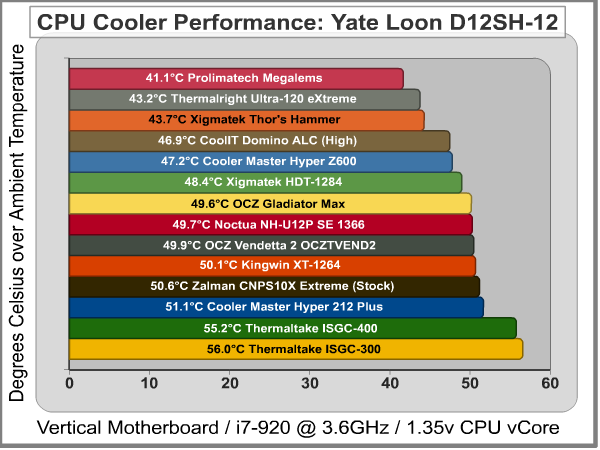
The overclocked Intel Core i7-920 processor helped to separate our large collection of LGA1366 cooler by more than 14°C between them, but additional fan output would have helped improve cooling performance and create an even larger disparity between products. Benchmark Reviews is confident that these results match those of users with the same system and configuration, but because our tests route the video card and X58 Northbridge through a water-cooling system to avoid nearby heat corruption into our results, your own results will be slightly higher. In order of final performance, these are the Best CPU Coolers for the overclocked LGA1366 Core i7 platform with thermal difference (CPU core temp minus ambient room temp) beside them:
|
CPU Cooler |
Thermal Difference | |
|---|---|---|
| Prolimatech Megahalems | 41.1°C over ambient | |
| Thermalright Ultra-120 eXtreme | 43.2°C over ambient | |
| Xigmatek Thor's Hammer S126384 | 43.7°C over ambient | |
| CoolIt Domino ALC (high fan setting) | 46.9°C over ambient | |
| Cooler Master Hyper Z600 | 47.2°C over ambient | |
| Xigmatek HDT-S1284 | 48.4°C over ambient | |
| OCZ Gladiator Max | 49.6°C over ambient | |
| Noctua NH-U12P SE1366 | 49.7°C over ambient | |
| OCZ Vendetta 2 OCZTVEND2 | 49.9°C over ambient | |
| Kingwin XT-1264 | 50.1°C over ambient | |
| Zalman XNPS10X Extreme | 50.6°C over ambient | |
| Cooler Master Hyper 212 Plus | 51.1°C over ambient | |
| Thermaltake ISGC-400 | 55.2°C over ambient | |
| Thermaltake ISGC-300 | 56.0°C over ambient |
All of the top performing CPU coolers have a few things in common, although some are better designed than others. The mounting system on the Prolimatech Megahalems uses an excellent bolt-through system with slotted alloy plates to ensure a perfectly centered cooler, which was a good bit better than the Xigmatek Crossbow kits we use on compatible coolers. The Thermalright Ultra-120 eXtreme also uses a bolt-through kit, as does the Cooler Master Hyper series and Noctua products... so contact pressure is extremely high for all of these coolers. At least half of our CPU cooler collection have very flat mirror-finished contact surfaces, whereas the other half use Heat-pipe Direct Touch (HDT) technology. Every single one of these coolers have either large-gauge heat-pipes, or several pairs of heat-pipe rods integrated into the base. Then there's the CoolIt Domino, which matches a flat polished surface to an integrated water cooling system.
In my opinion every single product on this chart is an excellent cooler, but only the top few can be considered the best. Just as before in our Q1 2009 round-up, the Prolimatech Megahalems is the standout top-performer with a total adjusted temperature of 41.1°C over ambient. Only trailing two degrees behind is the Thermalright Ultra-120 eXtreme and then Xigmatek Thor's Hammer S126384. All three of these coolers are phenomenal performers, and deserve the title of Best CPU Cooler for the Intel Core i7 / LGA1366 socket. If you're planning to overclock your computer beyond a reasonable theshold, then you'll want to make sure one of these coolers is on your parts list.
There's a pretty evident separation between the top three coolers, and every other product tested. The CoolIt Domino ALC did very well when the fan was set to high on this liquid-cooling system, offering performance slightly better than the Cooler Master Hyper Z600 with a Yate Loon D12SH-12 fan attached. Reliable products such as the Xigmatek HDT-S1284, OCZ Gladiator Max, Noctua NH-U12P SE1366, OCZ Vendetta 2, and Kingwin XT-1264 are all good performers, too. The new Zalman XNPS10X Extreme performed very well for itself, even though it used the included proprietary stock fan. The Cooler Master Hyper 212 Plus seemed to do fine, but trailed behind the pack.
All of these coolers will work extremely well in overclocked systems, and given the right circumstances some of the more tame coolers could perform just as well as the top products. Some of these coolers will accept a second fan, further improving results, while other are limited to only one. Taking cost into consideration, the field can been reduced to only a few real contenders. The final two products are the exception: even after switching out their silent fan for a high-output Yate Loon, both the Thermaltake ISGC-400 and ISGC-300 performed a marginal distance from the others and wouldn't help an enthusiast achieve that top-speed overclock. Consider all of this, because in the next section I offer my final thoughts on the future of CPU coolers.
CPU Cooler Final Thoughts
There is one minor drawback to using the Core i7 or Phenom II processors which affects overclockers: the difference in CPU cooler mounting dimensions. Many overclockers and enthusiasts have grown to cherish their favorite cooler, and trust them to cool the hottest system they can build. The problem is that now many manufacturers are offering free adapter kits, or include an adapter with their current model coolers, which leads to bigger problems because of processor differences. For all of our LGA1366 test products, we used the Xigmatek ACK-I7361 or ACK-I7363 CrossBow mounting kits whenever possible.
CPU coolers made for the LGA775 platform are designed for use with a Core 2 (Duo or Quad) or Pentium 4 and D processor with an integrated heat-spreader measuring 28.5 x 28.5mm (812.25mm total area), but the LGA1366 socket requires a much larger 32 x 35mm (1120mm total area) footprint to accommodate the extra 591 'pins'. If you use an LGA775 cooler on a LGA1366 socket, your missing out on 38% (307.75mm) of the contact surface. Additionally, the cores are located in slightly difference locations; the Core 2 Quad is slightly spaced away from the center, while the Core i7 is concentrated there.
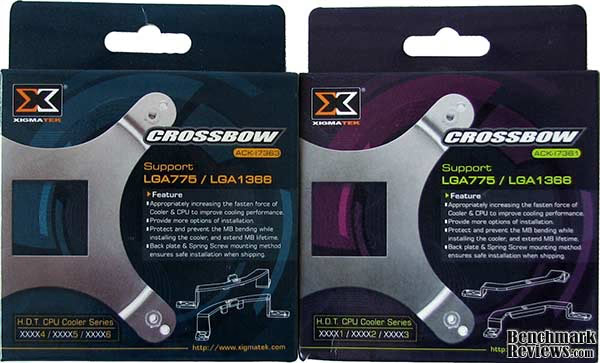
The Phenom II processor series from AMD offer a large 37.31 x 37.31mm (1392.04mm total area) integrated heat-spreader surface, which is the largest processor surface I can recall since the original Intel Pentium (I) days. Compared to Intel's Core 2 Duo and Quad processors which measure 28.5 x 28.5mm, the Phenom II offers over 71% more contact surface area. If you compare the latest Intel Core i7 processors which measure 32 x 35mm, then the Phenom II series offers 24% more contact surface area. For overclockers, this will mean a much larger area to cool, but also much more manageable temperatures.
There are a lot of different products out there, and believe it or not we exclude a few from each article because they don't stack up well at all. So this is why you may not see some of the coolers other sites have tested in our results. Because of space and time limitations it's just simply not feasible to review them all, but it's certainly worth mentioning which products should be avoided. So I began to carefully think about it and nearly constructed a real-time chart which places products into different levels of performance. That's when I realized that performance is relative, too, and what performs well today might be considered low-end only a year from now. Perhaps the best method for testing is to use a synthetic system to generate the same exact load for each and every test conducted. This would stand the test of time much better than any computer system or processor platform would, because temperature is a static measurement, but it wouldn't take into account the differences seen between processor model architecture.
The synthetic test unit might generate 250W of thermal energy, but every CPU series has a different layout and might not mate perfectly to a particular cooler. This brings me to my final point: there's a cooler for every processor and purpose. The ordinary casual computer user is fine with the included thermal cooling solution that comes with the retail processor kit. Systems built with a Core 2 Duo processor and three-piped HDT cooler (like the HDT-S1283 or Vendetta 2) will not be cooled the same as a Core 2 Quad processor because of where the cores align with the heat-pipes. Likewise, coolers built around the Core 2 LGA775 design may not perform well at all with the Core i7 or Phenom II platforms. This is why the research is so critical, and understanding the product is important.
Best CPU Cooler Conclusion
It's been very quiet around the CPU cooling industry these past three months, as evidenced by the lack of high-end products launched to market. The opposite is true for overclockers, since the longtime-popular Intel Core 2 and Core i7 brands are now competing with the AMD Phenom II series. Previously an overclock was limited by the CPU, but AMDs decision to offer unlocked Black Edition (BE) processors at mainstream prices have removed this roadblock. Still, AMDs socket AM3 platform will need to work overtime in order to beat the LGA775 'Socket T' interface.
For enthusiasts and overclockers, there's still plenty of life left in the older socket platforms and the retail pricing proves it. As of August 2009 the quad-core Q8200 and Core 2 Duo E8400 each sell for around $165, unchanged for almost nine months; while the price on a Core 2 Quad Q6600 has actually increased to $200, thus proving that popularity for the LGA775 platform still exists. The LGA775 products still provide decent value and give hardware enthusiasts a reason to continue using P45 and X48 chipsets, but they don't compare to the performance of Intel's Core i7 series or even touch the value of an AMD Phenom II processor.
Dual-core processors are still strong for gamers and multitaskers, while quad-core processors work best for audio/video editing and virtual computer servers. AMD's Phenom II launch has done wonders for the enthusiast and overclocking community, with efforts further amplified by offering affordable high-end products during an economic recession. For the money, there isn't a processor around that comes close in value or performance than the AMD Phenom II X3 720 Black Edition unlocked triple-core socket AM3 processor that sells for only $120 (which has earned it the Benchmark Reviews Editor's Choice Award). If quad-core is more to your liking, the AMD Phenom II X4 955 BE removes the clock multiplier restriction at a mainstream price around $200; something Intel's Extreme Edition processor offers for more than $1000.
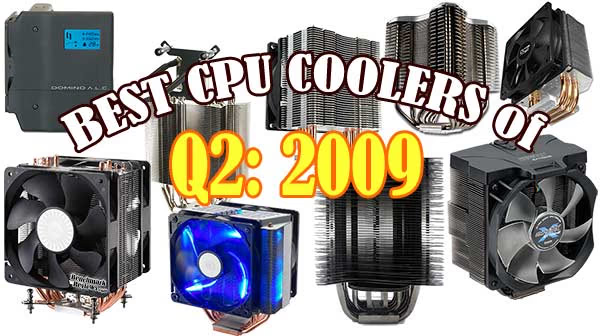
While not every CPU cooler tested in this article is suitable for extreme overclocking projects, practically all of these products offer excellent cooling performance for high-end systems. Benchmark Reviews offers a beginners how-to guide for enthusiasts wanting to overclocking their CPU, so join in and see how far you can stretch that dollar! I've already delivered my choices for the LGA775 platform way back in the Best of Q4 2008 Conclusion, and surprisingly nothing has changed. The newer Intel Core i7 platform is still maturing, so if you're in the market of a high-performance LGA1366 CPU cooler here are my suggestions:
For absolute performance my recommendation goes to the Prolimatech Megahalems. This product is designed by former Thermalright engineers, and takes the best aspects into consideration to produce one phenomenal product. The mounting base is unparalleled by any other I've tested, which delivers extraordinary contact surface pressure between the processor and polished finish on the Megahalems. As of August 2009 the ProlimaTech Megahalems was available at FrozenCPU for $65, which is a fair price for any ultra-performance product.
If the Megahalems cooler isn't available, I can suggest two other high-performance alternatives. The Xigmatek Thor's Hammer S126384 is available from NewEgg for $65, which includes the CrossBow ACK-I7363 mounting system with the CAC-SXHH7-U01 kit and allows two 120mm fans of either 25mm or 35mm depths. Alternatively, the Thermalright Ultra-120 eXtreme has a long history of cooling high-temperature overclocks and offers identical cooling performance to the Xigmatek Thor's Hammer S126384. NewEgg appears to have completely dropped Thermalright products, but FrozenCPU still lists the TRUE Black Ultra-120 eXtreme for $75. Neither of these coolers include a fan, so be sure to factor that into costs.
Beyond these three top-performers, there's only a handful of other CPU coolers I might consider worthy of high-temperature overclocking projects on the LGA1366 socket. The Titan FINRIR TTC-NK85TZ and Thermolab BARAM are two new products unlikely to be found in North American stores but still deserve your attention if you can find them. More likely to stocked is the Cooler Master Hyper Z600 RR-600-NNU1-GP kit for $55 or Xigmatek HDT-S1284EE which sells for $40 at NewEgg. Each of these kits offers LGA1366 compatibility, and each comes with a capable cooling fan (although the Hyper Z600 can fit four 120mm units).
This concludes the Best CPU Cooler Performance LGA1366 - Q2 2009 roundup article. Sadly, there just wasn't much change since our last review but instead our results verify the best-of-the-best cooling products for the Core i7 platform and prove what works on a real-world system as well as a moderately overclocked performance computer. In future articles I would like to incorporate a new approach, possibly with a bigger and more powerful 120x120x35mm fan to cool a much more demanding overclock. If you have constructive suggestions, Benchmark Reviews encourages you to leave comments and questions in our Discussion Forum.
EDITOR'S NOTE 13 FEB 2010: Benchmark Reviews will publish our Q1-2010 Best CPU Cooler Performance LGA1366 article on 11 March 2010. Several new heatsinks along with some enthusiast favorites will all be tested on an overclocked six-core processor. Additionally, our performance test results for the AMD AM3 socket will also be included.
Epilogue - Looking Forward
Sometimes a well-planned project still suffers problems, and even though Benchmark Reviews works closely with manufacturers and distributors we still miss the opportunity to test new products from time to time. In our next article, we plan to include the following CPU coolers:
-
Cogage TRUE Spirit
-
Cool Age FO-X120TF Wind Tunnel Cooler
-
Corsair H50 CWCH50 Liquid Cooler
-
Scythe Mugen 2 CPU Cooler
-
Scythe Kabuto CPU Cooler
-
Xigmatek Balder SD1283
-
Xigmatek Odin's Wing
-
ZEROtherm Nirvana NV120 PWM Premium CPU Cooler
Although we made several requests for product samples, there were a few companies that declined to have their product compared against others in our Best CPU Cooler Performance series.
-
Evercool Buffalo HPFI7-10025 CPU Cooler
-
Rosewill FORT120 RCX-SHDT120X1 CPU Cooler
Benchmark Reviews will also begin testing high-volume output with the Scythe Ultra Kaze 120x30mm cooling fan, which is reported to push 133.6 CFM at 45.9 dBA.
Reader comments from the original article
6 comments were posted before commenting closed. They are preserved as written. Original avatars no longer resolve and are shown as a placeholder.
Backing plate bruce h storm Permalink:
Hi What was the backing plate you used on the Prolimatech Megahalem . Was it the Xigmatek ACK-I5361 Intel Core i7/Core i5 compatible Bracket Set or Xigmatek ACK-I5363 Intel Core i7/Core i5 compatible Bracket Set
RE: Backing plate Olin Coles Permalink:
The ProlimaTech Megahalems has its own backplate that comes with the heatsink, and is far superior to the Xigmatek versions. Take a look at the full review that's linked in this article.
Is the backplate required? Ben Permalink:
If I buy the Megahalems will I need the backplate if I'm going to use it on a 1366 Socket?
RE: Is the backplate required? Olin Coles Permalink:
The 1366 backplate is already included in the kit.
RE: Ben Permalink:
I mean will I have to use it or it will go on to the 1336 socket without the backplate?
RE: RE: Olin Coles Permalink:
You will need to use it... and I recommend that you read the full review here: /index.php?option=com_content&task=view&id=316