
ProlimaTech Armageddon CPU Cooler Heatsink
ProlimaTech Armageddon CPU Cooler Review
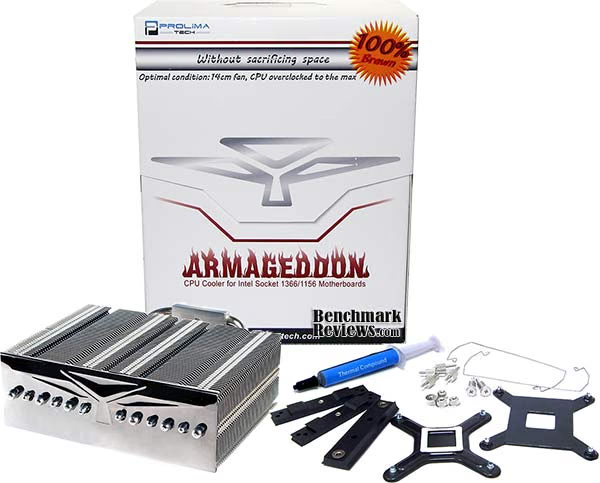
The aftermarket heatsink industry is very competitive, and manufacturers often release several product designs before finally scoring a win with enthusiasts and overclockers. The Megahalems was ProlimaTech's first run at CPU-cooler's, and a very successful one at that. Earning our Editor's Choice Award and countless accolades from other websites, ProlimaTech has built high expectations with their follow-up products. The ProlimaTech Armageddon is one such cooling solution with a legacy to fill, and with six heatpipes and enough finsink area for two 140mm fans it seems a reasonable possibility. Benchmark Reviews recently tested the ProlimaTech Armageddon heatsink in our Best CPU Cooler Performance series, on an overclocked Intel Core i7-980X Extreme Edition processor against several other top CPU coolers.
While ProlimaTech went after high-end overclockers and PC hardware enthusiasts with their Megahalems heatsink (who don't shy away when fan noise is considered by most to be 'loud',) they've decided to focus on a product that can offer the same level of cooling performance for overclocked CPUs while reducing fan noise. That product became known as the ProlimaTech Armageddon, a heatsink with the same general design as the Megahalems but with a wider radiator with slightly less depth. While it's well-known that 120mm cooling fans offer tremendous static pressure, there are several 140mm fans that can offer similar airflow without the noise. In our benchmark tests the Armageddon receives two 63CFM Xigmatek 140x140x25mm XLF-F1453 parts, although the retail kit does not include any fans.
Intel's Core i7-980X Extreme Edition "Gulftown" 6-core processor has been used to test the ProlimaTech Armageddon, and was given a heart-warming 1.375 volts to the vCore so it could reach 4000MHz (4GHz) stable on the capable ASUS P6X58D-Premium motherboard.
Computer hardware is an ever-evolving industry, and since Moore's law only applies to an exponentially growing transistor count then there should probably be another law for cooling. In the very recent past there have been two major trends which have accelerated the performance potential of CPU cooler. That first development was the use of heat-pipes to directly contact with the CPU surface; which resulted in the Heat-pipe Direct Touch technology. The second development is by no mean a new concept, just new to our industry in specific. For many years now heatsinks have been full of right angles, but very recently companies have begun to recognize the need to disrupt smooth airflow and reduce the laminar skin effect which allows air to travel just above the solid surface. Some manufacturers have used at least one of these new concepts in their product design, and only a few are beginning to incorporate both. Benchmark Reviews will see how much this affects the overall performance as we test a large segment of enthusiast cooling products.
About ProlimaTech
Prolimatech, founded in 2008 is headquartered in Taiwan, led by a team of dedicated experts with 22 years of accumulated experience in the field of computer thermal solutions. Prolimatech stands for Professionalism exceeding beyond all Limits. We are here to challenge any limits that stand in our way to achieve what was thought to be impossible. Prolimatech incorporates integration of the aerospace resource-saving technology and advanced heat conduction technology to create the best heat absorption and dissipation solutions while pertaining to the science of aesthetics. Our never-ending quest is to satisfy every computer overclocker's and every enthusiast's needs for high quality and performance oriented thermal solutions for their high-end computer components.
ProlimaTech Armageddon Heatsink
When enthusiasts hear the name ProlimaTech they immediately think of their award-winning Megahalems heatsink series, which now includes Megahalems Revision-B and the dark-tinted MegaShadow CPU coolers. ProlimaTech has proven themselves to be the name to beat in aftermarket cooling products, and all of their heatsinks utilize the industry's very best bolt-through mounting clip system.
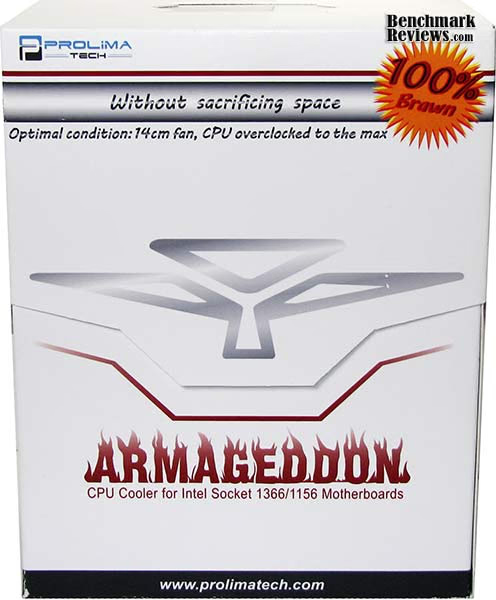
Twisting their previous designs to include both dark-tint finish and six 6mm heatpipe rods, the ProlimaTech Armageddon heatsink accepts dual 140/120mm cooling fans and offers excellent cooling potential.
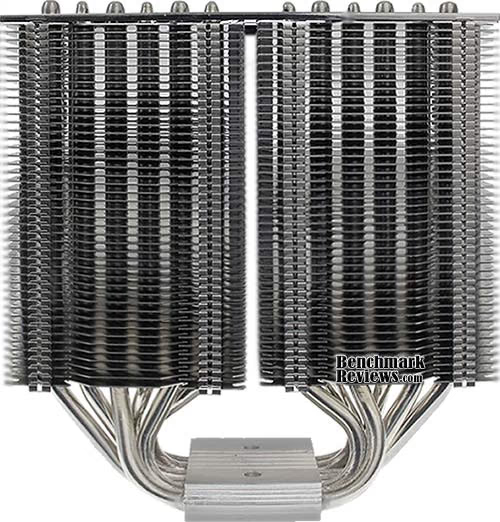
All twelve heatpipe ends are separated and given full contact with passing airflow. In all of our tests, the ProlimaTech Armageddon CPU-cooler performed much better when the heatsink was positioned horizontally with fans exhausting heated air directly towards the top of the computer case. Vertical heatsink orientation still provides good results, but internal heat-pipe liquid must overcome more travel against gravity.

Features and Specification
- Name: ProlimaTech Armageddon
- Size (LxWxH): 144x60x160mm
- Weight: 1.65 LBS (750 Grams)
- Heatpipes: 6x 6mm Sintered
- Fan Placement: Supports 2x 140mm
- Application: Intel LGA775/1156/1366 (AMD AM2/AM2+/AM3 Optional)
- Clip System: Bolt-Through with Back-Plate
- Mounting Pressure: Extremely High
- Base: Polished C1100 Nickel Plated Copper
- MSRP: Check Prices

Much like their Megahalems heatsink series, the ProlimaTech Armageddon is Intel-only. However, a separate $10 AMD AM2/AM2+/AM3 mounting kit will expand compatibility to Athlon and Phenom processors.

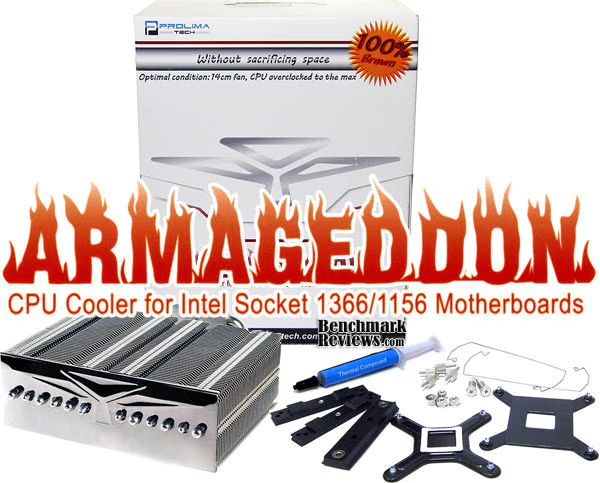
While the ProlimaTech Armageddon CPU cooler does not come with any fans, there are enough retaining clips to support two units. Also included with the Armageddon heatsink is a full-size application syringe of Prolimatech PK-1 thermal paste, which earned high ratings in our 80-Way Thermal Paste Review article.
Contact Surface Preparation
Processor and CPU cooler surfaces are not perfectly smooth and flat surfaces, and although some surfaces appear polished to the naked eye, under a microscope the imperfections become clearly visible. As a result, when two objects are pressed together, contact is only made between a finite number of points separated by relatively large gaps. Since the actual contact area is reduced by these gaps, they create additional resistance for the transfer of thermal energy (heat). The gasses/fluids filling these gaps may largely influence the total heat flow across the surface, and then have an adverse affect on cooling performance as a result.
Thermal Paste Application
The entire reason for using Thermal Interface Material is to compensate for flaws in the surface and a lack of high-pressure contact between heat source and cooler, so the sections above are more critical to good performance than the application of TIM itself. This section offers a condensed version of our Best Thermal Paste Application Methods article.
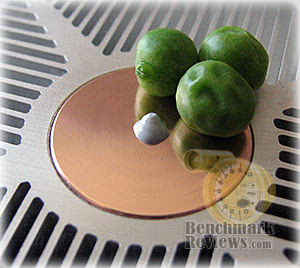
After publishing our Thermal Interface Material articles, many enthusiasts argued that by spreading out the TIM with a latex glove (or finger cover) was not the best way to distribute the interface material. Most answers from both the professional reviewer industry as well as enthusiast community claim that you should use a single drop "about the size of a pea". Well, we tried that advice, and it turns out that maybe the community isn't as keen as they thought. The example image below is of a few frozen peas beside a small BB size drop of OCZ Freeze TIM. The image beside it is of the same cooler two hours later after we completed testing. If there was ever any real advice that applies to every situation, it would be that thermal paste isn't meant to separate the two surfaces but rather fill the microscopic pits where metal to metal contact isn't possible.

After discussing this topic with real industry experts who are much more informed of the process, they offered some specific advice that didn't appear to be a "one size fits all" answer:
- CPU Cooling products which operate below the ambient room temperature (some Peltier and Thermo-electric coolers for example) should not use silicon-based materials because condensation may occur and accelerate compound separation.
- All "white" style TIM's exhibit compound breakdown over time due to their thin viscosity and ceramic base (usually beryllium oxide, aluminum nitride and oxide, zinc oxide, and silicon dioxide). These interface materials should not be used from older "stale" stock without first mixing the material very well.
- Thicker carbon and metal-based (usually aluminum-oxide) TIM's may benefit from several thermal cycles to establish a "cure" period which allows expanding and contracting surfaces to smooth out any inconsistencies and further level the material.
The more we researched this subject, the more we discovered that because there are so many different cooling solutions on the market it becomes impossible to give generalized advice to specific situations. Despite this, there is one single principle that holds true in every condition: Under perfect conditions the contact surfaces between the processor and cooler would be perfectly flat and not contain any microscopic pits, which would allow direct contact of metal on metal without any need for Thermal Interface Material. But since we don't have perfectly flat surfaces, Thermal Material must fill the tiny imperfections. Still, there's one rule to recognize: less is more.
Surface Finish Impact
CPU coolers primarily depend on two heat transfer methods: conduction and convection. This being the case, we'll concentrate our attention towards the topic of conduction as it relates to the mating surfaces between a heat source (the processor) and cooler. Because of their density, metals are the best conductors of thermal energy. As density decreases so does conduction, which relegates fluids to be naturally less conductive. So ideally the less fluid between metals, the better heat will transfer between them. Even less conductive than fluid is air, which then also means that you want even less of this between surfaces than fluid. Ultimately, the perfectly flat and well-polished surface is going to be preferred over the rougher and less even surface which required more TIM (fluid) to fill the gaps.
This is important to keep in mind, as the mounting surface of your average processor is relatively flat and smooth but not perfect. Even more important is the surface of your particular CPU cooler, which might range from a polished mirror finish to the absurdly rough or the more complex (such as Heat-Pipe Direct Touch). Surfaces with a mirror finish can always be shined up a little brighter, and rough surfaces can be wet-sanded (lapped) down smooth and later polished, but Heat-pipe Direct Touch coolers require some extra attention.
To sum up this topic of surface finish and its impact on cooling, science teaches us that a smooth flat mating surface is the most ideal for CPU coolers. It is critically important to remove the presence of air from between the surfaces, and that using only enough Thermal Interface Material to fill-in the rough surface pits is going to provide the best results. In a perfect environment, your processor would mate together with the cooler and compress metal on metal with no thermal paste at all; but we don't live in perfect world and current manufacturing technology cannot provide for this ideal environment.
Mounting Pressure
Probably one of the most overlooked and disregarded factors involved with properly mounting the cooler onto any processor is the amount of contact pressure applied between the mating surfaces. Compression will often times reduce the amount of thermal compound needed between the cooler and processor, and allow a much larger metal to metal contact area which is more efficient than having fluid weaken the thermal conductance. The greater the contact pressure between elements, the better it will conduct thermal (heat) energy.
Unfortunately, it is often times not possible to get optimal pressure onto the CPU simply because of poor mounting designs used by the cooler manufacturers. Most enthusiasts shriek at the thought of using the push-pin style clips found on Intel's stock LGA775 thermal cooling solution. Although this mounting system is acceptable, there is still plenty of room for improvement.
Generally speaking, you do not want an excessive amount of pressure onto the processor as damage may result. In some cases, such as Heat-pipe Direct Touch technology, the exposed copper rod has been pressed into the metal mounting base and then leveled flat by a grinder. Because of the copper rod walls are made considerably thinner by this process, using a bolt-through mounting system could actually cause heat-pipe rod warping. Improper installation not withstanding, it is more ideal to have a very strong mounting system such as those which use a back plate behind the motherboard and a spring-loaded fastening system for tightening. The Noctua NH-U12P is an excellent example of such a design.
In all of the tests which follow, it is important to note that our experiments focus on the spread pattern of thermal paste under acceptable pressure thresholds using either a push-pin style mounting system or spring-loaded clip system. In most situations your results will be different than our own, since higher compression would result in a larger spread pattern and less thermal paste used. The lesson learned here is that high compression between the two contact surfaces is better, so long as the elements can handle the added pressure without damaging the components.
Heatpipe Directional Orientation
Heat-pipe technology uses several methods to wick the cooling liquid away from the cold condensing end and return back towards the heated evaporative end. Sintered heatpipe rods help overcome Earth's gravitational pull and can return most fluid to its source, but the directional orientation of heatpipe rods can make a significant difference to overall cooling performance.
For the purpose of this article, all CPU-coolers have been orientated so that heatpipes span from front-to-rear with fans exhausting upward and not top-to-bottom with fans blowing towards the rear of the computer case. This removes much of the gravitational climb necessary for heatpipe fluid working to return to the heatsink base. In one specific example, the horizontally-mounted ProlimaTech Megahalems heatsink cooled to a temperature 3° better than when it was positioned vertically. While this difference may not be considered much to some people, hardcore enthusiasts will want to use every technique possible to reach the highest overclock possible.
Heatsink Test Methodology
Benchmark Reviews is obsessed with testing CPU coolers, as our Cooling Section has demonstrated over the past few years. We've solicited suggestions from the enthusiast community, and received guidance from some of the most technical overclockers on the planet. As a result, our testing methodology has changed with every new edition of our Best CPU Cooler Performance series. Because of this, each article is really its own stand-alone product, and cannot be fairly compared to the others. This particular article is a perfect example of that principle, since we're using a fresh methodology. Benchmark Reviews continues to test CPU coolers using the stock included fan (whenever applicable), and then replace it with a high-output fan for re-testing.
Manufacturers are not expected to enjoy this sort of comparison, since we level the playing field for all heatsinks by replacing their included fan with a common unit which is then used for every CPU cooler tested. Many manufacturers include fans with their heatsink products, but most 'stock' fans are high-RPM units that offer great airflow at the expense of obnoxiously loud noise levels. By using the same model of cooling fan throughout our heatsink tests, we can assure our results are comparable across the board. This is one of the more significant changes we have made to our test methodology, since many of the benchmark tests we have conducted in the past have compared the total package. Ultimately we're more interested in the discovering the best possible heatsink, and we believe that you'll feel the same way.
Testing was conducted in a loosely scientific manner. Ambient room temperature levels were maintained within one degree of fluctuation, and measured at static points beside the test equipment with a calibrated digital thermometer. Manufacturer-supplied thermal paste was not used in these tests, and a common Thermal Interface Material of our choosing (listed in the support equipment section below) was utilized instead. The processor received the same amount of thermal paste in every test, which covered the ICH with a thin nearly-transparent layer. The heatsink being tested was then laid down flat onto the CPU, and compressed to the motherboard using the supplied retaining mechanism. If the mounting mechanism used only two point of force, they were tightened in alternation; standard clip-style mounting with four securing points were compressed using the cross-over method. Once installed, the system was tested for a baseline reading prior to testing.
At the start of each test, the ambient room temperature was measured to track any fluctuation throughout the testing period. Lavalys EVEREST Ultimate Edition was utilized to create 100% CPU-core loads and measure each individual processor core temperatures. It's important to note that software-based temperature reading reflects the thermal output as reported from the CPU to the BIOS. For this reason, it is critically important (for us) to use the exact same software and BIOS versions throughout the entire test cycle, or the results will be incomparable. All of the units compared in our results were tested on the same motherboard using the same BIOS and software, with only the CPU-cooler product changing in each test. These readings are neither absolute nor calibrated, since every BIOS is programmed differently. Nevertheless, all results are still comparable and relative to each products in our test bed (see The Accuracy Myth section below).
Since our test processor report core temperatures as a whole number and not in fractions, all test results utilize EVEREST to report averages (within the statistics panel), which gives us more precise readings. To further compensate for this, our tests were conducted several times after complete power down thermal cycles. Conversely, the ambient room temperature levels were all recorded and accurate to one-tenth of a degree Celsius at the time of data collection.
When each cooler is tested, Benchmark Reviews makes certain to keep the hardware settings identical across the test platform. This enables us to clearly compare the performance of each product under identical conditions. While the ambient room temperature did fluctuate between 20.0~21.0°C during testing, the thermal delta would not change enough to impact our test results. Benchmark Reviews reports the thermal difference in test result charts. For the purpose of this article, thermal difference (not the same as thermal delta) is calculated by subtracting the ambient room temperature from the recorded CPU temperature.
Intel Test System
- Processor: Intel Core i7-980X Extreme Edition 6-Core Gulftown CPU BX80613I7980X
- Motherboard: ASUS P6X58D-Premium (Intel X58-Express Chipset)
AMD Test System
- Processor: AMD Phenom-II X4-965 BE (140W version)
- Motherboard: ASUS M4A79XTD-EVO (AMD 790X Chipset)
Support Equipment
- Lavalys EVEREST Ultimate Edition v5.30
- Tuniq TX-3 (No curing time necessary or given)
- Yate Loon 120x120x25mm fan, model D12SH-12 (88 CFM Advertised @ 40 dBA) 12V/0.30A
- Xigmatek 140x140x25mm XLF-F1453 fans, model CFS-SYGJS-LU1 (65.5 CFM Advertised @ <16 dBA) 12V/0.30A
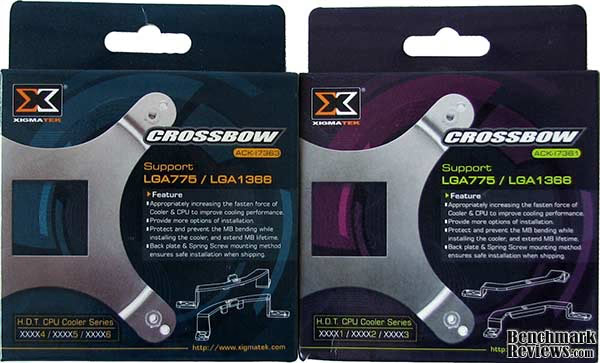
- Xigmatek CrossBow ACK-I7361 (supports xxxx1 / xxxx2 / xxxx3 cooler models)
- Xigmatek CrossBow ACK-I7363 (supports xxxx4 / xxxx5 / xxxx6 cooler models)
- Thermalright LGA1366 Bolt-Thru-Kit UPC 814256-00079 (supports all TRUE and TRUE Spirit models)
All of the tests in this article have been conducted using vertical motherboard orientation, positioned upright in a traditional tower computer case. Heatsinks are positioned so that heatpipe rods span horizonally, and described in our Heatpipe Directional Orientation from the previous section.
At the start of our test period, the test system is powered on and EVEREST system stability tests are started with Stress CPU and Stress FPU options selected. For a minimum of sixty minutes (one hour) EVEREST loads each CPU core to 100% usage, which drives the temperature to its highest point. Finally, once temperatures have sustained a plateau, the ending ambient room temperature and individual CPU core levels are recorded thus completing the first benchmark segment.
The second test segment involves removing the stock cooling fan (while the system is still under load) and replacing it with a high-output 120 mm Yate Loon D12SH-12 cooling fan. The system is given thirty additional minutes with EVEREST loading the CPU cores before final temperature readings are taken and recorded.
The Accuracy Myth
All modern processors incorporate an internal thermal diode that can be read by the motherboards' BIOS. While this diode and the motherboard are not calibrated and therefore may not display the actual true temperature, the degree of accuracy is constant. This means that if the diode reports 40°C when it's actually 43°C, then it will also report 60°C when it's truly 63°C. Since the design goal of any thermal solution is to keep the CPU core within allowable temperatures, a processor's internal diode is the most valid means of comparison between different heatsinks, or thermal compounds. The diode and motherboard may be incorrect by a small margin in relation to an actual calibrated temperature sensor, but they will be consistent in their margin of error every time.
Intel 980X: High-Output Fan
Overclockers are known for being particular to their equipment, which is why Benchmark Reviews changes our format with each new project. Although it's impossible to nail-down which cooling fan is the overwhelming choice for overclocker projects, most enthusiasts would agree that fans with the best static pressure and highest airflow are the most appropriate. Because of size and design constraints in most of these products, a 120x120x25mm fan is as large as we can go with our collection of CPU coolers. This section uses the high-output Yate Loon D12SH-12 cooling fan on each product tested. The D12SH-12 cooling fan forces an impressive 88 CFM of air at a moderately noisy 40 dBA, and performs better than several 120x120x38mm fans we've tested (more on that later). In my experience, the Yate Loon D12SH-12 is one of the best 120mm cooling fans available in regards to the noise to performance ratio.
Overclocked to 4.0Hz @ 1.375V, Benchmark Reviews tests our collection of heatsinks on the hexa-core Intel Core i7-980X Extreme Edition. While some enthusiasts may dare to trespass beyond this voltage, Benchmark Reviews needed our test system to remain functional long enough to complete testing on nearly twenty various products under several different conditions. Our readers must remember that every product must pass testing on the same motherboard and processor, and if one of these fail all the testing must be redone completely.
All of the top performing CPU coolers have a few things in common: bolt-through mounting clip systems that create impressive contact pressure. Although some mounting systems are better designed than others, The mounting system on the Prolimatech Megahalems and Armageddon heatsinks use a bolt-through system with slotted alloy plates to ensure a perfectly centered cooler, which was a good bit better than the Xigmatek Crossbow kits we use on compatible coolers. The new mounting kit that comes with the Thermalright Venomous-X heatsink creates a dangerous amount of contact pressure, although we were able to tighten the cooler all the way without incident. Thermalright's Ultra-120 eXtreme, Cogage TRUE Spirit, and Cogage Arrow all use a similar bolt-through kit that creates substantial contact pressure. At least half of our CPU cooler collection have very flat mirror-finished contact surfaces, whereas the other half use Heat-pipe Direct Touch (HDT) technology. Every single one of these coolers have either large-gauge heat-pipes, or several pairs of heat-pipe rods integrated into the base. In my opinion nearly every single product on this chart is an outstanding aftermarket cooler, but only a select few can be considered the very best!

Knowing that this would stir some controversy, many of these heatsinks were tested seven or more times each, with the highest and lowest results thrown out with the remainder averaged. Benchmark Reviews reveals the results of our Intel LGA1366 CPU-cooler performance tests using high-output cooling fans in the chart below:
|
Intel-LGA1366 CPU Cooler |
Thermal Difference | Advantage | ||
|---|---|---|---|---|
| ProlimaTech Megahalems | 24.29°C over ambient | -4°C | ||
| Thermalright Venomous-X | 24.47°C over ambient | -4°C | ||
| Scythe Mugen-2 SCMG-2000 | 26.03°C over ambient | -3°C | ||
| Cogage Arrow | 26.53°C over ambient | -3°C | ||
| Titan FENRIR TTC-NK85TZ | 27.92°C over ambient | -1°C | ||
| Zalman CNPS10X-Performa | 28.08°C over ambient | -1°C | ||
| Coolink Corator-DS | 28.38°C over ambient | -1°C | ||
| Cogage TRUE Spirit | 28.39°C over ambient | -1°C | ||
| Noctual NH-D14 (2x 140) | 29.10°C over ambient | |||
| ProlimaTech Armageddon | 29.26°C over ambient | |||
| Thermalright Ultra-120 eXtreme | 29.40°C over ambient | |||
| CyberPowerPC XtremeGear HP-1216B | 29.42°C over ambient | |||
| 3R-System IceAge Prima Boss-II IA-120B2 | 29.46°C over ambient | |||
| Tuniq Tower-120 Extreme | 29.52°C over ambient | |||
| Intel DBX-B ATS (Performance) | 29.65°C over ambient | |||
| Xigmatek Balder SD1283 CAC-SXHH3-U06 | 30.00°C over ambient | +1°C | ||
| Xigmatek Thor's Hammer S126384 | 30.76°C over ambient | +1°C | ||
| Noctua NH-U12P | 31.68°C over ambient | +2°C | ||
| Thermaltake Contac-29 CLP0568 | 32.60°C over ambient | +3°C |
When a heatsink costs $65, it had better be real good... and thankfully the ProlimaTech Megahalems is. Cooling to a temperature of only 24.29°C over ambient, the Megahalems has only one competitor with close reach: the $70 Thermalright Venomous-X heatsink with 24.47°C. Both heatsinks come with polished base and outstanding bolt-through mounting system, and neither forces you to use an under-powered stock fan, so take your pick!
Proving (to me, at least) that our Benchmark Reviews Editors Choice Award was hard-earned, the Scythe Mugen-2 produces 26.03°C at the entry-level price of $35. If you're not after any overclocking records, and you don't mind the giant hassle for installation, this could easily be the best value of the bunch. The equally-large Cogage Arrow delivers a similar 26.53°C. Titan's FINRIR cooler produces 27.92°C, which nearly identical to the Zalman CNPS10X-Performa, Coolink Corator-DS, and Cogage TRUE Spirit.
Equipped with two large Xigmatek 140x140x25mm XLF-F1453 fans on an even larger heatsink, the Noctual NH-D14 finds itself midway through our results with 29.10°C. Equally large, and equally-equipped with the same two 140mm Xigmatek cooling fans, the ProlimaTech Armageddon cools to 29.38°C without a peep. Perhaps it's the two extra cores on Gulftown, or the less-than-stellar mounting kit, but the Thermalright Ultra-120 eXtreme falls down a few spots and rubs elbows with a $22 XtremeGear HP-1216B; which delivered 29.42°C and also matched the more expensive 3R-System IceAge Prima Boss-II. At 29.52°C over ambient, the massive Tuniq Tower-120 Extreme offered respectable performance, but the $64.99 price tag is a little too far off from fair market value.
For the first time in our testing, an Intel cooler has finished with top-level results. Set to 'Performance' fan speed, the Intel DBX-B Advanced Thermal Solution produced a notable 29.65°C over ambient temperature, which comes just barely ahead of the premium Xigmatek Balder SD1283 and Xigmatek Thor's Hammer S126384 heatsinks. The Noctua NH-U12P may be listed nearly the bottom of our chart, but 31.68°C is only five degrees from the top! To that same extent, the budget-priced Thermaltake Contac-29 finished our tests with 32.60°C.
Enthusiast Fan Comparison
Over the past few months there have been several requests by our readers for Benchmark Reviews to begin testing these coolers by using many different enthusiast level fans. While the idea seems interesting enough, the actual undertaking would be unreasonably time consuming. As it is now, each cooler already takes about two hours to install, prepare, and test; and most coolers receive five or more tests in stock and overclocked conditions. The test process for an individual cooler could take several days depending on ambient temperature and humidity.
In this section, we've taken the Yate Loon D12SH-12 that's been used for the past year of high-output testing and compared it to the Scythe Ultra Kaze, which is a 38mm thick enthusiast fan. I've heard a great number of enthusiasts claiming phenomenal results with the Ultra-Kaze, but it's not like me to believe hearsay. In this section, I've taken the opportunity to directly compare several 'high volume' test fans. Here's how it was done:
Lavalys EVEREST Ultimate Edition is used to create full loads on each core utilizing the system stability test (Stress CPU and Stress FPU options), and also measure individual CPU core temperatures. After a minimum of sixty minutes at full load, temperatures sustain a plateau and the ending ambient room temperature and individual CPU core levels are recorded. The fans are quickly replaced while the system is still under load, annd given thirty additional minutes with EVEREST loading the CPU cores before final temperature readings are again taken and recorded.
- Intel Core i7-920 2.66GHz LGA1366 Processor
- Yate Loon 120x120x25mm model D12SH-12 (88 CFM @ 40 dBA) 12V/0.30A
- Scythe Kaze-Jyuni Slip-Stream 120x120x25mm fan, model SY1225SL12SH (110.31 CFM Advertised @ 37.0 dBA) 12V/0.53A
- CoolAge SX2 120x120x38mm fan, model CA-120SX2 (80 CFM Advertised @ 32 dBA) 12V/0.19A
- Scythe Ultra Kaze 120x120x38 model DFS123812H-3000 (133.6 CFM @ 45.9 dBA) 12V/0.60A

It becomes evident that there's a point of diminishing returns for every CPU cooler, and when 'over-fanned' the results collide closely together. Although the 2.66 GHz Intel Core i7-920 processor we've used for this test does a decent job of separating the crowd when these coolers keep their stock fan, once a high-output fan is attached there's really not much separating them all. So it's a good bet that most of these top-performing products could cool an overclocked system extremely well, but these days only the very best will do. Much like the Thermal Interface Material testing we've conducted, all of the high-performance products are beginning to perform at nearly the same levels. Eventually, I expect to see the same technology used in all cooling products with the difference being the application. This is where experience comes in handy, and we've shared some of this with you in our Best Thermal Paste Application Methods article. Remember, less is more when it comes to thermal paste, and soon CPU coolers may offer the same paradigm.
Taking a small collection of CPU coolers, Benchmark Reviews tested the performance of four different fans.
|
CPU Cooler |
Scythe Kaze-Jyuni Slip-Stream | CoolAge SX2 | Yate Loon D12SH | Scythe Ultra Kaze | |
|---|---|---|---|---|---|
|
Average |
Thermal |
Difference | |||
| Prolimatech Megahalems | 38.0°C over ambient | 39.1°C over ambient | 36.3°C over ambient | 36.2°C over ambient | |
| Scythe Mugen-2 SCMG-2000 | 39.9°C over ambient | 41.0°C over ambient | 38.6°C over ambient | 38.8°C over ambient | |
| Xigmatek Thor's Hammer S126384 | 40.7°C over ambient | 43.5°C over ambient | 39.1°C over ambient | 41.6°C over ambient | |
| Titan FENRIR TTC-NK85TZ | 43.6°C over ambient | 45.0°C over ambient | 42.5°C over ambient | 43.2°C over ambient | |
| CoolAge FO-X120TF Wind Tunnel | 44.6°C over ambient | 44.2°C over ambient | 42.6°C over ambient | 43.3°C over ambient | |
| Thermolab BARAM | 45.5°C over ambient | 46.2°C over ambient | 42.8°C over ambient | 43.4°C over ambient |
As you can see from the chart above, the Yate Loon 120x120x25mm model D12SH-12 fan performs the best compared to other enthusiast cooling solutions. Rated at 88 CFM by the manufacturer, I suspect that these are conservative figures. Operating on 0.30A, the Yate Loon D12SH-12 certainly moves a lot more air than suspected for a $7 fan. The real trick is in the operating voltage, which ranges from 6.5-13.8V, allowing enthusiasts to move the hot wire to either the 5V+ or 12V+ power lead. So until I'm given a good reason to think otherwise, Benchmark Reviews will continue to test high-output overclocked results with what I consider to be the best value in fans.
CPU Cooler Final Thoughts
There is one minor drawback to using the Core i7 or Phenom II processors which affects overclockers: the difference in CPU cooler mounting dimensions. Many overclockers and enthusiasts have grown to cherish their favorite cooler, and trust them to cool the hottest system they can build. The problem is that now many manufacturers are offering free adapter kits, or include an adapter with their current model coolers, which leads to bigger problems because of processor differences. For all of our LGA1366 test products, we used the Xigmatek ACK-I7361 or ACK-I7363 CrossBow bolt-through mounting kits whenever possible.
Heatsinks made for the old LGA775 platform are designed for use with a Core 2 (Duo or Quad) or Pentium 4 and D processor with an integrated heat-spreader measuring 28.5 x 28.5mm (812.25mm total area), but the LGA1366 socket requires a much larger 32 x 35mm (1120mm total area) footprint to accommodate the extra 591 'pins'. Then there's the LGA1156 socket, which measure 30mm square for 900mm of area. If you use an LGA775 or LGA1156 cooler on a LGA1366 socket, your missing out on up to 38% (307.75mm) of the contact surface. Additionally, the cores are located in slightly difference locations; the Core 2 Quad is slightly spaced away from the center, while the Core i7 is concentrated there.
The Phenom II processor series from AMD offer a very large 37.31 x 37.31mm (1392.04mm total area) integrated heat-spreader surface, which is the largest processor surface I can recall since the original Intel Pentium (I) days. Compared to Intel's Core 2 Duo and Quad processors which measure 28.5 x 28.5mm, the Phenom II offers over 71% more contact surface area. If you compare the latest Intel Core i7 processors which measure 32 x 35mm, then the Phenom II series offers 24% more contact surface area. For overclockers, this will mean a much larger area to cool, but also much more manageable temperatures.
There are a lot of different products out there, and believe it or not we exclude a few from each article because they don't stack up well at all. So this is why you may not see some of the coolers other sites have tested in our results. Because of space and time limitations it's just simply not feasible to review them all, but it's certainly worth mentioning which products should be avoided. So I began to carefully think about it and nearly constructed a real-time chart which places products into different levels of performance. That's when I realized that performance is relative, too, and what performs well today might be considered low-end only a year from now. Perhaps the best method for testing is to use a synthetic system to generate the same exact load for each and every test conducted. This would stand the test of time much better than any computer system or processor platform would, because temperature is a static measurement, but it wouldn't take into account the differences seen between processor model architecture.
The synthetic test unit might generate 250W of thermal energy, but every CPU series has a different layout and might not mate perfectly to a particular cooler. This brings me to my final point: there's a cooler for every processor and purpose. The ordinary casual computer user is fine with the included thermal cooling solution that comes with the retail processor kit. Systems built with a Core 2 Duo processor and three-piped HDT cooler (like the HDT-S1283 or Vendetta 2) will not be cooled the same as a Core 2 Quad processor because of where the cores align with the heat-pipes. Likewise, coolers built around the Core 2 LGA775 design may not perform well at all with the Core i7 or Phenom II platforms. This is why the research is so critical, and understanding the product is important.
Between our recent Best CPU Cooler Performance project and the previous Q3-2009 Best CPU Cooler Performance article, I've learned that processor architecture can have a major impact on heatsink performance. I'm not referring to speed or voltage here, because those factors are a given when it comes to cooling. What I'm referring to is how the 45nm Intel Bloomfield Core-i7 is going to have a 'heat signature' area that differs slightly from 32nm Gulftown. In fact, Gulftown's 248mm2 die package is closer to a Lynnfield Core-i7 CPU. Those heatsinks with a larger contact surface (and heatpipe base) will best serve 45nm AMD Phenom-II processors with a 258mm2 die or 45nm Intel Core-i7 quad-core 263mm2 Bloomfield CPU's. Essentially, it's important to research the cooler's physical information in addition to performance results when you're shopping for a CPU cooler. It's not a one-size-fits-all heatsink market, and the biggest cooler doesn't always provide the best performance.
Armageddon Heatsink Conclusion
To properly rank the ProlimaTech Armageddon, overclockers must first understand that this was not a product designed to replace their popular Megahalems CPU cooler. The ProlimaTech Armageddon belongs in its own class of heatsinks, along with the growing list of other products that have grown in size to accommodate larger but much quieter cooling fans. Considering how quiet the ProlimaTech Armageddon operates with either one or two 140mm fans attached, it's understandable if it doesn't cool to the same level as Megahalems... but it nearly does.
In our benchmark tests, the ProlimaTech Armageddon (with dual 63CFM Xigmatek 140mm fans) performed better than a single high-output (80 CFM) Yate Loon D12SH-12 fan attached to the Thermalright Ultra-120 eXtreme, Tuniq Tower-120 Extreme, or Xigmatek Thor's Hammer S126384. Of course, most overclockers consider cooling performance to only be measured in degrees, and so the benefit of top-end performance that sheds fan noise is overlooked. On the other hand, there will also be PC hardware enthusiasts who find the ProlimaTech Armageddon heatsink very attractive, and may be drawn in by the new looks and unique allure.
Armageddon shares the exact same mounting system as Megahalems, which supports only Intel LGA775/1156/1366 sockets. ProlimaTech offers an optional AMD AM2/AM2+/AM3 mounting kit, which works for either of these heatsinks and creates the same outstanding contact pressure. So while the ProlimaTech Armageddon didn't top our results as the very best heatsink we've ever tested, it silently finishes among the top performers without the irritation of high-output fans and continues to use the industries' best mounting kit. In terms of functionality, I'd say that this adds a level of features not quite possible in other cooling products.
Users of Intel processors need to pay careful attention to their processor size and the number of core it contains. When choosing a HDT-based cooler, the older LGA775 and even the newer LGA1156 CPUs all work best with three 8mm heatpipe rods in the base, or four 6mm rods. Larger Nehalem-based LGA1366 Core-i7 processors with the 263mm2 die are large enough to use four 8mm heatpipe rods in the base, and five 8mm rods (such as those in the IceAge Prima Boss-II or Tuniq Tower-120 Extreme) just barely make full contact. They key here is to choose a cooler with enough heatpipes to saturate the base, but not too few that they are overloaded. On the other hand, Westmere-based 32nm processors won't have as much die space to cool, and so some of the LGA775 and LGA1156 heatsinks may work perfectly well on them.
As of May 2010, the ProlimaTech Armageddon (cpu-pro-14) is available at FrozenCPU for $69.99 or from NewEgg for $64.99. In terms of value, this price is similar to the ProlimaTech Megahalems, which sells for $61.99. PC hardware enthusiasts and overclockers will need to decide what they want out of the Armageddon, since the Megahalems offers better performance in most respects. Since ProlimaTech products allow consumers to select their own fan for the project, FrozenCPU is one of the few online retail outlets that specialize in CPU cooling hardware and will have a much better selection of fans and accessories than other online retailers.
In conclusion, the ProlimaTech Armageddon delivers top-level performance without the noise that comes with top-level fans. The ability to mount twin 140mm fans will allow overclockers and PC hardware enthusiasts the ability to enjoy their personal computing experience without the distraction of high-power fans screaming in the background. ProlimaTech's Armageddon kit includes the heatsink and (industry-leading) Intel mounting system, so fans remain the choice of consumers but AMD users will need to purchase the AM2/AM2+/AM3 mounting system. Overall the ProlimaTech Armageddon performed extremely well, especially since we've tested it against the best CPU coolers available. If you're looking to cool and overclocked processor while keeping fan noise to a minimum, the ProlimaTech Armageddon is a winning choice.
Pros:
+ Utilizes ProlimaTech Intel Mounting System
+ Six 6mm Separated Heat-Pipe Rods
+ Very Wide Finsink Radiator
+ Accepts Two 140mm Cooling Fans
+ Top-Level Cooling Performance
+ Includes ProlimaTech PK-1 Carbon-based Premium TIM
Cons:
- AMD Mounting System Not Included
- Limited Manufacturer Support
- Does Not Include Cooling Fans
Benchmark Reviews encourages you to leave comments and suggestions (below), or ask questions and join the discussion in our Forum.
Reader comments from the original article
4 comments were posted before commenting closed. They are preserved as written. Original avatars no longer resolve and are shown as a placeholder.
Pauly Paul Letteri Permalink:
In your reviews especially with the new Armegeeden cpu cooler I need to know if the height from where it is mounted .Will it clear my tall denominated style memory ? this is a Big problem for many thank you Paul.
Heatsink clearance Olin Coles Permalink:
Hello Paul: It's not possible to include this information in every article, because every system is different and memory comes in many different sizes. I can tell you that if you mount this heatsink so it blows air towards the back of the case, you won't come close to the memory.
Are Fan/s required Tmemphis Permalink:
Some of the reviews show this without fans mounted. Does this require fans if you are going to run a 2011 LGA CPU at stock speed and not overclock? I have a Home server Windows 7 in a smail case under my TV. I purchased a ASRock Gen4 X79 and an i7-3920 only to find no fan. Crazy! I have little idea of these Coolers and their issues with Ram fitting in (or not fitting) and case size seem to be an issue not to mention height. I'm confused on what get. The intel cooler/fan you can buy separate ($32) runs very hot for a standard and would cook the system in summer. What a mess intel have created. On the bright side you seem to have the best cooler and I'm glad i found you guys. I wish it was more simple thou. Thank you
RE: ProlimaTech Armageddon CPU Cooler Heatsink David Ramsey Permalink:
An X79 system seems like huge overkill for a home server, but that's what you have, so... The Armageddon is a very tall cooler and I suspect you'd have problems fitting it in a small HTPC case. Also, these cases are designed for low-power components and typically do not have the airflow of a larger desktop case, so unless there's a fan pointed right at the heat sink I think running it without a fan would be a bad idea. Even a very low CFM fan is much better. Note that this review dates from more than two years ago, long before the X79/LGA2011 systems were introduced. The Armageddon does not come with the mounting hardware for an LGA2011 socket; you'd have to buy that separately.