
Intel DX58SO Smackover X58 Motherboard
Intel DX58SO Motherboard
Up until January, 2006 if you were to ask any computer enthusiast their opinion of an Intel motherboard you would here something like this: Intel makes a highly reliable and extremely durable motherboard that will be there long after others have died. The true enthusiast would go on to say that the only reason they didn't own an Intel motherboard was that the features included in the BIOS were minimalist at best and they could not be overclocked. This all changed for the better with the release of the Intel's D975XBX "Badaxe" motherboard in January, 2006. For the first time in Intel's history they had recognized the enthusiast community by releasing a motherboard that was not only reliable but had a highly feature laden BIOS that allowed this board to run with the big dogs.
While the DX975BX board was Intel's first enthusiast level motherboard, it was certainly not to be their last. In late October, 2006 Intel released the big brother of the "Badaxe" the D975XBX2 deemed the "Badaxe II" which took their enthusiast level feature set a few steps further. This trend towards officially recognizing the enthusiast community was finally set in stone when the term "overclock" actually began to appear in some of Intel's official publications. Heretofore if you were smart enough to overclock a motherboard built by Intel you could kiss your warranty goodbye as you had officially violated an edict firmly established by Intel's support team. So much for the history lesson, let's fast forward to November, 2008 and the release of Intel's i7 series of processor and their X58 chipset that supported it.
The i7 series of processors accompanied by an enthusiast grade motherboard utilizing the X58 chipset were one of the most highly anticipated product releases since the Core 2 Duo. At the time of the launch Intel introduced their DX58SO motherboard affectionately nicknamed the "Smackover". The DX58SO motherboard is without a doubt the most feature laden endeavor that Intel has undertaken to date. It is not only slanted towards the serious overclocker but it provides a bevy of BIOS related features that could easily take Intel's latest product to the next level of performance.
We at Benchmark Reviews have had a review sample of the Intel DX58SO for just over a month now that we have used as our reference board for all of our reviews covering the i7 family of processors as this product series had the highest interest amongst our readers. Even though we have used volumes of test data acquired from the DX58SO and repeatedly talked about the features this motherboard had to offer, we have been remiss in officially reviewing this product. Today we intend to make amends and officially give the Intel DX58SO "Smackover" X58 Motherboard its due time in the spotlight.

About the Company: Intel
Intel Corporation is the world's largest semiconductor company founded by semiconductor pioneers Robert Noyce and Gordon Moore, and widely associated with the executive leadership and vision of Andrew Grove, Intel combines advanced chip design capability with a leading-edge manufacturing capability. Originally known primarily to engineers and technologists, Intel's successful "Intel Inside" advertising campaign of the 1990s made it and its Pentium processor household names.
Intel pushes the boundaries of innovation so our work can make people's lives more exciting, fulfilling, and manageable. And our work never stops. We never stop looking for the next leap ahead-in technology, education, culture, manufacturing, and social responsibility. And we never stop striving to deliver solutions with greater benefits for everyone. Intel is making PCs more accessible and affordable through innovative PC purchase programs. Through public and private collaboration, Intel has worked closely with government and industry leaders to develop more than 200 programs in 60 countries. With the onslaught of wireless broadband communication technologies like WiMAX, Wi-Fi, and 3G and wireline ADSL and cable, Intel in collaboration with local governments is connecting more people in more places than ever before-no matter how remote.
Intel is committed to improving education on a global scale. With an ongoing focus on students and teachers, we're making an impact with technology solutions that support the development of 21st Century skills, including digital literacy, problem solving, and critical thinking. As citizens use the Internet, the need to create localized content is the key. Intel-sponsored programs provide localized content and services to connect technologies to villages, suburbs, and cities around the world to deliver access to community information, education, and healthcare.
Intel Core i7: Platform
What is Nehalem Technology?
The Intel Core i7 microprocessor is built using a new micro architecture, codenamed "Nehalem," that allows chips to handle more data, quicker and more energy efficiently. Go inside Intel's labs and meet some of the thousands of Intel engineers who helped design and test the new processor. "Building this microprocessor brings a lot of people together, like architects, micro architects and the design teams," says Rani Borkar, vice president of Intel's Digital Enterprise Group. "As you get into the development phases, working with the process technology, it's a mind-boggling effort that requires a lot of teamwork across the board."
Before going into the specifications and features of the entire Intel Core i7 processor series we thought some background information about the new Nehalem technology might be in order. While doing research for this review I came a cross a very useful document on Intel's website entitled: "First the Tick, Now the Tock: Next Generation Intel Micro-architecture (Nehalem)". This white paper article helped me to gain a much better understanding of not only the features we'll see today in the Core i7 series of processors, but in future product releases we're likely to see that will implement other aspects of the Nehalem architecture. The article itself is 8 pages long so I'll leave it to you to read it in its entirety, but I will share a few excerpts that may help you to gain a better understanding of the products we'll visit today.

The first chapter is all about scalability. Next generation Intel micro architecture (Nehalem) is a dynamically scalable and design-scalable micro architecture. At runtime, it dynamically manages cores, threads, cache, interfaces, and power to deliver outstanding energy efficiency and performance on demand. At design time, it scales, enabling Intel to easily provide versions that are optimized for each server, desktop, and notebook market. Intel will deliver versions differing in the number of cores, caches, interconnect capability, and memory controller capability, as well as in the segmented use of an integrated graphics controller. This allows Intel to deliver a wide range of price, performance, and energy efficiency targets for servers, workstations, desktops, and laptops.
To extract greater performance from this new micro architecture, in targeted market segments, Intel is also introducing a new platform architecture: Intel QuickPath Architecture. Through integrated memory controllers and a high-speed interconnect for connecting processors and other components, Intel QuickPath Architecture delivers best-in-class performance, bandwidth, and reliability. In turn, it truly enables systems to fully unleash the new levels of performance that new and more powerful next generation micro architecture-based processor cores will deliver.
Next generation Intel micro architecture (Nehalem) marks the next step (a "tock") in Intel's rapid "tick-tock" cadence for delivering a new process technology (tick) or an entirely new micro architecture (tock) every year. The first Nehalem-based processors are expected to release in the latter part of 2008. The family will grow to include server, workstation, desktop, and mobile processors.
The next generation micro architecture's performance and power management innovations include:
-
Dynamically managed cores, threads, cache, interfaces, and power.
-
Simultaneous multi-threading (SMT) for enabling a more energy efficient means of increasing performance for multi-threaded workloads. The next generation micro architecture's SMT capability enables running two simultaneous threads per core-an amazing eight simultaneous threads per quad-core processor and 16 simultaneous threads for dual-processor quad-core designs.
-
Innovative extensions to the Intel Streaming SIMD Extensions 4 (SSE4) that center on enhancing XML, string, and text processing performance.
-
Superior multi-level cache, including an inclusive shared L3 cache.
-
New high-end system architecture that delivers from two to three times more peak bandwidth and up to four times more realized bandwidth (depending on configuration) as compared to today's Intel Xeon processors.
-
Performance-enhanced dynamic power management.
For more information on Intel's Core i7 series, please visit our Featured Reviews: Processors section which includes comprehensive articles on the Core i7-920 (BX80601920) and Core i7-965 Extreme Edition processors.
Intel X58-Express Platform
The Gigabyte GA-EX58-EXTREME motherboard platform consists of the Intel Core i7 processor (CPU), Intel X58 Express Chipset (IOH) and the ICH. The CPU now incorporates the system memory controller and accesses DDR3 memory through three independent memory channels. The IOH provides support for the two PCIe graphics slots and connects to the CPU via the Quick Path Interconnect (QPI) bus. The ICH provides the support for the SATA, USB and other system interfaces and is connected to the IOH via the DMI bus.
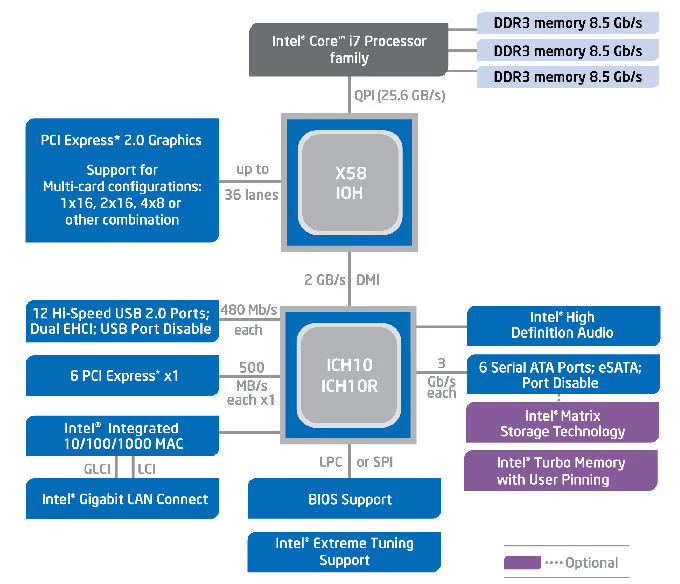
All motherboard busses and components are driven from a single 133.33 MHz base clock. The resulting component speed values are generated by applying a multiplier value to this base clock. There are four multipliers on the motherboard which are used to set the system speed:
-
CPU Speed: When multiplied by the system base clock speed (default 133.33 MHz) gives the CPU frequency. Four multipliers are used to define different speeds based on the number of active CPU cores.
-
Memory Speed: When multiplied by the system base clock speed gives the memory frequency. For example a memory multiplier of 10 times the base clock of 133.33 MHz results in a memory frequency of 1333 MHz.
-
Quick Path Interconnect (QPI) Speed: Selectable transfer rate of data transferred between the CPU and the IOH.
-
Uncore Speed: This multiplier applies to the non-CPU related items in the processor. The limit on this multiplier is set by the memory multiplier.
The Intel X58 Express Chipset
The Intel X58 Express Chipset continues to push innovation with capabilities designed to deliver quality, performance and headroom The Intel X58 Express Chipset achieves this performance by supporting the latest Intel Core i7 family of processors at 6.4 GT/s and 4.8 GT/s speeds via the Quick Path Interconnect (QPI), and enabling increased system bandwidth by supporting industry leading technologies, such as PCI Express 2.0 graphics, Intel Turbo Memory and support for Intel High-Performance Solid State drives.
PCI Express 2.0
Intel's high-end desktop chipset continues support for PCI Express 2.0 and adds flexibility with support of dual x16 and up to quad x8 graphics card configurations and combinations in between. The greatly improved 32GB/s of graphics bandwidth capability enables much higher levels of performance on graphics intensive applications such as high end gaming and video rendering for digital content creation.
Faster System Performance
With the growing imbalance between processor and memory performance, it is critical to optimize the memory controller design to obtain the maximum possible performance from the memory subsystem. The transition of the integrated memory controller (iMC) into the processor significantly increases overall system performance through the optimization of available bandwidth along with reduction of memory access latency. The Intel Core i7 family of processors brings triple channel DDR3 memory technology support. The DDR3 SDRAM devices operating at 1066 MHz, offer peak data transfer rates of up to 25.6 GB/s (when operated in triplel-channel interleaved mode), enabling the platform to take advantage of the higher bandwidth, faster system performance, and higher performance per watt at 1066MHz2.
Intel I/O Controller Hub 10 (Intel ICH10 and Intel ICH10R)
The Intel ICH10 I/O controller hub of the Intel X58 Express Chipset integrates several capabilities to provide flexibility for connecting I/O devices.
-
Intel Matrix Storage Technology1: Native support of external SATA ports (eSATA), combined with Intel Matrix Storage Technology (Intel MST), provides the flexibility to add an external drive for increased data storage with up to 6 times faster performance than USB* 2.0 or IEEE 1394 4002. Support for eSATA enables the full SATA interface speed of up to 3 Gb/s outside the chassis. The Advanced Host Controller Interface (AHCI) provides easier expandability with support for eSATA devices and native hot plug, while boosting boot and multi-tasking performance with Native Command Queuing (NCQ). In addition, support for Command Based Port Multipliers, and RAID levels 0, 1, 5 and 10 enable greater reliability for personal data, or maximum storage performance for intensive applications.
-
Intel Rapid Recover Technology (when configured with ICH10R I/O controller): With the ability to instantly boot off of a clone hard drive, Intel Rapid Recover Technology provides a fast, easy to use method for the end user to recover their data and return their system to an operational status.
-
Intel Turbo Memory: The Intel X58 Express Chipset with the Intel ICH10R also supports Intel Turbo Memory, an innovative flash memory-based overall system performance and boot time accelerator. This feature is easily implemented using a PCI
Express x1 module and can be used with any SATA Hard Drive to improve system responsiveness. Intel Turbo memory enables faster application loading and concurrent performance enhancements when used in conjunction with Intel Matrix Storage
Technology. Intel Turbo Memory, paired with the Intel X58 Express Chipset, also allows the user to easily control the applications or data in the cache using the new Intel Turbo Memory Dashboard interface, boosting performance further. -
Intel Solid State Drives support: The Intel X58 Express Chipset, when paired with Intel X25-E Extreme and X25-M Mainstream SATA Solid State Drives (SSDs), provides a high performance solution that can enable faster overall system response, boot and resume times. With no moving parts, SSDs run cooler and quieter and are a more reliable option than hard drives. In addition, SSDs remove input/output (I/O) performance bottlenecks associated with hard disk drives that help maximize the efficiency of Intel processors, such as the new Intel Core i7 processor family.
Intel Smackover Features
Intel QuickPath Interconnect (QPI) @ 6.4 and 4.8 GT/s - Intel’s latest system interconnect design increases bandwidth and lowers latency. Supports the Intel Core i7-965 processor Extreme Edition and Intel Core i7-940 and i7-920 processors.
PCI Express 2.0 Interface - PCI Express 2.0 delivers up to 16GB/s bandwidth per port, providing leading-edge graphics performance and flexibility with support for dual x16 and up to quad x8 graphic card configurations, or any combinations in between.
Intel High Definition AudioIntegrated audio support enables premium digital sound and delivers advanced features such as multiple audio streams and jack re-tasking.
Intel Matrix Storage Technology - With additional hard drives added, provides quicker access to digital photo, video and data files with RAID 0, 5, and 10, and greater data protection against a hard disk drive failure with RAID 1, 5, and 10. Support for external SATA (eSATA) enables the full SATA interface speed outside the chassis, up to 3 Gb/s.
Intel Rapid Recover Technology - Intel's latest data protection technology provides a recovery point that can be used to quickly recover a system should a hard drive fail or if there is massive data corruption. The clone can also be mounted as a read-only volume to allow a user to recover individual files.
Intel Turbo Memory - Intel's innovative NAND cache designed to improve the responsiveness of applications, application load times, and system boot performance. Intel Turbo Memory, paired with the Intel C58 Express Chipset, also allows the user to easily control the applications or data in the cache using the new Intel Turbo Memory Dashboard interface, boosting performance further.
Serial ATA (SATA) 3 Gb/s - Serial ATA (SATA) 3 Gb/s High-speed storage interface supports faster transfer rate for improved data access up to 6 SATA ports.
eSATA - SATA interface designed for use with external SATA devices. It provides a link for 3 Gb/s data speeds to eliminate bottlenecks found with current external storage solutions.
SATA Port Disable - Enables individual SATA ports to be enabled or disabled as needed. This feature provides added protection of data by preventing malicious removal or insertion of data through SATA ports. Especially targeted for eSATA ports.
USB Port Disable - Enables individual USB ports to be enabled or disabled as needed. This feature provides added protection of data by preventing malicious removal or insertion of data through USB ports.
DX58SO Specifications
| Form Factor | ATX (12.00 inches by 9.60 inches [304.80 millimeters by 243.84 millimeters]) |
| Processor | Support for a Intel Core i7 processor in an LGA1366 socket |
| Memory |
|
| Chipset | Intel X58 Express Chipset |
| Audio | Intel High Definition Audio subsystem in the following configuration:
|
| Video |
|
| LAN Support | Gigabit (10/100/1000 Mbits/sec) LAN subsystem |
| Peripheral Interfaces |
|
| Expansion capabilities |
|
Intel DX58SO First Look
Motherboards haven't seen a lot of change in the past two years, so we guess it was due time for Intel to shake things up a bit with the DX58SO. We will discuss the significant layout changes to this motherboard just a little later in this review. The biggest difference with this X58-Express product is that it updates the socket from LGA775 to LGA1366 in order to support the Intel Core-i7 series of processors. Additionally, the Dual-Channel DDR support that reigned supreme since the Pentium 4 days has also been updated to include Triple-Channel DDR3.
Intel may have introduced DDR3 support on their mainboards almost two years ago, but high costs paired with low adoption by manufacturers led to a reprieve for DDR2. That all ends now, as X58 is built for DDR3 only and Intel has no plans to allow DDR2 back into the game. This might seem like a move which slams the door in the face of mainstream enthusiasts wanting more value from their hardware, but the truth is that P45 and X48 chipsets will continue in production for many more months to come. Moving to triple-channel DDR3 also adds momentum for 64-bit computing, but also optimizes current 32-bit systems. Windows XP for example, offers a 4GB maximum memory mapping space on the 32-bit variety of the O/S.

Our first look at the layout of the Intel DX58SO "Smackover" motherboard shows a nice looking black PCB which returns to 8 layers allowing for better rigidity of the board. A more detailed visual scan shows that Intel decided to make a few changes in the previous status quo. The biggest change, and probably the most recognizable is the location of the memory slots which were moved to the area where the processor socket had resided for many years. Intel explains their rationale for this change as a needed improvement in cooling the memory by subjecting it to better airflow.

While on the topic memory Intel opted to only include four memory slots in the DX58SO. In these boards the full memory performance potential is only achieved with the primary three slots filled. The forth slot allows you to add an additional 2GB of DRAM, but that module is only accessed at single-channel performance rate, decreasing performance of that module by 66.66%. Other motherboards such as the ASUS P6T Deluxe provide a full six memory slots that allow for a maximum capacity of 12 GB of DDR3 at full performance potential. With this board being an excellent candidate for a workstation, we certainly can't quite grasp the logic in this configuration.

Another layout issue that bothered us tremendously was the need of having to utilize either one of your SATA power connectors or a 4-pin Molex connector to provide "auxiliary power" to the board. The locations of the connectors are denoted by the red arrows in the image above. Intel currently is the only X58 based motherboard manufacturer that we are aware of that requires this additional power connection. We certainly can't understand why with both the 24-pin main power cable and the 12 Volt 8-pin power adapter connected why there is a need for additional "auxiliary power".

Alas, finally a layout change that makes sense! Looking a the rear I/O panel you can readily see that the parallel port, the 9-pin serial port(s), and both the PS2 mouse and keyboard connectors are missing. We say bravo to Intel for finally removing these useless connections from the rear I/O panel. We feel the vast majority of enthusiasts have been waiting for this change to take place for some time. While not shown in the image we also are ecstatic that Intel chose to also remove the floppy drive connector and the PATA drive connectors on the DX58SO. These connectors were totally useless on a board of this caliber and only took up excess space as far as we are concerned.
Intel DX58SO: Closer Look
Probably thing single biggest fiasco with the layout of the Intel DX58SO is the positioning of the six SATA ports. As you can see from the image below all six of the SATA ports are in an upright position and two to four of the six become totally useless if you use a large graphics card such as the NVIDIA GTX280. On a board of this caliber which will obviously be used for extremely high-end functions we find this kind of mistake completely unforgivable. The images below will help to make our point much more clearly.

In the first image we installed a single NVIDIA GTX280 and as you can see two of the standing SATA ports are effectively eliminated from use.
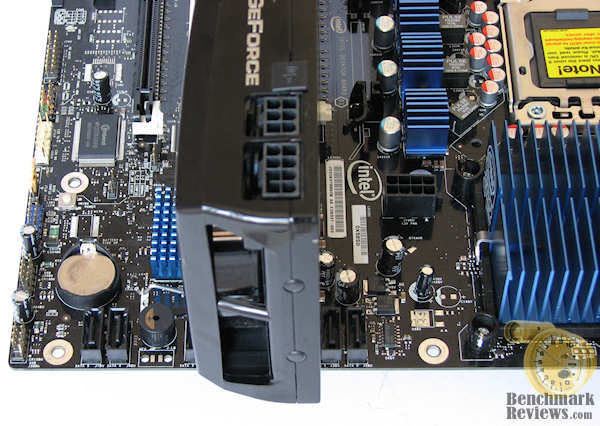
In the next image we installed a second GTX 280 in the second PCIe slot. We are well aware that the Intel DX58SO only supports CrossFire and not SLI but the second NVIDIA card is approximately the same size as the ATI 4870. Again by using the CrossFire option which is touted as a major feature on this board, we effectively eliminate two more of the six SATA ports leaving us only two to operate with. This is terribly wrong and could have been easily eliminated by moving the SATA ports to different locations and still keeping their upright presentation. An even simpler solution would have been to have configured the SATA ports in a low profiled right-angle presentation.

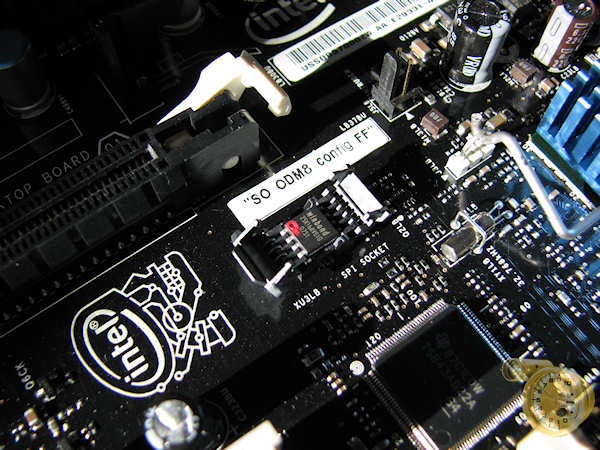
We did find another bright spot in this seemingly endless array of layout faux pas on the DX58SO motherboard. Intel chose to use a socketed BIOS chip in lieu of the current trend used by many other manufacturers of soldering the chip to the board. Intel uses the Winbond 25X16, a 16 Megabit BIOS chip to handle these duties. This chip is reputed by Intel to highly fault tolerant and virtually eliminates downtime due to a corrupted BIOS.
Another extremely positive aspect of the Intel DX58SO Smackover X58 Motherboard is the use of 8-channel (7.1) Dolby Home Theater* Audio subsystem with five analog audio outputs and two S/PDIF digital audio outputs (coaxial and optical) using the Sigmatel* 9274D audio codec. This codec allows for extremely high signal-to-noise ratios for an onboard sound system producing around 108 dB when using the digital outputs and experiencing a small drop to 106 dB when the analog segment is used. This makes the DX58SO and excellent option for home theater use.
We leave this section of our review with an image which gives and overview of the Intel DX58SO motherboard with call-outs of all of the boards features and their locations. You can see quite easily from studying this graphic that there are a few more layout issues that we failed to touch on in our overview.

Intel DX58SO BIOS
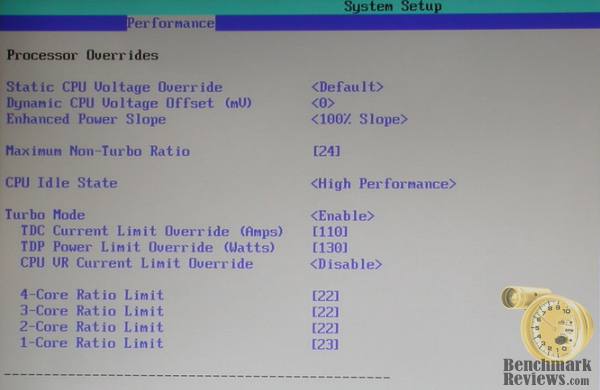
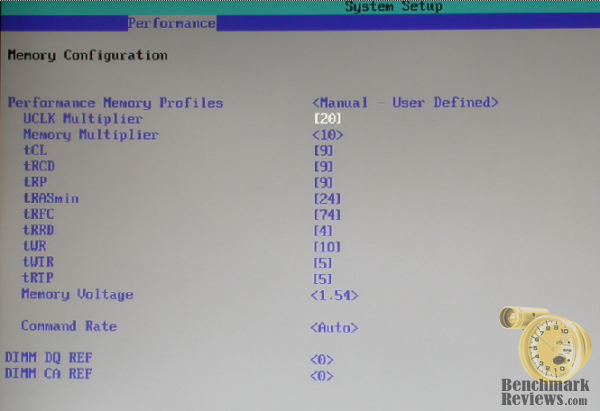
We think it is a safe assumption that most of you are not interested in seeing anywhere from 10 - 20 BIOS images in this section of our review. For that reason we've included three images from the performance section of the Advanced BIOS screen from the Intel DX58SO Smackover motherboard. These three images encompass the vast majority of settings that would influence this motherboard's performance. In lieu of looking at each one of the settings and their parameters independently we've included a table at the beneath the images that discusses all the manually adjustable BIOS settings, their range (where applicable), and the increments each can be adjusted in.
Processor Overrides

Bus Overrides
Memory Overrides
Intel DX58SO BIOS Options
The chart below will give you a much better idea of just how far Intel's DX5SO has come. This motherboard's BIOS is every bit as cutting edge as many of its competitors and in fact offers several features that boards such as the ASUS P6T Deluxe omitted. The two features that are of the most importance are the ability to independently adjust the multipliers of each core independently of the others and the ability to utilize Turbo Boost in both stock and overclocked modes of operation. We can imagine a number of situations where these two features alone can prove invaluable.
| Active Processor Cores | ALL, 1, 2 |
| Active Multithreading | Enable, Disable |
| Failsafe Watchdog | Enable, Disable |
| Host Clock Frequency Override | Auto, Manual |
| Host Clock Frequency | 133 - 240 MHz in 1 MHz increments |
| Processor Overrides | |
| Static CPU Voltage Override | Default, 1.0 - 1.64 Volts in .125V increments |
| Dynamic CPU VOltage Offset | 0 - 494mV in 6mV increments |
| Maximum Non-Turbo Ratio | Processor dependant 12 - 24X in 1X increments with i7 965 Extreme |
| CPU Idle State | Low Performance - High Performance |
| Turbo Mode | Enable, Disable |
| TDC Current Limit Override | 0 - 500 Amps in 1 Amp increments |
| TDP Power Limit Override | 0 - 500 Watts in 1 Watt increments |
| 4-Core Ratio Limit | 12 - 63X in 1X increments |
| 3-Core Ratio Limit | 12 - 63X in 1X increments |
| 2-Core Ratio Limit | 12 - 63X in 1X increments |
| 1-Core Ratio Limit | 12 - 63X in 1X increments |
| Bus Overrides | |
| IOH Core Voltage Override | 1.10 - 1.50V in .025V increments |
| QPI Voltage Override | 1.5 - 1.80V in .025V increments |
| QPI Data Rate | Auto, 4.8 GTS, 5.866 GTS, 6.4 GTS |
| PCI Express Burn-in Percentage | Default = 100 MHz, 101 - 110 MHz in 1MHz icrements |
| PCI Latency Timer | 32 - 248 in 32 increments |
| High Precision Event Timer (HPET) | Enable, Disable |
| Memory Overrides | |
| Performance Memory Profiles | Auto, Manual(User Defined) |
| Uncore (UCLCK) Multiplier | 12X - 30X in 1X increments |
| Memory Multiplier | Auto, 6, 8, 10, 12 |
| Memory Voltage | 1.5 - 2.5V in .04V increments |
| Command Rate | Auto, 1T, 2T |
| DIMM DQ REF | +128 thru -127 in increments of 1 |
| DIMM CA REF | +128 thru -127 in increments of 1 |
Testing Methodology
This is Benchmark Review's fifth article where the Intel i7 series of processor was used. The focus in this review shifts from solely the processor to more that of the motherboard. In our other releases we strictly used the Intel DX58S0 Smackover motherboard with the only comparison being the different processors we tested. Today we'll use a single processor, the Intel i7-965 Extreme Edition and compare its performance using the Intel DX58S0 heads-up versus the ASUS P6T X58 Deluxe Motherboard. In our previous reviews we also compared a previous generation X48 motherboard, the ASUS P5E3 using an overclocked Intel X3350 processor to establish some semblance of comparison to then versus now. To put is mildly, the P5E3 and X3350 were completely outclassed in every arena except for gaming in which the results were a bit closer. For that reason to day we will be comparing only the two X58 motherboards using the fastest processor currently on the planet, mano-a-mano. For those extreme enthusiasts out there we also tested both motherboards using our full array of benchmarks overclocked.
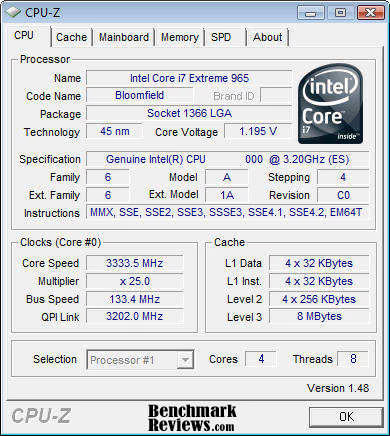
Unfortunately when testing systems of this type there is not set of "grass roots" tests that will completely speak to the to the system's overall performance. It is therefore necessary to comparatively test the performance of the CPU, Memory, Hard Drive(s) and Graphical Rendering and then draw your assumptions from the results of these tests. We chose an array of benchmarking tools (captioned below) that we felt would give our readers a complete of a picture of each system's performance. Each benchmark test program begins after a system restart, and the very first result for every test will be ignored since it often only caches the test. We then ran each of the tests a minimum of three times and reported an average of each test's results. We ran enabled Turbo Boost on both motherboards with the processors at their stock clock speeds.
System #1
-
Motherboard: Intel Extreme Motherboard DX58SO
-
Processor: Intel Core i7-965 Extreme Edition [3.20 GHz clock speed]
-
Processor Cooling: Noctua NH-U12P with 1366 adapter kit
-
System Memory: QIMONDA 3 x 1GB DDR3 1067 CL7 non-ECC UDIMM
-
Disk Drive: Intel High Performance SATA SSD X25-M 80GB MLC,
System #2
-
Motherboard: ASUS P6T X58 Deluxe OC Palm Edition
-
Processor: Intel Core i7-965 Extreme Edition [3.20 GHz clock speed]
-
Processor Cooling: Noctua NH-U12P with 1366 adapter kit
-
System Memory: QIMONDA 3 x 1GB DDR3 1067 CL7 non-ECC UDIMM
-
Disk Drive: Intel High Performance SATA SSD X25-M 80GB MLC,

CPU-Z View of DX58SO in Turbo Boost Mode


CPU-Z View of ASUS P6T Deluxe in Turbo Boost Mode
Common Components
-
Graphics Card: Zotac GTX 260 Amp2!
-
Optical Drive: ASUS DRW-2014L1T SATA Optical Drive
-
Enclosure: Lian Li PC-A7010B Black Aluminum Full-Tower ATX Case
-
PSU: Thermaltake W0132 Toughpower Cable Management 1000 Watt
-
Monitor: Dell 24-Inch Widescreen LCD Monitor 2407FPW
-
KVM Switch: ATEN CS1782 USB 2.0 DVI KVM Switch
-
Operating System: Windows Vista 32-bit Ultimate SP-1 with all current updates
Benchmark Applications
-
PCMark Vantage
-
3DMark Vantage v1.01
-
3DMark06 v1.1.0
-
SANDRA 2009
-
SuperPi Mod 1.5XS
-
EVEREST Ultimate v4.60.1500
-
Cinebench R10
-
World In Conflict
-
Crysis v1.21 Benchmark
Intel DX58SO: Overclocking
In recent years Intel has become much more understanding that the enthusiast community has grown quite large and that raw performance ranks number one with this consumer group. For that reason Intel has softened their view significantly regarding the overclocking of their processors and motherboards. In fact with the materials provided with the Core i7 review kit Intel even included a rather in depth 22 page document entitled Intel Extreme Motherboard DX58SO ...Performance Tuning Process. This document elaborates quite freely on the best way to overclock the Core i7 family of processors. In the document Intel states that there are four multipliers on the motherboard which are used to set the system speed:
-
CPU Speed: When multiplied by the system base clock speed (default 133.33 MHz) gives the CPU frequency. Four multipliers are used to define different speeds based on the number of active CPU cores.
-
Memory Speed: When multiplied by the system base clock speed gives the memory frequency. For example a memory multiplier of 10 times the base clock of 133.33 MHz results in a memory frequency of 1333 MHz.
-
Quick Path Interconnect (QPI) Speed: Selectable transfer rate of data transferred between the CPU and the IOH.
-
Uncore Speed: This multiplier applies to the non-CPU related items in the processor. The limit on this multiplier is set by the memory multiplier.
What Intel relates in their documentation is completely accurate when it comes to their motherboard, the DX58SO. The ASUS P6T X58 Deluxe brings a slightly more robust BIOS to the table that offers the ability to adjust some features not present on the DX58SO, especially in the realm of voltage manipulation. Whether these additional features are truly necessary is certainly debatable and with time and effort we shall certainly see which BIOS functions most tickle the fancy of the i7 family of processors.
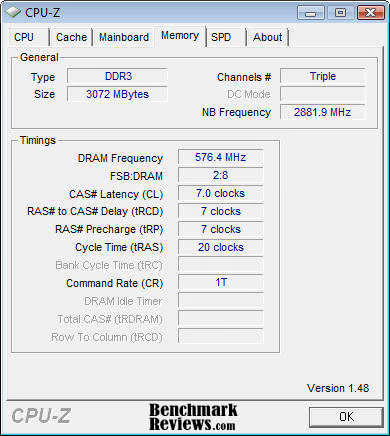
In this review we overclocked the DX58SO leaving left turbo boost enabled and were able to comfortably run the system at 4.035 GHz. We realized that due to the very nature of turbo boost we probably got a high overclocked value that we would have been able to attain with turbo boost disabled. Since the ASUS P6T X58 Deluxe does not offer turbo boost as a BIOS option when the system is overclocked we were forced to not use this feature in our overclocking exploits with the P6T. We able to attain the same overclocked level with ASUS P6T X58 Deluxe without turbo boost as we did with the DX58SO with turbo boost enabled using a multiplier of 28 and a base clock of 144 MHz. Unfortunately, those levels were not as stable as we would have liked to see with the ASUS P6T. We were able to achieve a completely stable overclock of 3.875 GHz upping the multiplier to 29 and leaving the base clock at the stock 133 MHz speed.

CPU-Z View of DX58SO Overclocked with Turbo Boost Enabled
It was at this point we decided to compare the two systems overclocked at their respective levels, the Intel DX58SO using turbo boost and the ASUS P6T without turbo boost. We thought the results would be quite interesting and help to either prove or disprove the merits of turbo boost.


CPU-Z View of ASUS P6T Deluxe Overclocked without Turbo Boost Enabled
PCMark Vantage System Tests
PCMark Vantage is the first objective hardware performance benchmark for PCs running 32 and 64 bit versions of Microsoft Windows Vista. PCMark Vantage is perfectly suited for benchmarking any type of Microsoft Windows Vista PC from multimedia home entertainment systems and laptops to dedicated workstations and hi-end gaming rigs.
Regardless of whether the person benchmarking is an artist or an IT Professional, PCMark Vantage shows the user where their system soars or falls flat, and how to get the most performance possible out of their hardware. PCMark Vantage is easy enough for even the most casual enthusiast to use yet supports in-depth, professional industry grade testing.


3DMark Vantage System Tests
3DMark Vantage is a PC benchmark suite designed to test the DirectX10 performance of your graphics card. We’ve been making 3DMark for over 10 years, with each new edition using the latest 3D technology to determine real-world performance.
A 3DMark score is an overall measure of your system’s 3D gaming capabilities, based on comprehensive real-time 3D graphics and processor tests. By comparing your score with those submitted by millions of other gamers you can see how your gaming rig performs, making it easier to choose the most effective upgrades or finding other ways to optimize your system.
3DMark is widely used by the PC industry, press and media as well as individual users and gamers, for comparing performance levels between whole systems or even specific components.

3DMark06 System Tests
3DMark is a computer benchmark by Futuremark (formerly named Mad Onion) to determine the DirectX 9 performance of 3D game performance with graphics cards. 3DMark06 uses advanced real-time 3D game workloads to measure PC performance using a suite of DirectX 9 3D graphics tests, CPU tests, and 3D feature tests.
3DMark06 tests include all new HDR/SM3.0 graphics tests, SM2.0 graphics tests, AI and physics driven single and multiple cores or processor CPU tests and a collection of comprehensive feature tests to reliably measure next generation gaming performance today. Some enthusiasts may note that Benchmark Reviews does not include CPU-bound tests in our benchmark battery, and that only graphic-bound tests are included.

SANDRA 2009 System Tests
SiSoftware Sandra (the System ANalyser, Diagnostic and Reporting Assistant) is an information & diagnostic utility. It should provide most of the information (including undocumented) you need to know about your hardware, software and other devices whether hardware or software.It works along the lines of other Windows utilities, however it tries to go beyond them and show you more of what's really going on. Giving the user the ability to draw comparisons at both a high and low-level. You can get information about the CPU, chipset, video adapter, ports, printers, sound card, memory, network, Windows internals, AGP, PCI, PCI-X, PCIe (PCI Express), database, USB, USB2, 1394/Firewire, etc.


EVEREST Ultimate System Tests
EVEREST Ultimate Edition is an industry leading system diagnostics and benchmarking solution for enthusiasts PC users, based on the award-winning EVEREST Technology. During system optimizations and tweaking it provides essential system and overclock information, advanced hardware monitoring and diagnostics capabilities to check the effects of the applied settings. CPU, FPU and memory benchmarks are available to measure the actual system performance and compare it to previous states or other systems. Furthermore, complete software, operating system and security information makes EVEREST Ultimate Edition a comprehensive system diagnostics tool that offers a total of 100 pages of information about your PC.


CINEBENCH 10 System Tests
CINEBENCH is a real-world test suite that assesses your computer's performace capabilities. MAXON CINEBENCH is based on MAXON's award-winning animation software, CINEMA 4D, which is used extensively by studios and production houses worldwide for 3D content creation. MAXON software has been used in blockbuster movies such as Spider-Man, Star Wars, The Chronicles of Narnia and many more. MAXON CINEBENCH runs several tests on your computer to measure the performance of the main processor and the graphics card under real world circumstances. The benchmark application makes use of up to 16 CPUs or CPU cores and is available for Windows (32-bit and 64-Bit) and Macintosh (PPC and Intel-based). The resulting values among different operating systems are 100% comparable and therefore very useful with regard to purchasing decision-making. It can also be used as a marketing tool for hardware vendors or simply to compare hardware among colleagues or friends.
We used the predefined benchmark included with the software and reported the rendering scores for both a single core (1 CPU) and for all four cores (All CPUs). We also ran the built in Open GL benchmark that is included with the CINEBENCH benchmarking suite.

SuperPi System Tests
Super Pi is used by many overclockers to test the performance and stability of their computers. In the overclocking community, the standard program provides a benchmark for enthusiasts to compare "world record" pi calculation times and demonstrate their overclocking abilities. The program can also be used to test the stability of a certain overclock speed. If a computer is able to calculate PI to the 32 millionth place after the decimal without mistake, it is considered to be moderately stable in terms of RAM and CPU. However, longer tests with other CPU/RAM intensive calculation programs will run for hours instead of minutes and may better stress system stability. While Super Pi is not the fastest program for calculating Pi, it remains very popular in the hardware and overclocking communities.
Benchmark Reviews runs and reports calculations for 1M, 2M, and 4M configurations.

Crysis System Tests
Crysis uses a new graphics engine: the CryENGINE2, which is the successor to Far Cry's CryENGINE. CryENGINE2 is among the first engines to use the Direct3D 10 (DirectX10) framework of Windows Vista, but can also run using DirectX9, both on Vista and Windows XP.
Roy Taylor, Vice President of Content Relations at NVIDIA, has spoken on the subject of the engine's complexity, stating that Crysis has over a million lines of code, 1GB of texture data, and 85,000 shaders. To get the most out of modern multicore processor architectures, CPU intensive subsystems of CryENGINE 2 such as physics, networking and sound, have been re-written to support multi-threading.
Crysis offers an in-game benchmark tool, which is similar to World in Conflict. This short test does place some high amounts of stress on a graphics card, since there are so many landscape features rendered. For benchmarking purposes, Crysis can mean trouble as it places a high demand on both GPU and CPU resources. Benchmark Reviews uses the Crysis Benchmark Tool by Mad Boris to test frame rates in batches, which allows the results of many tests to be averaged.
We ran the Crysis benchmarks in DirectX9 only with all settings at high. We are reporting results at resolutions of 1680 x 1050 and 1920 x 1200 with no anti-aliasing or anisotropic filtering utilized.

World in Conflict System Tests
The latest version of Massive's proprietary Masstech engine utilizes DX10 technology and features advanced lighting and physics effects, and allows for a full 360 degree range of camera control. Massive's MassTech engine scales down to accommodate a wide range of PC specifications, if you've played a modern PC game within the last two years, you'll be able to play World in Conflict.
World in Conflict offers an in-game benchmark; which records the minimum, average, and maximum frame rates during the test. Very recently another hardware review website made the assertion that these tests are worthless, but we couldn't disagree more. When used to compare video cards which are dependant on the same driver and use the same GPU architecture, the in-game benchmark works very well and comparisons are apples-to-apples.
We ran the World in Conflict benchmarks in DirectX9 only with all settings at very high. We are reporting results at resolutions of 1680 x 1050 and 1920 x 1200 with 4 x AA and 16 x AF utilized.

Power Consumption
To measure power we used our Seasonic Power Angel a nifty little tool that measures a variety of electrical values. We used a high-end UPS as our power source to eliminate any power spikes and to condition the current being supplied to the test systems. The Seasonic Power Angel was placed in line between the UPS and the test system to measure the power utilization in Watts. We measured the idle load after 15 minutes of totally idle activity on the desktop with no processes running that mandated additional power demand. Load was measured taking extended peak power measurements while running a variety of software applications in the background to achieve 100% load on all cores. Something to remember when looking at our load temperatures is that we are running an NVIDIA GTX based graphics card on our test rig, and they aren't power misers when loaded.

"Smackover" Final Thoughts
When looking at our benchmarking results we see as with any two closely matched boards with some benchmarks that are very close and some that are not so close. In any case the ASUS P6T X58 Deluxe OC Palm Edition was the clear winner on all of the benchmarks that we ran. We were somewhat concerned initially that the lack of turbo boost on the P6T might put it at a disadvantage in the overclocking realm. Such was not the case, as it is apparent at least in this series of tests that turbo boost works quite well at stock processor speeds giving as much as 266 MHz boost in some cases to the base clock rate. In the realm of overclocking we can't be certain of how much turbo boost may have helped or hurt the Intel DX58SO, but its obvious the lesser clocked ASUS P6T Deluxe certainly was the performance winner.
The DX58SO trailed the P6T Deluxe by around no more than 5% on most benchmark results. To be fair we must mention that we were using the latest version of the DX58SO's BIOS at the time of testing but since then a newer BIOS has been released. ASUS has had a number of iterations to its BIOS since the Release of the P6T Deluxe and is quite mature for a motherboad this early on the retail market.Since their inception, Intel motherboards have always been known as rock solid when it comes to reliability and more in the midrange when it comes to performance. Only in the last couple of years has Intel begun to place more of an emphasis on performance by unveiling BIOS features that would allow the enthusiast to push these boards beyond their stock settings. Should the Intel DX58SO "Smackover" motherboard be on your short list of boards to purchase, we believe it does have the best incarnation of performance features available in the BIOS to date and it should improve with time.

The most frightfully obvious problem with the Intel DX58SO is the layout of the board's components. It is blatantly evident that this board was designed by engineers that have little regard for what computer enthusiasts abide by on a daily basis. A short recap of the blunders we detailed earlier reveals the following issues:
-
The memory slots were moved to an area where the processor socket had resided for many years
-
This change in the memory slot configuration required Intel to only include four memory slots in the DX58SO
-
The forth memory slot allows you to add an additional 2GB of DRAM, but that module is only accessed at single-channel performance rate, decreasing performance of that module by 66.66%
-
An additional auxiliary power connection is required on the DX58SO that is not required on any other X58 board currently on the market
-
The positioning of the SATA ports severely hampers the use of the current full sized graphics solutions without the sacrifice of 2-4 SATA ports
-
The 8-pin auxiliary power connector is placed in a very awkward position in the center of the board
Intel's i7 series of processors are currently the fastest production processors in existence and their X58 chipset powers the fastest motherboards available. Our question is why can't Intel design a motherboard layout with the same forward thinking skills that these other two excellent products exhibit? We think that Intel's primary market for their motherboards is still the business arena where the demands for extreme performance and grace are still superseded by reliability. Old habits die hard and event though we're seeing a major effort from Intel to breakaway from their tradition it will take time. This is in no way saying that the DX58SO is not a good motherboard, only that it's not a great motherboard that would firmly increase Intel's dominance in the computer world.
Intel DX58SO Conclusion
We at Benchmark Reviews are always amazed by the differences in the advertising campaigns that different computer products manufacturers utilize when launching a new product. Most motherboard manufacturers tend to bloviate with a long-winded diatribe about all of their features and specifications that can be confusing a best for the potential consumer. Intel, on the other hand gives little or no useful information about their consumer grade products and touts one of the shortest advertised feature sets in existence for their DX58SO "Smackover" motherboard. They make up for this by approaching their product information from a scientific/engineering prospective in the form of white paper articles that are generally somewhat obscure and in most cases well over the reading level of many of their potential consumers. The DX58SO motherboard in specific and the X58 series in general are entirely new to the consumer market and function somewhat differently than their predecessors. We feel that a board of epic proportion such as the DX58SO certainly deserves more useful information than Intel has seen fit to provide.
The overall appearance and presentation of the Intel DX58SO "Smackover" Motherboard is severely detracted from by the aberrant layout of the board's major components. We feel that a consumer should get what they pay for and we support this by suggesting the following potential real-life scenario: A user that simply read the specifications and features of the Intel DX58SO purchases the board with the intent of running two graphics cards in CrossFire configuration along with three SATA drives and a SATA optical drive. The features and specifications alone more than support this boards ability to support those components. THe layout of the SATA ports do not.
The construction of the DX58SO is in keeping with its predecessors, rock solid and built to last. Intel added to their already solid construction by using an 8 layered printed circuit board (PCB) for added components and motherboard rigidity. Even the featured components that in our opinion are misplaced on the board are well constructed so we can't detract from that in this arena.
The performance of the Intel DX58SO is quite good and within 5% of the fastest X58 motherboards available. Given the business market segment that this board will likely target the performance will most likely be highly acceptable. Our only real concern in this area of review is the memory limitation the board provides. Granted you can house up to 8 GB of DDR3 on the DX58SO, but if you choose to maximize the memory the last 2 GB stick will only be addressed at a single channel rate. This effectively decreases the performance of this one stick of RAM by approximately 66%, while we didn't test the board loaded with memory we have to conceptualize that it will take a performance hit from this design implementation. If you were choosing a motherboard for processor intensive tasks such as CAD/CAM or video editing and you have the option to choose 12 GB at full speed or 8 GB with the limitation we just described, which would you choose? Another fact to be considered is that the unlike the vast majority of the DX58SO's competion which support for the first time both SLI and CrossFire, the DX58SO only supports CrossFire.
The Intel DX58SO "Smackover" is at present one of the lowest priced X58 motherboards on the market, which is highly unusual based on Intel's pride in their products. At the time of this writing New Egg offers the Intel BOXDX58SO LGA1366 Intel X58 ATX Intel Motherboard for $258.99 which is $20.00 cheaper than the MSRP and a minimum of $20.00 cheaper than most of their competition. At the price and given the performance if your willing to put up with the layout issues we mentioned it's a great deal.
At Benchmark Reviews we pride ourselves on releasing as complete of a product overview as is humanly possible. We feel that we have continued in this tradition with the Intel DX58SO "Smackover" Motherboard. The DX58SO has so much potential and could have been Intel's finest board to date had they taken the user's perspective more into consideration with their placement of components. While these flaws detract from this board's likelihood of becoming a highly praised front runner, the board does have some excellent features that we hope will be building blocks for a new revision. We cannot in good conscience recommend this board to the computer enthusiast. We can see where the DX58SO would have place in the business world as long as all of the considerations we have expounded upon are taken into account.
Pros:
+ Highly feature laden BIOS for an Intel manufactured motherboard
+ Excellent, rock-solid construction
+ Excellent on-board sound codec
+ Rear I/O ports minimized to fit today's standards
+ Ability to independently adjust each core's multiplier when running the i7-965 EX
+ Ability to run turbo boost in both stock and overclocked modes of operation
+ Use a socketed BIOS chip as opposed to having the chip soldered on the board
+ The price is right
Cons:
- Only three fully functional memory slots - Fourth memory slot addressed at single channel speed
- Additional auxiliary power connector required
- Horrible positioning of the 6 available SATA ports
- Supports only CrossFire in lieu of both CrossFire and SLI supported by the competition
- Poor placement of 8-pin auxiliary power connector
Ratings:
-
Presentation: 7.50
-
Appearance: 8.25
-
Construction: 9.00
-
Functionality: 7.00
-
Value: 8.00
Final Score: 7.95 out of 10.
Questions? Comments? Benchmark Reviews really wants your feedback. We invite you to leave your remarks in our Discussion Forum.
Reader comments from the original article
10 comments were posted before commenting closed. They are preserved as written. Original avatars no longer resolve and are shown as a placeholder.
eSATA port not stable Guru Permalink:
Hi, Please don't buy this board if you are planning to use eSATA port.
I've had eSATA issues also Dogwood Permalink:
I was using an eSATA volume on my DX58SO for backup using Clonezilla. At first this worked fine, but at some point I started getting I/O errors in the middle of the process. I swapped out various components and tried both ports, but the unreliability persisted. I was speculating that maybe one of the BIOS updates rendered the eSATA ports unstable (it would presumably be BIOS, because Clonezilla isn't running Windows or Windows drivers). Very mysterious...it's interesting to see that someone else cautions against eSATA. Anyway, I don't have a critical need for eSATA, so I've just stopped using it; can substitute USB, albeit with loss of speed. But I'm never comfortable when something isn't working properly; I want to know the full story.
RE: I've had eSATA issues also Guru Prasad H B Permalink:
I faced the same problem, with WD MY book (1TB) external Hard disk. The eSATA port works for first 5 min, and the windows freezes for some time or i used to get PD(or some such) time out warning and newer stops. Initially i suspected about the WD hard disk, when i contacted them, they said there is some problem with marver controller (which is used in DX58SO mother board). so i took this issue with Intel support team, but its of no use.. Tried installing latest BIOS, Marvel driver, Intel Matrix storage drivers which are available in Intel webpage, its of no use. My intention to buy DX58SO was mainly for using eSATA port for which i had huge data (around 25 Gb) to be used for testing purpose. now because of the one HDD (eSATA) is not working why will i invest on another HDD for which to make sure the problem is not there in Intel Mother board. So i brought low cost PCI-eSATA card (which is 10 $) which is working fine with DX58SO.
RE: Intel DX58SO Smackover X58 Motherboard Dogwood Permalink:
Aha! I finally found an official word that maybe clarifies the need for the unusual extra "auxiliary power" connector on the DX58SO. This Intel page indicates that the extra power cable is only necessary when the primary power connector is an old 2x10 connector, but it's not necessary with a newer 2x12 connector. So this is just Intel's way of making the board compatible with older hardware. ##intel.com/support/motherboards/desktop/sb/cs-012073.htm "Next generation high-end graphics cards will consume from 75 watts up to 150 watts of power. The PCI Express x16 connector can deliver up to 75 watts. In order to achieve 75W, an ATX12V power supply with a 2x12 main power connector is recommended. However, 75W can also be achieved with ATX12V power supplies with 2x10 main power connector when using the 1x4 power connector on the board."
RE: Intel DX58SO Smackover X58 Motherboard Dave_O Permalink:
FYI - Purchased this board in June, 2010. Intel has changed the internal SATA connectors so they plug in from the back, not from the top as noted in the review.
RE: RE: Intel DX58SO Smackover X58 Motherboard Olin Coles Permalink:
Thank you for the update! Do you happen to know which revision your motherboard is (should be printed), so I can update this article?
RE: RE: RE: Intel DX58SO Smackover X58 Motherboard Dave_O Permalink:
The label on the box is - AA E29331 - 702
RE: RE: RE: RE: Intel DX58SO Smackover X58 Motherboard Olin Coles Permalink:
Hmm... usually it will be printed on the motherboard itself. For example: R2 or Rev 2.
RE: Intel DX58SO Smackover X58 Motherboard Clyde Snider Permalink:
Where did the name "Smackover" come from? Was it from the town Smackover, Arkansas?
RE: RE: Intel DX58SO Smackover X58 Motherboard David Ramsey Permalink:
Good question. Intel doesn't say.