
Biostar TA890GXB-HD mATX AMD Motherboard
Biostar TA890GXB-HD Motherboard Review
With the release of the new 6-core Thuban processors, AMD unveiled their latest chipset to go with it; the 890FX/GX. Very similar to the 790FX chipset, the 890GX is the first ever to support native SATA 6Gb/s 6Gb/s. In this article Benchmark Reviews takes an in depth look at one of the Biostar's latest motherboards built around the 890GX chipset. The Biostar TA890GXB-HD mATX AM3 Motherboard is an entry-level board that, as the G suggests, pairs with onboard graphics in order to give budget minded users the option of using the latest technologies with the option of taking some of the pressure off their pockets. AMD has a reputation, especially recently, of making good quality products available to the everyday users and enthusiasts that might not be able to afford their hobby otherwise. The 890GX chipset is recommended for use with Phenom-II processors and it pairs quite well with the Athlon-II series as well, which are the most likely pairing for the Biostar TA890GXB-HD AM3 Motherboard, given its price. We will be pitting the TA890GXB-HD against the older 785G chipset to see just what type of performance the new chipset offers.

AMD has been stepping up their game over the last few years by releasing stable and effective chipsets that motherboard manufacturers have decided to use in their products. The recent trend for these valuable chipsets is to integrate them with graphics. The 780G and 790GX, and later the 785G chipsets showed that AMD is serious about their products. The 890GX chipset continues this trend by offering the newest AMD chipset combined with the Radeon HD 4290 integrated graphics processor. While the Radeon HD4290 offers no real improvement over the 785G chipset's Radeon HD 4200, it still offers a valuable IGP that has been outperforming even the most recent Intel IGP options found on die with the new i3, i5, and i7 processors.
The 890GX chipset pairs with either the SB850 southbridge, which brings with it the bulk of the changes found in the new chipset. The SB850 offers and additional two PCIe lanes, opening a lot of potential for USB 3.0 controllers and increases in potential bandwidth. The most prominent feature of the new southbridge is, of course, the support for native SATA 6Gb/s 6.0 Gb/s. A couple additional USB ports and a GbE MAC round out the new southbridge.
With its support for Thuban 6-core processors, the core unlocKING function, and extreme overclocking capabilities, the Biostar TA890GXB-HD offers a motherboard with plenty of features into an entry-level arena with its low price point and mATX form factor. Just how well can the Biostar TA890GXB-HD hold up against the similarly priced 785G chipset? Follow along as we put it to the test. With the northbridges being nearly identical, can the 890GX really offer that much potential difference for an entry-level user? It is unlikely that the market targeted by the TA890GXB-HD will be focused on buying a 6-core processor immediately. Even the SATA 6Gb/s functionality will likely be lost on someone looking for an inexpensive system. But the key here is upgradeability. While 6-core processors and drives that push bandwidth past the limits of SATA II are still expensive for entry-level users, they soon won't be. And the TA890GXB-HD will then have much more to offer than it's older counterparts.
About Biostar Microtech International Corp.
Defining a common goal and value to all employees
Gathering talents who share the same interest and ambition jointly to pursue common course in creating business niche, BIOSTAR offers an environment that allows optimal development for the individuals in self-actualization and self-recognition, organizes a highly motivated and aggressive elite team.
Customer Orientation
With excellent product quality and perfect service, BIOSTAR is paid positive recognition from its customers and oriented by maintaining full command of timely and accurate market information to keep in line with the market dynamics. Therefore, we stick to each and all our commitments to the customers by offering the perfect product quality, providing bona fide satisfactory customer services, achieving reasonable production cost reduction, and minimizing wastes for feeding back our customers more benefits and most favored prices while establishing long-term mutual benefits. At BIOSTAR, we insist our conviction of sharing profits and glories with the general public and have our ultimate goal of pursuing a win-win situation.
Continuous operation with honest
We run our company always with the most sincere attitude and actions. Any major decision-making must have survived after the strict and careful assessment. Most importantly, we never duck away from consequences of our decisions. BIOSTAR continues to grow bigger and stronger by following through our corporate mission of permanent operation.
AMD 890GX Chipset and SB850
The last chipset AMD released was the 785G Chipset in August 2009. Although that chipset was "new", it didn't really come with any new features. It was an improvement on the 780G chipset, and fell between that and the 790GX chipset. So in reality, the last new chipset released by AMD was the 790GX all the way back in August 2008. Since even before then, the flagship chipset for AMD has been the 790FX. With the release of the 890GX chipset, that all changes.
Somewhat upsettingly, the 890GX chipset doesn't bring a lot of new changes to the AMD chipset. The northbridge is almost identical to the 790GX chipset, though there are some differences. The main new features and additions to the AMD chipset that are released with the 890GX are actually found in the southbridge. The SB850 is new makeover of the older SB750 and adds, among other things, functionality for SATA 6Gb/s 6Gb/s, becoming the first core logic chipset to support natively integrated SATA 6Gb/s 6Gb/s.

The 890GX does bring some new features to the table, however. First off, the 890GX is limited to socket AM3 only. Both the 785G and the 790GX could be used in both AM2+ and AM3 motherboards, giving support to older DDR2 memory if desired. The 890GX, it seems, will be limited to only AM3 processors and DDR3 memory. The 890GX also touts support for the new 6-Core Thuban die processors. The chipset still uses the same 55nm process and utilized the same graphics as the 785G chipset. Additionally, the 890GX chipset mirrors the 790GX in that it offers 22 PCIe 2.0 in the northbridge and a full HT 3.0 5.2 GT/s link between the CPU and the northbridge.
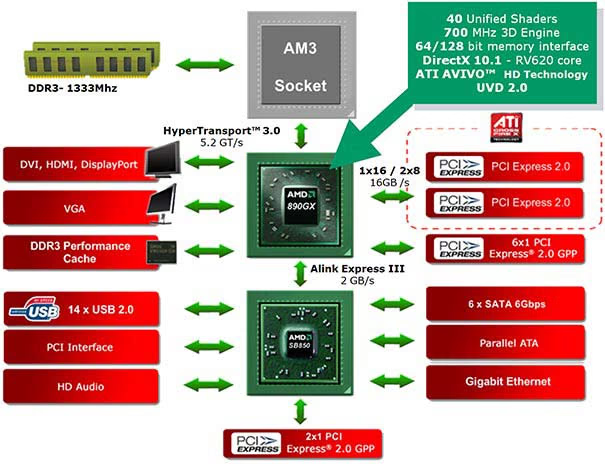
The Radeon HD 4290 is nearly identical to the Radeon HD 4200 found in the 785G chipsets and is built on a RV6xx graphics core, which is nothing new for AMD integrated graphics. The only real difference between the 4290 and the 4200 is that the former runs a little faster on the core clock; 700MHz rather than 500MHz. We still have the 55nm node and around 205 million transistors and there are still 40 stream processors implemented. The graphics include all the same upgrades in video playback capability that arrived with the 785G chipset and the Radeon HD 4200. These include HDMI 1.3 standards, UVD2 / AVIVO support, DirectX 10.1, and full hardware MPEG-2/VC-1/H.264 video decode acceleration. Just like the chipsets, the 890GX offers the ability to pair another video card with the Radeon HD 4290 in Hybrid CrossfireX mode. Previously, the Hybrid CrossfireX was limited to only as high as a Radeon HD 34xx card, providing only very limited improvements to the IGP. Supposedly, the 890GX chipset, with the Radeon HD 4290 supports Hybrid CrossfireX with video cards up to the Radeon HD 5450. If this is true, it will provide a much better graphical advantage than ever before when utilizing CrossfireX mode with an IGP.

The audio on the chipset has also stayed the same on the new 890GX chipset. It offers 2 channel LPCM, or you can opt for 5.1 Channel Dolby Digital over HDMI. As I mentioned above, the bulk of the changes that come along with the 890GX chipset are actually found in the SB850 southbridge. The SB850 extends the amount of PCI Express 2.0 lanes by 2, for a total of 24 PCI Express 2.0 lanes. It adds support for an additional 2 USB ports, bringing the total to 14 ports. And, of course, it adds support for SATA 6Gb/s 6Gb/s, converting all 6 ports to the new standard. While this will undoubtedly prove extremely helpful in the future, it doesn't do a whole lot for the average user just yet. There are still only a handful of drives available, but they are rapidly becoming more and more popular. In order to avoid bottlenecks for the new SATA 6Gb/s standard and the possibility of USB 3.0 as well, AMD has increased the bandwidth on the Alink Express between the northbridge and the southbridge to 2GB/s in each direction over the previous 1GB/s in each direction. This really blows the latest Intel chipsets out of the water. So far no Intel chipsets support a native SATA 6Gb/s controller, but they also only allow the use of a controller on a PCIe 1.0 lane, limiting the bandwidth for USB 3.0 or SATA 6Gb/s to 250MB/s. If you get sneaky and bridge two PCIe 1.0 lanes, you can double the bandwidth, but it is an extra inconvenience for motherboard manufacturers.
Biostar AMD-890GX Features
|
BIO-unlocKING technology enables the ACC function on AMD processors and unlock extra 3rd or 4th core with a super-simple click on your keyboard. |
|
|
GTO63 the newest technology presented by BIOSTAR |
|
|
GTO 63 stands for GreaTurbo Overclock, special designed for Overclockers. GT60, SATA 6G, and AMD 6-core processor support are the Actor of GTO 63. GTO 63 is a based the demanding technology from this industry. GTO 63 offers "GT60" technology with capability for gaming performance gain up to 60%; SATA6G, the fastest storage transfer rate on Earth; and the upcoming AMD 6-core processor with incredible multi-computing. |
|
|
2 Phase Memory Power Design |
|
|
2-phase independent power design to increase memory voltage stability and durability. |
|
|
BIOSTAR "GPU" Technology |
|
|
BIOSTAR G.P.U (Green Power Utility) is a new function, it will enhance energy efficiency by disabling extra phases while CPU on light loading. It integrated a friendly GUI to monitor what's your CPU resourcing, response and optimized the power saving on your system. Such as Heavy 3D Gaming, Internet or MSN charting, G.P.U will always arrange the best power efficiency in your system. |
|
|
Chipset-CPU Features |
|
|
AMD 890GX+SB850 |
|
|
Powered by ATI RadeonTM HD 4290 Graphics, DirectX 10.1 introduces detail-rich images and dynamic interactivity for playing the latest DirectX 10.1 games. AMD 890GX Chipset is designed up to 5200MT/s HyperTransportTM 3.0 (HT3.0) interface and PCI ExpressTM 2.0 x 16 graphics. It's enhanced AMD's latest AM3 and multi-core CPUs to experience life like images and dynamic interactivity for playing the latest games, editing digital photos and videos and for experiencing |
|
|
ATI Hybrid CrossFireXTM Technology |
|
|
ATI Hybrid CrossFireXTM takes your gaming experience to the next level, under a Windows Vista environment. ATI Hybrid CrossFireX boosts PC performance by enabling the AMD Chipset's integrated graphics processor and a discrete GPU (ATI RadeonTM HD 2400 Series ATI RadeonTM HD 3400 Series) to operate simultaneously with combined output to a single display for blis display for blisteringly-fast frame rates. Unleash the graphics performance that you've been waiting for on a mainstream Windows Vista PC! |
|
|
Integrated HDMI with HDCP |
|
|
On board HDMI connector allows full Video & Audio support via standard DVI output. Industry leading scores for High Definition video quality. |
|
|
SATA 6Gb/s |
|
|
SATAIII 6Gbps provides a higher bandwidth to retrieve and transfer HD media. With this super speed data transfer, SATAIII enables an incredible data boost up to 2 x faster than SATA 3G. |
|
|
BIOS-Software Features |
|
|
BIO-Flasher |
|
|
Effortlessly update BIOS from a USB flash disk before entering your OS. |
|
|
BIO-ReLife |
|
|
BIO-ReLife Technology let you to resume crushed BIOS data from a USB flash Pen Driver that put the new BIOS file. This considerate BIOS utility can restore your system and far from the BIOS Crush situation. |
|
|
O.N.E |
|
|
Biostar offered 3 kind of overclocking settings (V6/V8/V12) that provided good, better, best O.C setting which turned in Biostar Labs. The motherboard features the Biostar T series Motherboards that allows users to conveniently load our preset BIOS settings. |
|
|
Other Features |
|
|
Rapid Switch |
|
|
No more meddling with Power and Reset jumpers on the board. The Power and Reset buttons are built onboard. It is convenient for DIY users to test the board without short-circuiting the wrong pins. |
|
|
Rapid Debug |
|
|
No need to check any H/W installation error flurried. On board |
|
|
X.D.C (eXtreme Durable Capacitors) |
|
|
Biostar adopt with low ESR and high ripple conductive solid state caps provide sufficient, stable power supply to the CPU. Also the life-time can be more than 6.25 X of ordinary liquid caps. |
|
|
Tweak Tech |
|
|
Biostar owned unique engineering PWM layout with low ESR and high ripple conductive solid state caps to provide sufficient, stable power supply to the CPU. And the same philosophy applies to our DDR design to enhance voltage stability of memory. |
|
Biostar TA890GXB-HD Specifications
|
CPU SUPPORT |
|
|
HT |
|
|
MEMORY |
|
|
EXPANSION SLOT |
|
|
STORAGE |
|
|
USB |
|
|
GbE |
|
|
INTEGRATED VIDEO |
|
|
CODEC |
|
|
REAR I/O |
|
|
INTERNAL I/O |
|
|
DIMENSION |
|
|
OS SUPPORT |
|
|
ACCESSORIES |
|
Closer Look: Biostar TA890GXB-HD
Biostar is a name I haven't heard from in quite a while. They have recently released a whole new line of motherboards touting the 890FX/GX chipsets. The TA890GXB-HD is a micro-ATX entry-level board that costs about $95. The TA890GXB-HD, despite being a micro ATX motherboard, ships out in a full sized box. I found this to be a nice feature, as the contents of the box were not packed in nearly as tightly as I have seen on other mATX board boxes. The motherboard and accessories are well protected within the box with cardboard dividers and a foam pad. The box is black with silver writing is pretty eye-catching. It touts some of the features of the motherboard, including the native SATA 6Gb/s 6Gb/s controller.

The contents of the box are pretty standard, but Biostar goes a little beyond what's normally found with a mATX entry-level motherboard. There are three SATA cables included with the TA890GXB-HD, rather than the standard two. Additionally, each of these SATA cables is the locking type, that secures it to the drive or peripheral and to the motherboard. Anyone who has used SATA drives, which are very common, knows the value in locking cables, as the SATA connector can easily come loose with a little jarring or excess movement. Biostar also includes a MOLEX to SATA power connector adapter. Most power supplies are now equipped with SATA connectors, but some older PSUs are not, and even some of the newer ones are limited on the number of SATA connectors they offer. Including an adapter with the motherboard isn't extremely rare, but it is far from common. Other contents include a driver CD, the motherboard manual, and the I/O panel shield. Also included with the Biostar TA890GXB-HD is a blue Velcro cable organizer. This was a nice commodity that I haven't seen before with a mATX motherboard.

The Biostar TA890GXB-HD is laid out very similarly to nearly all mATX motherboards these days. For the purposes of this article, we will call the side with the I/O panel the top and the side with the ATX power connector the bottom. The 4-pin CPU power connector is located all the way up at the top right of the motherboard, somewhat hidden amongst the I/O connections. This location could be potentially difficult to reach if your power supply doesn't have long cables, and depending on the size of case you have, especially if you are using a large GPU.
Down at the bottom of the motherboard you can see the 24-pin ATX power connector. Down in the bottom left corner are the six SATA 6Gb/s 6Gb/s connectors. Before the 890FX/GX chipsets with the SB850 southbridge, motherboard manufacturers needed to a third party controller to allow for SATA 6Gb/s ports. This general meant that you would find maybe two SATA 6Gb/s ports, and the remaining ports would be SATA II. With the new availability of the SATA 6Gb/s native controller in the SB850, it is likely that we will see many more drive manufacturers working on drives that can take advantage of the higher bandwidth speeds. At the time of this article, there are still very few SATA 6Gb/s drives available that actually function at speeds high enough to need the new technology. With the native SATA 6Gb/s controller, the SB850 becomes the southbridge to beat, and Intel will have to play catch-up to AMD for a change.

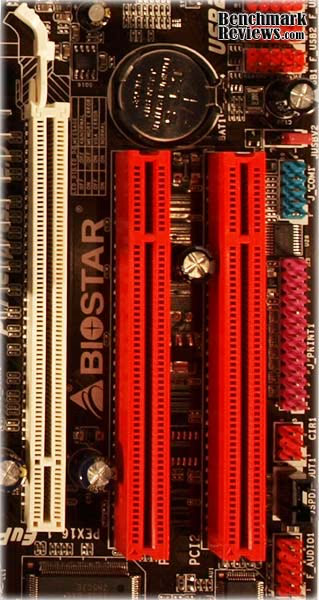
The Biostar TA890GXB-HD motherboard uses a black and red coloring scheme that looks pretty good and matches the box and the Biostar logo quite well. The PCI slots use the red color while the single PCIe 2.0 x16 is white. The DIMM slots also play along with the coloring scheme. In fact the only thing that really looks out of place with the coloring scheme (other than the blue VGA port) is the purple parallel port pins labled "Printer" on the far left of the TA890GXB-HD. I know the pins are labeled "Printer", but I can't imagine what use they would really have on this motherboard. If you still have a printer that requires a parallel port, I have a suggestion. Instead of trying to find a parallel port cable to go from the motherboard and screw in to one of the cases open PCI slot covers, do yourself a favor and spend $50 on a USB printer. They aren't hard to find. In fact, it would be much more of a challenge to find a printer still using a parallel port. What I'm trying to say here, Biostar, is that it's time to get rid of the parallel port connector. Besides, it doesn't match.
Biostar TA890GXB-HD Detailed Features
The TA890GXB-HD is certainly intended to be an entry-level motherboard, so while I wasn't surprised that the MOSFET didn't have a heatsink, I always have to wonder why not. Even being an entry level motherboard, the TA890GXB-HD advertises right on the box its support for 6-Core Phenom-II processors. Those processors have a TDP of 125W. This means that it also supports the up to 140W TDP of some of the other Phenom-II processors. That's not messing around. A lot of power will be headed down that 4-pin CPU power connector, through the MOSFET and into the CPU. It is unlikely that many Thuban users will pick the TA890GXB-HD as their enthusiast motherboard of choice, but I think things could get a little warm when using a CPU with a high TDP, especially if you plan on overclocking or using the core unlocKING function.

Located smack dab in the middle of the board is the TA890GXB-HD motherboard is the infamous new 890GX northbridge. The northbridge heatsink is a pretty large, plain square with the Biostar logo on it. Its plenty big enough that the common user, and most likely buyer of the TA890GXB-HD will probably not have any problems with the northbridge overheating on them. The only occasion that might cause trouble is boosting the bus speed up too high and pushing a lot of extra voltage to get that awesome overclock. The recent AMD chipsets have been excellent overclockers, and we expect no less from the 890GX, so just be careful when pushing this motherboard to the limit and realize that the northbridge heatsink, while big enough, may not cool enough for the extreme overclocker.

Just to the right of the northbridge is the AM3 socket. Below that you'll find four DDR3 DIMM slots. The slots are arranged in alternating fashion as A1B1 and A2B2. This allows for use of dual-channel DDR3 RAM kits by placing the RAM sticks in the color coordinated slots. I utilized the bottom slots, the white ones, for placing the 4GB kit used for the testing. This was mainly due to the overlap from the Scythe Mugen II CPU cooler. Placing the Patriot memory kit in the red slots, closer to the CPU, would have impeded the placement of the CPU cooler fan. This isn't really a negative as far as the TA890GXB-HD motherboard is concerned, but with the size of many CPU coolers today, it always puzzles me why motherboard manufacturers don't put the DIMM slots farther away from the CPU slot. Of course, spare real-estate is tight on a mATX motherboard.
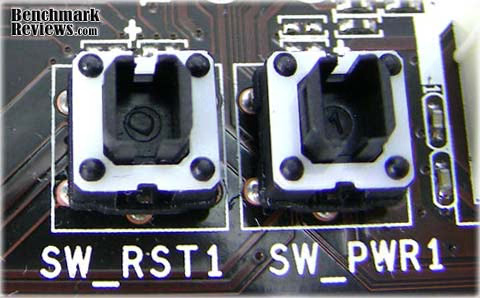
An awesome little feature that I found extremely useful was the power and reset buttons located on the motherboard near the SATA ports. These two little buttons came in handy, very handy, especially when I was overclocking. Since my preferred method of overclocking includes a whole lot of trial and error, I was constantly using these buttons when I couldn't get the BIOS to post. The computer would freeze occasionally as well, and I would need to reset. After changing out equipment on the test bench, these little buttons are extremely useful. My point is, every motherboard manufacturer should get on board with this. I know a lot of motherboards are providing this handy little feature and now I know why. If you fancy yourself an enthusiast, get a motherboard with these buttons on them. You won't be disappointed.

The all new SATA 6Gb/s ports are located in the bottom corner of the TA890GXB-HD, where you would expect them. Even though the SB850 has integrated a native SATA 6Gb/s controller, it has yet to offer native support for USB 3.0. Of course, just having the SATA 6Gb/s capability puts the AMD 890GX chipset ahead of the competition. Many motherboard manufacturers will undoubtedly provide motherboards with a USB 3.0 controller, and the SB850 southbridge provides an additional two PCIe 2.0 x1 lanes to accommodate that without stealing from any other possible uses. The TA890GXB-HD does not provide a USB 3.0 controller, but this is really not all that surprising, considering the market being targeted by Biostar with this motherboard. They need to keep costs low for the entry-level mATX boards, and the lack of USB 3.0 at this juncture is a good place to cut costs.
The I/O panel on the Biostar TA890GXB-HD is cut down to the bare essentials. While I'm sure this helps to cut costs and keep the price of the motherboard low, its pretty slim even for an entry-level motherboard. From left to right we start off with a pair of USB 2.0 ports under a single PS2 port. Considering that I actually found a PS2 motherboard hanging out in my garage the other day, I suppose someone, somewhere, might still need this. If it were up to me, though, I would opt for two more USB ports. The motherboard can support it, since it is only using a total of 10 and the SB850 supports 14.
To the right of the PS2 and USB ports is the now familiar HDMI port. It wasn't that long ago that an HDMI port integrated on to the motherboard was an extreme rarity. With the 4000 series Radeon HD IGPs now being paired with AMD chipsets, this rare spectacle has become commonplace. Even the Intel GMA 4500 IGPs and above nearly always sport an HDMI port now. In addition to the HDMI port, the TA890GXB-HD offers users the option of VGA or DVI. You will often find, especially on mATX motherboard, the HDMI port stacked on top of the VGA port, offering more room for another set of USB ports, sometimes paired with a 1394 port and an eSATA port. The Biostar TA890GXB-HD doesn't do this, and I can't really say why. While it likely helps keep costs low, many other mATX motherboards offer the enhanced functionality of extra external ports.

Moving past the video options, we have another set of two USB 2.0 ports situated under a Gigabit Ethernet port. Along with SATA 6Gb/s, the SB850 has finally integrated GbE as well. Most motherboard manufacturers using older chipsets, while perhaps opting out of an SATA 6Gb/s controller, would normally add a GbE controller. It is nice to see that AMD has finally integrated this functionality directly into the southbridge. Then again, even with the addition of a native GbE controller, Biostar opted to use the Realtek RTL8111E PHY as the 10/100/1000Mbps controller on the TA890GXB-HD.
The final piece we find on the I/O panel of the TA890GXB-HD is the audio ports. All three of them. Biostar uses the Realtek ALC892 codec that comes integrated into the 890GX chipset, but rather than offering support for 8 channels, it offers only 6 Channel HD Audio on the TA890GXB-HD. I'm not really sure what is up with all the cutting corners here. Granted, I don't use an 8 channel audio system with my computer. I don't use an 8 channel system for my home theater. But the 890GX chipset, especially on a mATX motherboard is a great, affordable option for someone looking into an HTPC. A home theater enthusiast might be looking for 8 channel audio. They will find it on many other 890GX motherboards, but not on the TA890GXB-HD.
Another thing missing from the Biostar TA890GXB-HD is the 128 MB of side-port memory that is optional with the Radeon HD 4290 IGP. While this feature is less common than, say, 8 channel audio, many motherboards still offer this feature. The Radeon HD 4290 isn't a very powerful graphics card. You will find evidence of this in the testing section. That little bit of extra, dedicated RAM to help along the struggling video card really goes a long way, especially if you are using the Radeon HD 4290 for its intended purpose, media decoding, rather than gaming.
Motherboard Testing Methodology
At the start of all tests, the previous display adapter driver is uninstalled and trace components are removed using Driver Cleaner Pro. We then restart the computer system to establish our display settings and define the monitor. Once the hardware is prepared, we begin our testing. We conducted the tests at the resolution of 1280x1024 (19" Standard LCD), a very standard and highly used resolution for both games and other normal uses. Each benchmark test program begins after a system restart, and the very first result for every test will be ignored since it often only caches the test. This process proved extremely important in the Resident Evil 5 benchmarks, as the first run served to cache maps allowing subsequent tests to perform much better than the first. Each test is completed five times, with the average results displayed in our article.
The focus of our testing for the Biostar TA890GXB-HD motherboard will be to compare it's performance, with the new 890GX chipset, the 785G chipset found in the ASUS M4A785TD-M EVO motherboard. All components use in the test system will be identical, with the exception of the motherboard. This should help us to isolate the motherboard during testing to see how the two motherboards compare directly. We are not expecting a lot of difference between the boards, as there is not a lot of difference between the two chipsets.
AMD Socket AM3 Test System
- Processor: 3.1GHz AMD Athlon-II X3-445 ADX445WFK32GM (MSRP $87)
- Motherboard: Biostar TA890GXB HD
- Motherboard: ASUS M4A785TDs-M EVO
- System Memory: 2x2GB Patriot Gamer Series DDR3 (1333MHz@7-7-7-21)
- Video: MSI N285GTX-T2D1G-OC NVIDIA GTX 285 1GB; Onboard ATI Radeon HD 4290
- Disk Drive 1: OCZ Agility Series OCZSSD2-1AGT30G 30GB SSD
- Disk Drive: SEAGATE Barracuda ST31500341AS 1.5TB SATA
- Optical Drive: ASUS DRW-24B1ST DVD Burner
- PSU: Corsair CMPSU-850TX 850W
- Enclosure: NZXT GAMMA
- Operating System: Windows 7 Home Premium x64Intel LGA775 Test System 2
Benchmark Applications
- PCMark Vantage v1.0.2.0
- Lavalys Everest Ultimate Edition v5.30.1900
- Maxon Cinebench R11.5
- Passmark Performance Test
- SiSoft Sandra 2010.1.16.26
- Resident Evil 5 Benchmark
Overclocking Methodology
Overclocking with the TA890GXB-HD was a little bit more of a chore than I have become accustomed to recently. The BIOS is laid out in a relatively easy to understand format, but the overclocking section was a little confusing. Still, it's leaps and bounds ahead of the old jumper tweaking method. The TA890GXB-HD BIOS has an option for automatically overclocking the CPU called the A.O.S. (Automatic Overclock System).
To use the A.O.S., set the Overclock Navigator in the T-Series tab of the BIOS to automatic. Its three options are Disabled, Automatic, and Manual. Once on automatic, the A.O.S. will become available. The A.O.S. has three different settings, V6, V8, and V12-Tech Engine. The motherboard incrementally steps up the overclocking as you choose a higher numbered Tech Engine. Unfortunately, only the V6-Tech Engine resulted in a stable overclock for me at 3.4GHz. The other two settings always crashed the system before I could get into Windows.
Biostar also includes the T-Overclocker program with the motherboard for use in Windows. The program allows you to adjust the settings of the TA890GXB-HD without going through the BIOS. It is very similar to the settings options in the BIOS, but it is a lot more user-friendly and offers more options. V3, V6, V9, V12, V15, and AUTO settings are available. You can also adjust the settings manually through the utility. Again, I couldn't get over the V6 settings without the computer freezing up. I was sure, though, that I could reach a stable overclock higher than just a 3.4GHz.
I reached the highest stable overclock setting at 3.9GHz by setting the Navigator to Manual and adjusting the settings myself. I started by increasing the bus speed while keeping the other settings at stock levels. The stock multiplier for the Athlon-II X3-445 is x15.5. I reached 245MHz on the bus speed stably before I could no longer boot into the Windows. After that, I added more voltage to the CPU. With just adding voltage to the CPU, I reached a stable overclock of 3.6GHz. I wasn't satisfied with that, so I added voltage to the NB as well. With 1.6V going to the CPU and 1.4V going to the NB, I reached the highest stable overclock I could out of the TA890GXB-HD, at 3.9GHz.
I was a little bit disappointed with the overclock performance of the TA890GXB-HD. First of all, the Automatic overclock settings wouldn't get me past 3.4GHz. In the end, I was only able to keep the Athlon-II X3-445 at 3.9GHz. Using the ASUS M4A785TD-M EVO, I was able to get the CPU to 4.1GHz stably, a full 200MHz faster than with the Biostar TA890GXB-HD.
PCMark Vantage Benchmark Results
Using synthetic benchmarks to compare one product to another has some distinct advantages when testing similar hardware, yet I have never found myself completely satisfied by the process. I have come to understand that they're important for comparing "apples to apples", and that the results are usually very consistent. But as with any synthetic benchmark, the numbers can often mean very little more than just numbers. We don't take a high score on a synthetic benchmark to mean that a product will/should perform well, and neither should you. The difference between projected performance and actual performance is the difference between fire and the fire-fly.
PCMark Vantage is the first objective hardware performance benchmark for PCs running 32 and 64 bit versions of Windows Operating Systems. PCMark Vantage is perfectly suited for benchmarking any type of Microsoft Windows Vista or 7 PC from multimedia home entertainment systems and laptops to dedicated workstations and hi-end gaming rigs.
Regardless of whether the person benchmarking is an artist or an IT Professional, PCMark Vantage shows the user where their system soars or falls flat, and how to get the most performance possible out of their hardware. PCMark Vantage is easy enough for even the most casual enthusiast to use yet supports in-depth, professional industry grade testing.
TV and Movies Suite
The tests in the TV and Movies Suite have been selected to represent the Windows Vista TV and Movies Consumer Scenario. The combination of test sets covers the common TV and Movies usage. The TV and Movies Suite gives a separate PCMark TV and Movies Score which does not affect the overall PCMark Score. TV and Movies Suite include the following tests:
- TV and Movies 1
- Two simultaneous threads
- Video transcoding: HD DVD to media server archive
- Video playback: HD DVD w/ additional lower bitrate HD content from HDD, as downloaded from net
- TV and Movies 2
- Two simultaneous threads
- Video transcoding: HD DVD to media server archive
- Video playback, HD MPEG-2: 19.39 MBps terrestrial HDTV playback
- TV and Movies 3
- HDD Media Center
- TV and Movies 4
- Video transcoding: media server archive to portable device
- Video playback, HD MPEG-2: 48 Mbps Blu-ray playback
Gaming Suite
The tests in the Gaming Suite have been selected to represent the Windows Vista Gaming Consumer Scenario. The combination of test sets covers the common Gaming usage. The Gaming Suite gives a separate PCMark Gaming Score which does not affect the overall PCMark Score. Gaming Suite includes the following tests:
- Gaming 1
- GPU game test
- Gaming 2
- HDD: game HDD
- Gaming 3
- Two simultaneous threads
- CPU game test
- Data decompression: level loading
- Gaming 4
- Three simultaneous threads
- GPU game test
- CPU game test
- HDD: game HDD
Music Suite
The tests in the Music Suite have been selected to represent the Windows Vista Music Consumer Scenario. The combination of test sets covers the common Music usage. The Music Suite gives a separate PCMark Music Score which does not affect the overall PCMark Score. Music Suite includes the following tests:
- Music 1
- Three simultaneous threads
- Web page rendering - w/ music shop content
- Audio transcoding: WAV -> WMA lossless
- HDD: Adding music to Windows Media Player
- Music 2
- Audio transcoding: WAV -> WMA lossless
- Music 3
- Audio transcoding: MP3 -> WMA
- Music 4
- Two simultaneous threads
- Audio transcoding: WMA -> WMA
- HDD: Adding music to Windows Media Player

Right from the start we are surprised by the better performance of the ASUS M4A785TD-M EVO motherboard. While the gains over the Biostar TA890GXB-HD motherboard are minimal, and it is likely that we would see some difference even if we simply used two different motherboards of the same type and version, it is still interesting that the older 785G chipset scores consistently higher in every area. The TV and Movies scores fall within about 1% of each other, showing that the gain is really marginal. The Gaming benchmark gives the ASUS motherboard a 6% performance increase over the Biostar TA890GXB-HD. The ASUS also experiences a 6% increase in the Music benchmarks.
While I find the VIA 7.1 Channel HD Audio CODEC found on the ASUS Motherboard to be superior in providing sound output than the 5.1 Channel Realtek HD Audio CODEC on the TA890GXB-HD, this really shouldn't affect the outcome of even the Music tests. The only thing I can think of is that the ASUS motherboard registers the Athlon-II X3-445 at 3.12GHz compared to the 3.10GHz that the TA890GXB-HD measures from the processor at stock speeds. We know the difference is not in the components, because they have been kept the same throughout both systems. In fact, since the SSD is heavily weighted in both the Gaming and Music benchmarks, it is plain to see here that the SATA 6Gb/s capabilities of the TA890GXB-HD doesn't give any advantage to the scores over the SATA II. This is because the SSD used in the benchmarks, though fast, can't get the speeds up high enough to actually utilize the SATA 6Gb/s bandwidth.
Everest Benchmark Results
Lavalys EVEREST is an industry leading system diagnostics and benchmarking solution for enthusiasts PC users, based on the award-winning EVEREST Technology. During system optimizations and tweaking it provides essential system and overclock information, advanced hardware monitoring and diagnostics capabilities to check the effects of the applied settings. CPU, GPU and memory benchmarks are available to measure the actual system performance and compare it to previous states or other systems. Furthermore, complete software, operating system and security information makes EVEREST Ultimate Edition a comprehensive system diagnostics tool that offers a total of 100 pages of information about your PC.
Both the Queen and the PhotoWorxx tests rely on basic x86 instructions, and consume very low system memory while also being aware of HyperThreading, multi-processors, and multi-core processors. While the EVEREST CPU tests really only compare the processor performance more than it measures platforms, it still offers a glimpse into what kind of power each platform possesses.
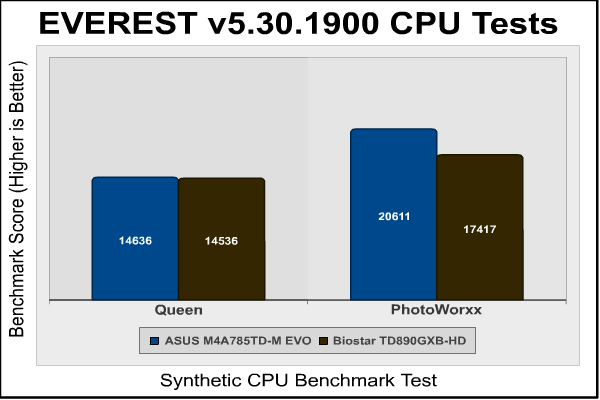
Queen and Photoworxx tests are synthetic benchmarks that operate the function many times over and over-exaggerate by several magnitudes what the real-world performance would be like. The Queen benchmark focuses on the branch prediction capabilities and misprediction penalties of the CPU. It does this by finding possible solutions to the classic queen problem on a chessboard. At the same clock speed theoretically the processor with the shorter pipeline and smaller misprediction penalties will attain higher benchmark scores.
The ASUS M4A785TD-M EVO registers a less than 1% gain over the Biostar TA890GXB-HD. This pretty well shows us that the two chipsets are equal when it comes to the Queen benchmark. With so little changing between the two chipsets, this really comes as no surprise. Most of the upgrades coming with the 890GX chipset are found in the southbridge, which doesn't affect the Queen benchmarks.
Like the Queen benchmark, the Photoworxx tests for penalties against pipeline architecture. The synthetic Photoworxx benchmark stresses the integer arithmetic and multiplication execution units of the CPU and also the memory subsystem. Due to the fact that this test performs high memory read/write traffic, it cannot effectively scale in situations where more than two processing threads are used. The EVEREST Photoworxx benchmark performs the following tasks on a very large RGB image:
- Fill
- Flip
- Rotate90R (rotate 90 degrees CW)
- Rotate90L (rotate 90 degrees CCW)
- Random (fill the image with random colored pixels)
- RGB2BW (color to black & white conversion)
- Difference
- Crop
The Photoworxx benchmark tests offer a different perspective, and one that is a little more in line with what we saw in the PCMark Vantage tests. The Biostar TA890GXB-HD lags behind the ASUS motherboard by about 18%. That is a big difference considering the only piece of hardware that is differing between the two systems is the motherboard. It is very disappointing that the TA890GXB-HD, equipped with the newer chipset, is being handily outperformed by the older 785G motherboard.
The Zip Library test measures combined CPU and memory subsystem performance through the public ZLib compression library. ZLib is designed as a free lossless data compression library for use on virtually any computer hardware and operating system. The ZLib data format is itself portable across platforms and has a footprint independent of input data that can be reduced at some cost in compression. The AES integer benchmark measures CPU performance using AES data encryption. It utilizes Vincent Rijmen, Antoon Bosselaers and Paulo Barreto's public domain C code in ECB mode and consumes 48 MB of memory.
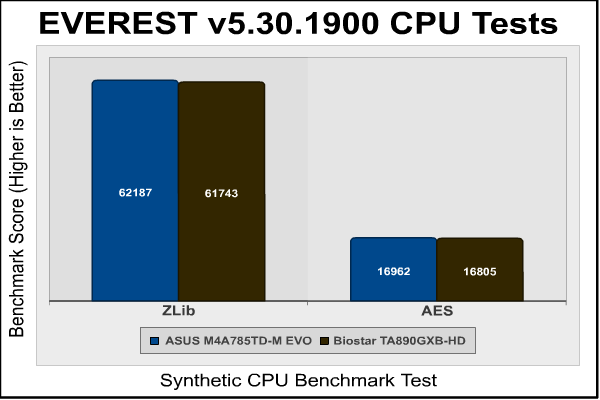
In the Zlib and AES compression tests we go back to the results we saw from the Queen tests. Both tests fall within the 1% margin of error region and really go to show that there isn't much difference at all between the two chipsets. Without taking advantage of the new options on the southbridge, relatively equal tests are just what we would expect to see.
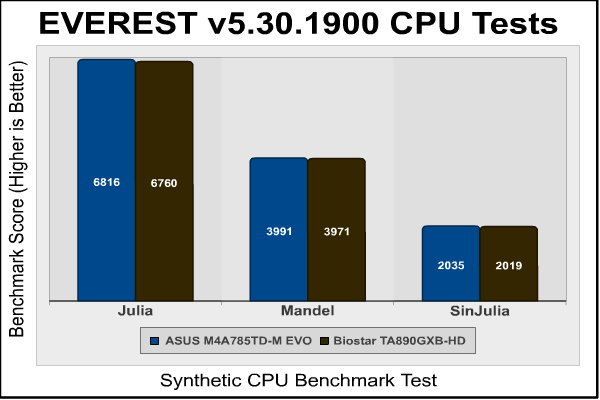
The Julia and Mandel tests focus on measuring the single precision FP performance through the Julia fractal. The code behind this is written in Assembly, so it's incredibly optimized for both Intel and AMD processors. Julia focuses on 32 bit precision while Mandel focuses on 64 bit. SinJulia is a modified version of Julia which measures in 80 bit.
The final Everest tests again give us a good idea that the two northbridge chipsets are about as close to equal as we can get. Using the same processor, there is really no difference in the floating point precision between the two motherboards.
Cinebench Benchmark Results
Maxon Cinebench is a real-world test suite that assesses the computer's performance capabilities. Cinebench is based on Maxon's award-winning animation software, Cinema 4D, which is used extensively by studios and production houses worldwide for 3D content creation. Maxon software has been used in blockbuster movies such as Spider-Man, Star Wars, The Chronicles of Narnia and many more. Cinebench Release 11.5 includes the ability to more accurately test the industry's latest hardware, including systems with up to 64 processor threads and the testing environment better reflects the expectations of today's production demands. A more streamlined interface makes testing systems and reading results incredibly straightforward.
The Cinebench R11.5 test scenario uses all of a system's processing power to render a photorealistic 3D scene, "No Keyframes" the viral animation by AixSponza. This scene makes use of various algorithms to stress all available processor cores. The OpenGL graphics card testing procedure uses a complex 3D scene depicting a car chase with which the performance of your graphics card in OpenGL mode is measured. During the benchmark tests the graphics card is evaluated by way of displaying an intricate scene that includes complex geometry, high-resolution textures, and a variety of effects to evaluate the performance across a variety of real-world scenarios.
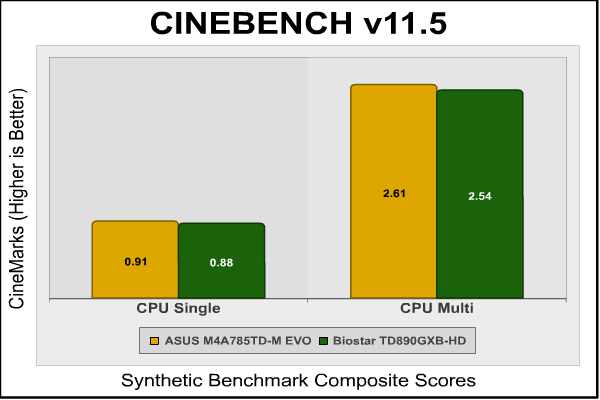
The Cinebench results are really surprising, and can perhaps offer us some insight into what is going on here. Cinebench does an excellent job of isolating the GPU during its performance tests, yet the ASUS motherboard outperforms the Biostar TA890GXB-HD by a small amount in both the single and multi-CPU benchmarks. When we consider that the ASUS motherboard clocks the stock Athlon-II X3-445 at 3.12GHz compared to the 3.10GHz given by the TA890GXB-HD, we might be able to account for these differences. Even so, I am not sure that a simple 20MHz increase in clock speed would account for a 3% increase in performance from both the single and the multi-GPU tests.
Resident Evil 5 Benchmark Results
Built upon an advanced version of Capcom's proprietary MT Framework game engine to deliver DirectX 10 graphic detail, Resident Evil 5 offers gamers non-stop action similar to Devil May Cry 4, Lost Planet, and Dead Rising. The MT Framework is an exclusive seventh generation game engine built to be used with games developed for the PlayStation 3 and Xbox 360, and PC ports. MT stands for "Multi-Thread", "Meta Tools" and "Multi-Target". Games using the MT Framework are originally developed on the PC and then ported to the other two console platforms.
On the PC version of Resident Evil 5, both DirectX 9 and DirectX 10 modes are available for Microsoft Windows XP and Vista Operating Systems. Microsoft Windows 7 will play Resident Evil with backwards compatible Direct3D APIs. Resident Evil 5 is branded with the NVIDIA The Way It's Meant to be Played (TWIMTBP) logo, and receives functionality enhancements. NVIDIA and Capcom offer the Resident Evil 5 benchmark demo for free download from their website, and Benchmark Reviews encourages visitors to compare their own results to ours.

The Resident Evil 5 benchmarks clearly prove to us the benefit of the 128MB of sideport memory on the ASUS motherboard. The TA890GXB-HD forgoes the memory, and is punished for it in these tests. Since all the other components are the same, the only difference lies in the IGP. The Radeon HD 4290 on the TA890GXB-HD actually has a faster clock speed at 700MHz than the Radeon HD 4200 on the ASUS board at 500MHz. Even so, the sideport memory, that functions as a frame buffer with very low latency (7-7-7-21 DDR3 1333MHz) bandwidth to the graphics core, offers a sizeable difference. It doesn't make the game playable, but it does increase performance.
Whatever you are looking for as far as graphic prowess, whether it be an HTPC for streaming flash video, a PC to play older, less GPU intensive games, or a even just a basic working computer for word processing and internet browsing, the Radeon HD 4290 will function perfectly for you. If you want to play high end games, however, or are involved in any type of 3D rendering, you should invest in a discrete GPU. It should also be noted that the TA890GXB-HD comes equipped with a PCIe x16 port that can be used for a much better discrete graphics card if you need to use the computer for highly GPU intensive games or projects.
Passmark Benchmark Results
PassMark PerformanceTest is a PC hardware benchmark utility that allows a user to quickly assess the performance of their computer and compare it to a number of standard 'baseline' computer systems. The Passmark PerformanceTest CPU tests all benchmark the mathematical operations, compression, encryption, SSE, and 3DNow! instructions of modern processors.
In our tests there were several areas of concentration for each benchmark, which are combined into one compound score. This score is referred to as the CPU Mark, and is a composite of the following tests: Integer Math, Floating Point Math, Find Prime Numbers, SSE/3DNow!, Compression, Encryption, Image Rotation, and String Sorting. For this review, we've also decided to run the memory benchmark, which results in a composite score based on the following tests: small block allocation, cached read, uncached read, write performance, and large block allocation.
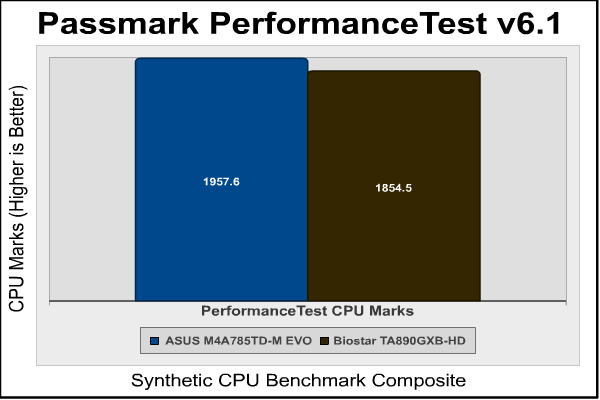
The Passmark CPU tests give about a 6% advantage to the ASUS motherboard. While this could, again, be attributed to the 20MHz additional clock speed, I am not so sure that is the case. In every single test we have looked at, the ASUS motherboard has outperformed the Biostar TA890GXB-HD, and with an older chipset. Unfortunately, the performance of the Biostar motherboard is just not holding up to par. It is always close, but one would expect the motherboard with the newer chipset to be the leader, even if slightly.
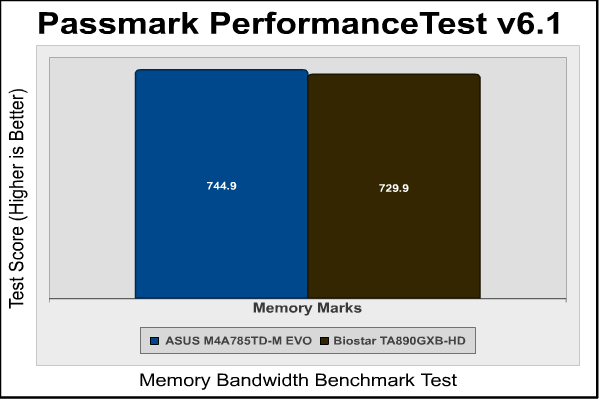
The memory tests for Passmark offer a similar story. The results are within 2% of each other, which is really far to close to actually notice a difference. But again, it is interesting that the ASUS motherboard gets higher marks than the TA890GXB-HD. The RAM clock speed and latencies were identical throughout all of the tests, so we can't claim that an extra 20MHz made the difference here.
SiSoftware Sandra Benchmark Results
SiSoftware Sandra (the System ANalyser, Diagnostic and Reporting Assistant) is an information & diagnostic utility. It should provide most of the information (including undocumented) you need to know about your hardware, software and other devices whether hardware or software.
It works along the lines of other Windows utilities, however it tries to go beyond them and show you more of what's really going on. Giving the user the ability to draw comparisons at both a high and low-level. You can get information about the CPU, chipset, video adapter, ports, printers, sound card, memory, network, Windows internals, AGP, PCI, PCI-X, PCIe (PCI Express), database, USB, USB2, 1394/Firewire, etc.
The SANDRA DhryStone and Whetstone tests are CPU tests that run completely within the CPU + cache memory itself. These tests are perfect for seeing general efficiency per processing core. Dhrystone is basically a suite of arithmetic and string manipulating programs and is an older CPU tests. Even so, it remains a simple and accurate way to show RAW CPU processing performance. The whetstone benchmark primarily measures floating-point arithmetic performance.
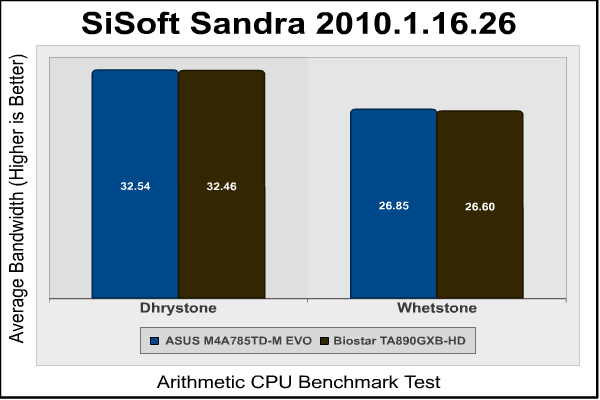
The SiSoft Sandra tests results are much closer together than Passmark results and, in reality, that is what we want to see. The two tests are really identical to each other, giving us renewed hope in the performance of the TA890GXB-HD. It seemed to be lagging behind a little in some of the other benchmark tests, but the Sandra results keep it right up there with the ASUS motherboard.
AMD-890 Motherboard Final Thoughts
As newer, faster technology pours into the market, an interest in upgrading our computers to make them more compatible with the latest gadgets, games, and other programs is inevitable. While hardcore enthusiasts and gamers may have nearly unlimited resources to spend on the latest and greatest components, most users don't fall into that category. In fact, most gamers don't even fall into that category. Taking a look at Steam's hardware survey, we can see that a lot of users that are playing games have a lot of room to upgrade and improve their systems. Since this is the case, it is likely that these users, like most of us, will be operating on tight budgets.
AMD has been known for quite a while now as a value based brand. Intel's top of the line equipment outperforms most of that provided by AMD, but it comes at a price. Budget minded users have long looked to AMD for refuge from the prices, while still expecting great performance and value. The 890GX chipset released by AMD continues a recent trend of excellent performance in their graphics integrated chipsets. Biostar has used the 890GX chipset in their entry level motherboard, the TA890GXB-HD that Benchmark Reviews has looked at in this article.
The Biostar TA890GXB-HD AM3 Motherboard offers a lot of features while still maintaining a low price. For only $95, the TA890GXB-HD gives you support for AMD 6-core processors and SATA 6Gb/s ports. With its PCIe x16 port and two additional PCIe 2.0 x1 lanes over the older 700 series chipsets, the TA890GXB-HD offers buyers opportunities that would normally be limited to motherboards with a much higher price-point. While the TA890GXB-HD BIOS is a little less user friendly than other manufacturer's, it still offers fairly easy to use overclocking settings, and the core-unlocking feature couldn't be easier to use. I wouldn't suggest trying to overclock with this motherboard if you have no experience overclocking, but with the safety shut-off features that I found unbelieveably helpful, you could tamper with it as a fairly new overclocker. The onboard power and reset switches came in handy in this regard as well.
The Radeon HD 4290 integrated graphics solution that comes on the TA890GXB-HD motherboard offers no real upgrade from the Radeon HD 4200 of the previous generation of AMD chipsets. Another disappointing note is that the TA890GXB-HD lacks the dedicated 128 MB of DDR3 sideport memory that comes optional with the 890GX chipset. While the on-board graphics solution for the TA890GXB-HD won't play the latest and most graphics intensive games (as we have seen in our tests), it offers an excellent multi-media experience without the added cost of another component. HDMI 1.3 and DirectX 10.1 are both supported with the 890GX chipset, along with UVD2/AVIVO and H.264/VC-1/MPEG-2 video decode acceleration. If you need more graphics power, the TA890GXB-HD offers a PCIe X16 2.0 slot that can be used to take your PC to the next level of gaming performance. The Radeon HD 4290 can even be paired with the Radeon HD 5450 discrete graphics card in a hybrid crossfirex configuration that will really boost performance.
I was quite disappointed with the sound options on the TA890GXB-HD, to be perfectly honest. I was actually quite taken aback by the lack of 7.1 support. Sure, 5.1 is really more than I need, but with the impressive offering on the ASUS motherboard through the VIA CODEC, I was pretty let down by the TA890GXB-HD. Granted, the TA890GXB-HD is an entry-level motherboard, and may not be used a lot by consumers interested in the greatest sound output available. As I type I am using a computer that has no speakers at all, and many workstations for businesses that might be users of the TA890GXB-HD due to the integrated graphics solution and low price-point would definitely look past the audio support. At the same time, though, the 890GX chipset offers an awesome opportunity for inexpensive HTPCs. The TA890GXB-HD, with its mATX form factor, offers a great solution for HTPC users, except for the fact that you won't be able to use your 7.1 channel speakers unless you get an add-on card.
The nice part about the TA890GXB-HD is that, even at it's entry level price, it doesn't hold you back from turning your machine into whatever you need. While you are limited to a single PCIe X16 GPU, that won't stop you from playing the latest games. The AM3 platform offers the opportunity to buy small (like the inexpensive Athlon-II X2-255 we used in our testing) and upgrade to pretty much anything, including the new 6-core Thuban processors. The TA890GXB-HD supports DDR3 RAM up to 1600MHz, meaning there is plenty of overhead for your Dual-Channel RAM kit. The Bio unlocKING function will let you upgrade to a Phenom-II X2 or X3 CPU and give a shot at unlocking the disabled cores. I know Biostar was looking forward to offering users the chance to unlock Thuban based 4-core processors, but it appears AMD doesn't intend to make them publicly available. However, paired with a Thuban 6-core processor, good 1600Mhz DDR3 RAM, and a Radeon 5000 series video card, the TA890GXB-HD could be the foundation of that gaming rig you are planning on slowly upgrading to one piece at a time.
Biostar TA890GXB-HD Conclusion
Biostar is a name that has been around in the motherboard industry for a very long time. Some of the first motherboards I ever came in contact with were manufactured by Biostar. They have a lot of experience in the industry and have had a lot of time to iron out any wrinkles in their production. With the TA890GXB-HD, Biostar offers a solid entry into the world of the 890GX chipset. The TA890GXB-HD motherboard is most certainly an entry-level motherboard, and it provides only the basic features that you would expect from such a board. The most exciting piece of hardware I found on the TA890GXB-HD was actually the onboard power and reset buttons.
The Biostar TA890GXB-HD AM3 motherboard performed slightly under our expectations. It was never far from the scores of the ASUS motherboard we tested it against, but it never quite mustered the strength to score higher than the ASUS either. Even when overclocking, we were able to eke out a 200MHz higher clock speed when using the ASUS motherboard over the TA890GXB-HD. Throughout the rest of the testing, in every single benchmark, the TA890GXB-HD came in a close second place to the ASUS M4A785TD-M EVO.
I really enjoyed the appearance of the Biostar TA890GXB-HD motherboard. The red and black color scheme has always been one that catches my eye and it still does with the TA890GXB-HD. The layout of the motherboard is clean and organized looking. The northbridge and southbridge heatsinks are plain and standard, just squares with fins. Many motherboard manufacturers have taken to making intricate shapes or designs with their heatsinks, but I think the Biostar TA890GXB-HD looks excellent even without any of that flash. Even the TA890GXB-HD box caught my eye with its sleek, silver lettering on a black background.
Biostar offers up a sturdy and well constructed motherboard with the TA890GXB-HD. Biostar has used 100% solid capacitors that will add life and longevity to the use of the board. I particularly liked the fact that this mATX motherboard was packaged in a full ATX size box. A lot of accessories packed in tightly with the motherboard could cause some damage. With its solid construction and protected packaging, you can rest assured that any jostling or shaking during shipping should not injure the TA890GXB-HD in the least.
As far as functionality is concerned, there are really two parts of the TA890GXB-HD that deserve attention. The onboard power and reset buttons provide a great boost to functionality and the SATA 6Gb/s ports allow the user to look forward to the future of extremely fast transfer rates with new SSD technology. Unfortunately, besides those two features, the TA890GXB-HD is sadly lacking in functionality. The 890GX chipset supports 14 USB ports, but there are only 4 ports on the back of the TA890GXB-HD. When many entry-level motherboards are supporting 7.1 Channel HD Audio, Biostar opted only for 5.1 Channel support on the TA890GXB-HD. The 890GX chipset also supports the addition of 128MB of sideport memory, which is sadly lacking on the TA890GXB-HD. Overall, I was somewhat disappointed in the functionality of the TA890GXB-HD.
Available at NewEgg for $94.99, the TA890GXB-HD represents the entry-level market for the new motherboards sporting the 800 series of chipsets. As such, this BioStar motherboard is the least expensive of all AMD-890GX products available; which reach up to $140. Motherboards with features such as SATA 6Gb/s are still somewhat rare at this point, but they are becoming more readily available. The 890GX/FX chipset will start to make these more commonplace. A lot of motherboard manufacturers are starting to offer higher level feature sets to help set them apart from the competition. While the TA890GXB-HD offers an onboard power and reset switch that I absolutely love, they fail to offer some of the other amenities found on some boards. A 7.1 Channel Audio CODEC and more USB ports would make the TA890GXB-HD much more valuable that it already is. I'm not surprised that there is no USB 3.0 support or a MOSFET heatsink, but even entry-level boards can have nice components. Still, the TA890GXB-HD packs quite a punch for under $100, and is the most affordable 890GX motherboards available.
Pros:
+ 100% Solid Capacitors Extend Longevity
+ Gigabit Ethernet (GbE)
+ Micro-ATX Form Factor good for HTPC
+ HDMI 1.3, DirectX 10.1, UVD2, RAID
+ Onboard Power and Reset Switches
Cons:
- Only 4 USB ports on I\O panel
- Large RAM modules may impede CPU Fan
- IGP won't play the latest games
Ratings:
-
Performance: 7.75
-
Appearance: 9.00
-
Construction: 8.75
-
Functionality: 8.00
-
Value: 9.00
Final Score: 8.50 out of 10.
Recommended: Benchmark Reviews Seal of Approval.
Questions? Comments? Benchmark Reviews really wants your feedback. We invite you to leave your remarks in our Discussion Forum.
Reader comments from the original article
5 comments were posted before commenting closed. They are preserved as written. Original avatars no longer resolve and are shown as a placeholder.
Review caleb Permalink:
Nice review. Would be nice to see a vs against intel platform in same price range.
RE: Review Sam Delaurentis Permalink:
In the pros section you state the mobo has 100% solid state caps. In the images though it is clear that there are only solid state caps around the cpu area, the rest are electolytic.
Solid State Capacitors Hank Tolman Permalink:
You are absolutely right. Though many new Biostar boards have adopted 100% solid state capacitors, this board is obviously not one of them. You can clearly see the electrolytic capacitors throughout the board. This is from biostar's features of the board: "Biostar adopt with low ESR and high ripple conductive solid state caps provide sufficient, stable power supply to the CPU. Also the life-time can be more than 6.25 X of ordinary liquid caps." But they obviously didn't make ALL their capacitors solid state. I will make the change to the article. Thanks for catching that.
Very Bad for Creative USB X-Fi Surround 5.1 Rezka TEY Permalink:
I Just buy this motherboard view month ago, it has good performace, but i got a bad experience about my Creative USB X-Fi Surround 5.1 It is going BSOD when i plug the Creative USB X-Fi Surround 5.1 on USB
RE: Very Bad for Creative USB X-Fi Surround 5.1 Olin Coles Permalink:
That sounds like a driver/software issue. Remove the drivers/software, restart the system, and reinstall.