
Antec Solo-II Computer Case Enclosure
Antec Solo II Computer Case Review
Manufacturer: Antec, Inc.
Product Name: Solo II Computer Case
Price As Tested: $129.99 (Newegg)
Full Disclosure: The product sample used in this article has been provided by Antec.
Stark, quiet and commanding; like a monolith, the Solo II has an immaculate appearance which belies its sophistication. By listening and responding to the demands of their customers, Antec has perpetuated the viability of the popular Sonta series of quiet computing cases. They've realized that the quiet computing segment contains gamers and system builders with needs beyond pure aesthetics. With a few system tweaks and upgrades (can you say large video cards?) Antec has targeted the intersection between elegance and functionality. At Benchmark Reviews we appreciate when our collective voice reaches the manufacturers. In this article we'll see exactly what Antec "heard" and whether or not they listen as well as their competitors.
To be fair, it helps to know who Antec is trying to please. There are so many options that can be included on a case, but the size of our wallets sets a limit on how many features a manufacturer can include and still stay in business. The Solo II is part of the Sonata series of cases geared towards quiet computing. There are many reasons for wanting a quiet case, and typically the desire for aesthetics encompasses both sound and appearance. At a minimum we know that the quiet case must reduce or eliminate the noise generated by its internal components. The technical details here will determine the basic types of features to be included on the case. Mostly this involves reducing sound as it travels through solid parts as well as through the air. Suspending hard drives with rubber, rigid, massive cases, and quiet-operating components are all typical fare.
Now, the first generations of quiet cases were designed around what was then the standard for hardware, but hardware evolves. The last revision of quiet cases hit some roadblocks by using the standard tricks without accounting for an updated hardware roadmap, and this caused quite a bit of screaming among early adopters. Video cards did not fit. Motherboards did not fit. Cables did not fit. The enormous pressure to keep costs low also resulted in some shoddy quality on basic parts like panels, buttons and mounts.
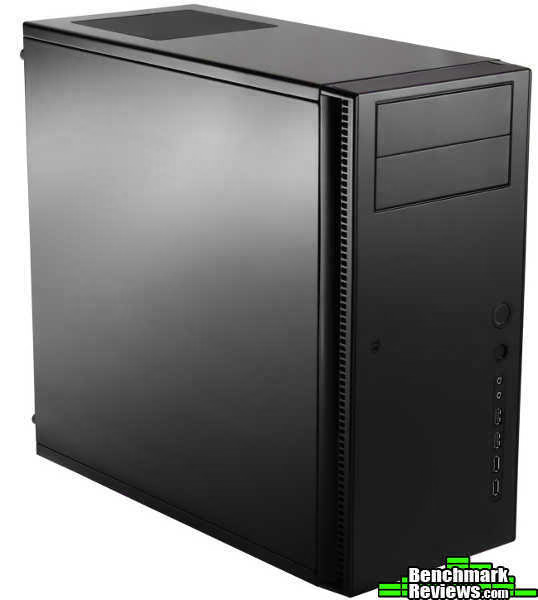
So our target crowd now includes previously dissatisfied as well as new gamers, system builders, early-adopters and general quiet-computing enthusiasts. Their demands? "Make my high performance machine look like a black tie event and sound like a tiptoeing ninja!" To be clear, this means it must 1) hold performance parts (video card, CPU coolers, motherboard, etc), 2) look like it should be the CEO's computer and 3) be really quiet with respect to the parts being used. Cost is not one of the top requirements, but cannot be forgotten. With this background in mind we'll evaluate how well the Solo II delivers.
Antec Solo II Features
| FEATURES & TECHNOLOGY | USER BENEFIT |
|---|---|
| Understated, Clean Appearance - Anodized aluminum bezel - Piano black pane |
|
| 1.0 mm SECC + polycarbonate top & side panels |
|
| Dedicated top PSU intake |
|
| Removable, washable fan filters |
|
| Dual hard drive mounting system with easy-access front drive cage |
|
| Enlarged CPU cutout |
|
| Expanded GPU space |
|
| True Quiet 120 mm rear exhaust fan |
|
| 2 front panel USB 3.0 ports with internal connector |
|
| No internal sharp edges |
|
| 3 year warranty |
|
Computer Case Specifications
| Case Type |
Mid Tower |
|---|---|
| Motherboard | Standard ATX, microATX, Mini-ITX |
| Drive Bays | External: - 2 x 5.25" Internal: - 3 x 3.5" / 2.5" using tray mounts OR - 2 x 3.5" with suspension mounting system - 1 x 2.5" (dedicated) |
| Cooling | 1 rear 120 mm TrueQuiet exhaust fan with 2-speed switch (standard) 2 front 120 mm intake fans (optional) |
| Maximum Graphics Card Size | 15.0" (381 mm) |
| Expansion Slots | 7 |
| Front Panel | 2 x USB 3.0 2 x USB 2.0 Audio In/Out |
| Product Weight | 20.2 lbs (9.1 kg) |
| Product Dimensions | 17.3" (H) x 8.1" (W) x 18.5" (D) (440 mm (H) x 205 mm (W) x 470 mm (D) |
Closer Look: Exterior
Nothing says elegant, sophisticated and snooty like a grand piano, right? Just teasing, I actually enjoy a classical performance. And the Solo II reminds me of a guy in a tux playing a shiny black grand piano. In a mirror. The classy look maintains consistency with the Antec's Sonata line of cases and represents the needs of it's users. The Solo II is not just a hunk of metal and plastic merely meant to hold more plastic and metal. The Solo II is meant to be used where site and sound are important, or where the absence of such is desired.
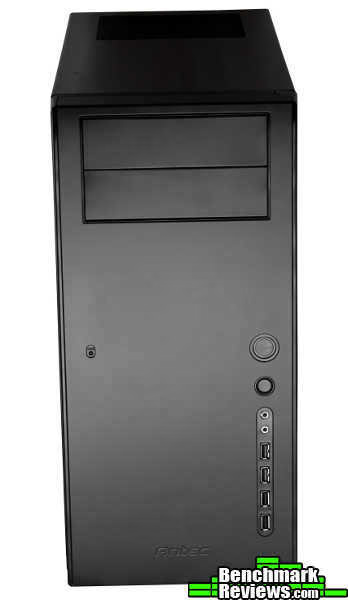
The entire exterior is black, but the front panel provides a foil with it's flat black in contrast to the shiny sides, top and bottom. The front is kept unembellished sporting only two 5.25 bays and an unassuming line of ports and buttons. The bezel is anodized aluminum, and in theory this was probably a nice idea to add some accent. But in practice, even a small amount of spotting gives the case a cheap feel. I think this is because fingerprints on the shiny panels are obviously fingerprints on a shiny panel, but fingerprints on the bezel look like staining, wear, or something else. Really this is just a cosmetic nuisance. When the case is clean everything looks sharp!
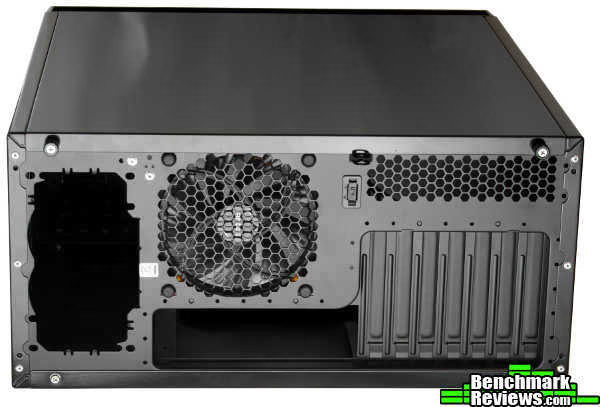
The backside of the Solo II reveals a few interesting features. There is a top-mounted PSU, black interior finish, 7 expansion ports and a 120 mm fan. With the PSU mounted to the top the motherboard and expansion ports are shifted towards the bottom of the case. In rare instances this means less room for a bulky card, it is an intentional consequence as will be shown later.
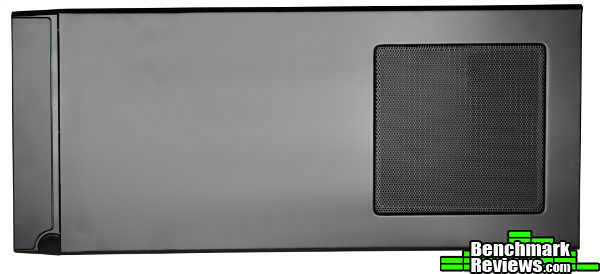
In my experience a top-mounted PSU causes the case to feel heavier since it is top-heavy. On top of the case at the back sits an intake just above the PSU. I'm sure this may be helpful for some PSUs, but in my case there's no air flow through this vent and it's mostly a hole for noise to escape.
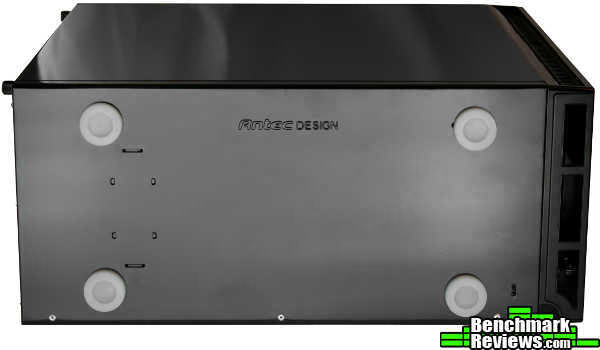
The bottom of the case has the same piano-black finish as the top and sides. The feet are made of a soft silicone which helps to dampen sound from transferring from the case to the desk. This may not seem very important, but my last case had hard plastic feet which transferred the hard drive clicks to the desk like a sounding board. Soft feet make a huge sound difference!
Detailed Exterior Features
In keeping pace with the technology treadmill, Antec updated the ports on the front of the Solo II. This is often a choice that distinguishes cases. It seems that time only brings more options, but the most popular here are E-SATA, firewire and USB.
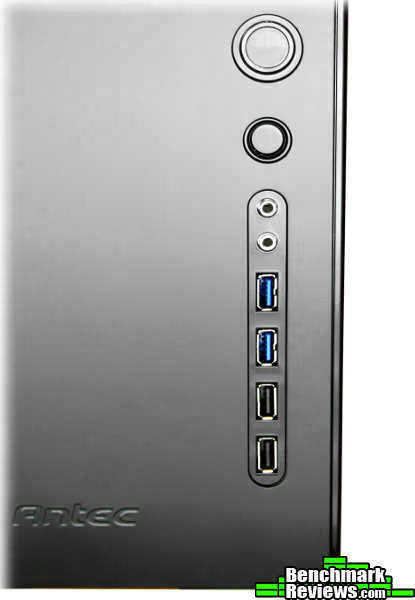
The Solo II keeps it simple by offering two USB 3.0 ports and two USB 2.0 ports along with the standard headphone and mic jacks. The connectors are all high quality and very sturdy. With the original Sol, some users had problems with cheaply constructed power and reset buttons. This isn't the case on the Solo II. Both buttons are sturdy and slightly recessed. No problems with accidentally toggling the wrong button. The power button is pushed easily enough when desired, and the reset button requires some extra force. This is exactly how buttons should behave.
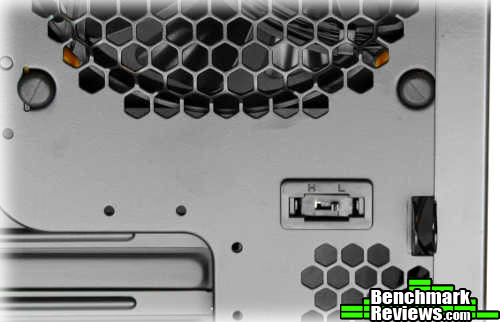
Speaking of buttons on the back of the case there is a small button, well a switch really, just below the rear fan. This switch allows the fan to run at high for better cooling, or on low for reduced noise. It's far from a fully functional fan controller (which serious quiet-enthusiasts are sure to install), but it allows a modest level of customization to fit the need. I guarantee that if I used this case for a media PC by the couch that I'd have it on low for movies and on high when playing games.

One last feature to point out before perusing the inside of the Solo II is the thumbscrew mechanism. The main panel has two spring-loaded, captive thumbscrews like those found on the original Solo. These are AWESOME!!! No worrying about a screwdriver or finding a place to set screws when you take off the panel. I only wish these existed on both panels.
Closer Look: Interior
A case's exterior is mostly about appearance blended with functionality suitable for interacting with the case on a daily basis. Power on, power off, plug in, plug out. For the quiet enthusiast and system builder, the interior of the case can be even more important. The features and layout inside the case can make the difference between a loyal fan and a disenfranchised customer.
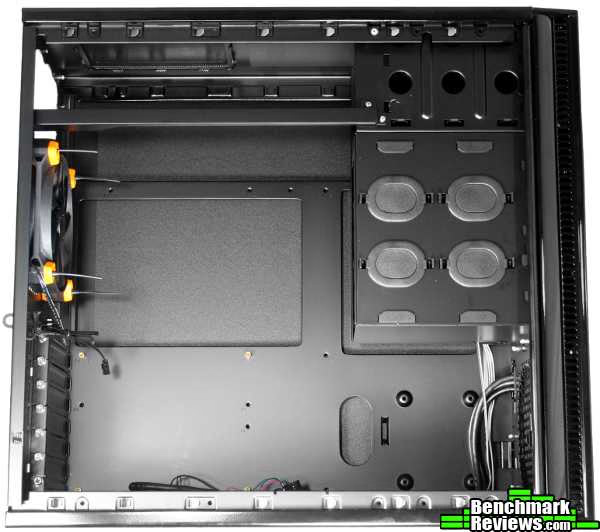
Well, the interior of the Solo II is covered in a black coating which matches the piano finish on the exterior. It didn't take more than a scrape from a screw, screw-driver or a bump from a component to mar the coating. I don't think this is a big deal, but it could impact your resale value if you like to upgrade frequently. The layout is only slightly different than most mid-tower ATX cases. As mentioned earlier, the PSU is located on the top, which slides the motherboard tray towards the bottom of the case. There is a rail across the top for mounting the PSU, but this can be removed.

The side panels on the Solo II are heavier than normal since they are steel covered by a dense polycarbonate mat. The mass of the door combined with the polymer mat provide improved sound dampening for vibrations traveling through the air. This type of passive damping provides a fixed amount of noise reduction. So noisier components will still be proportionately louder than quieter ones.
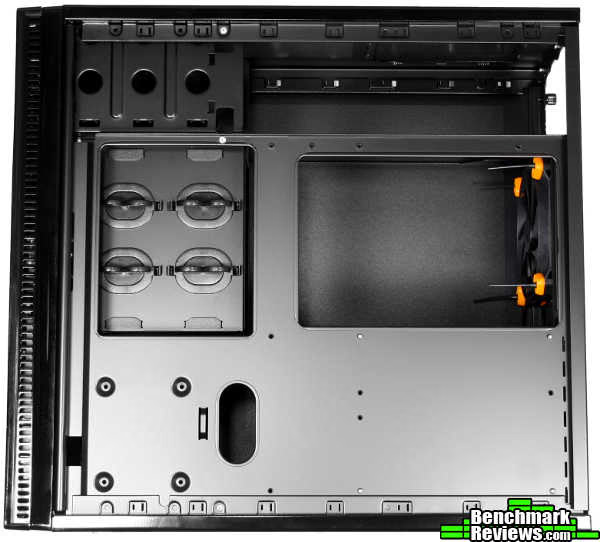
With the back panel removed we can see a huge cutout in the motherboard tray. I would almost dare you to find a cooler/socket combo that can't be installed with this cutout. I won't because the clearance between the tray and the panel is less than a half-inch. This isn't even enough for my main PSU cable! This is my first major complaint about the case. I don't know if this was intentional or an oversight, but I think the designers at Antec must have had some idea. There are very few cable management cutouts in the tray, and a mediocre cable wrapping system was attached to the 3.5" hard drive cage.

The front panel on the Solo II can be removed by opening the left panel and lifting three tabs. The door swings open on two hinges. Once open the front door can be lifted straight off the hinges and completely removed. The dual fans and filters from the original Solo are decoupled in the Solo II giving independent access to either. The top fan and removable filter give access and cooling to the 3.5" hard drive cage while the bottom fan and filter provide cooling for the larger interior of the case.
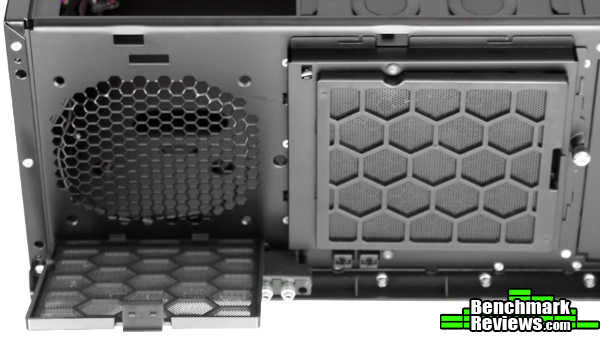
Each filter can be removed and cleaned, or even removed entirely. Underneath the filters are low impedance grills which will protect the fan without blocking the air flow. Taking off the filters will let more dirt into the case, but the less-restricted airflow will allow the case to run quieter and cooler. The fans from the original Solo have been upgraded from 92 mm to 120 mm. A larger fan moves more air for the same RPM. Thus you can install a larger fan, run it at lower RPM and still get the same magnitude of cooling.

The top filter and fan are mounted on a door which hinges down to reveal the 3.5" hard drive cage and three hard drive trays. This is the only way to get drives out of the case when using the hard drive trays. So you have to remove a side panel, open the front panel, unscrew the thumbscrew holing the inner door and pull out the drive tray. That's way too much work for a case that is supposed to be builder-friendly! I worry about the construction of the "hinges" for the access door. It's really just thin metal strips bent into place. Only one rough jostle or slip here will ruin the hinges.
Underneath each drive tray are a set of elastic suspension bands which can physically decouple the hard drives from the case and minimize hard drive vibrations from rattling the case. More on these later. The last thing to consider is the thickness of the inner door. There's not enough room to include a normal fan with rubber grommets to reduce sound. If you want to go this route to minimize sound in the case you will be restricted to using the lower fan or a custom thin fan.
Detailed Interior Features
Now we'll look more closely at the internal components of the Solo II. As mentioned earlier, it takes quite a bit of work to get the 3.5" hard drives trays out of the front of the case. These trays are the safest, most reliable way to mount the drives in the case.
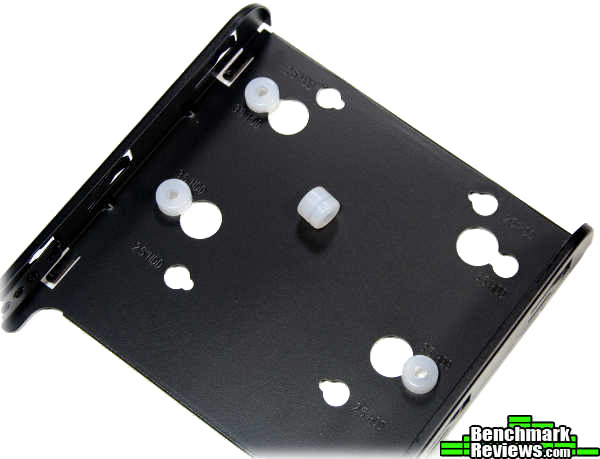
The drive is secured by four screws so it won't be slipping or sliding away. To reduce vibrations the drive is separated from the tray by soft silicone grommets. These do a decent job at reducing vibrations from transferring through the drive tray and into the case shell where they will be amplified. But the tray-mounting method still requires the hard drive to be secured to the tray. And by default this is done using rigid metal screws through which noise can still be transferred. That's why an alternative method is provided for mounting the drives. Also note that the grommets and screws can be moved for mounting 2.5" drives.
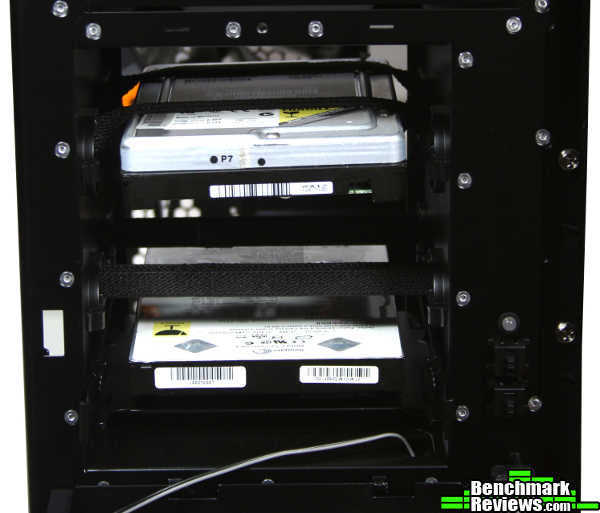
Remove the three hard drive trays and you can mount two drives using the suspension bands. These bands almost entirely decouple the hard drive from the case to totally eliminate vibrations through a solid interface. The drives will still make noise, but it will be much quieter when restricted to traveling through the air. This is a great concept, but this implementation has one critical flaw. If you tip your case backwards (which I do ALL the time) then your drives can simply slip out of the bands and drop right into the motherboard area! This is a well-known problem that should have an easy fix, but Antec has left that up to you. Was it really to hard to offer a perpendicular band to secure the backside of the hard drive? Or better yet, turn the hard drive cage sideways. A sideways cage gives quick access to the drives and will keep them from dislodging when suspended.
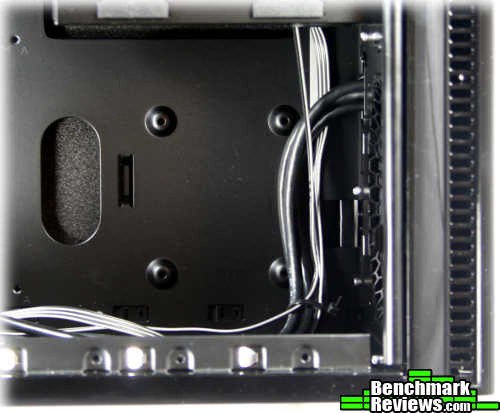
Now, you may have already noticed that the Solo II has an empty space below the drive cage which was not present on the original Solo. This was probably the MAJOR reason for releasing a second version of the case without adding many major modifications. The original Solo had four 5.25" bays (one of which could convert to 3.5") and four 3.5" bays. When was the last time you installed 8 drives?! So you had 8 bays but not enough room for a large video card. Antec lopped this mess down to two 5.25" bays and three 3.5" bays leaving room at the bottom. With this new-found space you can install an additional 2.5" drive AND...install a large video card!!! I have been asking for this layout in a mid-tower for awhile! Thank You, Antec!
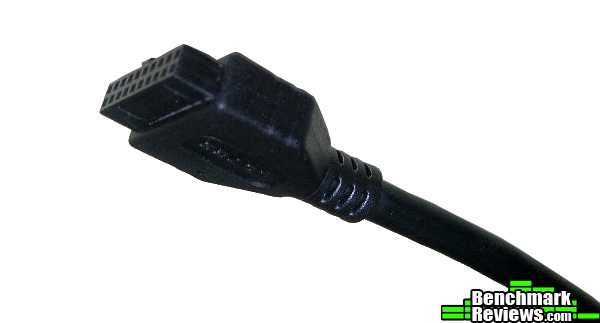
There are a couple other things added to be friendly to new technology. The USB 3.0 cable for the front panel on the Solo II terminates in a connector that can be plugged into an actual USB 3.0 motherboard header. No more routing a cable out the back of the PC to plug into an external port.

Another happy upgrade found on the Solo II is a 120 mm True Quiet fan. Compared to normal fans this thing doesn't even whisper. You can still hear the air going into the case, but the motor is basically silent. When any amount of power is used all I can hear now are my PSU fan and my Raptor. The Raptor is muted enough that I have to lean down to notice, but the PSU is still a screaming monster. I'm already going to have to upgrade to something better. There's enough space above the PSU that you could fit a quiet intake fan just for the PSU, so I'm already considering what to do there. Oddly there didn't seem to be any consideration for any water-cooling techniques aside from a self-contained unit like Antec's Kuhler H2O . I suppose aesthetics were more important in this case.
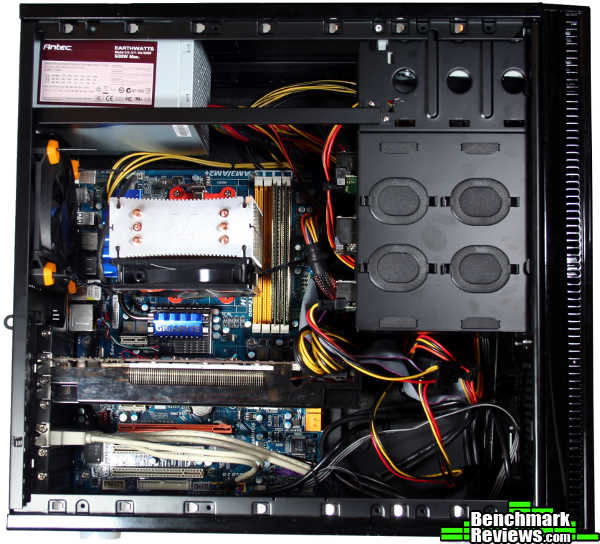
My first build did not go quickly. It's a small-footprint case trying to squeeze in standard to large components. Since there wasn't room behind the mobo-tray, most of the wire mess ended up behind and below the hard drive cages. I could have been much neater, but I was more concerned about time than looks. The cable management hooks mounted behind the drive cage was a nice idea, but mostly just got in the way while routing cables. Oh yeah, make sure and save yourself some time by tightening the pre-installed standoffs. You don't wanna squeeze the motherboard in there twice because your standoffs were loose! Things would have gone quicker if I had used a modular PSU or a PSU with smaller cables. In the end it was worth the pain for me to squeeze parts in for the small footprint.
Computer Case Final Thoughts
I've noticed in creativity and brainstorming sessions that the most rudimentary ideas surface almost immediately. While usually effective, these are not always the most effective. It seems like the truly inspired ideas don't surface until the rudimentary ones are vetted and optimized. Once things get difficult is when creativity finds wings and really good ideas begin to surface.
When it comes to quiet computing I think the obvious ideas are still in the vetting process. There are a lot of standard techniques that keep getting reused without much thought and some simple ideas overlooked. I'm not picking on Antec here, I see this across the board. I think what we have is a great start, and I hope to see designers put in a little extra thought on the next generation. If you have any ideas I'd love to hear them in the comments. I'll even give a few to get us started:
- ALL rubber case (that one's FREE haha)
- Extra rubber grommets for misc component mounting
- Insulation around the hard drive cage
- Fewer holes in the case (dedicated, custom airflow paths can reduce noise)
- Sound dampening inserts (heavier is better)
Antec Solo II Conclusion
When it comes to sound, the Solo II only slightly better than it's predecessor the Solo. A 120 mm True Quiet exhaust fan helps to keep noise down and temperatures lower. The build goes slower than other mid-sized towers due the layout, but the layout allows just enough room for performance components. Due to the small-footprint and the capacity for high power parts the interior runs hot. Although Antec tried to make the drives easy to access, a minimum of three panels must be removed for 3.5" drive swaps. Drive mounting could be greatly improved with a sideways or modular drive cage.
Piano-black glossy sides gives the Solo II a classy look that will be appreciated in even the most professional setting. It's prone to the usual fingerprints, but that's only a big problem on the front bezel. The black anodized aluminum looks great when clean, but fingerprints drastically detract from the commanding, unembellished appeal. The intake ports on the side leave the front and sides clean while still offering some pattern to make things visually interesting.
First, the bad. The interior coating scratches quite easily, the hinges on the interior drive bay door are weak, and the front door comes off far easier than it goes back on. The internal bays are hard to access, there's not enough clearance under the motherboard tray, and the cable management hooks cause hurt more than they help when cables aren't excessively long. Now for the good. Spring-loaded, captive thumbscrews on the left panel make it easy to access. The frame and panels are solid and sturdy. A fan speed switch is conveniently located on the back. The front panel buttons and connectors are well-constructed and have just the right amount of resistance. The USB 3.0 ports use a connector meant for the motherboard header.
Layout options are limited, but the essentials will all fit in the small-footprint. With two 5.25" bays and three 3.5" bays there's room at the bottom for extra large video cards and/or a 2.5" hard drive. Fan filters are removable and optional. The top has an intake for better PSU cooling, but just allows noise to escape when a simple PSU is used. For 3.5" drives, the trays include soft silicone grommets for noise-reduction. For better sound damping the trays can be removed and two drives instead mounted in suspension bands. Only tension keeps the drives in place, so caution or modification is required. In addition to grommets and suspension bands, noise levels are kept low by polycarbonate sheets and a 120 mm True Quiet fan. Two additional 120 mm fans can be installed up front if the extra noise must be tolerated for cooling needs.
As of February 2012, Antec's Solo II case sells for $129.99 (Newegg). That sounds a bit steep considering the quiet-computing competition and other features that can be purchased for that amount. Antec made some modest improvements over the original Solo, but the price still seems a little steep considering how much of the platform remains the same. What you're buying: small-footprint, elegant and unassuming appearance, compatible w/ performance parts, quiet. What you're not buying: tool-less installation, extra fans / large fans, modular construction, oodles of space. The main competitor here will be the Silencio 550.
The Solo II made some modest steps forward, but has some shortcomings that make it hard to work with. It's still a good candidate if you like how it looks, want something quiet that can still pack a punch inside.
Pros:
+ Room for large video cards
+ True Quiet 120 mm exhaust fan
+ Silicone noise-damping feet
+ Sound damping panels
+ Multiple quiet-mounting options for hard drives
+ USB 3.0 on front panel
+ Small footprint
Cons:
- Low clearance under motherboard tray
- Suspended hard drive can dislodge
- Very little damping in front panel
- On the expensive side
- Drive cage difficult to access
Ratings:
- Performance: 8.75
- Appearance: 9.50
- Construction: 8.00
- Functionality: 9.00
- Value: 7.00
Final Score: 8.45 out of 10.
Benchmark Reviews invites you to leave constructive feedback below, or ask questions in our Discussion Forum.
Reader comments from the original article
17 comments were posted before commenting closed. They are preserved as written. Original avatars no longer resolve and are shown as a placeholder.
Nice case. pinobot Permalink:
But, i don't understand why they don't put the harddisks on top that would give you a little more room (or to the bottom together with the psu). I just ordered a swapbay for my harddiks, 3 harddisks go in the space of 2 5.25 bays. Talking about bays, why so few bays, you can just as well make 5 external bays, you can always internally put a dustfilter in front of it.
RE: Suspended drives slipping out flemeister Permalink:
Did you try twisting the elastic fabric a few times to increase its grip on the hard drive? Like in the third photo down on this page: ##silentpcreview.com/article8-page2.html I did this in the original Antec Solo (the revised version with the same elastic fabric as the Solo II, not the very first one that used poor quality elastic bands), and it works to keep the drive in place. Not fool-proof, but certainly better than not twisting the cord.
RE: RE: Suspended drives slipping out Dan Ferguson Permalink:
Yeah, twisting the bands definitely helps, but like you said it's not a sure thing. I think having an extra band, string or something to secure the drive end should have been included in the design.
???? Pigbristle Permalink:
Quote: "A fan speed switch is conveniently located on the back" Are you having a laugh??? Do you know how many people have there rigs under desks? So now when I switch from watching a movie to playing a game, I have to get down on my knees & thumble around the back feeling for a switch? And the worst part, moving this switch to the front probably wouldn't have cost anything more to the manufacturing.
RE: ???? Dan Ferguson Permalink:
Yeah, there was some sarcasm there, I forgot to elaborate. The switch really isn't that bad if the case is accessible, but a pain if it's tucked inside a desk.
RE: RE: ???? Pigbristle Permalink:
I've noticed a lot of case reviewers do the same thing. They review the case on a table with 360o access, forgetting that a lot of consumers who actually buy these cases, have them on the floor or under desk. It just seems so obvious to me, I mean, would you put the start switch on the back? No! , so why put the fan controller on the back???
Other competition Computer Ed Permalink:
I would disagree about this cases main competition. I would see Fractal's Define R3 as the big driect competition to this and from what you have shown actually beating it pretty good.
RE: Other competition Thomas Permalink:
Not really. Fractal Define's R3 is one of those cases that simply go through a checklist of features yet don't execute any of them very well. It includes lots of hard drives but the mounting is not especially good for a silent enclosure; it includes bitumen material to thicken the chassis but the steel is woefully flimsy; it includes quiet fans but they use sleeve bearings. I have one right now and its definitely not in the same league as Antec's quiet computing cases with the 1mm thick steel and polycarbonate sheets. From what I can see, this Antec Solo II is executed well for a system w/ 500W PSU (aka not for really 1337 gamers), the major problem is the asking price where its only a few dollars less than the Antec P183. Cable management with top mounted cases has always been easier with bottom mounted cases and cables are easily enough tucked away with zip ties/modular PSUs...it doesn't really matter *how* you tuck it away because this case doesn't have a side windows.
RE: Antec Solo-II Computer Case Enclosure Robert17 Permalink:
Thanks Dan. This unit seems a bit pricey for the feature set. And you are correct. Not that swapping drives happens every day, but they are probably accessed more that the PSU which seems easier to swap. Which brings me to your suggestion question. I've wondered for some time why PSU manufacturers haven't offered PSUs with various configurations, i.e., having modular cabling that extends from perhaps the "top" of bottom-mounted units. Routing PSU cables has been a "one size fits all" affair for too long. And for quietness? A spray-on bedliner for pickup trucks that reduces noise as well as protects the bed has been around for years. Why not utilize it, or something like it, in computer cases as well. My two cents. Spend it wisely.
RE: Antec Solo-II Computer Case Enclosure Adam Permalink:
Love the look of this case and some great design ideas, actually quite tempted by it. Shame about that cable management though. Thank for the review, but one question (that's probably pretty stupid), what's with the CPU heatsink orientation?
RE: RE: Antec Solo-II Computer Case Enclosure Dan Ferguson Permalink:
The Contac 29, as well as other sinks, use a cheap mounting method for AMD sockets which gives it a 90 degree orientation from normal.
RE: RE: RE: Antec Solo-II Computer Case Enclosure Adam Permalink:
Well that's odd/lazy. Did they expect every case to have a top vent in it? Must bugger up the ram slots something terrible as well, bad enough with some correctly positioned coolers let alone sticking right over the top.
It literally sucks ehume Permalink:
Rear fan, pulling air in. The case sucks. The thing reminds me of the Antec NSK 4480 II I bought as my very first case. Why they were still selling that dinosaur in late 2009 I don't know. This is better, but the air going into that case is going to hiss through the openings around the back of the face plate. Well, no one who reads these reviews will be a customer for this case, but I'll say it now: Don't. Get. This. Case.
? wyterabbit Permalink:
The rear fan is an exhaust fan, it doesn't pull air in.
Love & Hate alaembodo Permalink:
I'd go for this case. I like it. It's neither over the top styling like a Thermaltake, nor is it lit up like the 4th of July like a LED ornament. I like the understated & clean look. There's also no non-functional esthetic plastic cladding on it. I also don't need 5 hard drives and a water cooling rig. For me, $129 isn't an issue. I can easily add 120mm fans to it and find a way to do a clean wiring job in there. I also don't need to change PC components every 2 months.
Use a Fanless PSU! Dogwood Permalink:
It's worth noting that the vented top-mount power supply orientation is perfect for a fanless PSU. I'm looking at a Seasonic SS-400FL; there's also a SS-460FL. If 400 or 460 watts is enough, then fanless is tempting -- in which case the top-mount lets the heat silently escape the case instead of venting into it as a bottom-mount would. I suppose a fan-cooled PSU might be mounted upside-down so as to draw cooling air from outside? This looks like it will be a great case for an air-cooled system that don't produce excessive heat. With the new 23- and 25- and 28- nanometer parts coming out (Ivy Bridge, Southern Islands, etc -- which use less power) the Solo II can hold plenty of computer power for most purposes.
I ordered one from J&R for $110 total Dogwood Permalink:
I just ordered an Antec Solo II at J&R. It's listed at $119.99, including shipping. I found a promo code that gave me an extra $10 off, "JRGOOG"; the listing said this discount code expires on 10/15/11. As I write this, I see Provantage also has the case listed at about $112; presumably they add shipping to that. So the $110 delivered is likely to be the best price this can be had at until maybe it becomes mature -- note that you can find the first Solo now for as low as $80 or $90. ##jr.com/antec/pe/ANT_SOLOII/