
Google Cr-48 Chrome OS Notebook
Google Cr-48 Chrome Notebook Review
Manufacturer: Google
Product Name: Google CR-48 Chrome Notebook
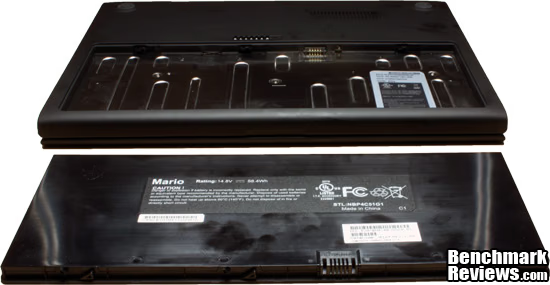
Model Number: Mario
Price As Tested: Not For Sale
Full Disclosure: The product sample used in this article has been provided by Google.
Cloud computing has been the big word for the last two years, and has quickly become a part of everyone's daily lives. Photos going up on the web to be edited, music and video being streamed, and documents stored online are becoming the norm. Google's CR-48 Chrome Notebook running the Chrome OS is a culmination of all of these. It provides no local services and allows users to only use internet accessible services. Benchmark Reviews will investigate to see if the CR-48 is really the future of computing or if it just is an interesting idea that will fade away like many other products that have been touted as "the future of computing."
The Google CR-48 is a Cloud based system. In short this means nothing is contained within the system, and therefore anything a user wants to do is contained on the web in some form or another. Want to edit a photo? Google recommends you use Picasa. Want to write a paper? Google wants you to use it Google documents system. Looking for some music? You have many choices for that including Pandora, Grooveshark, or Rdio. This means a constant internet connection is be needed to use the CR-48. Thankfully, along with Wi-Fi access the CR-48 also comes with two years of 3G internet service courtesy of Verizon. This always-connected requirement does come with its own benefits though. The CR-48 boasts an 8-hour battery life, 8 days of standby time, and an almost instantaneous startup. All of this comes in a sleek all black matte exterior, with a full size keyboard, a matte 1280x800 LCD screen, and a multi-touch capable touchpad.

As the Google CR-48 is a preview unit to help work out the kinks in Google's Chrome OS, the testing on this device will not be a finalized verdict on a the CR-48 but rather a preview of the technology that will be seen in the future. Because of this, no award will be given at the end of this review.
Google CR-48 Features
- 12.1-inch screen.
- Full size keyboard.
- Oversized multi-touch touchpad.
- Qualcomm Gobi 3G
- 802.11n dual-band WiFi.
- 8+ hours of active use.
- 8+ days of standby.
- Webcam.
- Flash storage.
- Intel Pine Trail processor.
- 100MB of free Verizon data.
Google CR-48 Specifications
| Operation System | ChromeOS | |
|---|---|---|
| Processor | Intel Atom 455 @ 1.66GHz | |
| Display | Size | 12.1" |
| Resolution | 1280 x 800 | |
| Matt/Glossy | Matte | |
| Memory | 2GB DDR3 (1333) | |
| Storage | 16GB Integrated SSD | |
| Graphics Processor | Intel GMA 3150 | |
| Audio | Integrated | |
| Bluetooth | 2.1 + EDR | |
| USB | 1 x 2.0 | |
| Battery | Life | 8 Hours |
| Type | 63Whr Li-Ion | |
| Networking | Wi-Fi | 802.11a, b, g, n |
| Encryption | WEP, WPA, WPA2 | |
| Mobile | CDMA | |
| Size | 0.9" x 11.8" x 8.6" | |
| Weight | 3.8Lbs. | |
Closer Look: Google CR-48
Some companies want extravagant looking systems that have their name plastered all over it. The CR-48 is the exact opposite of this with no visible markings anywhere on the case. Other computer manufactures take note, many people want an elegant clutter free exterior rather than a glossy mess that quickly gets dirty.

The entire exterior is covered in a rubber coating which gives the CR-48 a beautiful matte black exterior. The exterior reminded me of the old black MacBook although less with less plastic. The CR-48 is minimalist system something that is apparent from the beginning without opening it or looking at its side. There are no audio ports, no corporate logos, not even a system light on the front or top.
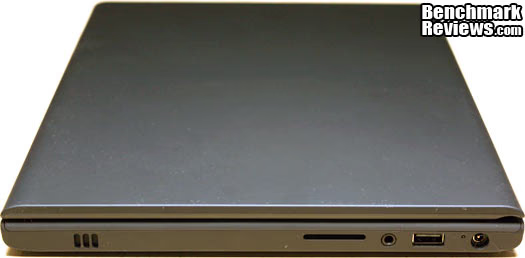
Continuing on the minimalist theme that embodies the entire CR-48 system, the right side contains very little in way of connections. The CR-48 has one full size SD card reader that can be used to upload photo to image hosting and editing sites such as Flickr, and Picasa, and a 3.5mm jack. Other than these connections, there is only the custom power jacks included on the CR-48, which also contains the only external way of determining whether the CR-48 is on. When charging this light is orange and when fully charged it turns white.

On the right side of the CR-48, you have only a VGA connection that will enable the CR-48 to connect to an external monitor. Sadly the CR-48 is unable to drive both its main screen and the VGA connection making this an either one or another affair. Next to that is the main ventilation port for the CR-48. The CR-48 does have a fan internally but during my use of the system, I have been unable to hear it and have not felt any heat being given off from the system.

Once you opening the CR-48 you can see the many design queues that Google has taken from Apple. This includes the Chiclet keyboard used on the CR-48. Although not backlit is very similar to that used on the MacBook Pros. The keyboard has a nice amount of spring to it and combined with its full size creates a very enjoyable experience for typing on. It is not as good as a mechanical keyboard, but for a laptop and especially a netbook, the typing experience is fantastic. The track pad on the CR-48 is also particularly good being both very accurate and multi-touch capable.
Google CR-48 Detailed Features
The external of the CR-48 while nice is not what all of the hype surrounding this system is about. Rather it is Googles Chrome OS that runs on it that has many users excited. This is one of Google's newest creations and the CR-48 was their way of getting the kinks out of the system. The Chome OS is a cloud computing based operating system, in which none of the user's data is stored locally but rather stored out in the cloud. This means that users will not listen to music directly off your system but rather stream it, they will edit their documents in Google Documents, and rather than watching your movies off of discs or HDD they will stream it from services like Hulu.
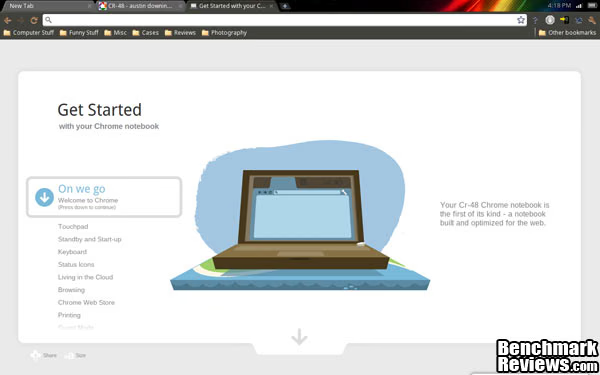
When users start the CR-48 for the first time they are greeted with a very user-friendly first time configuration screen. From here you can control many aspects of the CR-48's operation including touchpad sensitivity, keyboard language (including dvorak), and your browsing experience.
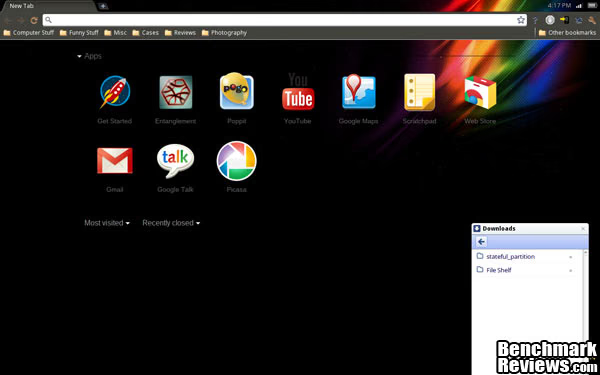
Anytime a new empty tab is opened, the Chrome OS brings up the your "home" page. This contains any applications you have installed off the web store, and any tabs you recently closed.
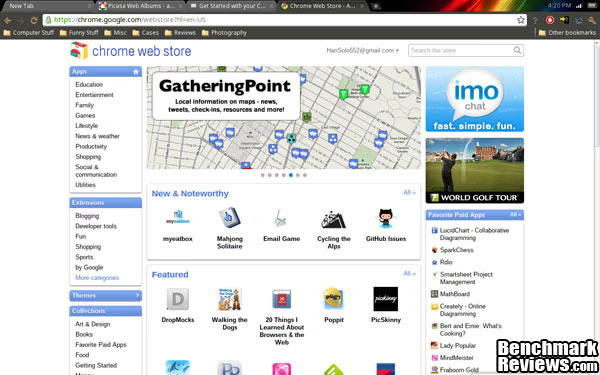
The Chrome Web Store still has a long way to go, with many of its applications being little more than glorified bookmarks. The potential is there, but currently it really is not being used. Extensions on the other hand can help augment your experience, but even then it is nothing revolutionary. None the less I expect the Chrome web store to shape up to become something very important in the next couple of years so don't count it out of the game yet.
Google CR-48 Final Thoughts
Google's CR-48 is a look at the future; it is not quite ready for public consumption and Google acknowledges this but, the potential is there. In the time spent using CR-48 I found that the experience was exactly what I was expecting. In their current form all netbooks have limitations due to the lack of power, and therefore lend themselves perfectly to slim cloud based operating systems like Chrome OS and Jolicloud. Unfortunately even when running Jolicloud on my EeePC I found the experience to be sluggish much of the time. On the other hand Chrome OS running on equally underwhelming hardware still feels to have quite a bit of pep to it in normal operation. Even better being a instant on system, I was able to write little blurbs as they came to me without having to worry about a waiting 30 seconds for my system to be ready to be used. I equally loved the ability to get 8 hours of battery life out of the system. This let me charge the CR-48 at night and leave the next morning for class without the need to carry around the charger.
Even with all of the praise I have given the CR-48, this product still has some flaws that need to be worked out. The most prominent of these is the need for better support of the SD Slot and USB drives. Out of the box, these are not enabled. Even after being enabled, content located on them cannot be used locally but instead may only be uploaded to other services. Another flaw of the CR-48 is although being a generally a very quick system, the lack of power in the CR-48 can show through occasionally when surfing around multiple Flash or Javascipt intensive sites. Overall, my experience on the CR-48 was enjoyable and has provided the mobile machine I have been looking for.
Google's Chrome OS has a very bright future in front of it. Having the ability to move between systems without losing any of users personal settings, having all documents stored on the cloud, and streaming media at your finger no matter where you are is where the future is heading.
Questions? Comments? Benchmark Reviews really wants your feedback. We invite you to leave your remarks in our Discussion Forum.
Reader comments from the original article
16 comments were posted before commenting closed. They are preserved as written. Original avatars no longer resolve and are shown as a placeholder.
I love technology Com-Tek Chris Permalink:
I appreciate what Google is doing here and everything they have done in the short time they have been in power. However I am still a firm believer in pioneering. Microsoft & Apple along with the Open Source community pioneered everything that Google is using/selling. Just 2 years ago there were several accusations of companies taking open source code, packing it up as their own and then reselling it, it happens everyday I guess, I'm reading another article while I starting writing this. Again, I appreciate what Google is doing here, but I have to stick with the pioneers and I don't like hardware being shoved down my throat that I cannot pick out myself. Sure I know, I don't have to buy it. I also feel like Google has taken a lot of open source code out there and cloned software to be like of those that were built by open source communities. They have stamped that software with their logo and because we are so used to Google being friendly we assume everything they do is ok. I for one will not be buying the Chrome OS PC's, if they allow users to install on a platform of their choice for free or for a fee is fine with me. Maybe I'm just getting old, Apple and Microsoft along with players like Novell and more earned their right and took the bumps and bruises it takes to get where they are, whether you like them or not, you have to respect the pioneers that got us where we are today. I'm off my soap box.
RE: I love technology Austin Downing Permalink:
How did Microsoft & Apple pioneer what they are doing? And this is just a pre-test piece of hardware I am sure many machines of different forms and sizes will eventually run the Chrome OS. And Google feeds a lot of the open-source community just look at the Chromium project.
What I believe Anthony G Permalink:
What I believe Com-Tek Chris is saying has a valid point; however, I think he missed the boat on whom Google needs to pay their due's to.. Sun Microsystems, now Orcale, for their Java IP infringements.
RE: What I Believe Com-Tek Chris Permalink:
Noted, I agree with you on this Anthony, I can't believe I didn't mention those guys, they are genius's.
Cloud Computing Marcel Brown Permalink:
It seems to be very nice what the future has in stock for us all. But from where I live I see this re-occurring situation in which everything is very affordable until a big community starts to use it all and all of a sudden ISP's and cellphone operators "suddenly" realize that they can not keep the prices as low as they are. That is THE moment in which cloud computing is going to be the 2012 rip off. The technical idea behind it is very nice, I will admit that, but not having any local tools to use a.k.a. being fully dependent on your Wifi/Lan/whatever connection is not a wise solution in my humble opinion. But hey, I live in Europe where we all get screwed big time.
Hmm ANIKHTOS Permalink:
I would never never bought a computer that would made me depended on an external factor. If for any reason i loose connection to the net or the net connection is really bad then i end up with nothing to use?? Not been able to write my paper for the class or work? Not able to see a moovie or relax listening to some music. So this device will have less usage than a mp3 player!!! Wow is that what the companies call future??? send us back to they typewriter age?? Frankly the idea of online storage so you can access data from anywhere in the world is stupid. First to do that i must be somewhere, second i must have access to pc so if i go to another town with my laptod why on earth have my documents online and not and the hard drive!?!??!!? Again another stupid technolog that is praised until the users will turn it down. By the way services like youtube are completely diferent in concept they are sharing sevrices. All who want to return to pre computer era are free to get the cloud computer pass. :-)
I don't get it Jim Barr Permalink:
I've been using the CR-48 since December, and I have to admit that it has far exceeded my expectations. But here's the key: My expectations were limited. That's quite the opposite of most who encounter the CR-48. If you need offline storage, proprietary software, or applications that simply aren't available online, then simply put, the CR-48 is not for you. For those needs, get a decent notebook or netbook. But that wasn't my expectation--mine was to be able to surf the Web (Chrome=done), access my Google-stored information (Gmail, Google Docs, PicasaWeb=done), do Web site maintenance and development (SSH, FTP using eyeOS, image editing ising Picnk and Pixlr, Joomla and Wordpress backend=done) and to try to establish online counterparts to the many offline tools that I regularly rely on. In most cases, I have found reasonable online solutions that have fit my needs. is there room for improvement? Absolutely! Also, the "always-connected" aspect of the CR-48 is really taking an unfair beating, IMHO. Is this concept really so new? If you are a smartphone user, it's certainly not, because you already are always connected. How is the CR-48 really any different other than being a different form factor? While I agree that offline access to several Google Apps (particularly Gmail, Google Docs, and Google Reader) would be great, the truth is that I have yet to be in a situation with my CR-48 where I'm truly offline. I am either within range of a Wi-Fi access point, or I can enable the Verizon wireless service. It's all about understanding just what cloud computing can and cannot do.
Good Review Selden Permalink:
My only quibble is over your statement about performance, where Chrome OS (I hope, because it's still in beta) is not yet up to snuff. For reference, I have a 2-year old Acer AA1 (Atom N270, 32gb SSD, 2gb RAM), which runs Ubuntu 10.04. Even though it has a slightly less powerful processor, the Acer is consistently faster at everything (including the startup process, but excluding wake from sleep) than the Cr-48. I can only conclude that Chrome OS is the problem. Re ANIKHTOS' comment: "Frankly the idea of online storage so you can access data from anywhere in the world is stupid. First to do that i must be somewhere, second i must have access to pc so if i go to another town with my laptod why on earth have my documents online and not and the hard drive!?!??!!?" see the amusing video that Google released when the Cr-48 pilot program began: ##youtube.com/watch?v=lm-Vnx58UYo It's having all your documents on your hard drive that is stupid.
Re: Good Review Jim Barr Permalink:
I don't know if I'd say having all your documents on your hard drive is stupid so much as extremely limiting. Keeping my documents in the cloud (Gmail, Google Docs, and DropBox) gives me access to them from pretty much ANY computer I use without exception. And anything that I must always have access to gets stored on a thumb drive in my pocket.
Couple of points Quanah S. Harjo Permalink:
Just a couple of talking points here... ChromeOS and Chrome itself are both open source in their Chromium versions, so Google isn't just "taking and not giving" from the Open Source pool. Several ChromeOS apps work offline. HTML5 (and the dieing Google Gears) has provisions for use of local storage, and apps like Google Docs take advantage of this. Docs in particular will save data on the computer, then sync again when a connection is available. Finally, Chrome OS will be able to play locally stored music, at least. Actually you can do it *now* with an app from the Web Store called "Local Player", but Google is also building a media player into the OS...it just doesn't work yet.
Re: Couple of points Jim Barr Permalink:
The CR-48 has always had the ability to play local audio files. You just need to enter about:flags into the address bar and enable the feature. I don't remember if this is enabled in the beta channel, but it is definitely available in the developer channel. (And that's "channel" not Developer Mode.)
Chrome user Susan Permalink:
I have to comment on the list of specs for the CR 48. It lists 'flash storage'! I wish! The experimental notebook I received does not respond to a flash drive. You cannot watch a movie from flash or as far as I can tell retrieve photos for cloud editing. They seem to have forgotten that in order to put a photo on a cloud editor, you have to be able to get it into your computer somehow. I have not tried Skype for use with the built in camera, but it seems that there is no other way to use the camera. Aside from the initial user id pix we took when we first got this, there does not seem to be any way to take a shot that will then be useable for editing elsewhere. The initial id photos do not seem to be accessible for editing or sending either. I love that I was lucky enough to receive this nifty little gadget and grateful as well. But I have found that it is mainly useful for entertainment and surfing,email and online shopping.But if you want to send an email with a personal photo, forget that idea. Maybe I am doing something wrong and need help. If anyone can tell me more I would love to learn!
Remember... Quanah S. Harjo Permalink:
The Chrome OS is still heavily in development. There are a lot of things that don't work, some that barely work, and some that are working great. File access from flash drives is *working*, but it certainly isn't consistent. There's a "secret" screen that you can get to by typing "about:flags" into your address bar. It has a list of features that are in the OS but aren't stable enough to be trusted for general use yet. The advanced file system is one of them, and is what allows general flash/memory card access. I've uploaded pics to Piknik and Flickr, so it works, it's just rather flakey at the moment. There's also a Media Player feature that's half implemented at the moment that should take care of movie needs. Just give this thing a little more time to bake, and it should get better fairly quickly. Well...it has to if they're expecting to release production Chrome OS laptops later this year!
RE: Chrome user Austin Downing Permalink:
To use flash storage you need to type about:flags in your browser and enable the storage option. You can then upload photo's directly from flash driver or SD cards. I have not tried using the system for local multimedia.
RE: Chrome user Selden Permalink:
Your comment about killing your Cr-48 reached me via Gmail, but doesn't show up here. How to recover your Cr-48: ##youtube.com/watch?v=UVrI3IyKo3E
Went out completely Susan Hooten Permalink:
My CR48 is no longer usable. Connectivity is completely defunct therefore it is useless. Had problems with it all along. Now it does not connect. My son tightened some wires around the wifi card once several months back, and it helped a whole lot. It connected perfectly for about six more months. Then it gave out completely. I am very sad to have no CR48 to use anymore. It was very nice while it lasted, but the help I received was invalid when I would complain about this problem. They told me I needed a different router even tho it was fine after my son tightened up the connection, so it was not my router, EVER, it WAS a terrible, frustrating problem with the unit and it finally failed fatally.