
Icron USB Ranger 2211 Range Extender
Icron USB Ranger 2211 Review
Manufacturer: Icron Technologies Corporation
Product Name: Icron USB Ranger 2211
Model Number: 2211
Price As Tested: $349 MSRP
Full Disclosure: The product sample used in this article has been provided by Icron Technologies.
Everything from Rocket Launchers to Dancing Clowns are available as a USB peripheral these days. Most of us keep our USB devices within arm's length on our desktop, but there are circumstances where a little more distance is either desirable, or unavoidable. That's the general case for the average consumer; the commercial or industrial user has a tougher set of requirements. They have Rocket Launchers and Dancing Clowns too, but they're the full-sized versions, or maybe the giant-sized display versions. You can bet that the computers which control them are located more than 5 meters away. That's the reason for today's article; what to do when your USB device is 300 feet away from your PC? You find a device like the Icron USB Ranger 2211, and a big spool of Cat 5 Ethernet cable, and you hook it up, no problem! Just so you can be sure that there won't be any problems, Benchmark Reviews put the latest USB extender from Icron Technologies on the test bench, and we have a complete set of results for you. We also look under the hood, and show you the technology that's inside.
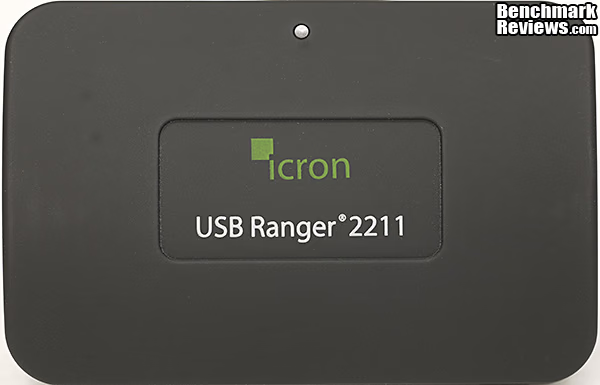
The popular USB serial interface has some limitations, which is not unusual for any computer hardware standard. Compatibility has been one of its strong points since it was introduced in 1994, and transfer speeds have kept up with inflation. By introducing USB 2.0 in the year 2000 and then USB 3.0 in 2008, the competing standards were kept at bay with ever-increasing USB speeds, available in a friendly and familiar package. The speed increases were significant, from the original 12 Mb/s to the current 5 Gb/s, it's hard to argue with a 400x increase. So, what's not to like? The 5 meter length limit is the only thing that I've struggled with over the years. When setting up a home office, it often makes sense to locate printers and other peripherals on the other side of the room from the workstation. If you route the wires any way but "as the crow flies", you are going to exceed the 5 meter limit. Sometimes you can get away with it, other times it just won't work. More often than not, it'll work most of the time, and only fail when you're in the middle of an important print job.
The other limitation that USB suffers from is power delivery through the interface. Various schemes have been introduced, such as charging downstream ports (CDP) and dedicated charging ports (DCP), but the basic USB 2.0 device is limited to 500mA and USB 3.0 devices are limited to 900mA. The most frequent case where maximum power draw becomes an issue is for portable HDDs. Most of them use low RPM drives, especially in the 2.5" form factor, but some of us like to push the envelope a bit and stick 7200 RPM notebook drives into our portable enclosures. We all know to carry around our dedicated "Y" cables, so we can pull power out of two USB ports simultaneously and handle the startup current for the platter motor. It's the price you pay for that extra bit of performance.
Closer Look: Icron USB Ranger 2211
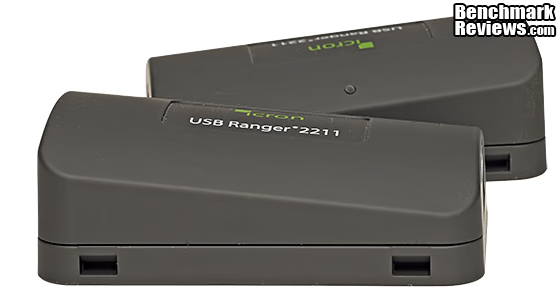
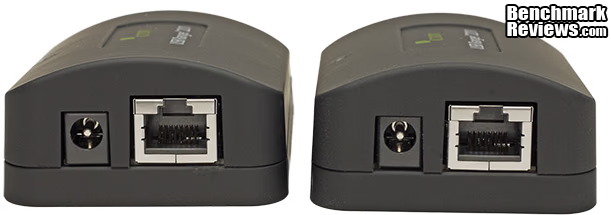
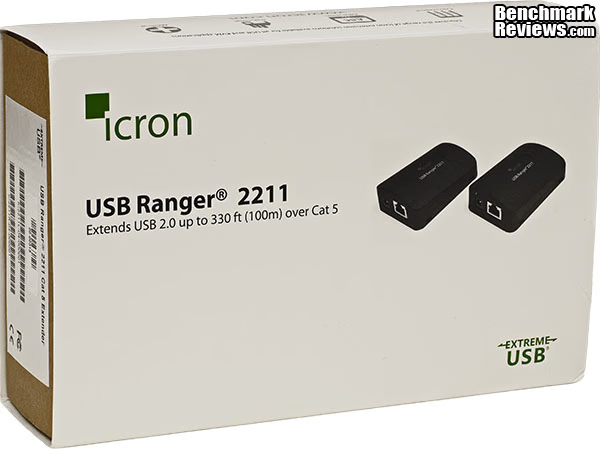
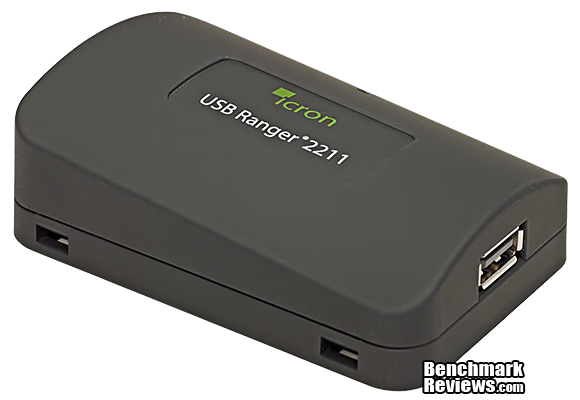
The Icron USB Ranger 2211 is one of several USB extender models in the Icron product line. The two modules included in the kit are similar in size and shape, but are configured as "Local" and "Remote" components. Aside from the firmware changes inside the units, the obvious difference is in the USB ports located on the thinner end of each unit. The local module has the USB Type A receptacle, and the remote version has a USB Type B port. The thicker end of each one has the RJ-45 Ethernet connector and a power input jack.
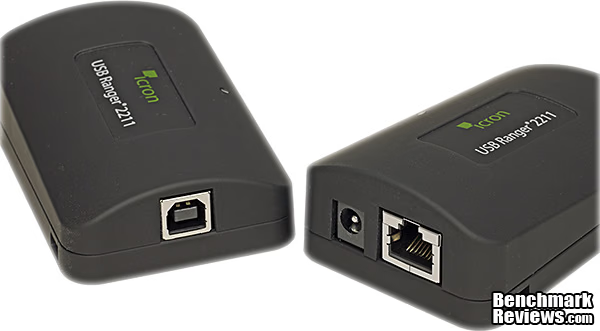
The picture above shows the module with the Type B interface, and the image below shows the version with the Type A USB jack. Don't worry too much about which one is which - Local or Remote. Once you start hooking things up, it'll be clear that one module hooks up to your computer and one hooks up to whatever USB device you need to connect with.
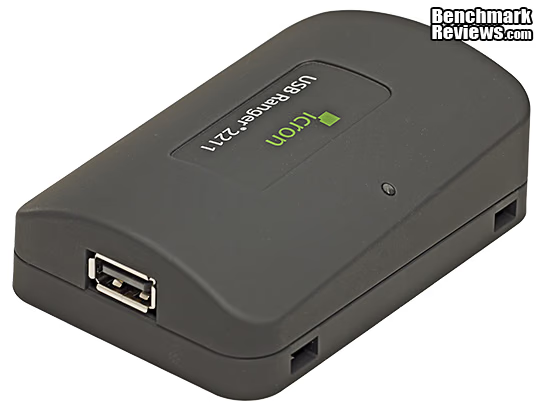
When I was first reading the Quick Start guide, I was trying to figure out which one was which, and then I found the label on the back of the module. The part number on the Remote component has an "R" in it, and the Local one has an "L" in it. It wasn't until I hooked it all up that I realized I was overthinking it, and that instinct would have worked just as well as due diligence. The only risk is that you'll climb that 50 foot ladder up to the remotely-mounted webcam that you've installed on the side of a building, and you put the wrong module in your pocket.
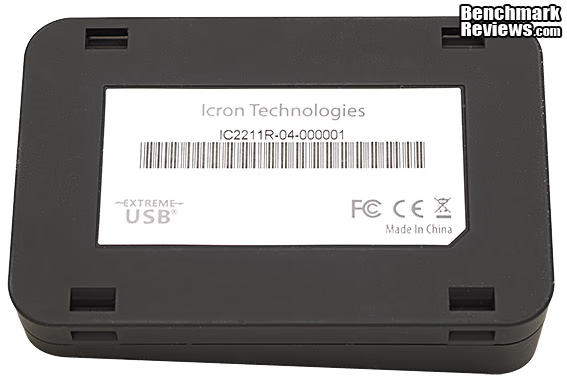
The four rectangular slots on the corners of the module looked like pressure points for assembly latches at first. If you've read any of my previous reviews, you know I like to take things apart.... But the holes are actually there to allow secure mounting of the device with plastic or metal straps. A medium-sized wire tie fits easily in the slot, and the pass through is pretty straight, which avoids binding. Considering the commercial and industrial uses that the USB Ranger will be used for, it's a good bet that easy and rugged mounting options are high on the list of desirable features. The top half of each enclosure is sharply slanted, so it was a good design decision to put the mounting slots on the bottom piece, which has a flat, uniform surface.
Both modules have a single LED indicator on them, which lights up bright green when the complete signal path is connected. Aside from that, there are no other indicators or controls for the system. There are no drivers required either. This is truly a "plug it in and use it" device, which is slightly different than the original Plug-and-Play concept that was introduced with Windows 95.
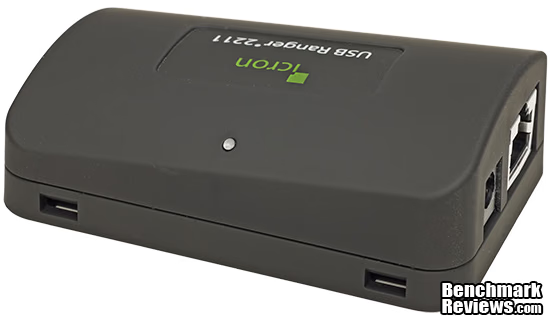
The only real choice involved in deploying the USB Ranger 2211 is where to plug the power supply in. Both Local and Remote modules have a pin/sleeve power receptacle, but only one of them needs to have power supplied to it in order for the system to work. Your choice.... For a lot of industrial and commercial applications, it's going to be a whole lot easier to find a 115VAC wall receptacle at the computer end of things, but whatever the situation, the flexibility is there.
In the next section, let's take a look at what's supplied with the USB Ranger 2211 kit, and also get into the details of the components inside this interesting device. I did a quick tear-down, so we could see the highlights.
Icron USB Ranger 2211 Detailed Features
The Icron USB Ranger 2211 kit comes complete with everything you need to get started. The Ethernet cable is not provided, but that makes perfect sense. There are so many different applications, and different cable types and distances involved that it's best for the end-user to supply that part of the signal chain. Even if the manufacturer did provide an Ethernet cable, I'm betting that 90% of the time it would end up being be the wrong cable for the project. The other cable that's not provided is the USB cable for the remote end. The same thinking applies here. It all depends on the USB device that you're going to interface with. It might have a Type B, Mini-B, or a Micro-B jack; it's impossible to tell in advance.
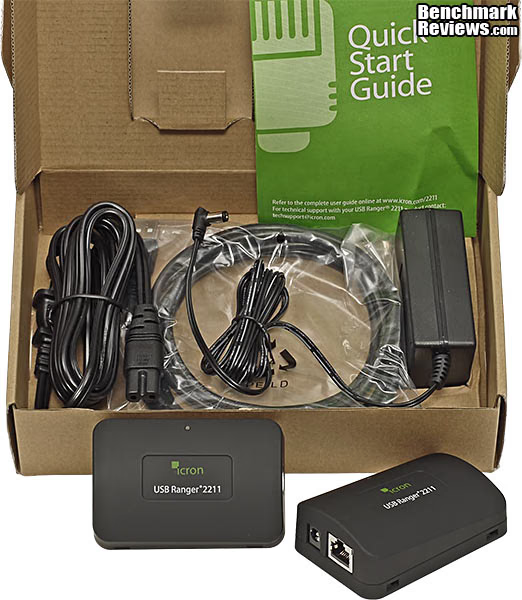
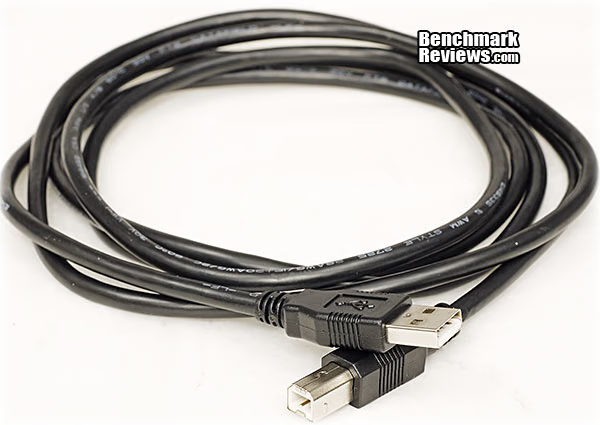
The USB cable that is supplied is a standard Type A to Type B version, and is a good, usable length at a full 2 meters. This is the one cable that you will definitely need, so Icron went ahead and provided it in the kit.
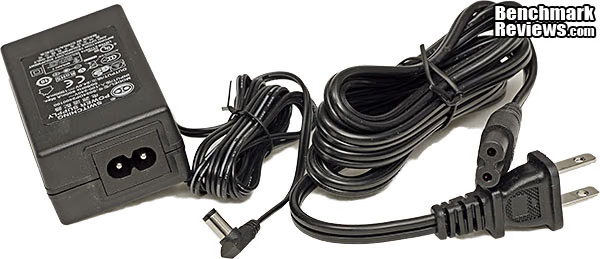
The power supply is a step up from the usual wall wart, with a separate AC cord. I very much appreciate the layout of these brick-type power supplies, as it makes it much easier to plug the dozen or so peripherals that I have running on the test bed into a standard power strip. It's also more secure and convenient if you're installing it at a remotes site.
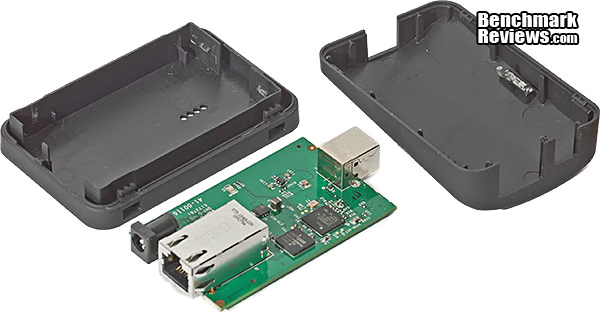
The internals of the Icron USB Ranger 2211 are very simple. There is one PC board inside, with connectors mounted to both ends, and it snaps into the bottom half of the plastic enclosure. No tools or fasteners are required.
The LEX board itself is fairly simple and sports two primary ICs. There's an Ethernet physical transceiver (PHY) from Broadcom and a custom ASIC made specifically for Icron that goes by the name of "LionsGate". We'll talk more about this IC in the next section where we get into the core technology and look at performance. In contrast to video cards, where the power supply chips are an important part of the design, this board has one simple regulator IC, which knocks down the 5VDC to about 1.1V for the logic chip. The RJ-45, USB, and power connection jacks actually take up more real estate on the PCB than the ICs, but that's OK - this is an interconnect device, after all. The REX board has an additional device on it, a USB hub, but it's not significantly more complex than the "Local" PCB I've shown here.
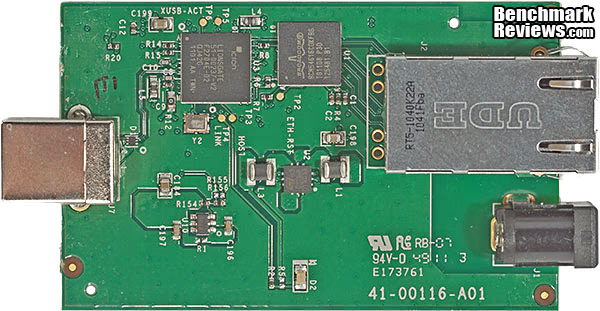
OK, we've got as much detail as we can, by just looking at the parts. Now let's dive a little deeper into the technology involved.
Technology and Methodology
Icron USB Ranger 2211 Technology
The Icron USB Ranger 2211 has a very straightforward system architecture, which befits its straightforward purpose. There's an Ethernet Physical Transceiver (PHY) connected to each of the Ethernet jacks. The same part is used in both modules, a Broadcom BCM54616. The custom Application Specific Integrated Circuit (ASIC) is made specifically for Icron, and it integrates Icron's patented ExtremeUSB technology on a single chip. The same IC (LionsGate) is used in both modules, and is configured at PCB assembly to act as Remote or Local. The last chip in the mix is a USB Hub, the USB2512B sourced from SMSC. As a USB hub, it supports the USB Battery Charging specification Rev. 1.1 for Charging Downstream Ports (CDP) for two ports. This IC is only in the Remote module (REX), where the USB device(s) that are being accessed are connected. This is the end that needs the power management features provided by the USB Hub IC.
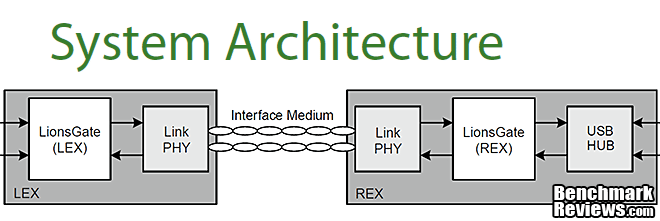
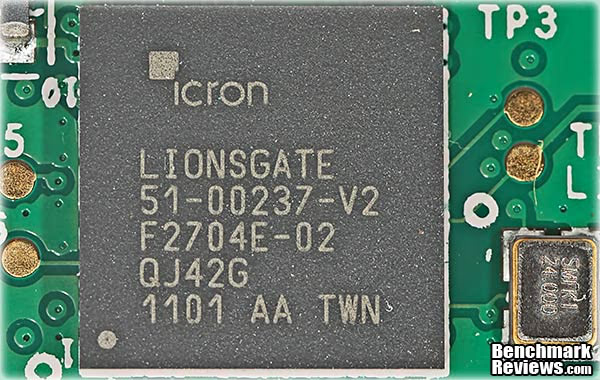
Apparently you can't build an ASIC these days without giving it a proper English name (Fermi, Tahiti, Kepler, Cape Verde, et.al.) so this one's called "LionsGate". This custom IC is the key to the overall design of the USB Ranger, and it was planned to be compatible with various transmission media. This particular implementation, in the USB Ranger 2211, enables 100 meter connections with Cat 5 Ethernet cables. Other models can send USB communications a distance of 10 kilometers, using fiber optic cables. The LionsGate IC supports all USB transfer types: Bulk, Isochronous, Control, and Interrupt. There is an integrated USB 2.0 compliant PHY included on the chip, which is connected directly to the PC on the LEX module, and to the USB Hub on the REX module. As I mentioned earlier, the system is a true plug-and-play interface; no software drivers are required for operation.
USB Testing Methodology
USB 2.0 is USB 2.0, right? Well, seeing is believing, and sometimes external variables interfere with what should be a simple test. So, I'm going to do what we always do at Benchmark Reviews, and test the system in a real world scenario. One of the most common USB peripherals is a portable HDD, and almost all of them end up being throttled by USB 2.0, with its 480Mbps maximum transfer speed. Converting that to Bytes, gives 60 MB/s as the maximum possible throughput, ignoring any communication overhead. In reality, overhead chews up 10 to 15 percent of the peak performance, meaning the true upper limit during real world data transfers is more like 50 MB/s. In my experience, that upper limit is rarely reached during normal operations; the fastest I've seen is transfer rates in the high 30's.
I'm using my latest test bed for this set of benchmarks, along with a variety of external drives with USB 2.0 connections. Since we're not testing drive performance, per se, I'm going to limit the testing to sequential Reads and Writes, which will show the maximum throughput. Just for fun, I also ran these same tests on a couple of different platforms and was somewhat surprised that my He-man test bed ran them 25% faster than my Dell notebook with an i3 350M. While the two disk benchmarks that I'm using have been largely unaffected by differing system specs when using the internal SATA connection, the USB interface introduces significant variation. So, if you're running your own USB benchmarks on some peripherals, be sure to use the same test system every time.
The basic approach I'm going to use for measuring performance of the Icron USB Ranger 2211 is to run the disk benchmarks while the external hard drives are connected directly to the USB port on the PC, and then run those same tests while the drives are connected through the USB Ranger and 100 feet of Cat 5E Ethernet cable. Either the range extender will have no impact on transfer speeds, or we will be able to measure how much impact it does have. Either way, we have a challenging, but fair and consistent test protocol.
Support Equipment
- 100-Foot Category 5E Shielded Twisted Pair Ethernet Cable
- 10 metric Gigabyte Test File (10 GB = 10,000,000,000 bytes)
- Maxtor OneTouch II 300GB E-HO11
- Buffalo MiniStation HD-PHS120U2/UCUS + WD1200VE
- SilverStone SST-TS01B RFID External Drive + WD1600BEKT
- Vantec NexStar 3 NST-380S3 + WD7501AALS
- IOCELL NetDISK 351UNE Network Storage Device + WD1500HLFS
Disk Benchmark Applications
- ATTO Disk Benchmark 2.47: Spot-tests static file size chunks for basic I/O bandwidth
- CrystalDiskMark 3.0.1c by Crystal Dew World: Sequential speed benchmark
Test System
- Motherboard: MSI Z68-Express Z68A-GD80 (1.23.1108 BIOS)
- System Memory: 4x 4GB Corsair Vengeance LP DDR3 1600MHz (9-9-9-24)
- Processor: Intel Core i5-2500K Sandy Bridge 3.3GHz (BX80623I52500K)
- CPU Cooler: Thermalright Venomous-X (Delta AFB1212SHE PWM Fan)
- Video: Intel HD Graphics 3000
- Drive 1: OCZ Agility3 SSD 120GB (AGT3-25SAT3-120G)
- Optical Drive: Sony NEC Optiarc DVD (AD-7190A-OB 20X)
- Enclosure: Lian Li Armorsuit PC-P50R
- PSU: Corsair CMPSU-750TX ATX12V V2.2 750Watt
- Monitor: SOYO 24"; Widescreen LCD Monitor (DYLM24E6) 1920X1200
- Operating System: Windows 7 Ultimate Version 6.1 (Build 7600)
ATTO Disk Benchmark
The ATTO Disk Benchmark program is free, and offers a comprehensive set of test variables to work with. In terms of disk performance, it measures interface transfer rates at various intervals for a user-specified length and then reports read and write speeds for these spot-tests. It's also one of the few disk benchmarking utilities that does non-destructive performance measurements for both Read and Write, on formatted drives. There are some minor improvements made to the 2.47 version of the program that allow for test lengths up to 2GB, but all of our benchmarks have been conducted with 256MB total length, and with a Queue Depth of 4. ATTO Disk Benchmark requires that an active partition be set on the drive being tested. The results displayed by this benchmark are basic bandwidth speed performance indicators, which is just the type of test that we need to evaluate our USB interface.
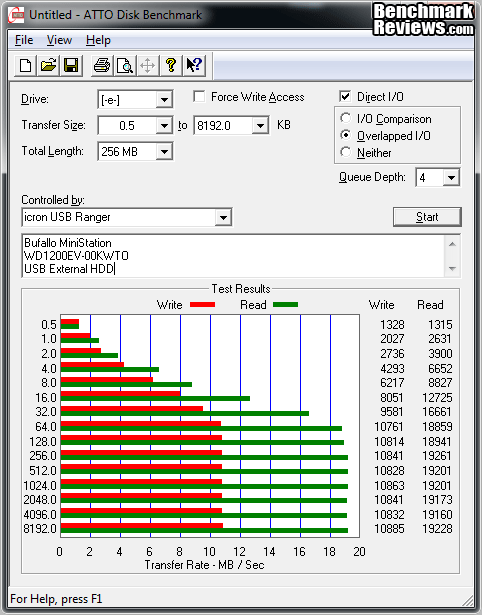
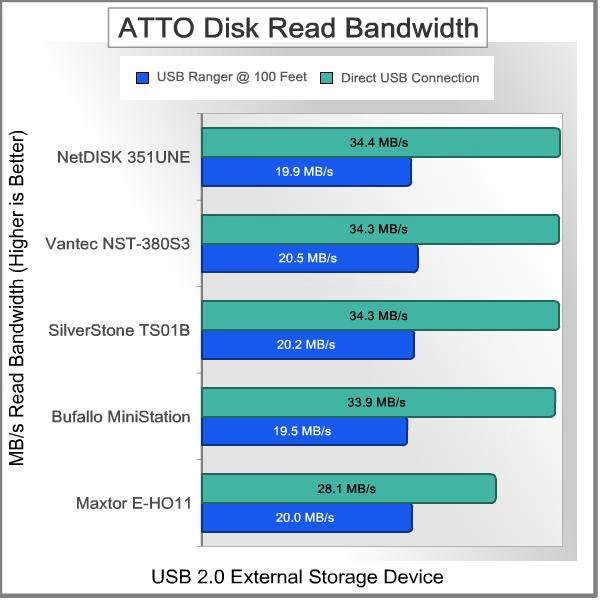
Let's look at the results for reading data from the drives while they're connected directly to the PC, first. The Read results are very consistent for the three USB devices that have the highest performing HDDs in them. I put a 10,000 RPM Velociraptor in the NetDISK 351 UNE, just for fun. Any modern 7200 RPM 3.5" SATA HDD would have saturated the USB interface. The Vantec and SilverStone enclosures both had 7200 RPM drives in them, one 3.5" and one 2.5". The other two devices are both slower and older technology, and didn't always keep up. Looking at the results while connected through the USB Ranger 2211, there is a marked reduction in transfer speed, and it looks like there is a cap at about 20 MB/s. That's only 1/3 of the theoretical bandwidth of 480 Mbps, and about 2/3 of the speeds we obtained while directly connected. It's important to note that the direct connect results represent a throttled condition as well. Most of the drives in the test are capable of much higher read rates than 35 MB/s, using their native SATA interface.
The Results for Write performance over the 100 foot Ethernet connection are somewhat similar to the Read tests, except for the Vantec enclosure. I think something is wrong with the HDD in there, and will have to investigate. See why it's a good idea to benchmark your stuff every now and then? The addition of the Icron USB Ranger and 100 feet of Cat 5E cable had a significant impact on the Write performance too, bringing it down to the 11 MB/s range. There seems to be some additional overhead involved in the Write process over USB, since all of the drives had Read results that were 25% higher than the Write results, while directly connected to the USB port on the PC. Through the USB Ranger 2211, the Write results are about 45% lower than the Read results.
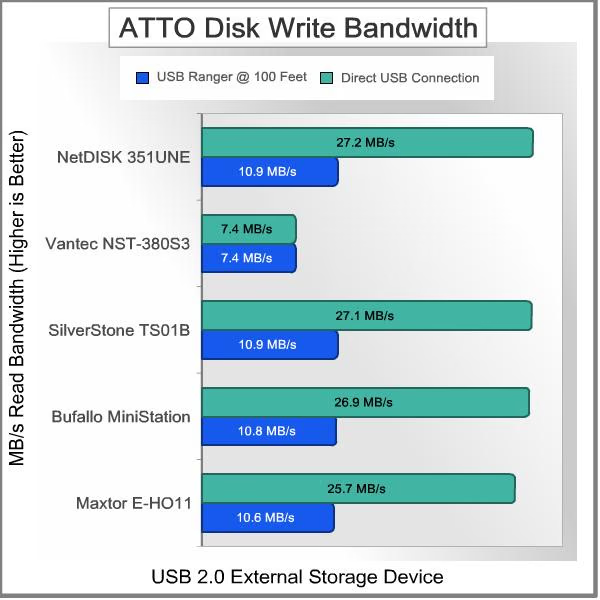
Overall, the ATTO Disk Benchmark testing shows substantial bandwidth degradation from inserting the Icron USB Ranger 2211 into the signal path. The reduction in transfer speed comes in the form of a cap, rather than a proportional decrease. This was true for both Read and Write operations: from my experience, that's typical of how USB works. Let's see how each of the drives fare using CrytalDiskMark as a test platform.
CrystalDiskMark 3.0 Test Results
CrystalDiskMark 3.0 is a file transfer and operational bandwidth benchmark tool from Crystal Dew World that offers performance transfer speed results using sequential, 512KB random, and 4KB random samples. For our USB testing, only the sequential file transfer speed was measured using a 1000MB space. We're not testing the drives, as much as we are testing the throughput of the USB connection, so we need to focus on pure bandwidth limits. CrystalDiskMark uses compressed data in its benchmark tests, so sequential file transfer speeds may appear somewhat lower compared to those tested with other tools using uncompressed data.
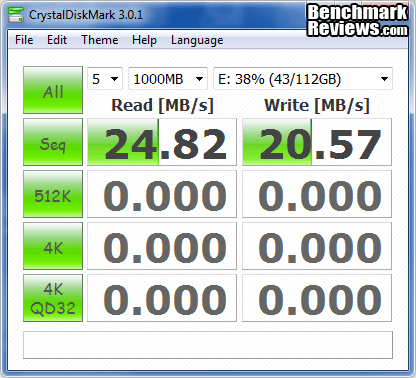
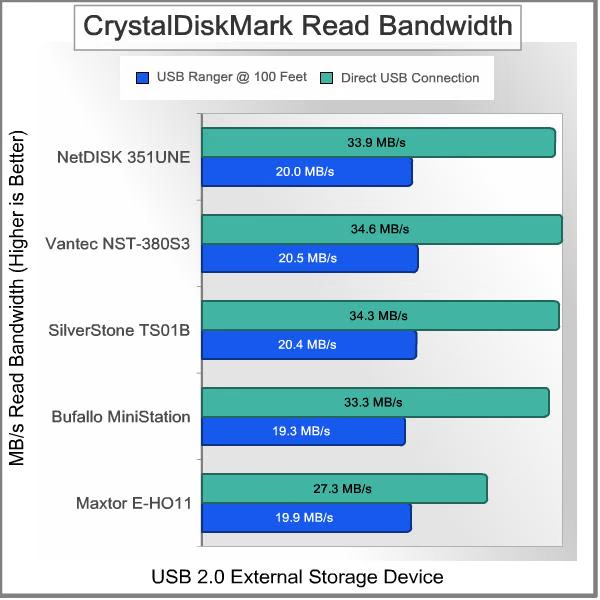
Each of the external disk drives is unique. There is a mix of 2.5" and 3.5" drives, some are 5400 RPM, some are 7200 RPM, and I threw a 10,000 RPM, 2.5" device into the mix, just because I could. I purposefully avoided using any SSDs in the testing because write performance is not always constant with SSDs, and no external drive solution that I'm aware of supports Garbage Collection. The Read results are a bit more diverse than what we saw in the ATTO benchmark, but are still generally consistent. The best performing drives topped out at about 34 MB/s when connected directly to the PC's USB port, and they all got throttled down to about 20 MB/s when passed through the Icron USB Ranger 2211 extender.
The CrystalDiskMark Write results with the Icron USB Ranger in place in are about 7% better than what we saw in ATTO Disk Benchmark, but the average is still only 11.6 MB/s, ignoring the bad result I got with the Vantec/WD750 Black combination. The raw results, where the external HDD was connected directly to the PC's USB port, are a little more than 3% faster than the ATTO results. The bottom line on Write performance is that you lose more than half of the base throughput with the USB extender. For some reason, Write speeds take more of a hit, both with the basic USB connection and with the USB extender. There goes my idea of putting a backup drive in my neighbor's garage.
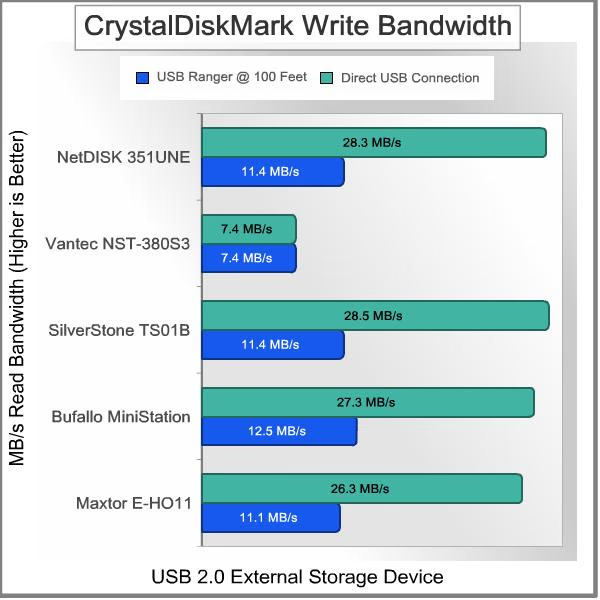
The conclusions are pretty obvious, in that we've shown that USB 2.0 is a limiting factor on drive performance when used by itself, and we've also shown that the Icron USB Ranger limits bandwidth even further. Both of those limits are well below the USB 2.0 theoretical maximum throughput of 480 Mbps. In both cases, the interface seems to impose a definite cap on the transfer rate, rather than extracting some fixed percentage as a penalty. Despite the popularity of external drives with USB 2.0 connections, it's really not a very capable interface for this application. I understand why it is so popular - after all, I had five of them lying around to throw into the benchmarking effort, but I also have never been happy with the throughput I experienced.
Now that our benchmarks are done, let's look at some Final Thoughts, and Conclusions.
USB Extender Final Thoughts
The Icron USB Ranger 2211 is not a device that all of our readers are going to need, or want. It's not like a video card or keyboard, where we have to have one, and need to pick from the hundreds of different possibilities. However, if you need one of these devices, you REALLY need it. There are only so many cases where you have to access a USB device 100 yards removed from your computer, but when that need arises, there is probably no other way to get the job done. Admittedly, most of these cases are going to be in the commercial and industrial world. The only way I would ever need 100 meters of cable to reach an external USB device, is if I located it in my next door neighbor's house. Now that I think about it, that might be a simple way to create offsite backups, quickly and for free, with minimal security risks. OTOH, it might be better to bury the running HDD enclosure inside a waterproof bag in the back yard. It's nice and cool, three feet down. Ugh, I think I've been reading too many Lifehacker blog posts.....
For most of us, the USB devices we own can be easily and cheaply replaced with newer versions that support a different, more convenient interface. Sometimes it makes more sense to move to a networking protocol, like Ethernet or 802.11b/g/n wireless. That's what most printers are equipped with now, except for the few low-end models that are still limited to USB. Sometimes, a near-field communication service is better, like Bluetooth. That's what your small, portable devices are going to support, if you have a relatively new model. Things are different in the commercial and industrial worlds; the device you need to interface with may cost well over $100,000. The labor costs to replace a built-in fixture can also run into tens of thousands, as well. Throwing it away and getting a new one isn't always an option. That's where a product like the Icron USB Ranger is an essential item for your toolkit. Like I said above, "... if you need one of these devices, you REALLY need it."
More than likely, the expensive, custom installed, remote USB device that you need connectivity for isn't a hard drive. I purposefully used one in my benchmarks, to push the bandwidth requirements to the extreme. So don't take the lower throughput numbers in the test results as a negative, just use them to understand the performance envelope that's available with this technology. If your remote device doesn't need more than about 100+ Mbps of bandwidth, then you're all set.
So, what conclusions can we draw from our teardown and testing? Click NEXT PAGE to find out, and discuss...
Icron USB Ranger 2211 Conclusion
From a performance standpoint, the Icron USB Ranger 2211 showed some weaknesses. I was hoping that the USB range extender would have a minimal effect on throughput, but Read operation suffered a 40% decrease and Write performance took a 60% hit. Maybe my hopes were unrealistic, because USB has always disappointed me when I've used it to connect an external HDD to a PC. I don't know the mechanics of what happens, but the end result always seems to be an artificial cap on bandwidth. So, given that the unavoidable signal path here was USB-Ethernet-USB, an additional drop in performance should have been on my radar. That being said, if your application is going to run fine with 20MB/s of throughput, which most are, don't worry about it. You just need to know what the limits are, and now you do. Don't be fooled into thinking that every USB device, hooked up to any host, is going to deliver 480 Mbps every time. That's marketing talk, not reality.
The appearance of the Icron USB Ranger 2211 is very attractive and contemporary. The single green LED on each module is subtle, and not so bright that it draws attention to itself. If you need to see that it's on and working, you can. You can also ignore it if it's in your peripheral vision. The tapered black enclosures give the LEX and REX modules a very modern look. The rest of the kit is basic components and cables, so there's not much to talk about relative to their appearance.
The build quality of the USB Ranger modules was quite good. Everything was assembled well, everything fit neatly when I put it back together, and the overall impression of the module was very solid, even though the weight is low. In fact, while I was testing, I accidentally stepped on one of the modules and it didn't break. Enough said! The PC boards inside the modules were well designed and manufactured, with no obvious flaws or rework evident. The rest of the components in the kit were good quality; I like the modular (brick style) power supply better than the common wall wart style, and I also appreciated the longish two meter USB cable that was supplied. It was obvious that Icron didn't scrimp on the accessories, which makes sense since so many of their customers are industrial or commercial users. The packaging was pretty basic, but it was informative, protected the contents well, and was 100% recyclable.
The features of the Icron USB Ranger 2211 are also pretty basic. It does one thing, and it does it well. Of course, if you looked at the official USB Implementers Forum (USB-IF), you would see a list of features that spans several pages. It's all in how you look at it. One feature that was quite useful was the ability to power the system from only one module, and the user chooses which end. 115VAC outlets aren't always co-located with the USB device, so it's good to have options.
As of late April 2012, List Pricing for the Icron USB Ranger 2211 is $349. This is probably a little higher than many consumers are willing to pay for this kind of functionality. As I said in Final Thoughts, most of the USB devices the average consumer owns can be easily and cheaply replaced with newer versions that support a different interface. If you can't do that, then a device like this is one of only a few, pricey options.
I don't want to come down too hard on the USB Ranger 2211 for its throughput limitations or the pricing model. They both make sense, given the market space that this product is aimed at. The applications where it's most likely to be used won't tax its bandwidth capability. The total market for this kind of product is smaller and less competitive than for many computer peripherals, which drives up the pricing. If you need this product, you'll know it, and you'll gladly pay for the unique solution that it provides.
Pros: 
+ It just works - no drivers, no drama
+ Throughput was very consistent, no dropouts
+ Modules are small, but not too small
+ Tiedown slots are well designed and located
+ Modular power supply design (brick)
+ Only one module needs to be powered - users choice
Cons:
- Bandwidth is limited, well below the theoretical max for USB 2.0
- Disk Write bandwidth is only ½ of Read bandwidth
- Modules are light enough to be flipped over by cables
- Cost will be an issue for general consumer
Ratings:
- Performance: 8.50
- Appearance: 9.00
- Construction: 9.25
- Functionality: 9.50
- Value: 8.50
Final Score: 8.95 out of 10.
Quality Recognition: Benchmark Reviews Silver Tachometer Award.
Benchmark Reviews encourages you to leave comments (below), or ask questions and join the discussion in our Forum.