
IOCELL NetDISK 351UNE Network Storage Device
IOCELL NetDISK 351UNE NDAS Review
Manufacturer: IOCELL Networks Corp.
Product Name: IOCELL NetDISK SOLO NEWFAST
Model Number: 351UNE
Price As Tested: $59.99 (Amazon)
Full Disclosure: The product used in this review was supplied by IOCELL Networks
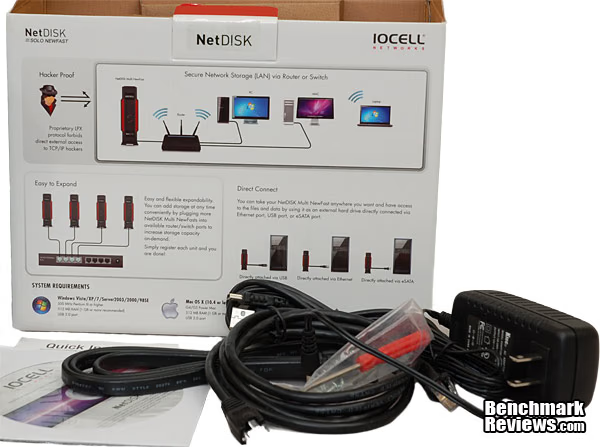
The first thing that IOCELL Networks wants you to know about the NetDISK 351UNE is that it is not a NAS; instead it is a network-direct-attached-storage (NDAS) device. It does not function as a server, and there are some distinct benefits that come with that. For one: size, cost and complexity go way down. Two: it does not use TCP/IP to connect to your network, which eliminates all common TCP/IP-based methods for hacking into your data. Three: it's faster, since there is so much less overhead to manage. Sometimes, less is more. Benchmark Reviews has looked at several full-range NAS products in the last few months, now let's investigate what a more tightly focused approach can provide.
The NetDISK 351UNE uses a proprietary Lean Packet Exchange (LPX) protocol to transfer data to and from your network, and this protocol is contained in a driver package that must be loaded on each computer that desires access to the data store. Before you balk at that, it's the same with printers, scanners, or any other peripheral device on your network, so don't despair. There are advantages, such as the fact that no one is likely to hack into your LPX device. I'll take that over troubles with DHCP settings, any day.
The IOCELL NetDISK 351UNE is the first logical step up from an ordinary direct-attached-storage device. Hooking an external drive up to your PC with USB 3.0 or eSATA makes that storage available on the PC it's connected to, and it can also be accessed by other computers on the network through drive sharing. The downside is that the target PC may not always be turned on, or if it's a laptop, it may not even be in the building. Also, folder sharing is still a little cumbersome, and introduces security risks. If you're worried about hidden malware on your own PC, just imagine the number and the types of threats that are contained on the typical teenager's laptop.

The 351UNE is one of the lowest cost storage units on the market to offer a full complement of interfaces - Ethernet, eSATA, and USB. The unit I tested came without a drive, and there are also units available with 1TB and 2TB drives installed at the factory. I like the ability to choose the brand and type of HDD that contains my data, so this unit is the one I would most likely purchase.
Three features dominate the discussion of network storage hardware: data capacity, data security, and data transfer speed. The current crop of NAS devices offer a dizzying array of applications to help manage and distribute the data, and provide several new ways of accessing that data. The 351UNE is content to live a simpler life, serving up files and folders with a stripped down interface that looks and acts just like a local drive. As such, it focuses intently on those three critical features: capacity, security and speed. Going back to basics also caps the cost as well, which always an advantage.
Benchmark Reviews wants to believe that smaller, faster and cheaper is better, but we remain skeptics at heart. Let's dig in and carry out a full review of this new class of network storage products, and see how it compares to more traditional solutions.
Closer Look: IOCELL NetDISK 351UNE
The NetDISK 351UNE is a single-disk device, supporting all standard 3.5" SATA drives. SATA I, II, and III are supported, primarily because each new revision of the SATA standard has been backward compatible with the previous one. The physical enclosure is a bit larger than a typical external HDD unit, and it has feet molded into the case rather than a separate stand or holder. Gone are the days when you needed to keep an HDD in the same orientation that it was formatted in, but for heat reasons it's probably best to keep the 351UNE in the vertical position. The unit is very well ventilated, which you'll see as we look at all the various angles, and cooling is entirely passive. There is no fan included in the enclosure, which helps keep down the noise. Small fans tend to create the most irritating noises, so I definitely appreciate the passive approach here, even if it means some HDD chatter leaks out of the enclosure.

Both sides of the NetDISK 351UNE are about the same, as far as appearance goes, although one of the sides is a removable piece. The entire external surface is produced from injection-molded plastic, which is a step down from some of the nicely detailed aluminum drive enclosures available on the market. Considering the ultra-low cost of this unit, compared to its high level of functionality, it's no surprise that any extra bling was left on the designer's drawing board. In my case, all the routers and switches in my house are stuffed into a corner, closest to the telecom gateway. In a perfect world, I never have to pay any attention to that corner of the room, with the exception of a good cleaning every now and then. Oh wait, in a perfect world I never need to clean the house.... As a result, looks don't matter as much to me, for this type of device. An external drive enclosure tends to be located closer to the user's workspace and gets handled every now and then, so bright-and-shiny makes more sense for them.

The back of the NetDISK 351UNE is where all the goodies are, the front just has two LEDS for Power and Access status. Going from left to right (which is actually top to bottom), the first port you encounter is the 1000BASE-T Ethernet jack, with the standard RJ45 8 Position Modular Connector. Two LEDs are present in the corners, which helps verify that you have a physical connection and the devices are communicating. Next up is an eSATA connector that allows you to use the 351UNE as a simple direct-attached-storage device. The last option is a mini-B USB jack, which operates at USB 2.0 speeds of 480 Mbps. Finally, there are the 12VDC power connector and the On/Off switch, which reside at the bottom of the unit. It's important to note that only one of the data ports can be used at any time. There is a hardware hierarchy, where the eSATA port takes precedence over the other two, even if they are plugged in, but it's best just to have one cable plugged in at a time.

The bottom of the NetDISK has four good-sized feet, with rubber inserts covering the full footprint of each one. The Philips head screws in the center of the top two feet are there to secure the two halves of the enclosure together. They thread directly into the plastic of the bottom half; there are no metal inserts, so be careful not to strip them upon re-assembly. The front and rear portions of the bottom surface have ventilation holes, which is very useful for cooling off the system board that is located at the rear of the unit. In the center is the product label, which wouldn't normally garner a mention, but it has the Device ID and "Write Key" located on it. You need these to register the device on the network, and they aren't documented anywhere else in the manual or in any other packing materials. Best to write them down somewhere safe, which for me usually means someplace that I can't remember after about a month has passed.

The box contains everything you need to get the NetDISK 351UNE up and running, minus the hard drive. Cables are provided for each of the three possible interfaces, and they are decent quality, if a little short. There is a set of screws to hold the user-supplied HDD in place on the drive tray inside the unit, and a nominal screwdriver that seemed like it was one size too small, i.e. a Philips 'Size 0' instead of a 'Size 1'. The power supply is a standard two-prong Chinese wall wart rated for 120-240VAC on the input and 12VDC and 2.5A of current on the output.
A Quick Installation Guide and a driver disk are enclosed, and I was pleasantly surprised to see that the driver version on the CD-ROM was up to date. The internal packaging was all cardboard, and recyclable. There's nothing inside that's particularly shock sensitive, so the packaging was completely adequate for protecting the contents.
At the end of the install, this is what the inside of the unit will look like. The HDD is tightly contained within the metal drive tray, and it is connected directly to SATA power and signal jacks that are mounted to the system board. There are no cables to mess with, thankfully; they've been somewhat annoying on some of the external HDD enclosures I've used in the past. Everything lined up reasonably well when it was time to slide all the pieces together and bolt it all down. Once I put the cover back on, there were no rattles, and everything seemed solid. Because of all the empty space inside, it didn't have the "brick" feeling that smaller, metal enclosures have, but it still felt rugged enough to transport freely.

Now that we've had a thorough tour of the exterior, let's go back to the beginning of the build process, do a full tear-down and see what the insides look like. The next section covers Insider Details.
Insider Details: IOCELL NetDISK 351UNE
The NetDISK 351UNE comes apart easily, by removing two screws on the bottom, and then separating the two halves of the unit. They're not quite equal halves, as the side shown on the left below is more of a cover and the one on the right is more of an enclosure. Despite the molded plastic construction, it all fits together cleanly, with no gaps or exposed flashing. The case has a lot of open area around the edges, and I'm surprised the designers didn't go for something a bit smaller in overall size.

The construction inside is very straightforward and robust. It's almost as if the 351UNE was designed to be a portable drive, instead of a transportable device.

The metal drive tray is quite solid, and constructed of carbon steel. There were no sharp edges or other manufacturing defects that you sometimes see with products on the lower end of the price range. It's always nice when you can finish an entire review without using any adhesive bandages.

Taking a closer look at the system board, it doesn't look like much, but each function is managed by a dedicated Application Specific IC (ASIC). I'll detail them in the very next section, but here's how they line up. The key IC on the board is the NDAS disk controller, sourced from the originator of NDAS technology, Ximeta. It's also the largest chip, second from the left, sandwiched between the Ethernet transceiver on the left, and the SATA bridge that supports the eSATA port. The fourth large chip from the left is the USB to SATA bridge device that supports the USB 2.0 port, the interface of last resort. Most of the other visible components are power management ICs or discrete passives. There's actually a lot of Silicon here on this small PC board, which is an indicator of the enhanced functionality this unit offers over a typical external storage box. OTOH, it's less than you would typically see in a NAS server, which also makes sense, given the lightweight nature of the LPX protocol that Ximeta pioneered. Significantly absent is any form of CPU, which IOCELL says is a good thing. Testing is where Benchmark Reviews will validate that claim.

Now, let's look at each of the four major ICs in detail. The first one is a USB/SAT to SATA bridge, sourced from 'initio'. It's not a name I'm familiar with, but they've been around Silicon Valley since 1994, so they must be doing something right. The INIC-1611 is capable of transferring data at 60MB/s on the USB side, and 150MB/s on the SATA side. This is equivalent to SATA I performance specifications, although the chip will support both SATA II and eSATA interfaces. The largest and most interesting chip on the board is the Ximeta NDAS3012, which houses all the proprietary NDAS functionality that makes the NetDISK 351UNE fairly unique in the marketplace. All of the distinctive features that we've discussed in the first several sections of this review are due to the code that runs on this IC. It's a tight, fast, direct link between Ethernet and SATA that you just won't find any place else. It doesn't do everything; there are a couple of kitchen-sink items that still need taking care of, which is why there are four major chips on the board, instead of two.

JMicron supplies their JM20330 SATA bridge IC that supports eSATA. Just like the USB connection, this chip only supports a data transfer rate of 150MB/s, which is SATA I class performance. While this was not an issue for dog-slow USB 2.0, eSATA is capable of so much more throughput. I suspect it's not going to a huge success to use this NetDISK 351UNE as a high-performance eSATA drive, with a killer HDD loaded inside. In fact, IOCELL recommends "Green" HDDs anyways, due to the lower current draw for their low-speed spindle motors. ("High performance hard disks, especially ones which have high starting current consumption of over 2.5 Amp, are not recommended.") The last chip to look at is a Gigabit Ethernet Transceiver sourced from LSI. It's a bit ironic that LSI, which is such an iconic brand in storage controller technology, is supplying just an Ethernet controller here. The reality is that LSI's storage products are aimed at a completely different market (enterprise solutions), and if they also happen to make a decent GbE transceiver for a good price, why not use it?

To measure isolated NAS power consumption, Benchmark Reviews uses the Kill-A-Watt EZ (model P4460) power meter made by P3 International. Obviously, power consumption is going to depend heavily on the type of drive that's installed. In idle standby mode the IOCELL NetDISK 351 UNE consumed just 6 watts of electricity. During heavy file transfer operations, it drew between 16 and 17 watts. Read and write consumption was similar, I never saw a consistent difference between the two.
We've seen the ins and outs of the hardware; now let's take a detailed look through the list of features and the included software that you get with the NetDISK NDAS product line. It's a much shorter list than you're used to seeing in our NAS reviews, but there are a few unexpected tricks that these units can do. You don't want to be fooled into thinking it's just a box and a drive.
IOCELL NetDISK 351UNE Features
NETDISK SOLO
 The NETDISK Solo is a user-friendly, direct network interface storage unit, with proprietary NDAS technology (Network Direct Attached Storage). The primary advantage of this technology is that it allows direct connection to a TCP/IP-based network without the need for IP configuration. If you look at the trade-offs between storage architectures and complexity, the Storage Area Network (SAN) is at the top, Network Attached Storage is in the middle, and NDAS is at the bottom. In many cases, the bottom is a good place to be, especially when it comes to cost and complexity. Let's take a brief look at the feature set you do get, with this low-cost, lightweight technology.The Feature-rich and Integrated Applications for Business

- Back up your laptop via the Ethernet port
- Back up any PC on the network
- Back up other devices connected to a PC
- Treat it like a local drive
- Drag and drop music, video, documents, etc...

- Serial ATA Interface
- No capacity limit
- Multiple partitions
- Any partition type

- Up to 100Mbps data transfer
- Plug&Play, any file format, hot-swappable

- Direct connection to a single computer
- Access to standalone disks
- Access RAID 1 primary disk
- RAID 1 data synchronizes when connected by NDAS

- Low power
- Disks "spin down" if not accessed
- Power and Disk LEDs
Virtual RAID Management with RAID 1 +Spare 
The NetDISK NDAS offers the ability to create RAID 0 and RAID 1 volumes from individual units attached to the network. It's kind of a peer-to-peer architecture, that is actually a bit more fault tolerant than having all your drives controlled from one controller, and powered from one PSU. It also supports hot-swap for failed drives, and a "Spare" drive can be added to a RAID 1 volume for increased flexibility.
NDAS Technology Reduces Complexity
When you compare the architecture of a typical NAS server implementation to one using NDAS technology, you can readily see the reduction in complexity. I think this chart really needs one more box on the NDAS side; that's the Lean Packet Exchange (LPX) protocol, and it would go where the green TCP/IP box is on the right hand side. After all, you have to have LPX installed on the "host" PC. It's a simpler, faster protocol than TCP/IP, but you can't pretend it's not there....

NDAS Technology Provides Granular Access Rights
During setup and driver installation for each PC on the network, there is an opportunity to set write privileges for each node. You cannot set separate privileges for different user accounts on each PC, the rights are assigned to all users. Also, even if someone tries to install the driver package on one of the other PCs on the network, without the unique NetDISK ID and Write Key, they will not be able to access the NDAS storage device.


NDAS Technology Safeguards Your Storage From TCP/IP Hacking
There is an additional advantage of the Lean Packet Exchange (LPX) protocol, which is used to interface the NetDISK unit to the Router or Switch that's used as a gateway into the network. LPX is a tiny player in the network world, and very few hackers are going to even know it exists, and even fewer are going to bother spending their time trying to break into it. So far, I haven't heard any claims that it's "hardened" in any way, just that the million or so methods that are commonly used to hack TCP/IP don't work on LPX. It's not airtight security, but it does keep you safe from 99.999+% of the attacks that might come your way.

Those are the basic features of the IOCELL NetDISK 351UNE. In the next section we'll dive into the included software to show you how all these features are implemented.
IOCELL NDAS Software Features
The software that ships with the IOCELL NetDISK 351UNE is not as extensive as some of the full-blown NAS Server packages available today. Instead, it focuses more on the hardware management and configuration of the device itself. Like any good network device, it has to have a unique ID, and register itself on the network. An installation wizard walks you through these steps, and the pertinent registration information is printed on a sticker on the bottom of each unit. In addition to the network ID, there is one additional key which lets the administrator manage Write permissions on the drive at multiple, granular levels. Installing this feature is optional, but I recommend doing it, just so you can have it as an option later, if you need it.

Pretty early in the installation process, you get a glimpse into the "special sauce" that makes the NetDISK product line unique. The Lean Packet Exchange (LPX) protocol is the technology that IOCELLL purchased from Ximeta in August of 2011, having used it in their products for the previous two years. Smaller, lighter, faster, cheaper is what this technology promises, so YES, you need it. Click the "Always trust..." checkbox and then the Install button.

Once you're done with the install, the NDAS software rides along on the task bar. Here you can see a pretty big hint at some functionality that I really wasn't expecting. Right away, it's obvious that you can manage and control multiple devices on the same network. What's not obvious is that you can "bind" multiple devices together to get RAID operation across selected drives.

Clicking on the Properties entry provides the familiar Windows dialogue box, with some additional information specific to this type of device. You can do some configuration here, or you can do it within the software. The General tab shows you how many users have Read-Only and Read/Write access to this particular device, and also lets you remove the Write Key for that drive, if it was installed earlier. Under Logical Device Information, you can see that Device 1 is actually two physical devices bound together into a single RAID 0 logical device. That's a pretty neat trick, which I've not seen before, and we'll explore how to do that next.

NDAS Bind Management is the section of the software where you can mix and match devices to create JBOD, RAID 0, and RAID 1 volumes. If you are just starting out with a single drive, you can add mirrored units in RAID 1 without losing or having to backup your data. Once you have a mirrored pair, you can add a Spare disk, replace a disk, remove a disk, or reset a disk. Although RAID is NOT a backup solution, the ability to remove a spare disk from a RAID 1 volume and transport it off-site does help enable a robust backup process. It's not quite the same as hot-swapping drive trays in and out of a NAS, but in some ways, it's a more controlled process, which IMHO is a good thing. None of this type of capability exists for the RAID 0 configuration, because in RAID 0 every byte on every drive is addressed uniquely, and there are no copies of the data to fall back on. All you need is one minor hiccup with one drive, and the whole array comes crashing down. As a general rule, "Friends don't let friends run RAID 0."

Once the individual drives, or RAID volumes are mounted, Windows treats them just like ordinary drives. All the usual operating system tools and techniques are used to format and access the data. That's another big advantage of the NDAS concept, the 'Direct' part of NDAS. Everyone on the network has access to each of the drives that have been registered on their system, and they can treat it just like it was installed locally, inside their workstation.
IOCELL NetDISK 351UNE Specifications
USB
- Plug & Play - No Driver installation required
- Portable data storage with high-speed USB 2.0
Ethernet Network (via LAN or direct)
- Direct connect the NetDISK to a single computer's Ethernet Port or to the Network via Switch or Router. (Connection driver installation required)
- Storage for every authorized computer in the network
- Easy installation ? no IP address to configure
- No TCP/IP improves transfer rate and security
- Compatible with most wireless access routers IEEE 802.3 a/b/g/n
eSATA
- High Speed Leader
- Plug & Play Access
- Cable Included
Technical Specifications
- HDD Capacity available in different capacities (tested up to 2TB)
- Average Read Seek < 10ms (depending on HDD used)
- Power Requirements 100~220 VAC, 50-60 Hz, 12V DC, 2.5A
- Operating Temperature 5 to 50 °C
- Storage Temperature -40 to 70 °C
- Humidity 5 to 90%, non-condensing
- Shock 2ms/63g (op.), 2ms/350g (non op.)
- USB 2.0 Data transfer of up to 480Mbps
- Ethernet Data transfer of up to 1000Mbps
- eSATA Data transfer of up to 3.0G/s
- Dimensions 6.4 H x 8.4 L x 1.9 W (inch) 161.3 H x 213.5 L x 48 W (mm)
- Warranty 1 Year, Limited
Now that we've had a complete look around, about and inside the IOCELL NetDISK 351UNE, let's put our lab coats on and put this thing on the test bed, shall we?
Network Terminology
Benchmark Reviews primarily uses metric data measurement for testing storage products, for anyone who is interested in learning the relevant history of this sore spot in the industry, I've included a small explanation below:
The basic unit data measurement is called a bit (one single binary digit). Computers use these bits, which are composed of ones and zeros, to communicate their contents. All files are stored as binary files, and translated into working files by the Operating System. This two number system is called a "binary number system". In comparison, the decimal number system has ten unique digits consisting of zero through nine. Essentially it boils down to differences between binary and metric measurements, because testing is deeply impacted without carefully separating the two. For example, the difference between the transfer time of a one-Gigabyte (1000 Megabytes) file is going to be significantly better than a true binary Gigabyte (referred to as a Gibibyte) that contains 1024 Megabytes. The larger the file used for data transfer, the bigger the difference will be.
Have you ever wondered why your 500 GB hard drive only has about 488 GB once it has been formatted? Most Operating Systems utilize the binary number system to express file data size, however the prefixes for the multiples are based on the metric system. So even though a metric "Kilo" equals 1,000, a binary "Kilo" equals 1,024. Are you confused yet? Don't be surprised, because even the most tech savvy people often mistake the two. Plainly put, the Kilobyte is expressed as 1000 bytes, but it is really comprised of 1,024 bytes.
Most network engineers are not fully aware that the IEC changed the way we calculate and name data chunks when they published the new International Standards back in December 1998. The International Electrotechnical Commission (IEC) removed the old metric prefixes for multiples in binary code with new prefixes for binary multiples made up of only the first two letters of the metric prefixes and adding the first two letters of the word "binary". For example, instead of Megabyte (MB) or Gigabyte (GB), the new terms would be Mebibyte (MiB) or Gibibyte (GiB). While this is the new official IEC International Standard, it has not been widely adopted yet because it is either still unknown by institutions or not commonly used.
NAS Testing Methodology
All the NAS devices we test cannot accommodate all the different disk configurations, so our current test protocol has been based on two of the most popular setups: a basic (single) disk and RAID-5 configurations. Since this single-bay device does not support RAID 5, I only tested the single-disk mode. I used the current IOCELL Networks NDAS driver, v3.72.2080, which was available on the included CD-ROM. It matched the latest driver package available on the manufacturer's website, which is always a welcome situation.
Connected directly to the Realtek 8112L Gigabit LAN controller in the test-bench system by a ten-foot CAT6 patch cable, each NAS product receives one test transfer followed by at least three timed transfers. Each test file was sent to a single Western Digital Caviar Black 750GB (WD7501 AALS hard drive installed in the NDAS for a timed write test, and that same file was sent back to a Western Digital Velociraptor 150GB 10,000 RPM (WD1500HLFS) hard drive in the test system to perform a read test. Each test was repeated several times, the high and low values were discarded and the remaining results were recorded and charted.
We are continuing our NAS testing with the exclusive use of Windows 7 as the testing platform for the host system. The performance differences between Win7 and XP are huge, as we documented in our QNAP TS-259 Pro review. The adoption rate for Win 7 has been very high, and Benchmark Reviews has been using Win 7 in all of our other testing for some time now. It was definitely time to make the jump for NAS products.

The two transfer tests: read and write, were conducted on each NAS appliance using the 1 GB file and then a 10 GB file. Additionally, a second set of tests were conducted with Jumbo Frame enabled, i.e. the MTU value for the Ethernet controllers was increased from 1500 to 9000. All the NAS products tested to date in the Windows 7 environment have supported the Jumbo Frame configuration. The Ethernet controller on the NetDISK 351UNE was not directly configurable, so it's unclear how well it will work when the MTU value is adjusted on the host controller. I also include a baseline of sorts, which is the internal file transfer from the Corsair P64 SSD to the Western Digital 150GB VelociRaptor installed on the Intel P55 motherboard SATA connections, where the Intel P55 chipset provides the SATA 3Gb/s interface, and a Marvell 88SE9123 controller provides two ports of SATA 6Gb/s connections.
NAS Comparison Products
- IOCELL Networks NetDISK 351UNE
- QNAP TS-219P+ Gigabit 2-Bay SATA NAS server
- QNAP TS-259 Pro Gigabit 2-Bay SATA NAS server
- QNAP TS-659 Pro II Gigabit 6-Bay SATA NAS server
- QNAP TS-419P II Gigabit 4-bay SATA NAS Server
Support Equipment
- (4) Western Digital Caviar Black WD7501 AALS 750GB 7200 RPM 32MB Cache SATA 3.0Gb/s 3.5"
- 10-Foot Category-6 Solid Copper Shielded Twisted Pair Patch Cable
- 1 metric Gigabyte Test File (1 GB = 1,000,000,000 bytes)
- 10 metric Gigabyte Test File (10 GB = 10,000,000,000 bytes
Test System
- Motherboard: ASUS P7P55D-E Pro (1002 BIOS)
- System Memory: 2x 2GB GSKILL Ripjaws DDR3 1600MHz (7-8-7-24)
- Processor: Intel Core i5-750 (OC @ 4.0 GHz)
- CPU Cooler: Prolimatech Megahalems (Delta AFB1212SHE PWM Fan)
- Video: ATI Radeon HD 5770 1GB GDDR5 (Catalyst 8.840.3.0)
- Drive 1: Corsair P64 SSD, 64GB
- Drive 2: Western Digital VelociRaptor WD1500HLFS 150GB 10000 RPM 16MB Cache SATA 3.0Gb/s 3.5"
- Optical Drive: Sony NEC Optiarc AD-7190A-OB 20X DVD Burner
- Enclosure: CM STORM Sniper Gaming Case
- PSU: Corsair CMPSU-750TX ATX12V V2.2 750Watt
- Monitor: SOYO 24"; Widescreen LCD Monitor (DYLM24E6) 1920X1200
- Operating System: Windows 7 Ultimate Version 6.1 (Build 7600)
1GB Single-Disk Test Results
The bottom line for any storage device is the combination of capacity and transfer speed. For a network attached storage server, the differences are all about the infrastructure that is placed around the basic HDD array. Since capacity is something that's easy to define and measure, the real question for any NAS product is how fast will it Read and Write data. For this reason, Benchmark Reviews measures NAS performance as the bandwidth achieved during a file transfer test. The first tests we perform utilize a single 1GB (1000 megabytes / 1,000,000,000 bytes) file in a transfer to and from the NAS.
Since we started testing NAS units exclusively with Win 7, there aren't as many prior test results to compare with. We'll try and build up the NAS testing as best we can in the next year. In the meantime, we can compare the IOCELL NetDISK product to several units from QNAP that we have on hand now. In many ways, it's not a fair comparison, given the price difference between the IOCELL NDAS unit, and all of the QNAP products. There's like a 5X difference between the NetDISK 351UNE and the lowest-priced QNAP NAS Server in this test.
With all the NAS units operating in single disk mode, the 351UNE is not at the same level as the high-end NAS units, but it's not embarrassed. The average read speed was 62 MB/s, which is about 75% of the average performance that the QNAP units achieved. Not bad, for one fifth the price! Of course, none of them can compare with the performance of an SSD and a Velociraptor attached directly to the Southbridge.

Moving on to the 1 GB write bandwidth test, the performance of the NetDISK 351UNE drops a fraction, reaching an average write speed of 54 MB/s. In all cases, I detected very minor differences with the NetDISK NDAS, when comparing performance with Jumbo Frames enabled on the host Ethernet controller. Some of the NAS units we have tested had much more sensitivity to the MTU value in use, as you can see from the chart below. The driver for the NDAS device did not allow access to the MTU settings of the NetDISK unit, so the results may have been different if we were able to configure the IOCELL hardware directly. The NAS results here mirror the cost and performance of the CPU included in each device, and clearly the speed goes up with price. The NDAS does it all without a CPU, and it basically matches the performance of the lowest price NAS, which is running a 1.6 GHz Marvell ARM-based CPU.
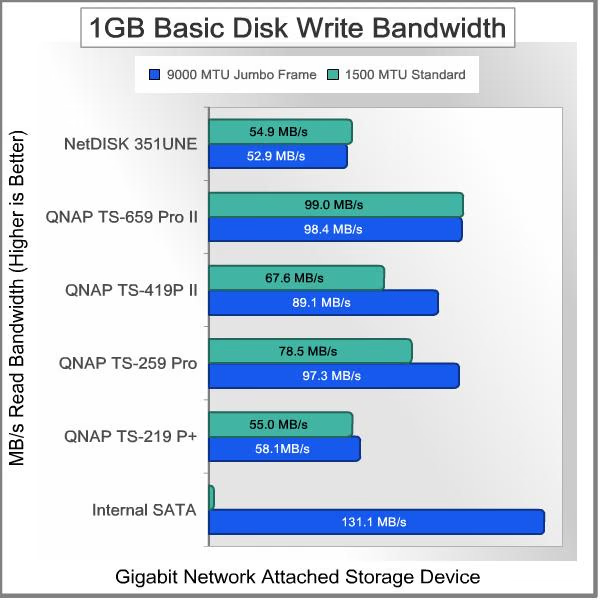
Next up is 10 GB (1000 metric megabytes / 10,000,000,000 bytes) file transfer testing. Using the single-disk configuration in each NAS, and a single Gigabit connection, network throughput will be put to the test, and the effect of any system or hardware caches will be minimized.
10GB Single-Disk Test Results
Examining 10GB basic file transfer speeds, the NetDISK 351UNE only loses about 1 MB/s compared to the 1 GB results. The NAS units gained some, with the use of this larger test file, such that the NDAS only reaches approximately 64% of the performance of the average of the four NAS devices, compared to the 75% we got with the smaller test file. Still, I'm impressed with the results of the lower-cost NDAS device, and it is clearly performing in the range of its advertised ratings. Once again, the Jumbo Frame/MTU value had very little impact on the results for the NetDISK product, most likely due to the fact that the MTU settings are not configurable on the 351UNE model.

In our 10GB write performance tests, the NetDISK 351UNE actually beats out the lowest priced QNAP NAS by a few MB/s. Putting up a decent result of over 59 MB/s with the larger 10GB test file, it narrowly improved on the 55.9 MB/s performance of the TS-219 P+. That's quite a coup for the NDAS technology, right there!

I wasn't sure what kind of performance I should expect; during the unboxing, assembly and initial setup of the IOCELL NetDISK 351UNE, it all looked too simple and easy to me. But, that's why we test, because first and second impressions don't really matter in this technology sector - performance is almost always the driving factor. On that score, I'm quite impressed, when you consider the cost basis for this product. I know it has very little in the way of software features, and can't do most of the cool things that we've become accustomed to in the world of NAS Servers. For backup purposes and basic networked storage though, it puts in a very respectable performance. The fact that it does so for well under $100 is a minor miracle in my book.
In the next section, we're going to take advantage of the NDAS technology, and the fact that the NetDISK device is configured to look and act just like a local drive. We'll perform some benchmark testing that doesn't normally get put into the mix when we test NAS-type devices.
- IOCELL Networks NetDISK 351UNE
- QNAP TS-219P+ Gigabit 2-Bay SATA NAS server
- QNAP TS-259 Pro Gigabit 2-Bay SATA NAS server
- QNAP TS-659 Pro II Gigabit 6-Bay SATA NAS server
- QNAP TS-419P II Gigabit 4-bay SATA NAS Server
Non-Traditional NAS Test Results
In addition to measuring simple timed transfers, to determine how fast it will read and write contiguous blocks of data, Benchmark Reviews was also able to measures NDAS performance using some tests that are traditionally used for internal drives. Because the IOCELL NetDISK 351UNE is treated like a local drive, courtesy of the NDAS software and driver package, most of our favorite HDD/SSD benchmarking tools worked just fine. Most NAS products don't work too well with this type of test program; even though they may have the ability to map the NAS device to a drive letter, they're still not treated like local drives by the Operating System. So, let's look at some results...
ATTO Disk Benchmark Results
The ATTO Disk Benchmark program is free, and offers a comprehensive set of test variables to work with. In terms of disk performance, it measures interface transfer rates at various intervals for a user-specified length and then reports read and write speeds for these spot-tests. There are some minor improvements made to the 2.46 version of the program that allow for test lengths up to 2GB, but all of our benchmarks are conducted with 256MB total length. ATTO Disk Benchmark requires that an active partition be set on the drive being tested. Please consider the results displayed by this benchmark to be basic bandwidth speed performance indicators.
The NetDISK 351UNE turned in a stellar performance on ATTO, reaching a peak Read speed of 65.8 MB/s and a peak Write speed of 76.6 MB/s. It's good to keep in mind that these tests are not always indicative of real-world performance. I never saw R/W speeds this high in actual use; the highest I saw were in the high 50s / low 60s for Read and Write. Still, I'm definitely impressed with these results.

HD Tach Benchmark Results
HD Tach is a software program for Microsoft Windows that tests the sequential read, random access and interface burst speeds of the attached storage device. HD Tach allows write-bandwidth tests only if no partition is present. The graphical user interface (GUI) of the Windows-based benchmark tool HD Tach is very convenient and allows the test product to be compared against others collected on your system or those registered into the Simpli Software database. The important numbers used for comparison are the sustained read and write bandwidth speeds, which indicate an approximate performance level of the product.
The IOCELL NetDISK 351UNE and the Western Digital Caviar Black WD7501AALS 750GB 7200 RPM w/32MB Cache performed at an average Read speed of 52.5 MBps. This is close to the range of performance I experienced during timed transfers of 1GiB and 10GiB files. Don't worry about the glitch in the middle; it was a Windows notification that caused all the data to go into a buffer. The read speed during that period looks a lot like the max speed in the ATTO test, though.....

PCMark Vantage Results
PCMark Vantage is an objective hardware performance benchmark tool for PCs running 32- and 64-bit versions of Microsoft Windows Vista or Windows 7. PCMark Vantage is well suited for benchmarking any type of Microsoft Windows Vista/7 PC: from multimedia home entertainment systems and laptops, to dedicated workstations and high-end gaming rigs. Benchmark Reviews uses the HDD Test Suite to demonstrate simulated real-world storage drive performance in many of our Storage articles. PCMark Vantage runs eight drive tests, each with a specific purpose.
Once the benchmarking tests are complete, the results are given a PCMark score while the detailed result show actual transaction speeds. Results are displayed in the chart below, and if you compare them with the recent test of the Seagate Barracuda 3TB Hard Drive (ST3000DM001) here on Benchmark Reviews, you'll see that it achieves about 60-75% of the performance of that SOTA drive. The exception is on images and video, where it lags much further behind.

CrystalDiskMark Results
CrystalDiskMark 3.0 is a file transfer and operational bandwidth benchmark tool from Crystal Dew World that offers performance transfer speed results using sequential, 512KB random, and 4KB random samples. For our test results chart below, the 4KB 32-Queue Depth read and write performance was measured using a 1000MB space. CrystalDiskMark requires that an active partition be set on the drive being tested, and all drives are formatted with NTFS for our tests. Benchmark Reviews uses CrystalDiskMark to illustrate operational IOPS performance with multiple threads. In addition to our other tests, this benchmark allows us to determine operational bandwidth under heavy load.
Although the combination of the IOCELL NetDISK 351UNE and the Western Digital Caviar Black WD7501AALS 750GB 7200 RPM w/32MB Cache can't compare to the Seagate Barracuda 3TB Hard Drive - ST3000DM001 that was tested earlier this month, it still pulls a respectable 61 MB/s on both sequential Read and Write tests.

All in all, these are a respectable set of results for direct-attached-storage. Sure, they're a bit lower than a true local drive connection, directly into the SATA controller on the motherboard. But, for a NAS device mimicking a local HDD, they stand head and shoulders above the competition at the price point.
NAS Server Final Thoughts
My first and solemn duty is to remind everyone that relying on a collection of drives in any RAID configuration for data backup purposes is a huge error. RAID systems provide protection against loss of services, not loss of data. Several examples will illustrate the problem, I hope:
-
the drive controller goes bad and corrupts the data on all the drives in the array
-
the entire storage device is physically or electrically damaged by external forces
-
the entire storage device is lost, stolen, or destroyed
-
a single drive in a RAID 5 cluster dies and during the rebuild process, which puts higher stress on the remaining drives, a second drive fails
-
floods, earthquakes, tornadoes, etc. (AKA El Niño)
All these points lead to the inescapable conclusion that multiple drives in a common system, in a single location do not provide effective and reliable data backup. Throughout many of the NAS reviews I've talked about high-availability systems, but the NetDISK 351UNE doesn't quite fit that description. However, if you bundle two or three units together, and use the binding features available in the software, you can create a RAID 1 (+ hot spare) volume across the seemingly individual units. That's a unique capability that gets pretty close to enterprise-level redundancy, but with only one unit on hand, I couldn't test it. What you can't get, are the performance advantages of the higher-level RAID configurations. What you do get in exchange is additional system-level redundancy, because each NetDISK box has its own power supply and its own electronics. In a typical NAS, if one electronic component in the PSU or on the main system board fails, the whole unit goes down.
So, even if one whole NetDISK unit goes up in a puff of smoke, your data is still available and accessible. The virtual RAID volume stays online the entire time while the failed device is replaced and the array is rebuilt. That's what RAID systems are designed to do. The inherent redundancy is not meant to serve as a backup file set. A larger NAS with more drive bays offers the possibility of increasing the redundancy with RAID 5/6/50/60, but for a SOHO environment, RAID 1 or 5 is generally adequate. Remember, we're not talking about losing data here; we're only talking about the ability to keep working uninterrupted, if one drive should fail. If two or more drives fail, it's time to pull the local backups off the shelf.
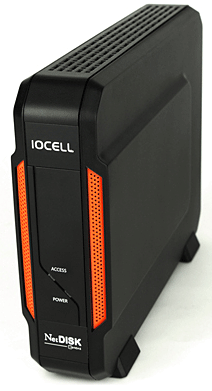
The question I keep coming back to is, "Is there a specific role that a small NDAS device fulfills so well, that it displaces all the other options?" I realize I'm spoiled for life after my last round of NAS testing, but I can't see relying on a single drive for front-line data storage, after living with RAID 5 for a while now. I've been through the process of restoring a system from backups, and if I can avoid it, I will. Even just restoring user data is a challenge; because you have to know exactly where to put it back to, and then the applications have to know that it's there. That's why drive images and snapshots are so popular in the enterprise world. You make an exact clone of your system drive, and put it on the shelf. Of course the replacement process works best when you have an identical workstation sitting there on the same shelf, because the drive image has all the device drivers and system settings that are unique to the hardware it was generated with.
How about as a backup device? That's where I think the NetDISK 351UNE really shines. With all the major interfaces available in one unit, it makes for great flexibility during both the backup and restore process. It's small enough to be transportable, and it supports the new 3GB SATA drives, so it will more than likely hold all the precious data you need to keep on ice. With a simpler (direct-attached-storage) device, you would typically swap two or maybe three units around, always keeping one at a remote location. With an NDAS, you can set up a virtual RAID 1 volume, and keep the array mounted to the network while you swap out the hot spare. That way, you can keep the same drive letter assigned in your desktop environments and not have to configure the drive anew each time it's brought on-line. The replacement drive starts synchronizing itself to the primary disk as soon as it's attached. There are cheaper solutions for straight backup applications, with eSATA and USB 3.0 connections, but it's a whole lot harder to make them accessible to every workstation on the network.
So, what conclusions can we draw, particularly about this high value, single-bay NDAS device? Click NEXT to find out, and discuss...
IOCELL NetDISK 351UNE Conclusion
The performance of the NetDISK 351UNE was very solid, and it met the specifications advertised by the manufacturer, when attached via its Ethernet connection. When tested as a local drive, with ATTO Disk Benchmark, it easily exceeded those specs, achieving Read/write performance of 66MB/s and 76MB/s respectively. In timed tests, it ran at 62MB/s in reads and 59MB/s in writes. IMHO, the performance gains claimed for the NDAS technology are real, and they come at such a low cost that it's easy to understand why IOCELL wasted no time in buying the technology from its creator Ximeta, earlier this year. My only performance disappointment is that IOCELL stuck with the USB 2.0 interface on this unit, and quite frankly, I'm left longing for more - USB 3.0 to be exact. The eSATA connection is a nice option, even though it's technically limited to SATA I speeds of 150MB/s. With the type of drive that is recommended for use by IOCELL, 5400 RPM units, that won't be a real-world limitation.
The 351UNE doesn't go for the flashy or trendy look; instead the charcoal grey exterior implies a sense of solidity. That's what you want in a network storage device, something that will be steady as a rock. The low cost of the device means that it's all plastic on the outside, but it still manages to feel substantial, once an HDD is installed.

The construction quality of the NetDISK 351UNE is a little better than your average external storage enclosure, and not quite to the same level as some of the high-end NAS products on the market. Considering the cost, I think the build quality is very good. There's a lot of Silicon on the system board, and the proprietary stuff is always more costly. So, even though I'm not bowled over by the plastic construction, it doesn't bother me at all. Everything fit together nicely, and there were no gaps or extra flashing anywhere. The PC board was well manufactured, used quality components, and was clean to boot.
IOCELL has pulled off a triple play with the NetDISK product line. The 351UNE has the unique, low-cost, lightweight NDAS protocol that provides a quantum leap in performance at a very low price point. It also has the ability to network several NetDISK devices together in a peer-based architecture, and deliver RAID 0 or RAID 1 functionality that is more modular than the competition. Lastly, once you take it off the network, you can still attach it directly to a workstation or server via the eSATA or USB connections. That's quite helpful in system backup scenarios, which is one area where this product makes a lot of sense.
We've looked at several high-end NAS units lately, so the value proposition for the NetDISK 351UNE is not lost on us at Benchmark Reviews. $59.99 (Amazon) is a shockingly low price for any network storage device and for the cost of most competitors' diskless systems, you can get a 1TB unit from IOCELL ($124.99 at Newegg) and the 2TB model is only $179.99. Considering the current pricing on HDDs since flooding wiped out production in Thailand, the 1TB and 2TB models are an even better bargain, right now. If you need a wealth of software features and higher levels of RAID configuration (RAID 5, 6, 10...), then a full-blown NAS is in your future. They start around $150 for a diskless system, but I urge you to look closely at the features and performance of the low-end units to make sure you are really getting what you need. Without a doubt, value is one of the strongest points in favor of the IOCELL NetDISK 351UNE, based on performance per dollar spent.
Benchmark Reviews is always on the lookout for products that offer a technological advantage, especially ones that can directly benefit the user. That's why we have been at the forefront in highlighting the latest SSD technology, since the earliest days in 2008. The IOCELL NetDISK 351UNE isn't a whole new category of device, despite the NDAS naming convention. However, it is a unique twist on network attached storage, and for once we have a product that's simpler, faster and cheaper instead of slower, more complex and more expensive. Yes, CPUs keep getting faster, but in this case a faster CPU isn't better than having no CPU at all. If you've been looking at getting a NAS, but had trouble justifying the cost, I recommend taking a look at the IOCELL Networks NDAS product line.
Pros:
+ 62 & 59 MB/s best read/write performance
+ Excellent product value
+ Modular RAID capability via device binding
+ LPX transfer protocol isn't hacker-bait
+ Diskless, 1TB, and 2TB units available
+ Hot-swap for RAID 1 volumes
+ Gigabit Ethernet connection
+ Low power consumption
+ eSATA port for direct storage connection
+ High quality construction
Cons:
- 7200 RPM drives not recommended (Starting current <2.5A)
- eSATA limited to SATA I speeds (150 MB/s)
- USB 2.0 is too slow
Ratings:
- Performance: 9.25
- Appearance: 8.50
- Construction: 9.00
- Functionality: 9.00
- Value: 9.75
Final Score: 9.1 out of 10.
Excellence Achievement: Benchmark Reviews Golden Tachometer Award.
Benchmark Reviews encourages you to leave comments (below), or ask questions and join the discussion in our Forum.
Reader comments from the original article
6 comments were posted before commenting closed. They are preserved as written. Original avatars no longer resolve and are shown as a placeholder.
RE: IOCELL NetDISK 351UNE Network Storage Device Mack Permalink:
Pretty cool device. Its good to see some creativity out there. Thanks for the review!
Agreed Bruce Permalink:
Yeah, I was sorta caught off-guard by this product. I wasn't really expecting something this unique and this good. There's so many me-too products out there, and it can be tough to spot the stand-outs.
RE: IOCELL NetDISK 351UNE Network Storage Device Athlonite Permalink:
Me likes I've been looking at getting a small NAS to plonk on the GB switch but I seriously wasn't interested paying 2~300 bucks for the ability.... This product is just what the disk space shortage ordered
Look for the bargains..... Bruce Permalink:
"The models with 1TB and 2T drives preinstalled are better bargains now that the Thailand flooding has driven the price of bare HDDs up through the roof."
Where have you been all my life. Mergatroid Permalink:
Wow, I sure could have used this a few months ago. I have a NAS with a single drive, not very good but serviceable for file streaming and storage. I have a dual drive NAS in RAID 1 backing up the first NAS, and backing up my system backup drive. I didn't really need a RAID1 for backing up my NAS and system backup, but it added redundancy as you mentioned. One of these network drives (or two) would have been just what I was looking for. I hope they're still around when I need more storage. I really like the transfer rate and the universal nature of the added ports (USB and eSATA). I think this is an amazing value at the price mentioned. Nice review too. Good breakdown on what the drive does and what it doesn't do.
It's a great alternative... Bruce Permalink:
It's a great alternative to some of the other solutions out there. There's no doubt that it's the most cost-effective choice for several usage scenarios, where it performs as well as devices that are 5x the cost.