
NZXT Sentry LXE Digital Fan Controller
Cooling is a necessity for high performance gear. From the humble passive heatsink to the monstrous dual-fan tower coolers, airflow is an essential part of the process. Typically we connect fans to our devices via the motherboard, or directly to the PSU. If we're lucky, we can control the fans via software such as SpeedFan, otherwise the hum of high speed performance-orientated fans is permanent.
Sometimes we want to turn down the speed of fans to suit the level of cooling required. This is where fan controllers come into play. Here we have NZXT's top of the range fan controller solution, the Sentry LXE. Does it give us the level of control required for peaceful performance? Benchmark Reviews is here to find out!

Fan controllers have many forms. Some are built into cases in the form of simple potentiometers (variable resistors), others use a 3.5" or 5.25" bay to house a series of potentiometers, some form of visual display, or both. NZXT's solution takes a different approach by combining internal components with an external display. The aim is to provide all information and control mechanisms in a single slick external unit, and have the clutter of cables concealed within the case itself. It's definitely interesting on paper, but how does it perform in the real world?
In this review, we will be connecting the fan controller to a modern PC for evaluation. The temperature probes will be placed throughout the case, and all fans will be controlled via the Sentry LXE controller.
Manufacturer: NZXT Corporation
Product Name: Sentry LXE
Model Number: ACCNTSENTRYLX
UPC: 00811121010126
Price As Tested:$54.99 (NewEgg)
Full Disclosure: The product sample used in this article has been provided by NZXT
NZXT Sentry LXE Features
Intuitive Touch Screen LCD
Advanced, touch screen LCD displays temperatures in C/F, RPMs, along with the date, time, and day of the week. Users have the ability to switch the display off for complete darkness for more immersive gaming sessions.
Complete Control
5 Temperature Probes keep tabs on thermals throughout the case while the 5 Fan controllers adjust the fans’ RPM speed for at least 10W per channel. Allows users to automatically adjust the fan speeds to correspond to a specific temperature, manually customize for extreme overclocking capabilities, or set to absolute silence.
Temperature Alarm
Instant notification if temperatures rise above a designated point.
Sleek Design
Brushed aluminum frame provides sleek aesthetics for any desktop.
Rechargeable Battery
The Sentry LXE features a rechargeable battery for up to 500 times, keeping the LXE life time longer without the hassle of replacing batteries constantly.
Using a NZXT developed PCI board and external touch display, the LXE allows for more 5.25" bays freed up for other peripherals.environment. Simply set the fan controller atop your PC or desktop and connect through PCI card interface.
Note: Features provided by NZXT
NZXT Sentry LXE Specifications
| Fan Adjustment Range | 3.7V to 12V |
|---|---|
| Fan Channel | 5 |
| Max watt per channel | 10W |
| Temperature Module Channel | 5 |
| Temperature Range | 0 ~ 99? / 32 ~ 199.9? |
| Measurement Frequency | Every 2 Seconds |
| Temperature Alarm Range | 30? to 90? |
| (AUTO) | Min 50%, Under 0-25?,fan RPM 50% |
| (MANUAL) | Min 40% |
| Screen Size | 5.27 inches |
Note: Specifications provided by NZXT
Closer Look: NZXT Sentry LXE
The Sentry LXE is a great looking device. Its frame is made from 4mm thick brushed aluminium in swish black. The inset of the frame has a fake chrome lining to satisfy those who must have shiny things.
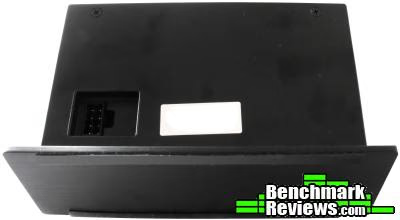
Facing the back we can see the four screws which hold the device together, and a single 8-pin power/data connector. This plugs straight into the expansion slot component, otherwise referred to as the PCB (printed circuit board). Along the base of the Sentry NXE are two thin rubber strips for grip.
Viewing the Sentry NXE from the side reveals its chunky stature, and the single-piece aluminium frame.

The main unit is lifeless without the PCB which provides power and controls/monitors the fans. This controller consumes a single molex connector and an expansion bracket. It does not connect to the motherboard, but it will render the slot inaccessible. A small piezo speaker (next to the rechargeable battery) facilitates the alarm function. To the right of the battery is where external power is connected, and above this is where the temperature probes are secured. Along the top of the PCB are the fan headers.

NZXT Sentry LXE Detailed Features
There are a bunch of cables which come with the NZXT Sentry LXE. The first pictured is a molex connection which provides power to the PCB. It has both male and female connectors such that the power connection can be shared with other devices.
Below this is the lengthy (approx 2m) 8-pin cable which connects the main display unit to the PCB.

Five 3-pin fan connections are supplied (which is the maximum number the controller can support). Each cable is labeled 'Fan' followed by a number from 1 to 5. This is handy when organising the display order on the main unit. It also helps to match the temperature probes with particular fans.

Just as the fan cables are labelled, so are the temperature probes. The Sentry LXE comes with seven probes (even though only five can be used at any one time). Perhaps their delicate nature necessitates having spares. These cables can be separated by tearing them apart carefully.

Semi-transparent stickers are provided to secure the temperature probes onto any components you wish to monitor.

Finally, when all is connected, we're met with the flashy lights of the touchscreen LCD display. Each number along the left-hand side of the screen corresponds to a fan/probe on the controller. You'll have to remember these mappings, or use some good old post-it notes.
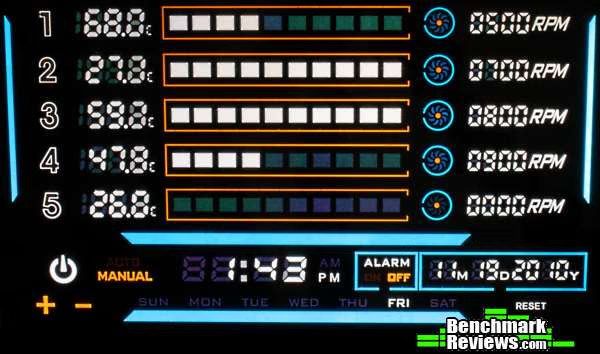
Pressing any of the five numbers once will cause the temperature to blink. Using the '+' and '-' symbols in the bottom-left-hand corner increases/decreases the temperature value. This value corresponds to the alarm temperature threshold. If the temperature hits this value, the alarm will sound (if you have it enabled), and the associated fan will churn at maximum speed.
Hitting the same number again gives us control over the selected fans RPM value. A value below 40% (or 4 blocks out of 10) turns the fan off when in manual mode. In automatic mode, the minimum is 50% (25 degrees Celsius, 77 degrees Fahrenheit), which increases as the temperature increases. Switching between manual and automatic is as simple as pressing to the right of the power icon.
Holding down any number will cause all temperatures to start flashing, such that you can choose between Celsius or Fahrenheit.
In addition to fan control there's a time, day, and date display. Pressing either the time or date areas selects them for alteration. The day is automatically set based on the date.
Finally there's the 'reset' button for taking the settings back to defaults, and the power button for turning off the display (the controller still functions as programmed).
Testing & Results
Testing Methodology
The test set up for the NZXT Sentry LXE fan controller consists of hooking up the device to a X58 based system. Five temperature probes are placed throughout a Silverstone Raven RV01 case, one on the underside of the HDD, one on the base of a Thermalright Ultra eXtreme 120 heatsink, one between the two main intake fans, one on the heatsink of the 4870x2, and one on the VRM (voltage regulation module) of the motherboard.
This system has four main fans. Two large 180mm intake fans, a 120mm CPU fan, and a single 120mm exhaust fan. All four have been matched with the closest temperature probe. Testing involves using the controller for a few days in an everyday environment, noting its usefulness and any concerns.
Test System
-
Motherboard: Gigabyte GA-X58-DS4
-
System Memory: Patriot Viper 1333MHz CL9
-
Processor: Intel Core i7 920 @ 4GHz
-
Audio: ASUS Xonar Essence STX
-
Video: HIS HD4870x2
-
Disk Drive 1: Western Digital Caviar Black 600GB
-
Enclosure: Silverstone Raven RV01
-
PSU: Corsair HX620
Results
Rest assured, the Sentry LXE works as advertised. After a few days of usage, no major problems have been encountered. The temperatures update often, and the alarm works when required.
A small issue with the main unit occurred where the screen displayed garbled information. The controller still functioned correctly, however. Unplugging it and reconnecting fixed it. There's also a small delay between the unit being powered on, and the fans spinning down to their assigned settings.
All in all, the controller is very handy. During the night you can turn your fans down to maintain a peaceful silence, or ramp up the fans for a benchmarking session.
NZXT Sentry LXE Final Thoughts
If you're in the market for a fan controller, and you dislike being restricted to staring at your tower to monitor temperatures, the external NZXT Sentry LXE is a great option. The large display is easy to read during the day, and the touchscreen interface works reasonably intuitively.
It would have been nice to have a software control option, but that would no doubt raise the cost of the device. The main issue with any hardware fan controller is that the temperature probes are rarely as good as those built into components themselves. Monitoring CPU temperatures, for instance, is difficult when using external probes.
Nonetheless, this controller is as good as you're going to get. 10W per fan channel is handy for high performance fans, and having full control over their speed is great when you want peace over performance.
NZXT Sentry LXE Conclusion
NZXTs Sentry LXE fan controller performs just as you'd expect it to. Fans are set to their assigned settings, temperatures are constantly monitored, and the current RPM is always displayed. It's a great unit for enthusiasts who like to keep track of their gear, as long as 10W per channel is enough (which is equivalent to 0.833A at 12v). If you're one of the few insane people with Delta fans, you're going to need a little more grunt (upwards of 12W per channel).
Appearance wise, the LXE is modern, understated and professional. It doesn't try hard to compete for attention, so you could leave the display off and have it look like a nice photo frame. On the other hard, the bright display is eye-catching and geeky. The best of both worlds.
Build quality is very good. The aluminium frame is solid, and the unit shows no signs of poor structural design.
When it comes to functionality, the Sentry LXE goes above and beyond just fan control. It provides a handy clock for those full-screen gaming sessions where the taskbar is out of view, and sports a suitably annoying alarm to warn the user when their cooling isn't sufficient. The loss of an expansion slot to accommodate the PCB, and the fiddly nature of the resistive touchscreen are the only small issues here.
Last but not least, there's the question of value. At $54.99, this fan controller is a decent piece of kit. For a large external touchscreen display which shows everything clearly, you really can't go past the LXE. There are cheaper internal options with more channels and higher wattages, but you lose the accessibility of having an external unit.
All considered, the Sentry LXE is a great product. It has my full recommendation for anyone looking for a solid fan controller with digital display.
Pros:
+ Large external display
+ Touchscreen interface
+ Manuel and auto options
+ Alarm feature
+ Rechargeable battery for storing settings
+ Spare temperature probes
Cons:
- Renders an expansion card slot unusable
- Limited areas of screen utilise touch
- Awkward ribbon cable used to connect main unit to PCB
- Resistive touchscreen is a bit fiddly
- Terrible instruction manual
- 10W per channel may be limiting for some extreme fans
Ratings:
-
Performance: 8.50
-
Appearance: 9.75
-
Construction: 9.75
-
Functionality: 9.00
-
Value: 8.00
Final Score: 9.0 out of 10.
What are your thoughts on the NZXT Sentry LXE digital fan controller? Leave comments below, or ask questions in our Forum.
Reader comments from the original article
1 comment were posted before commenting closed. They are preserved as written. Original avatars no longer resolve and are shown as a placeholder.
RE: NZXT Sentry LXE Digital Fan Controller Doug Permalink:
Nice review and piece of hardware, but it's redundant--as are all devices of this sort. It would be nice to see an item like this use the ALREADY ON THE BOARD temperature monitors. It would negate the need for temp probes. Passing temps to the hardware could be done with a simple driver. That option would also clean up 5 probe leads. But for absolute in case airflow and organization, Speedfan is the way to go.