
Sentey Burton GS-6500 Computer Case
Sentey Burton Computer Case Review
Manufacturer: Sentey
Product Name: Burton Computer Case
Model Number: GS-6500
Price As Tested:$109.99 (NewEgg)
Full Disclosure: The product sample used in this article has been provided by Sentey.
The Sentey Burton (GS-6500) is a full tower enclosure developed for enthusiasts who desire high performance and a sexy exterior. This case flaunts its multiple LED fans, and LED buttons, turning heads in the process. The Burton, is one of several models belonging to the Extreme Division line of computer cases. The Burton comes in 3 flavors. The GS-6500 in glossy black, the GS-6500B with blue highlights and grills, and the GS-6500R with red highlights and grills. It's pretty easy to glance at the exterior of this case and be charmed into submission. As your jaw drops, your guard is let down, but don't worry, Benchmark Reviews presents an in-depth look at the all black GS-6500 case, from its highly glossy exterior to the bright blue glowing interior.
Sentey's inspiration comes from their philosophy. Performance, quality, innovation and sustainability are combined synergistically to meet their goals of providing high value through design. Sentey is an international corporation currently headquartered in Miami and with a strong Latin American presence. They have manufacturing in Shenzen, China, and an operations center in California.
.avif)
This computer case shines visually, with a stunning array of fan LEDs, as well as a beautiful array of LEDs on the top console, but ultimately, the true purpose here is to determine if this case is more than just visual appeal. Does the Sentey Burton GS-6500 attain the level of excellence that the computer enthusiast expects?
Sentey Burton Features*
- High Tower Case for PC
- 1 mm SECC Rolled Steel
- Supports E-ATX, ATX, and Micro-ATX
- Up to 10 Drive Bays (internal + external)
- 7 Expansion slots
- Quick dismantle without screws or tools**
- Top Panel with 4 USB 2.0
- High Definition Audio Ports, Mic
- Water Cooling Ready
- Hidden Cabling System
- Card Reader and Top Mounted SATA. e-SATA
- 6 Cooling Fans
- Tool Box Storage (in case )
- SSD ready
* Features and certification per Box literature.
** See review for details.
GS-6500 Specifications*
|
Case Type |
High Tower, 1mm SECC Steel |
|---|---|
|
Color |
Black GS-6500, Red GS-6500R, Blue GS-6500B |
|
Dimensions |
550 mm x 214 mm x 520 mm (21.65" x 8.42" x 20.47") |
|
Weight |
12.1 kg Net |
|
Cooling |
Front: 140mm LED, Rear: 120mm LED, Top: 2x120mm LED, Left Side: 2x80mm LED |
|
Drives Bays |
External 5.25" x 5 |
|
Expansion Slots |
7 |
|
Motherboard Size |
M-ATX, ATX, E-ATX |
|
Top I/O Panel |
USB 2.0 x 4 |
|
Card Reader |
Reads CF/MD, XD, SD/MMC, TF and MS/M2 cards.** |
* Features and certification per Sentey product literature at website.
** Card reader not tested for all formats.
Fan specs: Sentey did not provide fan specifications.
Closer Look: Burton Exterior
This case is visually stunning with a very high gloss black painted exterior. These photos were taken in a manner that purposely reduce the visual appearance of the specular quality, but I can assure you, this case has an almost mirror like finish.
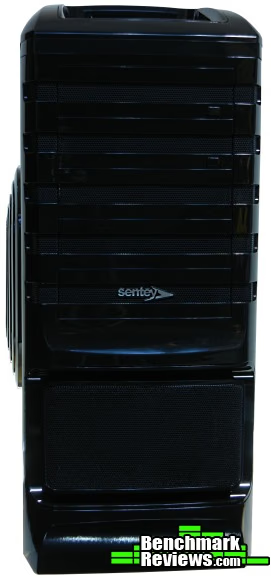
The front of the case provides access to four 5.25 in drive bays. The drive bay covers can be removed and snap back in place as needed. What really impresses me are the top two bay panels. These are mechanically designed to open a standard DVD / CD door mechanism. This is a great solution for keeping the great exterior look of your case even when the internal peripheral does not match. This is explained in more detail later.
Below the set of external bays is a removable perforated cover that has a fan filter that can be cleaned.
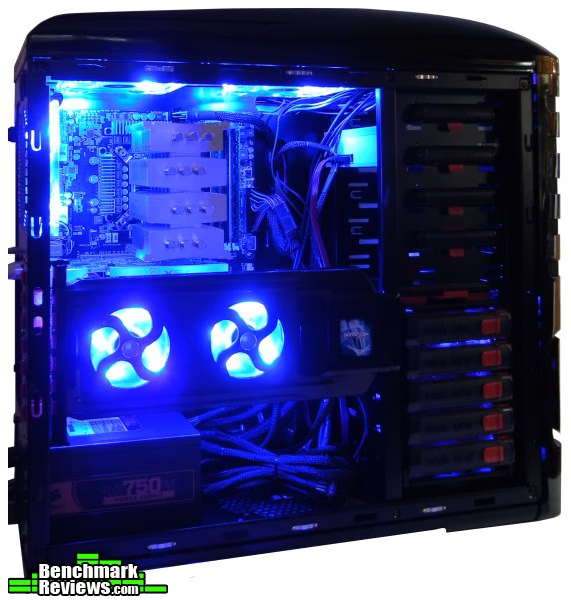
In the dark, this case really shines with an internal blue glow thru every perforation. Each fan includes an LED, and there are six of these strategically placed on the top, back, front, and left sides. This case almost screams mod me with an acrylic panel. Once covered, the case still exudes a blue ambiance, but more subdued, and very tolerable.
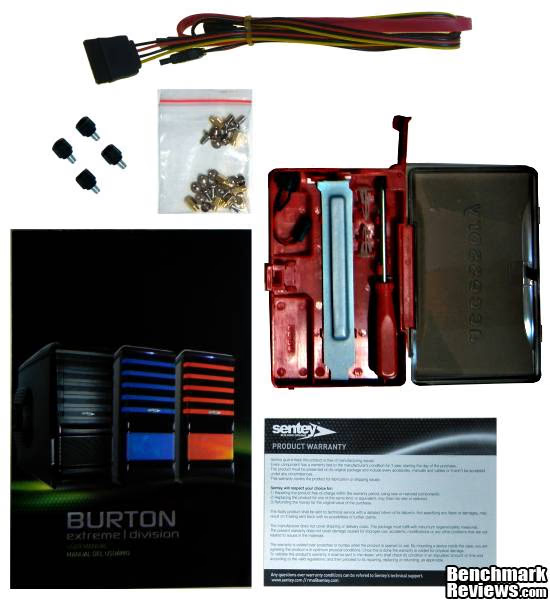
The Sentey Burton arrived in a box with full color graphics on all sides without damage. The case itself was encased in Styrofoam and also included a cloth-like cover. All the parts were present. The packaging includes a multi-page dual-language insert, tool-less case screws, SATA cable and SATA power cable, a mini speaker, and a parts bag with standoffs and motherboard mounting screws, as well as peripheral screws. Not shown in the photo is a cloth to clean the case, and the mini-CD driver disk for the card reader. This disk includes a readme file that explains in more detail how to install the card reader.
The insert has several full color pictures and diagrams. It includes an exploded assembly diagram of the case, diagrams of the card reader and USB ports, HDD cage info, and very basic assembly instructions. A first time builder may want to review or watch how-to videos before starting their assembly. The motherboard tray does not include built-in standoffs and it is not removable.
Also included is a small snap in mini-tool case, which houses a screw driver, an expansion cover plate, and several other components that can be useful, such as a soft wiping cloth to help remove those stubborn finger prints (not shown). I really like that this tool case has its own mounting location internally.
The warranty card specifies a 1 year warranty, but it requires that any return include all packaging and parts, including manuals and cables for the case or the case won't be accepted “under any circumstances”.
.avif)
The perforated area with slits on the left side of the case covers two 80 mm fans that pull air into the case to help cool your graphics card(s) and other peripherals. This also functions to allow the blue LEDS to trickle light thru giving an rather please blue ambiance to the left side of the case. This section of the case is attached via screws (requires screwdriver) to the case cover, and removal is necessary to reach the filter. Due to the design of the larger slits, some of the air will bypass the filter.
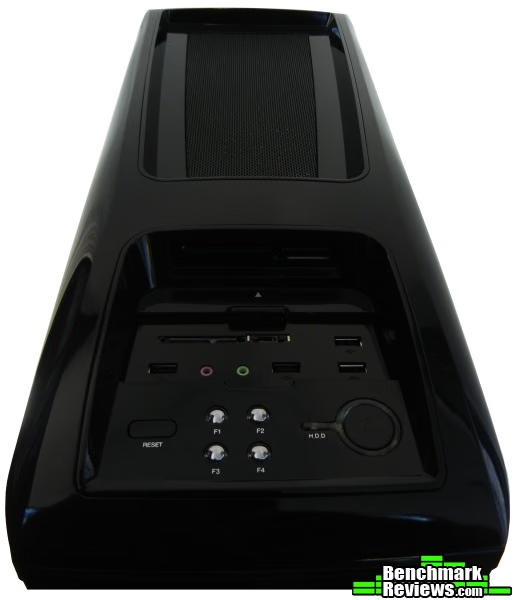
This particular image shows the top of the case in all its glossy splendor. The counterpoint to this is that to keep the case in splendor, you will be needing that wiping cloth frequently as the paint and plastic really highlights every tiny dust particle and fingerprint. Sentey includes a reset button, four buttons that control the fans (on / off), the audio out and mic jacks, SATA and e-SATA as well as four USB 2.0 ports. Did I mention it also includes a card reader? Its a little difficult to see well here, but later we will get a better look. There is a sliding cover for the ports which can be used to protect them.
Each of the four fan switches glows a pleasant red, the HDD LED mixes with the power LED, providing a somewhat purplish hue. It looks really great in the dark.
On the top of the case, and toward the back end of the case, there is a micro-perforated region that covers two 120 mm fans with LEDs. These fans transfer the hot air in the case to the exterior. If one was inclined to swap the fan direction, to create a positive pressure design, there is a fine screen underneath the micro-perforations, however, unless you plan on removing your motherboard, there is no easy way to clean this screen. Since no screen is actually required for its current orientation, venting outward, its serves more to attenuate the light from inside the case.
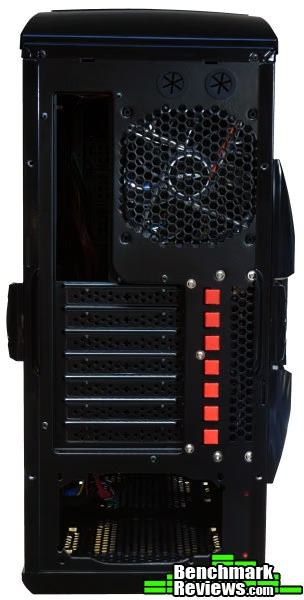
Here we can see that Sentey provided 7 tool-free expansion slots. There is a 120 mm fan that pulls air from inside the case and vents to the exterior. The expansion ports are of the disposable knock-out type, therefore, you will have a large gap in your case if you remove the card that was supposed to be there. However, Sentey has provided a removable port cover (in the tool case) that you can use as a replacement unless you remove multiple cards without any substitutions. Unfortunately, the replacement cover is not painted to match the case.
You may also note the two large punch-outs with rubberized grommets for water cooling. The remainder of any water cooling efforts are all left to after-market devices.
Also, we note that this case is designed to have a bottom-mounted power supply. Air that cools the power supply never mixes with the case air, thus a more efficient cooling system. There is a micro-perforated screen at the bottom of the case, but it is not a slide-out filter. These screens are very easy to clean, using a vacuum, but it would be nice to get better access to them. We also see some large unfiltered perforations at the rear of the case. The case has a slightly negative pressure design which will cause dust to pass thru these perforations and build up on the inside of the case. This will be discussed in more detail later.
Detailed Exterior Features
The GS-6500 is manufactured using SECC steel, meaning that it is protected from rust and corrosion by an electro-galvanizing process. The molded plastic parts felt solid and had a very nice finish.
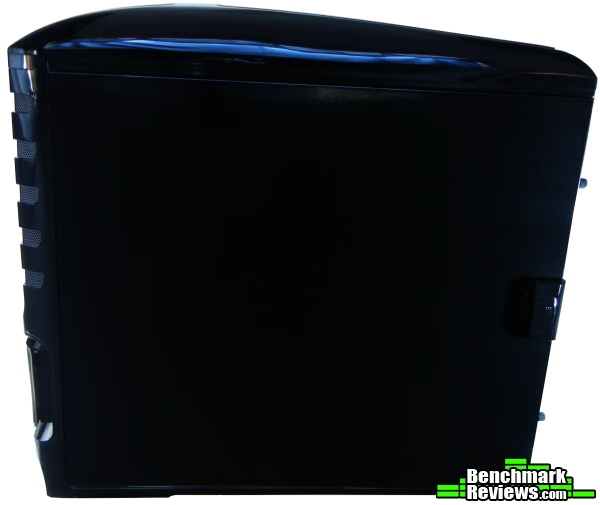
All of the steel was painted black with an extremely glossy finish. The case covers can be a little bit tight when trying to close them, especially from this right side as shown here, but the latching mechanism gives a solid lock in place feel.
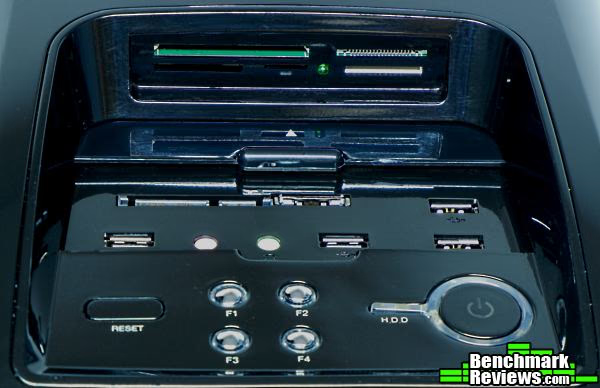
The top tray houses the card reader, shown here with a much better view. This top tray really looks great in the dark with the LEDs, and Sentey deserves praise for this. However, a couple of USB 3.0 ports would have been nice here.
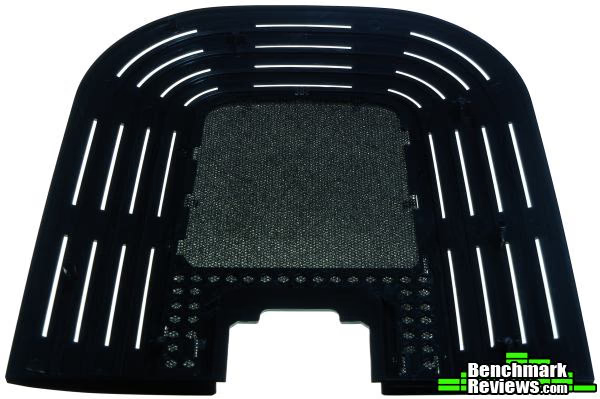
This is the decorative left vent cover. A screwdriver is required to remove this from the left case cover so that you can reach the filter. Also, the large outer slits, though attractive, will allow air to bypass the filter completely.
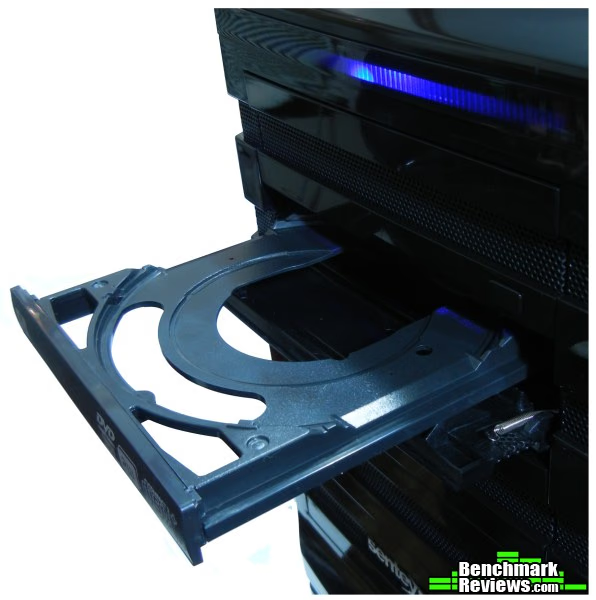
Here's the DVD/CD cover exposed to show the spring and internal mechanism. So, essentially, your DVD player mounts in the usual way, and the door cover attached to the bezel overlays the DVD player. Pressing the button at the bottom right of the cover, mechanically presses the DVD button, and opens the cover. The spring mounted to the door allows it to automatically close once the tray is retracted. The push button covers can be removed, for those users who dislike the idea of a messing with an added door mechanism.
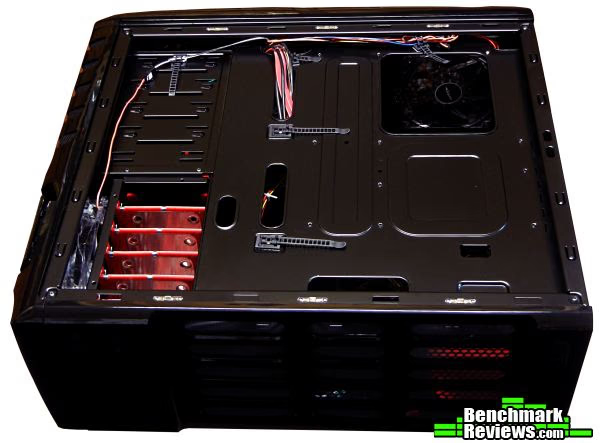
Here we see the bottom of the case at an angle. The underside of the Sentey Burton is completely painted. The mounting feet are sufficiently tall enough to leave space to allow the PSU fan to vent properly on an even surface, but might not be tall enough for shag carpet.
Closer Look: GS-6500 Interior
The inside of the Sentey Burton is completely painted black. All of the edges were finished. There were no sharp edges. The case is designed to fit the PSU just behind the snap-in tool case as shown below.
The expansion ports have a tool-free latch system. My graphics card locked in with only a small amount of effort and with a decent feel to the latching mechanism. However, I had to be careful, to align the plastic pin to the mounting hole with this design, and there is some laxity with the latching mechanism, in that, the card was able to move up or down very slightly. On closer inspection, the latching mechanism appears to work to hold the card in place, but the pin does not fully penetrate the bracket hole adequately. My preference would be for the pin of the latching mechanism to be a little longer, and put just a little more pressure to keep the card in place. Removing the video card was easy.
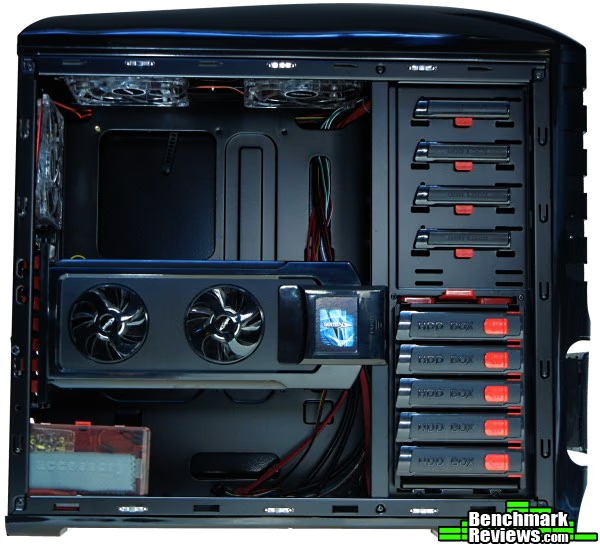
A very innovative feature to this case is the hinged fan assembly for the two 80mm fans. This assembly swings outward should you need to access the case internals, and can also be quickly and easily detached from the case itself. Electrical connection for the fans is via 2 contact pads at the left side of the assembly. In a later photo, you can see this fan assembly can be removed completely.
There is a decent window for the cpu back plate. The motherboard tray is not removable. Another feature is the tool-less external drive bay mounting system. The external DVD easily slid in place by de-latching the locking mechanism, and it is locked in place by pushing the latch back in place. One plus noted is that the pins used for latching to the external drive bay peripherals are made of metal, which will (hopefully) last longer than plastic.
There is quite a lot of space for expansion cards which measured 13 5/8” (346.08mm) with a simple measuring tape from the backplate to the drive cage. There is adequate space to route wires to the right of the motherboard especially because the HDD cage orients perpendicular to the expansion cards. There is also an unpopulated fan mount here, but the likelihood of it being used is slim, because the PSU wires have to cross right over it.
The GS-6500 has several cutouts for passing cables and a dedicated area for running cables. The cutouts and the space for cables is adequate. The case itself includes multiple cables for the usual switches, jacks and ports, however, the USB cables are not long enough if you want to properly route them in a hidden fashion.
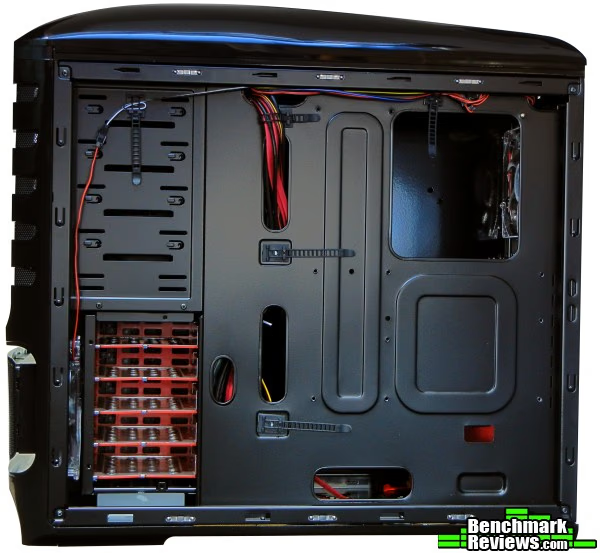
The right side of the case shows the back end of the HDD cage and a better view of some of the cable portals. There is 5/8” (15.875mm) of space between the motherboard tray and the case cover. Reversible cable ties are allocated to various locations. There are not really any cable tie off points in this design. Instead, the cable ties use a permanent sticky tape to adhere to the case. However, this tape did not adhere well. No additional reversible cable ties are included.
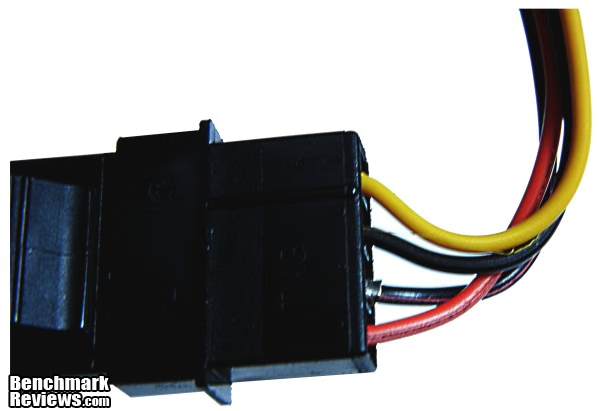
This is one molex connector demonstrating an issue with exposure of the molex pins at the base of the connector. Initially the pin was sticking out about twice this distance, and this image is after I attempted to push it back into the proper seat. Eventually, I had to use needle nose pliers to push it back in. Both connectors had the same problem. Electrical tape was later used to insure that the pin would not be a problem in the future.
Detailed Interior Features
So far the Burton has shown significant innovation, but also some of the money saving ideas like using self-adhering cable ties has not worked out so well. Lets get into more detail, and see what else this case has to offer.
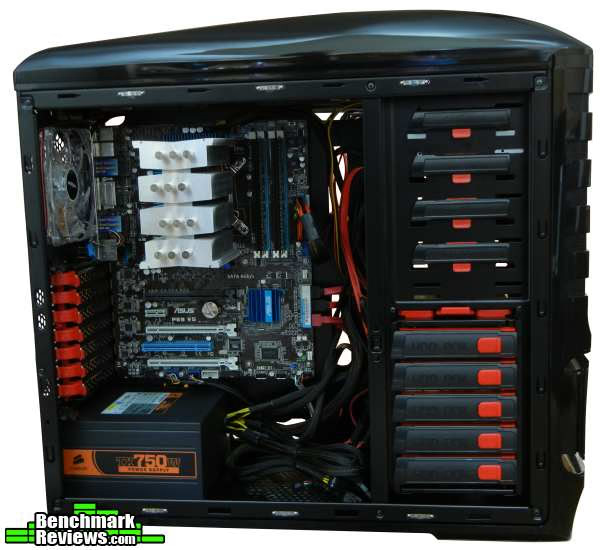
The Sentey Burton has plenty of room to the right and just below the motherboard. However, unless you have a modular PSU, this will be filled with unused PSU wiring. There is simply not enough room on the back side of the motherboard to store all this cabling. The last expansion slot might be best for USB or e-SATA expansion brackets or similar because it will not accommodate more than 0.5 to .7” (12.7mm) from the PSU to the slot. The depth from the standoffs of the motherboard tray, (measured from the top of the standoffs) to the inside cover edge is 7” (177.8mm). This is more than adequate for the Scythe Mugen 3 installed here. There is 1 5/8” (41.28mm) space between the top of the motherboard and the case, some of that is taken up by the 2 fans at the top.
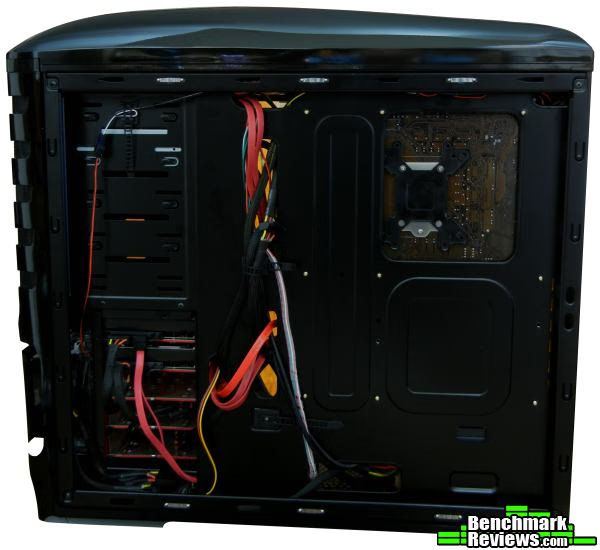
On the right side of the case there is 5/8” (15.88mm) of space between the back of the motherboard and the case cover. This a pretty decent amount of space. There is also a larger area next to the drive cage that can be used to place extra cables. There are channels located at the bottom and top of the case as shown in this photo which can also be used to run cables.
One issue that is noted is that the reversible cable ties are unable to stick strongly enough to the painted surface of the case. In this photo you can see that the top middle cable tie is missing (because it could not stick to the case). All three of the cable ties that are supposed to run down the middle of the case failed to adhere to the case either as I was working on the cabling or soon after.
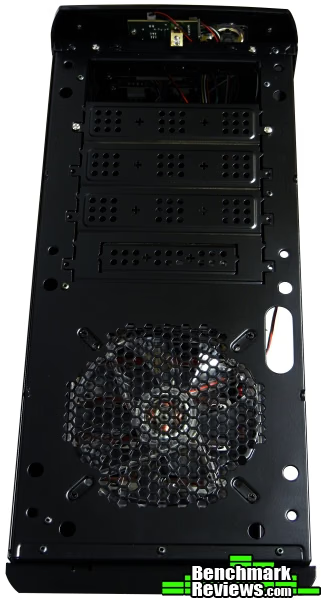
The front bezel lifts away from the case pretty easily. There are no wires that prevent the bezel from lifting off. The external drive plates are snapped off, but the design incorporates a mountable screw hole, that allows the plate to be put back into place. This is actually a pretty good idea. The 5th drive slot can also handle a 3.5” drive. However, the exterior portion of the bevel is designed to remove in its entirety, so you would need to purchase a cover plate for the smaller drive, and there is no drive cage adapter internally.
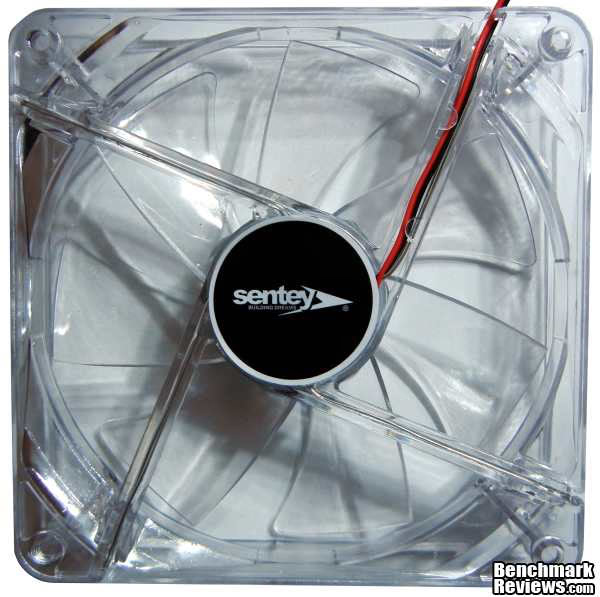
The fans are remarkably quiet. They do not include any specific modeling label or identification. The wiring for these fans terminate with standard connectors to the fan controller, however, you will certainly need extensions if you decide to replace with a non-proprietary fan. The voltage to the left fan bracket measured at 11.96 vDC (fans off) which suggests that if you desire more air flow you will have to buy different fans.
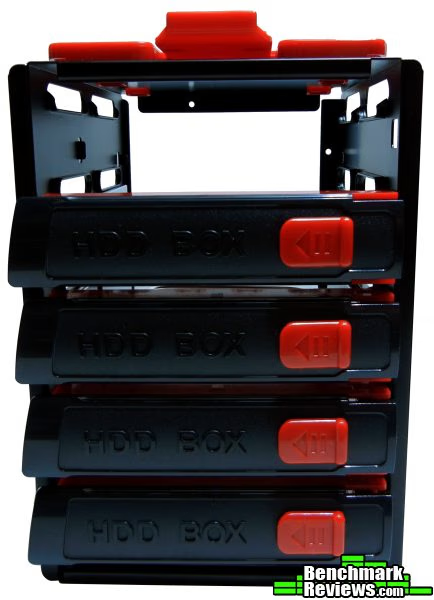
Here's a close-up of the removable hard drive cage. Once assembled the drive and the sleeve simply slide in. It locks into place with a positive feel. Hot Swap SATA is missing from the case design. This is very disappointing for a case with so many great features.
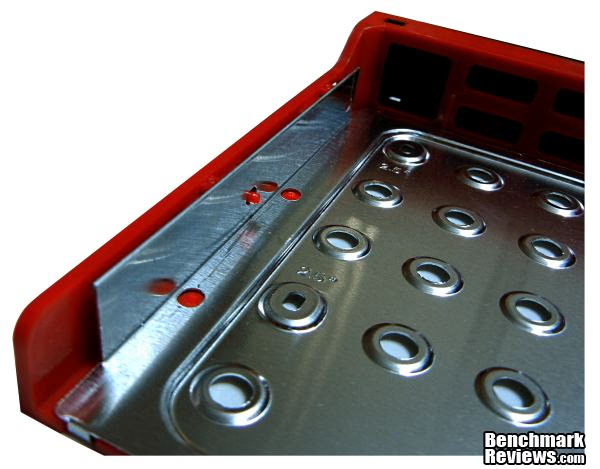
The hard drive is mounted to the drive sleeve between the metal plates, by angling the drive into non-moving pins on the right side, and then pressing a lever on the outside of the sleeve which forces the pin into the screw holes of the drive. In this photo the middle pin is shown because the lever has been pressed into place. Sentey should have followed the lead with its external drive pins and kept these metal, but unfortunately, they are plastic pins. One plus, is the hard drive sleeve also includes holes for the smaller SSD form factor which are then screw mounted from the bottom of the sleeve. This design does not use rubberized grommets to reduce noise, but despite this I did not hear any HD noise. This may be related to the fact that the newer drives are less noisy.
Sentey Burton Final Thoughts
The Sentey Burton GS-6500 enclosure is solidly built. It has a very high gloss almost mirror like finish, with a beautiful array of LEDs that light up the case when viewed in the dark. The bright blue fan LEDs are tastefully positioned to allow just the right amount of light thru the case so that the light does not appear glaring or annoying in anyway. I love the overall look of this design. If you are looking for a lot of flashy LEDs then this case is screaming for an acrylic window, because when the left case cover is removed, you get all 6 of the fans beaming bright blue light. It really looks great with the case cover off. Unfortunately, the acrylic window is not sold as an available option. Not every builder will want an acrylic window, so, maybe this could be an option available in the future should Sentey ever chose to make version 2.
I really liked the exterior drive bay cover design that allows the case to maintain its exterior composition and still mount a DVD player or two. This means, that the case will look great even without a door that has to be opened to reach the drives. By contrast, most other cases that are designed to retain their exterior appearance, utilize an annoying bezel door that has to be opened each and every time the DVD needs to be accessed.
Another feature of this case is the tool-less design of the expansion ports, and drive bays, both internal and external. Because of the positioning of the HDD cage, there is more than enough space to handle very large graphics adapters. One feature that is clearly missing from this case is hot swap SATA capability. Cable routing was adequate for this case. Unfortunately, the reversible cable ties would not stick to the case, and there were no additional tie mounting points. A more sensible design would be to provide tie mounts at various locations or provide stickier and slightly longer reversible cable ties.
Because of the bottom-mounted PSU arrangement, you will most certainly need at least 24” cables or a PSU extension if you plan to route behind the backplane. You may also want to find some extensions for the other PSU cables depending on your board layout. The PSU sits very close to the 7th expansion slot, relegating that last slot to something pretty thin or something like a SATA bracket.
The top mounted card reader is a real plus. Also, the SATA, and USB ports and jacks are well placed. It would have been nice to see USB 3.0, but this is missing. Also, I am concerned about the pins of the molex adaptors being somewhat loose, and partially exposed. This can easily cause a short if it had not been repaired with a little electrical tape. I have seen this issue before with molex connectors, especially when the connector is only populated with 2 wires.
The case includes 6 fans, all with LEDs, and all very quiet. I like the overall design and placement of the fans. Sentey decided to go with two smaller 80mm fans on the left side of the case more for looks than for performance. A lot of effort went into designing an internal bracket for the fans that was removable. And now a word on performance. For those bored to tears by math, feel free to jump this next paragraph.
If one does some research into fan theory, its pretty clear that 2 fans are not better than 1 fan of twice the diameter. This is because the total area of the fan blade is proportional to the square of the radius. Assuming, a radius of 1”, two fans would have an area of 2 x (3.14 x 12) which is 6.28 sq in. Versus 1 fan of 2”, (3.14 x 22) which is 12.56 sq in of area. It is known that fan efficiency improves with increasing blade diameter and fan CFM is linearly proportional to RPM (within certain ranges). Basically, what it comes down to, is that unless there are certain design restrictions, 1 larger fan is better than 2 smaller fans taking up the same mounting location, because the actual available area of the 2 smaller fans is less than the larger fan. Larger fans tends to be less noisy and more efficient as well. What I am suggesting is that Sentey would have gotten much better airflow if they had placed a much larger diameter fan on the case cover, rather than the 2 beautiful fans with the carefully designed but expensive removable hinge, at a much lower overall cost to them. Of course, that would have sacrificed the awesome LED experience.
The case is going to operate with a slightly negative pressure because more fan area is devoted to exhaust than to pushing air into the case. This will inevitably cause dust to build up on the external perforations that are not intended to be filters. A positive pressure design with good filters at the entry would alleviate this issue. If you are wondering how you can determine this for yourself, a simple small piece of tissue paper placed on the perforations at the back of the case will give you the same answer.
I really liked this case, tho I am disappointed that this case did not have 8 expansion slots and hot swap SATA. Buyers looking for hot swap SATA, and less LED flare, in a less roomy medium tower may also like the In Win BUC case, also reviewed at Benchmark Reviews.
Burton GS-6500 Conclusion
IMPORTANT: Although the rating and final score mentioned in this conclusion are made to be as objective as possible, please be advised that every author perceives these factors differently at various points in time. The author's experience with the product may differ significantly from your own. While we each do our best to ensure that all aspects of the product are considered, there are often times unforeseen market conditions and manufacturer changes which occur after publication that could render our rating obsolete. Please do not base any purchase solely on our conclusion, as it represents our product rating specifically for the product tested which may differ from future versions.
The Sentey Burton has a beautiful glossy black exterior. When looking at the case in a darkened room it looks amazing. These lights are very pleasing and gentle on the eyes, and do not glare or blink. The front Bezel is eye catching. Some people may prefer more or less flash to their case, and of course that is up to individual opinion.
I found cooling to be very adequate using one graphics card and a non-overclocked cpu with a Scythe Mugen 3, although I did not do any formal thermal testing. This case is packed with six very silent fans, and a bottom-mounted PSU with filtered pass-thru ventilation design. To give some comparison, the PSU fan was louder than all six fans combined. Should you desire additional cooling capacity you can purchase 1 more after-market fan that can be placed to the right of the PSU. I would have preferred for the case to use a positive airflow mechanism, and if you add one more fan into the available mounting bracket then this would do the trick. If you plan on overclocking multiple graphics cards and the cpu, you may want a better cooling solution that allows for fan speed control with higher velocity fans as the existing controls are simply on / off buttons. For most users, the included six fans will be much more than enough.
The GS-6500 is moderately heavy, with a solid feeling to the construction. The overall quality SECC steel and plastic of the case is excellent. The steel had no sharp edges. Cable windows were adequate. The right side of the case (backside of the motherboard tray) has enough room to run multiple cables. If you plan to use a non-modular larger power supply with heavily sleeved thick gauge wires, you should still be ok. The reversible ties used tape to mount to the case, and this tape was not sticky enough to keep the ties mounted.
The tool-free expansion and external drive bay system is handy. However, they do not include hot swap functionality. The drive sleeves seemingly kept the two Hitachi drives silent, even without rubber grommets. Mounting screws will be required for solid state disks in the 2.5” form factor.
When considering the construction score, there was some deduction for the molex connectors, though its possible these particular connectors were a fluke.
It is important to note that the negatives and the positives listed here may not be the same as your own. For example, I found the lack of hot swap functionality to be a big issue but others could care less about hot swap. If you happen to be one of those then add more points to the score. Some people may be content with USB 3.0 at the back of the case. My preference is to have easier access at the front. Each plus or minus listed should be measured by your own personal meter, and then you can decide if this case is worth your money.
Overall, for a full-tower computer enclosure that looks great, and includes tool-less expansion ports, tool-less internal and external drive bays, card reader, 6 included fans with a bottom mounted PSU design with pass thru ventilation, at a cost of $109.99 (NewEgg), this case is a decent deal.
Pros:
+ Solid Construction
+ Exterior Styling and LED illumination
+ Removable, External Drive Bay Door Cover Mechanisms, Retains Styling
+ Tool-free Expansion Slots, Tool Free External Bay Design
+ Adequate Space for Cable Routing
+ Removable HDD Cage with Drive Sleeves
+ 6 Silent LED Fans, PSU pass-thru vent design, filtered vents
Cons:
- Some filters not (easily) reachable for cleaning, requires tools, and case disassembly
- Reversible cable ties attach via tape and fall off easily, barely long enough
- Molex connector x2 with loose pins, exposing metal
- Lacks SuperSpeed USB 3.0 ports
- Removable HDD Cage and sleeves are without SATA Hot Swap
- Only 7 expansion slots is less than expected for full tower
Ratings:
- Performance: 8.5
- Appearance: 9.5
- Construction: 8.5
- Functionality: 8.75
- Value: 8.5
Final Score: 8.75 out of 10.
Quality Recognition: Benchmark Reviews Silver Tachometer Award.
Benchmark Reviews invites you to leave constructive feedback below, or ask questions in our Discussion Forum.

Reader comments from the original article
10 comments were posted before commenting closed. They are preserved as written. Original avatars no longer resolve and are shown as a placeholder.
never heard of this company before endocine Permalink:
What a strange name for a company, and the case seems more like a budget oriented box. I probably would have given it a 2.5 for appearance.
Sentey is kinda new Robert17 Permalink:
Nice review Marc. I think Sentey is a newer player in the case market as I haven't heard of them before late last year; their web site doesn't offer much history either. But from what I've seen in the way of reviews of their products they are serious about their work. Kudos for your "fan theory" as well. Most folks aren't overly math conscience and this is appreciated.
RE: Sentey is kinda new Doug Dallam Permalink:
Yeah the fan area compared to single large or smaller multiple is a good call.
RE: Sentey Burton GS-6500 Computer Case dlb Permalink:
Sentey is indeed a newer player in case market; they've been around for about 12-18 months, maybe more.... nice review here! Not my taste in PC cases, but a good review none-the-less... one question: What's the CPU cooler used in the build? It kind of looks like a Scythe cooler of some type... if I missed it somewhere in the review, I apologize ;)
RE: Sentey Burton GS-6500 Computer Case Mononymous Permalink:
how is this beautiful?... it's like HAF but not as chunky
RE: Sentey Burton GS-6500 Computer Case MACK Permalink:
Its a Scythe Mugen 3. No formal testing was done using that cooler. The CPU is an Intel Xeon E3-1235 Sandy Bridge @ 3.2GHz I actually ran it idle for most of the pics without the fan because one of the brackets that holds the fan on the Mugen broke. Later, I had to rig a mounting bracket. Re: the exterior of the case, man, that is really subjective... All I can say is it looks great for me especially in the dark, so you can see the blue lights. But, it looks best with the left case cover off. I gave it a high score for looks, but if you say... drop the looks score down to 8.25, then that drops the whole case down a notch. That's why I always recommend your weighing your own personal values, into the score...
RE: Sentey Burton GS-6500 Computer Case Doug Dallam Permalink:
Nice, complete, clear review. This case has some nice innovations, like that top bay cover. The plastic pins for the HD suck. What were they thinking? Now if they were made of nylon, they'd probably last forever and it would have been fine. But plastic? Also confusing is the 80mm fans that you point out. Huh? What were they thinking, indeed. No USB 3.0 port. Go figure. It's a nice case though, except the outside looks like an "Alien" of the "Alien" series movies that got his balls cut off and a buzz cut. lol
Need to know ticonic Permalink:
Will the asus gforce gtx 580 rog matrix graphics card fit into the sentey gs 6500 burton full tower case.
RE: Sentey Burton GS-6500 Computer Case Mack Permalink:
"space for expansion cards which measured 13 5/8? (346.08mm) with a simple measuring tape from the backplate to the drive cage." Dimension per ASUS: 11.5 " x 5 " Inch Should be more than enough for it.
RE: Sentey Burton GS-6500 Computer Case maria Permalink:
First time I seen of this computer I'll consider buying one