
Rosewill Gaming Keyboard RK-8100
Rosewill Gaming Keyboard RK-8100 Review
Manufacturer: Rosewill, Inc.
Product Name: Gaming Keyboard RK-8100
Model Number: RIKB-11003
UPC: 898745045253
Price As Tested: $24.99 (Newegg / Amazon)
Full Disclosure: The product sample used in this article has been provided by Rosewill.
Despite being a PC gamer since receiving MechWarrior 2: Mercenaries for my parents' ancient Epson back in 1995, I've never really had a keyboard specifically designed as a "gaming" keyboard. They've always been generic office things from Microsoft or Logitech. Prior to receiving this keyboard for review, I used a backlit Logitech keyboard that had a flat typing surface. I've been testing the Rosewill Gaming Keyboard RK-8100 (model RIKB-11003) for the past three weeks, and typing on it still feels different to me.
The Rosewill Gaming Keyboard is not mechanical, so you won't be seeing a discussion of various Cherry-flavored inputs. It features a number of bells and whistles to appeal to a gaming audience. At a relatively low $24.99, Rosewill targets this well-featured peripheral at the budget-conscious gamer.
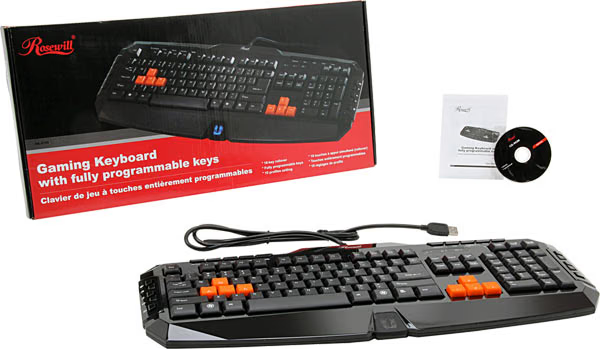
Features
- Cutting Edge Design
- Soft-Touch Gaming Keys provide you with wonderful gaming experience
- Unique software designed for gaming
- Fully programmable keys
- 18-key rollover supports 18 keys pressed at the same time
- Supports 10 profiles setting
Specifications
|
Model No. |
RK-8100 |
|---|---|
|
Part No. |
RIKB-11003 |
|
Interface |
USB |
|
Normal Keys |
107 |
|
Type |
Wired |
|
Total travel |
2.5 + 1mm |
|
Dimensions |
19.09" x 8.35" x 0.98" |
|
Keyboard weight |
603g |
Closer Look: Rosewill RIKB-11003
Just because the keyboard is designated as gaming doesn't mean you can't use it for other tasks. In fact, I'm writing this review using the Rosewill Gaming Keyboard. The keys don't travel quite as far as on some mechanical keyboard (2.5 + 1mm according to the specs). Typing on this keyboard is a responsive, if noisy, affair. If you really get typing, the sound is reminiscent to hard-spattering rain against your window.
The designation "gaming" seems to give keyboard manufacturers the burning desire to give their devices alternative dimensions. The Rosewill Gaming Keyboard is not your daddy's standard rectangular keyboard. As you can see in the images, it would be difficult to define the keyboard's actual shape. It is a large keyboard, with extra keys taking up space at the top left, top tight and both sides. In an effort to reduce wrist strain, there is a substantial palm rest. Make sure you have plenty of space available on your desk or keyboard tray. The shiny black surface of the keyboard is prone to picking up finger and palm prints, so keep some sort of microfiber cloth handy to keep it clean.
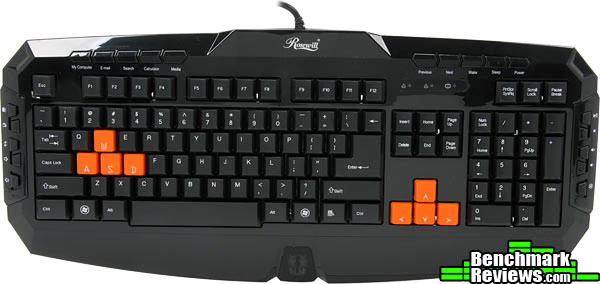
Unlike many recent entries into the gaming keyboard market, the Rosewill Gaming Keyboard does not feature backlit keys. It does have one LED-lit emblem, however. What this emblem depicts is anyone's guess. In my opinion, I think it's supposed to be a tiger or some other large cat. Though, with the side details that could be construed as mandibles, it could very well be some sort of insect.
A close look at the surface of any individual key makes it appear that the character is some sort of raised sticker. Running my finger over the character, I can definitely feel it is very slightly raised compared to the rest of the sloping key surface. However, whatever technique has been used is fairly durable; I can't pick the character off with my fingernail. The keys don't feature any noise-reduction technology like gaskets or o-rings.
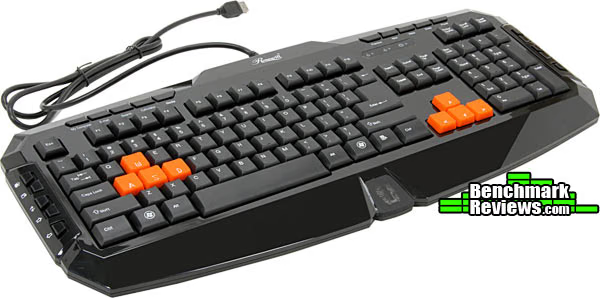
Possibly the best feature of this keyboard for gamers are the rubberized WASD and arrow keys. Your fingertips find them easily, and, thanks to the keys' texturing, your fingers don't slip easily from their surfaces. However, in the case that you don't like these keys, Rosewill includes a set of plain plastic replacement keys and a small key removal tool that saves you the effort of grabbing a butter knife to pop keys free from the board.
The bottom of the board features two folding legs and two small rubberized pads to hold it in place. However, in the sample provided to me at least, the keyboard wobbles slightly from side to side. Perhaps there is some slight warping, or the pads and legs are uneven in size. In any case, it is a noticeable annoyance.
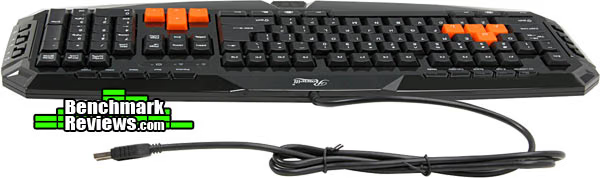
The keyboard doesn't include any other fancy features like extra USB ports or audio plugs. You just plug the single USB cable into your computer and go.
RIKB-11003 Detailed Features
The Rosewill Gaming Keyboard comes twenty additional keys along the sides and top of the typing surface. On the left hand side, you find Internet related keys for returning to your home page, going back and forth, refreshing, and adding favorites. The top left keys (appearing above F1-F4) are more generally Windows related. You can instantly open your email, Windows Explorer search, calculator, media (iTunes, Windows Media, etc) as well as your My Computer folder and the calculator.
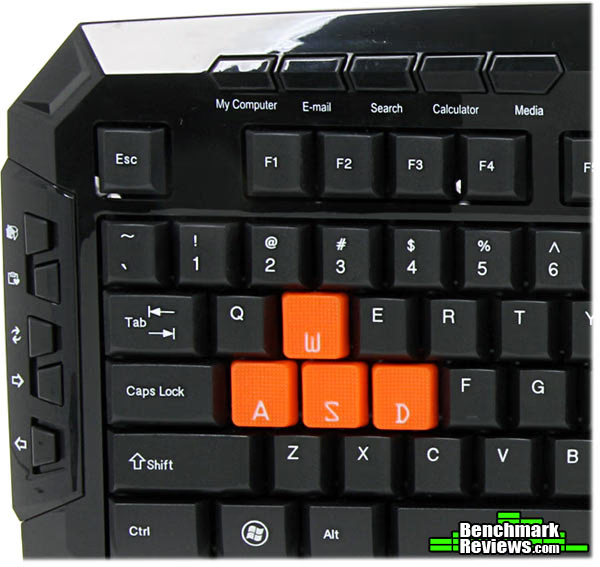
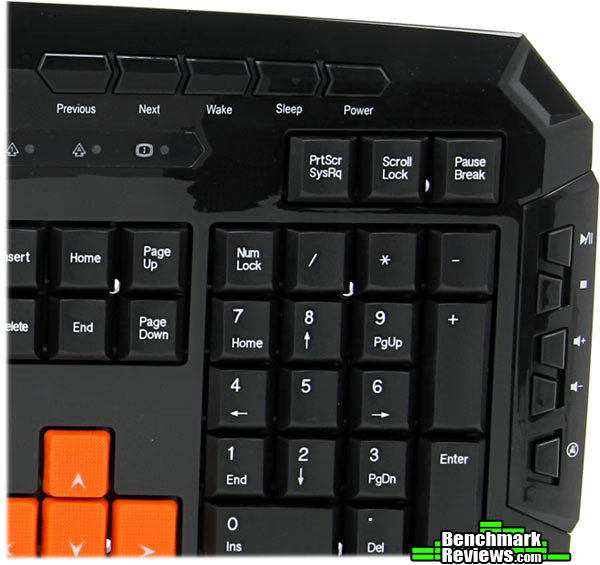
The top right keys navigate your media back and forth, and allow you to put your computer to sleep, wake it up, and turn it off. If you like to play games and listen to music like me, these media navigation keys might seem like a great addition. However, I have found that they often don't work if you're in a full-screen environment like a game. This requires to minimize the window and then press the navigation keys, which is a definite annoyance if you're playing a reflex and timing-based game like a shooter.
The keys on the right (located to the right of the numpad) are more media control keys. These let you pause/play, stop, increase or decrease system volume, and mute. These all appear to work if you're doing something full-screen. The volume keys raise or lower system volume in 2% increments. Holding them down quickly raises or lowers volume. Perhaps in an effort to play up the gaming design of the keyboard, Rosewill gave it a small backspace key. It is the same size as any normal character key. If you have relied on a large backspace key, you may find yourself accidentally hitting the backslash key beside it.
A minidisc comes with the keyboard, allowing you to install Rosewill's keyboard software. This software provides you with three different keyboard layers (profiles). Every key excepting the additional media keys can then be customized to just about any function you want, from a single mouse click or keyboard stroke, to a macro. Any normal key on the board can also be disabled (gamers may like to disable their Windows keys quickly, to avoid accidentally minimizing while in the middle of a heated match or battle).
The macro interface records your desired keystrokes, which you can then fine-tune with time intervals, number of repeats, and whatnot. Mouse clicks can also be included in macros. Say you are playing a shooter with a semi-automatic gun. You could create a macro with your left-click button allowing you to simply hold the button down and achieve the highest rate of fire without tiring out your finger.
Testing & Results
There isn't any standard test you can administer to a keyboard. The best you can do is use the keyboard for all keyboard-related tasks and see if it lives up to your expectations and needs. Peripherals also often come down to a matter of taste. One gamer might prefer a specific feel to each keystroke, while another wants a different one. My methodology is therefore quite basic: I used the Rosewill Gaming Keyboard in my everyday keyboarding tasks to see how it performed.
Test System
-
Motherboard: Asus Lga 1155 Intel Z77 Hdmi Sata 6 GB/S Usb 3.0 ATX Intel Motherboard P8Z77-V LE PLUS
- System Memory: Corsair Vengeance 4 x 4 GB DDR3 1600 MHz PC3 12800
- Processor: Intel Core i5-3570K Quad-Core Processor 3.4 GHz 6 MB Cache
- Audio: Onboard
- Video: MSI GTX 660 Ti Power Edition
- Disk Drive 1: 120 GB Adata SSD
- Disk Drive 2: 1000 GB Seagate Barracuda 7200 RPM
- Optical Drive: DVD Burner
- PSU: Seasonic S12 II Bronze 620W ATX12V
- Monitor: ASUS VE247H 23.6-Inch 1920x1080 LED Monitor
- Operating System: Windows 7 64-bit Home Premium
Software Tested
-
Microsoft Office Word 2007
- Call of Duty: Black Ops II
Results
Unless you plan on switching between keyboards for tasks, the number one thing you'll be dong with the Rosewill Gaming Keyboard is typing. Whether that's IMing, emailing, writing an essay or responding to a forum post on your clan's message board. I personally do a ton of word processing in Microsoft Word. I've probably put tens of thousands of words through Word in the past few weeks using this keyboard. How does it stand up? The best word is: acceptable. The noisiness can be a factor. However, to some that adds to the ambience.
The keys on the board aren't really stepped in a way that a normal office keyboard tends to be, which can change the way you move your fingers. I often found myself accidentally pressing the key directly above the one I wanted simultaneously, entering two characters instead of one. The left shift key, so necessary in capitalizing, feels as though it takes too much force to trigger, giving me lots of lowercase characters that should be uppercase. If you choose to leave the rubberized keys in, I found that my fingertips often caught on them. Switching to the normal plastic keys alleviates this problem, however. As mentioned earlier, many people will probably be tripped up for the first while by the small backspace key. The only solution to this one is to get used to it. The irregular shape of the board may also interfere with normal hand placement, depending on how you like to position your wrists.
The RIKB-11003 is a passable typing keyboard, but wouldn't be my ideal one.
However, it is called a gaming keyboard. One of the keyboard's main physical features, the rubberized WASD and arrow keys, really shines in this respect. Call of Duty: Black Ops II well requires a great deal of precision and control of movement. While sprinting through corridors or across open sections, the keyboard responded nicely to my presses. My fingertips never slipped from the keys, even when the going got intense. The texture of the keys also keeps you from accidentally shifting your fingers over, accidentally trying to press RFDG or something instead.
The macros were easy to set up. All you have to do is remember which keys do what in the game. Unlike an MMO, where massive, complicated macros might be necessary, Black Ops II only required a few. You could, for instance, set it so that a touch of a single key would make you dive through the air, landing in a prone position (this tactic can win you a firefight, since oftentimes your opponent expects to shoot at a standing or crouching target). You could also set up macros to through multiple grenade types. Literally any task that requires multiple keystrokes or button presses can be mapped to a single key on the Rosewill Gaming Keyboard.
Since each row of keys only rises slightly above the previous, your fingers don't get snagged. A normal keyboard might cost you a reload as you try desperately to mash R, but instead just hit the edge of the key. Your fingertip just slides right over the keys on this board, allowing smooth transitions.
The anti-ghosting technology is another boon for gamers. I've had some keyboard that wouldn't, for instance, allow me to press both shift and space at the same time (thereby precluding sprinting jumps, a necessity in many modern shooters). You have the ability to press up to 18 keys at the same time with the RIKB-11003, so all your commands are sure to go through.
Rosewill Keyboard RK-8100 Conclusion
As of December 2012, the Rosewill Gaming Keyboard RIKB-11003 cost $24.99 online (Newegg / Amazon), offering a good value for the money, but is a highly situational keyboard.
If you do a lot of word processing in addition to gaming, you might want to look for a keyboard with more features designed for typing (or purchase a secondary typing keyboard). However, a gamer who cares little for actual typing ability may just fall in love with this keyboard. It's comparatively low price tag and gamer-friendly features won't let you down.
A number of flaws and annoyances with this keyboard keep it from scoring higher than it might otherwise have. Its relatively large size limits the number of desks on which it can be used. An apparent lack of quality control gives it defects like slight wobbles. Media key layout may also be an issue to some, especially if you accidentally hit the Sleep or Power button when you just mean to change the song playing on iTunes.
Typists may find the rather loud clicks of this keyboard irritating, but a gamer wearing a headset, deep into a play session may not even notice the extra noise. The glossy black plastic with its tendency to display smudges left by your fingers and hands keeps it from being as good looking as it might have been, and the large, blue LED logo at the bottom (still a mystery to me) may also appear gaudy to some.
However, with its low price tag, you might be hard pressed to find a better gaming keyboard in this price range.
Pros
Cons
Ratings:
-
Performance: 7.00
- Appearance: 6.00
- Construction: 7.50
- Functionality: 8.00
- Value: 8.50
Final Score: 7.4 out of 10.
Benchmark Reviews invites you to leave constructive feedback below, or ask questions in our Discussion Forum.
Reader comments from the original article
5 comments were posted before commenting closed. They are preserved as written. Original avatars no longer resolve and are shown as a placeholder.
RE: Rosewill Gaming Keyboard RK-8100 Argos Permalink:
They can stick the label 'gaming' on anything. To me this is one of the many that do not deserve it. As a fanatic Shooter/RPG gamer I always ask "What have you done for me lately". In this case the answer is: "Nothing. absolutely nothing." It is so frustrating to see so called 'gaming' keyboard after so called 'gaming' keyboard ignoring fps gamers like me. Come on Rosewill is this all you can think of? A bit of rubber on the WASD? and a bit of programmability? jeeeeez. I can't imagine any gamer thinking they need this. At least it is relatively cheap.
Oops! RealNeil Permalink:
Sorry that this KB upsets you so Argos. Fact of the matter is that many people cannot afford to buy mechanical gaming keyboards to game with. So an inexpensive board that has features that help (even a little) is welcome to a lot of people. Because of the price, some will have to make do and get this or something like it. You are right in that $25 is cheap for a gamer's KB. This is what Rosewill usually does though. A lot of what they make is good. Try taking a long look at their Blackhawk Ultra PC Case. It's One of the best that I have ever built with and has a ton of room inside, and lots of useable features too.
RE: Oops! Argos Permalink:
@ RealNeil Don't worry I am not upset. Also I was not at all referring to mechanical keyboards. I personally feel they are overrated. I own many keyboards. None of them is mechanical. No, what I actually meant is that most gaming keyboards lack any truly useful adaptations for FPS/RPG gamers, like for example an improved layout of the WASD keys. Ideazon had a go at that once, but for some reason nobody else gets that FPS gamers need more than some reprogrammability, questionable and mostly useless lcd's, and ridiculous fancy shapes. Currently I use a Microsoft Sidewinder X6. It is a fairly well designed board. It is programmable, and features a modular design, but forgets to actually do something useful with that. I would have expected Microsoft to release some improved Ideazon Fang-like module for FPS gaming, but of course they did not. Such a waste of incredible potential. An ambidextrous designed 'Fang' FPS module could have been attached to the left and right side of the X6 board. It would have been my dream gaming board. Well at least it is backlit and looks cool. This is the problem with all so called gaming keyboards. They don't add truly useful and practical options for FPS gaming. It is like FPS gaming does not exist for the kb manufacturers. Don't get me wrong, programmable keys are fine, but to be honest most of the time you don't need them at all.
Indeed Slaine Permalink:
Many keyboards are just looks and aimed at MMORPG. But few think ahead. A feature that could help a lot would be a modular keyboard, where you can arrange the main body, the arrows and the numeric keyboard left or right that way you want it would attend lefties and all the arrows users that hate WASD because they stumble over the other keys.
RE: Indeed Argos Permalink:
Yes absolutely, that is exactly what I was talking about, Slaine. The Microsoft Sidewinder X6 is halfway there. It is backlit, it is programmable, and.... it is modular! The only thing they forgot was to ad the WASD part. That is why I mentioned the Ideazon Fang (google for it). Imagine that device modernized and adapted to the modular Sidewinder X6. It would be perfect from my point of view. I have been using the Fang for many years now and it is a wonderful peripheral for FPS gamers like me and I would welcome a new modernized and backlit version with full support for modern OS-es.