
Microsoft Arc Wireless Compact Keyboard
Microsoft Arc Wireless Keyboard Review
Many people may subscribe to the idea of "a keyboard is a keyboard is a keyboard". People don't just sit in front of a desk and use their computers anymore. Many people have their PCs connected to their televisions for home theater use, or set up in their kitchen, or hidden within some inconspicuous furniture. Anything goes these days. As computer users each change the way they use their PCs, consumers will need different peripherals to take advantage of these trends. A traditional keyboard does not always suffice in the eyes of the customer, and Microsoft recognizes and addresses this trend with the compact wireless Microsoft Arc model J5D-00001 keyboard. Benchmark Reviews has been givin the opportunity to not only test this wireless keyboard, but also determine if something that looks as good can also perform well. With a small footprint and elegant looks, Microsoft considers this a piece of decoration as much as it is a piece of electronics. Stay tuned as we see if this product lives up to performing as well as it fits into your home decor.

The Microsoft Arc Keyboard seems to emphasize both form and function. It is clear that the designers wanted something that both performed well and looked good without breaking the bank or cutting corners on looks and usability.
Here's how Microsoft describes the Arc wireless keyboard:
The Arc Keyboard is a redesign of the keyboard as we know it. It's small enough to move easily around the house and so attractive it fits seamlessly with chic home accessories, so it looks at home wherever it's used.
The Arc Keyboard shares the same design language with Microsoft Corp.'s best-selling Arc Mouse, with a beautifully curved profile, clean lines, and an ultraportable, lightweight shape. This keyboard is all about the home, and Microsoft Hardware's industrial design team drew their inspiration from modern home accessories: flatware, lighting fixtures and vases, resulting in a keyboard that looks and feels like it belongs with other objects in the home.
Weighing in at less than a pound, the Arc Keyboard is easy to move from room to room throughout the house, and its domed keyset comfortably rests on laps so people can kick back on the couch or type away on the kitchen counter. With its unique, compact design, the Arc Keyboard becomes a functional and stylish part of any living space.
About Microsoft Hardware
For more than 26 years, the Hardware Group has employed innovative engineering, cutting-edge industrial design and extensive usability testing to create products of exceptional quality and durability that enhance the software experience and strengthen the connection between consumers and their PC. Microsoft Hardware leads the industry in ergonomic engineering, industrial design and hardware/software compatibility, offering consumers an easier, more convenient and more enjoyable computing experience. More information about the Hardware Group is available at https://www.microsoft.com/hardware.
Founded in 1975, Microsoft (Nasdaq "MSFT") is the worldwide leader in software, services and solutions that help people and businesses realize their full potential.
Microsoft Arc Features
- NEW! Eye-catching form factor makes the Arc keyboard a stylish statement piece that fits in with home décor.
- NEW! Thin and lightweight design weighs less than one pound so the keyboard can easily be picked up and moved from room to room.
- Snap-in Nano transceiver gives consumers the option to leave the transceiver plugged into the computer or conveniently store it under the keyboard.
- NEW! Four-way directional pad offers the capabilities of arrow keys while taking up less space.
- On/off function lets people easily switch the keyboard on and off and conserve battery life.
- Two-color battery life indicator warns people when it is time to replace the batteries.
System Requirements
Windows-Based PC:
- Windows 7, Windows Vista or Windows XP
- An available USB port
- 2 AAA batteries (included)
Macintosh:
- Mac OS X v.10.4-10.6x
- An available USB port
- 2 AAA batteries (included)
Model J5D-00001 Specifications
- 2.4GHz wireless technology gives consumers a confident wireless connection and a range of up to 15 feet, even in a crowded wireless environment.
- 12.25in (31.115cm) Width X 5.875in (14.923cm) - 6in (15.24cm) Depth X 0.125in (0.318cm) - 0.875in (2.223cm) Thickness
Closer Look: Microsoft Arc
In the images below is a full view of the Microsoft Arc wireless keyboard layout. You can see the top row that consists of the "F" function keys, the home/end/etc. keys, and volume control.
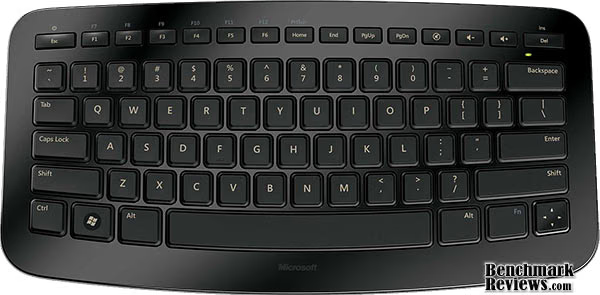
The addition of the laptop-style "FN" function button allows keys to be multi-purpose, and save on precious space.

This is a shot of the Microsoft Arc from the side. I chose this picture in order to show off the curved lines of the Arc. Note the power button that is a double "function" of the Esc key.
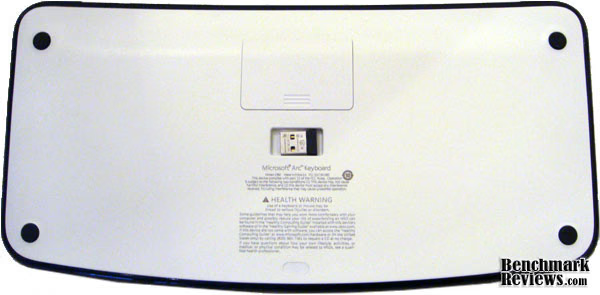
Pictured above is the bottom of the Microsoft Arc keyboard, which allows you to access the battery compartment. This is also where the USB receiver resides.

Notice the natural raised back of the Arc. This helps reduce some of the strain users encounter after typing for a extended periods of time.
Microsoft Arc Detailed Features
In the last section we briefly touched on the basic functions of the Arc wireless keyboard. If you hadn't noticed many of the elegant lines and useful features, we'll inspect them further in the following section.
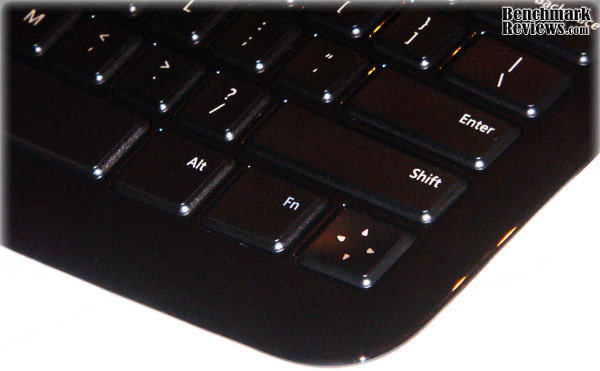
Another way Microsoft chose to save space was with the uni-directional key, illustrated above. It's fairly self-explanatory, and works famously. But, if you cannot depict the purpose from the picture, it serves as a single button to perform the function of the traditional up, down, left, and right buttons. The direction-pad key was a huge help for me.

This is a close-up of the mini-USB receiver. This tucks nicely into the little magnetic holder on the bottom of the Arc, and I tried shaking and gently bumping the keyboard against a table to shake it loose, but it is firmly attached in there.

Shown here is another "angle" shot meant to give you an idea of the aesthetically pleasing lines and curves the Microsoft Arc keyboard has.

Here is a shot of the top of the Arc from the side. Notice the natural arch from the center to either side the keyboard has.
Testing & Results
Testing Methodology
The Microsoft Arc wireless keyboard was tested in a wide variety of situations. I hooked it up to my main desktop for "entertainment" tasks such as gaming to test responsiveness, some light web browsing, and multimedia use to see how robust the wireless feature functioned for me in a typical "home" environment. I also brought it to work with me for a few days to try it in a heavy use environment to gauge the longevity of using it as a primary keyboard for typing and heavy web browsing.
Test System 1
-
Motherboard: Gigabyte P5NE-SLI
-
System Memory: 4gb DDR2
-
Processor: Intel e6600
-
Video: eVGA Nvidia gtx260
-
Operating System: Windows 7 Professional 64bit
Test System2
-
Model: Dell Latitude e6500
-
System Memory: 4gb
-
Processor: Intel Centrino 2 Duo
-
Operating System: Windows XP Professional SP3
Test Results
I found that there was very little that this keyboard could not handle well. Using it for web browsing and basic other tasks, there is nothing about the Arc that I found to discourage this use. The keys type very nimbly, there is absolutely no setup required for either OS it was tested on. It did not even ask me for an administrator's password at work like many other peripherals do, so those of you who don't have admin rights over their work computers should not have trouble. I simply plugged it into both systems, and it just worked.
Using it for heavy typing or gaming resulted in good performance, but being that it is a bit smaller than an average keyboard, my fingers began feeling slightly cramped after several hours of continued use. I also occasionally found myself mistyping a few keys, but that can be had with almost any new keyboard. Until you get the hang for the tactile feel and layout of every button, it is hard to gauge whether that is learning the new Arc keyboard, or a misstep in a design. I chalk it up to it being a new keyboard.
If you are looking for a full featured multimedia keyboard, you may want to look elsewhere. There is a Mute button and Volume button, but there is nothing along the line of a play, stop, pause, etc. button. This is not to say that it is not a suitable keyboard for a HTPC, but just keep that omission in mind. The wireless had not shown me any trouble at all. I used it both at home and at work, where there is a massive amount of electronic interference to be had, and I did not notice a single missing keystroke. All in all, I found it to be a very comfortable keyboard that is perfect for basic use, and as long as you don't need to type a 40 page term paper on it, you will be very pleased with the performance.
Wireless Keyboard Final Thoughts
I can really think of very few reasons why someone in the market for a simple, yet functional wireless keyboard would pass the Microsoft Arc up. With a price point at roughly $60, it is an affordable no-nonsense wireless keyboard from a respectable brand. If you are looking for a more than fully-featured wireless keyboard for your HTPC setup, this may not be for you, but if you want a simple solution for a keyboard to put in your living room, kitchen, or some other minimalist setting, but don't want to sacrifice looks, this keyboard is worth a look.

I wanted to conclude with this image. This is the way the Arc came packaged. I am not completely sure what this represents, but if I had to guess, it has something to do with the way the keyboard is designed in such a way that it would become a part of your every day life.
Microsoft Arc Keyboard Conclusion
Performance on this keyboard was not an issue. I never noticed any hiccups typing whether I was using it for hours at a time, or using it touch-and-go. The wireless did not seem to be affected by other wireless devices at all, and the range of 15ft is more than adequate for most users.
Appearance was a focal point for this keyboard. You can really tell that their design team put a great deal of effort into making this look as good as it performs. The colors, shape and size exude elegance.
The construction quality of the Microsoft Arc is top notch. They keys feel very solid, and leave no impression of wearing out any time soon. I have no reason to believe that this keyboard would not survive a few drops from the kitchen counter, and as stated before, the magnetic holster for the USB receiver held strong through some light abuse.
Often you find that a device either functions well, or looks good. This device does both. The functionality of this keyboard is all there. It may not have all of the fancy buttons of some other keyboards, but it has a full size qwerty layout, a directional pad, and a nice selection of function buttons along the top row. It is nothing to be disappointed about.
The Microsoft Arc J5D-00001 keyboard has a $60 MSRP, but sells online for as low as $45. The price may seem a bit on the expensive side for a keyboard, but when you add in the fact that it is wireless, compact, and damn good looking, the price easily seems on par with the device, especially with the included 3 year warranty from Microsoft. I have a feeling people will be pleased with their purchase at either price.
As I have stated in several other ways, I see no reason why this would not be a top choice if you are in the market for a wireless keyboard. The good looks immediately caught my eye, and the quality and functionality definitely won my favor.
Pros:
+ Small and lightweight
+ Very attractive design
+ Wireless with mini-USB adapter that easily stores under keyboard
+ Battery life indicator
+ Dead simple to set up and use
+ Great wireless robustness
Cons:
- Slightly lacking HTPC keys, but it is not necessarily designed to be one
- Not very comfortable after using for an extended period of time
Ratings:
-
Performance: 9.00
-
Appearance: 9.50
-
Construction: 9.50
-
Functionality: 8.50
-
Value: 7.25
Final Score: 8.75 out of 10.
Recommended: Benchmark Reviews Seal of Approval
Questions? Comments? Benchmark Reviews really wants your feedback. We invite you to leave your remarks in our Discussion Forum.
Reader comments from the original article
1 comment were posted before commenting closed. They are preserved as written. Original avatars no longer resolve and are shown as a placeholder.
User User Permalink:
The esc and del keys are very stupid, and hard to use. The arrow keys are bad too. Becuase of that, its a bad idea.