
Logitech ClearChat PC Wireless Headset 981-000068
Logitech ClearChat PC Wireless
Stereo headsets are becoming an essential part of any modern PC and, like keyboard and mice before them, they are finally going wireless. The freedom that a wireless headset provides will appeal to anyone, but with so many 2.4GHz wireless devices in every home, can a wireless headset really match the performance, clarity and comfort of its wired counterparts? Benchmark Reviews examines an impressive entry, the Logitech ClearChat PC Wireless Headset 981-000068, and finds out.
For casual users and hardcore gamers alike, headsets are becoming some of the most heavily used peripherals on any PC. Voice chat is a standard feature for any instant messaging client, Ventrilo and Teamspeak are a staple of online gaming and Skype is quickly becoming a preferred choice for many users making long distance calls. However, unlike almost every other peripheral on the PC these days, most headsets are still wired. The options are very limited for demanding, nomadic computer users. Bluetooth headsets designed for cell phones can work on a PC (provided your machine has a bluetooth adapter), but they are designed strictly for voice chat and have limited range, without delivering the high-quality stereo sound of a wired headset. The Logitech ClearChat PC Wireless is designed to be the best of both worlds, providing high-quality stereo sound, a noise canceling microphone and wireless freedom, albeit at a fairly hefty MSRP of $99.99.
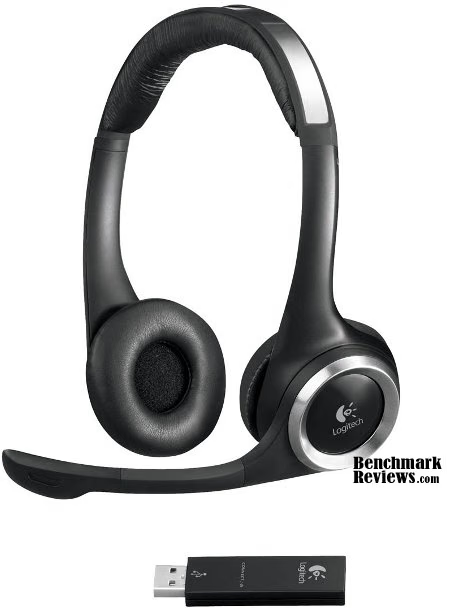
While the ClearChat Wireless is a winning combination on paper, the design leads to some big questions: Will the battery life be sufficient for demanding users? Can a wireless connection deliver the same quality of sound as its wired counterparts? Let's find out.
About Logitech
Focused on innovation and quality, Logitech designs personal peripherals to help people enjoy a better experience with the digital world. We started in 1981 with mice, which (new at the time) provided a more intuitive way of interacting with a personal computer. We became the worldwide leader in computer mice, and have reinvented the mouse in dozens of ways to match the evolving needs of PC and laptop users.
Since those early days, we have expanded our expertise in product design beyond the computer mouse, with a broad portfolio of interface devices that are the "last inch" between you and your computer or your console game, digital music or home-entertainment system.
With products sold in almost every country in the world, Logitech's leadership in innovation now encompasses a wide variety of personal peripherals (both cordless and corded), with special emphasis on products for PC navigation, gaming, Internet communications, digital music and home-entertainment control.
For each of our product categories, we study how our customers use their digital devices, and then our designers and engineers set their sights on how we can create a better experience with those devices - richer, more comfortable, more fun, more productive, more convenient, more delightful.
Headset Features
-
2.4 GHz wireless
You can move freely up to 10 m (33 feet) away from your computer. -
Laser-tuned audio
You'll enjoy high-quality, uncompressed stereo audio.Why is laser-tuned audio better? -
Noise-canceling microphone
You won't have to compete with background noise to be heard-even in a noisy room. -
Quick-access audio controls
You can adjust the volume and mute the microphone right from the headset. -
Flexible, rotating boom
You can position the microphone right where you want it-and rotate it out of the way when you're listening to music or watching a movie. -
Rotate-to-mute
The microphone automatically mutes when you rotate it up and out of the way. -
Simple setup
You'll be up and running in seconds with the included USB wireless transmitter-no software or pairing required. -
Plush headband and ear pads
They're designed to keep you comfortable for hours on end. -
Microphone mute light
The microphone tip glows softly to let you know when it's muted. -
Multiple uses
They work with PC games, movies, music, and common calling applications including Skype, Yahoo!, Windows Live, and AIM. Learn more about Internet communication.
ClearChat PC Wireless Specifications
-
Frequency response
Headset: 20-20,000 Hz
Microphone: 100-10,000 Hz
-
Microphone Sensitivity
62 dBV/μBar
42 dBV/PA +/-3 dB
-
Wireless
2.4 GHz
-
USB compatible (1.1 and 2.0)
Closer Look: Logitech ClearChat PC Wireless
One of my first concerns when considering a wireless headset was that of weight. With a battery I expected the headset to be quite heavy, and since I tend to game and chat for periods several hours long, I need a headset that is relatively light. Once it was unboxed though, I was pleased to find that the ClearChat Wireless weighed in at only 120g (0.25 lbs) and was no heavier than the wired Plantronics headset it replaced.
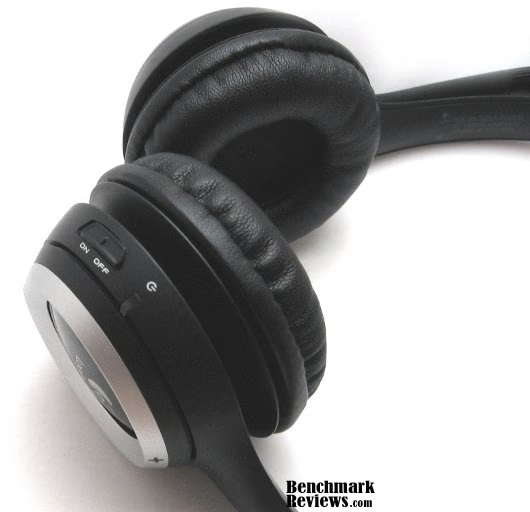
The right earpiece contains the bulk of the electronics, including the controls, power socket, battery and wireless receiver. The unit has a solid build, and a definite high-quality feel.
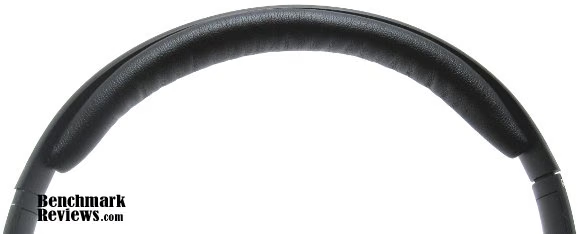
The headband padding is thick and comfortable. The ClearChat doesn't put all its weight on the top of your head however, as the wide, metal strip in the headband causes the earpieces to "grip" your head with slight inward pressure. This arrangement keeps the headset firmly in place, and makes it barely noticeable even while moving around. However, since the headphones rest directly against the ears, those with piercings high on their ears may find this inward pressure very uncomfortable.
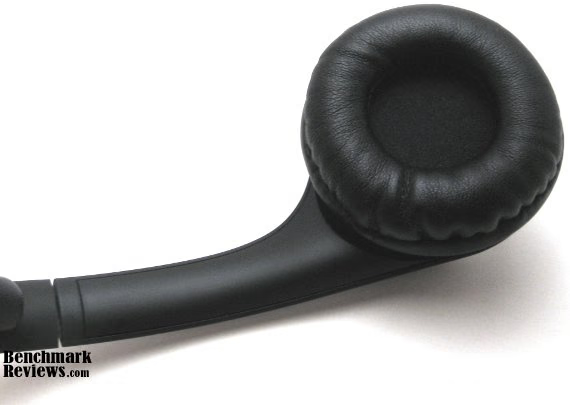
The padding on the earpieces is made of the same material as the headband, and it is thick and study, without being prone to the peeling common to other, less-expensive headsets. The speaker itself is protected by a drilled metal plate and covered with thin cloth.
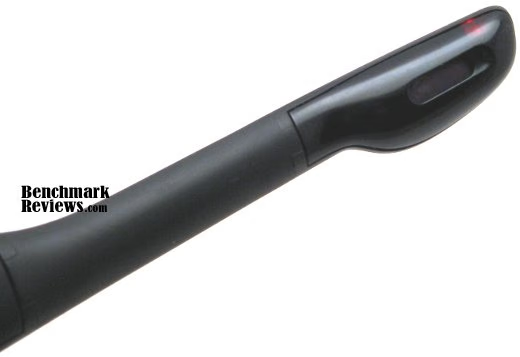
The rotating microphone boom is rather short, and while it is flexible, the rubber-like material doesn't hold its shape when bent. This hasn't proved to be a problem, however, as the mic seems to pick voices clearly regardless of its position. The boom contains a red LED which indicates that the microphone has been muted. This feature is handy in theory, but the boom sits entirely out of my peripheral vision while in use. The microphone automatically mutes when the boom is rotated up.

The ClearChat Wireless uses a solid USB dongle as a receiver, with a small pinhole for connecting it to the headset. I have never had to use the connect button, as the headset and receiver worked together right out of the box.
ClearChat PC Wireless Detailed Features
Taking a more detailed look at the ClearChat PC Wireless shows off some clever integration of controls that would normally be on the wire for a regular headset.

The quick-access audio controls reside on the right earpiece. The volume is controlled by rocking the silver ring up or down, and mute is a large button within the ring. The volume control is fine-grained when tapped, and rapidly changes the volume when held down, for those noisier moments on Ventrilo.
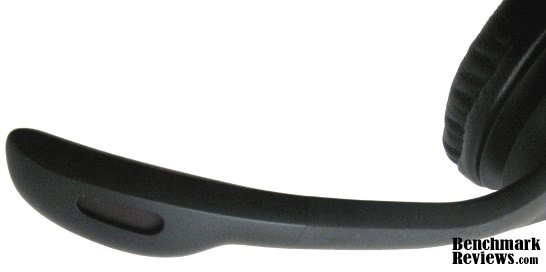
The ClearChat PC Wireless includes a noise-canceling microphone. This feature uses a second microphone on the outside of the boom, whose signal is subtracted from that of the inside microphone. In practice this appears to work very well. Voice recording is much clearer on the ClearChat PC Wireless than most single-microphone headsets, particular when the background noise contains voices, as from a movie or telephone conversation elsewhere in the room.
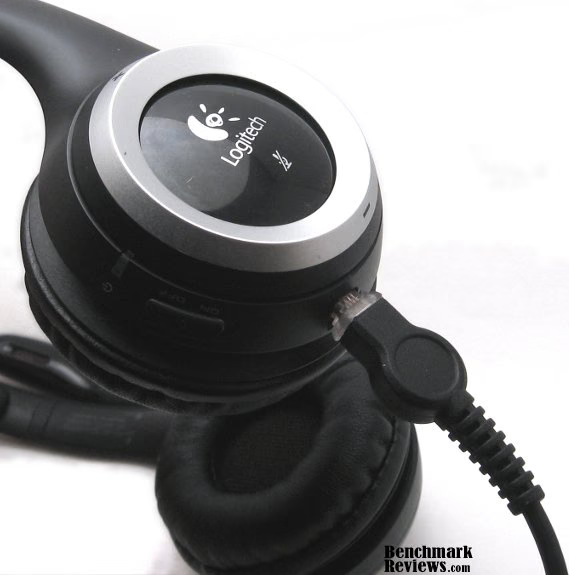
I was surprised to find that Logitech decided to forego the use of mini-USB for charging the battery, and has instead included a small 6V, 240mA power brick, which connects to the headset using a very unusual, proprietary socket. I'm at a loss to explain why Logitech chose to do this; Aside from the inconvenience of not being able to charge from the PC itself, the power plug and cable are quite stiff, causing them to push against my shoulder when using the headset while charging. This pushes the headset around, and the vibrations from it are surprisingly loud (in the right ear).

The ClearChat PC Wireless includes a 6.5 ft. USB extension cable with a felt-bottomed holder that the wireless dongle can be plugged into. Initially, I didn't expect this cable to be particularly useful. However, I soon discovered that it is very necessary to get the most out of the ClearChat. More on this later.
Testing & Results
Testing Methodology
The main concerns when testing the ClearChat PC Wireless were sound quality, battery life and wireless performance. For measuring wireless performance, the specifications of the PC used (below) were less important than the wireless context in which the headset was to be tested. As I'm writing this, for example, within ten feet of me there are:
-
32 visible wireless networks
-
Linksys WRT300N wireless router
-
HP Elitebook 8530w notebook
-
PS3 (one controller active)
-
Microsoft Bluetooth Notebook Mouse 5000
-
Wireless Logitech G7 Laser Mouse
-
BenQ x805 Wireless Desktop Keyboard
In other words, the 2.4GHz spectrum is very crowded here. Through all of this the ClearChat PC Wireless needs to be able to transmit three audio channels (left, right, microphone) of high quality audio without disruption or delay. The USB receiver was connected to a PC with the following specifications:
Test System
-
Motherboard: ASUS P6T
-
System Memory: 6GB OCZ Obsidian Black XTC DDR3-1600
-
Processor: Overclocked Intel Core i7-920 @ 4.00GHz
-
Audio: Logitech ClearChat PC Wireless
-
Video: Dual Sapphire Radeon HD5870s in Crossfire
-
Disk Drive 1: 80GB Intel X25-M G2 SSD
-
Disk Drive 2: 1.5TB Western Digital Caviar Green
-
Operating System: Windows 7 Professional (64-bit)
ClearChat Test Results
Initially, the USB dongle was plugged directly into the back of the PC. Windows 7 detected and installed the default USB audio drivers without any trouble. However, right from the first test sound in the audio control panel, there were interruptions and corruption of both the microphone and stereo signals. These problems worsened in games, leading me to believe that the proximity of the dongle to the video cards was part of the problem. Similarly, running Prime95 and loading the processor caused significant distortion of the signal. The Logitech website recommends the use of the USB extension cable in cases like this, and the reasons for its inclusion were now quite clear. I repositioned the dongle using the extension cable to a position 5 feet way from the PC, 12 feet from the wireless router and 3 feet from the sitting position at the PC.
The difference was clear and immediate. Music, voices and games all sounded crisp and clear. Within minutes I was playing Borderlands, using Ventrilo and listening to music, all at the same time. Even with the high amount of wireless traffic from the keyboard and mouse that gaming produces, the ClearChat Wireless performed flawlessly. After a rough start, I have come to be immensely pleased with the headset, particularly given the amount of wireless gear with which it has to contend. The quality of the transmitted audio signal is superb, with no digital artifacting or "shimmer" at high frequencies, and the speakers are also very clear with terrific high frequency response. However, the bass response is noticeably weaker than in most headsets I've encountered, and this was particularly noticeable when listening to music. While enabling the Bass Boost audio enhancement feature in Windows 7 (Playback Devices / Properties / Enhancements) helped to make the bass performance adequate, audiophiles will likely be disappointed by the ClearChat's low-frequency response.
The noise-canceling microphone performance is excellent. People with whom I chat often report that room noise is no longer noticeable and that I sound very clear. They did note, however, that voices on the ClearChat sound slightly more nasal than other headsets I've tried. This is consistent with poor low-frequency response, much like in the headphones. This suggests that the wireless protocol itself, and not the speakers, may be responsible.
After repositioning the dongle, I found the wireless performance to be excellent, but not 100%. Intermittently the digital signal is corrupted, and for 3-5 seconds sound is garbled. The ClearChat seems to be able to detect this disruption when it occurs and after a quiet 'click' (changing channels?) the audio fidelity is restored to normal. This type of momentary disruption is relatively rare, occurring at most once an hour. I've gone through entire days with the headset on with no disruptions at all. Of course, this is at relatively close range (3 feet) and, as always, the wireless performance will depend heavily on your environment. Logitech claims the ClearChat Wireless has a range of up to 33 feet and, given a clear line of sight, these numbers are achievable. However, as the distance increases beyond 20 feet the momentary disruptions become more frequent. When walls and microwave ovens are involved, the range is significantly shorter. That said, I can travel around my home out to a range of 20-25 feet (depending on the number of walls in the way) and still get a usable signal. Keep in mind that the environment in which this testing occurred approaches a "worst case scenario" for wireless noise, and most users will get better results.
One other wireless issue worth noting is that the dongle appears to "ping" the headset periodically when the headset is powered off. These pings cause the mouse cursor to jump every 5-10 seconds, likely due to intereference with my Logitech G7's wireless receiver. This can be remedied by leaving the headset on (and plugged in) when not in use. I have not observed any other wireless devices being affected by this issue, so most users will likely not enounter it. Also, if Mac OS X users are encountering issues with garbled sound, there is a dongle firmware update available from the Logitech website that may remedy them, available here.
The battery charges quickly, and will last approximately six hours. The run-time of the headset seems to have no dependence on the type of use, so whether you're blasting music or doing nothing at all, you'll get six hours. From this, it seems likely that the headset is in constant contact with the computer, and this assertion is supported by the fact that there is no delay in either microphone or headphone response after a period of silence. As noted earlier, the headset can be used while plugged in, saving you the hassle of having to switch to a wired device when the battery dies.
Headset Final Thoughts
The freedom that comes from using a wireless headset cannot be understated. Any user that spends multiple hours a day tethered to their desk by a headset will appreciate the benefits of going wireless. Having the option to sit on the couch while talking on Skype, or go to the kitchen while waiting to respawn is even better than I had hoped. The Logitech ClearChat PC Wireless has lived up to, and in many cases exceeded, my expectations. It's extremely comfortable, so much so that I often forget that I'm wearing it, and the sound is clear and crisp. With that said, the wireless nature of the device requires some compromise in exchange for that freedom, primarily the sensitivity of the wireless signal to other devices in the area. Nevertheless many users, myself included, will find those compromises a small price to pay for the freedom the ClearChat PC Wireless provides.
Logitech ClearChat PC Wireless Conclusion
As usual, Logitech includes everything the user will need, all in a compact, attractive package. The headset is clearly visible, and obviously well-built. Since the ClearChat uses the default USB audio drivers in Windows and Mac OS X, the package doesn't contain a driver disc, and setup is completely painless.
The ClearChat PC Wireless is noticeably high-quality from the moment that you pick it up. It's clear that a great deal of thought and care went into its design and construction. The ClearChat will look appropriate in any environment, whether in the office or at home. While I think the headset is quite attractive, some may find the black and brushed-metal look rather dull, with the only lights being subtle LED indicators.
The materials used in the construction of the ClearChat are high-quality and durable. The design is flexible, yet tough, and should survive fairly rough handling. The cushions on the headphones are particularly comfortable and high quality, giving you the impression that this headset will last you for years. The only real shortcoming is the bizarre choice to include a wall-plug charging cable that is both propriety and cumbersome, instead of an almost-universal mini-USB port.
Wireless technology will always have its limitations, and the ClearChat PC Wireless is no exception. The sound and microphone data can be disrupted by strong electrical noise, and the wireless receiver must be carefully placed to ensure the headset is at peak performance. The wireless audio protocol seems to limit bass response as well, leading to a slightly tinny music, and slightly nasal vocal recording, although these problems are both fairly subtle. With all of this said, the headset was tested in a very electromagnetically "noisy" environment, and these shortcomings are minimal with respect to the benefits that come from being wireless. Wireless devices should let you work where and when you want, and this one delivers. The ClearChat PC Wireless lives up to its promises with excellent battery life and crystal clear audio.
As of mid-November 2009 Newegg lists three RF Wireless Stereo Headsets, and the Logitech ClearChat PC Wireless is the most expensive of those at $71.99. Further searching with our Price Comparison Tool revealed additional retailers with better pricing. The competing Plantronics .Audio 995 has similar features at a similar price, while the ASUS HS-1000W is $20 cheaper and claims up to three times the range. However, the high build quality, compact size and light weight of the Logitech ClearChat PC Wireless make it a compelling offering despite the higher price, particularly for users that wear their headsets for many hours at a time.
Pros:
+ Decent wireless performance
+ Solid, high-quality feel
+ Long battery life
+ Noise-cancelling microphone
+ Very comfortable
Cons:
- Sensitive to electronic noise
- Somewhat expensive
- Lousy bass response
- Annoying power cable
Ratings:
-
Presentation: 9.00
-
Appearance: 8.00
-
Construction: 9.00
-
Functionality: 8.00
-
Value: 7.50
Final Score: 8.3 out of 10.
Questions? Comments? Benchmark Reviews really wants your feedback. We invite you to leave your remarks in our Discussion Forum.
Reader comments from the original article
2 comments were posted before commenting closed. They are preserved as written. Original avatars no longer resolve and are shown as a placeholder.
Multi Level Communication Spl BILL Permalink:
How well does the Logitech ClearChat PC Wireless Headset 981-000068 work with various talk to text programs. Are there other less expensive wireless system out there that do as good or better then this new system from Logitech when it comes to feeding talk to text programs. And how about the effectiveness of some of the over the ear systems such as Plantronics Voyager 520 and others
RE: Multi Level Communication Spl Olin Coles Permalink:
Hello Bill: This isn't usually something that the microphone has any impact on, and the software will normally determine how well it works.