
Cooler Master Silencio 550 Computer Case
Cooler Master Silencio 550 Case Review
Manufacturer: Cooler Master
Product Name: Cooler Master Silencio 550 Mid-Tower Case
Model Number: RC-550-KKN1
Price As Tested: $109.99 (Newegg)
Full Disclosure: The product sample used in this article has been provided by Cooler Master.
Benchmark Reviews has as its subject today one dark and mysterious Cooler Master Silencio 550 Mid-Tower Case. The mysterious aspect of this new offering from the master craftsmen of computer cases at Cooler Master is the way the Cooler Master Silencio 550 is marketed: "Near silent operation and prepared to take on powerful hardware, the Cooler Master Silencio is able to keep high-end setups running cool and quiet." Since this case takes a maximum of three fans and is a Mid-Tower, I'm a little confused as to why Cooler Master chose this avenue of marketing. Moreover, it is advertised to support both the AMD 6990 and the nVidia 590 video cards, which are not only top end hardware, but also top end heat producers.

I'm always skeptical of marketing hype, so my first stop was the factory specs, and I found something refreshing: detailed factory measurements! I hope this becomes a standard, at least with non-budget cases. Giving us these measurements is a good sign that Cooler Master is listening to reviewers and enthusiasts, and that's always nice to know.
Cooler Master Silencio 550 Features
- Includes two 800rpm silent fans (Supports up to three 120mm fans)
- I/O panel provides easy access for users
- High quality foot stand
- Side ventilation holes for better cooling performance
- Dust Filter provided for easy access to wash
- Stylish and Simple design
Cooler Master Silencio 550 Features Specifications
| Model | RC-550-KKN1 |
|---|---|
| Available Color | Black |
| Material | Steel Body, Plastic Front Bezel |
| Dimensions | 210 x415.5 x 505.2mm / 8.3 x 17.8 x 19.9 inches |
| Weight | 9.2kgs (20.3lbs) |
| M/B Type |
Micro ATX/ATX |
| 5.25" Drive Bay |
3 (without the use of exposed 3.5" drive bay) |
| 3.5" Drive Bay | 7 Hidden |
| 2.5"/3.5" - SATA HDD Drive Bay | 2 Hidden (converted from one 3.5" bay) |
| I/O Panel | USB3.0 x 1, USB2.0 x 1, Mic x1, Audio x 1, SD card reader x 1 |
| Expansion Slots | 7 |
| Cooling System | Front(Intake): 120mm x 1, 800rpm silent fan pre-install (Support 120mm fan x 2 or 140mm fan x 1 optional) Rear (Exhaust): 120mm x 1, 800rpm silent fan pre-installRear (Exhaust): 120mm x 1, 800rpm silent fan pre-install |
| Power Supply | Standard ATX PS2 (optional |
| Maximum Compatibility |
CPU cooler height: 6.10-inch (154mm) 16.80-inch (427mm) (Remove HDD cage w/o fan) |
| Warranty | 2 years |
| UPC Code | 884102011689 |
Closer Look: Exterior
One aesthetic of this case is that the front panel comes with a black mirror finish, and by "mirror" Cooler Master means it. I purposely left some of my equipment situated so that you could see the mirror like finish, because this type of finish doesn't appeal to all: (1) is an umbrella I was using to photograph the unit. (2) The actual photo bench I was working on with white background paper underneath. Last (3) is an orange backdrop I hung in the background. Now that's mirror to the bone. Oh yes folks, it's a finger print magnet. But whatever. It looks pretty neat. You know, I'm beginning to think that the person this case speaks to is a computer hobbyist in his (or her) 40s, upper middle class, and wanting something to match his condo in Manhattan, something to go along with his black lacquer baby grand piano. So, is it truly all looks and no function?

The back panel. Nothing interesting here. This is your basic back end of a computer case, and that's all. (1) back fan; (2) water cooling ports; (3) expansion slots x7; (4) the bottom of the case and the power supply hole.

So here is something on the outside of the case that is a little more interesting. The bottom of the case looking into the power supply section: (1) This is an easily removable screen that simply pulls off backwards. I like it. It's simple, effective, and easy to clean without having to turn your case upside down. (2) This is just the power supply perforated intake.

This should actually go in the next section because it's less of a "external closer look" and more of a "detailed external look," but the case has nothing more externally interesting and we need something more too look at in this section. It doesn't have any holes, plexiglass, artwork, nothing on the exterior except a very nicely painted black matte finish, and you can see that in the introductory image. So, let me introduce the Front I/O Panel.
You might have noticed only two USB ports. One is USB 3.0 (You'll need to run it out of the back of your case) and the other is the 20th century USB 2.0. So you have your basic stuff here, such as the headphone and mic jacks. You'll also notice that you get an SD card reader. I would have liked to seen two more USB ports, but okay, I can go with it. After all, you can plug your USB hardware into the back also. Last we have a hard drive light, a reset button, and the power switch. Everything is nicely laid out here, except that the vertically mounted SD slot will collect more dust and dirt than a horizontally mounted unit.

That's pretty much all their is on the outside of the case. This thing is externally spartan, but in a good way. The black matte finish is quality and hides finger prints, while the front is mirror like and is, thus, a finger print magnet. So on with the show. Can the Cooler Master Silencio live up to the "Three Noble Necessities" of case engineering: Price, Function, and Quality?
Detailed Exterior Features
So the outside is clean and sleek and obviously no frills. It's business like in appearance, elegant even, but not boring. It strikes me as something the Secret Service would have in their office to match their black Chevy Suburbans. If you needed a little more flash, you could install a couple of dark red LEDs inside and get a nice glow from light leaks coming from the front panel and the fan inlets and outlets. The real meat of any case, though, is not in its looks, but how it performs.
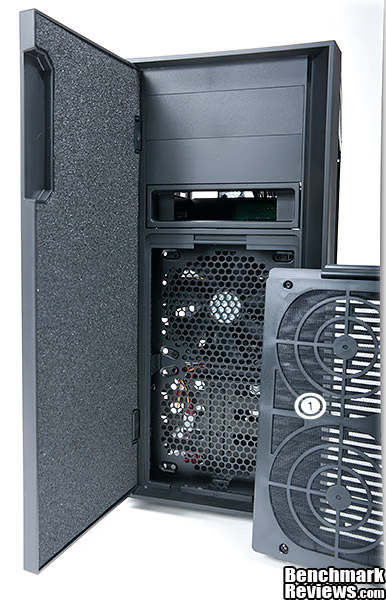
Let's just jump right in here: (1) This is the door, as you can see, but look, it's insulated with high density foam for sound dampening. So we begin to see the mysteries of sound dampening and the "silent" aspect of the Silencio 550. (2) There are only two 5.25" bays. That may or may not be a problem. For me, it wouldn't be a problem because I've never had anything more than two CD-DVD writers anyway. (3) I love this option. Some of you might not care, so foo to you. I love hot swap docks and Cooler Master included one in this case. You just slide a bare 3.5" drive right into it, no door, no mounting brackets, no nothing, just the bare drive. Very functional. Note that you cannot convert this to a 2.5" because the layout is different on the back of a 2.5" drive. Last, we have the front grill (4), but wait till you see what happens next.

Yessir, this entire front grill pops off. It pops off very easily too and pops on very positively. It's not cheap feeling in the least and it's double sided, adding to the feel of quality. See behind the grill? It's the front included fan (1). Below that we have the inside of the grill, which is the filter. I think this is nicely designed. Since this case is somewhat sealed by the side and front sound insulation, you should check the front and bottom filters often. Actually, the sound insulation on the sides and front panel seal it up pretty good so the filters are going to take a beating from our old friend Mr. Dust.

I wanted to show you what the filter looked like standing next to the filter receiver. Here, the filter is facing you whereas when it is installed, the filter you see would be hidden and the grill visible (1). Also, the door only opens right to left, so if your like me and like your case on your right, you have a problem. The door is not removable either. Other than this, so far I like the case. It's easy to get into, solid, sleek and nice looking, and it will be very quite; plus, I like the built in hot swap bay, much.
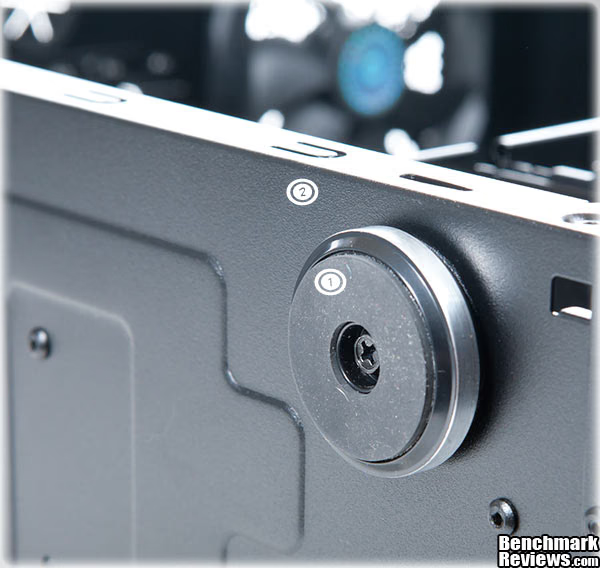
This is a shot of both the foot (1) and the paint job (2). As you can see, the paint is just really nicely done and it's nice and thick too. I wanted to shoot the bottom of the case for our paint inspection because if I were a case manufacturer trying to shave .0001 cents off production cost by skimping on paint, I'd do it on the bottom of the case. That way people don't see it until they have it, and instead of sending it back, they're going to keep it, rationalizing "No one sees the bottom of the case anyway." But we don't see any skimping on paint here. (Maybe I shouldn't give them any ideas.) The feet are rubber on the bottom, wide, and low. This makes the case very stable.
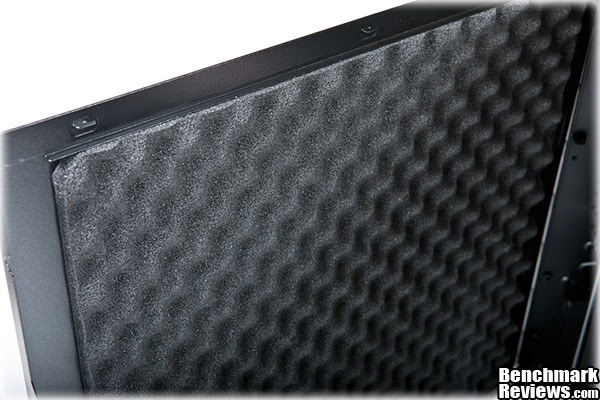
We'll segue into the next section with a an image of the inside of a side panel. As you can see, the panel is sound insulated. The foam is high or medium density and feels exactly like sound insulation material, not simply foam (I've seen and felt it before). As mentioned before, the insulation really seals up the cracks. Other than that, nothing else special here. Just your basic side panel, but with insulation. Well, there is one thing, They're heavy, heavy in a solid manner, because of the
insulation.
Closer Look: Interior
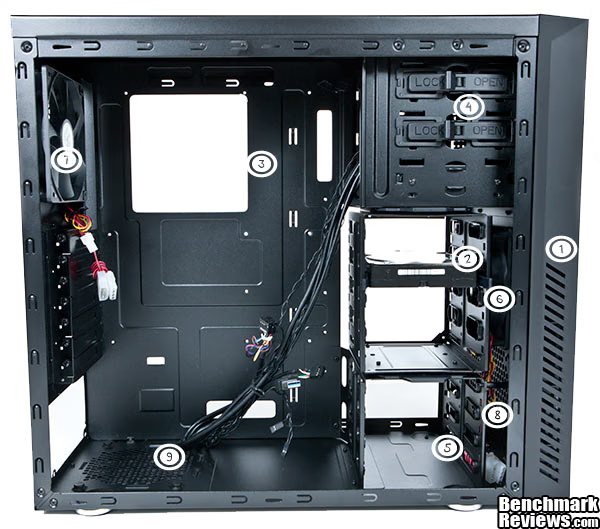
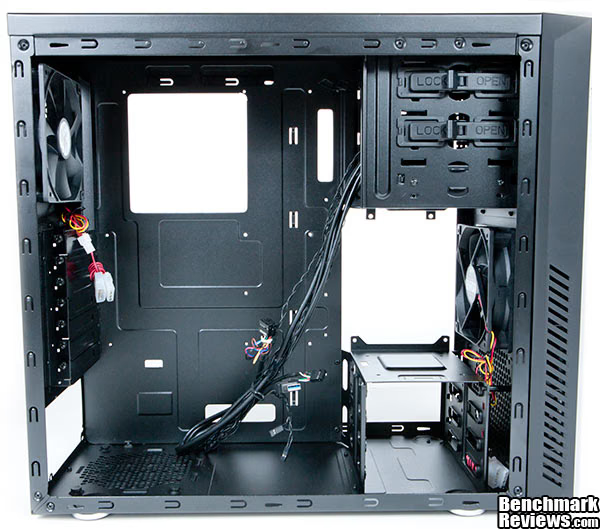
Finally, here is, as the military would put it, "Case, Computer Side Open" like "Meals, Ready to Eat (MRE's) because this case, again, just reminds me of something CIA, Secret Service, or military:
(1) This might be the most important aspect of this section. These are side inlet gills. Remember I was saying that the case is pretty well sealed? Well, Cooler Master must think so too because they created these gill vents specifically for cooling purposes. The fans will literally suck air in from these slits, which are on both sides of the front bezel, and through the filter we saw in the last section.
(2) This is the removable hard drive cage. It glides inbetween the top 5.25" non-removable tray and the bottom 5.25" non-removable tray. Well, I guess they could be removable if you drill out the rivets.
(3) This is the back tray CPU hole, nice and large and pretty unexciting.
(4) The top non-removable 5.25" bays with the bottom taken by the hot swap SATA docking tray. There are sliding lockers, as you can see, and they work well and feel solid. You can take them off if you want to bolt in your drives, or double them up on each side. You only get two of them though.
(5) We have here the bottom non-removable 5.25" drive bays.
(6) Can you see it? It's the front fan.
(7) Here again we have the back fan. Note here that besides the power supply fan and the front fans, this is the only fan you can mount in this case.
(8) Moving back again to the front of the case, we have an empty slot where the additional, optional fan mounts. Hey, I just noticed something. I have you jumping all over the place with the numbering. Instead of going back and redoing every image with numbers on it, I promise next time I'll start with (1) on the upper left and descend to the right. Sorry about that.
(9) Anyway, last we have the very interesting power supply air-flow entry perforations at the bottom left of the case. Very interesting, indeed.
The reason I went to the trouble with the numbering scheme and details is that there may be those starting out on their computer education, and thus the detailed explanations might prove helpful to them. That, and I myself find that sometimes I wish I had a little more detail when things like drive cages and mounting methods are discussed.
No numbers here. This is the same picture but with the hard drive cage removed. You can clearly see the fan in the front now. The optional fan mounts directly underneath it. You have to slide it down between the front of the case and the bottom drive cage.
Here we have the hard drive cage going solo on us. This is nice. There are no screws or clips or other stupid homicidal inducing design flaws. You slide it in, it clicks, and you're in business. It fits nice and tight too and the nylon guides prevent rattling.

Here is another look at the permanent and removable aspects of the drive bays: (1) the back of the SATA hot swap bay; and (2) the removable hard drive cage. Everything fits together nicely.

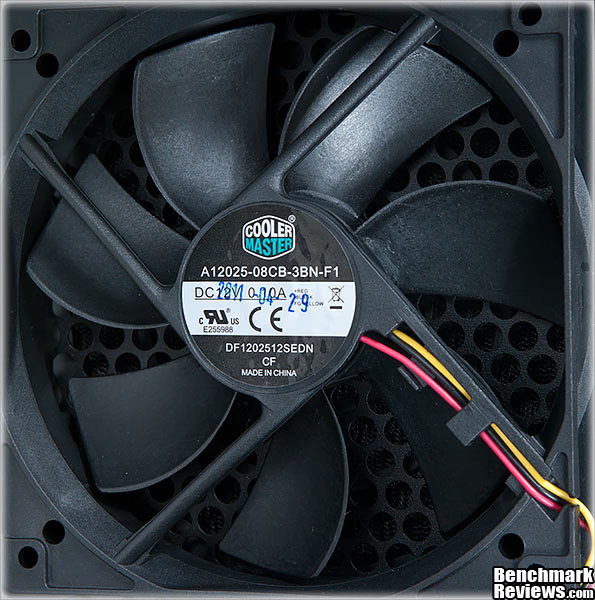
For you fan aficionados, I wanted you to be able to see what Cooler Master is using. Here you get a clear shot of the numbers. Report back in the comments section and let us know. Is it any good? It looks like your basic fan to me.
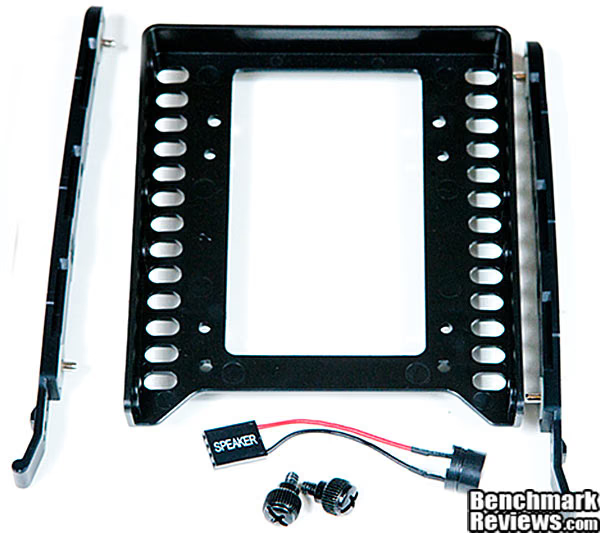
Cooler Master tossed in one drive converter, shown here with the back panel thumb screws (You get four thumb screws for the panels). Last, we have the most exciting item yet--an internal speaker. Are you kidding me? I haven't seen one of those in decades. I got a little chuckle out of that. I think some engineers have a sense of humor, not unlike Easter eggs in software. So here is a hardware Easter egg for you: An internal speaker. I wouldn't recommend playing "Taste the Bass" CDs through it though.
I'm happy to report that, indeed, all of the interior edges are rolled and there are no sharp areas to cut your fingers off. I hate nothing more than finishing a system build and then bleeding out because of cuts on my fingers and hands due to sharp edges. So let's get inside of this thing and see what the Silencio 550 has cookin'.
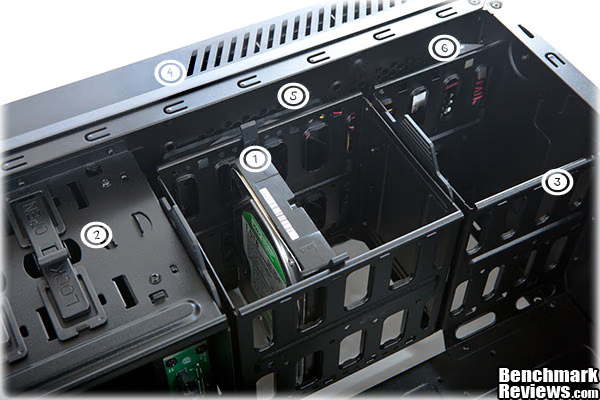
Detailed Interior Features
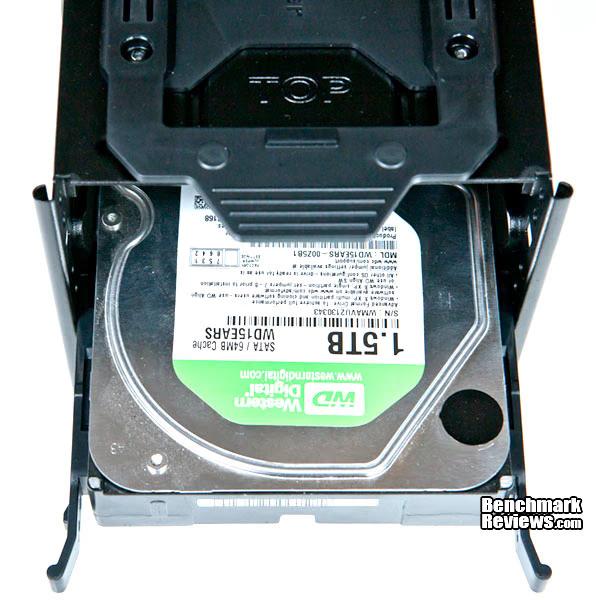
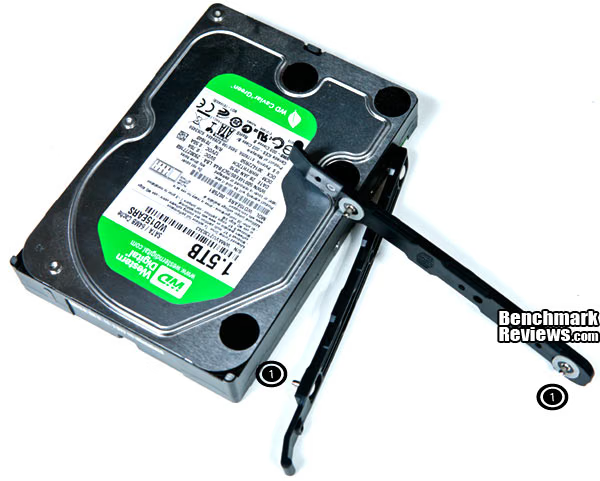
We'll start off where started in the last section, but this time I present to you the front innards of the case from a different angle: (1) The hard drive in the removable hard drive cage; (2) the 5.25" non-removable drive cage; (3) bottom non-removable 3.5" drive cage; (4) front bezel intake vent gills; (5) the front 120mm fan; and (6) the area where the optional fan mounts.
Let's get all of the numbers out of the way. Here we can see that the tape reads almost 16" without the removable HD cage. Cooler Master specifications state this space at 15.8" so it truly is 15.8" of video card space. Not bad.
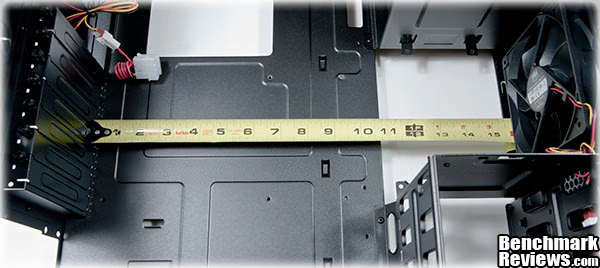
Now here we have the same measurement but with the hard drive cage installed. It looks like a little over 11". Cooler Master specifications state this measurement at 11.1" and so again, they are spot on. The next measurement is without the fan but I didn't take that measurement. Cooler Master was right on with the first two, so suffice it to say the measurement without the top, front fan is what they say it is at 16.8". (That and since we already have two variables from the first two measurements, you can do the simple math in your head by deducting the width of a 120mm x 25mm fan, so you don't need to take the last measurement anyway. A very useful thing that logic.)

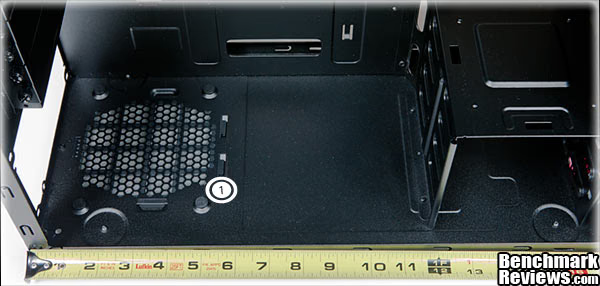
I don't think high wattage power supplies are oversized anymore, unlike in the past. I looked at a 1200wt Cooler Master PS and it was your standard, small, square diameter. But if you're like me and have an older PS, one of those 1000 watters that look like small refrigerators, then you'll appreciate the space you have here (1). Yep, 12". That's enough for a fridge and some left overs too.
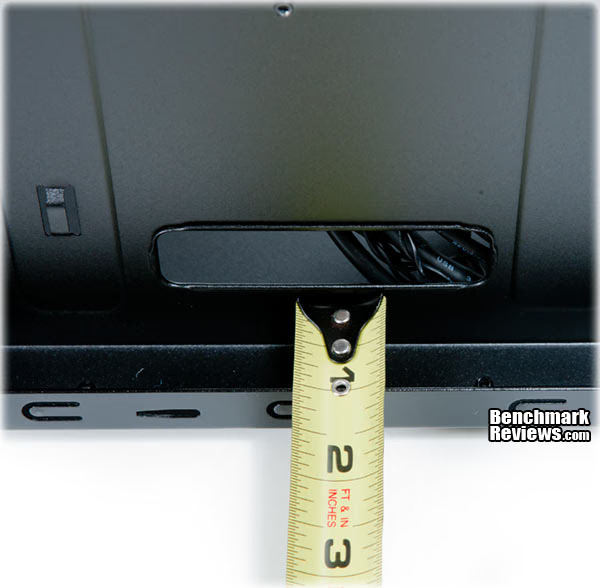
Last on the list of measurements, we have cable space on the back side of the motherboard tray. Serious space here at a whopping 15/16th of a full inch. That's pretty nice. That's more than my old Cooler Master 830 evo stacker, which was, new, 300 dollars. Even with the insulation, we're still looking at 7/8"+ of space. Note too that the motherboard tray is not removable.
Silencio 550 Final Thoughts
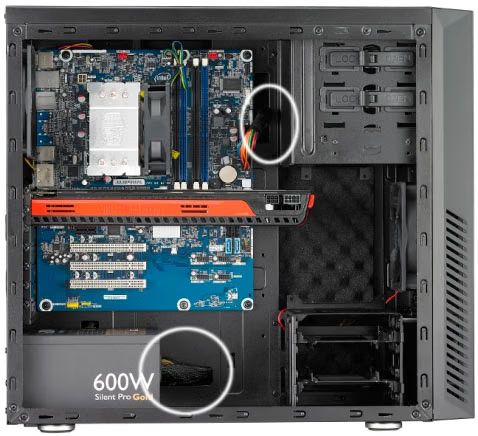
Here is the Cooler Master provided image of installed components. The circles show the cable routing. You can see the power supply cabling running out of the bottom cable hole nicely, and that's because you get almost a full inch of cable space on the back side. You can also see that the video card takes up just enough space that you would need to remove the drive cage for it to fit, leaving you with only two lower hard drive or SSD drive slot receivers. You do have, however, plenty of space to simply stack drives on the cage and on each other using any sort of kludge to do so (I cloth taped two SSDs back to back in my current case, with a nylon spacer between them, and then Velcro'ed them down on the bottom of the case, for instance). When I first received this case, I have to tell you, I didn't have high hopes that it would be anything I'd own. I've changed my thinking.
First, I would own this case if I wanted to build a clean, functional, nice looking box not the "Hey, I'm from the Borg collective, resistance is futile" look. At first I was thinking why a Mid-Tower case with the possibility of only three fans for "a high end system." Consider that if I put my 3.8Mhz OC'ed i7 920 Bloomfield in this case along with my GTX295 video card, and only had three fans, I'd probably cook it the first time I fired up "Crysis 2." I was thinking about the insulation too, but Cooler Master ships the Silencio 550 with only two 800 rpm fans. I mean a good 800 rpm fan is a pretty quite fellow in any case, much less one that is sound insulated. So what's the dealio? The dealio is that if I ran my 920 at stock speeds or with mild Ocing, it would have no problem in this case using two 800 rpm fans, and if it did I could either add another or increase fan speeds or both. So it can handle high end parts and keep them cool and quite. It's just a matter of how high end and what you do with them.
Second, the 920 series OCs are so, so, "antique" right? I mean we have the smaller die Sandy Bridge evolution of CPUs and they run extremely cool and extremely fast, so there you go. I'm thinking you could build a top end gaming station in this case using Sandy Bridge, three 800 rpm fans, and video beast card, and still get plenty of cooling, plus the added benifit of having it almost silent. Also, the 550 has lots of room in it for cable routing, even though it's a Mid-Tower case. So what's not to like about this thing?
Well, for one, you get two USB ports and one of them you have to drag out the back end of your case for it to work. That's right. The USB connector you get is not a mother board pin. It's a normal USB 3.0 connector, which means, you guessed it, you will need to run the cable through the case and out the back in order to plug the front USB 3.0 cable in. To me, that's a kludge, although I know it's pretty common. Then again, if it did come with a motherboard connector and your motherboard didn't have one, you'd be out of luck, unless there are converters out there and I have no idea if there are or are not. (I did a fast search and didn't find anything). If there are converters, it would have been nice for Cooler Master to include one.
Then there's that SD card reader, and to that I say, "Why?" Listen, SSD portable card readers just over the size of the SD card itself cost 9 bucks. So do we really need an SD card reader mounted vertically on the top of a case, ready to catch the fallout from the next volcanic eruption? You choose, but for me it was an easy question to answer. Let me think, "Nope." I'd rather have seen two more USB ports. It's not that big of a deal though.
Finally, the CPU cooler area gives us 154mm, and that's it. I did a search and compared a few coolers and found that some will fit and some will not, so watch for that. It won't be a problem finding a high end cooler that will fit. If you have a favorite CPU cooler that you want to use, however, or already have one, it may be problematic. You may need to be flexible.
Silencio 550 Conclusion
The Cooler Master 550 Silencio uses a Mid-Tower case and insulated front and side panels to sound dampen noise. The insulation is dense and seals the case well. You can only mount a total of three 120mm fans in the case, but for all but the hottest rigs, this is most likely going to be just fine Especially when you consider Sandy Bridge technology and how cool it runs, the problem of heat isn't really a problem as it was a few years ago (Think 920 Bloomfield OCed). The case comes with two 800 rpm 120mm Cooler Master fans, installed.
For a Mid-Tower case, it's surprisingly roomy and you get almost a full inch of back panel cable room, but only 154mm of CPU cooler space, which may or may not be a problem for you. The Silencio 550 will accept a video card up to 11.1" (281mm) with the removable drive cage installed, 15.8" (400mm) card with the drive cage removed, and 16.8" (427mm) card with the top front fan and drive cage removed. Included is a front loading built in hot swap bay, an SD card reader, and two USB ports, one USB 3.0 and one 2.0. However, the USB 3.0 does not have it's own native USB controller, so you need to run the cable out of the back of the case and plug it into the motherboard's USB 3.0 header. The front grill is double thickness to allow intake air from the gill vents in the front bezel and snaps in nicely. It also comes with a filter that is easy to clean. There is another filter on the bottom of the case serving the power supply, and it too is an easy to remove filter that slides off.
The case's look is sleek, spartan, but elegant, and painted very well. I have no problems with the case's outward appearance, but if you want "Bright Lights Big City," it's not the case for you. The painted surface is a matte finish that doesn't show finger prints, but the mirror like front panel is a finger print magnet. On the other hand, the front is nice looking because it is mirror like, and that's pretty cool. The gill vents on the front are nice looking, and are not there just for looks. They are a necessary cooling element because the internal sound insulation seals the panels well. As always, the construction, like all Cooler Master cases, is as solid as it gets, with all rolled edges so there are no cut points anywhere on the case. On the other hand, the case is so sleek as to not standout at all, but that's not necessarily a bad thing.
In several areas, I've given this case a hard time, but there is nothing wrong with it. If you're in the market for an elegant, mature case without the bright lights big city look, and one that is sound insulated and functional, then this case might be for you. Sound insulation is this case's marketing point, although it does shine in other areas, such as cable management and build quality.

Pros:
+ Sleek, elegant look
+ Sound insulated
+ Roomy internal spaces
+ Lots of video card room
+ Hot Swap hard drive bay
+ SD card reader
+ USB 3.0 front panel I/O port
+ Filters on both air intakes
+ Built solid
+ Almost a full inch of back panel cable space
+ Internal removable hard drive cage
+ Comes with two 120mm 800 rpm fans
Cons:
- SD card reader instead of more I/O USB ports
- USB 3.0 from front panel has to be run outside the case
- Larger video cards requiere removing the internal drive cage
- Only two 5.25" bays
-Door is not removable and only opens right to left
Ratings:
- Performance: 8.00
- Appearance: 7.25
- Construction: 9.75
- Functionality: 9.00
- Value: 8.50
Final Score: 8.5 out of 10.
Recommended: Benchmark Reviews Seal of Approval.
Benchmark Reviews invites you to leave constructive feedback below, or ask questions in our Discussion Forum.
Reader comments from the original article
31 comments were posted before commenting closed. They are preserved as written. Original avatars no longer resolve and are shown as a placeholder.
Dat speaker Linus Permalink:
The speaker is for BIOS beep codes and is a damn handy thing to have when something's malfunctioning, not some daft joke by CM's engineers. Learn your #, reviewer.
RE: Dat speaker WhyNotV2 Permalink:
You beat me to it Linus!!! One would think that a reviewer of computers/accessories would know what the speaker was for. You would also hope that the editor would also have picked up on it and informed the reviewer so that the reviewer could atleast add a parenthetical "I kid!!!" or something witty to the statement so that we, the reader, could put some stock in their review. Instead, we get a statement of computer building ignorance causing us to question the accuracy of the review.
RE: RE: Dat speaker Olin Coles Permalink:
I try not to change what the reviewer's write in their articles, and the small matter of pointing out the included piezo motherboard speaker as a listening device doesn't detract from 'the accuracy of the review'. An inch is an inch, and cable clearance is cable clearance.
A Small Matter? RMC Permalink:
It's a small matter the reviewer does not know what a mother board POST code speaker is? That is Mother Board 101 material. Every PC case I've purchased in the last two years (five) came with that "speaker". My ASUS P67 mother board has a connection for that speaker, as do all my mother boards. The point about this is it brings the credibility of the reviewer into question. Frankly, I'm shocked he didn't know what it's purpose is. Then we have a review about a PC case that is intended to be quieter than the average case. Yet not even a subjective comparison or comment about the noise level from the case? How useful is that to someone looking for a quiet case for a build? Sorry, but I am underwhelmed with this review.
RE: A Small Matter? Doug Dallam Permalink:
Who said I didn't or don't know what a post code is? Wow, you?re getting pretty out there based on available information. Also, all the cases I?ve bought in the last 11 years have not had a post speaker in them. So, what?s your point? Also, how would you test for sound? What real good would it do for me to say, "Yep, it's more quite than my current case with the same two 800rpm fans in it." I'm not going to waste the reader?s time with silly little subjective results. I think most of our readers can extrapolate that if a similar case does not have insulation, it will be noisier. More to the point, this wasn?t a ?silent case shootout review? the same way it wasn?t about how much cfm or noise fans make, or I would have tested the fans that came with it too. If you found the review underwhelming, that's okay. But if it was underwhelming because of my play on the speaker or the lack of valid sound testing, then I think your critique of the review is quite underwhelming as well, since everything else you need to know about a case is in the review. To each his own.
RE: RE: A Small Matter? RMC Permalink:
Who said I didn't or don't know what a post code is? Wow, you?re getting pretty out there based on available information. I sure didn't say you didn't know what a POST code is, check my first post. I clearly wrote "... POST code speaker...". So sorry, but I'm not biting on that spin/deflection. The first comment on this review was about the POST code speaker, and I have another question. What type of mother board audio connector (HD, Azallia, etc) would you connect that speaker to? Also, how would you test for sound? What real good would it do for me to say, "Yep, it's more quite than my current case with the same two 800rpm fans in it. As they say, if you need to ask.... The good that would come from that would be at least some indication that a case meant to be extra quiet actually accomplished that. How would that be wasting the readers time with a subjective result, when the review itself is for the most part, subjective, given no direct comparison with another case? You test by moving your hardware from a case you are familiar with to the case being tested. That is what reviewers do, go the extra mile, or hopefully they do. SPL meters are available, and although noise testing is difficult and exact numbers are dependent on many variables, a relative change in SPL between the same hardware in two cases would indicate any success in the design of the case being tested. I'm sorry you did not like my comments, but I stand by them.
RE: RE: RE: A Small Matter? Doug Dallam Permalink:
I made judgment calls on what to test and what not to test. I stand behind my decisions, as you do with yours, but since I don?t buy your objections, I give them no credence. If you think you can do a better job with reviews, I?m sure Olin would love having someone, like you, who is so attention and detail oriented as a reviewer for Benchmark Reviews. You should consider filling out an application.
RE: RE: RE: RE: A Small Matter? RMC Permalink:
I don't know if you've reviewed PC hardware in the past, or if you are just starting doing that, but you should try to understand the following. Comments on your reviews will not always be positive and in agreement with your findings and opinions. Also, any mistakes will likely be pointed out regardless of how small or insignificant they are. IMO, when errors are made, if the reviewer replies with a statement like, "... oops, how did I miss that, sorry...", that will be the end of it. I imagine that Mr. Coles would tell you something similar to this. Attempting to defend mistakes simply draws more attention to them and throws more fuel on the fire. If you think that my comments are unreasonable and I am being a jerk and a troll, you ain't seen nothing yet. I understand writing reviews is not easy, and is quite a bit of work. I have considered submitting an application, and I would like to write reviews. The question is, is the time and effort necessary to perform the job worth what is offered as payment?
RE: RE: Dat speaker Doug Dallam Permalink:
You should always question reviews for invalid testing procedures when you find something in the test that could invalidate the results. I'm happy you took the time to "question the accuracy of the review" when you found out the code speaker wasn't there to play "Taste the Bass" through. That was a good catch.
CMSSC Founder Enigma8750 Permalink:
I really like the idea of a padded case and a sound proof computer. The door is still clumsey to me but I can see the reason for it. It has to be there to Isolate the inside from the outside but does it also I Isolate the fresh air from entering into the front of the Case. It looks like a great case for a Good Modder to go to work on. The insides are very well thought out and the Press on Plug in drive guides are the greatest. Great Case Coolermaster.. Where is my Storm Scout II.. I ordered it like 4 months ago and I got was some ugly Enforcer. Come on....!
RE: CMSSC Founder Doug Dallam Permalink:
Yeah the door. A one way only door. That's so, so 1995. Like someone else said, it might not be a bad case to mod also. I was thinking about some red LEDs in the door itself, or something to illuminate the CM emblem. But then again, no.
Dat Speaker et al Robert17 Permalink:
Dat speaker !! Yeah, but remember that there are a lot of younger folks as well as some older ones that don't have a clue as to the beep codes, even when they are listed on the 48th page of the MB manual. Probably cause they don't occur much anymore. But yes, Coolermaster is one of the few case mfrs. that still include the speaker & that's a pretty professional approach. So, okey dokey, Doug, was it silent? Did you measure for that?
RE: Dat Speaker et al Adam Permalink:
Oddly enough my Xigmatek Utgard came with an internal speaker (to my surprise), although I'd not give them many points for 'professional approach' considering how poorly made the fan controller/USB front panel was.. Can't complain too much though, always good to have one of them hanging about for emergencies.
RE: RE: Dat Speaker et al Doug Dallam Permalink:
Never seen a speaker come with a case in the last several years. But then again, I don't buy cases every year myself. However, all of my MBs have come with a built in speaker for codes and or lights plus LED.
RE: Dat Speaker et al Doug Dallam Permalink:
I don't see how I could have tested it unless I ripped the insulation off to test without it. All cases have their own harmonics, as do fans, so testing the same fans, even, in another case wound have been useless. I did think for a while about how I could test it though.
Nomadd Nomadd Permalink:
This case has already been discountinued. Hence why you can't find in stock anywhere. Spoke to Coolermaster yesterday and they say a revised model is on the way. Wouldn't give a timescale, but looks like 1-2 months. Updated version will have: more cutouts for better cable management; "flat" sound-deadening material on the left-hand side, so getting the panel on once you've routed your cables will be easier; and more holes for folks with water-cooling rigs. I asked about the other areas: putting sound deadening on the "roof"; putting a cover of the hot-swap drive bay, but the Coolermaster guy said they weren't planning to make those changes,
RE: Nomadd Olin Coles Permalink:
I presume you read this review? This is the new Silencio 550, which we received a week ago from Cooler Master and is not available in stores until next week. It has the features you just listed, and was never previously released. You must be thinking of the Cooler Master Sileo 500, which is a different case.
RE: RE: Nomadd Olin Coles Permalink:
Also, Cooler Master just informed me that the EU version is slightly different than the US version because of "regional tweaks".
USB 3.0 Header converter Paul N. Permalink:
great review on the case; I appreciate the subtle jokes that you throw in here and there. I ran into this while perusing Lian Li's website. It's a USB 3.0 header converter which will allow you to connect the front panel USB 3.0 cables to the mobo internally as opposed to routing it through to the back. ##lian-li.com.tw/v2/en/product/product06.php?pr_index=575&cl_index=2&sc_index=47&ss_index=141&g=f
RE: USB 3.0 Header converter Doug Dallam Permalink:
Awesome man! Thanks for posting. So there you go folks!
RE: Cooler Master Silencio 550 Computer Case Paul N. Permalink:
Oops. bad linky. Here you go ##lian-li.com.tw/v2/en/product/product06.php?pr_index=575&cl_index=2&sc_index=47&ss_index=141&g=f
RE: Cooler Master Silencio 550 Computer Case Maurivilas Permalink:
When is that coming to Brazil stores?
A build with Silentio 550 Bikkeltje Permalink:
I've just finished a build using this case. Can't see any difference between my EU version and this one. As there were very few holes in the motherbord-tray, I found cable management challenging. A Scythe Mugen 2 didn't fit so i installed a Corsair H60 water-cooling set I also made a hole for the usb 3.0 cable to go through the backpanel. If you would like to see foto's: #nl.hardware.info/usersystemen/14910/bikkeltje-z68-silentio-550#tab:photos All in all its a nice case silent and good value for your money.
RE: A build with Silentio 550 Doug Dallam Permalink:
Thanks a lot for posting. I never thought this case would be popular. What sort of parts did you install? How many fans are you using? I see you are using an i5. What vid card? Also, I'm interested in why you chose this case?
RE: RE: A build with Silentio 550 Bikkeltje Permalink:
I'm not a gamer myself so there is no separate graphics card. I'm using the internal HD Graphics 3000. The Corsair H60 watercooling block came with a 140mm fan. This fan and the radiator is installed replacing the 800rpm coolermaster exhaust fan. The (coolermaster supplied) exhaust fan has found a new occupancy as a intake fan alongside the other intake fan. So there are now in my case 2 coolermaster 800rpm intake fans and one corsair exhaust fan. The extra drive cage is removed for a better airflow. Slightly overclocked (2500K @ 4.2Ghz) and 100% stressed it keeps my cpu below 62 degrees Celsius (idle 32 degrees Celsius). Case temperatures stay in their twenties (24-26). The main reason i chose this case were (in oder): Soundproofing Looks Front USB 3.0 Price
RE: Cooler Master Silencio 550 Computer Case Computer Hardware System Permalink:
Nice post! I just read through the entire article of yours and it was quite good. This is a great article. Thanks for sharing this informative information. I will visit your blog regularly for some latest post about computer hardware
RE: Cooler Master Silencio 550 Computer Case Doug Dallam Permalink:
Thank you. Please do come back.
RE: Cooler Master Silencio 550 Computer Case current news Permalink:
We need a large number of computers to collect information about current news. That case looks like it would solve a problem we now have with cooling all of them.
RE: Cooler Master Silencio 550 Computer Case Xanan Permalink:
A good written 'review' but I'm sorry to say, it doesn't really give out most of the useful info. I mean, all right, its a silent case, but then how silent is it? Without a comparison, for all I know, it could be just a marketing gimmick. At the very least, it could have been compared to some other CM case in the same price range. What about the temps? All that insulation would be useless, if another case was found to be more silent, and ran cooler, which unfortunately, would be known had a case been compared in the first place. Its difficult to write a review, and its more difficult to write a review that caters to everybody, but I honestly did not find any reason to put my money into this one at the very least.
RE: RE: Cooler Master Silencio 550 Computer Case Olin Coles Permalink:
Keep in mind that our writers may not have the resources available to them that you request, which in this case extends to multiple cases available for comparison. That comparison, by the way, would need to be measured at the same listening points to be relative. Additionally, the same internal hardware measured at the same ambient temperature would be necessary to make direct comparisons. But that's the problem: you want one particular case compared while everyone else wants another. You can see where this becomes extremely difficult, and why these reviews are more subjective than quantitative.
RE: RE: Cooler Master Silencio 550 Computer Case Doug Dallam Permalink:
Not to mention the time it would take. Xanan, using your own logic, 99% of case reviews would not be worth reading, since your objection can apply to any case, not just the Silencio. For instance, What if I compared the Silencio and the Cooler Master HAF 922M (that comes with three 120mm fans) using an Intel Celeron with a TDP of 35wts in both cases? What's that going to tell you? Like Olin said: I hope you can see the problem with your request.