
NVIDIA GeForce GTX 280 Video Card
NVIDIA GeForce GTX 280
I want to begin this article by expressing that like many of you reading this article, I spent money on 9800-series GeForce products thinking that my choice would be free of buyers remorse for at least a year. After all, it wasn't all that long ago that the GeForce 8800 series landed itself atop the competition and reigned supreme for well over a year. So it seemed logical that when NVIDIA launched their 9800 series, that things would somehow remain the same. So this is where I break some painful news to owners of premium top-end GeForce products: there's a new king named GTX 280 and he's not just a bigger, better, version of something we've already seen. The new GeForce GTX 280 presents a completely new core design, and introduces NVIDIA's 2nd-generation DirectX 10 architecture as opens up a new dimension of heterogeneous computing.
Hot on the heels of a rapid-succession GeForce 9800 GX2 and GeForce 9800 GTX launch only two short months ago, NVIDIA now officially unveils the GeForce GTX 280 and GTX 260 video cards. Using the fastest and most-powerful graphics processor NVIDIA has ever developed, both new GeForce products are constructed from a freshly-minted GT200 graphics processor (. Both the GTX 280 and GTX 260 products position themselves at the very highest segment of the GeForce product line. NVIDIA Estimates that the GeForce GTX 280 will be introduced at $649, while the similarly powerful GeForce GTX 260 will enter the $399 price point. If the competition ever had a very good reason to be concerned with their future, it would be right now.
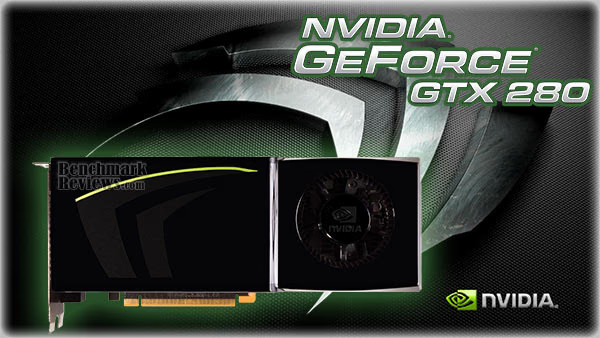
Now would also be a good time to explain why the new GTX 280 and GTX 260 product launch had to occur just nine weeks after the last GeForce 9-series launch. We offer a full explanation in the following section, but the short explanation is that the GT200 GPU isn't just another GPU with a few extra cores and speed increases; this is a whole new creature that does more than just render graphics.
Sure, you can realistically expect phenomenal frame rate results out of this video card, but you can also expect that real-world applications such as Adobe's upcoming CS4 software suite can actually perform every manner of tasks faster with this new GPU than any multi-core CPU ever could (which I witnessed first-hand at the NVIDIA Editors Day 2008 event). Finally, graphical demands of every imaginable level are handled by a GPU that out-paces the ability of a CPU, making it a lot more than just another video card. It's going to be tough to contain my enthusiasm since I've been testing this card for almost two weeks now; but I assure you that while the performance is every bit as real as I say it is.
| Currently Supported GeForce Products | GeForce GT200 Family | GeForce 9 Series Family | GeForce 8 Series Family | |||||
|
|
|
|
As sure as our name is Benchmark Reviews, this article will be report every GTX 280 benchmark result we've collected; but please, for the sake of missing out on something very big, don't skip all of the information we offer here just to see video game performance charts and glimpse at our conclusion. This isn't just another article about the latest and greatest video card or how well it handles the latest game titles, this article is also meant to explain why the GTX 200 graphics processor is going to change the way we all use computer hardware now and into the future.
Even before the GeForce GT200 GPU, NVIDIA has been consistently overwhelming the graphics card industry. Anymore it seems like the only products that manage to outperform their video cards are other GeForce graphic cards. Industry competitors have been very unsuccessful at beating NVIDIA, and very recently their biggest rival waved a white flag in surrender and relegated themselves to feeding off a low-end market segment just to maintain an identity. Sometimes though, I think that you become so good at what you do that you begin to compete with yourself. Not surprisingly NVIDIA has already anticipated this problem and planned for a solution, which is why this article will introduce a lot more than just video game frame rates for the new compute-ready GT200 graphics processor.
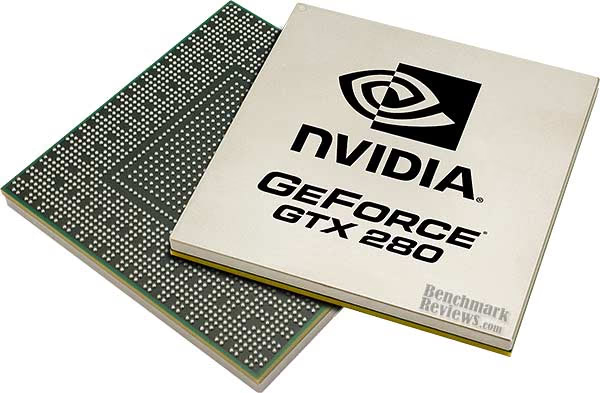
In the next section, Benchmark Reviews takes the time to give a full explanation as to why the GTX 200 graphics processor arrived so quickly after the last product launch, and begin to point out why it deserves some special attention.
About the Company: NVIDIA Corporation
NVIDIA (Nasdaq: NVDA) is the world leader in visual computing technologies and the inventor of the GPU, a high-performance processor which generates breathtaking, interactive graphics on workstations, personal computers, game consoles, and mobile devices. NVIDIA serves the entertainment and consumer market with its GeForce products, the professional design and visualization market with its Quadro products, and the high-performance computing market with its Tesla products. These products are transforming visually-rich and computationally-intensive applications such as video games, film production, broadcasting, industrial design, financial modeling, space exploration, and medical imaging.
NVIDIA Product Lines
GeForce - GPUs dedicated to graphics and video.
Desktop and notebook PCs equipped with GeForce GPUs deliver unparalleled performance, crisp photos, high-definition video playback, and ultra-realistic games. GeForce notebook GPUs also include advanced power management technology to deliver high performance without sacrificing battery life.
Quadro - A complete range of professional solutions engineered to deliver breakthrough performance and quality.
Certified for all leading professional graphics applications. #1in professional graphics segment share. NVIDIA Quadro Plex is the industry's first dedicated visual computing system (VCS).
Tesla - A massively-parallel multi-threaded architecture for high-performance computing problems.
A dedicated, high-performance GPU computing solution that brings supercomputing power to any workstation or server and to standard, CPU-based server clusters. Tesla delivers a 128-processor computing core per GPU, C-language development environment for the GPU, and a suite of developer tools - allowing users to develop applications faster and to deploy them across multiple generations of processors. It also can be used in tandem with multi-core CPU systems to create a scalable computing solution that fits seamlessly into existing workstation or IT infrastructures.
GT200 GPU: Why Now?
As my review of the GeForce 9800 GTX was just being published for the April 1st launch, there were already rumors circulating about a mystery "GeForce 9900" video card. At first, I found myself just a little irritated at the prospect of working on one major GeForce product launch while another was right around the corner. For most of early May there was a strong buzz around the coming product line, but it wasn't until I attended NVIDIA Editors Day 2008 that it was all laid out in front of me. Once I witnessed first-hand how the new GT200 GPU transcoded video at speeds I never imagined (and I transcode DVD publications often) it began to make sense. Further enforcing my interest in NVIDIA's latest technology was information about CUDA that would enable me to actually leverage GeForce products into commercial environments for the purpose of increase productivity. Not only was the GT200 changing the way we will perceive a video card, but it was evident that the term "display adapter" may no longer apply.
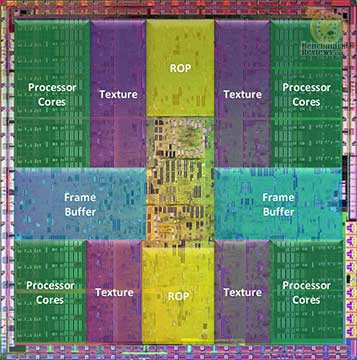
Before I share anymore information on the new architecture and the advanced technology it utilizes, I will answer the fundamental question: why now? To understand the answer, you must first accept how the industry works and that when there's a development break-through it may not always be scheduled on a calendar. Most people don't realize that it takes between 1-2 years (according to NVIDIA sources) to produce a stable graphics processor architecture. In fact, you might consider the development timeline a lot like a chess game because of constant trail and error turn-taking. So when NVIDIA finalizes a newly engineered design and makes it retail-ready, the company personnel go from a year-long yellow light to a full-blown green. So when a 1-2 year long development successfully completes with amazing results, you can understand the urgency of getting their bleeding-edge technology to market.
GT200 GPU: So What's New?
GeForce GT200 GPUs (presently the backbone of both the GTX 260 and GTX 280 products) are massively multithreaded, many-core, visual computing processors that incorporate both a second-generation unified graphics architecture and an enhanced high-performance, parallel-computing architecture. Two over-arching themes drove GeForce GT200 architectural design and are represented by two key phrases: "Beyond Gaming" and "Gaming Beyond." You may have caught this emphasis when I gave my report on NVIDIA's Editors Day 2008.
"Beyond Gaming" means the GPU has finally evolved beyond being used primarily for 3D games and driving standard PC display capabilities. This is what I was referring to when I said that calling the GTX 280 a display adapter was now inappropriate. You're going to see this be commonplace more and more often, because GPUs are accelerating non-gaming, computationally-intensive applications for both professionals and consumers. "Gaming Beyond" means that the GeForce GT200 GPUs will also enable amazing new gaming effects and dynamic realism, delivering much higher levels of scene and character detail, more natural character motion, and very accurate and convincing physics effects. The GeForce GT200 GPUs are designed to be fully compliant with Microsoft DirectX 10 and Open GL 2.1.

NVIDIA's second generation unified visual computing architecture as embodied in the new GeForce GTX 200 GPUs is a significant evolution over the original unified architecture of GeForce 8 and 9 series GPUs. Numerous extensions and functional enhancements to the architecture permit a performance increase averaging 1.5× the prior architecture. Improvements in sheer processing power combined with improved architectural efficiency allow amazing speedups in gaming, visual computing, and high-end computation.
NVIDIA engineers specified the following design goals for the GeForce GT200 GPUs:
-
Design a processor with up to twice the performance of GeForce 8800 GTX
-
Rebalance the architecture for future games that use more complex shaders and more memory
-
Improve architectural efficiency per watt and per square millimeter
-
Improve performance for DirectX 10 features such as geometry shading and stream out
-
Provide significantly enhanced computation ability for high-performance CUDA applications and GPU physics
-
Deliver improved power management capability, including a substantial reduction in idle power.
|
Features |
8800 GTX |
GTX 280 |
% Increase |
|---|---|---|---|
|
Cores |
128 |
240 |
87.5 % |
|
TEX |
64t/clk |
80t/clk |
25 % |
|
ROP Blend |
12p/clk |
32p/clk |
167 % |
|
Precision |
fp32 |
fp64 |
-- |
|
GFLOPs |
518 |
933 |
80 % |
|
FB Bandwidth |
86 GB |
142 GB |
65 % |
|
Texture Fill |
37 GT/s |
48 GT/s |
29.7 % |
|
ROP Blend |
7 GBL/s |
19 GBL/s |
171 % |
|
PCI Express |
6.4 GB |
12.8 GB |
100 % |
|
Video |
VP1 |
VP2 |
-- |
The new second-generation SPA architecture in the GeForce GTX 280 improves performance compared to the prior generation G80 and G92 designs on two levels. First, it increases the number of SMs per TPC from two to three. Second, it increases the maximum number of TPCs per chip from 8 to 10. The effect is multiplicative, resulting in 240 processor cores.
Compared to earlier GPUs such as GeForce 8800 GTX, the GeForce GTX 280 provides:
-
1.88× more processing cores
-
2.5× more threads per chip
-
Doubled register file size
-
Double-precision floating-point support
-
Much faster geometry shading
-
1 GB frame buffer with 512-bit memory interface
-
More efficient instruction scheduling and instruction issue
-
Higher clocked and more efficient frame buffer memory access
-
Improvements in on-chip communications between various units
-
Improved Z-cull and compression supporting higher performance at high resolutions
-
10-bit color support
What makes the GeForce GT200 a great parallel processor?
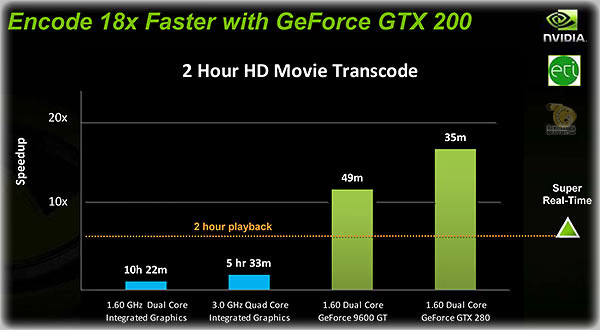
There are three key ingredients:
-
CUDA: The greatest obstacle to parallel computing has always been the software. The GeForce GTX 280 supports CUDA, the industry's first parallel computing language to have deep penetrating (70 million user base) on the PC. CUDA is simple, powerful and offers exceptional scaling on visual computing applications.
-
GPU Computing Architecture: The GeForce GTX 280 is designed specifically for parallel computing, incorporating unique features like shared memory, atomic operations and double precision support.
-
Many-core architecture: With 240 cores running at 1.3GHz, the GeForce GTX 280 is the most powerful floating point processor ever created for the PC.
-
Torrential bandwidth: Due to their high data content, visual computing applications become bandwidth starved on the CPU. With eight on-die memory controllers, the GeForce 280 GTX can access 141GB of data per second, greatly accelerating HD video transcoding, physics and image processing applications.
Please see our NVIDIA GPU Computing FAQ for additional information on this topic.
GeForce GTX 280 Specifications
Coupled with PureVideo HD technology, the NVIDIA GTX 280 video card delivers an astounding multimedia experience. The GeForce GTX 280 features two dual-link, HDCP-enabled DVI-I outputs for connection to analog and digital PC monitors and HDTVs, a 7-pin analog video-out port that supports S-Video directly, plus composite and component (YPrPb) outputs via an optional (and included) dongle. 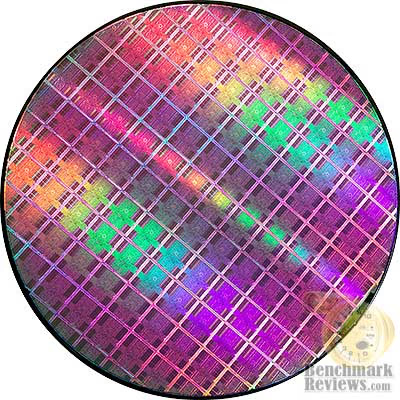
-
NVIDIA GeForce GTX 280 Graphics Card
-
HDMI resolutions: 480p/720p/1080i/1080p
-
PCI Express 2.0 interface
-
Dual card-slot active cooling solution
-
PureVideo HD technology with hardware decoding of high-definition video formats
-
Dual dual-link DVI - up to 2560x1600
-
DVI HDTV output: 480p/720p/1080i
Bus Support
-
PCI Express 2.0
-
PCI Express x16 Backwards Compatible
3D Acceleration
-
Microsoft DirectX10 support
-
Unified Shader Model 4.0
-
OpenGL 2.1
Others
-
HDTV Ready (using dongle adapter)
-
Vista Ready
-
SLI and 3-Way SLI Ready
-
HDCP Ready
-
DVI Audio (using digital audio connection)
-
Dual Link Dual DVI
-
RoHS Compliant
Dual-Stream Decode
Recently, studios have begun taking advantage of the additional space high-definition media such as Blu-Ray and HD DVD discs provide by adding dual-stream picture-in-picture functionality to movies. Often the PiP content is coupled with advanced BD-J (Java) or HDi (XML) features, so taking the processing burden off of the CPU is even more important for titles with these advanced features. The latest PureVideo HD engine now supports dual-stream hardware acceleration which takes the workload off of the CPU and gives it to the more powerful GPU.
GT200 Graphics Processing Unit
-
1.4 Billion transistors
-
933 gigaFLOPs of processing power
-
Local 16k shared memory
-
602 MHz Graphics engine clock speed
-
240 Graphics processor cores
-
1296 MHz graphics processor clock speed
-
400 MHz RamDAC
-
Max. Resolution @ 2560 x 1600
-
True 128-bit floating point high dynamic-range (HDR) lighting with 16x full- screen anti-aliasing
-
Double precision 64-bit floating point computation support
-
2nd Generation NVIDIA Unified Architecture
-
Supports future 10-bit color and 120 MHz LCD panels
GT200 Video Memory
-
1 GB GDDR3 video memory
-
1107 MHz memory clock (2214 MHz DDR realized)
-
16Mx32 Memory configuration
-
512-bit memory bus
-
Hynix H5RS5223CFR-N2C (Rated 1200 MHz 0.8ns 2.05V)
-
Memory pieces: 16
-
Memory package: uBGA
HDCP over dual-link allows video enthusiasts to enjoy high-definition movies on extreme high-resolution panels such as the 30" Dell 3007WFP at 2560 x 1600 with no black borders. The GeForce GTX 280 also provides native support for HDMI output, using a certified DVI-to-HDMI adaptor in conjunction with the built-in SPDIF audio connector.
Aero with HD DVD and Blu-ray Playback
Until now, users have been unable to take advantage of the Aero user interface in Windows Vista while playing HD video. When this was attempted, Vista would revert back to a basic theme and Aero would be disabled.
PureVideo HD now supports HD movie playback in Aero mode. This creates a more seamless user experience by eliminating the pop-up message notifying that Vista has switched to basic mode. As you can see in the screenshot below, Aero windows are enabled in conjunction with HD movie playback.
With HDMI support the GTX 280-based graphics solution is among the fastest graphics card available, and when paired with a 7 Series NVIDIA nForce motherboard, creates the latest in a line of powerful NVIDIA gaming platforms. Be blown away by scorching frame rates, true-to-life extreme HD gaming, and picture-perfect Blu-ray and HD DVD movies.
GeForce GTX 280 Features
Backed by NVIDIA's Lumenex Engine, the GeForce GTX 280 Features delivers true 128-bit floating point high dynamic range (referred to as HDR), lighting capabilities with up to 16x full-screen anti-aliasing. Second-generation NVIDIA PureVideo HD technology with HDCP compliance delivers the ultimate high-definition video viewing experience to the NVIDIA GeForce GTX 280 video card.
With hardware decoding for Blu-ray and HD DVD formats, PureVideo HD technology lowers CPU utilization when watching high-definition video formats by decoding the entire video stream in the graphics processor, freeing up the processor for other tasks. In addition to low CPU utilization, PureVideo HD enhances standard definition video content with de-interlacing and other post-processing algorithms to ensure standard DVD movies look their best on the PC screen and high-definition television sets. High definition content protection, or HDCP, technology ensures a secure connection between the GTX 280 graphics card and an HDCP capable monitor for viewing protected content such as high-definition Blu-ray or HD DVD movies.
Coupled with PureVideo HD technology, the GeForce GTX 280 deliver the ultimate multimedia experience. HDMI technology allows users to connect PCs to high-definition television sets with a single cable, delivering high-definition surround sound audio and video with resolutions up to 1080p. PureVideo HD technology scales video in the highest quality up to resolutions of 2560x1600 - from standard and high-definition file formats - while preserving the details of the original content. PureVideo HD technology also accelerates high-definition video decode, freeing up CPU cycles while watching high-definition Blu-ray and HD DVD movies or other VC-1 and H.264 encoded file formats.
NVIDIA Unified Architecture
-
Unified shader architecture
-
GigaThreadTM technology
-
Full support for Microsoft DirectX 10
-
Geometry shaders
-
Geometry instancing
-
Streamed output
-
Shader Model 4.0
-
Full 128-bit floating point precision through the entire rendering pipeline
NVIDIA Lumenex Engine
-
16x full screen anti-aliasing
-
Transparent multisampling and transparent supersampling
-
16x angle independent anisotropic filtering
-
128-bit floating point high dynamic-range (HDR) lighting with anti-aliasing
-
32-bit per component floating point texture filtering and blending
-
Advanced lossless compression algorithms for color, texture, and z-data
-
Support for normal map compression
-
Z-cull
-
Early-Z
NVIDIA Quantum Effects Technology
-
Advanced shader processors architecture for physics computation
-
Simulate and render physics effects on the graphics processor
NVIDIA Triple-SLI Technology
-
Patented hardware and software technology allows three GeForce-based graphics cards to run in parallel to scale performance and enhance image quality on today's top titles.

NVIDIA PureVideo HD Technology
Along with world-class video acceleration, PureVideo HD has been at the forefront of advanced video post-processing. With the R174 series driver, we are introducing new features for PureVideo HD for GeForce GTX 200-based products. These new features, Dynamic Contrast Enhancement and Dynamic Blue, Green, and Skin Tone Enhancements, are extremely computationally intensive and not found on even the most high-end Blu-ray or HD DVD players. But by tapping into the enormous pool of computational power offered by our processor cores, we can now enable post-processing techniques that have yet to be realized in fixed-function video processors.
-
Dedicated on-chip video processor
-
High-definition H.264, VC-1, MPEG2 and WMV9 decode acceleration
-
Advanced spatial-temporal de-interlacing
-
HDCP capable3
-
Spatial-Temporal De-Interlacing
-
Noise Reduction
-
Edge Enhancement
-
Bad Edit Correction
-
Inverse telecine (2:2 and 3:2 pull-down correction)
-
High-quality scaling
-
Video color correction
-
Microsoft Video Mixing Renderer (VMR) support
Advanced Display Functionality
-
Two dual-link DVI outputs for digital flat panel display resolutions up to 2560x1600
-
One dual-link DVI outputs for digital flat panel display resolutions up to 2560x16004
-
Dual integrated 400MHz RAMDACs for analog display resolutions up to and including 2048x1536 at 85Hz
-
Integrated HDTV encoder provides analog TV-output (Component/Composite/S-Video) up to 1080i resolution
-
NVIDIA nView multi-display technology capability
-
10-bit display processing
Dynamic Color Enhancement
By analyzing the color components of each frame, we can also isolate and improve the appearance of blue, green, and skin tones, which the human eye is particularly sensitive to. Unlike televisions which have built-in image processors, PC monitors typically display the input picture without any processing, which can result in comparatively dull images. Dynamic blue, green, and skin tone enhancement alleviates this problem by applying correction curves on these sensitive colors. The result is improved total balance and clarity, without over saturation.
Built for Microsoft Windows Vista
-
Full DirectX 10 support
-
Dedicated graphics processor powers the new Windows Vista Aero 3D user interface
-
VMR-based video architecture
High Speed Interfaces
-
Designed for PCI Express x16
-
Designed for high-speed GDDR3 and DDR3 memory
Operating Systems
-
Built for Microsoft Windows Vista
-
Windows XP/Windows XP 64
-
Linux
API Support
-
Complete DirectX support, including Microsoft DirectX 10 Shader Model 4.0
-
Full OpenGL support, including OpenGL 2.0
NVIDIA Hybrid SLI Technology
Benchmark Reviews learned of Hybrid SLI during our time with NVIDIA at the 2008 International CES. I thought that seeing the Stereoscopic 3D Gaming demonstration would be the highlight of NVIDIA's offerings, but then the following morning they proved to have at least one more trick up their sleeve. At CES we were privileged to see Hybrid SLI make it's formal release.
NVIDIA announced the industry's first hybrid technology for PC platforms-Hybrid SLITM-that addresses two critical issues: increasing graphics performance and reducing power consumption. NVIDIA Hybrid SLI technology will be incorporated into a wide variety of graphics and motherboard desktop and notebook products that the Company is rolling out for both AMD and Intel desktop and notebook computing platforms throughout 2008.
"From the introduction of programmable GPU's to the rapid adoption of our multi-GPU SLI technology, NVIDIA has repeatedly pioneered and innovated to solve difficult problems for the industry. We believe Hybrid SLI technology is one of the most important innovations we've come up with to date," said Jen-Hsun Huang, CEO of NVIDIA. "Hybrid SLI delivers new multi-GPU technology to a large segment of the PC market, delivering consumers a level of PC graphics performance and power efficiency never before seen."

First disclosed in June 2007, NVIDIA Hybrid SLI technology is based on the Company's market-leading GeForce graphics processor units (GPUs) and SLI multi-GPU technology. Hybrid SLI enables NVIDIA motherboard GPUs (mGPUs) to work cooperatively with discrete NVIDIA GPUs (dGPUs) when paired in the same PC platform. Hybrid SLI provides two new technologies - GeForce Boost and HybridPower - that allow the PC to deliver graphics performance for today's applications and games when 3D graphics horsepower is required, or transition to a lower-powered operating state when not.
NVIDIA HybridPower Technology
For lower energy consumption and quieter PC operation, HybridPower allows the PC to switch processing from a single GPU or multiple GPUs in SLI configuration to the onboard motherboard GPU. HybridPower is most useful in situations where graphics horsepower is not required, such as high definition movie playback on a notebook platform or simple e-mail or Internet browsing on a desktop. It is also beneficial for those users who want a quiet operating state with reduced thermals and noise. For notebooks, HybridPower can also dramatically extend battery life by up to 3 hours. When a game or application is started that requires the additional 3D horsepower, the PC can automatically transition back to the discrete graphics cards and power up the 3D capabilities all transparent to the end user.
In applications where 3D performance is required, GeForce Boost turbo-charges 3D operation by combining the processing power of the traditional NVIDIA GeForce-based graphics card with that of the second GPU integrated into the motherboard core logic. In media-rich applications, both GPUs work in tandem to render the combined images with the end user benefiting from the increase in performance and frame rate. For typical games and 3D applications, GeForce Boost can kick in automatically resulting in a greatly enhanced consumer experience.

When coupled with a HybridPower-enabled motherboard, the GeForce GTX 280 (and GTX 260) can be power down completely. For everyday computing and watching HD movies, the motherboard GPU is used and the GTX 280 can be turned off, consuming no power at all. When an intensive 3D application is engaged, users can turn on the GeForce GTX 280 for maximum performance. HybridPower works by sending the output of the discrete GPU through the output connector on the motherboard. This allows the system to use both GPUs as it sees fit without physically changing the connector.

NVIDIA is the recognized market leader for GPU desktop and notebook solutions for both Intel and AMD platforms and has a full lineup of Hybrid SLI-capable graphics and motherboard products planned for 2008. New Hybrid SLI-capable products include the upcoming NVIDIA nForce 780a SLI, nForce 750a SLI, and nForce 730a media and communication processors (MCPs) for AMD CPUs, which will be released next month, as well as the new GeForce 8200-the industry's first micro-ATX motherboard solution with an onboard Microsoft DirectX 10-compliant motherboard GPU. NVIDIA Hybrid SLI notebooks as well as desktop products designed for Intel CPUs will be available next quarter. Look for Hybrid SLI to make its way into everything NVIDIA produces from this point forward.
GeForce GTX 280 Closer Look
At first, the GTX 280 (and also the GTX 260) could be easily mistaken for the older 9800 GTX video card series. The NVIDIA GeForce GTX 280 uses a dual-slot design with improved clearance around the fan for optimal cooling and airflow. The board is cooled with an exceptionally quiet on-board "smart" blower fan; even when playing the most graphics-intensive 3D games, the GeForce 9800 GTX remained whisper quiet. The blower fan is angled so that the line of airflow will draft directly against the graphics processor.
The NVIDIA GeForce GTX 280 comes in one color: black. At this time (launch day), all GTX 280 and GTX 260 products will be NVIDIA reference versions, with manufacturers simply branding their allotment of video cards with a decal. Although it is uncertain, NVIDIA may eventually offer their add-in card partners (AIC's) the engineering information necessary to create working modifications so that unique varieties of the GT200-based graphics card can be independently designed. In contrast to the equally dark Gigabyte 9800 GX2 we just tested the new GTX 280 looks a whole lot more exciting, with the key difference surrounding the blower fan region which is contoured to enhance airflow and reduce obstructions.
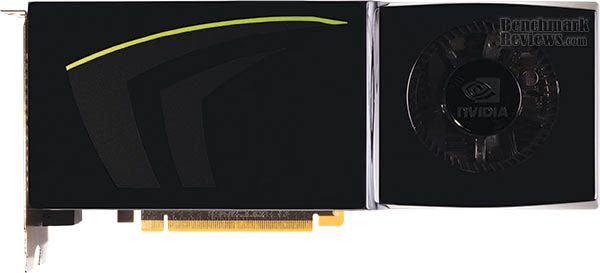
Utilizing a glossy piano-black shell to encase the GT200 GPU, the delicate electronics inside are kept safe from accidental impact damage. I still feel the sting of a past incident where an accidental snag loosened a critical electronic component from the PCB of our older GeForce 8800 GTX in-between benchmark tests, which resulted in flawed results and some nasty fan mail. Thanks to the new well-conceived design those worries are all behind us now.
The NVIDIA GTX 280 graphics card is a performance optimized high-end graphics card on each and every level. Power is taken from the PCI Express host bus as well as from one 8-pin and another 6-pin PCI Express power connector. Without any auxiliary power provided to the GeForce GTX 280 graphics card, an LED on the header bracket will shine red and the graphics card will not boot. In addition, the connector that is not adequately powered will turn red. Together this new functionality offers immediate feedback for enthusiasts concerned about providing adequate power to the GPU. In the past, low/no auxiliary power situations sounded a piezo buzzer which was so loud you could often mis-located the origin of the alarm.

Since I'm sure you just read the long list of new features and specifications GTX 280, you already know that you can use GT200 graphics processor for a lot more than playing video games. Aside from the entire Parallel Computing Architecture, the HDMI functionality paired with the smart fan design and external exhausting ventilation may help the GTX 280 find a home inside premium-level HTPC environments.
A few months back we reviewed ZOTAC's GeForce 8800 GT AMP! Edition HDMI video card, which used a DVI-to-HDMI adapter and S/PDIF audio input cable to stream full HDMI audio and video output for the first time in any NVIDIA product. Then just months ago the GeForce 9800 GTX series was launched with the same HDMI functionality and features. HDMI is back again (although not with the native interface found on the 9800 GX2) as NVIDIA introduces the GeForce GTX 280.
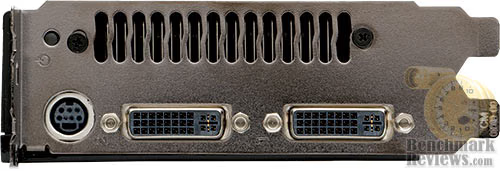
Because the HDMI audio functionality is controlled at a hardware level, there is no need for additional drivers or software. Much like the SPDIF connection on the back of a motherboard, the video cards audio out function is plug-n-play. The P/SPDIF cable included with the kit connects between a small two-pin port on the power-connection side of the unit and onto the HT Omega Claro Plus+ AD8620BR Op Amp sound card we used for testing. Your setup may be different so the cable may connect between the GTX 280 and the digital audio input pins on either your motherboard or add-in sound card. Not all motherboards and sound cards support this option, so make sure it's available before you make your purchase.
The underside of the new GTX 280 is made from metal, and acts as a heat-dissapating device with a few vents allowing for a small amount of air circulation. The entire row of ventilation slots is 1.75" wide by 8.25" long, however only about 3.25" of that length is actually an open vented slot. I had some stability issues with my early review sample because of heat, so perhaps all of the vents seen in the image below will be opened up for better cooling performance in future retail models.
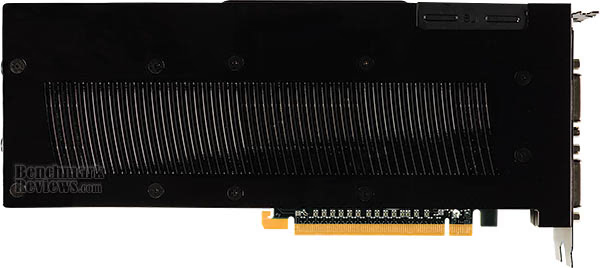
At the upper-right corner of the GeForce GTX 280 shown above you would be keen to notice the rubber cover that is hiding two SLI connections. NVIDIA has designed the GeForce GTX 280 to operate in a 3-way SLI configuration. For many of the extremely demanding applications and video games, a GeForce GTX 280 placed into a 3-way SLI set will be much faster than a set of Quad SLI GeForce 9800 GX2's. The big question gamers and hardware enthusiasts will need answer for themselves is if their configuration is will support this functionality in terms of power supply, case, and cooling.
At this first stage of early product release, AIC's will not offer any product difference from the NVIDIA reference design for their own products. Value-added features are likely to include bundled video game titles or convenience software, but it will be a while before partners can begin making BIOS adjustments (for overclocking).
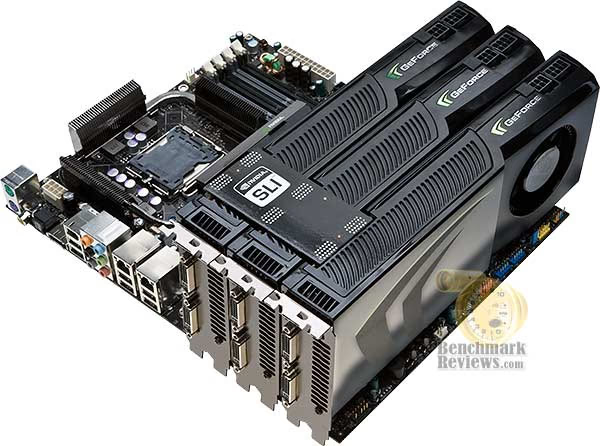
Looking at how the NVIDIA GeForce GTX 280 might stack-up in a triple-SLI configuration, you can see a few advantages and disadvantages over previous GeForce products. One of the primary problems encountered with the 8800 GTX and Ultra series was the tight confinement created inside the case, which often times led to poor cooling. NVIDIA later redesigned the tail end for their 9800 GTX using contours to help open up air channels. The opening at the rear of the card is hollowed to allow supplemental cooling-air intake, resembling a jets intake manifold.
While the angled blower fan is going to help do a better job of cooling the GT200 GPU, and the contoured design will assist in bringing an unrestricted supply of fresh air, but the ventilation is not exclusively exhausted outside of the case. In my testing, I found that a tremendous amount of heat radiated from the video card itself, making it very hot to the touch, and that an additional fan needed to be added inside the case to cope with the added exhaust air.
This concludes our skin-deep look at the new NVIDIA GeForce GTX 280, which has revealed several interesting discoveries about the hardware design and the cooling process. In our next section, Benchmark Reviews begins testing on the GeForce GTX 280 video card against its closest competitors (all of which belong to NVIDIA at the moment), but only after we spend some time explain how it's all done here in our lab.
Video Card Testing Methodology
Benchmark Reviews has high hopes that one day we will be so giant and world famous that every combination of the graphic card available will be on-hand for our product testing... and we're getting closer! I envy the review sites that have twenty other video cards tested in stand-alone, SLI, and CrossFireX arrays for each and every review. Eventually we will be that big, and offer all of those configurations. Readers can help us grow to that size by spreading the word, but for now we'll have to make due with what our budget can afford. In this article, Benchmark Reviews is going to test and compare the NVIDIA GeForce GTX 280 1GB graphics card against several other closely-ranked products from within the GeForce family.
At the start of all tests, the previous display adapter driver is uninstalled and trace components are removed using Driver Cleaner Pro. We then restart the computer system to establish our display settings and define the monitor. Once the hardware is prepared, we begin our testing. The synthetic benchmark tests in 3DMark06 will utilize shader models 2.0 and 3.0. Every test is conducted at the following resolutions: 1600x1200 (20.1/21" Standard LCD's), 1280x1024 (19" Standard LCD), and 1024x768 (17" Standard LCD). In some tests we utilized widescreen monitor resolutions, since more users are beginning to feature these products for their own computing. Each benchmark test program begins after a system restart, and the very first result for every test will be ignored since it often only caches the test. This process proved extremely important in the World in Conflict and Supreme Commander benchmarks, as the first run served to cache maps allowing subsequent tests to perform much better than the first. Each test is completed five times, with the average results displayed in our article.
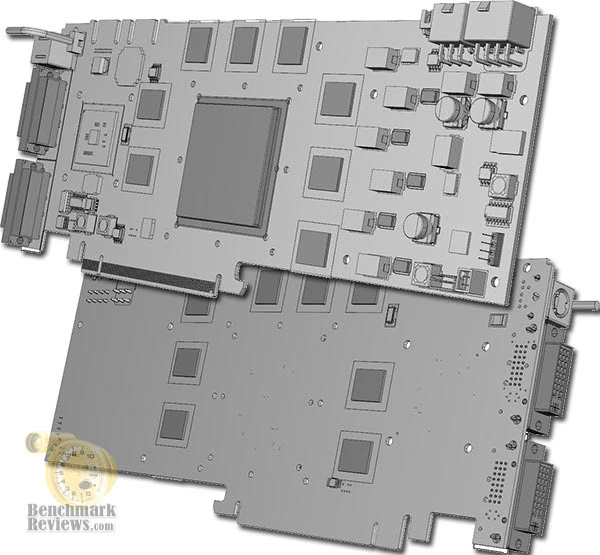
Our site polls and statistics indicate that the over 90% of our visitors use their PC for playing video games, and nearly 70% of you are using one of the screen resolutions mentioned above. Since all of the benchmarks we use for testing represent different game engine technology and graphic rendering processes, I feel that this battery of tests will provide a diverse range of results for you to gauge performance on your own computer system. Since most gamers and enthusiasts are still using Windows XP, it was decided that DirectX 9 would be used for all tests until demand and software support improve for Windows Vista.
Test System
-
Motherboard: Gigabyte GA-X48T-DQ6 (Intel X48 Chipset) with version F4 BIOS
-
Processor: Intel E8200 Core 2 Duo 2.66GHz (Overclocked to 3.6 GHz)
-
System Memory: Corsair PC3-14400 DDR3 1800MHz
-
Disk Drive 1: OCZ SATA-II 32GB 2.5-Inch SSD OCZSSD2-1S32G
-
Disk Drive 2: (Paging File) MemoRight GT MR25.2-064S 2.5-Inch 64GB SATA SSD
-
Optical Drive: ASUS BC-1205PT SATA Blu-ray Disc Optical Drive
-
Operating System: Windows XP Professional SP-3 (optimized to 16 processes at idle)
Benchmark Applications
-
3DMark06 v1.1.0 (8x Anti Aliasing & 16x Anisotropic Filtering)
-
Company of Heroes v1.71.0 (Very High Settings, 16xQ CSAA)
-
Crysis v1.21 Benchmark (High Settings, No Anti Aliasing)
-
Lightsmark 2007 v1.3
-
Supreme Commander: Forged Alliance (Fidelity High: 8x AA)
-
World in Conflict v1.0.0.8 Performance Test (Very High Setting: 4x AA/4x AF)
Test Products
| Product Series | MSI 8800 GTX NX8800GTX-T2D768E-HD | ZOTAC GeForce 9800 GTX ZT-98XES2P-FSP | FOXCONN GeForce 9800 GTX 9800GTX-512N | ZOTAC GeForce 9800 GTX ZT-98XES2P-FCP | NVIDIA GeForce GTX 280 | ||
|---|---|---|---|---|---|---|---|
| Stream Processors | 112 | 128 | 128 | 128 | 128 | 128 (x2) | 240 |
| Core Clock (MHz) | 700 | 610 | 700 | 685 | 756 | 600 (x2) | 602 |
| Shader Clock (MHz) | 1700 | 1350 | 1700 | 1713 | 1890 | 1500 (x2) | 1296 |
| Memory Clock (MHz) | 1000 | 1000 | 1000 | 1100 | 1150 | 1000 (x2) | 1107 |
| Memory Amount | 512 MB | 768 MB | 512 MB | 512 MB | 512 MB | 512MB (x2) | 1024 MB |
| Memory Interface | 256-bit | 384-bit | 256-bit | 256-bit | 256-bit | 256-bit (x2) | 512-bit |
-
ZOTAC GeForce 8800 GT 512MB AMP! Edition ZT-88TES3P-FCP (700 MHz GPU/1700/1000 RAM - Forceware v175.16)
-
MSI GeForce 8800 GTX OC NX8800GTX-T2D768E-HD (610 MHz GPU/1350/1000 RAM - Forceware v175.16)
-
ZOTAC GeForce 9800 GTX 512MB ZT-98XES2P-FSP (700 MHz GPU/1700 Shader/1000 RAM - Forceware v175.16)
-
FOXCONN GeForce 9800 GTX Standard OC Edition 9800GTX-512N (685 MHz GPU/1713 Shader/1100 RAM - Forceware v175.16)
-
ZOTAC GeForce 9800 GTX AMP! Edition ZT-98XES2P-FCP (756 MHz GPU/1890 Shader/1150 RAM - Forceware v175.16)
-
Gigabyte GeForce 9800 GX2 GV-NX98X1GHI-B (600 MHz GPU x2/1500 Shader/1000 RAM - Forceware v175.16)
-
NVIDIA GeForce GTX 280 (602 MHz GPU/1296 MHz Shader/1107 MHz RAM - Forceware v177.34)

Using the latest GPU-Z utility available for free from our industry affiliate techPowerUp!, we verify manufacturer specifications with the actual internal specifications. In regard to this GeForce GTX 280 graphics card, it appears that all specifications match those stated by NVIDIA.
Now we're ready to begin testing video game performance on the NVIDIA GeForce GTX 280 graphics card, so please continue to the next page as we start with the 3DMark06 results.
3DMark06 Benchmark Results
3DMark is a computer benchmark by Futuremark (formerly named Mad Onion) to determine the DirectX 9 performance of 3D game performance with graphics cards. 3DMark06 uses advanced real-time 3D game workloads to measure PC performance using a suite of DirectX 9 3D graphics tests, CPU tests, and 3D feature tests.
3DMark06 tests include all new HDR/SM3.0 graphics tests, SM2.0 graphics tests, AI and physics driven single and multiple cores or processor CPU tests and a collection of comprehensive feature tests to reliably measure next generation gaming performance today. Some enthusiasts may note that Benchmark Reviews does not include CPU-bound tests in our benchmark battery, and that only graphic-bound tests are included.
Here at Benchmark Reviews, we believe that synthetic benchmark tools are just as valuable as video games, but only so long as you're comparing apples to apples. Since the same test is applied in the same controlled method with each test run, I believe 3DMark is a very reliable tool for comparing graphic cards against one-another.
Using a base resolution of 1024x768 as our starting point (representative of a 17" LCD monitor) the maximum settings were applied to 3dMark06, which for these tests includes 8x Anti-Aliasing and 16x Anisotropic Filtering. Low-resolution testing allows the graphics processor to plateau maximum output performance, which thereby shifts demand onto the system components to keep up. At the lower resolutions 3DMark will reflect the GPU's top-end speed in the composite score, indicating full-throttle performance with little load. This makes for a less GPU-dependant test environment, and is helpful in measuring the maximum output performance in the test results.

Without question the GeForce 9800 GX2 outperforms every other competitor by a great margin of difference, as it should for a video card housing two G92 GPU's. But for this article we're going to focus on the NVIDIA GeForce GTX 280 video card. At the lowest resolution of 1024x768, the GeForce GTX 280 nearly keeps pace with the Gigabyte GeForce 9800 GX2 GV-NX98X1GHI-B, yet still succeeds as the most powerful single-GPU solution in our test group for performance.

Bumping the GPU strain up a notch with 1280x1024 resolutions the scores remain relatively comparable in terms of performance ratio. More users operate with this resolution than anything else, as it represents 19" LCD monitor native resolution. Once again, the GeForce 9800 GX2 completely dominates the competition with major dual-GPU muscle, but the rest of the pack still manages to keep up the pace with nearly identical result ratios.

At the widescreen resolution of 1680x1050, the NVIDIA GTX 280 produces an HDR/SM 3.0 score of 3788 which is just narrowly beaten by the GeForce 9800 GX2 score of 3875.
While the entire G90-series GPU family is PCI Express 2.0 compatible, there doesn't seem to be enough demand to create an immediate advantage. However, with the much higher-output GT200 GPU, the bandwidth demands raise from 6.4 GBps on the GeForce 8800 GTX to 12.8 GBps on the GTX 280, as tested on the Gigabyte GA-X48T-DQ6 motherboard.
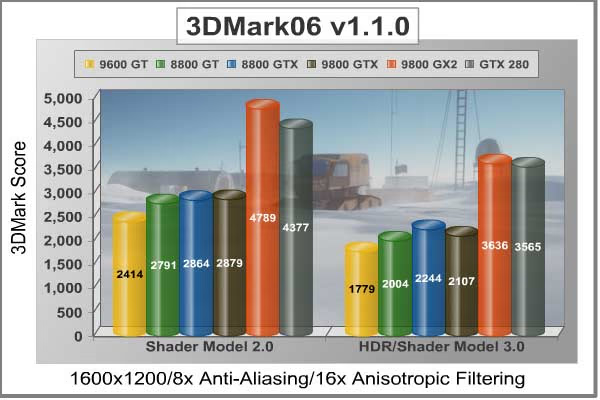
Not too many users have a 20-21" standard display LCD that uses the 1600x1200 resolution, but I'm one of the few. At this resolution, there are 1.92 MP displayed. From the results charted above, the GeForce 9800 GX2 and GTX 280 have firmly seated themselves into a lonely top-performance catagory shared only with each other. Perhaps one day they will see some competition, but not today.

Finishing up the series of synthetic benchmark tests under heavy load, the FOXCONN GeForce 9800 GTX Standard OC Edition video card finally out-paced the much older MSI GeForce 8800 GTX OC in the SM 2 tests, but every single-GPU solution offered is nearly halved in performance in comparison to the GeForce GTX 280 for our HDR/SM3 tests. The show belongs to the 9800 GX2 and GTX 280 if you're looking for pure performance.
One of NVIDIA's goals for the GT200 was to produce a GPU that doubles the performance of the 8800 GTX. Considering that the GeForce 8800 GTX video card that we used for testing is MSI's OC Edition that scored 1797 points in the shader model 3.0 tests, it seems that the GeForce GTX 280 may actually have completed its goal. Producing 3041 HDR/SM3 points, the reference GTX 280 outperforms the overclocked 8800 GTX by nearly 70%. With only a single GPU inside, the GTX 280 manages to perform identically to the twin-G92 9800 GX2.
Take the 3DMark06 tests at face value, because in our next section we begin real-world testing on a cadre of popular video games known for taxing the graphics processor, and this lineup might change. Our first up is Crysis, so please continue on...
Crysis Benchmark Results
Crysis uses a new graphics engine: the CryENGINE2, which is the successor to Far Cry's CryENGINE. CryENGINE2 is among the first engines to use the Direct3D 10 (DirectX10) framework of Windows Vista, but can also run using DirectX9, both on Vista and Windows XP.
Roy Taylor, Vice President of Content Relations at NVIDIA, has spoken on the subject of the engine's complexity, stating that Crysis has over a million lines of code, 1GB of texture data, and 85,000 shaders. To get the most out of modern multicore processor architectures, CPU intensive subsystems of CryENGINE 2 such as physics, networking and sound, have been re-written to support multi-threading.
Crysis offers an in-game benchmark tool, which is similar to World in Conflict. This short test does place some high amounts of stress on a graphics card, since there are so many landscape features rendered. For benchmarking purposes, Crysis can mean trouble as it places a high demand on both GPU and CPU resources. Benchmark Reviews uses the Crysis Benchmark Tool by Mad Boris to test frame rates in batches, which allows the results of many tests to be averaged.
The very first thing we discovered in the low-resolution tests was how seemingly poor the Gigabyte GeForce 9800 GX2 GV-NX98X1GHI-B performed, since each overclocked G92 9800 GTX was able to outperform the two G92 GPU's that refused to shine bright in this low-resolution test. Even without Anti-Aliasing turned on, Crysis keeps the entire field of G92 competitors around 60 FPS. It's clear that the CryENGINE2 is a heavy hitter, as the insanely overclocked ZOTAC 8800 GT AMP! Edition outperforms the older MSI GeForce 8800 GTX OC NX8800GTX-T2D768E-HD by almost 3%. But without a real strain on the GPU, these products all compare relatively well across the field...

...and then there's the NVIDIA GeForce GTX 280. With only 0.79 Megapixels to display at 1024x768, the GTX 280 outperforms the overclocked GeForce 8800 GTX by 39%, and the newer 9800 GTX by 21%.
Low-resolution testing allows the graphics processor to plateau maximum output performance, which thereby shifts demand onto the system components. At the lower resolutions Crysis will reflect the GPU's top-end speed in the composite score, indicating full-throttle performance with little load. This makes for a less GPU-dependant test environment, is helpful in measuring the maximum output performance in the test results.
At the 1280x1024 resolution our results mirror what gamers using a 19" LCD monitor would experience, and the performance is beginning to slip into the less-desirable 30 FPS threshold for acceptable performance. In terms of general performance, all of these products maintain the same performance ratio as before, except for the 9800 GX2 which seems to hold its ground.

Thanks to the AA optimizations in the G90-series GPU, all of the products based on this chip with easily outperform both of the older G80 GPU's by a significant margin as the resolution is raised and bandwidth demands are increased. It's obvious that the 65nm G90 core architecture is to be credited, and perhaps the new PCI Express 2.0 interface which allows twice as much graphics data bandwidth also played its part.

For widescreen users, our benchmarks below indicate that the older 8800 GTX just barely matches the level of performance found in the ZOTAC 8800 GT AMP! Edition. Testing in high-pressure Crysis also seems to have effected the GeForce GTX 280, which is barely ahead of the GeForce 9800 GX2 dual-GPU graphics card.
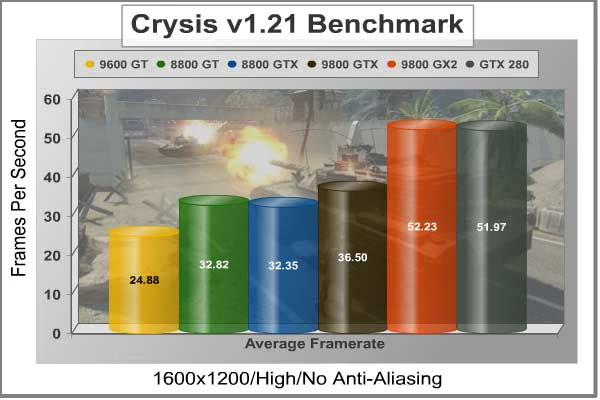
Heading into the 1920x1200 resolutions produced on the SOYO DYLM26E6 used for testing, Crysis forces 2.3 million pixels to be processed by our graphical test products. Surprisingly, the overclocked 8800 GTX has plateaued with the AMP!'ed 8800 GT at high-resolution, where as the other G90-based GPU's all maintained a rather constant performance ratio between one-another throughout the Crysis benchmark tests. The GeForce GTX 280 and the 9800 GX2 seem to still be neck-and-neck for our 1600x1200 testing.

While the overclocked Foxconn GeForce 9800 GTX clearly outperformed the AMP!'ed 8800 GT by nearly 11 frames per second on average, the entire collection of graphics cards looks miserable against the 9800 GX2 and NVIDIA GeForce GTX 280.
At the end of our Crysis testing at the widescreen resolution of 1920x1200, Foxconn's 9800GTX-512N certainly showed that newer video games may be more enjoyable with 9800 GTX series, but the GTX 280 outperformed it by nearly 50%. While the GTX 280 does trail behind the dual-GPU 9800 GX2 by a mere 4%, the GTX 280 dominates the overclocked MSI 8800 GTX by an astounding 74%!
We would have loved to add high-level post processing effects results in this list, but since the other comparison products would likely fail to produce usable frame rates we have decided to hold off and publish a new set of tests when we publish the upcoming ZOTAC GeForce GTX 280 AMP! Edition reviews.
In our next section, Benchmark Reviews switches to video-output only benchmarking, and uses Lightsmark for an apples-to-apples comparison of raw graphics performance on NVIDIA's new GTX 280 graphics card.
Lightsmark Frame Rates
Stepan Hrbek is the mastermind behind Lightmark 2007, a program that allows you to benchmark real-time global illumination. Natural lighting makes artificial graphics life-like and real. Computers get faster, but rendering more polygons doesn't add value if lighting still looks faked, so insiders know that the next big thing is proper lighting; aka Realtime Global Illumination.
Typical workloads in real-time rendering will shift, and Lightsmark simulates it. Global Illumination renders often take hours, so is your computer fast enough for real-time?
Before Lightsmark, real-time global illumination was limited to small scenes, small resolutions, small speeds, specially crafted scenes with handmade optimizations. Lightsmark breaks all limits at once, running in reasonably sized scene (220000 triangles) in high resolutions at excellent speed.
At the ultra-low resolution of 1024x768, Lightsmark forces each GPU to open up performance full-throttle. Demands are quick-paced, and not surprisingly, a larger video frame buffer (9600 GT, 9800 GX2, and GTX 280) means that performance suffers from an extended memory address in this speed-critical test.

Lighting is computed fully automatically in an original unmodified scene from 2007 game World of Padman. This benchmark is not tweaked for Lightsmark, and contains all sorts of geometrical difficulties with extra rooms hidden below the floor.
This scene places medium to low demands on a graphics card processor and tests the maximum speed with which the scene can be properly displayed at each resolution. At the lower resolution, the large frame buffer does not come to offer the same benefits. A larger video memory means a longer round-trip for information, and when the resolution is low that trip needs to be completed very quickly.

This is our first evidence that matching the video card to the rest of your hardware is just as important as matching it to the expected task. Notice from this test that Lightsmark doesn't favor the goliath Gigabyte GeForce 9800 GX2, or the Palit GeForce 9600 GT 1GB Sonic graphic cards. In fact, our GeForce 9800 GX2 was outperformed in every single Lightsmark test by the snappy AMP!'ed 8800.
With Crysis tested at 1600x1200, the frame buffer was not as critical as raw processing power. It helped, but obviously it didn't make a margin of difference. In Lightsmark, information is passed through the buffer and called on very quickly, and the only thing which was going to benefit this test was the appropriate ratio of graphical stream processors to video memory buffer, so to keep up with demands.

In terms of performance, this test offers very short but taxing graphics, and only the most nimble products with capable muscle can take advantage. This translates into trouble for anyone using new graphics hardware to render older (OpenGL) video games such as Doom 3 or Quake 4.
After all of the Lightsmark tests were complete, I'm sure these results aren't going to indicate anything particular to most readers. As I mentioned before, the frame buffer has a whole lot to do with the speed of rendering. The larger the frame buffer, the longer it will take to complete the strobe of information. Lightsmark is meant to represent that collection of older games, which some of you might still be playing. Even Call of Duty 4: Modern Warfare runs on a proprietary game engine that Infinity Ward based off of the tried-and-true Q3 structure. So keep this in mind as you're shopping for a new video card.
In the next section we change gears and test to compare our group of video cards in Supreme Commander.
Supreme Commander Results
Supreme Commander: Forged Alliance is a standalone real-time strategy computer game expansion to Supreme Commander, developed by Gas Powered Games and published by THQ. Because it is a standalone expansion, it is possible to play without owning Supreme Commander. Forged Alliance adds new game play features to the game, several new units for the three preexisting factions, and is further optimized for increased performance beyond that of the original game.
Supreme Commander makes extensive use of two technologies relatively unused in video games prior to its release, namely multi core processing and multi monitor displays. When detecting a multi-core processor, the game assigns a specific task, such as AI calculations, to each core, splitting the load between them. Supreme Commander is one of the first games to specifically support dual and quad core processors in the game.
In the chart depicted below, Supreme Commander calculates a SupComMark score for the video rendering. The exact formula is a mystery, and since the scores are all comprised of very high numbers the information begins to look very similar. Despite this, there are some differences worth noticing if you pay attention to the numbers. I could have probably subtracted about 7000 points from this test, so that the chart would look more useful, but then I would probably get complaints about the inaccurate scores.
At any rate, the NVIDIA GeForce GTX 280 Compute-Ready graphics card doesn't pull ahead like it has done in past tests. At least not to the same degree. Unlike the other games we test, Supreme Commander: Forged Alliance does not use a short in-game benchmark to determine a score. In these tests, Supreme Commander plays an entire round of the game from start to finish and generates composite scores based on this lengthy test. This composite score is based on two factors: sim and render.

Supreme Commander: Forged Alliance may not offer the first-person shooter experience that many gamers prefer, but the graphics are among the most demanding possible because of the larger world-scape. Even so, there begins to be a trend showing that places high demand on the graphics card, as evidenced by mutually low average frame rates shown below.

Once the average frame rate scores were calculated, there seemed to be three distinct levels of performance, as shown in the chart above. The Palit GeForce 9600 GT 1GB Sonic represented the mid-level graphic card, while the nearest-neighbor AMP!'ed 8800 GT rubbed elbows with the factory-overclocked 8800 GTX and 9800 GTX. In fact, the old MSI GeForce 8800 GTX OC NX8800GTX-T2D768E-HD actually matched performance of the FOXCONN GeForce 9800 GTX Standard OC Edition 9800GTX-512N in Supreme Commander. At the very top of the food-chain was the only real stand-out: the Gigabyte GeForce 9800 GX2 GV-NX98X1GHI-B, which rendered the majority of frames much faster than the others.
Even with the 512-bit memory buffer totaling 1 GB of GDDR3, Supreme Commander forced the new GeForce GTX 280 within 17% of the next fastest group of video cards.
Supreme Commander proved to be a harsh gaming engine for video cards, and Crysis certainly applied some heavy pressure, but let's see how World in Conflict holds up against our performance testing in the next section.
World in Conflict Benchmark Results
The latest version of Massive's proprietary Masstech engine utilizes DX10 technology and features advanced lighting and physics effects, and allows for a full 360 degree range of camera control. Massive's MassTech engine scales down to accommodate a wide range of PC specifications, if you've played a modern PC game within the last two years, you'll be able to play World in Conflict.
World in Conflict's FPS-like control scheme and 360-degree camera make its action-strategy game play accessible to strategy fans and fans of other genres... if you love strategy, you'll love World in Conflict. If you've never played strategy, World in Conflict is the strategy game to try.
World in Conflict offers an in-game benchmark; which records the minimum, average, and maximum frame rates during the test. Very recently another hardware review website made the assertion that these tests are worthless, but we couldn't disagree more. When used to compare video cards which are dependant on the same driver and use the same GPU architecture, the in-game benchmark works very well and comparisons are apples-to-apples.
First tested was the 1024x768 resolution in WiC, which relates to gamers using a 17" LCD monitor. Based on the test results charted below it's clear that WiC doesn't place a limit on the maximum frame rate (to conserve wasted power) which is good for full-spectrum benchmarks like ours, but bad for electricity bills. The critically important minimum frame rate results indicate a shared lead between the 8800 GT AMP! Edition, ZOTAC 9800 GTX AMP! Edition, and GeForce 9800 GX2 video cards.
To my surprise however, the Palit 9600 GT actually showed a prevailing strength against the overclocked MSI GeForce 8800 GTX, matching it in minimum frame rate and coming very close in the average. Ultimately the GTX 280 would secure the lead with an average frame rate of 68 FPS; but a 2 FPS lead over the GeForce 9800 GTX is not exactly impressive.
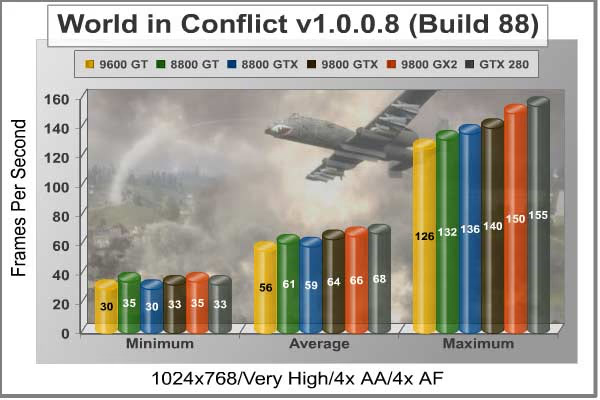
A cautionary word about maximum frame rates is necessary, however. Although these readings are worth noting, the maximum frame rate is nearly worthless in determining GPU power. The reason for this is simple: those maximum frame rates are collected from scenes with little to no movement and practically no graphical processing demand. Obviously this shifts the importance over to the minimum frame rate, which will indicate how smooth the performance will remain under heavy demand.
With a balanced demand for CPU and GPU power, the 1.31 Megapixel draw at 1280x1024 resolution proved to be the turning point for performance. Notice how the GeForce 9800 GX2 posts minimum frame rates not very much higher than the an overclocked 8800 GT and barely above the 30 FPS mark, which proves that even under moderate demand World in Conflict is still incredibly demanding. The NVIDIA GeForce GTX 280 holds its ground and drops only 1 FPS, which results in a decidedly lead over the 9800 GTX.
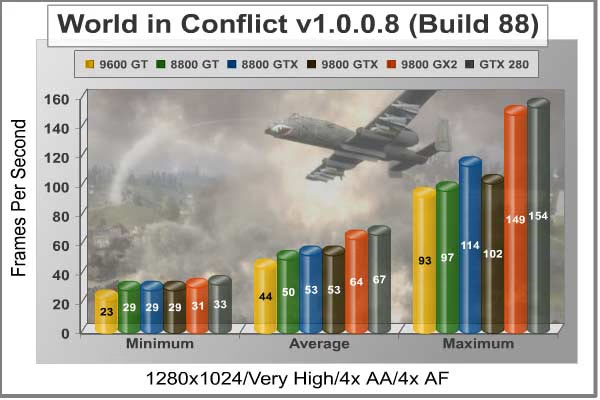
Set to the highest graphics quality settings the Masstech engine allows, World in Conflict begins to really strain all of the GeForce products. At the 1600x1200 resolution, the GeForce GTX 280 absolutely dominates! Between 1.31 MP and 1.92 MP, the GTX 280 reduced FPS output by a mere 4 frames, matching the performance decay of the GeForce 9800 GX2.
Taking a broader look at the average frame rate, the overclocked Foxconn GeForce 9800 GTX still proves that it really isn't much stronger than a very-overclocked GeForce 9600 GT, while the MSI GeForce 8800 GTX OC beats it out in the minimum and average frame rates. In comparison, the GTX 280 outperforms the overclocked 8800 GTX by 40% in WiC.

It's been a long run of tests for the new NVIDIA GeForce GTX 280 graphics card, and the performance has certainly been more than I could have expected. As the new king of the graphics castle, the GeForce GTX 280 wears an undisputed crown as the highest-performing graphics processor available today. Of course, there's still the 9800 GX2 to contend with, but on a few occasions this dual-G92 video card was just barely able to keep pace with the GTX 280.
GeForce GTX 280 Temperatures
This section is probably the most popular for me, not so much as a reviewer but more for my enthusiast side. Benchmark tests are always nice, so long as you care about comparing one product to another. But when you're an overclocker, or merely a hardware enthusiast who likes to tweak things on occasion, there's no substitute for good information.
Benchmark Reviews has a very popular guide written on How To Overclock the NVIDIA GeForce Series video card, but it was published shortly after the 8th generation of GeForce products was launched. Currently we are preparing for a more updated article, with additional information on shader overclocking and temperature control as the newest GeForce products are made available. Once published you can expect more detailed information than what is shown below, as for now the temperatures depicted are GPU core temperatures at idle and under load.
To begin my testing, I used ATITool v0.26 to record GPU temperatures at idle and again at high-power 3D mode. The ambient room temperature was a comfortable 22.1°C and the inner-case temperature hovered around 34°C. The NVIDIA GeForce GTX 280 reference video card recorded 46°C in idle 2D mode, and increased to 78°C in full 3D mode.

I must admit that 78°C is not the coolest-running GeForce product I have ever tested. Since the metal underplate acts to dissipate heat, you don't really want to touch it after loaded use. Prior to testing with Forceware v177.34 and writing this review, there were two times during "test" game play that my system suffered nv4_disp.dll driver crashes with pre-release beta Forceware driver v177.26. Both of these times the GTX 280 had hovered around 78°C for a period of twenty minutes or more... just as my "test" session was getting good. I realize that mine is an early reference build of the GTX 280 video card, and the first driver was an early pre-release, but it's still worth mentioning.
Editors Note 06/17/2008: It didn't occur to me until I received two other GTX 280 video cards for testing, but the early reference model NVIDIA offered for testing did not increase fan speed as the load was raised. The fan would operate in low-power mode, which might explain the higher temperatures.
Keeping in mind that GT200 is an entirely new graphics processor, you can relate this product launch back to the day G80 processors launched in the GeForce 8800 series. What this means is that the graphics processor will undergo a some level of fabrication refinement over time, and new GPU will be binned for faster products, similar to how the GeForce 8800 Ultra was one year ago. Adding to the improvements that refinement will undoubtedly bring, you can expect cooling to become improved with more efficient die processes.
The most favored feature of past upper-level GeForce designs has been the focused exhaust design. Heated air recirculating around inside the computer case is could reduce stability for your sensitively overclocked computer system. While 78°C isn't terribly hot under full load, it's still more than ten degrees hotter than the 9800 GTX, which means that there's some room for improvement. But here's a little fact you probably didn't know: the GT200 GPU is designed operate safely up to its 105°C thermal threshold. What happens after that? Believe it or not, if the GPU exceeds this temperature the clock speed will automatically be dialed down to avoid damage.
GTX 280 Power Consumption
It's becoming difficult to dodge the "doom and gloom" talks these days. Planet Earth is needs our help, badly. With forests becoming barren of vegetation and snow capped poles quickly turning brown, the technology industry has a new attitude towards suddenly becoming "green". I'll spare you the powerful marketing hype that I get from various manufacturers every day, and get right to the point: your CPU has been doing a lot more to save the planet than your GPU has... until now. It's taken some time, but NVIDIA has finally worked out that problem.
GeForce GTX 200 GPU's (which include the GTX 280 and GTX 260 at the time of this writing) include a more dynamic and flexible power management architecture than past generation NVIDIA GPUs. Four different performance / power modes are employed on the new GT200 processor:
-
Idle/2D power mode (approx 25 W)
-
Blu-ray DVD playback mode (approx 35 W)
-
Full 3D performance mode (varies-worst case TDP 236 W)
-
HybridPower mode (effectively 0 W)
Using a HybridPower-capable nForce motherboard, such as those based on the nForce 780a chipset, a GeForce GT200 GPU can be fully powered off when not performing intensive graphics operations and graphics output can be handled by the motherboard GPU (mGPU). For 3D graphics-intensive applications, the NVIDIA driver can seamlessly switch between the power modes based on utilization of the GPU.
Each of the new GeForce GTX 200 GPUs integrates utilization monitors ("digital watchdogs") that constantly check the amount of traffic occurring inside of the GPU. Based on the level of utilization reported by these monitors, the GPU driver can dynamically set the appropriate performance mode (i.e., a defined clock and voltage level) that minimizes the power draw of the graphics card-all fully transparent to the end user.
The GPU also has clock-gating circuitry, which effectively "shuts down" blocks of the GPU which are not being used at a particular time (where time is measured in milliseconds), further reducing power during periods of non-peak GPU utilization.
All this enables GeForce GTX 200 graphics cards to deliver idle power that is nearly 1/10th of its maximum power (approximately 25 W on GeForce GTX 280). This dynamic power range gives you incredible power efficiency across a full range of applications (gaming, video playback, surfing the web, etc). While current Intel central processing units are using a power-efficient 24nm die process size, the graphics processor is a bit slower to catch up to this refinement level and the GT200 is built by TSMC's 65 nm fabrication process. Below is a chart with the isolated video card Watts (not system total) consumed by each specified test product:
|
Product Description |
GPU Idle Watts |
GPU Load Watts |
|---|---|---|
|
NVIDIA GeForce GTX 280 |
30 W |
190 W |
|
85 W |
170 W |
|
|
ZOTAC GeForce 9800 GTX AMP! Edition ZT-98XES2P-FCP |
50 W |
150 W |
|
48 W |
145 W |
|
|
53 W |
150 W |
|
|
MSI NX8800GTX-T2D768E-HD OC GeForce 8800 GTX |
76 W |
201 W |
|
33 W |
115 W |
|
|
30 W |
104 W |
|
|
59 W |
153 W |
In regard to power requirements, the GeForce GTX 280 has the same hunger that haunted the older 8800 GTX and requires one 8-pin and another 6-pin PCI-Express power connection for proper operation. Taken into broader perspective, the GTX 280 consumes nearly the same power as the older 8800 GTX while producing twice the performance in most gaming applications and adding parallel computing power. So the loaded power consumption has become more efficient, which is not very common since emphasis is usually placed on idle/standby mode efficiency and conservation.
NVIDIA has designed the GT200 graphics processor to be an efficient GeForce product at idle, too, and thereby reduces the power consumption full-time. The newly improved design inherently gives the GT200 an efficiency advantage at every level, and the power consumption falls to same low level as recorded for the Palit GeForce 9600 GT 1GB Sonic NE/960TSX0202. NVIDIA's most top-end GeForce product consumes just as much power in idle 2D mode as their lowest models. That's really quite impressive, to say the least.
Please continue to the review conclusion in the next section, where I share my final thoughts on the NVIDIA GT200 graphics processor and give my opinion of the new high-level GTX 280 product offering.
GT200 GPU Final Thoughts
Paying to be an early adopter of technology or buying from the top-shelf has never really been my personal taste, even for someone as immersed in technology as I am. There are always new technologies that people talk up as they are developed, such as Blu-ray Disc for example. Yet, because there isn't enough value behind the added features or functionality to warrant paying for the premium price tag, most people simply wait extended periods of time before making their purchase. There is occasionally the rare exception however, when you can find a revolutionary new product that really makes the price worth the purchase. For me, the GT200 graphics processor conducting a symphony of 240 processor cores inside the GeForce GTX 280 video card makes me believe a uniquely rare exception has been found.
Now I'm not going to tell you that these GT200-based video cards are a must-have item for everyone. After all, the GTX 280 and GTX 260 are now NVIDIA's top-shelf premium GeForce products and not everyone can pay the price of admission. However, there will undoubtedly be products launched with lower model numbers that make the argument much more plausible for the average person. Either way, the GT200 is as revolutionary to graphics and computing as the electric motor has been to automobiles. I would even go so far as to say that NVIDIA's GT200 GPU is an evolution in video cards in much the same way as Solid State Drives are to storage. It feels that big... and so far I've only touched on the graphics side of the product.

There has been the continued mention of parallel computing architecture throughout this article, and for very good reason. The GT200 isn't just a graphics processor, at least not in the sense we have all experienced for the past decades. Beginning with the GT200, you'll need to look at NVIDIA GPUs the same way as you view AMD or Intel CPUs. While they each have their strengths, these days they play more of a multi-purpose role. Intel and AMD processors have long since be capable of lower-level graphics processing (mostly 2D limited), and lately they have "evolved" into four cores. Well, I suppose evolution made a special visit to NVIDIA's TSMC facility because the GT200 has 240 processor cores and can achieve excellent compute-level tasks with high performance results.
What's going to be difficult to pull off is educating the end-user, the consumer, and corporate buyer. After my testing was complete, I experimented with different Intel processors to see what kind of difference they made. Making a long story short, the benchmark results for Crysis at 1920x1200 were virtually identical between the dual-core E8700 and quad-core Q6700. But I already know how this works: Benchmark Reviews recommends that gamers spend more money on the GPU and less on the CPU, and readers promptly dismiss us for NVIDIA fan-boys. That same visitor will then read the same opinion at a few other websites and either suspect we're all being paid off (and will probably post something of the sort in a forum somewhere) or maybe, by some stretch of the imagination, they'll begin to suspect that something is actually happening in the world of technology. So after the world reports that the GT200 is a better investment than a new Extreme Edition processor, that visitor will still go out and buy a new quad core and complain about the old 7900 GT that's smoldering inside his case.
For everyone else who actually reads through this entire article, there's a lot going on with the GT200 that is not available anywhere else. For those with deep pockets, NVIDIA SLI technology is taken to unreachable levels with GeForce GTX 200-series graphics cards. NVIDIA PhysX technology, which is becoming mainstream in game development, will require no additional accelerator to enjoy the amazing new graphical effects of upcoming game titles. Even Enterprise computing environments will benefit from CUDA applications coded to make use of the many cores inside the GT200, more threads, double-precision math, and increased register file size.
Hopefully, the money-wise hardware enthusiast will begin making smarter decisions when purchasing new computer systems, and might conduct a rudimentary performance analyses to optimize their PC to match the CPU with the GPU. I think that they will find out how a lower-end CPU paired with a higher-end GPU produces more performance than the reverse; and for the same price.
This idea of heterogeneous computing is what NVIDIA has been working hard to accomplish. Selecting the most appropriate graphics processor is now exactly as important as choosing the right processor any specific task. Please see our NVIDIA GPU Computing FAQ for additional information on this topic.
GeForce GTX 280 Conclusion
When Benchmark Reviews tested the GeForce 9800 GX2, the box-like NVIDIA reference design was not incredibly appealing to me. Apparently I just needed to wait for the 9800 GTX design before I would see curves influence the product appearance. Now that we're launching the GeForce GTX 280, the new king is wearing clothes but they aren't exactly new. While I never really considered the entire pre-G92 GeForce 8800 series to be very attractive as a whole, primarily because of the awkward half-covered products, the GTX 280 has finished what was started. One particular favorite of mine is the tilted blower fan, which corrects the functional flaws of the parallel blower fan found in the 9800 series. Unlike the past generation of products, this GeForce video card does not offer LED lights for cosmetic accents because they are now utilized for functional indication of hardware status.
In the not so distant past I have had to replace my GeForce 8800 GTX because of an errant SATA cable swiped off one of the capacitors. At that moment, I felt that NVIDIA definitely should have done something more to protect the electronics on their product. Unlike the higher-end 8800 series GeForce products, the GTX 280 leave nothing exposed to potential damage to sensitive electronic components. NVIDIA has engineered the GeForce GTX 280 to sustain above-average abuse, which also means you'll have very little change of having to RMA this product because it falls apart on you. The plastic shell covering the GTX 280 will work very well in cramped environments where the video card will be in contact with cables and components, just so long as it can fit.
In regards to performance and functionality, NVIDIA has redefined the graphics card space for single-GPU solutions. Beginning with 240 processor cores, the GeForce GTX 280 is everything that previous products have not been: parallel-computing ready. Without question, the GeForce GTX 280 has earned the top position for NVIDIA's video card product lineup. The core, shader, and memory clocks are at the launch-date reference level, so it might be a short while before drivers are stable enough to gain stable overclocks. Optimized post process compression combined with a future-proof 1024 MB of video frame buffer will make this the must-have card for extreme gamers for the foreseeable future (*see intro). A long-overdue 512-bit memory bus calls upon the PCI-E 2.0 bandwidth opportunities, and opens the design to GDDR4 components as the product line matures. Additionally, full HDMI audio and video output is available for HTPC builds and viewing high definition copyright protected material.
The GT200 GPU is not perfect, however. NVIDIA decided against working towards a DirectX 10.1 capable graphics processor, which may effectively limit the amount of development at the upcoming level. Fortunately, the competition isn't suiting up for DirectX 10.1 either, so perhaps this is all a moot point. In terms of multimedia connectivity, there is no DisplayPort functionality available on the new GTX 280, however AIC partners may be allowed to add this feature as a value-add incentive.
On this lauch day, there are a few eVGA versions of the GTX 280 presently listed at NewEgg for $649, while the similarly powerful GeForce GTX 260 will enter the $399 price point. Some will claim these products have become too expensive, but I am reminded that the GeForce 8800 GTX and GTS launched with very similar price tags almost two years ago. So let's see, count for inflation and a US dollar in decline, then add a 50% graphics performance improvement, 240 compute-ready cores, and a very power efficient architecture, and you might begin to see the value a little more clearly. Helping to blur the line of value is GeForce 9800 GX2, which might not offer the same level of compute power but can play video games at nearly the same level of performance. The least expensive version is presently the PNY 9800 GX2 for $429.99, or you can take advantage of the Step-Up program and get the eVGA 9800 GX2 for $469.99. Either of these would make an excellent gaming alternative, so long as you're willing to miss out on all of the other features.
In summary, the NVIDIA GeForce GTX 280 compute-ready GT200 video card has proved itself to be the long-overdue solution to intensive graphics applications for far too long. To describe performance, you have to think of more than just video game frame rates, because now transcoding, rasterization, and graphics ripping will occur in thin percentiles of the time it previously took. With the power of CUDA technology and the new CUDA runtime for Windows Vista, intensive computational tasks can be offloaded from the CPU to the GPU making this the first GeForce product worthy of Enterprise computing environments.
The GT200 processor is a remarkable achievement that NVIDIA should be proud of, and for once I find myself giving an expensive premium product my highest recommendation; but it's not without some reservations. It's nice that the GTX 200-series offers HDMI video output (via adapter) along with digital audio output through the attached S/PDIF audio cable, but I think that a product of this level should also be looking at native DisplayPort connectivity to fully secure the idea of future-proof hardware. If multimedia transcoding is a selling point, than connecting to the equipment that cutting-edge professionals will be using should be just as important.
With games like Crysis and World in Conflict being replaced later this year, the newest titles are beginning to revolve around features like PhysX and higher post-processing effects. Expect the GTX 280 to shine in upcoming titles like FarCry 2 which uses the Dunia game engine and will place real demand on the 1 GB video frame buffer; even Shadow Harvest and S.T.A.L.K.E.R. Clear Sky should make this product worth while. The future of gaming might let you play the game with an older graphics solution, but it doesn't make any promises on enjoyment. So if you're a competitive hardcore gamer on with an appetite (and disposable income) for the absolute best, NVIDIA's GTX 280 is the only graphics solution you will need to know of. If you're not so extreme, than the GeForce 9800 GX2 still performs just as well.
Pros:
+ Outstanding AA/AF performance from demanding games
+ Supports DirectX 10, OpenGL 2.1, and Shader Model 4
+ 602 MHz GPU/1296 MHz Shader/1107 MHz RAM
+ Parallel Compute ability for CUDA applications and GPU physics
+ Extremely quiet "Smart Fan" under loaded operation
+ Enables NVIDIA HybridPower technology
+ Unprecedented single-GPU performance - matches 9800 GX2
+ Double-precision floating-point support
+ 240 Compute-capable processing cores
+ HDMI Audio and Video supported for HDCP output
+ Contoured enclosure offers improved airflow and cooling
+ 16x Coverage Sampling Antialiasing (CSAA) algorithm
+ Supports triple-SLI functionality
+ Ultra-efficient 65nm GT200 processor
+ 512-bit 12.8 GBps GDDR3 1 GB frame buffer
Cons:
- Large footprint full ATX form factor VGA space
- Lacks DisplayPort interface (but may be added by AIC partners)
Ratings:
-
Presentation: N/A (Reference Sample)
-
Appearance: 9.00
-
Construction: 9.75
-
Functionality: 9.75
-
Value: 8.00
Final Score: 9.125 out of 10.
Excellence Achievement: Benchmark Reviews Golden Tachometer Award.
Editors Note 06/17/2008: It didn't occur to me until I received two other GTX 280 video cards for testing, but the early reference model NVIDIA offered for testing did not increase fan speed as the load was raised. The fan would operate in low-power mode, which might explain the higher temperatures.
Questions? Comments? Benchmark Reviews really wants your feedback. We invite you to leave your remarks in our Discussion Forum.