
Roccat ISKU Illuminated Gaming Keyboard
Roccat ISKU Gaming Keyboard Review
Manufacturer: Roccat
Product Name: ISKU Illuminated Gaming Keyboard
Model Number: M-INT-ROC-ISKU-KEYBOARD-UK
Price As Tested: £69.99 (Amazon UK) Equivalent to approximately $110 USD at today's exchange rate.
Full Disclosure: The product sample used in this article has been provided by Roccat.
Roccat has shown us here at Benchmark Reviews that it has what it takes to compete successfully in the gaming mouse market. What we are going to find out today is whether they can follow that success with the Roccat ISKU Illuminated Gaming Keyboard. Like the KONE[+] gaming mouse, the ISKU gaming keyboard has EasyShift[+] and when these two devices are paired together they can communicate with each other using the Roccat Talk protocol.
There are three EasyShift[+] zones featuring 28 easy-to-reach macro keys, 5 doubly-programmable dedicated M-keys and 3 doubly-programmable Thumbster T-Keys. It is possible to assign different pre-defined functions to the eight media keys and you can also re-assign the F-keys to be used as shortcut or application launch keys. The illuminated keys have five levels of brightness and will auto dim when the keyboard has been idle for a predefined amount of time. If this hasn't got you interested then I don't know what will.

The Roccat ISKU is larger than your average keyboard and has an inbuilt wrist rest, you had better be sure that you have plenty of desk real estate if you intend to get one of these beasts. The shape and design of the Roccat ISKU is like a mix between space age and industrial, the color scheme works really well and makes for a nice change from the plethora of red/black gaming peripherals currently available. The price is a little high for this keyboard I think, but here are a lot of good features and a unique way to customise your load out so it's down to you in the end if you think it is worth the price or not. If this is the sort of keyboard you have been looking for then read on to find out if it has what it takes as we test it in a variety of games and applications.
Roccat ISKU Features
- Blue key illumination with 6 brightness levels including off setting
- Easy Shift[+] for simple key duplication and activation
- 3 Easy Shift[+] zones featuring 28 easy-to-reach macro keys, including 5 doubly-programmable dedicated M-keys and 3 doubly-programmable Thumbster Keys
- Macro Live! recording button for in-game macro setting; 180+ macros in 5 profiles
- 8 media & hotkeys; 25+ assignable functions
- Medium-height keys; optimum keystroke; advanced anti-ghosting
- ROCCAT Driver & Macro Manager, incl. macro presets for games, multimedia & office apps
- Integrated Extra-Large Granulated Wrist Rest with optimized surface texture
- Cable channels for better device organization
- Non-slip base with lock-on keyboard feet
- Fast profile switching; 5 Profile-Status LEDs
- ROCCAT Talk: Set Bonus by combining devices
Closer Look: Roccat ISKU
In this section we will be taking a look at the design and aesthetics of the Roccat ISKU Illuminated Gaming Keyboard and get our initial opinion.
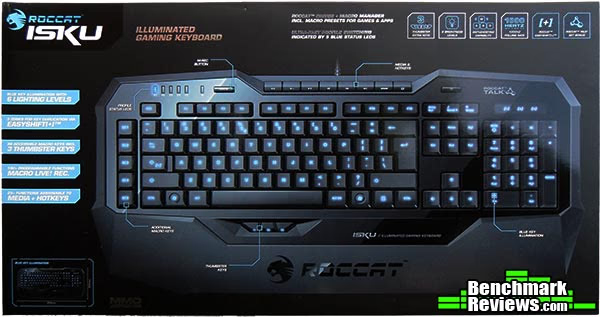
The Roccat ISKU box is very informative with all of the main features detailed on the front. The flipside of the box has more info and goes into much more detail on these features.

As I am in the UK, I have in my possession a British layout version of the Roccat ISKU of which there are 19 different layouts in total. The ISKU is absolutely huge and will take up a lot of your desk real estate. This is good for me as I have larger than average hands, the large built in wrist wrest comes in really handy too. The Roccat ISKU measures approximately 51cm x 25cm.

Roccat describes the keys as medium height for optimum keystroke, this means that they are somewhere in between laptop style flat keys and full size regular keyboard keys. The blend of different blacks used on the ISKU gives it a nice unique look.

On ergonomic keyboards we would see a nice sculpted curve on the side profile shot, on the ISKU the keys are all completely level. In theory this means that after long periods of typing your hands will become tired and fatigued quicker on the ISKU compared to an ergonomic keyboard, a trait which most mechanical keyboards have as standard. Each key has a slight curve to it which helps a little in differentiating keys without looking at them while you are typing or gaming.

Here are the three EasyShift[+] zones, note that the EasyShift[+] key takes the place of the Caps Lock key. This can be changed in the ISKU settings utility but Caps Lock is bound to "EasyShift + T1" by default. The M-Keys and the T-Keys are doubly programmable which means they can have two functions bound to them, one is default and one activated by the EasyShift[+] key. The main EasyShift[+] key area shown above in blue can have any macro or predefined action applied to each individual key.
Roccat have been very clever here by allowing you to have a function modifier on keys that are around the area where you would normally have your hand placed. This should appeal to gamers from every category be it FPS, RTS, MMO, etc. The media keys (top middle) are preset to media functions and can have other predefined functions applied to them. To the left of the media keys is a large button labelled REC, this is the "Macro Live! Recording Button". This feature makes recording macro's so simple, and dare I say pleasurable, to record. One click of this button and the ISKU will talk to you via your speakers or headset asking you to choose a macro key, next the ISKU will ask you to perform your macro and press the record button to save your macro. The ISKU will then confirm by voice that your macro has been successfully recorded.

Another cool feature of the ISKU gaming keyboard are the cable channels. These allow you to route the cable out where you prefer and in a way that suits your setup, this is a feature that has been implemented on other gaming keyboards but not to this level. Better still you can also route other peripheral cables using these channels for a super tidy setup. There are six rubber pads on the bottom of the ISKU and the feet have rubber end caps on them to help stop it sliding around, these work best when they are clean so if you find your keyboard sliding around all you need do is give these a wipe (along with your surface) and normal grip shall be restored.
Roccat ISKU Detailed Features
In this section we will have a look at the software that drives the Roccat ISKU Illuminated Gaming Keyboard.

The main window deals with the function of the EasyShift[+] key and also the functions of the M and T keys. By default the EasyShift[+] key is set to modify the keyboard commands only but because I also have the Roccat KONE[+] installed I can make use of Roccat Talk and have the EasyShift[+] key as the modifier for all devices (keyboard and mouse). Next you can assign functions to the macro and thumb keys (M-Keys and T-Keys).
The ISKU Illuminated Keyboard can have up to five different profiles set to activate when a certain game or application is launched. You can also set one of these profiles as windows profile (by clicking the WP button on any of the five profiles), as soon as you exit any application or game that has a profile assigned to it, the settings utility will automatically switch back to your defined windows profile so you don't need to worry about (or check) which profile is active.

Next is the EasyZone settings tab, here you can assign the secondary functions to the 20 keys in the direct area where your hand sits while you are gaming (highlighted above) to be used in conjunction with the EasyShift[+] key.

The next tab is the Media key and F-key function assignment area. Shown above are the default functions of these keys and there are drop downs that allow you to change their functions. The Media keys can only have pre defined functions assigned to them but the F-keys have more options. They can either have a shortcut assigned to them e.g. CTRL + X, they can have a timer assigned to them, or they can be assigned to launch applications of your choice.

The advanced setting tab gives you access to various settings. Character repeat rate and delay options allow you to change the delay between key repeat and how often keys repeat when held down. Key illumination brightness lets you choose between six levels of brightness. Key illumination dimmer timeout allows you to set an illumination level to lower to after a user defined length of time. Sound feedback options let you decide whether you want it active or not and the voice playback volume. There is also the option to enable or disable some keyboard keys that would normally interfere with your games (bottom left).

The last tab of the ISKU keyboard utility allows you to check for driver updates and get online support in one convenient location, this saves you having to trawl through the website in order to find the relevant pages.
There is but one underlying problem though and this fault is either inherent to the software itself or maybe it is the process of flashing the ROM onboard the keyboard. When you make any changes you need to apply them. It takes approximately 35 seconds from clicking apply to the changes actually taking place on the keyboard. While 35 seconds might not seem like a long time, waiting this period of time between changing settings can soon mount up. Changing settings or buttons configurations can become a time consuming and laborious task.
Testing & Results
Testing Methodology
Testing an input device is simple, all one needs to do is use it. Unfortunately there are no quantative benchmarks to run, no numbers to compare, and no software used that can test the quality of the hardware. Testing an input device like the Roccat ISKU Illuminated Gaming Keyboard is going to be based around personal opinion and preference. In this section I will present my unbiased opinion with regards to the use and operation of the Roccat ISKU and report back any improvement benefiting directly by its use in various games and programs listed below. Your mileage may vary slightly and as such this should be taken as a guide only.
Test System
- Motherboard: ECS P55H-AK (Intel P55)
- System Memory: 4GB OCZ Blade ST 2000MHz
- Processor: Core i5 760 @ 4.0GHz
- Video: MSI N560GTX-Ti HAWK
- Disk Drive 1: OCZ Vertex 2 60GB
- Disk Drive 2: Seagate Barracuda 7200.12 1TB
- Enclosure: Thermaltake Overseer RX-I
- PSU: Corsair HX750W 750 watt Modular
- Monitor: HKC 22" Widescreen (1920x1080)
- Operating System: Windows 7 Ultimate x64 (SP1)
Test Software
- Adobe Photoshop CS5
- Firefox and Internet Explorer web browsers
- Microsoft Office applications
- Call of Duty: Black Ops (mainly zombies)
- Battlefield: BC2
- Need for Speed: World
- GTA IV
Results
The Roccat ISKU is much like any keyboard when it comes to its use, aside from the EasyShift[+] functions and Macro Live Recording it is just a regular keyboard that glows blue. There is no real anti-ghosting to talk about since it connects to your PC via USB. The keys are of the rubber dome variety so they respond quite well because they are new, but we know that rubber dome keyboards are only good for a few years of heavy use whereas a mechanical keyboard will easily last the duration.

The ISKU is not a bad keyboard but the only real benefit it has to gamers are the macro keys and backlights. It feels the same as any normal keyboard and responds the same too. It's only when you put things like EasyShift[+], EasyAim and Roccat talk into the mix that you start to notice the benefit of this keyboard. Roccat says that they plan to release more peripherals that take advantage of Roccat talk and I for one am hoping that one of these peripherals might be a mechanical keyboard.
Illuminated Keyboard Final Thoughts
I have come to the conclusion that the only real benefits of the Roccat Isku Illuminated gaming Keyboard are EasyShift[+] and Roccat Talk. Sure the Blue illumination gives it a different edge but it isn't really essential to gaming, the rubber dome keys are nice when they are new but it is only a matter of time before they wear out. The wrist rest while nice and large is moot because they keys are all flat and not in the least bit ergonomic, this means after really long periods of typing or gaming you will become fatigued or have slight aches. Don't be put off by this paragraph though because for now at least the ISKU is the only keyboard that is Roccat Talk compatible, so until Roccat make another this is the only way you can take advantage of this feature, and what a great feature it is.
EasyShift[+] is such a great idea and it has been really well implemented on the ISKU keyboard. There are 20 keys in the vicinity of where your hand normally resides when you are gaming and they are only a modifier click away. This is made one step better when you pair the ISKU keyboard with the KONE[+] mouse using Roccat talk, I have the EasyShift[+] keys on both devices set to control either device and it really opens up the possibilities of configurations to a whole new level. The limit really is your imagination and memory span. Add to this that you can have five profiles on each device and you can now start to realise the amount of possible configurations that are literally only a few clicks away. The best case scenario from this team up of peripherals is for an RTS gamer, in this category a lot is dependent on Actions Per Minute and I think the ISKU/KONE[+] combo will really excel here.
Roccat ISKU Conclusion
In this section I am going to write a brief five point summary on the following categories; Performance, Appearance, Construction, Functionality and Value. These views are my own and help me to give the Roccat ISKU Illuminated Gaming Keyboard rating out of 10. A high score does not necessarily mean that it is better than a similar mouse which has been reviewed by another writer here at Benchmark Reviews, which may have got a lower score. It is however a good indicator of whether the ISKU Keyboard is good or not. I would strongly urge you to read the entire review, if you have not already, so that you can make an educated decision for yourself.
The Roccat ISKU illuminated gaming keyboard performs exactly as expected for a USB rubber dome keyboard, there is nothing exceptional about its performance but at the same time there are no problems with its performance so we break even.
Beauty is in the eye of the beholder, and blue is one of my favorite colors. Red/black is nice but has been done to death so it is nice to see something different now and then. I would have liked the option to switch between blue/red/green to suit my mood, which would have been a nice feature. I'm quite glad that Roccat didn't make the whole external case from glossy plastic as this may have spoiled the design because the glossy parts are easily tainted.
The Roccat ISKU is very well constructed but feels very lightweight. There aren't too many occasions where your keyboard would get an absolute pounding but it would be nice to know that your keyboard would be able to stand up to it should such an event occur. If I were to release some rage onto the ISKU keyboard I don't think it would last too long. After all, in the heat of the moment it wouldn't be too unusual for a gamer to release some frustration into their keyboard.
Functionality is very good with the Roccat ISKU, the media keys are a nice addition as well as the M-Keys and T-Keys. Being able to disable the windows keys are a blessing for an FPS gamer such as myself. The blue backlit keys are nice but if you are looking at the keyboard when you are gaming then you won't see the screen. The cable routing could not have been executed better, I really like having the option to go to the left or the right dependant on your setup. The EasyShift[+] keys really make this keyboard and the Roccat talk compatibility extends that capability more. I love the macro live recording feature and I don't even use macros, it's just so easy and super quick that even grandma could do it.
Availability of the Roccat ISKU is limited in the USA but can be purchased for £69.99 (Amazon UK) in the UK which is equivalent to approximately $110 USD at today's exchange rate. This price is quite high but the ISKU has quite a few tricks and unique features up it's sleeve that almost merit this price, making this a tough one to call.
Pros:
+ EasyShift[+] feature
+ Dedicated media keys
+ Roccat Talk compatible
+ 180 macros possible, 500 actions per macro
+ Simplistic yet intuitive macro recording
+ Varying levels of illumination and idle dimmer
+ Anti slide rubber grips
+ Turn on/off Windows keys, TAB and Left Shift
+ Sound feedback for macro recording and profile switching
+ Cable routing channels
+ Great potential for high APM
+ Wrist rest built in
Cons:
- Rubber dome keys
- Very light keyboard, doesn't feel strong
- Some keys not fully illuminated unless you look directly down at them
- Glossy parts hard to keep clean
- Takes up a lot of room on your desk (51cm x 25cm)
Ratings:
-
Performance: 8.50
-
Appearance: 9.00
-
Construction: 8.00
-
Functionality: 9.75
-
Value: 8.50
Final Score: 8.75 out of 10.
Quality Recognition: Benchmark Reviews Silver Tachometer Award.
Benchmark Reviews invites you to leave constructive feedback below, or ask questions in our Discussion Forum.