
Mad Catz S.T.R.I.K.E. 5 OLED Gaming Keyboard
Mad Catz S.T.R.I.K.E. 5 Gaming Keyboard
Manufacturer: Mad Catz Interactive
Product Name: S.T.R.I.K.E. 5 Gaming Keyboard
Model: MCB43108N002/02/1
UPC: 728658030964 EAN: 728658030964
Price As Tested: $199.99 (Amazon)
Full Disclosure: The product sample used in this article has been provided by Mad Catz.
Mad Catz released their new STRIKE 7 keyboard two months back, representing the high end model of their new cyborg series keyboards. Like the Cyborg RAT 9/7/5/3 mice, the STRIKE 5 is now released. It's more affordable, and just as promising. Equipped with the same keyboard and customization setup, the STRIKE 5 is equipped with the same power with the only difference being the auxiliary panel. Instead of the VENOM touchscreen which came with 12 apps, the STRIKE 5 comes with a simplified OLED EYE display. For those looking for a cheaper alternative to the STRIKE 7, Benchmark Reviews will analyze the STRIKE 5 to see if it holds up.
The STRIKE 5 and STRIKE 7 are nearly identical from a design standpoint, having the same slick look and feel. At $199.99, it's $100 cheaper then its elder brother. The same basic features come for both keyboards. Each come with 7 modular pieces that can be customized as you please, including 2 keyboard pieces, 1 macro add-on, 3 palm rests, and the VENOM/EYE panel.

The STRIKE 5 is not a mechanical keyboard. It uses a membrane which mimics the feeling of a mechanical keyboard without the excessive noise. The tactile response most closely resembles cherry brown switches, which provide a light click feedback good for gaming and working. The STRIKE 5 comes with simplified software capabilities, which is natural given the lack of a touchscreen. It's very interesting to see what Mad Catz can do with such a small OLED display. Benchmark Reviews looks forward to testing this out and see how it compares with the STRIKE 7 and competing keyboards.
STRIKE 5 Features
Fully Modular for Unparalleled Customization
Borrowing modifiable technology from the world's most adjustable mouse - - the award-winning R.A.T. - - the S.T.R.I.K.E. 5 Gaming Keyboard's unique design provides unprecedented customization options to enhance overall comfort. Armed with total control of your keyboard's fit, size, color, sound, and programming, you can finally play your favorite games exactly as intended: How you like to play them!
5 Separate Hardware Modules
- Control Module with E.Y.E. OLED Display
Easily navigate the keyboard's many functions with the Control Module's intuitive E.Y.E. panel. Program advanced macros, adjust back-lighting, monitor re-spawn timers, control your media, and even take in-game control of external functions - - balance game and microphone volumes, launch apps and websites - - all with a few simple finger taps. - Keyboard Optimized for Responsiveness
When a fraction of a second is all that divides victory from defeat, you must have absolute confidence in your keyboard. The S.T.R.I.K.E. key bed utilizes a specially engineered membrane which provides the tactile feel and responsiveness expected by gamers. The speedy, double-tap friendly keys respond to an optimized 60g of actuation force and reset at the perfect level, all of which helps reduce muscle fatigue during marathon gaming sessions. The unique design gives you the best keyboard performance without sacrificing back-lighting, durability or responsiveness.
Not all back-lighting is the same. Full 16 million color RGB back-lighting - - both through and around the keys - - matches the keyboard to your gaming rig and the keys' laser-etched, lacquered light guides are ideal for gaming in dim environments. - More Programmable Macro Buttons
The S.T.R.I.K.E. 5 Gaming Keyboard incorporates 21 programmable macro buttons over three modes to create 63 user-definable commands. The keyboard includes nine programmable buttons on the E.Y.E. panel plus four more on the removable Function Strip, three controls on the palm rest, and five additional programmable keys on the NumPad bring the total to 21. - Modular NumPad
Just like the Control Module, the NumPad is capable of loose or fix-mounted positioning. The custom connection scheme makes it all possible, and the included set of longer wires bolsters your arrangement options. - 3-Part Active Palm Rest and Two Wrist Rests
A height-adjustable, active palm-rest houses both a thumb wheel and an action button for even more controls at your fingertips. Both wrist rests utilize a rugged 5-pin connector to attach to the main keyboard module and NumPad, effectively enhancing your comfort during stints of extended gaming.
Uncomplicated Macro Programming
An intuitive graphical interface vastly simplifies the formerly tedious task of macro programming. Assign single or multiple keystrokes, complete with custom timings, to macro keys or interface icons and then easily fine-tune your settings. This ability is essential for fast-paced games which require clear but complex multi-key actions.
Each of the keyboard's three different modes can store your programmed macros; you need only switch to a different mode mid-game to triple your available commands. Once programmed, custom profiles can be published to share with your community and saved for later recall, allowing for a seamless transition to another gaming PC.
STRIKE 5 Specifications
| Size | 15.1 x 7.5 x 9.3 inches |
|---|---|
| Weight | 7.3 pounds |
| Includes |
|
| Compatibility | Windows XP/Vista/7/8 |
| Ports | 3.5mm audio & microphone jacks |
Closer Look: Mad Catz STRIKE 5
The Mad Catz STRIKE 5 keyboard continues the family bloodline of customization and futuristic looks. The keyboard itself has the exact same feature-set as the STRIKE 7. The package includes a keyboard body, a num pad, a 4-button macro add-on, a 2-button macro palm rest, two basic palm rests, and the EYE OLED display panel. The body has a matte finish. While the STRIKE 7 has a more rubbery texture to the surface, the STRIKE 5 seems to be more metallic. It looks and feels better.
The STRIKE 5 is quite a large keyboard, taking up a lot of space especially with the palm rests attached. At a bare minimum, the EYE OLED display needs to be attached to the num pad or keyboard body, as all wired connections go through it. There's no reason to get the STRIKE 5 without utilizing all pieces though. It sports a large array of customizations (like the RAT series gaming mice) that can be used to optimize comfort any way you want it, whether it's pulling the palm rests further out, or raising their height, or swapping WASD keys out for textured keys.

The STRIKE 5 comes with a toolbox included different key styles for up/down/left/right and WASD keys, screws for the keyboard, as well as a key extraction tool. Certainly the keyboard doesn't need any of those items to function and is pretty solid even without screws (I never attached them for the STRIKE 7).
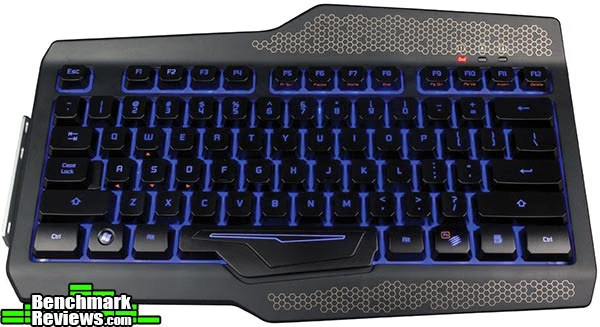
The number pad has all the traditional keys and some more. Five of the macro keys are placed surrounding the UP key. These are conveniently placed for easy usage. Mad Catz tried to decrease the chance of accidental macro key presses by keeping the elevation of the macro keys a reasonable amount lower than standard keys. This is a good design choice to optimize functionality and usability.

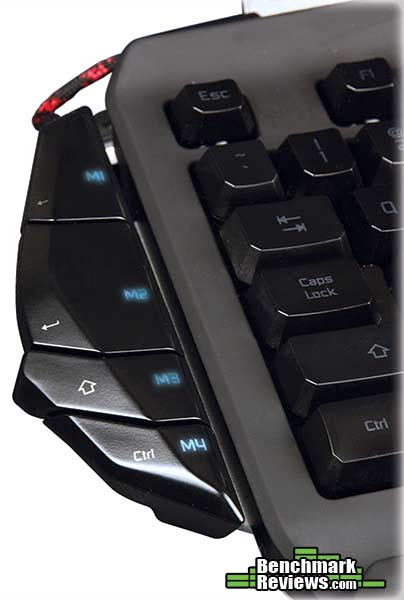
The 4-key macro add-on can be attached to the left of the keyboard body or number pad, depending on how you prefer to use it. These are buttons that have a tactile click feedback when pressed. The key size allocations seem a little odd though, especially the M4 key which is difficult to reach comfortably. However given the sheer number of macros, that's probably insignificant.
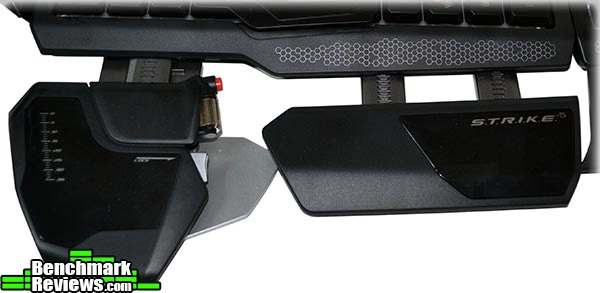
The STRIKE 5 sports the same palm rest designs as the STRIKE 7. Each palm rest can be individually adjusted and pulled out. This has been surprisingly useful to get the optimal feel. The left piece has a scroll wheel and button which can be individually programmed as well. The last button on the palm rest allows for height adjustments. This is useful for FPS/RPG players that primarily use WASD keys. One thing that was slightly annoying was the swap from aluminum surface to a glossy black plastic surface. This actually caused some discomfort when you get sweaty palms, and leaves nasty palm marks. Mad Catz should've stuck with the STRIKE 7 design here.
Flipping over the STRIKE 5, we see the exact same solid build. For such an expensive gadget, construction quality is critical. Mad Catz ensured the product construction with an aluminum body, padded with rubber feet for grip, and screw holes for all key connections. The extendable feet can be tucked or taken out easily. The STRIKE 5 uses pure plastic for these pieces compared to the aluminum/plastic mix in the STRIKE 7. This is a fine change as the back is barely visible anyhow.

The Mad Catz STRIKE 5 seems just as promising as the STRIKE 7, minus the huge price tag. It's still expensive for a keyboard. Its worthiness will be detailed out in the next Section as Benchmark Reviews takes a closer in-depth look at the OLED display and the software.
Mad Catz STRIKE 5 Detailed Features
The Mad Catz STRIKE 5 comes with a nice panel, replacing the touchscreen with an array of physical buttons and the EYE OLED display. This fancy little panel actually has quite a bit going for it. It doesn't have a wide array of app support like the STRIKE 7, but it still has the essentials:
- Time
- Stopwatch
- 3x Re-spawn Timers
- Back-light brightness adjustment
- Mic volume control
- Volume control
- Program Launcher (up to 12 programs)
The 4 buttons on the left are used to control the EYE OLED panel. The bottom set are used to toggle between apps. The top set are used for app controls. What's really fun is that the EYE OLED display itself is a dial that can be rotated to adjust things like volume and brightness. Unfortunately there are some usability issues with it. While the concept was perfect, in practice the dial was not particularly responsive, sometimes even ignoring turns. To get it to capture input correctly, we had to push the dial in using a bit of force and then turning.
Also, the OLED display that was shipped also seemed to have a row of dead pixels, causing there to be a black line straight across all app displays. This is a little unfortunate, and if it was an actual $200 purchase I would probably exchange for a new one. Toggling between apps is also a little tedious. While the transition animation is nice for a while, toggling from one app to another has no easy way to do it other than rotate slowly.
The visuals of the OLED panel itself is creative and elegant. It uses a series of animating rings to convey information. For example if the app was "time", then the blue ring would be the seconds, the outer ring symbolizes which app your on, and the inner content shows what app this is.
The rest of the panel works decently as well, profile toggles at the top are instantaneous. There are 9 programmable macro buttons, lighting on-off control, and windows button disable/enable button. This actually has a good number of usability enhancements from the VENOM display in the STRIKE 7. Honestly having to go into an app to turn on or off the windows button or access media buttons was a pain, not to mention the physical keys work much better for macros.
The EYE OLED Panel actually turned out much better than expected in terms of its design. Its highly usable and looks elegant. It was amazing how they fit all the essential information in a tiny circular display.
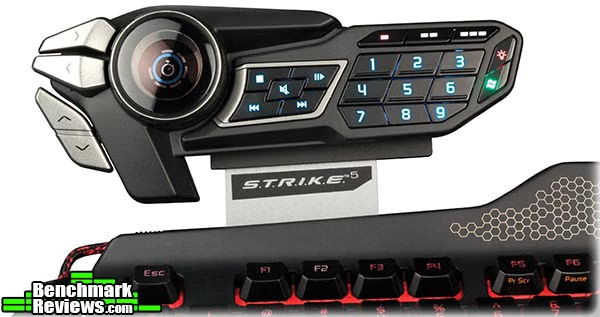
The back of the EYE OLED panel are 3.5mm audio/mic jacks. This is less interesting than the 2 USB ports available on the STRIKE 7, but at the same time the keyboard no longer requires a power supply to function correctly. That's a fairly big plus for me, and given most cases have plenty of USB ports, this was a good design change.

The Mad Catz STRIKE 5 is quite a bit simpler to pick up and start using. The software is very similar to STRIKE 7's, with some UI improvements and simplifications. The same first-run experience is available for the STRIKE 5 as the STRIKE 7. Mad Catz provides some downloadable profiles for popular games and applications that come pre-programmed with functionality and icons. This list includes: Photoshop, Diablo III, Skyrim, League of Legends, Minecraft, Outlook, StarCraft II, SWTOR, and WoW. Note activating these profiles only loads the macro commands and settings. To assign them to a button still needs to be done manually. However this simplifies first run greatly.
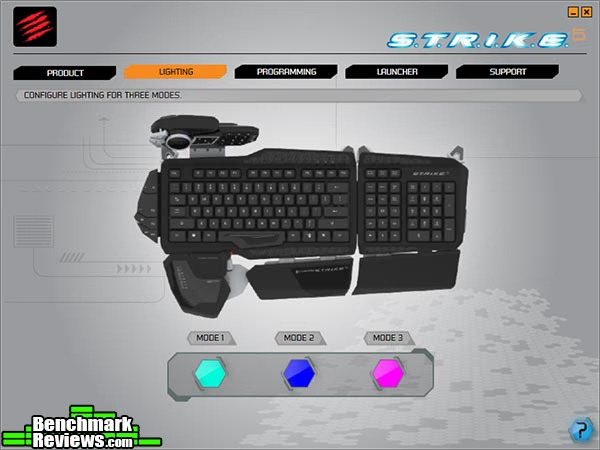
The default screen shown is lighting options. Up to 3 colors can be chosen, 1 per profile. The STRIKE 5 supports 16 million RGB back-lighting.
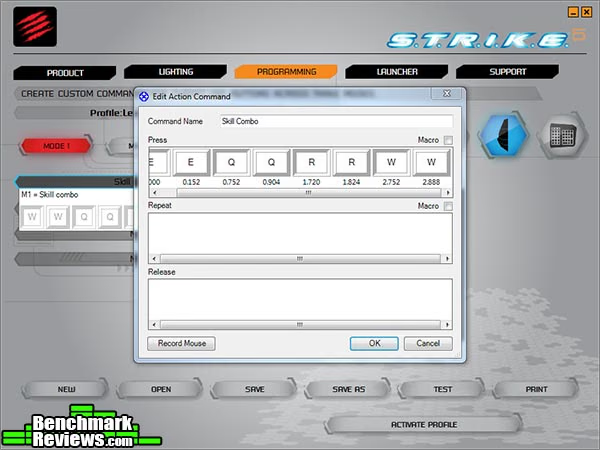
The Macro programming screen is almost identical to the STRIKE 7, except with the touchscreen area disabled. Below you can see that I've assigned all buttons to the pre-defined League of Legends profile pre-populated macros. They're actually particularly helpful as in game accidental settings toggling can always happen.

The STRIKE 5 retains the best of the STRIKE 7, which is its accurate macro time delay capture. It has virtually no upper limit on the number of key-presses allowed and extremely accurate (by the millisecond) on when the key-press occurs. Many macro keyboards these days have set delay times in between key presses, and a very strict upper limit of 20-40 key-presses. The STRIKE 5 blows the competition out of the water with their Macro capabilities.
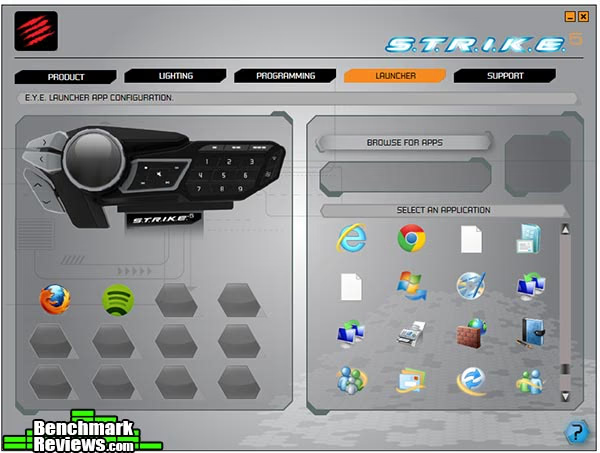
Last but not least, the included software allows for users to program their own set of application launchers. The top set of buttons are used to launch the app while the EYE OLED dial is used to switch between applications. Up to 12 apps can be added to the launcher.
Testing & Results
Testing Methodology
This keyboard was used as the primary keyboard over a period of 3 weeks. In addition to producitivty software and everyday browsing, the Mad Catz STRIKE 5 was tested in several games: Crysis, StarCraft 2, League of Legends, and Might & Magic VI.
Test System
- Processor Intel i7-920
- Video Card: Nvidia GTX 285
- RAM: 16GB DDR3
- Monitor resolution: 1920x1080 pixels
Test Software
- StarCraft II
- League of Legends
- Diablo III
- Crysis
- Might & Magic VI
- Lunia
Results
Unpacking the Mad Catz 5 was strangely familiar to its predecessor. It came in a large shoebox style package. The entire package is essentially the same except the swap from VENOM touchscreen to EYE panel. Unlike the STRIKE 7, no power supply is needed and the keyboard is fully functional through 1 USB port. Hooking up the audio jacks are optional. The cord is braided to avoid tangling and looks great with the rest of the pieces. There is no Driver CD supplied and all relevant files can be downloaded online. You will need the STRIKE 5 drivers, the profile software, and to get you started faster, pre-setup profiles.
The learning curve for the profile tool, called Smart Technology, is relatively low. The number of customization options for the STRIKE 5 are much more limited. Macro assignment and program launcher are the only two items that needs to be set up.
Starting with initial impressions for typing, the glossy plastic palm rest was a mistake. The STRIKE 7 had aluminum surfaces that keeps things cool and doesn't degrade in appearance from palm prints. Even the matte plastic used by the rest of the keyboard felt better to rest on. Not sure why this change was made.
Basic typing was comfortable. The membrane used mimics Cherry Brown switches, which I find much better for typing than Cherry Red switches for example. Of course the keyboard itself isn't mechanical. In general mechanical keyboards have a longer lifespan but the STRIKE 5 has a solid construction and I had no issues with the keyboard membrane quality.
The EYE panel is intuitive to use. I prefer the physical macros over touchscreen macros. In order to avoid misclicks, the buttons all have physical guides so even blind pressing is accurate. At $199, the EYE Panel is essentially a full $100 cheaper than the VENOM touchscreen, but retaining all the macro functionality. There are some usability issues with the EYE OLED dial as turning it carries out different operations based on the app. However it often doesn't register well, and even if it registers the click there's some noticeable delay. The included EYE OLED can display time, timers, stopwatch, app icons for launching apps, as well as media controls and EYE settings. It's still quite innovative and differentiates itself from most keyboards on the market at a much more reasonable price.
Overall the keyboard part performs well. It's quiet and feels great in games and for typing. The slick design works great for most settings, and it has one of the best macro systems ever. However there's quirks with comfort and quality that make this keyboard a little troubling.
Gaming Keyboard Final Thoughts
After the introduction of the STRIKE 5, the US market now has three keyboards with a display (STRIKE 7 and Razer DeathStalker). Below is a list of the Razer Deathstalker touchscreen features:
-
Clock/Timers - both systems have a dedicated clock and timer app.
-
Program launcher - only the Mad Catz STRIKE 5 allows you to launch apps using the touch screen.
-
Game mode - both systems have a game mode. However STRIKE 5 only disables windows button while DeathStalker can disable alt-F4 and alt-tab as well.
-
Browser - the Razer DeathStalker has a fully functional built-in browser, this opens up the gateway for an infinite number of possibilities given 3rd parties can develop web apps just for the keyboard. Community power users can develop things themselves and share.
-
Popular tools - The DeathStalker has Youtube, Twitter, and Facebook built-in. The STRIKE 5 has TeamSpeak.
-
Track pad - The DeathStalker enables users to use the touch surface as a track pad if they choose to.
The Razer's keyboard doesn't even attempt to mimic a mechanical keyboard, so while its got style, it lacks actual gaming capabilities. However the touchscreen is definitely ahead than what Mad Catz has introduced so far. The STRIKE 5 sells for $199, the DeathStalker is at $250, and the STRIKE 7 is $299. Essentially the entire price range is covered.
Between the STRIKE 7 and the STRIKE 5, the $100 difference makes it really hard to justify the STRIKE 7 purchase. The VENOM touchscreen is a great feature but for what it accomplishes, the EYE OLED Panel accomplishes most of it, some maybe less elegantly, at a $100 discount. What I'm expecting now is the introduction of STRIKE 3 (potentially) in a month of two that comes with just the keyboard and small media/macro unit without a fancy display. Hopefully that will come at $150 or less. This would give folks who mainly care about the modularity and design of the keyboard to buy it at a reasonable price without the fancy screens. This would put Mad Catz in a good position to capture all of the high end market with the STRIKE series.
Mad Catz STRIKE 5 Conclusion
The Mad Catz STRIKE 5 is a good iteration from the STRIKE 7. Ignoring the touchscreen/OLED panel, the rest of the keyboard is almost identical between the two brothers. Some slight changes have been made in the STRIKE 5, some good some bad. For example they changed the surface material slightly from a rubbery to metallic feel. This choice worked great. The palm rest however regressed as they took away the comfortable aluminum surface and replaced it with a glossy plastic, compromising comfort and aesthetics a little. It's not a huge issue but now it's noticeable that palms are sticky due to the surface. Otherwise the keyboard is just as solid as the STRIKE 7. The Cherry Brown membrane clone is quiet and comfortable, and a good compromise between gaming and typing comfort. The macro system is top of class, not to mention the sheer number of entries at a time, 18 macros per profile across 3 instant toggling profiles.
Like the rest of the Cyborg series, the STRIKE 5 maintains the futuristic high tech look and feel. Mad Catz has never failed to make the products visually appealing, and the STRIKE 5 is no exception. The EYE OLED Panel actually fits great with the look. The display is elegant and effective. The circular design uses every ring to symbolize something intuitive, and the dial can be spun to adjust the volume rings or toggle between apps to launch.
Functionality wise, the STRIKE 5 has a large number of features. It is completely customizable and modular, allowing you to build it from any of the 7 pieces. It has a quiet but effective membrane for typing. The STRIKE 5 has a total of 18 macro keys, 3 profiles, 16million RGB back-lighting, windows-lock capabilities, media keys, and a small set of apps for the EYE OLED Panel. Macro recording is extremely accurate and captures time to the millisecond. There's too many keyboards out there that claim they have macro programming capabilities but then have strict limitations on number of inputs and/or inaccurate timings. Some force a 0.5 second delay per key press. Mad Catz definitely got this part right.
Unfortunately, unlike its near flawless predecessor, the STRIKE 5 does have a flaw. The keyboard body is just as flawless. Every piece is sturdy and holds together well. The rubber feet help keep the STRIKE 5 in place. While Mad Catz includes screws, it's almost unnecessary thanks to the construction. However the EYE dial is a critical part of this keyboards feature, and to suffer from performance issues and registering problems, that's quite unfortunate. Luckily I discovered that using a bit of force and pushing the dial while turning it does cause it to register correctly.
For $199.99 at Amazon, the STRIKE 5 comes at a much more reasonable price than the STRIKE 7. It matches 95% of the functionality for 2/3 of the price, that's a pretty good deal, as long as the previously mentioned issues don't bother you. From and feature and performance perspective, the keyboard matches requirements to make it a recommendation. This price is still about $50 higher than solid mechanical keyboards from competing companies such as Razer and SteelSeries. While the STRIKE 5 is only mimics a mechanical keyboard, it does cover way more ground from a design, customization and software perspective.
Pros:
+ Macros that have accurate time delays and virtually no input limits
+ Customizable in terms of hardware and software
+ EYE OLED panel runs apps such as timers/stopwatches
+ A keyboard that closely resembles the feel of a Mechanical keyboard feel without the excessive sound
+ Ridiculously large number of macro buttons
+ Looks fabulous with its 16 million RGB back-lighting
Cons:
- Comfort somewhat comprised from glossy plastic palm rests
- EYE OLED dial quality issues
Ratings:
- Performance: 8.75
- Appearance: 9.75
- Construction: 8.50
- Functionality: 9.00
- Value: 7.00
Final Score: 8.60 out of 10.
Benchmark Reviews invites you to leave constructive feedback below, or ask questions in our Discussion Forum.
Reader comments from the original article
8 comments were posted before commenting closed. They are preserved as written. Original avatars no longer resolve and are shown as a placeholder.
RE: Mad Catz S.T.R.I.K.E. 5 OLED Gaming Keyboard Argos Permalink:
Personally (yeah what else) I do not like the design, or should I say lack of design. To me it looks like a shambles. But I would still buy this if it featured an FPS module resembling the Ideazon Fang or like the Steel Series Merc Stealth has on the left side of the board. - As far as I am concerned this board (like most these days) does not really do anything for FPS gamers or FPS/RPG gamers who play games like Skyrim/Fallout3 etc. - My old Fang is a gift from heaven. Because of its well thought out, practical layout I did not even have to get used to it. I wish a modernized backlit version of the Fang would be made by someone. I would love it as a module for this board or the modular Microsoft Sidewinder X6. - I really use the Fang... every button on it, but I am sure with this Madcatz board most fancy stuff I would never use in an actual gaming situation.
RE: Mad Catz S.T.R.I.K.E. 5 OLED Gaming Keyboard Daryl Greene Permalink:
I agree with Argos. 99% of the "gaming" keyboards out there are just keyboards. None of them lend anything to playing RPG/FPS games at all.I cannon use the main keyboard to play. With the upward-left lean of the w a s d keys, it makes it very difficult to effectively move about in a game. It just doesn't fit with the design of my hand.
RE: RE: Mad Catz S.T.R.I.K.E. 5 OLED Gaming Keyboard Argos Permalink:
@Darysl Greene In that case I would really recommend trying to acquire an Ideazon Fang or perhaps a Cybersnipa Gamepad. I use the Fang myself and have bought a Cybasnipa as a backup because the Fang is out of production since Steelseries took over. Just like you I hate the way the WASD keys are lined out on a normal keyboard. The gamepads I mentioned are a world of difference and comfort when playing RPG/FPS games. Just look at their lay outs and you will see what I mean. The problem with the Fang is that since Ideazon was taken over by Steelseries they stopped giving good driver support. The hardware works fine, but you might run into trouble when trying to use the programming software on Windows 7 and 8. As far as the Steelseries MERC which has virtually the same lay-out as the Fang at the left side of the board... I would not recommend it. The problem with the MERC is on the right hand side of the board. The designers combined the keypad with the cursor keys and from experience I can tell you it is incredibly annoying. After using the board for a year I just could not stand it anymore.
CyberSnipa? MasterZoen Permalink:
I have had a CyberSnipa Gamepad v2 for more than 3 years and can honestly say it's one of the worst designs I've ever used. While the butterfly key layout with other keys surrounding it is a nice idea, it just wasn't implemented properly. I've had arthritis since I was a sophomore in high school, and have found that I can tell how well made and ergonomic a peripheral is by how quickly my hand begins to hurt, and I began to experience pain in my wrist and fingers after only 20 minutes of play with this pad. The CyberSnipa Gamepad V2 appears at first glance to have been setup to be used by either hand, and this functionally crippled it. It becomes apparent upon first use that this is meant to be used by your left hand leaving you to wonder as to why it was designed to look ambidextrous. This gamepad was not made with ergonomics in mind. There is only a minor incline, perhaps 2 degrees, to the game pad, putting nearly all the keys at the same height. This makes trying to hit the number keys 1-3 and 8-0 very difficult. Also, trying to hit the keys that a person would normally try to with their left index finger is made difficult by these keys each being separated and fairly small, with exception for the x, c, and b keys positioned above the space key. The ctrl key cannot be hit reliably while using the qweasd butterfly, and the same holds true for the shift and z keys, the tab and h keys since these would all be pressed by the pinky. I suspect only a double jointed finger gymnast would be able to use these without shifting their hand. The spacing and postion of the shift key in relation to the space key makes a running jump extremely painful and prone to failure. This board uses no drivers as it has the same hardware as an actual keyboard, so there isn't anyway to change the buttons that the device registers because it inputs actual letter keys, so you have to change the controls within the game thus making switching between gamepad and keyboard a real challenge. I've been using a Logitech G13 for quite some time now, and I've found it to be very comfortable and easy to use and the on board memory makes taking it to LAN parties or gaming tournaments and keeping your profiles very simple. If the Fang is anything like the CyberSnipa Gamepad v2 I'm staying well away from it.
RE: CyberSnipa? Argos Permalink:
@MasterZoen I have been using the Ideazon Fang for many years and I love it. It is the best and most useful FPS peripheral I ever bought. Never had ergonomic problems of any kind, but I do not suffer from arthritis like you. So perhaps it is not for you. But I dare say that people without arthritis will love it. Problem is that Steelseries let the product die after they took over Ideazon. I have been wanting to buy a second backup device for years, but I can not find it anywhere anymore. I never had a problem to hit the number keys on the Fang, but I do use the Fang in combination with a versatile and programmable gaming mouse that takes over several important functions. For example I almost never have to use the number keys to select weapons. I do like the looks of the G13, but it has no special WASD setup. The WASD layout is what I like more than anything on the Fang. It is a joy to play any FPS/3PS/RPG with it. The only thing I do not like about the Fang is the way they put the jump and the p1 key on the side of the pad. That is very unpractical. But because the Fang is completely programmable this can be overcome. They should have done the jump and p1 key like they did it for their other product the Merc Stealth. The Fang is by no means perfect. I would love to see a modernized and even more ergonomically shaped Fang. It should be easy, but Steelseries loves to churn out same ol same gaming keyboards at the moment instead of improving an already wonderful product.
Fang... MasterZoen Permalink:
I looked up some pictures of the Fang, and it doesn't look like it would be near as hard to hit the buttons as the CyberSnipa. The buttons are all much closer together and there are thumb buttons on the side. Although, I still think it would hurt my hands so I'll stick to recommending the Logitech G13. I like the G13's analog thumbstick, as I have a number of games that recognize it as a controller, and the fact it can function as a 4-way hat switch. When you add in the ability to reprogram the buttons for a personalized layout, well, I can't be any more satisfied with it. As they say, "To each, their own."
RE: Mad Catz S.T.R.I.K.E. 5 OLED Gaming Keyboard Skidmarks Permalink:
I don't suppose it's a bad keyboard & would probably appeal to a lot of people but you just can't beat a good mechanical keyboard. If this thing had mechanical key switches the price would be through the stratosphere. Although it's an interesting keyboard give me a mechanical keyboard with Cherry Blacks & without macro keys anyday.
Fang vs STRIKE Martin Permalink:
Hey folks. Personally I have both - Fang being hands down THE BEST gamepad out there, sadly as stated multiple times already, it's discontinued, they killed it instead of taking the design further... I didn't see the value in STRIKE 7 and the touchscreen altho all the rest of it just screamed BUY MEEE :) recently I finally got myself STRIKE 5 keyboard and I have no regrets. In recent years, I play primarily MMOs/FPS, but in either one communication is important, with Fang you still needed a keyboard to type, so it was Fang + Keyboard + Mouse. STRIKE does cover 2 of these functions, and it is quite useful once you're used to it. All I can say don't knock it until you get to play on/with it. To me I loved the vertical placement of space on FANG and what I was sold on was the hand rest addition to STRIKE, brilliant. I'm using full keyboard atm but considering rearranging it to use the numerical keyboard with all the gadgets on it instead, may actually be a better option. Combined with RAT MMO mouse from Cyborg, gaming is just brilliant, macros gallore, I don't lift my hands off the control to access the options, it's all bound and accessible in-game on the fly.