
NETGEAR R6300 Gigabit Wi-Fi Router
NETGEAR R6300 Gigabit Wi-Fi Router Review
Manufacturer: NETGEAR, Inc.
Model Number: R6300 WiFi Router
UPC: 606449084450
Price As Tested: $199.99 (NewEgg / Amazon)
Full Disclosure: The product sample used in this article has been self-supplied.
Next generation wireless routers are now firmly in the marketplace, and Benchmark Reviews has had the opportunity to take a closer look at one of NETGEAR 's current flagship routers, which is the NETGEAR R6300 Gigabit Wi-Fi Router. Having Broadcom's 5G Wi-Fi IEEE 802.11ac chips on-board, The R6300 is capable of delivering speeds of up to 1300Mbps when connected to other 802.11ac devices, and speeds of up to 450Mbps when connected to 802.11n devices.
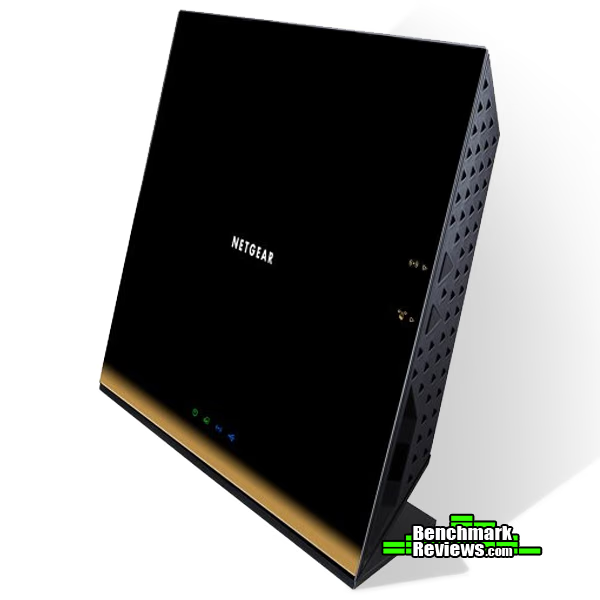
Some have suggested that it has, "a face that only a mother could love," but, personal preferences aside, the design of the R6300 is not indicative of this router's performance and capability. It is packed with great features, such as READYshare, that are designed to address your personal and professional wireless needs. Whether you want to stream HD video, sit down for an extended gaming session, or even do a number of tasks simultaneously, the NETGEAR R6300 can handle it.
Closer Look: Netgear R6300
The aesthetics and physical characteristics of a router normally are not among the main reasons why and individual purchases one router rather than another. However, that's not to say that these are not important points to some consumers. Take a look at the Netgear R6300:

A box is a box... is a box. The R6300 is a large router; hence, it comes in a box that is, obviously, larger. The router is well protected and is accompanied by an Ethernet cable, the power adapter, the quick install guide, and some other Netgear literature and offers. The R6300 does not have external/detachable antennas, nor does it come with an installation CD, so the contents are pretty streamlined when comparing it to the contents of other routers.
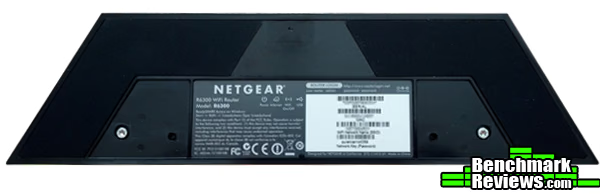
Considering that the R6300 is designed to stand vertically on a flat surface, it does not have much surface area on the bottom. However, the router has some very large slip-resistant pads, which cover about 50 percent of the router's underside to prevent it from sliding around or potentially marring a desktop.

Having a unique look, the Netgear R6300 may not be visually stimulating to everyone (Personally, I would get rid of the gold gradient on the bottom and just leave it glossy black.) However, the design was meant to maximize the capability of the internal antennas, since it is standing vertically with a few degrees of lean towards the back of the router. When on, "NETGEAR" can be seen glowing on the front of the router along with the LED lights toward the bottom that indicate the router's status. The LED lights on the bottom display the status of power, internet connectivity, Wi-Fi, and the USB port.
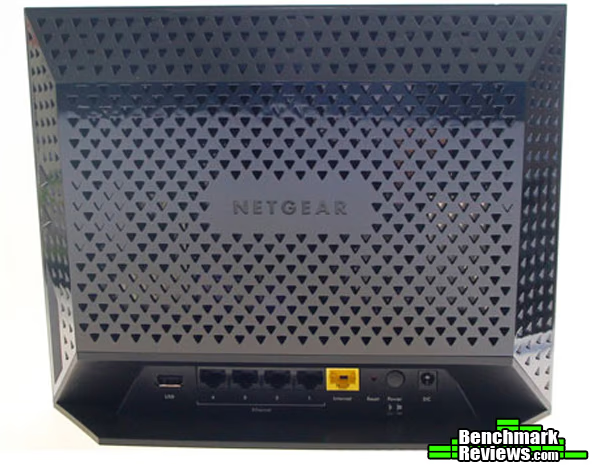
It is clear when looking at the back of the Netgear R6300 that ventilation was a serious design priority. The triangle-shaped ventilation holes cover the vast majority of the back and sides of the device. The back also contains all of the ports, which include a USB 2.0 port, four LAN ports, one WAN port, a reset button, a power button, and the DC power in port.
NETGEAR R6300 Detailed Features
Versatility, in terms of where an individual may place the Netgear R6300, is something that is lacking. Many routers can be set up in a horizontal position, in a vertical position (usually with an attachment), or mounted on a wall. You can only position the R6300 one way - vertically. This may not be an issue for some, but for others, it may be a deal-breaker. If you have limited desk space and either need a router that can be positioned horizontally or mounted on a wall, you may want to keep shopping.
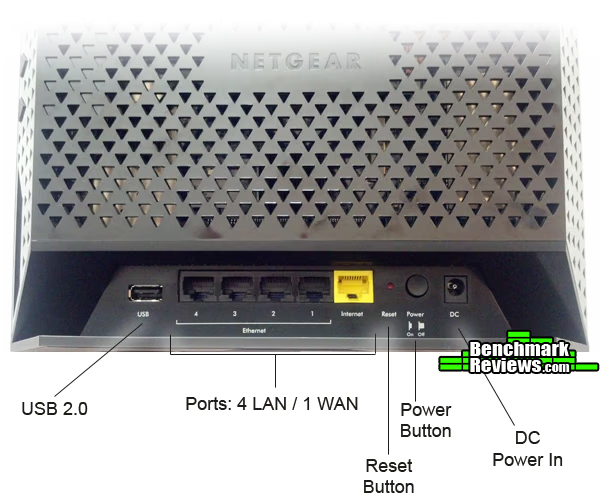
In the view above, you will notice the features located on the back that were mentioned earlier. In what I consider to be a design flaw, the ports and buttons are somewhat difficult to access for a couple of reasons. First, you may not be able to notice this in this view, but the R6300 is angled toward the back. Second, as you can see by the shadowing on the router, the ports and buttons are recessed. These two factors combined make it frustrating to manipulate anything on the reverse side of the router, especially when removing Ethernet cables.
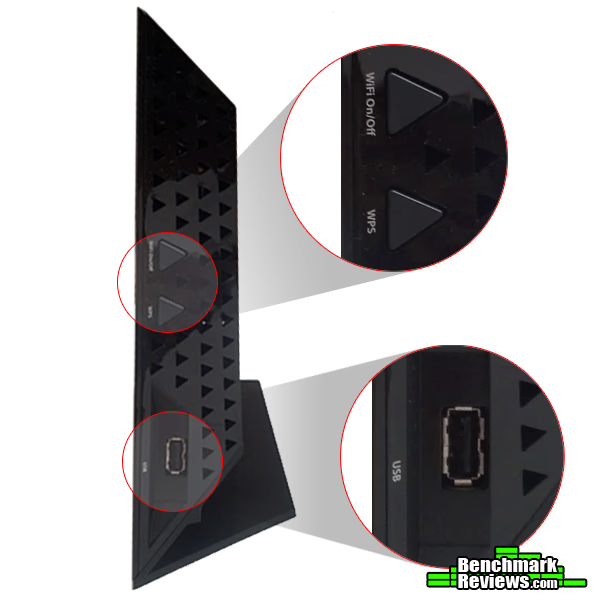
In this side view, you are able to see two buttons and a USB 2.0 port. One of the buttons is to turn the Wi-Fi on or off and the other is the WPS button, which allows you to automatically pair Wi-Fi enabled devices. Also, placing a USB port on the side was a good idea, since the USB port in the back is far more difficult to access.
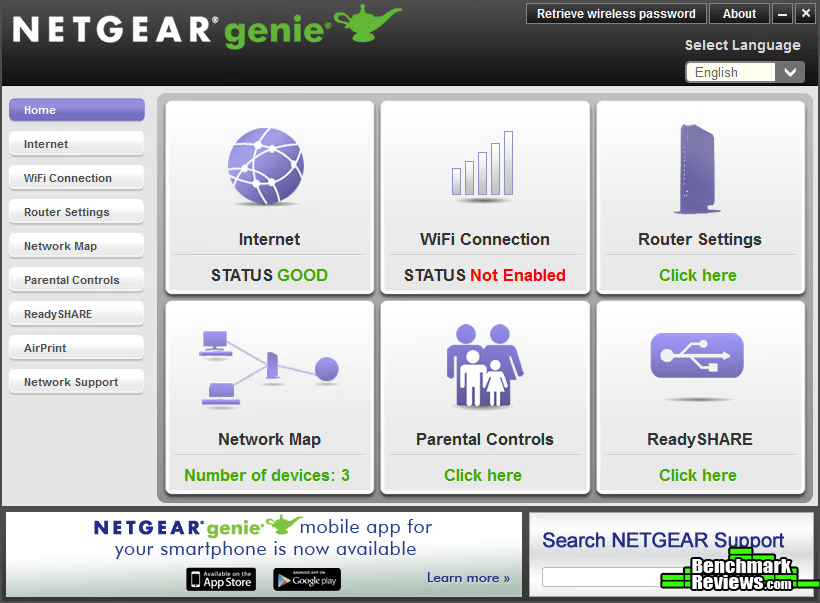
In the retail packaging, you will find downloading instructions for the GUI, which is called the "Netgear genie." Once downloaded, the genie setup wizard detects and automatically sets up your network connection. This software also includes a multitude of features that allow you to manipulate practically any router setting you can think of including advanced settings (IPv6, QoS, etc.). The Netgear genie gives you full control of your router and your network. It is very well organized and doubt that it would even intimidate a novice. Another huge plus is that the GUI is compatible with virtually any platform. The smartphone app is useful, but lacks the ability to manipulate the advanced settings.
The ReadySHARE feature provides you with a number of capabilities. One capability is the ReadySHARE USB Storage Access, which allows you to plug in an external USB hard drive and share its contents to any device connected to your home network. Also, you can connect a printer to a USB port and wirelessly print from devices on your network.
NETGEAR Wi-Fi Features
When purchasing a router, there are many variables that must be considered by an individual, the most obvious of which includes the range and speed of the device. The Netgear R6300 not only excels in these areas, but also has a multitude of other features that make it an excellent choice, not to mention the fact that it is a next generation router, so you will enjoy this strong performer for years to come. Let's take a closer look at this device:
Wireless
- Draft 2 of the 802.11ac standard, which is capable of speeds of 1300 Mbps when connected to other 802.11ac devices.
- Capable of speeds up to 450 Mbps on with 802.11n devices.
- Backward compatible with 802.11a/b/g and n.
Security
- One-touch WPS connection through "Push ‘N' Connect" button feature.
- Wi-Fi Protected Access (WPA/WPA2-PSK)
- Double firewall protection (SPI and NAT firewall)
- Denial-of-service (DoS) attack prevention
Convenience
- Five 10/100/1000 (1 WAN and 4 LAN) Gigabit Ethernet ports with auto-sensing technology.
- Netgear Genie dashboard makes it easy to set up and manipulate your home network. The Netgear Genie is also available as an iPhone/iPad and Android App.
- Includes two USB 2.0 ports.
Performance
- Wi-Fi Boost with high-powered radio amplifiers.
- Memory: 128 MB Flash and 128 MB RAM.
NETGEAR R6300 Specifications
- Width 8.1 in
- Depth 10 in
- Height 3 in
- Weight 23.1 oz
Standards
- Hi-Speed USB : 2 x 4 pin USB Type A
- IEEE 802.11 b/g/n 2.4 GHz
- IEEE 802.11 a/n/ac 5.0 GHz
- LAN : 4 x Ethernet 10Base-T/100Base-TX/1000Base-T - RJ-45,
- WAN : 1 x Ethernet 10Base-T/100Base-TX/1000Base-T - RJ-45
Performance
- Wi-Fi Boost with high-powered radio amplifiers
- Memory: 128 MB Flash and 128 MB RAM
- Advanced Quality of Service (QoS)
- IPv6 Support (Internet Protocol Version 6)
Security
- Wi-Fi Protected Access (WPA/WPA2-PSK)
- Double firewall protection (SPI and NAT firewall)
- Denial-of-service (DoS) attack prevention
Testing & Results
Testing Methodology
To test the performance of this router, a laptop was used and speed tests conducted in various locations throughout a three-story home. The router was located in a room on the middle floor in the northwest corner of the home. Due to time constraints and limited access to comparable hardware, this was the best testing method available at the time.
The main considerations of this test included the following:
- How does the range and proximity affect the speed of my Wi-Fi connection?
- Is the R6300 able to provide an ample wireless signal throughout the house?
- In order to determine the speed measurements in various locations throughout the house, the tool found on speedtest.net, which tests Internet connection bandwidth, was utilized. In each location, the test was conducted three times in order to determine the average result. Six locations were used, two on each floor. On each floor, one test was conducted in the northwest corner, the other in the southeast corner.
- The distances from the R6300 are as follows:
- Third Floor, NW Corner - Approx. 10 feet directly above
- Third Floor, SE Corner - One floor up, approx. 35 feet away
- Second Floor, NW Corner (router's location) - Approx. four feet away
- Second Floor, SE Corner - Approx. 42 feet away
- Basement, NW Corner - Approx. 14 feet directly below
- Basement, SE Corner - One floor down, approx. 40 feet away
Test System
- Laptop Model: Acer Aspire 5920
- Processor: Intel Core2 Duo T5450 @ 1.67GHz
- System Memory: 3.00 GB DDR2 667MHz
- Operating System: Windows Vista Home Premium 32-bit
- Wi-Fi Adaptor: Intel PRO/Wireless 3945ABG
Results
There are a number of factors that can lead to the degradation of a Wi-Fi network including signal-to-noise ratio, Wi-Fi pollution, and channel congestion. Considering the location of each test, some of these factors likely influenced the results.
There is a disparity between the stated speeds of the package I receive and the actual speeds experienced through my ISP. The package is supposed to provide me with access to 20Mbps download speeds and 12Mbps uploads speeds. However, what I have experienced far exceeds those speeds (with the far more capable desktop PC's in the house). A possible reason for this disparity is due to the fact that I use my own modem, a Motorola SURFboard SB6121, rather than the modem supplied by my ISP.
To establish a benchmark speed, I hardwired the laptop, ran the speed test three times and averaged the results, which were 23.51Mbps down, and 16.01 up. The average results of the aforementioned locations are as follows:

Considering the potential for signal degradation in a three-story home, the results were impressive. The signal strength was consistently strong, dropping to four bars on a five bar scale in only two locations, which were the 3rd floor, SE corner and the 1st floor, SE corner. The drop in signal strength directly impacted the speeds in those locations as you can see above. The encryption was set to WPA2-PSK during the testing process.
NETGEAR R6300 Final Thoughts
The Netgear R6300 has performed brilliantly for the better part of six months in my home. There are two PC's constantly running on the network, one in the room where the router is located, and the other on the third floor in the southeast corner. The PC near the router typically experiences speeds in excess of 50Mbps download and 25Mbps upload. The PC on the third floor, working off of the Netgear WN2000RPT Range Extender, will see speeds around 40Mbps download and 20Mbps upload. In addition, we have streaming HD video capability throughout the house and it works flawlessly.
Netgear R6300 Conclusion
From a standpoint of performance, the Netgear R6300 is impressive to say the least. It maintained speeds throughout the house rivaling that of the hardwired benchmark. Considering that the testing was done using an antiquated laptop, the final results seem even that much more impressive.One of the elements where the R6300 falls short is from a design standpoint. Not only is it not very visually appealing, but its stature combined with the positioning of the majority of the ports it a bit of a disappointment. Also, it could have used a USB 3.0 port or two. However, the performance of the router drowns out it shortcomings.
The GUI, also known as the "Netgear genie," is intuitive and extremely easy to use. After setting up the router on you network and downloading the GUI, all you have to do is sit back, wait a few minutes, and you will be connected to your network without lifting a finger. If you want to manipulate settings, even advanced settings, you will have no problems at all.
As of mid-October (2012) you can buy the Netgear R6300 for $199.99 (NewEgg / Amazon). Considering the fact that you can get a good router for less than half that price, this may seem excessive. However, this router truly does deliver and is prepared for the next generation of Wi-Fi devices. There are not many options for Gigabit routers on the market right now, but if you have one, you are set up for the long-term. Considering the features, performance, and future capability of the R6300, this device is worth the asking price.
Pros:
+ Signal Range
+ Signal strength & speed
+ Intuitive GUI
+ Ease of set up
+ Next generation Gigabit router
+ READYshare
Cons:
- Large design, limited placement options
- Difficult to access most ports/buttons
- Expensive price tag
- USB 3.0 ports would have been nice
Reader comments from the original article
3 comments were posted before commenting closed. They are preserved as written. Original avatars no longer resolve and are shown as a placeholder.
Nice router but... Kaldor Permalink:
I like the fact that we finally have near gigabit speed on a router and I am strongly considering buying an AC wireless router. However, right now there are no network adapters that will allow you to use the AC speed to its fullest. The only one that I know of, the Netgear A6200-100NAS is only USB 2.0. This is a major failing. Unless we see USB 3.0 and PCI-E adapters, only one people that will see a real use for this are owners of very new laptops that have the AC wireless built in, of there are none that I know of.
whats the point Scolex Permalink:
I am puzzled in the testing and results section you only gave numbers for your internet connection speed. Those numbers are worthless IMHO when you consider that even a simple G router can handle a 23.5Mbps connection with no problem. Not to mention internet speeds can change at the drop of a hat and are not exactly reliable/repeatable. Why not setup a test with a wireless computer downloading files from a wired computer that would be a better indicator of the wifi potential.
RE: whats the point Greg Schepers Permalink:
I appreciate your feedback regarding the testing of this device. You mention that "internet speeds can change at the drop of a hat and not exactly reliable/repeatable." However, I did mention in the Final Thoughts section that the R6300 has, "performed brilliantly for the better part of six months in my home," and then qualified that statement by sharing the level of performance it has consistently delivered. I encourage you to read the entire review. I apologize if you feel the testing was not thorough enough and will consider your recommendation for future router testing and review projects.