
Honeywell SecuraDrive 80GB USB 1.8-Inch Pocket Drive
Honeywell SecuraDrive
The Honeywell SecuraDrive portable USB hard drive is perfect for storing MP3 music files, videos files and photos, or for protecting sensitive and private data while on the go. Featuring Password Protection Technology, the SecuraDrive allows the user to allocate part or all of the hard drives capacity to be public or private, with the private areas only accessible with the proper password, regardless if the SecuraDrive is lost or stolen. Benchmark Reviews tests the 80GB SecuraDrive FM-HWS80U2 for modern-day performance and reliability.
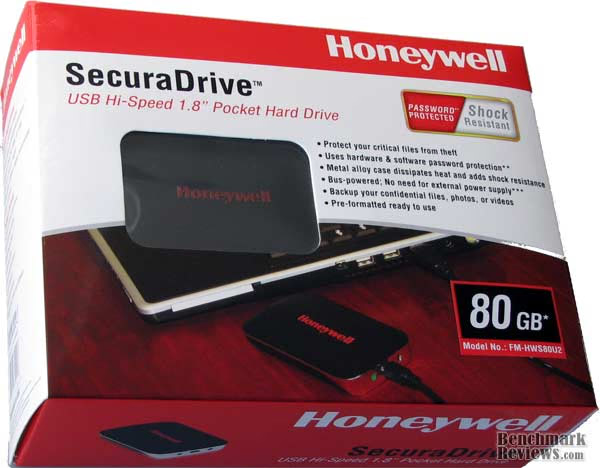
Ultra-small and compact enough to fit into a dress shirt pocket, Honeywell answers the call of today's necessary precautions for secure computing. Like most people, I have more accounts and passwords than I can remember on my own. In addition to my own personal information, I must also remember the sensitive account details for my clientele. Because the SecuraDrive is a 1.8" hard drive mounted inside a rugged chassis, there is a level of protection above and beyond the growing capacity of USB flash drives. Additionally, the durability of hard drives to endure extreme heat while retaining data allows you to save large amounts critical information and important documents inside a fire safe or safety deposit box.

About the company: Honeywell Consumer Electronic Division
When it comes to applying leading-edge technology to solve the world's problems, few companies can rival our long record of achievement. It began in the 1880s. We pioneered a combination of sensors and actuators that gave birth to a new field of technology - automation and control. We have never looked back. Across twelve decades, Honeywell's employees and their inventions have been building a better world. We have created groundbreaking technology solutions for customers of our aerospace, transportation systems, and specialty materials businesses. And, yes, we are still the world's leader in automation and control solutions.

Honeywell International Inc. is a household name for most people, thanks to the long history of producing quality thermostats. On the commercial side of business, they has offered aircraft engines and aviation components for many years. These parts of the business won't be changing anytime soon, but a recent deal with SOYO has started the Honeywell Consumer Electronic Division and produced a new line of flat-panel televisions and monitors. SOYO designs and distributes these newly-designed products on behalf of Honeywell.
SOYO Group, Inc. is a provider of consumer electronics such as, LCD Monitors, LCD Televisions, Bluetooth, Portable Storage, Home Theater Furniture and broadband telecommunications products and services. Headquartered in Ontario, California, with additional sales offices in South America, SOYO Group sells its products through an extensive network of authorized distributors, resellers, system integrators, VARs, retailers, mail-order catalogs and e-tailers. Products are sold under the SOYO, Go Video, Dragon, Onyx, Dymond, Honeywell, Le Vello, and Prive brand names. For more information, please visit the SOYO Group website.
FM-HWS80U2 Specifications
High-capacity hard disks are always a popular item, and having this ability in a small form factor storage device makes for a win-win situation. SOYO built the Honeywell FM-HWS80U2 SecuraDrive using Samsung's Spinpoint N2 hard drive. This drive features very low power consumption, and when attached to portable PCs the low power feature can extend the battery lifetime approximately 20 hours compared to a 2.5" drive. Samsung's proprietary SilentSeek technology minimizes the acoustic noise level to 1.6 Bel, which is the industry's lowest level.
|
Model |
FM-HWS80U2 |
FM-HWS120U2 |
FM-HWS160U2 |
|---|---|---|---|
|
Capacity |
80GB* |
120GB* |
160GB* |
|
Interface |
Hi-Speed USB 2.0 |
||
|
Rotational Speed (RPM) |
4200 RPM |
||
|
MTBF |
300,000 POH |
||
|
2Disk |
1.8 Bel |
||
|
Interface Transfer Rate |
Up to 480Mbits/s |
||
|
Buffer Size |
8 MB |
||
|
Linear Shock
(Non-operating 1.0 ms)
|
1500G |
||
|
Software |
SecuraDriveTM Software (Windows only)
Driver for Windows 98 SE
|
||
|
Size |
3.8 x 2.4 x 0.6 inch |
||
|
Weight |
5.1 oz |
||
|
System requirements |
Pentium III 350 MHz or higher / iMac, Apple G3/G4/G5/Intel processor
Windows 98SE, ME, 2000, XP, Vista / MAC OS X 10.2.8 or higher
64MB RAM, 128MB or higher recommended
USB 1.1 / 2.0 port
|
||
|
Assembled in |
USA |
||
|
Warranty |
1 Year Limited Warranty |
||
A rugged enclosure offers shock resistance up to 250G, and the Spinpoint N2 can resist an operating shock level of up to 600G. In addition, an optional free-fall sensor technology, which locks the head when it detects a drop, raises the shock coverage level to up to 1500G. This feature adds a higher degree of content protection for the Honeywell SecuraDrive, which is likely to be handled and transported in situations where dropping may occur.
The SecuraDrives' Spinpoint N2 80GB hard disk drive also includes a 4200rpm spindle speed, a CE ATA interface, and 8MB cache memory.
SecuraDrive Features
-
Protect your critical files from theft
-
Uses hardware & software password protection (PC only)
-
Metal alloy case dissipates heat and adds shock resistance
-
Bus-powered; No need for external power supply (USB power cord for low-power hubs)
-
Backup your confidential files, photos, or videos
-
UPC Code: 660475310013
FM-HWS80U2 Closer Look
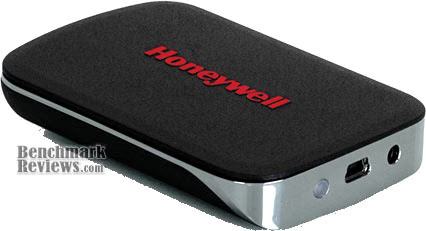
Honeywell has brought the rugged functionality of a compact 1.8" hard drive directly into a fashionable enclosure made perfect for pockets and purses. The SecuraDrive Hi-Speed USB pocket hard drive FM-HWS80U2 offers all of the capacity that desktop hard disk drives can afford, but delivers it at a fraction of the size without sacrificing reliability.

Honeywell's SecuraDrive outer chassis is coated with black rubber, which serves the purpose of improving product durability while offering a tactile grip surface during normal handling.
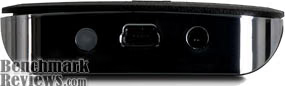
At the connection-end of the SecuraDrive FM-HWS80U2 there are two ports and one LED light. The LED shines red while the product is connected via High-Speed USB, and blinks during drive access. The mini-USB "B" connection allows for direct connection with support for power and data over USB 2.0 compliant ports. For older computers without powered ports, or USB hubs with low or no additional line power, this 1.8-inch pocket hard drive can be powered with an additional USB cable (included).
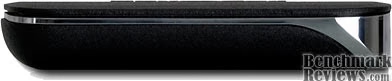
Roughly the size of most modern cellular flip-phones, the Honeywell SecuraDrive hosts a Samsung SpinPoint N2 hard disk drive inside.

A chromed finish offers enough accent to the SecuraDrive that you may forget just how rugged this portable hard drive really is. USB flash drives may be more tolerant to drop-shock, but with modern technology embedded inside the 80GB FM-HWS80U2 is capable of surviving the worst accidents with a 250G impact resistance.
SecuraDrive Detailed Look
The Honeywell SecuraDrive is perfect for lightweight travel; especially with notebook computers and UMPC's. This High-Speed USB 2.0 pocket drive This drive features low power consumption can extend the battery lifetime approximately 20 hours when compared to a 2.5" externally connected hard disk drive.
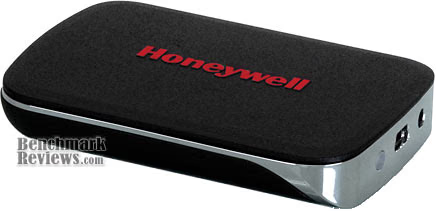
As a Network Administrator, I find myself taking a lot of technology with me onto the job site. Years back I would have to carry a large CD case to hold the dozens of discs I needed to troubleshoot problems. Now, with one single 80GB Honeywell SecuraDrive I can fit all of the software and diagnostic tools I need on the FM-HWS80U2, and safely add client information if necessary.
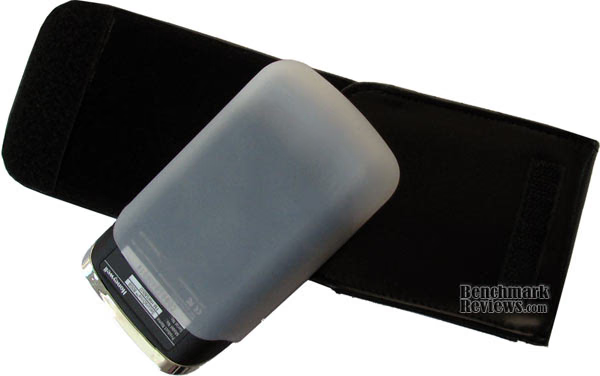
Even though the Samsung Spinpoint N2 hard drive stored inside can resist an operating shock level of up to 600G, Honeywell has added an additional layer of protection by including a rubber-membrane sheath for the SecuraDrive. There aren't any scientific measurements which indicate the added shock resistance level, but you can rest assured that minor drops will not scuff or scar the product.
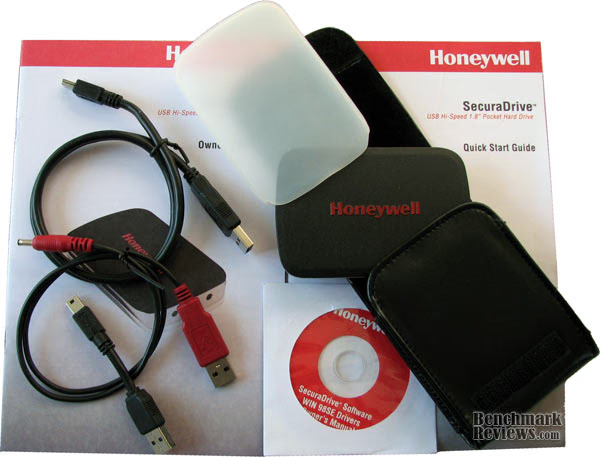
The Honeywell SecuraDrive FM-HWS80U2 comes with everything you see pictured above. There is a standard 3-foot USB "A" to USB "B" cable along with a mini version, and an additional USB cable for to supply power for USB 1.0 and 1.1 ports. Since most computer made in the past several years have come equipped with High-Speed USB 2.0, there was no need for the power cable.

The 80GB drive comes with two different levels of protection. The first is a rubber-membrane sheath which fits the SecuraDrive like a glove. The second is a leather carry-case pouch which fits the wrapped unit and a two-inch USB A to B cable.
In our next section, Benchmark Reviews walks you through the paces of setting-up the SecuraDrive software for use with the FM-HWS80U2.
SecuraDrive Software
Utilizing the SecuraDrive application software, you are able to partition your pocket drive into both a "Public (open)" and a "Secure Area (password protected)" area:
Public Area
There is no password protection applied to this area. You may perform any basic standard functions in this area.
Security Area
This area cannot be accessed without inputting the password you set. Once logged in, the device will be switched from "Public Area" to "Security Area". After successfully switching, you may perform any basic functions.
After connecting the SecuraDrive FM-HWS80U2 to your computer system, launch the security software: Open My Computer > Access your SecuraDrive > Double-click on the Security Software

Once the SecuraDrive software has launched, you should see the Main Menu. Click Setup Security to begin the setup process.
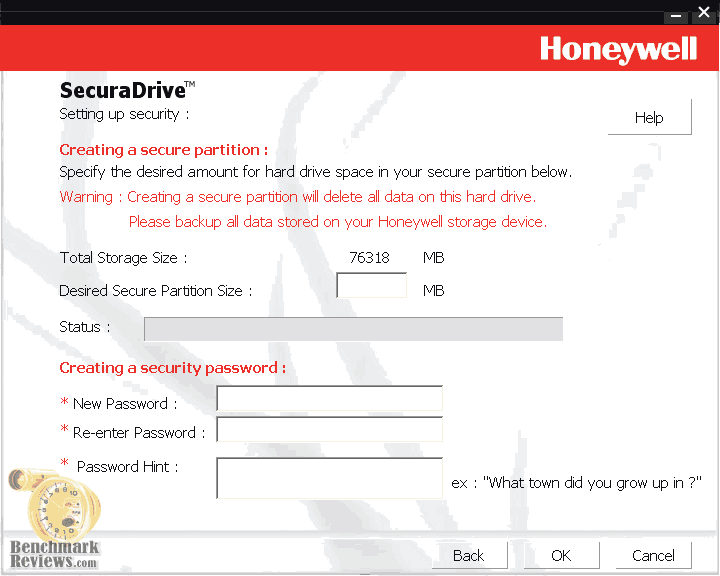
Fill out all fields; once you are finished click OK and wait for the 80GB drive to finish being partitioned.
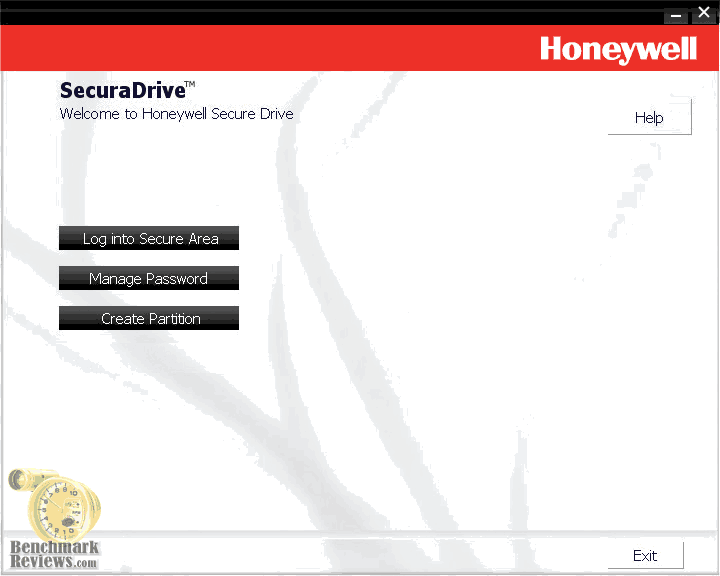
After setting up your security area, the Main Menu will have a few different options. You will now have four options: Log into Secure Area, Manage Security Password, Create Partition, and Create Bootable Drive. Click log into Secure Area.
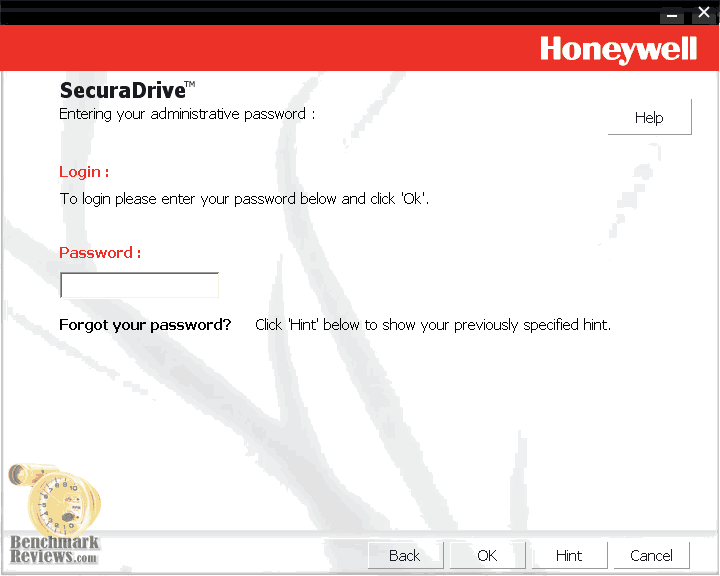
Log into the Secure Area by entering the password you designated during the initial setup.

Once logged in, you will only be able to view the Secure Area. The files you put in the Secure Area will not be viewable while logged out, and the files you put in the Public Area will not be viewable while logged in. To switch back to the Public Area, log out double click the SecuraDrive icon on your taskbar.
Test Methodology
While convenience and safe storage are the primary and secondary selling points for the Honeywell SecuraDrive FM-HWS80U2, many users are also insist on high-speed performance. In our tests we have already confirmed that the SecuraDrive fits perfectly into small pockets, and the software offers excellent first-line security. Now it's time for Benchmark Reviews to compare this miniature hard disk drive to it's rival: the USB flash drive.

Test System
-
Motherboard: Gigabyte GA-X48T-DQ6 (Intel X48 Chipset) with E BIOS
-
System Memory: Corsair PC3-14400 DDR3 1800MHz
-
Processor: Intel E6550 Core 2 Duo 2.33GHz
-
Video: ZOTAC GeForce 8800 GT 512MB PCI-Express 2.0
-
Disk Drive 1: Western Digital 74GB WD740ADFD 10,000 RPM SATA
-
Disk Drive 2: (Paging File): Mtron MOBI 3000 2.5-Inch 16GB SSD MSD-SATA3025
-
Optical Drive: Samsung SH-S203 SATA 20x DVD R/W
-
Operating System: Windows XP Professional SP-2 (optimized to 16 processes at idle)
Test Hardware
-
Honeywell SecuraDrive Hi-Speed USB 1.8-Inch 80GB Pocket Hard Drive FM-HWS80U2
-
OCZ Rally2 Hi-Speed USB 32GB Dual Channel Flash Memory Drive
Test Tools
-
HD Tach RW v3.0.4.0 by Simpli Software
Results
Since consumers have the decision to choose either an external hard disk drive or USB flash drive, sometimes the decision rests on performance more than anything else. Benchmark Reviews has compared the Honeywell SecuraDrive against the largest USB flash drive we could find.
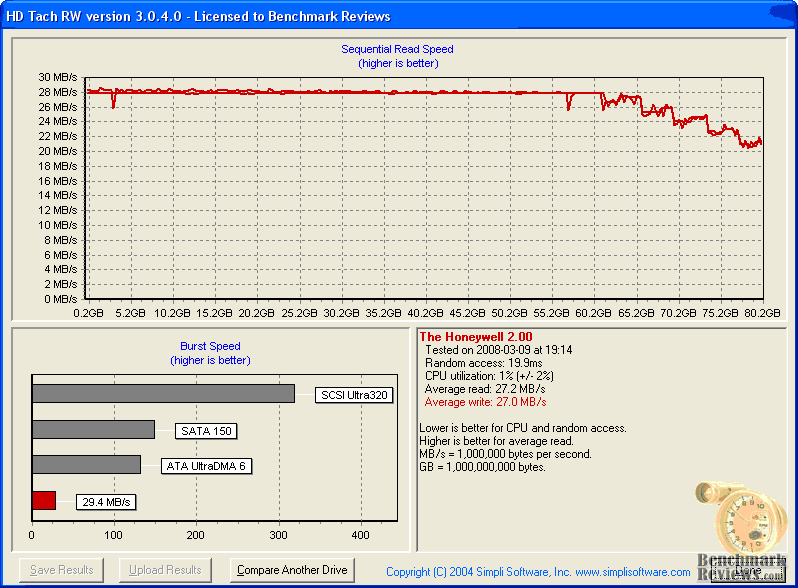
Tested all on its own, the 80GB Honeywell SecuraDrive sustains a relatively solid 28 MBps for the first 63 GB of disk. After that point, the sustained read and write speed tapers to around 21 MBps. This isn't all too bad, and the 29.4 MBps burst speed is respectable as well.
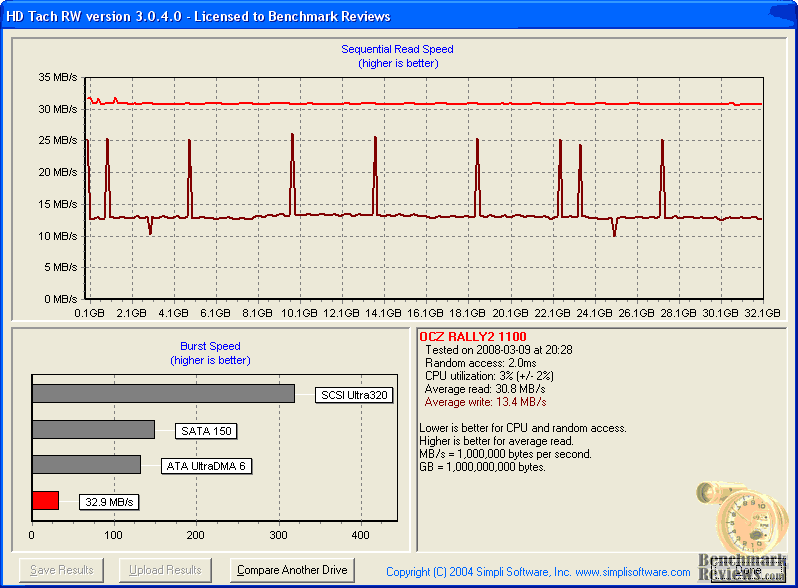
Next up was the OCZ Rally2 USB flash drive. The read speed was a steady 30.8 MBps, but the write speed was a miserable 13.4 MBps despite a few intermittent performance spikes. The 32.9 MBps burst isn't a great as I would have expected from a dual-channel flash-based device, especially since it is the latest and greatest technology available.
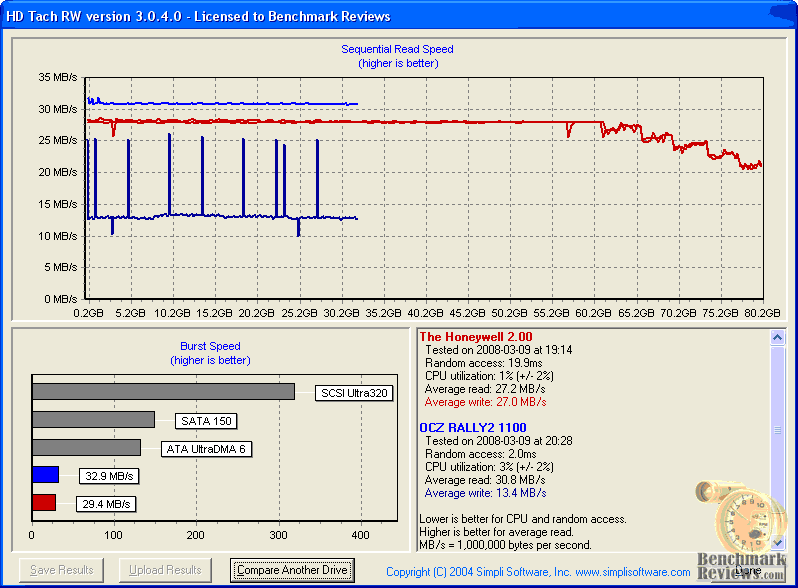
Compared side by side, the average read speed on the Honeywell SecuraDrive is 27.2 MBps against the Rally2's 30.8 MBps; almost no perceivable difference in real-world performance there. The read burst speed was also similar, with the SecuraDrive performing at 29.4 to the Rally2's 32.9 MBps; again, these results are relatively identical. The biggest difference is also the most important, and that comes with the write speed performance. With a pathetic 13.4 MBos read speed recorded by the 32GB OCZ Rally2 USB flash drive, the Honeywell FM-HWS80U2 dominates write-to performance with 27.0 MBps. With all things being otherwise equal, the SecuraDrive proves to hold a distinct performance advantage over the very best USB flash drives available.
SecuraDrive Final Thoughts
Coming into the article, I had mixed feelings about the longevity of external hard disk drives in a world filled with high-capacity USB flash drives. Although I must carry both products because I am a professional technician, for many months now the SOYO 20GB SlimEx Platinum has been a lifesaver. I really enjoy having a portable device capable of holding large amounts of data, and in certain conditions the capacity has been priceless. On the other hand I recently purchased the 32GB OCZ Rally2 flash drive, and lightened the load if only slightly. But now, with the 80GB Honeywell SecuraDrive I will not only have more capacity than I might realistically need, but it will be both faster and more secure than my flash drive.

Aside from the capacity and speed, the SecuraDrive is also small enough to allow secured protection of my property in the confinements of a fire-resistant personal safe. Although the fire-resistant safe might be enough to help some people sleep better at night, I have nightmares of melted USB flash drives cooking inside the inch-thick oven. Even floods have me concerned, since our environment is revolting against our abuse it's clear that I must concern myself with all acts of God. In situations like mine where paranoia settles in and demands that I take extreme measure to protect sensitive data, only a well-protected hard disk drive will do. The Honeywell SecuraDrive will personally help me protect this invaluable data without fear of potential loss.
FM-HWS80U2 Conclusion
Normally I rate the presentation score based on how informative the retail product packaging is, and how well it's protected. I'm not planning to change this, but I have found something particularly interesting with this Honeywell product that seems beyond the call of duty. When I received the FM-HWS80U2 the first thing I noticed were small circular clear stickers over each side of the packaging. Normally this would be the extent of a manufacturers effort to secure their product from tampering or theft. In the case of Honeywell's SecuraDrive the package was also glued shut, which not only makes shoplifting difficult but also ensure that the device's security is not compromised.
Dressing up a Spinpoint N2 1.8" hard drive isn't an easy task, but SOYO has served Honeywell perfectly by encasing the SecuraDrive with a clean combination of black rubber and chromed metal. The SecuraDrives appearance is discreet enough not to draw attention and elegant enough to be considered attractive.
By nature, the Samsung Spinpoint N2 hard drive offers free-fall sensor technology which locks the head when it detects a drop, thereby raising the shock coverage level to up to 1500G's. Add onto this a soft silicon-rubber membrane sheath, a tough rubber-covered enclosure, and a thick leather case, and now you've got yourself a virtually indestructible product. Needless to say the quality of construction and design put into the SecuraDrive is premium quality, which is exactly what you want from something protecting your most valuable assets.
Functionally speaking, the FM-HWS80U2 pocket hard drive is perfect for many different uses. I found it most ideal for storing very large amounts of sensitive data; but it's also incredibly handy for my needs as a computer technician. Ultimately it outperforms the best flash drives, while at the same time offering enormous capacity in something half the size of an iPhone.
At the time of this writing, Honeywell's SecuraDrive Hi-Speed USB 1.8 Inch Pocket Hard Drive is brand-new to the market and yet to make it onto retail shelves. SOYO appears to sell several versions of the SecuraDrive directly from their website, with the 80GB FM-HWS80U2 model selling for $199. Presently this appears to offer a value on par with pricing for 32GB USB flash drives, and since the SecuraDrive offers speed and capacity advantages the decision shouldn't be so difficult.
In conclusion, the Honeywell SecuraDrive is an excellent first-edition product from a trusted industry name. Since micro-storage options are usually a split decision between USB flash drives or compact hard disk drives, it's comforting to have a rugged product offer a substantial advantage in price, capacity, and performance. I highly recommend the Honeywell SecuraDrive Hi-Speed USB 1.8 Inch pocket hard drive (model FM-HWS80U2 tested) for any person in need of safe and secure data storage beyond the capacity of small USB flash drives. The peace of mind alone is worth twice what you'll pay, and your already getting twice the product you would compared to the alternative.
Pros:
+ Extremely low power consumption
+ Very attractive design
+ Extremely small size footprint
+ Convenient leather carry case
+ Excellent compact storage solution
+ Secure storage device for sensitive data
+ Incredibly rugged design is nearly shock-resistant
+ Faster performance than dual-channel flash drives
Cons:
- Expensive, even if it cost less than smaller capacity flash drives
- Data encryption not supported by SecuraDrive software
EDITORS NOTE: SOYO, the manufacturer of this Honeywell product, has filed for bankruptcy and is no longer in business.
Questions? Comments? Benchmark Reviews really wants your feedback. We invite you to leave your remarks in our Discussion Forum.