
Genius MaxFire Pandora-Pro USB Mini Gamepad
Genius MaxFire Pandora Pro Gamepad Review
Sometimes I find that playing games with a keyboard just does not cut it. Games that require quick action such as platform games or puzzle games don't always work as well using a computer keyboard. Game pads feel much more natural when you are trying to defeat your opponent in a fighting game, or get to the next grueling level on a fast paced puzzle game. There are a variety of game pads, and Benchmark Reviews has tested many of these game pads over the years. Genius has provided Benchmark Reviews the Mini USB Maxfire Pandora Pro. This is a type of game pad that is often overlooked in this segment, a small and portable game pad. With features such as the ability to fold into a small package and turbo buttons, the Pandora Pro promises features from the larger types of game pads, but in a might more portable package.
I am a fan of playing old console games on my computer. I enjoy games from when I grew up, and many of those games can only be found on emulators. Games such as Super Mario brothers, Tetris attack, and other games from the Super Nintendo era. I find that a gamepad like this is perfectly suited for a scenario like this. I find myself playing these games on a laptop more than anything, and combining that with the size and portability of the Pandora Pro, it makes a perfect fit for some on-the-go gaming. Whether you are sitting in an airport, visiting the family, or on a long road trip, this is a great way to play games on-the-go.
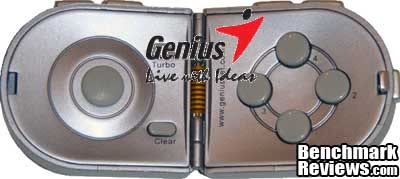
I tested this gamepad using my desktop machine. I played a variety of Emulated console games such as Super Mario Brothers, Tetris attack, etc. I also used the gamepad in some newer games such as Grand Theft Auto: IV, Dirt 2, and several other games. I evaluated gamepad in the following areas of interest: Performance, Functionality, Construction, Appearance, and Value. Some of these categories have the tendency to be more subjective than others. At Benchmark Reviews, we strive for professionalism and aim to provide the most fair and unbiased reviews as possible.
Manufacturer: Genius, a division of KYE Systems Corporation
Product Name: MaxFire Pandora Pro
Model Number: 31610060100
Price As Tested:$13.99
Full Disclosure: The product sample used in this article has been provided by Genius.
MaxFire Pandora Pro Features
MaxFire Pandora Pro features eight action buttons including four side buttons and a Turbo function for auto repeat, is especially great for shooting and action games. This game pad measures 9.9 x 4.9 x 1.2 cm and weighs only 30 grams, so you can easily carry it with a notebook, tie it to a mobile phone or use it as a decoration and play games anytime you want. In addition, a retractable USB cable and slim carry box are included; and the slim box has slots so can carry your own memory cards as well. (source: https://www.geniusnet.com/)
Key features:
- Mini Foldable USB Game Pad for Windows XP/2000/ME/98SE
- Mini direction stick for easy and advanced control
- Turbo button for auto repeat, great for shooting and action games
- Retractable USB Cable and slim box included, easy to carry
- Dual motor provides real vibration effects such as hits, explosions or crashes
Pandora Pro Specifications
| Interfaces | USB |
|---|---|
| OS Required | Windows 98SE/ME/2000/XP |
| Vibration | Yes |
| Action buttons | 8 |
| Side buttons | 4 |
| Advance Function | Turbo |
| Mini Stick as PSP | Yes For Direction |
| Slim Pad Design | Yes |
| Wrap or Retractable Cable | Yes |
System Requirements:
- BM PC Pentium 233 MHz compatible or higher
- Microsoft Windows XP/2000/ME/98SE
- CD/DVD-ROM drive for driver installation
- Available USB port
This information was collected directly from the website www.geniusnet.com. One thing I wanted to add to this information is that despite it being absent from the above information, the Pandora Pro is stated as being compatible with Microsoft Windows Vista.
Closer Look: Pandora Pro
We will take a look at some of the features of the Pandora Pro gamepad. This gamepad is meant to be portable, yet still have many of the same features as some of the larger types of gamepads on the market. Let us take a look and see just how much punch Genius packed into this product.
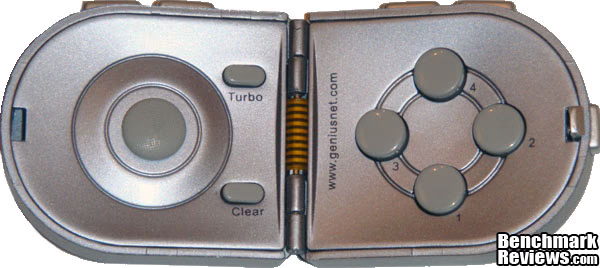
This is a full image of the MaxFire Pandora Pro. There are four main buttons, a directional pad, and the turbo/clear buttons. The orange and black striped section in the center is the wiring that passes from one side to the other, and is flexible to allow the Pandora Pro to fold in half.
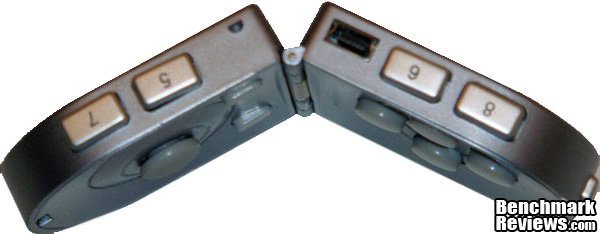
This is the top of the Pandora Pro. You can see the additional four trigger buttons as well as the port where the USB cable plugs in.
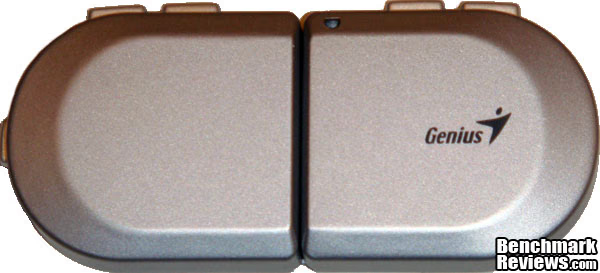
This is the rear of the Pandora Pro gamepad. The curved edges make it comfortable to hold whether you have large or small hands.
Pandora Pro Detailed Features
Things such as turbo, a mini-joystick, and ultra-portability are a few of the features on the Pandora Pro. Please read through this next section as we go into detail about each of these features.
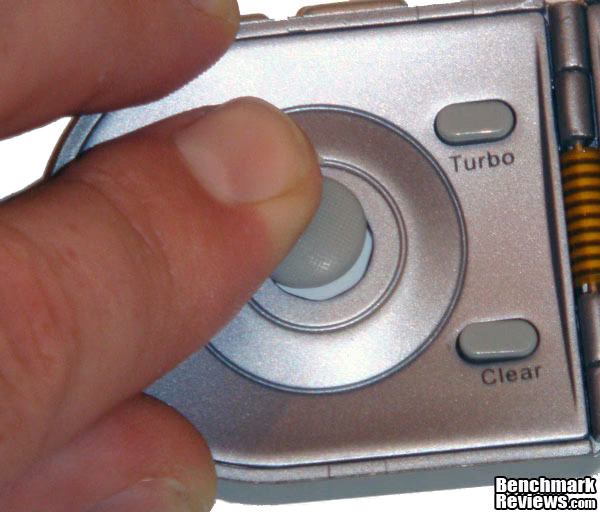
This image shows the mini joystick type of directional pad on the Pandora Pro. There is not a great deal of movement, but there is enough to give you plenty of control. The pad is limited to Up, Down, Left, Right, and the diagonals. Also on this side are the Turbo and Clear buttons. These buttons are a little peculiar. In order to turn Turbo on, you need to hold down the Turbo button, then press the respectie button you wish to have be Turbo-enabled. This allows you to press that button and get a rapid-fire response from that button. It will stay that way until you hold the Clear button and press the respective button again. Each button 1-8 can have their own individual turbo on/off state to allow for many different configurations. Unfortunately, there is no sort of LED or any indicator that says that a button is Turbo or not, so you just have to press it to see the reaction.
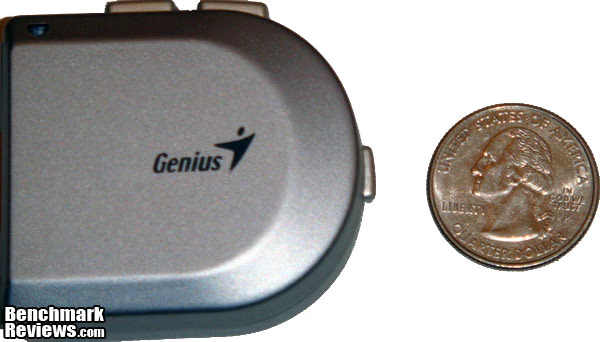
Here is a photo of the Pandora Pro folded for portability. I took a photo of a Quarter for a size comparison. The previous pictures do not fully show the compactness of the gamepad, but this shows quite well how compact the device really is. The gamepad snaps snugly shut, and the button on the right side of it needs to be pressed for it to open. Additionally, if you look in the upper right-hand corner of the Pandora Pro, you can see a spot where you can fasten a lanyard or something similar to it, so that you don't lose it.
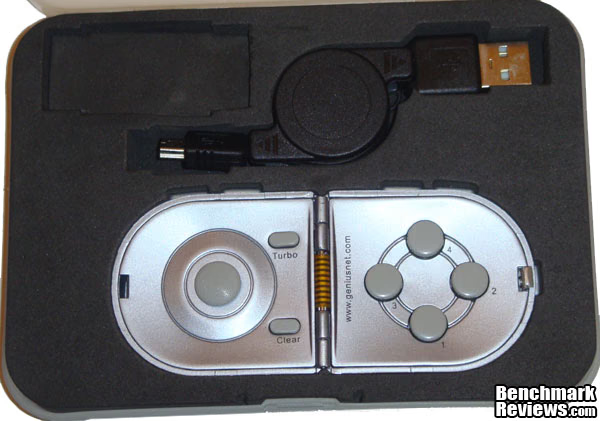
Genius went so far as to include a carrying case with the Pandora Pro. The gamepad is packed in the box this way, and it is a great way to keep it safe from bouncing around in a backpack or laptop bag. You can see the retractable USB cable that comes included with the Pandora Pro. From my experience, those retractable cables work well enough for a while, but tend to pull out one day, and never retract back in (or vice-versa). Nonetheless, it is nice to have, as they are good space savers.
Testing & Results
Testing Methodology
I tested the Genius MaxFire Pandora Pro with several gaming scenarios. Being that one of the focal points of this gamepad is the compact size, and portability, I focused much of my testing on games that are suitable for both portable machines and gamepads. My primary testing methods were with emulated games, as that was my first thought when I received this gamepad. I used Snex9x as a Super Nintendo emulator, and played Super Mario Brothers and Tetris Attack!.
Test System
-
Motherboard: Gigabyte P5NE-SLI
-
System Memory: 4x1GB Corsair XMS DDR2
-
Processor: Intel Core 2 Duo e6600
-
Audio: On Board
-
Video: EVGA GTX 260 c216 768GB
-
Disk Drive 1: WD Raptor 72GB
-
Enclosure: Cooler Master Wave Master
-
Monitor: ASUS VH242H 24"
-
Operating System: Windows 7 Professional 64bit and Windows XP Professional 32bit
Results
After plugging in the Pandora Pro, I was immediately greeted with a Windows balloon-tip saying that my hardware had been successfully installed. I did not have to download or install any drivers. I then went to the device section on the control panel to calibrate my newly installed gamepad. I did not encounter any issues calibrating it, and all the buttons worked as they should.
After properly mapping the buttons in the Snes9x software, I began playing Tetris Attack!. If you are not familiar with this game, it is a fast puzzle based game where you need to match colored blocks faster than your opponent. it is a true test of the responsiveness of any game controller. If there is any lag or the directional pad has any trouble recognizing exactly what way you want to go, the game is very unplayable. The Pandora Pro performed very well. I was able to play the game as though I was on a larger, and much more expensive gamepad. I played this game for roughly two hours during one session, and not once did I feel like my hands or fingers were getting sore or cramped.
Another game I tested this controller with is Super Mario Brothers for the Super Nintendo. This, like Tetris Attack! is a game that requires good timing and precision. If your controller lags out, or has trouble recognizing which direction your D-pad is facing, you will soon end up very frustrated. I am a seasoned player of Super Mario Brothers, and I found no issues while playing this game at all.
After testing out the basics of the Pandora Pro, I wanted to test the vibration function of the controller. I tried a variety of games on my Windows 7 Professional 64bit machine, but soon began to notice that vibration was not working on any of the games. Just a short list of games that I tried this with are as follows: Grand Theft Auto 4, Dirt 2, Battlefield: Bad Company 2, F.E.A.R., Clutch, and Ghostbusters, just to name a few. Most all of these games have support for gamepads in one form or another, but the controller did not vibrate during gameplay. There is a driver on the Genius website for the vibration feature, and there is a Windows 7 64bit version of this driver. This driver gives a utility to test out the vibration function of the controller, and the Pandora Pro vibration function works just fine in that utility, just not in any game.
However, the case with the vibration trouble was not present in Windows XP 32bit. I tried the Flatout game, and was pleasantly greeted with a surprising rumble while driving my car around the track. The utility allows you to control the intensity among other options of the vibration function. There is a vibrating motor in either side of the controller, and feels similar to a strong wireless phone vibration. On this note, I would have liked to see a switch for the vibration feature.
Note that it is easy to make an assumption that just because a product says "Compatible with Vista" and has a Windows 7 driver, that it will work 100%. This is not always the case. The controller is listed as compatible with Vista, but the vibration function is not quite there. This does not detract from the product, as it is not advertised as being Windows 7 compatible.
One thing I did notice is if you are apt to squeezing the controller tightly, you may be prone to folding it in half. There is an evident "click" when you open the controller that is meant to help the controller stay open, but if you squeeze or twist your controllers a lot, you may find that it folds on you occasionally.
Game Pad Final Thoughts
My final thoughts on the Pandora Pro are positive. I enjoy the compact size and portability of it. It is perfect for laptop users that want to play games on the go, or for kids. Putting eight buttons on this controller gives it an edge over some other larger controllers that I have used, which allows greater configuration and control on games. Choosing a (very) small joystick-type controller over a typical D-pad seems like it would be a hindrance to the controller, but I found that it took little to no effort to get used to.
I think the Pandora Pro is very well suited for gamers that enjoy playing old school games on emulators. Older gamers like myself will enjoy the button layout, as it resembles some of the older controllers and button layouts that systems used to use, such as the Super Nintendo, Sega Genesis and original PlayStation. It also has features that keep it competitive with much more expensive controllers, such as the vibration and turbo function.
I feel that Genius has a very fine product in the MaxFire Pandora Pro. It is inexpensive, compact, and packs a good amount of features into a very small package.
Genius MaxFire Pandora Pro Conclusion
The appearance of the Pandora Pro is very nice. It has a nice silver color that will compliment most any setup. The controller itself is of very simple aesthetics, but there is nothing wrong with the way that it looks.
Construction quality of the Pandora Pro is best gauged by how well it would hold up over time. It is made of plastic, and is inexpensive, so I would take a guess that after much heavy use, the buttons will begin to wear out, and the hinge and latch would eventually become problematic. The fact that the wires connecting the two sides of the controller are exposed, leave me to believe that it would only be a matter of time before they were damaged. Keeping the gamepad in the case whenever the controller is not in use would be the best way to ensure the longevity of the Pandora Pro.
The Pandora Pro functions as well as you would expect. Having eight dedicated buttons allows for a good amount of button mapping in games. The turbo functionality allows you to give individual buttons turbo, which is very nice. The directional stick may be a little daunting for those used to a typical D-Pad, but it takes very little effort to get past this. Don't let the fact that the vibration function does not work in Windows 7. It is likely something Genius will fix in an upcoming driver patch, and does not take away from the controller's other good features.
The value of the product is hard to beat. Currently priced at $13.99 on NewEgg, this controller is priced very competitively and is one of the few controllers that is this portable at any price.
I would recommend the Pandora Pro for someone looking for a portable gamepad or for a controller for their kid(s). While it likely won't replace a full-size, full-featured controller, it covers a very nice gap in the controller market where its portability, value, and features are very welcome.
Pros:
+ Compact Size
+ Individual Turbo for Each Button
+ Included Carrying Case
+ Dual Motor Vibration
+ Plug and Play (other than vibration function)
Cons:
- May be too small for those with larger hands
- No "start/select" buttons
- Retractable USB cord is short; seems flimsy
- Gamepad may not last long through heavy use
Ratings:
-
Performance: 9.00
-
Appearance: 9.00
-
Construction: 7.00
-
Functionality: 9.50
-
Value: 9.50
Final Score: 8.8 out of 10.
Quality Recognition: Benchmark Reviews Silver Tachometer Award.
Questions? Comments? Benchmark Reviews really wants your feedback. We invite you to leave your remarks in our Discussion Forum.