
Silverstone LC10B-E HTPC Case
Home Theater PCs continue to gain popularity, particularly as more television networks are pushing their content over the web. They're also a great platform for gaming, watching Blu-Ray movies, running a custom DVR, and centralizing media storage. For some of these tasks, a low-power Atom system might be sufficient, but for gaming and processing high definition content, most consumers will want a little more horsepower. That's where a quality HTPC chassis can make a big difference. With room for full-size ATX components, seven hard drives, and five fans, the SilverStone LC10B-E that Benchmark Reviews is covering today should fit the bill.
Last year I reviewed the MicroFusion Remote 350 HTPC case from Antec. There's no doubt it's a great case, but it's limited to micro ATX motherboards, a mini power supply, and only one hard drive. On the plus side, it's small form factor fits just about anywhere. If you have room for a slightly larger case, however, the SilverStone LC10B-E will provide way more hardware options. For starters, it can fit a full size ATX motherboard and power supply, as well as several hard drives and case fans. Thanks to the modular design it can also be configured to handle oversized video cards and even multiple GPU builds.

The SilverStone LC10B-E sells for roughly $130, which puts it right about middle of the pack among HTPC cases. Given the extensive list of hardware support and SilverStone's reputation for quality, though, it should prove to be a great value. In today's review, we'll dissect the LC10B-E feature by feature and find out if it lives up to the SilverStone name.
SilverStone LC10-E Features
Build to perform, the LC10-E has cooling configuration rarely seen in HTPC cases. The two rear 8025 fans configuration provides ample airflow to easily handle the heat from a Core2 Quad processor. But having great thermal performance did not compromise the poise of LC10-E as our engineers created a front panel that is both elegant and devoid of any unsightly holes. This philosophy of no compromises again results in a HTPC case of unparalleled combination of style and function.
Special Feature
-
Home theater component styling
-
Stealth optical drive slot
-
Next generation cooling performance
-
Abundant front I/O ports
SilverStone SST-LC10B-E Specification
|
Model No. |
SST-LC10B-E (black) | |
|---|---|---|
|
Material |
Aluminum front panel, 0.8mm SECC body | |
|
Motherboard |
ATX, Micro ATX | |
|
Drive Bay |
External | 5.25" x 1 |
| Internal | 3.5" x 7 | |
|
Cooling System |
Front | 2 x 92mm or 80mm fan slots (not included) |
| Rear | 2 x 80mm exhaust, 2050rpm, 21dBA | |
| Side | 1 x 80mm fan slot & PSU vents (not included) |
|
|
Expansion Slot |
7 (Full Size) |
|
|
Front I/O Port |
USB2.0 x 2 IEEE1394 x 1 Audio x 1 MIC x 1 |
|
|
Power Supply |
Optional standard PS2 (ATX) | |
|
Net Weight |
6.4 kg | |
|
Dimension |
430mm(W) x 170.2mm(H) x 425.5mm(D) | |
About the company: SilverStone Technology Co.
Founded in 2003, SilverStone is an established leader in its field, with an elite team of engineers; we started our quest of providing products that create inspirations. We have since expanded the lines of products as well as types of products we produce, giving our customers a wide selection of choices.
With distribution centers in different areas of the globe, SilverStone products can be seen all over the world, not just for computer users but also for home entertainment use. Providing leisure with integration of advanced technologies that is functional and making them enjoyable to use.
Here at SilverStone Technology, we continue to pride ourselves in providing the highest level of standards in designing and manufacturing computer enclosures, power supplies, and accessories. Our pursuit for the first class aesthetic appeal is relentless; our teams of devoted engineers are constantly searching for the best technologies that suit end-users with different needs and will make our products as technologically sound as they are beautiful.
Closer Look: Exterior
The SilverStone LC10B-E HTPC case arrived safe and sound thanks to some well designed packaging. Once outside the box, I was impressed by how light it was for a full metal design. The 0.8mm SECC (Steel) body and aluminum front panel help keep the weight down to around 14 lbs. The metal construction also contributes to a very solid feel, with no flex or warping.
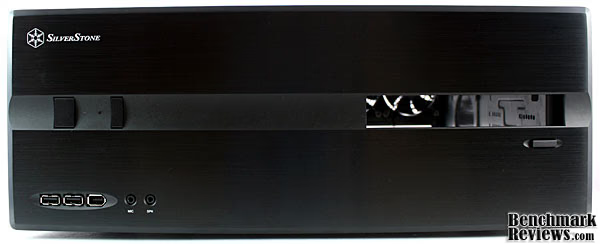
On the front side, you can get a better look at the aluminum panel. The brushed black should complement most entertainment centers. Unlike some laminate cases I've seen, this is a real finish as well and won't peel off.

Turning our attention to the side of the LC10B-E, we can see the vent for the power supply. Also visible at this angle are the vents milled into the side of the aluminum front panel. We'll cover both of these in more detail on the next page.

On the back side are the typical motherboard and expansion card cutouts. A total of seven, vented expansion slots can be seen--a clear indication of the LC10B-E's support for full ATX motherboards. To the right of that is room to mount a power supply, again full size.

The back side of the SilverStone LC10B-E also hosts two 80mm fans. I appreciate the use of true fan grills here, and not the usual perforated steel panel. They add a bit of style, but should also be somewhat quieter. For more demanding systems, a third fan can be added to the side where that black mesh vent is.
Detailed Exterior Features
In terms of exterior features, the big selling point of the SilverStone LC10B-E is its sleek, minimalist appearance. Still, there are a number of features that stand out for their function as well as aesthetics.

I touched on this earlier, but I thought I'd include a better photo of the LC10B-E's front panel vents. These should help improve airflow in an otherwise solid design. They also serve as an intake point should you decide to utilize the front fan mounts.

Also integrated into the front panel of the SilverStone LC10B-E are the front I/O connections. Here we can see the power and reset buttons up top, followed by USB, firewire, mic, and headphone ports below. The only thing missing is an eSATA port. Granted, most new motherboards include one within the rear I/O ports, but if your entertainment center is anything like mine, those can be a real hassle to reach.
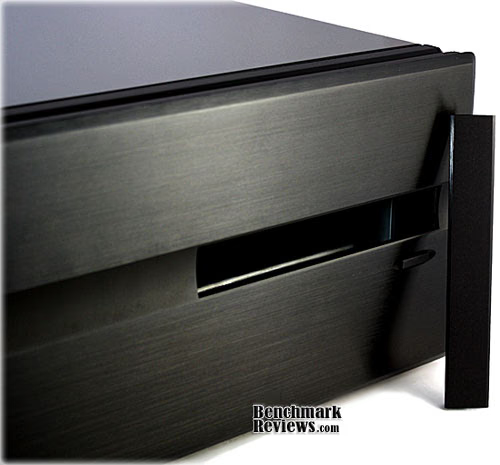
On the other side of the front panel is what SilverStone refers to as a "stealth optical drive slot." The idea here is that once you have your optical drive in place, you attach the smaller aluminum cover to the front of the tray to create a uniform appearance. SilverStone includes the required mounting tape and for the most part the design works well. Of course, you'll want to test fit everything before finally securing it.

Rounding out our tour of the LC10B-E's exterior features is the power supply vent I pointed out earlier. It's a basic mesh panel and should match up well with power supplies that favor a bottom mounted fan. Again, SilverStone uses discrete vents as opposed to punching holes into the side panel. Both serve the same purpose, but the former clearly wins points for appearance.
Closer Look: Interior
After removing a few screws, the top cover of the SilverStone LC10B-E slides off nicely. What's nice about this cover is it wraps around the sides of the case by about an inch. It's not much, but that extra inch translates into a little more elbow room when the cover is removed.

With the case opened, we can finally take a look at the internal layout. A long brace stretches across the top, adding some strength in the event you stack other components on top of the LC10B-E. Toward the back are the two case fans we saw from the external photos, along with the power supply, rear I/O, and expansion slot brackets.

The two 80mm fans included at the rear of our LC10B-E are rated at 2050rpm and 21dBA, while a third fan can be mounted on the side. I already mentioned the fan grills on the exterior side of the case, but it looks like SilverStone also included fan grills in the interior. This should keep any stray wires from getting caught in the blades, but I still recommend secure any loose cables with zip ties.

Turning our attention to the other rear corner, we see the power supply mounting area and vent. One of the benefits of this case is the ability to use a full size power supply. This means that virtually any ATX PSU you buy today will fit, even 1000W+ units. If you plan on filling up the hard drive bays, though, I recommend getting a modular PSU as cable clutter will quickly add up.

Flipping the LC10B-E around, you can see how SilverStone managed to fit so much 3.5" drive space into this HTPC case. A total of six 3.5" drives can fit into the two smaller cages, while a seventh can be installed into the spare 5.25" bay via an included adapter. If you plan on running a high-end video card, pulling out the center drive cage will provide considerably more space. You could even remove the other 3.5" cage and run multiple GPU's. That would only leave you with room for only one hard drive, but there are many out there willing to take that trade-off. The bottom line is the LC10B-E can be customized to fit your needs.
Detailed Interior Features
So far the SilverStone LC10B-E is shaping up to be a great HTPC case. The interior is well-designed, supports a variety of hardware, and offers a number of configuration options. Let's see if this holds true during our installation.

Motherboard and power supply installation are fairly routine, following the same process as most other cases. The only difference with the LC10B-E compared to a regular installation is the configuration of the drive bays. The first step is to remove the screws from the top and slide them out. At this point, you may want to snip out the steel paneling covering the front fan mounts as well.

With the 3.5" drive cages out of the case, you can secure your hard drive with the included screws. If you plan on adding your own intake fans, though, I recommend attaching these first. It's much more difficult with the drives already installed.
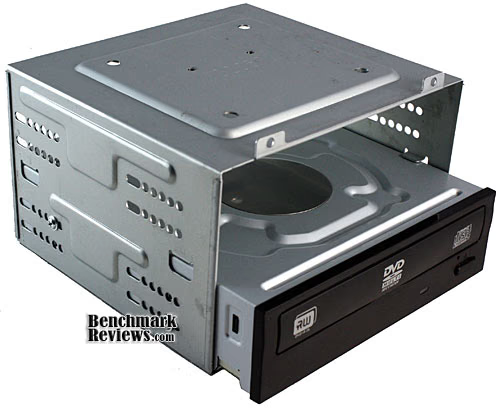
The 5.25" drive bay follows a similar process, but with one important exception: you need to test fit the drive before picking the mounting holes. There are several in a row to correct for variations among different optical drives and it's important to determine which ones work best for your system. While test fitting the drive, be sure to check that the exterior eject button makes contact with the drive's eject button, but doesn't hold it down when not depressed.

With all of the components installed, it's time to run the necessary cables. The SilverStone LC10B-E comes with the usual power and reset switch wires, as well as power and hard drive LEDs. Also included are the front I/O cables, which in this case amount to a firewire cable, USB cable, and HD/AC '97 audio cable--all of which connect to internal headers on the motherboard.
SilverStone LC10-E Final Thoughts
HTPC cases, as well as HTPCs themselves, can be customized to fulfill various roles. As I mentioned in the intro, there are some situations in which a small, book-size Atom ITX system might do. On the opposite end of the spectrum are massive 24 bay server systems for those with extreme storage needs. The SilverStone LC10B-E that we reviewed today falls somewhere in between. It's not as small as some of the micro ATX HTPC cases out there, but it holds much more hardware and supports full ATX components.
The bottom line is that with all of these products on the market, consumers really need to identify their needs before making a purchase. The SilverStone LC10B-E is a great fit for those that have large storage needs or want to run high-end video cards. It's also a good buy if you prefer the freedom of having a variety of hardware options, such as full ATX motherboards and power supplies. If size is your primary concern, though, you may want to looks into SilverStone's slim HTPC chassis line. The LC10B-E isn't oversized by any means, but there are smaller options out there for those that need it.

SilverStone SST-LC10B-E HTPC Case Conclusion
SilverStone represent their products very well and the SST-LC10B-E HTPC case is no exception. It arrived in a solid, well-design box with plenty of shelf appeal. SilverStone also maintains an excellent website providing product information, photos, and support. My only complaint is that the naming schemes can sometimes get confusing.
Outside the box, the LC10B-E looks even better. The brushed aluminum front panel gives the case a sleek, minimalist appeal that should blend in well with other home theater components. The "stealth" optical drive feature is also a nice touch and ensures a consistent, professional appearance.
That all metal construction also helps out considerably in the overall quality of the case. The LC10B-E not only feels solid, but truly is well constructed. I noticed no flexing, warping, or loose parts during my review and they even went so far as to include fan grills on the interior side of the fans.
The interior of the LC10B-E is also host to a number of useful features. My personal favorites are the removable drive cages and support for full ATX hardware components. This makes it possible to create a high-end gaming machine or massive storage server, all within the same case.
Overall, I'm extremely impressed with SilverStone's LC10B-E HTPC case. At $113.99 from NewEgg (after rebate) with free shipping, it occupies somewhat of a sweet spot among HTPC cases. It's not perfect, but compared to the competition in this price segment, it's a great buy.
Pros:
+ Visually appealing
+ High quality, all metal construction
+ Room for five case fans (2 included)
+ Room for seven 3.5" drives
+ Supports full ATX components
+ Customizable interior
Cons:
- No eSATA port
- No card reader
Ratings:
-
Presentation: 9.25
-
Appearance: 9.50
-
Construction: 9.50
-
Functionality: 9.25
-
Value: 9.00
Final Score: 9.3 out of 10.
Excellence Achievement: Benchmark Reviews Golden Tachometer Award.
Questions? Comments? Benchmark Reviews really wants your feedback. We invite you to leave your remarks in our Discussion Forum.