
Corsair Carbide 500R Computer Case
Corsair Carbide 500R Computer Case Review
Manufacturer: Corsair
Product Name: Carbide 500R
Model Number: CC-9011013-WW
Price As Tested:$139.99 (white) or $121.16 (black)
Full Disclosure: The product sample used in this article has been provided by Corsair
If you're looking for more than a normal mid-sized ATX case can offer, or if you are having a hard time finding all the features you want without breaking the bank, then you'll definitely be interested in the Corsair Carbide 500R. Benchmark Reviews recently showed you the 400R and its excellent capabilities. A step above that is the 500R. We looked at model CC9011012-WW which has an arsenal of features. Four stock fans for massive cooling, tool-less installation, modular/configurable drive bays, eight expansion slots. It's got everything you need, and nothing you don't. This is a great case for the expanding system; for users who want to step out of something small and start getting big on their performance.
Mid-tower ATX cases are like mid-range video cards. The decision of which one to buy is far more involved than just buying the most expensive case or card and calling it good because you got everything that could possibly be offered. The mid-range market, for both cases and video cards, offers something slightly less than top-of-the-line. This means that to save on cost you are sacrificing SOMETHING whether it's room, performance, features...SOMETHING. Often you don't realize how much you need a certain feature until you are suffering from its absence, when it's already too late. So every time we look at a mid-range video card or a mid-tower case we are trying to find out what features were included, and which features were left out to fit into the mid-tower footprint and price-range.
If you have this understanding when looking for a case then you can save yourself some time and money by finding exactly the features you need at the expense of others. Sometimes. There's almost always something you learn with each case, something you realize that would have been nice to have. But your odds are still better at finding a case geared towards your specific needs. If you are new to custom builds then you may not be sure what you need. If you are a more experienced builder then you probably have a growing list of likes and dislikes as well as pet peeves.
Now enter the Corsair Carbide 500R. It's designed to be more than your average mid-tower case. It can simultaneously meet the needs of new builders and aficionados. Its feature list is long enough to warrant issuing a pamphlet, and the features are not only useful, but they are exactly what you need for a near-perfect build. It's still not a perfect case, if there is such a thing, and we'll again show you what you're getting and what you may be sacrificing.

With this in mind, Benchmark Reviews will take a more comprehensive look at the features of the Carbide 500R compared to the less expensive 400R and other similar cases. We will focus on the core features for which this case was designed: cooling, ease of build, expandability and looks. All aspects will be gauged while keeping price in mind and what you could otherwise get for your money. In the end a score will be assigned based on this evaluation.
Corsair Carbide 500R Features
- Excellent cooling capacity
- USB 3.0 support
- SSD support in all 3.5" drive bays
- Thumb-screws on front and back panels
- Thumb-screws on PCI slots
- Tool-less 5.25" drive installation
- Tool-less 3.5" drive installation
- Integrated dust filters
- Black painted interior
- 8 Expansion slots
- Supports video card up to 17.8"
- Room for 240mm radiator
- 3x 120mm fans
- 1x 200mm fan
- Multi-channel fan controller
- Movable /configurable drive bays
- Large CPU cutout
- Large holes for cable routing
- Rubber grommets on cabling holes
- Extra space under motherboard tray for cabling
- USB 3.0 to USB 2.0 adapter for front IO ports
Computer Case Specifications
| Motherboard Support: | ATX mATX |
|---|---|
| 5.25" drive bays: | 4 |
| 3.5" drive bays: (with 2.5" compatibility) |
6 |
| Expansion Slots: | 8 |
| Front I/O panel contains: | 2x USB 3.0 connectors 1x Firewire connector 3.5" headphone and microphone connector Power and reset switches Fan LED on/off switch |
| Dimensions: | 20.5" x 8.1" x 20" |
| Material: | Steel structure with molded ABS plastic accent pieces |
| 120mm/140mm fan mounts: | 6 |
| 120mm fan mounts: | 4 |
| Included Fans: | 1x 200mm side panel fan 2x front-mounted 120mm fans 1x rear 120mm fan |
| Side panel with mesh fan mount locations | |
| Supports most 240mm dual radiators (15mm spacing) | |
| Multi-channel fan controller | |
| Supports graphics cards up to 452mm in length (with hard drive cage removed) | |
Closer Look: Exterior
The Corsair Carbide 500R comes in two flavors, black or white. Benchmark Reviews has the privilege of showing you the white version (which in the author's opinion is the better-looking case). Both black and white versions are an improvement over the 400R which seemed a little unbalanced with the raised front.

The Carbide 500R has straight panels and straight lines on the main edges that give it a balanced, clean look. The side panels protrude in the center of the case which give it some styling and break up the pure geometry of the edges which helps it avoid the solid box shape of a boring computer. The left panel has a perforated grill for improved airflow that also improves the style.

In a matching fashion, the front of the Carbide 500R is mostly covered in the dark, perforated pattern of the side. The front panel provides an appealing veneer for two 120 mm fans, four 5.25" bays, and the array of input and output ports and buttons. Behind the grill are dust filters to help keep the interior of the case cleaner and increase the longevity of your components. It's very straight-forward to remove the front panel with a firm jerk to clean the filters or service the fans.

Similar to the left panel, the right panel is also distended to provide room for cables, fans, CPU coolers, etc. Both panels are easily removable with captive thumb-screws so the screws won't be unintentionally lost. Quickly and easily removable panels are features on my list of things that you don't notice until they're missing. I've been surprised by cases with difficult to remove front and back panels, but you won't have to worry about that with the 500R.
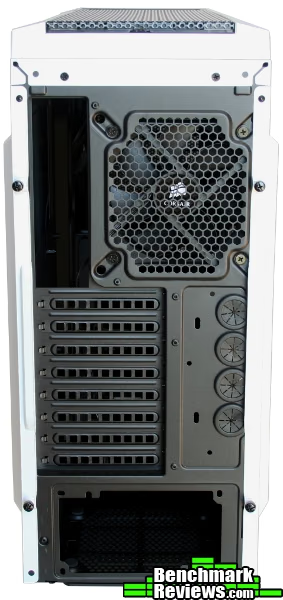
The back of the 500R better shows the cases true size. It measures on the taller side at 20.5", and the extra width is contained mostly at the convex extensions of the side panels. With the extra height, Corsair added an extra expansion slot, a 120 mm fan w/ option for 140 mm, and room at the top for additional fans or a radiator. Eight expansion slots are usually only necessary when using three or four graphics cards. That type of power needs serious cooling, and four water-cooling ports are provided if necessary.

From underneath the case can be seen a removable dust filter, thumb-screws (for one of the removable drive cages) and the support feet. The support feet have two nice features that are easy to overlook. 1) They are made of soft rubber which helps dampen extra case noise. 2) They extend underneath the front panel. With the feet under the front panel this provides better access to the handle at the bottom of the front panel. It also means that the front panel can be removed and replaced without lifting the front of the case off the ground. Perhaps a small nuisance, but one I'm happy to discard.
Detailed Exterior Features
Now we start to get a more intimate view of the features of the Carbide 500R. The front IO panel concentrates all your main access points to one location high on the case. The ports are forward facing which fits better in confined spaces. The 500R has two USB 3.0 ports, the requisite audio jacks, and one firewire port. If you're a firewire user then you'll love this, if you're an e-SATA user then you'll probably be a little upset. Maybe we should just make another new standard to make everyone happy. OK, the case has USB 3.0, everyone stop fighting. Really, the USB 3.0 ports are great to give the case long-term viability as well as backwards compatibility.

Power and reset switches are also present, nothing to complain about construction-wise for any of these. Two extra switches provide control over fans and LEDs. One turns the LEDs on or off, and the other controls the fans. The Carbide 500R has a multi-channel fan controller which can provide varying levels of cooling to the case.
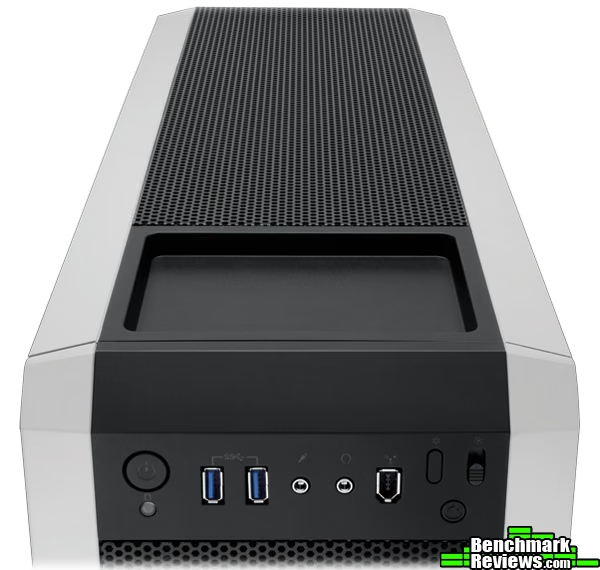
On the top side of the case is a small tray good for holding who-knows-what nonsense. Behind that, the remainder of the top is covered in the same grill as the front and side panels giving a nice touch of congruency to the case. A gentle push on the front end of the grill allows it to unlatch and lift off.
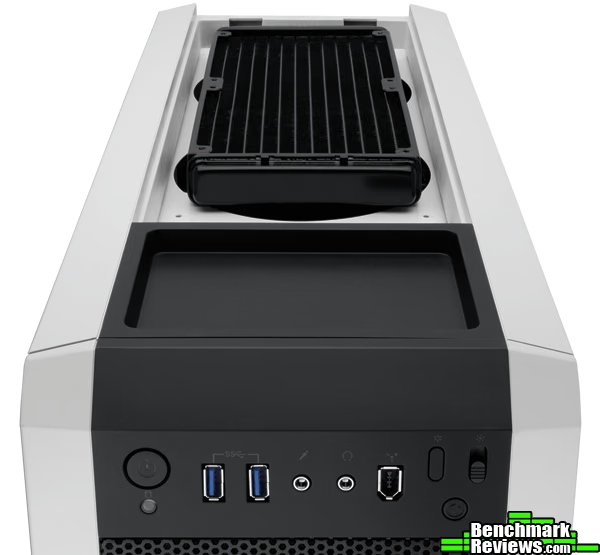
Under the top cover are two 120 mm fan mounts. As the image above shows, a 240 mm radiator could be installed here instead. Even without installing either, the open ports on top allow some heat to escape. It also allows sound right out of the top and into the room. If you need the cooling, install the fans, otherwise you may want to stuff something in there.
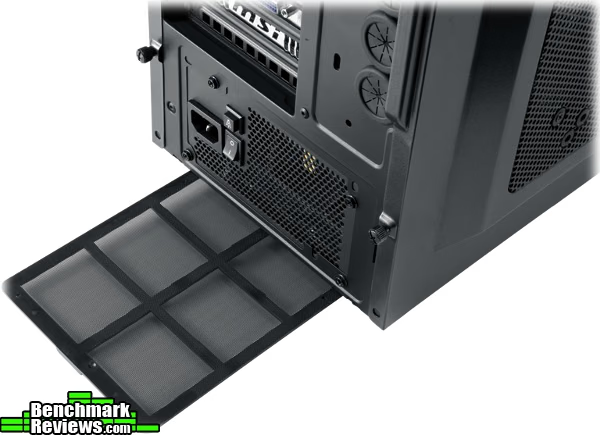
There are lots of cases that tout removable and washable dust filters in various places. The Carbide 500R actually holds partially true to the claim. The filter on the bottom easily slides out. The mesh is mounted to a plastic backbone so it stays rigid and can be washed without worry of degradation. To clean the other filters either requires sticking painted metal parts under the faucet, or removing foam and mesh inserts without any reinforcement.
Overall the exterior of the Corsair Carbide 500R is very nice both to use and to look at. The panels can all be removed without tools and without much effort. They are easy to remove but sturdy when in place. The IO ports, fans and filters are accessible and convenient. For exterior performance the Carbide 500R gets high marks.
Closer Look: Interior
While the exterior of a case is important, the interior really makes or breaks a case for a system builder. The Carbide 400R is long and tall, but not overly so. The extra space allows ample room for installing parts, running cables, and making things even look neat. One downside of the long case is the extra distance that cables are required to travel. This wasn't a problem for the IO cables connecting to the motherboard, but it can present issues if your PSU cables are too short. For example, the 12V 2x4 cable on an EarthWatts PSU was barely long enough to run across the backside and still connect without much tension.

The spacious interior of the 500R allows for eight expansion slots, large, grommeted cable holes, two 3.5/2.5" hard drive cages, and four 5.25" drive bays. The only "dead" space in the case lies between the PSU and the hard drive cages. But even here Corsair added mounts for another fan to be installed.

Speaking of fans, the Carbide 500R has plenty! It comes stocked with three 120 mm fans (two front and one back) and a single 200 mm fan on the side panel. All three fans are wired into the multi-channel fan controller. Adding additional fans to the controller will require adding a cable splitter which is not included with the case. The side panel includes additional mounting points allowing the 200 mm fan to be replaced by two smaller fans either 120 mm or 140 mm. The mounting hardware for this particular swap is not included. Similar to the Carbide 400R review, Corsair included 12 long machine screws for mounting additional fans. These are hardly long enough to use a nut when mounting a normal thickness fan.

There are only a few places on the case where the long screws can be used. Two fans can be mounted in the front but on the interior side of the hard drive cages (shown in the image below). Also, the screws might allow some type of fan mounting in the two top fan positions. Ironically, all the fans included with the 500R are installed using normal fan mounting screws of which no extras are included. As long as we're discussing screws and parts, I want to bring up the quality of machining on both the screws and the holes. I have to assume that they were done by the same company, because the quality of the metal is similar, and the tolerances were also similar. The loose tolerances plus soft metal adds up to poor durability. This is true for the thumb screws, mounting screws, mounting holes, etc. Too many times did I feel like I was cross-threading or forcing a fit that should be natural. It seems that screws only seated easily if they were put exactly back into the holes from which they were removed. At least the fans have nice glowy LEDs to make me feel happy again.
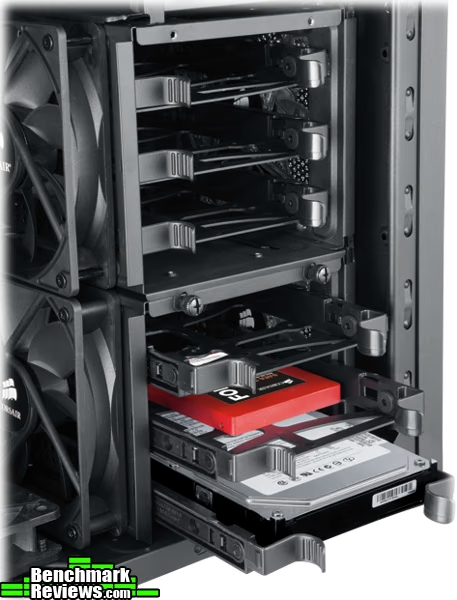
The 3.5" hard drive cages allow tool-less install of 3.5" drives, and they provide compatibility with 2.5" drives without extra hardware (aside from the provided mounting screws). Each cage houses three mounting trays which easily pop in and out. As already mentioned the cages can have fans mounted to their sides, but this seems like a waste of time. Also shown in the image above is the corner of a fan mounted to the bottom of the case. You can put a fan just about ANYWHERE inside the 500R.

Tool-less installation is a great feature for system builders, especially those of us who try different cases on a monthly basis. The Carbide 500R has eight PCI slots, each with a thumb-screw. I consider the convenience of a thumb-screw to be equivalent to tool-less install. Thumb-screws are two steps up from normal screws, one step up from tool-less clamps which clamp all slots simultaneously, and one step below individual tool-less slot clamps (when done correctly). In the big picture, despite a few flaws, the Corsair Carbide 500R is setup for success in the cooling and installation areas. But let's take a more intimate look at the interior features.
Detailed Interior Features
It's always surprising how minor details in a product can make such a large difference in the overall experience. As a builder I have come to have great respect for a little extra room inside a case. I just finished building an HTPC, and it was almost a miserable experience trying to cram half-pint parts into as small a footprint as possible. Not to mention the HTPC case was not designed to be user friendly. Even on some mid-tower cases where I'm trying to put multiple large GPUs, a hefty power supply with attendant cords, etc, it can get nasty trying to cram everything in and still have room for your hands.
This is one area where the Corsair Carbide 500R provides a more unique experience. The motherboard tray is built rather close to the edge of the frame of the case. This gives more room for larger CPU coolers on the top side, but squeezes room underneath the tray where you want to run cables and mounts. It's a trade-off between room on the top and room on the bottom.
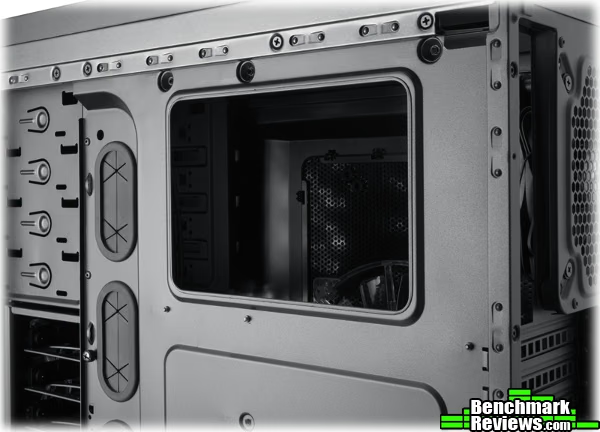
Corsair's solution is to put the motherboard tray close to the frame, bulge out the side panel, and provide a channel for cabling. The motherboard tray has a step between where the motherboard mounts and the cables connect into the hard drives. This step provides a channel on the backside which will accommodate even a thick bundle of cables. This channel is where the through-holes are cut so cabling can easily be routed between the front and backsides of the tray. This technique was so slick that cabling went really fast and looks very tidy since the cables almost naturally follow the channel with little need for tie-downs. But if you need them, anchors and ties are both provided.
There were two drawbacks I noticed while using this hardware scheme. First, running cables through the channel is not the most direct route, and could be a problem if you have short cables. Still, in most instances there is probably room for a direct run since the out-dented panels give some leeway. Second, If you have a large motherboard with horizontal SATA ports you may bump into this step. My board has horizontal ports, but it is short enough that there is no strain on the cables going over the step in the tray. I think this step is a good idea, and the extra space allows room for your hands to get inside and attach cables.
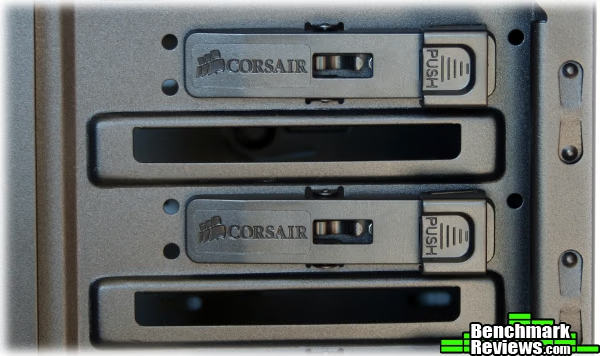
Corsair also has unique methods for latching hard drives. The 5.25" bays rely on tension created when the side of the drive pushes the pins of the latching mechanism via a lever into the screw-holes on the drive. It's a decent system, but at first it was rigid trying to get the drives into their bays. Also, there are no partitions between 5.25" bays for mounting odd-sized or unusual equipment like a 3.5" drive. If you want to do anything special, then you'll need to provide your own adapters.
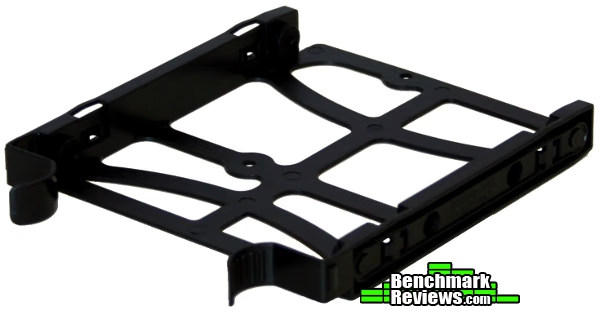
The 3.5" drivers use ABS plastic drive trays. The trays are floppy and soft by themselves, but with a 3.5" drive mounted and inserted into the drive cage it's very solid. Many cases simply use rails. The only concern I have with these floppy trays is when using 2.5" drives. They screw onto the tray and don't get additional support when mounted in the drive cage. It's possible that a hard jarring of the case could dislodge the drive tray. Even that is a minor concern with solid state drives. The trays are easily released by squeezing the curved front tabs. It's a smooth system to use, and I have not had any problems mounting and dismounting drives.

For extended customization, the 3.5" drive cages on the Corsair Carbide 500R are configurable. The two cages are independently removable. This would be most advantageous when using very large PCI cards. With a cage removed you can install cards up to 17.8" long, essentially the same length of the case. It may also be desirable to increase the airflow from the front fans by removing an unused cage. The image above shows the four possible configurations for the drive cages. By design the cages only mount facing outward, sideways. If you're resourceful you might be able to get them so the drives face forward and back, but it would be a modification.
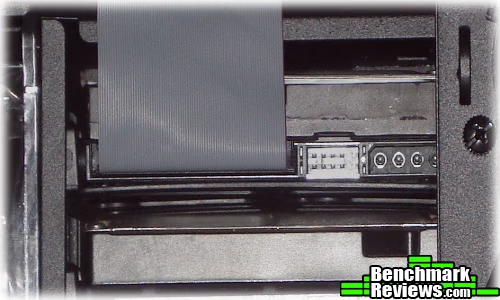
There are two problems with the sideways orientation of the 3.5" drives in the 500R. If you mount a drive sideways, there is not room in the front to run normal SATA cables, so everything has to be routed at the back. Luckily the back panel is tool-less so this is a minor inconvenience if anything. The second problem is the inability to install PATA drives. The hard drive cages are mounted so that the molex port on the drive is blocked by the motherboard tray. Flipping the drive in any direction does not result in a mountable configuration. I was finally able to get the drive mounted by sliding the drive out until it touched the left panel and weaseling the molex plug inside the drive cage. Maybe this won't affect anybody else, but I recover enough old drives for friends and repurpose old PC's that I always have a PATA drive attached.
For the most part, the Carbide 500R provides a hassle-free, quick, and good-looking build. There is ample space and many options for configuring to your needs. There are some minor exceptions that are only a problem if you own hardware that don't fit the norm. But even these have work-arounds. The interior features of the Carbide 500R provide features for an exceptional build and cooling.
Computer Case Final Thoughts
Oft times when I want a better perspective on the present I simply look back to the past. I remember my first "build" where most of the components came pre-installed and all I really had to do was insert drives and add software. The computer case was a huge beige steel beast. Even worse, I think about proprietary cases I've worked on for others and how difficult it could be to get a video card out of a case that only hinged half-way open. Or trying to get an optical disk drive out of a steel mount, mounted on another hinging mount which itself had to be screwed into the case. I think that was twelve screws just to replace a single drive, not including the case cover.
Then even on modern cases I recall some builds like the one where I cut my hands in multiple places on sharp tabs inside. Or on a small mid-tower case trying to contort my hands and fingers into inhuman shapes trying to run cables and fit connectors. I've had to repair/replace more than one CPU that burned out because the cables got caught in the fan.
Fast forward to now, and the array of features and benefits we enjoy as builders. So many features, some frivolous and some useful, that it's impossible to have every possible enhancement in a single case. So many of our reviews are looking at what has been included to the expense of leaving others out. When you get down to it there are some core features that just seem to make sense and that should be included on every case. Yet I still find myself pulling out the screw driver for case panels of all things. What I really came to appreciate with the Carbide 500R was how the frivolous features were all left out, and the common sense ones were all included, almost to excess.
If I could send a message to case builders based on this experience it would be to make things easier on a wider range of people. That's one thing that stands out about the 500R. It's not perfect, but it just worked. It had all the basic stuff I wanted, few hindrances to doing what I need, and it will work for a huge variety of builds. I've had an increasing number of people asking me about three GPUs, and I've been hard pressed to find compatible mid-towers. But the Carbide 500R I feel I could easily recommend for almost any build.

Corsair Carbide 500R Conclusion
Yes, the Carbide 500R performed exquisitely. With four stock fans it rivals the best in cooling performance. Under extended stress in a cramped environment it kept CPU and GPU temperatures stable in a safe zone below 80 °F using the lowest setting on the fan controller. It also builds quickly and effortlessly. If you had all your parts ready it could be built in under ten minutes, including pretty cable routing. This is probably true for almost any build since the 500R is ready to receive a variety of components.
Solid Black or two-tone white and black provide two styling options for this chic case. The grills and paneling provide excellent accent to the otherwise very square case. The IO ports are arranged facing forward at the top for easy access as well as appeal. Rubber feet on the bottom help keep the case quiet as well as make the front panel easy to remove. The filters on front and bottom keep the interior clean for long-term looks. The interior is coated in a durable black coating and sharp edges are protected by design or by grommets.
Steel, ABS and soft rubber construction make the Carbide 500R both sturdy and light. The panels can all be removed independently, and all without tools allowing truly fast access to any area of the case. The screws provided for fan mounting are not appropriate for any of the fans you are likely to add, so you'll probably need to provide your own hardware. Also, many of the screws and threads used in the case are soft or poorly machined. Care had to be used to keep from cross-threading during the build. The motherboard tray has a recessed area that cleverly provides more room for large CPU coolers while leaving room underneath for routing a trunk of cables. The layout leaves room enough for hands to install and for air to flow more freely.
Function, but not over form; they're both present. This is one of the most functional cases I've tested, used or even seen. It completely lacks superfluous features in order to concentrate on those that really matter. An eighth expansion slot and removable drive cages allow for more and larger video cards. The extra heat of a suped-up system is or can be easily removed by the gamut of fan options provided. Fans can be put in front, in between, on the bottom, on the top, on the side...dang near everywhere. So when it comes to cooling, your brain is the limit. It may not be the best for an obese motherboard or old hardware, but it's geared to accept any arrangement of current hardware. All the 3.5" bays are compatible with 2.5" drives. By default the panels, bays and slots are all tool-less. It's also got the USB 3.0 ports on front with a connector and adapter for USB 3.0 or 2.0 motherboard headers.
Presently the Corsair Carbide 500R can be found at Amazon.com for $121.16 for the black model or $139.99 for the white. This is $20-$40 more than the 400R which nets you the 200mm side fan, larger side mesh, modular drive cages, removable top panel (and room so the top fans don't crowd the mobo), multi-channel fan controller, and just a plain better look. Compared to other products, Corsair should feel pressure to lower their price. On the lower side you have cases like Lancool PC-K63 which offers a nearly identical feature set. Comparable would be cases like the NZXT Phantom, and one price point above you have cases such as the Lanboy Air. There are many good cases around this price point, and Corsair would be a shoe-in if they come down a step in price.
Corsair lived up to their claims about the Carbide 500R's cooling capabilities, builder friendliness and expandability. The features are basic but necessary for a variety of uses. I can easily recommend this case to anyone.
Pros:
+ Four stock fans: 2x 120mm front, 1x 120mm rear, 1x 200mm side
+ Many additional fan mounting options
+ All tool-less installation
+ Configurable hard drive cages
+ Multiple, wide, grommeted cabling spaces
+ Convex side panels for extra space
+ Excellent construction and style
Cons:
- Mediocre quality screws and threads
- Could be a tad less expensive
- PATA/IDE drives do not fit
Ratings:
- Performance: 9.50
- Appearance: 9.00
- Construction: 9.50
- Functionality: 9.50
- Value: 8.75
Final Score: 9.25 out of 10.
Excellence Achievement: Benchmark Reviews Golden Tachometer Award.
Benchmark Reviews invites you to leave constructive feedback below, or ask questions in our Discussion Forum.
Reader comments from the original article
21 comments were posted before commenting closed. They are preserved as written. Original avatars no longer resolve and are shown as a placeholder.
ehhh oblivionlord Permalink:
Great case however the biggest letdown is the 120mm fans at the front and lack of any fans at the top for $120 shipped. If this case fitted 140mm fans at the front and 2 140mm fans at the top then this case would be awesome. 120mm fans are good, but compared to 140mm of today, the 120mm just doesn't compare. A good 140mm fan can best a good 120mm by 10dba and still provide the same overall cfm. That's cutting the noise by half. The 690-II Advanced still has this case beat hands down in price and features.
Choice is a funny thing Mergatroid Permalink:
Corsair put those 2 x 120mm fans on the front because that's what their build community asked them for. Many people were modding their other mid tower cases by adding 2 x 120mm fans at the front in place of the 200mm fan Corsair installed stock. Personally I don't recall anyone modding the front for 140mm fans. IMHO, it really doesn't matter much. You can get high flow quiet fans in almost any size. Personally I prefer 200mm fans but that's really a personal preference. The 690-II Advanced is a pretty nice case for sure, and has two main advantages I could see (the room for a bottom mounted rad and the external SATA hot swap bay), but it has no grommets, the drive cages are not removable, not as many fan choices on the side panel, not so much room for the cable management, none of the front panel or fan cables are sleeved (or at least black, and yeah little things like that make a difference). Of course you can't put as big a card in it as you can this case because you cannot remove the drive cages. And there's only 7 expansion slots instead of eight. I would agree Corsair should get this case price down by $20 or $30, but I would not say the 690-II "has this case beat hands down in price and features".
RE: Choice is a funny thing Doug Dallam Permalink:
Mergatroid--larger fans are not about personal preference as far as efficiency goes. Larger fans are simply quite a bit more efficient than smaller fans. The reason, all things being equal, is that each fan has a center assembly which takes up fan area. So, one large fan will have more fan area than two smaller fans, again, all things being equal. This also means that a larger fan can run slower than a smaller fan, while maintaining the same output.
RE: RE: Choice is a funny thing David Ramsey Permalink:
Larger fans do not necessarily move more air than smaller fans. Fan CFM output is one of the most abused metrics in the industry. Custom PC Magazine did a comprehensive review of 80, 120, 140, and 200mm fans some years back and actually measured the output CFM, which was generally much lower than specified.
RE: RE: RE: Choice is a funny thing Doug Dallam Permalink:
David, I didn't say that they do. What I should have said was: "All things being equal," the fan with the larger area of affect (blade area) will put out more cfm. Granted, a 140mm fan spinning at 6, 000RPMs will put out more air than a 200mm fan running at 600rpms, all things being equal, such as blade pitch, blade flex, and housing element. This, in turn, makes larger fans, all things being equal, more efficient than smaller fans, as far as air to rpm ratio goes.
minor diffrence Mergatroid Permalink:
The difference efficiency will really not be that much especially considering many smaller size fans will move more air anyway. The main advantage of larger fan is noise and if you do get one that moves a lot of air it will also be pretty noisy. The 200mm 166cfm NZXT fan is a good example. I can get more air movement from two 120mm fans and the NZXT is almoat as loud at high speed. The only major advantage is noise at ower RPMs. A good case modder can always find equivalent performance when altering fan sizes and numbers.
RE: minor diffrence Doug Dallam Permalink:
Merg, please reread what I said. It's not my opinion, it's simply physics. If you want to argue what I said, then you'll need to argue with the canons of physics because that's all I was pointing out. Also, two 120mm fans will not out perform one 230mm fan if the total fan blade area of the 120mm fans is less than the fan blade area of the 230mm fan, all things being equal, simply because the fan area--the area that actually moves air--will be less for the two 120mm fans than it will be for the 230mm fan (center hub takes away fan blade area, x2). Following from this, again, a larger fan, all things being equal, can move more air per revolution than can a smaller fan.
Sorry, I don't think you're reading my meaning Mergatroid Permalink:
I know what efficiency is. What I'm saying is it doesn't matter. Anything you can achieve with a 200mm fan I can achieve with any other sized fans, even if they're 5 or 10% less efficient and even if I had to use more of them. Adding in multiple fans or faster fans or whatever. Yeah yeah, we know about the centre hub area. So what? Someone may purchase a 700 RPM 200mm fan that only moves, say, 70 CFM. Someone else may chose a 120mm fan running at 2000 RPM that moves 110 CFM. So what if the 200mm fan is more efficient, what does it matter? So you may get a little less noise moving the same amount of air, that's about all your increased efficiency is good for. I'm not arguing the physics, I'm arguing the point that higher efficiency is not necessarily any better unless you're strictly looking at noise per unit airflow. Another advantage is that smaller fans can fit in smaller areas. One more thing to consider is that if you go looking for 200mm fans you'll find that, as a percentage, there's a lot more crappy large sized fans than in the smaller sizes. I've seen people in build forums going through a lot of larger fans because they purchase them and then are unhappy with their performance. As a matter of fact, many of them end up with the same NZXT 166 cfm 200mm fan I use in the front of my case because they're looking for better airflow, not lower noise. A lot of 200mm fans don't have especially good airflow for such large fans, especially in places where you could mount two 120mm fans and get exceptional airflow (like 2 x 120mm Scythe 2000 RPM Slipstream fans at 2 x 110 CFM for 220 CFM). There are other 120mm fans that offer lower airflow and lower noise, but add two together and they're better than most 200mm fans. This goes right back to my first post where my point was what type of fans you use is really a personal choice, efficiency be damned. After all, if it wasn't, ALL manufacturers would be using the SAME fans.
RE: Sorry, I don't think you're reading my meaning Doug Dallam Permalink:
I do see your point. One reason to go with less fans is less wiring, which means a cleaner interior. If you simply want as much airflow as you can get, noise bedamned, I might mention using one of these: #amazon.com/MAXXAIR-HVCF4000-4000-Heavy-duty-Carpet/dp/B001V5J2LQ/ref=pd_cp_hi_1 Duct that into the side of your case, and you'll only need one fan.
RE: RE: Sorry, I don't think you're reading my meaning Stupido Permalink:
ha-ha-ha that would be very very nice ghetto cooling... :D
RE: Corsair Carbide 500R Computer Case kzinti1 Permalink:
You forgot to mention the one thing that separates this Corsair case from all of the others. Corsair Quality. You get what you pay for. Quality materials, fit and finish do not come cheap. If you buy a cheap case then you've bought a CHEAP case! Not one that has the quality of Corsair. If you want the best you have to pay for it.
Lol Mergatroid Permalink:
If you want the best then go with a 600T or 650D. I love those cases. But this case is very well made. I hope Corsair pays attention to the complaint about the screws fitting. That's one of the things that can give a case a "quality feel". I've gotten compliments for a few cases I've built just by adding a touch of grease to the thumb screws to give them a smoother almost damped feel. Something so simple can have a big effect on how people perceive a case.
RE: Corsair Carbide 500R Computer Case Doug Dallam Permalink:
A good review and good images too. And, a good case. The only thing I don't understand is why case manufacturers don't use 230mm fans these days front, side, and top (if applicable). They're just so much more efficient than 120s or 140s.
Because they're too big Mergatroid Permalink:
There are great fans in every size range. Lots of people were ranting about how great 200mm fans were when they started using them, now many enthusiasts replace 200mm with two 120mm fans. You can get great fans in any size. Look at the guy in the first post complaining about the case not using 2 x 140mm fans. We can't all have our way. The manufacturer has to settle on something. I bet the #1 complaint about computer cases is "Why didn't they use THIS type of fan". Well, they can't use them all. My personal 600T has 1 200mm NZXT fan and 8 120mm fans and it's working fine. Great air flow and not very noisy. One case cannot be everything to everyone. Luckily we all have minds and opposable thumbs so we can change minor inconveniences like that if we find a case we really like but doesn't use our favorite fan size. After all, it's not hard to drill a couple of holes or dremel away a bit of metal here and there. There's no such thing as a perfect case.
mr CHARLEYAM Permalink:
it a real nice case for a mid tower. its got a lot of attention to detail, options and looks .. a good case to say the least..
Good stuff Mergatroid Permalink:
I guess it is a little bit pricy, but it sure has most of the features that made Corsair's other Mid tower cases so popular. Good job Corsair, but fix the screw thread fit.
Which one... idunnosoSTFU Permalink:
is better, 500 or 650D?
650D Mergatroid Permalink:
The only advantage the 500r has is a little more room for cable management and a few more fan mounts. The 650 has a window instead of mesh which means the coolimg is likely not as good. However imho the 650 is a much nicer case and I think it looks way classier. If your on a bit of a budget though the 500 is an excellent choice.
Hmmm idunnosoSTFU Permalink:
Let's just say I don't care about the price. Convenience and performance wise, which one's the winner? Or do you have any other suggestions that costs the same.
Performance? Mergatroid Permalink:
Well, if I was in a store and they had the 400, 500, 600 and 650 I would walk out with either the 600 or 650, but I'm biased because I think those are two of the best cases ever produced. I am an unabashed fan of the 600T and 650D. I love everything about the 600T except the big knob they have for the fan controller. The rest of that case is great. It's a medium airflow case, not high airflow. It has great looks, great drive bays, great cable management (perhaps the best cable management due to the convex side panels), choice of Window or Mesh (600T SE comes with both), filters, room for a rad, huge interior. I really love my 600T. The 650D is every bit as good, but I think it looks even better. If it had of been around when I purchased my 600T I may own a 650D right now. The ONLY disadvantage to the 650D is that there is not as much room on the sides for cable management. However, it is perfectly adequate (one of my roommates has the 650D and it's awesome, I love the looks). The 400 and 500 are great cases to be sure, but IMHO the 400 doesn't look all that great, and even the 500 a little too because I don't like those side panels even though they are very functional. I bet the 500 has the best air flow though with the two optional drive cage fans and the bottom fan (I modded my 600T so I have the same intake fan on the bottom, and the drive cage fans too although I removed the top drive cage). I can't decide for you, as I said I'm sort of biased. Hope some of this info helps you out a bit though.
RE: Performance? Dan Ferguson Permalink:
Sorry I've not been getting emails on this thread. Most of Mergatroid's comments represent my findings and opinions. If price is not an issue you can't go wrong by upgrading within Corsair's fleet. Personally, I prefer the look and cooling arrangement of the 500R.