
Lancool First Knight PC-K63 Computer Case
Lancool First Knight PC-K63 Computer Case Review
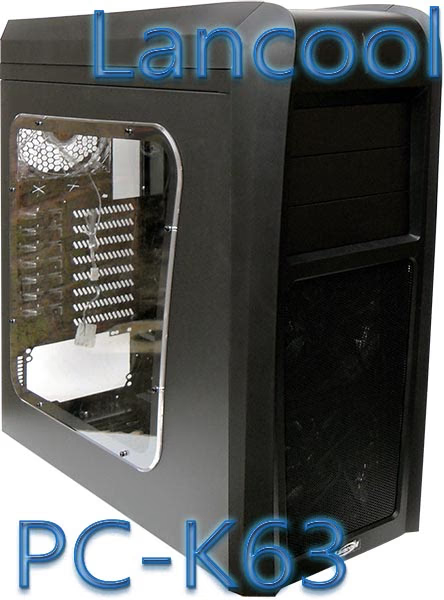
Lian Li is a maker of super high quality aluminium PC chassis, for most these are considered too expensive for a gaming PC. Well Lian Li also make PC cases made of steel and plastic to the same high standards and also share their innovations and patents, but market them under the name Lancool. Recently Lancool launched three new cases in the First Knight series aimed at the gaming market and Benchmark Reviews has the Lancool First Knight PC-K63 computer chassis on hand for testing.
The PC-K63 is entirely tool free and has a fully painted black interior, the motherboard standoffs come pre installed and thumbscrews are used where there is no tool free mechanism. Patented tool free solutions are; tool free PSU clamp, tool free HDD/SSD rubber mounting grommets and an excellent HDD/SSD mounting cage, tool free ODD latch mechanism and finally tool free PCI backplane clamps. The Lancool First Knight PC-K63 case has a massive transparent window and very bright LED fans that light up the inside while they cool your components. In the back is a very good cable routing solution that will help advanced and novice PC builders alike to easily route cables out of sight. There are a few more innovations to talk about but we will get to those as the review progresses.
The exterior of the Lancool PC-K63 will likely get some mixed reactions, early previews can already attest to this, my favourite comment that I read said that the PC-K63 reminded them of Johnny Bravo. The PC-K63 veers away from the normal Lancool exterior design brief and tries something boldly different, this may make or break this case as aesthetics count for quite a lot with PC cases in the gaming market.
Manufacturer: Lian-Li Industrial Co. Ltd.
Product Name: Lancool First Knight
Model Number: PC-K63
Price As Tested: $128 (MSRP)
Full Disclosure: The product sample used in this article has been provided by Lian-Li.
Lancool First Knight Features
-
Patented tool free PCI bracket locking mechanism
-
Patented tool free 5.25" device mounting
-
Patented PSU securing clamp
-
Patented cable routing solution
- Patented anti vibration fan mounting
-
Patented anti vibration rubber ring suspension HDD rack
-
Easy access multimedia I/O ports on top cover
-
Supports liquid cooling system
-
Washable fan filters on front fans and PSU vent
-
Windowed side panel
-
Five fans for superior cooling
Lian-Li PC-K63 Specifications
|
Case Type: |
Mid Tower Chassis |
|---|---|
|
Drive Bay: |
5.25" x 3 |
| 3.5" x 6 (Internal) | |
| 2.5" x 4 (Internal) | |
|
Motherboard Support: |
ATX / Micro ATX / Mini ITX |
|
Cooling Fans: |
Front: 140mm Blue LED x 2 @ 1000 rpm 51CFM @ ~25dBa |
| Top: 140mm x2 @ 1000 rpm 38 CFM @ ~25dBa | |
| Rear: 120mm Blue LED x 1 @ 1200 rpm / 38.5 CFM @ ~25dBa | |
|
I/O Ports: |
USB 3.0 x 1 |
| USB 2.0 x 1 | |
| E-SATA x 1 | |
| Headphone and Microphone | |
|
Dimensions: |
214 x 530 x 530 mm (W / H / D) |
|
Net Weight: |
10.4KG |
Closer Look: PC-K63 Exterior
In this section we will have a look at the exterior styling and features of the Lancool PC-K63 PC case.
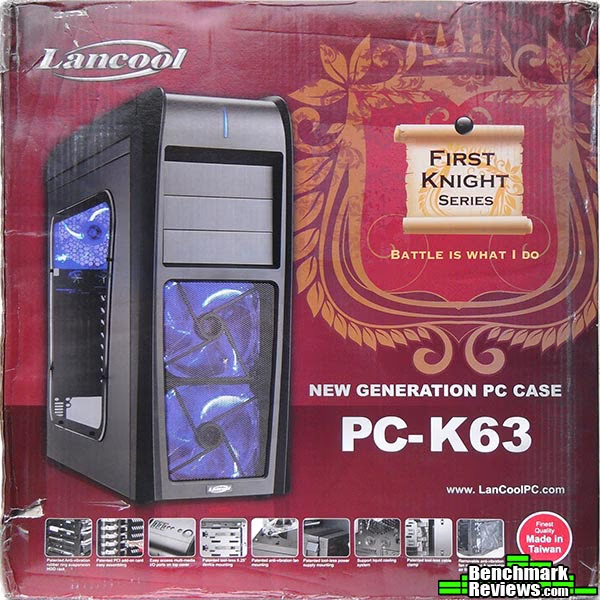
The PC-K63 ships in a lovely looking box full of color and information and all of the important features are pictured. The box held up quite well considering it travelled from Taiwan to the UK.
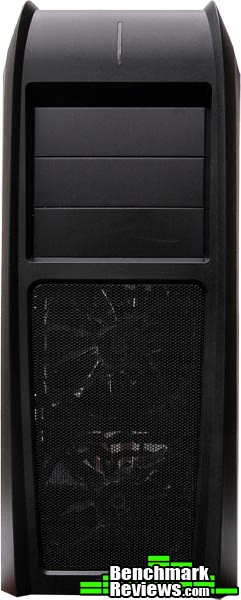
The front of the PC-K63 case is very different to anything Lancool have done before, it is very unique and functional but not the best looking face. One major factor that spoils the front looks for me is that the 5.25" drive bays are recessed, if they were flush then I am sure that the looks would be more appealing. I also like the front of cases to be more uniform, the PC-K63 uses a mixture of styles.

When we look at the left side of the PC-K63 case we have a lovely big clear window. It is nice to see a side window without vents for once which means you can show off your hardware without obstruction. The shape of the window follows the shape of the case, this would have been better as a square.

Moving round to the back we see that the PC-K63 has a bottom mounted PSU, vented PCI backplates and rubber grommets to allow watercooling pipes or wires to pass through.
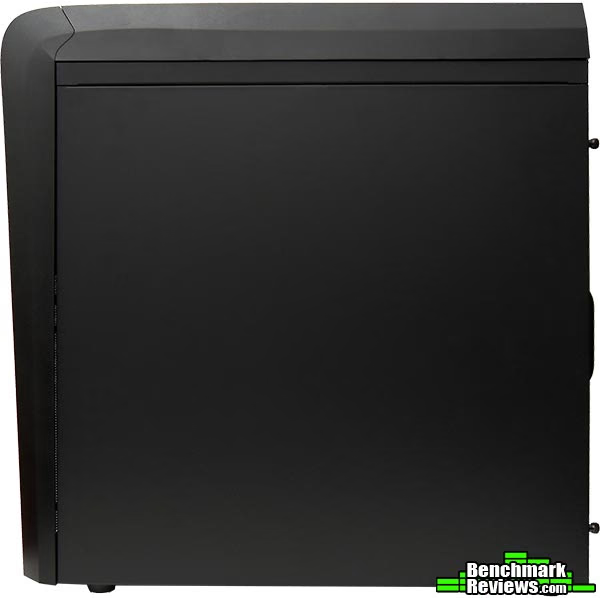
The right side of the case is very plain, this panel is interchangeable with the left side window panel and will give you the option of hiding your components away if you don't fancy showing them off.
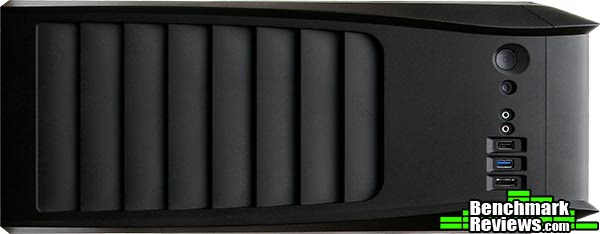
The top of the PC-K63 case is possibly the nicest part, the lines look sleek and the vents look like a sharks gills. Speaking of the vents there is plenty of room for air to move through these which is very important when you want to get that hot air out.
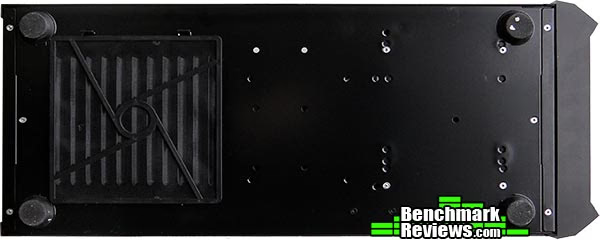
At the bottom of the PC-K63 case we see four rubber feet, not overly big but suitable for the task all the same. We also see that the vent for the PSU has a removable dust filter. Like many of their other high-end cases, the Lancool PC-K63 includes holes at the bottom of the case for cabling accessories from Lian Li.
Detailed Exterior Features
Now let's look a little close at the detailed external features of the PC-K63 case and get a better idea of what's good and what's not.
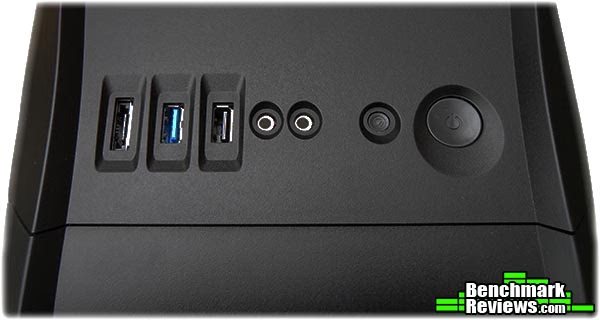
The front panel is integrated into the shroud and from right to left we have: Power button, reset button, headphone and microphone ports, one USB 2.0 port, one USB 3.0 port and finally an e-SATA port.
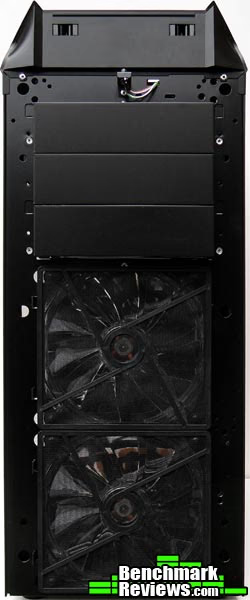
Removing the front face is very easy, all you need to do is give a gentle tug at the bottom and away it comes. Once removed you have access to the front 140mm fans and filters, and also the 5.25" drive bay covers.

The fan filters are easy to remove by unclipping them on the left hand side. Specs on the fans are as follows: Lian Li LI121425QE-B4-A DC 12v 0.14a blue LED fans, 140mm, 1000rpm, 51CFM airflow @ ~25dBa. They are very very similar in specs and looks as (and quite possibly are) Yate Loon D14SL-124B fans.

The top of the Lancool PC-K63 is a s easy to remove as the front, the front must be removed first and then the top will pull off with a little tug. The fans used here are Lian Li LI121425BE-4-A DC 12v 0.14a fans, 140mm, 1000rpm, 38 CFM airflow @ ~25dBa.

All of the fans on the PC-K63 case are mounted with Lancool's patented rubber anti vibration mounting system. This allows for really quick and easy removal or fitting of your fans simply by applying a little pressure and sliding them to the right to remove, or to the left to install in the specially cut mounting holes. Shown here for demonstration is one of the top 140mm fans which are mounted on the outside of the case, they could also quite possibly mount on the inside making room for a watercooling radiator on top.

Another quick look at the bottom again with the PSU dust filter removed showing the gill style of vents for the PSU intake airflow.
Closer Look: PC-K63 Interior
In this section we will take a look inside the Lancool PC-K63 case. By the time we are done with this section you will wish that Lancool had made as much effort on the exterior styling as they have on the inside. The interior is very well thought out and will make all the difference as to whether this case is a hit or not.
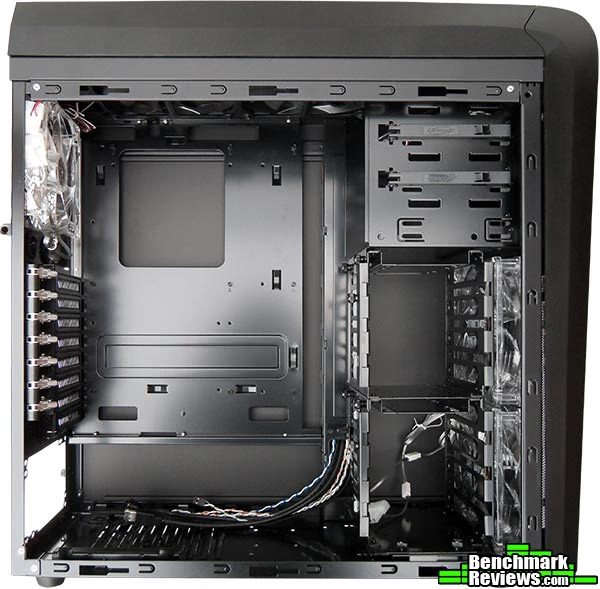
Inside the PC-K63 case there is lots of room to move around and plenty of options for routing cables. Commonly asked for measurements are; 29.5cm (11.5") from the PCI backplates to the HDD rack, 42cm (16.5") from PCI backplates to the front fans (HDD racks are removable) and lastly above the motherboard you have a 2.5cm (1") gap. You can't see it too well in this image but all of the motherboard stand offs come pre installed.
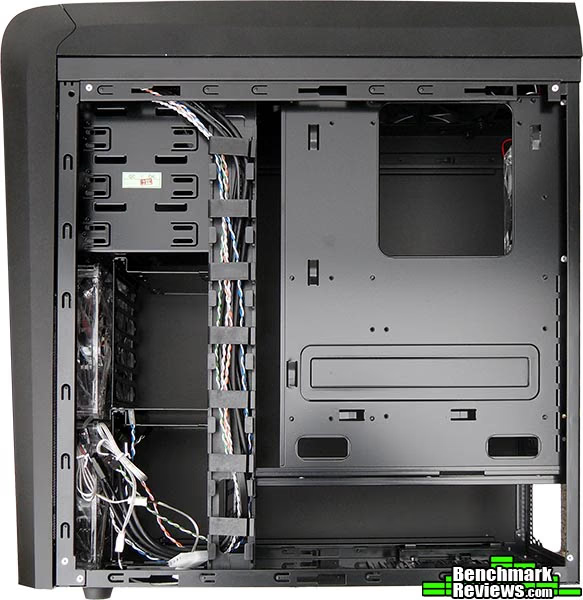
Removing the right side panel reveals even more great innovations. The cable routing channel is a new feature for Lancool cases, you won't get all of your cables in here but there is room for quite a bit. The motherboard tray terminates near the bottom of the case (PSU area) and leaves a lot of options when it comes to routing or hiding cables away. Further to this are the cable routing cut outs at the bottom and at the side of the motherboard tray, these give ever more options for an accurate and tidy install. The CPU backplate cut-out is nice and big but it could do with moving to the left slightly as you will see later in the review.
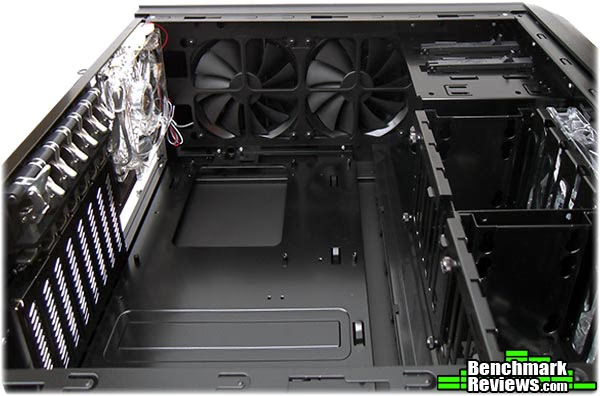
Looking at the top from inside the PC-K63 you will notice that the top of the case comes pre cut for mounting two 140mm fans, there should be just enough room above the motherboard to install standard 25mm thick fans inside the case as opposed to where they are installed by default on the outside. Just to the left of these fans are two holes that would suggest that a radiator could be installed on top of the case under the plastic shroud. In my build I routed the front panel USB 3.0 cable under the top shroud and down through one of those holes in order to keep it out of the way of other internal components and to have a neater looking build.
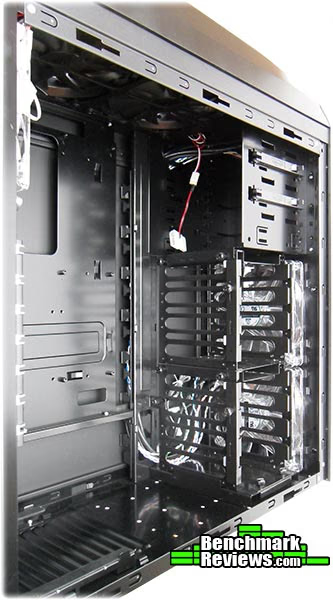
Looking towards the front now we see space for three 5.25" drives / devices, two of which have tool free mounting. The HDD racks are removable and non obtrusive to the intake airflow (until they are populated that is). The front fans are mounted on the inside of the case and could quite possibly be mounted on the outside of the case also as there is just enough room behind the front shroud, this once again opens up more possibilities for a watercooling installation with rad thickness being the only real concern.

Looking towards the back inside the PC-K63 the first thing I noticed was that it has eight PCI slots, seven of these are tool free and the last one has a thumbscrew holding it in place. This opens up the possibility for quad GPU setup dependant on your motherboard, but more than likely it will be better suited for support of triple VGA setups with video cards that have dual slot coolers. Lancool have installed a 120mm fan in the back, the specs for this fan are: Lian Li LI121225Sl-B4-C 120mm blue LED fan, 1200 rpm, 38.5 CFM @ ~25dBa. The vented PCI backplates allow for good airflow through the case.
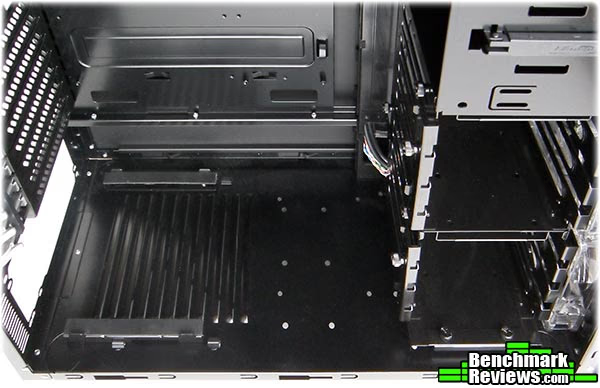
Looking at the bottom inside the PC-K63 case now and we again see the intake vents for your PSU and also two rails with rubber on them to support and hold in place your PSU in conjunction with the PSU clamp that you will see in the next image. I still can't figure out why there are so many seemingly random holes in the bottom, maybe Lancool has another innovation that was meant to go inside the PC-K63 but wasn't quite ready yet.
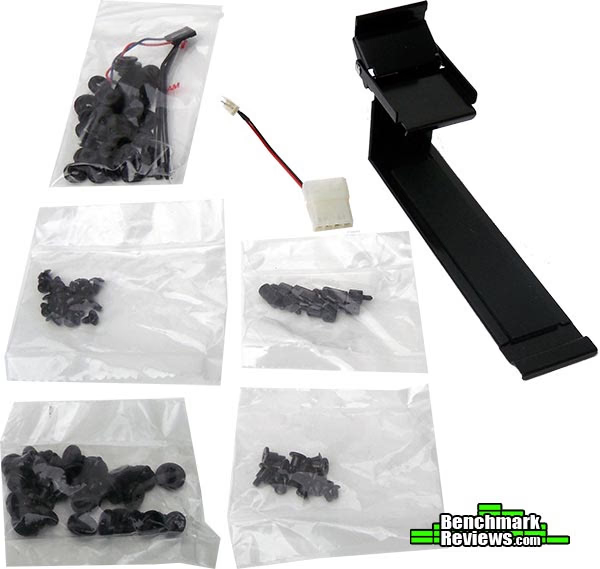
These are the bundled accessories that come with the PC-K63 case, top right is the familiar Lian Li PSU clamp. This clamp is very effective and will hold your PSU just as well as screws will. In the little baggies you have rubber grommets, large thumbscrews and smaller screws for mounting HDD's in the HDD rack and thumbscrews for securing your motherboard in place. There is one bag of small screws (middle left) that are likely for securing optical drives, but seeing as Lancool hasn't provided an instruction manual yet I can only make assumptions here.
Detailed Interior Features
In this section we will examine closer the features of the last section. It is only when you look closer that you can begin to appreciate the finer things that the Lancool PC-K63 has to offer.

The HDD racks have a sliding bracket that locks them in place, simply loosen this thumbscrew and slide the bracket up or down to open or lock it then simply tighten the screw when you are done and your drives are secure. The HDD rack can be taken out by removing four thumb screws (two at the top, two at the bottom), then it simply slides out.

I really like this HDD rack as I have seen many before it that have tried and failed at being useful, there are two HDD racks and they are essentially the same apart from the bottom plate of the bottom rack that is slightly different so they are installed in a specific way. Immediately you will notice a 2.5" SSD mount that allows you to mount a 2.5" drive the same way the fans are installed, this is one of two places to mount an 2.5" drive in this rack with the second place being at the bottom which would be secured by regular screws via the pre drilled holes. You can also choose whether to mount your drives with the connectors facing to the left or the right side of the case.

As previously stated the PC-K63 case has support for three 5.25" devices, two of these have a tool free solution for securing your devices. The tool free solution is rather primitive but works well enough, it unclips and hinges out when you want to install a drive. There is a little piece on the other side of the clamp that inserts into the screw hole on your 5.25" drive and the clamp clips back into place. It doesn't hold as well as a screw but at the same time your disk drive isn't likely to fall out either.
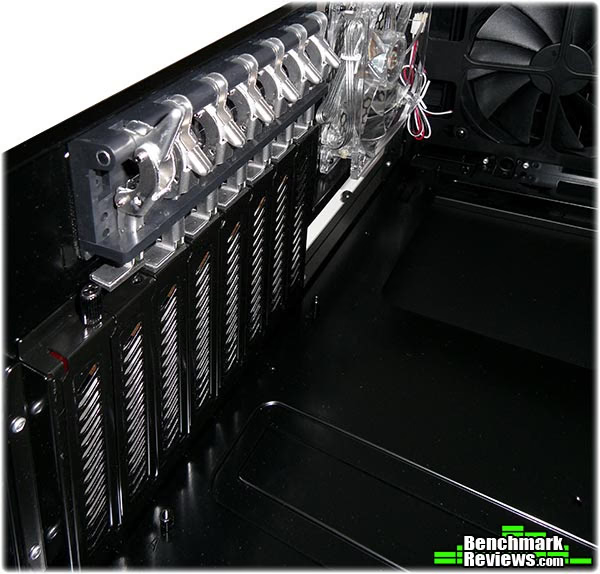
Here is another one of my favorite features that Lian Li have implemented in their Lancool cases, the PCI backplate clamps are the best tool free solution for securing add in cards that I have seen or used. They are simple yet very effective and it is a big surprise that it has took so long for anyone to come up with something as good as this.
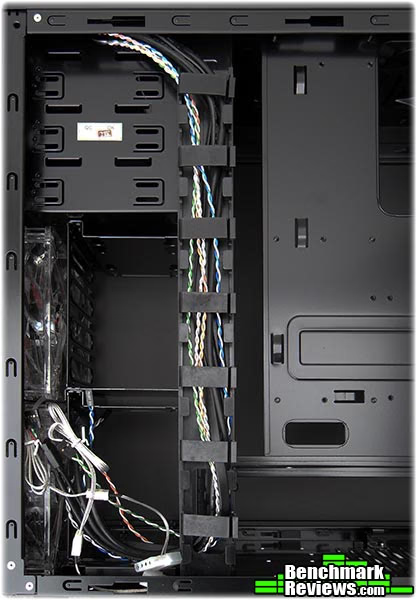
Looking a little closer now at the cable routing channel now, it is hard to describe how useful this is - it really is an excellent addition. That along with the open plan nature of the PC-K63 allows you to route the cables how YOU want, not how the case maker wants you to, making for a much tidier install. It becomes apparent here that there is enough space between the HDD racks and the front of the case to get a 35mm thick rad in here if you were to install the fans on the outside behind the front shroud.
Lancool PC-K63 System Build
Ok, we have talked enough about the PC-K63 case and now it is time to put some hardware inside and take some temperatures to see how well it performs.
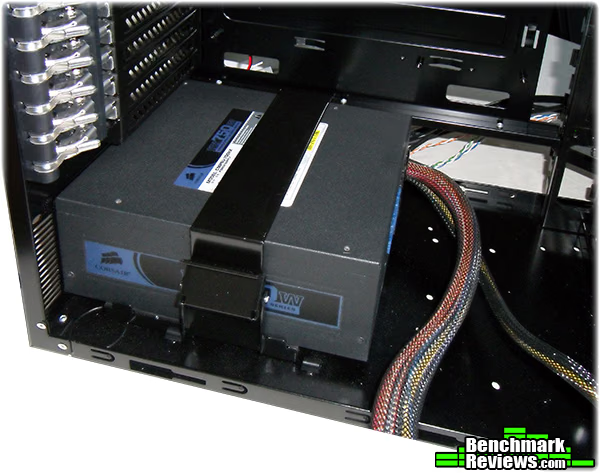
I generally start By putting in the PSU, this is made super easy by the PSU clamp. I really cannot state how much of a good little feature this is, it's so simple yet so effective. With the clamp locked down there is no need to secure your PSU with screws but if you want peace of mind then it really doesn't take too long to attach four screws.
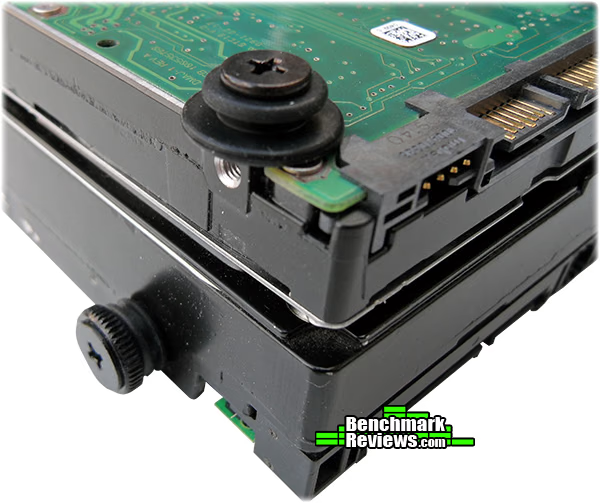
Next up I prepared my hard drives for mounting in the rack, this is a tool free process even with the smaller screws as the rubber makes it like a thumb screw. There are two different rubber grommets and two different screws in use here, the 2.5" drive on top uses the larger rubber grommet and the smaller screw and the 3.5" drive on the bottom uses the smaller rubber grommet and the larger screw.

Now we get to mount it in the rack, this is super simple as I explained before. As you will see in the next images I have suspended my 2.5" drive upside down due to it being thicker than a standard 2.5" drive and it got in the way of replacing the rack in the case. This means that it is likely quite possible to mount six 2.5" drives instead of the four quoted by Lancool.

Everything else goes in pretty straight forward and as I said before cable routing is really taken care of with this case. Behind the motherboard tray we have a 1/2 inch gap to accommodate even the thickest of cables so no worries there Ed. I'm quite sure that with more time I could tidy this up even more but I'm not submitting an entry to MDPC so I don't really care too much how it looks back here, the most important part is the front so let's go take a look.
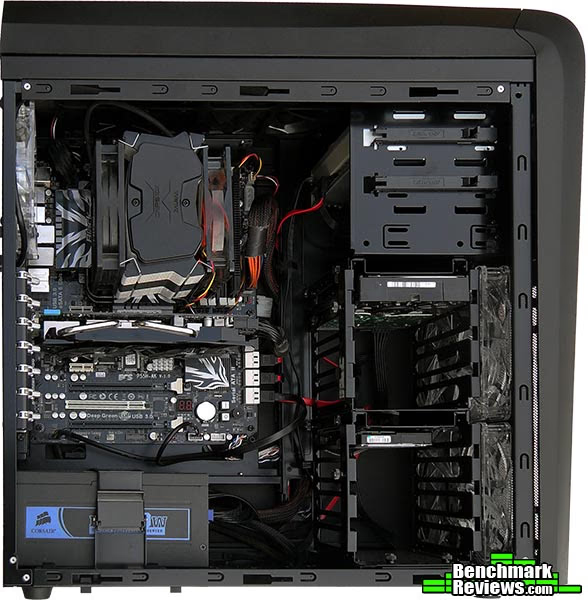
I actually took this picture before the one above so those with a keen eye will notice some inconsistencies, even with these present I still reckon I have done a pretty good job of tucking the cables out of sight. This is important mainly to improve airflow and to have nice looks, after all the side window is huge and all this is on show.
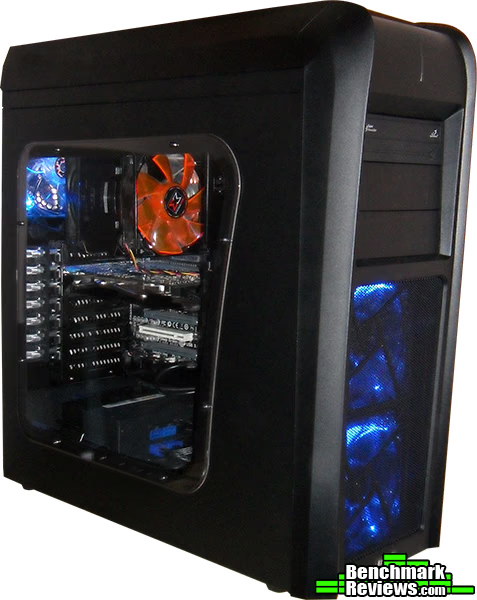
There we have it then, all the goodies are inside and we are powered up. Shame my camera can't capture the true color without blurring out, the fans provide a much more vibrant glow than is shown here. One idea I had but have yet to execute is to swap the top exhaust fans with the front intake fans, this would create a nicer effect inside the case due to the LED's in the intake fans and at the same time draw attention away from the outside of the case where a more stealthy effect is desired.
Lancool PC-K63 Testing and Results
Testing Methodology
In the following tests I will be comparing the Lancool PC-K63 to the Thermaltake Armor A90 PC case as they are very similar in airflow pattern and layout. I will be measuring the most important components inside the case and these are CPU, VGA and HDD. To test the CPU I will create a load using prime 95 and monitor the temperature using RealTemp v3.60, taking a reading of the idle temperature before I start. To test the GPU I will create a load using MSI Kombustor v1.0.7 and monitor temperatures with GPU-Z v0.5.0, taking a reading of the idle temperature before I start. To test the hard drive I submitted it to a barrage of various benchmarks and monitored the temperature using HWMonitor, all to no real avail as the HDD's temperature really didn't rise that much in either case. Each test is repeated three times for consistency and the average reading is used in the graphs below.
Test System
- Motherboard: ECS P55H-AK (Intel P55)
- System Memory: OCZ Blade ST 2000MHz 4GB Kit
- Processor: Intel Core i5 760
- Video: Gigabyte GTX 460 1GB
- Disk Drive 1: 160GB Seagate SATA 7200rpm 32MB cache
- ODD: TSSTcorp SATA DVD-RW Combi
- Enclosure: Thermaltake Armor A90 / Lancool PC-K63
- PSU: Corsair HX750W Modular
- Monitor: HKC 2219A 22" Widescreen
- Operating System: Windows 7 ultimate x64
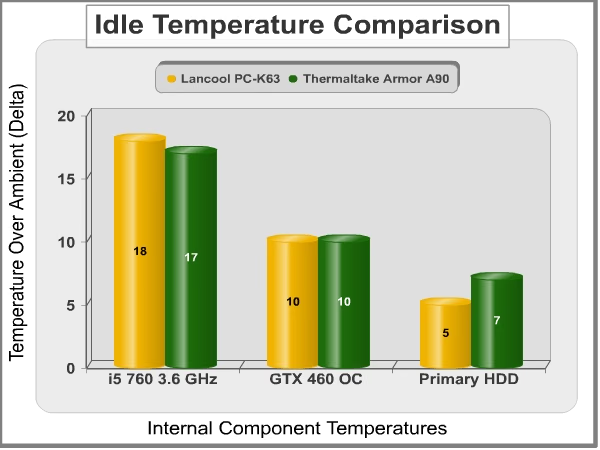
While the PC is idle the Lancool PC-K63 wins over ever so slightly with HDD temperatures, this is likely due to a better intake than the Thermaltake Armor A90. The PC-K63 has two 140mm intake fans to the Armor A90's one 140mm intake fan. The CPU is ever so slightly warmer in the PC-K63 which is odd as I thought the exhaust would be better than the Armor A90. Temperatures reported in these tests are degrees over ambient (Delta) because the tests were conducted on different days and there was a variant of 2C in the ambient room temperature, varying from 23C on day one to 25C on day two.
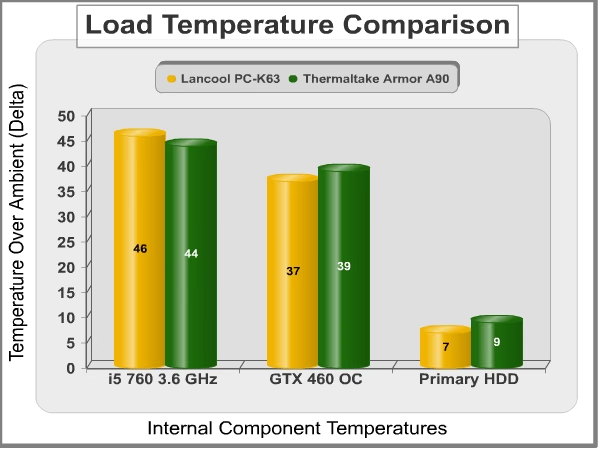
In the load tests the results are slightly different, The HDD is once again slightly cooler in the PC-K63 but the CPU is still is slightly warmer. There is now a variance between the VGA temperatures and the PC-K63 snatches it here with a 2C lead. The thermal design in the Thermaltake Armor A90 is better suited to your CPU and the thermal design in the Lancool PC-K63 is better suited to components lower down in the case (HDD's and VGA's). With this said the temperatures are very close indeed and both cases cater really well to the needs of the enthusiast.
Lancool PC-K63 Final Thoughts
It seems as though it is hard for case manufacturers to strike the balance between looks and features. For every case there is a whole bunch of people that will call it ugly and there is an equal amount of people that find it attractive, after that we can decide if it has decent features or not. The problem with the Lancool PC-K63 PC case is that it is pretty much a unanimous decision that the looks are not all that appealing, with exception to good old Rodney Reynolds who thinks that the exterior styling is quite nice and of course gave the PC-K63 a kickass rating that it rightly deserves for its features, but not necessarily it's looks.
The Lancool PC-K63 is a weird design but the looks really can grow on you, initial impressions are wiped aside by its exceptional build quality and its innovations and features. The case was an absolute pleasure to work with and the installation of my hardware went ahead without a hitch. There are many quotes I could write here, like "beauty is only skin deep" and "don't judge a book by its cover" but at the end of the day it is you that has to look at the case your hardware is in, and looks really are important.
Lancool PC-K63 Conclusion
In this section I am going to write a brief five point summary on the following categories; Performance, Appearance, Construction, Functionality and Value. These views are my own and help me to give the Lancool PC-K63 PC case a rating out of 10. A high or low score does not necessarily mean that it is better or worse than a similar PC case that has been reviewed by another writer here at Benchmark Reviews, which may have got a higher or lower score. It is however a good indicator of whether the PC case is good or not. I would strongly urge you to read the entire review, if you have not already, so that you can make an educated decision for yourself.
Performance is really good, the thermal design and high airflow intake keeps temperatures in check and sound levels down. Installation was a breeze, the PC-K63 is an absolute pleasure to work with.
Appearance is where the PC-K63 is going to lose some points, mainly because of the styling of the front plastic shroud but also because the side window follows and emphasises that curve on the 'head'. If you can battle past this you will really appreciate the interior styling of the PC-K63 that almost makes up for where the exterior lacks. You are of course entitled to your own decision at the end of the day
Construction is where the Lancool PC-K63 really shines, it really is very well put together and the interior is very well thought out. I have nothing bad to say about the construction, even the plastic is made well.
Functionality also sings in favour of the Lancool PC-K63 PC case. Never before have I had a case with so many good features, the only tool free solution that I think was slightly lacking was the 5.25" drive locking mechanism. With that said though it serves its purpose and my optical drive has yet to fall out on its own, so it's not without a use. The PSU clamp, the PCI clamps, the tool free HDD cage and mounting solution and the cable routing solutions are really good innovations and really make the PC-K63 a very good case indeed.
The Lancool PC-K63 has an MSRP of $128 (VAT not included) and I think that is a lot to ask for this case. Even more so when you consider that the PC-K62 is available at Newegg right now for a cool $99. Ok the PC-K62 doesn't have all of the features of the PC-K63 but it looks a shed load better and that counts for a lot.
The Lancool is not the best looking case in the world but once you get past that it is a real brute of a case feature wise, it would be a crime not to recommend this case for all of it's features, but at the same time looks really count for a lot and are the downfall of this case.
Pros:
+ Watercooling friendly
+ Quality tool free innovations
+ Cable routing is excellent
+ Build quality is excellent
+ Airflow is very good
+ Very quiet operation
+ All intake fans have removable filters
+ Big side window to show off your hardware
+ Space for four 2.5" drives, possibly six
+ Painted interior
+ Bottom mounted PSU
+ USB 3.0 on front panel
+ Room for big hardware
+ Hard drive mounting is exceptional
Cons:
- Looks do not do this case any favours
- No external 3.5" bay
- No hot swap
- 5.25" tool free solution feels flimsy
Ratings:
- Performance: 9.50
- Appearance: 7.00
- Construction: 9.50
- Functionality: 9.50
- Value: 8.00
Final Score: 8.70 out of 10.
Recommended: Benchmark Reviews Seal of Approval.
Questions? Comments? Benchmark Reviews really wants your feedback. We invite you to leave your remarks in our Discussion Forum.
Reader comments from the original article
20 comments were posted before commenting closed. They are preserved as written. Original avatars no longer resolve and are shown as a placeholder.
RE: Lancool First Knight PC-K63 Computer Case Robert17 Permalink:
Good review. Comparing/contrasting with Nate Swetland's review of the Zalman Z9 of Jan.20th, the feature-rich set of these middies really stands out. The battle to win the enthusiasts is reaching a remarkably high level. And in short time. It seems that only in the past five years have cases improved rapidly and dramatically. Beige reigned supreme for far too long. I studied many reviews and did some tinkering with my top picks over the last 6-8 months, finally settling on an NZXT Phantom black; picked it up locally for $99 on sale. It appears that all the case manufacturers are up to the task of providing excellent "bang for the buck". The future of cases looks bright indeed.
Function realneil Permalink:
This case isn't so beautiful as you say, but it does have a nice set of features (as you say) inside of it and I can see where it would be a pleasure to build with. The true downside to this case is the price. There are just too many other cases out there that provide excellent cooling, while looking better, and cost far less than this does. The easy to work with interior features don't warrant such a cost.
Inside win, outside lose. Enigma Permalink:
The wire channel... Genius. The removable drive bays.. Nice. The inner quality. Great. Outside. The pompadore look went out in the 1950s.. Well. How can I describe this.. Have you ever seen a baby that was so ugly that you couldn't look at it for more that a second at a time and you felt like telling the mother the truth but the mother is LIAN LI. The whole front is loser..All the way. I do like the controls and the indented usb panel that is nice but not enough..One E Sata.. One USB3 and one USB2.. are those things that expensive to manufacture. You should have concidered a CoolerMaster style drive bay inside that front Cancerous bump to fill the void you put in the front of that case. You know if I had an aging Lancool that was scratched and broken on the inside I might consider buying this and putting my old top and front on it. I will be really surprised if they sell many of these.. remember the Menatour.
RE: Lancool First Knight PC-K63 Computer Case Nate Swetland Permalink:
I really like that cable management channel, a lot. I couldn't quite tell, are all the fans 3pin power with a molex adapter, or do some have only molex? Do the PCI or 5.25" covers snap off? If so, can you re-attach them? That is one of my biggest gripes with cases anymore, snap-off parts. I also don't like the I/O panel to be on the top, I prefer the front. It's too bad this case is not very pleasing on the eyes, because it looks like it has a couple of great features like the removable HDD cage and wire management. Nice review!
RE: RE: Lancool First Knight PC-K63 Computer Case Steven Iglesias-Hearst Permalink:
All of the fans are 3 pin and have a molex power adapter, a little bit of an oversight from my end, sorry. The PCI and 5.25" covers do not snap off, I would have definitely made a point of that if they did because I hate them too. Thanks Nate and everyone else for the postive comments.
Really nice review Ed Hume Permalink:
I love how you explore this case with the water coolers in mind. I also love how you reported the distances, including the distance behind the mb tray. Thanks for that. I think that Lian Li have built a thoughtful case. Two 140mm fans up front is a great idea, especially if you ditch the junk that Lian Li usually put in their cases and replace them with blue LED Yate Loon D14SL-124B's. Another fine feature is the pair of 140mm fan positions at the top with no grills. My preferred arrangement is to block off the rear position and use the forward top position as an intake, to feed fresh air to the heatsink. People who have tried this get 3 - 5c better cpu temps than using the top fans as exhaust. Thanks again for the fine review. It's an excellent introduction to what looks to be a fine case.
Great review finnr Permalink:
I actually like this case. I have a Lian Li PC-A03 and I would upgrade to the K63 any time. It looks very spacious and great airflow. I like the simple design of Lian Li and the aluminium look, and I never really liked the usual gamer cases (Antec, Cooler Master etc.). The curves on the K63 look great. I am bored with square cases :)
come on guys... Enigma Permalink:
Are you getting paid to say that this is a nice looking case.. It's a Lian Li. A pedigree. It's not proper for a Lian Li Mate with a Raid Max or any other Riff raff. It is an ugly Case. It is not a design element that I would continue unless you like eating your inventory.
RE: come on guys... Steven Iglesias-Hearst Permalink:
It also wasn't right for Lian Li to mate a PC case with a snail but they did it anyway.... search google images for "Lian Li PC777" and you will see what I mean.
Steven.. Enigma Permalink:
I know which one you are talking about ... at least that is a Classic design.. The next one will look like a 57 Chevy with pushbutton automatic I guess.. Get it Right Lian Li.. KISS.. Keep It Simple Stupid.
K-63 Vs Nzxt Phantom Viv Permalink:
Was looking at getting Phantom, based on positive reviews (here & elsewhere). I originally looked at K-62 but then realised it could only take 4 HDD's. Question to original reviewer: Taking aesthetics and appearance out of the equation, which one is better?
RE: K-63 Vs Nzxt Phantom Steven Iglesias-Hearst Permalink:
It's really difficult to answer that question because I haven't had my hands on a Phantom but I can say the Phantom looks like it is really functional and has lots of room to play with. Unfortunatel you will have to make that choice for youreslf.
About Watercooling @ Lancool PC-k63 WanKu Goranov Permalink:
Hi , very very interesting review .. full with information & details .. excellent work !!! My question is .. how thick 280mm radioator can be installed at the top ?! There is very little information @ web about this case (Lancool site is also very very poor on information) If there is no room for appropriate radiator @ top .. i think the only other way , is modifying the bottom , but dust-filters+thick radiator+2pull 140mm fans .. i think .. the CFM will decrease a lot.. and the radiator can not be chilled appropriately .
RE: About Watercooling @ Lancool PC-k63 Steven Iglesias-Hearst Permalink:
If I were to install a rad in this case it would be on top (under the plastic shroud) as there is only 25mm gap above the mobo on the inside, there is a nice 40mm gap under the top plastic shroud. Hope this helps.
thnx WanKu Goranov Permalink:
thnx mate :) very usefull info :) So í'm busy in the summer , eventuelly my build will start Oct-Nov , so if nothing new is commin' out , i guess my choice will be Haf-X .. hopefully the price will be a lil bit lower.. now it's about 160 Euro in my country Bulgaria :) After your review , i was inlove with this Knight-Case , but 40mm radiator doesn't suits me , i would use smthg lika XSPC or Phobye thicker radiotors (about 60mm) .. So thnx again !! This info was very usefull , because there is nothing so concrete as numbers about this case currently online . You first revelead the truth :))
Found My Case Oli DIYer Permalink:
Good evaluation, Steven. I just ordered one after dropped an order on Antec 902 V3. K63 looks just like my old Nokia 8850 cell phone. So the front pancel is acceptable to me. The shape of the side window is worse. Lian Li should allow owner to swap the top/front panels to the K62. I've been looking for cases with features: - Multiple quiet big fans (at least 4), with easily detachable filters. - Top fan(s) must not block the big CPU-cooler. Outside-mount is better and safe. I've heard someone's top fan broke and fell down and could hit the CPU. - USB3.0 & Esata at front. - Side window so I can measure different area temperatures from outside. - Good wire management, or side window will make my PC look even uglier. - Black inside out, or side window is not needed. - 2.5" SSD mount (at least 2). - Can fit an 11.5" long graphic card. Around the same price, can anyone suggest other similar cases like this?
Closer Look Oli DIYer Permalink:
I've read your review again, word by word, after I assembled my K63. - Great observation on mounting six 2.5" HDD, with two unside down. If you haven't said so, no one would ever know. - In your testing, the CPU hot air flows from front to back, then taken out by the 12" rear case fan, because the two CPU fans are oriented horizontally. I wonder that If you orient the CPU fans vertically upward, would the two 14" top case fans do a better job in taking out the heat. - The clip-hinge for easy cards installation is a good idea, but not practical. First, most of the hinges can not hang on at top after fully lifted up. They simply drop back down by gravity. I had to use Scotch tape to hold them in order to free both my hands. Secondly, the device is bulky and the open gap after a full lift is only 18mm high. I had a hard time to squeeze in my 3-slot wide, 11" long graphics card. I can either take the top 3.5" rack out, or better yet, take the whole clip-hinge device off, for an easier insertion. Either way, the purpose of the hinge device is invalidated. Still, it is a well-designed high quality case.
RE: Lancool First Knight PC-K63 Computer Case Steven Iglesias-Hearst Permalink:
Thank you, Oli. I'm glad my review helped you. The Zalman CPU cooler it a heatpipe tower cooler, so in this orientation it is in its best theoretical position as the fluid in the hat pipe needs somewhere to rise to. Many of Olin's CPU comparison articles on this website have pointed this out. The best thing you could do is a little bit of experimentation of you own, it's all part of the experience. :) As for your observations with the expansion slot hinges, I feel what you are saying but I myself didn't find it to be a problem. What sort of a monster video card do you have that uses 3 slots? Sounds like a beast lol.
RE: Lancool First Knight PC-K63 Computer Case Oli DIYer Permalink:
I have two monsters in my case, the first one is Noctua NH-D14, with 2 fans like the Zalman's. Fluid flow in the heat pipe is another new knowledge I learned from you. I did ask Noctua tech support about the fans orientation. The response is pretty much like yours. Currently I let them sit vertically, so the lower fan can help suck out some heat from the backplane of the VGA card, and let the two case fans do the rest job. Without applying thermal paste, and running Crysis 2 at stock speed, the i7-2600k is kept under 67C. The second monster is the Asus GTX570 DCII, which occupies 3 slots of the Sabertooth P67 mobo, and wastes me 2 PCI expansion slots. The trade-off is that I get a very quiet and cool card for overclocking.
RE: Lancool First Knight PC-K63 Computer Case Jason Permalink:
I really don't think this case is ugly. Actually I like the curvy shape but it does look a tad top heavy but so what. I actually like the idea of placing the LEDs on top so it glows on the MB because if any part is ugly it would be the LEDs showing throught the front of the case.